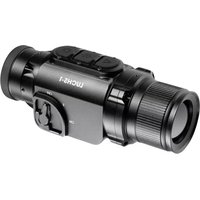
Keiler13 Pro - Binoculars LIEMKE - Free user manual and instructions
Find the device manual for free Keiler13 Pro LIEMKE in PDF.



User questions about Keiler13 Pro LIEMKE
0 question about this device. Answer the ones you know or ask your own.
Ask a new question about this device
Download the instructions for your Binoculars in PDF format for free! Find your manual Keiler13 Pro - LIEMKE and take your electronic device back in hand. On this page are published all the documents necessary for the use of your device. Keiler13 Pro by LIEMKE.
USER MANUAL Keiler13 Pro LIEMKE
Based on our commitment to always offer you thermal imaging optics with leading performance and quality, you will find state-of-the-art products with outstanding performance parameters in our new range of products.
With our service promise to return your optic within ten working days if you send it in, as well as a warranty on our products of up to three years, we thank you for your trust and wish you a good hunting season!
Your LIEMKE team!
CONTENT
- SPECIFICATIONS 12
02.PACKAGE CONTENTS 12 - COMPONENTS AND CONTROLS 12
04.SAFETY 13 - OPERATION 13
06.SWITCH ON 14
07.SWITCH OFF 14
08.STANDBY MODE 14 - DIOPTER ADJUSTMENT 14
10.SWITCHING THE IMAGE MODE 14
11.DIGITAL ZOOM 14
12.SCREEN BRIGHTNESS 15
13.SENSOR CALIBRATION MODE 15
14.VIDEO OUT 15
15.CHARGING THE BATTERY 15 - LED LIGHT 16
- TECHNICAL INSPECTION 16
18.MAINTENANCE 16
19.TROUBLESHOOTING... 17
01. SPECIFICATIONS*
| MODELL | Keiler-13 Pro Ceramic | Keiler-18 Pro Ceramic |
| Detector Resolution 240x180 px 384x288 px | ||
| Pixel Size 17 μm | ||
| NETD ≤50 mk | ||
| Frame Rate 50 Hz | ||
| Objective Lense 13 mm 19 mm | ||
| Field of View | 17,8°×13,4° | 19,5°×14,7° |
| Display 720×540 | ||
| Digital Zoom | 2x | 2x, 4x |
| Max. Battery Life** | 15 h | |
| Weight | <320 g | |
| Dimensions | 160×62×62 mm | |
| Detection Range, m (Ziel: 1,7mx0,5m, P (n) = 99%) | 476 | 696 |
- Technical parameters of the device may be improved without prior notice.
** Actual operation time depends on the temperature of the battery and the intensity of use of the WiFi function and the built-in video recorder.
02. PACKAGE CONTENTS
1x KEILER-13/-18 Pro Ceramic
1x Video cable
1x Power adapter
1x Pouch
1x Micro-USB cable
1x Manual
1x Operating manual
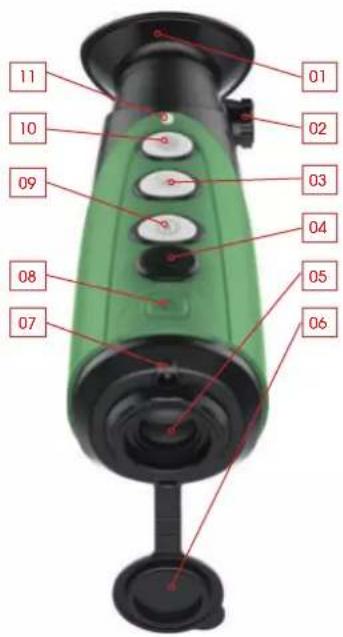
03. COMPONENTS AND CONTROLS
- Eyeshade
- Eyepiece Adjustment
- Zoom
- Mini-USB-Port
- Lens
- Lens Cap
- LED Light
- Power
- Image Mode
- Brightness
- Indicator Light
04. SAFETY
The rated charging voltage of this product is 5V.
Please charge in time when power is low, so as to avoid service life loss caused by battery over-discharge.
The thermal imager is not recommended to be used in high temperature environment for a long time, if the temperature is too high, the imager will enter the high-temperature protection state, and automatically shut down.
The recommended temperature for use -10^ to +50^ .
Make sure that the USB port cover on the bottom of the thermal imager is tightly closed when using in damp environments, e.g. rainy days.
Under any circumstances (whether on or off), do not expose the lens of the thermal Imager directly to high-intensity radiation sources (such as the sun, laser, etc.), to avoid irreversible damage to the device.
When the device is not used for a long time, it should be charged at least every 2 months during storage and stored in a dry and ventilated environment.
The device should not be charged in an environment above 40^ .
Disposal of waste electrical equipment and batteries
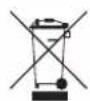
Do not dispose of waste electrical equipment and batteries in the household waste. Please hand them in to your local recycling centre. Batteries should be fully discharged when disposed of.
CE marking

The devices are in conformity with the EU directives:
EMC Directive 2014/35/EU
RoHS Directive 2011/65/EU
05. OPERATION

ATTENTION!
The lens of the device must not be pointed at any sources of intense energy, such as laser-emitting devices or the sun. This may damage the electronic components in the device. Damage caused by failure to comply with the operating guidelines is not covered under warranty.
06. SWITCH ON
Turn on the device by pressing the Power button or 3 seconds. The start-up screen appears, the Infrared Image comes on after several seconds. The green LED indicator lights up continuously.
07. SWITCH OFF
Switch off the device by long pressing the Power button for 3 seconds.
08. STANDBY MODE
To increase the battery life, the device can be put into standby mode.
When the device is on, short press the Power button to enter the standby mode.
The green indicator light will flash every 3 seconds.
Short press the Power button again to wake up the device from the standby mode.
Waking up the device is instant, there is no waiting time compared to switching on the device after it has been switched off completely.
09. DIOPTER ADJUSTMENT
The diopter adjustment adjusts the eyepiece of the device to the individual user's eyesight.
Close the lens cover and turn the eyepiece/diopter adjustment clockwise or counterclockwise until the symbols on the display appear clearest for your personal eyesight.
10. SWITCHING THE IMAGE MODE
Short press the Image Mode button to switch the image mode from white hot, black hot, red hot, false color and target highlight mode.

01. 02. 03. 04. 05.
- White Hot - ideal for accurate identification
- Black Hot - ideal for quick spotting
- Red Hot - for fast detection of heat sources
- False Color - for detection at close range, for example thermal bridges
- Target Highlight - reduces the overall brightness and thus glare
11. DIGITAL ZOOM
Short press the Zoom button for Image zooming from 1 × to 2 × , 4 × (Keiler-18 Pro Ceramic) or from 1 × to 2 × (Keiler-13 Pro Ceramic) and back to 1 × .
12. SCREEN BRIGHTNESS
Short press the Brightness button to adjust the screen brightness from level 1 to level 6 and back to level 1.
13. SENSOR CALIBRATION MODE
Simultaneously long press the Image Mode, Zoom and Brightness buttons to switch between manual and automatic calibration modes.
The selected mode is indicated by an M or A symbol in the bottom right corner of the screen.
During use, the image will deteriorate gradually because of changing background temperature of the sensor. This needs to be equalized by periodically calibrating the sensor.
In A mode, calibration is done automatically via an internal shutter that makes a faint clicking noise. The calibration can also be done manually by pressing the zoom and brightness buttons simultaneously during viewing if a deterioration in image quality is detected during use.
In M mode, no automatic calibration is done. Pressing the Zoom and Brightness buttons simultaneously during viewing performs a manual shutterless calibration. During this shutterless calibration, the lens cover needs to be closed. Otherwise, an Image of the scene viewed during calibration will be imparted on the sensor. This can be corrected by a proper calibration.
14. VIDEO OUT
Turn on the analog video recording function by long-pressing the Zoom button.
The video output icon will appear in the lower-right corner of the image. The analog video can be output to an external monitor via the USB interface.
15. CHARGING THE BATTERY
The device is equipped with an Internal rechargeable battery that can be charged via the Mini-USB port on the top of the housing. The battery indicator in the lower left corner of the screen shows the charging level of the battery.
Please recharge the battery no later than when a low battery charge (red battery symbol) is displayed.
You can charge the battery with the supplied AC adapter or a portable power supply such as a USB power bank. A Powerbank with 4000 mAh capacity can double the runtime. The LED Indicator lights up red when charging and changes to green when the battery is fully charged. The device can be charged during use, charging is faster than discharge during use.
16. LED LIGHT
When the device is switched off, you can press the Picture Mode button to activate the LED light above the lens.
As soon as you release the button, the lamp turns off.
17. TECHNICAL INSPECTION
A technical inspection of the device is recommended before use.
Check the external appearance of the device. There should be no cracks in the casing.
Check the condition of the lens and eyepiece; There should be no cracks, greasy spots, dirt or other deposits.
Check the condition of the rechargeable battery: This should be charged.
Check the electrical contracts: There should be no presence of salts or oxidation.
18. MAINTENANCE
Maintenance should be carried out at least twice a year and consist of the following actions.
Wipe the external surfaces of metal and plastic parts free of dust and dirt with a cotton cloth. Silicone grease may be used for this.
Clean the electrical contacts of the unit using a non-greasy organic solvent.
Check the glass surfaces of the eyepiece and the lens. If necessary, remove dust and sand from the lenses (preferably using a non-contact method). Cleaning of the external surfaces of the optics should be done with substances designed specially for this purpose.
19. TROUBLESHOOTING
This table lists all the problems that may arise when operating the device. Carry out the recommended checks and repairs in the order shown in the table. If a defect should occur that is not listed in the table, or if it is impossible to repair the defect yourself, the device should be returned for repair.
| Malfunction Possible reason Correction | ||
| Thermal imager does not power up. | Battery completely discharged | Charge the battery |
| Does not operate from external power source. | USB cable damaged | Replace USB cable |
| External power source discharged | Charge external power source (If necessary). | |
| Image is unclear, with vertical lines and uneven background | Calibration required Perform image calibration according to Section 13 „Sensor Calibration Mode" of the Manual. | |
| The image is too dark. | Low brightness level set. Adjust display brightness. | |
| Colored lines appear on display or the image has disappeared. | The device was exposed to static electricity during operation. | After exposure to static electricity, the device may either reboot automatically or require turning off and on again. |
| Poor Image quality / reduced detection distance | These problems may occur during observation in difficult weather conditions (high humidity, snow, rain, fog, etc.). | |
| When used in lowtemperature conditions, the image quality of the surroundings is worse than in positive temperature conditions. | In positive temperature conditions, objects being observed (surroundings and background) heat up differently because of thermal conductivity, thereby generating a high-temperature contrast. Accordingly, the image quality produced by the device will be higher. In low-temperature conditions, objects being observed (background) do, as a rule, cool down to roughly the same temperature because of which temperature contrast is substantially reduced and the image quality (detail) is poorer. This is a feature of thermal imaging devices. | |
TERMOGRAFÍA
Estimados clients,
10. PASSAGE AU MODE IMAGE
RoHS Directive 2011/65/EU
05. OPERAZIONI

ATTENZIONE!
Changes in construction or design are reserved. No guarantee for possible errors
Please note the legal terms of purchase and use for
thermal imaging optics in your country or federal state.
Changes in design, technical implementation, scope of delivery and prices reserved.
LIEMKE · KEILER-13/-18 PRO CERAMIC - Manual de instruetiones Ultimamerican: 08/2021
Contact technical service
Contactez le service technique