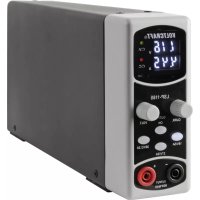
LSP1165 - Power supply VOLTCRAFT - Free user manual and instructions
Find the device manual for free LSP1165 VOLTCRAFT in PDF.



| Product type | Laboratory power supply with electronic stabilization |
| Brand | Voltcraft |
| Model | LSP1165 |
| Category | Power supply |
| Dimensions (W x H x D) | 55 x 134 x 300 mm |
| Weight | Approx. 1.40 kg |
| Mains power supply | 100-240 V AC, 50/60 Hz, max. current consumption 1.1 A, protection class I |
| Voltage/current ranges | 0-16 V/5 A, 0-27 V/3 A, 0-36 V/2.2 A (selectable via keys) |
| Display resolution | Voltage: 0.1 V; Current: 0.01 A |
| Accuracy | Voltage: ± (1% + 2 digits); Current: ± (1% + 2 digits) |
| Load stability (100%) | Voltage < 20 mV; Current < 10 mA |
| Load stability (10%) | Voltage < 4 mV; Current < 10 mA |
| Residual ripple | < 30 mVpp |
| Efficiency | > 80% |
| Maximum power | 80 W |
| Fuse | 5 x 20 mm, 250 V, 2 A, time-lag |
| Ambient conditions | Temperature 0 to +40 °C, relative humidity max. 80% (non-condensing) |
| Supplied accessories | Power cord, instruction manual |
| Main functions | Voltage/current adjustment via rotary knobs, output activation/deactivation (OUTPUT ON key), range selection (16V/5A, 27V/3A, 36V/2.2A), CV/CC LED, 4 mm safety sockets |
| Maintenance and cleaning | Cleaning with a dry cloth; replacing the fuse with an identical model |
| Safety | Protection class I, do not use as a charger, do not expose to moisture, disconnect before cleaning |
Frequently Asked Questions - LSP1165 VOLTCRAFT
User questions about LSP1165 VOLTCRAFT
0 question about this device. Answer the ones you know or ask your own.
Ask a new question about this device
Download the instructions for your Power supply in PDF format for free! Find your manual LSP1165 - VOLTCRAFT and take your electronic device back in hand. On this page are published all the documents necessary for the use of your device. LSP1165 by VOLTCRAFT.
USER MANUAL LSP1165 VOLTCRAFT
www.business.conrad.at
Taste ,36V/2.2A" (10)
- Introduction 17
- Explanation of symbols 18
- Intended use 18
- Scope of delivery 18
- Safety information 19
a) General information 19
b) Mains voltage/mains cable 20
c) Location for installation 20
d) Operation 21
- Connections and control elements 23
- Commissioning and operation 24
a) Connection and operation 24
b) Selection of the voltage/current range. 24
c) Setting the output voltage and current limitation 25
d) Activate/deactivate output 25
e) LEDs "C.V." and "C.C." 25
f) Connecting consumers 26
- Cleaning and maintenance 27
a) Cleaning 27
b) Fuse replacement. 27
- Functional problems 28
- Disposal 28
- Technical data 29
1. INTRODUCTION
Dear Customer,
Thank you for making the excellent decision to purchase a Voltcraft® product.
Voltcraft® - This name stands for above-average quality products in the areas of measuring, charging and grid technology, characterised by technical competence, extraordinary performance and permanent innovation.
Whether you are an ambitious hobby electronics or a professional user - a product of the Voltcraft® brand family will provide you with the best solution for even the most sophisticated of tasks. Special features: We offer the sophisticated technology and reliable quality of our Voltcraft® products at a near-unbeatable price/performance ratio. We lay the groundwork for long, good and successful cooperation.
Enjoy your new Voltcraft® product!
All company names and product names are trademarks of their respective owners. All rights reserved.
If there are any technical questions, please contact:
International: www.conrad.com/contact
United Kingdom: www.conrad-electronic.co.uk/contact
2. EXPLANATION OF SYMBOLS
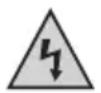
This symbol is used when your health is at risk, e.g. from an electric shock.

The exclamation mark in a triangle indicates important notes in these operating instructions that must be observed strictly.

The "arrow" symbol indicates that special advice and notes on operation are provided.

The product is intended for use in dry indoor rooms only; it must not become damp or wet.

Observe the operating instructions!
3. INTENDED USE
The lab mains unit with electronic stabilisation serves as a potential-free voltage source to operate low-voltage consumers.
The output voltage and the output current can be set via a rotary encoder each (for setting area, see chapter "Technical data"). A display shows the output voltage and the output current. The direct voltage output of the lab mains unit is available at two 4 mm sockets on the front.
The lab mains unit is set up in protection class I and must only be connected and operated at a protective contact mains socket of the public mains.
The power intake of the consumer must not exceed the rated current of the mains unit (see chapter "Technical data").
The safety notes and all other information in these operating instructions always have to be observed. Read the operating instructions precisely and keep them. Only pass the product on to any third parties together with the operating instructions.
This product complies with the statutory national and European requirements.
4. SCOPE OF DELIVERY
Lab mains unit
- Mains cable
- Operating instructions
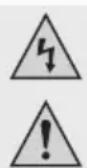
Please read the operating instructions completely before taking the device into operation. They contain important information for correct operation. The guarantee/warranty will expire if damage is incurred resulting from non-compliance with the operating instructions! We do not assume any liability for consequential damage!
We do not assume any liability for damage to property or personal injury caused by improper use or the failure to observe the safety instructions! In such cases the warranty/guarantee is voided.
Dear Customer,
this safety information serves not only to protect the product, but also your own safety and the safety of other persons. Therefore, read this chapter very carefully before taking the product into operation!
This lab mains unit left the manufacturer's factory in a safe and perfect condition. The user must observe the safety instructions and warnings contained in these operating instructions to preserve this condition and to ensure safe operation.
a) General information
- The unauthorized conversion and/or modification of the product is inadmissible for safety and approval reasons (CE). Never dismantle the product.
- The product is not a toy and must be kept out of reach of children. The product must only be set up, used or stored in places that are not accessible to children. Pay particular attention when children are present! Children could change settings, which may cause fire or explosion (depending on what kind of consumer is connected to the lab mains unit). Danger to life!
- Maintenance, adjustments and repair work may only be carried out by a specialist/specialised workshop. The device contains no parts that require servicing or adjusting by you.
In schools, training centres, hobby and self-help workshops, the use of the product must be supervised by responsible trained personnel. - In commercial institutions, the accident prevention regulations of the Employer's Liability Insurance Associations for Electrical Systems and Operating Materials are to be observed.
- Do not leave packaging material lying around carelessly. It might become a dangerous toy for children!
- Handle the product with care. It can be damaged by impact, blows or when dropped even from a low height.
- If you are not sure about the correct operation or if questions arise which are not covered by the operating instructions, please do not hesitate to contact us or another specialist.
b) Mains voltage/mains cable
lab mains unit corresponds to protection class I. It is only approved for connection to a protective contact mains socket of the public mains. Ensure that the protective contact connection is not defective/ interrupted. It would pose fatal danger from electric shock in case of malfunction.
- The socket to which the mains cable for the lab mains unit is connected must be easily accessible.
If this is not possible, a device for separation from the mains on all poles must be provided (e.g. an emergency off switch or fault current protection switch).
- Do not pull the mains plug from the mains socket by pulling the cable.
- If the lab mains unit or mains cable are damaged, do not touch them. There is danger of death from electric shock!
First switch off the mains voltage for the mains socket to which the mains cable is connected (switch off the corresponding circuit breaker or take out the fuse, then switch off the fault interrupter protection switch (FI circuit breaker) so that the mains socket is separated from the mains voltage on all poles).
Only then unplug the mains unit from the mains socket.
Dispose of the damaged mains cable in an environmentally friendly way. Do not use it anymore.
Replace it with a new mains cable of the same specifications.
If you find any damage to the lab mains unit, stop operating it and take it to a specialist workshop or dispose of it in an environmentally friendly manner.
c) Location for installation
- The product must only be set up and operated in dry indoor rooms. The product must not become damp or wet. There is danger of a fatal electric shock!
The lab mains unit also must not be exposed to extreme temperatures, direct sunlight, vibration or mechanical stress. - Choose a solid, flat, clean and sufficiently large surface for the lab mains unit.
Never place the lab mains unit on a flammable surface (e.g. carpet, tablecloth). Always use a suitable, non-flammable, heatproof surface.
Never cover the lab mains unit. Keep the lab mains unit away from flammable or easily inflammable materials (e.g. curtains). - Ensure that the mains cable and the cables to the connected consumer are not crushed or damaged by sharp edges. Place all cables where no one can trip over them.
- Do not place any containers filled with liquid, e.g. vases or plants, on or next to the product. If these liquids get into the lab mains unit, the lab mains unit will be destroyed and there is great danger of fire or electric shock.
First switch off the mains voltage for the mains socket to which the lab mains unit is connected in this case (switch off the corresponding circuit breaker or turn out the fuse, then switch off the fault interrupter protection switch (FI circuit breaker) so that the mains socket is separated from the mains voltage on all poles). Only then unplug the mains unit from the mains socket.
Do not use the lab mains unit anymore, but take it to a specialised workshop or dispose of it in an environmentally friendly manner.
- Do not place the lab mains unit on any valuable furniture surfaces without using a suitable protection.
d) Operation
- Operation in environments with a high amount of dust, flammable gases, vapours or solvents is not permitted. There is a danger of fire and explosion!
- Before taking the lab mains unit into operation and during operation, ensure that your hands, shoes, clothes, the floor and the product itself are dry.
- Ensure that there is sufficient ventilation during operation. Never cover up the lab mains unit.
- Never leave the product unattended while operating. Despite a considerable number of protective circuits, it is impossible to exclude the possibility of malfunctions during operation.
- Do not wear any metal or conductive materials, such as jewellery (necklaces, bracelets, rings, etc.) while you are working with the lab mains unit and a connected consumer. Short-circuit poses a danger of burns and explosion, as well as danger of injury.
- If several lab mains units are switched in series, a voltage dangerous to the touch may result. In this case, there is a danger to life from electric shock!
- Only operate the product in a moderate climate, never in a tropical climate. For more information on acceptable environmental conditions, see the chapter "Technical data".
- Never operate the device immediately after it was taken from a cold room to a warm room. The resulting condensation may lead to malfunctions or damage! There also is a risk of potentially fatal electric shock!
Let the product reach room temperature before taking it into operation again. This may take several hours!
- Avoid operation in direct proximity of strong magnetic or electromagnetic fields, transmitter aerials or HF generators. This can affect the control electronics.
- Disconnect the lab mains unit's mains plug from the mains socket during thunderstorms to prevent damage from overvoltage.
- Ensure that the insulation of the lab mains unit, the safety sockets, connected cables and mains cable are not damaged or destroyed.
- Avoid the use of non-insulated metallic cables between the lab mains unit and the consumer! Use only connection cables of sufficient size with intact insulation.

- Do not use the lab mains unit as a charger.

lab mains unit is not designed for application to humans and animals.
be assumed that safe operation is no longer possible, the device must be turned off and precautions are to be taken to ensure that it is not used unintentionally.
Switch off the lab mains unit and disconnect it from the mains voltage (pull the mains plug from the mains socket). Do not use the product anymore after this, but take it to a specialized workshop or dispose of it in an environmentally compatible manner.
It can be assumed that operation without danger is no longer possible if the lab mains unit has any visible damage, the device no longer works, after extended storage under unsuitable conditions or after difficult transport conditions.
- If the lab mains unit is not to be used for an extended period of time (e.g. storage), disconnect it from the operating voltage, pull the mains plug of the mains cable from the mains socket.
Keep the entire product at a dry, clean site that is not accessible by children.
6. CONNECTIONS AND CONTROL ELEMENTS
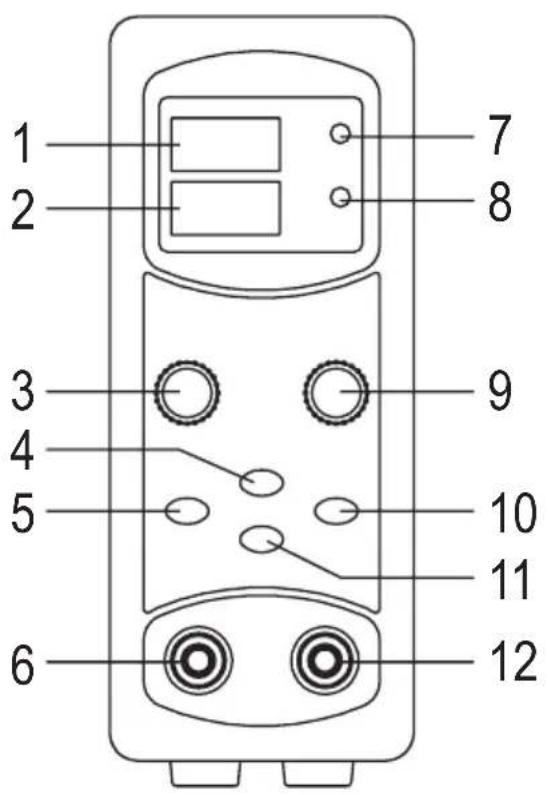
1 Output voltage
2 Output current
3 Dial switch "CURR." for the current limitation (output current)
4 "OUTPUT ON" button
5 "16V/5A" button
6 DC-output socket “-” (negative pole)
7 LED "C.V."
8 LED "C.C."
9 Dial switch "VOLT." for the output voltage
10 "36V/2.2A" button
11 "27V/3A" button
12 DC output socket "+" (positive pole)
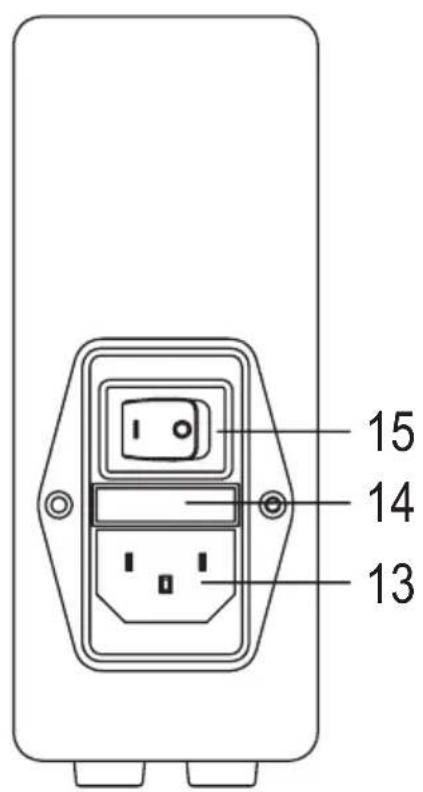
13 Mains socket to connect the enclosed mains cable
14 Fuse holder
15 On/off switch
a) Connection and operation
- Place the lab mains unit on a firm and level surface.
- First switch off the lab mains unit (put the on/off switch (15) in the "O" position).
- If a consumer is connected to the DC output sockets (6, 12), disconnect it.
- Connect the mains socket (13) to a mains outlet with a protective ground via the included mains cable.
- First switch on the lab mains unit (put the on/off switch (15) in the "I" position).
- The display now shows the currently set output voltage and the value for current limitation.

At the DC output sockets (6, 12), the output voltage will only be available when you briefly push the button "OUTPUT ON" so that the button lights up red.
b) Selection of the voltage/current range
The lab mains unit has three voltage/current ranges that you can choose via three buttons:
"16V/5A" button (5)
The lab mains unit delivers an output voltage of 0 - 16 V/DC and a current of 0 - 5 A (max.).
"27V/3A" button (11)
The lab mains unit delivers an output voltage of 0 - 27 V/DC and a current of 0 - 3 A (max.).
"36V/2.2A" button (10)
The lab mains unit delivers an output voltage of 0 - 36 V/DC and a current of 0 - 2.2 A (max.).

Observe:
After pushing the respective button, it lights up. The display shows the currently set output voltage and the value for current limitation.
The last value set remains saved after the lab mains unit is switched off.
The setting of the respective output voltage and the current limitation is described in the next section.
If the DC output is activated (red LED in the button "OUTPUT ON" (4) is lit) and you push one of the three buttons, the DC output is deactivated for reasons of safety (red LED goes out).
c) Setting the output voltage and current limitation
- To set the output voltage and the current limitation, keep one of the buttons "16V/5A" (5), "27V/3A" (11) or "36V/2.2A" (10) pushed (approx. 3 seconds) until the values for the output voltage and the current limit flash.

Observe:
If the DC output is activated (red LED in the button "OUTPUT ON" (4) is lit) and you push one of the three buttons, the DC output is deactivated for reasons of safety (red LED goes out).
- Change the output voltage by turning the dial encoder "VOLT." (9) to the left or right.
If the dial switch is turned slowly, the voltage value changes in small steps. When turning fast, the adjustment is made in large steps. - Change the value for current limitation by turning the dial encoder "CURR." (3) to the left or right.
If the dial switch is turned slowly, the current value changes in small steps. When turning fast, the adjustment is made in large steps. - Save the setting by pushing the lit button "16V/5A" (5), "27V/3A" (11) or "36V/2.2A" (10) briefly. The display then stops flashing and the setting mode is completed.
If a button that is not lit is pushed (for another voltage/current range, see chapter 7. b), its setting can be changed as well without leaving the setting mode.
d) Activate/deactivate output

Before activating the DC output, always check if the operating voltage of the consumer connected to the lab mains unit matches the output voltage of the lab mains unit. Otherwise, the consumer will be damaged; there also is a danger of fire and explosion (depending on the consumer)!
As a special feature of the lab mains unit, the DC output can be activated/deactivated by pushing the button "OUTPUT ON" (4).
A red LED in the button displays the condition of the output:
- LED is lit: The output is activated and delivers voltage/current
- LED is not lit: The output is deactivated
This way, it is not necessary to disconnect the consumer from the lab mains unit if you want to make changes, e.g., to the consumer circuit, or similar.
e) LEDs "C.V." and "C.C."
The two LEDs show whether the output currently provides a constant voltage or a constant current.
LED "C.V.": Output delivers constant voltage ("C.V." = "Constant Voltage").
LED "C.C.": Output delivers constant current ("C.C." = "Constant Current").
If the LED "C.C." is lit, the set current limitation of the lab mains unit is active.
f) Connecting consumers

First ensure that the total power of all consumers connected to the lab mains unit together does not exceed the maximum output of the lab mains unit.
The consumers should always be switched off when they are connected to the lab mains unit. Otherwise, sparks may result that will damage the output sockets of the lab mains unit as well as the plugs used by you.
- If this has not been done yet, connect the lab mains unit and switch it on (see chapter 7. a).
- Provide the required operating voltage for the respective consumers; see chapters 7. b) and 7. c). The same applies to the current limitation.

If no current limitation is to be used, set the current value to maximum.
- Deactivate the DC output; push the button "OUTPUT ON" (4), so that the red LED in the button is not lit.
- Connect the negative connection (-) of the consumer to the DC output socket “-” (6) of the lab mains unit.
Then connect the positive connection (+) of the consumer to the DC output socket ^ 喜 + ^ 喜 (12) of the lab mains unit.

Use sufficiently sized cables (depending on the output current).
The lab mains unit has 4 mm safety sockets, so that corresponding 4 mm-banana plugs are required.
- Check again that the output voltage shown in the display of the lab mains unit corresponds to the operating voltage of the consumers.
Then push the button "OUTPUT ON" (4) to activate the DC output; the red LED in the button lights up.
The current values for current and voltage appear in the display.
Depending on the operating condition of the lab mains unit (voltage or current controlled), the LED "C.V." (7) for the voltage control or the LED "C.C." (8) for the current limit lights up.
On demand, you can also adjust the value for the current limitation or the value for the current control with the output sockets released.
- To deactivate the DC output; push the button "OUTPUT ON" (4), so that the LED in the button goes out.
8. CLEANING AND MAINTENANCE

The lab mains unit is maintenance-free for you apart from occasional cleaning and fuse change; never disassemble it.
Opening of the lab mains unit, maintenance and repairs must only be done by a specialist.
a) Cleaning
Always switch off the lab mains unit before cleaning and disconnect it from the mains voltage (pull the mains plug).
Clean the product only with a dry, soft, clean cloth. Dust can be removed easily with a dry, clean brush and a vacuum cleaner.
Do not use any aggressive cleaning agents for cleaning, or even chemicals; this may cause not only discolouration but also damage to the product.
b) Fuse replacement
The fuse can trip at overload or if the lab mains unit is defective.
Proceed as follows for to replace the fuse:

Attention!
off the lab mains unit first. Pull the mains cable from the lab mains unit; also disconnect the connected consumers from the lab mains unit.
Use a flat screwdriver to pull out the fuse holder (the slot at the fuse holder is within the mains socket).
Replace the defective fuse with a new fuse of the same build (same type, same rated current, and same trigger characteristics); see chapter "Technical data".
Plug the fuse holder back into the fitting until it latches.
Then check for correct function of the lab mains unit.

If the fuse trips again (even if there is no overload or no consumer is connected), switch off the lab mains unit and disconnect it from the mains voltage. Then have the lab mains unit inspected by a specialist.
9. FUNCTIONAL PROBLEMS
The lab mains unit does not work, the displays are not lit:
- Check the on/off switch (switch position "l" = on).
- Check that the mains cable is firmly connected to the lab mains unit and whether it is plugged into a proper mains socket with protective contact (wall outlet).
- Check the functionality of the mains socket (e.g. fuse, circuit breaker, fault interrupter protection switch).
The connected consumers do not work:
- Check polarity at the DC output sockets (6, 12).
- Check that the current limitation is activated; if required, set a higher value for current limitation (or set the maximum value).
- Observe that the lab mains unit has three different voltage/current ranges that can be selected via the three buttons "16V/5A" (5), "27V/3A" (11) or "36V/2.2A" (10); see chapter 7. b).
When the consumer needs, for instance, an operating voltage of 30V / DC , select the corresponding range with the button "36V/2.2A". Only an output current up to 2.2 A is available here, however.
- Reduce the load of the lab mains unit.
- Check the technical data of the consumers (operating voltage, current consumption, voltage type).
10. DISPOSAL
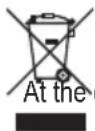
Electronic devices are recyclable and should not be disposed of in household waste.
End of its service life, dispose of the product according to the relevant statutory regulations.
11. TECHNICAL DATA
Operating voltage 100 - 240 V/AC, 50/60 Hz
Current consumption .Max. 1.1 A
Protection class
DC-output 1
Connection sockets for DC-output .4 mm round sockets
Adjustable output voltage Area 1:0-16 V/DC
Area 2:0-27 V/DC
Area 3:0-36 V/DC
Adjustable output current Area 1:0-5A
Area 2:0-3A
Area 3:0-2.2 A
Resolution .Voltage:0.1V
Current: 0.01 A
Accuracy .Voltage: ± (1% +2 digits)
Current: ±(1% +2 digits)
Stability at 100% load change .Voltage: < 20mV
Current: < 10mA
Stability at 10% load change .Voltage: < 4mV
Current: < 10 ~mA
Residual ripple at nominal load .Voltage: < 30mVpp
Efficiency. >80%
Output power max. 80 W
Fuse type. Microfuse 5× 20mm ( × L) 250 V, 2 A, slow-acting tripping characteristics
Ambient conditions.Temperature 0^ to +40^ ,humidity max. 80% relative, non-condensing
Dimensions (W× H× D) . 55× 134× 300mm
Weight approx. 1.40 kg
TABLE DES MATIÈRES
Page
Chere cliente, cher client,
Vouavesprisunrtesbondecisionenachetantunproduit Voltcraft etnousyouenremercions.
France (email): technique@conrad-france.fr
Chere cliente, cher client,
Toets,36V/2.2A" (10)
LED "C.V.": Uitgang levert constante spanning ("C.V." = "Constant Voltage" = constante spanning).
LED "C.C.": Uitgang levert constante stroom ("C.C." = "Constant Current" = constante stroom).
Copyright 2015 by Conrad Electronic SE.

Legal Notice
This is a publication by Conrad Electronic SE, Klaus-Conrad-Str. 1, D-92240 Hirschau (www.conrad.com).
All rights including translation reserved. Reproduction by any method, e.g. photocopy, microfilming, or the capture in electronic data processing systems require the prior written approval by the editor. Reprinting, also in part, is prohibited. This publication represent the technical status at the time of printing.
Copyright 2015 by Conrad Electronic SE.

Information legales
Copyright 2015 by Conrad Electronic SE.

Colofon
Copyright 2015 by Conrad Electronic SE. V3_0915_02/VTP
