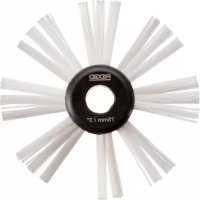
FlexShaft K9204 - Drain cleaning machine RIDGID - Free user manual and instructions
Find the device manual for free FlexShaft K9204 RIDGID in PDF.

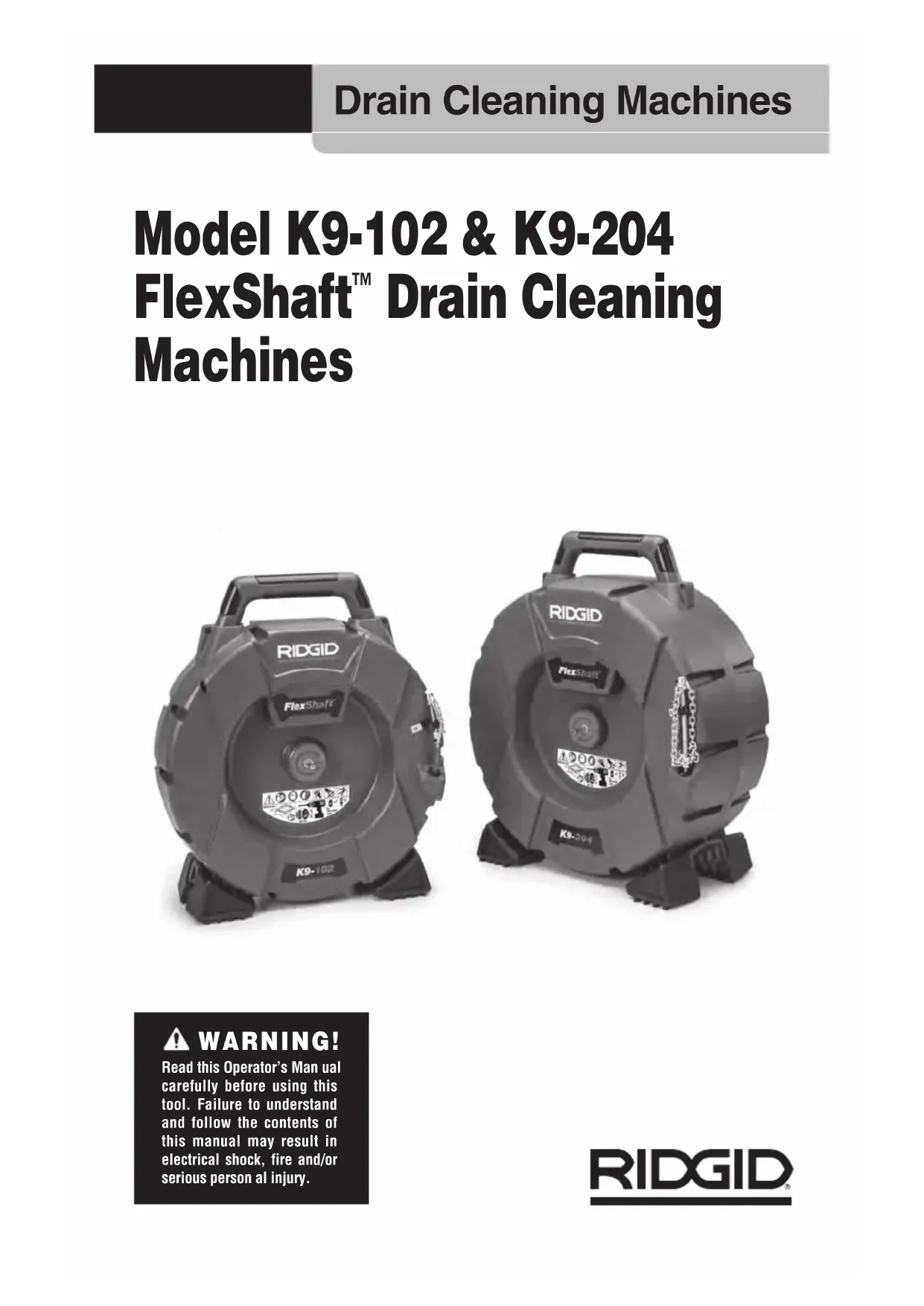


| Product Type | Drain cleaning machine (drain auger) |
| Model | FlexShaft K9204 (equivalent to models K9-102 and K9-204) |
| Brand | RIDGID |
| Nominal Pipe Diameter | 1 1/4" to 4" (32 to 100 mm) depending on model |
| Cable Diameter (without jacket) | 1/4" (6 mm) or 5/16" (8 mm) depending on version |
| Jacketed Cable Diameter | 3/8" (9.5 mm) or 1/2" (12.7 mm) depending on version |
| Jacketed Cable Length | 50' (15.2 m) or 70' (21.3 m) depending on version |
| Maximum Rotation Speed | 2500 rpm |
| Power Source | Requires a cordless drill (not included) – specifications: speed 1800-2500 rpm, chuck min 3/8", adjustable clutch, momentary trigger, no lock-on |
| Dimensions (L × W × H) | 536 mm × 274 mm × 615 mm (for K9-204 version) |
| Weight (without drill or chain) | 17.3 kg (for K9-204 version) |
| Operating Temperature | -6°C to 60°C (20°F to 140°F) |
| Main Functions | Cleaning and descaling of drainage pipes; compatible with camera inspection |
| Cleaning Chains | Several types: single, double, triple, with or without carbide teeth |
| Lubrication | Factory lubricated for life; use of RIDGID FlexShaft lubricant recommended to facilitate cable advancement |
| Maintenance and Cleaning | Clean with soapy water and mild disinfectant; wipe the jacketed cable during removal; drum draining possible |
| Safety | Mandatory wearing of safety glasses and gloves; do not use corded drills; keep one hand on the rotating cable; follow hygiene guidelines |
| Spare Parts and Repairability | Replaceable jacketed cable; interchangeable cleaning chains; repairs by a RIDGID authorized service center |
| Accessories | Cleaning chains, jacketed cables, lubricant, cut sleeves |
| Warranty | Lifetime Warranty (Full Lifetime Warranty) |
Frequently Asked Questions - FlexShaft K9204 RIDGID
User questions about FlexShaft K9204 RIDGID
0 question about this device. Answer the ones you know or ask your own.
Ask a new question about this device
Download the instructions for your Drain cleaning machine in PDF format for free! Find your manual FlexShaft K9204 - RIDGID and take your electronic device back in hand. On this page are published all the documents necessary for the use of your device. FlexShaft K9204 by RIDGID.
USER MANUAL FlexShaft K9204 RIDGID
Model K9-102 & K9-204 FlexShaft™ Drain Cleaning Machines


Table of Contents
Safety Symbols 2
General Safety Rules Work Area Safety 2
Electrical Safety 2
Personal Safety 2
Tool Use and Care 3
Service 3
Specific Safety Information 3
FlexShaft Drain Cleaning Machine Safety 3
RIDGID Contact Information 4
Description 4
Specifications 5
Specifications - Acceptable Battery Powered Drills 5
Standard Equipment 5
Pre-Operation Inspection 5
Machine and Work Area Set-up 6
Battery Powered Drill Set-up and Operation 7
Drill Switch 7
Drill Speed 8
Drill Adjustment Clutch Setting 8
Installing/Adjusting Chain Knocker 9
Operating Instructions 11
Draining the Drum 15
Transportation 15
Storage 15
Maintenance Instructions 15
Cleaning 15
Lubrication 15
Cable Assembly Replacement 15
Troubleshooting 15
Service And Repair. 16
Optional Equipment 16
Disposal 17
EC Declaration of Conformity. Inside Back Cover
Lifetime Warranty Back Cover
*Original Instructions - English
Model K9-102 & K9-204 FlexShaft™ Drain Cleaning Machines


WARNING!
Read this Operator's Manual carefully before using this tool. Failure to understand and follow the contents of this manual may result in electrical shock, fire and/or serious personal injury.
Safety Symbols
In this operator's manual and on the product, safety symbols and signal words are used to communicate important safety information. This section is provided to improve understanding of these signal words and symbols.

This is the safety alert symbol. It is used to alert you to potential personal injury hazards. Obey all safety messages that follow this symbol to avoid possible injury or death.

DANGER
DANGER indicates a hazardous situation which, if not avoided, will result in death or serious injury.

WARNING
WARNING indicates a hazardous situation which, if not avoided, could result in death or serious injury.

CAUTION
CAUTION indicates a hazardous situation which, if not avoided, could result in minor or moderate injury.
NOTICE
NOTICE indicates information that relates to the protection of property.

This symbol means read the operator's manual carefully before using the equipment. The operator's manual contains information on the safe and proper operation equipment.

This symbol means always wear safety glasses with side shields or goggles while using this equipment to reduce the risk of eye injury.

This symbol indicates the risk of hands, fingers or other body parts being caught, wrapped or crushed in the drain cleaning FlexShaft.

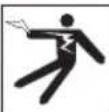
This symbol indicates the risk of the electrical shock.

This symbol indicates the risk of fingers or other body parts being caught, wrapped, crushed or struck by the chain knocker.
Do not operate tool with the cable end outside of the drain.

This symbol means always wear gloves when handling or using this equipment to reduce the risk of infections, bums or other's personal injury from the drain contents.
General Safety Rules
WARNING
Read and understand all warnings and instructions. Failure to follow all warnings and instructions may result in electric shock, fire, and/or serious injury.
SAVE THESE INSTRUCTIONS!
Work Area Safety
- Keep work area clean and well lit. Cluttered or dark areas invite accidents.
- Do not operate tools in explosive atmospheres, such as in the presence of flammable liquids, gases, or dust. Tools create sparks which may ignite the dust or fumes.
- Keep children and by-standers away while operating tools. Distractions can cause you to lose control.
- Keep floors dry and free of slippery materials such as oil. Slippery floors invite accidents.
Electrical Safety
- Avoid body contact with earthed or grounded surfaces such as pipes, radiators, ranges and refrigerators. There is an increased risk of electrical shock if your body is earthed or grounded.
- Do not expose power tools to rain or wet conditions. Water entering a power tool will increase the risk of electrical shock.
- If operating a power tool in a damp location is unavoidable, use a ground fault circuit interrupter (GFCI) protected supply. Use of a GFCI reduces the risk of electric shock.
Personal Safety
- Stay alert, watch what you are doing and use common sense when operating tools. Do not use tools while you are tired or under the influence of drugs, alcohol, or medication. A moment of inattention while operating tools may result in serious personal injury.
- Use personal protective equipment.
Always wear eye protection. Protective equipment such as dust mask, non-skid safety shoes, hard hat, or hearing protection used for appropriate conditions will reduce personal injuries.
- Do not overreach. Keep proper footing and balance at all times. Proper footing and balance enables better control of the tool in unexpected situations.
Tool Use and Care
- Do not force tool. Use the correct tool for your application. The correct tool will do the job better and safer at the rate for which it is designed.
- Store idle tools out of the reach of children and do not allow persons unfamiliar with the tool or these instructions to operate the tool. Tools can be dangerous in the hands of untrained users.
- Maintain tools. Check for misalignment or binding of moving parts, breakage of parts and any other condition that may affect the tool's operation. If damaged, have the tool repaired before use. Many accidents are caused by poorly maintained tools.
- Keep handles dry, clean and free from oil and grease. Allows for better control of the tool.
Service
- Have your tool serviced by a qualified repair person using only identical replacement parts. This will ensure that the safety of the tool is maintained.
Specific Safety Information
WARNING
This section contains important safety information that is specific to this tool.
Read these precautions carefully before using the FlexShaft™ Drain Cleaning Machine to reduce the risk of electrical shock or other serious injury.
SAVE ALL WARNINGS AND INSTRUCTIONS FOR FUTURE REFERENCE!
Keep this manual with machine for use by the operator.
FlexShaft Drain Cleaning Machine Safety
- Always use safety glasses and gloves in good condition while handling or using. Use latex or rubber gloves, face shields, protective clothing, respirators or other appropriate protective equipment when chemicals, bacteria or other toxic or infectious substances are suspected to be present to reduce the risk of infections, burns or other serious personal injury.
- Do not use with a corded drill. Operating with a corded drill increases the risk of electrical shock and other injuries.
- Do not allow the chain knocker/end of cable to stop turning while drill switch is depressed. This can over-stress the cable and may cause twisting, kinking or breaking of the cable assembly and may result in serious personal injury.
- Practice good hygiene. Do not eat or smoke while handling or operating the tool. After handling or operating drain cleaning equipment, use hot, soapy water to wash hands and other body parts exposed to drain contents. This will help reduce the risk of health hazards due to exposure to toxic or infectious material.
- Only use the FlexShaft Drain Cleaning Machine for the recommended drain sizes. Using the wrong size drain cleaner can lead to twisting, kinking or breaking of the cable and may result in personal injury.
- Keep hand on the cable assembly whenever the FlexShaft Machine is running. This provides better control of the cable and helps prevent twisting, kinking and breaking of the cable and reduces the risk of injury.
- Position machine cable outlet within 3^ (1 m) of the drain inlet or properly support exposed cable assembly when the distance exceeds 3^ (1 m). Greater distances can cause control problems leading to twisting, kinking or breaking of the cable. Twisting, kinking or breaking cable may cause striking or crushing injuries.
- One person must control both the cable assembly and cordless drill. Do not lock drill switch in the ON position during operation. If the cable stops rotating, the operator must be able to release the drill switch to prevent twisting, kinking
and breaking of the cable and reduce the risk of injury.
- Do not wear loose clothing or jewelry. Keep your hair and clothing away from moving parts. Loose clothing, jewelry or hair can be caught in moving parts.
- Do not operate this machine if operator or machine is standing in water. Operating machine while in water increases the risk of electrical shock.
- Do not use if there is the risk of contact with other utilities (such as natural gas or electric) during operation. Visual inspection of the drain with a camera is a good practice. Crossbores, improperly placed utilities and damaged drains could allow the cutter to contact and damage the utility. This could cause electrical shock, gas leaks, fire, explosion or other serious damage or injury.
- Read and understand these instructions, the battery drill instructions and the instructions for any other equipment used with this tool before operating. Failure to follow all instructions may result in property damage and/or serious injury.
RIDGID Contact Information
If you have any question concerning this RIDGID product:
- Contact your local RIDGID distributor.
- Visit RIDGID.com to find your local RIDGID contact point.
- Contact Ridge Tool Technical Service Department atrtctechservices@emerson.com, or in the U.S. and Canada call (800) 519-3456.
Description
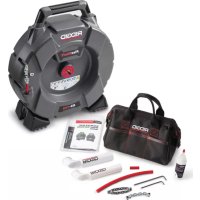
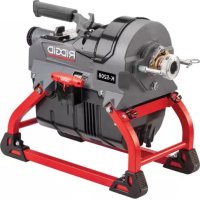
The RIDGID Model K9-102 and K9-204 FlexShaft™ Drain Cleaning Machines are designed to clean and descale pipes and drain lines as called out in the Specifications.
A user supplied battery powered drill is used to drive the FlexShaft Drain Cleaning Machines. The FlexShaft Drain Cleaning Machine cable assembly is manually fed in and out of the drain. A chain knocker that expands to the pipe inside diameter is used to break up the blockage and clean the walls of the pipe. Chain knockers with carbide cutting tips are available
for use on roots and cleaning the pipe wall of scale. Plain chain knockers are for general use, including grease. FlexShaft Drain Cleaners are well suited to use with inspection cameras during the drain cleaning process.
The FlexShaft Machines are lightweight and compact for ease of transport.
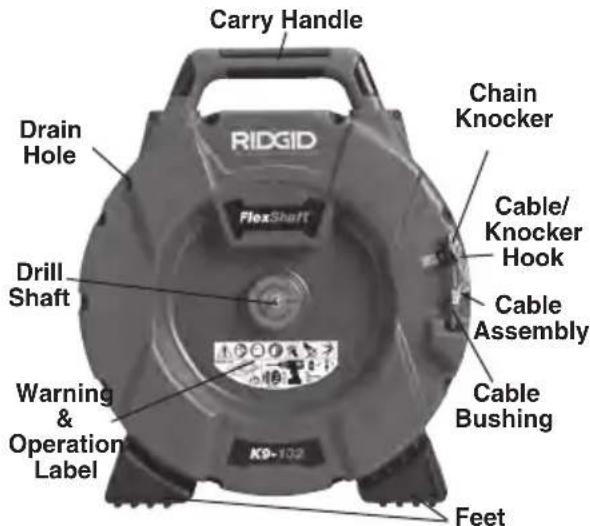
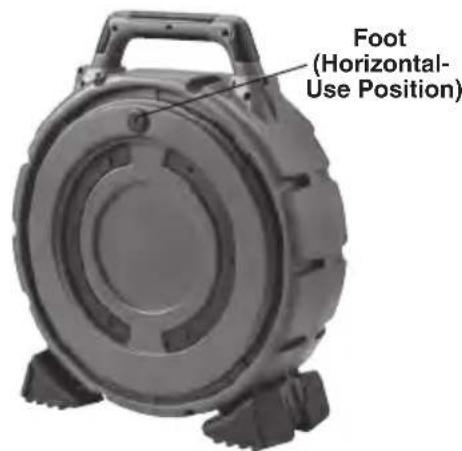
Figure 1A - RIDGID FlexShaft Drain Cleaning Machine
Figure 1B - RIDGID FlexShaft Drain Cleaning Machine

Figure 1C - Cable End/Chain Knocker
Specifications
| Model.............. | K9-102 | K9-204 |
| Drain Capacity (Nom.).......... | 1/4" to 2" (32 - 50 mm) | 2" to 4" (50 - 100 mm) |
| Cable Diameter (without Sheath).......... | /4" (6 mm) | 5/16" (8mm) |
| Cable Assy. Diameter (with Sheath).......... | /8" (9.5 mm) | 1/2" (12.7 mm) |
| Cable Assembly Length.......... | 50' (15.2 m) | 70' (21.3 m) |
| Rotational Speed.......... | Maximum 2500 RPM | Maximum 2500 RPM |
| Drill Attachment.......... | /16" Hex (8 mm) | 5/16" Hex (8 mm) |
| Weight (without Drill/Knocker).......... | 24.3 lbs. (11.0 kg) | 37.3 lbs. (16.9 kg) |
| Dimension (without Drill).......... | 19.2" x 7.5" x 22.1" | 21.1" x 10.8" x 24.2" |
| (488 mm x 191 mm x 562 mm) | (536 mm x 274 mm x 615 mm) | |
| Operating temperature.......... | 20°F to 140°F (-6°C to 60°C) | 20°F to 140°F (-6°C to 60°C) |
It is not recommended to clean glass, ceramic, porcelain or similar fixtures with the FlexShaft Drain Cleaners as it may damage the fixture.
Specifications - Acceptable Battery Powered Drills
Rotational Speed.... 1800 to 2500 RPM
Chuck Size 3/8" or greater
Clutch. With adjustable torque
Switch Type............MomentaryContact
Switch Lock Not equipped with
Drill must carry appropriate certification mark for the market (CE mark, c()us mark, etc.)
Do not use corded drills, hammer drills or impact drivers. Use of an inappropriate drill increases the risk of equipment damage and personal injury. See Battery Powered Drill Set-up and Operation section.
Standard Equipment
Refer to the RIDGID catalog for details on equipment supplied with specific drain cleaning machine catalog numbers.
NOTICE This machine is made to clean drains. If properly used it will not damage a drain that is in good condition and properly designed, constructed and maintained. If the drain is in poor condition, or has not been properly designed, constructed and maintained, the drain cleaning process may not be effective or could cause damage to the drain. The best way to determine the condition of a drain before cleaning is through visual inspection with a camera. Improper use of this drain cleaning machine can damage the drain cleaning machine and the drain. This machine may not clear all blockages.
Pre-Operation Inspection
WARNING

Before each use, inspect your Drain Cleaning Machine and correct any problems to reduce the risk of serious injury from electric shock, twisted or broken cables, chemical burns, infections and other causes and prevent Drain Cleaning Machine damage.
Always wear safety glasses, and other appropriate protective equipment when inspecting your Drain Cleaning Machine.
- Clean the machine, including handles and controls. This aids inspection and helps prevent the machine or control from slipping from your grip. Clean and maintain the machine per the maintenance instructions.
- Inspect the machine for:
- Pr op er assembly and completeness.
- Any broken, worn, missing, misaligned or binding parts.
Presence and readability of the warning label (see Figure 2).

Figure 2 - Warning Label
- Smooth and free movement of the cable assembly in and out of the machine.
- Any condition which may prevent safe and normal operation.
If any problems are found, do not use the drain cleaning machine until the problems have been repaired.
- Clean any debris from the cable assembly and chainknockers. Inspect sheath for wear and damage. There should not be any cuts, kinks, breaks or excessive wear. Inspect the cable near the chain knocker. Cable assemblies should not be bent or deformed. Cable strands should be tight to one another without separation. Inspect chain knocker for damaged or lost carbide cutting tips (if equipped) and wear of the chain itself. If chain links are worn more than 14 through or damaged, replace the chain knocker. Replace worn and damaged equipment before using drain cleaning machine.
Confirm that the chain knocker is properly set up and is secure on the cable.
- Inspect the battery powered drill per its instructions. Make sure that the drill is in good operating condition and the switch controls the drill operation. Confirm that the drill meets the requirements in the Specification section and is properly set for use with the machine.
- Inspect and maintain any other equipment being used per its instructions to make sure it is functioning properly.
Machine and Work Area Set-up

WARNING

Set up the Drain Cleaning Machine and work area according to these procedures to reduce the risk of injury from electric shock, fire, machine tipping, twisted or broken cables, chemical burns, infections and other causes, and prevent machine damage.
Always wear safety glasses and other appropriate protective equipment when setting up your Drain Cleaning Machine.
- Check for an appropriate work area. Operate in a clear level, stable, dry location. Do not use the Drain Cleaning Machine while standing in water.
- Inspect the drain to be cleaned. If possible, determine the access point(s) to the drain, the size(s), length(s), and material(s) of the drain, distance to mainlines, the nature of the blockage, presence of drain cleaning chemicals or other chemicals, etc.
If chemicals are pr esent in the drain, it is important to understand the specific safety measures required to work around those chemicals. Contact the chemical manufacturer for required information. Confirm no other utilities are present in the drain or area to reduce the risk of damage. Visual inspection of the drain with a camera is a good practice.
If needed, remove fixture (water closet, etc.) to allow access to drain. Do not run the chain knocker in a fixture. This could damage the FlexShaft Machine or the fixture.
Best drain cleaning results will occur if water is flowing during the drain cleaning process to wash away debris. For 1/4 and 1/2 sink drains, cut away wall pipes are available to allow this. See Figure 3 for installation. Place a container to catch any drain contents that may spill.
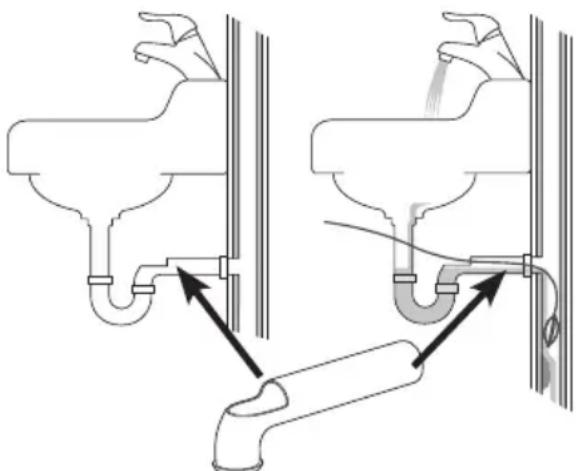
Figure 3 - Wall Pipe Installation
- Determine the correct equipment for the application. See Specifications. Drain Cleaning Machines for other applications can be found by consulting the Ridge Tool Catalog, online at RIDGID.com.
-
Make sure all equipment has been properly inspected.
-
If needed, place protective covers in the work area. The drain cleaning process can be messy.
- Place the Drain Cleaning Machine on the ground with the drill shaft vertical. Machine should sit squarely and firmly on the ground. Do not operate with the drill shaft horizontal. This will reduce the risk of tipping.
- Remove the battery from the drill. Properly set-up the drill. (See Battery Powered Drill Set-up and Operation section.) Securely attach the drill chuck to the hex of the drill shaft (Figure 4).
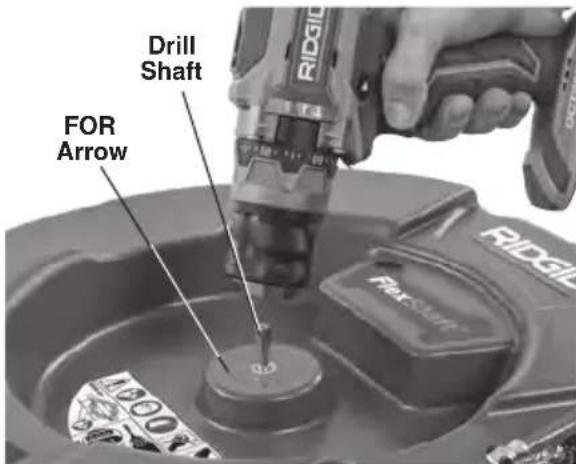
Figure 4 - Attaching Drill To Drill Shaft

Figure 5 - Example of Extending Drain Access to within 3^ of Machine Cable Outlet
- Position the Drain Cleaning Machine so that the cable outlet is within 3^ (1 m) of the drain access. Greater distances from the drain access increases the risk of the cable assembly twisting or kinking. If the FlexShaft Machine cannot be placed with the cable outlet within 3^ (1 m) of the
drain access, extend the drain access with similar sized pipe and fittings (see Figure 5). Improper cable assembly support can allow the cable to kink and twist and can damage the cable or injure the operator. Extending the drain back to the Drain Cleaning Machine also makes it easier to feed cable assembly into drain.
- Disconnect the chain knocker from the hook and pull approximately 4^ (1.2m) of cable assembly out of the machine.
- Mark the sheath to indicate when the chain knocker is approaching the drain opening when withdrawn. This can be done with tape. This reduces the risk of the chain knockers coming out of the drain and whipping around. The distance depends on the configuration of the drain, but should be at least 4' (1.2 m) from the chain knocker.
- Ensure chain knocker is properly installed (see Installing/Adjusting Chain Knocker).
- Insert chain knocker end at least 1^ (0.3m) into drain.
- Evaluate the work area and determine if any barriers are needed to keep bystanders away from the drain cleaning machine and work area. The drain cleaning process can be messy, and bystanders can distract the operator.
- Position the machine for easy accessibility. You must be able to hold and control the cable assembly and the drill switch.
- With dry hands, insert the battery into the drill.
Battery Powered Drill Set-Up and Operation
See the Specifications section along with this section for information on acceptable battery powered drills for use with the FlexShaft Drain Cleaning Machines. There are many types of battery powered drills available, and not all are appropriate for use with the FlexShaft Drain Cleaning Machines. If there is any question about appropriateness of a drill for this application, do not use it. Remove the battery from the drill before making any adjustments or attaching to/removing from the drain cleaning machine.
Drill Switch
The drill must be equipped with a momentary contact switch without a switch lock. This
means that the drill will only turn when the operator is depressing the drill switch. If the drill switch is released, the drill will turn OFF. Set drill in "FOR" rotation (see Figure 4).
Drill Speed
When using your FlexShaft Drain Cleaning Machine, the required rotational speed range is 1800 - 2500rpm . Cleaning will be optimized by rotating the chain knockers closer to the 2500rpm maximum. To do this, know your battery powered drill specifications and settings to optimize operation. Many battery powered drills have multiple speed settings, and typically the highest speed is in the range for operation of the FlexShaft equipment. See Figure 6 for an example of drill speed settings. Do not operate the FlexShaft drain cleaning machine at over 2500rpm .
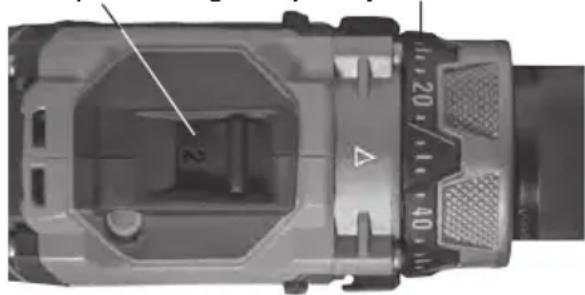
Drill Speed Settings Torque Adjustment Collar
Figure 6 - Drill Settings
Drill Adjustable Clutch Setting
Always use a battery powered drill equipped with a properly set adjustable clutch. This will help reduce the risk of cable damage in the drum of the drain cleaner and reduce handle forces.
Battery powered drills equipped with adjustable clutches will typically have a torque adjustment collar (Figure 6) marked with a scale in numbers starting at one and increasing to indicate increasing torque at clutch disengagement. The adjustable clutch is many times used for driving screws, and may have a selector that needs to be set to the "Screw Driving Mode" ( ) for the adjustable clutch to work. When the adjustable clutch releases, the motor continues to turn but the drill chuck does not. Many times this is accompanied by vibration/noise from the drill.
Battery powered drills are often also equipped with "Drill" ( ) and "Hammer" ( ) modes of operation (Figure 7). In these modes, the adjustable clutch does not work, and these modes should never be used for FlexShaft Drain Cleaning Machine operation.

Figure 7 - Selecting Proper Mode
When using the FlexShaft Drain Cleaning Machines, always start with the adjustable clutch set to approximately 25% of the total clutch adjustment range (example - if the torque adjustment collar on the drill is marked from 1 to 20, the initial setting should be 5).
Operate the drain cleaner per these instructions. When clearing blockages, operate drill at full speed for best cleaning. Do not force the chain knocker into the blockage - if the chain knocker cannot turn, it cannot clean the drain. The chain knocker may need to be moved away from the blockage to come back up to speed. If during operation the drill clutch continuously releases ("clutches out"), release the drill switch and withdraw the cable from the drain. Review the drain cleaner set up and operation and confirm everything is correct - an important part of the set up for proper operation is chain knocker selection (See Figure 9 for details) and adjustment. Make any needed changes and continue cleaning drain.
If the drill clutch continues to release during operation, the drill adjustable clutch setting can be increased. The drill clutch can be increased in steps up to 75% of the total clutch adjustment range. (example - if the torque adjustment collar on the drill is marked from 1 to 20, the maximum setting should be no more than 15). Do not exceed 75% of the total clutch adjustment range. Never place drill in "Drill" or "Hammer" mode - this disables the adjustable clutch. This increases the risk of cable damage in the drum of the drain cleaner.
If the drill clutch continues to release when set at 75% of the total clutch adjustment range, consider using another RIDGID drain cleaning machine.
Installing/Adjusting Chain Knocker
- Select proper chain knocker for the conditions.


Figure 8 - Chain Knockers
Chainknockers are sized based on collar inside diameter and are designed for specific cable sizes. 1 / 4 chainknockers are used on 1 / 4 cable, etc. Do not use a larger size chain knocker on a smaller cable (for instance 5 / 16 on 1 / 4 ).See Figure 8 and Collar Distance Chart.
Chainknockers without carbide cutting tips can be used in common pipe types. These chainknockers work well in grease and similar blockages.
Chain knockers with carbide cutting tips are used for removing scale from the inside of the pipe and can be used for roots. Carbide cutting tips are used for aggressive cleaning and could damage pipe, especially softer materials (such as plastics and Orangeburg), thin walled pipe, or if the chain knocker is kept in one position for an extended time. See Figure 9, Chain Knocker Selection Chart.
Do not use chain knockers for cleaning in glass, ceramic, porcelain or similar material fixtures or pipes. They could be damaged.
- Figure 10 shows a schematic of proper chain knocker installation and adjustment. There are two key points when installing/ adjusting chain knockers.
Coilar Distance: Set the chain knocker collars the correct distance apart ("Collar Distance") to allow the chains to spread an appropriate amount when rotated to clean the pipe walls. Collar Distance varies based on cable size and pipe diameter, and is generally set using a spacer made from sheath ("Collar Spacer"). If additional flexibility is required to navigate a bend, the collar spacer can be removed and the collar distance can be set with a tape measure. Operating without a collar spacer makes it more likely for the cable to flip over in use and be damaged. Do not operate carbide cutters without a collar spacer to reduce risk of cable damage.
Exposed Cable: Minimize the amount of exposed cable (cable not covered by sheath). The more exposed cable there is, the more likely the cable will flip over in use and be damaged. Exposed cable should be limited to no more than 14 " (6 mm), and is set with a bushing made from sheath ("Knocker Bushing"). Exposed cable varies with the amount of cable out of the drum. The more cable out of the drum, the smaller the exposed cable. Exposed cable may need to be set with cable out of the drum for best results,
Sheath is supplied with the drain cleaner and is available as a service part to allow configuration as needed for your specific application. Only use RIDGID FlexShaft Drain Cleaner sheath of the correct size for the cable. Any time sheath is cut, it should be cut cleanly and squarely. Do not damage the cable when cutting the sheath.
- Chain knockers are retained to the cable with set screws that use a supplied 3mm hex key. Loosen set screws and remove chain knocker, spacer and bushing from cable.
- Inspect the sheath end for damage or wear. The sheath end should be square and clean. If needed, the sheath end can be trimmed slightly.
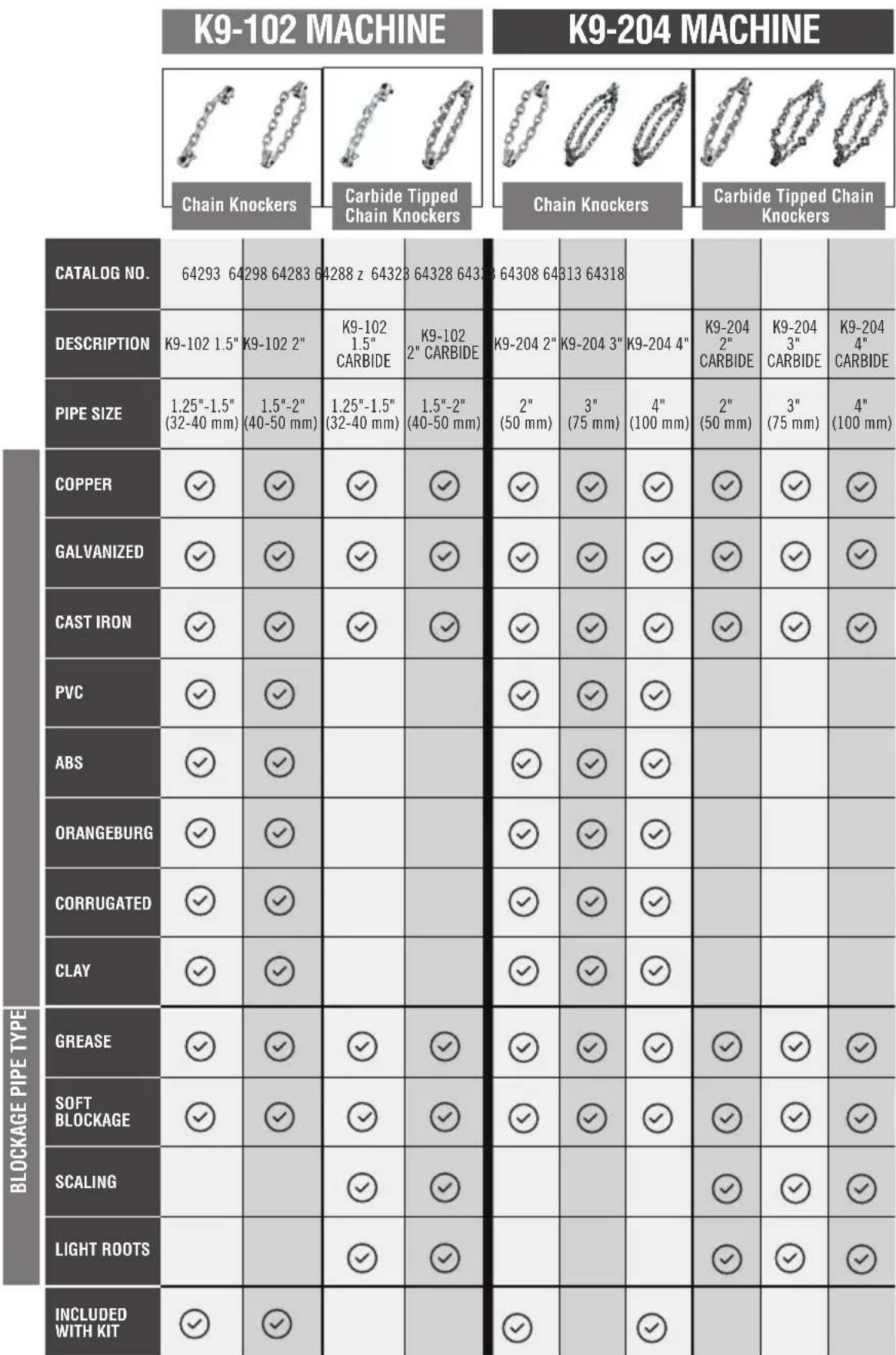
Figure 9 - Chain Knocker Selection Chart
| Knocker | Collar Distance | ||||
| Machine | Cable Size | Number of Chains | Number of No Links/Chain | minal Recommended Pipe Size | |
| K9-102 | 1/4" | 1 | 7 | 1/4" to 11/4" (32 mm to 40 mm) | 13/4" (44.5 mm) |
| 2 | 7 | 11/2" to 2" (40 mm to 50 mm) | |||
| K9-204 | 5/16" | 2 | 9 | 2" (50 mm) | 21/2" (63.5 mm) |
| 3 | 13 | 3" (75 mm) | 4" (101.6 mm) | ||
| 3 | 15 | 4" (100 mm) | 41/2" (114.3 mm) | ||
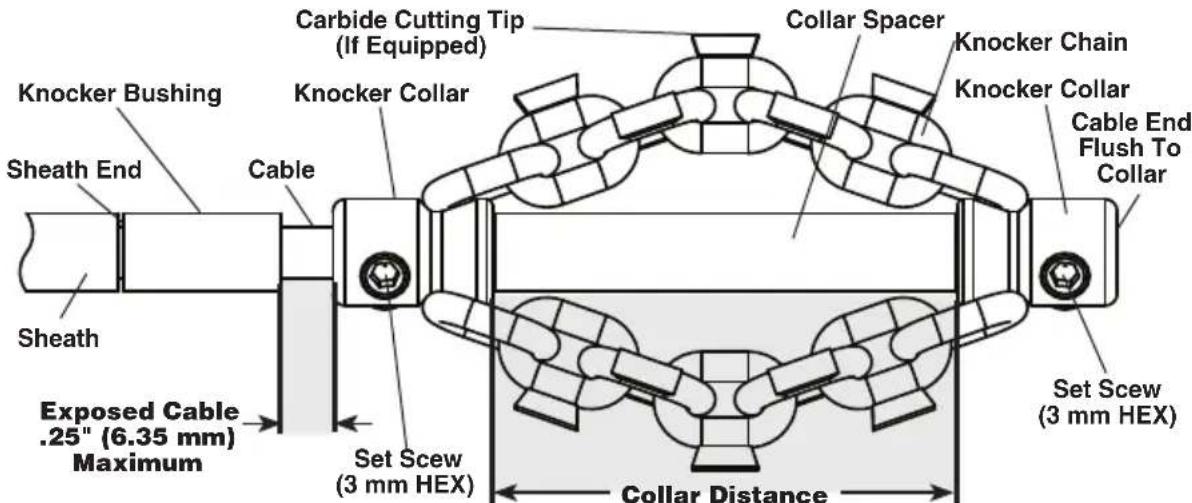
Collar Distance Chart
Figure 10 - Chain Knocker Installation/Adjustment
- If needed, cut a section of sheath to use as the collar spacer to the appropriate size (See Collar Distance Chart).
Collar distance can be modified to your preference for the specific pipe/application. As collar distance increases, the diameter of the chains decreases, and vice versa. Improperly set collar distance can reduce the efficiency of pipe cleaning.
- Test fit the chain knocker, knocker bushing and collar spacer on the cable as shown in Figure 10. Chains should be straight - do not assemble with chains twisted. To prevent excessive cable end wear, cable end should be flush with the end of the collar.
Check length of exposed cable. To reduce the risk of cable flip over and damage, exposed cable cannot exceed 14 (6 mm). If needed, cut a knocker bushing from sheath to limit exposed cable. Always use a knocker bushing to reduce wear on the sheath end.
- With the chain knocker correctly installed on the cable as shown in Figure 10, use the supplied hex wrench to securely tighten the collar set screws. Place set screw tip against cable, then tighten an ad
ditional 1 / 8 to 1 / 4 turn (45^ to 90^ degrees). If the set screws are not secure, the chain knocker could slip and damage the cable or be lost down the drain.
Operation Instructions
AWARNING


Always use safety glasses and gloves in good condition while handling or using. Use latex or rubber gloves, face shields, protective clothing, respirators or other appropriate protective equipment when chemicals, bacteria or other toxic or infectious substances are suspected to be present to reduce the risk of infections, burns or other serious personal injury.
Do not use with a corded drill. Operating with a corded drill increases the risk of electrical shock.
Do not allow the chain knocker/end of cable to stop turning while drill switch is depressed. This can overstress the cable and may cause twisting, kinking or breaking of the cable assembly and may result in serious personal injury.
Practice good hygiene. Do not eat or smoke while handling or operating the tool. After handling or operating drain cleaning equipment,
use hot, soapy water to wash hands and other body parts exposed to drain contents. This will help reduce the risk of health hazards due to exposure to toxic or infectious material.
Keep hand on the cable assembly whenever the FlexShaft Machine is running. This provides better control of the cable and helps prevent twisting, kinking and breaking of the cable and reduces the risk of injury.
Position the FlexShaft Machine cable outlet within 3^ (1 m) of the drain inlet or properly support exposed cable assembly when the distance exceeds 3^ (1 m). Greater distances can cause control problems leading to twisting, kinking or breaking of the cable. Twisting, kinking or breaking cable may cause striking or crushing injuries.
One person must control both the cable assembly and cordless drill. Do not lock drill switch in the ON position during operation. If the cable stops rotating, the operator must be able to release the drill switch to prevent twisting, kinking and breaking of the cable and reduce the risk of injury.
Follow operating instructions to reduce the risk of injury from twisted or broken cable, cable ends whipping around, machine tipping, chemical burns, infections and other causes.
- Make sure that machine and work area is properly set-up and that the work area is free of bystanders and other distractions.
- Pull cable assembly from the machine and feed into drain. At least 1^ (0.3m) of cable must be in drain so that the chain knocker will not come out of the drain and whip around when the machine is started.
Directly route the cable assembly from the machine cable outlet to the drain opening, minimizing exposed cable and changes in direction. Do not tightly bend the cable assembly - this can increase the risk of twisting or breaking.
If using a camera to view the drain cleaning process, the camera can be fed in at the same time. Typically the cable assembly and the camera push rod can be gripped and advanced/retrieved at the same time. Keep the camera at least 1.5^ (0.5 m) behind the chain knocker.
NOTICE Do not allow the spinning chain knocker to hit the camera head/push rod. It can damage it.
-
Assume a proper operating position to help maintain control of the cable assembly and drill (see Figure 11):
-
Be sure y ou can quickly release the drill switch.
- Your gloved hand must be on the cable assembly to control and support as the cable assembly is fed into the drain and blockage.
- Be sure that you have good balance, do not have to overreach, and cannot fall on machine, drain, etc.. This operating position will help to maintain control of the cable assembly and FlexShaft Machine.

Figure 11 - In Operating Position
- Confirm that at least 1^ (0.3m) of cable assembly is in the drain.
- Confirm that the drill is properly set-up, and depress and release the drill switch, noting the direction of the drill chuck. Drill rotation should match the FOR arrow on the drum (See Figure 4). Do not rotate the cable in reverse except as specifically described in these instructions. Running in reverse can damage the cable.
- Place one hand on the cable assembly and other hand on the drill grip.
- The FlexShaft Drain Cleaning Machine utilizes high rotational speed and low torque to clean drains. FlexShaft cable assemblies are more flexible than other types of drain cleaning cables. The FlexShaft machine is best used by applying light pressure and slowly working the chain knocker into the blockage when withdraw
The general operating steps for the FlexShaft Drain Cleaning Machines (see below):
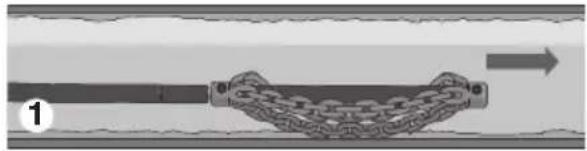
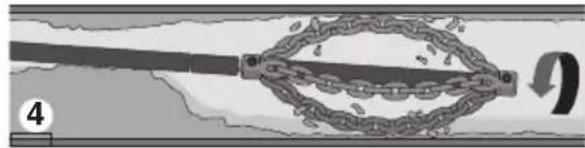


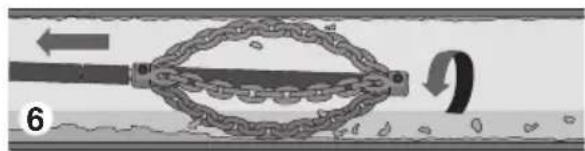
Figure 12 - General Operating Steps
- Advance the chain knocker (generally not rotating) to the area of the drain that needs cleaned.
- If there is a blockage, pass the chain knocker through the blockage.
-
If possible start a flow of water through the drain to carry cuttings and debris away as the drain is cleaned.
-
Rotate the cable/chain knocker at full speed.
- Continue to rotate knocker. Gradually withdraw the cable assembly so that the chain knocker can break up the blockage.
- Continue to gradually withdraw the cable assembly while rotating so that the chain knocker can clean the walls of the drain.
ing the cable. It's important to let the speed of the chain knocker clean the drain - do not force chain knockers into blockages.
- Advancing/Retriving the Cable Assembly - FlexShaft Lubricant
In some cases it may be beneficial to apply RIDGID FlexShaft lubricant to the outside of the sheath when feeding the cable down the drain. This can make it easier to advance the cable assembly down the drain and allow greater cleaning distance. If doing so, place a clean towel with lubricant on it in the palm of the gloved hand used for advancing the cable assembly, and apply lubricant as feeding the cable assembly (Figure 13). Add lubricant to the towel as needed during the process. RIDGID FlexShaft markings are printed on the sheath every 5^ (1.5 m) to aid in determining how much cable assembly has been fed from the machine.
Only use RIDGID FlexShaft lubricant. Other lubricants may not be appropriate for use in a drain and could contaminate the water.
When retrieving the cable assembly, it is good practice to use a towel to wipe dirt
and debris from the cable sheath as it is pulled from the drain and fed back into the drum.
- Rotating the Chain Knocker
Generally the chain knocker is rotated for cleaning while withdrawing the cable.
Only rotate the cable/chain knocker when the chain knocker is at least 1' in the drain. To rotate the cable, firmly grip the drill handle and depress the drill switch. The person controlling the cable assembly must also control the drill switch. Do not operate the machine with one person controlling the cable assembly and another person controlling the drill. Do not allow cable assembly to build up outside the drain, bow or curve. This can lead to twisting, kinking and breaking of the cable. At any time, release the drill trigger to stop cable rotation. When clearing blockages, operate the cable at full speed for best cleaning. Do not force the chain knocker into blockages. In some cases, using variable speed will assist with navigating turns. Rotating the chain knocker in FORWARD or REVERSE for a short time while advancing the cable assembly can help it negotiate the drain and blockages.
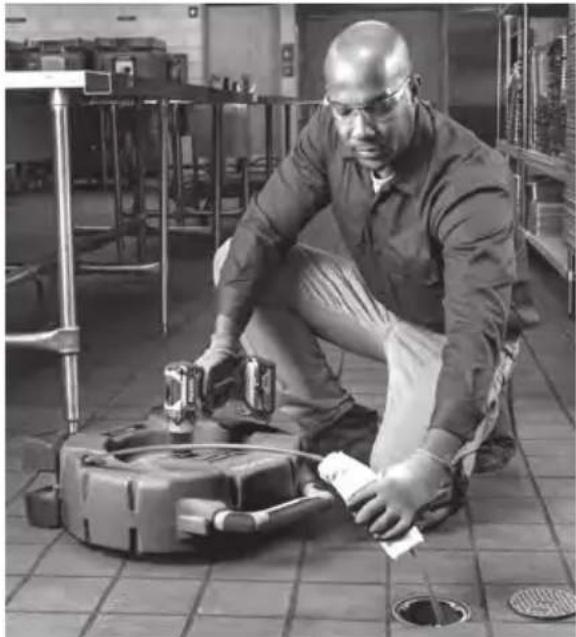
Figure 13 - Applying Lubricant to the Cable Sheath
-
Advance the cable assembly into the drain, generally not rotating. Grasp the sheath near where it exits the machine housing. Pull 6" to 12" (150 to 300mm ) of cable assembly out of the FlexShaft Machine so that there is a slight bow in the cable. Gloved hand must be on cable assembly to control and support. Improper cable support can allow the cable assembly to kink or twist and can damage the cable or injure the operator. Feed the cable assembly into the drain (Figure 12, Step 1).
-
Continue to advance the cable assembly until the resistance is encountered. Carefully work the chain knocker through the blockage. Do not force the cable assembly - if the chain knocker cannot turn, it cannot clean the drain. Pay attention to how far the cable has gone. Do not overrun the cable into a larger drain. This can cause the cable to knot up or cause other damage (Figure 12, Step 2).
-
If possible, start a flow of water down the drain to flush the debris out of the line and help clean the cable assembly as it is retrieved. This can be done by turning on a faucet in the system or other methods. Pay attention to the water level, as the drain could plug again (Figure 12, Step 3).
-
With the chain knocker past the blockage/ area to be cleaned, fully depress the drill switch to rotate the chain knocker. Slowly
pull the cable assembly from the drain, allowing the rotating chain knocker to clean the drain walls and break up the blockage (Figure 12, Steps 4 & 5). If the cable stops turning, do not continue operating the drill. This may cause the cable to twist and kink. At any time, release the drill switch to stop cable rotation.
Monitor the feedback from the feel of the cable assembly in your hand and the sound of the drill/knocker in the drain. If the drill clutch disengages, the cable has likely stopped turning. See Drill Adjustable Clutch Setting in Set-up section. Do not place the battery drill torque adjustment in the "drill" setting. This increases the force that is felt at the drill handle, and can cause the drill to spin around. Firmly grip the drill handle to maintain control.
It may be necessary to move the chain knocker out of the blockage to allow it to come back up to speed.
If the chain knocker becomes stuck, it may be able to be freed by running the drill in reverse for a short time. Do not run in reverse for more than a few seconds to prevent cable damage. In some cases, it may be possible to pull the cable assembly and the blockage out of the drain by hand. If this is done, be careful to not damage the cable assembly. Remove the blockage from the knocker and cable and continue cleaning the drain as detailed above.
If using with a camerad not run the chain knocker into the camera head or push rod.
In some cases, to clean the opposite side of the pipe it may help to run the drill in REVERSE for a short time.
-
Continue to clean the rest of the drain while retrieving the cable. Once the drain has been cleaned, retrieve the cable and feed back onto the drain cleaning machine. Pay close attention, as the cable may lodge in a blockage while being retracted (Figure 12, Step 6).
-
Watch for your sheath marking as the cable assembly is retrieved. Release the drill switch when the chain knocker nears drain opening. Do not pull the chain knocker from drain while it is rotating. The chain knocker can whip around and could cause serious injury.
-
If needed for complete cleaning, repeat the above procedure.
-
Pull any remaining cable assembly from the line by hand and push back into the drum. Prepare the machine for transport.
Draining the Drum
If needed, the drain cleaner can be turned to allow any liquid in the housing to be drained (see Figure 1 for drain hole location).
Transportation
Feed all of cable assembly into the drum and secure the chain knocker in the hook. Remove the drill from the drill shaft. Do not leave the drill attached during transport to prevent tipping and damage to the drain cleaner. See Figure 1.
Storage
WARNING The Drain Cleaning Machine must be kept dry and indoors or well covered if kept outdoors. Store the machine in a locked area that is out of reach of children and people unfamiliar with drain cleaning machines. This machine can cause serious injury in the hands of untrained users.
Maintenance Instructions
WARNING
Drill should be removed from drain cleaner before any maintenance is performed.
Always wear safety glasses and other appropriate protective equipment when performing any maintenance.
Cleaning
It is good practice to use a towel to wipe dirt and debris from the sheath as the cable assembly is pulled from the drain and fed back into the drum. This will help to keep the drum clean and reduce the likelihood of the cable assembly sticking in the drum. If needed, cable assembly can be pulled from the machine and the housing opened for flushing/ cleaning.
Clean the machine as needed with hot soapy water and/or mild disinfectants. Drain the machine as needed.
Lubrication
The FlexShaft Drain Cleaning Machines are lubricated for life from the factory.
Cable Assembly Replacement
- Pull entire cable assembly from housing.
- Remove the fasteners holding the housing closed (4 mm hex wrench) and open the housing (Figure 14).
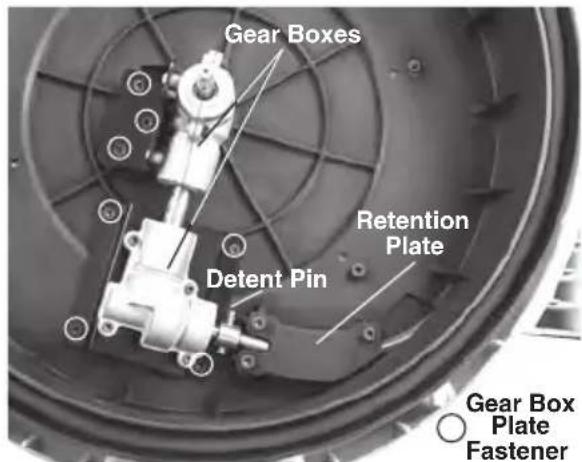
Figure 14 - Drain Cleaner Housing Opened
- Remove retention plate fasteners and retention plate (Figure 14).
- Loosen gear box plate fasteners 3-4 turns but do not remove. (4 mm hex wrench).
- Remove the detent pin from the cable coupling.
- Remove the cable coupling from the gear box shaft and remove the cable assembly. Lift the gearboxes slightly to allow cable coupling removal.
- Reverse process to assemble, securely attaching all fasteners. Ensure sheath is tight to the stop in the drum cable slot to minimize exposed cable (see Figure 15).
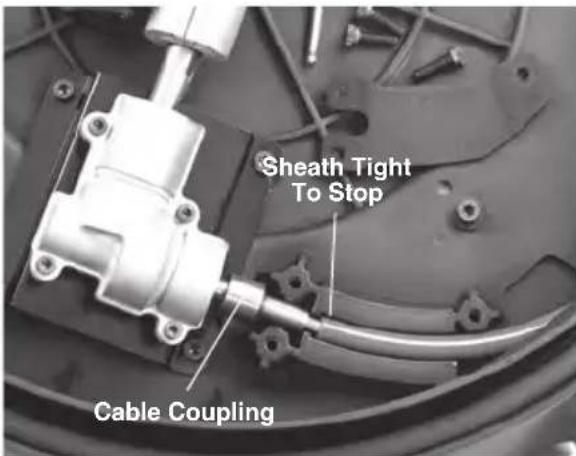
Figure 15 - Changing the Cable Assembly
Troubleshooting
| SYMPTOM POSSIBLE REASON SOLUTION | ||
| Cable kinking or breaking. | Cable assembly is being forced.. | Do no force cable assembly. Follow operating instructions. |
| Incorrect FlexShaft Machine or chain knocker used for pipe diameter. | Use correct FlexShaft Machine or chain knocker for pipe size. | |
| Drill being run in reverse. | Use reverse only if flex shaft gets caught in pipe. | |
| Cable assembly exposed to acid/ corroded. | Clean cable assembly routinely. | |
| Cable/sheath worn out. | Replace worn cable assembly. | |
| Cable assembly not properly supported. | Support cable assembly properly, see instructions. | |
| Chain knocker not properly set up/ adjusted | Properly set up/adjust chain knocker, see instructions. | |
| Improper drill or drill settings. | Choose proper drill and settings, see instructions. | |
| FlexShaft Machine wobbles or moves while cleaning drain. | Ground not level. | Place on level stable surface. |
Service and Repair
WARNING
Improper service or repair can make the machine unsafe to operate.
The "Maintenance Instructions" will take care of most of the service needs of this machine. Any problems not addressed by this section should only be handled by a RIDGID Independent Service Center. Use only RIDGID service parts.
For information on your nearest RIDGID Independent Service Center or any service or repair questions see Contact Information section in this manual.
Optional Equipment
WARNING
To reduce the risk of serious injury, only use accessories specifically designed and recommended for use with the RIDGID FlexShaft Drain Cleaning Machine, such as those listed.
| Catalog No. | Description |
| 64283Knocker, ¼" cable, 1½"-2" pipe, single chain, carbide tip | |
| 64288Knocker, ¼" cable, 2" pipe, 2 chain, carbide tip | |
| 64293Knocker, ¼" cable, 1½"-2" pipe, single chain | |
| 64298 Knocker, ¼" cable, 2" pipe, 2 chain | |
| 64308Knocker, ¼" cable, 2" pipe, 2 chain, carbide tip | |
| 64313Knocker, ¼" cable, 3" pipe, 3 chain, carbide tip | |
| 64318Knocker, ¼" cable, 4" pipe, 3 chain, carbide tip | |
| 64323 Knocker, ¼" cable, 2" pipe, 2 chain | |
| 64328 Knocker, ¼" cable, 3" pipe, 3 chain | |
| 64333 Knocker, ¼" cable, 4" pipe, 3 chain | |
| 64338 FlexShaft Lubricant, 8 oz, 12 per case | |
| 64343 7/8 Assembly, cable, sheath, couplings, 50' | |
| 64348 5/8" Assembly, cable, sheath, couplings, 70' | |
| 64363 1/4" RIDGID Wallpipe Accessory | |
| 64368 1/2" RIDGID Wallpipe Accessory | |
For a complete listing of RIDGID equipment avail able for these tools, see the Ridge Tool Cata log online at RIDGID.com or see Contact Information.
Disposal
Parts of these tools contain valuable materials and can be recycled. There are companies that specialize in recycling that may be found locally. Dispose of the components in compliance with all applicable regulations. Contact your local waste management authority for more information.
21.1" x 10.8" x 24.2"
RIDGE TOOL COMPANY Ridge Tool Europe NV (RIDGID)
EC DECLARATION OF CONFORMITY
For Warranty Information for your World Region visit RIDGID.com
Ridge Tool Europe NV (RIDGID)

- Model K9-102 & K9-204 FlexShaft™ Drain Cleaning Machines
- Table of Contents
- WARNING!
- Safety Symbols
- DANGER
- WARNING
- CAUTION
- NOTICE
- General Safety Rules
- SAVE THESE INSTRUCTIONS!
- Work Area Safety
- Electrical Safety
- Personal Safety
- Tool Use and Care
- Service
- Specific Safety Information
- SAVE ALL WARNINGS AND INSTRUCTIONS FOR FUTURE REFERENCE!
- FlexShaft Drain Cleaning Machine Safety
- RIDGID Contact Information
- Description
- Specifications
- Specifications - Acceptable Battery Powered Drills
- Standard Equipment
- Pre-Operation Inspection
- Machine and Work Area Set-up
- Battery Powered Drill Set-Up and Operation
- Drill Switch
- Drill Speed
- Drill Adjustable Clutch Setting
- Installing/Adjusting Chain Knocker
- Operation Instructions
- AWARNING
- NOTICE Do not allow the spinning chain knocker to hit the camera head/push rod. It can damage it.
- If using with a camerad not run the chain knocker into the camera head or push rod.
- Draining the Drum
- Transportation
- Storage
- Maintenance Instructions
- Cleaning
- Lubrication
- Cable Assembly Replacement
- Service and Repair
- Optional Equipment
- Disposal
- EC DECLARATION OF CONFORMITY
- For Warranty Information for your World Region visit RIDGID.com
Brand : RIDGID
Model : FlexShaft K9204
Category : Drain cleaning machine