
FlexShaft K9306 - Drain cleaning machine RIDGID - Free user manual and instructions
Find the device manual for free FlexShaft K9306 RIDGID in PDF.




| Product Type | Electric Drain Cleaner |
| Brand | RIDGID |
| Model | FlexShaft K9306 (K9-306) |
| Pipe Diameter | 3" to 6" (75 to 150 mm) |
| Cable Length | 125 ft (38 m) |
| Cable Diameter (with Sheath) | 5/8" (16 mm) |
| Rotational Speed | 2000 rpm |
| Motor Power | 1.1 kW (1.5 HP) |
| Supply Voltage | 120 V or 220-240 V depending on version |
| Rated Current | 13 A (120 V) / 8 A (220-240 V) |
| Weight | Over 56 lb (25 kg) |
| Sound Pressure | 96.1 dB (A), K=3 |
| Operating Temperature | -6°C to 60°C (20°F to 140°F) |
| Main Functions | Cleaning and descaling of drain pipes |
| Control | REV/O-OFF/FOR switch and pneumatic foot pedal |
| Safety Devices | Integrated ground fault circuit interrupter, electronic torque limiter, thermal protection |
| Included Equipment | Cleaning chains, brushes, penetrating head, FlexShaft lubricant |
| Maintenance | Lubricated for life, inspect motor brushes every 6 months, replace cable if damaged |
| Cleaning | Warm soapy water, mild disinfectant; do not immerse |
| Warranty | RIDGID Lifetime Warranty |
Frequently Asked Questions - FlexShaft K9306 RIDGID
User questions about FlexShaft K9306 RIDGID
0 question about this device. Answer the ones you know or ask your own.
Ask a new question about this device
Download the instructions for your Drain cleaning machine in PDF format for free! Find your manual FlexShaft K9306 - RIDGID and take your electronic device back in hand. On this page are published all the documents necessary for the use of your device. FlexShaft K9306 by RIDGID.
USER MANUAL FlexShaft K9306 RIDGID
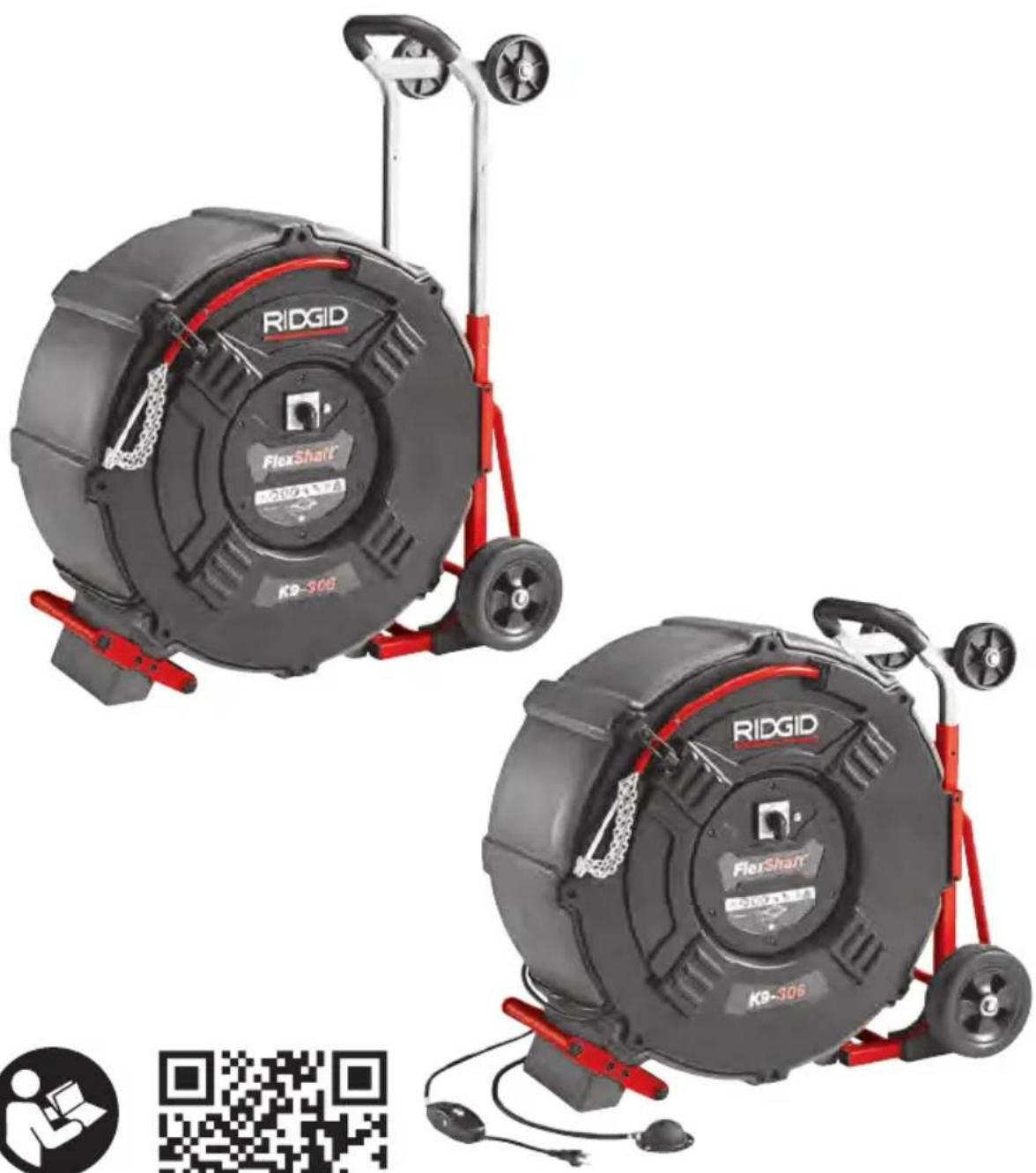
Model K9-306 FlexShaft™ Drain Cleaning Machine
natural_image
Two identical RIDGID FlexShaft 300s exercise machines with red frame and wheels, displayed against a plain background (no text or symbols on the devices themselves)


RIDGID.com/qr/k9-306
- Français – 21
General Power Tool Safety Warnings
Work Area Safety 2
Electrical Safety 2
Personal Safety 3
Tool Use and Care 3
Service....4
Specific Safety Information 4
FlexShaft™ Drain Cleaning Machine Safety 4
RIDGID Contact Information 5
Description....5
Specifications 6
Standard Equipment 6
Pre-Operation Inspection....6
Machine and Work Area Set-up 7
Installing/Adjusting Chain Knocker 9
Installing Brushes 11
Installing Penetrating Head....12
Operating Instructions 12
Using Machine With Brushes.... 15
Draining Drum 16
Transportation....16
Storage 16
Maintenance Instructions 16
Cleaning 17
Lubrication....17
Cable Re-termination 17
Cable Assembly Replacement 17
Motor Brush Inspection/Change 18
Electronic Torque Limiter/Motor Thermal Overload....18
Troubleshooting 19
Service And Repair 19
Optional Equipment 19
Disposal....20
UKCA Declaration of Conformity.... Inside Back Cover
Lifetime Warranty....Back Cover
*Original Instructions - English
Model K9-306 FlexShaft™ Drain Cleaning Machine
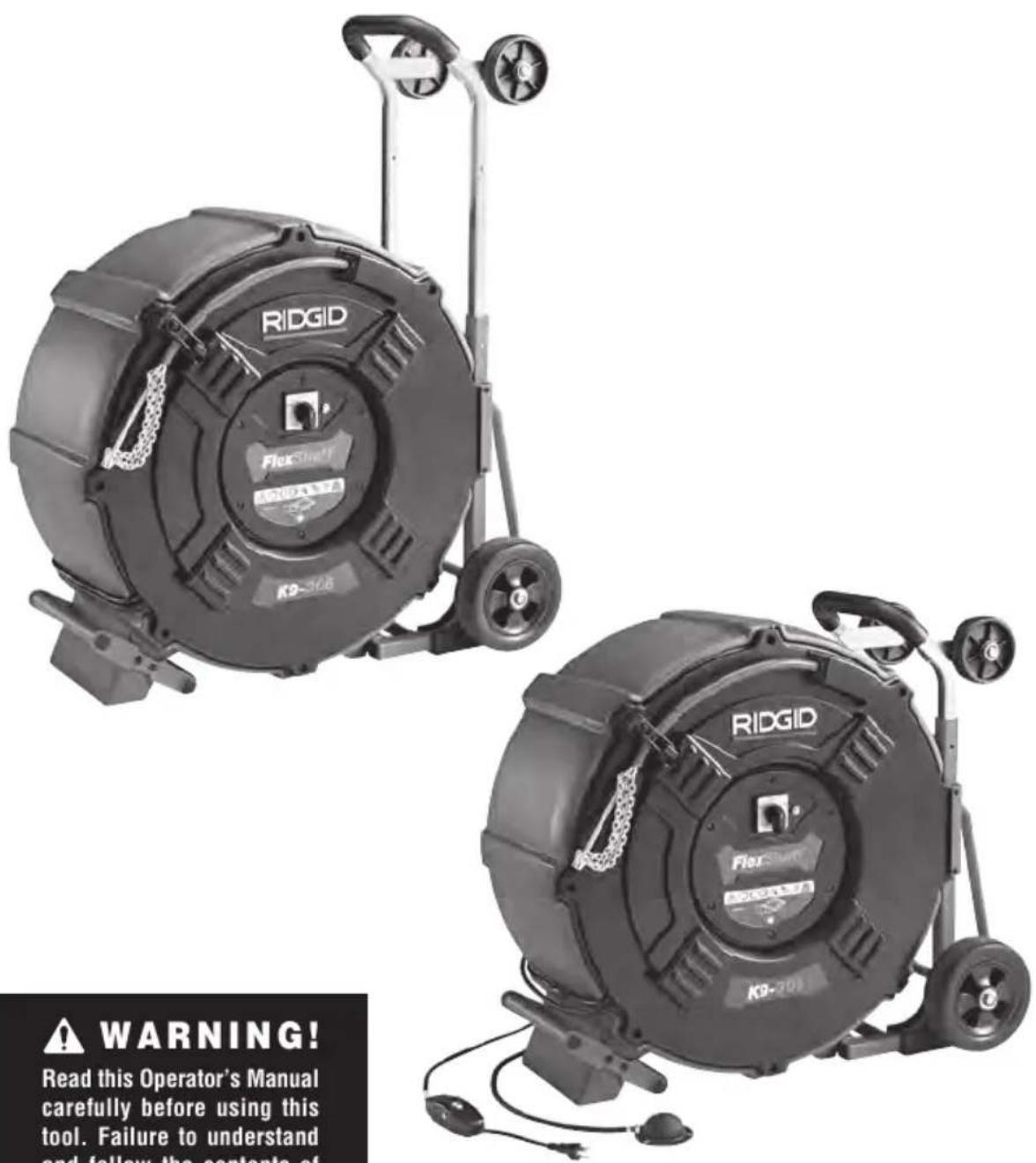

WARNING!
Read this Operator's Manual carefully before using this tool. Failure to understand and follow the contents of this manual may result in electrical shock, fire and/or serious personal injury.
RIDGID®
Safety Symbols
In this operator's manual and on the product, safety symbols and signal words are used to communicate important safety information. This section is provided to improve understanding of these signal words and symbols.

This is the safety alert symbol. It is used to alert you to potential personal injury hazards. Obey all safety messages that follow this symbol to avoid possible injury or death.

DANGER
DANGER indicates a hazardous situation which, if not avoided, will result in death or serious injury.

WARNING
WARNING indicates a hazardous situation which, if not avoided, could result in death or serious injury.

CAUTION
CAUTION indicates a hazardous situation which, if not avoided, could result in minor or moderate injury.
NOTICE
NOTICE indicates information that relates to the protection of property.

This symbol means read the operator's manual carefully before using the equipment. The operator's manual contains im-information on the safe and proper operahe equipment.

This symbol indicates the risk of fingers or other body parts being caught, wrapped, crushed or struck by the chain knocker.
Do not operate tool with the cable end outside of the drain.

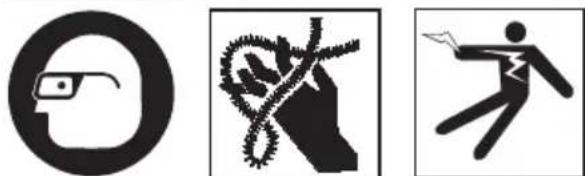
This symbol means always wear safety glasses with side shields or goggles while using this equipment to reduce the risk of eye injury.

This symbol means always wear gloves when handling or using this equipment to reduce the risk of infections, burns or other personal injury from the drain contents.

This symbol indicates the risk of hands, fingers or other body parts being caught, wrapped or crushed in the drain cleaning FlexShaft.

This symbol indicates that the marked equipment exceeds 55 lbs (25kg). Exercise caution when lifting or moving to the risk of injury.

This symbol indicates the risk of the electrical shock.
General Power Tool Safety Warnings\*
WARNING
Read all safety warnings, instructions, illustrations and specifications provided with this power tool. Failure to follow all instructions listed below may result in electric shock, fire and/or serious injury.
SAVE ALL WARNINGS AND INSTRUCTIONS FOR FUTURE REFERENCE!
The term "power tool" in the warnings refers to your mains-operated (corded) power tool or battery-operated (cordless) power tool.
Work Area Safety
- Keep work area clean and well lit. Cluttered or dark areas invite accidents.
- Do not operate power tools in explo-
sive atmospheres, such as in the presence of flammable liquids, gases or dust. Power tools create sparks which may ignite the dust or fumes.
- Keep children and by-standers away while a power tool. Distractions can cause you to lose control.
Electrical Safety
- Power tool plugs must match the outlet. Never modify the plug in any way. Do not use any adapter plugs with earthed (grounded) power tools. Unmodified plugs and matching outlets will reduce risk of electric shock.
- Avoid body contact with earthed or grounded surfaces such as pipes, radiators, ranges and refrigerators. There is an increased risk of electrical shock if your body is earthed or grounded.
- Do not expose power tools to rain or
wet conditions. Water entering a power tool will increase the risk of electrical shock.
- Do not abuse the cord. Never use the cord for carrying, pulling or unplugging the power tool. Keep cord away from heat, oil, sharp edges or moving parts. Damaged or entangled cords increase the risk of electric shock.
- If operating a power tool in a damp location is unavoidable, use a ground fault circuit interrupter (GFCI) protected supply. Use of a GFCI reduces the risk of electric shock.
Personal Safety
- Stay alert, watch what you are doing and use common sense when operating a power tool. Do not use a power tool while you are tired or under the influence of drugs, alcohol, or medication. A moment of inattention while operating tools may result in serious personal injury.
- Use personal protective equipment. Always wear eye protection. Protective equipment such as dust mask, non-skid safety shoes, hard hat, or hearing protection used for appropriate conditions will reduce personal injuries.
- Prevent unintentional starting. Ensure the switch is in the off-position before connecting to power source and/or battery pack, picking up or carrying the tool. Carrying power tools with your finger on the switch or energizing power tools that have the switch on invites accidents.
- Remove any adjusting key or wrench before turning the power tool ON. A wrench or a key left attached to a rotating part of the power tool may result in personal injury.
- Do not overreach. Keep proper footing and balance at all times. This enables better control of the tool in unexpected situations.
- Dress properly. Do not wear loose clothing or jewelry. Keep your hair, clothing and gloves away from moving parts. Loose clothes, jewelry or long hair can be caught in moving parts.
- If devices are provided for the connection of dust extraction and collection
facilities, ensure these are connected and properly used. Use of dust collection can reduce dust-related hazards.
- Do not let familiarity gained from frequent use of tools allow you to become complacent and ignore tool safety principles. A careless action can cause severe injury within a fraction of a second.
Power Tool Use and Care
- Do not force the power tool. Use the correct tool for your application. The correct power tool will do the job better and safer at the rate for which it is designed.
- Do not use the power tool if the switch does not turn it ON and OFF. Any power tool that cannot be controlled with the switch is dangerous and must be repaired.
- Disconnect the plug from the power source and/or remove the battery pack, if detachable, from the power tool before making any adjustments, changing accessories, or storing power tools. Such preventive safety measures reduce the risk of starting the power tool accidentally.
- Store idle tools out of the reach of children and do not allow persons unfamiliar with the power tool or these instructions to operate the power tool. Power tools can be dangerous in the hands of untrained users.
- Maintain power tools and accessories. Check for misalignment or binding of moving parts, breakage of parts and any other condition that may affect the power tool's operation. If damaged, have the power tool repaired before use. Many accidents are caused by poorly maintained power tools.
- Keep cutting tools sharp and clean. Properly maintained cutting tools with sharp cutting edges are less likely to bind and are easier to control.
- Use the power tool, accessories and tool bits etc. in accordance with these instructions, taking into account the working conditions and the work to be performed. Use of the power tool for operations different from those intended could result in a hazardous situation.
- Keep handles and grasping surfaces dry, clean and free from oil and grease. Slippery handles and grasping surfaces do not allow for safe handling and control of the tool in unexpected situations.
Service
- Have your power tool serviced by a qualified repair person using only identical replacement parts. This will ensure that the safety of the power tool is maintained.
Specific Safety Information
WARNING
This section contains important safety information that is specific to this tool.
Read these precautions carefully before using the FlexShaft™ Drain Cleaning Machine to reduce the risk of electrical shock or other serious injury.
SAVE ALL WARNINGS AND INSTRUCTIONS FOR FUTURE REFERENCE!
Keep this manual with machine for use by the operator.
FlexShaft™ Drain Cleaning Machine Safety
- Before using the tool, test the ground fault circuit interrupter (GFCI) provided with the power supply cord to insure it is operating correctly. A properly operating GFCI reduces the risk of electrical shock.
- Only use extension cords that are protected by a GFCI. The GFCI on the machine power cord will not prevent electrical shock from extension cords.
- Only grasp the rotating cable with gloves recommended by the manufacturer. Latex or loose fitting gloves or rags can become wrapped around the cable and may result in serious personal injury.
-
Do not allow the cutter to stop turning while the cable is turning. This can overstress the cable and may cause twisting, kinking or breaking of the cable and may result in serious personal injury.
-
One person must control both the cable and the switch. If the cutter stops rotating, the operator must be able to turn the tool OFF to prevent the cable from twisting, kinking and breaking.
- Use latex or rubber gloves inside the gloves recommended by the manufacturer, goggles, face shields, protective clothing, and respirator when chemicals, bacteria or other toxic or infectious substances are suspected to be in a drain line. Drains may contain chemicals, bacteria and other substances that may cause burns, be toxic or infectious or may result in other serious personal injury.
- Practice good hygiene. Do not eat or smoke while handling or operating the tool. After handling or operating drain cleaning equipment, use hot, soapy water to wash hands and other body parts exposed to drain contents. This will help reduce the risk of health hazards due to exposure to toxic or infectious material.
- Only use the Drain Cleaning Machine for the recommended drain sizes. Using the wrong size drain cleaner can lead to twisting, kinking or breaking of the cable and may result in personal injury.
- Keep glove covered hand on the cable assembly whenever the FlexShaft Machine is running. This provides better control of the cable and helps prevent twisting, kinking and breaking of the cable and reduces the risk of injury.
- Position machine cable outlet within 4' (1.2 m) of the drain inlet or properly support exposed cable assembly when the distance exceeds 4' (1.2 m). Greater distances can cause control problems leading to twisting, kinking or breaking of the cable. Twisting, kinking or breaking cable may cause striking or crushing injuries.
- Do not wear loose clothing or jewelry. Keep your hair and clothing away from moving parts. Loose clothing, jewelry or hair can be caught in moving parts.
- Do not operate this machine if operator or machine is standing in water. Operating machine while in water increases the risk of electrical shock.
- Do not use if there is the risk of contact with other utilities (such as natural gas or electric) during operation. Visual
inspection of the drain with a camera is a good practice. Crossbores, improperly placed utilities and damaged drains could allow the chain knocker to contact and damage the utility. This could cause electrical shock, gas leaks, fire, explosion or other serious damage or injury.
- Read and understand these instructions and the instructions and warnings for all equipment and materials being used before operating this tool to reduce the risk of serious personal injury.
RIDGID Contact Information
If you have any question concerning this RIDGID® product:
- Contact your local RIDGID distributor.
- Visit RIDGID.com to find your local RIDGID contact point.
- Contact Ridge Tool Technical Service DepartmentatProToolsTechService@Emerson.com, or in the U.S. and Canada call 844-789-8665.
Description
The RIDGID® Model K9-306 FlexShaft™ Drain Cleaning Machine is designed to clean and descale 3" to 6" (75-150 mm) pipes and drain lines, up to 125' (38 m) in length.
A REV/O-OFF/FOR switch controls cable rotation and a pneumatic foot switch provides ON/OFF control of the motor. An integral Ground Fault Circuit Interrupter (GFCI) is built into the line cord.
The cable assembly is manually fed in and out of the drain and rotates at 2000 RPM. A chain knocker that expands to the pipe inside diameter is used to break up the blockage and clean the walls of the pipe. Chain knockers with carbide cutting tips are available for use on roots and cleaning the scale from the pipe wall. Plain chain knockers are for general use, including grease. The machine is equipped with an electronic torque limiter ro reduce the likelihood of cable damage.
FlexShaft Drain Cleaners are well suited to use with inspection cameras during the drain cleaning process.
It is not recommended to clean glass, ceramic, porcelain or similar fixtures with the FlexShaft Drain Cleaners as it may damage the fixture.
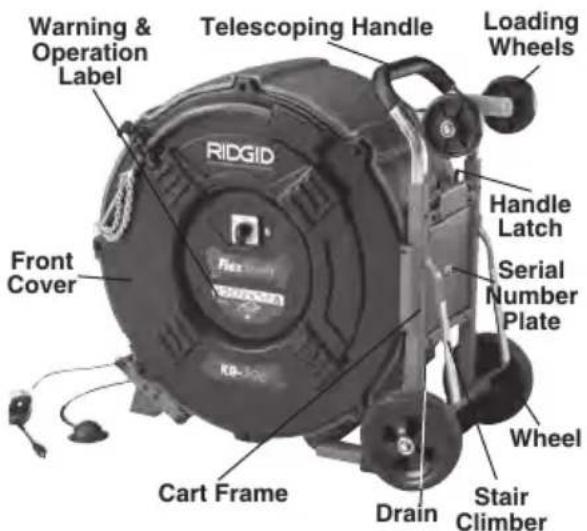
Figure 1A – RIDGID FlexShaft Drain Cleaning Machine
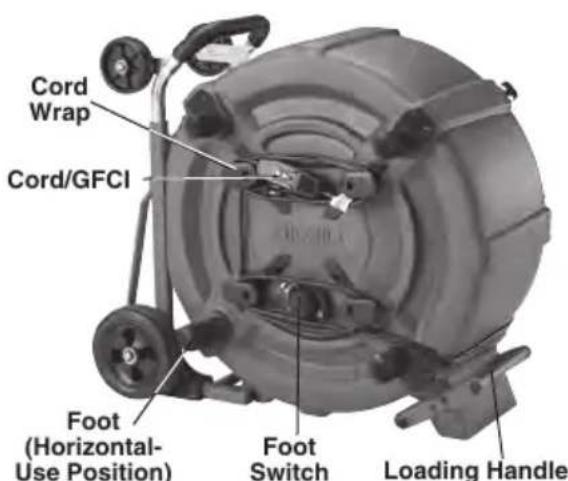
Figure 1B – RIDGID FlexShaft Drain Cleaning Machine
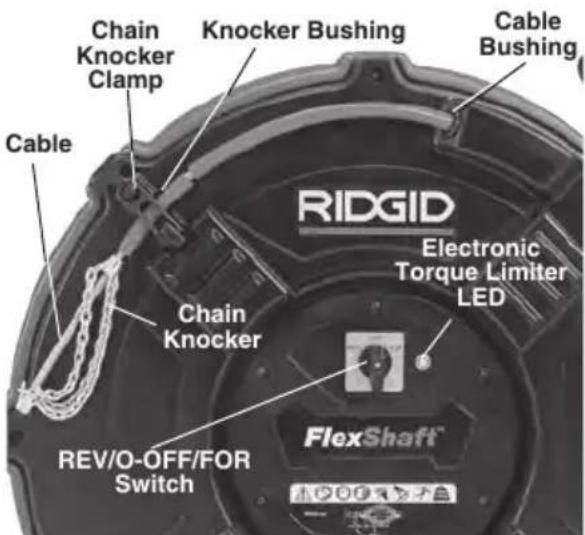
Figure 1C - Cable End/Chain Knocker
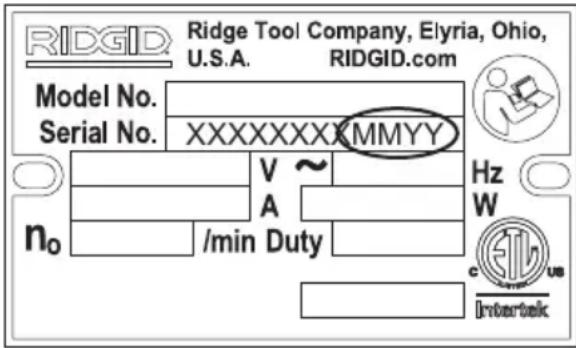
Figure 2 – Machine Serial Number
Serial number plate is located on cart side of housing. (See Figure 1A) The last 4 digits indicate the month (MM) and year (YY) of manufacture.
Specifications
Drain Capacity
(Nom.) 3" to 6" (75 - 150 mm)
Cable Diameter
(without Sheath).....3/8" (9.5 mm)
Cable Assy. Diameter
(with Sheath) ..... 5/8" (15.9 mm)
Cable Assembly
Length 125' (38.1 m)
Motor
Power...... 1.1 kW (1.5 HP) 1.1 kW (1.5 HP)
Voltage ..... 110-120V220-240V
Current.....11A 8A
Refer to on product serial plate for information specific to unit.
Rotational Speed ...2000 RPM
Weight 166 lbs. (75 kg)
Dimension 36.1" × 32.5" × 20.5"
(918 mm × 826 mm ×
521 mm) Handle down
Operating
Temperature......20°F to 140°F
(-6°C to 60°C)
Sound Pressure
(L_PA)^* 96.1 dB(A), K=3
Sound Power
(L_PW)^* 91.8 dB(A), K=3
* Sound measurements are measured in accordance with a standardized test per Standard EN 62481-1.
- Sound emissions may vary due to your location and specific use of these tools.
- Daily exposure levels for sound need to be evaluated for each application and appropriate safety measures taken when needed. Evaluation of exposure levels should consider the time a tool is switched off and not in use. This may significantly reduce the exposure level over the total working period.
Standard Equipment
Refer to the RIDGID catalog for details on equipment supplied with specific drain cleaning machine catalog numbers.
NOTICE This machine is made to clean drains. If properly used it will not damage a drain that is in good condition and properly designed, constructed and maintained. If the drain is in poor condition, or has not been properly designed, constructed and maintained, the drain cleaning process may not be effective or could cause damage to the drain. The best way to determine the condition of a drain before cleaning is through visual inspection with a camera. Improper use of this drain cleaning machine can damage the drain cleaning machine and the drain. This machine may not clear all blockages.
Pre-Operation Inspection
WARNING

Before each use, inspect your Drain Cleaning Machine and correct any problems to reduce the risk of serious injury from electric shock, twisted or broken cables, chemical burns, infections and other causes and prevent Drain Cleaning Machine damage.
Always wear safety glasses, and other appropriate protective equipment when inspecting your Drain Cleaning Machine.
- Make sure that the drain cleaning machine is unplugged and inspect the power cord, Ground Fault Circuit Interrupter (GFCI) and plug for damage. If the plug has been modified, or if the cord is damaged, to avoid electrical shock, do not use the machine until the cord has been replaced by a qualified repair person.
- Clean the machine, including handles and controls. This aids inspection and helps prevent the machine or control from slipping from your grip. Clean and maintain the machine per the maintenance instructions.
- Inspect the machine for:
• Proper assembly and completeness.
- Any broken, worn, missing, misaligned or binding parts.
- Presence and readability of the warning label (see Figure 3).
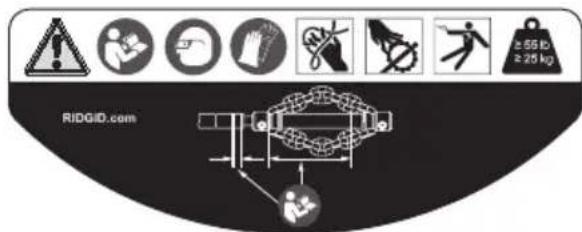
Figure 3 – Warning Label
- Smooth and free movement of the cable assembly in and out of the machine.
- Any condition which may prevent safe and normal operation.
If any problems are found, do not use the drain cleaning machine until the problems have been repaired.
- Clean any debris from the cable assembly and chain knockers. Inspect sheath for wear and damage. There should not be any cuts, kinks, breaks or excessive wear. Inspect the cable near the chain knocker. Cable assemblies should not be bent or deformed. Cable strands should be tight to one another without separation. Inspect chain knocker for damaged or lost carbide cutting tips (if equipped) and wear of the chain itself. If chain links are worn more than 14 through or damaged, replace the chain knocker. Replace worn and damaged equipment before using drain cleaning machine.
Confirm that the chain knocker is properly set up and is secure on the cable.
- Inspect and maintain any other equipment being used per its instructions to make sure it is functioning properly.
-
Make sure that the REV/O-OFF/FOR switch is set to the O-OFF position.
-
With dry hands, plug cord into properly grounded outlet. Test the GFCI provided in the electrical cord to ensure that it is operating correctly. Depress the GFCI TEST button -the machine should not operate. Depress the RESET button – the machine should operate. If GFCI is not functioning properly, unplug the cord and do not use the drain cleaning machine until the GFCI has been repaired.
-
With the inspection complete, with dry hands, unplug the machine.
Machine and Work Area Set-up
WARNING
natural_image
Three black-and-white icons: a circular eye with glasses, a hand holding a rope, and a stick figure running with a briefcase (no text or symbols)Set up the Drain Cleaning Machine and work area according to these procedures to reduce the risk of injury from electric shock, fire, machine tipping, twisted or broken cables, chemical burns, infections and other causes, and prevent machine damage.
Always wear safety glasses and other appropriate protective equipment when setting up your Drain Cleaning Machine.
-
Check for an appropriate work area. Operate in a clear level, stable, dry location. Do not use the Drain Cleaning Machine while standing in water.
-
Inspect the drain to be cleaned. If possible, determine the access point(s) to the drain, the size(s), length(s), and material(s) of the drain, distance to mainlines, the nature of the blockage, presence of drain cleaning chemicals or other chemicals, etc.
If chemicals are present in the drain, it is important to understand the specific safety measures required to work around those chemicals. Contact the chemical manufacturer for required information. Confirm no other utilities are present in the drain or area to reduce the risk of damage. Visual inspection of the drain with a camera is a good practice.
If needed, remove fixture (water closet, etc.) to allow access to drain. Do not run the chain knocker in a fixture. This could damage the FlexShaft Machine or the fixture.
-
Determine the correct equipment for the application. See Specifications. Drain Cleaning Machines for other applications can be found by consulting the Ridge Tool Catalog, online at RIDGID.com.
-
Make sure all equipment has been properly inspected.
-
If needed, place protective covers in the work area. The drain cleaning process can be messy.
-
Transport the drain cleaning machine to the work area along a clear path. Adjust handle if necessary (Figure 4). Move handle latches together and move telescoping handle to desired position. Confirm that the handle latches engage and the handle is securely held in position. If handle is moved past latch holes, the handle buttons will prevent the handle from pulling out. If this occurs, depress buttons to move handle.
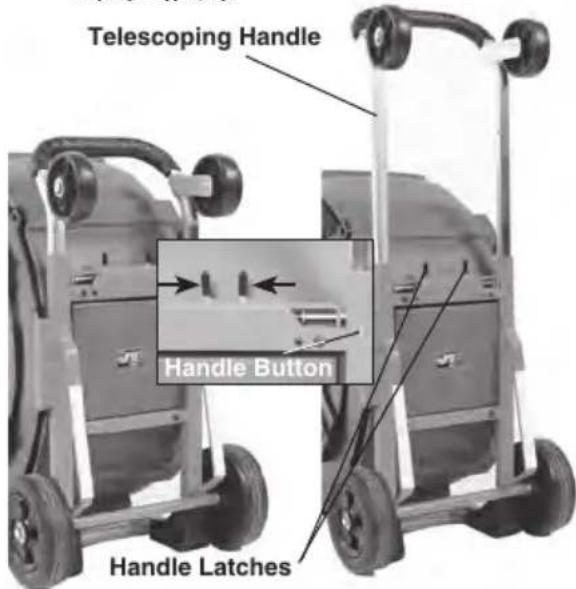
Figure 4 – Adjusting Telescoping Handle
-
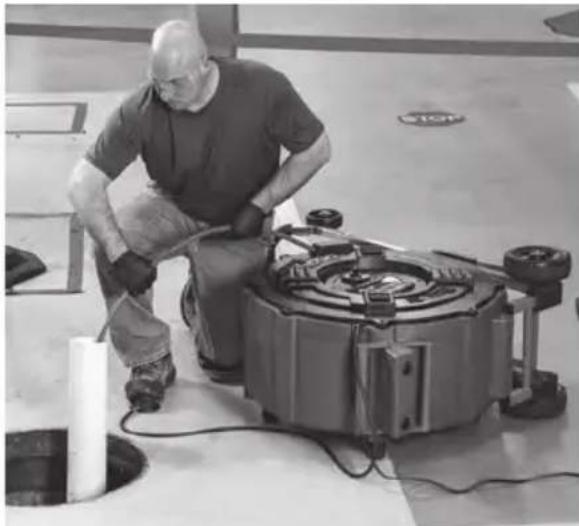
Place the Drain Cleaning Machine as shown in Figure 5. Machine should sit squarely and firmly on the ground.
-
Position the Drain Cleaning Machine so that the cable outlet is within 4' (1.2 m) of the drain access. Greater distances from the drain access increases the risk of the cable assembly twisting or kinking. If the FlexShaft Machine cannot be placed with the cable outlet within 4' (1.2 m) of the drain access, extend the drain access with similar sized pipe and fittings (see Figure 5). Improper cable assembly support can allow the cable to kink and twist and can damage the cable or injure the operator. Extending the drain back to the Drain Cleaning Machine also makes it easier to feed cable assembly into drain.
natural_image
Mechanic working on a large industrial machine in a workshop (no visible text or symbols)Figure 5 – Example of Extending Drain Access to within 4' (1.2 m) of Machine Cable Outlet
-
Unclamp the chain knocker and pull approximately 5' (1.5 m) of cable assembly out of the machine.
-
Mark the sheath to indicate when the chain knocker is approaching the drain opening when withdrawn. This can be done with tape. This reduces the risk of the chain knockers coming out of the drain and whipping around. The distance depends on the configuration of the drain, but should be at least 5' (1.5 m) from the chain knocker.
-
Ensure chain knocker is properly installed (see Installing/Adjusting Chain Knocker).
-
Insert chain knocker end at least 1' (0.3 m) into drain.
-
Evaluate the work area and determine if any barriers are needed to keep bystanders away from the drain cleaning machine and work area. The drain cleaning process can be messy, and bystanders can distract the operator.
-
Position the foot switch for easy accessibility. You must be able to hold and control the cable, control the foot switch, and reach the REV/O-OFF/FOR switch.
-
Confirm that the REV/O-OFF/FOR switch is in the O-OFF position.
-
Run the cord along a clear path. With dry hands, plug the drain cleaner into a properly grounded outlet. Some GFCIs may need to be reset every time they are plugged in. Reset GFCI if needed. Keep all connections dry and off the ground. If the power cord is not long enough, use an extension cord that:
-
Is in good condition.
- Has a plug similar to that supplied on the drain cleaner.
- Is rated for outdoor use and contains a W or W-A in the cord designation (i.e. SOW), or complies with H05VV-F, H05RN-F types or IEC type design (60227 IEC 53, 60245 IEC 57).
- Has sufficient wire size. For extension cords up to 50' (15,2 m) long use 16 AWG (1,5 mm²) or heavier. For extension cords 50'-100' (15,2 m – 30,5 m) long use 14 AWG (2,5 mm²) or heavier.
When using an extension cord, the GFCI on the drain cleaner does not protect the extension cord. If the outlet is not GFCI protected, it is advisable to use a plug in type GFCI between the outlet and the extension cord to reduce the risk of shock if there is a fault in the extension cord.
- Move the REV/O-OFF/FOR Switch to the O-OFF position, and with dry hands unplug the machine.
Installing/Adjusting Chain Knocker
- Select proper chain knocker for the conditions.
Chain knockers are sized based on collar inside diameter and are designed for specific cable sizes. 3/8" chain knockers are used on 3/8" cable, etc. Do not use a larger size chain knocker on a smaller cable (for instance 1/2" on 3/8"). See Figure 6 and Collar Distance Chart.
Chain knockers without carbide cutting tips can be used in common pipe types. These chain knockers work well in grease and similar blockages.
Chain knockers with carbide cutting tips are used for removing scale from the inside of the pipe and can be used for roots. Carbide cutting tips are used for aggressive cleaning and could damage pipe, especially softer materials (such as plastics and Orangeburg), thin walled pipe, or if the chain knocker is kept in one position for an extended time.
Do not use chain knockers for cleaning in glass, ceramic, porcelain or similar material fixtures or pipes. They could be damaged.
- Figure 7 shows a schematic of proper chain knocker installation and adjustment.
There are two key points when installing/adjusting chain knockers.
Collar Distance: Set the chain knocker collars the correct distance apart (“Collar Distance”) to allow the chains to spread an appropriate amount when rotated to clean the pipe walls. Collar Distance varies based on cable size and pipe diameter, and is generally set using a spacer made from sheath (“Collar Spacer”). If additional flexibility is required to navigate a bend, the collar spacer can be removed and the collar distance can be set with a tape measure. Operating without a collar spacer makes it more likely for the cable to flip over in use and be damaged. Do not operate carbide cutters without a collar spacer to reduce risk of cable damage.
Exposed Cable: Minimize the amount of exposed cable (cable not covered by sheath). The more exposed cable there is, the more likely the cable will flip over in use and be damaged. Exposed cable should be limited to no more than 14 " (6 mm), and is set with a bushing made from sheath ("Knocker Bushing").
Sheath is supplied with the drain cleaner and is available as a service part to allow configuration as needed for your specific application. Only use RIDGID FlexShaft Drain Cleaner sheath of the correct size for the cable. Any time sheath is cut, it should be cut cleanly and squarely. Do not damage the cable when cutting the sheath.
-
Chain knockers are retained to the cable with set screws that use a supplied 3 mm hex key. Loosen set screws and remove chain knocker, spacer and bushing from cable.
-
With no knocker installed, hold cable end away from your body or others. Run machine in REVERSE for 5 seconds to maximize exposed cable. Place switch in O-OFF position and unplug machine.
Hold sheath and pull on cable to remove slack and expose maximum amount of cable.
-
Inspect the sheath end for damage or wear. The sheath end should be square and clean. If needed, the sheath end can be trimmed slightly.
-
If needed, cut a section of sheath to use as the collar spacer to the appropriate size (See Collar Distance Chart).
K9-306 MACHINE
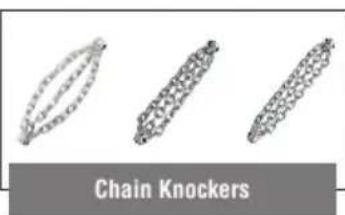
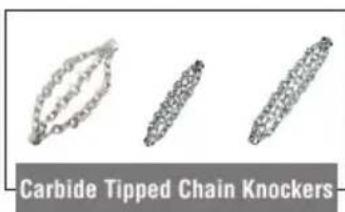
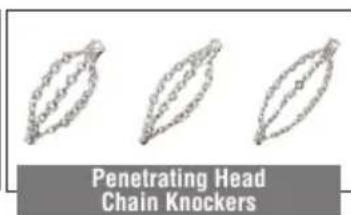
| CATALOG NO. | 66618 | 66623 | 66628 | 66633 | 66638 | 66643 | 66648 | 66653 | 66658 | ||||
| DESCRIPTION | K9-306 3" | K9-306 4" | K9-306 6" | K9-306 3" CARBIDE | K9-306 4" CARBIDE | K9-306 6" CARBIDE | K9-306 - 3" PENETRATING HEAD | K9-306 - 4" PENETRATING HEAD | K9-306 - 6" PENETRATING HEAD | ||||
| PIPE SIZE | 3" (75 mm) | 4" (105 mm) | 5"- 6" (125-150 mm) | 3" (75 mm) | 4" (105 mm) | 5"- 6" (125-150 mm) | 3" (70 mm) | 4" (100 mm) | 5"- 6" (125-150 mm) | ||||
| COPPER | √ | √ | √ | √ | √ | √ | √ | √ | √ | √ | |||
| GALVANIZED | √ | √ | √ | √ | √ | √ | √ | √ | √ | √ | |||
| CAST IRON | √ | √ | √ | √ | √ | √ | √ | √ | √ | √ | |||
| PVC | √ | √ | √ | ||||||||||
| ABS | √ | √ | √ | ||||||||||
| ORANGEBURG | √ | √ | √ | ||||||||||
| CORRUGATED | √ | √ | √ | ||||||||||
| CLAY | √ | √ | √ | ||||||||||
| BLOCKAGE PIPE TYPE | GREASE | √ | √ | √ | √ | √ | √ | √ | √ | √ | √ | ||
| SOFT BLOCKAGE | √ | √ | √ | √ | √ | √ | √ | √ | √ | √ | |||
| SCALING | √ | √ | √ | √ | √ | √ | √ | ||||||
| ROOTS | √ | √ | √ | √ | √ | √ | √ | ||||||
| WIPES | √ | √ | √ | √ | |||||||||
| INCLUDED WITH KIT | √ | √ | |||||||||||
Figure 6 – Chain Knocker Selection Chart
| Knocker | |||||
| Machine | Cable Size | Number of Chains | Number of Links/Chain | Nominal Pipe Size | Recommended Collar Distance |
| K9-306 | ^3/_8" | 3 | 11 | 3" (75 mm) | 4" (102 mm) |
| 3 | 13 | 4" (100 mm) | 4^1/_2" (114 mm) | ||
| 3 | 17 | 6" (150 mm) | 5" (127 mm) | ||
Collar Distance Chart
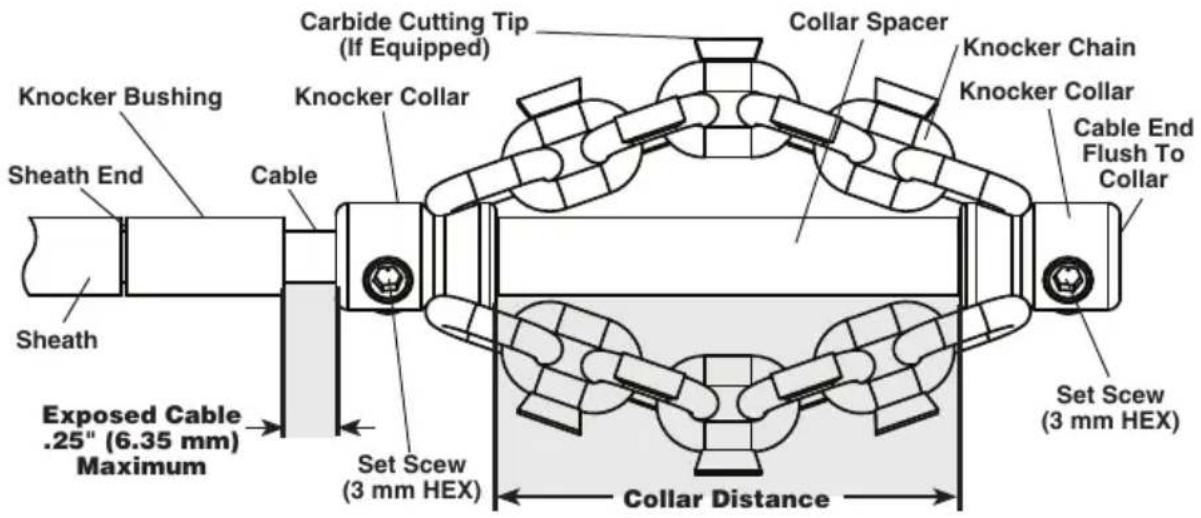
Figure 7 – Chain Knocker Installation/Adjustment
Collar distance can be modified to your preference for the specific pipe/application. As collar distance increases, the diameter of the chains decreases, and vice versa. Improperly set collar distance can reduce the efficiency of pipe cleaning.
- Test fit the chain knocker, knocker bushing and collar spacer on the cable as shown in Figure 7. Chains should be straight – do not assemble with chains twisted. To prevent excessive cable end wear, cable end should be flush with the end of the collar.
Check length of exposed cable. To reduce the risk of cable flip over and damage, exposed cable cannot exceed 14 " (6 mm). If needed, cut a knocker bushing from sheath to limit exposed cable. Always use a knocker bushing to reduce wear on the sheath end.
- With the chain knocker correctly installed on the cable as shown in Figure 7, use the supplied hex wrench to securely tighten the collar set screws. If the set screws are not secure, the chain knocker could slip and damage the cable or be lost down the drain.
Installing Brushes
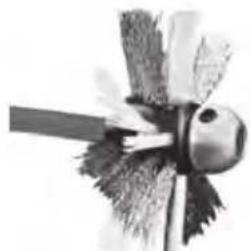
Brushes are available for various uses, such
as cleaning the inside of the pipe, centering the chain knocker in the pipe and spreading lining compound. See the specific brush information for the types of uses it is appropriate for.
Brushes can be assembled in a variety of configurations, with some options shown in Figure 8.
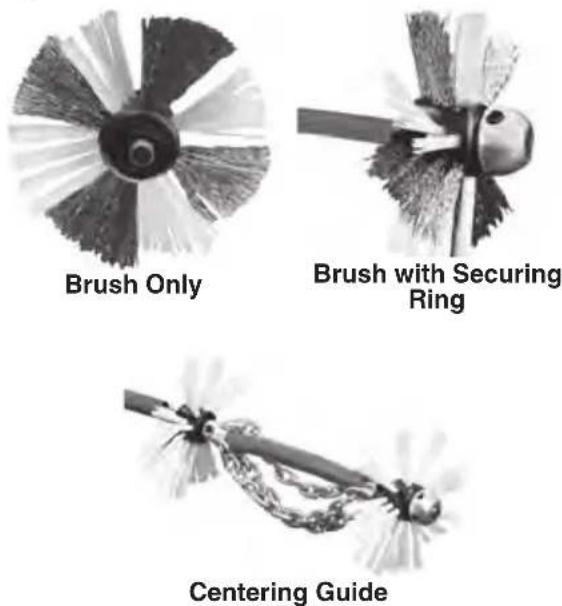
Figure 8 – Example Brush Configurations
Installation of brushes is similar to the installation of chain knockers. The collar of the brush is placed over the cable and retained by securely tightening the set screws. When at the end of the cable, the cable end is flush with the brush collar. Brush securing rings are available to improve brush retention if set screws loosen in use.
As with chain knockers, minimize the amount of exposed cable (cable not covered by sheath). The more exposed cable there is, the more likely the cable will flip over in use and be damaged. Limit exposed cable to no more than 14 " (6 mm), set with a bushing made from sheath ("Knocker Bushing").
Installing Penetrating Head
Penetrating heads are available to help create a hole in a blockage to get the drain flowing and allow the chain knocker into an area. See Figure 9 for installation information.
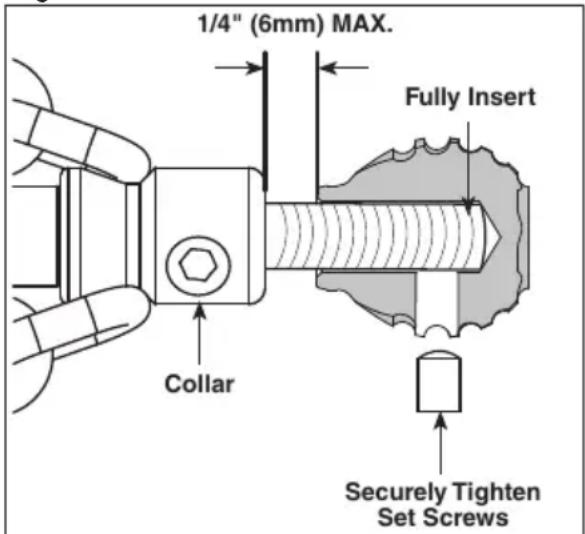
Figure 9 – Penetrating Head Installation
Operating Instructions
WARNING


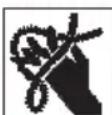
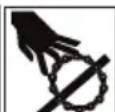
Always use safety glasses and gloves in good condition while handling or using. Use latex or rubber gloves, face shields, protective clothing, respirators or other appropriate protective equipment when chemicals, bacteria or other toxic or infectious substances are suspected to be present to reduce the risk of infections, burns or other serious personal injury.
Do not allow the chain knocker/end of cable to stop turning while cable assembly is turning. This can overstress the cable and may cause twisting, kinking or breaking of the cable assembly and may result in serious personal injury.
Keep a hand on the cable assembly whenever the FlexShaft Machine is running. This provides better control of the cable and helps prevent twisting, kinking and breaking of the cable and reduces the risk of injury.
Position the FlexShaft Machine cable outlet within 4' (1.2 m) of the drain inlet or properly support exposed cable assembly when the distance exceeds 4' (1.2 m). Greater distances can cause control problems leading to twisting, kinking or breaking of the cable. Twisting, kinking or breaking cable may cause striking or crushing injuries.
One person must control both the cable assembly and foot switch. If the cable stops rotating, the operator must be able to turn the tool OFF to prevent twisting, kinking and breaking of the cable and reduce the risk of injury.
Follow operating instructions to reduce the risk of injury from twisted or broken cable, cable ends whipping around, machine tipping, chemical burns, infections and other causes.
- Make sure that machine and work area is properly set-up and that the work area is free of bystanders and other distractions.
- Pull cable assembly from the machine and feed into drain. At least 1' (0.3 m) of cable must be in drain so that the chain knocker will not come out of the drain and whip around when the machine is started.
Directly route the cable assembly from the machine cable outlet to the drain opening, minimizing exposed cable and changes in direction. Do not tightly bend the cable assembly – this can increase the risk of twisting or breaking.
If using a camera to view the drain cleaning process, the camera can be fed in at the same time. Typically the cable assembly and the camera push rod can be gripped and advanced/retrieved at the same time. Keep the camera at least 1.5' (0.5 m) behind the chain knocker.
NOTICE Do not allow the spinning chain knocker to hit the camera head/push rod. It can damage it.
- Assume a proper operating position to help maintain control of the cable assembly and machine (see Figure 10):
- Be sure you can quickly release the foot switch.
-
Your gloved hands must be on the cable assembly to control and support as the cable assembly is fed into the drain and blockage.
-
Be sure that you have good balance, do not have to overreach, and cannot fall on machine, drain, etc.
- You must be able to reach the REV/O-OFF/FOR switch.
This operating position will help to maintain control of the cable assembly and FlexShaft Machine.
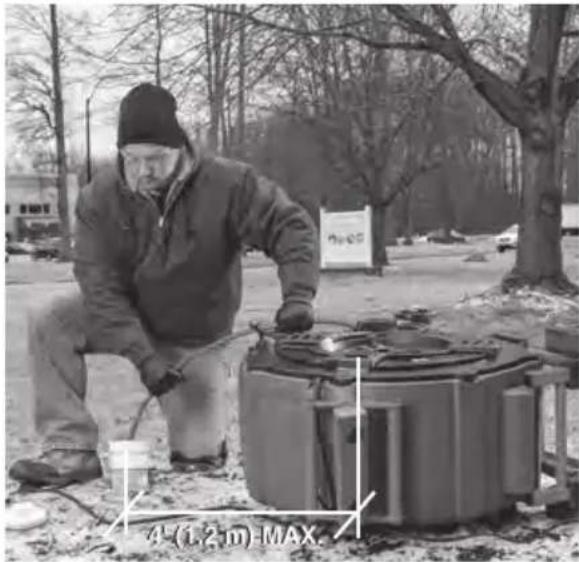
Figure 10 – In Operating Position
- Confirm that at least 1' (0.3 m) of cable assembly is in the drain.
- Grasp the exposed cable assembly with both gloved hands equally spaced and pull 6"-12" (150mm - 300mm) of cable out of the drum so that there is a slight bow in the cable. Gloved hands must be on the cable to control and support the cable. Improper cable support can allow the cable to kink or twist and can damage the cable or injure the operator. Make sure that the cable outlet of the drain cleaner is within 4' (1.2 m) of the drain opening (Figure 10).
- Move the REV/O-OFF/FOR switch to FOR (Forward) position.
- Depress the foot switch to start the machine. There will be a slight delay before the cable starts to rotate. The person controlling the cable must also control the foot switch. Do not operate the drain cleaner with one person controlling the cable and another person controlling the foot switch. This can lead to twisting, kinking and breaking of the cable.
- The FlexShaft Drain Cleaning Machine utilizes high rotational speed and low torque to clean drains. FlexShaft cable assemblies are more flexible than other types
of drain cleaning cables. The FlexShaft machine is best used by applying light pressure and slowly working the chain knocker into the blockage. It's important to let the speed of the chain knocker clean the drain – do not force chain knockers into blockages.
- Advancing/Retrieving the Cable Assembly – FlexShaft Lubricant
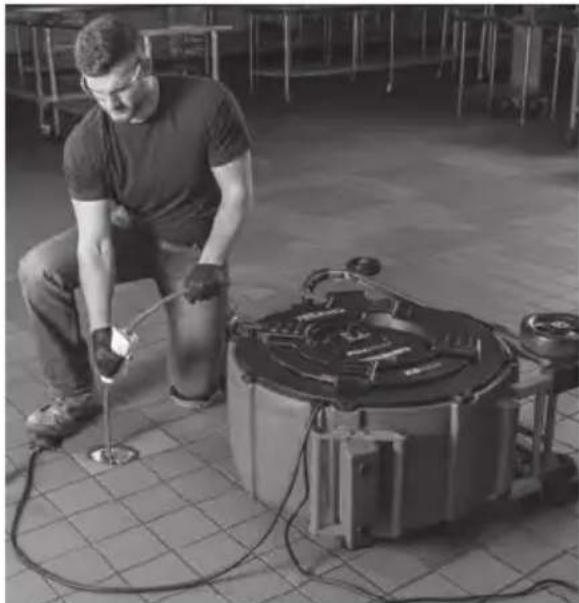
In some cases it may be beneficial to apply RIDGID FlexShaft lubricant to the outside of the sheath when feeding the cable down the drain. This can make it easier to advance the cable assembly down the drain and allow greater cleaning distance. If doing so, place a clean towel with lubricant on it in the palm of the gloved hand used for advancing the cable assembly, and apply lubricant as feeding the cable assembly (Figure 11). Add lubricant to the towel as needed during the process. RIDGID FlexShaft markings are printed on the sheath every 5' (1.5 m) to aid in determining how much cable assembly has been fed from the machine.
Only use RIDGID FlexShaft lubricant. Other lubricants may not be appropriate for use in a drain and could contaminate the water.
When retrieving the cable assembly, it is good practice to use a towel to wipe dirt and debris from the cable sheath as it is pulled from the drain and fed back into the drum.
- Rotating the Chain Knocker
Generally the chain knocker is rotated for cleaning while withdrawing the cable.
Only rotate the cable/chain knocker when the chain knocker is at least 1' in the drain. To rotate the cable, firmly grip the cable and depress the foot switch. The person controlling the cable assembly must also control the foot switch. Do not operate the machine with one person controlling the cable assembly and another person controlling the foot switch. Do not allow cable assembly to build up outside the drain, bow or curve. This can lead to twisting, kinking and breaking of the cable. At any time, release the foot switch to stop cable rotation. When clearing blockages, operate the cable at full speed for best cleaning. Do not force the chain knocker into blockages. Rotating the chain knocker in FORWARD or RE-
VERSE for a short time while advancing the cable assembly can help it negotiate the drain and blockages.
natural_image
Man kneeling beside a large cylindrical device with hoses, operating equipment in a workshop (no visible text or symbols)Figure 11 – Applying Lubricant to the Cable Sheath
- Advance the cable assembly into the drain, generally not rotating. Grasp the sheath near where it exits the machine housing. Pull 6" to 12" (150 to 300 mm) of cable assembly out of the FlexShaft
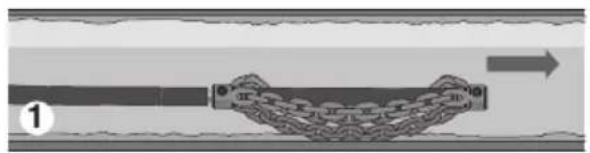
Machine so that there is a slight bow in the cable. Gloved hand must be on cable assembly to control and support. Improper cable support can allow the cable assembly to kink or twist and can damage the cable or injure the operator. Feed the cable assembly into the drain (Figure 12, Step 1).
-
Continue to advance the cable assembly until the resistance is encountered. Carefully work the chain knocker through the blockage. Do not force the cable assembly – if the chain knocker cannot turn, it cannot clean the drain. Pay attention to how far the cable has gone. Do not overrun the cable into a larger drain. This can cause the cable to knot up or cause other damage (Figure 12, Step 2).
-
Once the drain is open, if possible, start a flow of water down the drain to flush the debris out of the line and help clean the cable assembly as it is retrieved. This can be done by turning on a faucet in the system or other methods. Pay attention to the water level, as the drain could plug again (Figure 12, Step 3).
-
With the chain knocker past the blockage/area to be cleaned and REV/O-OFF/FOR switch in FOR position, depress the
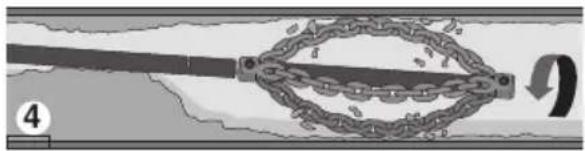
The general operating steps for the FlexShaft Drain Cleaning Machines (see below):
natural_image
Diagram of a mechanical or structural component with a curved beam and chain, showing motion direction (no text or symbols)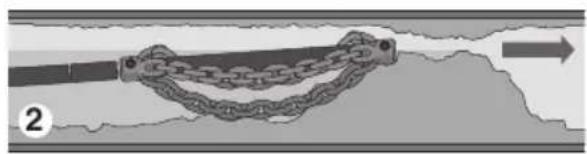
natural_image
Diagram of a chain link between two parallel bars, with an arrow indicating direction (no text or symbols)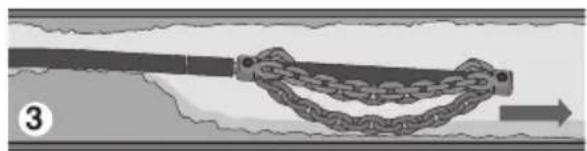
natural_image
Diagram of a chain link being twisted with a string, showing motion direction (no text or symbols)-
Advance the chain knocker (generally not rotating) to the area of the drain that needs cleaned.
-
If there is a blockage, pass the chain knock-er through the blockage.
-
If possible, start a flow of water through the drain to carry cuttings and debris away as the drain is cleaned.
natural_image
Diagram of a chain link mechanism with a central loop and directional arrow (no text or symbols)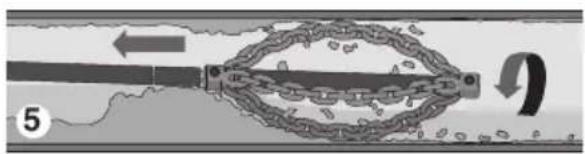
natural_image
Diagram of a mechanical linkage system with chains and a lever, showing motion direction (no text or symbols)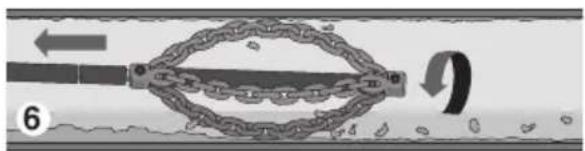
-
Rotate the cable/chain knocker at full speed.
-
Continue to rotate knocker. Gradually withdraw the cable assembly so that the chain knocker can break up the blockage.
-
Continue to gradually withdraw the cable assembly while rotating so that the chain knocker can clean the walls of the drain.
Figure 12 – General Operating Steps
foot switch to rotate the chain knocker. Slowly pull the cable assembly from the drain, allowing the rotating chain knocker to clean the drain walls and break up the blockage (Figure 12, Steps 4 & 5). If the cable stops turning, do not continue operating the machine. This may cause the cable to twist and kink. At any time, release the foot switch to stop cable rotation. Rotating the cable in REVERSE can help clean the opposite side of the pipe.
Monitor the feedback from the feel of the cable assembly in your hand and the sound of the motor/knocker in the drain. It may be necessary to move the chain knocker out of the blockage to allow it to come back up to speed.
If the chain knocker becomes stuck, the electronic torque limiter will shut off the motor to reduce the likelihood of cable damage. The torque limiter LED will flash to indicate this. Release the foot switch to allow motor to restart. Place the REV/O-OFF/FOR switch to allow opposite rotation. Grasp the cable with both gloved hands, press the foot switch for several seconds and pull on the cable until it is free of the blockage. Repeat if necessary. In some cases, it may be possible to pull the cable assembly and the blockage out of the drain by hand. If this is done, be careful to not damage the cable assembly.
Place the REV/O-OFF/FOR switch in the FOR position and continue cleaning the drain.
NOTICE Do not allow the spinning chain knocker to hit the camera head/push rod. It can damage it.
- Continue to clean the rest of the drain while retrieving the cable. Once the drain has been cleaned, retrieve the cable and feed back onto the drain cleaning machine. Pay close attention, as the cable may lodge in a blockage while being retracted (Figure 12, Step 6).
- Watch for your sheath marking as the cable assembly is retrieved. Release the foot switch when the chain knocker nears drain opening. Do not pull the chain knocker from drain while it is rotating. The chain knocker can whip around and could cause serious injury.
- If needed for complete cleaning, repeat the above procedure.
- Pull any remaining cable assembly from the line by hand and push back into the drum. Prepare the machine for transport.
Using Machine With Brushes
Using the machine with a brush is similar to use with a chain knocker. Brushes are used for finer cleaning of the pipe, they are not used for blockage removal. Remove blockages and heavy debris with a chain knocker or other methods first. While chain knockers are most typically rotated while withdrawing the cable from the drain, brushes are typically used while advancing the cable. This is because the brushes typically fill the drain diameter and push debris in front of them. See Figure 13 for general steps.
Brushes can also be used in conjunction with chain knockers such as centering devices or for combined cleaning. Usage depends on the exact circumstances and is left to the judgment of the user.
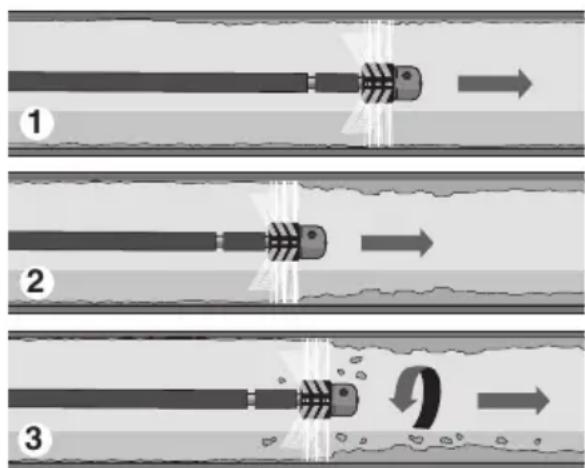
Figure 13 – Cleaning Drain Walls With Brush
- Advance the brush (generally not rotating) into the drain.
- When the area to be cleaned is reached, if possible, start a flow of water through the drain to carry debris away during cleaning.
- Rotate the cable/brush at full speed and gradually advance the cable into the drain to clean the walls as desired.
Draining Drum
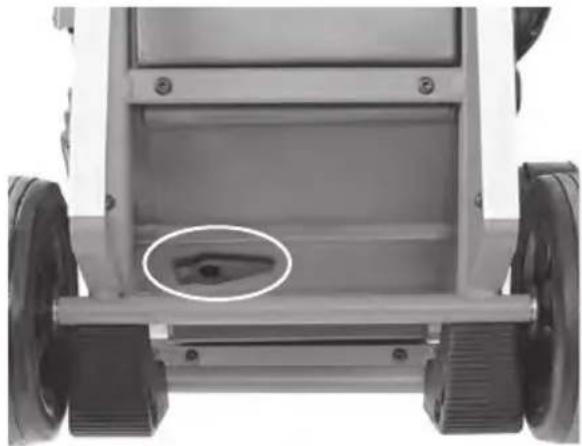
Open drain plug (Figure 14). Lean the machine back into the wheels and allow to drain. Close plug when finished.
natural_image
Front view of a wheeled vehicle chassis with visible wheels and a small circular component on the back (no text or symbols)Figure 14 – Drain Plug
Transportation
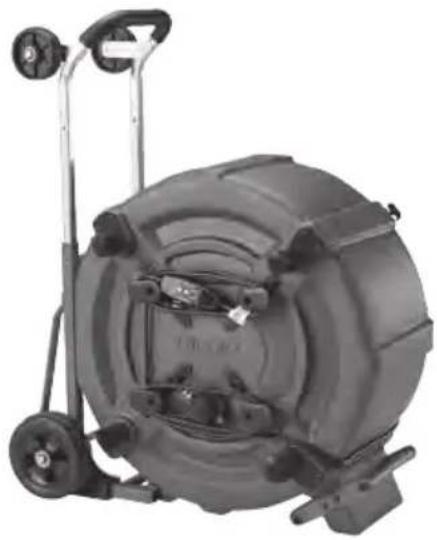
Feed all of cable assembly into the drum and secure the chain knocker with the clamp. Wrap cord and foot switch hose around the cord wrap. See Figure 15. Before moving the machine, make sure that the telescoping handle is secured into the extended position for transport. If the machine needs to be lifted, use proper lifting techniques. Use care moving equipment on stairs, and be aware of possible slip hazards.
natural_image
Mechanical device with wheels and a cylindrical housing, no visible text or symbolsFigure 15 – Preparing for Transport
Loading
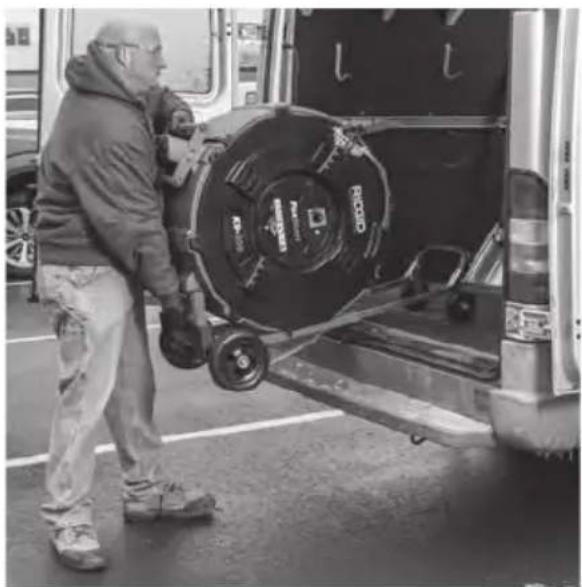
With the telescoping handle locked into the extended position, place machine with wheels toward the vehicle. Lean the machine back and rest the loading wheels on the vehicle bed. Use loading handles (Figure 16) to lift the machine and slide it onto the vehicle (Figure 17). Be aware of the machine weight. Use proper lifting techniques – more than one person may be required.
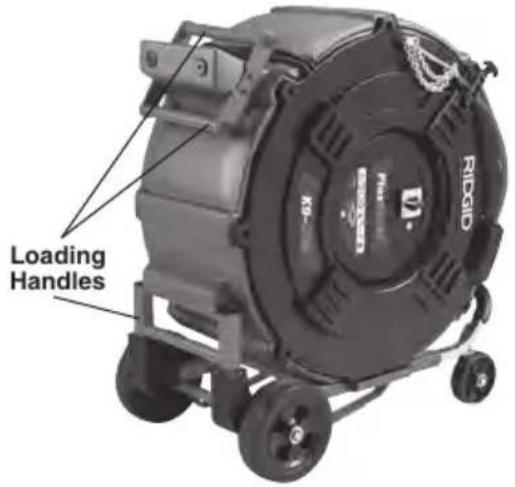
Figure 16 – One Transport Method
natural_image
Man loading a large cylindrical object into a vehicle, no visible text or symbolsFigure 17 – Lifting Unit Onto Vehicle
Storage
⚠ WARNING The Drain Cleaning Machine must be kept dry and indoors or well covered if kept outdoors. Store the machine in a locked area that is out of reach of children and people unfamiliar with drain cleaning machines. This machine can cause serious injury in the hands of untrained users.
Maintenance Instructions
WARNING
REV/O-OFF/FOR switch should be O-OFF and machine unplugged before performing any maintenance.
Always wear safety glasses and other appropriate protective equipment when performing any maintenance.
Cleaning
It is good practice to use a towel to wipe dirt and debris from the sheath as the cable assembly is pulled from the drain and fed back into the drum. This will help to keep the drum clean and reduce the likelihood of the cable assembly sticking in the drum. If needed, cable assembly can be pulled from the machine and the housing opened for flushing/cleaning.
Clean the machine as needed with hot soapy water and/or mild disinfectants.
Do not submerge or flush the machine with water. Do not allow water to enter motor or other electrical components. Make sure unit is completely dry before plugging in and using.
Lubrication
The FlexShaft Drain Cleaning Machines are lubricated for life from the factory.
Cable Re-termination
The FlexShaft cable cannot be shortened or re-terminated. If the cable is damaged, it must be replaced. Do not use a damaged cable.
Cable Assembly Replacement
- Remove chain knocker from cable assembly.
- Use a 4 mm hex wrench to loosen the front cover fasteners (they are retained to the cover and frame). Lift the cover and unplug the motor wire connector (Figure 18). Feed cable through bushing into machine. Remove the front cover.
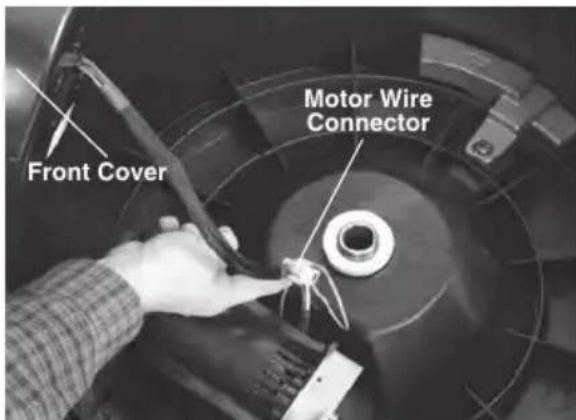
Figure 18 – Drain Cleaner Housing Opened
- Loosen sheath clamp screws (Figure 19 A) two turns, but do not remove.
- Remove the cable retention clamp fasteners and retention clamp (Figure 19).
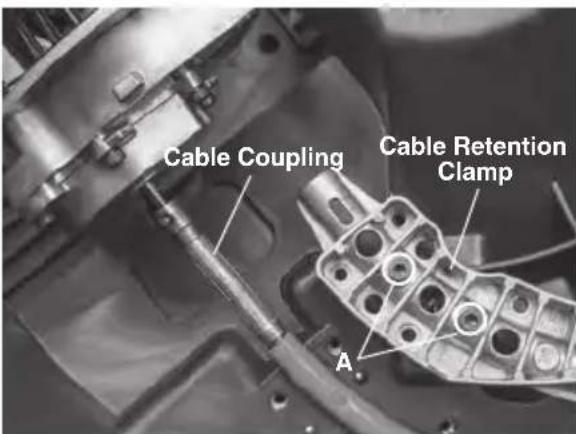
Figure 19 – Cable Installation
-
Remove the retaining ring and pin from the cable coupling.
-
Disconnect coupling from the gearbox shaft. Remove the entire cable assembly from the machine.
- Insert cable coupling through the drum channel and install the coupling over the gearbox shaft. Securely install the pin and retaining ring. Do not load cable yet.
- Slide end of cable retention clamp over the cable and into the drum channel.
- Loosely install the 4 cable retention clamp fasteners (see Figure 19). Make sure that the cable sheath is within 14 " (6.4 mm) of the cable coupling. When looking through the viewport, the end of the sheath must be between the lines (see Figure 20).
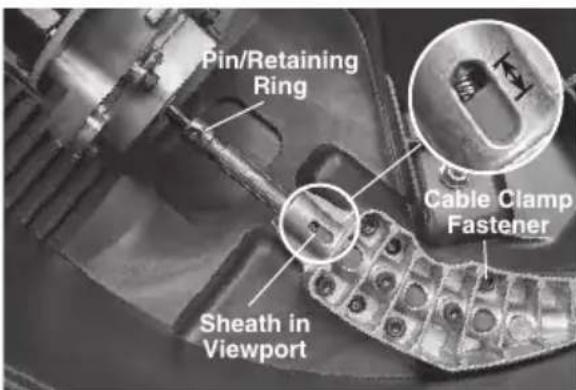
Figure 20 – Sheath Position In Viewport
-
Securely tighten all clamp fasteners.
-
Confirm end of sheath is between the lines in the viewport. Securely tighten the sheath clamp screws.
-
Feed the cable into the drum channel.
-
Feed the end of the cable through the cable bushing in the front cover and securely install the front cover.
-
With no knocker installed, hold cable end away from your body or others. Run machine in REVERSE for 5 seconds to maximize exposed cable. Place switch in O-OFF position and unplug machine.
If there is no cable exposed, cut back sheath to expose 1"-2" (25 - 50 mm) of cable. Hold sheath and pull on cable to remove slack and expose the maximum amount of cable. Cut the sheath back to expose 7 3/4" (197 mm) of cable measured from the end of the cable.
Go to Installing/Adjusting the Chain Knocker section, step 5 to complete chain knocker installation.
Motor Brush Inspection/Change
Brushes should be inspected every 6 months and changed when shorter than 12 " (13 mm).
- See Cable Assembly Replacement, step 2 to remove cover.
- Use a screwdriver to remove the brush cover, Figure 21. Remove brush and inspect. If there are any signs of damage or shorter than 12 " (13 mm), replace brushes.
- Reverse process to reassemble.
- Place chain knocker in drain and allow to run 15 minutes in FORWARD and REVERSE, to break in brushes.
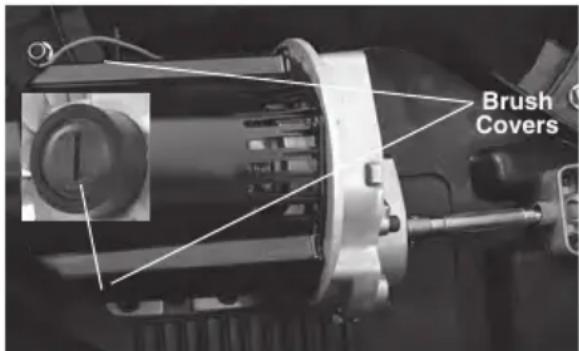
Figure 21 – Inspecting/Changing Motor Brushes
Electronic Torque Limiter/Motor Thermal Overload
The machine is equipped with an Electronic Torque Limiter/Motor Thermal Overload. If the motor draws excessive current, the motor will shut off to reduce the likelihood of cable damage and the Electronic Torque Limiter LED will flash. Release the foot switch to allow the motor to restart. See the Operating Instructions section for information for removing the cable from a blockage.
If the Electronic Torque Limiter LED is on continuously, the motor has overheated. To reset the thermal overload, unplug machine, turn the REV/O-OFF/FOR switch to the O-OFF position and let the machine cool for at least 15 minutes. If the machine will not start or continuously trips during normal operation, take machine for service.
Troubleshooting
| SYMPTOM POSSIBLE REASON SOLUTION | ||
| Cable kinking or breaking. | Cable assembly is being forced. | Do not force cable assembly. Follow operating instructions. |
| Incorrect FlexShaft Machine or chain knocker used for pipe diameter. | Use correct FlexShaft Machine or chain knocker for pipe size. | |
| Cable assembly exposed to acid/ corroded. | Clean cable assembly routinely. | |
| Cable/sheath worn out. | Replace worn cable assembly. | |
| Cable assembly not properly supported. | Support cable assembly properly, see instructions. | |
| Chain knocker not properly set up/ adjusted. | Properly set up/adjust chain knocker, see instructions. | |
| Cable turns in one direction but not the other. | Faulty REV/O-OFF/FOR switch. | Have switch replaced. Take for service. |
| Ground Fault Circuit Interrupter (GFCI) trips when machine is plugged in. | Damaged power cord. | Have cord replaced. Take for service. |
| Short circuit in motor. | Take for service. | |
| Faulty Ground Fault Circuit Interrupter (GFCI). | Have cord replaced. Take for service. | |
| Moisture in motor, switch box or on plug. | Take for service.. | |
| FlexShaft Machine wobbles or moves while cleaning drain. | Ground not level. | Operate in a clear, level and stable location. |
| Motor does not turn on with switch. | GFCI needs to be reset. | Reset GFCI. |
| Motor has overheated. Electronic torque limiter LED ON. | See “Motor Thermal Overload”. | |
| Electronic torque limiter LED flashing. | See “Electronic TorqueLimiter” | |
Service and Repair
WARNING
Improper service or repair can make the machine unsafe to operate.
The "Maintenance Instructions" will take care of most of the service needs of this machine. Any problems not addressed by this section should only be handled by a RIDGID Authorized Independent Service Center. Use only RIDGID service parts.
For information on your nearest RIDGID Authorized In depen dent Service Center or any service or repair questions see Contact Information section in this manual.
Optional Equipment
WARNING
To reduce the risk of serious injury, only use accessories specifically de-
signed and recommended for use with the RIDGID FlexShaft Drain Cleaning Machine, such as those listed.
| Catalog No. | Description |
| 66618Knocker, | 38 " cable, 3" pipe, 3 chain |
| 66623Knocker, | 78 " cable, 4" pipe, 3 chain |
| 66628Knocker, | 38 " cable, 6" pipe, 3 chain |
| 66633 | Knocker, 78 " cable, 3" pipe, 3 chain, carbide tip |
| 66638Knocker, | 58 " cable, 4" pipe, 3 chain, carbide tip |
| 66643Knocker, | 18 " cable, 6" pipe, 3 chain, carbide tip |
| 66648Knocker, | 78 " cable, 3" pipe, 3 chain, carbide w/penetrating head |
| 66653Knocker, | 78 " cable, 4" pipe, 3 chain, carbide w/penetrating head |
| 66658Knocker, | 38 " cable, 6" pipe, 3 chain, carbide w/penetrating head |
| 64338 FlexShaft Lubricant, 8 oz, 12 per case | |
| 66663 | 38 " Assembly, cable, sheath, couplings, 125' |
| 66668 | FlexShaft 38 " sheath stock, 12" |
For a complete listing of RIDGID equipment available for these tools, see the Ridge Tool
Cata log online at RIDGID.com or see Contact Information.
Disposal
Parts of these tools contain valuable materials and can be recycled. There are companies that specialize in recycling that may be found locally. Dispose of the components in compliance with all applicable regulations. Contact your local waste management authority for more information.
For EC Countries: Do not dispose of electrical equipment with household waste!
According to the European Guideline 2012/19/EU for Waste Electrical and Electronic Equipment
and its implementation into national legislation, electrical equipment that is no longer usable must be collected separately and disposed of in an environmentally correct manner.
Poids.....166 lbs. (75 kg)
Dimensions ....36,1" × 32,5" × 20,5" (918 mm × 826 mm × 521 mm) poignée repliée
natural_image
Man working on a mechanical device in a workshop (no visible text or symbols)natural_image
Man working on a mechanical device in a workshop (no visible text or symbols)Figure 11 – Lubrification de la gaine de câble
natural_image
Diagram of a mechanical component with a curved spring-like structure and an arrow indicating direction (no text or symbols)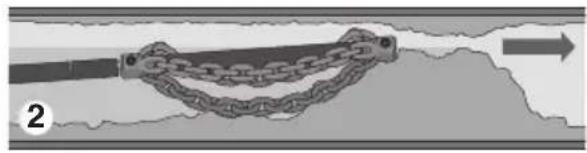
natural_image
Diagram of a chain link being pulled into a cable, with an arrow indicating direction (no text or symbols)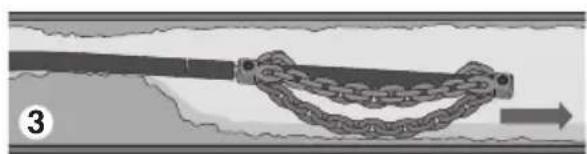
natural_image
Diagram of a chain link being twisted with a directional arrow, no text or symbols presentnatural_image
Mechanical linkage diagram with chain and loop components (no text or symbols)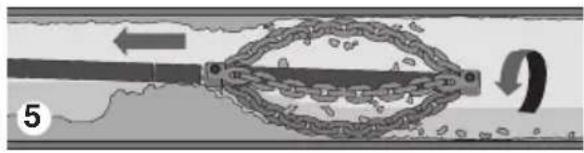
natural_image
Diagram of a mechanical or electrical component with a chain and directional arrow, no visible text or symbols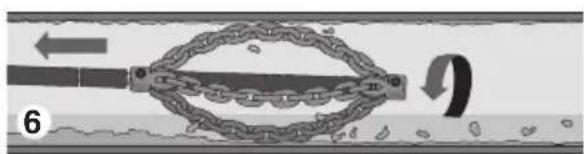
natural_image
Diagram of a chain link mechanism inside a pipe, showing motion and movement (no text or symbols)natural_image
Front view of a wheeled vehicle chassis with visible wheels and a small circular mark on the front wheel (no text or symbols)Figure 14 – Robinet de vidage
Transport
natural_image
Mechanical device with wheels and a central component, no visible text or symbolsFigure 15 – Préparation au transport
Chargement
natural_image
Mechanic working on a large industrial machine in a workshop (no visible text or symbols)natural_image
Close-up of a mechanical impeller or blade with multiple blades radiating from a central hub (no text or symbols visible)Escobilla sola
natural_image
Close-up of a bird's head with wings spread, no visible text or symbolsnatural_image
Illustration of a dragonfly with wings and tail feathers (no text or symbols)natural_image
Mechanic working on a large cylindrical device in a workshop (no visible text or symbols)natural_image
Diagram of a mechanical component with a curved base and arrow indicating direction (no text or symbols)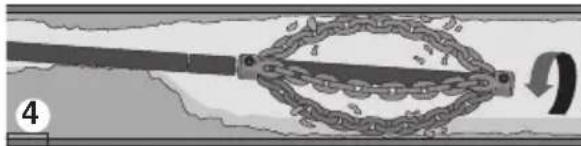
natural_image
Mechanical diagram showing a chain link mechanism with a rotating arrow (no text or symbols)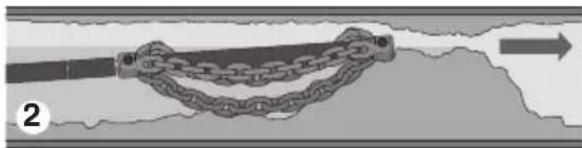
natural_image
Diagram of a chain link between two vertical bars, with an arrow indicating direction (no text or symbols)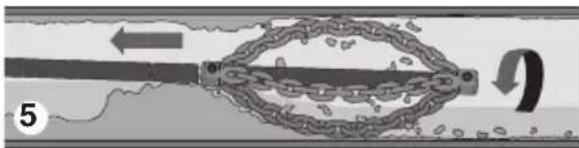
natural_image
Diagram of a chain link mechanism with directional arrows and a curved arrow, no text or symbols present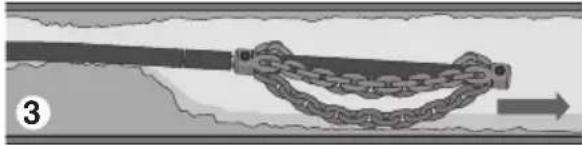
natural_image
Diagram of a chain link being twisted with a string, showing rope deformation (no text or symbols)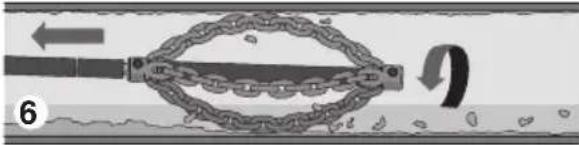
natural_image
Diagram of a chain link device with a rotating arm and textured base, no text or symbols presentnatural_image
Front view of a wheeled vehicle chassis with visible wheels and a small circular component (no text or symbols)natural_image
Mechanical device with attached cart and wheels, no visible text or symbolsnatural_image
Black-and-white photo of a man loading a large cylindrical object onto a vehicle, no visible text or symbolsUKCA DECLARATION OF CONFORMITY
We declare that the machines listed above, when used in accordance with the operator's manual, meet the relevant requirements of the Directives and Standards listed below.
What is covered
RIDGID® tools are warranted to be free of defects in workmanship and material.
How long coverage lasts
This warranty lasts for the lifetime of the RIDGID® tool. Warranty coverage ends when the product becomes unusable for reasons other than defects in workmanship or material.
How you can get service
To obtain the benefit of this warranty, deliver via prepaid transportation the complete product to RIDGID c/o Emerson Professional Tools, LLC in, Elyria, Ohio or any RIDGID® AUTHORIZED INDEPENDENT SERVICE CENTER. Pipe wrenches and other hand tools should be returned to the place of purchase.
What we will do to correct problems
Warranted products will be repaired or replaced, at RIDGID's option, and returned at no charge; or, if after three attempts to repair or replace during the warranty period the product is still defective, you can elect to receive a full refund of your purchase price.
What is not covered
Failures due to misuse, abuse or normal wear and tear are not covered by this warranty. Seller is not responsible for any incidental or consequential damages.
How local law relates to the warranty
Some states do not allow the exclusion or limitation of incidental or consequential damages, so the above limitation or exclusion may not apply to you. This warranty gives you specific rights, and you may also have other rights, which vary, from state to state, province to province, or country to country.
No other express warranty applies
This FULL LIFETIME WARRANTY is the sole and exclusive warranty for RIDGID ^® products. No employee, agent, dealer, or other person is authorized to alter this warranty or make any other warranty on behalf of the RIDGE TOOL COMPANY.
To obtain further warranty information on your product please visit www.RIDGID.com/us/en/warranty

Parts are available online at Store.RIDGID.com
RIDGID
Emerson Professional Tools, LCC
400 Clark Street
Elyria, Ohio 44035-6001
U.S.A.
Ce qui est couvert


- Model K9-306 FlexShaft™ Drain Cleaning Machine
- General Power Tool Safety Warnings
- WARNING!
- Safety Symbols
- DANGER
- WARNING
- CAUTION
- NOTICE
- General Power Tool Safety Warnings\*
- SAVE ALL WARNINGS AND INSTRUCTIONS FOR FUTURE REFERENCE!
- Work Area Safety
- Electrical Safety
- Personal Safety
- Power Tool Use and Care
- Service
- Specific Safety Information
- FlexShaft™ Drain Cleaning Machine Safety
- RIDGID Contact Information
- Description
- Specifications
- Standard Equipment
- Pre-Operation Inspection
- Machine and Work Area Set-up
- Installing/Adjusting Chain Knocker
- Installing Brushes
- Installing Penetrating Head
- Operating Instructions
- NOTICE Do not allow the spinning chain knocker to hit the camera head/push rod. It can damage it.
- Using Machine With Brushes
- Draining Drum
- Transportation
- Loading
- Storage
- Maintenance Instructions
- Always wear safety glasses and other appropriate protective equipment when performing any maintenance.
- Cleaning
- Lubrication
- Cable Re-termination
- Cable Assembly Replacement
- Motor Brush Inspection/Change
- Electronic Torque Limiter/Motor Thermal Overload
- Service and Repair
- Improper service or repair can make the machine unsafe to operate.
- Optional Equipment
- Disposal
- Transport
- Chargement
- UKCA DECLARATION OF CONFORMITY
- What is covered
- How long coverage lasts
- How you can get service
- What we will do to correct problems
- What is not covered
- How local law relates to the warranty
- No other express warranty applies
- RIDGID
- Emerson Professional Tools, LCC
- Ce qui est couvert
Brand : RIDGID
Model : FlexShaft K9306
Category : Drain cleaning machine