 ManualGo.com
IAN 331828 - Lighting Livarno Lux - Free user manual and instructions
Find the device manual for free IAN 331828 Livarno Lux in PDF.



Download the instructions for your Lighting in PDF format for free! Find your manual IAN 331828 - Livarno Lux and take your electronic device back in hand. On this page are published all the documents necessary for the use of your device. IAN 331828 by Livarno Lux.
USER MANUAL IAN 331828 Livarno Lux
/ LED DESK LAMP WITH
Operation and safety notes
/ LED DESK LAMP WITH
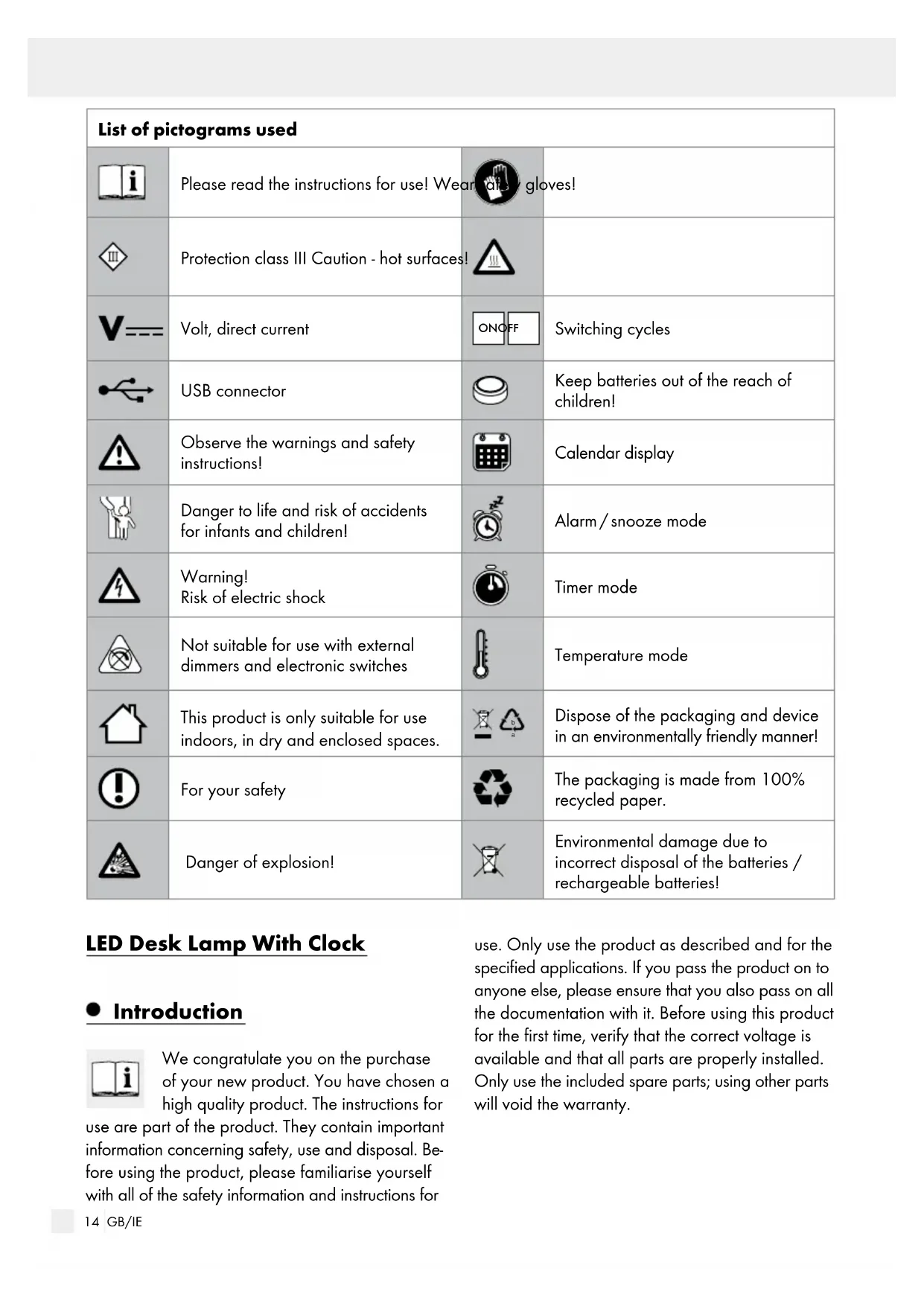
Dispose of the packaging and device in an environmentally friendly manner! For your safety The packaging is made from 100% recycled paper. Danger of explosion! Environmental damage due to incorrect disposal of the batteries / rechargeable batteries! LED Desk Lamp With Clock Introduction We congratulate you on the purchase of your new product. You have chosen a high quality product. The instructions for use are part of the product. They contain important information concerning safety, use and disposal. Be- fore using the product, please familiarise yourself with all of the safety information and instructions for use. Only use the product as described and for the specified applications. If you pass the product on to anyone else, please ensure that you also pass on all the documentation with it. Before using this product for the first time, verify that the correct voltage is available and that all parts are properly installed. Only use the included spare parts; using other parts will void the warranty.15 GB/IE Introduction / Safety Intended use This product is only suitable for use indoors, in dry and enclosed spaces. This device is intended for private household use only. This product is not suitable for use as room lighting or as a nightlight. Delivery contents Check that all the parts are present and that the device is in perfect condition immediately after unpacking. 1 LED Desk Lamp With Clock 14137006L / 14137005L 1 Micro-USB cable 1 Button cell battery, type CR2032 1 Set of instructions for use Parts description
Day of the week display
Down button Technical data Lamp: Model no.: 14137006L / 14137005L Illuminant: 18 LEDs (non-replaceable) Battery: 1 Button cell, type CR2032 USB input: 5 V / 2 A Operating voltage: SELV 5 V Rated power: LED max. 4 W Protection class: III / Charging time: approx. 2 hours Lighting time: approx. 1.5 hours LED: Rated power: max. 3.1 W (non-replaceable) Safety Safety instructions Damage due to failure to comply with these instruc- tions for use will void the warranty! We assume no liability for consequential damages! We assume no liability for property damage or personal injury due to improper handling or failure to observe the safety instructions! DANGER TO
LIFE AND RISK OF ACCIDENTS
FOR INFANTS AND CHILDREN! Never leave children alone and unsupervised with the packaging material. The packaging material poses a suffocation hazard. Children frequently underestimate the dangers. This device may be used by children aged 8 years and up, as well as by persons with re- duced physical, sensory or mental capacities, or lacking experience and/or knowledge, so long as they are supervised or instructed in the safe use of the device and understand the as- sociated risks. Do not allow children to play with the device. Cleaning and user maintenance must not be performed by children without supervision. RISK OF INJURY! Do not leave the lamp or the packaging material lying unattended. Plastic film/bags, plastic parts, etc. are dangerous for children to play with. Avoid the risk of fatal injury from electric shock Always check the Micro-USB cable and the lamp for damage before charging the lamp. Introduction16 GB/IE Safety / Set-upSafety Never use the lamp if it shows any signs of damage. To avoid hazards, if the external flexible lead on this lamp is damaged it must be replaced by the manufacturer, their service representative or an equivalent professional! The illuminant in this lamp is not replaceable; if the illuminant reaches the end of its life, replace the entire lamp. In the event of damage, repairs or other prob- lems with the lamp, please contact the service centre or an electrician. Never open any of the electrical equipment (e.g. switches, fitting socket etc.) or insert any objects into this equipment. This will pose a risk of fatal injury from electric shock. Before use, verify that the available mains voltage corresponds to the required operating voltage of the lamp (see “Technical data“). Disconnect the Micro-USB cable from the lamp before assembling, dismantling or cleaning. This lamp is not suitable for use with external dimmers and electronic switches! For your safety Position the lamp so it is protected from mois- ture and dirt. Always be attentive! Always pay attention to what you are doing and always proceed with caution. Do not cover the lamp with objects. Excessive heat build-up can result in fire. Do not look into the LEDs from a close distance during operation. Do not look at the LEDs with an optical instru- ment (e.g. magnifying glass). Never install the light if you are having diffi- culty concentrating or do not feel well. Safety instructions for batteries / rechargeable batteries
KEEP BATTERIES OUT OF
THE REACH OF CHILDREN! Swallowing batteries can cause chemical burns, perforation of soft tissue, and death. Severe burns may occur within 2 hours of swallowing batteries. Seek immediate medical attention. DANGER TO LIFE! Keep batteries / rechargeable batteries out of reach of children. If accidentally swallowed seek immediate medical attention. DANGER OF EXPLOSION! Never recharge non-rechargeable batteries. Do not short-circuit batteries / rechargeable batteries and / or open them. Overheating, fire or burst- ing can be the result. Never throw batteries / rechargeable batteries into fire or water. Do not exert mechanical loads to batteries / rechargeable batteries. Risk of leakage of batteries / rechargeable batteries Avoid extreme environmental conditions and temperatures, which could affect batteries / rechargeable batteries, e.g. radiators / direct sunlight. If batteries / rechargeable batteries have leaked, avoid contact with skin, eyes and mucous mem- branes with the chemicals! Flush immediately the affected areas with fresh water and seek medical attention! WEAR PROTECTIVE GLOVES! Leaked or damaged batteries / rechargeable batteries can cause burns on contact with the skin. Wear suitable protective gloves at all times if such an event occurs.17 GB/IE Safety / Set-up In the event of a leakage of batteries / recharge- able batteries, immediately remove them from the product to prevent damage. Only use the same type of batteries / recharge- able batteries. Do not mix used and new bat- teries / rechargeable batteries. Remove batteries / rechargeable batteries if the product will not be used for a longer period. Risk of damage of the product Only use the specified type of battery / re- chargeable battery! Insert batteries / rechargeable batteries accord- ing to polarity marks (+) and (-) on the battery / rechargeable battery and the product. Clean the contacts on the battery / rechargeable battery and in the battery compartment before inserting! Remove exhausted batteries / rechargeable batteries from the product immediately. Set-up Note: Remove all packaging material from the product. Position the lamp on a flat surface. To activate the lamp‘s LC display
, remove the insulating strip on the battery compartment
. A melody will then sound. To activate the reflector light, the lamp must first be charged using the Micro-USB cable. Charge the lamp by inserting one end of the Micro-USB cable into the USB port
and the other end of the Micro-USB cable into a USB adapter. Switching the lamp on / off Switch the lamp on or off using the On / Off touch button
Dimming the lamp You can dim the lamp in three stages. The brightest stage is activated automatically when you switch on the lamp. By repeatedly pressing the On / Off touch button
the lamp can be dimmed in 3 stages and switched off again. Switching the LC display lighting on / off Switch the lighting on the LC display
. (A quick touch is sufficient.) Functions Time mode: Displays time, date, week, temperature; 12 / 24 hour format (AM = morning, PM = evening) Alarm/ snooze mode: Set the alarm time and select alarm signals; snooze function can also be operated at the same time Timer mode: Set time will be counted down Temperature mode: Automatic display of the current temperature: us- ing the set button
you can select either °C or °F. Safety18 GB/IE Settings / Changing the battery / Maintenance and cleaning / DisposalSettings Settings Press the mode button
to switch between different functions: Output format 12/ 24 hour format Alarm mode Timer mode Note: If no button has been pressed for one minute, the LC display
to set the desired for- mat using the up button
once more to confirm your entry. Enter the information in the following order: 12 hour display hour minute Year Month Day The following adjustment range is available: years between 2000 and 2099, months be- tween 1 and 12, days between 1 and 31, hours between 1 and 12 or 0 and 23, minutes be- tween 0 and 59. When setting the hours and minutes the seconds are automatically deleted. The week will change automatically when the date has been set. Press the mode button
twice in the output format to configure the alarm / snooze mode. Press the set button
to set the desired time and alarm melody or alarm tone using the up button
Note: You have the option of switching be- tween 7 alarm melodies and 2 alarm tones. Press the set button
again to confirm your entry. Enter the information in the following order: Hours minutes music Press the up button
in the output format to activate the snooze function. Press the up button
again to deactivate the snooze function. When the alarm sounds press any button to end the alarm. If the snooze function has been activated, then the alarm will sound four times and the snooze display will flash in the LC dis- play
to deactivate the snooze function. The snooze display will disappear. Press the mode button
twice in the output format to configure the alarm / snooze mode. Press the SET button
five times to deactivate the alarm. Note: If no button has been pressed for one minute, the LC display
four times in the output format to configure the timer mode. Press the set button
to set the desired time using the up button
again to confirm your entry. The timer will begin (countdown from the set time).19 GB/IE Settings / Changing the battery / Maintenance and cleaning / Disposal Enter the information in the following order: hour minute time interval The following adjustment range is available: hours between 0 and 23, minutes between 0 and 59. When the set time has expired, a melody will sound. To end the melody press any button. Temperature mode Press the set button
in the output format to switch between °C and °F. Music playback Press the down button
in the output format to play back music. You can choose between seven songs. Changing the battery (fig. D) Open the battery compartment
by turning the battery cap anticlockwise using a coin. Remove the old battery and replace this with a new battery (see “Technical data“). Please note the polarity when inserting the battery. This is indicated in the battery compartment
A melody will sound. To end the melody press any button. Turn the battery cap clockwise onto the battery compartment
using a coin to close it. Maintenance and cleaning Note: The device is maintenance-free. The LEDs cannot be replaced.
SHOCK! For electrical safety, never clean the lamp with water or other liquids, nor immerse it in water.
CAUTION! RISK OF BURNS DUE TO
HOT SURFACES! Allow the lamp to cool down completely. Do not use solvents, petrol, etc. Otherwise the lamp will be damaged. Remove the Micro-USB cable from the power supply and the lamp. Only clean with a dry, lint-free cloth. Disposal