EasyManual
P3110 - Guitar amp IBANEZ - Free user manual and instructions
Find the device manual for free P3110 IBANEZ in PDF.



User questions about P3110 IBANEZ
0 question about this device. Answer the ones you know or ask your own.
Ask a new question about this device
Download the instructions for your Guitar amp in PDF format for free! Find your manual P3110 - IBANEZ and take your electronic device back in hand. On this page are published all the documents necessary for the use of your device. P3110 by IBANEZ.
USER MANUAL P3110 IBANEZ
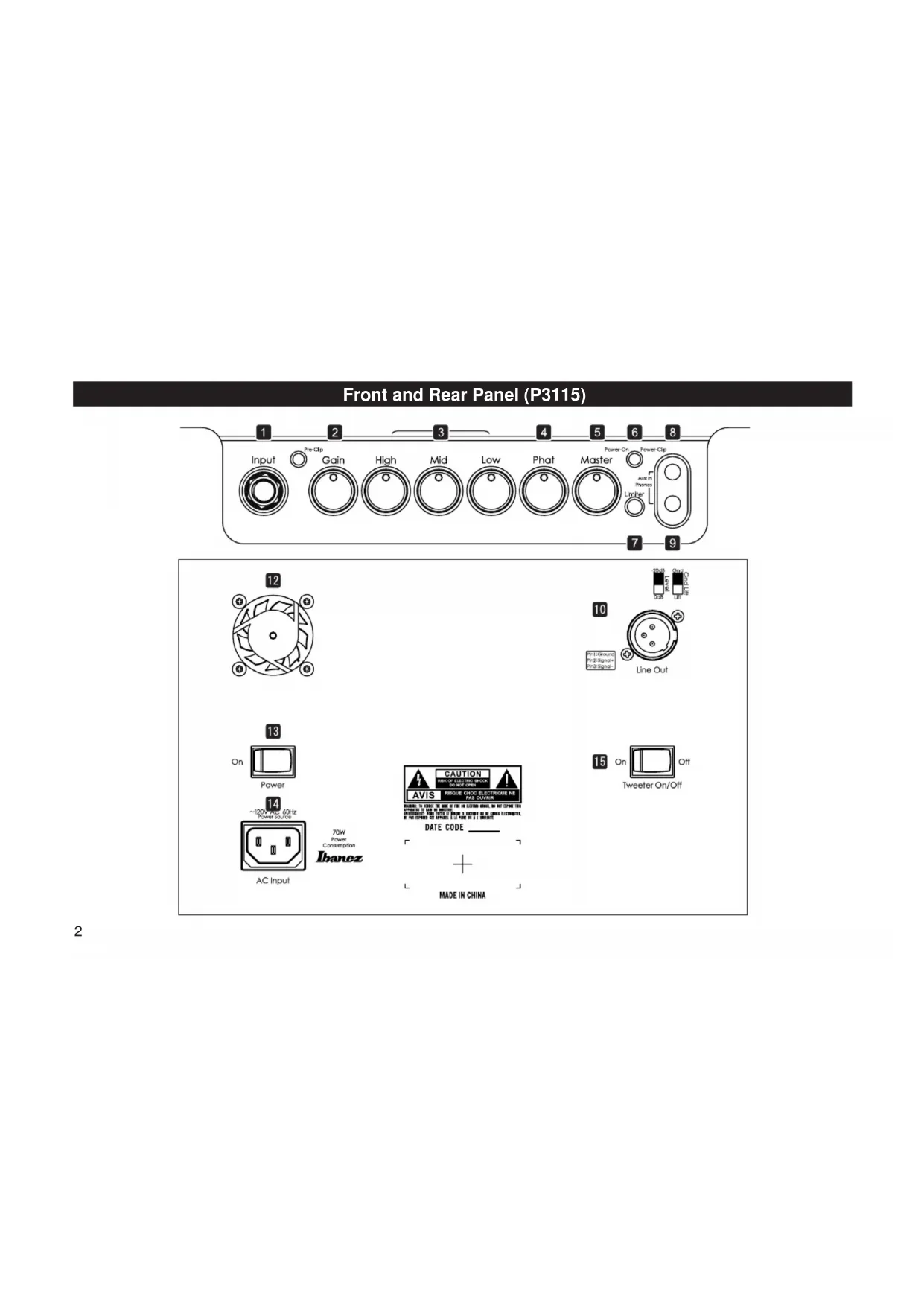
Front and Rear Panel (P300H)2 Front and Rear Panel (P3115)3 SA5213 ENGLISH Foreword Thank you for purchasing the Ibanez product. Read this manual thor- oughly prior to using your amplifier in order to get the most out of the functions available. Ensure that this manual is also stored in a safe place. Important Safety Instructions
1) Read these instructions.
2) Keep these instructions.
3) Heed all warnings.
4) Follow all instructions.
5) Do not use this apparatus near water.
6) Clean only with a dry cloth.
7) Do not block any ventilation openings. Install in accordance with
the manufacturer’s instructions.
8) Do not install near any heat sources such as radiators, heat regis-
ters, stoves, or other apparatus (including amplifiers) that produce heat.
9) Do not defeat the safety purpose of the polarized or grounding-type
plug. A polarized plug has two blades with one wider than the oth- er. A grounding type plug has two blades and a third grounding prong. The wide blade or the third prong are provided for your safe- ty. If the provided plug does not fit into your outlet, consult an elec- trician for replacement of the obsolete outlet.
10) Protect the power cord from being walked on or pinched particu-
larly at plugs, convenience receptacles, and the point where they exit from the apparatus.
11) Only use attachments/accessories specified by the manufacturer.
12) Use only with the cart, stand, tripod, bracket, or table
specified by the manufacturer, or sold with the ap- paratus. When a cart is used, use caution when mov- ing the cart/apparatus combination to avoid injury from tipover.
13) Unplug this apparatus during lightning storms or when unused for
long periods of time.
14) Refer all servicing to qualified service personnel. Servicing is re-
quired when the apparatus has been damaged in any way, such as power-supply cord or plug is damaged, liquid has been spilled or objects have fallen into the apparatus, the apparatus has been ex- posed to rain or moisture, does not operate normally, or has been dropped.
15) Minimum distance of 20 cm around the apparatus for sufficient
16) Do not install this equipment in a confined space such as a book
case or similar unit. The ventilation should not be impeded by cov- ering the ventilation openings with items such as newspaper, table- cloths, curtains etc.
17) WARNING: The mains plug/appliance coupler is used as discon-
nect device, the disconnect device shall remain readily operable.
18) WARNING: To reduce the risk of fire or electric shock, do not ex-
pose this apparatus to rain or moisture. The apparatus shall not be exposed to dripping or splashing and that no objects filled with liq- uids, such as vases, shall not be placed on apparatus.
19) This apparatus shall be connected to a mains socket outlet with a
protective earthing connection.
- “TheLightningFlashwitharrowheadsymbolwithinanequilateral triangle, is intended to alert the user to the presence of uninsulated “dangerousvoltage”withintheproductenclosurethat maybeof sufficientmagnitudetoconstituteariskofshocktopersons”.
- “Theexclamationpointwithinanequilateraltriangleisintendedto alert the user to the presence of important operating and mainte- nance (servicing) instructions in the literature accompanying the product”.4 ENGLISH Precautions during use
1) This product is capable of producing extremely high volumes. In
some cases, this could damage your hearing or cause other bodily impairment. You must be careful of the volume when using this product.
2) Use this product with a power supply of the voltage that is printed
3) Place this product near the main power outlet, and ensure that the
main power plug can be easily disconnected from the main power outlet if any problem should occur.
4) This device contains a fuse for protection. The fuse may be broken
due to external physical shock or because it has reached the end of its lifetime, but since a broken fuse may indicate that a serious internal malfunction has occurred, please contact your dealer be- fore replacing the fuse.
5) When you are not using it, leave the power turned off. If you will not
be using this product for an extended period, leave the power cable disconnected.
6) Do not turn off the power switch or disconnect the plug from the AC
outlet while the device is operating. Doing so may cause malfunc- tions.
7) Do not stand on this device or place heavy objects on it. Doing so
may cause breakage or malfunctions. Cautions regarding location
8) Secure the provided power plug to mains socket-outlets that has a
protective ground terminal.
9) Do not place this device in locations where particularly low tem-
peratures might occur, such as walk-in coolers. The device may fail to operate correctly.
10) Do not place this device in locations subject to strong magnetic
fields, such as near a television or radio, or near any other device that emits electromagnetic radiation. This device may fail to oper- ate correctly under such conditions.
11) Do not place the device in locations subject to sudden temperature
changes If this device is in a cold room whose temperature is sud- denly raised, condensation may form inside the device, causing it to fail to operate correctly.
12) Do not place the device in locations of excessive dust or vibration.
Such conditions may cause damage or malfunction.
13) Depending on the location in which this device is placed, noise
may occur in a radio located nearby, or flickering or distortion may be seen in the screen of a nearby television. If you suspect that this device is responsible for these conditions, turn off the power switch of this device. If this causes the radio or television to return to nor- mal operation, try moving this device away from the radio or televi- sion, or change the orientation of the radio or television.5
ENGLISH Safety precautions You must carefully read these precautions before you begin using this device, and use the device only as directed.Afteryou’vereadtheseprecautions,keepthemwiththe“Owner’smanual”andthe“Warrantee.” Prevention of fire, electrocution, or injury About the graphic symbols indicates a caution (including a danger or warning). The spe- cific content of the caution is indicated inside the triangle. The graphic shown at left indicates a general caution, warning, or danger. indicates a prohibition (something you must not do). The spe- cific content of the prohibition is depicted inside the symbol. The graphic shown at left indicates that you must not disassem- ble the unit. indicates a compulsory action (something you are required to do). The specific requirement is depicted inside the symbol. If a foreign object enters this device If a metallic or flammable foreign object should enter the interior of this device through a jack or other opening, immediately turn off the power switch, disconnect the plug from the AC outlet, and contact the dealer from whom you purchased the device. Fire or electrocution may occur if you continue using the device in this condition. Do not disassemble or modify the device Do not open the cabinet of this device. This device contains high-voltage components, and touching them may produce electrical shock. Contact your dealer if interior inspection or servicing is required.Do not modify this device. Doing so may cause fire, electrical shock, or malfunctions. Do not place water or chemicals on the device To avoid the risk of fire or electrical shock, do not place flower vases, drinks, cosmetics, or containers of chemicals or water on top of this de-vice. Unplug from the AC outlet if lightning occurs If lightning occurs nearby, turn off the power switch, disconnect the plug fromtheACoutlet,andstopusingthedevice.Lightningcancausefireorelectrical shock. Do not place the device near flame or heat Do not allow this device or its power cable to be near heating equipment.Such a situation poses a risk that the cabinet or the power cable sheath-ing may melt, causing fire or electrical shock. Do not use the device at high volume levels for a long time Using the device at high volume levels through speakers for a long time may cause permanent hearing loss depending on the output volume set-ting. Do not place the device in locations of high humidity Do not use this device in locations of high humidity such as near a bath or humidifier, or in the rain, or near a body of water. Doing so may cause fire or electrical shock. Warnings If the device emits smoke Fire or electrocution may occur if you continue to use the device when it is behaving abnormally, such as emitting smoke or an unusual odor. Imme-diately turn off the power switch, disconnect the plug from the AC outlet, and contact the dealer from whom you purchased the device. Never at-tempt to repair the device yourself, since this can be hazardous. If the device breaks If you drop the device or if its cabinet is damaged, immediately turn off the power switch, disconnect the plug from the AC outlet, and contact the dealer from whom you purchased the device. Fire or electrocution may occur if you continue using the device in this condition.6
ENGLISH Do not block the cooling vents Since the rear of this device functions as a cooling vent, you must leave sufficient space between it and the wall. Blocking the cooling vent will cause heat to be trapped inside the device, possibly causing fire. Do not place the device in locations of high temperature Do not place this device in locations of high temperature, such as in direct sunlight or near equipment that produces heat, such as a stove or heater. Doing so will cause the internal temperature to rise, possibly causing fire. Do not subject the device to oil spatters or steam Do not place this device where it might be subjected to oil spatters or steam. This could cause fire or electrical shock. Use this device only with an AC outlet of the correct voltage You must use this device only with an AC outlet of the correct voltage as marked on the device itself. Fire or electrical shock may occur if you use this device with an AC outlet of the wrong voltage. Do not operate with wet hands Do not connect or disconnect the power cable while your hands are wet. You risk electrical shock if you do so. Handle the plug with caution When unplugging the cable, be sure to grasp the plug itself. If you unplug the power cable by pulling the cable itself, you risk damaging the cable, possibly causing fire or electrical shock. Do not use “octopus-like” connections Do not use branching extension cords, power strips, or branching sockets tocreate“octopus-like”connectionsfromanACpoweroutlet.Doingso may cause fire or electrical shock. Handle the power cable with caution Do not allow the power cable to be scarred, damaged, modified, exces- sively bent, pulled, twisted, or bundled. If heavy objects are placed on the power cable or if it is subjected to heat, it may be damaged, possibly caus- ing fire or electrical shock. Please contact your dealer if the power cable becomes damaged. Use this device only in the country where you purchased it This device is designed for the AC power supply voltage of the country in which you purchased it; you cannot use it outside the country. Cautions Disconnect the power cable if you will be away If you won’t be using the device for an extended period of time, disconnect the plug from the AC outlet for safety. Do not drop the device or subject it to physical impact Do not drop this device or subject it to strong physical impact. Doing so may cause breakage or malfunctions. Do not place the device in an unstable location It may become unbalanced and tip over, causing damage or injury.7 ENGLISH Names and Function on Each Part
Use the following procedure to set optimal gain with the Master control set around 9 o’clock. 2-1. Set all other controls first. 2-2.SetGaincontroltoalevelinwhichthePre-ClipLEDjuststartstoillumi- nate when your hardest notes are played.
By turning the knob clockwise you will boost the low and high frequency range while scooping the middle frequency range. This is beneficial for a va- riety of sounds including slap bass. At its minimum position, the frequency response is flat.
After setting Gain control, adjust this control to the level you required. To avoidsignalclipping,monitorthePower-ClipLEDwhileadjusting.
3.5mm stereo mini jack. This jack is designed to be connected to the head- phone output of a portable CD or MP3 player, or similar device. Use the volume control of your portable player along with the volume control on the amp to adjust the desired volume.
3.5mm stereo mini output jack for stereo headphones. The sound is not re- producedthroughthebuilt-inspeakerwhenheadphonesareinuse.TheLIN- EOUT signal will still produce output.
This phones output can produce lots of volume. Ensure that the MASTER andAUXVOLUMEhasbeenturneddownbeforebeginningtoplayusingthe headphones, and then slowly increase the volume until it has reached the desired level. Note inserting or removing headphones at high volume levels may result in damage to the headphones and to the user’s hearing.8 ENGLISH
10-1.Level0dB/-20dB 10-2.GNDLift If a ground loop is causing hum, using this switch to disconnect the ground will reduce the hum.
11. Speaker Out (Only for P300H)
6.3mm(1/4”)Monauraljack *Caution: This amp is designed for a speaker cabinet rated at 4 Ohms or above. If you use a speaker cabinet that is less than 4 ohms, a protection circuit will shut down speaker output to avoid overheating. Also do not insert or pull out speaker cable while you are playing to avoid serious damage to the amp.
Cools the inside of the amp. Works only when the amp is hot.
When amp is not being used, it should be turned off.
Connect the included AC power cable to this connector. Only use this amp with the voltage indicated on the panel.
15. Tweeter (Only for P3115)
Turns on/off tweeter.9 ENGLISH Troubleshooting First check that your shielded guitar cable, speaker cable, and power cable are connected correctly. If possible, use a tester to check the cable or try using an alternate cable or amp to verify your cable’s condition.
1. The power supply cannot be switched on.
- Checkthatthepowercablehasbeenconnectedcorrectly.
- Trypluggingitintoadifferentsocketandseeifthesameproblemoccurs.
2. The power supply can be switched on, but no sound is
- Checkthatthebassguitarhasbeenconnectedcorrectly.
- Removeanyexternalcomponentsconnectedtotheeffectsloopandbetween the bass guitar and the amplifier and check to see if any sound is heard.
- Checktoseeiftherearebatteriesinthebassguitar.Ifthereare,checkthat they are OK.
- Checktoseeiftheheadphonesareconnected.
- Checktoseeifanythingintheimmediatevicinityisresonatingorbanging against the amplifier to produce the noise.
- Checktoseeiftheplugcoverontheshieldedcableisloose.
- Makesurethattheaction(stringheight)ofyourbassguitarissetcorrectly.
- Checktoseeifthebassguitarbatteriesaredepleted.
- Useanotherbassguitar,effectsorotherexternalcomponents,andcableto see if the same noise is produced. In case of defects This product has passed exhaustive inspections before being shipped from the factory. Ensure that the above procedures are carried out when a problem is thought to exist. Contact your dealer in the unlikely event that an abnormality oc- curs during use. Also, ensure that the symptoms of the problem are explained in detail when requesting repair in order to facilitate swift handling. Because of im- provements to this product, the specifications may change without notice.10