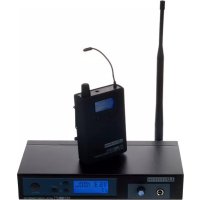
MEI 100 G2 - Earplug LD Systems - Free user manual and instructions
Find the device manual for free MEI 100 G2 LD Systems in PDF.



| Product Type | Wireless In-Ear Monitoring System |
| Brand | LD Systems |
| Model | MEI 100 G2 |
| Frequency Range | 823-832 and 863-865 MHz |
| Number of Channels | 96 (8 groups of 12 channels) |
| RF Link Type | FM stereo |
| Frequency Response | Transmitter/receiver: 80 Hz - 15 kHz; earphones: 30 Hz - 20 kHz |
| Signal-to-Noise Ratio | > 90 dB(A) |
| Distortion (THD) | 0.5% |
| RF Output Power (Transmitter) | 10 mW |
| Audio Output Power (Receiver) | 100 mW on 3.5 mm mini-jack |
| Audio Inputs (Transmitter) | 2 x Combo (XLR/6.35 mm jack) |
| Input Impedance | 100 kΩ |
| Transmitter Power Supply | External power supply 9-18 V DC, 300 mA |
| Receiver Power Supply | 2 LR06 (AA) batteries, battery life > 10 hours |
| Transmitter Dimensions (W x H x D) | 212 x 38 x 90 mm |
| Transmitter Weight | 0.57 kg |
| Receiver Dimensions (W x H x D) | 65 x 95 x 25 mm |
| Receiver Weight | 0.07 kg (without batteries) |
| Included Earphones | LDIEHP1, in-ear |
| Main Functions | LCD display, integrated limiter, mono/stereo modes, group/channel selection, volume control, RF indicator |
| Maintenance | Clean with a dry cloth |
| Safety | Do not open the device; use at moderate listening levels; observe voltage warnings |
| Repairability | No user-serviceable parts; contact an authorized service center |
Frequently Asked Questions - MEI 100 G2 LD Systems
User questions about MEI 100 G2 LD Systems
0 question about this device. Answer the ones you know or ask your own.
Ask a new question about this device
Download the instructions for your Earplug in PDF format for free! Find your manual MEI 100 G2 - LD Systems and take your electronic device back in hand. On this page are published all the documents necessary for the use of your device. MEI 100 G2 by LD Systems.
USER MANUAL MEI 100 G2 LD Systems
LDMEI100G²
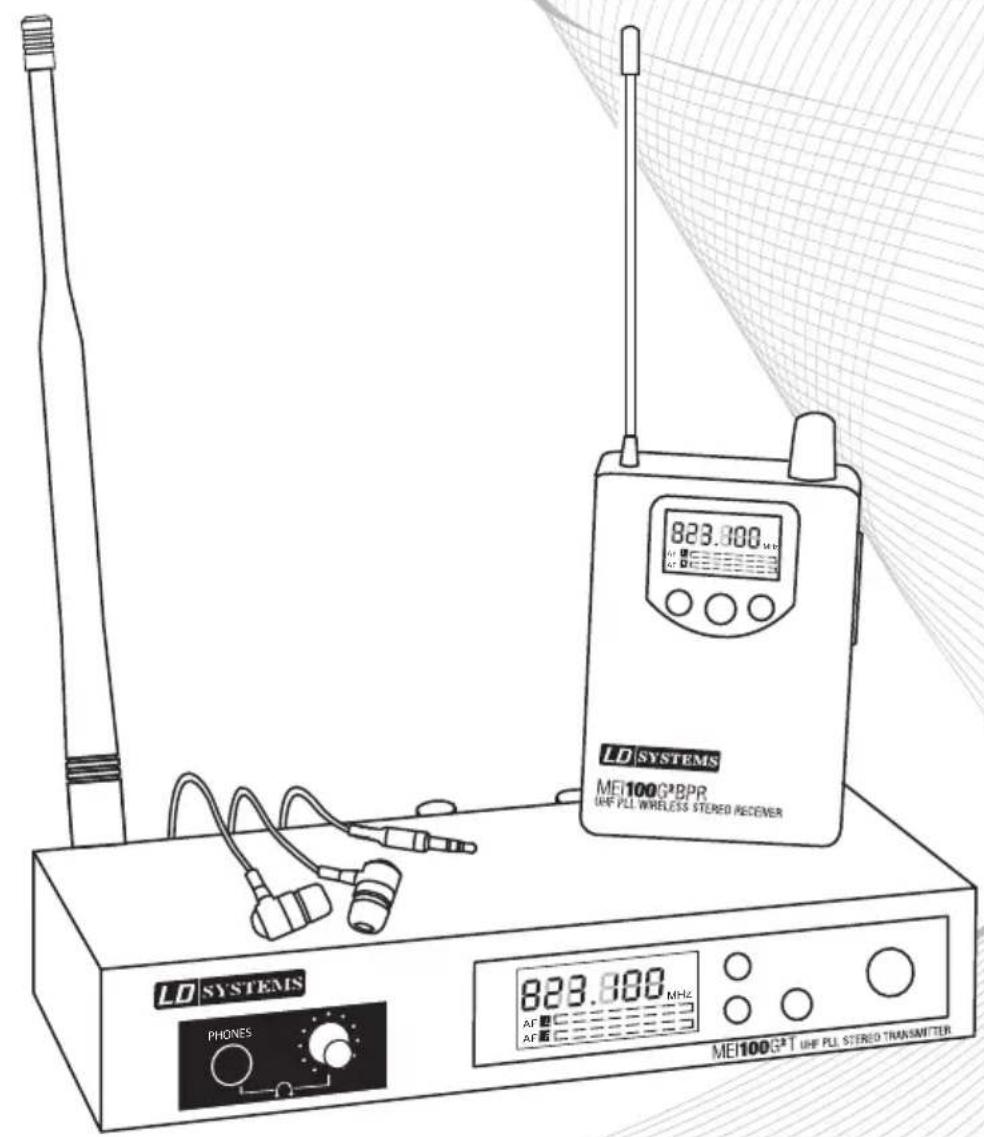
WIRELESS IN EAR MONITORING SYSTEM
Thank you for choosing LD Systems!
We have designed this product to operate reliably over many years. Therefore LD Systems guarantees for high quality products with its name and many years of experience as a producer.
Please, take a few moments to read these instructions carefully, as we want you to enjoy your new LD Systems products quickly and to the fullest.
For information about LD SYSTEMS check out our website WWW.LD-SYSTEMS.COM
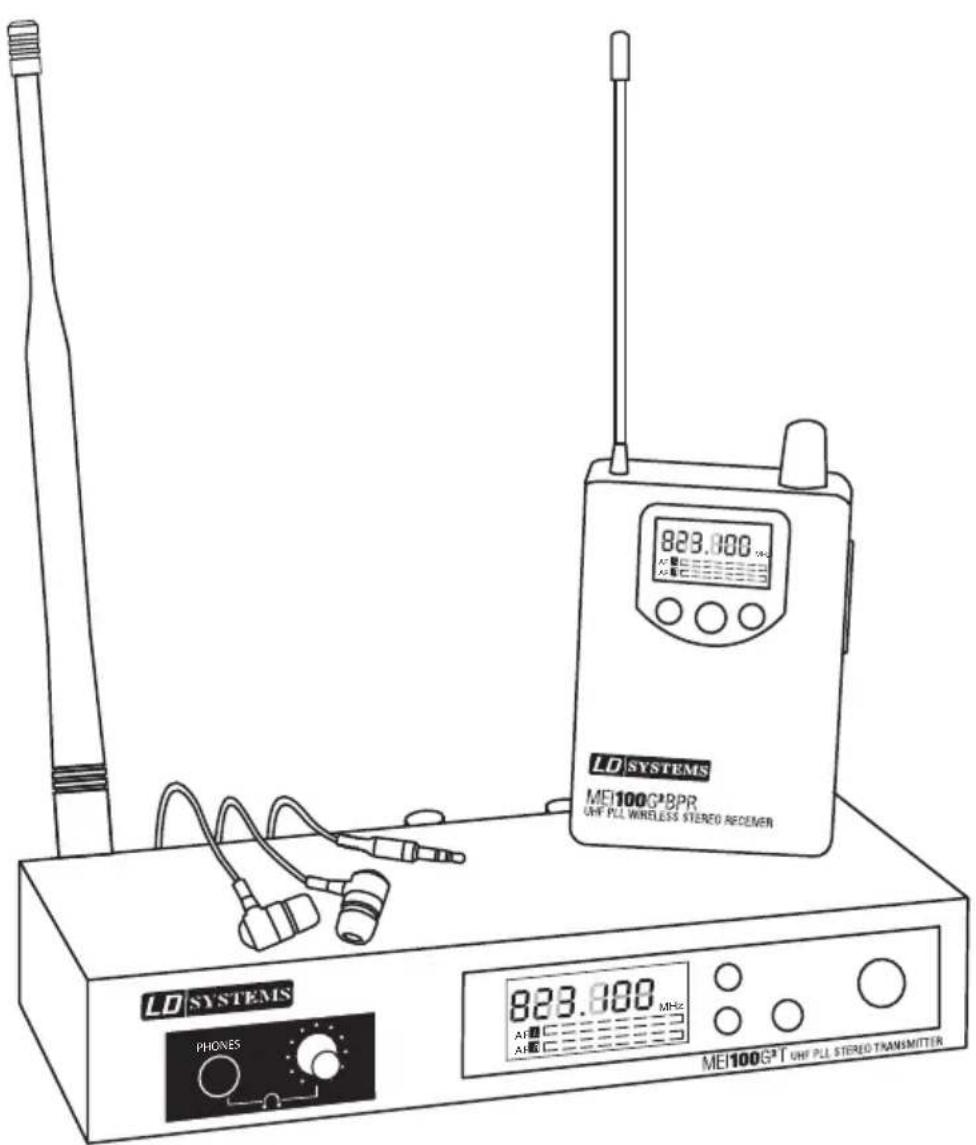
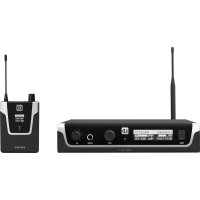
The new LD Systems MEI 100 G2 In-Ear Monitoring-System with 96 UHF channels with outstanding sound quality and a large dynamic range in the 823 - 832 and 863 - 865 MHz bands.
The system toggles between mono and stereo mode for perfect monitoring for live musicians, actors or speakers. A built-in limiter ensures even, distortion-free sound reproduction with a frequency range of 80Hz - 15 kHz and stands out because of its high signal-to-noise ratio and low total harmonic distortion.
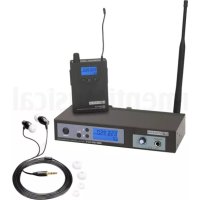
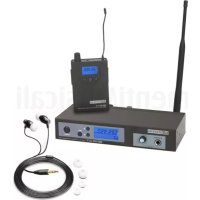
The multifunctional displays of the transmitter and receiver indicates all important system statuses. With high quality batteries, it is possible to attain running times of 10 hours and more. The MEI 100 G2 package includes high-quality earphones, a 19" rackmount kit, and a rugged transport box made of ABS plastic.
LDMEI100G²
WIRELESS IN EAR MONITORING SYSTEM
PREVENTIVE MEASURES:
- Please read these instructions carefully.
- Keep all information and instructions in a safe place.
- Follow the instructions.
- Observe all safety warnings. Never remove safety warnings or other information from the equipment.
- Use the equipment only in the intended manner and for the intended purpose.
- Use only sufficiently stable and compatible stands and/or mounts (for fixed installations). Make certain that wall mounts are properly installed and secured. Make certain that the equipment is installed securely and cannot fall down.
- During installation, observ e the applicable safety regulations for your country.
- Never install and operate the equipment near radiators, heat registers, ovens or other sources of heat. Make certain that the equipment is always installed so that is cooled sufficiently and cannot overheat.
- Never place sources of ignition, e.g., burning candles, on the equipment.
- Ventilation slits must not be blocked.
- Do not use this equipment in the immediate vicinity of water (does not apply to special outdoor equipment - in this case, observe the special instructions noted below. Do not expose this equipment to flammable materials, fluids or gases.
- Make certain that dripping or splashed water cannot enter the equipment. Do not place containers filled with liquids, such as vases or drinking vessels, on the equipment.
- Make certain that objects cannot fall into the device.
- Use this equipment only with the accessories recommended and intended by the manufacturer.
- Do not open or modify this equipment.
- After connecting the equipment, check all cables in order to prevent damage or accidents, e.g., due to tripping hazards.
- During transport, make certain that the equipment cannot fall down and possibly cause property damage and personal injuries.
- If your equipment is no longer functioning properly, if fluids or objects have gotten inside the equipment or if it has been damaged in anot her way, switch it off immediately and unplug it from the mains outlet (if it is a powered device). This equipment may only be repaired by authorized, qualified personnel.
- Clean the equipment using a dry cloth.
- Comply with all applicable disposal laws in your country. During disposal of packaging, please separate plastic and paper/cardboard.
- Plastic bags must be kept out of reach of children.
FOR EQUIPmENT THaT CONNECTS TO THE POWER maINS:
-
CAUTION: If the power cord of the device is equipped with an earthing contact, then it must be connected to an outlet with a protective ground. Never deactivate the protective ground of a power cord.
-
If the equipment has been exposed to strong fluctuations in temperature (for example, after transport), do not switch it on immediately. Moisture and condensation could damage the equipment. Do not switch on the equipment until it has reached room temperature.
-
Before connecting the equipment to the power outlet, first verify that the mains voltage and frequency match the values specified on the equipment. If the equipment has a voltage selection switch, connect the equipment to the power outlet only if the equipment values and the mains power values match. If the included power cord or power adapter does not fit in your wall outlet, contact your electrician.
-
Do not step on the power cord. Make certain that the power cable does not become kinked, especially at the mains outlet and/or power adapter and the equipment connector.
-
When connecting the equipment, make certain that the power cord or power adapter is always freely accessible. Always disconnect the equipment from the power supply if the equipment is not in use or if you want
SAFETY:
to clean the equipment. Always unplug the power cord and power adapter from the power outlet at the plug or adapter and not by pulling on the cord. Never touch the power cord and power adapter with wet hands.
- Whenever possible, avoid switching the equipment on and off in quick succession because otherwise this can shorten the useful life of the equipment.
- IMPORTANT INFORMATION: Replace fuses only with fuses of the same type and rating. If a fuse blows repeatedly, please contact an authorised service centre.
- To disconnect the equipment from the power mains completely, unplug the power cord or power adapter from the power outlet.
-
If your device is equipped with a Volex power connector, the mating Volex equipment connector must be unlocked before it can be removed. However, this also means that the equipment can slide and fall down if the power cable is pulled, which can lead to personal injuries and/or other damage. For this reason, always be careful when laying cables.
-
Unplug the power cord and power adapter from the power outlet if there is a risk of a lightning strike or before extended periods of disuse.
CAUTION:
Never remove the cover, because otherwise there may be a risk of electric shock. There are no user serviceable parts inside. Have repairs carried out only by qualified service personnel.
The lightning flash with arrowhead symbol within an equilateral triangle is intended to alert the user to the presence of uninsulated “dangerous voltage” within the product’s enclosure that may be of sufficient magnitude to constitute a risk of electrical shock.

The exclamation mark within an equilateral triangle is intended to alert the user to the presence of important operating and maintenance instructions.
CAUTION – HIGH VOLUME LEVELS WITH AUDIO PRODUCTS!
This equipment is intended for professional use. Therefore, commercial use of this equipment is subject to the respectively applicable national accident prevention rules and regulations. As a manufacturer, Adam Hall is obligated to notify you formally about the existence of potential health risks.
Hearing damage due to high volume and prolonged exposure: When in use, this product is capable of producing high sound-pressure levels (SPL) that can lead to irreversible hearing damage in performers, employees, and audience members. For this reason, avoid prolonged exposure to volumes in excess of 90 dB.
CAUTION! IMPORTANT INFORMATION ABOUT LIGHTING PRODUCTS
- Do not look into the beam from a distance of less than 40 cm.
- Do not stare into the beam for extended periods at short-to-medium distances.
- Do not view the beam directly with optical instruments such as magnifiers.
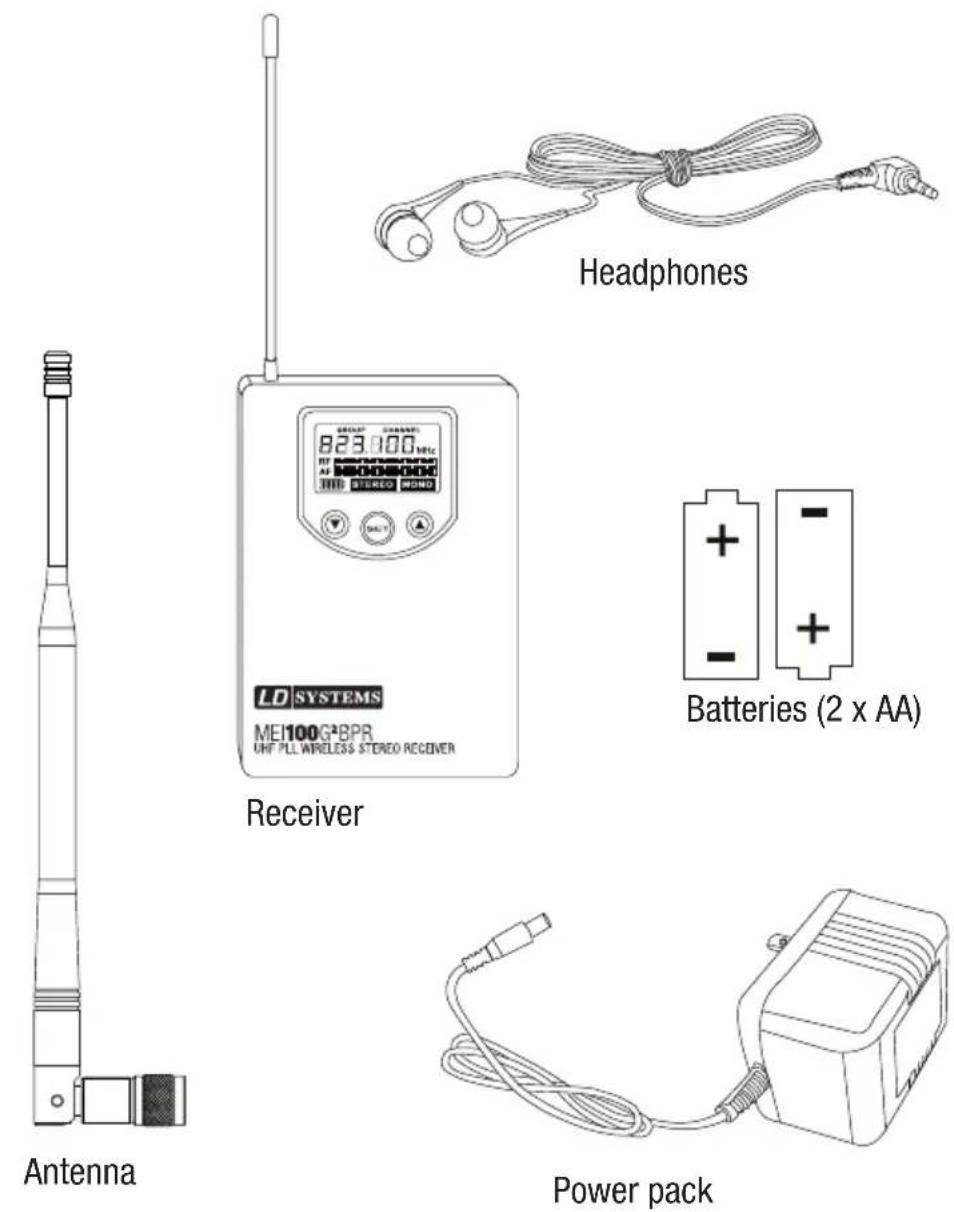
SYSTEM COMPONENTS:
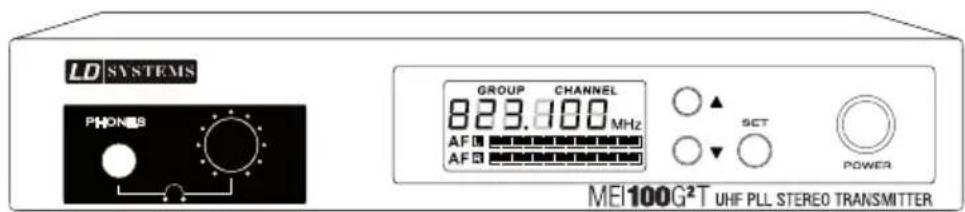
Transmitter
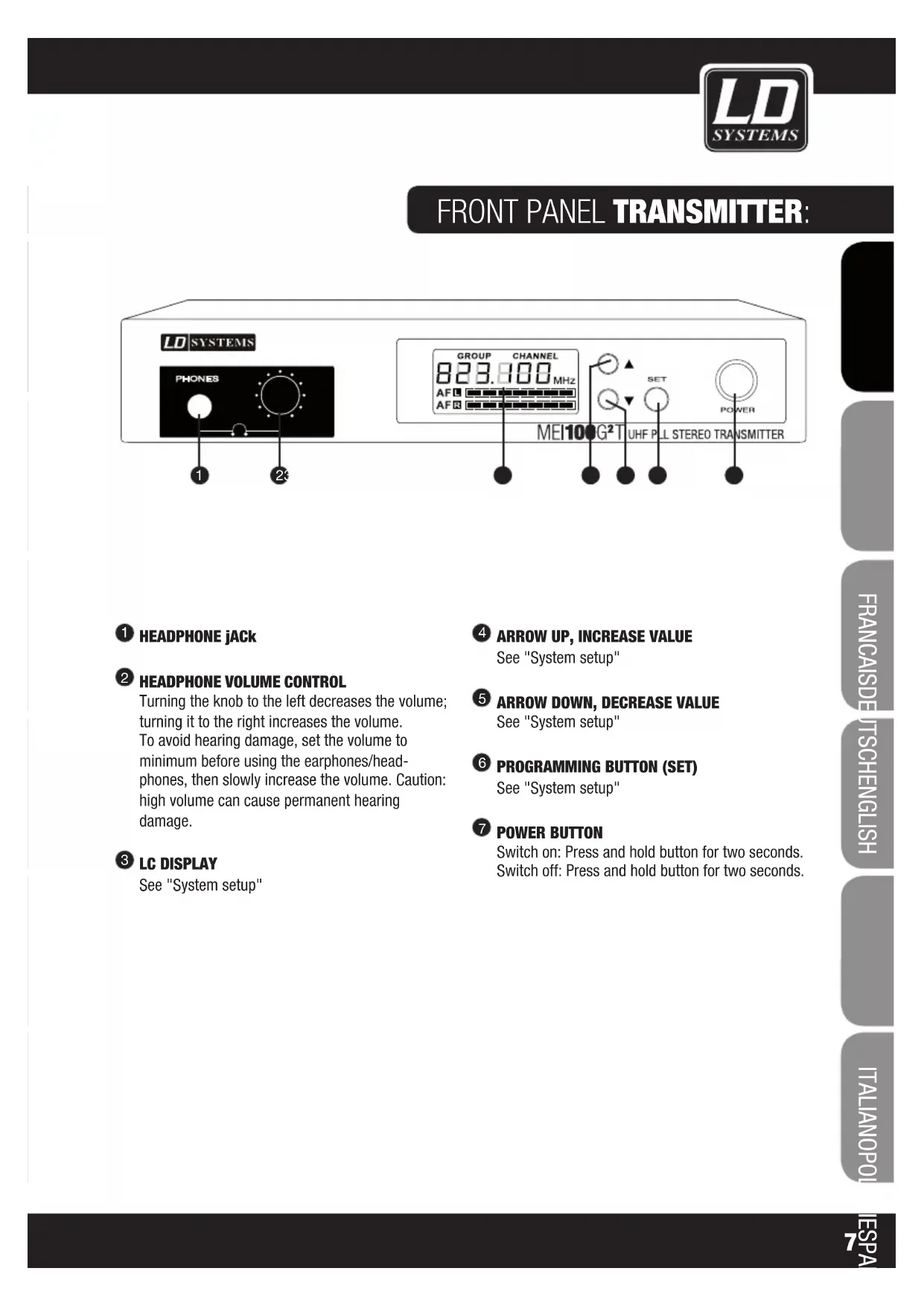
FRONT PANEL TRANSMITTER:
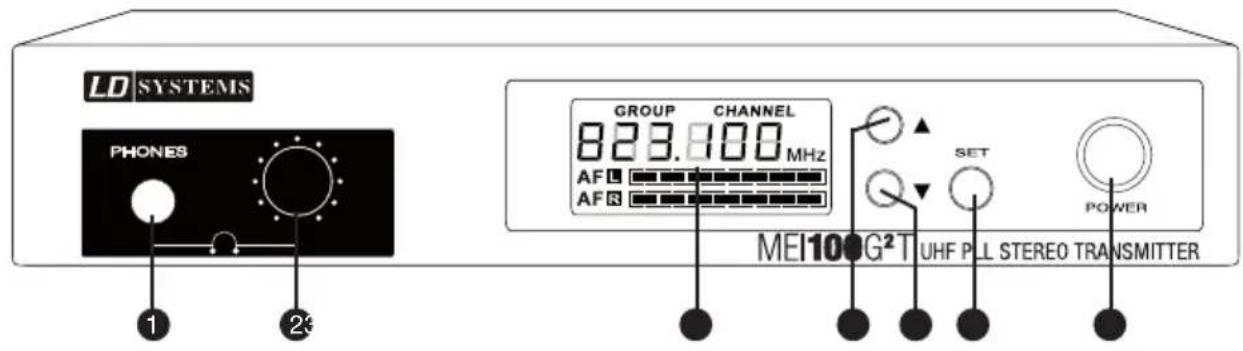
1 HEADPHONE jACK
2 HEADPHONE VOLUME CONTROL
Turning the knob to the left decreases the volume; turning it to the right increases the volume. To avoid hearing damage, set the volume to minimum before using the earphones/headphones, then slowly increase the volume. Caution: high volume can cause permanent hearing damage.
③ LC DISPLAY
See "System setup"
4 ARROW UP, INCREASE VALUE
See "System setup"
5 ARROW DOWN, DECREASE VALUE
See "System setup"
6 PROGRAMMING BUTTON (SET)
See "System setup"
7 POWER BUTTON
Switch on: Press and hold button for two seconds. Switch off: Press and hold button for two seconds.
REAR PANEL TRANSMITTER:
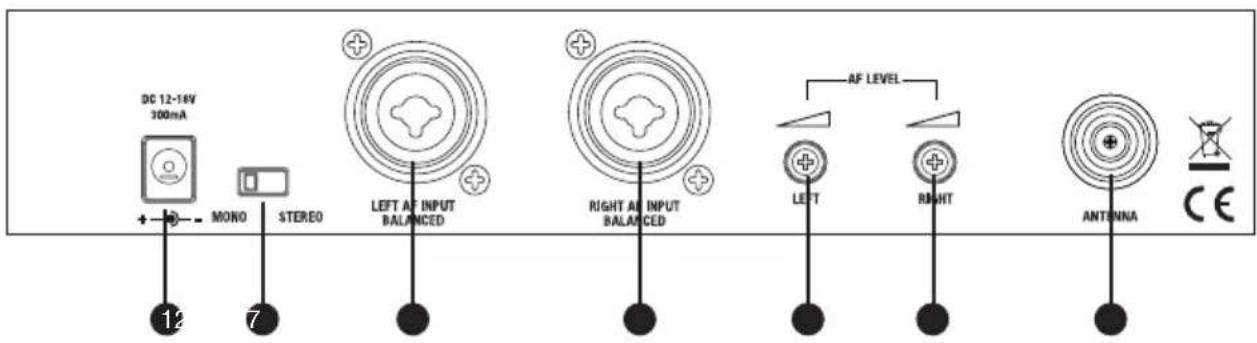
1 POWER PACK INPUT
2 STEREO/MONO SWITCH
Stereo mode: Both line inputs, left and right, must be used in order to hear a stereo signal on the receiver. It is advisable to set the left and right line inputs to the same level.
Mono mode: Only one line input must be used in order to hear a mono signal on both sides of the earphones. If there are different signals on both line inputs, they are merged into sum mono signal. The loudness of the two signals is then adjusted using the left and right channel input level controls.
③ XLR / 6.3 MM jACK SOCKET (COMBO) INPUT LEFT
4 XLR / 6.3 MM jACK SOCKET (COMBO) INPUT RIGHT
5 INPUT LEVEL
Left channel
6 INPUT LEVEL
Right channel
7 ANTENNA jACK
50Ω
BODY PACK RECEIVER:
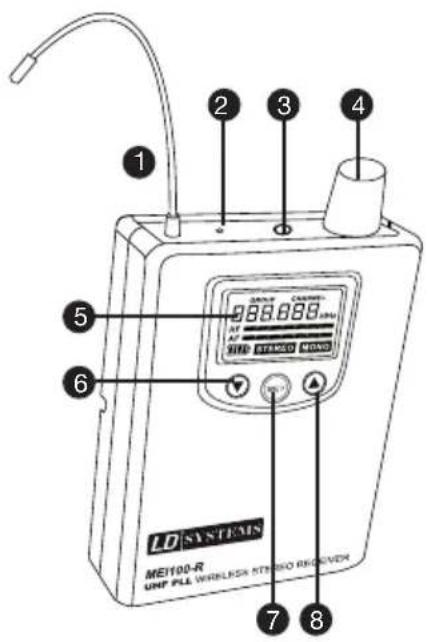
1 ANTENNA
2 RF SIGNAL LED
Lights up when an RF signal is present
3 EARPHONE/HEADPHONE CONNECTOR 3.5 MM STEREO jACK
4 ON/OFF SWITCH AND VOLUME CONTROL FOR EARPHONE/HEADPHONE OUTPUT
To switch on, turn the knob to the right (clockwise) past the snap-in point. To switch off, turn the knob to the left (counter clockwise) past the snap-in point.
Turning the knob to the left decreases the volume; turning it to the right increases the volume. To avoid hearing damage, set the volume to minimum before using the earphones/headphones, then slowly increase the volume. Caution: high volume can cause permanent hearing damage.
5 LC DISPLAY
6 ARROW DOWN, DECREASE VALUE
7 SET
Programming button
8 ARROW UP, INCREASE VALUE
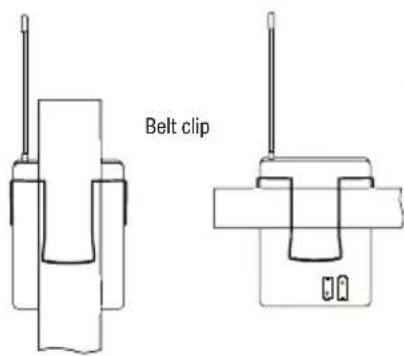
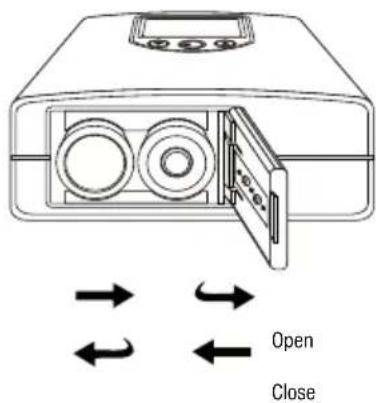
WEARING THE BODY PACK RECEIVER
Clip the receiver to your belt or a suitable strap. For optimum fit, the clip should always be pushed all the way over the belt and/or strap (see illustration).
BATTERY REPLACEMENT
Press the spot marked "OPEN" on the battery compartment lid and simultaneously push it toward the middle of the unit. The lid will spring open and the batteries can be removed. After inserting new batteries (battery orientation shown on rear of device), press down the battery compartment lid down on the sport marked "CLOSE" and push it toward the edge of the device until it engages.
With high quality batteries, it is possible to attain running times of 10 hours and more. When the LCD panel battery symbol flashes, the batteries (type AA) should be replaced immediately. Remove the batteries before extended periods of disuse.
SYSTEM SETUP:
TRANSMITTER PROGRAMMING
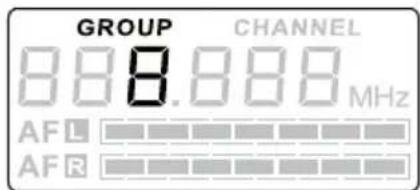
1
Select a GROUP and/or CHANNEL:
Press the SET button (GROUP flashes). The desired frequency group is selected using the arrow keys ▲ and ▼(see Figure ①). Press the SET button again (CHANNEL flashes). The desired frequency group is selected using the arrow keys ▲ and ▼(see Figure ②). Confirm the input with SET.
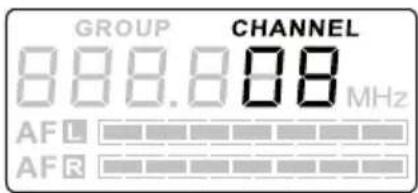
2
Note: Any number of receivers can be used with one transmitter, provided all receivers are supposed to receive the same signal and are set to the same radio frequency as the transmitter.

3
Audio input level display:
The audio input level is indicated by two bar indicators (channel left/right, see Fig. 3).
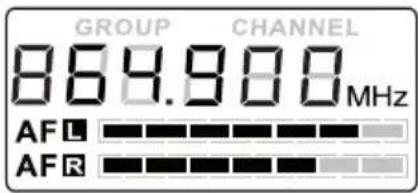
4
LC display options:
Audio input level, transmitter radio frequency (see Figure 4).
Adjust the audio input level using the level controls on the rear panel of the transmitter. Higher input levels result in improved signal to noise ratio. The input stage must not be overloaded.
SYSTEM SETUP:
5
RECEIVER PROGRAMMING
Select a GROUP and/or CHANNEL:
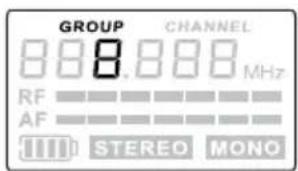
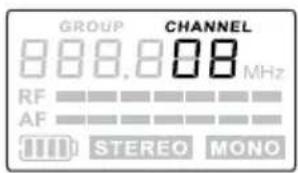
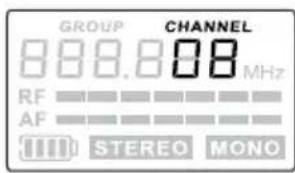
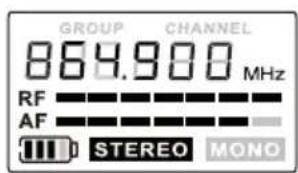
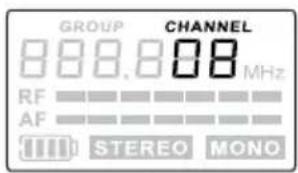
Press the SET button (GROUP flashes). The desired frequency group is selected using the arrow keys ▲ and ▼(see Figure 5). Press the SET button again (CHANNEL flashes). The desired frequency group is selected using the arrow keys ▲ and ▼(see Figure 6). Confirm with SET.
6
7
Battery indicator:
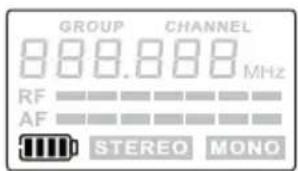
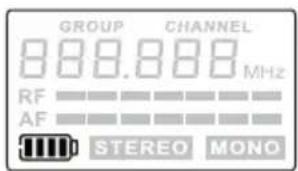
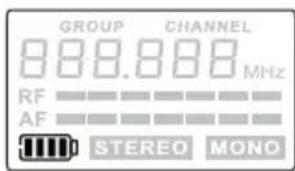
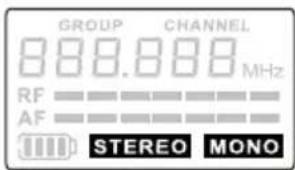
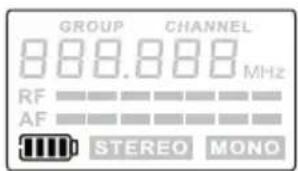
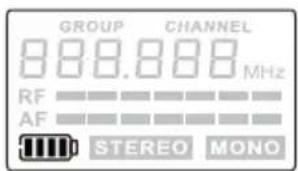
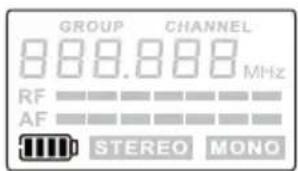
The battery status of the receiver is indicated in 5 levels (see Fig. 7).
8
Stereo/mono mode indicator:
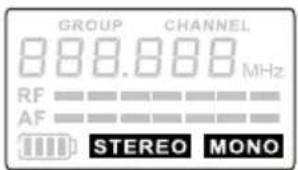
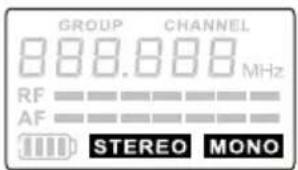
The receiver automatically detects whether a stereo or mono signal is present and indicates the respective status on the LC display (see Figure 8). Stereo/mono mode is configured on the transmitter.
9
LC display options:
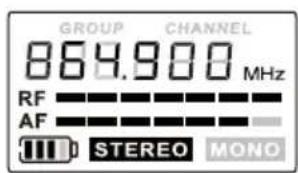
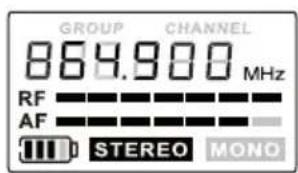
Battery status, RF/audio level, stereo/mono mode, radio frequency (see Figure 9).
SETUP AND TROUBLESHOOTING:
SETUP
For optimal transmission, position the transmitter at a minimum height of 1 m and orient the antenna vertically upwards. When using multiple wireless systems in one installation, make certain that the antennas do not touch or cross. Do not position the transmitter in the immediate vicinity of metal objects and digitally controlled devices (CD players, computers, digital consoles, etc.): There should be a direct line of sight between transmitter and receiver.
TROUBLESHOOTING
| PROBLEM DISPLAY SOLUTION | ||
| No sound or volume too low. | Receiver: Display is switched off. | Make certain that the batteries are not dead and the receiver is on. |
| Transmitter: Display is switched off. | Check the connection between power supply and transmitter. Turn on the transmitter. | |
| Receiver: is on, but the RF indicator is not lit. | Make certain that the transmitter and receiver are set to the same radio frequency. | |
| Reduce the distance between transmitter and receiver and make certain that there is a direct line of sight between transmitter and receiver. | ||
| Make certain that the transmitter antenna is installed correctly. | ||
| Receiver: is on and the RF indicator is lit. | Increase the volume at the receiver and check the headphone connection. | |
| Check the input level on the transmitter and increase it if necessary. | ||
| Distortion or noise. Receiver: RF indicator is on. | Increase the distance to possible causes of interference (digitally controlled devices, e.g., CD players, computers, digital consoles...). | |
| Use a different radio frequency. | ||
| Distorted sound. | Receiver: Battery symbol is flashing. | Replace the batteries with new ones. |
| Transmitter: Level indicator is too high | Reduce the volume at the level controls of the transmitter or the volume of the source device. | |
SPECIFICATIONS:
Set designation: LDMEI100G2
Belt pack receiver model designation: LDMEI100G2BPR
| Frequency range: 823 - 832 MHz and 863 - 865 MHz | |
| Channels: 96 (8 groups of 12 channels) | |
| Transmission method: FM stereo | |
| Frequency response: 80 - 15,000 Hz | |
| S/N ratio: >90 dB(A) | |
| THD: 0,50% | |
| Audio output: | 3.5 mm stereo jack |
| Max. audio output level: | 100 mW |
| Controls: | Volume/ On / Off, Set, arrow keys (up/down) |
| Indicators: | Multifunctional LC display, RF signal |
| Power supply: | 2 "AA" size batteries |
| Operating time: | >10 hours (depending on batteries) |
| Dimensions (W x H x D): | 65 x 95 x 25 mm |
| Weight: | 0.07 kg (without batteries) |
| Transmitter model designation: | LDMEI100G2T |
| Radio receiver frequency range: | 823 - 832 MHz and 863 - 865 MHz |
| Channels: 96 (8 groups of 12 channels) | |
| Operating modes: | Mono / stereo |
| Transmission method: FM stereo | |
| RF output: | 10 mW |
| Frequency response: 80 - 15,000 Hz | |
| S/N ratio: > 90 dB(A) | |
| THD: 0,50% | |
| Inputs: | 2 x XLR/ 6.3 mm jack (combo) |
| Input impedance: 100 kohms | |
| Antenna connector: | TNC |
| Controls: | Power (on/off), Set, arrow keys (up/down), headphone volume, audio level (AF level) left/right, mono/stereo switch |
| Indicators: | Multifunctional LC display: |
| Power supply: | external power supply |
| Operating voltage: 12 V - 18 V DC, 300 mA | |
| Dimensions (W x H x D): | 212 x 38 x 90 mm |
| Weight: | 0,57 kg |
| Headphone model designation : | LDIEHP1 |
| Type: | In-ear |
| Frequency response: 30 - 20,000 Hz | |
| Impedance: | 16 ohms |
| Connector type: | 3.5 mm stereo jack |
| Cable length: | 1.5 m |
Our products are subject to a continuous process of development and improvement. Thus technical characteristics are subject to change without notice.
MANUFACTURER'S DECLARATIONS:
MANUFACTURER'S WARRANTY
This warranty covers the Adam Hall, LD Systems, Defender, Palmer, and Cameo brands.
It applies to all products distributed by Adam Hall.
This warranty declaration does not affect the statutory warranty claims against the manufacturer, but expands them with additional warranty claims vis-a-vis Adam Hall.
Adam Hall warrants that the Adam Hall product that you have purchased from Adam Hall or from an Adam Hall authorized reseller is free from defects in materials or workmanship under normal use for a period of 2 or 5 years (please inquire on a product-by-product basis) from the date of purchase.
The warranty period begins on the date on which the product was purchased, proof of which must be produced (through presentation of the invoice or the delivery note with the date of purchase) in the event of a warranty claim. Should products of the brands named above be in need of repair within the limited warranty period, you are entitled to warranty service according to the terms and conditions stated here.
During the Limited Warranty Period, Adam Hall will repair or replace the defective component parts or the product. In the event of repair or replacement during the Limited Warranty Period, the replaced original parts and/or products become property of Adam Hall.
In the unlikely event that the product which you purchased has a recurring failure, Adam Hall has the right, at its discretion, to replace the defective product with another product, provided that the new product is at least equivalent to the product being replaced with regard to the technical specifications.
Adam Hall does not warrant that the operation of this product will be uninterrupted or error-free. Adam Hall is not responsible for damage that occurs as a result of your failure to follow the instructions included with the Adam Hall branded product. The manufacturer's warranty does not cover – expendable parts (e.g., rechargeable batteries) - products from which the serial number has been removed or with a serial number that has been damaged as a result of an accident - damage due to improper use, user error or other external reasons
- damage to devices operated outside the usage parameters stated in the documentation included with the product - damage due to the use of replacement parts not manufactured, sold or recommended by Adam Hall, - damage due to modification or servicing by anyone other than Adam Hall.
These terms and conditions constitute the complete and exclusive warranty agreement between you and Adam Hall regarding the Adam Hall branded product you have purchased.
MANUFACTURER'S DECLARATIONS:
LIMITATION OF LIABILITY
If your Adam Hall branded hardware product fails to work as warranted above, your sole and exclusive remedy shall be repair or replacement. Adam Halls' maximum liability under this limited warranty is expressly limited to the lesser of the price you have paid for the product or the cost of repair or replacement of any components that malfunction under conditions of normal use.
Adam Hall is not liable for any damages caused by the product or the failure of the product, including any lost profits or savings or special, incidental, or consequential damages. Adam Hall is not liable for any claim made by a third party or made by you for a third party.
This limitation of liability applies whether damages are sought, or claims are made, under this Limited Warranty or as a tort claim (including negligence and strict product liability), a contract claim, or any other claim, and cannot be rescinded or changed by anyone. This limitation of liability will be effective even if you have advised Adam Hall or an authorized representative of Adam Hall of the possibility of any such damages, but not, however, in the event of claims for damages in connection with personal injuries.
This manufacturer's warranty grants you specific rights; depending on jurisdiction (nation or state), you may be entitled to additional claims. You are advised to consult applicable state or national laws for a full determination of your rights.
REQUESTING WARRANTY SERVICE
To request warranty service for the product, contact Adam Hall or the Adam Hall authorized reseller from which you purchased the product.
EC DECLARATION OF CONFORMITY
The equipment marketed by Adam Hall complies (where applicable) with the essential requirements and other relevant specifications of Directives 1999/5/EC (R&TTE), 2004/108/EC (EMC) und 2006/95/EC (LVD). Additional information can be found at www.adamhall.com.
MANUFACTURER'S DECLARATIONS:
PROPER DISPOSAL OF THIS PRODUCT
(Valid in the European Union and other European countries with waste separation)

This symbol on the product, or the documents accompanying the product, indicates that this appliance may not be treated as household waste. This is to avoid environmental damage or personal injury due to uncontrolled waste disposal. Please dispose of this product separately from other waste and have it recycled to promote sustainable economic activity.
Household users should contact either the retailer where they purchased this product, or their local government office, for details on where and how they can recycle this item in an environmentally friendly manner. Business users should contact their supplier and check the terms and conditions of the purchase contract. This product should not be mixed with other commercial wastes for disposal.
ENVIRONMENTAL PROTECTION AND ENERGY CONSERVATION
Energy conservation is an active contribution to environmental protection. Please turn off all unneeded electrical devices. To prevent unneeded devices from consuming power in standby mode, disconnect the mains plug.
Adam Hall GmbH, all rights reserved. The technical data and the functional product characteristics can be subject to modifications. The photocopying, the translation, and all other forms of copying of fragments or of the integrity of this user's manual is prohibited.
natural_image
Line drawing of a device with two circular components and a door open, no text or symbols present


Öffnen
Schließen
SO TRAGEN SIE DEN TASCHENEMPFÄNGER OPTIMAL
1
2
3
4
5
6
7
Batterieanzeige:
8
9
1
2
3
4
5
6
7
8
9
RÉGLAGE DU RÉCEPTEUR
DÉCLARATION DE CONFORMITÉ CE
MISE AU REBUT DE CE PRODUIT
1
2
3
4
5
6
7
8
9
1
2
3
4
5
6
7
8
9
GWARANCjA PRODUCENTA
DEKLARACJA ZGODNOŚCI WE
1
2
3
4
5
6
7
8
9
- LDMEI100G²
- Thank you for choosing LD Systems!
- PREVENTIVE MEASURES:
- FOR EQUIPmENT THaT CONNECTS TO THE POWER maINS:
- SAFETY:
- CAUTION:
- CAUTION – HIGH VOLUME LEVELS WITH AUDIO PRODUCTS!
- CAUTION! IMPORTANT INFORMATION ABOUT LIGHTING PRODUCTS
- SYSTEM COMPONENTS:
- FRONT PANEL TRANSMITTER:
- REAR PANEL TRANSMITTER:
- POWER PACK INPUT
- STEREO/MONO SWITCH
- ③ XLR / 6.3 MM jACK SOCKET (COMBO) INPUT LEFT
- XLR / 6.3 MM jACK SOCKET (COMBO) INPUT RIGHT
- INPUT LEVEL
- INPUT LEVEL
- ANTENNA jACK
- BODY PACK RECEIVER:
- WEARING THE BODY PACK RECEIVER
- BATTERY REPLACEMENT
- SYSTEM SETUP:
- TRANSMITTER PROGRAMMING
- RECEIVER PROGRAMMING
- SETUP AND TROUBLESHOOTING:
- SETUP
- SPECIFICATIONS:
- Set designation: LDMEI100G2
- MANUFACTURER'S DECLARATIONS:
- MANUFACTURER'S WARRANTY
- LIMITATION OF LIABILITY
- REQUESTING WARRANTY SERVICE
- EC DECLARATION OF CONFORMITY
- PROPER DISPOSAL OF THIS PRODUCT
- ENVIRONMENTAL PROTECTION AND ENERGY CONSERVATION
- SO TRAGEN SIE DEN TASCHENEMPFÄNGER OPTIMAL
- RÉGLAGE DU RÉCEPTEUR
- DÉCLARATION DE CONFORMITÉ CE
- MISE AU REBUT DE CE PRODUIT
- GWARANCjA PRODUCENTA
- DEKLARACJA ZGODNOŚCI WE
Brand : LD Systems
Model : MEI 100 G2
Category : Earplug