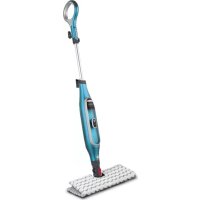
Genius S6002 - Steam cleaner SHARK - Free user manual and instructions
Find the device manual for free Genius S6002 SHARK in PDF.



| Product type | Steam mop cleaner |
| Brand | Shark |
| Model | Genius S6002 |
| Power supply | 220-240 V, 50/60 Hz |
| Power | 1120 W |
| Water tank capacity | 320 ml |
| Runtime | Approximately 15-20 minutes (depending on mode) |
| Heating time | 30 seconds |
| Steam settings | Intelligent Steam Control: Light, Normal, Deep (disinfection) |
| Compatible floor types | Hard impermeable floors: laminate, hardwood, vinyl, marble, tile, stone |
| Weight | Approximately 2.5 kg |
| Dimensions (approx.) | 120 x 30 x 20 cm (assembled) |
| Cord length | Approximately 6 m |
| Cleaning modes | Steam cleaning with rotating pads |
| Disinfection function | Yes, Deep mode (8 slow passes) |
| Included accessories | 2 Dirt Grip pads, filling bottle, cable clip |
| Pad care | Machine washable (warm water, liquid detergent), low heat drying |
| Pad replacement | Every 3 to 4 months |
| Safety | Automatic shut-off if handle not tilted, overheat protection |
| Warranty | 2 years (manufacturer warranty + legal) |
| Repairability | Spare parts available on sharkclean.eu |
Frequently Asked Questions - Genius S6002 SHARK
User questions about Genius S6002 SHARK
0 question about this device. Answer the ones you know or ask your own.
Ask a new question about this device
Download the instructions for your Steam cleaner in PDF format for free! Find your manual Genius S6002 - SHARK and take your electronic device back in hand. On this page are published all the documents necessary for the use of your device. Genius S6002 by SHARK.
USER MANUAL Genius S6002 SHARK
BEMAERK: Begge puder skal allid were monterede under brug.
INTELLIGENT STEAM CONTROL
BESTILLING AF EKSTRA TILBEHOR
TILBEHØR
Pafyldningskande
FEJL FINDING OFTE STILLDE SPORGSMAL
PFLEGE IHRES STEAM AND SCRUB MOPPS
for purchasing the Shark' Steam and Scrub Mop

TIP: The QR Code can be found on the back panel of the Steam and Scrub Mop
REGISTER YOUR PURCHASE

sharkclean.eu/register-guarantee

+44(0800)8620453

Scan QR code using mobile device
To benefit from your product's extended guarantee, simply register your purchase at sharkclean.eu/register-guarantee
RECORD THIS INFORMATION
Model Number:
Date Code:
Date of Purchase (Keep receipt):
Store of Purchase:
TECHNICAL SPECIFICATIONS
Voltage: 220-240V, 50/60Hz
Watts: 1120W
Water Capacity: 320ml
PLEASE READ CAREFULLY AND KEEP FOR FUTURE REFERENCE.
This instruction manual is designed to help you get a complete understanding of your new Steam and Scrub Mop. If you have any questions, please call the Customer Service line at +41 (0800) 862 0453.
CCUK
CONTENTS
Important Safety Instructions 31
Getting Started 33
Assembling Your Steam and Scrub Mop 34
Using Your Steam Steam and Scrub Mop 35
Intelligent Steam Control 36
Caring For Your Steam and Scrub Mop 37
Ordering Additional Accessories 38
Troubleshooting Guide 39
Frequently Asked Questions. 40
Guarantee 41

This marking indicates that this product should not be disposed with other household wastes throughout the UK. To prevent possible harm to the environment or human health from uncontrolled waste disposal, recycle it responsibly to promote the sustainable reuse of material sources. To return your used device, please use the return and collection systems or contact
the retailer where this product was purchased. They can take this product for environmentally safe recycling.
Thank you for purchasing the Shark* Steam and Scrub Mop.
This Owner's Guide is designed to help you get a complete understanding of your new Steam and Scrub Mop. Please read it carefully and keep for future reference.
For a list of what is included with this mode, refer to inside flap of box.
If you should have a question about your Shark1 Steam and Scrub Mop please call Shark2 Customer Service at: 144 (0800) 862 0453.
IMPORTANT SAFETY INSTRUCTIONS
WARNING This appliance is not Intended for use by persons with reduced physical, sensory or mental capacities, or lack of experience and knowledge, unless they have been given supervision or instruction concerning use of the appliance by a person responsible for their safety. Children should not use or play with this appliance. Close supervision is necessary to keep appliance out of reach of children during use.
WARNING: Danger of scalding. The steam emitted from the steam mop is very hot and may cause scalding. Please use caution when using the steam and scrub mop.
WARNING: Keep steam mop away from children.
WARNING: Children should be supervised to ensure that they do not play with the appliance.
1 This appliance can be used by persons with reduced physical, sensory or mental capabilities or lack of experience and knowledge if they have been given supervision or instruction concerning use of the appliance in a safe way and understand the hazards involved. Cleaning and user maintenance should not be done by children. Keep the appliance and its cord out of reach of children. DO NOT allow to be used as a toy. Close supervision is necessary when used near children.
2 Keep the appliance out of reach of children when it is energised or cooling down.
3 When in use, NEVER turn the Steam and Scrub Mop over on its side or direct steam toward people, pets or plants. Liquid or steam must not be directed towards equipment containing electrical components, such as the interior of ovens.
4 The filling aperture should not be opened during use.
5 Use the system ONLY for its intended purpose.
6 DO NOT use to heat a room.
7 DO NOT use outdoors.
8 DO NOT leave the Steam and Scrub Mop unattended when plugged in. ALWAYS unplug the power cord from the electrical socket when not in use and before servicing.
9 DO NOT allow the Steam and Scrub Mop to be used by children. Close attention is necessary when used near children, pets or plants.
10 Use ONLY as described in this instruction manual.
11 Use ONLY manufacturer's recommended accessories.
12 DO NOT use with damaged cord or plug, if the Steam and Scrub Mop is not working as it should or has been dropped, damaged, left outdoors or immersed in water, return it to SharkNinja Europe Limited for examination and repair. Incorrect reassembly or repair can cause a risk of electrical shock or injury when the Steam and Scrub Mop is used.
13 To protect against a risk of electric shock, DO NOT immerse the Steam and Scrub Mop in water or any other liquid.
14 DO NOT handle the plug or Steam and Scrub Mop with wet hands or operate it without wearing shoes.
SAVE THESE INSTRUCTIONS
PLEASE READ CAREFULLY BEFORE USE
15 DO NOT pull or carry by cord, use cord as a handle, close a door on cord or pull cord around sharp edges or corners. DO NOT run Steam and Scrub Mop over cord. Keep cord away from heated surfaces.
16 DO NOT unplug by pulling an power cord. To unplug, grasp the plug and pull out of the piug socket. DO NOT use extension cords or sockets with inadequate current-carrying capacity.
17 DO NOT put any objects into the steam nozzle openings. Discontinue use if the steam nozzle is blocked.
18 DO NOT put hands or feet under the Steam and Scrub Mop as it gets very hot.
19 Use the Steam and Scrub Mop ONLY on flat, horizontal surfaces. DO NOT use on walls, counters or windows.
20 DO NOT use on leather, wax-polished furniture, synthetic fabrics, velvet or other delicate, steam-sensitive materials.
21 DO NOT add cleaning solutions, vinegar, scented perfumes, oils or any other chemicals to the water used in the Steam and Scrup Mop. This may damage the mop or make it unsafe for use. If you live in a hard-water area, we recommend using distilled water in your Steam and Scrup Mop.
22 NEVER store or leave Steam and Scrub Mop in one spot with Dirt Grip pad attached, as this may damage surfaces.
23 Before removing Dirt Grip pad, unplug the Steam and Scruo Mop and allow it to cool.
GETTING STARTED ASSEMBLING YOUR STEAM AND
When assembling your steam mop there may be a little water in or around the water tank. This is because we test all our steam mops before you buy them, so you get a quality Shark' Steam and Scrub Mop.
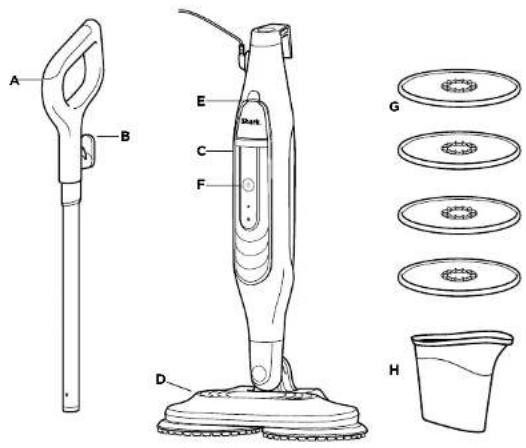
A Steam Mop Handle
B Quick-Release Cord Holder
C Steam Map Body
D Floor head
Water Tank lid
F Mode Button
6Dirt Grip Pads
H Filling Flask
P
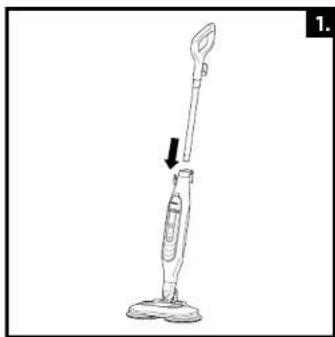
1 Insert the map handle into the steam mop body until it clicks into place.
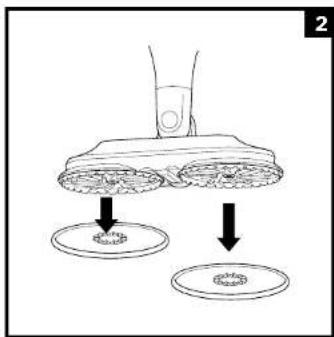
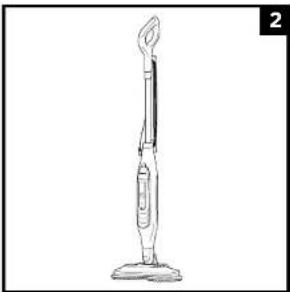
2 To attach the Dirl Grip pads, place BOTH the pads flat on the floor with the plastic rings facing up. Align the indentation on the rotating discs on the bottom of the nozzle with the plastic rings on the pads, then gently lower the nozzle onto the pads, pressing until the pads are secured.
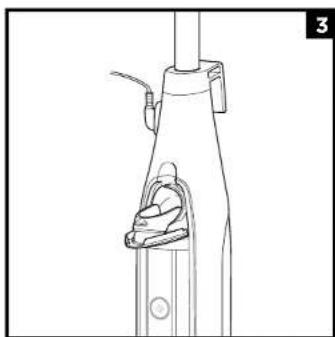
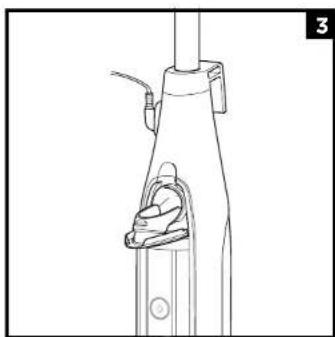
3 To open the water tank, pull the lid down.
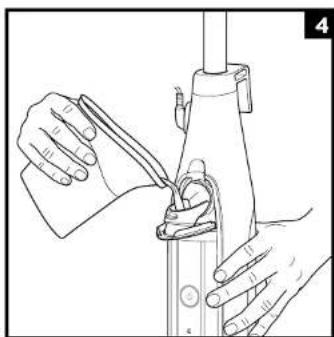
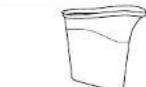
Use the filling flask to pour distilled water into the tank. Make sure to not exceed the Max Fill line on the flask. When finished, close the tank lid firmly.
NOTE: Max capacity of the water tank is 320ml
USING YOUR STEAM AND SCRUB MOP
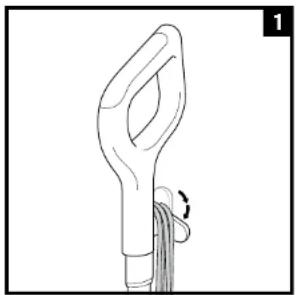
1 Make sure that your pads are secured to the nozzle discs.
Twist the quick-release cord holder to unwrap the power cord completely. Plug into an electrical socket.
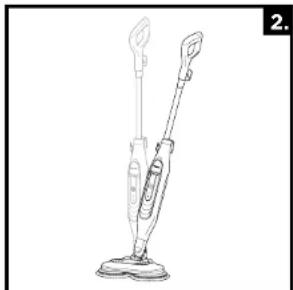
2 To start cleaning, put your foot on the floor head and pull the handle towards you. This will engage the power pads
Please note, if the handle is not reclined with in 30 seconds of selecting a mode the mop goes back into standby.
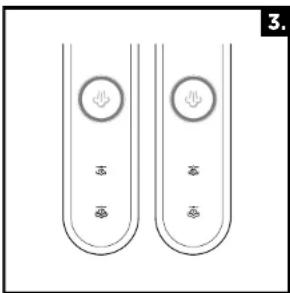
3 When the map is first plugged in, the unit will be in Standby Mode and 2 Indicator Lights will blink. Using the mode button select your preferred setting.
4 Mop with a forward and backward motion.
5 When the water tank is empty, the steam mop will stop producing steam. Make sure the unit is unplugged before refilling the water tank.
6 When finished mopping, press the mode button. The blue light will blink, indicating that the unit is in Standby mode. Once in Standby mode, lift the handle to bring the steam mop back to the upright position and unglug the unit.
7 Please wait 2 to 3 minutes for the steam mop to cool completely before removing the Dirt Grip pads.
Never leave the steam mop with damp or wet Dirt Grip pads on any floor for an extended period.
Tip: When cleaning near skirting boards, edges, or furniture, you may feel a slight pull from the unit making contact with surfaces. This is normal and not a cause for concern.
NOTE:If the handle is not reclined the pads do not spin.
NOTE: To prolong the life of your steam mop, we recommend using distilled water.
NOTE: Sweep or vacuum your floors prior to cleaning with your steam mop.
NOTE: Both pads must be installed at all times during use.
INTELLIGENT STEAM CONTROL
The Shark* Steam and Scrub Mop has 2 unique Intelligent Steam Control settings so you can select the ideal amount of steam to use for each cleaning task. IN DEEP MODE, the pads will spin faster and more steam will be produced. See below for tips on when to use each setting.
| SETTING IDEAL FOR THESE SEATED SURFACES | RECOMMENDED USAGE | |
| LIGHT | Laminate | Cleaning delicate surfaces |
| Hardwood | Light cleaning and dusting | |
| Vinyl | Loosening and lifting light dirt | |
| NORMAL | Marble | Basic, everyday cleaning |
| Tile | Cleaning large areas | |
| Stone | Cleaning moderate and heavy traffic areas | |
TO SANITISE:
1 Attach clear Dirt Grip pads to the scrubbing nozzle.
2 Plug in the unit, tilt the mop handle down towards you, and press the mode button to select the DEEP setting. The pads will then start spinning.
3 Wait 30 seconds for the unit to begin producing steam.
4 Start mopping with a forward and backward motion on an appropriate sealed hard floor surface. After three minutes, your unit will be ready to sanitise.
5 Using a forward and backward motion, move the unit slowly and evenly over the area to be sanitised while applying continuous downward pressure. Sowly repeat at least 8 times.
CARING FOR YOUR STEAM AND SCRUB MOP
AFTER USE AND STORAGE
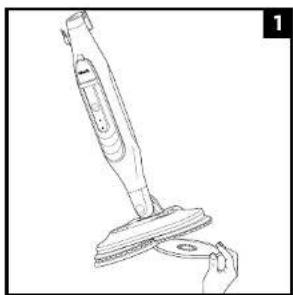
1 When the pads have cooled completely, remove them by pulling them off the discs.
2 After the unit has cooled and the steam has been released, empty the water tank before storing. Open the tank lid and pour the water out into a sink or bath. After all the water has drained out, close the lid.
3 To store the steam mop, wait until after it has cooled and the steam has been released. Store steam mop in a dry protected area until next use.
Dirt Grip PAD CARE INSTRUCTIONS

Machine-wash the Dirt Grip pads separately with warm water using liquid detergent.
NEVERUSEBLEACH,POWDERED
DETERGENT, OR FABRIC SOFTENERS as they may damage the Dirt Grip pads or leave a coating that will reduce their cleaning performance and absorbency. Dirt Grip pads should be line-dried or tumble-dried on a low setting, as this will extend the life of the microfibre fabric.
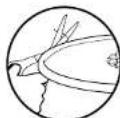
I lose fibres can indicate wearing of the microfibre fabric. DO NOT pull the loose fibres as this can cause the weave to come undone. Simply trim the loose fibres with scissors.
Replacement Dirt Grip pads
For best cleaning results, we recommend replacing the Dirt Grip pads every 3 to 4 months following normal use. As with any fabric, dirt particles, grease, friction, and repeated washing can cause the fibres to break down, and you may notice an increase in the effort needed to push or pull the mop.
ORDERING ADDITIONAL ACCESSORIES
ACCESSORY
Filling Flask
Makes it simple and convenient to fill the water tank.
Dirt Grip Pads
Easy-to-attach, reusable pads feature a super-absorbent microfibre for locking in moisture and dirt, and scrubbing material for breaking up tough, stuck-on stains.

You can purchase replacement Dirl Grip pads and other accessories by visiting sharkclean eu
TROUBLESHOOTING FAG
| PROBLEM POSSIBLE REASONS & SOLUTIONS | |
| The steam mop isn't producing any steam. | The steam mop should be securely plugged into an electrical socket. Check your fuse or circuit breaker or try a different socket. Make sure the water tank is full, the unit is plugged in, and the mode button is illuminated. If the indicator lights are off, try a different electrical socket. If the indicator lights are blinking, press the mode button to select a steam setting. If the indicator lights are solid, wait 30 seconds for the unit to warm up. If after following the above steps the steam mop still does not produce any steam, contact Customer Service at +44 (0800) 862 0453 or visit sharkclean.co.uk |
| The steam mop is producing intermittent steam. | This is normal. For more consistent steam, select the DEEP setting. Also make sure the water tank is full. |
| I can't select a steam setting. | Make sure the steam mop is plugged in and the indicator lights are flashing. If your steam mop is producing steam but the indicator lights are off, call customer service at +44 (0800) 862 0453. |
| Floors are cloudy, streaky, or spotty after steaming. | The Dirt Grip pads might be dirty. Install a clean set of pads. If you washed the Dirt Griö pads with powdered detergent, then they could be damaged and require replacement. Due to accumulated soap or grease residue, the floor may require several cleanings with the Steam Mop. A more stubborn case may require you to rinse the floor with a mix of one part vinegar and two parts water* (out DO NOT put any cleaning solution into the steam mop's water tank). *Please consult your flooring manufacturer's care and maintenance instructions before applying any cleaning products or solutions. |
| It's hard to push or pull the mop. | The mop might be hard to push or pull if the Dirt Grip pads aren't wet enough. It should get easier to move the mop across the floor after it's been running for a few minutes. Overly dirty pads could also make it harder to push or pull the mop. We recommend using clean pads. |
| Rotating discs are not turning or are wobbling. | The steam mop may be in the upright position. Tilt the handle down to use the mop. The Dirt Grip pads may not be centred. Turn the power OFF, unplug the steam mop. Wait for a few moments to allow the pads to cool, then reinstall the Dirt Griö pads. |
| The steam mop is vibrating or wobbling. | The Dirt Grip pads are not controlled on the rotating discs. Turn the power OFF and unplug the unit, and wait for the pads to cool. Follow the instructions in the Assembling Your Steam and Scrub Mop section to reinstall the pads. |
| The Steam and Scrub Mop turns off on its own. | If your Steam and Scrub mops shuts off in use, it likely needs to cool down. Perform the following steps before you restart cleaning. Unplug it and remove the pads. Allow the unit to cool for a minimum of 30 minutes. Reinstall the pads. Plug in the Steam and Scrub mop, select your steam mode and begin cleaning. |
| QUESTION ANSWER | |
| Can I use the steam mop on carpets? | No, the steam mop is not designed for carpet cleaning. |
| What surfaces can I use the steam mop on? | The steam mop is designed for use on all sealed hard floor surfaces. We recommend consulting the use and care instructions from your floor manufacturer before using your Steam and Scrub Mop. ▲WARNING: DO NOT use on leather, wax-polished furniture, synthetic fabrics, velvet, or other delicate, steam-sensitive materials. NOTE: On surfaces treated with wax and on some unwaxed floors, the sheen may be removed by the hoat or steam action of the unit. |
| Can I put something other than water in the water tank of the steam mop? | DO NOT add cleaning solutions, vinegar, scented perfumes, oils, or any other chemicals to the water used in this appliance, as this may damage the unit or make it unsafe for use. We recommend using distilled water in your steam mop. |
SharkNinja
GUARANTEE TERMS AND CONDITIONS
When a consumer buys a product in the Europe, they get the benefit of legal rights relating to the quality of the product (your statutory rights). You can enforce those rights against your retailer. At Shark we are so confident about the quality of our products that we give you an additional manufacturer's warranty for two years. These terms and conditions relate to our manufacturer's guarantee only - your statutory rights are unaltered. Please note that the 2 year guarantee is available in all EU.
The conditions below describe the prerequisites and scope of our guarantee. They do not affect your statutory rights or the obligations of your rater and your contract with them.
Shark: Guarantees
A household appliance like a Steam and Scrub Moc constitutes a 2000 investment. Your new machine needs to work properly for as long as possible. The guarantee it comes with is an important consideration - and reflects how much confidence the manufacturer has in its product and manufacturing quality.
Every Shark machine comes with a free parts and abour guarantee. Our customer service help me (+44 (0800) 682-4535) is open from 9:00am to 6:00pm Monday - Friday. It's free to call and you'll be put straight through to a Shark representative. You also find online support at: www.sharclean.com.
How do I register my Shark guarantee?
If you have purchased your vacuum directly from sharkcience, your guarantee is registered automaticity. You can a so register your guarantee online with 28 days of purchase.
To ronster online, please visit www.sharkclean.ou/registor-guarantcc.
- Keep a note of the date you purchased the machine.
IMPORTANT
The 2 year guarantee will cover your product from the date of purchase
Please keep your receipt at all times. Should you need to use your extended guarantee we will need your receipt to verify the information you have supplied to us is correct. The inability to produce a valid receipt may invalidate your guarantee.
What are the benefits of registering my free Shark guarantee?
When you register your guarantee we'll have your details to hand if we ever need to get in touch if your further agree to receive communications from us, you can also receive the tips and advice on how to get the best out of your Shark® Steam and Scroup Hop and near the latest news about new Shark® technology and launches.
If you register your guarantee online, you'll get instant confirmation that we've received your details
How long are new Shark® machines guaranteed for?
our confidence in our design and quality control means that your new Shark ^a Stearn and Scrub Hop is guaranteed for two years.
What is covered by the free Shark guarantee?
Repair or replacement of your Shark® machine (at Shark’s discretion), including all parts and about A Shark® guarantee is in addition to your legal rights as a consumer.
What is not covered by the free Shark guarantee?
Normal wear and tear
-
Accidental damage or fault caused by negligent use or care, misuse, neglect, careless operation or handling of the Steam and Scrub Mop which is not in accordance with these instructions.
-
Use of the Steam and Scolk Men for anything other than normal domestic household purposes
-
Faults caused by the use of parts not assembled or installed in accordance with these instructions.
-
use of parts and accessories which are not Shark® genuine components.
-
Faulty Installation (except where installed by Shark).
Repairs or alterations carried out by parties other than Shark or its agents.
What happens when my guarantee runs out?
SmarX does not design products to last for a limited time. We do appreciate that there may be a desire for our customers to want to repair their Steam and Scrub Mop cleaners after the guarantee has lapsed. In this case please contact our FicePhone customer service hotline and ask about our out of guarantee program; on +44 (0800) 862 0453.
Where can I buy genuine Shark' spares and accessories?
Snark® spares and accessories are developed by the same engineers who developed your Shark® Steam and Scrub Mop You'll find a full range of Snark® spares, replacement parts and accessories for all Snark® machines at www/snarkclean.net.
Please remember that damage caused by the use of non-Shark spares may not be covered under your guaranty.
NOTES
3 Trok hot daskel omea on hot water reservoir to open.
APENAS PARA USO DOMÉSTICO
EFTER ANYANDNING OCH FÖRVARING
FELSOKING VANLIGA FRAGOR OCH SVAR
Hur registraragagmin Shark-garant?
Om u har kdt in damnsugare dirak frshkcaian eregistreras din garanti automatiskt. Du kan ocksaj registerrain gerantl onine m 28 cagar frininko.
For att registra online, besx www. sharkclean u/rea sten-guarantee
- Anteckna vilket datum du kopta masken.
- He clina kvitton tiangjina. Slu. du behovance anvna din feralda garanti behovi vki tkt for att bekfa t at den inatienrionu din ger asar korekt. Om du inte kan visa up pitt glt ktoan dat cgtigifkforlaan dar garin.
A repurchase order or similar for the VAD hender nirn min garant iar qut 2
Illustrations may differ from actual product. We are constantly striving to improve our products; therefore the specifications contained herein are subject to change without notice.
2021 SharkNinja Europe Limited. SHARK is a registered trademark of SharkNinja Operating LLC.
PRINTED IN CHINA
ESPANOL
- INTELLIGENT STEAM CONTROL
- BESTILLING AF EKSTRA TILBEHOR
- TILBEHØR
- Pafyldningskande
- FEJL FINDING OFTE STILLDE SPORGSMAL
- PFLEGE IHRES STEAM AND SCRUB MOPPS
- for purchasing the Shark' Steam and Scrub Mop
- REGISTER YOUR PURCHASE
- RECORD THIS INFORMATION
- TECHNICAL SPECIFICATIONS
- PLEASE READ CAREFULLY AND KEEP FOR FUTURE REFERENCE.
- CONTENTS
- IMPORTANT SAFETY INSTRUCTIONS
- SAVE THESE INSTRUCTIONS
- GETTING STARTED ASSEMBLING YOUR STEAM AND
- USING YOUR STEAM AND SCRUB MOP
- TO SANITISE:
- CARING FOR YOUR STEAM AND SCRUB MOP
- AFTER USE AND STORAGE
- Dirt Grip PAD CARE INSTRUCTIONS
- NEVERUSEBLEACH,POWDERED
- Replacement Dirt Grip pads
- ORDERING ADDITIONAL ACCESSORIES
- ACCESSORY
- Filling Flask
- Dirt Grip Pads
- TROUBLESHOOTING FAG
- SharkNinja
- GUARANTEE TERMS AND CONDITIONS
- Shark: Guarantees
- How do I register my Shark guarantee?
- IMPORTANT
- What are the benefits of registering my free Shark guarantee?
- How long are new Shark® machines guaranteed for?
- What is covered by the free Shark guarantee?
- What is not covered by the free Shark guarantee?
- What happens when my guarantee runs out?
- Where can I buy genuine Shark' spares and accessories?
- NOTES
- EFTER ANYANDNING OCH FÖRVARING
- FELSOKING VANLIGA FRAGOR OCH SVAR
- Hur registraragagmin Shark-garant?
- A repurchase order or similar for the VAD hender nirn min garant iar qut 2
- ESPANOL
Brand : SHARK
Model : Genius S6002
Category : Steam cleaner