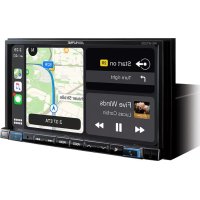
INEW720DC - Browser ALPINE - Free user manual and instructions
Find the device manual for free INEW720DC ALPINE in PDF.



User questions about INEW720DC ALPINE
0 question about this device. Answer the ones you know or ask your own.
Ask a new question about this device
Download the instructions for your Browser in PDF format for free! Find your manual INEW720DC - ALPINE and take your electronic device back in hand. On this page are published all the documents necessary for the use of your device. INEW720DC by ALPINE.
USER MANUAL INEW720DC ALPINE
Getting Started ....4
Favourite Function....6
Registering Items 6
Android Auto (Optional)....7
Apple CarPlay (Optional)....7
Radio/RDS Operation 8
DAB/DAB+/DMB Operation 9
USB Flash drive Operation (Optional)....10
HDMI Device (DVD Player) Operation (Optional) 11
iPod/iPhone Operation (Optional)....12
Hands-Free Phone Control 13
Map Functions....14
Navigation Menu....15
Setting a Destination....16
Specifications 17
IMPORTANT
Please record the serial number of your unit in the space provided below and keep it as a permanent record.
SERIAL NUMBER:
ISO SERIAL NUMBER: AL
INSTALLATION DATE:
INSTALLATION TECHNICIAN:
PLACE OF PURCHASE:
For details on all functions, refer to the Owner's Manual stored in the supplied CD-ROM. (As it is data CD, the CD cannot be used for playing back music and images on the player.) If required, an ALPINE dealer will readily provide you with a print out of the Owner's Manual contained in the CD-ROM.
WARNING

WARNING
This symbol means important instructions. Failure to heed them can result in serious injury or death.
INSTALL THE PRODUCT CORRECTLY SO THAT THE DRIVER CANNOT WATCH TV/VIDEO UNLESS THE VEHICLE IS STOPPED AND THE EMERGENCY BRAKE IS APPLIED.
It is dangerous for the driver to watch TV/Video while driving a vehicle. Installing this product incorrectly enables the driver to watch TV/Video while driving. This may cause a distraction, preventing the driver from looking ahead, thus causing an accident. The driver or other people could be severely injured.
DO NOT WATCH VIDEO WHILE DRIVING.
Watching the video may distract the driver from looking ahead of the vehicle and cause an accident.
DO NOT OPERATE ANY FUNCTION THAT TAKES YOUR ATTENTION AWAY FROM SAFELY DRIVING YOUR VEHICLE.
Any function that requires your prolonged attention should only be performed after coming to a complete stop. Always stop the vehicle in a safe location before performing these functions. Failure to do so may result in an accident.
DO NOT FOLLOW ROUTE SUGGESTIONS IF THE NAVIGATION SYSTEM INSTRUCTS YOU TO PERFORM AN UNSAFE OR ILLEGAL MANEUVER, OR PLACES YOU IN AN UNSAFE SITUATION OR AREA.
This product is not a substitute for your personal judgement. Any route suggestions by this system should never supersede any local traffic regulations or your personal judgement or knowledge of safe driving practise.
KEEP THE VOLUME AT A LEVEL WHERE YOU CAN STILL HEAR OUTSIDE NOISES WHILE DRIVING.
Excessive volume levels that obscure sounds such as emergency vehicle sirens or road warning signals (train crossings, etc.) can be dangerous and may result in an accident. LISTENING AT LOUD VOLUME LEVELS IN A CAR MAY ALSO CAUSE HEARING DAMAGE.
MINIMIZE DISPLAY VIEWING WHILE DRIVING.
Viewing the display may distract the driver from looking ahead of the vehicle and cause an accident.
DO NOT DISASSEMBLE OR ALTER.
Doing so may result in an accident, fire or electric shock.
USE ONLY IN CARS WITH A 12 VOLT NEGATIVE GROUND.
(Check with your dealer if you are not sure.) Failure to do so may result in fire, etc.
KEEP SMALL OBJECTS SUCH AS SCREWS OUT OF THE REACH OF CHILDREN.
Swallowing them may result in serious injury. If swallowed, consult a physician immediately.
USE THE CORRECT AMPERE RATING WHEN REPLACING FUSES.
Failure to do so may result in fire or electric shock.
DO NOT BLOCK VENTS OR RADIATOR PANELS.
Doing so may cause heat to build up inside and may result in fire.
USE THIS PRODUCT FOR MOBILE 12V APPLICATIONS.
Use for other than its designed application may result in fire, electric shock or other injury.
MAKE THE CORRECT CONNECTIONS.
Failure to make the proper connections may result in fire or product damage.
BEFORE WIRING, DISCONNECT THE CABLE FROM THE NEGATIVE BATTERY TERMINAL.
Failure to do so may result in electric shock or injury due to electrical shorts.
DO NOT ALLOW CABLES TO BECOME ENTANGLED IN SURROUNDING OBJECTS.
Arrange wiring and cables in compliance with the manual to prevent obstructions when driving. Cables or wiring that obstruct or hang up on places such as the steering wheel, shift lever, brake pedals, etc. can be extremely hazardous.
DO NOT SPLICE INTO ELECTRICAL CABLES.
Never cut away cable insulation to supply power to other equipment. Doing so will exceed the current carrying capacity of the wire and result in fire or electric shock.
DO NOT DAMAGE PIPE OR WIRING WHEN DRILLING HOLES.
When drilling holes in the chassis for installation, take precautions so as not to contact, damage or obstruct pipes, fuel lines, tanks or electrical wiring. Failure to take such precautions may result in fire.
DO NOT USE BOLTS OR NUTS IN THE BRAKE OR STEERING SYSTEMS TO MAKE GROUND CONNECTIONS.
Bolts or nuts used for the brake or steering systems (or any other safety-related system), or tanks should NEVER be used for installations or ground connections. Using such parts could disable control of the vehicle and cause fire etc.
DO NOT INSTALL IN LOCATIONS WHICH MIGHT HINDER VEHICLE OPERATION, SUCH AS THE STEERING WHEEL OR SHIFT LEVER.
Doing so may obstruct forward vision or hamper movement etc. and results in serious accident.
CAUTION
This symbol means important instructions. Failure to heed them can result in injury or material property damage.
HALT USE IMMEDIATELY IF A PROBLEM APPEARS.
Failure to do so may cause personal injury or damage to the product. Return it to your authorized Alpine dealer or the nearest Alpine Service Centre for repairing.
HAVE THE WIRING AND INSTALLATION DONE BY EXPERTS.
The wiring and installation of this unit requires special technical skill and experience. To ensure safety, always contact the dealer where you purchased this product to have the work done.
USE SPECIFIED ACCESSORY PARTS AND INSTALL THEM SECURELY.
Be sure to use only the specified accessory parts. Use of other than designated parts may damage this unit internally or may not securely install the unit in place. This may cause parts to become loose resulting in hazards or product failure.
ARRANGE THE WIRING SO IT IS NOT CRIMPED OR PINCHED BY A SHARP METAL EDGE.
Route the cables and wiring away from moving parts (like the seat rails) or sharp or pointed edges. This will prevent crimping and damage to the wiring. If wiring passes through a hole in metal, use a rubber grommet to prevent the wire's insulation from being cut by the metal edge of the hole.
DO NOT INSTALL IN LOCATIONS WITH HIGH MOISTURE OR DUST.
Avoid installing the unit in locations with high incidence of moisture or dust. Moisture or dust that penetrates into this unit may result in product failure.
Getting Started
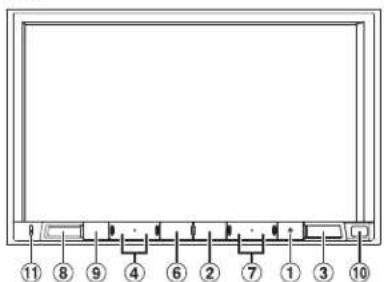
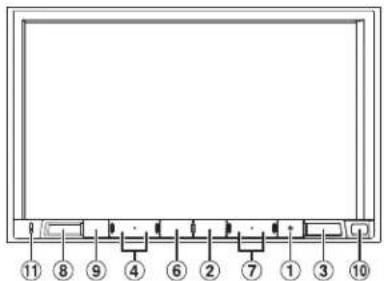
Location of Controls
The screen design used in the Owner's Manual may differ from the actual screen.
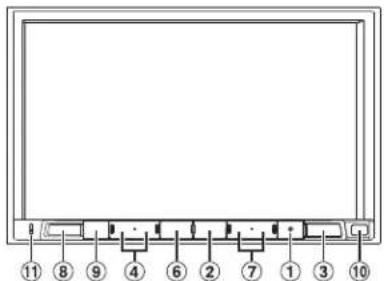
For X903D
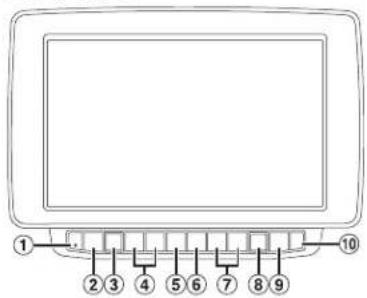
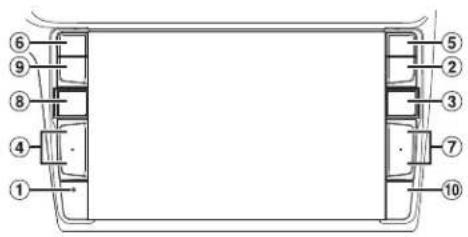
For X803D-U/INE-W720D
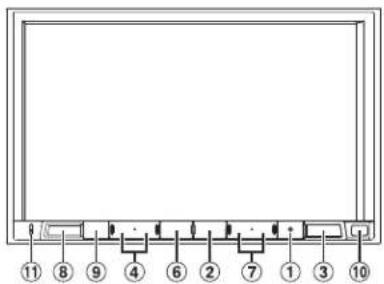
① RESET switch
The system of this unit is reset.
② MENU/ (Power Off) button
Recalls the Menu screen. Press and hold this button for at least 5 seconds to turn the power off.
③ (NAV) button
Recalls the navigation map screen. Press again to switch to Navigation menu screen. Press and hold this button for at least 2 seconds to change to Go Home route screen. (If Home is not set yet, it will change to the Home setting screen.) For details of navigation operations, refer to "Navigation System OM" in the CD-ROM.
④ /dr ÷(UP/DOWN) button
Press to adjust the volume.
⑤ (PHONE) button (X903D only)
Recalls the Phone Menu screen. Press to start a conversation when a call is incoming.
⑥ or VOICE button
Depending on the connected smartphone, press to recall Siri function or voice recognition mode.
⑦ / ▶□□n|
Press to seek up/down a station in radio mode or up/down a track, chapter, etc., in other audio/visual sources.
⑧ (AUDIO)/(Favourite) button
Displays the Audio/Visual screen. If the Audio/Visual screen is already displayed, changes the source. Press and hold for at least 2 seconds to recall the Favourite screen.
⑨ (MUTE) button
Press to activate/deactivate the mute mode.
⑩ Remote Sensor
Point the remote control transmitter towards the remote sensor within a range of 2 metres.
⑪ Microphone (X803D-U/INE-W720D only)
Used for Hands-free or Voice Control modes.
Turning Power On or Off
1 Turn the ignition key to the ACC or ON position.
The system is turned on.
2 Press and hold the MENU button for at least 5 seconds to turn the power off.
Switching the Audio Sources Screen to a Dedicated Screen
You can switch the Audio Sources screen to a dedicated screen by touching the icon on one of the three edges of the screen.
Shortcut Setup Screen
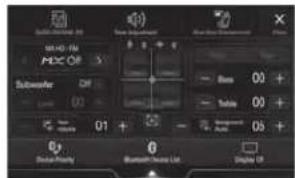
You can set the BASS ENGINE SQ, Tone Adjustment or Rear Seat Entertainment System.

Dual Screen
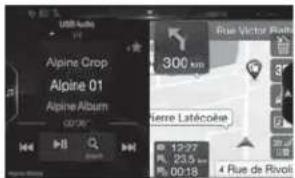
You can switch between the displayed screens on the Dual Screen.
(USB Audio)
Audio Sources Screen
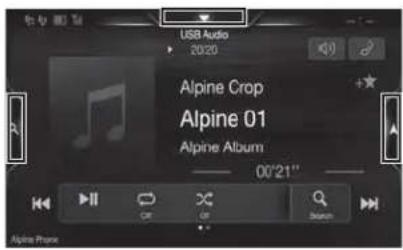


Preset button or Quick Search mode Screen*
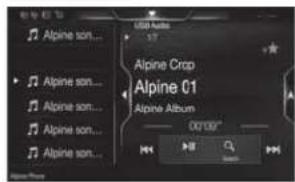
* The Search mode differs depending on the audio source. For details, see the operating instructions of the audio source.
Favourite Function
This unit enables you to recall functions easily by registering frequently used items such as the Audio source, the navigation search function, etc. to the Favourite screen. You can recall any of these items easily.
1 Press and hold the ♪/(Favourite) button for at least 2 seconds. The Favourite screen is displayed.
Favourite screen example
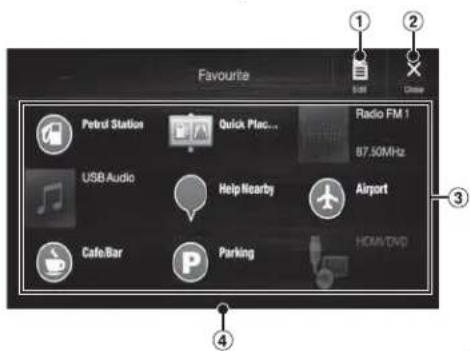
① Changes to the Edit screen used for registering items or changing names.
② Close the Favourite screen
③ Favourite registration item
④ Indicates the location of the currently displayed Favourite screen.
Swipe to the left and right to change the pages. You can add up to 6 pages.
Owner's manual Registering Items
Registering Items
1 Touch [] (Edit).
A checkbox is displayed on the upper left area of the registration icon and it changes to Edit mode.
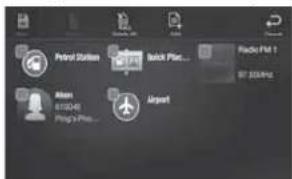
2 Touch[] (Add).
The items to be added (categories) are displayed.
3 Touch the desired item to be added (category).
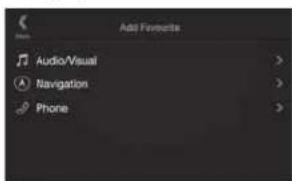
4 Choose the desired item to be added.
For details on the items to be added, refer to "Editing the Favourite Screen" in the Owner's Manual.
- You can add up to 54 items.
- You cannot register an item more than once.
5 After editing is complete, touch [] (Save).
6 After the caption for the confirmation is displayed, touch [Yes].
7 Editing is complete and the screen switches to the Favourite screen.
- If you touch [☐] (Cancel) while editing, a confirmation prompt will appear. Touch {Yes}, the screen switches to the previous Favourite Edit screen.
Android Auto (Optional)
Android Auto is designed to make it easier to use apps from your phone while you're on the road. Navigate with Google Maps, listen to playlists or podcasts from your favourite apps, and more. Download the Android Auto App from the Google Play store before continuing. Connect your Android compatible Phone to begin using Android Auto.
1 Press the MENU button.
The Menu screen is displayed.
2 Touch [Android Auto].
The Android Auto screen is displayed.
- For details operation of Android Auto, refer to "Android Auto" in the Owner's Manual (CD-ROM).
Owner's manual Apple CarPlay (Optional)
Apple CarPlay (Optional)
Apple CarPlay is a smarter, safer way to use your iPhone in the car. Apple CarPlay takes the things you want to do with your iPhone while driving and puts them right on this unit. You can get directions, make calls, send and receive messages, and listen to music, all in a way that allows you to stay focused on the road. Just plug in your iPhone to this unit and go.
For details, refer to Owner's Manual (CD-ROM).
Press for VOICE to activate Siri function of the iPhone.
You can make a call, play music, etc., by using Siri function of the iPhone.
You can also control Apple CarPlay on touchscreen.
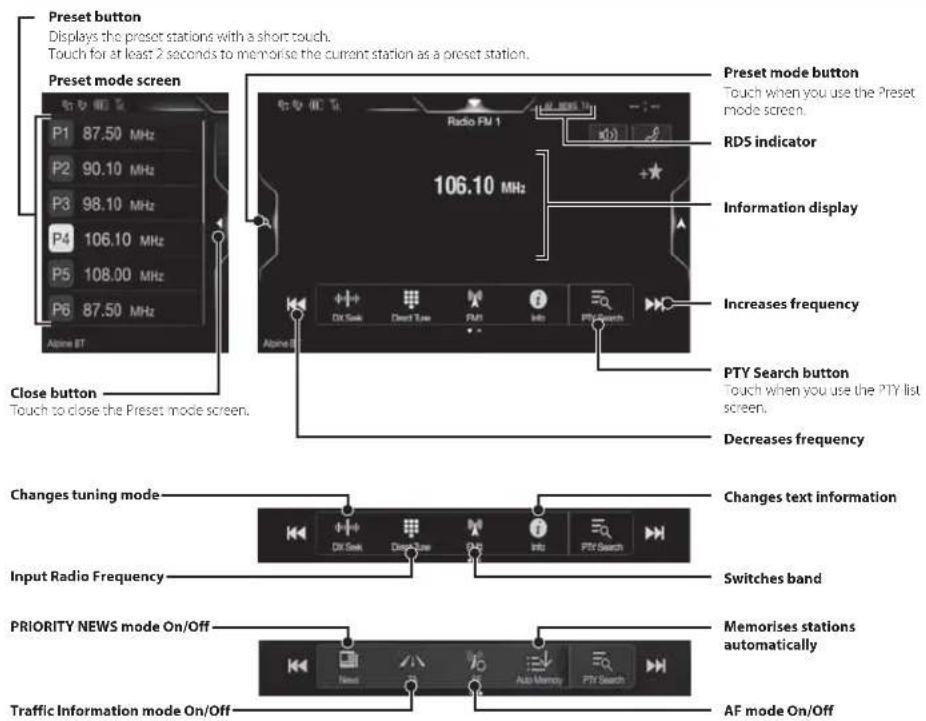
Radio/RDS Operation
DAB/DAB+/DMB Operation
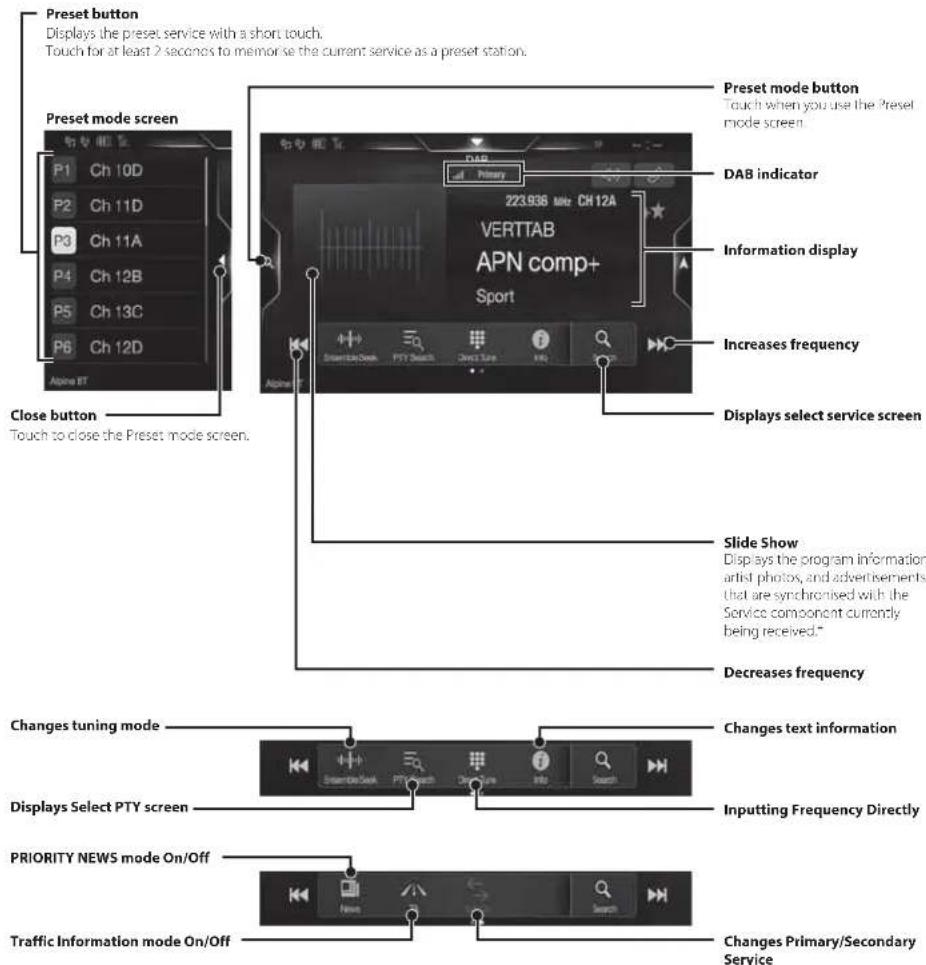
* They may not be displayed, depending on the Service component currently being received.
USB Flash drive Operation (Optional)
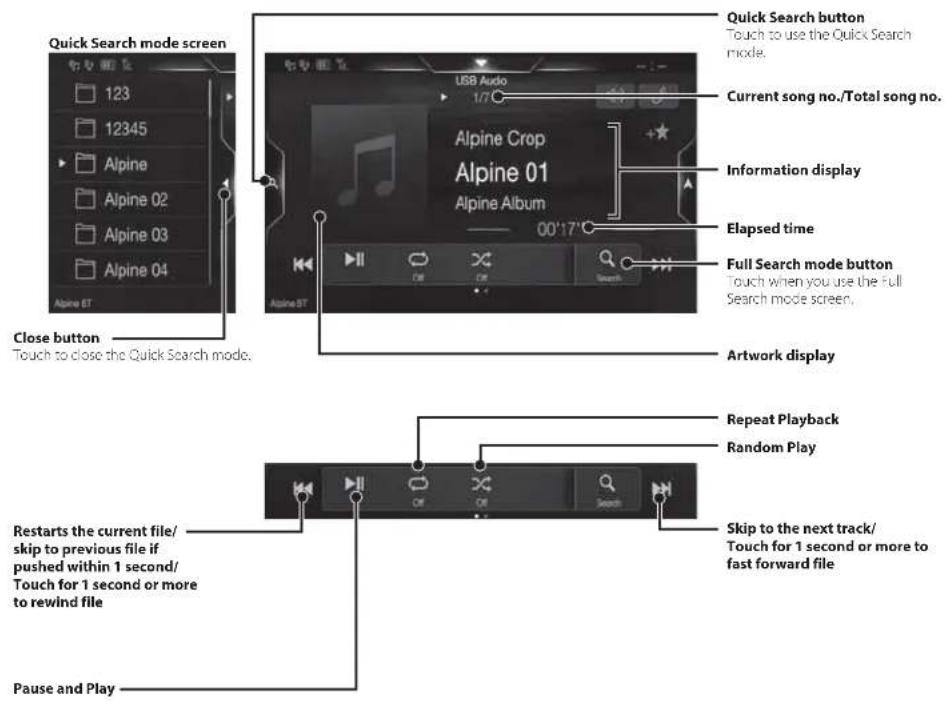
You can play back music files (MP3/WMA/AAc/FLAC) and video files (AVI/MKV/MP4) stored in a USB flash drive on the internal player of this system.
USB Audio main screen example
HDMI Device (DVD Player) Operation (Optional)
When you connect an optional DVE-5300 (DVD Player), you can operate it from the unit.
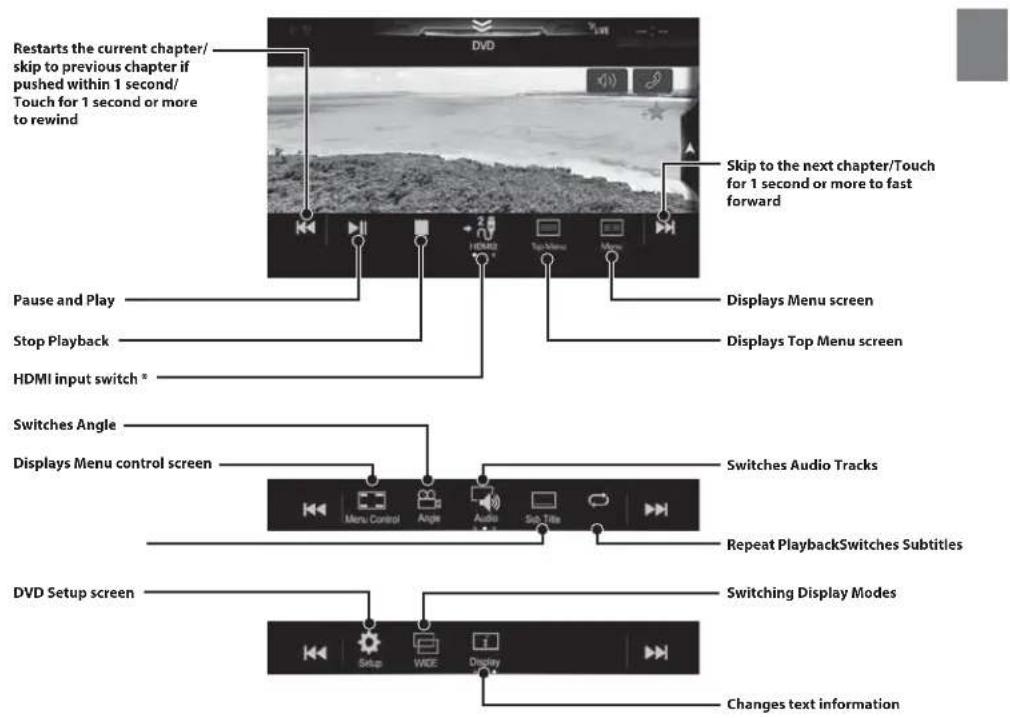
* If you connect an optional HDMI selector module, you can connect two HDMI devices. If the HDMI selector is set to "On" when two HDMI devices are connected, the HDMI input switch button is displayed. The displayed button differs depending on the settings and the HDMI input currently selected. For details, refer to "HDMI Setup" and "Setting the HDMI Selector On/Off" in the OWNER'S MANUAL (CD-ROM).
iPod/iPhone Operation (Optional)
A separately sold Lightning to USB cable (KCU-471i), etc., is required depending on the type of iPod/iPhone.
Audio mode
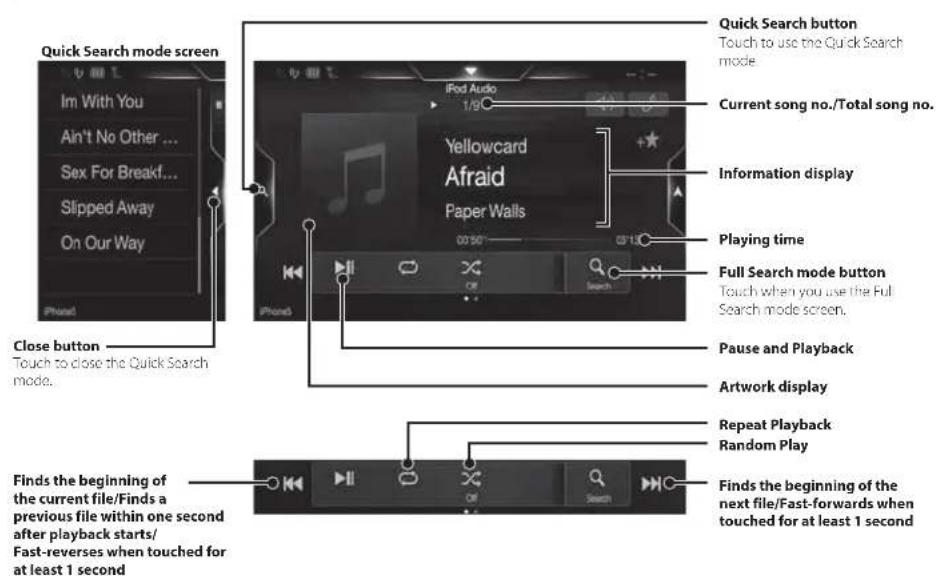
Searching for a Music File (Full Search Mode)
For example: Searching by Artist name
1 Touch [Artists] in the Full Search mode screen.
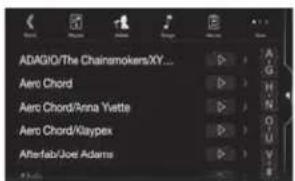
2 Touch the desired artist's name.
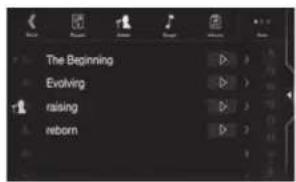
The Albums search screen of the selected artist is displayed.
Touching [▶] of the desired artist will play back all songs of the selected artist.
3 Touch the desired album's name.
All songs of the selected album are displayed.
Touching ▶ of the desired album will play back all songs of the selected album.
4 Touch the desired song's name.
The selected song is played back.
Hands-Free Phone Control
The unit can connect with up to two hands-free phones.
If you connect two hands-free phones to the unit, select "Hands-free Device Priority" in "Bluetooth Setup" to set the order of precedence. For details, refer to OWNER'S MANUAL in the AUDIO VISUAL SECTION (CD-ROM).
How to connect to a Bluetooth compatible device (Pairing)
1 Touch [Setup] button on the Menu screen.
![87.50 MHz 87.50MHz 100.00MHz 96.30MHz 86.40MHz 99.50MHz 104.70MHz [Setup] button](/content/2026/03/487788/images/cabe3386d960c2b66691bae7a588e8fa871cdfe2268d1ceece22b517d55b928b.jpg)
2 Touch [Bluetooth].
• Make sure the "Bluetooth" setting is "On".
3 Touch [Set Bluetooth Device].
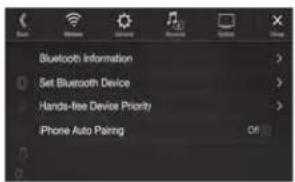
4 Touch [] to search for a new device.
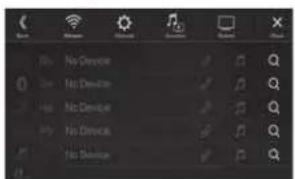
5 Touch [ ] (Audio), [ ] (Hands-free) or [ ] (Both) for the device you want to connect from the list.
Audio: Sets for use as an Audio device. Hands-free: Sets for use as a Hands Free Device. Both: Sets for use as both an Audio device and Hands Free Device.
6 When the device registration is complete, a message appears and the device returns to normal mode.
- You can register up to 5 Bluetooth compatible mobile phones.
- The Bluetooth registration process differs depending on the device version and SSP (Simple Secure Pairing). If a 4 or 6 character Passcode appears on this device, enter the Passcode using the Bluetooth compatible device. If a 6 character Passkey appears on this device, make sure the same passkey is displayed on the Bluetooth compatible device and touch "Yes."
Answering a Call
1 An incoming call triggers the ringtone and an incoming call display.
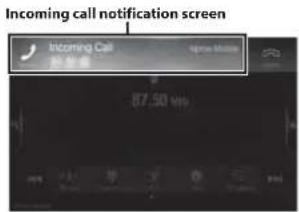
2 Touch incoming call notification screen.
The call starts.
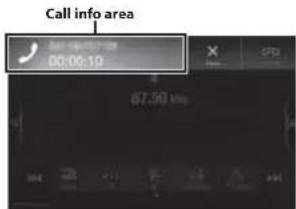
Touch the call info area during a call changes to the Phone Operation screen. Use this screen to adjust the speech volume, etc.
Hanging up the Telephone
1 Touch [] (End Call).
The call finishes.
Map Functions
Below is an overview of different buttons and icons on the map display. For more detailed information about this screen, please see the Owner's Manual.
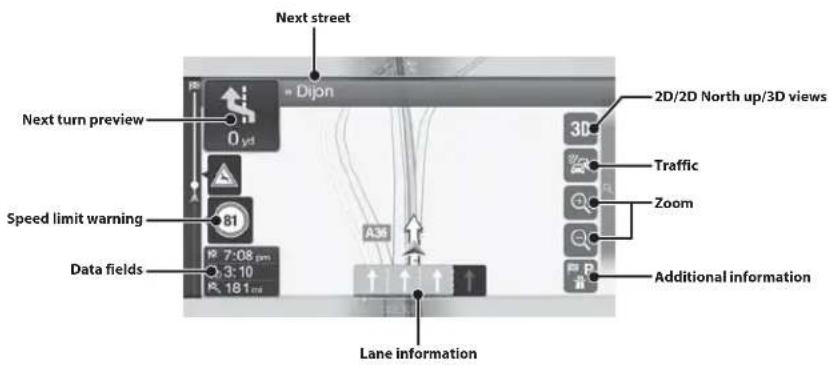
![Warning road sign 160 yd 81 4:01 pm R: 0:00 R: 160 yd Street name Motorway services Destination menu Access the menu Touch [Q] Parking around destination Additional information](/content/2026/03/487788/images/9ad97839f5cd12968cf76f1e14b1e85cdcf2a4db069033a10143ee710f610fed.jpg)
Navigation Menu
To access the Navigation Menu, touch [Q] on the right edge of the map screen. Alternatively, press the 🔊 button.
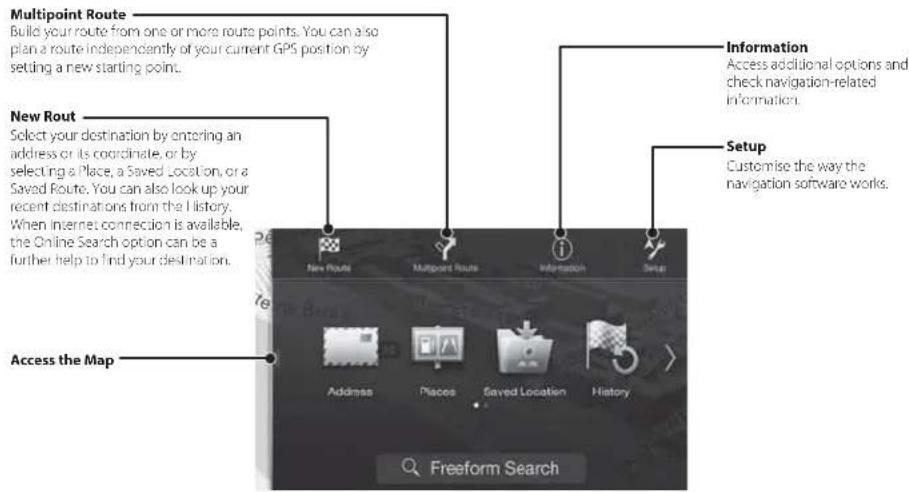
Setting a Destination
The following example describes how to search for a destination when choosing [Town/Postcode] from [Address].
- You can search and narrow down the Country/State by starting from [Country/State].
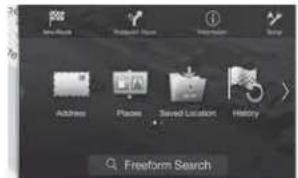
1 Touch [New Route] from the Navigation Menu.
2 Touch [Address].
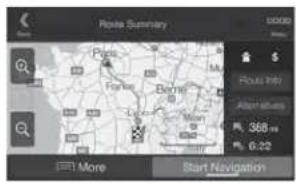
7 Touch [More] to modify the route parametres, or touch [Start Navigation] to start your journey.
3 Touch [Town/Postcode].
4 Enter the town name or postcode.
- Touch 📞 display the candidate list.
5 Enter the desired street name.
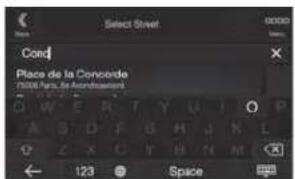
- Touch □ display the candidate list.
6 Enter the house number or crossing street.
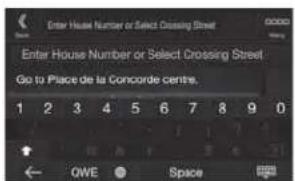
The route is calculated, and a map appears, showing the entire route. Here you can check route information and route alternatives.
Specifications
MONITOR SECTION
Screen Size 9" (X903D)
8' (X803D-U)
7° (INE-W720D)
LCD Type Transparent type TN LCD
Operation System TFT active matrix
Number of Picture Elements 1,152,000 pcs.
(800×480×3(RGB))
Effective Number of Picture Elements
99% or more
Illumination System LED
FM TUNER SECTION
Tuning Range 87.5 - 108.0 MHz
Mono Usable Sensitivity 8.1 cBf (0.7 μV/75 ohms)
50 dB Quieting Sensitivity 12 dBf (1.1 μV/75 ohms)
Alternate Channel Selectivity 80 dB
Signal-to-Noise Ratio 65 dB
Stereo Separation 35 dB
Capture Ratio 2.0 dB
MW TUNER SECTION
Tuning Range 531 - 1,602 kHz
Usable Sensitivity 25.1 μV/28 dBf
LW TUNER SECTION
Tuning Range 153 281 kHz
Sensitivity (IEC Standard) 31.6 μV/30 dBF
DAB SECTION
Tuning Range BAND III 174.93 - 239.2 MHz
Tuning Range L-BAND 1/52.96-1/490.6 MHz
Usable Sensitivity -103 dBm
Signal-to-Noise Ratio 95 dB
Stereo Separation 85 dB
USB SECTION
USB requirements USB 7.0
Max. Power Consumption 1,500 mA (CDP Support)
USB Class USB (Mass Storage Class)
File System FAT16/32
Number of Channels 2 Channels (Stereo)
Frequency Response ^1 5 - 20,000 Hz (±1 dB)
Total Harmonic Distortion 0.008% (at 1 kHz)
Dynamic Range 95 dB (at 1 kHz)
Signal to Noise Ratio 100 dB
Channel Separation 85 dB (at 1 kHz)
*1 Frequency response may differ depending on the encoder software/bit rate.
HDMI SECTION
Input Format 480p/VGA
Output Format 480p
GPS SECTION
GPS Reception frequency 1,575.42 ±1 MHz
GPS Reception sensitivity -136 dB max.
GLONASS SECTION
GLONASS Reception frequency 1,597.807 MHz - 1,605.6305 MHz
CLONASS Reception sensitivity -137 dB max.
Bluetooth SECTION
Bluetooth Specification Bluetooth V3.0
Frequency band 2,402-2,480 MHz
Output Power 14 dBm Max. (Power class 2)
Profile HFP (Hands-Free Profile)
OPP (Object Push Profile)
PBAP (Phone Book Access Profile)
AZDP (Advanced Audio
Distribution Profile)
AVRCP (Audio/Video Remote
Control Profile)
SPP (Serial Port Profile)
GENERAL
Power Requirement 14.4 V DC
(11 16 V allowable)
Operating temperature
-4°F to +140°F
(70°C to +60°C)
Maximum Power Output
50 W×4
Audio output level
Precut (Front, Rear): 4V/10k ohms (max.)
Preout (Subwoofer): 4V/10k ohms (max.)
Weight 1.51 kg (3 lbs, 5 oz) (X803D-U)
1.41 kg (3 lbs. 2 oz) (INE-W720D)
CHASSIS SIZE
Width 198 mm (7 13/16") (X803D-U)
178 mm (7") (INE-W720D)
Height 125 mm (4–15/16") (X803D-U)
100 mm (3-15/16") (INE W720D)
Depth 147 mm (5-3/4")
NOSE SIZE
Width 191 mm (/ 1/2") (X803D-U)
171 mm (6 3/4") (NE-W720D)
Height 121 mm (4-3/4") (X803D-U)
96 mm (3-3/4") (NE-W720D)
Depth 19 mm (3/4")
• X903D is sized exclusively for a certain car model.
- Due to continuous product improvement, specifications and design are subject to change without notice.
- The I.CD panel is manufactured using an extremely high precision manufacturing technology. Its effective pixel ratio is over 99.99%. This means that there is a possibility that 0.01% of the pixels could be either always ON or OFF.
- Windows Media, and the Windows logo are trademarks, or registered trademarks of Microsoft Corporation in the United States and/or other countries.
- Apple, iPhone, iPod, iPod nano, iPod touch, and Siri are trademarks of Apple Inc., registered in the U.S. and other countries. Apple CarPlay is a trademark of Apple Inc.
- Use of the Made for Apple and Works with Apple badges means that an accessory has been designed to connect specifically to the Apple product(s) identified in the Made for Apple badge and to work specifically with the technology identified in the Works with Apple badge, and has been certified by the developer to meet Apple performance standards. Apple is not responsible for the operation of this device or its compliance with safety and regulatory standards. Please note that the use of this accessory with an Apple product may affect wireless performance.
- Google, Android, Android Auto, Google Play and other marks are trademarks of Google LLC.
- The Bluetooth® word mark and logos are registered trademarks owned by the Bluetooth SIG, Inc. and any use of such marks by Alpine Electronics, Inc. is under licence. Other trademarks and trade names are those of their respective owners.
- The terms HDMI and HDMI High-Definition Multimedia Interface, and the HDMI Logo are trademarks or registered trademarks of HDMI Licensing, LLC in the United States and other countries.
- MPEG Layer-3 audio coding technology licensed from Fraunhofer IIS and Thomson. Supply of this product only conveys a licence for private, non-commercial use and does not convey a licence nor imply any right to use this product in any commercial (i.e. revenue-generation) real time broadcasting (terrestrial, satellite, cable and/or any other media), broadcasting/streaming via internet, intranets and/or other networks or in other electronic content distribution systems, such as pay-audio or audio-on-demand applications. An independent licence for such use is required. For details, please visit http://www.mp3licensing.com
- ©2006-2018 TomTom. All rights reserved. This material is proprietary and the subject of copyright protection, database right protection and other intellectual property rights owned by TomTom or its suppliers. The use of this material is subject to the terms of a license agreement. Any unauthorized copying or disclosure of this material will lead to criminal and civil liabilities.
About the Rules of Bluetooth Electromagnetic Radiation Regulation

Declaration of Conformity
Inhalt
WARNUNG 2
VORSICHT....3
Erste Schritte 4
Favoritenfunktion 6


Speichermodustaste
Bei Verwendung des
PBAP (Phone Book Access Profile)
A2DP (Advanced Audio
Distribution Profile)
AVRCP (Audio/Video Remote
Control Profile)
SPP (Serial Port Profile)
ALLGEMEINES
About the Rules of Bluetooth Electromagnetic Radiation Regulation

Declaration of Conformity
Table des matières
AVERTISSEMENT 2
ATTENTION 3
Mise en route....4
Fonction Favoris 6
Menu Navigation....15

Touche [Réglages]
8.1 dBF (0.7 μV/75 ohms)
1,41 kg (3 lbs. 2 oz) (INE-W720D)
DIMENSIONS DU CHÂSSIS
Largeur 198 mm (/ -13/16") (X803D-U)
178 mm (7") (INE-W720D)
100 mm (3-15/16") (INE-W720D)
Profondeur 147 mm (5 -3/4")
DIMENSIONS DU NEZ
Largeur 191 mm (7 -1/2") (X803D-U)
171 mm (6-3/4") (INE-W720D)
96 mm (3 -3/4") (INE-W/20D)
Profondeur 19 mm (3/4")
About the Rules of Bluetooth Electromagnetic Radiation Regulation

Declaration of Conformity
Contenido
ADVERTENCIA....2
PRUDENCIA 3
Primeros pasos....4
Para X803D-U/INE-W720D


2 Toque [ ] (Añadir).
PBAP (Phone Book Access Profile)
A2DP (Advanced Audio
Distribution Profile)
AVRCP (Audio/Video Remote
Control Profile)
SPP (Serial Port Profile)
GENERAL
Alimentación
14.4VCC
(11 - 16 V margen permisible)
About the Rules of Bluetooth Electromagnetic Radiation Regulation

Declaration of Conformity
Sommario
AVVERTENZA....2
ATTENZIONE 3
Per X803D-U/INE-W720D


PBAP (Phone Book Access Profile)
A2DP (Advanced Audio
Distribution Profile)
AVRCP (Audio/Video Remote
Control Profile)
SPP (Serial Port Profile)
SPECIFICHE GENERALI
About the Rules of Bluetooth Electromagnetic Radiation Regulation

Declaration of Conformity
Innehåll
WARNING....2
FÖRSIKTIGT....3
Komma igång....4
INSTALLATIONSTEKNIKER:
INKÖPSSTÄLLE:


PBAP (Phone Book Access Profile)
A2DP (Advanced Audio
Distribution Profile)
AVRCP (Audio/Video Remote
Control Profile)
SPP (Serieport-Profil)
ALLMÄNT
About the Rules of Bluetooth Electromagnetic Radiation Regulation

Declaration of Conformity
Inhoud
WAARSCHUWING....2
OPGELET....3
Aan de slag 4
Voor X803D-U/INE-W720D
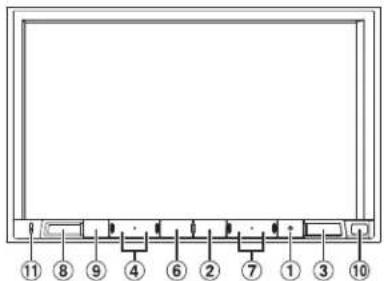
① RESET-knop
④ / of ÷ (OMHOOG/OMLAAG)-knop
⑤ (PHONE) (alleen X903D)-knop


Type LCD Transparant type TNLCD
PBAP (Phone Book Access Profile)
A2DP (Advanced Audio
Distribution Profile)
AVRCP (Audio/Video Remote
Control Profile)
SPP (Serial Port Profile)
ALGEMEEN
• X903D is sized exclusively for a certain car model.
About the Rules of Bluetooth Electromagnetic Radiation Regulation

Declaration of Conformity
Содержание
ПРЕДУПРЕЖДЕНИЕ 2
ВНИМАНИЕ....3
Модель X803D-U/INE-W720D
① Кнопка RESET

- ©2006-2018 TomTom. All rights reserved. This material is proprietary and the subject of copyright protection, database right protection and other intellectual property rights owned by TomTom or its suppliers. The use of this material is subject to the terms of a license agreement. Any unauthorized copying or disclosure of this material will lead to criminal and civil liabilities.
About the Rules of Bluetooth Electromagnetic Radiation Regulation

Declaration of Conformity

Сделано в Японии
Spis treści
OSTRZEŻENIE....2
PRZESTROGA 3
Wprowadzenie....4
Funkcja Ulubione 6
Dia X803D-U/INE-W720D
① Przełącznik RESET

About the Rules of Bluetooth Electromagnetic Radiation Regulation

Declaration of Conformity
DEVICES THAT EMIT RADIO WAVES. The following products and systems on your vehicle emit radio waves when in operation.
SIMPLIFIED EU DECLARATION OF CONFORMITY
Hereby, ALPINE ELECTRONICS, INC. declares that the radio equipment type X903D, X803D-U,
INE-W720D is in compliance with Directive 2014/53/EU. The full text of the EU
declaration of conformity is available at the following internet address:
http://www.alpine.com/e/research/doc/
Compliant with UNECE Regulation 10 (E-Mark)

| [EN] English | Hereby, Alpine Electronics, inc. declares that the radio equipment type X903D, X803D-U, INE-W720D is in compliance with Directive 2014/53/EU.The full text of the EU declaration of conformity is available at the following internet address: http://www.alpine.com/e/research/doc/ |
| [BG] Bulgarian | С настоящото Alpine Electronics, inc. декларира, че този тип радиос ъоръжение X903D, X803D-U, INE-W720D е в съответствие с Директива 2014/53/EC.Цялостният текст на ЕС декларацията за съответствие може да се намери на следния интернет адрес: http://www.alpine.com/e/research/doc/ |
| [CZ] Czech | Tímto Alpine Electronics, inc. prohlašuje, že typ rádiového zařízení X903D, X803D-U, INE-W720D je v souladu se směrnící 2014/53/EU.Üplné znění EU prohlášení o shodě je k dispozici na této internetové adrese: http://www.alpine.com/e/research/doc/ |
| [DA] Danish | Hermed erklærer Alpine Electronics, inc., at radioudstyrstypen X903D, X803D-U, INE-W720D er i overensstemmelse med direktiv 2014/53/EU.EU-overensstemmelseserklæringens fulde tekst kan findes på følgende internetadresse: http://www.alpine.com/e/research/doc/ |
| [DE] German | Hiermit erklärt Alpine Electronics, inc., dass der Funkanlagentyp X903D, X803D-U, INE-W720D der Richtlinie 2014/53/EU entspricht.Der vollständige Text der EU-Konformitätserklärung ist unter der folgenden Internetadresse verfügbar: http://www.alpine.com/e/research/doc/ |
| [EL] Greek | Με την παρούσα ο/η Alpine Electronics, inc., δηλώνει ότι ο ραδιοεξοπλισμός X903D, X803D-U, INE-W720D πληροί την οδηγία 2014/53/EE.To πλήρες κείμενο της δήλωσης συμμόρφωσης ΕΕ διατίθεται στην ακόλουθη ιστ οσελίδα στο διαδίκτυο: http://www.alpine.com/e/research/doc/ |
| [ES] Spanish | Por la presente, Alpine Electronics, inc. declara que el tipo de equiporadioeléctrico X903D, X803D-U, INE-W720D es conforme con la Directiva 2014/53/UE.El texto completo de la declaración UE de conformidad está disponible en la dirección Internet siguiente: http://www.alpine.com/e/research/doc/ |
| [ET] Estonian | Käesolevaga deklareerib Alpine Electronics, inc. et käesolev raadioseadme tüüp X903D, X803D-U, INE-W720D vastab direktiivi 2014/53/EL nõuetele.ELi vastavusdeklaratsiooni täielik tekst on kättesaadav järgmisel internetiaadressil: http://www.alpine.com/e/research/doc/ |
| [FI] Finnish | Alpine Electronics, inc. vakuuttaa, että radiolaitetyyppi X903D, X803D-U, INE-W720D on direktiivin 2014/53/EU mukainen.EU-vaatimustenmukaisuusvakuutuksen täysimittainen teksti on saatavilla seuraavassa internetosoitteessa: http://www.alpine.com/e/research/doc/ |
| [FR] French | Le soussigné, Alpine Electronics, inc., déclare que l’équipement radioé lectrique du type X903D, X803D-U, INE-W720D est conforme à la directive 2014/53/UE.Le texte complet de la déclaration UE de conformité est disponible à l’adresse internet suivante: http://www.alpine.com/e/research/doc/ |
| [HR] Croatian | Alpine Electronics, inc. ovime izjavljuje da je radijska oprema tipa X903D, X803D-U, INE-W720D u skladu s Direktivom 2014/53/EU.Cjeloviti tekst EU izjave o sukladnosti dostupan je na sljedećoj internetskoj adresi:http://www.alpine.com/e/research/doc/ |
| [HU] Hungarian | Alpine Electronics, inc. igazolja, hogy a X903D, X803D-U, INE-W720D típusú rádióberendezé smegfelel a 2014/53/EU irányelvnek.Az EU-megfelelőségi nyilatkozat teljes szövege elérhető a következő internetes címen:http://www.alpine.com/e/research/doc/ |
| [IS] Icelandic | Hér, Alpine Electronics, inc. lýsir yfir að radióbúnaður tegund X903D, X803D-U, INE-W720D er i samræmi við tilskipun 2014/53/ESB.The fullur texti af ESB-samræmisyfirlýsing er í boði á eftirfarandi veffangi:http://www.alpine.com/e/research/doc/ |
| [IT] Italian | Il fabbricante, Alpine Electronics, inc., dichiara che il tipo di apparecchiatura radio X903D, X803D-U, INE-W720D è conforme alla direttiva 2014/53/UE.Il testo completo della dichiarazione di conformità UE è disponibile al seguente indirizzo Internet: http://www.alpine.com/e/research/doc/ |
| [LT] Lithuanian | Aš, Alpine Electronics, inc., patvirtinu, kad radijo jrenginių tipas X903D, X803D-U, INE-W720D atitinka Direktyvą 2014/53/ES.Visas ES atitikties deklaracijos tekstas prieinamas šiuo interneto adresu:http://www.alpine.com/e/research/doc/ |
| [LV] Latvian | Ar šo Alpine Electronics, inc. deklarē, ka radioiekārta X903D, X803D-U, INE-W720D atbilst Direktīvai 2014/53/ES.Pilns ES atbilstības deklarācijas teksts ir pieejams šādā interneta vietně:http://www.alpine.com/e/research/doc/ |
| [MT] Maltese | B’dan, Alpine Electronics, inc., niddikjara li dan it-tip ta’ taghmir tar-radju X903D, X803D-U, INE-W720D huwa konformi mad-Direttiva 2014/53/UE.It-test kollu tad-dikjarazzjoni ta’ konformità tal-UE huwa disponibbli f’dan l-indirizz tal-Internet li ğej: http://www.alpine.com/e/research/doc/ |
| [NL] Dutch | Hierbij verklaar ik, Alpine Electronics, inc., dat het type radioapparatuur X903D, X803D-U, INE-W720D conform is met Richtlijn 2014/53/EU.De volledige tekst van de EU-conformiteitsverklaring kan worden geraadpleegd op het volgende internetadres: http://www.alpine.com/e/research/doc/ |
| [NO] Norwegian | Herved Alpine Electronics, inc. erklærer at radioutstyr type X903D, X803D-U, INE-W720D er i samsvar med direktiv 2014/53/EU.Den fullstendige teksten i EU-erklæring er tilgjengelig på følgende internettadresse:http://www.alpine.com/e/research/doc/ |
| [PL] Polish | Alpine Electronics, inc. niniejszym oświadcza, że typ urządzenia radiowego X903D, X803D-U, INE-W720D jest zgodny z dyrektywą 2014/53/UE.Pełny tekst deklaracji zgodności UE jest dostępny pod następującym adresem internetowym:http://www.alpine.com/e/research/doc/ |
| [PT] Portuguese | O(a) abaixo assinado(a) Alpine Electronics, inc. declara que o presente tipo de equipamento de rádio X903D, X803D-U, INE-W720D está em conformidade com a Diretiva 2014/53/UE.O texto integral da declaração de conformidade está disponível no seguinte endereço de Internet: http://www.alpine.com/e/research/doc/ |
| [RO] Romanian | Prin prezenta, Alpine Electronics, inc. declară că tipul de echipamente radio X903D, X803D-U, INE-W720D este în conformitate cu Directiva 2014/53/UE.Textul integral al declarației UE de conformitate este disponibil la următoarea adresă internet:http://www.alpine.com/e/research/doc/ |
| [SK]Slovak | Alpine Electronics, inc. týmto vyhlasuje, že rádiové zariadenie typu X903D, X803D-U,INE-W720D je v súlade so smernicou 2014/53/EÚ.Úplné EÚ vyhlásenie o zhode je k dispozícii na tejto internetovej adrese:http://www.alpine.com/e/research/doc/ |
| [SL]Slovenian | Alpine Electronics, inc. potrjuje, da je tip radijske opreme X903D, X803D-U, INE-W720D skladenz Direktivo 2014/53/EU.Celotno besedilo izjave EU o skladnosti je na voljo na naslednjem spletnem naslovu:http://www.alpine.com/e/research/doc/ |
| [SV]Swedish | Härmed försäkrar Alpine Electronics, inc. att denna typ av radioutrustning X903D, X803D-U,INE-W720D överensstämmer med direktiv 2014/53/EU.Den fullständiga texten till EU-försäkran om överensstämmelse finns på följande webbadress:http://www.alpine.com/e/research/doc/ |
| [TR]Turkey | İşbu beyanla, Alpine Electronics, inc. radyo ekipmanı tipinin X903D, X803D-U, INE-W720D,Directive 2014/53/EU yönergesine uyduğunu ilan eder.EU uyumluluk ilanının tam metnine (Declaration of Conformity) aşağıdaki internet adresindenulaşılabilir.http://www.alpine.com/e/research/doc/ |
ALPINE®
ALPINE ELECTRONICS MARKETING, INC.
1-7, Yukigaya-Otsukamachi, Ota-ku,
Tokyo 145-0067, JAPAN
Phone: 03-5499-4531
ALPINE ELECTRONICS OF AMERICA, INC.
1500 Atlantic Blvd.
Auburn Hills, Michigan 48326 U.S.A.
Phone 1-800-ALPINE-1 (1-800-257-4631)
ALPINE ELECTRONICS OF AUSTRALIA PTY. LIMITED
161-165 Princes Highway, Hallam
Victoria 3803, Australia
Phone 03-8787-1200
ALPINE ELECTRONICS GmbH
Ohmstraße 4
Fletchamstead Highway, Coventry CV4 9TW, U.K.
www.alpine.co.uk
ALPINE ELECTRONICS FRANCE S.A.R.L.
A.Muang Samutprakarn, Samutprakarn 10280, Thailand
Designed by ALPINE Japan
Printed in Thailand (Y)