
HP9019K - Screwdriver BLACK & DECKER - Free user manual and instructions
Find the device manual for free HP9019K BLACK & DECKER in PDF.


| Product type | Cordless screwdriver/drill |
| Brand | Black & Decker |
| Model | HP9019K |
| Voltage | 12 V |
| No-load speed | 0 - 700 min⁻¹ |
| Max. torque | 8.3 Nm |
| Chuck | Hexagonal 6.35 mm (1/4") |
| Drilling capacity (steel) | 9.5 mm |
| Drilling capacity (wood) | 12.7 mm |
| Weight | 1.5 kg |
| Charger | AC 230 V, charging time ~3 h |
| Battery type | Rechargeable NiCd/NiMH |
| Main functions | Drilling and screwing, variable speed, forward/reverse, swivel head |
| Maintenance and cleaning | Clean ventilation slots with a soft brush; housing with a damp cloth; no solvents |
| Safety | Double insulation, safety stop in center position of direction selector |
| Spare parts and repairability | Repairs by authorized service only, use original parts |
| Included accessories | Screwdriver bit, charger, battery |
| Warranty | 24 months (domestic) |
| Intended use | Domestic, screwing and drilling in wood, metal and plastic |
Frequently Asked Questions - HP9019K BLACK & DECKER
User questions about HP9019K BLACK & DECKER
0 question about this device. Answer the ones you know or ask your own.
Ask a new question about this device
Download the instructions for your Screwdriver in PDF format for free! Find your manual HP9019K - BLACK & DECKER and take your electronic device back in hand. On this page are published all the documents necessary for the use of your device. HP9019K by BLACK & DECKER.
USER MANUAL HP9019K BLACK & DECKER
Your Black & Decker drill/screwdriver has been designed for screwdriving applications and for drilling in wood, metal and plastics. This tool is intended for consumer use only.
Your Black & Decker charger has been designed for charging the battery in the tool with which it was supplied.
Safety instructions
Warning! When using battery-powered tools, basic safety precautions, including the following, should always be followed to reduce the risk of fire, leaking batteries, personal injury and material damage.
Read all of this manual carefully before operating the tool.
Retain this manual for future reference.
Keep work area clean
Cluttered areas and benches can cause accidents.
Consider work area environment
Do not expose the tool to rain. Do not use the tool in damp or wet conditions. Keep the work area well lit. Do not use the tool where there is a risk of causing fire or explosion, e.g. in the presence of flammable liquids and gases.
Keep children away
Do not allow children, visitors or animals to come near the work area or to touch the tool.
Dress properly
Do not wear loose clothing or jewellery, as these can be caught in moving parts. Preferably wear rubber gloves and non-slip footwear when working outdoors. Wear protective hair covering to keep long hair out of the way.
Personal protection
Always use safety glasses. Use a face or dust mask whenever the operations may produce dust or flying particles.
Hearing protection should be worn.
Do not overreach
Keep proper footing and balance at all times.
Stay alert
Watch what you are doing. Use common sense.
Do not operate the tool when you are tired.
Secure workpiece
Use clamps or a vice to hold the workpiece. It is safer and it frees both hands to operate the tool.
Connect dust extraction equipment
If devices are provided for the connection of dust extraction and collection facilities, ensure that these are connected and properly used.
Remove adjusting keys and wrenches
Always check that adjusting keys and wrenches are removed from the tool before operating the tool.
Use appropriate tool
The intended use is described in this instruction manual. Do not force small tools or attachments to do the job of a heavy-duty tool.
The tool will do the job better and safer at the rate for which it was intended. Do not force the tool.
Warning! The use of any accessory or attachment or performance of any operation with this tool other than those recommended in this instruction manual may present a risk of personal injury.
Check for damaged parts
Before use, carefully check the tool for damage. Check for misalignment and seizure of moving parts, breakage of parts, damage to guards and switches and any other conditions that may affect its operation. Ensure that the tool will operate properly and perform its intended function. Do not use the tool if any part is damaged or defective. Do not use the tool if the switch does not turn it on and off. Have any damaged or defective parts repaired or replaced by an authorised repair agent. Never attempt any repairs yourself.
Remove the battery
Where the design permits, remove the battery when the tool is not in use, before changing any parts of the tool, accessories or attachments and before servicing.
Avoid unintentional starting
Do not carry the tool with a finger on the on/off switch. Be sure that the tool is switched off when inserting the battery into the tool.
Do not abuse cord
Never carry the charger by its cord or pull it to disconnect from the socket. Keep the cord away from heat, oil and sharp edges.
Store idle tools
When not in use, tools, batteries and chargers should be stored in a dry, locked up or high place, out of reach of children.
Maintain tools with care
Keep cutting tools sharp and clean for better and safer performance. Follow the instructions for maintenance and changing accessories. Keep handles and switches dry, clean and free from oil and grease.
Repairs
This tool complies with relevant safety requirements.
Repairs should only be carried out by qualified persons using original spare parts; otherwise this may result in considerable danger to the user.
Additional safety instructions for batteries and chargers
Batteries
- Never attempt to open for any reason.
Do not expose the battery to water.
Do not store in locations where the temperature may exceed 40^
Charge only at ambient temperatures between 4^ and 40^ .
Charge only using the charger provided with the tool. - When disposing of batteries, follow the instructions given in the section "Protecting the environment".
Under extreme conditions, battery leakage may occur. When you notice liquid on the battery, proceed as follows:
-
Carefully wipe the liquid off using a cloth. Avoid skin contact.
-
In case of skin or eye contact, follow the instructions below.
Warning! The battery fluid, a 25 - 30% solution of potassium hydroxide, can be harmful. In case of skin contact, immediately rinse with water. Neutralise with a mild acid such as lemon juice or vinegar. In case of eye contact, rinse abundantly with clean water for at least 10 minutes. Consult a physician.
Do not incinerate the battery.
Do not attempt to charge damaged batteries.
Chargers
Use your Black & Decker charger only to charge the battery in the tool with which it was supplied. Other batteries could burst, causing personal injury and damage.
- Never attempt to charge non-rechargeable batteries.
Have defective cords replaced immediately.
Do not expose the charger to water.
Do not open the charger.
Do not probe the charger.

The charger is intended for indoor use only.
Electrical safety

Your charger is double insulated; therefore no earth wire is required. Always check that the mains voltage corresponds to the voltage on the rating plate. Never attempt to replace the charger unit with a regular mains plug.
Overview (fig. A)
- Variable speed switch
- Forward/reverse slider
- Bit holder sleeve
- Head adjustment button
- Charger receptacle
- Charger
- Screwdriver bit
- Battery
Assembly
Fitting and removing the battery (fig. B)
To fit the battery (8), line it up with the receptacle on the tool. Slide the battery into the receptacle and push until the battery snaps into place.
To remove the battery, push the release button (9) while at the same time pulling the battery out of the receptacle.
Fitting and removing a drill bit or screwdriver bit (fig. C & F)
This tool uses screwdriver bits and drill bits with a 1/4" (6.35) mm hexagonal shank.
Lock the tool by setting the forward/reverse slider (2) to the centre position (fig. F).
Pull back the bit holder sleeve (3) (fig. C).
- Insert the bit shaft (7) into the bit holder.
Release the bit holder sleeve.
Use
Warning! Before drilling into walls, floors or ceilings, check for the location of wiring and pipes.
Charging the battery (fig. E)
The battery needs to be charged before first use and whenever it fails to produce sufficient power on jobs that were easily done before.
When charging the battery for the first time, or after prolonged storage, it will only accept an 80% charge.
After several charge and discharge cycles, the battery will attain full capacity. The battery may become warm while charging; this is normal and does not indicate a problem.
Warning! Do not charge the battery at ambient temperatures below 4^ or above 40^ . Recommended charging temperature: approx. 24^ .
To charge the battery (8), remove it from the tool.
Slide the charger receptacle (5) onto the battery as shown.
Plug in the charger (6).
The battery will become warm while charging. After approx. 3 hours of charging, the battery will be fully charged.
Remove the charger receptacle from the battery.
Adjusting the head (fig. D)
For optimum versatility, the head can be set to different positions.
Press the head adjustment button (4) down.
Swivel the head into the desired position.
Release the button.
Selecting the direction of rotation (fig. F)
For drilling and for tightening screws, use forward (clockwise) rotation. For loosening screws or removing a jammed drill bit, use reverse (counterclockwise) rotation.
To select forward rotation, push the forward/reverse slider (2) to the left.
To select reverse rotation, push the forward/reverse slider to the right.
ENGLISH
To lock the tool, set the forward/reverse slider into the centre position.
Drilling/screwdriving (fig. A)
Select forward or reverse rotation using the forward/ reverse slider (2).
To switch the tool on, press the switch (1). The tool speed depends on how far you press the switch.
To switch the tool off, release the switch.
Setting the torque
This tool is fitted with a collar to set the torque for tightening screws. Large screws and hard workpiece materials require a higher torque setting than small screws and soft workpiece materials. The collar has a wide range of settings to suit your application.
Turn the collar to the desired setting. If you do not yet know the appropriate setting, proceed as follows:
- Set the collar to the lowest torque setting.
- Tighten the first screw.
- If the clutch ratchets before the desired result is achieved, increase the collar setting and continue tightening the screw. Repeat until you reach the correct setting. Use this setting for the remaining screws.
Hints for optimum use
Drilling
Always apply a light pressure in a straight line with the drill bit.
Just before the drill tip breaks through the other side of the workpiece, decrease pressure on the tool.
Use a block of wood to back up workpieces that may splinter.
Use HSS drill bits when drilling in metal.
Use a lubricant when drilling metals other than cast iron and brass.
Make an indentation using a centre punch at the centre of the hole to be drilled in order to improve accuracy.
Screwdriving
Always use the correct type and size of screwdriver bit.
- If screws are difficult to tighten, try applying a small amount of washing liquid or soap as a lubricant.
Always hold the tool and screwdriver bit in a straight line with the screw.
When screwing in wood, it is recommended to drill a pilot hole with a depth equal to the length of the screw.
A pilot hole guides the screw and prevents splintering or distortion of the wood. For the optimum size of the pilot hole, refer to the table below.
When screwing in hardwood, also drill a clearance hole with a depth equal to half the length of the screw. For the optimum size of the clearance hole, refer to the table below.
| Screw size Pilot holeø(softwood) |
| No. 6 (3.5 mm) 2 mm |
| No. 8 (4 mm) 3.2 mm |
| No. 10 (5 mm) 3.5 mm |
| Screw size Pilot holeø(hardwood) |
| No. 6 (3.5 mm) 2.5 mm |
| No. 8 (4 mm) 3.5 mm |
| No. 10 (5 mm) 4.0 mm |
| Screw size Clearance hole |
| No. 6 (3.5 mm) 4 mm |
| No. 8 (4 mm) 5.0 mm |
| No. 10 (5 mm) 5.7 mm |
Accessories
The performance of your tool depends on the accessory used. Black & Decker and Piranha accessories are engineered to high quality standards and designed to enhance the performance of your tool. By using these accessories you will get the very best from your tool. This tool uses screwdriver bits and drill bits with a 1/4" (6.35 mm) hexagonal shank. Piranha Super-lok accessories are designed for use with this tool.
Maintenance
Your Black & Decker tool has been designed to operate over a long period of time with a minimum of maintenance. Continuous satisfactory operation depends upon proper tool care and regular cleaning.
Your charger does not require any maintenance apart from regular cleaning.
Warning! Before performing any maintenance on the tool, set the forward/reverse slider to the centre position. Unplug the charger before cleaning it.
Regularly clean the ventilation slots in your tool using a soft brush or dry cloth.
Regularly clean the motor housing using a damp cloth. Do not use any abrasive or solvent-based cleaner.
Protecting the environment
Tools

Black & Decker provides a facility for recycling Black & Decker products and rechargeable batteries once they have reached the end of their working life. This service is provided free of charge. To take advantage of this service please return your product to any authorised repair agent who will collect them on our behalf.
Batteries
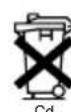
Black & Decker batteries can be recharged many times. At the end of their useful life, discard batteries with due care for our environment:
Run the battery down completely, then remove it from the tool.
NiCd and NiMH batteries are recyclable. Take them to your service agent or a local recycling station. Collected batteries will be recycled or disposed of properly.
Technical data
| HP9012/HP9019 | |
| Voltage V | 12 |
| No-load speed min | -1 0 -700 |
| Max. torque Nm 8.3 | |
| Bit holder 1/4" (6.35 mm hex) | |
| Max. drilling capacity in steel/wood mm 9.5 / 12.7 | |
| Weight kg 1.5 | |
Charger
| Input voltage V | AC 230 |
| Approx. charging time h 3 |
EC declaration of conformity
Black & Decker declares that these products conform to: 98/37/EC, 89/336/EEC, 73/23/EEC, EN 50260, EN 55014, EN 60335, EN 61000
LpA (sound pressure): dB(A), LwA (acoustic power) dB(A), hand/arm weighted vibration < 2.5 m/s²
Colin Wills, Director of Engineering BDCI, 4/F, 2 Dai Wang Street Tai Po Industrial Estate Tai Po NT, Hong Kong
Guarantee
Black & Decker is confident of the quality of its products and offers an outstanding guarantee. This guarantee statement is in addition to and in no way prejudices your statutory rights. The guarantee is valid within the territories of the Member States of the European Union and the European Free Trade Area.
If a Black & Decker product becomes defective due to faulty materials, workmanship or lack of conformity, within 24 months from the date of purchase, Black & Decker guarantees to replace defective parts, repair products subjected to fair wear and tear or replace such products to ensure minimum inconvenience to the customer unless:
The product has been used for trade, professional or hire purposes;
The product has been subjected to misuse or neglect;
The product has sustained damage through foreign objects, substances or accidents;
Repairs have been attempted by persons other than authorised repair agents or Black & Decker service staff.
To claim on the guarantee, you will need to submit proof of purchase to the seller or an authorised repair agent. You can check the location of your nearest authorised repair agent by contacting your local Black & Decker office at the address indicated in this manual. Alternatively, a list of authorised Black & Decker repair agents and full details of our after-sales service and contacts are available on the Internet at:
www.2helpU.com.
Director of Engineering BDCI, 4/F, 2 Dai Wang Street Tai Po Industrial Estate Tai Po NT, Hong Kong
DEUTSCH
Garantie
No. 10 (5 mm) 4,0 mm
Colin Wills
Director of Engineering
BDCI, 4/F, 2 Dai Wang Street
Tai Po Industrial Estate
Tai Po NT, Hong Kong
Garantie
Director of Engineering BDCI, 4/F, 2 Dai Wang Street Tai Po Industrial Estate Tai Po NT, Hong Kong
Garanzia
Director of Engineering BDCI, 4/F, 2 Dai Wang Street
Tai Po Industrial Estate Tai Po NT, Hong Kong
Garantie
Director of Engineering
BDCI, 4/F, 2 Dai Wang Street
Tai Po Industrial Estate
Tai Po NT, Hong Kong
Garantía
Tire as chaves de aperto
Engenheiro Responsavel BDCI, 4/F, 2 Dai Wang Street Tai Po Industrial Estate Tai Po NT, Hong Kong
Garantia
Utom rackhall for barn
Director of Engineering BDCI, 4/F, 2 Dai Wang Street Tai Po Industrial Estate Tai Po NT, Hong Kong
Reservdar / reparationer
Director of Engineering BDCI, 4/F, 2 Dai Wang Street Tai Po Industrial Estate Tai Po NT, Hong Kong
Director of Engineering BDCI, 4/F, 2 Dai Wang Street Tai Po Industrial Estate Tai Po NT, Hong Kong
Reservedele / reparationer
Colin Wills
Director of Engineering
BDCI, 4/F, 2 Dai Wang Street
Tai Po Industrial Estate
Tai Po NT, Hong Kong
Evdsieyuev npoiopoinon
To panavokataoβio Black & Decker exei oxediaotei yia εφapouyec biδωμatoC kai yia diatponon oε Eulo, μεtaλlo kai πλaotika.
Auto to epyaIeio npoopiEeai mOvo yia epaatexviKxpon. O optioTc oc Black & Decker exi oxediaotei ia T option tnc nataapiac tou epyaIeou, to onio ouvodseie.
Odyieacopaaleia
Ppooox!Kata n xpon enavaopoptcouevwv epyaieiw, Ta npenai naVtva laubavovtai obaikec npopuaEia aopaaleiac, yia tov nepiopiio tou kivduvou npkayiac, diappoons uypou ano mataapiies, owatikow baaewkai uukwzmuw.
Piv xnpaonpoinoeTo epyaleio diaaote npooextikac Tnapakatow onyieC.
ΦuλaTeTo eYxεipio auto yia ελλοντikn avapopa
AiaItnpeite KaBapo to Xwpo EpyaiaC
Akataotatoi xpoi kai nayko1 ekyuovouv kivuvo Taupaatou.
AaBcTe un' oyn TIC eNippaes Tou nepiBaAovToC
Mny ekTeTe nAekTpiKa epyaia o Upaia. PovTiote n
nepiox npyaoia v evai kal a quEvm. Mn xpouonoieiTO epyaieo av unapxei kivouoc va pokknei npkayia n
ekpEn, n.x. KovTa oE uPakta uypa kai aepia.
EeYxTe eav To epyaieio aoc exi 6a8c
Piv ano T xpon, ExyTe npooekTka to epyaleio yia tuxov Znuec. EelyTe yia tuxov ka kn euypapmuon kai epiokn twv KVOUeewv eepw, yia epn tou exouv onaoge, yia tuxov Znuec otouc npoupaaknpcek kai touc diakontec, kai yeviKa kthe eibouc ouvthkec oI onoe c evdexetai va empeaoov m λeitoupyia tou epyaleiou. Bebaowte 0TI to epyaleio λeitoupyei kavovikai kxpoanoiietai yia to okono yia tov onoio npoopizetai.Mn xpoanoiite to epyaleio av kanoio EAptnua tou napouaace1 eAattwa. Mn xpoanoiote to epyaleio, eav o diakontnc dev unopei va to beeE vvtoc n EKToc leitoupyiac. PovtioTe yia tvv enikueun n avtkataoan Touxov eaattwpatikov Eapntmuatwv ano Eouioobotmevo keVtpo enikveuw. Note mnu enixepnoe Te va enikkeuoeTe o idoi to epyaleio.
Apaieote Tn mntapia
Apaepote Tmuatapia otav to epyaieio dex npnooioitei, npotou aaaaTe oonoiHnote avtaaakto, npaekoev n EAptnau Tou epyaieou, kai npiv anT ouvtnpon Tou.
Anopuyetntv tuxia ekkivnon tou epyaieiou
Mn eTapepeTo epyaleio exovacTo daKTuO oac navw 0to diakontm Ekkivnonc. Bepaiweite otkata thv eoayyn Tns mntapiaac, to epyaleio evai oBnoto.
Mny kakouetaipizote to kaawdo
Ionte un tepeteto optiokpatwvtac tov ano to kaawio kau nvy totpaate ano to kalwio yia va to byaTe ano thnpica. Povtiote to kalwio va napapeveu akpia ano m eepohtta, ta laia kai ano aixnpecs akues.
duayet Ta epyaia aos oaae espeos
Otav ev xpoaonoiouvtai, ta epyaleia, ooptiotc kal oI mataie c npentv a anoekuovtai e npo xwpo, paKpia ano ta naiaia.
SUVtnpnoTe ppoeKTiKa ta epyaia
Euoulac yia apiotn xpnon
Diatpnon
Na aokite navta ma eaaopa nien otny iia eueia me to Tpuanavi.
MolcToTpunaviByeI ano TnV aAanAepa Tou Teepaxiou Epyaiaic, eattwote Tny aokouevn nion oEpyaleio.
Xpnooonone eva koumai ELO yia va otnpieEte ta Teuayia epyaiaac, Tov onoiw To uikó evexetai va epavioi pwuec kaTTo pumua.
Tia m diatponon oe taa, xnooionote Tpuavia taxuxala (HSS).
Xpnoaonoiote Iunavtiko kata T diatpnan aalou eTaalou EKTOC ano xutoiDnpo kalopeixa.
Anuoyote ia kpn ykorn eia novta oTo Kevtpo Tns onns nou tha tputnesei, npokieevou va tputnoeTe e Eyautepn akpiEia.
Biodomega
Na xpoaonoiite navta tov kaataaAno tuno Ka uEeyEOc mUTnc katoaBIOU.
Av To ophiu Taw Biow npouiae duokolia, anwote uKpn nooTnTa Uypou anoppunavTKO uanouvio av Iaaytko.
To epyaleio kai n mou tou kataoiou npeneia va Kpatiouta naVt oyn iia euaeia u Tbiia.
- Otav biowve Te e EuAo, ouviotata va avoiyte npwta ma Tpuia-obnyo ie ibo baoc te ukoTc bioc.
EAAHNIKA
H trpuia-odnyoc kaobdyei tn Bida kai npoalaabei To 0kiauo n tv napapoppwon tou elou. ta to katalnnlo eeyeoc ts prunac-odnyou, avatpeEte oTov nivaka nou akoaloue i.
OTAV BiowvETe OE OKnpo EALo, aoviyETe ETIOGmua TPURA yia diakevo ME Baooc ioo ME To MIOO mKOC TCS BiDac. Ia TO katalanno MEyEtoC TNS TPUNAC YIA DIakevo, avatpeTc OTOV NIVAKA NOAKOAUOeI.
| Mévyoc Bidaç Ω Trpùnac-odnyou (maλakó Εύλο) |
| Ap. 6 (3,5 mm) 2 mm |
| Ap. 8 (4 mm) 3,2 mm |
| Ap. 10 (5 mm) 3,5 mm |
| Mévyoc BiocΩ Tpúncs-odnyóu (oklnpó Úluo) |
| Ap. 6 (3,5 mm) 2,5 mm |
| Ap. 8 (4 mm) 3,5 mm |
| Ap. 10 (5 mm) 4,0 mm |
| Mévyoc Bioc Tpúna yia δiákevo |
| Ap. 6 (3,5 mm) 4 mm |
| Ap. 8 (4 mm) 5,0 mm |
| Ap. 10 (5 mm) 5,7 mm |
Eeapntmuata
H anofoon Tou epyaaiou oac Eapntatai ano ta EapntmaTnou xnoanoeite. Ta EapntmaTback & Decker kai Piranha eiva oxediaogeva oumpwva e npotuna uynlnc nioiTAC yia va beAiwovuTv anofoon Tou epyaieou aoc Xnoaonowvtae ta 8a emtuexte TbeAiotn anofoon Tou epyaieou.To epyaieoxnoaioei mutekatoaiboiou kai TpuanaviaeEaywviokotelexoc6,35mm(1/4")Ta EapntmaTpa Piranha Super-lok eiva oxediaogeva yia xnoen e to epyaieio auto.
Suvtnpnon
AutoTo epyaieio Tc Black & Decker exei oxediaotei etoi
wote va aeitoupeiy ia eya lo xoviko diotmaue tv
elambdaotn duvatnf povtida.H adiaeeintn kai kavovikn
aeitoupyia tou eapatai ano tn povtida tou epyaeeiou kai
tov taktko kaqapiou tou.
O optiotsac dev aanatei kaimua ouvtnpnon EKToc ano tov
taktko kaqapiou tou.
Ppoox! Piv EKTEAeTe OIOaHnOte Epyaia ouvtpono nC OTo EpyaEio, TOnOeMeTc To cOpouEv Doakonm Eupoc / Niow Otn Mcaia The. Byale To foaptiOn ano Tnv npiz a Piv Tov KaapoeTe.
Na KaBapicTe TAKtKa Tc unOdoXeC Eaepioou OTo EpyaEio oac xnpoIooWvTac maakn BoOpTa a n OTeyVOnavi.
Na kaθapiετaTakTiKaTo περβλημa TnS μnxavns xnpoioiwvTac εva βεγμεvo navi. Mn xnpojooiεiTe ΟλβωTiKa n Uypa KaθapIoou Nou περχouv δiauπkεc ouic.
Aa0eon epyaaleiw kai nepiaalov
Epyaia

Director of Engineering
BDCI, 4/F, 2 Dai Wang Street
Tai Po Industrial Estate
Tai Po NT, Hong Kong
Eyyunon
H Black & Decker eivaaiyoun yia nV noiota wv npoiovtwv ts kai napexei onuavtkn evyunon. H napouoa yapann Eyyunon anotea i npooBeto dkaiomega caq kal dve Nmuwei ta ouvtaymuata oac diakawata. H eyyunon loxuei Evtoc nC etikpateia cTsw Kpatw Meaw Tc EupwnaiKc Evwnc kai ts EupwnaiKc Zwns Eeuvepow Suvaalayw.
Dealer address Date of purchase
. In this tool your first purchase? . lot dishes
Codice postale Postcode
CodigodCodigo postal Postnr.
Postnr. Postnr. Postinumero
Kωδικός

Cat. no.:
English Please complete this section immediately after the purchase of your
tool and send it to Black & Decker in your country. If you live in
Australia or New Zealand, please register by using the alternative
guarantee card supplied.

- Safety instructions
- Keep work area clean
- Consider work area environment
- Keep children away
- Dress properly
- Personal protection
- Do not overreach
- Stay alert
- Secure workpiece
- Connect dust extraction equipment
- Remove adjusting keys and wrenches
- Use appropriate tool
- Check for damaged parts
- Remove the battery
- Avoid unintentional starting
- Do not abuse cord
- Store idle tools
- Maintain tools with care
- Repairs
- Additional safety instructions for batteries and chargers
- Batteries
- Chargers
- Electrical safety
- Overview (fig. A)
- Assembly
- Fitting and removing the battery (fig. B)
- Fitting and removing a drill bit or screwdriver bit (fig. C & F)
- Use
- Charging the battery (fig. E)
- Adjusting the head (fig. D)
- Selecting the direction of rotation (fig. F)
- ENGLISH
- Drilling/screwdriving (fig. A)
- Setting the torque
- Hints for optimum use
- Drilling
- Screwdriving
- Accessories
- Maintenance
- Protecting the environment
- Tools
- EC declaration of conformity
- Guarantee
- DEUTSCH
- Garantie
- Garanzia
- Garantía
- Tire as chaves de aperto
- Garantia
- Utom rackhall for barn
- Reservdar / reparationer
- Reservedele / reparationer
- Evdsieyuev npoiopoinon
- Odyieacopaaleia
- AiaItnpeite KaBapo to Xwpo EpyaiaC
- AaBcTe un' oyn TIC eNippaes Tou nepiBaAovToC
- EeYxTe eav To epyaieio aoc exi 6a8c
- Apaieote Tn mntapia
- Anopuyetntv tuxia ekkivnon tou epyaieiou
- Mny kakouetaipizote to kaawdo
- duayet Ta epyaia aos oaae espeos
- SUVtnpnoTe ppoeKTiKa ta epyaia
- Euoulac yia apiotn xpnon
- Diatpnon
- Biodomega
- EAAHNIKA
- Eeapntmuata
- Suvtnpnon
- Aa0eon epyaaleiw kai nepiaalov
- Epyaia
- Eyyunon
Brand : BLACK & DECKER
Model : HP9019K
Category : Screwdriver