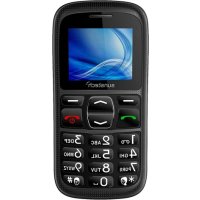
CEL10 - Smartphone Sunstech - Free user manual and instructions
Find the device manual for free CEL10 Sunstech in PDF.



| Product type | Smartphone |
| Brand | Sunstech |
| Model | CEL10 |
| Power supply | Removable Li-ion battery, mains charger |
| SIM card type | Standard (size not specified) |
| External storage | microSD card (T-Flash) |
| Supported audio formats | MP3, WAV |
| Supported video formats | AVI |
| FM radio | Yes |
| Flashlight | Yes, dedicated key |
| SOS function | Yes, with emergency numbers and SMS sending |
| Alarm | Up to 5 alarms |
| Calculator | Yes |
| Calendar | Yes |
| Voice recorder | Yes |
| Phone lock | By PIN code or password |
| Automatic screen lock | 15 s, 30 s, 1 min, 5 min or disabled |
| Airplane mode | Yes |
| Silent mode | Yes, profiles: general, silent, meeting, headset, outdoor |
| Warranty | 2 years (EU legal warranty) |
| Country of manufacture | China |
Frequently Asked Questions - CEL10 Sunstech
User questions about CEL10 Sunstech
0 question about this device. Answer the ones you know or ask your own.
Ask a new question about this device
Download the instructions for your Smartphone in PDF format for free! Find your manual CEL10 - Sunstech and take your electronic device back in hand. On this page are published all the documents necessary for the use of your device. CEL10 by Sunstech.
USER MANUAL CEL10 Sunstech
- Safety and Considerations 4
- Button, The appearance of Phone and Icon Illustration..6
- Usage Introduction. 8
- Entering text 10
5.Basic function. 11
6.Menu function. 13
6.1 Phone Book 13
6.2 Message 13
6.3 Call Center. 14
6.3.1 Call history 14
6.3.2 Advanced setting 15
6.4 Alarm 15
6.5 FM radio 15
6.6 Calendar 15
6.71 Calculator 16
6.8 Multimedia. 16
6.8.1 Video player 16
6.8.2 Audio player 16
6.8.3 Sound recorder 16
6.9 Setting 16
6.9.1 Phone setting 17
6.9.2 Profile 17
6.9.3 SOS setting. 17
6.9.4 Security setting. 18
6.9.5Restore setting 18
7. Other functions 18
8. Trouble Shooting. 19
1. Safety and Attentions
In order to use your mobile phone safely and efficiently, please read your messages before using:
Please be careful when you are near chemical plant, gas station, tank farm and otherexploders. Even if your mobile phone is in standby, it will send out RF signal as well. Therefore, please power off your mobile phone.
When you are driving, do not use your mobile phone. If you have to use it, please park your car then have your calling.
Don't use your mobile phone in the hospital so as not to disturb the operation of medical equipment, such as heart pacemakers, hearing aids and etc. You should obey relevant rules before using.
Please power off your mobile phone before the plane taking off so as not to disturb flying. It is dangerous and illegal to use mobile phone on board.
Please place your mobile phone and all accessories where is untouchable for kids.
Accessories and battery: please use the dedicated accessory and battery of our company. If not, it will destroy the phone and lead to danger. Please do not shortcut, tear down and
adapt the battery. If the phone has excessive temperature, discolor, variant, bulking, weeping and other unusual phenomenon, please stop using and change the battery immediately so as not to affect the safety. Please place the old batteries in specific recycle spots.
No charging without the battery. When you take off the battery, please power off the mobile phone so as not destroy the property of the phone.
The phone is not waterproof. Please keep it dry.
Avoid using the phone in an excessive and too low temperature.
Not throw, fall and beat the phone so as not to destroy the internal and external phone.
Authorized Service: install and maintain the phone by professional people. Please not tear off the phone on your own.
The counting unit of radiation standard is called SAR. In the international norm, the SAR limitation is 2.0~W / Kg . The maximal SAR of this phone is 0.482~W / Kg . It meets the state criterion of GB 21288-2007.
2. Key Press, Appearance and Icon instructions
| Icon Instructions | |
| - | Right soft key. Enter the phonebook Return to superior interface |
| - | Left soft key Enter in the menu or act as the button "Enter" |
| - | Call key. Dial and answer calls. |
| - | End call. Press and hold the button to turn it on/off. |
| - | SOS |
| - | Flashlight key |
Appearance:
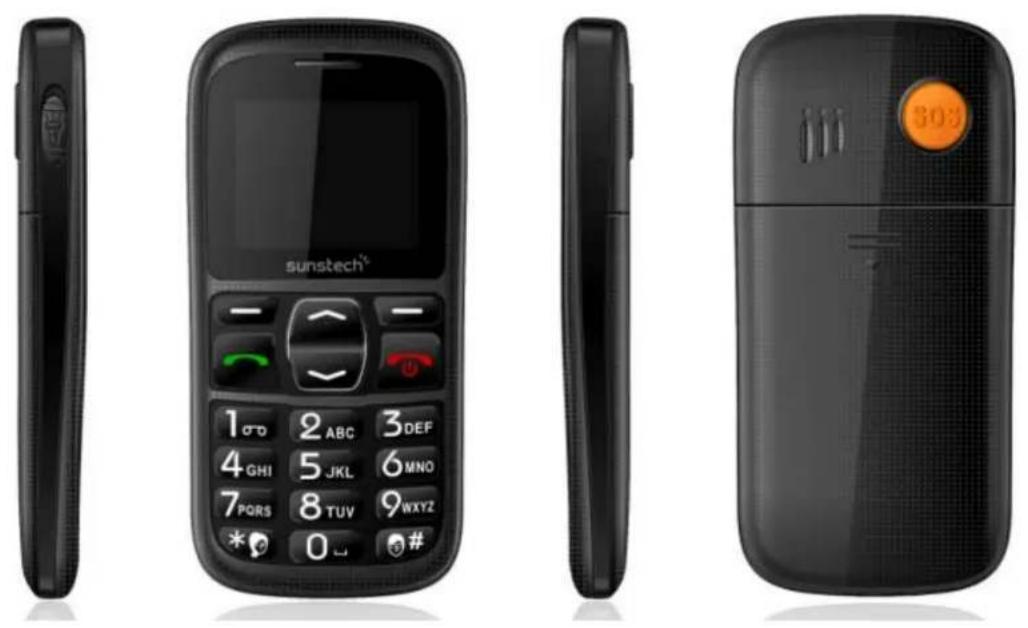
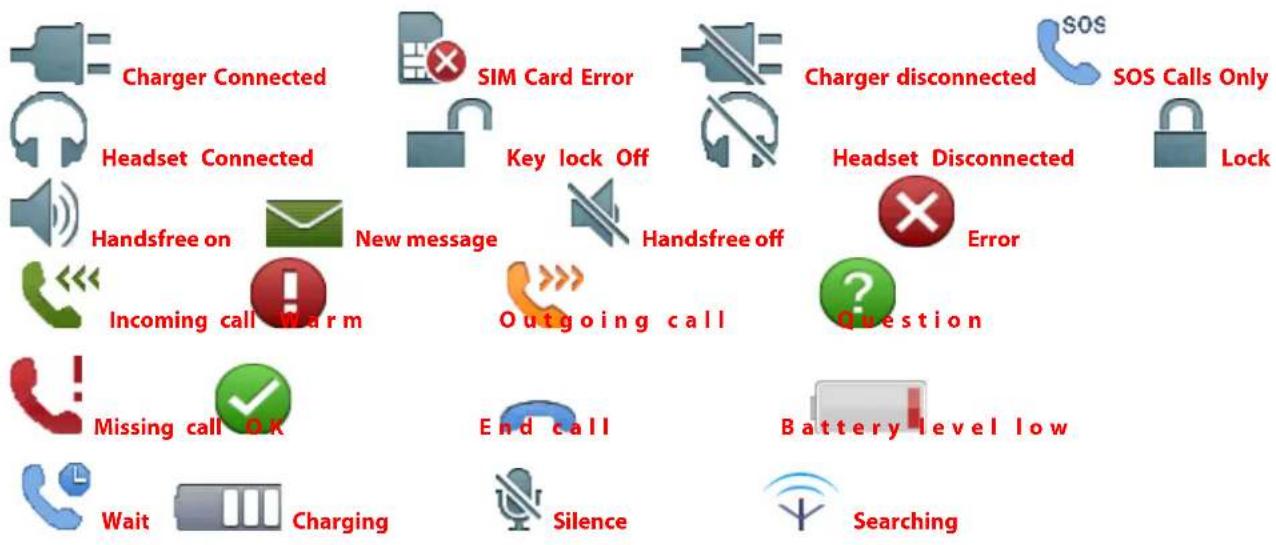
Icon Instructions: (The icon is just for reference. If the change, we will not inform you.)
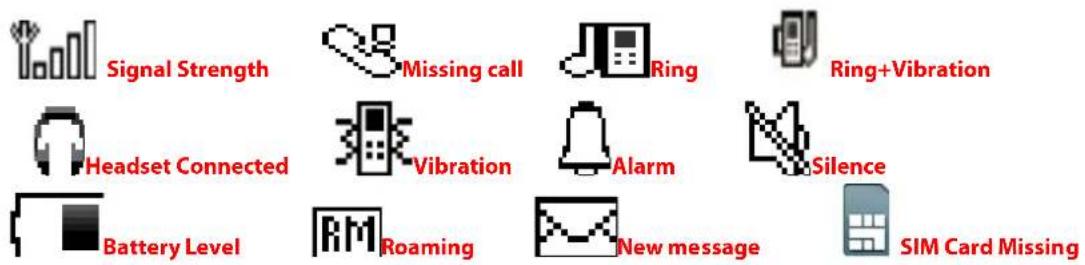
In the front of the screen, it will show the following icon to show the phone state. And the icon will change as different countries and service provider.
Screen Icon
3. User's Introduction
SIM card information
When you access, you will get an SIM card which will contain your information such as PIN no. and available service option.
Install and Take Out SIM Card
1) Power off the phone. Remove the battery cover and unload other power supply. (If the phone is on, hold and press can power on/off.)
2) Insert the SIM card as index map(make sure the metal point face the phone).
3) When you need to take out SIM card, power off and then take out the battery.
Install T-FLASH Memory Card
T-Flash acts as phone storage: The first time when you insert in T-Flash, it is better for you to set the music player, video player, and voice recorder as storage card.
USB link to computer and input port. After linking, T-Flash can act as U Disk. User can copy and edit into the card. MP3 copy to "My Music", Picture copy to "Images" or "Photos", e-book copy to "Ebook".
The usage of T-Flash: Before operating, you must power off the phone, take out the charger and battery.
Insert the T-Flash into card slot as index map. Attention: The metal point face down.
The usage of charger and battery
- The usage of battery
This phone also had Li-ion battery. After using the first time, you can reuse it after charging for 4 hours to make sure the best state of the battery.
1) When removing, please act as follow, A: Remove the battery cover B: Take up the battery
2) When installing, please act as follow. A: The metal points face to each other and then press down the battery until it settles down.
3) When the battery is running low, is displayed and a warning
signal is heard.
- Charging
1) Connect the battery to power supply.
2) displayed briefly when the charger is connected to the phone.
3) The battery charge indicator will be animated while charging.
4) is displayed when charging is completed.
Warning:
When charging, it should be placed in a wind place between 0^ 40^ . Only use batteries, charger and accessories that have been approved for use with this particular model. Connecting other accessories may be dangerous and may invalidate the phone's type approval and guarantee.
Link to internet
Lock off the SIM card, the mobile phone can search internet automatically. Once Ok, the name of the service operator will show on. If the phone is stand-by, you can dial and receive.
4、Entering Text
Entering text with Smart ABC
The dictionary will suggest words based on the keys you have
pressed.
For example: To write the word "HELLO", use arrow keys to view the suggested words. You can delete it with right soft key.
Entering numbers:
Enter the available number free 0 to 9.
Special button:
Press # for a list of special characters. Select the desired character and press OK to enter it.
Press to shift between sentence case, upper case, lower case and numerals.
5. Basic Function
Make and Receiving calls
Make calls
When the signal of network provider is shown, you can dial and receive calls.
1) When the phone is stand-by, enter any numeric keys, and press . After being received, there will be calling information on the screen.
2) Enter the phone number including the area code. Delete with Clear.
Dial international number
1) When making international calls, press + and numbers.
2) In the standby mode, press and hold * and then the + will be shown.
3) Dial with Attention: Some internet do not support the international calls with+.
Making a call from the Phonebook
- In the standby mode, open the phonebook.
- Use the arrow keys to scroll through the phonebook, or quick search by pressing the key corresponding to the first letter of the name.
- Press to dial.
Dial recent call
1)Press then a list of recent calls will be shown.
2)Scroll the available number, and press
SOS
If you are in the range of Internet, you can call SOS.
Receive calls
- When you listen to the incoming calls, you will hear ringing or
vibration,
- Press to answer.
- Press to end the call.
6. Menu Function
6.1 Phonebook
To add a new contact: press option to submenu, enter contact name and number then save.
You can send SMS to the contact.
6.2 Message
-
Writing a message (Text message)
-
Press Menu, scroll to and press OK.( You can add template, number, name and so on)
- Select Write message and press OK.
- Type your message then press Done.
- You can enter the number directly in the edit box and/or send.
- Inbox (incoming messages)
When you receive new SMS, the phone will ring. The missing messages will be shown on the screen. Then press Message Center Inbox Option. You can reply, delete, edit, forward,
copy, delete all, copy all, move all etc. the messages.
Drafts
If you edit a message, but do not send out, you can save.
Outbox
The send messages will be save in Outbox.
- Sent messages
Check sent SMS .
All the sent messages will be saved in Sent messages.
- SMS templates
Enter Template, press Option, then you can edit, move messages or create new messages from the template.
- SMS Settings
1)You can check the Memory status of SIM and phone
2) You can select Save sent message on or off.
6.3Call Center
6.3.1 Call history
Missed, dialed, and Received calls are saved in a combined call log. For multiple calls related to the same number, only the most recent call is saved. You can delete the call log.
Call settings
- Advanced setting
1) Blacklist
Reject number: you can select on/off
Blacklist numbers: You can set 20 numbers to blacklist, when you select reject number on, once these 20 numbers call you, you will not receive calls from them, no disturb.
2) Auto call recorder: select on/off
3) Auto radial: select on/off
4) Call time display: select on/off
5) Call time reminder: Off/Single/Periodic
6) Answer mode: Any key/auto answer when headset mode
6.4 Alarm
You can set to up 5 alarms in different hours.
Set time, type etc.
6.5 FM radio
Enter FM radio, press the numbers "4" and "6" to adjust and choose your favorite frequency and press "5" to turn OFF/ ON to continue listen the radio.
6.6 Calendar
Enter the option submenu:
You can jump to date, go to the Today, Week View and other operations.
6.7 Calculator
Calculate using the number keys to enter numbers, press the left side of the operation symbol (^n + , - ,× ,÷ ^n) , press the that displays the results.
If input 1 + 2 = 3 , methods of operation: first enter the number keys "1", then use the navigation keys to select the "+" sign, enter the number keys 2, with the choice "=" sign, press the left soft key, to calculate the results "3."
6.8 Multi media
6.8.1 Video player
This player can play video from your Micro SD card.
Note: The formats audio must be only AVI
6.8.2 Audio player
This player can play music from your Micro SD card.
Note: The formats audio must be only MP3 or WAV.
6.8.3 Sound recorder
You can make sound recorder
6.9 Settings
6.9.1 Phone Settings
Time and date
Set Time and date: input time, month, year and press save.
- Schedule power on/off
Set the time to power on and off
- Language
Select language and press OK.
- Pref. input method
Select input method and press OK.
- Display
Wallpaper----Set the wallpaper
LCD backlight -adjust the Brightness and time(sec)
- Flight mode
You can choose Normal mode or Flight mode
6.9.2 Profile
You can choose General/Silent/Meeting/Headset/outdoor
6.9.3 SOS Setting
1 Status: select On, then SOS is open.
2.Family Numbers: Set 5 SOS number in Family Numbers, and saved them.
3. SOS SMS ON/OFF.
Select SOS SMS ON, then you can also send SMS to these 5 numbers.
- SOS SMS: Edit your SOS info and saved.
- Warning Tone
Select the SOS Warning Tone on /off
Attention: You should open this function if you want to use it. When you slide open SOS red button, it will call up to 5 numbers one by one and at the same time send out the SMS to them.
6.9.4 Security setting
1) Phone security: Phone lock, you can set password to lock the phone or change password
3) Screen auto lock: you can choose Off, means the screen will never lock, or you can choose 15 secs/30 secs/1 min/5 min
Input phone password:
Default password is "0000", then restore setting, your previous operations like pictures will erase.
7. Other functions
7.1 Flashlight
Whether the mobile phone is power on or off, you can open the flashlight pressing the key. When you push up the key, the flashlight is on. When you push down the key, the flashlight is off.
8. Troubleshooting
In order to avoid unnecessary service, and save time and money in the phone operating problems, please control the
following self-exam.
- The mobile phone is turned on request "PIN code"
Check the PIN code is activated.
You must enter to get together with the SIM card PIN code. You can also turn off the PIN code check function.
- Open the phone to request the "Insert SIM card"
Check the SIM card is inserted in place.
- The mobile phone is turned on request "Please enter the phone lock code"
You set the phone lock.
You must enter a random password for the unlock.
- No network
You may be in GSM / DCS network coverage range.
- No sound when pressing the key
Check the Mute mode.
Check the mode menu.
- No alarm
Check the Mute mode.
- Can not make a call
Call options may be set against. Check the ban call menu.
- Can not receive incoming calls
You may set a ban call options. Check the ban call menu.
9. Fail to send a message
Check the option of message
The harmful elements of this phone by Unitone
| Component | Harmful Elements | |||||
| (Pb) | (Hg) | (Cd) | (Cr(VI)) | (PBB) | (PBDE) | |
| (VPS× | ○ | ○ | ○ | ○ | ○ | |
| Battery | × | ○ | ○ | ○ | ○ | ○ |
| Assessory | × | ○ | ○ | ○ | ○ | ○ |
| ○: The level of the harmful elements is below SJ/T11363-2006 standard. ×: One of the elements are over SJ/T11363-2006 standard. Attention! The reason for “×”: No other available technology or accessory.: This signal is available for Chinese electronic product, the No. in the signal Stands for the term of environmental service for this product. | ||||||
Made in China
WARRANTY CARD
EUROPEAN WARRANTY
1.General
This warranty is granted without prejudice and in addition to the recognized rights for the consumer vis-à-vis the seller provided in the Royal Legislative Decree of 16 November, approving the restated text of the General Law for the Protection of Consumers and Users and other complementary legislation. Therefore, the recognized legal rights for the consumer are not limited or excluded according to the relevant Regional, National or European legislation.
This warranty shall be valid in all the European Union Member States with the limitations that legally correspond in the country in which they are intended to be implemented in accordance with their implementing legislation.
Notwithstanding the foregoing, SUNSTECH shall respect the rights and limitations related to the product warranty that legally correspond in each of the States listed in the Attachment in accordance with their implementing legislation for any product provided that it is intended for the EU market and has
been purchased or used by the consumer or user within the EEA.
1.Legal Warranty
This SUSTECH product has a two (2) year warranty counting from the date of delivery and/or purchase. During the above timeframe, SUNSTECH shall be held responsible for any lack of conformity of the product in relation to the contract in accordance with the provisions of the Law for the Protection of Consumers and Users, that shall entitle the consumer to request the repair or replacement of the product, unless one of these options is objectively impossible or disproportionate.
Accordingly, the remedy (i.e. the repair or replacement) shall be deemed to be disproportionate if it imposes unreasonable costs on the seller. In order to determine this, the following shall be considered: (i) the value of the product if there were no lack of conformity; (ii) the relevance of the lack of conformity; and (iii) if the other form of remedy could be carried out without major inconvenience to the consumer and user.
To determine whether the costs are unreasonable, the costs incurred by one form of remedy must be significantly higher than the costs corresponding to the other form of remedy.
In addition, the consumer may choose between requesting a
reduction in the price or terminating the contract, if he is not entitled to demand the repair or replacement of the product and whenever these actions would not be completed within a reasonable timeframe and would cause more inconvenience to the consumer and user. However, the termination shall not take place where the lack of conformity is minor.
Both the repair and the replacement of the product as a result of the product's lack of conformity shall be free of charge for the consumer and user, including labour and materials.
In any case, repairs under warranty shall be carried out by SUNSTECH's Official Technical Assistance Service or its authorized distributors.
1 CONDITIONS for the warranty to be exercised
To exercise the legal and commercial warranty, it is necessary to submit documentary evidence showing the delivery and/or purchase date of the product, whether the invoice, receipt, delivery slip or sealed and dated warranty card. Documents which have been tampered with or falsified will not be accepted.
The consumer shall contact SUNSTECH's Customer Service Team using the website (under the support section) and will be informed about what action to take. At that time, the consumer
shall have to provide a clear description of the malfunction or the lack of conformity of the product with the contract.
In any case, repairs under the warranty shall be carried out by SUNSTECH's Official Technical Assistance Services or its authorized distributors so that SUNSTECH can be held responsible under the legal and/or commercial warranty.
1. Exceptions
The warranty does not foresee or include periodic maintenance or product installation revisions.
In addition, the product will not be considered as lacking conformity in relation to the contract and therefore, it will not be covered by the legal or commercial warranty when:
-
The lack of conformity corresponds to a discrepancy with the safety standards or the local or national techniques of a different country to the one it was originally designed and produced in;
-
This product or any of its identification features (number of series, etc.) have been partially or completely opened, assembled, unassembled, handled and/or repaired by a person not part of SUNSTECH's Official Technical Assistance Services team or its authorized distributors
-
The lack of conformity is a result of an incorrect installation (except if the installation has been carried out by one of SUNSTECH's authorized sellers or under its responsibility, or by the consumer following SUNSTECH's installation instructions) or an abusive or inadequate use of the product, including but not limited to, a usage that is not in accordance to the normal purpose of the product or the directions for use and maintenance, as defined by SUNSTECH;
- The lack of conformity has been caused by a computer virus, an action or a manipulation of passwords, software installation, manipulation or reinstallation, etc.;
- The lack of conformity is due to the use of accessories, chargers or consumables that are not SUNSTECH originals and therefore are not designed for that product;
- The lack of conformity is due to the use of any third party software or application that modifies, changes or adapts the software that was approved and/or included by SUNSTECH in the product;
-
The lack of conformity is a result of downloading or using third party multimedia services and/or contents available or accessible through the product;
-
Damages in or through the battery, which are due to it being overcharged, are produced;
- Any of the box seals or battery cells have been damaged, or there is clear evidence that shows these were handled; and/or
- The product damages are caused by any unforeseeable or force majeur circumstances, especially, lightning, water, fire, applying incorrect voltage or any other cause that is not due to the product manufacturing or design.
Under no circumstances will SUNSTECH be held responsible for the loss of any data stored in the product. The consumer will be held responsible for any back-up copies and the protection of any data from loss, damage or destruction.
None of the warranties included here cover the replacement of parts, due to ware or rupture of mechanisms, rubber, boxes and/or plastic, as well as any aesthetic damage resulting from the normal use of the product, for example, if the screen loses its shine with the use of the product. In the same way, the warranties do not cover any type of damage produced during the transportation of the product (including but not limited to aesthetic damage, blows, lines, scratches, stains, dents, etc.) in which case the applicable provisions under SUNSTECH's general contract conditions will apply.
For further information go to www.sunstech.es
You can also contact:
AFEX SUNS, S.A.
Pallars, 189-191
08005 BARCELONA
DECLARATIONOFCONFORMITY
CouncilDirective(s)towhichconformityisdeclared:
Directive(1999/5/EC)-R&TTE
Directive(2004/108/EC)-EMC
Directive(2006/95/EC)-LVD
Directive(2011/65/EU)-RoHS
ApplicationoftheStandards:
EN60950-1:2006+A11:2009+A1:2010+A12:2011
EN60950-1:2006+A11:2009+A1:2010+A12:2011+A2:2013
EN50360:2001/A1:2012EN62209-1:2006
EN62209-1:2005EN62209-2:2010
Manufacturer'saddress:
C/Pallars189,08005Barcelona
Typeofequipment:
Mobilephone
Trade:
SUNSTECH
Modelno.:
CEL10
We, the undersigned, hereby declare under our sole responsibility that the specified equipment is in conformity with the above Directive(s) and
Standard(s)
Place:Barcelona
(Signature)
VICTOR Planas Bas
(Full name)
Date:25-August-2015
General Manager
(Position)
Directiva(1999/5/EC)-R&TTE
Directiva(2004/108/EC)-EMC
Directiva(2006/95/EC)-LVD
Directiva(2011/65/EU)-RoHS
DECLARATIONDECONFORMITE
DirectiveduConseilauxquelleslaconformiteestdéclarée:
Directive(1999/5/EC)-R&TTE
Directive(2004/108/EC)-EMC
Directive(2006/95/EC)-LVD
Directive(2011/65/EU)-RoHS
Applicationdesnormes:
EN60950-1:2006+A11:2009+A1:2010+A12:2011
EN60950-1:2006+A11:2009+A1:2010+A12:2011+A2:2013
EN50360:2001/A1:2012EN62209-1:2006
EN62209-1:2005EN62209-2:2010
Directiva(1999/5/EC)-R&TTE
Directiva(2004/108/EC)-EMC
Directiva(2006/95/EC)-LVD
Directiva(2011/65/EU)-RoHS
Aplicações Normas:
EN60950-1:2006+A11:2009+A1:2010+A12:2011
EN60950-1:2006+A11:2009+A1:2010+A12:2011+A2:2013
EN50360:2001/A1:2012EN62209-1:2006
EN62209-1:2005EN62209-2:2010

- Safety and Attentions
- Key Press, Appearance and Icon instructions
- Appearance:
- Screen Icon
- User's Introduction
- SIM card information
- Install and Take Out SIM Card
- Install T-FLASH Memory Card
- The usage of charger and battery
- - Charging
- Warning:
- Link to internet
- 4、Entering Text
- Basic Function
- Dial international number
- Making a call from the Phonebook
- Dial recent call
- SOS
- Receive calls
- Menu Function
- Phonebook
- Message
- - Inbox (incoming messages)
- Drafts
- Outbox
- - Sent messages
- - SMS templates
- - SMS Settings
- 6.3Call Center
- Call history
- Call settings
- - Advanced setting
- 1) Blacklist
- Alarm
- FM radio
- Calendar
- Calculator
- Multi media
- Video player
- Audio player
- Sound recorder
- Settings
- Phone Settings
- Time and date
- - Schedule power on/off
- - Language
- - Pref. input method
- - Display
- - Flight mode
- Profile
- SOS Setting
- Security setting
- Other functions
- Flashlight
- Troubleshooting
- Fail to send a message
- Check the option of message
- Made in China
- WARRANTY CARD
- EUROPEAN WARRANTY
- 1.General
- 1.Legal Warranty
- Exceptions
- DECLARATIONOFCONFORMITY
- Directive(1999/5/EC)-R&TTE
- Directive(2004/108/EC)-EMC
- Directive(2006/95/EC)-LVD
- Directive(2011/65/EU)-RoHS
- Directiva(1999/5/EC)-R&TTE
- Directiva(2004/108/EC)-EMC
- Directiva(2006/95/EC)-LVD
- Directiva(2011/65/EU)-RoHS
- DECLARATIONDECONFORMITE
Brand : Sunstech
Model : CEL10
Category : Smartphone