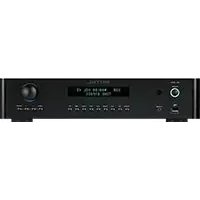
RC1572 - Receiver ROTEL - Free user manual and instructions
Find the device manual for free RC1572 ROTEL in PDF.



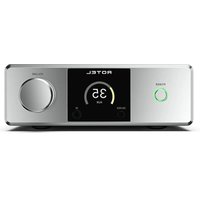
| Product Type | Stereo Control Amplifier (Preamplifier) |
| Brand | Rotel |
| Model | RC-1572 |
| Dimensions (W x H x D) | 431 x 99 x 338 mm (17 x 4 x 13.25 inches) |
| Net Weight | 7.4 kg (16.3 lb) |
| Power Supply | 120 V / 60 Hz (USA) or 230 V / 50 Hz (Europe), switchable internally by a technician |
| Rated Power Consumption | 35 watts |
| Standby Power Consumption | Less than 0.5 watt |
| Analog Inputs | Phono (MM), 4 x RCA line (CD, Tuner, Aux, etc.), 1 pair XLR balanced |
| Digital Inputs | 2 x coaxial, 2 x optical (PCM up to 24-bit/192 kHz) |
| USB Input | Front USB-A for iPod/iPhone/iPad, USB-B for PC (USB Audio Class 1.0/2.0 up to 384 kHz) |
| Bluetooth | Built-in with antenna jack, aptX compatible |
| Outputs | RCA pre-out, XLR pre-out, 2 x mono subwoofer, headphone (3.5mm jack) |
| Connectivity | Rotel Link (mini-jack cable), 12 V trigger (2 outputs), RS232, Ethernet network, external remote input |
| Remote Control | Infrared RR-AX93, with secondary code |
| Tone Control | Bass ±10 dB at 100 Hz, Treble ±10 dB at 10 kHz (on/off switchable) |
| Balance | Adjustable from L15 to R15 |
| Display | Backlit LCD screen, adjustable brightness |
| Maintenance and Cleaning | Use a dry cloth or vacuum; do not use liquid products |
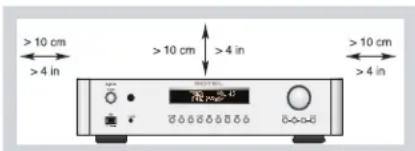
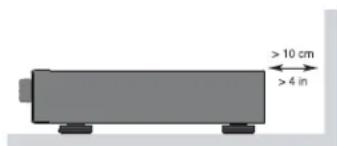
| Safety | Double electrical insulation; do not expose to moisture; unplug during storms; leave 10 cm free space around the unit |
| Spare Parts and Repairability | Internal fuse replaceable only by authorized service; no user-serviceable parts |
| General Information | Balanced design, toroidal transformer, symmetrical PCB trace circuits, RoHS and WEEE certified |
Frequently Asked Questions - RC1572 ROTEL
User questions about RC1572 ROTEL
0 question about this device. Answer the ones you know or ask your own.
Ask a new question about this device
Download the instructions for your Receiver in PDF format for free! Find your manual RC1572 - ROTEL and take your electronic device back in hand. On this page are published all the documents necessary for the use of your device. RC1572 by ROTEL.
USER MANUAL RC1572 ROTEL
HCTpyKcna nonb30BaTeJIa
Important Safety Instructions
Notice
The RS232 connection should be handled by authorized persons only.
WARNING: There are no user serviceable ports inside. Refer all servicing to qualified service personnel.
WARNING: To reduce the risk of fire or electric shock, do not expose the unit to moisture or water. Do not expose the unit to dripping or splashing. Do not place objects filled with liquids, such as vases, on the unit. Do not allow foreign objects to get into the enclosure. If the unit is exposed to moisture, or a foreign object gets into the enclosure, immediately disconnect the power cord from the wall. Take the unit to a qualified service person for inspection and necessary repairs.
Read these instructions.
Keep these instructions.
Heed oil warnings.
Follow all instructions.
Do not use this apparatus near water.
Clean only with dry cloth.
Do not block any ventilation openings. Install in accordance with the manufacturer's instructions.
Do not install near any heat sources such as radiators, heat registers, stoves, or other apparatus (including amplifiers) that produce heat. Do not defeat the safety purpose of the polarized or grounding-type plug. A polarized plug has two blades with one wider than the other.
A grounding type plug has two blades and a third grounding prong.
The wide blade or the third prong are provided for your safety. If the provided plug does not fit into your outlet, consult an electrician for replacement of the obsolete outlet.
Protect the power cord from being walked on or pinched particularly at plugs, convenience receptacles, and the point where they exit from the apparatus.
Only use attachments/accessories specified by the manufacturer.
Use only with the cart, stand, tripod, bracket, or table specified by the manufacturer, or sold with the apparatus. When a cart is used, use caution when moving the cart/ apparatus combination to avoid injury from tip-over.

Unplug this apparatus during lightning storms or when unused for long periods of time.
Refer all servicing to qualified service personnel. Servicing is required when the apparatus has been damaged in any way, such as power supply cord or plug is damaged, liquid has been spilled or objects have fallen into the apparatus, the apparatus has been exposed to rain or moisture, does not operate normally, or has been dropped.
The apparatus should be used in non tropical climate.
You must allow a minimum 10 cm or 4 inches of unobstructed clearance around the unit.
WARNING:The rear panel power cord connector is the mains power disconnect device. The device must be located in an open area that allows access to the cord connector.
The unit must be connected to a power supply only of the type and voltage specified on the rear panel. (USA: 120 V/60Hz, EC: 230V/50Hz)
Connect the component to the power outlet only with the supplied power supply cable or an exact equivalent. Do not modify the supplied cable. Do not use extension cords.
The mains plug is the disconnect of the unit. In order to completely disconnect the unit from the supply mains, remove the main plug from the unit and the AC power outlet. This is the only way to completely remove mains power from the unit.
The batteries in the remote control should not be exposed to excessive temperature such as sunshine, fire or other heat sources. Batteries should be recycled or disposed as per state and local guidelines.
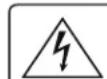
CAUTION RISK OF ELECTRIC SHOCK DO NOT OPEN
WARNING: SHOCK HAZARD-DO NOT OPEN
AVIS: RISOUE DE CHOC ÉLECTRIQUE-NE PAS OUVIR
APPLICABLE FOR USA, CANADA OR WHERE APPROVED FOR THE USE
CAUTION: TO PREVENT ELECTRIC SHOCK, MATCH WIDE BLADE OF PLUG TO WIDE SLOT. INSERT FULLY.
ATTENTION: POUR EVITER LES CHOCS ELECTRIQUES. INTRODUIRE LA LAME LA PLUS LARGE DE LA FICHE DANS LA BORNE CORRESPONDANTE DE LA PRISSE ET POUSSER JUSQ AU FOND.
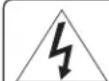
This symbol is to alert the user to the presence of uninsulated dangerous voltages inside the product's enclosure that may constitute a risk of electric shock.
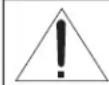
This symbol is to alert the user to important operating and maintenance (service) instructions in this manual and literature accompanying the product.

Rotel products are designed to comply with international directives on the Restriction of Hazardous Substances (RoHS) in electrical and electronic equipment and the disposal of Waste Electrical and Electronic Equipment (WEEE). The crossed wheelix bin symbol indicates compliance and that the products must be appropriately recycled or processed in accordance with these directives.

This symbol means that this unit is double insulated. An earth connection is not required.
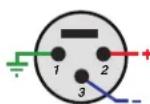
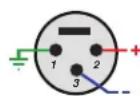
Pin Assignments
Balanced Audio (3 pole XLR):
Pin 1: Ground / Screen
Pin 2: In phase / +ve / Hot
Pin 3:Out of phase/v-e/Cold

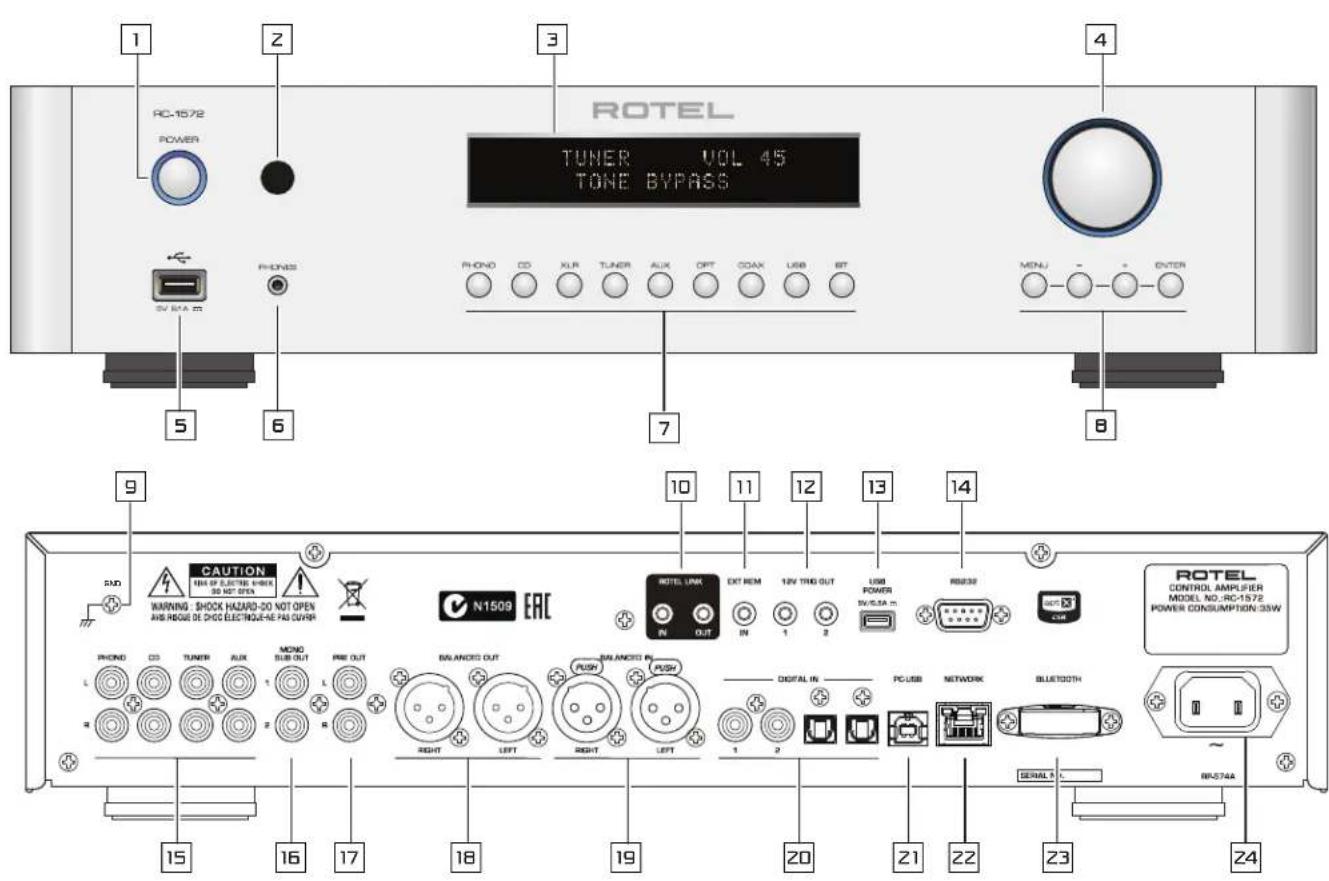
Figure 1: Controls and Connections Bedieningselementen en aansluitingen Commandes et Branchements Controllie connessioni Bedienelemente und Anschluske Kontrolier och anslutningar Controles y Conexiones OpraHbI npaBHeNn pa3beMbl
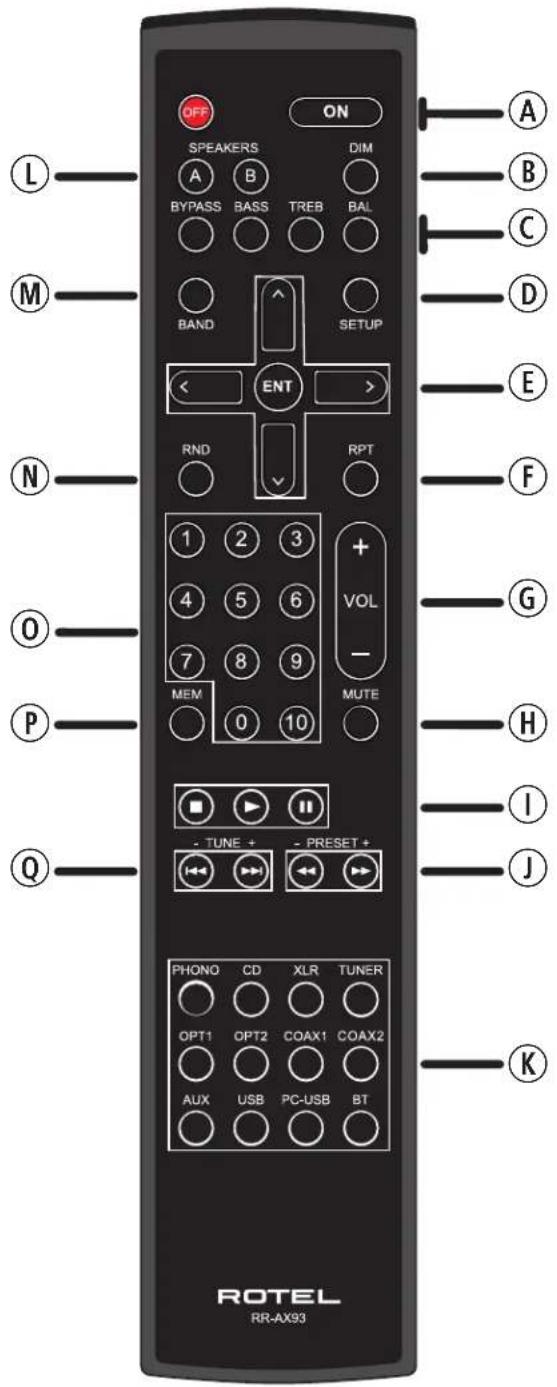
Figure 2: RR-AX93 Remote Control
Télécommande infrarouge RR-AX93
Fernbedienung RR-AX93
Mando a Distancia RR-AX93
Afstandsbediening RR-AX93
Telecomando RR-AX93
RR-AX93 fjarrkontroll
Пунь ДУ RR-AX93
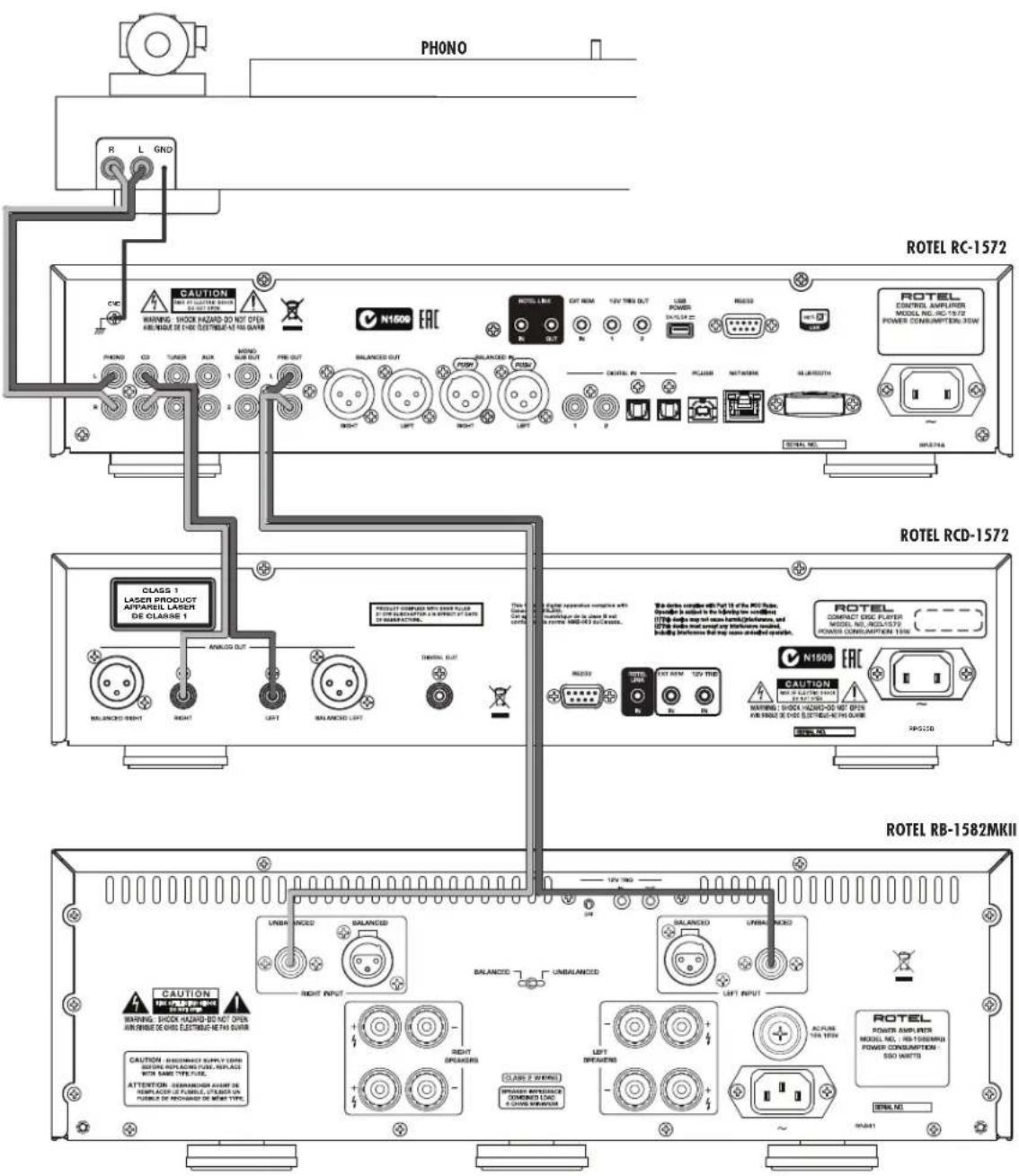
Figure 3: Analog Input and Output Connections Branchements des entrées et sorties analogiques Analoge Ein- und Ausgangsanschlüsse Entradas y Salidas Análogicas
Analoge ingangen en uitgangen
Collegamenti ingressi ed uscite analogici
Anslutninger for analoga in- och utgangar
AhaorobbIe BXoHbIe N BbIXoHbIe pa3beMbI
BaanhcBhe (XLR) BxOHNbIe N BbIXOHNbIe pa3beMbI
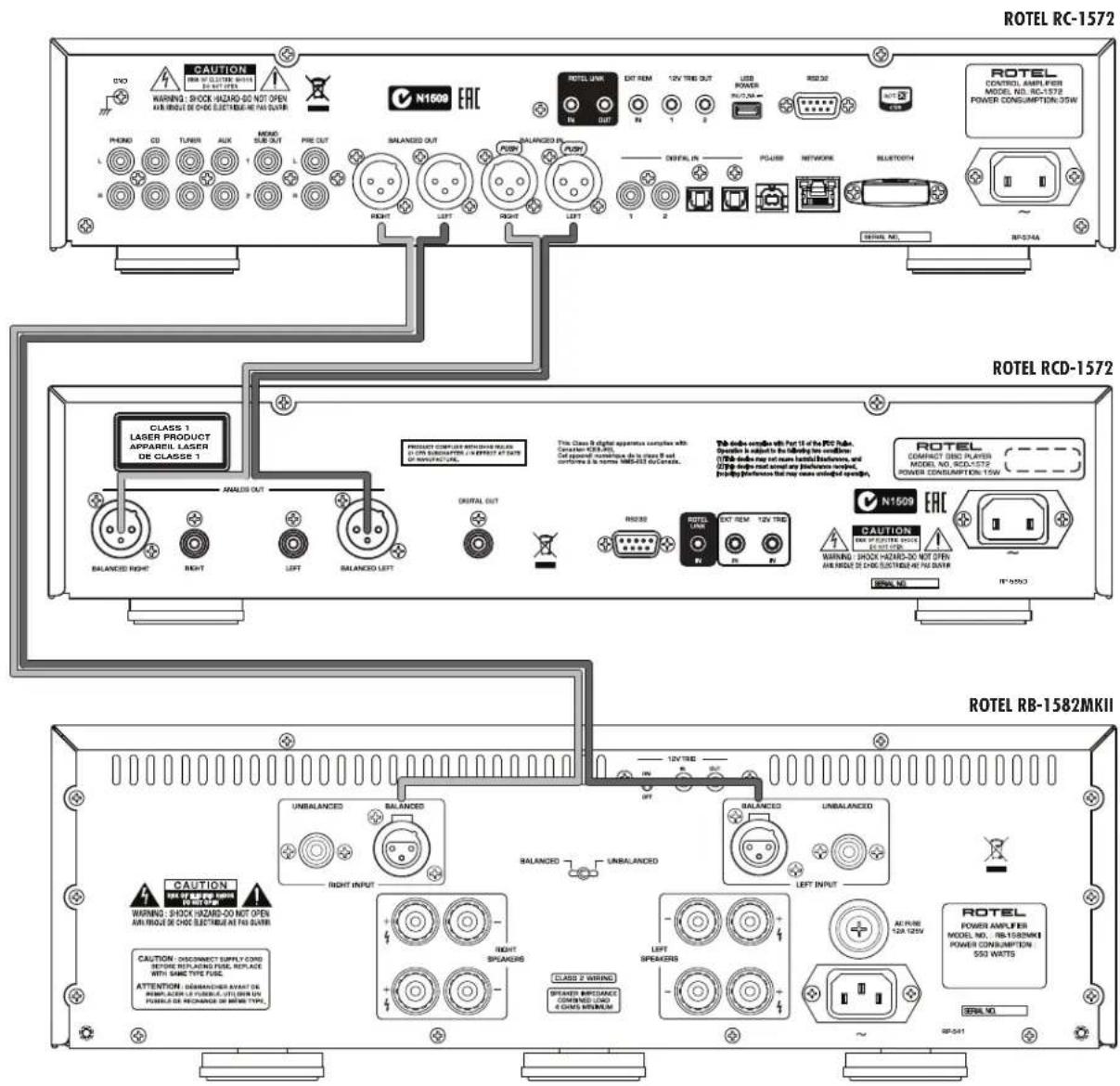
Figure 4: Balanced (XLR) Input and Output Connections Branchements des entrées et sorties symétriques (XLR) Symmetrische (XLR-)Ein- und Ausgangsanschluss Entradas y Salidas Balanceadas (XLR)
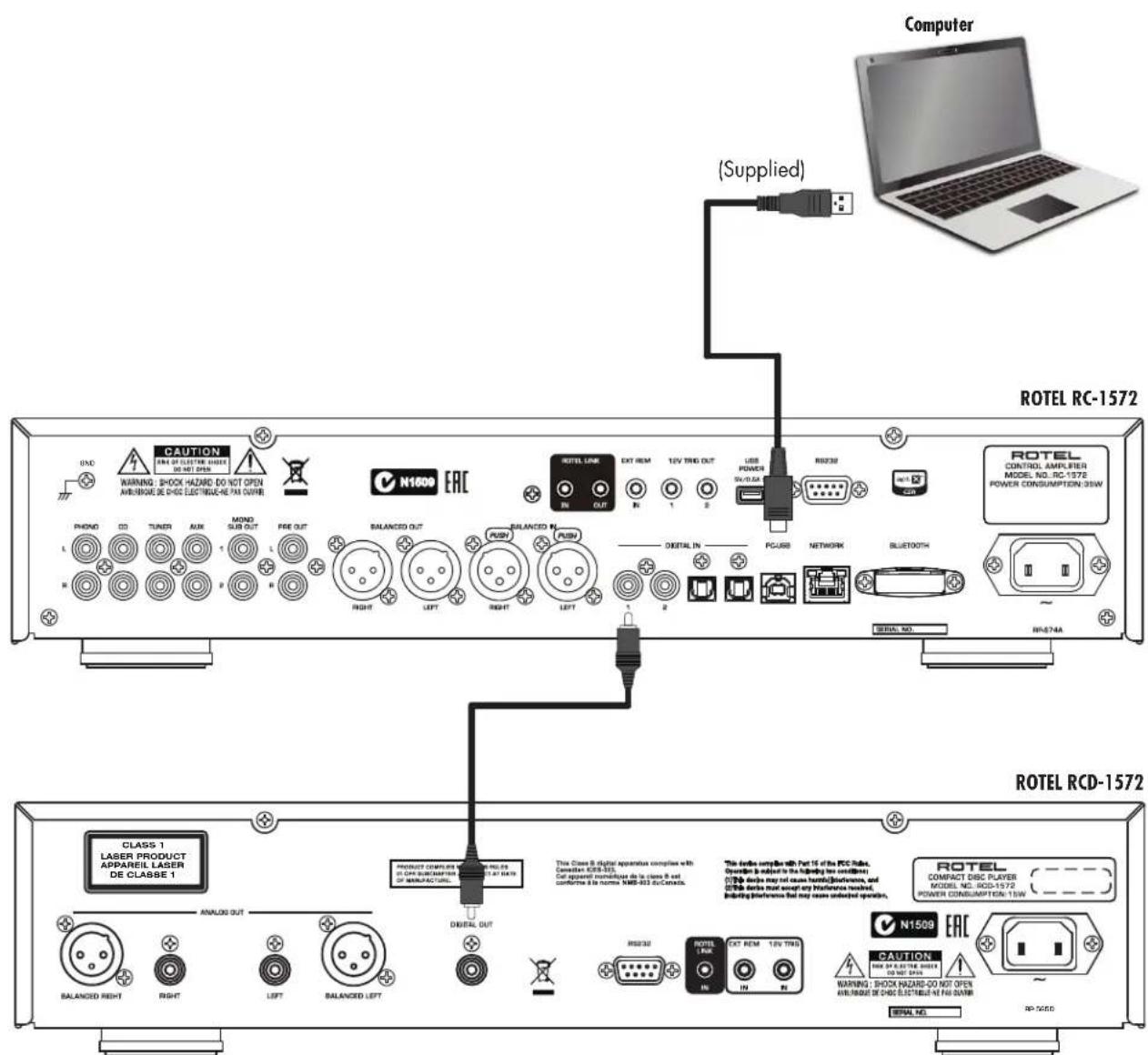
Figure 5: Digital Inputs Connections Branchements des entrées numériques Digitale Eingänge Anschluss Conexiones de Entradas Digitales
Digitale ingangen
Collegamenti ingressi digitali
Anslutningar for digitala ingangar
Coeduneneta UnpoBoB BXoD
Important! : The 12V trigger cables will override the Rotel Link commands. Do not connect the 12V trigger cable if Rotel Link is connected.
When making connections be sure to:
It is also recommended that you:
Turn off all the components in the system before hooking up any components, including loudspeakers.
Turn off all components in the system before changing any of the connections to the system.
Turn the volume control of the amplifier all the way down before the amplifier is turned on or off.
Remarques importantes
Ipeep nooCoeMHHeHnEM:
V BbIKIHOHTe BCE KOMNOHEHtB, BKIOHOAR KOLOHKn.
V BbIKHOHTe BCE KOMNOHEHTb B BAWe CNTeMe, npeKJe Yem YTO-TO H He MeHrTb.
PekomeHdyetca TAKKE:
V BbIeCTn rpoMkoCTb yCNHNTeHa MHHNMy, nepe Tc KAK BKHIOOATb NNN BBkJIHOOTb ETO.
Contents
Important Safety Instructions 2
Figure 1: Controls and Connections 3
Figure 2: RR-AX93 Remote Control 4
Figure 3: Analog Inputs and Output Connections 5
Figure 4: Balanced (XLR) Input and Output Connections 6
Figure 5: Digital Inputs Connection 7
Figure 6: Rotel Link and 12V Trigger Connections 8
Figure 7: Front USB Input 9
Important notes 10
About Rotel. 11
Getting Started. 11
A Few Precautions 12
Placement 12
Cables 12
The RR-AX93 Remote Control 12
Second Amplifier Remote Code 12
Remote Control Batteries 12
AC Power and Control 12
AC Power Input 12
Power Switch and Power Indicator 12
12V Trigger Connection 13
Input Signal Connections 13
Phono Input and Ground Connection 13
Line Level Inputs 13
Balanced (XLR) Inputs 13
Digital Inputs 13
Output Connections 13
MONO SUB Out output[15] 13
Preamp Output 13
Balanced (XLR) Output 13
Headphone Output 13
Remote Sensor 13
Display 14
Front USB Input 14
APTX Bluetooth Connection 23 14
Rear USB Power port 14
Audio Controls. 14
Volume Control 14
Balance Control 14
Tone Control Bypass 14
Bass and Treble Tone Controls 14
Function Control 14
Dimmer Control 15
Display Dimmer 15
POWERLED Dimmer 15
Rotel Link 15
EXT REM IN Jack 15
RS232 15
PC-USB Input 15
Network Connection 15
Settings Menu 16
Troubleshooting 17
Power Indicator Is Not Illuminated 17
Fuse replacement 17
No Sound 17
Cannot Connect via Bluetooth 17
Playable Audio Format 17
Specifications. 18
About Rotel
Our story began over 50 years ago. Over the decades, we have received hundreds of awards for our products and satisfied hundreds of thousands of people who take their entertainment seriously - like you!
Rotel was founded by a family whose passionate interest in music led them to manufacture high-fidelity components of uncompromising quality. Through the years, that passion has remained undiminished and the family goal of providing exceptional value for audiophiles and music lovers, regardless of their budget, is shared by all Rotel employees.
Rotel's engineers work as a close team, listening to, and fine tuning, each new product until it reaches their exacting musical standards. They are free to choose components from around the world in order to make that product the best they can. You are likely to find capacitors from the United Kingdom and Germany, semiconductors from Japan or the United States, while toroidal power transformers are manufactured in Rotel's own factory
We all have concerns about our environment. And, as more and more electronics are produced it is especially important for a manufacturer to do all it can to engineer products that have a minimum impact on the environment.
At Rotel, we are proud to do our part. We have reduced the lead content in our products by using special lead-free ROHS solder and components.
Our engineers continually strive to improve power supply efficiency without compromise to quality. When in standby mode Rotel products use minimal power to meet global Standby Power Consumption requirements.
The Rotel factory is also doing their part to help the environment through constant improvements to product assembly methods for a cleaner and greener manufacturing processes.
All of us at Rotel thank you for buying this product. We are sure it will bring you many years of enjoyment.
Getting Started
Thank you for purchasing the Rotel RC-1572 Stereo Control Amplifier. When used in a high-quality music audio system, your Rotel product will provide years of musical enjoyment.
The RC-1572 is a full featured, high performance component. All aspects of the design have been optimized to retain the full dynamic range and subtle nuances of your music. The RC-1572 has a highly regulated power supply incorporating a Rotel custom-designed toroidal power transformer and custom-made slit foil capacitors. This low impedance power supply has ample power reserves, which enables the RC-1572 to easily reproduce the most demanding audio signals. This type of design is more expensive to manufacture, but it is better for the music.
The printed circuit boards (PCB) are designed with Symmetrical Circuit Traces. This ensures that the precise timing of the music is maintained and faithfully recreated. The RC-1572 circuitry uses metal film resistors and polystyrene or polypropylene capacitors in important signal paths. All aspects of this design have been examined to ensure the most faithful music reproduction.
The main functions of the RC-1572 are easy to install and use. If you have experience with other stereo systems, you shouldn't find anything perplexing. Simply plug in the associated components and enjoy.
A Few Precautions
WARNING: To avoid potential damage to your system, turn off ALL the components in the system when connecting or disconnecting the loudspeakers or any associated components. Do not turn the system components back on until you are sure all the connections are correct and secure.
Please read this manual carefully. In addition to basic installation and operating instructions, it provides valuable information on various RC-1572 system configurations as well as general information that will help you get optimum performance from your system. Please contact your authorized Rotel dealer for answers to any questions you might have. In addition, all of us at Rotel welcome your questions and comments.
Save the RC-1572 shipping carton and all enclosed packing material for future use. Shipping or moving the RC-1572 in anything other than the original packing material may result in severe damage to your amplifier.
If included in the box please fill out and send in the owner's registration card. Also be sure to keep the original sales receipt. It is your best record of the date of purchase, which you will need in the event warranty service is ever required.
Placement
Like all audio components that handle low-level signals, the RC-1572 can be affected by its environment. Avoid placing the RC-1572 on top of other components. Also avoid routing audio signal cables near power cords. This will minimize the chance it will pick up hum or interference.
We recommend installing the RC-1572 in furniture designed to house audio components. Such furniture is designed to reduce or suppress vibration which can adversely affect sound quality. Ask your authorized Rotel dealer for advice about component furniture and proper installation of audio components.
The RC-1572 is supplied with an RR-AX93 remote control and must be placed where the infrared signal from the remote can reach the front panel Remote Sensor.
Cables
Be sure to keep the power cords, digital signal cables and regular audio signal cables in your installation away from each other. This will minimize the chance of the regular audio signal cables picking up noise or interference from the power cords or digital cables. Using only high quality, shielded cables will also help to prevent noise or interference from degrading the sound quality of your system. If you have any questions see your authorized Rotel dealer for advice about the best cable to use with your system.
The RR-AX93 Remote Control
Some functions can be done with either the front panel controls, or the supplied RR-AX93 remote control. When these operations are described, the square call out numbers refer to the main unit, while the encircled letters refer to the remote control.
Second Amplifier Remote Code
The factory setting is remote code 1. If you find that the remote is conflicting with other Rotel amplifiers, you can change to remote code 2 with the following steps.
- From the remote control press Tuner 8 and 2 at the same time for 5 seconds, to set the remote control to send Audio Code 2.
- Point the remote at the unit and press 2 ⑨ button for 14 seconds. The unit will show "AUDIO CODE SET 1 > 2 ^
- Repeat the above procedure and press "1" button instead of "2" to change the unit back to Code 1.
NOTE: The remote control can be used to operate the basic functions of Rotel tuners and CD players. Remote control buttons labeled F11NO0 can be used to operate CD or Tuner functions in your system. For the remote control to operate properly, make sure both the remote control and the CD or Tuner are both in same remote code, either Code 1 or 2. For more information please contact your authorized Rotel dealer.
Remote Control Batteries
Two UM-4/AAA size batteries (supplied) must be installed before the remote control can be used. To install the batteries, remove the cover on the back of the RR-AX93. Install the batteries as shown in the illustration in the battery well. Test the control for proper operation, then replace the cover. When the batteries become weak the remote control won't operate the RC-1572 consistently. Installing fresh batteries should eliminate the problem.
AC Power and Control
AC Power Input 24
Your RC-1572 is configured at the factory for the proper AC line voltage in the country where you purchased it (either 120 volts AC or 230 volts AC with a line frequency of either 50Hz or 60Hz ). The AC line configuration is noted on a decal on the back panel.
NOTE: Should you move your unit to another country, it may be possible to reconfigure it for use on a different line voltage. Do not attempt to perform this conversion yourself. Opening the enclosure of the unit exposes you to dangerous voltages. Consult a qualified service person or the Rotel factory service department for information.
NOTE: Some products are intended for sale in more than one country and as such are supplied with more than one AC cord. Please only use the one appropriate for your country/region.
RC-1572 should be plugged directly into a polarized wall outlet using the supplied cable or other compatible cable as recommended by your authorized Rotel dealer. Do not use an extension cord. A heavy duty multi-tap power outlet strip may be used if it (and the wall outlet) is rated to handle the current demanded by the RC-1572 and all the other components connected to it.
If you are going to be away from home for an extended period of time such as a month long vacation, it is a sensible precaution to unplug the RC-1572 (as well as other audio and video components) while you are away.
POWER Switch and Power Indicator ④
Press the front panel Power Switch button 1 to turn the unit on. The Power Indicator light is illuminated when the unit is on. Press the Power Switch button again to turn the unit off.
When the power switch is in the ON position, the remote control ON and OFF buttons may be used to activate the RC-1572. In Standby mode the power LED remains illuminated, but the display is turned OFF.
12V TRIGGER Connection 12
See Figure 6
Some audio components can be turned on automatically when they receive a 12V turn on "signal". The two 12V Trigger Outputs on the RC-1572 provide the required signal. Connect compatible components to the RC-1572 with a conventional 3.5mm mini mono plug cable. When the RC-1572 is in standby mode or turned off, the trigger signal is disabled, so the components controlled by it will be turned off.
NOTE: If you are using other units in the series with Rotel link, please use the Rotel Link connection to turn the units on or off. Do not connect both the Rotel Link and 12V trigger cables. The 12V trigger's power on or off features will override the Rotel Link features.
Input Signal Connections
NOTE: To prevent loud noises that neither you nor your speakers will appreciate, make sure the system is turned off when you make any signal connections.
Phono Input and Ground Connection (GND)
See Figure 3
Plug the cable from the turntable into the appropriate left and right phono inputs. If the turntable has a "ground" wire, connect it to the screw terminal to the left of the Phono inputs. This will help prevent hum and noise.
Line Level Inputs [15]
See Figure 3
The CD, Tuner, and Aux inputs of the amplifier are analog "line level" inputs. These inputs are for connecting components such as CD players or other audio playback devices with an analog audio output.
The left and right channels are clearly labeled and should be connected to the corresponding channels of the source component. The Left connectors are white, the Right connectors are red. Use high quality RCA cables for connecting input source components to the RC-1572. Ask your authorized Rotel dealer for advice about cables.
Balanced (XLR) Inputs 19
See Figure 4
A pair of balanced XLR inputs accept audio signals from CD player, Blu-ray player or other source components with XLR outputs.
NOTE: You should choose only one method of analog connection from a source component to RC-1572. Do not connect both the RCA and XLR outputs of a source component to the RC-1572 at the same time.
Digital Inputs 20
See Figure 5
There are two sets of digital inputs labeled COAXIAL 1 and 2, OPTICAL 1 and 2. Connect the COAXIAL or OPTICAL PCM outputs of your source component into these sockets. The digital signals will be decoded and played by the RC-1572. The unit is capable of decoding PCM signals up to 24 bit, 192kHz .
Output Connections
MONO SUB Output 16
There are 2 connectors for mono subwoofer output to connect to a subwoofer. These mono outputs are summed with both the left and right audio signal. They are parallel outputs allowing 2 subwoofer to be connected to the RC-1572.
Preamp Output
See Figure 3
A pair of RCA connectors supplies an analog output signal from the RC-1572 to a power amplifier with RCA unbalanced input connectors.
Balanced (XLR) Output [16]
See Figure 4
A pair of XLR balanced connectors supplies an analog output signal from the RC-1572 to a power amplifier with XLR balanced input connectors.
NOTE: Do not connect both the RCA and XLR to the same amplifier at the same time.
NOTE: Changes to the settings of the Volume, Balance or Tone controls affect the signal from the XLR and Preamp outputs.
Headphone Output 6
The headphone output allows you to connect headphones for private listening. This output accepts a standard 3.5mm (1/8^ ) mini stereo headphone connector. Plugging in a set of headphones does not cut off the signal to the preamp outputs. In most instances you should turn off the power amplifier when listening to headphones.
NOTE: Because the sensitivity of speakers and headphones can vary widely, always reduce the volume level before connecting or disconnecting headphones.
Remote Sensor 2
This remote sensor window receives IR commands from the remote control. Please do not block this sensor.
Display 3
The front panel display shows the source selected, volume level and tone settings. The display provides access to the setup and configuration menu options of the amplifier.
Front USB Input 5
See Figure 7
The front USB input can be connected to an iPhone, iPad or iPod device providing music playback. Simply plug the device into the front USB and select USB function from the source selector. The iPod and iPhone remain active allowing search and play functions.
APTX Bluetooth Connection 23
The Bluetooth Antenna 23 on the RC-1572's back panel is for wireless streaming via Bluetooth from your device (i.e. mobile phones, tablets or computers). From your device, look for "Rotel Bluetooth" and connect to it. Connection is normally automatic, but if prompted for a password, please enter "0000" on your device. The RC-1572's supports both traditional Bluetooth and APTX Bluetooth audio streaming.
Rear USB Power Port 13
The rear USB port provides 5V/0.5 amps for charging or powering USB devices including streaming music players. This port does not allow playback of audio.
The port can be configured to remain powered even when the RC-1572 is in standby mode through the front panel setup menu (See USB POWER option on page 16).
This configuration option allows the attached streaming source to remain powered for use with the Signal Sense function for automatic power on/off control of the amplifier.
NOTE: When configured to provide continuous power to the rear panel USB port the RC-1572 will consume additional power even when in standby mode.
Audio Controls
Volume Control 46
Turn the controls clockwise to increase the volume, or counter clockwise to decrease the volume. From the remote control press the volume + or - button to turn the volume up or down. Press the MUTE H button to completely mute the volume.
Balance Control
The Balance Control adjusts the left-to-right balance of the sound output. The factory default is the center position or "0". To change the balance from the front panel, press the MENU button to toggle the front display to BALANCE setting mode. Then press the - or + buttons on the front panel to change the value to LEFT or RIGHT. The value can change from L15 to R15.
NOTE: This setting is saved permanently including after powering off the RC-1572.
To make temporary changes not saved after power off, from the remote control press the BAL button to access the BALANCE setting menu, then press the up/down/left/right arrow buttons to adjust.
Tone Control Bypass C
Bass and Treble Control (Tone Control) circuits are bypassed at factory default to ensure the purest possible sound. To turn on the tone control from the front panel, press the MENU button to toggle to the Bypass control then press the - or + buttons on the front panel to turn bypass on or off. When tone bypass is set to on, the front display will show TONE BYPASS.
NOTE: This setting is saved permanently including after powering off the RC-1572.
To temporarily changes the Tone Control Bypass, press the BYPASS button on the remote control to toggle the Bypass mode enabled and disabled.
Bass and Treble Controls
To set the Bass or Treble controls from the front panel, press the MENU button to toggle to the Tone control menu and press the ENTER button to toggle to either the BASS or TREB Setting menu. Then press the -or + button on the front panel to adjust the value. The Bass and Treble values range from -10 to +10.
NOTE: These settings are saved permanently including after powering off the RC-1572.
To temporarily change the Bass and Treble settings from the remote control, press the BASS or TREB button, then press the up/down/left/right arrow buttons on the remote control to adjust the value.
NOTE: Bass and Treble changes are only available when Tone Bypass is disabled (see Tone Control Bypass section).
A properly setup high-performance audio system produces the most natural sound with little or no adjustment of the tone controls. Use these controls sparingly. Be particularly careful when turning the controls up as this increases the power output in the bass or treble range, increasing the load on the amplifier and speakers.
NOTE: Setting the Bass and Treble controls do not automatically turn on the tone control. To turn on tone control, refer to previous section Tone Control Bypass.
Source Input Selector 7K
Press the corresponding input button on the front panel 7 or remote control to select the desired listening source.
Push the front panel source buttons to toggle between Optical 1 - 2 and Coaxial 1 - 2 or use the dedicated source button on the remote control.
Dimmer Control
Display Dimmer 8
To change the brightness of the front display, press the MENU button to toggle to the DIMMER Setting. Then press the - or + buttons on the front panel to change the display brightness.
NOTE: This setting is saved permanently including after powering off the RC-1572.
To temporarily change the display brightness, press the DIM B button on the remote control.
POWER LED Dimmer
To change the brightness of the Power LED on the front panel, press the MENU [b] button to toggle to the POWER LED Settings. Then press the - or + buttons on the front panel to change the LED brightness.
Valid settings include: BRIGHT, MID, DIM.
NOTE: This setting is saved permanently including after powering off the RC-1572.
Rotel Link
See Figure 6
The ROTEL LINK OUT connection can be made with the stereo 3.5 mm cable (supplied) to a Rotel product with ROTEL LINK IN connection including a CD player.
These allow the attached Rotel products to communicate with each other and be controlled via the Rotel App (available for download on the iTunes store).
NOTE: Only the Rotel Link cables supplied with this product should be used. These 3.5 mm cables have WHITE connector ends and should not be confused with the 12 Volt Trigger cables that have BLACK connector ends.
EXT REM IN Jack 11
This 3.5mm mini-jack receives command codes from industry-standard infrared receivers via hard-wired connections. This feature could prove useful when the unit is installed in a cabinet and the front-panel sensor is blocked. Consult your authorized Rotel dealer for information on these external repeaters and the proper wiring of a jack to fit the mini-jack receptacle.
RS232 14
The RC-1572 can be controlled via RS232 for integration with automation systems. The RS232 input accepts a standard straight DB-9 Male-to-Female cable.
For additional information on the connections, software, and operating codes for RS232 control of the RC-1572, contact your authorized Rotel dealer.
PC-USB Input 21
See Figure 5
Connect this input using the supplied USB cable to the PC-USB socket of your computer.
The RC-1572 supports both USB Audio Class 1.0 and USB Audio Class 2.0 modes. Windows computers do not require installation of a driver for USB Audio Class 1.0 and support playback of audio up to 96kHz sampling rates. The Factory Default setting is USB Audio Class 1.0.
To take advantage of USB Audio Class 2.0 audio playback supporting up to 384kHz sampling rates you will need to install the Windows driver
supplied on CD included with the RC-1572. You will also need to switch the RC-1572 to USB Audio Class 2.0 playback mode with the following:
- Press MENU on the front panel until "PC-USB AUDIO CLASS" appears on the display.
- Select "2.0" using the "-" button then press "ENTER".
- Power cycle the RC-1572 and reboot your PC after changing the USB Audio mode to ensure both units are properly configured.
Many audio playback applications do not support 384kHz sampling rate. Please confirm your audio player supports 384kHz audio and you have 384kHz audio files to properly playback this sample rate. Also, you may need to configure the audio driver in your PC to output 384kHz or your computer may "down sample" to a lower audio sample rate. For more information please refer to your audio player or operating system information.
NOTE: USB Audio Class 2.0 required installation of the Windows PC driver on the CD ROM included with the RC-1572.
NOTE: MAC computers do not require a driver to support PC-USB 1.0 or 2.0 audio.
NOTE: Upon successful installation of the driver, you may need to select the ROTEL audio driver from the audio/speaker setup of your computer.
NOTE: The RC-1572 supports both DSD and DOP audio playback in 1X and 2X formats. Consult your audio player to confirm proper operation for playback of these audio formats.
Network Connection 22
The RC-1572 can be attached to a network using the rear panel NETWORK socket [22]. The NETWORK configurations allow both STATIC and DHCP IP addressing. See the Network section of this manual under Setting Menu for IP address configuration information.
The NETWORK connection allows software updates to be downloaded from the Internet. The NETWORK connection also allows IP control for integration with automation systems.
For additional information on the IP control please contact your authorized Rotel dealer.
Settings Menu
You can access the settings menu from the front panel by pressing the MENU button or the SETUP button on the remote control. You can change the value of the selected option by pressing the +/- buttons on the front panel or up/down/left/right arrow buttons on the remote control. Step through the sub-menus by pressing the MENU button on the front panel or SETUP button on the remote control.
- Tone Control: TONE BYPASS ON/OFF, BASS level and TREBLE levels can be changed to desired settings. Press the ENTER button on the front panel or the ENT button on the remote control to toggle between the tone setup options. (For more information on Tone Control refer to the Tone Control Bypass, Bass and Treble control sections.)
NOTE: These settings are stored permanently even after the RC-1572 is powered off.
BALANCE: Changes left/right balance (For more information on Balance sections).
NOTE: This setting is stored permanently even after the RC-1572 is powered off.
- DIMMER: Dims the display.
NOTE: This setting is stored permanently even after the RC-1572 is powered off.
- POWER LED: Dims the Power LED on the front panel.
NOTE: This setting is stored permanently even after the RC-1572 is powered off.
- POWER ON MAX VOLUME: This sets the maximum volume level when the unit is turned ON. "45" is the factory default.
NOTE: Power On Max Volume settings do not apply to sources configured with Fixed Gain.
- POWER OPTION: Enables the RC-1572 to be controlled via the network port when attached to an automation system. The power consumption is higher in Quick Power mode. If network control is not required select the Normal Power mode. "Normal" is the factory default.
Valid settings include: Normal, Quick.
NOTE: When the POWER OPTION is configured to Quick, the RC-1572 will consume additional power in standby mode.
- USB POWER: This option allows the rear panel USB connector to provide power, even when the RC-1572 is in standby mode.
To enable the continuous power mode select the ALWAYS option. To provide power only when the RC-1572 is powered on, select the NORMAL option. The default for USB POWER is set to NORMAL.
NOTE: The front panel power button must be in the ON position to supply power to the rear panel USB connector.
NOTE: When the USB POWER is configured to ALWAYS the RC-1572 will consume additional power in standby mode to supply USB power.
- AUTO POWER OFF: The RC-1572 can be configured to automatically power off if unused for a specified period. If no changes are made to the unit within the specified "Auto Power Off" timer the unit will automatically go to STANDBY mode. The Auto Power Off timer will be restarted if changes are made to the volume, source or playback. The default for Auto Power Off is set to DISABLE.
Valid settings include: DISABLE, 1 HOUR, 2 HOURS, 5 HOURS, 12 HOURS.
NOTE: Some regions require the AUTOMATIC POWER OFF timer default setting to be 20 minutes. This can be changed in the SETUP MENU to any of the available options. For questions about the Automatic Power Off settings please contact your authorized Rotel dealer.
NOTE: Some products cannot detect ANALOG signal inputs and the unit may power off if there is no digital audio source detected or user action with the remote control or front panel. Analog input signal detection is not available in all models which may cause the unit to inadvertently power off. In this case the Automatic Power Off timer should be set to DISABLED.
- FIXED GAIN: Configures a Fixed Volume level for a specified input. To enable this feature press the +/- buttons to select the desired fixed volume level for Aux, USB, PC-USB, Optical 1, Optical 2, Coax 1, Coax 2 or Bluetooth. When enabled and the input with a Fixed Volume is selected, the Volume level will immediately be set to the specified level.
Valid settings include: VARIABLE, FIXED 01-95, FIXED MAX.
- AUX VOL: VARIABLE (disabled) is factory default.
- USB VOL: VARIABLE (disabled) is factory default.
- PC-USB VOL: VARIABLE (disabled) is factory default.
- OPT1 VOL: VARIABLE (disabled) is factory default.
- OPT2 VOL: VARIABLE (disabled) is factory default.
COAX1 VOL: VARIABLE (disabled) is factory default.
COAX2 VOL: VARIABLE (disabled) is factory default. - BTOOTH VOL: VARIABLE (disabled) is factory default.
NOTE: The Volume knob on the front panel and Volume +/- buttons on the IR remote are disabled when the volume is Fixed. To disable this feature set the Fixed Volume level to "Variable".
- PC-USB AUDIO CLASS: Changes supported PC-USB Audio Class of the attached device.
NOTE: Some computers attached to the PC-USB do not support USB Audio Class 2.0 and do not support 32/384 audio playback. If needed the PC-USB can be configured for USB Audio Class 1.0. Please consult your computer operating system for details.
- NETWORK: Shows the network connection status and to view/configure the network settings. If the network is properly configured and attached, "Connected" will be displayed. To view or modify the network settings, press the ENTER button.
The RC-1572 supports both DHCP and STATIC IP addressing. Select the desired IP address method and press ENTER.
If DHCP is selected you can refresh IP address by pressing ENTER or press MENU to view IP address information. Press the MENU button to toggle through IP address settings. If the IP address is renewed the network will be tested and connection status reported.
If STATIC IP address mode is selected you must configure all settings for the network including IP Address, Subnet Mask, Gateway and DNS Server. Use the up/down/left/right arrow buttons or the +/- buttons to adjust the values and press ENTER to move to the next value. When the proper IP information is configured press MENU to go to the next setting. After
entering the STATIC IP address information the network will be tested and connection status reported.
NOTE: For more information regarding network connection please contact your authorized Rotel dealer.
NOTE: A network connection is not required for the RC-1572 to operate.
- MAIN: This shows the current software version loaded into the RC-1572. The software can be updated if the RC-1572 is properly connected to the Internet.
- Press ENTER to check if a new software version is available.
- If a new software version is available press the + button on the front panel or the up/right button on the remote control to select YES then press ENTER button to begin the software update process.
- The new software will be downloaded from the Internet. The RC-1572 will power cycle when the software update is complete.
NOTE: Do NOT power off the RC-1572 during the software update process.
NOTE: It is recommended to Reset Factory Defaults after the software update is complete.
- PC-USB: This shows current loaded software version for PC-USB processor.
- SIGNAL SENSE: Checks if a digital audio signal is present on the configured Signal Sense input. When this input is selected as the active listening source, the RC-1572 monitors the digital data stream to determine if there is audio. If there is no audio detected for 10 minutes, the RC-1572 will enter Signal Sense Standby Mode. When in Signal Sense Standby Mode and the RC-1572 detects audio on Signal Sense input, the unit will automatically power on. To disable this function, select the DISABLE option which is the factory default setting.
NOTE: Recent software versions allow the configured Signal Sense input to be active in Standby Mode regardless of source input active when the unit was powered off to standby. Previous version of software required the Signal Sense configured input to be the active source when the unit was powered off for Signal Sense to become active and monitor the configured input for audio. For more information and details on supported software versions and software update steps please contact your authorized Rotel dealer.
NOTE: When the SIGNAL SENSE function is activated, the RC-1572 will consume additional power in signal sense standby mode.
- FACTORY DEFAULT: This sets the unit back to the original state as when it left the factory. Press the + button on the front panel or the Right button on the remote control to select
then press the ENTER button on the front panel or the ENT button on the remote control.
NOTE: All previously configured options will be erased and reset to the factory default settings.
Troubleshooting
Most difficulties in audio systems are the result of incorrect connections, or improper control settings. If you encounter problems, isolate the area of the difficulty, check the control settings, determine the cause of the fault and make the necessary changes. If you are unable to get sound from the RC-1572, refer to the suggestions for the following conditions:
Power Indicator Is Not Illuminated
The Power Indicator ring around the power button and the basic items in the Display window should be illuminated whenever the RC-1572 is plugged into the wall power outlet and the POWER switch is pushed in. If it does not illuminate, test the power outlet with another electrical device, such as a lamp. Be sure the power outlet being used is not controlled by a switch that has been turned off.
Fuse Replacement
If another electrical device works when plugged into the power outlet, but the Power Indicator still will not illuminated when the RC-1572 is plugged into the wall outlet, it indicates that the internal power fuse may have blown. If you believe this has happened, contact your authorized Rotel dealer to get the fuse replaced.
No Sound
Check the signal source to see if it is functioning properly. Make sure the cables from the signal source to the RC-1572 inputs are connected properly. Check all the wiring between the RC-1572 and the power amplifier, and the speakers.
Cannot Connect via Bluetooth
If you cannot pair your Bluetooth enabled device to the RC-1572, delete the memory of the previous connection on the RC-1572 and on your device. On your device this is often listed as "Forget this Device". Then try to make the connection again.
Playable Audio Format
USB Apple (iPhone, iPod, iPad)
| Format Notes | |
| Any supported file loaded to Apple device. | Any supported file loaded to Apple device. Phone may resample depending on stored format. May exclude Apps designed to play formats not originally supported by the sending device. |
APTX Bluetooth
| Format Notes | |
| Any format supported by the sending device. | May exclude Apps designed to play formats not originally supported by the sending device. |
PC-USB
| Format Notes | |
| Format determined by the Media Player/Server software that you use. | Any supported format by the PC software:PCM Audio:44.1 kHz, 48 kHz, 88.2 kHz, 96 kHz, 176.4 kHz,192 kHz, 384 kHz16 Bit, 24 Bit, 32 BitDSD64 and DSD128 |
Coax/Optical
| Format Notes | |
| SPDIF LPCM | 44.1 kHz, 48 kHz, 88.2 kHz, 96 kHz, 176.4 kHz, 192 kHz16 Bit, 24 Bit |
"Made for iPod," and "Made for iPhone," means that an electronic accessory has been designed to connect specifically to iPod or iPhone, respectively, and has been certified by the developer to meet Apple performance standards. Apple is not responsible for the operation of this device or its compliance with safety and regulatory standards. Please note that the use of this accessory with iPod, or iPhone may affect wireless performance.
iPhone, iPod, iPod classic, iPod nano, and iPod touch are trademarks of Apple Inc., registered in the U.S. and other countries.

Specifications
Total Harmonic Distortion (20 Hz - 20 kHz) < 0.004%
Intermodulation Distortion (60 Hz: 7 kHz, 4:1) < 0.004%
Input Sensitivity / Impedance
Phono Input (MM) 3 mV / 47k ohms
Line Level Inputs (RCA) 200 mV / 100k ohms
Line Level Inputs (XLR) 300 mV / 100k ohms
Input Overload Phono Input 62 mV Line Level Inputs 4 V
Output Level Line Level (RCA) 1 V Balance (XLR) 2V
Frequency Response Phono Input 20 Hz - 20k Hz, 0 ± 0.3 dB Line Level Inputs 10 Hz - 100k Hz, 0 ± 0.3 dB
Tone Controls
Bass ± 10 dB at 100Hz
Treble ± 10 dB at 10kHz
Signa to Noise Ratio (IHF "A" weighted)
Phono Input 80 dB
Line Level Inputs 110 dB
Channel Separation >64 dB
| Digital Section | |
| Frequency Response | 20 Hz - 20k Hz [0 ± 0.5dB Max] |
| Signal to Noise Ratio (IHF "A" weighted) | 100 dB |
| Input Sensitivity / Impedance | 0 dBfs / 75 ohms |
| Coaxial/Optical Digital Signals | SPDIF LPCM |
| (up to 192k Hz 24 bit) | |
| PC-USB | USB Audio Class 1.0 |
| (up to 96k Hz 24 bit) | |
| USB Audio Class 2.0 | |
| (up to 384k Hz 32bit)* | |
| *Driver installation required | |
| DSD and DoP support | |
| General | |
| Power Requirements: | |
| USA: 120 volts, 60 Hz | |
| EC: 230 volts, 50 Hz | |
| Power Consumption 35 watts | |
| Standby Power Consumption | < 0.5 watts |
| BTU (at 13.5 watts) | 65 BTU/h |
| Dimensions (W x H x D) | 431 x 99 x 33 |
| (17 x 3 /8 x 1) | |
| Front Panel Height | 2U (88.1 mm, |
| Weight (net) | 7.4 kg, 16.3 lb |
All specifications are accurate at the time of printing. Rotel reserves the right to make improvements without notice.
Rotel and the Rotel Hi-Fi logo are registered trademarks of The Rotel Co., Ltd, Tokyo, Japan.
Ajustements Graves/Aigus
Pin 3: Signal /Return/kalt

Inhaltsverzeichnis
[bis zu 24 Bit/96 kHz]
USB Audio Class 2.0
[bis zu 32 Bit/384 kHz]*
*Treiberinstallation erforderlich
[hastra 24 bits/96 kHz]
USB Audio Class 2.0
(hasta 32 bits/384 kHz)*
Dimensioes A n A l P
Altura del Panel Frontal
Peso Neto
35 ratios
65 BTU/h
431× 99× 338mm
2U (88^1mm)
7^4kg
Made for

iPod

iPhone
[hot 192 kHz 24-bits]
USB-audioklasse 1.0 (tot 24/96)
USB-audioklasse 2.0 (tot 32/384)
A Anything is possible.
Formatai audio riproducibili
USB Apple (iPhone, iPod, iPad)
Alt1 ±10 dB a 10 kHz
Baxkhble nHctpyKuIM no 6e30nacHOCTN
3aMeuHHe
CoeMHHeHnI NO WHe RS232 DoJIxHbI BInIOHHTbCra TOnbKO aBTOPM3OBAHbIM nepcoHAnOM.
IPEIOCTEPEXEHNE:BHTPNHETaCTe,NOCTyNHbIXnIg 06cnyKbAHNHOJIb3ObaTeMe.ObepbTe 06cnyKbAHNe KBaHmUmpoBaHOMMy MaTepy.
PNEOCTEPEKHENE: INI CNHJENH ONAHOCTN BO3TOPAHN HIN Nopaxhena 3neKtpueckMM TOKOM He NOBepraTe DAHHbI annapat BO3eJcTBIO DOXJIa HIN BnArl. He ONyCKaIte NNADANH NOCTOPOHNX npEDMETOB BVHTpb KOpNYCa IONANA BNARa HIN NOCTOPOHNHN ppeMet, HEMeDHeHNO BbHbTe BnUKy UHPa NITAHN H3po3ETKn. DcTabBe annapAT KBAINHfMUPOBAHHOM CNEUHAnCTY DnOcmToPA n BO3MOXJHO peMOHA.
IpouHTaTBe CHe HNCTpyKuHm.
CoxpaHnTe 3To pykoBoDCTBO.
06paaiTe BHMnHHe Ha Bce npeynpexdHnA.
CnedyTe Bcem HcTpyKuMaM No 3KcNpyaTuH.
He nnonb3yute 30 yctpoiCTBO B6n3n BObl.
OuMaaTe Kopnyc TOnbKO npn NmOs cyXo TpAKn Hnn nbinecoom.
He CtabbTe annapat Ha KpObaTb, DnBaH, KoBep Mm NoOp6Hyo MmKryoNOBepXHOCTb, KOTOPaMOnKe3aRTOPODHTBeHTMNIOHNHbE otBepCTH. Ecm Annapat BcTpaNBAeTcB WkaΦ Mm Dpyroi Kopnyc, 3OT Kopnyc DoJKeH BeHTMNIOPobTa cIy o6ecneeyHn OxlanJeHn annapata.
Iepknte annapat noanbwe oT padnatoPob OTonneHn,
oBorpebaTeNe, neey Hno6bx npTyHX yCTPOX TB, BbDnHOxN
tenNo.
Плогнзоваимьштесерпгд.Замлелюйштесерпгд.ДаннИЗ КOTOPBXI SHINE DpyrOTo.3a3eMnHoumshtsekpeHmEeTDAHOBeKbIX KOHТАкTAи TrpETN3Za3eMnHoumshTbPb.ОнБОсчMuNTB Bauy Be3oJANACHOCTb. He OTKa3bMaBteCb ot Мep Be3oJANACHOCTm, NpeOCTaBmRbX3a3eMnHoumMHII Плогнзоваимь SHTEKpeOM.ЕсIN NOCTaBmRbX3a3eKpTRKHyДуЗAMeHbYUCTapeBswIpo3TeK.
He npoknabIbIaBte ceteBoI uHyp tam, rge OH MooKet 6bItb p3aIaBnE, nepeKAT, kcyueh, noIbeepHyT B03eHCTBnIO Tennna HIN nobpekde HA KAM-NH6O cno6oM. O6paIaTe Oco6oe BHIMaHHe h ceteBoI uHyp 6bN3u IuTekepaHam, rge OH BXoJIT B 3aHNOIO naHEn bYcptOCTBA.
IcnoB3yTeToIbKo npHaJnEeXHocTH, yKa3aHHble npOnB0xDHTeEM.
McnoB3yTe TOnbKo TeneKky, NoCTaBky, CTOnKy, KPOHHTe HIN NOnKy DOCTATOHO CnBtHM, 106bl ByDEPKATbTOT hN3dEIn. ByDte OTOPOXkHb pNp nepemeeHH npbopa Ha NOCTaBKe Hm CTOnKe BO3bEKAHN PAHENH NIOPBekDHN3dEIn.

CetbeoH uyp cneyertocoeHHahtb ot ctenho p03eKn BO Bpemra rpo3blnnncnnp6op octablen HncnoIb3yebmIM dntenbHoeBpema.
HemeHnHO npKpaTHe HcNb3oBaHne KCMnoHeTn HnepeaHte Ha 6cnEobAHHe W/nn 06CnyKbAHne KBAMnHpOBAHn HpeMOHTHO OrpaHn3aMe eCNH: cTeBEOI hpy INI WtETeKep 6bn NobpeKdH; BHyTpB np6Op aYpOHn I pEmTeBn HnnpOHN HxkIOCTb; np6Op NObIAB nOdoXdEM; np6Op demOHCTpHyET np3HaKn HHeOPMaHbN PA6ToB; np6Op ypOHn HnNOBpeDn NIOb6M DpyTN M CIO6OM.
OCTabTe He MeHHee 10 cm CBO6oDHoro npocTaPcHCTBa BOKpy annapata dna o6ecneHn uKpKynuN BO3dyxa.
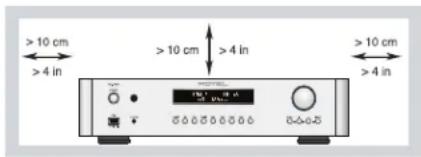
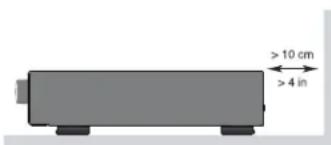
PNEOCTEPEXEHNE: CTebeo pa3bem Ha 3aDnei naHenn IpehdAahnHdien 4b6IcTPO oTOcoeINHeHHy UcTPOIcTBa O tNeKTPhueckOn cTeH. YcTpoIcTBo DOnJHKo 06ecneuHBatb Cbo6OdbHIO DOctY K a3dnei naHenn, VTO6bI cTebeo Ka6BeM MOKHO 6blO 6blcTO BvIDepHyTB.
Cetbeoe HanpaxKeHne, K KOtOpomy NoDcoeHHeTcAnnapat, DIOJXHO COOTBeCTCBoBaT Tpe6oBHaMm, Yka3aHHbIM Ha3aHHe naHenn annapata.(LUA:120B,60Tg,EC230B,50Tg)
IIOcoeINHnIte KOMnoHENTKNTaIooJe po3EKe TOnbko npn NOMOu ciTeBoro WHypa I3 KOMPiNkTeA NOCTaBN, INH erToCHOro EKBnBaJIeHTa. He nepeDeJIbBAIte NoCTaJIeMbIu Hnyp. He NcNoJIb3yIte yDInNHITe bNtAHnA.
OchOBHn BnKcTeBOro 5hUpa Cnyknt dnn OTKIOUeHNn Annapata OT cETN. DnI nonHOrO ot KTHIOUeHNn H3dennr OT nHTAOuEe CtH, BNky CTeBOrO KABEN cNDyET oTOcEDHnTb OT cTeBO Po9EtKN nepemEHNOr TOKa a TAKKe H3dennr.3To eHNCTBeHHn CNOc06, YTObI NNoHcTbO ydaJIbTb CeTEBO nNTAHHe NT3dNN.
IcnoB3yTe Ka6eIn C 3aunToi Class 2 npn noCoeUHeHHN KOHOK K KJIeMMAM yCNHtTeJn oBeCneYHeH NaeXHo H3OJIACm H MMHNMa3aui pNCKa yDap aNeKTpueCTbOM.
Batape BnybTe DcTahuHOnHoynpAbneHn (y) HeonKhbl noDBepraTbCBA3dEeCTBwIO H3nnHero TeNn, TaKOro KaK coJIHeuHb CEBT, OTOHb T.II.
DII SCA, KAHADJI BYPNYCTCPAH, TEJVECTPOXCTBO ODOBPEHO KNCIOJIbOBAHIMI.
CAUTION: TO PREVENT ELECTRIC SHOCK, MATCH WIDE BLADE OF PLUG TO WIDE SLOT. INSERT FULLY.
ATTENTION:POUR EVITER LES CHOCS ELECTRIQUES, INTRODUIRE LA LAME LA PLUS LARGE DE LA FICHE DANS LA BORNE CORRESPONDANTE DE LA PRISSE ET POUSSER JUSQU AU FOND.
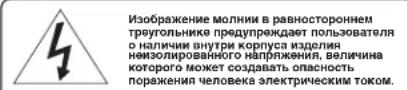
IIO6DpKJHINB0CKNIMATLHbMO 3HAKA B PAHOHOTOPOHEN TpeYORIHnHKpePdYNPbONe3OaEBTN O HANMHIN B cOpOBQIDKaouoenn annapat DOKmYTHaUM BAKhBbIX NcHTpykunno NO KcKnYbTAtuNN I TEKHNCCOMOgCcykHMBAHIN.
IpoodyktBrotelcnpoektnpobAHbTaK, 4TO6bI COOTBETCTBOBATTre6oBAHNMA MekdyHApOdbHbIX mpekTnB No orpaHHeHHIO npMeHHN BpehBx BeueCTB ENeKtpotexHueckom N3eKtpoHHOM o6opydoABHH (Restriction of Hazardous Substances - RoHS), taKke no 6pbaueHHOC OToNYHMHIM CBOW cPOK 3eKtpoTeHHUeCKHM n 3eKtpoHHbIM o6opydoABHHem (Waste Electrical and Electronic Equipment - WEEE). H3o6paKeHHne nepepeKHyTO MycOpHOrO BaKaHa HA KOncax O3HaAet TAKKE To, 70 tN pO4yktBtOJOnHbBbItb BTOPHHO HCNoB3oBAHbI (peuKnHnpobAHbI) HIn JKe 6o6o3aHTbB BCOOBETCBH CyonmhyTBMM BBIIe DnpeKTHBaMM.

3T0 TCMBOI O3Haaye, 4TO yCTPOCTBO IMeET DBOHUYIO H3OJIaIIIO. 3aEMeJIHe He Tpe6yTeCA.
Ha3haueHHe KOHTaKToB
baanHCbMyaynOpa3beM (3-KoHTaKTHbXLR):
Pin 1:3emra-Ground/ 3KpaH-Screen
Pin 2:Φa3a/+ve/Hot
Pin 3:Погибаа -ve /Cold

Copepkanhe
Pcynok 1: OpranbIynpabJIeHn npa3beMbI. 3
Pmcyhok 2: PnybT Dy RR-AX93. 4
Pmcyok 3:Ananorobbie Bxodhie H bixoHbte pa3beMbbl.
Pncyok 4: Baanchbte (XLR) BxOdbte N BbxOdbte pa3bembl
Pcynok 5: CoeHHeHH cHpObBIMn BxOaMn. 7
Pcynok 6: PncoeHene Rotei Link n 12-B Tprrrpno CmHa.
Pncyok 7: IopT USB na nepednei nahei 9
Baxkhble 3ameyannn 10
Baxhble Hnctpykun no 6e3onacchoctn. 78
OKOMnAHmROTEL. 79
Iepbte warrn 79
HeKoTOpbIe npedocToPoxHocTH 80
Pa3meueHne 80
Ka6eni 80
IyrrRR-AX93 80
BtopoHa60NkKoOOBnIyynpaBneHnYcHnTeEm 80
UcTaHOBka 6aTapeB mnyb80
IHTAHHe yCHnHTeN HynpaBneHHe. 80
Pa3bemIa cetEbo Hypal 80
BbiknoateIb nHTaHn HnDkaTOp nTaHn 81
PndcoeHHeHH 12-B TprurrepHoro CmHana 81
IopcoeHHeHE BxOHNbIX CnHaNoB 81
BxodI npouirpbBatena rpaamnactHNOK «Phono» [15]
KIIeMMA3a3eMnHn(GND) 81
BxOdbIJIHeHOrO yOpBn81
BanachbIe (XLR) BxOdbI 81
UHpOBBIEBXOdb81
BbixoHbIe pa3beMbI. 81
BbIXoI MONO SUB 81
BbIXoI npEynnten 81
BalaHcIbe (XLR) BbIXOdb81
BbixoHa HayuHnKn Phones 82
IaTnK nylbTa 82
Aucnnne 82
USBbxoHa nepedneHnaneH 82
IopcoenneHnKAPTXBluetooth 82
USB npT nHTaHnHa 3aHne HaneHn 13 82
Aydno perynnpovkn 82
PerynToprpoMocTHVOLUME 82
PerynTop 6ana hca BALANCE 82
06xod perynipobok Tem6pa TONE Control Bypass 82
PerynTopbTem6pa BASS n TREBLE@ 82
CenektopBxodob 83
Perynpovbka npkocn dmnnne - Dimmer. 83
Display Dimmer 83
POWERLEDDimmer 83
Umma Rotel Link 83
Pa3bemEXTREMIN-BXoJ3eKtpueckoro CMHana dNCTaHIOHOHORO ynpabneHH. 83
RS232 83
Bxoad PC-USB 83
Cerebo pa3beM 84
Mehio hactpoek 84
06HapyuKeHne uYcTpaHHe HEnCpabHoctei 86
He CBeHTTc HnHnKAtOp nHTaHn 86
3aMeHa npedoxpanHTeIa 86
Her 3byka 86
Hebo3MOxHO yCTaHOBnTB Bluetooth coeHHeHne 86
Bocnpn3BodmbieaydnofoopMaTbI 86
TexHHueckne xapaKtepehCTHKn 87
OKompanHnROTEL
NCTOpnHaewiKOMNaHmHauaIacb6Oone 50net Haazad.3a npoWdwnne DecTnEtnMbI NOLyUHNI COTHN HArpaD 3a Haan PpOyKTbI nCdeJann CactINBBIMCOHTNbICHIOJe,KOTOpBte OTHOCATcK CBOIM pa3BneHnM BNOJIe CepBe3HO-TakKe,KAk Bbl!
KOMnHaRrrol E6bIaOCHOBHa CEmeCTBOM, YBa CTpaTb KMy3bKe NopOINa CTpeMJIHeHne co3daBaTb hi-fi KOMnoHEThb 6eCKMnpomCCHOro KaeeCTBa.3a MHOrne rOdbI eTa cTpaTb HcUyTB He Ocna5bI, n IIO CEh JeB o6uae c9b - BByIyCKaTb PPOdYkTB NCKlHOHTeHBOH UeHHOCIn dIaydINOΦmIOB NIO6uTeNe My3bIK, He3aBNCIMO OT INx FmHaHCObIx BO3MOXHOCTe, pa3dEJIeTc BCEMI cotpydnikamn Rotel.
HJKeHepBo Rotel pa6oTaKt KaEiHaKaOMaHa, IpocNyUmba N tuaTeNbHO DOBDA KAKDbI HOBII npOyKT Do TAKORO yPOBnCOBepHeCTBa, KOrJa OH 6yDeT yOBDnT BOPaTbNx CTporIM My3bKaIbHbM CTaNapTAM. ImnpedOctabHeHa CBO6Da Bbl6opa KOMnIeKtyIOuNX No BCMeMy Mpy, YTO6bl CdeLaTb AnnapaT KAc MOXHO LyuWe. BepoTHO, Bbl CMoKeTe HaITN B HauNX annapaTax OT6OpHBe KOHNcCaTopbN3 BeNIKO6pTaHHN IN EpMaHHN, nonynpOboNDHKn N3 JAnOHn N CUSA, Ondako TopoOndAaNbHbIe CINOBbIe TpaHcΦopMaTOpbMb N3rOtaBnBAem Ha co6CTBeHHom 3aBoDE ROTEL.
BceMb3a60TUMc6OxpaHeOkpykaioeIcpebl.No Mepe TOrO,Kak Bce 6oJIbwe 3NEKTPOHbIX yCTPOINCTB Mmpe BByNcyckaetC,IaI PnON3BOUInTeIa OOC6EHBOBaXHO pN KOHCTpyiPObAHIN IPOyKTOB CdeNaT Bce BO3MOxHoe, 4TObI OH NHaOHcNN MNHMmaNbHbY upe6 OkpykaioeI cpe.
MbB KOMPnAHm Rotel, ropimc BcOWM BknaDom B o6uee deNo. Bo-nerbbix, Mbl COKPATINu Coepxahme CBHua C BCOe3NeKtpOnHke, 3a cuetncnlo3oBaHnKOMnoHrTO npnior,OTBeuaIOUeTo Tpe6oBaHnMR OHS.HaunnnKehepeHnpepbHBO CTpeMTc yIyUwHT b0ekTUBHOCTb 6Noka nITaHnHa, He nJa HKOmpmccB KaueCTBe 3Byka. B pexime OxndaHnstandby npodkytB Rolot Notpe6JIOT MNHMmaJbHyIO MOHocTb, YTO6b COOTBEcTBBOBaTb IIO6aJIbHbIM Tpe6oBaHnM HObIX cTAHapTOB - Standby Power Consumption.
Фбрпа RotelТаКБВнOCINСВОДВЗИNTOOKужIoSeCpeьla3a CHTNOCTOHORO COBepseHCTBOBaHnMeTODOBc6OpKN-ДЯОbecNeeHn 6OJIeueHCTbIX N«3eJIeHbIXnpoceCCOB npOn3BOCTBA.
BceMbcoTpydHnKnKomnaHnROTEL,6NaROpaPMBac3a nokynk3TOrO n3den. Mbyybepehby,TO OHO DoCTaBNT Bam MHORoNET yDobONbCTBNI.
Первные shaу
Bnaorapum Bac 3a nokynky npedbapntenbHoro ctepeo ycnnteRotel RC-1572.BcoCTabe BbICOKKaueCTBeHHo aynOcNCTembl OH 6yETdoCTabTb Bam yDobolbcTNBE MHOrne robl.
RC-1572 -noHNOyHKUHOHaBbHbKOMNoHEt COTINHbIM pa6OuHMn XapakTepcntkAmn. Bce acneKtbI erO KOHCTpyKUnOnTMM3NPOBaHbI dna NOUYeHHaONHOro DnHAMueckoro DnAa3OHa Npepaun ToHauWix HIOAHCOB My3bKn. BbcOKocTa6NBbHbNcTOOHNK PNTAHnR RC-1572 BKIOuHaET B c68 fnpMeHHbTOpOuaNbHbN TpaHCfOpMaTOp Rotel n 3aKa3Hbe KOHNCAToPbCnepFopOBaHHo FONBFO. 3TOITcTOHHKObNaadEHTN3KM BbxODHbM COpOTMBHeHm E60bUM 3aNACOM NMOUHOCTN, N03BOJHOUMR RC-1572 BOCNPou3BODnTB CaMbIE CNOXHbIE aYdNO CnIHAbI. CTOnMOCTb I3ROTOBHeHH DaHHo KCHPTyKUn BbIe, HO OHa IMeET npEmMyueCTBa C TOKN 3peHH My3bKn.
Dopoxkneuathbix nlat ycnnttepeacnooKehe bcmmeTpnuho.3To 06ecneuBAeTouHoe co6nOJeHHe BpeMeHHbIX napaMeTPOB My3bKaJIbHO rCnHa. B CnHahbHom TpaKTe npImeHBe MeTaNIONeHoyHe pe3NCTOpbl n NOnIctnpONoBBle NIN NOnInpONeHOBbe KOHdEHCaTObl. KaJbI 3LeMeHT CXEmbl NOBepraLC TsaTeNbHOMy paccmOTpeHIO, YTObl Do6NTbcr MaKcMaJIbHO DOCTOBepHOrO BocPOn3BeDeHnMy3bIKN.
RC-1572 npocB hactpoKe n kcnnyataun. EcnB Byyke menn deno co ctepeocnctemamn, y Bac He Bo3HNKHT HnKaKINB ONPocOB. IpocTo nOdkHOnTe octaHbIe KOMPOHEHT bHaCnaJxJaITecb.
HekotopbIe npedoctoPoxnOCTn
PIMMEYAHNE:Bo u36eKahue noBpeXdeHua KOMnoHeHMOB cuCmMb, BCE nodcoedunehua u omcoedunehua npou3bOdume npu bIKIOUeHHom numaHuu. IpeXde yem BkIOUaMb numaHue, yBedumecb, mO coedunehua bInonHeHb npabunbHo u HadeXHo.
IoxanyiCTa, BnHMaTeNbHO npOHTe DaHHepykoBoDCTBO. KpOme 6a3OBbIX HNCTpyKuNiNo yCTaHOBKe n pa6oTe, OHO daEt Bam ceHHyIO IHΦopMaUIO o pa3NIHbIX KOHfYpaunX CNTEm Ha63eRC-1572 IOTOM, KaONITMIM3UPOBaTb erO xapaKtepNCtIKN. EcnB03HKnHYBONPOcbl, 6paTNTecb KaBTOpIN3OBAHHomy dInepy Rotel. KpOme TOrO, BCEMbI, cOTpydNHKnRotel, rOTobbl OTBeNTb Ha BaAn BONPOcb N pinnHb Taan 3ameaHnia.
CoxpaHnTe Kopo6ky RC-1572 nBce octaIbHbIe ynaKoBOUHbIe MaTePnAbl, YTO6bl BdaJIbHeIeM IMeTb BO3MOXHOCTb BOCIOb3OBA TbCBaNIM. TpaHCnOpTnPoBka RC-1572 BHe 3aBoDcKoI ynaKOBKn MOKeT bIb3BaTb cepBe3Hbe NOBpeJdHnYcINNTen.
O6raTeNbHO coxpaHnTe Yek n rapaHTnHbI TaHO.3To rIaBHie DOkymeHTbl, yOCTOBepaUoNe daTy NOKyKn, B cnyuae ObaueHna 3a rapaHTnHbIM o6cnyKnBaHnEM.
Pa3meueHne
Kak N BCE KOMNHOENTb, 6o6pa6aTbIbAIouCne Cna6bteJeKETpuyeckne CnHaNbI, RC-1572 NOOBepKe H BnAHHIO OKpykaIouee CpeBn IpyrOro OobopyoBaHNA. CtapaiTeCb He CTaBnTb RC-1572 Ha DpyRte KOMNHOENTb I He npokNaIbIBaTc HnHaNbHbIe Ka6en pJdOM CO WHypAMNIITAHNA. ETO CHN3NT BEPOTHOCb BO3HNKHOBEHNA FOHa N NOMex.
PekomeHyuemNCnOJb30BaTb CneuaaIINpObaHHy Me6eB Iny ayno KOMnoHETOB.TakayMe6eB paccuTaHa HIOaBNeHHe Bn6paun, BNIAUoei Ha KaueCTBO 3ByKOBOcnpOnu3BeDeHn. O6paNTecb KABTOPu3OBaHHOMy DInepy Rotel 3a COBETOM No npabunbHomy Bb6Opy Me6eN Iny KOMnoHETOB N no npabunbHOH IN yctAHOBKe.
RC-1572 noctabneta c nybTom RR-AX93, n dojkeh 6bIb yctahOBneH Ta, TTO6bInHfpaKpachbI CNrHaONOTyNbTaMOrNerKoDocTnB DaTnKa Ha nepeDneH naHenn yCunntena.
Ka6enn
Hypnntanha, npoobte naanorobbe ayno Ka6en noJnxhbl HxOHTBCa kao KMOHO daBwe npyra. B 3om cnyae Mehwe wacob, 4TO aHAnorobb cnHn 6ydtarpa3hen yumom n Nomexamn OT CNIOBbIX n CNOPBbIX Ka6ene.C ToJeCENBONCN0B3yTe TOBko BICOKOKAueCTBeHHbIe EKpaHnpOBaHHbIe Ka6enn. O6patNTecb K Baewemy ABTOPN3OBaHHOMY DInepy Rotel 3a COBETAMn PO Bb6opy cambx LyuWnx Ka6ene dna NCNoB3OBaHHBn BAwe aydo nCTeme.
Пильт ДУ RR-AX93
HekotopbIe onepaunu npabneHnMoKHO BInoHnTb KaC npunaraemoro nybTa RR-AX93, TaK u c nepdneH naHn. PnOncaHm TAKnx onepaunB KBaapathbIX c06kax yka3bBaIcTc CbIoUHbE Homepa opraHOB ynpabneHn Ha nepdneH naHn, a B KpykoKax -Ha nybTe.
Btopo Na6op UK KoOb DnI ynpaBHeHy ycInTeIeM
IyoymonhaHIO hfa6pNke yctahOBnH a6Op NK KOOB 1.EcIN BbOsbHApyKnte, YTO KOMaHdbI pYbTa KOHfNkTyOT CdpYrIM yCmNTeNm Rotel, MoXHO CMeHHTb IN HA6Op KOOB 2 c NMOuBIO CNeDyUOx WArOB.
- Hanynte HaKmnte OJHOBpeMeHHo KhoNKn Tuner (n 2 0, ydepxmbaee B TeueHne 5 cekyH, YTo6bI 3acTabtB erO nocblNaTb BTOPOH H6Op KOMAHD - Audio Code 2.
- HanpaBbTe npbT Ha ycHnITe b HnKmTc Ha KhoNkY 2⑥, yDpeKxHBae B TeueHne 14 cekyHd. YcHnITe b nokaxet coo6uHHe "AUDIO CODE SET 1->2".
3.ДЯ BOЗВРАТКЕРБOMY HABOPY KODOB Code 1, NOBTOpeDpy, HaxIMaHa KONKу "1" BmecTo KONKN "2".
IPIMUEAHHE: C nylbma RR-AX93 moKHO ynpabnmb ocHOBbIMU fynkuaum mnohepou CD-nneepoB Rotel. Khonku nybma, oObo3aehhbte ha pucyHKax 6kybAmu F11N0P MOxHO uCNoB3oebamd ynpaBHeHua mnohepou CD-nneepom bawaue cuCmeme. 4mo6bl nybmpaboman npabunbHo, ydocmoepbmecb, umu npbM, u CD-nneep unu mnohe uponb3yom odun u mom je Hapop kdoB komAnD Code 1 unu Code 2.
IopcoeHHeHn 12-B TprurrepHOro CnHaHa
CM.puc.6
Hekotopbye aydno KOMNOHEThb Moryt aBtOMaTnueeCKN BkIIOuTaBc npn nonyueHN 12-BoIbTOBOrO "TPurrepHoro" CnHaJa. KaKdbn u3 DByx BbIXoDB yCunntela RC-1572 "12-V TRIGGER OUT" oecneuBaet taKoi CnHan. CobmteKOMNOHEThb NOCoEINHIAOTc K3TNMBbIXoDaRM-1572Ka6eJMM c3,5-MM MOHO MNHN-UIKePOM. Korda Ycunntelb BbIKIOuAeTc, TpURrepHbn CnHAn PpepbIaETc N IOCoEINHeHHBe KOMNOHEThb BbIKIOaOTc.
PIMMEAHHE: Eclu bbl ucnonb3yeme dpyzue komnohenbI u3 HOBou cepuu c Rotel Link, noxanyucma ucnonb3yume umhpefeuc Rotel Link dna ux 6kIOUeHua u bKIOUeHua. He coedunlme ux odHOpeMeHHo Ka6enmu Rotel Link u 12-B mpuzeepbIM. Jeno 8 mom, ymo 12-B mpuzeepbHcuZhan Ha 6kIOUeHue u bKIOUeHue UMeem npuopumem Had fynkuueu Rotel Link.
IopcoeHHeHbXOHNbIX CnHaIOB
PIMMEYAHNE:Bo u36khaue zpomko uyma, epehozo dna Bac u Bauux AC, bkiuoyume numaue BCEi cucmembl, npexde yem npoueodumb liobie coeduneHua.
BxodI nponpbyBaTeI rpaMnactHOK «Phono» 15 n KJIemma 3a3eMJIeHn (GND)
Cm.puc.3
PndcoeHnHtKeKabEnbOTnpOrrpBbATErIgpaMnlaCTINHOKKCOOTBeCTBYIOUM
rHe3dAM PHONO (neBomy LEFT npabOMy RIGHT).Ecmy npOnrpbBATErIeCTb
KJEMMa 3a3emJIeHn, NOcOeHnHtE ee K KJIEMMe 3a3emJIeHn ycInTeJ.3TO
CnOCo6CTByet yMeHbSeHnIO Wyma n NOMex.
BxOdbI INHeHOro yOpBH
CM.puc.3
3To BxOdbi CD, TUNER, AUX linHeHoro yOPOBn. OHN npEHa3NaueHbI dnnnoCoeHHENHn aHanoRObX bIXoOB CD-npOnrPbBaTeJe, KaccETbIX deK, TIOHEpOB paINO nT.I. Ctepeo o6OpyOBOHn, a TaKxe aHanoROrBO BixOdaDpynx yCTpoINCTB.
BxodblneBoro n npaboro KaHANO BnOmeHebI nDOnKHBnIOcoeHNrTcBc K COOTBeCTByIOUIM KaHaAM KOMNoHETa-NCToUHnKa. Theo neBoro KaHana 6eoe, npaboro -Kpachoe. IaI NOcoEINHeHnK RC-1572 NCnoNb3yTe BBicokokaueCTBeHHbIe Kaben co WtekepaMn RCA.Baaw ABtopu3OBaHHbI dInep Rotel MoXET NMOCb Bam B BbIbope COOTBeCTByIOUnx KabeneI DnBaWe CNTembl.
BaIaHcHbIe (XLR) BxOaBbI
CM.puc.4
Napa 6anaHcbix XLR bXoOB npHHMaet ayno cnHaJIbOT CD-nIeepob,Bluray nIeepob uIN dpyrnx KOMnOHeTOb C XLR bXoDAMN.
PIMMEYAHNE: Cneodyem ucnonb3obamb monbko odun cnoc6 ananoo2o coeduneuucmoynka c RC-1572. He noodcoedunme odnoBpeMeHHO 6ba bixoda ucmouhnuka - RCA u XLR K RC-1572.
UΦpObIe BXoDb 20
CM.puc.5
ImeetcIbA KOMnIeKTA UINPObBxBOJOB, 06O3NaHEnHbX 1 n2DnI COAXIAL IN OPTICAL, COOTBeTCTBeHHNo. NOpCoEINHtE KoAKCnAIBhle COAXIAL nIn ONTNueckne OPTICAL PCMBbIXoDbBaWeroNCTOCHNka K3TNm pa3beMaM. LINPObBte CnIHabIb6yUT DeKOdINpOBaHbN O6pa6TohblYcYNITeMe. YcNITeJIb MoKET DEKOINpOBaTB PCM cInrHaNbIc p3apeHeHem Do 246nt, 192KtU.
BbIXoHhIe pa3beMbl
BbIXoM MONO SUB 16
ImeotcBaCa6ByeepHbIXMOHO BixOdaIINPOndCOeHNHeNnA kTNBbIX ca6ByepeOB.3mMOHO BixOdbIpndctabnHOT c6oBcMMy neBOrIO npaboro KaHaNoB.OHnNOKIIouHeblnapaIeNbHO,no3BOJARbIaBaTbcRC-1572 cnHaNoHa Da Ca6Byeepa.
BbIXo npedyunnten
CM.puc.3
Napa RCA BbIXoOB BbIaET aHaIorOBbI BbIXoHc rIHaIOT RC-1572 Ha yCINITeB MoIOHCTn CBXOHBIM pa3beMaMn RCA.
BaIaHcHbIe (XLR) BbIXoJbI
CM.puc.4
Papa 6aHaHcbbX XLR bIxoDB bIaIOA aHaIorOBbIe bIXoHbIe cHbIbOT RC-1572 Ha yCINITeB MOUHcTc 6aHaHcbIMn BXOdHMn pa3bemAmN XLR.
IPMMEYAHNE: He noofoeunuime oohoepeMeHNO oba bixoda - RCA u XLR K odHomU yomuycunumEnIO.
PIMMEYAHNE: Pezyarnopby zpomkocmu, bala hca u membpa euniom ha cu2haj, nocmynaiouuHa XLR u RCA ebxod npeycunumen.
BbIXoHaHayuHnKnPhones
BbIXo Phones no3BOJnAeT NOkKnOuHTb HayuHnKn DnI INHnBnDyAlhBHO npocnyuBaHnK. KToMOrYrEs3Ny NOcoEINHIOCTaHApTHbIe CtepeoHayuHnK co wTekePOM 1/8 dIouMa (3.5 MM). NOpcoEINHeHne HayuHnKOB He OTKnIOUaET bXbObl ppeuCnINTeR. B 6oNbWnHCTBe cnuaeB bI doJIKNbI OTKnIOUaTb ycNtEnb MoHOCr npi npocnyuBaHnH HAYuHKnOB.
PIMMEYAHNE: NockoIbky 4yBcMbEmnbHocmb KOIOHOK u HayuHkoB MoXem cUbHo omNuamcb, Bce2da nepeod noOcoedunHeuem u omcoedunHeuem HayuHkoB yMeHbuaame zpomkocmb.
Датунknпуньт a 2
DaTnK BOCnPmHMAeTnHpKaPcBHe CnHafNb DnCTaHnOHOrO ynpBaHne HnO tnybTa.He 3aropaxkBaIte erO, nHaue nylt He 6ydt pa6oTaTb.
Ducnnne 3
IcnneHa nepeHne NaheNn Noka3bBaET Bb6paHHb INCTOCHNK, yPOBeHrPOMKcTn UcTaHOBKn Tem6pa. IcnneNoe oecneuHbAet DocTyN KHaCTpoKe n MeHO KOHNfYpauin BapnaHTOB ycINNTeJ.
USB BXoI Ha nepeDnei paHeI 5
CM.puc.7
Ha Bxod USB Ha nepeHne naneHn moXHo noDcoEHHntb iPhone, iPad, iPod
IaBBOcPOn3BeDeHnMy3bIKn. Bau yCTpoiCTBO IpocTo noDKlOHTe K
fPoHTaIbHOMy pa3bemy USB N bbl6epNTe BxoDhIM ceneKTopoM USB. iPod
iPhone octaTOc AKTNBHbIMn pni NOdkNIOUeHNn, NO3BOJRA NCKaTb N
BOcPOn3BODHTb TpeKn.
Повсоевинец K APTX Bluetooth 23
ANTeHb Bluetho 23 Ha 3aDHe nAneRn RC-1572 npedHa3NaheHa dIg
6ecnpobOHO npmeMa notOKOBOr aynIO no Bootho,OT BaWero yCtpoCTBa (HaNPmep,MoBnBHO rTepeOHa,IIaHweta IIN KOMNBoTepa)HaYcUNITEb.
Ha Bawem yCtpoCTBe HauInTe "Rotel Bluetooth" nNoCoEHNHTecK Hemy. O6bHuHO coeHNHeHne pOncxOAnr ABToMaTnueCheKn, Ho eCN 6yDen 3anpoWeh napOnB, BBeInTe "0000".RA-1572 NoDaePknBaet KaK o6bUHbbluTooth,Tak n APTX Bluetooth dI nepeaun NotOKOBoM My3bIKn.
USB noprT nHTaHnHa 3aDHei paHEn13
3aHn nopT USB oecneuBaet 5V/0.5 A npA 3apKn nn noKnouen H USB- yctpoiCTB, BkIoua noTOKOBbIe My3bKaIbHbIe nleepbl. TOT nopT He no3BOJAE TOCpOn3BOJMbT ayDIO.
IopT MoKET 6bITb CkOHnHpynpoBaH, YTO6bI OCTaBaTcBcN OND HAnpJKeHNEM DaKe TOrTa, KOrTa RC-1572 HaxOuNTcB B pExmE OxNJaHnuepe3 MeHO NaCTpOKn Ha IInceBoH naHeH (CM USB Power Ha Ctp.84).
3T0T npametp KOHfngpyaunn PO3BOJare TNOKJIIOUeHHbIe K HEMy yCTpoiCTBa OCTaBtcbkBKNIOUeHHbIMn DnI NcNtOBaHNc C fynKUeien Signal Sense nA BTOMATNUeCKORO BKNIOUeHn/ BblKIOUeHn.
IPIMUEAHNE:Ko2a oh cKoHouzypoBaa,ymo6b o6ecneumb 6ecnepeohuy nodauy numahua K USB-nopmy Ha 3adneu naHenu, daxe b pexume oxudanra RC-1572 6ydem dononHumeNo nompe6nmb MOUHOcMb.
Aydno perynipobkn
PernyToprpoMkoCTNVOLUME4①
TtO6bI NOBbICNTb rPOMKocTB, NOBEPHnTE peyraTOp VOLUME no yacOBo CTpeJIke, TtO6bI NOHn3NTb -npOTNB YACOBoCTpeIKn. HanyIte NoJb3yTeCb KONKaMn Volme ^+ n-dna NOBbUeHnN NOHnKeHn rPOMKOCTn. HaxmMaTe HA KONKy MUTE 日 nONHOro npnrnyeHn 3Byka.
PerynTop 6ana hca BALANCE
Perylntop Balance hactpanBaet 6aIacneBoro npaboro KaHaoB.3aOdcKe o nonoJenHe nToToro perynItopa -cpeJee nn "0".Dnna I3MeHenHg 6aHaCa h nepeJeHn naHn, HaxmTe KhoNkY MENU [8], YTObI nepeKnIOuHT bDCnIe B peKIM HAcTpoKn BALANCE SETTING. 3aTeM haxmMaTe KhoNk+ nn -Ha nepeJeHn naHn, YTO6bI n3MeHnTb HacTpoKn LEFT nn RIGHT. 3NaueHne 6baHaCa MoKET MeHrbcr O T L15 do R15.
IPMMEYAHNE:3ma ycmahOBka nocmHO coxpaHIOmCA,8 mom Yucne u noce bIKIOueHRAc-1572.
Yto6bI cdaTb BpeHHeIe N3MeHeHH yCTaHOBOK, KOToPbe He CoXpaHIOITcNocne BbKInOueHn, HaxMnte Ha NylTe KhoNky BAL C nla BxOJa B MeHIOBALANCE SETTING, 3aTe m HaxmMaIte KhoNkn co CTpeJkAmn UP, DOWN, LEFTnnRiRTG E dna perynpOBKn.
06xod perynipobok tem6pa TONE Control Bypass
IyoMOnuHnO cxembl perynuPobKn Bass n Treble (Tone Control) oxboJrTa dnoocHexeHc amoro uCToro 3ByaHna. Ha dncnneBbBODntc HADnncb TONE BYPASS. TTo6bl BkIOUHTb peryuNpOBKn TEM6pa c fpoHTaBHO naHeH hakmaiTe KhoNky MENU, TTo6bl nepeKIOUHTbc B pekmBypass, a 3aTem hakmaiTe KhoNki + nn - Dn BkIOUeHn nn BbKIOUeHn peKmAs oXoJa perynuPobok Tem6pa.
IPMMEUHNE:3ma ycmahOBka nocmHO coxpanHOMc,8 mom uocne uocne bkiuoyehua RC-1572.
Длгь Времен Horo n3me HeHЯpeKIMa Tone Control Bypass,нжмаTe KhoNkY BYPASS 念 Na nyIbTe Дla nepeKJIuOeHЯ n3 OJHoro coCTOHaHЯ BdpyrOe.
Perynatopbtempa BASS TREBLE
Ha φροHTaIbHη NaHei NaHακMauTe HeCKoJIbKpa3 KhoNky MENU a,уTO6bI 3aHTn B MeHIO peryIpuPoBok Bass nTreble. HακMnte Khonky ENTER nIpeKIoUeHn Mekdy ONuAMn, 3aTeM HaXmuaTe KhoNk + nI -dna HacToPouKn Tembpa. 3HaueHn Bass n Treble moxHo MeHrB b npedax ot -10do +10.
ПРМЕЧАНЕ:ЗMu ycmaHoEku nocmHaHNo coxpaHЯOmca,8 mom Yucne u nocne bblkIoueHu RC-1572.
Длв Времен Horo n3me HeHnpepynpOBK Bass nI Treble hakmte Ha nyIbTe KhoNKy Bass nIu Treble C, a 3aTeM hauKMaTe KHONk co cTpkenkAM UP,DOWN, LEFT nIIN RIGHT E,уTO6bl OTpyrnpoBaTb 3haHeHne.
ПРМЕЧАНО: Bass u Treble uzmeень дсмунь молько npu Tone Bypass bblknohen (cM. pa3den Tone Control Bypass).
BbICOKKaueCTBeHHa N npaBnIbHO HAcTpoEHHa ayDIOOCNTema 3ByuHT Han60one ecTeCTBeHHo N obUHNo He Tpe6yeT peryInpOBKn ToHaJIbHO 6aHaCa. He CneJeYeT3noynOTpe6nIb TpeyNtOpAMn TEM6pa. ByIte OcO6HeH BHNMaTeNbHi, NOBIIaH YAPOBeH Hn3Kx INN BcOKNX qACTOT, TaK KaN pN 3TOM CO3dAeTCa DOnONHInTEbHa HaRpy3Ka Ha YcINITeN KONOHKn.
PIMMEYAHNE: YcmaHObKa 3aueHui Bass u Treble He bIeem 3a co6oai aemomamueecko20 BkIOeHnue pezynlupO8ku mem6pa. Ee ue HxHoBkIOUmb, eCNI OHa 6bIIa OMKIOueHa, u 06 mOM Hanucano 8 pa3dene «O6xoD pezyarnop08 mem6pa>.
CenekTop BXoDOb7K
Ha nepeHne nane Hn 7 nn Ha npIbTe K n HaxmMaTe COOTBeTCTByIOue KhoNKn, UTo6bl Bb6paTb NcTOuHN kna PocnyuBaHn.
Hakimai Te KONK NCTOuyHKOB Ha nepedne nahen, npeeknue Hmexy Optical 1-2 u Coaxial 1-2 nn nncnonb3yte cneuaalbHble KONK NCTOuyHKOB Ha nyIbTe.
PerynpoBka npKocTn dinCpIe - Dimmer
Display Dimmer
ДяТOrO,уTO6bIи3MeHnITbApKocTbCbeueHnIaNcTnerHa nepeHne NaHEni, HaxMnTe KhoNkY MENU B,уTO6bI nepeTuB nOdmeHIO hAcTpOKn DIMMER Settings.3aTeMaTe KhoNk+Na- Ha nepeHne NaHEnI dЯ hAcTpOKn ApKocTn DicnTner.
Bo3MOXbIe 3aDAnHnI DnI POwER OPTION: Normal, Quick.
IPMMEYAHNE:Ko2da POWER OPTION hacmpoeHa Quick,daxe bpekume oxudanra RC-1572 6ydem dononHumelbno nompe6nmb mouHocmb.
- USB POWER: 3Ta onZu nO3BONaReT BbIaBaTb PnTaHne Ha pa3beM USB Ha 3aDHe nAeHn, YTO6bI oEceNeuTb PnTaHne DaJke TOrda, KOrDa RC-1572 HaxoDITcB BpeKIMme OxNuaHn.
YtO6bI BkHIOHTb pKMM HnpepBbHOH NOaH NITAHN Bb6epNTe napAMETP ALWAYS.ДЯ TOrO, YtO6bI OBeCNEuTb NITAHNE TOJbKO TOrJa, KOrJa RC-1572 BkHIOUEN, Bb6epNTe NORMAL. No ymoJIuaHIO USB POWER haxoINTCB NONOJKeHN NORMAL.
IPMMEYAHVE: Khonka numaHua Ha nepeDheu naHenu doJxHa haxoumbcB enoloxehuu ON, ymo6bl nodaambnumaHue Kpa3bemy USB ha 3adHeu naHenu.
PIMMEYAHNE:Ko2da USB POWER hacmpoeHa ALWAYS,daxe b pexkume oXudahra RC-1572 6ydem dononHumeIbHo nompe6nmb MoUHocmb.
- AUTO POWER OFF: RC-1572 MOXET ABOTOMATUeCKN BbIKJIOaTbc, ecn OH He NcNoIb3yETcra 3aadaHnoe BpeM. EcIn HnKaKIN 3MeHeHHn He npOn3oJIo 3a 3aDaHHb IJRA TaIMepa "Auto Power Off" npomekyTOK BpeMeHHn, To ycInIeNb abOTOMATUeCKN nepExoJNT B pexm STANDBY. TaIMep FyHKuIN Auto Power Off c6paCbBaETcra, ecn IN3MeHHn TpOMKocTb, CMeHHn INCTOCHNK INI 3aNyCTMb BOCpON3BeDeHne. No ymonaHHo FyHKuIN Auto Power Off OTKnIOueHa - DISABLE.
Bo3moXhble 3aHaHnI TaMepa: DISABLE, 1 HOUR, 2 HOURS, 5 HOURS, 12 HOURS.
NPMMEYAHVE: B Hekomopbix pezuoHax dny Hacmpouku no ymonuHIO dny napamempa AUTOMATIC POWER OFF ycmanoeNo 3nueHe 20 MuHym. 3mo moKHO u3MeHumb b MeHIO Hacmpoek dny IIO6O u3 DocymnHbx Onuui. IIO Bonpocam, KacaouumcHacmpoek abMomamuueckozo omKnUeHua numaHua, o6paauimecb KaBmOpuzOBaHHomy dunepy RoteI.
IPIMMEYAHHE: Hekomopbte ycmpoucmba He Mozym obHapykuabmb aHaNoOboBle bXoDhBc cuaHbbl, uycmpocmbo moKem omKnIOUumbc8,ecnHe o6HApyKeu cHpOBO ayduouocmoHuk unu deucmbue noNb3ObaMe en nomoubno nybma duCmAnuOHNO ynpabEnHura unu nepeDeH naHenu. ObHApyKeHue anao2oBzo bxOHO zcuHana hedocmynHO BO 8cx ModeJax,my moKem npueecmu K HenpeDhamepenHOMy omKnIOUeHIO ycmpoucmeA. B 3mOM cnUae maUMep abmamumueckOBO bIKIOUeHna numanurdoJxhen 6bimb ycmanoeHN B noLOKeHue DISABLE.
FIXED GAIN: 3aadaet fcknpoabHHb ypobHe rpomKocTn FixedVolume dIa onpeHeneHHoro BxOda. Tfo6blakTNBPoBaTB 3Ty fHKUHO, HAKMNTe KhoNKn +/- keys nla Bb6opa Jenaemoi fcknpoBaanHOn rpmKocTn dA Aux, USB, PC-USB, Optical 1, Optical 2, Coax 1, Coax 2 mNn Bluetooth BxoJa. Ecn 3Ta fHKnau kTNBPoBaHa N bblpaan BxoJc Fixed Volume,rpomKocTb-Volum cpa3y jke 6ydt bctabHeHa 3aahnHom ypOBHe.
Bo3MOXHbIe yCTaHOBKn: VARIABLE, FIXED 01-95, FIXED MAX.
AUX VOL: VARIABLE (OTKNIUOHe) 3aBODcKa yCTaHOBka No yMOJIuaHIO.
- USB VOL: VARIABLE (otkIouen) 3aBODcKa yCTaHOBKa nO yMOnJauHIO.
PC-USB VOL:VARIABLE (OTKIIIOHEN) 3aBOIDCKA yCTaHOBKA NO yMOJIaHHIO.
- OPT1 VOL: VARIABLE (otKlIyeh) 3aObocka yctahOBka no yMOJIuaHIO.
- OPT2 VOL: VARIABLE (otKljueye) 3aObockay yctaHOBka no yMOunhaHIO.
COAX1 VOL: VARIABLE (otkniohen) 3aObocka yctaHOBka no ymOnuHaNIO.
COAX2VOL:VARIABLE(OTKIOUeH)3aObockaYcTaHOBbKaNoymOnaHIO.
BTOOTHVOL:VARIABLE (OTKIOUeH) 3aObocka yCTaHObKa nOymoJauHIO.
IPIMUEAHVE:PykaVolumeHa nepeheu naHenu u Khonku Volume + / - Ha nybme He 6ydyum paobommb ecnu bknouen pekum Fixed.Дя omknouenue 3mou fynkuu ycmahOBume napamemp Fixed Volume 8 nonoxehue "Variable".
He cBETTcHnDnKaTOp nTtAn
KordaBnka shypa nntanra RC-1572 BcTaBHeA B cTeByIO po3eTKU HnKaT BbIKNoUateNB POWER,doJKeH CBETbc KOnbueBoi INHnKaTOp NtAnHn I OCHOBHBe 3IeMeHTb DnCIIeE. Ecm OH He CBETcR, npOBepeTbe HnUHne HApRAKeHn B cTeBOI po3eTEkDpyrHM 3NeKTPoPnB6Opom, HApPmep, NaMIOI. Y6eINTeCb, yTO po3eTKa He KOHTpONpyETc KaKIM-Nn60 BbIKNoUaTeNEM, KOTOpB B DaHHb MOMENT BbIKNoUeyH.
3ameHa npedoxpanHTea
Ecn nproon 3nKtponp6op, noKnJIOueHbIK ToJxpeo3eTke, pa6oTaT, a RC-1572-HET, BO3MOXHO, neperoen BHyTpEHNn PnABKNn ppeoxpaHntel nporpbBaTeB. B 3ToM cnUyae o6patNTecb B ABTopu3OBAHHy0 cpeBnCHy0 cnxy6y Rotel.
Het 3Byka
Y6eDITcB, YTO nCTOuHnK CnHrHaJa HOpMaIbHo FyHKUHOHpyeT. IpOBepbTe Ka6eN, NODcoEINHJIOUHe BXoR RC-1572 K nCTOuHnK CyHraHa; y6eDITcB, YTO CEneKTop BxOoB UCTaHOBJIe H ByJHXoe NOnOKeHne. IpOBepbTe TaKke IPOdcoEINHHeNE RC-1572 K akyctnueckm CnCTeMaM.
HeB03MOxHcYCTaHOBbTb Bluetooth coeHNHeHne
Ecnn BbI He MoKTe yCTaHOBnTb cOnpJKeHne (pair) BaWero Bluetooth coBmectMIMO rOyctpoNCTBa C RC-1572,coTpnte n3 naMaTn npEbnDyueee coeMHHeHne HaBaWemUcTPONCTBe.HaBaWemUcTPONCTBe qacto 3Ta OpeaunHa3bYBaETc"ForgethThis Device".Pocne 3TorO nonpObyTe yCTaHOBnTb coeMHHeHne eue pa3.
Bocnpo3BOIMMbIe ayDIO opMaTbI
USB Apple (iPhone, iPod, iPad)
JIHHeHHB BxOa(RCA) 200 MB/100KOM
INHcHbBxOa(XLR6aHaHcHbU) 300MB/100kOM
Ipeperpyka nno axoy
Phono 62 MB
JIHHeHbI BxOa4B
BbXoHnOyPoBeHb
HHeBnBXoD(RCA)1B
BanaHcbn (XLR) 2B
DnannanohyactoT
BxqdPhono20Γu-20KΓu±,3a6
HHeBbE BxOdb1 10u-100Ku,±0,3d6
Perynpaoon Tembpa
BASS ±10dB B 100Hz
Treib ±10dB 10kHz
OthoeHne Cmharuym (IHFA"83eeuu)
Phono 80dB
JIHHeiHbI BxOa 110d5
PasseneHne crepeoxahanos >64 n6
UHPOBcKu
Dnaaoh qactot 20Ft-20Kt,±0.5d6,Max)
OTHoHHe CnHn/ym (IHF"A"83eeu.) 100d5
Bx. ycbctbntenbHOCTb/ mnepaH 0 dBfs/75 OM
Dekopnyembe CnHbC XxOoB Coaxial/Optical
(no192K426nT)
USB Audio Class 1.0 (do 24/96)
USB Audio Class 2.0 (mo 32/384)*
*Tpe6yeTcYCTaHOBnTbДpaHBeP
JnnoepKn DSD n DoP
Tpeoohnnae
CLJIA: 120B,60Tg
EC: 230 B,50 T
Iotpe6nemar moHocTb
Iotpe6nneB 8 Standby
TeepnnoepeheBtU(4OM,1/8mouhocmu)
Pampeb (UXBxI)
Bblicota nepejmei maHem
Bec (hemmo)
2U (88,1 MM, 3'/, ins)
7,4Kr,16,3Ibs.
BceTexHueckne xapakTepeNtKoCOTBeTcTByIOT DeICTBnTeNbHOCTNa DaTy U3DaHNA.
KoMaHnRrOteL octabJrrer 3a c60n npabo Moepn3npoBAtb n3dnn6e3
IpeBaPntBHOyBeDOMJIeHn.
Rotel n norotun Rotel HiFi - 3to 3apernctpnpoabaHbte TOproBbe MapKn Rotel Co., Ltd.
Tokyo, Japan.
Ilorotnbl "Made for iPod" (Дярабовс iPod) u "Made for iPhone" (Дя рабовс coBmectho c iPhone) O3haaHOT,уо данhoe энктpoHHoe yctpoHCTBO 6bilo pa3pa6oTaHO dny coeHNHeHIMeHNO C yCTpoHCTBaAM iPod n iPhone COOTBeTCTBeHNO, a TAKKe 6bilo ceptnФицИрОвАо p3pa6oTчКOM KAK COOTBeTCTByIOUe e CTAnDapTAM KOMnaHIM Apple. KomnaHIM Apple He Hecet OTBetCTBeHHOCTN 3a pa6Oу DAHHORO yCTpoHCTBa, a TAKKe 3a erO coOTBeTCTBne CTAnDapTAM 6eONaChOCTN INpyHM HopMaTINbAM. O6paNTte BHNmaHNe, 4TO INcNoIb3OBaHIne 3TOrO yCTpoHCTBa COBmecTHO c iPod mII iPhone moKet IOBnIbTb Ha pa6Oy 6ecIpPoBoHDHcTn.
iPhone, iPod, iPod classic, iPod nano i iPod touch -этο toprobBLE capkn Apple Inc., zapertncptpobovhbte B CUSA n pyrgnx ctpaHax.
Made for
iPod iPhone
ROTEL
The Rotel Co. Ltd.
Tachikawa Bldg. 1F.,
2-11-4, Nakane, Meguro-ku,
Tokyo, 152-0031
Japan
Rotel of America
54 Concord Street
North Reading, MA 01864-2699
USA
Phone: +1 978-664-3820
Fax: +1 978-664-4109
Rotel Europe
Dale Road
Worthing, West Sussex BN1 2BH
England
Phone: +44 (0)1903 221 763
Fax: +44 (0)1903 221 525
Rotel Deutschland
- Important Safety Instructions
- Notice
- APPLICABLE FOR USA, CANADA OR WHERE APPROVED FOR THE USE
- When making connections be sure to:
- It is also recommended that you:
- Remarques importantes
- Ipeep nooCoeMHHeHnEM:
- PekomeHdyetca TAKKE:
- Contents
- About Rotel
- Getting Started
- A Few Precautions
- Placement
- Cables
- The RR-AX93 Remote Control
- Second Amplifier Remote Code
- Remote Control Batteries
- AC Power and Control
- AC Power Input 24
- POWER Switch and Power Indicator ④
- 12V TRIGGER Connection 12
- Input Signal Connections
- Phono Input and Ground Connection (GND)
- Line Level Inputs [15]
- Balanced (XLR) Inputs 19
- Digital Inputs 20
- Output Connections
- MONO SUB Output 16
- Preamp Output
- Balanced (XLR) Output [16]
- Headphone Output 6
- Remote Sensor 2
- Display 3
- Front USB Input 5
- APTX Bluetooth Connection 23
- Rear USB Power Port 13
- Audio Controls
- Volume Control 46
- Balance Control
- Tone Control Bypass C
- Bass and Treble Controls
- Source Input Selector 7K
- Dimmer Control
- Display Dimmer 8
- POWER LED Dimmer
- Rotel Link
- EXT REM IN Jack 11
- RS232 14
- PC-USB Input 21
- Network Connection 22
- Settings Menu
- Troubleshooting
- Power Indicator Is Not Illuminated
- Fuse Replacement
- No Sound
- Cannot Connect via Bluetooth
- Playable Audio Format
- Specifications
- Ajustements Graves/Aigus
- Inhaltsverzeichnis
- Formatai audio riproducibili
- Baxkhble nHctpyKuIM no 6e30nacHOCTN
- 3aMeuHHe
- DII SCA, KAHADJI BYPNYCTCPAH, TEJVECTPOXCTBO ODOBPEHO KNCIOJIbOBAHIMI.
- Copepkanhe
- OKompanHnROTEL
- Первные shaу
- HekotopbIe npedoctoPoxnOCTn
- Pa3meueHne
- Ka6enn
- Пильт ДУ RR-AX93
- Btopo Na6op UK KoOb DnI ynpaBHeHy ycInTeIeM
- IopcoeHHeHn 12-B TprurrepHOro CnHaHa
- IopcoeHHeHbXOHNbIX CnHaIOB
- BxodI nponpbyBaTeI rpaMnactHOK «Phono» 15 n KJIemma 3a3eMJIeHn (GND)
- BxOdbI INHeHOro yOpBH
- BaIaHcHbIe (XLR) BxOaBbI
- UΦpObIe BXoDb 20
- BbIXoHhIe pa3beMbl
- BbIXoM MONO SUB 16
- BbIXo npedyunnten
- BaIaHcHbIe (XLR) BbIXoJbI
- BbIXoHaHayuHnKnPhones
- Датунknпуньт a 2
- Ducnnne 3
- USB BXoI Ha nepeDnei paHeI 5
- Повсоевинец K APTX Bluetooth 23
- USB noprT nHTaHnHa 3aDHei paHEn13
- Aydno perynipobkn
- PernyToprpoMkoCTNVOLUME4①
- PerynTop 6ana hca BALANCE
- 06xod perynipobok tem6pa TONE Control Bypass
- Perynatopbtempa BASS TREBLE
- CenekTop BXoDOb7K
- PerynpoBka npKocTn dinCpIe - Dimmer
- Display Dimmer
- He cBETTcHnDnKaTOp nTtAn
- 3ameHa npedoxpanHTea
- Het 3Byka
- HeB03MOxHcYCTaHOBbTb Bluetooth coeHNHeHne
- Bocnpo3BOIMMbIe ayDIO opMaTbI
- ROTEL
- The Rotel Co. Ltd.
- Rotel of America
- Rotel Europe
- Rotel Deutschland
Brand : ROTEL
Model : RC1572
Category : Receiver