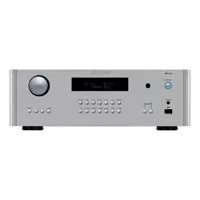
RA1592 - Receiver ROTEL - Free user manual and instructions
Find the device manual for free RA1592 ROTEL in PDF.



| Product Type | Integrated Stereo Receiver/Amplifier |
| Brand | Rotel |
| Model | RA1592 |
| Output Power | 200 W per channel (8 ohms, both channels driven) |
| Dimensions (W x H x D) | 431 x 144 x 425 mm |
| Front panel height | 3U (132.6 mm) |
| Net weight | 16.8 kg |
| Power supply | 120 V / 60 Hz (US) or 230 V / 50 Hz (EU) |
| Power consumption | 500 W (max), less than 0.5 W in standby |
| Analog inputs | Phono (MM), 3x Line (RCA), 1x Balanced XLR |
| Digital inputs | 3x Coaxial, 3x Optical (PCM up to 24-bit/192 kHz) |
| USB input | Front for iPhone/iPod/iPad, rear PC-USB (Audio Class 1.0/2.0, up to 384 kHz/32-bit, DSD/DoP) |
| Bluetooth | Built-in, APTX compatible |
| Speaker outputs | 2 pairs (A and B), min. impedance 4 ohms (1 pair) or 8 ohms (2 pairs) |
| Additional outputs | Preamp (PRE OUT), subwoofer (MONO SUB x2), headphone (3.5 mm) |
| Audio controls | Volume, balance, bass/treble (adjustable), tone bypass (Tone Bypass) |
| Network connectivity | Ethernet (RJ45) for software updates and IP control |
| Other connections | RS232, Rotel Link (3.5 mm mini-jack), 12 V trigger (2 outputs), wired IR input |
| Maintenance and cleaning | Dust with a dry cloth or vacuum cleaner. Do not use liquids. |
| Safety | Thermal and overload protection circuit. Do not expose to moisture. Read the safety instructions before use. |
| Spare parts and repairability | Contact a Rotel authorized technician for any internal intervention. Fuse and remote batteries replaceable. |
| General information | Manufactured according to RoHS and WEEE standards. Double electrical insulation (symbol ⊞). |
Frequently Asked Questions - RA1592 ROTEL
User questions about RA1592 ROTEL
0 question about this device. Answer the ones you know or ask your own.
Ask a new question about this device
Download the instructions for your Receiver in PDF format for free! Find your manual RA1592 - ROTEL and take your electronic device back in hand. On this page are published all the documents necessary for the use of your device. RA1592 by ROTEL.
USER MANUAL RA1592 ROTEL
Important Safety Instructions
Notice
The RS232 connection should be handled by authorized persons only.
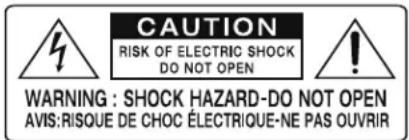
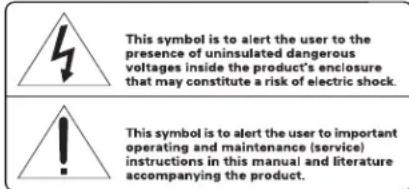
WARNING: There are no user serviceable parts inside. Refer all servicing to qualified service personnel.
WARNING: To reduce the risk of fire or electric shock, do not expose the unit to moisture or water. Do not expose the unit to dripping or splashing. Do not place objects filled with liquids, such as vases, on the unit. Do not allow foreign objects to get into the enclosure. If the unit is exposed to moisture, or a foreign object gets into the enclosure, immediately disconnect the power cord from the wall. Take the unit to a qualified service person for inspection and necessary repairs.
Read all the instructions before connecting or operating the component.
Keep this manual so you can refer to these safety instructions.
Heed all warnings and safety information in these instructions and on the product itself. Follow all operating instructions.
Clean the enclosure only with a dry cloth or a vacuum cleaner.
Do not use this unit near water.
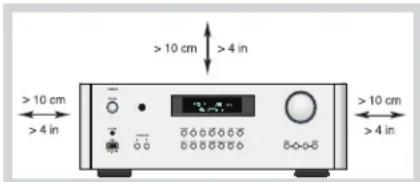
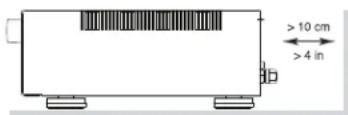
You must allow a minimum 10 cm or 4 inches of unobstructed clearance around the unit.
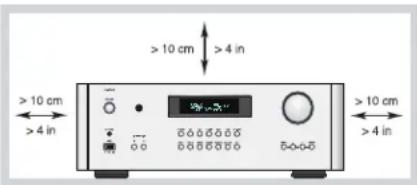
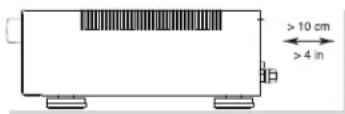
Do not place the unit on a bed, sofa, rug, or similar surface that could block the ventilation openings. If the unit is placed in a bookcase or cabinet, there must be ventilation of the cabinet to allow proper cooling.
Keep the component away from radiators, heat registers, stoves, or any other appliance that produces heat.
WARNING:The rear panel power cord connector is the mains power disconnect device. The device must be located in an open area that allows access to the cord connector.
The unit must be connected to a power supply only of the type and voltage specified on the rear panel. (USA: 120 V/60Hz, EC: 230V/50Hz)
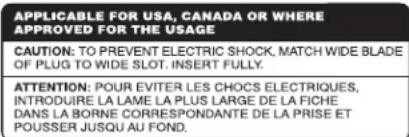
Connect the component to the power outlet only with the supplied power supply cable or an exact equivalent. Do not modify the supplied cable. A polarized plug has two blades, with one wider than the other. A grounding plug has two blades plus a third grounding prong. These are provided for your safety. Do not defeat grounding and/or polarization safety provisions. If the supplied plug does not fit your outlet, please consult an electrician for replacement of the obsolete outlet. Do not use extension cords.
The mains plug is the disconnect of the unit. In order to completely disconnect the unit from the supply mains, remove the main plug from the unit and the AC power outlet. This is the only way to completely remove mains power from the unit.
Do not route the power cord where it will be crushed, pinched, bent, exposed to heat, or damaged in any way. Pay particular attention to the power cord at the plug and where the cord exits the back of the unit.
The power cord should be unplugged from the wall outlet during a lightning storm or if the unit is to be left unused for a long period of time.
Use only accessories specified by the manufacturer.
Use only with a cart, stand, rack, bracket or shelf system strong enough to support the unit. Use caution when moving the unit in a stand or rack to avoid injury or damage to the unit.
Use Class 2 wiring for speaker connections to ensure proper installation and minimize the risk of electrical shock.
Immediately stop using the component and have it inspected and/or serviced by a qualified service agency if:
The power supply cord or plug has been damaged.
- Objects have fallen or liquid has been spilled into the unit.
The unit has been exposed to rain.
The unit shows signs of improper operation.
- The unit has been dropped or damaged in any way.
The batteries in the remote control should not be exposed to excessive temperature such as sunshine, fire or other heat sources.
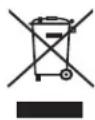
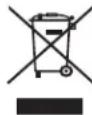
Rotel products are designed to comply with international directives on the Restriction of Hazardous Substances (RoHS) in electrical and electronic equipment and the disposal of Waste Electrical and Electronic Equipment (WEEE). The crossed wheelee bin symbol indicates compliance and that the products must be appropriately recycled or processed in accordance with these directives.

This symbol means that this unit is double insulated. An earth connection is not required.

Place the unit on a on a fixed, level surface strong enough to support its weight. Do not place it on a moveable cart that could tip over.
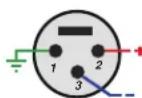
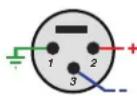
Pin Assignments
Balanced Audio (3 pole XLR):
Pin 1: Ground / Screen
Pin 2: In phase/ +ve/Hot
Pin 3: Out of phase / -ve / Cold

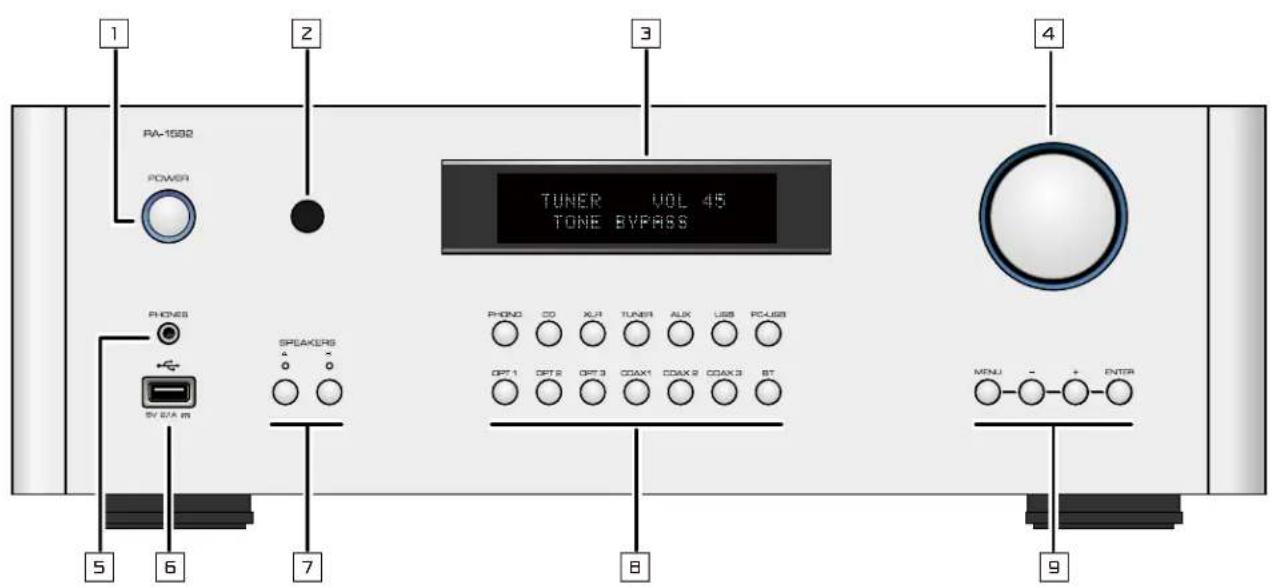
Figure 1: Controls and Connections Commandes et Branchements

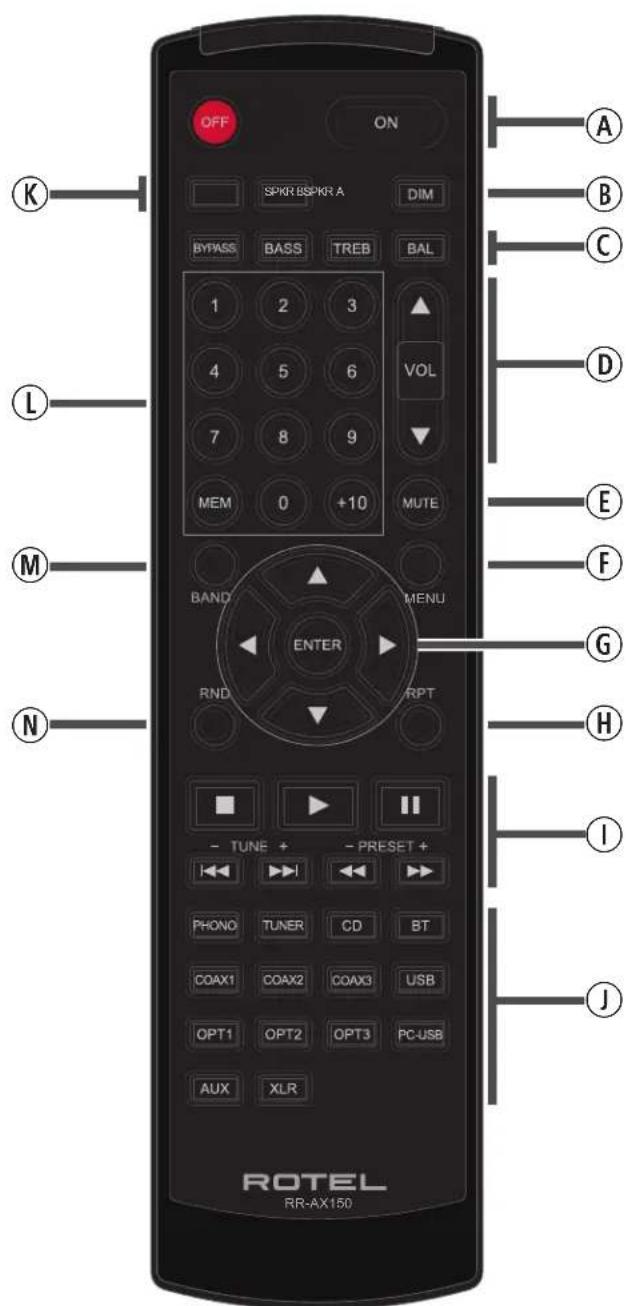
Figure 2: RR-AX150 Remote Control Telecommande infrarouge RR-AX150 Fernbedienung RR-AX150 Mando a Distancia RR-AX150
Afstandsbediening RR-AX150 Telekomando RR-AX150 RR-AX150 fjarrkontroll Пильт Ду RR-AX150
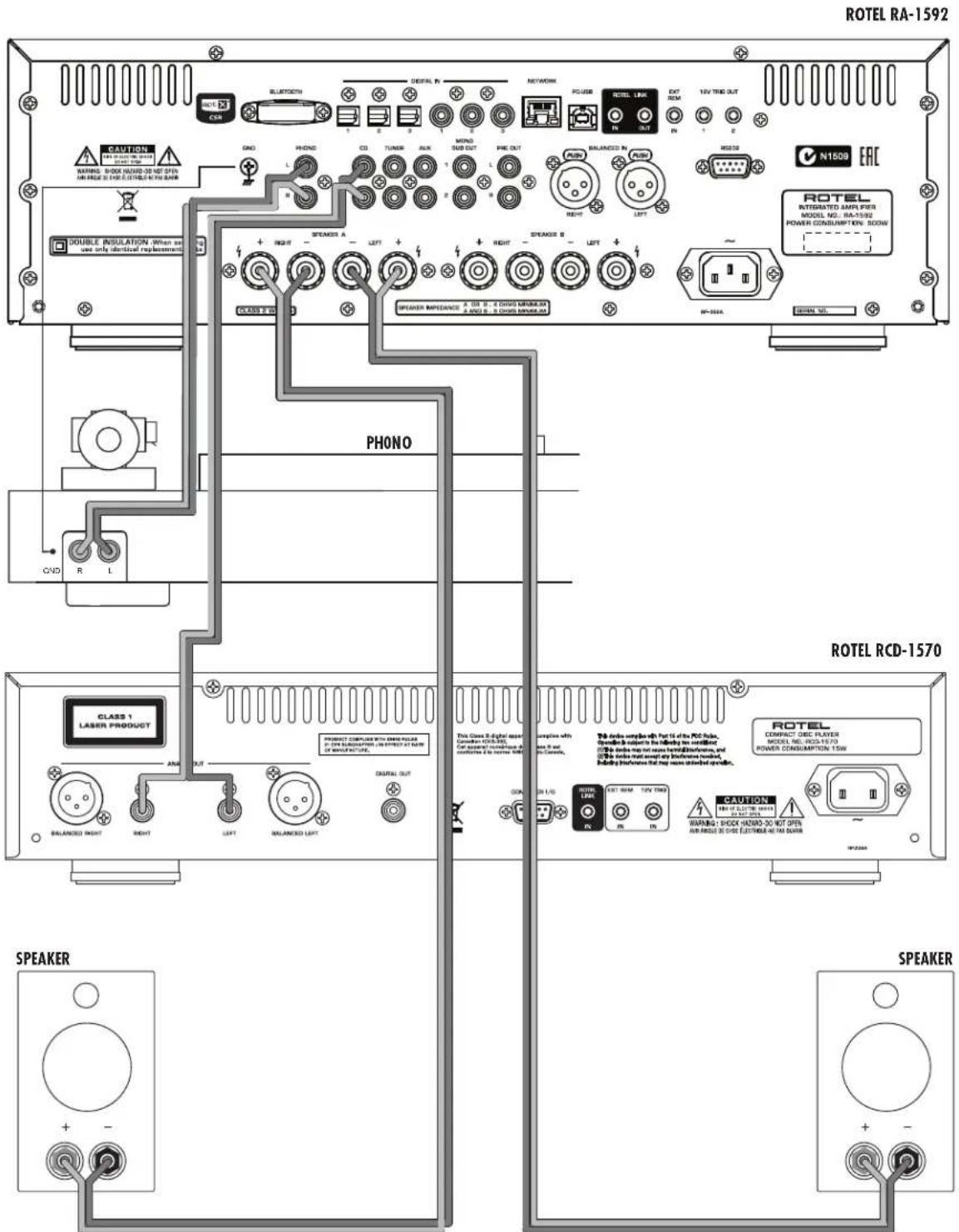
Figure 3: Analog Input and Speaker Output Connections
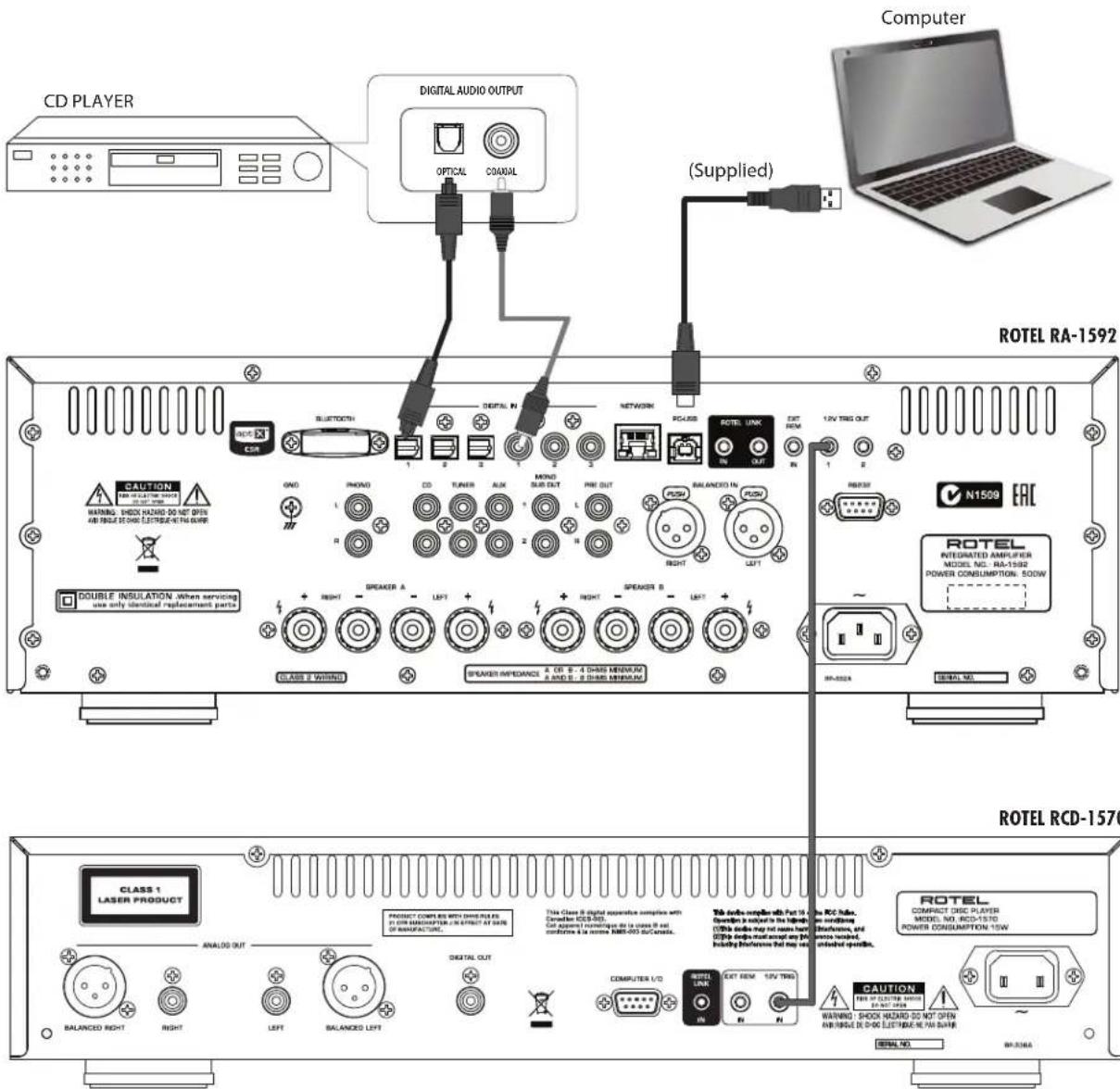
Figure 4: Digital Input and 12 Volt Trigger Out Connections
ROTELRA-1592
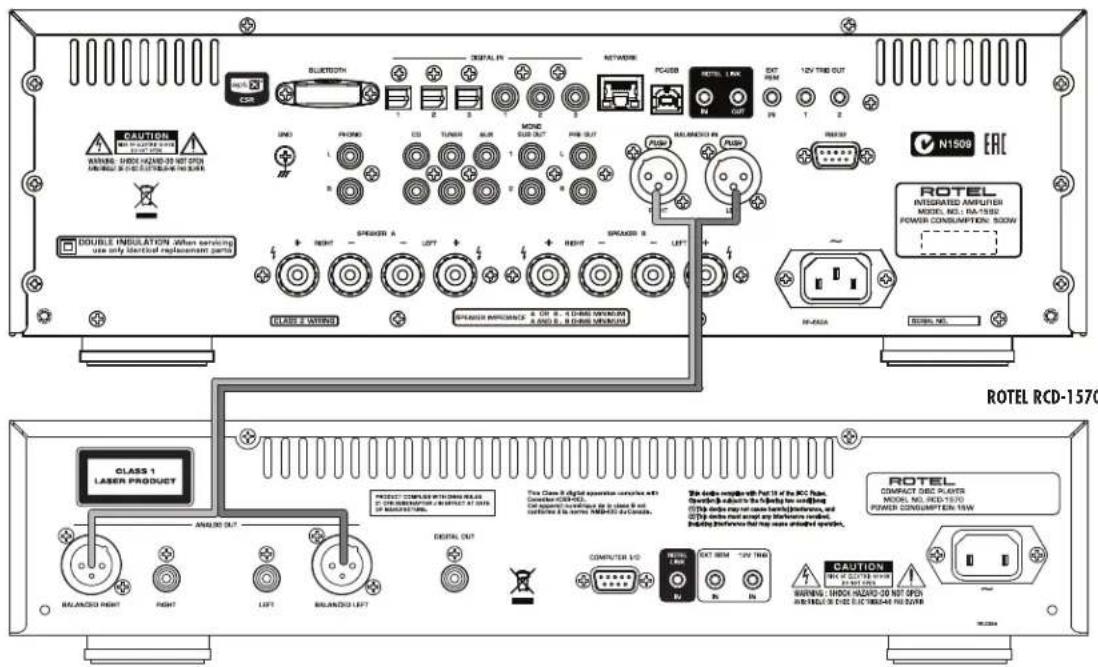
Figure 5: Balanced (XLR) Inputs Entres symétriques (XLR) Anschlussdiagramm (symmetrische (XLR-) Eingänge) Entradas Balanceadas (XLR)
Gebalanceerde ingangen (XLR)
Collegamenti ingressi bilanciati (XLR)
Balanserade anslutningar (XLR)
Balaanchbe (XLR) Bxodbl
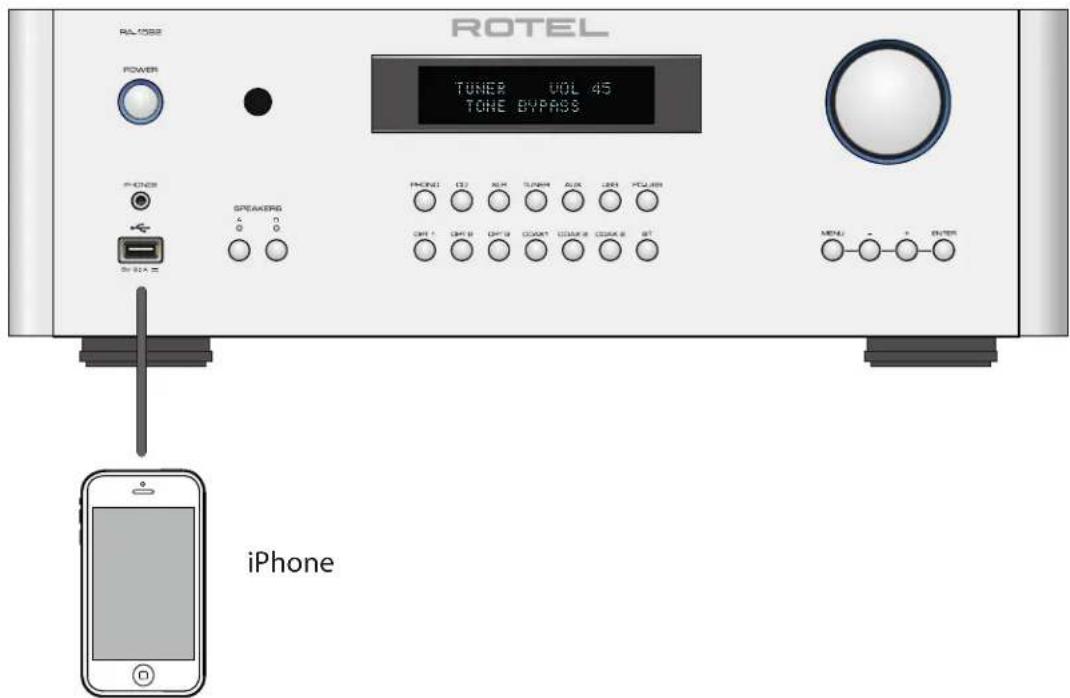
Figure 6: Front USB Input Entree USB en face avant Frontseitiger USB-Eingang Entrada USB Frontal
USB-ingang op het voorpaneel
Ingresso USB frontale
USB-port pu fronten
Iopt USB ha nepednei naehn
Important Notes
When making connections be sure to:
Turn off all the components in the system before hooking up any components, including loudspeakers.
Turn off all components in the system before changing any of the connections to the system.
It is also recommended that you:
Turn the volume control of the amplifier all the way down before the amplifier is turned on or off.
Remarques importantes
Important Safety Instructions 2
Figure 1: Controls and Connections 3
Figure 2: RR-AX150 Remote Control 4
Figure 3: Analog Inputs and Speaker Output Connections 5
Figure 4: Digital Input and 12 Volt Trigger out Connections 6
Figure 5: Balanced (XLR) Inputs 7
Figure 6: Front USB Input 7
Important notes 8
About Rotel 9
A Word About Watts 9
Getting Started 10
A Few Precautions 10
Placement 10
Cables 10
The RR-AX150 Remote Control. 10
Second Amplifier Remote Code 10
Remote Control Batteries 10
AC Power and Control 11
AC Power Input 11
POWER Switch and Power Indicator 11
12V TRIGGER Connection 11
Input Signal Connections 11
Phono Input and Ground Connection (GND) 11
Line Level Inputs 11
Balanced (XLR) Inputs 11
Digital Signal Inputs 11
Output Connections 11
MONO SUB Output 11
Preamp Output 11
Speaker Outputs 12
Speaker Selection 12
Speaker Wire Selection 12
Polarity and Phasing 12
Speaker Connections 12
Headphone Output 12
Remote Sensor 12
Display 12
Front USB Input 12
APTX Bluetooth Connection 12
Audio Controls 12
VOLUME Control 12
BALANCE Control 12
TONE Control Bypass 13
BASS and TREBLE Controls 13
Source Input Selector ① 13
Dimmer Control 13
Display Dimmer 13
PC-USB Input 13
RS232 14
Rotel Link 14
EXTREM IN Jack 14
Network Connection 14
Protection Circuit 14
Settings Menu 14
Troubleshooting 16
Power Indicator Is Not Illuminated 16
Fuse Replacement 16
No Sound 16
Cannot Connect via Bluetooth 16
Playable Audio Formats 16
Specifications 17
About Rotel
Our story began over 50 years ago. Over the decades, we have received hundreds of awards for our products and satisfied hundreds of thousands of people who take their entertainment seriously - like you!
Rotel was founded by a family whose passionate interest in music led them to manufacture high-fidelity components of uncompromising quality. Through the years, that passion has remained undiminished and the family goal of providing exceptional value for audiophiles and music lovers, regardless of their budget, is shared by all Rotel employees.
Rotel's engineers work as a close team, listening to, and fine tuning, each new product until it reaches their exacting musical standards. They are free to choose components from around the world in order to make that product the best they can. You are likely to find capacitors from the United Kingdom and Germany, semiconductors from Japan or the United States, while toroidal power transformers are manufactured in Rotel's own factory.
We all have concerns about our environment. And, as more and more electronics are produced it is especially important for a manufacturer to do all it can to engineer products that have a minimum impact on the environment.
At Rotel, we are proud to do our part. We have reduced the lead content in our products by using special lead-free ROHS solder and components.
Our engineers continually strive to improve power supply efficiency without compromise to quality. When in standby mode Rotel products use minimal power to meet global Standby Power Consumption requirements.
The Rotel factory is also doing their part to help the environment through constant improvements to product assembly methods for a cleaner and greener manufacturing processes.
All of us at Rotel thank you for buying this product. We are sure it will bring you many years of enjoyment.
A Word About Watts
This amplifier's power output is rated as 200 watts for each channel, when both channels are operating together at full power. Rotel has chosen to specify the power output in this way because, in Rotel's experience, it gives the truest value of the receiver or amplifier's power capability.
When comparing specifications for different products, you should be aware that power output is often specified in other ways, so you may not be comparing like with like. For example, the power output may be quoted with only one channel operating, giving a higher maximum figure.
A loudspeaker's impedance rating indicates the electrical resistance or load it offers when connected to the amplifier, usually 8 ohms or 4 ohms. The lower the impedance, the more power the speaker will need. In effect, a 4 ohm speaker will require twice as much power as an 8 ohm speaker.
However, Rotel amplifiers are designed to work into any speaker impedance between 8 and 4 ohms, and with all the channels working up to their full power. Because Rotel designs are optimized for use with all channels operating together, Rotel is able to specify the true power output for both channels.
Getting Started
Thank you for purchasing the Rotel RA-1592 Stereo Integrated Amplifier. When used in a high-quality music audio system, your Rotel product will provide years of musical enjoyment.
The RA-1592 is a full featured, high performance component. All aspects of the design have been optimized to retain the full dynamic range and subtle nuances of your music. The RA-1592 has a highly regulated power supply incorporating a Rotel custom-designed toroidal power transformer and custom-made slit foil capacitors. This low impedance power supply has ample power reserves, which enables the RA-1592 to easily reproduce the most demanding audio signals. This type of design is more expensive to manufacture, but it is better for the music.
The printed circuit boards (PCB) are designed with Symmetrical Circuit Traces. This insures that the precise timing of the music is maintained and faithfully recreated. The RA-1592 circuitry uses metal film resistors and polystyrene or polypropylene capacitors in important signal paths. All aspects of this design have been examined to ensure the most faithful music reproduction.
The main functions of the RA-1592 are easy to install and use. If you have experience with other stereo systems, you shouldn't find anything perplexing. Simply plug in the associated components and enjoy.
A Few Precautions
WARNING: To avoid potential damage to your system, turn off ALL the components in the system when connecting or disconnecting the loudspeakers or any associated components. Do not turn the system components back on until you are sure all the connections are correct and secure. Pay particular attention to the speaker wires. There must be no loose strands that could contact the other speaker wires, or the chassis of the amplifier.
Please read this manual carefully. In addition to basic installation and operating instructions, it provides valuable information on various RA-1592 system configurations as well as general information that will help you get optimum performance from your system. Please contact your authorized Rotel dealer for answers to any questions you might have. In addition, all of us at Rotel welcome your questions and comments.
Save the shipping carton and all enclosed packing material for future use. Shipping or moving the RA-1592 in anything other than the original packing material may result in severe damage to your amplifier.
If included in the box please fill out and send in the owner's registration card. Also be sure to keep the original sales receipt. It is your best record of the date of purchase, which you will need in the event warranty service is ever required.
Placement
Like all audio components that handle low-level signals, the RA-1592 can be affected by its environment. Avoid placing the RA-1592 on top of other components. Also avoid routing audio signal cables near power cords. This will minimize the chance it will pick up hum or interference.
The RA-1592 generates heat as part of its normal operation. The heat sinks and ventilation openings in the amplifier are designed to dissipate this heat. The ventilation slots in the top cover must be open. There should be
10 cm (4 inches) of clearance around the chassis, and reasonable airflow through the installation location, to prevent the amplifier from overheating.
Remember the weight of the amplifier when you select an installation location. Make sure that the shelf or cabinet can support it. We recommend installing the RA-1592 in furniture designed to house audio components. Such furniture is designed to reduce or suppress vibration which can adversely affect sound quality. Ask your authorized Rotel dealer for advice about component furniture and proper installation of audio components.
The RA-1592 is supplied with an RR-AX150 remote control and must be placed where the infrared signal from the remote can reach the front panel Remote Sensor.
Cables
Be sure to keep the power cords, digital signal cables and analog audio signal cables in your installation away from each other. This will minimize the chance of the analog audio signal cables picking up noise or interference from the power cords or digital cables. Using only high quality, shielded cables will also help to prevent noise or interference from degrading the sound quality of your system. If you have any questions see your authorized Rotel dealer for advice about the best cable to use with your system.
The RR-AX150 Remote Control
Some functions can be done with either the front panel controls, or the supplied RR-AX150 remote control. When these operations are described, the square call out numbers refer to the main unit, while the encircled letters refer to the remote control.
Second Amplifier Remote Code
The factory setting is remote code 1. If you find that the remote is conflicting with other Rotel amplifiers, you can change to remote code 2 with the following steps.
1.From the remote control press Tuner ① and 2 ① at the same time to set the remote control to send Audio Code 2.
2. Point the remote at the unit and press 2 (1) button for 8 seconds. The unit will show "Audio Custom Code 1 > 2 ".
3. Repeat the above procedure and press "1" button instead of "2" to change the unit back to Code 1.
NOTE: The remote control can be used to operate the basic functions of Rotel tuners and CD players. Remote control buttons labeled H1L can be used to operate CD or Tuner functions in your system. For the remote to operate properly, make sure both the remote and the CD or Tuner are both in same remote code, either Code 1 or 2.
Remote Control Batteries
Two AA size batteries (supplied) must be installed before the remote control can be used. To install the batteries, remove the cover on the back of the RR-AX150. Install the batteries as shown in the illustration in the battery well. Test the control for proper operation, then replace the cover. When the batteries become weak the remote control won't operate the RA-1592 consistently. Installing fresh batteries should eliminate the problem.
AC Power and Control
AC Power Input
Your RA-1592 is configured at the factory for the proper AC line voltage in the country where you purchased it (either 120 volts AC or 230 volts AC with a line frequency of either 50Hz or 60Hz ). The AC line configuration is noted on a decal on the back panel.
NOTE: Should you move your RA-1592 to another country, it is possible to reconfigure your amplifier for use on a different line voltage. Do not attempt to perform this conversion yourself. Opening the enclosure of the RA-1592 exposes you to dangerous voltages. Consult a qualified service person or the Rotel factory service department for information.
NOTE: Some products are intended for sale in more than one country and as such are supplied with more than one AC cord. Please only use the one appropriate for your country/region.
Because of its relatively high power rating, the RA-1592 can draw considerable current. Therefore, it should be plugged directly into a 2-pin polarized wall outlet. Do not use an extension cord. A heavy duty multi-tap power outlet strip may be used if it (and the wall outlet) is rated to handle the current demanded by the RA-1592 and all the other components connected to it.
If you are going to be away from home for an extended period of time such as a month-long vacation, it is a sensible precaution to unplug your amplifier (as well as other audio and video components) while you are away.
POWER Switch and Power Indicator
Press the front panel Power Switch button, to turn the unit on. The Power Indicator light is illuminated when the unit is on. Press Power Switch button again to turn the unit off.
When the power switch is in the ON position, the remote control ON and OFF buttons may be used to activate the RA-1592. In Standby mode the power LED remains lit, but the display is turned off.
NOTE: Place the self adhesive ring over the light surrounding the Power switch if the blue light is too bright.
12V TRIGGER Connection
Some audio components can be turned on automatically when they receive a 12V turn on signal. The two 12V Trigger Outputs of the RA-1592 provide the required signal. Connect compatible components to the RA-1592 with a conventional 3.5mm mini plug cable. When the RA-1592 is in turn off mode, the trigger signal is interrupted, so the components controlled by it are turned off.
NOTE: If you are using other units in the series with Rotel Link, please use the Rotel Link connection to turn the units on or off. Do not connect both the Rotel Link and 12V trigger cables. The 12V trigger's power on or off features will override the Rotel Link features.
Input Signal Connections 11 19 22
See Figure 3,4,5
NOTE: To prevent loud noises that neither you nor your speakers will appreciate, make sure the system is turned off when you make any signal connections.
Phono Input and Ground Connection (GND)
See Figure 3
Plug the cable from the turntable into the appropriate left and right phono inputs. If the turntable has a "ground" wire, connect it to the screw terminal to the left of the Phono inputs. It will help prevent hum and noise.
Line Level Inputs [19]
See Figure 3
The CD, Tuner, and Aux inputs of the amplifier are analog "line level" inputs. These inputs are for connecting components such as CD players or other audio playback devices with an analog audio output.
The left and right channels are clearly labeled and should be connected to the corresponding channels of the source component. The Left connectors are white, the Right connectors are red. Use high quality RCA cables for connecting input source components to the RA-1592. Ask your authorized Rotel dealer for advice about cables.
Balanced (XLR) Inputs 22
See Figure 5
A pair of balanced XLR inputs accept audio signals from CD player, Blu-ray player or other source components with XLR outputs.
NOTE: You should choose only one method of analog connection from a source component to RA-1592. Do not connect both the RCA and XLR outputs of a source component to the RA-1592 at the same time.
Digital Signal Inputs
See Figure 4
There are three sets of digital inputs labeled 1, 2 and 3, for COAXIAL and OPTICAL respectively. Connect the COAXIAL or OPTICAL PCM outputs of your source component into these sockets. The digital signals will be decoded and played by the RA-1592. The unit is capable of decoding PCM signals up to 24 bit, 192kHz .
Output Connections
MONO SUB Output
There are 2 connectors for mono subwoofer output to connect to a subwoofer. These mono outputs are summed with both the left and right audio signal. They are parallel outputs allowing 2 subwoofer to be connected to the RA-1592.
Preamp Output [z]
The RA-1592 has a set of preamp outputs labeled PRE OUT. The currently selected source input is available from this output. Typically the PRE OUT output is used to provide a signal to another integrated amplifier or power amplifier, which is used to drive remote speakers.
NOTE: Changes to the settings of the Volume, Balance or Tone controls affect the signal from the Preamp Output.
Speaker Outputs 24
See Figure 3
The RA-1592 has two sets of speaker outputs, labeled SPEAKER A and SPEAKER B. The speaker outputs are controlled by the A-B speaker selector buttons on the front panel and the buttons on the remote control.
Speaker Selection
If only one set of speakers will be used at any given time, the speakers may have an impedance as low as 4 ohms. If there are times when both the A and B speakers will be used, all the speakers should have an impedance of 8 ohms or more. Speaker impedance ratings are less than precise. In practice, very few loudspeakers will present any problems for the RA-1592. See your authorized Rotel dealer if you have any questions.
Speaker Wire Selection
Use insulated two-conductor stranded wire to connect the RA-1592 to the speakers. The size and quality of the wire can have an audible effect on the performance of the system. Standard speaker wire will work, but can result in lower output or diminished bass response, particularly over longer distances. In general, heavier wire will improve the sound. For best performance, you may want to consider special high-quality speaker cables. Your authorized Rotel dealer can help in the selection of cables for your system.
Polarity and Phasing
The polarity – the positive/negative orientation of the connections – for every speaker and amplifier connection must be consistent so all the speakers will be in phase. If the polarity of one connection is reversed, bass output will be very weak and stereo imaging degraded. All wire is marked so you can identify the two conductors. There may be ribs or a stripe on the insulation of one conductor. The wire may have clear insulation with different color conductors (copper and silver). There may be polarity indications printed on the insulation. Identify the positive and negative conductors and be consistent with every speaker and amplifier connection.
Speaker Connections
Turn off all the components in the system before connecting the speakers. The RA-1592 has color-coded binding post type speaker connectors on the back panel. These connectors accept bare wire, connector lugs, or dual banana type connectors. (except in European Community countries where their use is not permitted.)
Route the wire from the RA-1592 to the speakers. Give yourself enough slack so you can move the components to allow access to the speaker connectors.
If you are using dual banana plugs, connect them to the wires and then plug into the backs of the binding posts. The thumbscrews of the binding posts should be screwed in all the way (clockwise).
If you are using terminal lugs, connect them to the wires. If you are attaching bare wires directly to the binding posts, separate the wire conductors and strip the insulation from the end of each conductor. Be careful not to cut into the wire strands. Unscrew (turn counterclockwise) the binding post. Place the connector lug or wire around the binding post shaft. Turn the binding post clockwise to clamp the connector lug or wire firmly in place.
NOTE: Be sure there are no loose wire strands that could touch adjacent wires or connectors.
Headphone Output 5
The headphone output allows you to connect headphones for private listening. This output accepts a standard 3.5mm (1 / 8^ ) mini stereo headphone connector. Plugging in a set of headphones does not cut off the signal to the speakers. Use the front panel or remote control A-B Speaker Selector to turn off the speakers.
NOTE: Because the sensitivity of speakers and headphones can vary widely, always reduce the volume level before connecting or disconnecting headphones.
Remote Sensor 2
This remote sensor window receives IR commands from the remote control. Please do not block this sensor.
Display
The front panel display shows the source selected, volume level and tone settings. The display provides access to the setup and configuration menu options of the amplifier.
Front USB Input 6
See Figure 6
The front USB input can be connected to an iPhone, iPad or iPod device providing music playback to the amplifier. To enable audio playback using one of these devices, simply plug the device into the front USB and select USB as the desired source. The device remains active allowing search and play functions.
APTX Bluetooth Connection
The Bluetooth Antenna on the RA-1592's back panel is for wireless streaming via Bluetooth, from your device (i.e. mobile phones, tablets or computers). From your device, look for "Rotel Bluetooth" and connect to it. Connection is normally automatic, but if prompted for a password, please press "0000" on your device. The RA-1592's supports both traditional Bluetooth and APTX Bluetooth audio streaming.
Audio Controls
VOLUME Control ④
Turn the knob clockwise to increase the volume, or counter clockwise to decrease the volume. From the remote control press the volume + or - button to turn the volume up or down. Press the MUTE button to completely mute the volume.
BALANCE Control 9
The Balance Control adjusts the left-to-right balance of the sound output. The factory default is the center position or "0". To change the balance from the front panel, press the MENU button to toggle the front display to BALANCE SETTING mode. Then press the - or + buttons on the front panel to change the value to LEFT or RIGHT. The value can change from L15 to R15.
NOTE: This setting is saved permanently including after powering off the RA-1592.
To make temporary changes not saved after power off, from the remote, press the BAL button to access the BALANCE SETTING menu, then press the up/down/left/right 6 arrow buttons to adjust. When finished, press the BAL button again to exit the menu.
Tone Control Bypass ⑥
Bass and Treble Control (Tone Control) circuits are bypassed at factory default to ensure the purest possible sound. The front display will show TONE BYPASS. To turn on the tone control from the front panel, press the MENU button to toggle to the Bypass control then press the - or + buttons on the front panel to turn bypass on or off.
NOTE: This setting is saved permanently including after powering off the RA-1592.
To temporarily changes the Tone Control Bypass, press the BYPASS (C) button on the remote control to toggle the Bypass mode enabled and disabled.
Bass and Treble Controls
Set the Bass or Treble controls from the front panel by pressing the MENU button to toggle to the BASS / TREBLE menu. Press ENTER button to toggle between the options. Press the -or + button to adjust the value. The Bass and Treble values range from -10 to +10.
NOTE: These settings are saved permanently including after powering off the RA-1592.
To temporarily change the Bass and Treble settings from the remote control, press the BASS or TREB button then press the up/down/left/right 6 arrow buttons on the remote to adjust the value.
NOTE: Bass and Treble changes are only available when Tone Bypass is disabled (see Tone Control Bypass section).
A properly setup high-performance audio system produces the most natural sound with little or no adjustment of the tone controls. Use these controls sparingly. Be particularly careful when turning the controls up as this increases the power output in the bass or treble range, increasing the load on the amplifier and speakers.
NOTE: Setting the Bass and Treble controls does not automatically turn on the tone control. To turn on tone control, refer to previous section Tone Control Bypass.
Source Input Selector ①
Press the corresponding input button on the front panel or remote control ① to select the desired listening source.
Push the front panel source buttons to toggle between Optical 1-3, Coaxial 1-3 and Aux or use the dedicated source button on the remote control.
Dimmer Control
Display Dimmer ⑨⑧
To change the brightness of the front display, press the MENU 9 button to toggle to the Display Settings. Then press the - or + buttons on the front panel to change the brightness.
NOTE: This setting is saved permanently including after powering off the RA-1592.
To temporarily change the display brightness, press the DIM ⑧ button on the remote.
PC-USB Input 13
Connect this input using the supplied USB cable to the USB socket of your computer.
The RA-1592 supports both USB Audio Class 1.0 and USB Audio Class 2.0 modes. Windows computers do not require installation of a driver for USB Audio Class 1.0 and support playback of audio up to 96kHz sampling rates. The Factory Default setting is USB Audio Class 1.0.
To take advantage of USB Audio Class 2.0 audio playback supporting up to 192kHz sampling rates you will need to install the Windows driver supplied on the CD included with the RA-1592. You will also need to switch the RA-1592 to USB Audio Class 2.0 playback mode with the following:
- Press MENU on the front panel until "PC-USB AUDIO CLASS" appears on the display.
- Select "2.0" using the "-" button then press "ENTER".
- Power cycle the RA-1592 and reboot your PC after changing the USB Audio mode to ensure both units are properly configured.
Many audio playback applications do not support 192kHz sampling rate. Please confirm your audio player supports 192kHz audio and you have 192kHz audio files to properly playback this sample rate. Also, you may need to configure the audio driver in your PC to output 192kHz or your computer may "down sample" to a lower audio sample rate. For more information please refer to your audio player or operating system information.
NOTE: USB Audio Class 2.0 requires installation of the Windows PC driver on the CD ROM included with the RA-1592.
NOTE: MAC computers do not require a driver to support PC-USB 1.0 or 2.0 audio.
NOTE: Upon successful installation of the driver, you may need to select the ROTEL audio driver from the audio/speaker setup of your computer.
NOTE: The RA-1592 supports both DSD and DOP audio playback in 1X and 2X formats. Consult your audio player to confirm proper operation for playback of these audio formats.
RS232
The RA-1592 can be controlled via RS232 for integration with automation systems. The RS232 input accepts a standard straight DB-9 Male-to-Female cable.
For additional information on the connections, software, and operating codes for RS232 control of the RA-1592, contact your authorized Rotel dealer.
Rotel Link 14
The ROTEL LINK OUT connection can be made with the stereo 3.5mm cable (supplied) to a Rotel product with ROTEL LINK IN connection including a CD player. While the ROTEL LINK IN can optionally attach to Rotel network enabled products with ROTEL LINK OUT connections.
These allow the attached Rotel products to communicate with each other and be controlled via the Rotel App (available for download on the iTunes® store).
NOTE: Only the Rotel Link cables supplied with this product should be used. These 3.5 mm cables have WHITE connector ends and should not be confused with the 12 Volt Trigger cables that have BLACK connector ends.
EXT REM IN Jack 15
This 3.5mm mini-jack receives command codes from industry-standard infrared receivers via hard-wired connections. This feature could prove useful when the unit is installed in a cabinet and the front-panel sensor is blocked. Consult your authorized Rotel dealer for information on these external repeaters and the proper wiring of a jack to fit the mini-jack receptacle.
Network Connection 12
The RA-1592 can be attached to a network using the rear panel NETWORK socket [2]. The NETWORK configurations allow both STATIC and DHCP IP addressing. See the Network section of this manual under Setting Menu for IP address configuration information.
The NETWORK connection allows software updates to be downloaded from the Internet. The NETWORK connection also allows IP control for integration with automation systems.
For additional information on the IP control please contact your authorized Rotel dealer.
Protection Circuit
The amplifier has both thermal and over-current protection circuitry that protects the amplifier against damage in the event of extreme or faulty operating conditions. The protection circuits are independent of the audio signal and have no impact on sonic performance. Instead, the protection circuits monitor the temperature of the output devices and shut down the amplifier if temperatures exceed safe limits.
Most likely, you will never see this protection circuitry in action. However, should a faulty condition arise, the amplifier will stop playing and will display "AMP PROTECTION" on the front panel.
If this happens, turn the amplifier off. Let it cool down for several minutes, and attempt to identify and correct the problem that caused the protection circuitry to engage. When you turn the amplifier back on, the protection circuit will automatically reset.
In most cases, the protection circuitry activates because of a fault condition such as shorted speaker wires, or inadequate ventilation leading to an
overheating condition. In very rare cases, highly reactive or extremely low impedance speaker loads could cause the protection circuit to engage.
If the protection circuitry triggers repeatedly and you are unable to isolate and correct the faulty condition, contact your authorized Rotel dealer for assistance in troubleshooting.
Settings Menu
You can access the settings menu from the front panel by pressing the MENU button or 1 on the remote. You can change the value of the selected option by pressing the + / - button on the front panel or up/down/left/right arrow buttons on the remote. Step through the sub-menus by pressing the MENU button on the front panel or F on the remote.
- TONE Control: TONE BYPASS ON/OFF, BASS level and TREBLE levels can be changed to desired settings. Press the ENTER button on the front panel or on the remote to toggle between the tone setup options. (For more information on Tone Control refer to the Tone Control Bypass, Bass and Treble control sections.)
NOTE: These settings are stored permanently even after the RA-1592 is powered off.
BALANCE: Change left/right balance (For more information on Balance sections refer to the Balance Control section).
NOTE: This setting is stored permanently even after the RA-1592 is powered off.
- DIMMER: Dims the display.
NOTE: This setting is stored permanently even after the RA-1592 is powered off.
- ROTEL LINK RCD: Selects how the CD player is connected to the amplifier, either CD (analog), COAX1, COAX2, or BAL-XLR. CD is the factory default.
- POWER ON MAX VOLUME: This sets the maximum volume level when the unit is turned ON. "45" is the factory default.
NOTE: Power On Max Volume settings do not apply to sources configured with Fixed Gain.
- POWER OPTION: Enables the RA-1592 to be controlled via the network port when attached to an automation system. The power consumption is higher in Quick Power mode. If network control is not required select the Normal Power mode. "Normal" is the factory default.
Valid settings include: Normal, Quick.
NOTE: When the POWER OPTION is configured to Quick, the RA-1592 will consume additional power in standby mode.
- AUTO POWER OFF: The RA-1592 can be configured to automatically power off if unused for a specified period. If no changes are made to the unit within the specified "Auto Power Off" time the unit will automatically go to STANDBY mode. The Auto Power Off timer will be restarted if changes are made to the volume, source or playback. The default for Auto Power Off is set to DISABLE.
Valid settings include: DISABLE, 1 HOUR, 2 HOURS, 5 HOURS, 12 HOURS.
- FIXED GAIN: Configures a Fixed Volume level for a specified input. To enable this feature press the +/- buttons to select the desired fixed volume level for Aux 1, USB, PC-USB, Optical 1, Optical 2, Coax 1, Coax 2 or Bluetooth. When enabled and the input with a Fixed Volume is selected, the Volume level will immediately be set to the specified level.
Valid settings include: VARIABLE, FIXED 01-95, FIXED MAX.
- AUX1 VOL: VARIABLE (disabled) is factory default.
- USB VOL: VARIABLE (disabled) is factory default.
- PC-USB VOL: VARIABLE (disabled) is factory default.
- OPT1 VOL: VARIABLE (disabled) is factory default.
- OPT2 VOL: VARIABLE (disabled) is factory default.
COAX1 VOL: VARIABLE (disabled) is factory default.
COAX2 VOL: VARIABLE (disabled) is factory default. - BLUETOOTH VOL: VARIABLE (disabled) is factory default.
NOTE: The Volume knob on the front panel and Volume +/- buttons on the IR remote are disabled when the volume is Fixed. To disable this feature set the Fixed Volume level to "Variable".
- PC-USB AUDIO CLASS: Change supported PC-USB Audio Class of the attached device.
NOTE: Some computers attached to the PC-USB do not support USB Audio Class 2.0 and do not support 24/192 audio playback. If needed the PC-USB can be configured for USB Audio Class 1.0. Please refer to your computer operating system for details. - NETWORK: Shows the network connection status and to view/configure the network settings. If the network is properly configured and attached, "Connected" will be displayed. To view or modify the network settings, press the ENTER button.
The RA-1592 supports both DHCP and STATIC IP addressing. Select the desired IP address method and press ENTER.
If DHCP is selected you can refresh IP address by pressing ENTER or press MENU to view IP address information. Press the MENU button to toggle through IP address settings. If the IP address is renewed the network will be tested and connection status reported.
If STATIC IP address mode is selected you must configure all settings for the network including IP Address, Subnet Mask, Gateway and DNS Server. Use the up/down/left/right or +/- buttons to adjust the values and press ENTER to move to the next value. When the proper IP information is configured press MENU to go to the next setting. After entering the STATIC IP address information the network will be tested and connection status reported.
NOTE: For more information regarding network connection please contact your authorized Rotel dealer.
NOTE: A network connection is not required for the RA-1592 to operate.
- MAIN: This shows the current software version loaded into the RA-1592. The software can be updated if the RA-1592 is properly connected to the Internet.
- Press ENTER to check if a new software version is available.
- If a new software version is available press the + button on the front panel or the up/right button on the remote control to select YES then press ENTER button to begin the software update process.
- The new software will be downloaded from the Internet. The RA-1592 will power cycle when the software update is complete.
NOTE: Do NOT power off the RA-1592 during the software update process.
NOTE: It is recommended to Reset Factory Defaults after the software update is complete.
- PC-USB: This shows current loaded software version for PC-USB processor.
- SIGNAL SENSE: Check if a digital audio signal is present on the configured Signal Sense input. When this input is selected as the active listening source, the RA-1592 monitors the digital data stream to determine if there is audio. If there is no audio detected for 10 minutes, the RA-1592 will enter Signal Sense Standby Mode. When in Signal Sense Standby Mode and the RA-1592 detects audio on Signal Sense input, the unit will automatically power on. To disable this function, select the DISABLE option which is the factory default setting.
NOTE: To use the Signal Sense function, the RA-1592 must be actively listening to the configured Signal Sense source. If a source other than the configured Signal Sense source is selected, the automatic power off and power on functions will not be active. Example: if the Signal Sense source is configured as COAX 1 and the unit is listening to OPT 2, the signal sense functions will not be activated.
NOTE: When the RA-1592 enters standby mode via the remote control, the Signal Sense function will not operate until the unit detects the audio has stopped for the minimum 10 minute time-out period. This prevents the unit from immediately powering back on if there is still active audio playing.
NOTE: When the SIGNAL SENSE function is activated, the RA-1592 will consume additional power in signal sense standby mode.
- FACTORY DEFAULT: This sets the unit back to the original state as when it left the factory. Press the + button on the front panel or RIGHT arrow button on the remote control to select
then press the "ENTER" button on the front panel or on the remote control.
NOTE: All previously configured options will be erased and reset to the factory default settings.
Troubleshooting
Most difficulties in audio systems are the result of incorrect connections, or improper control settings. If you encounter problems, isolate the area of the difficulty, check the control settings, determine the cause of the fault and make the necessary changes. If you are unable to get sound from the RA-1592, refer to the suggestions for the following conditions:
Power Indicator Is Not Illuminated
The Power Indicator ring around the power button and the basic items in the Display window should be illuminated whenever the RA-1592 is plugged into the wall power outlet and the POWER switch is pushed in. If it does not light, test the power outlet with another electrical device, such as a lamp. Be sure the power outlet being used is not controlled by a switch that has been turned off.
Fuse Replacement
If another electrical device works when plugged into the power outlet, but the Power Indicator still will not illuminated when the RA-1592 is plugged into the wall outlet, it indicates that the internal power fuse may have blown. If you believe this has happened, contact your authorized Rotel dealer to get the fuse replaced.
No Sound
Check the signal source to see if it is functioning properly. Make sure the cables from the signal source to the RA-1592 inputs are connected properly. Check the wiring between the RA-1592 and the speakers.
Cannot Connect via Bluetooth
If you cannot pair your Bluetooth enabled device to the RA-1592, delete the memory of the previous connection on your device. On your device this is often listed as "Forget this Device". Then try to make the connection again.
Playable Audio Formats
USB Apple (iPhone, iPod, iPad)
| Format Notes | |
| Any supported file loaded to Apple device. | Any supported file loaded to Apple device. Phone may resample depending on stored format. May exclude Apps designed to play formats not originally supported by the sending device. |
APTX Bluetooth
| Format Notes | |
| Any format supported by the sending device. | May exclude Apps designed to play formats not originally supported by the sending device. |
PC-USB
| Format Notes | |
| Format determined by the Media Player/Server software that you use. | Any supported format by the PC softwarePCM Audio:44.1k, 48k, 88.2k, 96k, 176.4k, 192k 384k(16 bit, 24 bit and 32 bit)DSD64 and DSD128 |
Coax/Optical
| Format Notes | |
| SPDIF LPCM | 44.1k, 48k, 88.2k, 96k, 176.4k, 192k16 bit, 24 bit |
Specifications
Continuous Power Output 200 watts/channel
(20 - 20k Hz, < 0.03%, 8 ohms)
Total Harmonic Distortion < 0.03%
(20 Hz - 20k Hz, 8 ohms)
Intermodulation Distortion < 0.03%
(60Hz:7kHz,4:1)
Frequency Response:
Phono Input 20 Hz - 20kHz, 0 ± 0.5 dB
Line Level Inputs 10 Hz - 100kHz, 0 ± 0.5 dB
Damping Factor (20 Hz - 20kHz, 8 ohms) 600
Input Sensitivity / Impedance
Phono Input (MM) 5.2 mV / 47k ohms
Line Level Inputs (RCA) 340 mV / 100k ohms
Line Level Inputs (XLR) 540 mV / 100k ohms
Input Overload
Phono Input (MM) 52 mV
Line Level Inputs (RCA) 3.5 V
Line Level Inputs (XLR) 5.5 V
Preamplifier Output Level / Impedance 1.9 V/100 ohms
Signal to Noise Ratio (A weighted)
Phono Input (MM) 80 dB
Line Level Inputs 103 dB
Digital Section
Frequency Response 10 Hz - 90k Hz (0 ± 2 dB, Max)
Signal to Noise Ratio (HF "A" weighted) 102 dB
Input Sensitivity/Impedance 0 dBfs / 75 ohms
Preamplifier Output Level 1.4 V (at -20 dB)
Coaxial/Optical Digital Signals
SPDIF LPCM
up to 192kHz 24 bit
USB Audio Class 1.0
up to 96kHz 24bit
USB Audio Class 2.0
up to 384kHz 32bit*
*Driver installation required
DSD and DoP support.
Power Requirements:
USA: 120 volts, 60 Hz
EC: 230 volts, 50 Hz
Power Consumption 500 watts
Standby Power Consumption
BTU (4 ohms, 1/8th power)
Dimensions (W× H× D)
Front Panel Height
Weight (net)
<0.5watts
1239 BTU/h
431× 144× 425mm
(17 × 5 - 78 × 16 in.s.)
3U(132.6mm,51/4ins)
16.8 kg, 37.04 lbs.
All specifications are accurate at the time of printing.
Rotel reserves the right to make improvements without notice.
Rotel and the Rotel Hi-Fi logo are registered trademarks of The Rotel Co, Ltd., Tokyo, Japan.
"Made for iPod," and "Made for iPhone," means that an electronic accessory has been designed to connect specifically to iPod or iPhone, respectively, and has been certified by the developer to meet Apple performance standards. Apple is not responsible for the operation of this device or its compliance with safety and regulatory standards. Please note that the use of this accessory with iPod, or iPhone may affect wireless performance.
iPhone, iPod, iPod classic, iPod nano, and iPod touch are trademarks of Apple Inc., registered in the U.S. and other countries.
Made for

iPod

iPhone
Branchement trigger 12 V [16]
Ajustements Graves/Aigus
(20 Hz - 20k Hz, < 0.03%, 8 ohms)
Distorsion harmonique totale < 0.03%
(20 Hz - 20k Hz, 8 ohms)
Distorsion d'intermodulation < 0.03%
(60 Hz - 7k Hz, 4:1)
(20 Hz, 20 kHz, 8 Ohms)
susceptibilities of electrocution.
Dimensioes A n A l P
431× 144× 425mm
Altura del Panel Frontal
3U(132'6 mm)
Peso Neto
16'8 kg

m = 311 ;
Ingresso PC-USB USB Audio Class 1.0
[fino a 24 bit, 96k Hz]
USB Audio Class 2.0
[fn0a32bit,384kHz]
Baxkhble nHctpyKuIM no 6e30nacHOCTN
3aMeuHHe
CoeMHHeHnI NO WHe RS232 DoJIxHbI BInIOHHTbCra TOnbKO aBTOPM3OBAHbIM nepcoHAnOM.
IPEIOCTEPEXEHNE:BHTPNHETaCteu,IOCTyINbIXdNpO6cnyKbAHnNoIb3oBATEneM.DObepTe 0cnyKbAHnKBAHmPPOBaHOMMyMaTepy.
PNEOCTEPEKHENE: INI CNHJENH ONAHOCTN BO3TOPAHN HIN Nopaxhena 3neKtpueckMM TOKOM He NOBepraTe DAHHbY annapat BO3eJCTBNO DOXJRA HIN BnArl. He ONyCKaHTe NNADANH NOCTOPOHNX npEDMETOB BVHTpb KOpNYCA NOANA BNAR AIN NOCTOPOHHN npEDMET, HEMeDHeHBOBHe TBnKU SHypa NITAHN H3PO3ETKN. DcTabBe annapAT KBAUNHmUPOBAHHOMC CNEHAnHCTY DnOcmToPA H BO3MOJHXOR peMOHA.
PpexJe Yem NoCoeHHaTb annapat NypaBnTb MM, npOHTte BCE HcTpyKuM. CoXpaHHe pykoBocTBo NO KcNpyataun Dn daJIbeHwero NcOnIb3OBaHn.
06paaiTeBHHMaHHeHa npedeOtepeKeHnY,ynkaaHbHe HaKpIyce annapata IN B DaHHom pykoBDCTBe. YnpabJIeTne annapatom B COOTBECTBNI C NHTCPYKUAMM.
CoxpaHnTe pykoBODCTBO no 3KcNpyataun dnn daNbHeIwero nOONb3OBaHnA.
Pon3B0nIeOuHcTKyKOpNcTaONbKO cyXoTkAhbIO nn nbinecoom.
HeHcnoIb3yIte3To yCtpoIcTB0 B6nI3N BOIbI.
OCTabTe He MeHee 10 cm Cb6oDnHO IpoCtpaHCTBa BOKpy annapapa dna o6ceuehnaepkyauu BO3dyxa.
He CTABTe annapat Ha KpObaT, DMBaH, KOeB Hn NIO6HyIO MfIKyNOEPOBEXHOCTb, KOTOPaM NOKET3AORoPHTBeHTINNIOHNHbIE OTBepCTHa. Ecn n Annapat BcTpaNBAeTcB WkaF Hn DpyroI KOpNc, 3OT KopNc DOJKeH BeHTINNPOBaTcBn ORe oecnepeHHOnxAnkAnHHannapata.
Iepknte annapat noaIbIwe oT padnatoPob OtonneHH, oObrpebaTei neey HIObIX npTyHX yCTpoACh TB, BbldienHOxix Tenno.
PNEOCTEPEXEHNE: CTeB0 pa3bem Ha 3aDnei Naehn IpeHa3NaeHd nAe6bIcTporo OTOeHNHeHry UcTPOcTBa OJIeKTPnueckoi CETN. UcTPOJcTBO DOnJHXo 06ceuMbAtb CBoOHDIOCTyn K3aDnei Naehi, YTObI cTeB0 Ka6JIb MoKHO 6blO 6blcTpo BIdepHyTB.
Cetbeoe HanpnaeHne, K KOtOpomy NoDcoeHHreTcAnnapat, DIOJXHO COOTBETCTBOBaTb Tpe6oAHnAM, Yka3aHHbIM Ha 3aHHe nAneHn annapata. (CUA: 120 B, 60 Γu, EC 230 B, 50 Γu)
IpoCoeHnHHeKoMnHOENT KnHtAouEpo3ETKe TOnbKo npn nOmoOn cTeBOrO hUpy H3 KOMnNEkTA NoCTABKN, HInn Ero ToCHrOg 3KBHBaJIeHTA. He nepeDeBbAaTE NoCTABLIeMbl uHyp. IopnR3OBAHbIuTKePmEeT DBA HOHEBbX KOHTAKTa, OAnH N3 KOTOpBX UHPreDyTOR, 3a3EMNIOUoi WTEKe PMeET dBA HOJEBX KONTAKTa HTrpTeN 3a3EMNIOUoi WITbIPb. OHn o6ecNeuBAoT BauSy 6e20nnAoHcOCTb. He OTKa3bIABaTcE bO mep 6e20nnAcHTo, npdeOCTABMIx 3a3EMNIOUoiMm HInn IopnR3OBAHbIMuTEkePcm. EclnNoCTABMIeBMy wTEKeH nOdoTHK BAAwe Po3ETKe, 6opatTECbKJAEKTPKHy JnA ZAMEnb yCTapeBSeI po3ETKn. He nCNOlb3yIteYdNHINHtBnTAHn.
OchOBHn BnKc eTeBO rHpya CnyHIT nIry OTKIOeHHN annapata OT cTb. IINr NOHOrO OTKIOUeHHN H3dennr OT nHTAOuE cTb, BNky CTeBO rK6Bn Kc6yETOTcOeHHNb OT cTeBO pOzEtKN nepemEHNO TOKa a TAKKe H3dennr. 3To eHNCTBeHHb CNOCo, YTObI NNONHO b yADNTb cTeBO nHTAHRe NT3dNN.
3Ta ceTeBa BUNka DonJXHa 6bItb NERKO DocTyNa.
He npoklaabibaiTe ceteBoi uHyp TaM, rde OH MoKet 6bItb pa3dabien, nepekata, kpyueh, noDBepHyT B03eDCTBHO tena nn nobpeKden KaKMM-NH6 CnOc6oM. ObaaaiTe ooc6oe BHMaHne Ha ceteBoi uHyp B6nH3n TKepeKa HAM, rde OH BXoHTB 3aDHIO NaHeJIb yCTpoHCTBA.
CeteboW hnp Cnnyet OTOeHNHbT ot CTehHO pO3ETKn BO BVPem rpo3bl nnn cEIN npN6Op OCTaBHe HEnCNOJb3yEmbIM nnTeJIbHoB VPem.
NcnoB3yTeToIbKO npHnAdneKHOCTN,yKa3aHHbIe npo3BOJNTeM.
NcnoB3yTeTbKoTeNekkxy,NoCTABky,CtOky,KpOHHTeHHMn N0Iky CxCTEmbl,DOCTaTOHO CINbHbIM,VTO6blBbIDepXaTB 3OT T3dEIna. BybTe octopoxhbl pHn nepemeeHNPiN6OpHa NaODCTabKe HnCTKe BO h6exAHme paHENmNIOBpeKDeHN H3dEIna.
IcnoB3yIte Ka6eHn C3aunToi Class 2 npn noCoeHNHeHH KOHOK K KJIeMMam yCNHTeTn Ipn o6ceueHHaDeHXo H3OJIaUNH MNNMm3aun pNCKa yDpa 3NeKTpHcTbOM.
HemedeHHNo npekpatne HcnoB3OBaHne KOMnOHeNTa NpepaTe Ha 06cneobAHne H/nn 06cnyKbAHne KBaHmNpOBAHHo PEmOHTHOpraHn3auee cEIN:
CeteboIhHpynnIHTeKepe6bnnoBpeJdeH.
BHytpb np60pa ypoHnH npdeMTe bHn npoHn HxKkoctb.
-Пиборпобьван подождем.
-Пибор demOnctpnpутпрзнakн HeHopMaBhoH pa60tbl.
Ipn60 npoHnnn Hn NOBpeHHn IIObHM npyHM cno6oM.
Batape BnybTe DnCTaHIOHOrO npabHeHH (N) He DoNkHb NoDBepraTcB O3DJIeCTBnHO N3NIHrero Tena, TaKOro KaK coHNHeuHb CEBT, orOBh n.1.

BHIMAHIVE
OINACHOCTb NOPAKENK

BHUMAHVE:ONACHOCTbIOPAXEHH
3JIeKTPMueCKM TOKOM. HE OTKpbl
ДЛСWA,KAHAДыИДРУТХCTPAH,ГDE
YCTPOINCTBO ODOBPEHO KNCNOJIb3OBAHnIO
CAUTION: TO PREVENT ELECTRIC SHOCK. MATCH WIDE BLADE OF PLUG TO WIDE SLOT, INSERT FULLY.
ATTENTION: FOR EVITER LES CHOCES ELECTRIQUES. INTRODUIRE LA LAME LA PLUS LARGE DE LA EICHE.
DANS LA BORNE CORRESPONDANTE DE LA PRSE ET POUSSER JUSQU AU FOND.
Uso6paekhen MOnnBn s pabHocToPONHeM TPOVNIHNKNS PNOYNPKNASTNbOaTaeN
O HANHIN BHHTPN KOPNYCA NADENN
HEN3OINPObAHHO HAnPAJKeHHA,BeMN4NHa
KOTOPORMOKERTOSADABTOBACCHOTB NopakewHM HeNOREKA MEKTPMHeCKWM TOKOM

H06paKenneBocKnqatenbHoro3nka
B pabroctopponem tpeyrolnbe
conpoBokkaouen annapat Dokymentaun
Bakhblx MHpyKmno NkCnnyatauM
IpoyktBolet cnpoektnpobahb TaK, yO6blco0tBeTCTBOBAtb Tpe6OBAHnM MEduhyapOnHbX dNepKTHN BO rpanuHcHIO npmehen BpeDhBx BeueCtB 3NeKtpotexHueckOM 3NeKtpOHOM o6obyoBHMM (Restriction of Hazardous Substances-RoHS),TakKe no 6paueHHoO TOcNYHBMWM CBOI cPCK3eKnEtpoxHnVcKHM n3eKtpOHbIM o6opyoBHnM (Waste Electrical and Electronic Equipment - WEEE). N3o6paJkHe He nepeOpKHyTO MycOpHoro 6aKaHa KOneCAO3NaUaET TAKKe To, YTO 3TH npOyktBdONKHBb 6bITB BToPnHO HcNoB3OBAHb (peuHKnPOBaHb) INN Jke o6paOtohB b COOTBeTCTBN cyonMAHYbIMB BbIIue DnEkpTMBAM.

3T0 TCMBON 03Haayet, 4TO yCTPOCTBO HMeET DBOHYIO H3OIAJIIO. 3aEMLNEHHe HTepe6yETcA.

yctahablnbaute yctpoctBOHa poBHyO, rophtoHTanbHyIOnepXHOCTb, cnoocbHyO bIepejXaTe erO Bec. He ctabte erO Ha noDBeNHyTOtenKKy, KOTOPA MoKet ONOpKNHyTcBA.
Ha3haueHHe KOHTaKToB
Baanhcbnyayno pa3bem
(3-KoHTaKTHbX LXR)
Pin 1:3emra-Ground/
EkpaH - Screen
Pin 2: 0a3a / + ve / Hot
Pin 3: Ipnmbo4a3a / -ve / Cold

Copepkanhe
Pcynok 1: Opranby npapnienn npa3beMbl 3
Pcnyok2:IpynbTyR R-AX1504
Pcynok 3:NoocoeHHeHne HCTOHNKOB CnHana Ha aHaIorobBbXoDbN AkyCTnuecknx CnCTem 5
Pcynok 4: LnfoBov BxOg N BbIXo12-B TprrrpHoro CmHaJa 6
PcHOK5:BanaHChbE(XLR)BXoDbI7
PcHOK6:PiO r USBHa nepedHe naHenn 7
Baxhhe 3ameyannn8
Baxkhhe Hnctpykun no 6e3onacnoctn 81
OKOMnHaHH ROTEL 82
HeckoIbko CIOB o MoUHocTH B BaTTax 82
Iepbile warr 83
HeKoTOpBie npedocToPoJxHocTH 83
Pa3MeIeHne 83
Ka6eenn 83
IyBt IY RR-AX150. 83
Btopoi h6op IK k0obDЯуnpaBneHyaCnHTeMe 83
YcaHOBka 6aTapeB nynbT 84
HtunHe ychntenny npabnne 84
Pazbem nIe cTeBOro shypa 84
BbIKIOUaTeIb NHTAHN HINDAKATOp NNTAHN 184
IopcoeHHeHn12-B TprrrepHoro CurnHana 84
IOncoeHHeHHe BXOHBIX CnHaNoB 11022 84
BxOДлпnpoIrpbIbATEI rpaMnlaCTHNOK«Phono»
KJMeMa3a3eMHeHg (GND) 84
BxOdbI HHeHoro ypoBHa 84
BalaHcHbI (XLR) BxOdbI 84
UHpOBBieBXoDbI 85
BbIXoHbIe pa3beMbbl. 85
BbIXoJ MONO SUB 85
BbIXoI npeducnntena 85
IopcoeHHe akyctnuecknx CNTem 85
Bb6op akyctnuecknx cHTem 85
Bb6op akcyteckoro ka6ena 85
PonpaHocb H a3npobka 85
IopcoeHHeHneakcyTnuecknxKa6eJe 85
BbIXoHaHayuHnKnPhones 85
IaTnK nynbTa 85
Iucnnne 86
USB Bxod Ha nepedHei nane 86
IopcoHHeHMeKAPTXBluTeoth 86
Aydno perynipovkn 86
PerynToprpoMkoCTNVOLUME 86
PeryaTOp 6ana hca BALANCE 86
06xod perynipobok tem6pa TONE Control Bypass 86
PerynTopbTeMbpaBASSN TREBLE 86
CenekTopBxOoB ① 86
Perynpobka npkocn Dcnnne - Dimmer. 86
Display Dimmer 86
BxOa PC-USB回 87
RS232 87
Uinha Rotel Link 87
Pa3bEM EXT REM IN - BXoJ 3NeKtpueckoro CnHana DuctaHOnHOrO
ynpabnene 87
Ceteboi pa3bem 87
Cxema 3aunTbI 88
MehIO hAcTpoE 88
06HApyeHnE uCtpaHHe HEnCnpaBHOtei 89
He CBeHTcHnDnKatop nHTaHn 89
3aMeHa npedoxpaHnten 89
Her3Byka 89
HeB03MOxH0 yCTaHOBmTb Bluetooth coeHHHeHne 89
Bocnpn3BodmbieaydnofoopMaTbI 90
Texnueckne xapaKtepntu. 90
OKompanHnROTEL
NCTOPIN HAWEI KOMNAHNI HauanaB noTn 50 nTnHa3d.3a npOeDnne DecTnEtnMbI NOUYNN COTHn HArpa3 a HaNI pOdykTBn CcJIaNN CCACTINBBIMCOTNH TbcH NIODe, KOtOpBIE OTHOCATC KCBOM pa3BNEeHNM BNOHCEpeBe3HO-TakKe,KaK Bbl!
KOMnHaNr RoTe16bilaOCHOBaHcemeCTBOM, YBa CTpaTb KMy3bIke NopoDInla cTpeMJIeHne co3dAbTa hi-fi KOMnHOHeTb BEckOMnpomCCHOro KaueCTBa.3a MHOrHe rOdbI 3a TcPaTb HnUyTB He Ocna5b, I NO CEeJeB o6uaJceB - BByIyCKaTb PPOyKTb NCKJIIOHTeNbHOI CEHHOCIN DIA ayDINOΦHIOB NIO6HTeNe My3bIK, He3aBNCIMOnO tIX fHnHaHCObIx BO3MOXHOCTe, pa3dJIeTc BCEMn COtpyDnHKAMr Rotel.
HJKeHepBo Rotel pa6oTaOT kak ednHa KOMaHa, npocnyuBbA nTuatEnbHO DOBDA KaKdbI HoBb IpoDyKT Do TaKOrO yPoBHe COBepWeHCTBa, KORa OH 6yDeTyOBnetBoprTb Xc TporIM My3bKaIbHbIM CTaNaptAM. ImnpedOctabNeHa CBO6Da Bbl6opa KOMIIeKtyUoiNx No BcEMy Mpy, YTO6bl cdeLaB annapataK aK MoXHO LyuWe. BepoTHO, Bbl CMoxTe HauTN B hauNX annapatax OT6OpHBe KOHNecATOpbI N3 BeINKO6pHTaHH IN EpMaHH, nonynpobOHNKn i3 JAnNNi N CUSA, Ondako TopoOndJIbHbIE CNIOBbI TpaHcΦopMaTOpbMbI N3rotAbNBAem Ha co6CTBeHHOM 3aBoDE ROTEL.
BceMb3a60TmC6oXpAHeOkyKaIOeIcpebl.No Mepe TOrO,Kak Bce 60JIbSe 3NeKTPoHHbIX yCTpoHCTB BMpe BBInyckaETCA, a nocne OKOHHaHn Cpoka Cnyk6bl Bb6paCbBAeTcN, dIg POn13BOiNTeN Oco6eHNO BaxHO npKOHCTpyuPobAHn IPOdyKTOB cEaTaB Ce BO3MOxHoe, YTO6bl OHn HaHocnn MNHMaIbHbYueP6Zemne N ICTOCHNKAM BObl.
Mbl B KOMnAHm Rotel, ropIMCBA CBOUM BknaDOM B o6uee deIO. Bo-nerBbIX, Mbl cokpatINu COepxHae CBNUa B CBOE 3NEKTPOHKe, 3a cuETNCIObn3OBAHnnpinno,OTBeuaOHe TpeOBAHnRMOHS,BO-BTOpbix,HaNNHOBBieYcNInTEINpaBoTaOHe BKnace D, IMeIOT BnTepeo6Oone BBcOKn K.I.D., YemPpeBdyuune pa3pa6OtKn, pni OdnHaKOBo BxOHOH MoCHOCn N KaueCTBe 3ByaHNPiO6HbI npOyKtB npakTNUeCKn He BbIDJIeIOT TeIIa, He pactpaUNBaIOT noncy THeprHIOXopoWn C ToKn 3peHnOxaHbI OkpyKaIoSe CpeBnBdoBok Lyuhe 3ByaT.
MblnoHmAm,HTO 30MaIeHbKMe WarnBnepe,IHO OHOn OChb BaxKnbl.BebMbI npoDOnJkaem NOnCKN HObIX MeTOOB MATEpnaIOB Dn6OJIe UCTbIX INdpyKeCTBeHHbIX KOKpyKaIOUcE CpeDE TexHOIoRNUeCKNX PNOUCCOB.BceMbI, cotpydHnKi KOMpanHIN ROTEL,6laOpaIM Bac 3a NOKyKy 3TOrO n3dEInn.MblyBepEnb,YTO OHO DOCTaBt Bam MHOROTNET yDOBOJIbCTBnI.
HeckoIbko cIob o MoIooCTn B BaTTax
BixOHaH MaOuHocb ycunnten CoCTabnre 200 Bt Ha kaHn, npo oboux OndHOBpeMeHHo pa6oTaox H NaHyo MoU KaHAnax. KomnaHn peunna n3MepaTb BixOHyO MuOcHObTb NmEHNO TaKIM MetoDM NOTOM, yTO NO bTy Rotel, TOnkOH daeTNCHNHy OueHKy BO3MOXHOCTe pecnBepaNNyCunnten.
CpaBnBaJa DaHbIe B TexHnuecknx XapakTepeNtKax pa3NUnHbIx npOdyKTOB, HynHO IMeTb B BVNy, YTO BbIXoHna MOUHocTb qAcTo N3MepReTc COCEm DpyrIM CnOCOBm, TaK YTO, BO3MOxHO, BblTaeTeCb cpaBHnTb MeJy Co60i COBepWeHHo pa3Hbe Beu. HanpImep, BbIXoHna MOUHocTb MoKeT 6blTb PnpBeHea TOnbKO dJa OJHOro pa6oTaIoJero KaHaHa, YTO nO3BOJNeT NOnyHTb 6OJIee BbICOKn POKa3aTeNb MaKcIMaJIbHoN MOUHocTN.
IMnepaHc Akcytuecknx CNTem NOKa3bIbaeT, KaKOBo 3neKtpuececko conpoTnbHeHne Hn Harpy3ka, NOkKnIOuayMaHa BbIXOd ycNlnten, n O6bHuO OHa paBnEETc8 0M nnn 4 OMa. YEm HnKe IMnpeHaC, Tm 6ObnBaA moohocb Notpe6yeTc4 nJ KOnOHKn. B pe3ynbTaTe, akCytueckra CNTema c conpoTnbHeHnEM 4 Om HyxdaetcB yCnIHTe BDbOe 6ObnSe MoUHOCTn, Yem 8-OMna AC.
OdaKyo ycnntenr RoteI cnpoeKTnpoBaHbI TaK, TTo6bl pa60TaTb CIO6bIM MMnepaHcom KOIOHOK -OT 8OMdo4OM, pIn BCex KaHaJax OndOBpemHo BOBDAIOXIOHNIOHYO MOHOCb. I TaK KAKOHCTpykunm Rotel ONTNMI3NPOBaHb DnI NcIPOB3OBaHHaCO BcEMN OndOBpemHo pa60TaIOUMMKAHaJAMn, RoTe MoKET YKa3bIBaTB NCTINHHYIOMOHOCb DnI OBOxKHaJAOB.
Первныешагn
Blaorapm Bac 3a nokynky nnterpnpobahnoro ctepeo ycnintela Rotei RA-1592. B coctabe BbCOKOKaueCTbeHHoi ayDIOOCNTeMbI OH 6yTe DocTabnBaB Bam ydoBolbcTBE MHOrne robl.
RA-1592 - noHoofoyHKUHOHaBbHbKOMNoHeHT cOTnHbIM pa6OuHMXapakTepcntkAmn. Bce acneKtI ero KOHCTpyKun ONTMMNPOBaHb Ia nnoyehn noHoro dHnHAMueCKORo dnaa3oHa npepaOn ToHauWHXHOAHCOB My3bIK. BbcOKOCa6bNbHbNcTOOHNK NITAHNA RA-1592 BKIOaET Bce6a fnpMeHHbTOpONdaHBbN TpAHCphiMTop Rotel n 3aka3hBe KoHNcHcTOPbCnepFopnpOBaHHo FOJbRO. 30TNCTOHNIK O6NaadEHN3KM BbxODhbm COnPOTNBHeHem 60bLWM 3aNACOM NOMOHOctN, NO3BOJIHOUMR BA-1592 BocnpOn3BODNTb camble cNOxHbIe ayDnO cnrHaJI. CTOnMOCTb IN3ROTOHEHn DaHHo KOHCTpyKUn BWe, Ho OHa IMeT npEmMyEcTBA C TOKN 3peHMy3bIK.
Dopoknn neaTHbIX nIAT ycHnnteJIpaCnoJoxKeHb CmMMeTpnuHO.3To 06ecneuBaET ToHoe Co6NIOJeHHe BpemEHbIX npaMeTPOB My3bKaJIbHorO cnHana. B cHnHaBHom TpaKte NpImeHBe MeTaNIONeHouHbe pe3ncTOpbl I NOINCTIpONOBle INI NOINPpONIneHOBbie KOHeHcTaOpbl. KaKdbI 3JIeMeHT CXeMbI NOBepraLC TuaTeNbHOMy paccMOtpeHHIO, YTO6bl Do6NtbcMAkCMaMbHO DOCTOBepHOrO BOCpOn3BeDeHnMy3bIKN.
Kpome toro, RA-1592 nmeet He3aBncmbie ceneKTopb BxOob dI npocnyuBaanHa 3anbc. 3TO NO3BOJraT Bam CnyaaTb OINH NCTOCHIK OHOHBpeMeHHO 3aNcBbTa DpyroI.
RA-1592 npocB hacpoKe n kcnnyataun. EcnB Bby yke menn deo co ctepeocnctemaM, y Bac He Bo3HNKHT HnKaNX BOpocOB.IpocTo noknHnTe OCTaHbHle KOMNHOENTi HaCnaJXaIITecb.
HekotopbIe npedoctopoxhocTn
IPIMMEYAHNE:Bo u36eXaHue noBpeXdeHua KOMnoHeHmOB cUcMemb, BCE nodcoedunHua umoedunHua npou3bOdume npu bkykIOUeHHom numaHuu. IpeXde yem BkIOUamb numaHue,y6edumecb,UMo coeDuHua BInonHeBu npabunbHo u HadeXho.Ocoboe BHumAue ydenume KOnoHOyBn mpoEoDAM.He doJNHO ocmaambcra "pa3NOxMaueHHbx"KUn, Komopble Mozym Zamkhymbcmexdy cobou unu Ha Kopnyc ycunumen.
IoxanyiCTa, BHMaTeNbHO npOHTne DaHHepe pyKOBoDCTBO. KpOme 6a3OBbIX HnCTpyKmIO NO yCTaHOBKe n paOBe, OHO daET Bam ceHHy IO NHOpMaunIO o pa3NIVbX KOHfMypaunx CnCTe HA63eRA-1592 IOTOM, KaONITMIM3PObaTb erO xapaKtePncTNIK. EcIN Bo3NHKnHY BONpocbl, O6paTNTeB KABTOPI30BaHHomy dInepy Rotel. KpOme TOrO, BceMb, COtpyDNkRt Rote, rOTobbl OTBeNTb Ha Baan Bonpocbl IN pInHrTB BaAn 3ameaHnia.
CoxpaHnTe Kopo6ky RA-1592 n BCE octaIbHbIe ynaKoBOUHbIe MaTePnAbl, uTo6bl B daJIbHeIWe IMMeTb BO3MOxHOCtB BOCIOJIb3OBA TbCBaNIM. TpaHCnOpTnPOBaK aRA-1592 BHe 3aBOJcKoI ynaKOBKn MoKeT bIb3BaT bcpe3Hbe NOBpeXdHnYcINITeIa.
O63aTeNbHO coXpaHnTE Yek nIraPHTnHbTaNoh. 3To rIaBHbIe DOkymENTbl, yOCTOBepraUoNne DaTy NOKyPkN, B Cnyae O6paueHnA 3a rapaHTnHbIM o6CnyKnbAHnEM.
Pazmeuenie
Kak n BCE KOMNOHeTbI, 6oPa6aTbIbAIOUe Cna6bIe 3neKtpnueckne CnHAnbl, RA-1592 noDBepKeH BmAHnHO OkpykaOuEe CpeBn IpyrOro OobpyoBaHN. CtapaiTeCb He CTaBnTB RA-1592 Ha dpyrme KOMNOHeTbI n He npoknlaBbTaCnHaNbHbIe Ka6en pRdOM co UHypamn NITAHN. 3TO CHN3NT BEPOTHocTb nomex.
Bnpouecce HopmaIbHn pa60tby RA-1592 bIeJeTenNo. PauaIatopbI n BENTINaIOHHbe OTBepCTna npEHa3NaueHbI dNl OTOBa 3TOrO Tenna. He 3aRopaxnBaIte BENTINaIOHHbe OTBepCTna Ha BepXHe KpbIke. OcTaBBTe He Mehee 10 cm CBO6oHOro npoctpaHCTBa BOKpy Kopnyca n ObecneBte DOCTaOTuHb BO3dyXoo6MeH, YTObI yCUNInTeJIh He nepepeBaIcn.
POMHnTe O Bece ycunnteJIa, KOrIa Bb6npaete MeTo dIra Iero yctahOBKn. Y6eINTEcB, cTO NOIka NII NOCTABKa DOCTaTOOHO pOpyHa, YTO6bl BbIDepKAtB Bec annapata. PekomeHnyEMNCNtob3OBaTcNEUAnIMNIOPOBaHHyMe6ebn DnAyno KOMNoHErTOB. TaKaY Me6eNb paccuTaHa Ha NODaBNeHne Bn6paun, BNIAUoei Ha KaueCTBO 3ByKOBOcnpOn3BeDeHn. ObpatNTecb KaTOpN3OBaHHOMy DInnepy Rotel 3a COBETOM No npabINbHOMy Bb6opy Me6eN nIra KOMNoHETOB n I npabINbHOH IN YCTAHOBKe.
RA-1592 noctabnetaTc cnynbTom RR-AX150, n donxhen 6bty ctaHOBHe TAK, yto6bl HnOpaKpaChbI CNrHaI OT nybTa MOr IerKo DoCTNb DaTHnKa Ha nepeDneH naHenn Ycunntena.
Ka6enn
Hypnntanha, nnpobbe naanolorbte ayno ka6en noJnxhbl HxOHTBCa Ka moKHO daNbwe dpyr ot npyra. B 30m cnuyae Mehbe wHcOB, yTo ananorobb cinHan 6ydtarpa3hen uymom n nomexamn ot cnIOBbIX n nuPobbx kabei. CtoJe CEbHO NcNtB3yTe TOLko BbcOKKaeCTBeHHbIe EkaHnPOBaHHbIe ka6en. O6patntecb K Baewemy aBTOpN3oBAHHOMy DInnepy Rotel 3a coBETAMn PO Bb6opy cambx lyuWnx ka6ene i nncnlo3oBAHN B BaWe ayNo cTcTeMe.
IyIbT IY RR-AX150
HekotopbIe onepaunu npabneHn MOKHO BInONHnTB KAc c npunaraemoro nybTa RR-AX91, TaN C npedHe naneHn. PnOncaHn TAKx Onpaun B KBaDpaTHbIX CkO6KaXyKa3bIAoTcB CbIoNoHbE Homepa opraHOB npabneHn Ha npedHe naneHn, a B KpyKoQkax -Ha nybTe.
Btopo Na6op UK KoOb dIy npabLeHry cunntenem
IyoymonuHIO hfa6pNke yctAHOBnHn6Op NK KOIOB 1.EcnblbOcbnHyKHTe, YTO KOMaHdbI pNtBa KOHfNkTyOT CdpyTmUcNITeNm Rotel,MOXHO CMeHNTb INx HA6Op KOIOB 2 cNoMoIbIO cIeNyUOux WaOB.
- HanyIbTe HaxMITE OJHOBPeMeHNO KHONKITuner ① n2 ① ,HTo6bl3aCTaBNTb erO noCbIaNbT BTOPOHnabOp KOMHaD-Audio Code 2.
- HanpaBBTe npbT ha ycnnteB n haxmte Ha kHONky 2①, yapedxmbaee B Teeyene 8 cekynd.YcniNTeB nokkct coo6uene "Audio Custom Code 1->2".
3.Дя ВОЗВРАТа K nepвOMу Habopy КдOB Code 1, nobTOpIte npoцEDpy, HaxIMaHa KhoNkY "1" BmecTo KhoNkN "2".
IPMMEYAHHE: C nybma RR-AX150 moKHO ynpabIbMb oChOBHbIMu
fynkuaMu mIOhepoB u CD-nneepoB Rotel. Khonku nybMa, o6O3haueHHbIe
Ha pucyHKax bkyBaMu H1L N MOKHO uCNOb3OaBmb dN ynpaBHeHua
mIOhepom u CD-nneepom e baueu cucmeMe. Umo6blnybpa6oman
npabunbHo, ydoocmoepbmeCb, ymo u npblm, u CD-nneep unu mIOhep
ucnONb3yOM oDUn u mom Je h6Op kOdoB KomAnD Code 1 unu Code 2.
UctanOBka 6atapeB nynbT
Дe 6aTapeKn Tuna AA (npunaraOTc) HxJHo yctaHOBb npepi nCnoIb3ObaHnem nybTa.ДЯnx yctaHOBKn CnHMITE KpbIshky Ha 3aIHei CTOpoe RR-AX150.YctaHOBte 6aTapeen, BOTceke, KaNOKa3Ha Ho pucyHke. IpoBepbTe pa6oToCnO6hOCTb, a3aTeM BCTaBBte KpbIshky Ha MeTo. Korda 6aTapeu pa3pIKeHbl, nybT pa6OtaeT c RA-1592 HeycToUHBO. YctaHOBka CBexnx 6aTapeek DoJXHa yctpaHntb 3Ty np6bnemy.
IopcoeHHeHn12-B TprrrepHOro CnHaHa 16
Hekotopbte aydno kOMnOHeHt bMoryaBtOMaTNUeCKN BkIIOuATcR np nOnyueHH 12-BolbToBOro "TprrpHoro" cRHaHa. KaJdbn u3 DByx BbIXoOB ycInnter RA-1592 "12-V TRIGGER OUT" oecneuBaet taKoC rHan. CobMeTMBie KOMNoHEt bNOcoEINHrOITcK TmMb BbIXoMaR RA-1592Ka6eJIaMn C3,5-MM MmH-WeKePOM. KordaYcNInTe bBbIKIOuaETc, TprrrpHbN CnHAn npepbBAeTc N NOCoEOHNHeHHbIe KOMNoHEt bBbIKIOuAOTcR.
PIMMEYAHNE: Eclu Bbl ucnonb3yeme dpyzue kOmnoheHmbl u3 HOBou cepuu C Rotel Link, noxanyucma ucnonb3yume unhmepecC Rotel Link dnx ux bKIOUeHn u bKIOUeHn. He coedunue ux odHOpeMeHHo Ka6enmu Rotel Link u 12-B mpuzeepbM. Deno B mom, ymo 12-B mpuzeepbCuEan Ha bKIOUeHne u bKIOUeHne UMeem npuopumem Hd fynkuueu Rotel Link.
IodcoeHHeHne BXOHNbIX CnHnaIOB 111922
CM.puc.3,4,5
PIMMEYAHNE:Bo u36khaue zpomko wma, bpeho dna Bac u Bauux AC, bblknioaume numahue BCEu cucmemb, npexde em npou3bodumb IIO6bie coedunehu.
BxOД nIpynIpybIbATEnI rpaMnIaCTHOK «Phono» [19] KIeMma 3a3eMJIeHn (GND)
CM.puc.3
PoioceiHInTeKa6bIbOTnpOgRpbIaBTeIgpaMnactINHKoCootBETCTByIOUIM
rhe3dAMPHONO(nebomyLEFTnPabOMyRIGHT).EcnynpOuRpbIaTeIeCTb
KleMMa3aEmHeNIA,POcoeiHNITEeKKLeMMe3aEmHeNyaCyNJInTeJ.3TO
CnocobCTByeTymHeBWeHIOwMaN NOMex.
BxOdbI NInHeHOro yOpBnHa
CM.puc.3
3To BxOdb CD, TUNER, AUX nHeHoro yOpBn. OH npEHa3NaeHbI dIra NoDcoEINHeHH aHaIorOBbIX bIxOob CD-npOirpblBaTeJI, KaccetbIX DEK, TIOHEPOB paINO I T.I. Ctepeo o6OpyObaHn, a TaKke aHaIorOBoro BixOda dpyrnx yCTpoiCTB.
BxodblneBoro n npaboro KaHAnOB nomueHb i DonjXhbl noCoeHnIbTcK COOTBETCTBYUOMM KaHaNAM KOMPOHETA-NCTOUYHKa. Theo neBoro KaHana 6eOe, npaboro -KpacHoe. JnnoDcoEINHeHnR KA-1592 nCNoJb3yTe BbcOKokaueeCTBeHHbe Ka6eIn co WTEkepaMn RCA. Baaw ABtopu3OBaHHb I dInep Rotel MoXet NmOcb Bam B BbIbope coOTBETCTBYUOnx Ka6eNe I da BaWei CNTembl.
BaIaHcHbIe (XLR) BxOaBbl
CM.puc.5
Napa 6anaHcbx XLR BxOoB npHHMaetaynO cnHaNb ot CD-nIeepob,Blur ray nIeepob nn Dpynn KOMnoHeTOB C XLR BbXoAMn.
PIMMEYAHNE: Cnedyem ucnnoh3oammb monko odun cnocob anao2o0coedunehua umouhka c RA-1592. He noodcoednue me odhoepemehno oba bixoda umouhka - RCA u XLR K RA-1592.
UΦpObIe BXoIb
CM.puc.4
ImeetcTn KOMnKekTa cnΦpObBx BxOoOB, 6o3NaueHbX 1, 2 n 3 nla COAXIAL n OPTICAL, cootBETCTBEHNO. PoJcoeINHte KoAKcnAaNbHe COAXIAL nOnontueckne OPTICAL PCMBbIXoDbBaWeroNtOCHNka K TmM pa3beMaM. LcΦpObBe CnHaBb6yT DeKaOpInPobAhn bN o6pa60TaHbYcNInTeMeN. YcNInTeB MoKeT DeKaOpInPobA Tb PC McHnBbC p3peSeHMeMo 24 6nt, 192Ku.
BbIXoHbIe pa3beMbI
BbIXoM MONO SUB 20
IIMEIOCTaBaCa6ByeepHbIXMOHO BbIXOdaIINoNDOeUNHeHnA kTtNBbIX Ca6ByepeOB.3TuMOHO BbIXOdaIpeDCTabJIOTco6OIcMMyJeBOrO INpABORO KaHaIOB.OHI NIOKIIUHeHbI npaIIeNbHO,IO3BOJRABdABaTaBcRA-1592 CnHahbHa Da Ca6Byeepa.
BbIXoInpeducnnteTae[2]
Ycunntelb ochaen Bbixoamn Kackada npedeynneHn PRE OUT. 3T0BbXO npedeynntelra Bcerda pncyTCTBYe TcHnNtOCHNka, Bbl6paHHORB daHHb moMeHT dI npocnyuBaHn CelenkTopom BxOob.ObbyHO 3T0BbXoPREDOUT NDcoEHNHOTCk Kdpyromy INTerpnpOBaHOMy ycunntelIO mouhOCTn, nItaioeMy KOLOHKn DpyroKOMHaTe.
PIMMEYAHNE: PezyarnopbypomKocmu, balaHca umembpaBnuaHmHa cuzhan, nocmynaouHa bblxobnpedyucunumna.
Подсоедиениyaкустиескх систem 24
CM.PUC.3
YcunntelbRA-1592ImeetDBe NapblBbIXOOBHaKoONHKn,063NaeHHbX SPEAKERAUNSPEAKERB.3nBbIXOdbHaKOONKoHTpOnpnyOTc nepeKIOUaTeMeHa nepeHne Naehnn KhoNkamn Ha nyIbTe.
Bb6op akyctnuecknx cnCTem
EcInB IIO60 MOMENT 6yET NcOJIb3OBAIbC TOnbKO OJHa Napa KOnOHOK, To OHN MOryt IMTeB UIMNeAHC 4 OMa. EcInJe Oe OJHOBpeMeHHo MOryt pa6OtaTb Dba KomIIeKTA AC: A n B, TOrDa IIO6a H3 akyCTuuecknX CNTem DOJIkHs IMTeB UIMNeAHC 8 OM mnn BblIe. PaIcnOpTHBe 3HaueHmUIMNeAHaCA AC, KaN pAbuNo, OueH np6n3nteNbHb. Tem He MeHee, Ha npakTKe TOIbKO OueHb HemHorne AC MOryt PnpEclabTb PpO6nemy dIra RA-1592. IpokoHcyIbTnpyIteCb C BaAMM ABTopIN3OBAHbIM dIlePOM Rotel, ecIn y Bac BO3NHKn BONPOcbI.
Bb6op akcyuCheKoro Ka6eIa
IcnoB3yIne 130nIpOBaHHb DByxNpOBoHOH CKpyeHHb Ka6eB nI npinoeHNHeH yCINuTeRA-1592 K akyctnueckm CnCTeMaM. Pa3MeP n KaeeCTBO npoBa ImeOT 3aMeTHoe Ha CNY BnAHHne Ha npaMeTpbl CnCTeMb. CtAndapTbH kAcytueckm Ka6eB 6yEt pa6oTaB, Ho MoKet npnbEcTN K ChnKeHHIO rpoMKoCTn NIN OCLa6JeHHIO Hn3KnX qACTOT, OC6eHHo Ha 6oBbUnx pacCToHHax. B O6Ie Cnyae, 6Oee ToLCTb K6eB bUnyuAaET 3ByuAHne. DnHaunLyuNX napaMeTPOB, Bbl MoKete npImeHHb CnEuaJIbHbIe aKyctnueckne Ka6eBn BILcOKOrO KaueCTBa. BaIaABTopi3OBaHHb DnIep Rotel MoKet NOMOy Bam B Bblbope COOTBETCTByIOxix Ka6eB nI DaBse CnCTeMb.
PonapHoctb Hp3npoBka
Pnojphocb mnn noonokntelhna/otpuateleha opnehtaue coeHnenn Dn kackdoro rpoMKOROBOpNTe IOnKhb6bItb cOrnaocAbH, yTo6bl Bce ayctnueeckne cnctembl 6bln B f3e. Ecn nolpnoctb odHoro coeHnenn No own6ke cenana hcbpaTHo, 3BvAHne Hn3kXn acTOT 6yET ouHb CnabM, a ctepeo kapttna derpaNpyet. Bce aycHTnueeckne KaEBn npomapknpoBaHb, yTo6bl Bbl MmN OTMNUT bDa npOBDnHa. 3TO MoKet 6bl TnNooca nn PnphiHe He N30Jauu NDHO npOBDnHa. KaEBMoKETmEe Tb pO3paHyu N30Jauu C npOBDnKaAM Pa3HOro Ubeta (MeHnb n cepe6pnCTb). 3TO MOryt 6bl N metKn noJpHoCTn, HaneYataHhbe Ha N30Jauu. OnpeDenite PNOxKntelhBn n OTPnuatelhBn npOBDnKn n corNaCyIe C KaKdbm pa3bemOM rpmOKorOBopNTe n ycInNTe.
IopoeHHeHne akcyTnecknx Ka6enei 24
BbIKIOUHTe BCE KOMNHOENTBI BAWe ayDINO CNTEmpeXJe CEM NOCDENHtB KOLOHNK.YcINITeNB RA-1592 IMeET BUNTOBBe KJIEMMbIC UCBETOBIMapKIpOBKOHa 3aDHe NaHenn.3Tu pa3bEmbl pUnHMiaOT 3auuIeHHbI npBOoMn HakoHeuHNK TnA JLoNAkTn.(Ha pbHKax He-eBPonecknx cTpaH,pa3bEmbl pUnHMiaOT TaKke DBOHbIE 忍 aHaHbI).
PpnooxnIe npObOa OT ycunntena RA-1592 K KOJOnHkAm. OCTabTe IJIe Ce68 DOCTaTOUHb 3aIap, YTObI IMETb BO3MOXHOCTb IpeMeueHnKOMNOHETOB C cJeIbIO DoCTyNA K pa3BeMaM rPOMKOrOBOpITeNe.
Ecnn Bbl npmehrepe pa3bembl-6aHaHbI, npncoeHHnTe nK npoBdAm 3aTe m BCTaBbTe B p3bembl dny rpoMKOROBOpHTeNe. 3axMHbE Btynk pa3bemOB rpoMKOROBOpHTeNe doJXhbl 6bITb 3aBnHcHbHa BCIO DnHy (no cacoboi cTpeke).
Ecnn Bblncnonb3yete «nonatkn》,cMOHTnpuyte nx Ha npoBoa. Ecnn Bbl npicoeunnreTe 3auuuehhe KabeHn HenocpeDCTBeHHo K pa3beMa rpoMkoBOPunTeel,OTdIeNTe npoBDnKn CCHMMTE nOLOAIO C KOHa KaJdoR npoBOa.BybTe BHMaTeNbHb,YTObHe NOBpeDHTokOpBOaue JInb. OTBnHTe (npoTb YacobO CTpeKN) 3axmHyIO BVtynk Pa3bema rpomkoBOPnten.Pacnoonxte HakoehNK BOKpyr OCN BVtynK,INnpocyhte oroneHb nnpOB D oTBepCTne BOC. 3abepHnTe BVtynK no YacobOn CTpeKe,TO6bHadexHo 3afnkupoBaTb HakoehNK INn npoBOD.
IPIMMEYAHNE: y6edumecb, ymo omdeNbHbe «pa3noXmaeHHbIe» Xunbl npoobaHa He kacaiomc cocehux npooboe un pa3beMOE.
BbIXoHaHayuHnKnPhones
BbIXoD Phones no3BONReT noKIOUHTb HayuHnKn IIN HINBnyaIbHoro npocyunBaHH. KToMryTHe3NyNoCDoeHNHOTcAHTNapThIEcTepeOHayuHnKn co Wtekepom 1/8 nOHa.Ecn y HayuHnKOB DpyroI wTekep, nCnoNb3yIte nepeoxHnK. Haxmaite Khonky Ha nepeHne naHEn nNn KhoNkAMn (K) Ha nyIbTe dIe BbIKHOHeHn AkyCTNUeCKNX CNTem.
IINPMEYAHNE: Nocokobky CybcmbumelbHocmb KonoHOK u HayuHukOB MoKem cunbHO omnuambcra, BCEda nepeod nooCoeduHEm u omcoeduHEm HauuHkoB yMehbaaume zpomkocmb.
Датунknпльта
DAtyIKBocPnHMMaETINHphiPkacbIe CnHaJIbI DnCTaHcNHOHorO ynpabNeHr O TnylbTa. He 3aropaxnbAteero, HNaue nybT he 6ydt pa6oTaB.
Ducnnne 3
IcnneHa nepeHne NaheNn Noka3bBaET Bb6paHHb INCTOCHN, yPOBeHrPOMKcTn UcTaHOBKn Tem6pa. IcnneNoe oecneuHbAet DocTyN KHaCTpoKe n MeHIO KOHNfYpauCn BapnaHTOB ycINNTeJ.
USB BXoJ Ha nepeDnei paHei 6
CM.puc.6
Ha BxOJ USB Ha nepedne naHenn MoKHO noCoeHHnTb iPhone, iPad, iPod. BaW yctpoiCTBO npocTo noKJIOnuTe K pOHTaNbHOMy pa3bemy USB u Bb6epnte BxOHNm ceneKTOpom USB. YcPoIcTBO octaiOTc aKTHBbIMn npu NODKIOUeHIN, NO3BOJRA NCKaTb N BOCpON3BODInTb TpeKN.
Bo3moXhble 3aHaHnI TaMepa: DISABLE, 1 HOUR, 2 HOURS, 5 HOURS, 12 HOURS.
-FIXED GAIN:3aadaetfNkncnpoabHbIypoBeHrpmKocTn FixedVolume dIOnpeJeHnHO BxOJa. YTo6bIakTNBnPOBaTb 3Ty fynKlIO, HaxMNTe KhoNKn +/- keys dIra Bb6opa Jenaemoi fNkncpOBaHHO rpmKocTn dAuaX1,USB,PC-USB,Optical 1,Optical 2,Coax 1,Coax 2 nnn Bluoteoth BxoJa.Ecn tAfynKcnaAKTNBnPOBaHa N Bb6paHbXoD CFixed Volume, rpmKocTb-Volume cpa3y Je6ydtBbCTaBHeHa 3aDaHHOM ypoBHe.
Bo3moXhble yctahOBKn: VARIOBLE, FIXED 01-95,FIXED MAX.
AUX1 VOL: VARIABLE (otKIOueH) 3aObocka yctahOBka n oymoHaHIO.
- USB VOL: VARIABLE (otkniouen) 3aBODcKa yCTaHOBKa n yMOnuHaNIO.
-PC-USB VOL:VARIABLE (OTKIIIOUeH) 3aOIOckA yCTaHOBbKa NO yMOUNaHIIO.
- OPT1 VOL: VARIABLE (otKljuey) 3aObockay yctahOBka no ymoJauHIO.
- OPT2 VOL: VARIABLE (otKljueye) 3aObockay yctaHOBka no yMOJuaHIO.
COAX1 VOL: VARIABLE (otKIOUeH) 3aObocka yctaHObKa nOymOnuHaHIO.
COAX2VOL:VARIABLE(OTKIOUeH)3aBOJCKA yCTaHOBkaNoymOnuHaHIO.
BLUETOOTH VOL: VARIABLE (otKIOueH) 3aBOOcKa yCTaHOBka no yMOJIaHIO.
ПРМЕЧАНО: Рука Volume ha nepeнди naнени u Khonku Volume +/- ha nylbme He 6dym paobomamb ecnu ekliouen pekum Fixed. Дяомлоченяtmoi Функшу усmaновUME napamemp Fixed Volume b nonoxehue "Variable".
PC-USB AUDIO CLASS:ИЗмениет подерхиьемы Клас посоевеногустороста PC-USB.
IPIMMEYAHNE: HekomopbIe KOMnbIomepbI, nooCoeduHHeBke PC-USB, He nooepkUbaIOM USB Audio Class 2.0 u He nooepkUbaIOM oecnpou3eDeHue ayduo paunob c pasepuHEm 24/192. Ecnu mO Heo6xodUmo, ExoPC-USB moXnOcHouzypupObam dJy USB Audio Class 1.0. O6pamumecb K onucauHIO onepauonHou cuCmemb I aueeO KOmnbiomepa 3a demanbHOUhOpmaueu.
- NETWORK: Noka3bBaet cTatyc cTeBoro coeHHeHHN no3BOJnE TPOCMATPBt/koHnpynpoBaTBcTeBbIy eTaHOBKn. EcnI cTb npaBnBHO CKOHnpynpoBAHa n YCUNITeB coeHHeH C He, Ha DnCnIee NOBnEeTCA "Connected".ДЯ nPoCMOTpa HIN IN3MeHHeHH cTeBbIX yCTaHOBOK hXKmMaJIte KhoNkY ENTER.
RA-1592 noDdepeKnBaetKaKnHnAmuueckyDHDCP, TaKnCTaTmueckyO aDpecauio
STATIC IP. Bb6epTe xenaembl MeToI P aDpecaunn H aKMnTE KhoNkY ENTER.
EcnBb6paHDHCP,BblMoXeTeO6HOBnTbIPaDpec,HaxKaHaKHOpyENTER nINMENUdI npocmToPa HhOpMauno6 IP aDpece.HaxMaIte KHOpyMENU dI nepeKnouenM MeJy BapNaHTamn IP aDpecaunu.EcnIP aDpec 6HOBHe, Cetb 6ydtBHOBb IpoteCTnpoBaHa n Co06eH CTatyc CoeHNHeHNA.
EcnBb6pHa CTaTneckA aDpecaunr STATIC IP, Bbl DOnKhb camnCKoHfNpynpoBaTB BCE yctahOBKn dna CETn, BKInouaIP Address, SubnetMask,Gateway nDNS Server. IcnoIb3yIte KhoNkn Co tpekamn nn+/-dnaHactpoKn 3haueHn, a Notom HaxmuaTe KhoNky ENTER nnepeoxoKa cIeMy npametpy. Korla BheCena HyxnaIg INhOpmaunr, HaxmuaTe KhoNky MENU nnepexoda K cIeHyuOeJ yCTaHOBKe. Pocne BBOda STATIC IP aDpeca cTb 6yET BHOb npotectnipoBaHa n Coo6uen CTatyc coeHNHeHHa.
PIMMEYAHHE: 3a dononHumelbHou uHphiopmaueu o cemebx coeduneHuX obpaauamebc K bawemy aemopuzoehHomy dunepy Rotel.
PIMMEYAHNE:Дя pa6ombyucunmra RA-1592 cemeoe coeduHue He mpe6yemc.
- MAIN: ПокаьаьетTekуцю Версию ПО, Загтуженичогу Всиптейь RA-1592.
- Это ПО может 6ыт bбновно, ecn RA-1592 павиьно поcodинен Internet.
- Haxmte KhoNky ENTER, TTo6bI npOBepnTb HAnuYe HOBO BercnIO.
- EcnHOBaB BercnI IIO DocTyHa, HaxMITE KhoNky + Ha nepeDHe nAneHnn nn KhoNky up/right Ha nyIbTe JnBbl6opa YES, 3aTeM HaxMITE ENTER, 4TO6bI 3anyCTnB npOecC oBHOBNEHnI IO.
- Hoboe IIO 6ydt ckaaHOn 13 Internet. RA-1592 bblnouHTcN 3aTEM BkIIOHTcN noCne 3abepeHnna npOeDpybIo6HOBHeHHIO.
PIMMEYAHNE: HE bkioume RA-1592 e xode npoeypb oboenno
PIMMEYAHNE: PeKoMeHdyemcra6pcoc K 3aBodckum ycmahOBkam nocne 3aBepuHn npoueDpybI o6HOBHeu IIO.
PC-USB: noka3bBAeT KeuSyH BepCmIO, 3aRpyKeHHOro BC-USB npoueccop.
- SIGNAL SENSE: y6eintecb B haIuIuIuIuIuIuIuIuIuIuIuIuIuIuIuIuIuIuIuIuIuIuIuIuIuIuIuIuIuIuIuIuIuIuIuIuIuIuIuIuIuIuIuIuIuIuIuIuIuIuIuuHOM BxOe Signal Sense. Korda 3OT BxAOD Bb16paH BA qaeCTBe AKTNBHO, RA-1592 cneINT 3a uphiobbIM NtOKOM HA HAIUHe 3BykoBOrO CnHana. Ecn 3BykoBoi CnHAn He o6hApuyKeH B TeueHHe 10 MNHT, RA-1592 nepeienet B pexim OxuaHaia Signal Sense. Korda, haxoJcB 3TOM peKmE, RA-1592 6hApuyKNT 3BykoBOi CnHAn Ha BxOe Signal Sense, To OH ABTomTuueckn BKIIIOHTC. YTO6b otKIOUHTb 3Ty fYHKUIO, BbIEpnte ONUIO DISABLE B MeHIO factory default setting.
IPMMEAHNE: ymo6bucnoB3oambyHKuio Signal Sense, RA-1592 doJxeknakmubHO cedumtb 3a cuZhanom Ha bbl6panHOM bxode Signal Sense. Ecnu bbl6pan dpyeoubxod, omnuhbu om mozo kOmopbu HacmpoeH KAK Signal Sense, mo yHKua aemomamueccko20 BknUoyehu u bkiNIOuyehu paabomamb He 6ydem. Hanpumep, ecnu bbl6pan COAX1 bKauecmeB Signal Sense bxoda, a RA-1592 ha6niOdaem 3a OPT 2, mo yHKua signal sense 6ydem Heakmuha.
IPIMMEYAHNE: Koeda RA-1592 boudem e pexum oxudahur yepe3 nybem ynpaBlenu, fyHKua Signal Sense he 6ydem akmuBa noka He npoudem 10 mHym nocne ocmaHOBku 38yka. 3mo npedombpamum HemedneHHO 8kUOeHua ycmpoUcmea ecnu Ha BXode npucymcmByem 38koBu cuHaan.
IIPIMEYAHNE:Ko2aФyHKuJRA SNSAL SENSE HAKmubpyemc,daJe b pexum okuadua Signal Sense RA-1592 6ydem donolhumelho nompe6nmb moohocmb.
- FACTORY DEFAULT:Bo3BpaaaetYCTaHOBKynCINNTeKcXcOHOmycoTOnHHo, KOrda OH6blbInyuehen 34abpnKn. Haxmnte KhoNky +key Ha nepeDnei naHEnnRightHa nIbTe Ira BbIbopa
,a3aTeM Haxmnte KhoNky "ENTER"Ha nepeDnei naHEnnII INKhoNky RightHa nIbTe Ira BbIbopa , a3aTeM Haxmnte KhoNky "ENTER"Ha nepeDnei naHEnn II INnHa npIbTe.
PIMMEYAHNE:Bce npedabapumenbHo cKoHfouyupuObaHHbe onuuu 6dyom cmepmbu ycunumeb cephemc K3a0oCKum ycmahoekam noymoluaHIO.
06HapyKeHne uycTaPHeHne HeNCnPaBHOCTeI
BolbshnCTBO HeNoJADOK B ayDIOOCNTeMax npOcXoUIN 3-3a Hnpabunlbhbx coeHHeHnn HnePabunlbHbX yCTAHOBOK oprahOB ynpabNeHn. Ecnbl BtOLKHyncb C np6bnMoi, NOKaIINyTe ee oNactb, TuaTeBHO npOBepeTbe coeHHeHn Y cTaNHOKN, ONpeDenITE npuHny HncnPABHOCTNI cEnaJIte Heo6xOdmbie NImeHnE. Ecnbl Bb NO-pexHemy He MokTe Do6ntcb 3Byka ot RA-1592, npcmOTpNE pndctabnHbHn Hnke cncoK.
He cBeTcra HndKATOp nHTaHn
Korda BnIka shypa nHTAHRA-1592 BCTabHeA B cTeByIO po3eTKy HnKaT BbIKNoUaTeB POWER,doJKeH CBETbc KOnbueBoi HnDkaTOp nHTAHN I OCHOBHbE 3JIeMeHbI dncnE. Ecnn OH He CBETcR, npOBepeT haUNYe HnPaJKeHb B cTeBOI po3eTke DpyrIM 3NeKtpoNp6Opom, HApPmEp, lamNoi. Y6eINTEcb, yTo po3eTKa He KOHTpOInPyEcTc KaKM-Nn6o BbIKNoUaTeEN, KOTopbB B daHHbI MOMHT BbIKNoUeH.
3aMeHa npedoxpaHnten
Ecni nproj 3nEeKpnpn6op, noKnHueHbIK ToJKe po3eTke, pa6oTaet, a RA-1592-HET, BO3MOxHNOpeRoper BHyTpEHNNI pAkBNI pPeOxApaHTeNB npOnrpbBATEJI. B 3ToM cIyae O6paNTecb B aBTOpN3OBaHHUcpeBNCHyO cnJk6y Rotel.
Het 3Byka
y6eHNTecb, yTO nCTOuyHK CnHrHaJa HOpMaIbHO fHyHKuONHpyET. IpOBepbTe Ka6en, noCoeHNHIOUne BxOa RA-1592 K nCTOuyHKy CnHra; y6eHTecb, 4TO cEeKTop BxOoB yCTaHOBHe H ByXHoe NOnOKeHne. IpOBepbTe TaKke NoCoeHNHeNE RA-1592 K akyctuueckm cnCTemam.
Hebo3moXHO yCTaHOBnTB Bluetooth coeHNHeHne
Ecnn BbHe MoKTe yctaHOBntb cnpJxHne (pair) Baawero Bluetooth coBmecTMoro ycTpoiCTBa C RA-1592, cotpuTe n3 naMaTn npdebluiee coeHNHeHne Ha BaWemycTPOiCTBe. Ha BaWemycTPOiCTBe qacto 3Ta onepaunna Ha3bIbaeTc "Forget this Device". Pocne 3TOro nonpObyte yctaHOBntb coeHNHeHne eue pa3.
Bocnpo3BoIMbIe ayDIO opMaTbi
USB Apple (iPhone, iPod, iPad)
| Формат Плимецьемп. | Плибий подөрхинbaemь күлүл, загушинь Вүстөгтөрхл. Арлс. Смогдөн мочет сdenы пөрдөншкретиаши. Зависмостп OT coхрашенио Формата. Мөртөншклчыт прилөнши, рөдэнauthөнны дя Воспөншдөдэн форматов, КOTОВЕ MСХОДно He NOДБэрхинвотсг пөрдаюшmicm YСТРОCTВOM. |
APTX Bluetooth
Bx. yyBCTbTEnbHOcTb/VmNnEaHc
Phono (MM) 5,2 MB/47KOM
JIINHeHbI BxOJ(RCA) 340MB/100KOM
JINHEHBI BxOJ (6aHaCHbI) 540 MB/100KOM
Bx. yyBCTbTeNbHcTb/ mneJaHc
Bbix. npedyunntena/ mnnegaHc
Dekopnpyembe cinnanb Cxogob CoaxialOptical
10T90K4,±2bMx)
102
0 dBfs/75 OM
1,4B(npu-20dB)
EkOJIpyeMaBcCnHbIcXoJaPC-USB
SPDIF LPCM
(no192k246nt)
USB Audio Class 1.0 (no 24/96)
USB Audio Class 2.0 (no 32/384)*
*Tpé6yétCh yctaHOBnTb dpaHep
DSD u DoP, noДержнваьмь
CUSA:
120B,60Tg
EC:
230B,50T
Notpe6nemmaMOHOCb
Tnpe6neHwe B Standby
Teepnoepepepepepepepepepepepepepepepepepepepepepepepepepepepepepepepepepepepepepepepepepepepepepepepepepepepepepepepepepepepepepepepepepepepepepepepepepepepepepepepepepepepepepepepepepepepepepepepepepepepepe pe
Pazmepb(UxBx)
Bbicota nepedynnnaenn
Bec (hemmo)
500Bt
<0.5BT
1239BTU/h
431x144x425MM
17x5 /x16ins
3U(132,6MM,5/ins)
16,8 Kr, 37,04 lbs.
BceTexHnueckne xapakTepeNk COOTBeTCTBYK TdEeCTBnTeNbHOCTHa DaTy N3DaHn.
KOMNAHRArotel octabnret 3a cobon npaboMOepn3npoBAtb n3denn6e3
npedapntelbHOrOyBEdOMnHeHn.
Rotel n norotn Rotel HiFi - 3to 3apeinctpnpoBaHbIe TOpRoBle MapKu Rotel Co., Ltd. Tokyo, Japan.
Made for

iPod

iPhone
ROTEL
The Rotel Co. Ltd.
Tachikawa Bldg. 1F.,
2-11-4, Nakane, Meguro-ku,
Tokyo, 152-0031
Japan
Rotel of America
54 Concord Street
North Reading, MA 01864-2699
USA
Phone: +1 978-664-3820
Fax: +1 978-664-4109
Rotel Europe
Dale Road
Worthing, West Sussex BN1 12BH
England
Phone: +44 (0)1903 221 710
Fax: +44 (0)1903 221 525