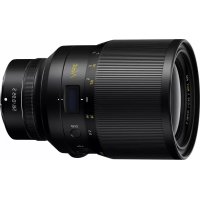
Nikkor Z 58mm f0.95 S Noct - Camera lens NIKON - Free user manual and instructions
Find the device manual for free Nikkor Z 58mm f0.95 S Noct NIKON in PDF.



| Product type | Manual focus photo lens |
| Mount | Nikon Z |
| Focal length | 58 mm |
| Maximum aperture | f/0.95 |
| Optical construction | 17 elements in 10 groups (4 ED, 3 aspherical, nanocrystal and ARNEO coatings, fluorine-coated front element) |
| Angle of view | FX format: 40°50', DX format: 27°20' |
| Focusing system | Manual focus (front) |
| Minimum focus distance | 0.5 m (from focal plane) |
| Maximum reproduction ratio | 0.19× |
| Diaphragm blades | 11 (rounded) |
| Aperture range | f/0.95 – f/16 |
| Filter diameter | 82 mm (P=0.75 mm) |
| Dimensions | Approx. 102 mm diameter × 153 mm |
| Weight | Approx. 2000 g |
| Supplied accessories | Front lens cap LC-82B, lens hood HN-38, rear lens cap LF-N1, case CT-101 |
| Case (exterior) | Approx. 464 × 366 × 176 mm, weight approx. 3040 g |
| Maintenance | Clean lenses with a soft cloth and ethanol; no organic solvents |
| Safety | Do not disassemble, avoid shocks, do not look at the sun through the lens, keep out of reach of children |
| Usage precautions | Support the lens when attached, keep contacts clean, store in case for transport |
| Information display | Displays distance, aperture, depth of field; unit and brightness settings |
Frequently Asked Questions - Nikkor Z 58mm f0.95 S Noct NIKON
User questions about Nikkor Z 58mm f0.95 S Noct NIKON
0 question about this device. Answer the ones you know or ask your own.
Ask a new question about this device
Download the instructions for your Camera lens in PDF format for free! Find your manual Nikkor Z 58mm f0.95 S Noct - NIKON and take your electronic device back in hand. On this page are published all the documents necessary for the use of your device. Nikkor Z 58mm f0.95 S Noct by NIKON.
USER MANUAL Nikkor Z 58mm f0.95 S Noct NIKON
NIKKOR Z 58mm f/0.95 S Noct
使用說明書
User's Manual
NIKKOR Z 58mm f/0.95 S Noct
http://www.nikon-image.com/support/repair/

·二ン比克亚扑一巴式为發送的场合
http://www.nikon-image.com/enjoy/ membership/about/
■ ニ cjなイメージング会員は
The lens is a high-precision optical instrument. To ensure continued performance, avoid subjecting the product to physical shocks during handling.
Before using this product, please read these instructions carefully. You will also need to consult the camera manual.
- This lens is intended exclusively for use with mirrorless cameras featuring a Nikon Z mount.
- This is a manual focus lens. Regardless of the focus mode selected with the camera, focus must be adjusted manually while this lens is attached.
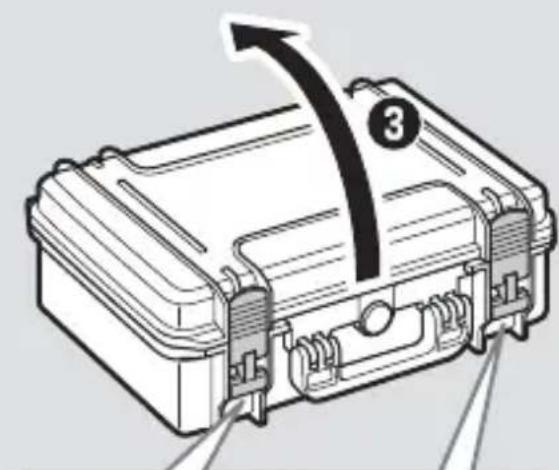
Opening the Trunk Case
To open the trunk case:
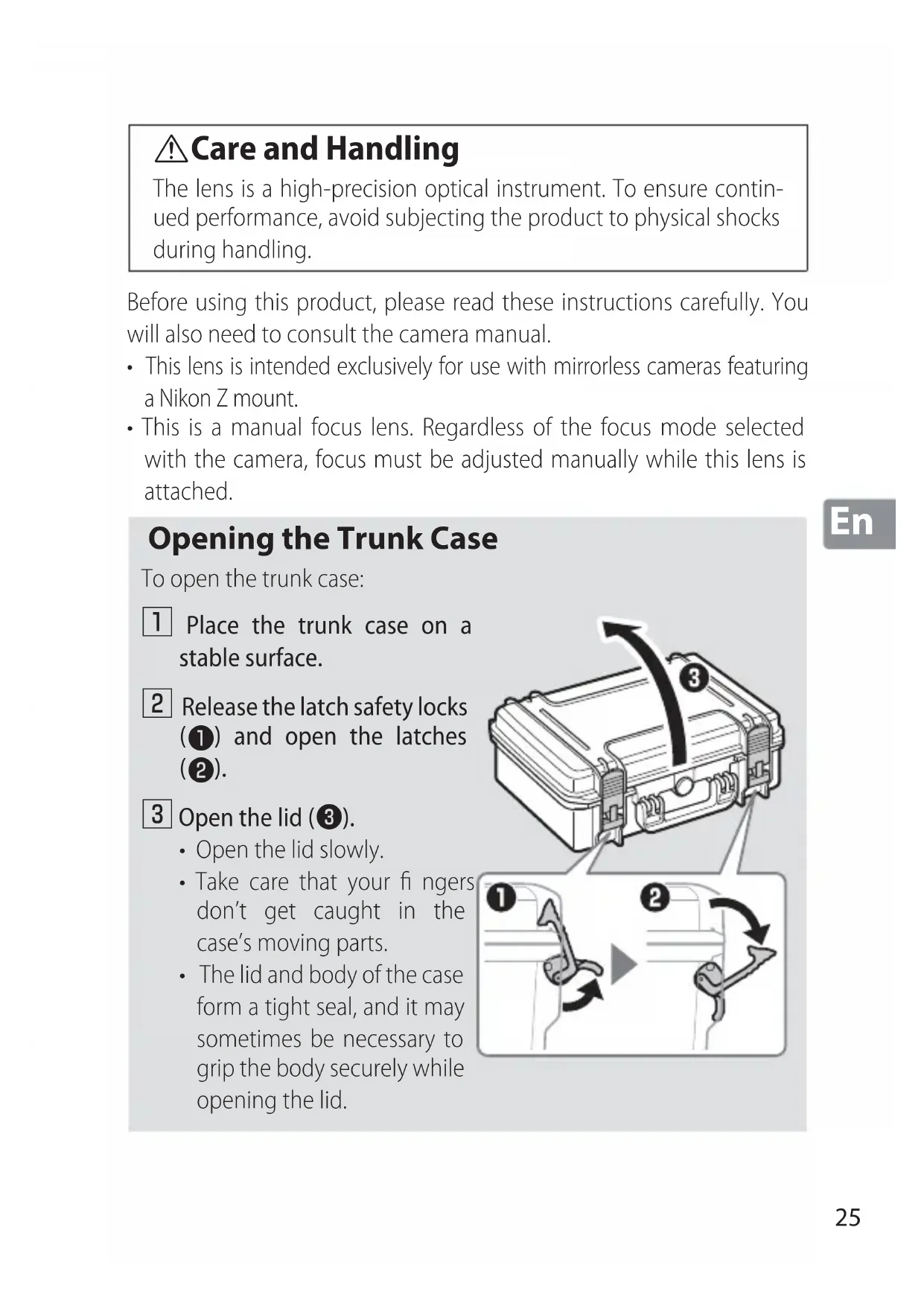
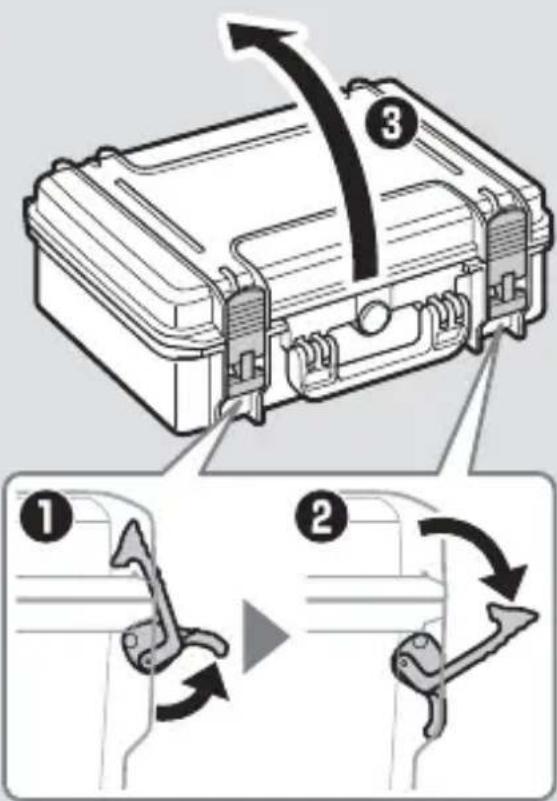
1 Place the trunk case on a stable surface.
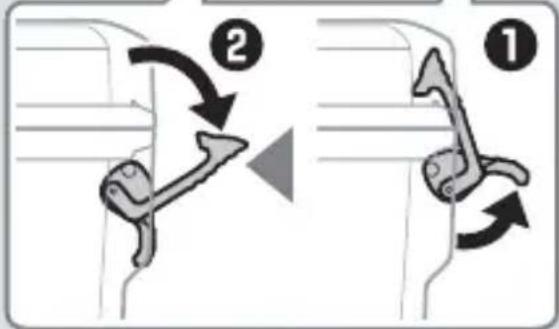
2 Release the latch safety locks (1) and open the latches (2).
3 Open the lid (3).
- Open the lid slowly.
Take care that your fingers don't get caught in the case's moving parts. - The lid and body of the case form a tight seal, and it may sometimes be necessary to grip the body securely while opening the lid.
For Your Safety
To prevent damage to property or injury to yourself or to others, read "For Your Safety" in its entirety before using this product.
Keep these safety instructions where all those who use this product will read them.
WARNING: Failure to observe the precautions marked with this icon could result in death or severe injury.
CAUTION: Failure to observe the precautions marked with this icon could result in injury or property damage.
En
WARNING
- Do not disassemble or modify this product.
Do not touch internal parts that become exposed as the result of a fall or other accident.
Failure to observe these precautions could result in electric shock or other injury.
- Should you notice any abnormalities such as the product producing smoke, heat, or unusual odors, immediately disconnect the camera power source.
Continued operation could result in fire, burns or other injury.
- Keep dry.
Do not handle with wet hands.
Failure to observe these precautions could result in fire or electric shock.
- Do not use this product in the presence of flammable dust or gas such as propane, gasoline or aerosols.
Failure to observe this precaution could result in explosion or fire.
- Do not directly view the sun or other bright light source through the lens.
Failure to observe this precaution could result in visual impairment.
WARNING
- Keep this product out of reach of children.
Failure to observe this precaution could result in injury or product malfunction. In addition, note that small parts constitute a choking hazard. Should a child swallow any part of this product, seek immediate medical attention.
- Do not handle with bare hands in locations exposed to extremely high or low temperatures.
Failure to observe this precaution could result in burns or frostbite.
CAUTION
- Do not leave the lens pointed at the sun or other strong light sources.
Light focused by the lens could cause fire or damage to product's internal parts. When shooting backlit subjects, keep the sun well out of the frame.
- Do not leave the product where it will be exposed to extremely high temperatures, for an extended period such as in an enclosed automobile or in direct sunlight.
Failure to observe this precaution could result in fire or product malfunction.
- Do not transport cameras or lenses with tripods or similar accessories attached.
Failure to observe this precaution could result in injury or product malfunction.
Notices for Customers in the U.S.A.
This device complies with part 15 of the FCC Rules. Operation is subject to the following two conditions: (1) this device may not cause harmful interference, and (2) this device must accept any interference received, including interference that may cause undesired operation.
Federal Communications Commission (FCC) Radio Frequency Interference Statement
This equipment has been tested and found to comply with the limits for a Class B digital device, pursuant to Part 15 of the FCC rules. These limits are designed to provide reasonable protection against harmful interference in a residential installation. This equipment generates, uses, and can radiate radio frequency energy and, if not installed and used in accordance with the instructions, may cause harmful interference to radio communications. However, there is no guarantee that interference will not occur in a particular installation. If this equipment does cause harmful interference to radio or television reception, which can be determined by turning the equipment off and on, the user is encouraged to try to correct the interference by one or more of the following measures:
- Reorient or relocate the receiving antenna.
- Increase the separation between the equipment and receiver.
- Connect the equipment into an outlet on a circuit different from that to which the receiver is connected.
- Consult the dealer or an experienced radio/television technician for help.
CAUTIONS
Modifications
The FCC requires the user to be notified that any changes or modifications made to this device that are not expressly approved by Nikon Corporation may void the user's authority to operate the equipment.
Nikon Inc., 1300 Walt Whitman Road, Melville, New York 11747-3064, U.S.A. Tel.: 631-547-4200
Notice for Customers in Canada
CANICES-3B/NMB-3B
Using the Lens
Parts of the Lens: Names and Functions
See below for the names and functions of the parts of the lens.
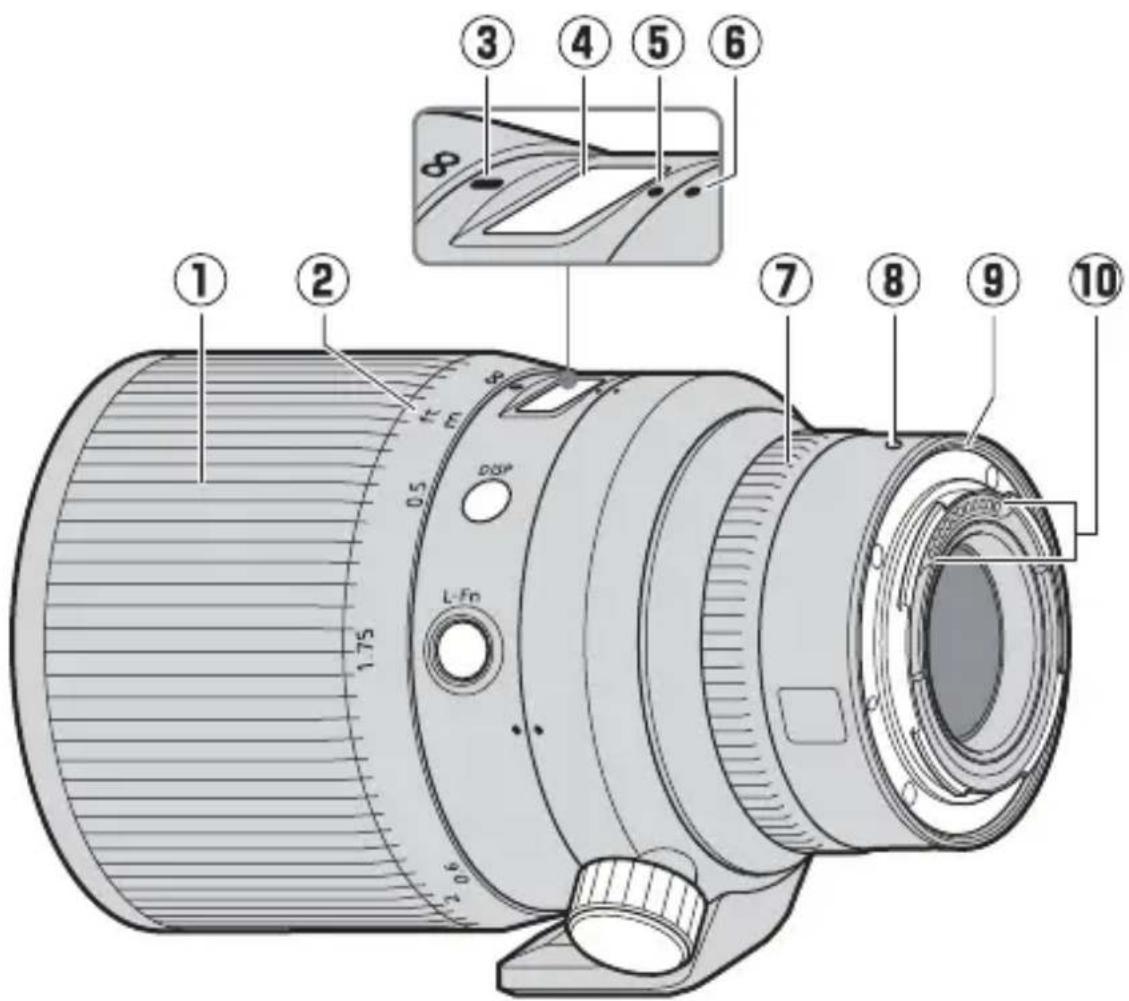
| 1 Focus ring Rotate to focus manually. — | ||
| 2 Focus distance indicator | Check the focus distance (the approximate distance between the image sensor and the subject). · Note that the focus distance indicator is intended only as a guide and may not accurately reflect the distance to the subject. Due to depth of fi eld or other factors, a focus distance of ∞ may not be selected when the camera is focused on a distant object. | — |
| 3 Focus distance mark | ||
| 4 Lens info panel | View focus distance, depth of fi eld, and other information. | See B (□34), C (□35) |
| 5 Lens rotation index | Use when rotating the camera from landscape to portrait orientation or vice versa. | See D (□37) |
| 6 Tripod collar rotation index | ||
| 7 Control ring | Rotate to adjust a setting such as Aperture or Exposure compensation assigned using the camera. For more information, see the description of Custom control assignment in the camera manual. | — |
| 8 Lens mounting mark | Use when mounting the lens on the camera. | See A (□33) |
| 9 Rubber lens-mount gasket | — | — |
| 10 CPU contacts | Used to transfer data to and from the camera. | — |
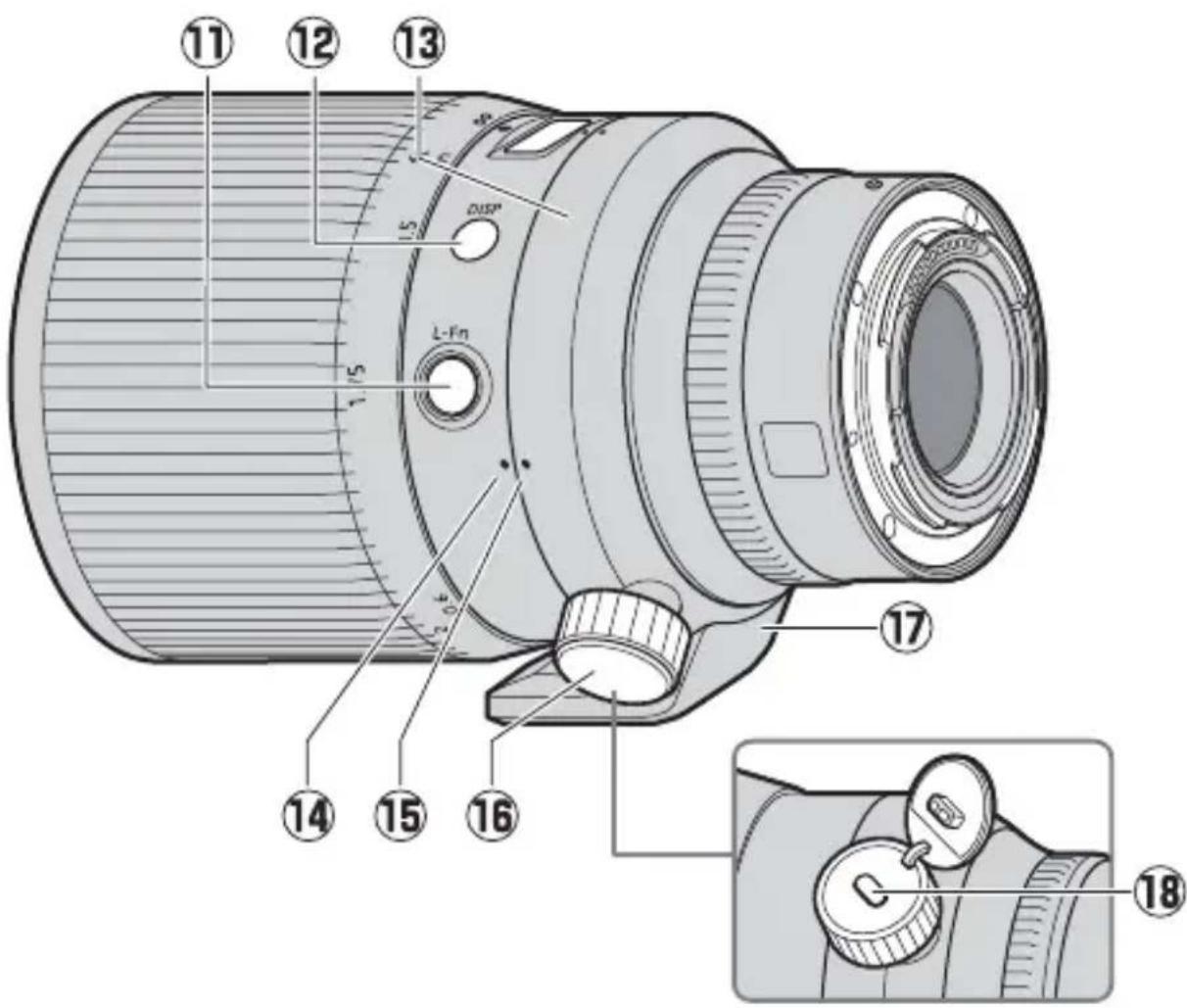
| 11 L-Fn button | Press to perform a function as-signed using the camera. For more information, see the description of Custom control assign-ment in the camera manual. | — |
| 12 Display button | Save settings or choose the information shown in the lens info panel. | See B (□34), C (□35) |
| 13 Tripod collar ring | — | — |
| 14 Lens rotation index (90°) | Use when rotating the camera from landscape to portrait orientation or vice versa. | See D (□37) |
| 15 Tripod collar rotation index (90°) | ||
| 16 Tripod collar ring attachment screw | ||
| 17 Built-in rotating tripod collar | Use when the camera is mounted on a tripod. | |
| 18 Security slot (for anti-theft cable) | Third-party anti-theft cables can be attached to this slot. For more information, see the documentation provided with the cable. | — |
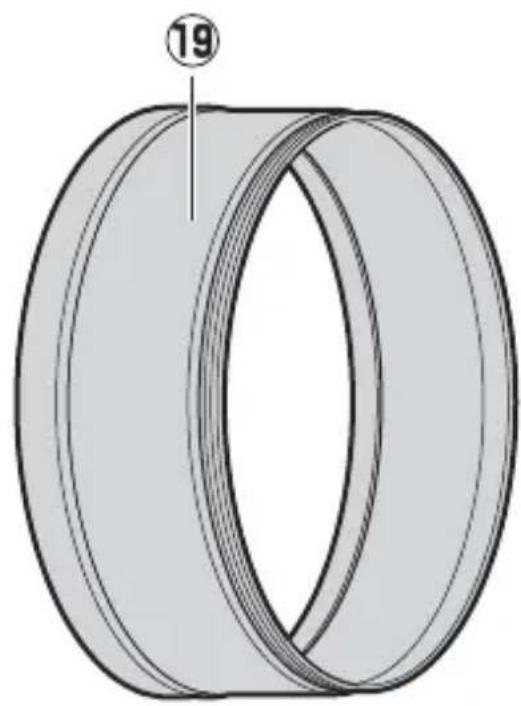
| 19 Lens hood | Lens hoods block stray light that would otherwise cause fl are or ghosting. They also serve to protect the lens. | See E (□38) |
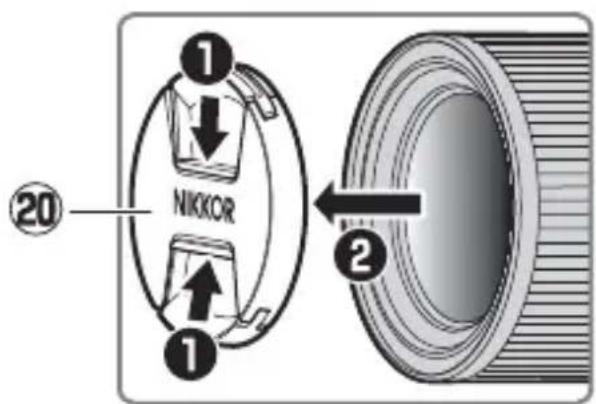
| 20 Front lens cap — — | ||
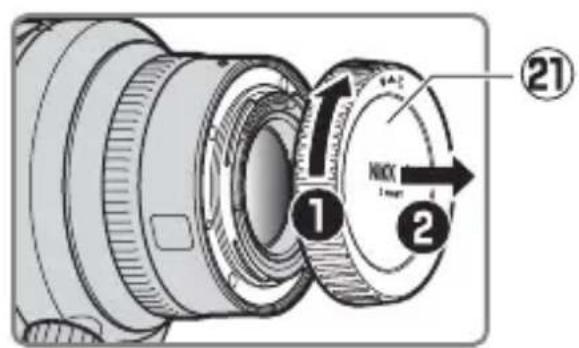
| 21 Rear lens cap — — |

Attachment and Removal
Attaching the Lens
1 Turn the camera off, remove the body cap, and detach the rear lens cap.
2 Position the lens on the camera body, keeping the mounting mark on the lens aligned with the mounting mark on the camera body, and then rotate the lens counterclockwise until it clicks into place.
- We recommend attaching the lens hood to protect the lens during use.
Removing the Lens
1 Turn the camera off.
Press and hold the lens release button while turning the lens clockwise.
The Lens Info Panel
The lens info panel lights when the lens is attached to a camera and the camera is on.
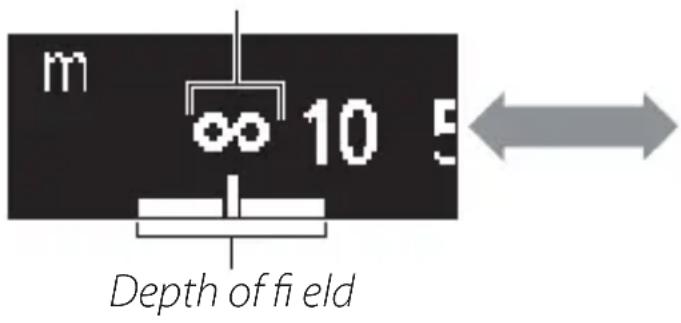
Press the display button to cycle the display as shown:
NIKKOR
Display button
En
Focus distance
F0.95
Aperture *
- Aperture is displayed only when the camera is in mode A or M. The display for other modes is shown in the illustration.
FAUTO
- The panel turns off automatically when the camera standby timer expires or if no lens operations are performed for about 10 seconds. Press the display button to reactivate the display.
The Lens Info Panel
The focus distance, depth of field, and other information displayed in the lens info panel are approximations only.
Irregular Bokeh
With fast shutter speeds and/or wide apertures, you may notice irregularities in how bokeh is shaped. The effect can be mitigated by choosing slower shutter speeds and/or higher f-numbers.

Panel Options
Follow the steps below to choose the units for focus distance from meters (m) or feet (ft) or adjust the brightness of the lens info panel.
Press and hold the display button to view settings.
- Unit or brightness selection options will be displayed. The currently selected item will flash.
- Press the display button to toggle between displays.

Units Brightness

2 Choose a setting using the lens control ring.
Units
- Rotate the control ring to choose from meters (m) or feet (ft).

Brightness
-
Rotate the control ring in the "+" (brighter) or "-" (darker) direction.
-
Choose from 6 levels of brightness.
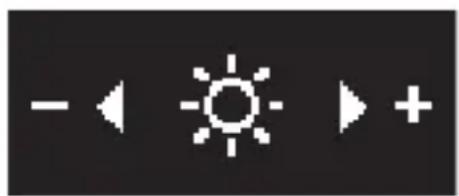
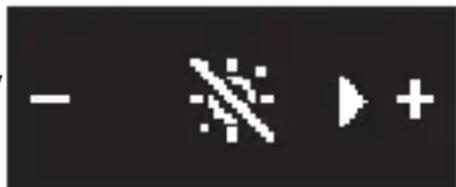
- To turn the lens info panel off, rotate the ring in the “—” direction until the icon changes to
- Press the display button to save changes and toggle the display.
- If no operations are performed using lens controls for about 5 seconds, panel options will clear from the display and changes will be canceled.
3 Press and hold the display button to return to the lens information display.
- Choosing for brightness turns the lens info panel off. To turn the display on again, press and hold the display button.

The Built-in Rotating Tripod Collar
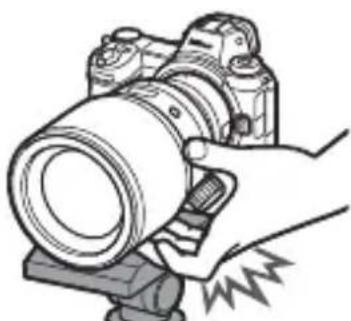
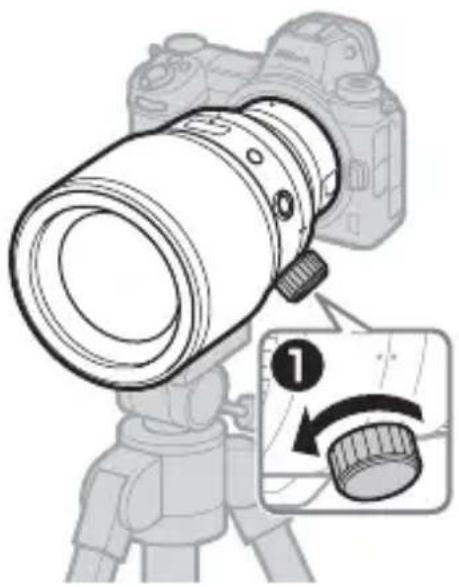
- Attach tripods to the built-in rotating tripod collar, not to the camera.
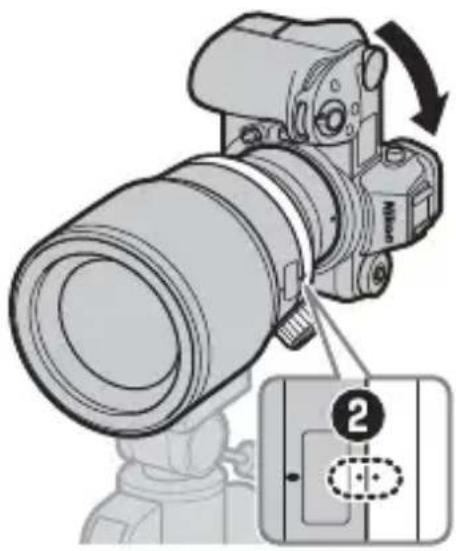
- Attaching tripods to the built-in rotating tripod collar rather than to the camera allows the camera to be rotated as described below while a tripod is attached.
1 Loosen the tripod collar ring attachment screw (1).
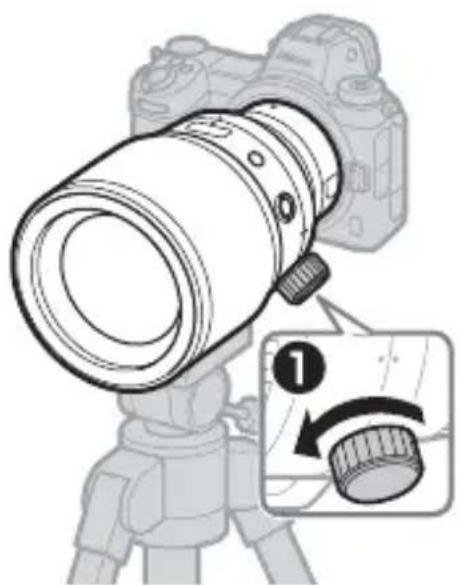
En
2 Rotate the camera (2) to align the lens rotation index with the tripod collar rotation index that matches the desired orientation (landscape or portrait).
- When rotating the camera, care may be needed to prevent the hand holding the camera contacting the tripod.
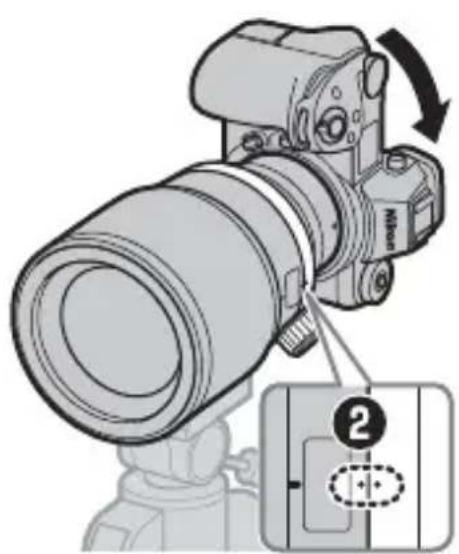
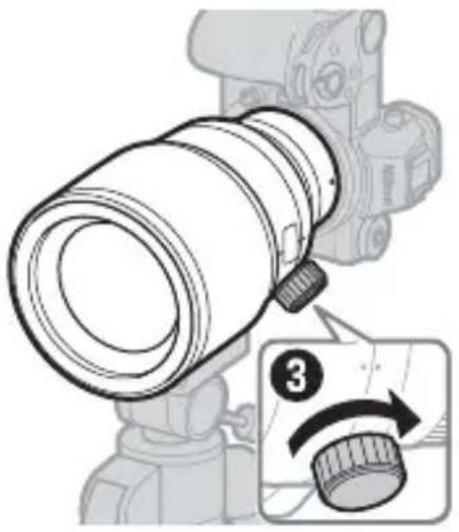
3 Tighten the tripod collar ring attachment screw (3).
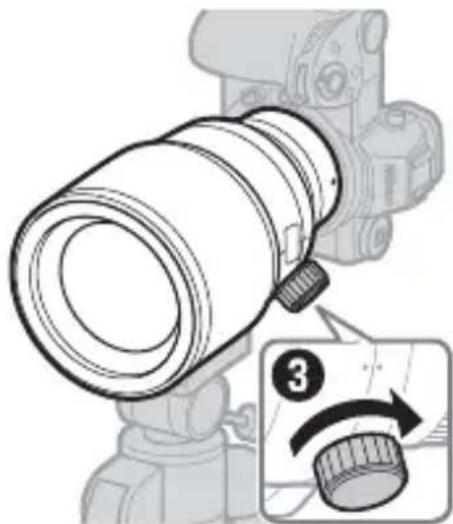
- For information on removing the built-in rotating tripod collar, contact a Nikon-authorized service representative.
En
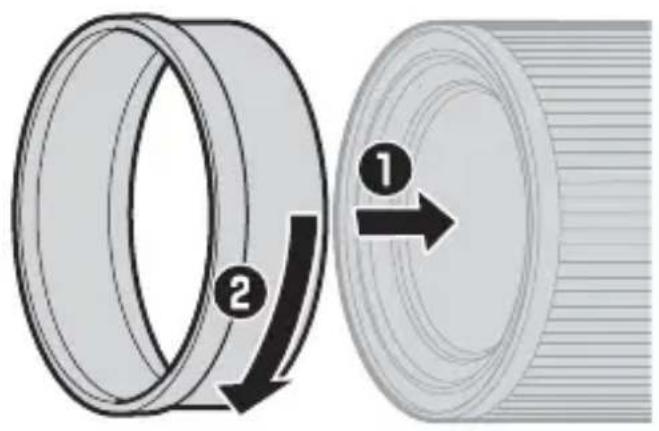
E Attaching and Removing the Lens Hood
The lens hood screws directly into the threads in front of the lens. Do not touch the glass surface of the lens or use excessive force.
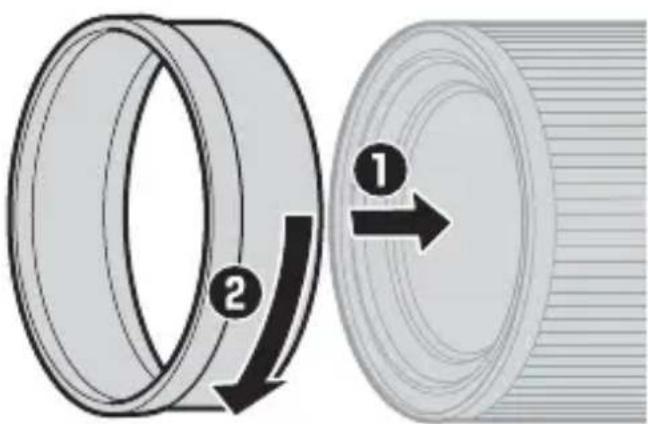
- To remove the hood, unscrew it from the lens.
Placing the Lens in Its Case
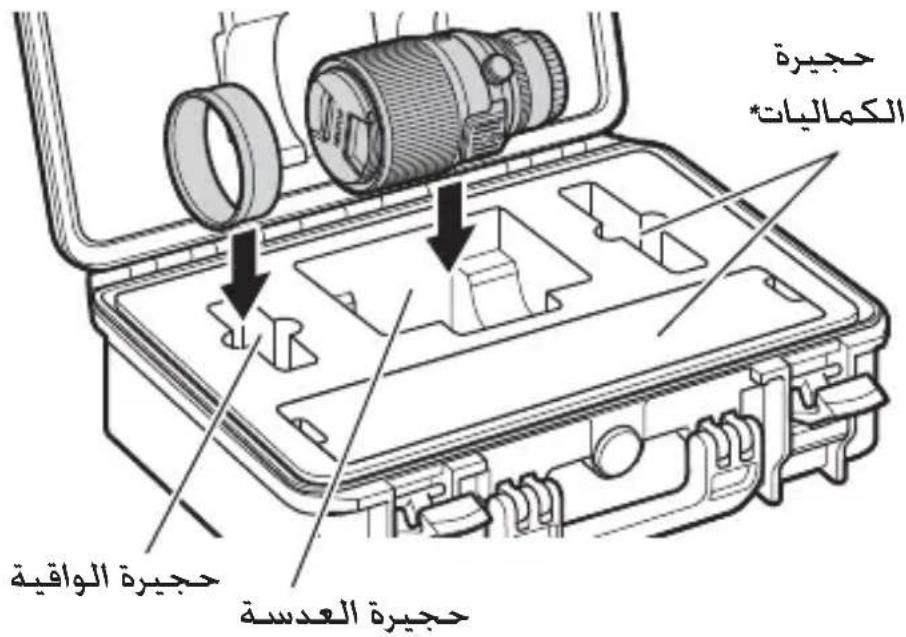
Follow the steps below to place the lens in its case.
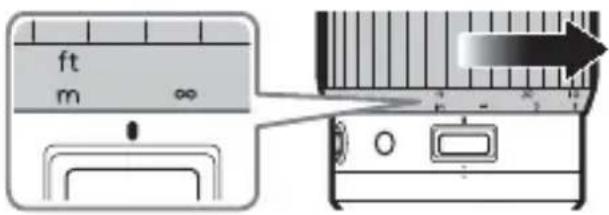
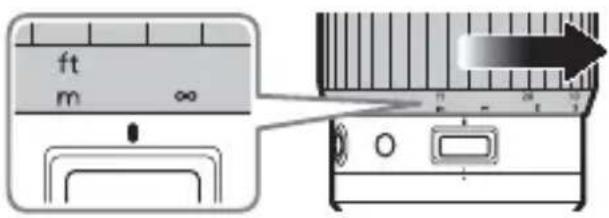
1 Rotate the focus ring to the position shown.
- The lens cannot be placed in the case while extended.
2 Confirm that the front and rear lens caps are attached.
3 Remove the lens hood.
4 Place the lens and hood in the case as shown.
- Reverse the steps in "Opening the Trunk Case" (25) to close and latch the lid. Be sure the safety locks are engaged.

- Items placed in the accessory compartment are not covered under warranty.
Precautions for Use
-
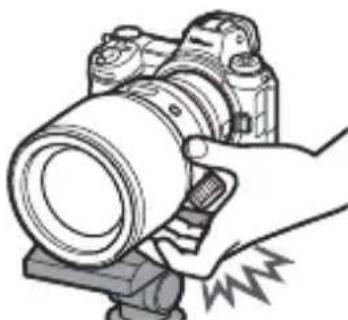
Be sure to support the lens when holding the camera. Failure to observe this precaution could damage the camera lens mount.
-
Do not pick up or hold the lens by its telescoping section.
-
Do not pick up or hold the lens or camera using only the lens hood.
-
Keep the CPU contacts clean.
-
When using a tripod with a large pan head, be careful when rotating the focus ring to avoid injury caused by your fingers getting caught between the ring and the pan head.
En
- Should the rubber lens-mount gasket be damaged, cease use immediately and take the lens to a Nikon-authorized service center for repair.
- Replace the front and rear lens caps when the lens is not in use.
- To protect the interior of the lens, store it out of direct sunlight.
- Do not leave the lens in humid locations or in locations in which it may be exposed to moisture. Rusting of the internal mechanism can cause irreparable damage.
- Do not leave the lens next to open flames or in other extremely hot locations. Extreme heat could damage or warp exterior parts made from reinforced plastic.
- Rapid changes in temperature may cause damaging condensation inside and outside the lens. Before taking the lens from a warm to a cold environment or vice versa, place it in a bag or plastic case to slow the change in temperature.
- Remove the lens from the camera and place it in the supplied case for transport.
Lens Care
- Removing dust is normally sufficient to clean the glass surfaces of the lens.
-
The fluorine-coated front lens element can be cleaned as described below.
-
Smudges, fingerprints, and other oily stains can be removed using a soft, clean cotton cloth or lens cleaning tissue; clean from the center outwards using a circular motion.
- To remove stubborn stains, wipe gently using a soft cloth lightly dampened with a small amount of distilled water, ethanol, or lens cleaner.
-
Any drop-shaped marks left from this process on the water- and oil-repellent surface can subsequently be removed with a dry cloth.
-
When cleaning the rear lens element, which is not fluorine-coated, remove smudges, fingerprints, and other oily stains using a soft, clean cotton cloth or lens cleaning tissue lightly dampened with a small amount of ethanol or lens cleaner. Wipe gently from the center outwards in a circular motion, taking care not to leave smears or touch the lens with your fingers.
- Never use organic solvents such as paint thinner or benzene to clean the lens.
- Neutral Color (NC) filters (available separately) and the like can be used to protect the front lens element. Remove the lens hood before attaching or removing filters.
- If the lens will not be used for an extended period, store it in a cool, dry location to prevent mold and rust. Do not store in direct sunlight or with naphtha or camphor moth balls.
Accessories
Supplied Accessories
- LC-82B 82 mm snap-on Front Lens Cap
- LF-N1 Rear Lens Cap
HN-38 Screw-on Lens Hood - CT-101 Trunk Case
En

Using the Trunk Case
-
Nikon assumes no liability in the event that damage to the case results in damage to its contents.
-
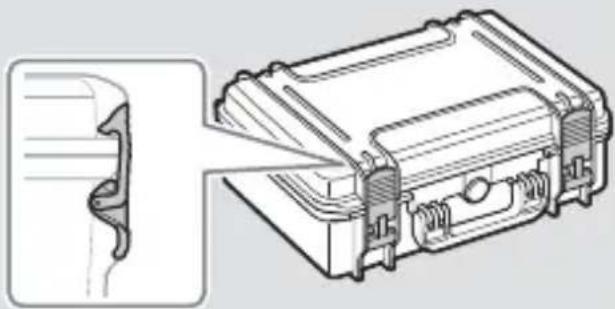
When storing the trunk case, close the latch safety locks. Confirm that the latches are securely closed as shown in the illustration.
- Do not leave the case for long periods in humid locations or in direct sunlight. Prolonged exposure to damp or direct sunlight could cause the inner padding to harden or fade.
- Do not store the case in locations exposed to extreme temperatures. Failure to observe this precaution could cause the inner padding to warp, shrink, or peel.
- Avoid directly touching the case after it has been exposed to extreme temperatures. Failure to observe this precaution could result in burns, low-temperature burns, or frostbite.
- Do not sit or place heavy objects on the case.
- Keep the case and its accessories out of reach of small children.
- Keep your hands clear of moving parts when opening or closing the case.
- Do not leave the case in unstable locations or locations where it is likely to fall.
- Never use organic solvents such as alcohol, benzine, or thinner to clean the case.
- Do not scratch or rub the surface of the case with hard objects.
- Do not attempt to disassemble, repair, or modify the case.
- The pressure equalization valve does not rotate. Applying excessive force to the valve could cause injury or damage the product.
- Do not drop the case, handle it with excessive force, or subject it to violent physical shocks or vibration.
- Nikon will not make repairs to the trunk case.
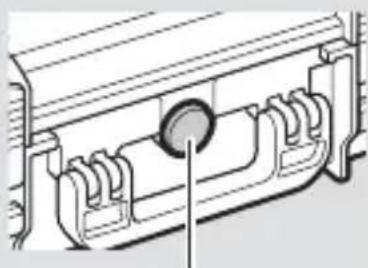
Pressure equalization valve
Specifications
| NIKKOR Z 58mm f/0.95 S Noct | |
| Mount Nikon Z mount | |
| Focal length 58 mm | |
| Maximum aperture f/0.95 | 17 elements in 10 groups (including 4 ED elements, 3 aspherical elements, and elements with Nano Crystal and ARNEO coats, and a fl uorine-coated front lens element) |
| Lens construction | |
| Angle of view • FX format: 40° 50' • DX format: 27° 20' | |
| Focusing system Front focusing system | |
| Minimum focus distance | 0.5 m (1.64 ft) from focal plane |
| Maximum reproduc-tion ratio | 0.19× |
| Diaphragm blades | 11 (rounded diaphragm opening) |
| Aperture range f/0.95 - 16 | |
| Filter-attachment size 82 mm (P = 0.75 mm) | |
| Dimensions Approx. 102 mm/4.1 in. maximum diam-eter × 153 mm/6.1 in. (distance from camera lens mount fl ange) | |
| Weight | Approx. 2000 g (4 lb 6.6 oz) |
CT-101 Trunk Case
| Type Attaché-style case | |
| External dimensions | Approx. 464 mm × 366 mm × 176 mm (1 ft 6.3 in. × 1 ft 2.5 in. × 7 in.) |
| Internal dimensions | Approx. 426 mm × 290 mm × 159 mm (1 ft 4.8 in. × 11.5 in. × 6.3 in.) |
| Weight Approx. 3040 | g (6 lb 10.7 oz), including inner pad-ding |
| Materials • Body: Polypropylene • Latch: Nylon | |
Nikon reserves the right to change the appearance, specifications, and performance of this product at any time and without prior notice.
En

NIKKOR Z 58mm f/0.95 S Noct
Renz is the good day of a good day.
iJ 1
An eni jiln is otd sng a h w t n th e f
迎:iaiinj
主的:iaiifoiEiFsiTnJiHtJiJIiJiJiJiJiJiJiJiJiJiJiJiJiJiJiJiJiJiJiJiJiJiJiJiJiJiJiJiJiJiJiJiJiJiJiJi
#
NIKKOR Z 58mm f/0.95 S Noct
| 마운드 | Nikon Z마운드 |
| exoconvexor58mm | |
| 체내조리개수f/0.95 | Nikon Z마운드 |
| rents구성10kg17吋(EDrents4개,비구면rents3개, 나무크리스绺울고 ARNEOorents3개, 具体情况상품만 기재고, 具体情况상품만 기재고) | Nikon Z마운드 |
| 화가공·FX foо목:40°50'·DX foо목:27°20' | Nikon Z마운드 |
| footsteprisssystemerl'me | footsteprisssystemm |
| 체단조convexor虚相 | name:0.5m |
| 체내화복명목于0.19× | 0.19× |
| 조리개들고11м(원형조리개) | 0.19× |
| 조리개워f/0.95 | ~ 16 |
| pillter부acht其实 | 82 mm (P=0.75 mm) |
| exege이트다작過목102mm×153mm(가에라rents3개, exegeiautomenere서의行為) | 02 mm×153 mm(가에라rents3개, exegeiautomenere서의行為) |
| 무게어2000g |
Kr
TrlefocréiSt CT-101
NIKKOR Z 58mm f/0.95 S Noct
| Dudukan | Nikon dudukan Z |
| Panjang fokal | 58 mm |
| Bukaan diafragma maksimal | f/0.95 |
| Konstruksi lensa | 17 elemen dalam 10 grup (termasuk 4 elemen ED, 3 elemen aserik, dan elemen dengan lapisan Nano Crystal dan ARNEO coat, ada elemen lensa depan berlapis fluorin) |
| Sudut gambar | • Format FX: 40° 50' • Format DX: 27° 20' |
| Sistem pemfokusan | Sistem pemfokusan depan |
| Jarak fokus minimum | 0,5 m dari bidang fokal |
| Rasio penggandaan maksimum | 0,19× |
| Bilah diafragma | 11 (bukaan diafragma lingkaran) |
| Kisaran bukaan | f/0.95 – 16 |
| Ukuran tambahan filter | 82 mm (P = 0,75 mm) |
| Dimensi | Garis tingah maksimum sekitar 102 mm × 153 mm (jarak dari kelepak pemasangan lensaamera) |
| Berat | Sekitar 2000 g |
Kotak Lensa CT-101
NIKKOR Z 58af/0.95 S Noct
a a a a a a a a a a a a a a a a a a a a a
LgLcAaPwJgJgJgJgJgJgJg
JlaB81 JgLi:OjCgJgJLJLo5gAaAsJJb
Lgolgaiiaa aic a5raaiee 1c bdslae
Lg a u Lg 1g< golgo jraa
aJ1J 100gJgJgJgJgJgJgJgJgJgJgJgJgJgJgJgJgJgJgJgJgJgJgJgJgJgJgJgJgJgJgJgJgJgJgJgJgJg
+ = 1
.0sLpLwJpLx:WUaSJJgJgJgJgJgJgJgJgJgJgJg
1g
aagai piai i 1g j gj jg jpa
Ji j, jia jia jia jia jia jia jia jia jia jia jia
aclia aiee eae eae eae eae eae eae eae eae eae eae eae eae eae eae eae eae eae eae eae eae eae eae eae eae eae eae eae eae eae eae eae eae eae eae eae eae eae eae eae eae
JlWgJgJgJgJgJgJgJgJgJgJgJgJgJg
p 1
L 5
a + b = 3
aee aiee LaoLg (NC) dLgU
LgjjgJ 1
Lg 150 g Lg 120 1. 0000000000000000000000000000000000000
gLi gJgJgJgJgJgJgJgJgJgJgJgJgJgJgJgJgJgJgJgJgJgJgJgJgJgJgJgJgJgJgJgJgJgJgJgJgJgJgJgJg
.
L
a a 1g
82 LC-82B jIb Jol aWsc slbc
LF-N1jbsaowscslbc
HN-38 1
Ar
-CT-101
p1
1 1
JLJI JI 1
LgJyIgSsIgIgIgIgIgIgIgIgIgIgIgIg
a aalaaagg paaal yolSgl aasll aaai j
.
c
J 1
y
Jg a
JLQ:WxJcGgJ.4wSdJI JIaIbIaIaIaIaI
aaiu aoo oos 0o
aewell psswippsd g aessllgoloo
a
.ogdll a 2g g 5g g 1g 1g 1g 1g
a
a 1
sfoal
a
g 100
a
Lgaii iic oogjai a aai j 100 g lalll Jj
Ar
g
1
2
3
4
sc(210)"aogdai aagjg 4 gaoalg jL .
LlaSla
3
J 1 J
A
2hww wai 8. owl a woll pLoI ooggall JwJ Awool aga .abraoogag JLej gJ Ljll Awee
A.aaaJnLgIyIgIgIgIg
L

J 1 J
L
JL JI JI JI JI JI JI JI JI JI JI JI JI JI JI JI JI JI JI JI
Ldic Lg Gogos Ls IaI aI aI aI aI aI aI aI aI
L 1
Jolalgagaaaegy
(1)
2
Jolalgogggs
a 1
()
g j 1sLJ Jd
aal
J 1
LgloaagJ 1

5 5 5 5 5 5 5 5 5 5 5 5 5 5 5 5 5 5 5 5 5 5 5 5 5 5 5 5 5 5 5 5 5 5 5 5 5 5 5 5 5 5 5
3
Ar
(ft)g(m)jL L
aLglo gghw hagj jLw
1
gw. gwhll JyJgJ WJl 0g
L
L

wlaal 1ggh wll
2

1
1 1
.(ft) pJg (m) J
E
"++" 1
1) 1"g (Lcghw s5)
(1)
6 6
NIKKOR
Lioic a wol Loglo 0
Laiy
1

:
F0.95
[\text{a}\overline{a} = \overline{a}\overline{i}\overline{l}\overline{1}]

5
m
10

FAUTO
1.2015.11.22 15:54
1c g
10 8dU aLc g LdoL
aLb:aaJoaLcX JgJc
A

Lc aagaaal Lgogaaa Jn Lgag gagagagagagagagagagagagagagagagagagagagagagagagagagagagagagagagagagagagagagagagagagagagagagagagagagagagag
.

a
Ar
g/9 g a lgl 111111111111111111111111111111
LcI aRgJgJLc
aessllslbc 100011 sllbc jg.1sllj
2
a
a
A
1
2
LwJ Lac
Jglln Jglnnn n nn nnnn nnnn nnnn nnnn nnnn nnnn nnnn nnnn nnnn nnnn nnnn nnnn nnnn nnnn nnnn nnnn nnnn nnnn nnnn nnnn nnnn nnnn nnnn nnnn nnnn nnnn nnnn nnnn nnnn nnnn nnnn nnnn nnnn nnnn nn
J 1
#
g 1 g 1 g 1 g 1 g 1 g 1 g 1 g 1 g 1 g 1 g 1 g 1 g 1 g 1 g 1 g 1 g 1 g 1 g 1 g 1 g 1 g 1 g 1 g 1 g 1 g 1 g 1 g 1 g 1 g 1 g 1 g 1 g
aIgIgIgIgIgIgIgIgIgIgIgIgIgIgIgIgIgIgIgIgIgIgIgIgIgIgIgIgIgIgIgIgIgIgIgIgIgIgIgIgIgIgIgIgIgIgIgIgIgIgI
gJgJgJgJgJgJgJgJgJgJgJgJgJgJgJgJgJgJgJgJgJgJgJgJgJgJgJgJgJgJgJgJgJgJgJgJgJgJgJgJgJgJgJgJgJgJgJgJgJgJg
Ar
L
1
J 105
100
Lgslj
aLg
1c gbi aigai 0i oic axagaiolgiiil oclpoc:
Lg
#
1
1
aIgaiyssaoos
g 1 g 1 g 1 g 1 g 1 g 1 g 1 g 1 g 1 g 1 g 1 g 1 g 1 g 1 g 1 g 1 g 1 g 1 g 1 g 1 g 1 g 1 g 1 g 1 g 1 g 1 g 1 g 1 g
1
Lol
A
a 5 a o g jg jy
gJ JJIgJJIgJJIgJJIgJJIgJJIgJJIgJJIgJJIgJJIgJJIgJJIgJJIgJJIgJJIgJJIgJJIgJJIgJJIgJJIgJJIgJJIgJJIgJJIgJJIgJJIgJJIg
JgWgRgJgJgJg
gJ 1
a
a acll 1
slllalllllllllllllllllllllllllllllllllllllllllllllllllllllllllllllllllllllll
Jalglai jla J
LcJnJnJnJnJnJnJnJnJnJnJnJnJnJnJnJnJnJnJnJnJnJnJnJnJnJnJnJnJnJnJnJn
L 1
Nikon Z
o 10
A. 5 y D. 4 w
aegdi aagai
:ddg#
1
2
JzJ (0) JzJ
(2)
(3)
sblb 2
10
AaJ1 J 45
Jolao a a>Jn wgg h
00g<Jg.
Lw0x1 L
2iic p<>p
5k + 1 0( mod D)
Ar
NIKON CORPORATION
© 2019 Nikon Corporation




