
GBH 18V34 CF Professional - Drill BOSCH - Free user manual and instructions
Find the device manual for free GBH 18V34 CF Professional BOSCH in PDF.
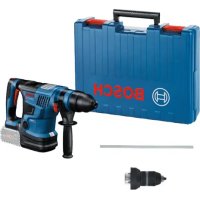



| Product type | Cordless rotary hammer |
| Brand | Bosch |
| Model | GBH 18V-34 CF Professional |
| Rated voltage | 18 V |
| Rated power input | 750 W |
| Impact rate | 0–2900 min⁻¹ |
| Impact energy (EPTA) | 5.8 J |
| Rated speed (right/left rotation) | 0–500 rpm |
| Tool holder | SDS-plus |
| Max. drilling diameter (concrete) | 32 mm |
| Max. drilling diameter (steel) | 13 mm |
| Max. drilling diameter (wood) | 40 mm |
| Weight (according to EPTA) | 5.2–6.3 kg |
| Length | 430 mm |
| Height | 250 mm |
| Recommended charging temperature | 0 to +35 °C |
| Operating and storage temperature | −20 to +50 °C |
| Compatible batteries | GBA 18V..., ProCORE18V... |
| Recommended chargers | GAL 18..., GAX 18V..., GAL 36... |
| Data transmission | Bluetooth 4.2 (Low Energy) |
| Sound pressure level | 89 dB(A) |
| Sound power level | 100 dB(A) |
| Vibrations (hammer drilling concrete) | 11 m/s² (K=1.5 m/s²) |
| Control display | Yes (status display, work mode selection) |
| Work modes | Auto, Soft, Favorite |
| Safety functions | Kickback Control, safety clutch |
| Vibration damping device | Yes (Vibration Control) |
| LED lighting | Yes |
| Auxiliary handle | Yes, adjustable |
| Depth stop | Yes, adjustable |
Frequently Asked Questions - GBH 18V34 CF Professional BOSCH
User questions about GBH 18V34 CF Professional BOSCH
0 question about this device. Answer the ones you know or ask your own.
Ask a new question about this device
Download the instructions for your Drill in PDF format for free! Find your manual GBH 18V34 CF Professional - BOSCH and take your electronic device back in hand. On this page are published all the documents necessary for the use of your device. GBH 18V34 CF Professional by BOSCH.
USER MANUAL GBH 18V34 CF Professional BOSCH
General Power Tool Safety Warnings
WARNING
Read all safety warnings and all instructions. Failure to follow the warnings and instructions may result in electric shock, fire and/or serious injury.
Save all warnings and instructions for future reference.
Save all warnings and instructions for future reference.
The term "power tool" in the warnings refers to your mains-operated (corded) power tool or battery-operated (cordless) power tool.
Keep work area clean and well lit. Cluttered or dark areas invite accidents.
- Keep work area clean and well lit. Cluttered or dark areas invite accidents.
- Do not operate power tools in explosive atmospheres, such as in the presence of flammable liquids, gases or dust. Power tools create sparks which may ignite the dust or fumes.
- Keep children and bystanders away while operating a power tool. Distractions can cause you to lose control.
Power tool plugs must match the outlet. Never modify the plug in any way. Do not use any adapter plugs with earthed (grounded) power tools. Unmodified plugs and matching outlets will reduce risk of electric shock. Avoid body contact with earthed or grounded surfaces, such as pipes, radiators, ranges and refrigerators. There is an increased risk of electric shock if your body is earthed or grounded. Do not expose power tools to rain or wet conditions. Water entering a power tool will increase the risk of electric shock. Do not abuse the cord. Never use the cord for carrying, pulling or unplugging the power tool. Keep cord away from heat, oil, sharp edges or moving parts. Damaged or entangled cords increase the risk of electric shock. When operating a power tool outdoors, use an extension cord suitable for outdoor use. Use of a cord suitable for outdoor use reduces the risk of electric shock. If operating a power tool in a damp location is unavoidable, use a residual current device (RCD) protected supply. Use of an RCD reduces the risk of electric shock.
Power tool plugs must match the outlet. Never modify the plug in any way. Do not use any adapter plugs with earthed (grounded) power tools. Unmodified plugs and matching outlets will reduce risk of electric shock. Avoid body contact with earthed or grounded surfaces, such as pipes, radiators, ranges and refrigerators. There is an increased risk of electric shock if your body is earthed or grounded. Do not expose power tools to rain or wet conditions. Water entering a power tool will increase the risk of electric shock. Do not abuse the cord. Never use the cord for carrying, pulling or unplugging the power tool. Keep cord away from heat, oil, sharp edges or moving parts. Damaged or entangled cords increase the risk of electric shock. When operating a power tool outdoors, use an extension cord suitable for outdoor use. Use of a cord suitable for outdoor use reduces the risk of electric shock. If operating a power tool in a damp location is unavoidable, use a residual current device (RCD) protected supply. Use of an RCD reduces the risk of electric shock.
Stay alert, watch what you are doing and use common sense when operating a power tool. Do not use a power tool while you are tired or under the influence of drugs, alcohol or medication. A moment of inattention while operating power tools may result in serious personal injury.
Stay alert, watch what you are doing and use common sense when operating a power tool. Do not use a power tool while you are tired or under the influence of drugs, alcohol or medication. A moment of inattention while operating power tools may result in serious personal injury.
Use personal protective equipment. Always wear eye protection. Protective equipment such as a dust mask, non-skid safety shoes, hard hat, or hearing protection used for appropriate conditions will reduce personal injuries. Prevent unintentional starting. Ensure the switch is in the off-position before connecting to a power source and/or battery pack, picking up, or carrying the tool.
Carrying power tools with your finger on the switch or energising power tools that have the switch on invites accidents.
Remove any adjusting key or wrench before turning the power tool on. A wrench or a key left attached to a rotating part of the power tool may result in personal injury. Do not overreach. Keep proper footing and balance at all times. This enables better control of the power tool in unexpected situations. Dress properly. Do not wear loose clothing or jewellery. Keep your hair, clothing and gloves away from moving parts. Loose clothes, jewellery or long hair can be caught in moving parts. If devices are provided for the connection of dust extraction and collection facilities, ensure these are connected and properly used. Use of dust collection can reduce dust-related hazards.
Power tool use and care
Do not force the power tool. Use the correct power tool for your application. The correct power tool will do the job better and safer at the rate for which it was designed. Do not use the power tool if the switch does not turn it on and off. Any power tool that cannot be controlled with the switch is dangerous and must be repaired. - Disconnect the plug from the power source and/or the battery pack from the power tool before making any adjustments, changing accessories, or storing power tools. Such preventive safety measures reduce the risk of starting the power tool accidentally. - Store idle power tools out of the reach of children and do not allow persons unfamiliar with the power tool or these instructions to operate the power tool. Power tools are dangerous in the hands of untrained users. - Maintain power tools. Check for misalignment or binding of moving parts, breakage of parts and any other condition that may affect the power tool's operation. If damaged, have the power tool repaired before use. Many accidents are caused by poorly maintained power tools. - Keep cutting tools sharp and clean. Properly maintained cutting tools with sharp cutting edges are less likely to bind and are easier to control. Use the power tool, accessories and tool bits etc. in accordance with these instructions, taking into account the working conditions and the work to be performed.
Use of the power tool for operations different from those intended could result in a hazardous situation.
Battery tool use and care
- Recharge only with the charger specified by the manufacturer. A charger that is suitable for one type of battery pack may create a risk of fire when used with another battery pack. Use power tools only with specifically designated battery packs. Use of any other battery packs may create a risk of injury and fire. When battery pack is not in use, keep it away from other metal objects, like paper clips, coins, keys, nails, screws or other small metal objects, that can make a connection from one terminal to another. Shorting the battery terminals together may cause burns or a fire. Under abusive conditions, liquid may be ejected from the battery; avoid contact. If contact accidentally occurs, flush with water. If liquid contacts eyes, additionally seek medical help. Liquid ejected from the battery may cause irritation or burns.
Service
Have your power tool serviced by a qualified repair person using only identical replacement parts. This will ensure that the safety of the power tool is maintained.
Hammer Safety Warnings
Wear ear protectors. Exposure to noise can cause hearing loss. Use auxiliary handle(s), if supplied with the tool. Loss of control can cause personal injury. Hold power tool by insulated gripping surfaces, when performing an operation where the cutting accessory may contact hidden wiring. Cutting accessory contacting a "live" wire may make exposed metal parts of the power tool "live" and could give the operator an electric shock. Use suitable detectors to determine if there are hidden supply lines or contact the local utility company for assistance. Contact with electric cables can cause fire and electric shock. Damaging gas lines can lead to explosion. Breaking water pipes causes property damage. Always wait until the power tool has come to a complete stop before placing it down. The application tool can jam and cause you to lose control of the power tool. - Secure the workpiece. A workpiece clamped with clamping devices or in a vice is held more secure than by hand. In case of damage and improper use of the battery, vapours may be emitted. The battery can set alight or explode. Ensure the area is well ventilated and seek medical attention should you experience any adverse effects. The vapours may irritate the respiratory system. Do not open the battery. There is a risk of short-circuiting.
The battery can be damaged by pointed objects such as nails or screwdrivers or by force applied externally. An internal short circuit may occur, causing the battery to burn, smoke, explode or overheat. Only use the battery with products from the manufacturer. This is the only way in which you can protect the battery against dangerous overload.

Protect the battery against heat, e.g. against continuous intense sunlight, fire, dirt, water and moisture. There is a risk of explosion and short-circuiting.
Hold the power tool firmly with both hands and make sure you have a stable footing. The power tool can be more securely guided with both hands. Caution! When using the power tool with Bluetooth, a fault may occur in other devices and systems, aeroplanes and medical devices (e.g. pacemakers, hearing aids). Also, damage to people and animals in the immediate vicinity cannot be completely excluded. Do not use the power tool with Bluetooth in the vicinity of medical devices, petrol stations, chemical plants, areas with a potentially explosive atmosphere or in blasting areas. Do not use the power tool with Bluetooth in aircraft. Avoid using the product near your body for extended periods.
The Bluetooth® word mark and logos are registered trademarks owned by Bluetooth SIG, Inc. and any use of such marks by Robert Bosch Power Tools GmbH is under license.
Product Description and Specifications

Read all the safety and general instructions. Failure to observe the safety and general instructions may result in electric shock, fire and/or serious injury.
Please observe the illustrations at the beginning of this operating manual.
Intended Use
The power tool is intended for hammer drilling in concrete, masonry and stone, as well as for light and medium difficulty chiselling work.
Power tools with impact action shut-off or drill chucks for straight shank drill bits are also suitable for drilling without impact in wood, metal, ceramic and plastic.
With the Bluetooth® Low Energy Module GCY 42 inserted, power tool data and settings can be transferred between the power tool and a mobile device by means of Bluetooth® wireless technology.
Product Features
The numbering of the product features refers to the diagram of the power tool on the graphics page.
8 | English
(1) Keyless quick-change chuck with integrated impact stop
(2) SDS plus quick-change chuck
(3) SDS plus tool holder
(4) Dust protection cap
(5) Locking sleeve
(6) Locking ring for quick-change chuck
(7) Combi switch for operating modes and clockwise/anticlockwise rotation
(8) Vibration damping
(9) Lock-on button for on/off switch
(10) Handle (insulated gripping surface)
(11) On/off switch
(12) Battery
(13) Cover for GCY 42 Bluetooth Low Energy Module
(14) Worklight
(15) Button for depth stop adjustment
Auxiliary handle (insulated gripping surface)
(17) Depth stop
(18) Battery release button
(19) User interface
(20) Drill chuck mounting
(21) Front sleeve of the keyless quick-change chuck
(22) Retaining ring of the keyless quick-change chuck
(23) Battery charge indicator (user interface)
(24) Rapid shut-off indicator (Kickback Control) (user interface)
(25) Working modes indicator (user interface)
(26) Button to select the working mode (user interface)
(27) Power tool status indicator (user interface)
(28) Smartphone indicator (user interface)
(29) Temperature indicator (user interface)
A) Accessories shown or described are not included with the product as standard. You can find the complete selection of accessories in our accessories range.
Technical Data
| Cordless rotary hammer GBH 18V-34 CF | ||
| Article number | 3611 J140.. | |
| Rated voltage V= 18 | ||
| Rated power input W 750 | ||
| Impact rateA) | min-1 | 0-2900 |
| Impact energy per stroke ac-cording to EPTA-Procedure 05:2016 | J 5.8 | |
| Rated speed | ||
| - Clockwise min | -1 | 0-500 |
| - Anticlockwise min | -1 | 0-500 |
Cordless rotary hammer GBH 18V-34 CF
| Tool holder SDS plus | |
| Spindle collar diameter mm 74 | |
| Max. drilling diameter: | |
| - Concrete mm 32 | |
| - Masonry (with hollow core bit) | mm 40-82 |
| - Steel mm 13 | |
| - Wood mm 40 | |
| Weight according to EPTA-Procedure 01:20141 | kg 5.2-6.3 |
| Length | mm 430 |
| Height | mm 250 |
| Recommended ambient temperature during charging | °C 0 to +35 |
| Permitted ambient temperature during operation2) and during storage | °C -20 to +50 |
| Compatible rechargeable batteries | |
| Recommended rechargeable batteries for maximum performance | |
| Recommended battery chargers | |
Data transmission
| Bluetooth® | Bluetooth®4.2 (Low Energy)® | |
| Signal interval | s | 8 |
| Max. signal range® | m | 30 |
A) Depends on battery in use. B) Limited performance at temperatures below 0°C. C) The mobile terminal devices must be compatible with Bluetooth Low Energy devices (version 4.2) and support the Generic Access Profile (GAP). D) The signal range may vary greatly depending on external conditions, including the receiving device used. The Bluetooth® range may be significantly weaker inside closed rooms and through metallic barriers (e.g., walls, shelving units, cases, etc.).
Noise/Vibration Information
Noise emission values determined according to EN 60745-2-6.
Typically, the A-weighted noise level of the power tool is: Sound pressure level 89 dB(A); sound power level 100 dB(A). Uncertainty K = 3 dB.
Wear hearing protection!
Vibration total values a_b (triax vector sum) and uncertainty K determined according to EN 60745-2-6:
Hammer drilling into concrete: a_h = 11 m/s², K = 1.5 m/s². Chiselling: a_h = 11 m/s², K = 2.8 m/s².
Drilling into metal: a_h = 2.5 m/s², K = 1.5 m/s².
The vibration level given in these instructions has been measured in accordance with a standardised measuring procedure and may be used to compare power tools. It can also be used for a preliminary estimation of exposure to vibration.
The stated vibration level applies to the main applications of the power tool. However, if the power tool is used for different applications, with different application tools or poorly maintained, the vibration level may differ. This can significantly increase the exposure to vibration over the total working period.
To estimate the exposure to vibration accurately, the times when the tool is switched off or when it is running but not actually being used should also be taken into account. This can significantly reduce the exposure to vibration over the total working period.
Implement additional safety measures to protect the operator from the effects of vibration, such as servicing the power tool and application tools, keeping the hands warm, and organising workflows correctly.
Assembly
Before carrying out any work on the power tool (e.g., maintenance, tool change, etc.) as well as during transport and storage, press the lock-on button to lock the on/off switch. There is risk of injury from unintentionally pressing the on/off switch.
Using the GCY 42 Bluetooth® Low Energy Module
Read the corresponding operating instructions for information about the Bluetooth® Low Energy Module GCY 42.
Battery Charging
Use only the chargers listed in the technical data. Only these chargers are matched to the lithium-ion battery of your power tool.
Note: The battery is supplied partially charged. To ensure full battery capacity, fully charge the battery in the charger before using your power tool for the first time.
The lithium-ion battery can be charged at any time without reducing its service life. Interrupting the charging process does not damage the battery.
The lithium-ion battery is protected against deep discharge by the "Electronic Cell Protection (ECP)". When the battery is discharged, the power tool is switched off by means of a protective circuit: The application tool no longer rotates.
Do not continue to press the On/Off switch after the power tool has automatically switched off. The battery can be damaged.
Follow the instructions on correct disposal.
Removing the battery
The battery (12) is equipped with two locking levels to prevent the battery from falling out if the battery release button (18) is pressed unintentionally. As long as the battery is inserted in the power tool, it is held in position by means of a spring.
terry is inserted in the power tool, it is held in position by means of a spring.
- To remove the battery (12), press the release button (18) and pull the battery out of the power tool. Do not use force to do this.
Battery charge indicator
The green LEDs on the battery charge indicator indicate the state of charge of the battery. For safety reasons, it is only possible to check the state of charge when the power tool is not in operation.
Press the button for the battery charge indicator or show the state of charge. This is also possible when the battery is removed.
If no LED lights up after pressing the button for the battery charge indicator, then the battery is defective and must be replaced.
Note: The state of charge of the battery is also displayed on the user interface (19) Status indications.
Battery model GBA 18V...


LEDs Capacity
3× continuous green light 60–100% 2× continuous green light 30–60% 1× continuous green light 5–30% 1× flashing green light 0–5%
Battery model ProCORE18V...


LEDs Capacity
5× continuous green light 80–100% 4× continuous green light 60–80% 3× continuous green light 40–60% 2× continuous green light 20–40% 1× continuous green light 5–20% 1× flashing green light 0–5%
Auxiliary handle
Do not operate your power tool without the auxiliary handle (16).
Swivelling the auxiliary handle (see figure A)
You can swivel the auxiliary handle (16) to any angle for a safe work posture that minimises fatigue.
Turn the lower gripping end of the auxiliary handle (16) anticlockwise and swivel the auxiliary handle (16) into the required position. Then turn the lower gripping end of the auxiliary handle (16) clockwise to retighten it.
Make sure that the retaining strap of the auxiliary handle slots into the corresponding groove of the housing.
Setting the drilling depth (see figure B)
You can use the depth stop (17) to set the required drilling depth X.
- Press the button for depth stop adjustment (15) and insert the depth stop into the auxiliary handle (16). The fluting on the depth stop (17) must face downwards.
- Push the SDS plus application tool into the SDS plus tool holder (3) as far as it will go. Otherwise, the movability of the SDS-plus drilling tool can lead to incorrect adjustment of the drilling depth.
- Pull the depth stop far enough out that the distance between the drill bit tip and the edge of the depth stop corresponds to the required drilling depth X.
Selecting drill chucks and tools
For hammer drilling and chiselling, you will need SDS plus tools, which insert into the SDS plus drill chuck.
For drilling without impact in wood, metal, ceramic and plastic as well as for screwdriving, tools without SDS plus are used (e.g. cylindrical shank drill bits). For these tools, you will need the keyless quick-change chuck (1) with integrated impact stop.
Note: Using the keyless quick-change chuck (1) with integrated impact stop is the only way to ensure that the tools inserted are not damaged.
Removing/inserting the quick-change chuck
Removing the Quick-Change Chuck (see figure C)
- Pull back on the quick-change chuck locking ring (6), hold it in this position and pull the SDS plus quick-change chuck (2) or the keyless quick-change chuck (1) out from the front.
- Once the quick-change chuck is removed, protect it from dirt.
Inserting the Quick-Change Chuck (see figure D)
Before insertion, clean the quick-change chuck and lightly grease the shank. - Wrap your whole hand around the SDS plus quick-change chuck (2) or the keyless quick-change chuck (1). Use a turning motion to push the quick-change chuck into the drill chuck holder (20) until you hear it click into place. - The quick-change chuck is automatically locked. Check that it is locked by pulling on the quick-change chuck.
Changing the Tool
The dust protection cap (4) largely prevents the penetration of drilling dust into the tool holder during operation. When inserting the tool, make sure that the dust protection cap (4) does not become damaged.
Replace a damaged dust protection cap immediately. It is recommended that you have use an after-sales service for this.
Changing the tool (SDS plus)
Inserting the SDS plus application tool (see figure E)
The SDS-plus drill chuck enables you to change the application tool easily and conveniently without needing to use additional tools.
- Insert the SDS plus quick-change chuck (2).
- Clean and lightly grease the shank of the application tool.
- Insert the application tool into the tool holder while turning it until it locks automatically.
- Check that it is locked by pulling on the tool.
As a requirement of the system, the SDS-plus application tool can move freely. This causes a certain radial run-out at no-load, which has no effect on the accuracy of the drill hole, as the drill bit centres itself upon drilling.
Removing SDS-plus application tools (see figure F)
- Push the locking sleeve (5) back and remove the application tool.
Changing the tool (without SDS plus)
Inserting the Application Tool (see figure G)
Note: Application tools that do not have SDS plus must not be used for hammer drilling or chiselling. Tools without SDS plus and their drill chucks are damaged by hammer drilling or chiselling.
- Insert the keyless quick-change chuck (1) with integrated impact stop.
Note: Only use the keyless quick-change chuck with integrated impact stop.
GBH 18V-34 CF. Using this drill chuck is the only way to ensure that the pneumatic impact mechanism of the rotary hammer does not damage the application tools.
- Hold the retaining ring (22) of the keyless quick-change chuck firmly in place. Open the tool holder by turning the front sleeve (21) until the tool can be inserted. Hold the retaining ring (22) in place and firmly tighten the front sleeve (21) by turning it in the direction of the arrow until you hear it click into place.
- Check that it is seated securely by pulling on the tool.
Note: If the tool holder was unscrewed all the way, a scraping sound may be heard while retightening the tool holder and it may not fully tighten.
In this case, turn the front sleeve (21) in the opposite direction to the arrow by one full turn. This will allow the tool holder to be fully tightened.
- Turn the combi switch (7) to the "drilling" position.
Removing the application tool (see figure H)
Hold the retaining ring (22) of the keyless quick-change chuck firmly in place. Open the tool holder by turning the front sleeve (21) in the direction of the arrow until the tool can be removed.
Dust/Chip Extraction
The dust from materials such as lead paint, some types of wood, minerals and metal can be harmful to human health.
Touching or breathing in this dust can trigger allergic reactions and/or cause respiratory illnesses in the user or in people in the near vicinity.
Certain dusts, such as oak or beech dust, are classified as carcinogenic, especially in conjunction with wood treatment additives (chromate, wood preservative). Materials containing asbestos may only be machined by specialists.
- Use a dust extraction system that is suitable for the material wherever possible.
- Provide good ventilation at the workplace.
- It is advisable to wear a P2 filter class breathing mask.
The regulations on the material being machined that apply in the country of use must be observed.
Avoid dust accumulation at the workplace. Dust can easily ignite.
Operation
Start-up
Ensure that the cover (13) of the Bluetooth Low Energy Module GCY 42 is closed during operation. This will prevent dust from getting in.
Inserting the Battery
Use only original Bosch lithium-ion batteries with the voltage stated on the type plate of your power tool.
Using other batteries can lead to injuries and pose a fire hazard.
- Push the lock-on button (9) to protect the power tool against accidental switching on.
- Slide the charged battery (12) into the power tool until the battery is securely locked.
Setting the Operating Mode (see figure 1)
You can use the combi switch (7) to select the operating mode of the power tool.
Note: Only change the operating mode when the power tool is switched off. Otherwise, the power tool may become damaged.
Note: If you switch to a different operating mode while the on/off switch is locked, the power tool will switch off.
- To change the operating mode, turn the combi switch (7) to the required position until you hear it click into place.


Position for hammer drilling into concrete or stone
GBH 18V-34 CF with keyless quick-change chuck (1): Position for drilling without impact in wood, metal, ceramic and plastic (clockwise)


Anti-clockwise position for loosening the application tool from the workpiece


Vario-Lock position for changing the chiselling position.


Position for chiselling
Switching On/Off
- If necessary, release the lock-on button (9) for the on/off switch.
- To switch on the power tool, press the on/off switch (11).
The lamp lights up when the on/off switch (11) is lightly or fully pressed, meaning that the work area is illuminated in poor lighting conditions.
- To switch off the power tool, release the on/off switch (11).
Adjusting the Speed/Impact Rate
You can adjust the speed/impact rate of the power tool when it is on by pressing the on/off switch (11) to varying extents.
Applying light pressure to the on/off switch (11) results in a low rotational speed/impact rate. Applying increasing pressure to the switch increases the speed/impact rate.
You can also control the speed on the user interface and/or via a smartphone app (see "Selecting the working mode", page 13).
Changing the chiselling position (Vario-Lock)
You can lock the chisel in 16 different positions, so you can select the optimum working position for each task.
- Insert the chisel into the tool holder.
- Turn the combi switch (7) to the "Vario-Lock" position.
- Turn the application tool to the required chisel position. Turn the combi switch (7) to the "chiselling" position. With this, the tool holder is locked.
Chiselling with lock function
To chisel for extended periods without pressing the on/off switch (11), lock the on/off switch in "chiselling" operating mode.
- To lock the power tool, press the on/off switch (11) down fully whilst simultaneously pressing the lock-on switch (9).
- To switch the lock off, press the lock-on button (9) again.
Note: If you switch to a different operating mode while the on/off switch is locked, the power tool will switch off.
Overload clutch
If the application tool jams or snags, the power transmission to the drill spindle will be interrupted. Always hold the power tool firmly with both hands to withstand the forces this may create and adopt a position with stable footing.
- Switch the power tool off immediately and remove the application tool if the power tool becomes blocked. Switching on when the drilling tool is blocked may cause high torque reactions.
Rapid shut-off (KickBack Control)

The rapid shut-off function (KickBack Control) gives the user greater control over the power tool and offers them better protection than power tools that do not have KickBack Control. If the power tool suddenly and unforeseeably rotates around the drilling axis, it will switch off and the rapid shut-off indicator (24) will light up and the worklight (14) will flash. When rapid shut-off is activated, the status indicator (27) flashes red.
- To switch the tool back on, release the on/off switch (11) and then press it again.
Electronic Precision Control (EPC)
EPC assists you when working with impact by ensuring slow start-up of the operating speed for precise working.
Adaptive Speed Control in "Chiselling" Operating Mode

For better control and precise positioning, the power tool starts at a low speed and then quickly increases to the maximum speed. Adapted Speed Control is started up automatically when the power tool is switched on.
User Interface (see figure J)
The user interface (19) is used to select the working mode and to indicate the status of the power tool.
Status indications
| Battery charge indicatorMeaning/cause Solution user interface)(23) | |
| Green (2 to 5 bars) Battery charged – | |
| Yellow (1 bar) Battery almost empty Replace or charge battery soon | |
| Red (1 bar) Battery empty Replace or charge battery | |
| Temperature indicator (29) Meaning/cause Solution | |
| Yellow Operating temperature of the battery or the power tool has significantly increased, performance is reduced | Run the power tool at no load and allow it to cool down or replace the overheated battery |
| Red Operating temperature of the battery or the power tool has been exceeded, power tool switches itself off as a precautionary measure | Leave the power tool to cool down or replace overheated batteries |
| Power tool status indicator (27) | Meaning/cause Solution | |
| Green Status OK - | ||
| Yellow Critical temperature has been reached or battery is almost empty | Run the power tool at no load and allow it to cool down, or replace or charge the battery soon | |
| Red Power tool has overheated or battery is empty Allow the power tool to cool down, or replace or charge the battery | ||
| Red Lock-on button pressed in "hammer drilling" operating mode | Press the lock-on button again | |
| Combi-switch activated during operation Turn the power tool off and on again | ||
| Motor is jammed, battery too weak | Charge the battery or use the recommended battery type | |
| General error | - Switch the power tool off and on again, or remove the battery and reinsert it | |
| If the error persists: | ||
| - Send the power tool to the after-sales service | ||
| Flashing red | Rapid shut-off is triggered | Turn the power tool off and on again |
| Power tool status indicator (27) | Meaning/cause Solution | |
| -In combination with the rapid shut-off indicator (24) | ||
| Flashing blue Power tool is connected to a mobile device or settings are being transferred | - | |
| Smartphone status indicator (28) | Meaning/cause Solution | |
| Green Additional information available (e.g. commercial information) | If you are interested in this, read the message on the smartphone | |
| Yellow Important information available (e.g. temperature warning) | Read the message on the smartphone | |
| Red Operation-critical information available (e.g. engine stop due to an error in the microcontroller unit) | Read the message on the smartphone immediately | |
| Selecting the working mode - Press the (26) button for selecting the working mode repeatedly until the working mode you require lights up. | Note: In Favorite working mode, the functions are configured via the smartphone app, while the functions are pre-set in Auto and Soft working modes. | |
| Working mode (25) indicator | Functions | |
| Auto lights up | In Auto working mode, the power tool reaches maximum performance. - "Hammer drilling" operating mode: Rapid increase in speed for controlled drilling up to 100 % of the maximum speed - "Chiselling" operating mode: Adaptive Speed Control - Rapid shut-off (KickBack control) | |
| Soft lights up | Soft operating mode is used to machine delicate materials. - "Hammer drilling" operating mode: EPC active, slow increase in speed for soft starts up to 80 % of the maximum speed for hammer drilling in sensitive surfaces - "Chiselling" operating mode: Adaptive Speed Control with an even more sensitive setup - Rapid shut-off (KickBack control) with an even more sensitive setup | |
| Favorite lights up | In Favorite working mode, the power tool can be individually configured via a smartphone app. - "Hammer drilling" operating mode can be configured in several steps: Power via speed Electronic Precision Control (EPC) via start-up speed - "Chiselling" operating mode: Adaptive Speed Control can be switched on and off - Sensitivity of rapid shut-off (KickBack control) until switch-off can be configured | |
| Connectivity functions In conjunction with the GCY 42 Bluetooth® Low Energy Module, the following connectivity functions are available for the power tool: - Registration and personalisation - Status check, output of warning messages - General information and settings - Management Read the corresponding operating instructions for information about the Bluetooth® Low Energy Module GCY 42. | The smartphone indicator (28) lights up if the power tool sends information (e.g. a temperature warning) to a mobile device via Bluetooth® wireless technology. Practical Advice - With the Bluetooth® Low Energy Module GCY 42, the power tool is equipped with a radio interface. Local operating restrictions, e.g. in aircraft or hospitals, must be observed. -In areas where the Bluetooth® wireless technology is not allowed to be used, the Bluetooth® Low Energy Module GCY 42 and the button cell must be removed. | |
Note: The cover (13) can only be securely closed if the Bluetooth® Low Energy Module GCY 42 and the button cell are situated in the power tool.
- To deactivate the Bluetooth® Low Energy Module GCY 42, rotate the button cell or place means of insulation between the button cell and Bluetooth® Low Energy Module GCY 42.
- Close the cover (13) to prevent dirt from getting in.
Vibration damping
Vibration The integrated vibration damping function reduces the generated vibration.
Do not continue to use the power tool if the damping element is damaged.
Recommendations for Optimal Handling of the Battery
Protect the battery against moisture and water.
Only store the battery within a temperature range of -20 to 50°C. Do not leave the battery in your car in the summer, for example.
Occasionally clean the ventilation slots on the battery using a soft brush that is clean and dry.
A significantly reduced operating time after charging indicates that the battery has deteriorated and must be replaced. Follow the instructions on correct disposal.
Maintenance and Service
Maintenance and Cleaning
- Remove the battery from the power tool before carrying out work on the power tool (e.g. maintenance, changing tool, etc.). The battery should also be removed for transport and storage. There is risk of injury from unintentionally pressing the on/off switch. To ensure safe and efficient operation, always keep the power tool and the ventilation slots clean. Replace a damaged dust protection cap immediately. It is recommended that you have use an after-sales service for this.
- Clean the tool holder (3) after each use.
- Clean the tool holder after each use.
After-Sales Service and Application Service
Our after-sales service responds to your questions concerning maintenance and repair of your product as well as spare parts. You can find explosion drawings and information on spare parts at: www.bosch-pt.com
The Bosch product use advice team will be happy to help you with any questions about our products and their accessories.
In all correspondence and spare parts orders, please always include the 10-digit article number given on the nameplate of the product.
Cambodia
Robert Bosch (Cambodia) Co., Ltd
Unit 8BC, GT Tower, 08th Floor, Street 169
Czechoslovakia Blvd, Sangkat Veal Vong
Khan 7 Makara, Phnom Penh
VAT TIN: 100 169 511
Tel.: +855 23 900 685
Tel.: +855 23 900 660
www.bosch.com.kh
People's Republic of China
China Mainland
Bosch Power Tool (China) Co. Ltd.
Bosch Service Center
567, Bin Kang Road
Bin Kang District
Hangzhou, Zhejiang Province
China 310052
Tel.: (0571) 8887 5566/5588
Fax: (0571) 8887 6688 × 5566# / 5588#
E-Mail: bsc.hz@cn.bosch.com
www.bosch-pt.com.cn
HK and Macau Special Administrative Regions
Robert Bosch Co. Ltd.
21st Floor, 625 King's Road
North Point, Hong Kong
Customer Service Hotline: +852 2101 0235
Fax: +852 2590 9762
E-Mail: info@hk.bosch.com
www.bosch-pt.com.hk
India
Bosch Service Center
69, Habibullah Road, (Next to PSBB School), T. Nagar
Chennai-600077
Phone: (044) 64561816
Bosch Service Center
18, Community Center
Phase 1, Mayapuri
New Delhi-110064
Phone: (011) 43166190
Indonesia
PT Robert Bosch
Palma Tower 10th Floor
Jalan RA Kartini II-S Kaveling 6
Pondok Pinang, Kebayoran Lama
Robert Bosch Middle East FZE - Pakistan Liaison Office
2nd Floor Plaza # 10, CCA Block, DHA Phase 5
Lahore, 54810
Phone: +92(303)4444311
Email: Faisal.Khan@bosch.com
Philippines
Robert Bosch, Inc.
28th Floor Fort Legend Towers,
3rd Avenue corner 31st Street,
Fort Bonifacio, Global City,
1634 Taguig City
Tel.: (632) 8703871
Fax: (632) 8703870
www.bosch-pt.com.ph
Singapore
Powerwell Service Centre Ptd Ltd
Bosch Authorised Service Centre (Power Tools)
4012 Ang Mo Kio Ave 10, #01-02 TECHplace
Singapore 569628
Tel.: 6452 1770
Fax: 6452 1760
E-Mail: ask@powerwellsc.com
www.powerwellsc.com
www.bosch-pt.com.sg
Thailand
Robert Bosch Ltd.
FYI Center Tower 1, 5th Floor
2525 Rama IV Road, Klongtoei,
Bangkok 10110
Tel.: 020128888
Fax: 02 0645802
www.bosch.co.th
Bosch Service - Training Centre
La Salle Tower Ground Floor Unit No.2
10/11 La Salle Moo 16
Srinakharin Road
Bangkaew, Bang Plee
Samutprakarn 10540
Tel.: 027587555
Fax: 027587525
Vietnam
Branch of Bosch Vietnam Co., Ltd in HCMC
14th floor, Deutsches Haus, 33 Le Duan
Ben Nghe Ward, District 1, Ho Chi Minh City
Tel.: (028) 6258 3690
Fax: (028) 62583692 - 62583694
Hotline: (028) 6250 8555
Email: tuvankhachhang-pt@vn.bosch.com
www.bosch-pt.com.vn
Bahrain
EA Juffali and Brothers for Technical Equipment Company.
Kingdom of Bahrain, Al Aker - Block 0624 - Road 2403 -
Building 0055D
Phone:+97317704537
Fax:+973177045257
Email: h.berjas@eajb.com.sa
Egypt
RBEG-LLC
22 Kamal Eldin Hussein
Sheraton Heliopolis
11799 Cairo
E-mail: boschegypit.powertools@eg.bosch.com
Iran
Robert Bosch Iran
3rd Floor, No 3, Maadiran Building
Aftab St., Khodami St., Vanak Sq.
Tehran 1994834571
Phone: +9821-86092057
Iraq
Sahba Technology Group
Al Muthana airport road
Baghdad
Phone Baghdad: +964 (0) 7901930366
Phone Dubai: +971 (0) 4422 1898
Email: duraid@sahbatechnology.com
Jordan
Roots Arabia-Jordan
Al-Hurriyah Street, Al-Muqabalein
Amman 11623, Jordan
P.O. Box: 110068
Tel.: +962 64398990
E-mail: bosch@rootsjordan.com
Kuwait
Shuwaikh Industrial Area, Block 1, Plot 16, Street 3rd
P.O. Box 164 - Safat 13002
Phone: +965-2496 88 88
Fax: +965-24810879
E-mail: josephkr@aaalmutawa.com
Lebanon
Tehini Hana & Co. S.A.R.L.
P.O. Box 90-449
Jdeideh 1202 2040
Dora-Beirut
Phone: +9611255211
Email: service-pt@tehini-hana.com
Libya
El Naser for Workshop Tools
Swanee Road, Alfalah Area
Tripoli
Phone: +218 214811184
Oman
Malatan Trading & Contracting LLC
P.O. Box 131, Ruwi, Muscat
Postal Code: 112, Sultanate of Oman
Phone: +968 2479 4035/4089/4901
Mob: +968-91315465
Fax: +96824794058
E-Mail: sudhirkumar@malatan.net
Qatar
International Construction Solutions WLL
P.O. Box 51, Doha
Phone: +974 40065458
Fax: +974 44538585
Email: csd@icsdoha.com
Saudi Arabia
Juffali Technical Equipment Co. (JTECO)
P.O. Box: 1049 - Jeddah 21431 - KSA
Jeddah: 00966 (0) 12 692 0770 - Ext 433
Riyadh: 00966 (0) 11 409 3976 - Ext 30/34/39
Dammam: 00966 (0) 13 833 9565
E-mail: M.Zreik@eajb.com.sa
Syria
Dallal Establishment for Power Tools
Damascus. Baramkeh street - Ibn Amer street,
Phone: +963112241006 or 009631122414009
Mobile: 00963991141005
Email: rita.dallal@hotmail.com
United Arab Emirates
Central Motors & Equipment,
P.O. Box 26255 Dubai
Dubai: 00971 (0) 43090920/3090930
Abu Dhabi: 00971 (0) 24017745
Sharjah: 00971 (0) 65932777
Al Ain: 00971 (0) 37157419
E-Mail: Mallappa.Madari@centralmotors.ae
Yemen
Abu Alrejal Trading Corporation
P.O. Box: 17024 Zubeiry St.
Sana'a, Yemen
Tel: +967-1-20 20 10
Fax: +967-1-471917
E-mail: tech-tools@abualrejal.com / yahya@abualrejal.com
Ethiopia
Forever plc
Kebele 2, 754, BP 4806
Addis Ababa
Phone: +251 111 560 600
Email: foreverplc@ethionet.et
Ghana
Robert Bosch Ghana Limited
21 Kofi Annan Road, Airport Residential Area, Accra
Tel. +233 (0)3027 94616
Kenya
Robert Bosch East Africa Ltd
Mpaka Road, P.O. Box 856
00606 Nairobi
Nigeria
Robert Bosch Nigeria Ltd.
52-54 Isaac John Street, P.O. Box
GRA Ikeja - Lagos
Tanzania
Diesel & Autoelectric Service Ltd.
117 Nyerere Rd., P.O. Box 70839
Vingunguti 12109, Dar Es Salaam
Phone: +255 222 861 793/794
Republic of South Africa
Customer service
Hotline: (011) 6519600
Gauteng - BSC Service Centre
35 Roper Street, New Centre
Johannesburg
Tel.: (011) 4939375
Fax: (011) 4930126
E-Mail: bsctools@icon.co.za
KZN - BSC Service Centre
Unit E, Almar Centre
143 Crompton Street
Pinetown
Tel.: (031) 7012120
Fax: (031) 7012446
E-Mail: bsc.dur@za.bosch.com
Western Cape - BSC Service Centre
Democracy Way, Prosperity Park
Milnerton
Tel.: (021) 5512577
Fax: (021) 5513223
E-Mail: bsc@zsd.co.za
Bosch Headquarters
Midrand, Gauteng
Tel.: (011) 6519600
Fax: (011) 6519880
E-Mail: rbsa-hq.pts@za.bosch.com
Transport
The contained lithium-ion batteries are subject to the Dangerous Goods Legislation requirements. The batteries are suitable for road-transport by the user without further restrictions.
When shipping by third parties (e.g.: by air transport or forwarding agency), special requirements on packaging and labelling must be observed. For preparation of the item being shipped, consulting an expert for hazardous material is required.
Dispatch battery packs only when the housing is undamaged. Tape or mask off open contacts and pack up the battery in such a manner that it cannot move around in the packaging. Please also observe the possibility of more detailed national regulations.
Disposal

Power tools, rechargeable batteries, accessories and packaging should be sorted for environmental-friendly recycling.

Do not dispose of power tools and batteries/re-chargeable batteries into household waste!
Battery packs/batteries:
Li-ion:
Please observe the notes in the section on transport (see
"Transport", page 16).
Français
Robert Bosch Morocco SARL
53, Rue Lieutenant Mahmoud Mohamed
20300 Casablanca
Tel.: +212529314327
E-Mail: sav.outillage@ma.bosch.com
Tunisia
Robert Bosch Tunisie SARL
Robert Bosch Argentina Industrial S.A.
Calle Blanco Encalada 250 - San Isidro
B1642AMQ
Calle Robert Bosch No. 405
C.P. 50071 Zona Industrial, Toluca - Estado de Mexico
Tel.: (52) 55 528430-62
Tel.: 800 6271286

Bluetooth Bluetooth

A) B) C) D)
Bluetooth® Low Energy Module GCY 42
Bluetooth GCY 42 Low Energy Module
LED
Battery charge indicator (19)
GBA 18V...


LED
3×60-100%
2×30-60%
1×5-30%
1×0-5%
ProCORE18V...


LED
5×80-100%
Battery charge indicator (with battery inserted)
- 1000000000000000 SD5-plus (2) 1000000000000000 1000000000000000 (1) 1000000000000000 1000000000000000 (2) 10000
nunnu (SDS-plus)
nntiieeoadSDS-plus (nnwunau E)
wn SDs-plus nnnnnaeennnnneae
- 1547200000000000 SDs-plus (2)
- 一 sds nannnnnnaSDS-plus (anwnneau F) -aaananaan (5) 1nnnaaannnnaa
nuaaunnae (laad SDS-plus)
nlaovia (gnwnnuu G)
80|m
▶ Low Energy Module GCY 42
(Adaptive Speed Control)

| wnwnwnwnwnwnwnwnwnwnwnwnwnwnwnwnwnwnwnwnwnwnwnwnwnwnwnwnwnwnwnwnwnwnwnwnwnwnwnwnwnwnwnwnwnwnwnwnwnwnwnwnwnwnwnwnwnwnwnwnwnwnwnwnwnwnwnwnwnwnwnwnwnwnwnwnwnwnwnwnwnwnwnwnwnwnwnwnwnwnwnwnwnwnwnwnwnwnwnwnwwwnwnwnwnwnwnwnwnwnwnwnwnwnwnwnwnwnwnwnwnwnwnwnwnwnwnwnwnwnwnwnwnwnwnwnwnwnwnwnwnwnwnwnwnwnwnwnwnwnwnwnwnwnwnwnwnwnwnwnwnwnwnwnwnwnwnwnwnwnwnwnwnwnwnwnwnwnwnwnwnwnwnwnwnwnwnwnwnwnwnwnwnwnwnwnwnwnwnwnwwnwnwnwnwnwnwnwnwnwnwnwnwnwnwnwnwnwnwnwnwnwnwnwnwnwnwnwnwnwnwnwnwnwnwnwnwnwnwnwnwnwnwnwnwnwnwnwnwnwnwnwnwnwnwnwnwnwnwnwnwnwnwnwnwnwnwnwnwnwnwnwnwnwnwnwnwnwnwnwnwnwnwnwnwnwnwnwnwnwnwnwnwnwnwnwnwnwnwnWNW |
(2505u)
(1 uu) uuaaunnnnnaa unannnnae annnnnne
(1u) uuu
Wuaan (29) nnn/naaun
wnn (27)
ok-
auiu uuaannnulnuunnn "nun"nnnnn" nuiu
| - 三国志·吴书·吴师攻占吴国·吴国攻占吴国·吴国攻占吴国·吴国攻占吴国·吴国攻占吴国·吴国攻占吴国·吴国攻占吴国·吴国攻占吴国·吴国攻占吴国·吴国攻占吴国·吴国攻占吴国·吴国攻占吴国·吴国攻占吴国·吴国攻占吴国·吴国攻占吴国·吴国攻占领吴国·吴国攻占领吴国·吴国攻占领吴国·吴国攻占领吴国·吴国攻占领吴国·吴国攻占领吴国·吴国攻占领吴国·吴国攻占领吴国·吴国攻占领吴国·吴国攻占领吴国·吴国攻占领吴国·吴国攻占领吴国·吴国攻占领吴国·吴国攻占领吴国·吴国攻占领吴国内战(24) | ||
Wuovnu (28) anunna/anaa
| lɪnɪəʊnɪəʊnɪəʊnɪəʊnɪəʊnɪəʊnɪəʊnɪəʊnɪəʊnɪəʊnɪəʊnɪəʊnɪəʊnɪəʊnɪəʊnɪəʊnɪəʊnɪəʊnɪəʊnɪəʊnɪəʊnɪəʊnɪəʊnɪəʊnɪəʊnɪəɒnɪəʊnɪəʊnɪəʊnɪəʊnɪəʊnɪəʊnɪəʊnɪəʊnɪəʊnɪəʊnɪəʊnɪəʊnɪəʊnɪəʊnɪəʊnɪəʊnɪəʊnɪəʊnɪəʊnɪəʊnɪəʊnɪəʊnɪəʊnɪəʊnɪəʌnɪəʊnɪəʊnɪəʊnɪəʊnɪəʊnɪəʊnɪəʊnɪəʊnɪəʊnɪəʊnɪəʊnɪəʊnɪəʊnɪəʊnɪəʊnɪəʊnɪəʊnɪəʊnɪəʊnɪəʊnɪəʊnɪəʊnɪəʊnɪəʊnɪəν |
| lɪnɪəʊnɪəʊnɪəʊnɪəʊnɪəʊnɪəʊnɪəʊnɪəʊnɪəʊnɪəʊnɪəʊnɪəʊnɪəʊnɪəʊnɪəʊnɪəʊnɪəʊnɪəʊnɪəʊnɪəʊnɪəʊnɪəʊnɪəʊnɪəʊm - lɪnɪəʊnɪəʊnɪəʊnɪəʊnɪəʊnɪəʊnɪəʊnɪəʊnɪəʊnɪəʊnɪəʊnɪəʊnɪəʊnɪəʊnɪəʊnɪəʊnɪəʊnɪəʊnɪəʊnɪəʊnɪəʊnɪəʊnɪəʊnɪəʊnɪ - lɪnɪəʊnɪəʊnɪəʊnɪəʊnɪəʊnɪəʊnɪəʊnɪəʊnɪəʊnɪəʊnɪəʊnɪəʊnɪəʊnɪəʊnɪəʊnɪəʊnɪəʊnɪəʊnɪəʊnɪəʊnɪəʊnɪəʊnɪəʊnɪəɒn lɪnɪəʊnɪəʊnɪəʊnɪəʊnɪəʊnɪəʊnɪəʊnɪəʊnɪəʊnɪəʊnɪəʊnɪəʊnɪəʊnɪəʊnɪəʊnɪəʊnɪəʊnɪəʊnɪəʊnɪəʊnɪəʊnɪəʊnɪəʊnɪəʊn lɪnɪəʊnɪəʊnɪəʊnɪəʊnɪəʊnɪəʊnɪəʊnɪəʊnɪəʊnɪəʊnɪəʊnɪəʊnɪəʊnɪəʊnɪəʊnɪəʊnɪəʊnɪəʊnɪəʊnɪəʊnɪəʊnɪəʊnɪəʊnɪəɒn - lɪnɪəʊnɪəʊnɪəʊnɪəʊnɪəʊnɪəʊnɪəʊnɪəʊnɪəʊnɪəʊnɪəʊnɪəʊnɪəʊnɪəʊnɪəʊnɪəʊnɪəʊnɪəʊnɪəʊnɪəʊnɪəʊnɪəʊnɪəʊnɪəʌn - lɪnɪəʊnɪəʊnɪəʊnɪəʊnɪəʊnɪəʊnɪəʊnɪəʊnɪəʊnɪəʊnɪəʊnɪəʊnɪəʊnɪəʊnɪəʊnɪəʊnɪəʊnɪəʊnɪəʊnɪəʊnɪəʊnɪəʊnɪəʊnɪ - lɪnəʊnɪəʊnɪəʊnɪəʊnɪəʊnɪəʊnɪəʊnɪəʊnɪəʊnɪəʊnɪəʊnɪəʊnɪəʊnɪəʊnɪəʊnɪəʊnɪəʊnɪəʊnɪəʊnɪəʊnɪəʊnɪəʊnɪəʊnɪəʊnɪəʊn lʌŋ - lɪnɪəʊnɪəʊnɪəʊnɪəʊnɪəʊnɪəʊnɪəʊnɪəʊnɪəʊnɪəʊnɪəʊnɪəʊnɪəʊnɪəʊnɪəʊnɪəʊnɪəʊnɪəʊnɪəʊnɪəʊnɪəʊnɪəʊnɪəʊnɪə°F - lɪnɪəʊnɪəʊnɪəʊnɪəʊnɪəʊnɪəʊnɪəʊnɪəʊnɪəʊnɪəʊnɪəʊnɪəʊnɪəʊnɪəʊnɪəʊnɪəʊnɪəʊnɪəʊnɪəʊnɪəʊnɪəʊnɪəʊnɪəʊnɪəUE - lɪnɪəʊnɪəʊnɪəʊnɪəʊnɪəʊnɪəʊnɪəʊnɪəʊnɪəʊnɪəʊnɪəʊnɪəʊnɪəʊnɪəʊnɪəʊnɪəʊnɪəʊnɪəʊnɪəʊnɪəʊnɪəʊnɪəʊnɪəʊnɪəU - lɪnɪəʊnɪəʊnɪəʊnɪəʊnɪəʊnɪəʊnɪəʊnɪəʊnɪəʊnɪəʊnɪəʊnɪəʊnɪəʊnɪəʊnɪəʊnɪəʊnɪəʊnɪəʊnɪəʊnɪəʊnɪəʊnɪəʊnɪəʊnɪəUG - lɪnɪəʊnɪəʊnɪəʊnɪəʊnɪəʊnɪəʊnɪəʊnɪəʊnɪəʊnɪəʊnɪəʊnɪəʊnɪəʊnɪəʊnɪəʊnɪəʊnɪəʊnɪəʊnɪəʊnɪəʊnɪəʊnɪəʊnɪəʊnɪəG - lɪnɪəʊnɪəʊnɪəʊnɪəʊnɪəʊnɪəʊnɪəʊnɪəʊnɪəʊnɪəʊnɪəʊnɪəʊnɪəʊnɪəʊnɪəʊnɪəʊnɪəʊnɪəʊnɪəʊnɪəʊnɪəʊnɪəʊnɪəʊnɪəUU - lɪnɪəʊnɪəʊnɪəʊnɪəʊnɪəʊnɪəʊnɪəʊnɪəʊnɪəʊnɪəʊnɪəʊnɪəʊnɪəʊnɪəʊnɪəʊnɪəʊnɪəʊnɪəʊnɪəʊnɪəʊnɪəʊnɪəʊnɪəʊnɪə - lɪnɪəʊnɪəʊnɪəʊnɪəʊnɪəʊnɪəʊnɪəʊnɪəʊnɪəʊnɪəʊnɪəʊnɪəʊnɪəʊnɪəʊnɪəʊnɪəʊnɪəʊnɪəʊnɪəʊnɪəʊnɪəʊnɪəʊnɪəʊnɪə |
| lɪnɪəʊnɪəʊnɪəʊnɪəʊnɪəʊnɪəʊnɪəʊnɪəʊnɪəʊnɪəʊnɪəʊnɪəʊnɪəʊnɪəʊnɪəʊnɪəʊnɪəʊnɪəʊnɪəʊnɪəʊnɪəʊnɪəʊnɪəʊnɪ - lɪnsɪəʊnɪəʊnɪəʊnɪəʊnɪəʊnɪəʊnɪəʊnɪəʊnɪəʊnɪəʊnɪəʊnɪəʊnɪəʊnɪəʊnɪəʊnɪəʊnɪəʊnɪəʊnɪəʊnɪəʊnɪəʊnɪəʊnɪəʊnɪəʊnɪəʊ - lɪnsɪəʊnɪəʊnɪəʊnɪəʊnɪəʊnɪəʊnɪəʊnɪəʊnɪəʊnɪəʊnɪəʊnɪəʊnɪəʊnɪəʊnɪəʊnɪəʊnɪəʊnɪəʊnɪəʊnɪəʊnɪəʊnɪəʊnɪəʊnɪə - lɪnsɪəʊnɪəʊnɪəʊnɪəʊnɪəʊnɪəʊnɪəʊnɪəʊnɪəʊnɪəʊnɪəʊnɪəʊnɪəʊnɪəʊnɪəʊnɪəʊnɪəʊnɪəʊnɪəʊnɪəʊnɪə - lɪnsɪəʊnɪəʊnɪəʊn—Iəʊnɪəʊnɪəʊnɪəʊnɪəʊnɪəʊnɪəʊnɪəʊnɪəʊnɪəʊnɪəʊnɪəʊnɪəʊnɪəʊnɪəʊnɪəʊnɪəʊnɪəʊnɪəʊnɪəʊnɪə - lɪnsɪəʊnɪəʊnɪəʊnɪãsbluethGCY 42® Low Energy Module nəa#t##o#d#o#d#o#d#o#d#o#d#o#d#o#d#o#d#o#d#o#d#o#d#o#d#o#d#o#d#o#d#o#d#o#d#o#d#o#d#o#d#o#d#o#d#o#d#o#d#o#d#o#d# - lɪnsɪəʊnɪəʊnɪãsbluethGCY 42® Low Energy Module nəa#t##o#d#o#d#o#d#o#d#o#d#o#d#o#d#o#d#o#d#o#d#o#d#o#d#o#d#o#d#o#d#o#d#o#d#o# |
Bluetooth Low Energy Module GCY 42 (13)
Bluetooth Low Energy Module GCY 42 (13)
Vibration control
Operating temperature: -20°C to 50°C
Bluetooth Low Energy Module GCY 42 (3)
Inu wun Inu wun uan wwnu 1 u5 2525 nuwnu 4 nuwnu 10110 In: +66 2012 8888 uw: +66 2064 5800 www.bosch.co.th nwnu G nau 2 10/11 nu 16 nwnu 10540 Innwn 027587555 Innwn 027587525

Personnel safety
Palma Tower 10th Floor
Jalan RA Kartini II-S Kaveling 6
Pondok Pinang, Kebayoran Lama
Khop Ly Hop Chong Qua Tai
If the tool inserted in the machine gets stuck or jammed, the drive force to the drill spindle is interrupted. Always hold the power tool firmly with both hands and stand firmly because when the tool operates, force will be generated. Stop the power tool and remove the inserted tool if the power tool gets stuck. When starting the machine while the inserted tool is jammed, high torque can occur.
Kickback Control mode

Kickback Control mode provides a better way to control the power tool and thereby increases the level of protection for the user compared to power tools
without Kickback Control. In sudden and unpredictable rotations of the power tool, the power tool will shut off the drill spindle, the kickback indicator (24) lights up and the work light (14) flashes. When the kickback control mode is activated, the status indicator (27) flashes.
- To restart, press the start button (11) again.
Electronic Precision Control (EPC)
EPC helps you when working with impact and impact drilling processes by slowing down the working speed to ensure precise work.
Adaptive Speed Control in "Drill" mode

For smoother control and precise starting, the power tool will start at a low speed and then quickly increase to maximum speed. Adaptive Speed Control is activated automatically when starting the power tool.
User interface (see figure J)
The user interface (19) is used to select the working mode as well as to display the status of the power tool.
Status display
Unit 8BC, GT Tower, Floor 08, Street 169
Low Energy Bluetooth 10
Module GCY 42
Jus Jus (14)
(15)
jai jil gill luc k ygill ubi aai (A
a a
2019
auiJ UuJI
| GBH 18V-34 CF | الصحيطالداني بوربلاين | |
| 3611J140.. | الصحيطالداني بوربلاين | |
| 18 | \( b\lg = \) | الجعَلُّلْداني |
| 750 | \( b\lg \) | الجعَلُّلْداني |
| 2900-0 | \( ^{1} \text{min} \) | \( ^{1A} \text{d} \)رْلْداني |
| 5,8 | \( ^{1} \text{J}\omega \) | \( ^{1} \text{EPTA-Procedure} \)\( _{\text{S}} \)\( _{\text{D}} \)\( _{\text{O}} \)\( _{\text{S}} \)\( _{\text{O}} \)\( _{\text{O}} \)\( _{\text{O}} \)\( _{\text{O}} \)\( _{\text{O}} \)\( _{\text{O}} \)\( _{\text{O}} \)\( _{\text{O}} \)\( _{\text{O}} \)\( _{\text{O}} \)\( _{\text{O}} \)\( _{\text{O} } \)\( _{\text{O}} \)\( _{\text{O}} \)\( _{\text{O}} \)\( _{\text{O}} \)\( _{\text{O}} \)\( _{\text{O}} \)\( _{\text{O}} \)\( _{\text{O}} \)\( _{\text{O}} \)\( _{\text{O}} \)\( _{\text{O}}\ ) \)\( _{\text{O}} \)\( _{\text{O}} \)\( _{\text{O}} \)\( _{\text{O}} \)\( _{\text{O}} \)\( _{\text{O}} \)\( _{\text{O}} \)\( _{\text{O}} \)\( _{\text{O}} \)\( _{\text{O}} \)\( _{\text{O}}^{\prime } \)\( _{\text{O}}^{\prime } \)\( _{\text{O}}^{\prime } \)\( _{\text{O}}^{\prime } \)\( _{\text{O}}^{\prime } \)\( _{\text{O}}^{\prime } \)\( _{\text{O}}^{\prime } \)\( _{\text{O}}^{\prime } \)\( _{\text{O} }^{\prime } \)\( _{\text{O}}^{\prime } \)\( _{\text{O}}^{\prime } \)\( _{\text{O}}^{\prime } \)\( _{\text{O}}^{\prime } \)\( _{\text{O}}^{\prime } \)\( _{\text{O}}^{\prime } \)\( _{\text{O}}^{\prime } \)\( _ {\text{O}}^{\prime } \)\( _{\text{O}}^{\prime } \)\( _{\text{O}}^{\prime } \)\( _{\text{O}}^{\prime } \)\( _{\text{O}}^{\prime } \)\( _{\text{O}}^{\prime } \)\( _{\text{O}}^{\prime } \)\( _{\text{O}}^{\prime }\) |
| 500-0 | \( ^{1} \text{a}\ddot{a}\ddot{a}\ddot{a}\ddot{a}\ddot{a}\ddot{a}\ddot{a}\ddot{a}\ddot{a}\ddot{a}\ddot{a}\ddot{a}\ddot{a}\ddot{a}\ddot{a}\ddot{a}\ddot{a}\ddot{a}\ddot{a}\ddot{a}\ddots \) | \( ^{1} \text{a}\ddot{a}\ddot{a}\ddot{a}\ddot{a}\ddot{a}\ddot{a}\ddot{a}\ddot{a}\ddot{a}\ddot{a}\ddot{a}\ddot{a}\ddot{a}\ddot{a}\ddot{a}\ddot{a}\ddot{a}\ddot{b}\ddot{a}\ddot{b}\ddot{a}\ddot{a}\ddot{a}\ddot{a}\ddot{a}\ddot{a}\ddot{a}\ddot{a}\ddot{a}\ddot{a}\ddot{a}\ddot{a}\ddot{a}\ddot{a}\ddot{a}\ddot{a}\ddot{a}\ddot{a}\ddot{a}\ddot{b}\ddot{a}\dddot \) |
| 500-0 | \( ^{1} \text{a}\ddot{a}\ddot{a}\ddot{a}\ddot{a}\ddot{a}\ddot{a}\ddot{a}\ddot{a}\ddot{a}\ddot{a}\ddot{a}\ddot{a}\ddot{a}\ddot{a}\ddot{a}\ddot{a}\cdots \) | \( ^{1} \text{a}\ddot{a}\ddot{a}\ddot{a}\ddot{a}\ddot{a}\ddot{a}\ddot{a}\ddot{a}\ddot{a}\ddot{a}\ddot{a}\ddot{a}\ddot{a}\ddot{a}\ddot{a}\ddot{a}\ddot{a}\cdots \) |
| SDS-plus | \( ^{1} \text{a}\ddot{a}\ddot{a}\ddot{a}\ddot{a}\ddot{a}\ddot{a}\ddot{a}\ddot{a}\ddot{a}\ddot{a}\ddot{a}\ddot{a}\ddot{a}\ddot{a}\ddot{a}\ddot{a}\ddot{a}\ddot{c}\ddot{a}\ddot{c}\ddot{a}\ddot{a}\ddot{a}\ddot{a}\ddot{a}\ddot{a}\ddot{a}\ddot{a}\ddot{a}\ddot{a}\ddot{a}\ddot{a}\ddot{a}\ddot{a}\ddot{a}\ddot{a}\ddot{a}\ddot{a}\ddot{a}\ddot{c}\ddot{a}\dddot \) | |
| 74 | \( ^{1} \text{a}\ddot{a} \) | \( ^{1} \text{a}\ddot{a}\ddot{a}\ddot{a}\ddot{a}\ddot{a}\ddot{a}\ddot{a}\ddot{a}\ddot{a}\ddot{a}\ddot{a}\ddot{a}\ddot{a}\ddot{a}\ddot{a}\ddot{a}\ddot{a}\dddot \) |
| 32 | \( ^{1} \text{a}\ddot{a} \) | \( ^{1} \text{a}\ddot{a}\ddot{a}\ddot{a}\ddot{a}\ddot{a}\ddot{a}\ddot{a}\ddot{a}\ddot{a}\ddot{a}\ddot{a}\ddot{a}\ddot{a}\ddot{a}\cdots \) |
| 82-40 | \( ^{1} \text{a}\ddot{a} \) | \( ^{1} \text{a}\ddot{a}\ddot{a}\ddot{a}\ddot{a}\ddot{a}\ddot{a}\ddot{a}\ddot{a}\ddot{a}\ddot{a}\ddot{a}\ddot{a}\ddot{a}\ddot{a}\text{d}\ddot{a}\ddot{a}\text{d}\ddot{a}\ddot{a}\ddot{a}\ddot{a}\ddot{a}\ddot{a}\ddot{a}\ddot{a}\ddot{a}\ddot{a}\ddot{a}\ddot{a}\ddot{a}\ddot{a}\ddot{a}\ddot{a}\ddot{a}\ddot{a}\ddot{a}\ddot{ a}\ddot{a}\ddot{a}\ddot{a}\ddot{a}\ddot{a}\ddot{a}\ddot{a}\ddot{a}\ddot{a}\ddot{a}\ddot{a}\ddot{a}\ddot{a}\ddot{a}\ddot{a}\ddot{a}\ddot{a}\ddot{a}\ddot{a}\ddot{ab}\ddot{a}\ddot{a}\ddot{a}\ddot{a}\ddot{a}\ddot{a}\ddot{a}\ddot{a}\ddot{a}\ddot{a}\ddot{a}\ddot{a}\ddot{a}\ddot{a}\ddot{a}\ddot{a}\ddot{a}\ddot{a}\ddot{a}\ddot{e}\ddot{a}\ddot{a}\ddot{a}\ddot{a}\ddot{a}\ddot{a}\ddot{a}\ddot{a}\ddot{a}\ddot{a}\ddot{a}\ddot{a}\ddot{a}\ddot{a}\ddot{a}\ddot{a}\ddot{a}\ddot{a}\ddot{a}\ddot{ae}\ddot{a}\ddot{a}\ddot{a}\ddot{a}\ddot{a}\ddot{a}\ddot{a}\ddot{a}\ddot{a}\ddot{a}\ddot{a}\ddot{a}\ddot{a}\ddot{a}\ddot{a}\ddot{a}\ddot{a}\ddot{a}\ddot{a}\ddot{ac}\ddot{a}\ddot{a}\ddot{a}\ddot{a}\ddot{a}\ddot{a}\ddot{a}\ddot{a}\ddot{a}\ddot{a}\ddot{a}\ddot{a}\ddot{a}\ddot{a}\ddot{a}\ddot{a}\ddot{a}\ddot{a}\ddot{a}\ddot{aa}\ddot{a}\ddot{a}\ddot{a}\ddot{a}\ddot{a}\ddot{a}\ddot{a}\ddot{a}\ddot{a}\ddot{a}\ddot{a}\ddot{a}\ddot{a}\ddot{a}\ddot{a}\ddot{a}\ddot{a}\ddot{a}\ddot{a}\ddot{an}\ddot{a}\ddot{a}\ddot{a}\ddot{a}\ddot{a}\ddot{a}\ddot{a}\ddot{a}\ddot{a}\ddot{a}\ddot{a}\ddot{a}\ddot{a}\ddot{a}\ddot{a}\ddot{a}\ddot{a}\ddot{a}\ddot{a}\ddot{am}\ddot{a}\ddot{a}\ddot{a}\ddot{a}\ddot{a}\ddot{a}\ddot{a}\ddot{a}\ddot{a}\ddot{a}\ddot{a}\ddot{a}\ddot{a}\ddot{a}\ddot{a}\ddot{a}\ddot{a}\ddot{a}\ddot{a}\ddot{az} \) |
| 13 | \( ^{1} \text{a}\ddot{a} \) | \( ^{1} \text{a}\ddot{a}\ddot{a}\ddot{a}\ddot{a}\ddot{a}\ddot{a}\ddot{a}\ddot{a}\ddot{a}\ddot{a}\ddot{a}\ddot{a}\ddot{a}\ddot{a}\mathbf{\Lambda} \) |
| 40 | \( ^{1} \text{a}\ddot{a} \) | \( ^{1} \text{a}\ddot{a}\ddot{a}\ddot{a} \) |
Uclawlll lalil Uyio Jull
(abUgss
gJgJUULUglgJl
.
jg jJy jjll yjbln 8j0
glaog gglgjull Ubaag aull
JbLssgUJJgbluJlg UglaJI
jIgJJIaJUJI
Bluetooth SIG, Inc.
Robert Bosch Pow

GgBHB18V-34CF
- 2.
- 3. 4.
aai
∴ m = 3/11 ;
- 20th century
009631122414009 g] +963112241006 :
00963991141005:JUJI
rita.dallal@ hotmail.com:gjzSxJy
Sahba Technology Group
1
:1d+964 (0)
901 930
+971(0)44221898:
duraid@sahbatechnology.com:JgjiSjIy
J
-RootsArabiaaJgJdS
jUJLJ,JJJgJW
jJ11623 Joc
110068:
:+96264398990
Robert Bosch Morocco SARL
gjoo oo ojll gJw.53
LJ1J120300
Joll
jglg kSd aJall guiu uuglpo
Jai pogj jossswGaw.8bBll 1gJl
logjw a ly sai jg s ljpll y
a#
jai: jai jbi jbi jci qllwj pui lo sic
1
y 2
.
__SUPPIMER__
- 1
118|w
SDS-plus chuck (2)
SDS-plus chuck
Chuck (5)
13 1/3
gol/ugjulds doS (9)
((gLc gJ (1) aws 10
jgolj
(12)
Low Energy Module*Bluetooth U (13)
GCY42
15 15
gaw gac o sii auii daS (15)
(2016)
(User jjU JJw gJilw (23)
Interface)
(Kickback Control)
(User Interface)
(User Interface)JL Jsi (25)
(User Interface)JLJU
(User Interface)
(User Interface) LoJsilw (29)
aoljio jg ggaas glalao aLs (A
Gai jilbSwsjamgosgbs
Cwqj jy Cai 13.4
gi Lai
| GBH 18V-34 CF | الله صَبْعْلُ | |
| 3611J140.. | الله صَبْعْلُ | |
| 18 | V= | الله صَبْعْlِ |
| 750 | W | الله صَبْعْلِ |
| 0-2900 | \( ^{-1} \)min | \( ^{(\text{A})} \)جادسcury |
| 5,8 | J | الله صَبْعْلِ |
| EPTA- \( ^{(\text{B})} \)دَالَيَسْمْ | ||
| Procedure 05:2016 | ||
(1)
(2)
(3)
(4)
(5)
(6)
(7)
(1)
(8)
(9)
(10)
(11)
(12)
(13)
(14)
(15)
(16)
(17)
(18)
(19)
(20)
(21)
Therefore, m = 3/11.
22)
23)
24)
Therefore, m = 3/11
25)
26)
27)
28)
29)
6 (A)
1
1
gi Lai
.8guo cboaloo jl uuiuuiuuiuui
jda j1 j1j1j1j1j
.
.
.


405000wgs
.
Bluetooth
Adaptive Speed Control

User Interface
User Interface
274
Copyright © 2009-2016 ARM LIMITED
All rights reserved.
Redistribution and use in source and binary forms, with or without modification, are permitted provided that the following conditions are met:
- Redistributions of source code must retain the above copyright notice, this list of conditions and the following disclaimer.
- Redistributions in binary form must reproduce the above copyright notice, this list of conditions and the following disclaimer in the documentation and/or other materials provided with the distribution.
- Neither the name of ARM nor the names of its contributors may be used to endorse or promote products derived from this software without specific prior written permission.
THIS SOFTWARE IS PROVIDED BY THE COPYRIGHT HOLDERS AND CONTRIBUTORS "AS IS" AND ANY EXPRESS OR IMPLIED WARRANTIES, INCLUDING, BUT NOT LIMITED TO, THE IMPLIED WARRANTIES OF MERCHANTABILITY AND FITNESS FOR A PARTICULAR PURPOSE ARE DISCLAIMED. IN NO EVENT SHALL THE COPYRIGHT OWNER OR CONTRIBUTORS BE LIABLE FOR ANY DIRECT, INDIRECT, INCIDENTAL, SPECIAL, EXEMPLARY, OR CONSEQUENTIAL DAMAGES (INCLUDING, BUT NOT LIMITED TO, PROCUREMENT OF SUBSTITUTE GOODS OR SERVICES; LOSS OF USE, DATA, OR PROFITS; OR BUSINESS INTERRUPTION) HOWEVER CAUSED AND ON ANY THEORY OF LIABILITY, WHETHER IN CONTRACT, STRICT LIABILITY, OR TORT (INCLUDING NEGLIGENCE OR OTHERWISE) ARISING IN ANY WAY OUT OF THE USE OF THIS SOFTWARE, EVEN IF ADVISED OF THE POSSIBILITY OF SUCH DAMAGE.
Apache License
Version 2.0, January 2004
http://www.apache.org/licenses/
TERMS AND CONDITIONS FOR USE, REPRODUCTION, AND DISTRIBUTION
1. Definitions.
"License" shall mean the terms and conditions for use, reproduction, and distribution as defined by Sections 1 through 9 of this document.
"Licensor" shall mean the copyright owner or entity authorized by the copyright owner that is granting the License.
"Legal Entity" shall mean the union of the acting entity and all other entities that control, are controlled by, or are under common control with that entity. For the purposes of this definition, "control" means (i) the power, direct or indirect, to cause the direction or management of such entity, whether by contract or otherwise, or (ii) ownership of fifty percent (50%) or more of the outstanding shares, or (iii) beneficial ownership of such entity.
"You" (or "Your") shall mean an individual or Legal Entity exercising permissions granted by this License.
"Source" form shall mean the preferred form for making modifications, including but not limited to software source code, documentation source, and configuration files.
"Object" form shall mean any form resulting from mechanical transformation or translation of a Source form, including but not limited to compiled object code, generated documentation, and conversions to other media types.
"Work" shall mean the work of authorship, whether in Source or Object form, made available under the License, as indicated by a copyright notice that is included in or attached to the work (an example is provided in the Appendix below).
"Derivative Works" shall mean any work, whether in Source or Object form, that is based on (or derived from) the Work and for which the editorial revisions, annotations, elaborations, or other modifications represent, as a whole, an original work of authorship. For the purposes of this License, Derivative Works shall not include works that remain separable from, or merely link (or bind by name) to the interfaces of, the Work and Derivative Works thereof.
"Contribution" shall mean any work of authorship, including the original version of the Work and any modifications or additions to that Work or Derivative Works thereof, that is intentionally submitted to Licensor for inclusion in the Work by the copyright owner or by an individual or Legal Entity authorized to submit on behalf of the copyright owner. For the purposes of this definition, "submitted" means any form of electronic, verbal, or written communication sent to the Licensor or its representatives, including but not limited to communication on electronic mailing lists, source code control systems, and issue tracking systems that are managed by, or on behalf of, the Licensor for the purpose of discussing and improving the Work, but excluding communication that is conspicuously marked or otherwise designated in writing by the copyright owner as "Not a Contribution."
"Contributor" shall mean Licensor and any individual or Legal Entity on behalf of whom a Contribution has been received by Licensor and subsequently incorporated within the Work.
- Grant of Copyright License. Subject to the terms and conditions of this License, each Contributor hereby grants to You a perpetual, worldwide, non-exclusive, no-charge, royalty-free, irrevocable copyright license to reproduce, prepare Derivative Works of, publicly display, publicly perform, sublicense, and distribute the Work and such Derivative Works in Source or Object form.
- Grant of Patent License. Subject to the terms and conditions of this License, each Contributor hereby grants to You a perpetual, worldwide, non-exclusive, no-charge, royalty-free, irrevocable (except as stated in this section) patent license to make, have made, use, offer to sell, sell, import, and otherwise transfer the Work, where such license applies only to those patent claims licensable by such Contributor that are necessarily infringed by their Contribution(s) alone or by combination of their Contribution(s) with the Work to which such Contribution(s) was submitted. If You institute patent litigation against any entity (including a cross-claim or counterclaim in a lawsuit) alleging that the Work or a Contribution incorporated within the Work constitutes direct or contributory patent infringement, then any patent licenses granted to You under this License for that Work shall terminate as of the date such litigation is filed.
- Redistribution. You may reproduce and distribute copies of the Work or Derivative Works thereof in any medium, with or without modifications, and in Source or Object form, provided that You meet the following conditions:
- You must give any other recipients of the Work or Derivative Works a copy of this License; and
- You must cause any modified files to carry prominent notices stating that You changed the files; and
- You must retain, in the Source form of any Derivative Works that You distribute, all copyright, patent, trademark, and attribution notices from the Source form of the Work, excluding those notices that do not pertain to any part of the Derivative Works; and If the Work includes a "NOTICE" text file as part of its distribution, then any Derivative Works that You distribute must include a readable copy of the attribution notices contained within such NOTICE file, excluding those notices that do not pertain to any part of the Derivative Works, in at least one of the following places: within a NOTICE text file distributed as part of the Derivative Works; within the Source form or documentation, if provided along with the Derivative Works; or, within a display generated by the Derivative Works, if and wherever such third-party notices normally appear. The contents of the NOTICE file are for informational purposes only and do not modify the License.
You may add Your own attribution notices within Derivative Works that You distribute, alongside or as an addendum to the NOTICE text from the Work, provided that such additional attribution notices cannot be construed as modifying the License. You may add Your own copyright statement to Your modifications and may provide additional or different license terms and conditions for use, reproduction, or distribution of Your modifications, or for any such Derivative Works as a whole, provided Your use, reproduction, and distribution of the Work otherwise complies with the conditions stated in this License.
- Submission of Contributions. Unless You explicitly state otherwise, any Contribution intentionally submitted for inclusion in the Work by You to the Licensee shall be under the terms and conditions of this License, without any additional terms or conditions. Notwithstanding the above, nothing herein shall supersede or modify the terms of any separate license agreement you may have executed with Licensee regarding such Contributions.
- Trademarks. This License does not grant permission to use the trade names, trademarks, service marks, or product names of the Licensor, except as required for reasonable and customary use in describing the origin of the Work and reproducing the content of the NOTICE file.
- Disclaimer of Warranty. Unless required by applicable law or agreed to in writing, Licensee provides the Work (and each Contributor provides its Contributions) on an "AS IS" BASIS, WITHOUT WARRANTY OR CONDITIONS OF ANY KIND, either express or implied, including, without limitation, any warranties or conditions of TITLE, NON-INFRINGEMENT, MERCHANTABILITY, or FITNESS FOR A PARTICULAR PURPOSE. You are solely responsible for determining the appropriateness of using or redistributing the Work and assume any risks associated with Your exercise of permissions under this License.
- Limitation of Liability. In no event and under no legal theory, whether in tort (including negligence), contract, or otherwise, unless required by applicable law (such as deliberate and grossly negligent acts) or agreed to in writing, shall any Contributor be liable to You for damages, including any direct, indirect, special, incidental, or consequential damages of any character arising as a result of this License or out of the use or inability to use the Work (including but not limited to damages for loss of goodwill, work stoppage, computer failure or malfunction, or any and all other commercial damages or losses), even if such Contributor has been advised of the possibility of such damages.
- Accepting Warranty or Additional Liability. While redistributing the Work or Derivative Works thereof, You may choose to offer, and charge a fee for, acceptance of support, warranty, indemnity, or other liability obligations and/or rights consistent with this License. However, in accepting such obligations, You may act only on Your own behalf and on Your sole responsibility, not on behalf of any other Contributor, and only if You agree to indemnify, defend, and hold each Contributor harmless for any liability incurred by, or claims asserted against, such Contributor by reason of your accepting any such warranty or additional liability.
END OF TERMS AND CONDITIONS
Copyright © 2016-2019 STMicroelectronics
All rights reserved.
Redistribution and use in source and binary forms, with or without modification, are permitted provided that the following conditions are met:
- Redistributions of source code must retain the above copyright notice, this list of conditions and the following disclaimer.
- Redistributions in binary form must reproduce the above copyright notice, this list of conditions and the following disclaimer in the documentation and/or other materials provided with the distribution. Neither the name of STMicroelectronics nor the names of its contributors may be used to endorse or promote products derived from this software without specific prior written permission.
THIS SOFTWARE IS PROVIDED BY THE COPYRIGHT HOLDERS AND CONTRIBUTORS "AS IS" AND ANY EXPRESS OR IMPLIED WARRANTIES, INCLUDING, BUT NOT LIMITED TO, THE IMPLIED WARRANTIES OF MERCHANTABILITY AND FITNESS FOR A PARTICULAR PURPOSE ARE DISCLAIMED. IN NO EVENT SHALL THE COPYRIGHT OWNER OR CONTRIBUTORS BE LIABLE FOR ANY DIRECT, INDIRECT, INCIDENTAL, SPECIAL, EXEMPLARY, OR CONSEQUENTIAL DAMAGES (INCLUDING, BUT NOT LIMITED TO, PROCUREMENT OF SUBSTITUTE GOODS OR SERVICES; LOSS OF USE, DATA, OR PROFITS; OR BUSINESS INTERRUPTION) HOWEVER CAUSED AND ON ANY THEORY OF LIABILITY, WHETHER IN CONTRACT, STRICT LIABILITY, OR TORT (INCLUDING NEGLIGENCE OR OTHERWISE) ARISING IN ANY WAY OUT OF THE USE OF THIS SOFTWARE, EVEN IF ADVISED OF THE POSSIBILITY OF SUCH DAMAGE.

- GENERAL POWER TOOL SAFETY WARNINGS
- WARNING
- SAVE ALL WARNINGS AND INSTRUCTIONS FOR FUTURE REFERENCE
- KEEP WORK AREA CLEAN AND WELL LIT. CLUTTERED OR DARK AREAS INVITE ACCIDENTS
- POWER TOOL PLUGS MUST MATCH THE OUTLET. NEVER MODIFY THE PLUG IN ANY WAY. DO NOT USE ANY ADAPTER PLUGS WITH EARTHED (GROUNDED) POWER TOOLS. UNMODIFIED PLUGS AND MATCHING OUTLETS WILL REDUCE RISK OF ELECTRIC SHOCK. AVOID BODY CONTACT WITH EARTHED OR GROUNDED SURFACES, SUCH AS PIPES, RADIATORS, RANGES AND REFRIGERATORS. THERE IS AN INCREASED RISK OF ELECTRIC SHOCK IF YOUR BODY IS EARTHED OR GROUNDED. DO NOT EXPOSE POWER TOOLS TO RAIN OR WET CONDITIONS. WATER ENTERING A POWER TOOL WILL INCREASE THE RISK OF ELECTRIC SHOCK. DO NOT ABUSE THE CORD. NEVER USE THE CORD FOR CARRYING, PULLING OR UNPLUGGING THE POWER TOOL. KEEP CORD AWAY FROM HEAT, OIL, SHARP EDGES OR MOVING PARTS. DAMAGED OR ENTANGLED CORDS INCREASE THE RISK OF ELECTRIC SHOCK. WHEN OPERATING A POWER TOOL OUTDOORS, USE AN EXTENSION CORD SUITABLE FOR OUTDOOR USE. USE OF A CORD SUITABLE FOR OUTDOOR USE REDUCES THE RISK OF ELECTRIC SHOCK. IF OPERATING A POWER TOOL IN A DAMP LOCATION IS UNAVOIDABLE, USE A RESIDUAL CURRENT DEVICE (RCD) PROTECTED SUPPLY. USE OF AN RCD REDUCES THE RISK OF ELECTRIC SHOCK
- STAY ALERT, WATCH WHAT YOU ARE DOING AND USE COMMON SENSE WHEN OPERATING A POWER TOOL. DO NOT USE A POWER TOOL WHILE YOU ARE TIRED OR UNDER THE INFLUENCE OF DRUGS, ALCOHOL OR MEDICATION. A MOMENT OF INATTENTION WHILE OPERATING POWER TOOLS MAY RESULT IN SERIOUS PERSONAL INJURY
- POWER TOOL USE AND CARE
- BATTERY TOOL USE AND CARE
- SERVICE
- HAMMER SAFETY WARNINGS
- PRODUCT DESCRIPTION AND SPECIFICATIONS
- INTENDED USE
- PRODUCT FEATURES
- ENGLISH
- TECHNICAL DATA
- CORDLESS ROTARY HAMMER GBH 18V-34 CF
- DATA TRANSMISSION
- NOISE/VIBRATION INFORMATION
- WEAR HEARING PROTECTION
- ASSEMBLY
- USING THE GCY 42 BLUETOOTH® LOW ENERGY MODULE
- BATTERY CHARGING
- REMOVING THE BATTERY
- BATTERY CHARGE INDICATOR
- LEDS CAPACITY
- AUXILIARY HANDLE
- SWIVELLING THE AUXILIARY HANDLE (SEE FIGURE A)
- SETTING THE DRILLING DEPTH (SEE FIGURE B)
- SELECTING DRILL CHUCKS AND TOOLS
- REMOVING/INSERTING THE QUICK-CHANGE CHUCK
- REMOVING THE QUICK-CHANGE CHUCK (SEE FIGURE C)
- INSERTING THE QUICK-CHANGE CHUCK (SEE FIGURE D)
- CHANGING THE TOOL
- CHANGING THE TOOL (SDS PLUS)
- INSERTING THE SDS PLUS APPLICATION TOOL (SEE FIGURE E)
- REMOVING SDS-PLUS APPLICATION TOOLS (SEE FIGURE F)
- CHANGING THE TOOL (WITHOUT SDS PLUS)
- INSERTING THE APPLICATION TOOL (SEE FIGURE G)
- REMOVING THE APPLICATION TOOL (SEE FIGURE H)
- DUST/CHIP EXTRACTION
- OPERATION
- START-UP
- INSERTING THE BATTERY
- SETTING THE OPERATING MODE (SEE FIGURE 1)
- SWITCHING ON/OFF
- ADJUSTING THE SPEED/IMPACT RATE
- CHANGING THE CHISELLING POSITION (VARIO-LOCK)
- CHISELLING WITH LOCK FUNCTION
- OVERLOAD CLUTCH
- RAPID SHUT-OFF (KICKBACK CONTROL)
- ELECTRONIC PRECISION CONTROL (EPC)
- ADAPTIVE SPEED CONTROL IN "CHISELLING" OPERATING MODE
- USER INTERFACE (SEE FIGURE J)
- STATUS INDICATIONS
- VIBRATION DAMPING
- RECOMMENDATIONS FOR OPTIMAL HANDLING OF THE BATTERY
- MAINTENANCE AND SERVICE
- MAINTENANCE AND CLEANING
- AFTER-SALES SERVICE AND APPLICATION SERVICE
- CAMBODIA
- PEOPLE'S REPUBLIC OF CHINA
- CHINA MAINLAND
- HK AND MACAU SPECIAL ADMINISTRATIVE REGIONS
- INDIA
- INDONESIA
- PHILIPPINES
- SINGAPORE
- THAILAND
- VIETNAM
- BAHRAIN
- EGYPT
- IRAN
- IRAQ
- JORDAN
- KUWAIT
- LEBANON
- LIBYA
- OMAN
- QATAR
- SAUDI ARABIA
- SYRIA
- UNITED ARAB EMIRATES
- YEMEN
- ETHIOPIA
- GHANA
- KENYA
- NIGERIA
- TANZANIA
- REPUBLIC OF SOUTH AFRICA
- CUSTOMER SERVICE
- GAUTENG - BSC SERVICE CENTRE
- KZN - BSC SERVICE CENTRE
- WESTERN CAPE - BSC SERVICE CENTRE
- BOSCH HEADQUARTERS
- TRANSPORT
- DISPOSAL
- BATTERY PACKS/BATTERIES
- LI-ION
- FRANÇAIS
- TUNISIA
- BLUETOOTH® LOW ENERGY MODULE GCY
- LED
- PROCORE18V
- NUNNU (SDS-PLUS)
- SDS-PLUS (2)
- NUAAUNNAE (LAAD SDS-PLUS)
- M
- (ADAPTIVE SPEED CONTROL)
- WUAAN (29) NNN/NAAUN
- WNN (27)
- WUOVNU (28) ANUNNA/ANAA
- PERSONNEL SAFETY
- KHOP LY HOP CHONG QUA TAI
- KICKBACK CONTROL MODE
- ADAPTIVE SPEED CONTROL IN "DRILL" MODE
- STATUS DISPLAY
- JOLL
- GI LAI
- ADAPTIVE SPEED CONTROL
- COPYRIGHT © 2009-2016 ARM LIMITED
- APACHE LICENSE
- DEFINITIONS
Brand : BOSCH
Model : GBH 18V34 CF Professional
Category : Drill