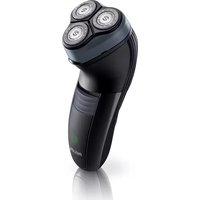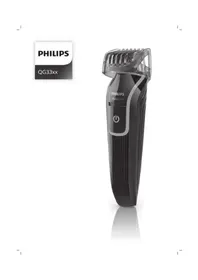
Series 3000 QG3335 - Shaver PHILIPS - Free user manual and instructions
Find the device manual for free Series 3000 QG3335 PHILIPS in PDF.



| Technical features | Rotary electric shaver, 3 shaving heads, double blade cutting system |
|---|---|
| Usage | Dry and shower shaving, cordless use with 40 minutes autonomy |
| Maintenance and repair | Easy to clean under water, replaceable shaving heads, charge indicator |
| Safety | Cut protection system, safety lock for transport |
| General information | 2-year warranty, ergonomic design, lightweight and compact for easy transport |
Frequently Asked Questions - Series 3000 QG3335 PHILIPS
User questions about Series 3000 QG3335 PHILIPS
0 question about this device. Answer the ones you know or ask your own.
Ask a new question about this device
Download the instructions for your Shaver in PDF format for free! Find your manual Series 3000 QG3335 - PHILIPS and take your electronic device back in hand. On this page are published all the documents necessary for the use of your device. Series 3000 QG3335 by PHILIPS.
USER MANUAL Series 3000 QG3335 PHILIPS
natural_image
Black Philips Multigroom electric shaver with visible grille and power button (no text or symbols on body)
natural_image
Illustration of an open book with a grid and arrow indicating text or transformation (no readable text or symbols)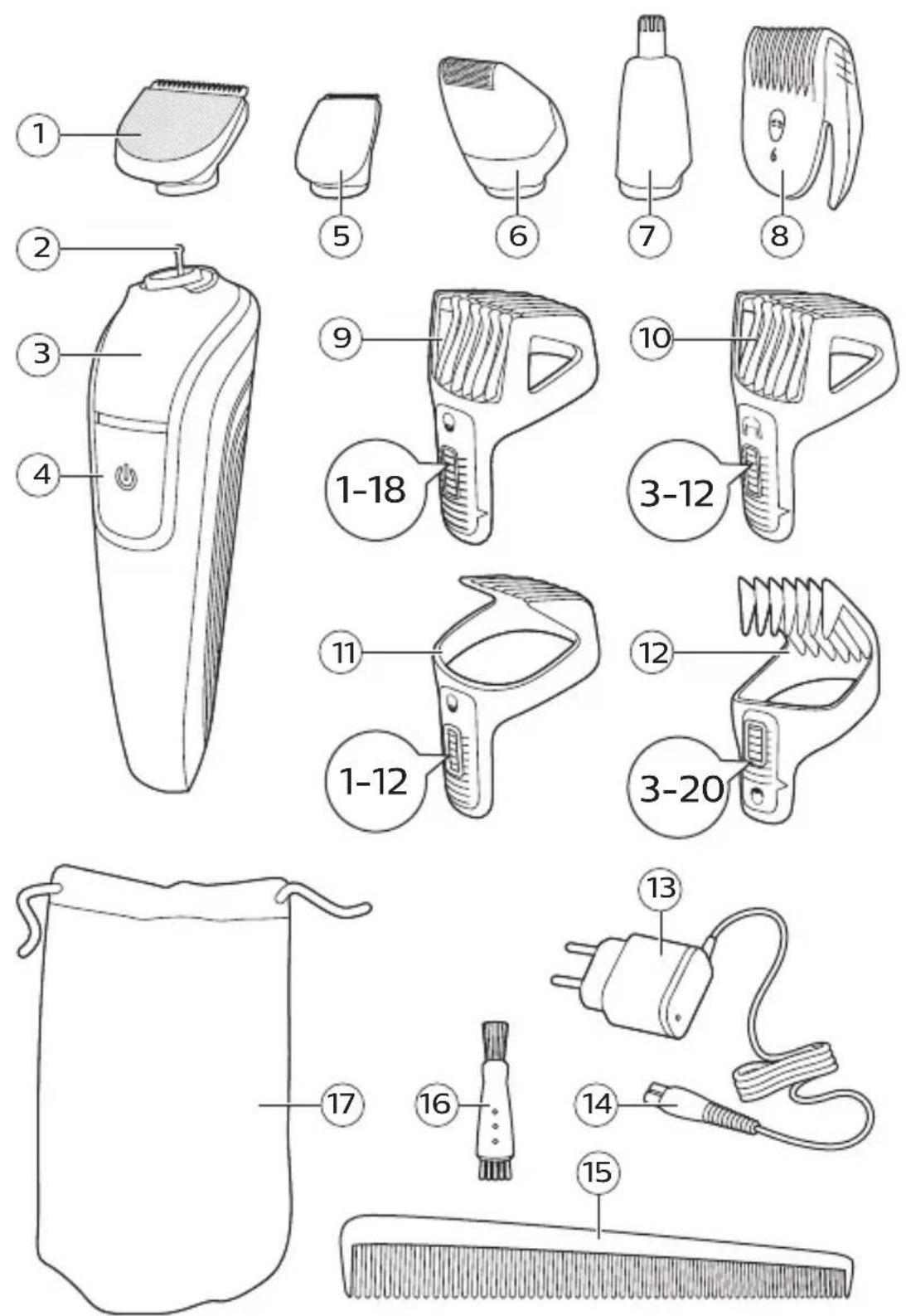
English 6
Dansk 22
Deutsch 38
Español 57
Français 74
Italiano 92
Nederlands 110
Norsk 128
Português 144
Suomi 162
Svenska 179
Türkçe 195
Ελληνικα 211
English
Introduction
Congratulations on your purchase and welcome to Philips! To fully benefit from the support that Philips offers, register your product at www.philips.com/welcome.
General description (Fig. 1)
1 Full size trimmer
2 Attachment connector
3 Handle
4 On/off slide
5 Detail trimmer
6 Detail foil shaver
7 Nose trimmer rotary
8 Eyebrow and detail comb
9 Beard and stubble comb (1-18mm)
10 Body comb (3-12mm)
11 Beard comb (1-12mm)
12 Hair comb (3-20mm)
13 Supply unit
14 Small plug
15 Comb
16 Cleaning brush
17 Pouch
The accessories supplied may vary for different products. The box shows the accessories that have been supplied with your appliance.
Important safety information
Read this important information carefully before you use the appliance and its accessories and save it for future reference. The accessories supplied may vary for different products.
Danger
natural_image
Prohibition sign showing a faucet with a diagonal line and raindrops, no text present- Keep the supply unit dry.
Warning
- To charge the battery, only use the detachable supply unit (A00390) provided with the appliance.
- The supply unit contains a transformer. Do not cut off the supply unit to replace it with another plug, as this causes a hazardous situation.
- This appliance can be used by children aged from 8 years and above and persons with reduced physical, sensory or mental capabilities or lack of experience and knowledge if they have been given supervision or instruction concerning use of the appliance in a safe way and understand the hazards involved. Children shall not play with the appliance. Cleaning and user maintenance shall not be made by children without supervision.
- Always unplug the appliance before you clean it under the tap.
- Always check the appliance before you use it. Do not use the appliance if it is damaged, as this may cause injury. Always replace a damaged part with one of the original type.
- Do not open the appliance to replace the rechargeable battery.
Caution
natural_image
Prohibition sign showing a faucet without raindrops, enclosed in a circle (no text)- Never immerse the charging stand in water and do not rinse it under the tap.
- Never immerse the appliance in water. Do not use the appliance in the bath or shower.
- Never use water hotter than 60°C to rinse the appliance.
- Only use this appliance for its intended purpose as shown in the user manual.
- For hygienic reasons, the appliance should only be used by one person.
- Do not use the supply unit in or near wall sockets that contain an electric air freshener to prevent irreparable damage to the supply unit.
- Never use compressed air, scouring pads, abrasive cleaning agents or aggressive liquids such as petrol or acetone to clean the appliance.
Electromagnetic fields (EMF)
This Philips appliance complies with all applicable standards and regulations regarding exposure to electromagnetic fields.
General

natural_image
Simple black-and-white icon of a faucet with raindrops (no text or symbols)- This appliance can be safely cleaned under the tap.
- The supply unit is suitable for mains voltages ranging from 100 to 240 volts.
- The supply unit transforms 100-240 volts to a safe low voltage of less than 24 volts.
Charging
Charge the appliance before you use it for the first time and when the battery is almost empty.
Charging takes approx. 10 hours.
A fully charged appliance, has an operating time of up to 60 minutes (QG3352, QG3347, QG3344, QG3342, QG3340, QG3339, QG3337, QG3335, QG3332, QG3330, QG3329, QG3327, QG3322,
QG3320) or 45 minutes (QG3338, QG3334, QG3321, QG3341, QG410).
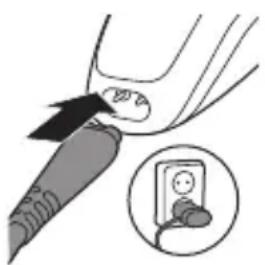
Charging with the supply unit
natural_image
Illustration of a hand holding a pen with a magnified inset showing a device (no text or symbols present)Note: This appliance can only be used without cord.
1 Make sure the appliance is switched off.
2 Put the small plug in the appliance and put the supply unit in the wall socket.
3 After charging, remove the supply unit from the wall socket and pull the small plug out of the appliance.
Using the appliance
The accessories supplied may vary for different products. The box shows the accessories that have been supplied with your appliance.
Always check the appliance and all accessories before use. Do not use the appliance or any accessory if it is damaged, as this may cause injury. Always replace a damaged part with one of the original type.
Trimming tips
- If you are trimming for the first time, be careful. Do not move the appliance too fast. Make smooth and gentle movements
- Since all hairs do not grow in the same direction, you may want to try different trimming positions (i.e. upwards, downwards, or across). Practice is best for optimum results.
- Always make smooth and gentle movements and be sure the surface of the comb always stays in contact with your skin.
Note: This appliance can only be used without cord.
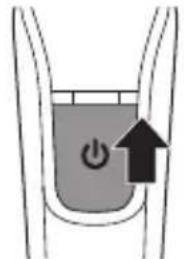
Switching the appliance on and off
text_image
Diagram showing a power button inside a container with an upward arrow indicating direction or force1 To switch on the appliance, slide the on/off button up.
2 To switch off the appliance, slide the on/off button down.
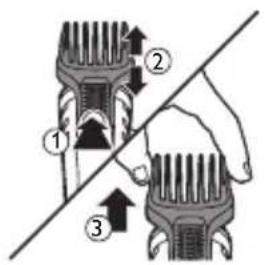
Detaching and attaching combs
text_image
Diagram showing three labeled mechanical components with directional arrows, likely illustrating a cutting or fastening process.1 To detach a comb from a cutting element, press the length setting selector, grab the sides and pull it upwards off the cutting element.
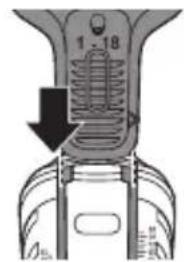
text_image
1 - 182 To attach any type of comb on a cutting element, slide it into the guiding grooves on both sides of the handle.
Detaching and attaching cutting elements
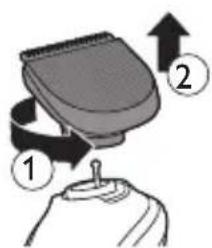
text_image
Diagram showing a device with labeled parts and directional arrows indicating motion or assembly.1 To detach a cutting element, turn it anti-clockwise and pull it upwards off the handle.
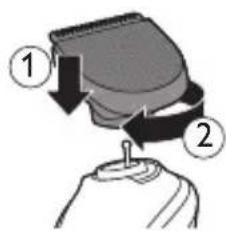
text_image
Diagram showing a hand holding a device with labeled parts and directional arrows indicating motion or force.2 To attach a cutting element, place it on the handle and turn it clockwise.
12 English
Precision attachments for use on face
- Make controlled movements against the hair growth and move it over the part that needs trimming.
Nose trimming
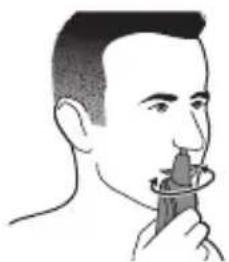
You can use the nose trimmer attachment to trim your nose hair and ear hair.
- Make sure your nostrils are clean. Make sure your outer ear channels are clean and free from wax.
- Do not insert the tip more than 0.5cm and make controlled movements.
Nosetrimmer rotary
natural_image
Line drawing of a person using a handheld device to interact (no text or symbols present)Trimming nose hair:
1 Gently move the tip in and out your nose while turning it round to remove unwanted hairs.
2 Switch off and clean the appliance after each use (see 'Cleaning and maintenance').
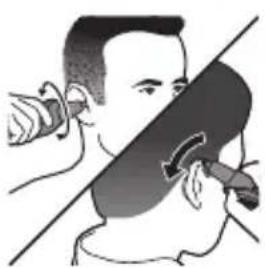
Trimming ear hair:
natural_image
Illustration of a person performing a hand gesture with a device, no text or symbols present1 Slowly move the tip round the ear to remove hairs that stick out beyond the rim of the ear.
2 Gently move the tip in and out the outer ear channel to remove unwanted hairs.
3 Switch off and clean the appliance after each use (see 'Cleaning and maintenance').
Detail trimmer
natural_image
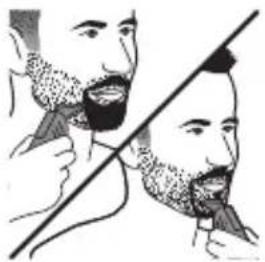
Illustration of two men's beaded teeth with a diagonal line crossing them (no text or symbols)You can use the detail trimmer without comb to create fine lines and contours around your facial style, close to the skin (to a length of 0.5mm).
1 Hold the detail trimmer perpendicular to the skin and move it upwards or downwards with gentle pressure.
2 Switch off and clean the appliance after each use (see 'Cleaning and maintenance').
Eyebrow and detail comb
natural_image
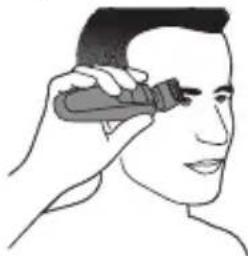
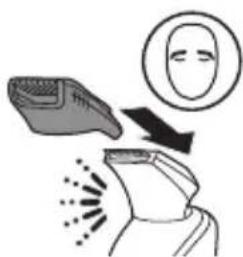
Illustration of a person applying a product to their face (no text or symbols)You can use the 21mm detail trimmer with the detail comb attached for tidying up your eyebrows or trimming your sideburns.
natural_image
Illustration of a hand holding a device with a face icon and motion lines indicating motion (no text or symbols)1 Slide the detail comb onto the detail trimmer.
2 Comb your eyebrows in the direction of hair growth.
3 Move the comb over the eyebrow from the outer tip of the eyebrow towards the base of the nose (against the direction of hair growth).
4 Switch off and clean the appliance after each use (see 'Cleaning and maintenance').
Detail foil shaver
natural_image
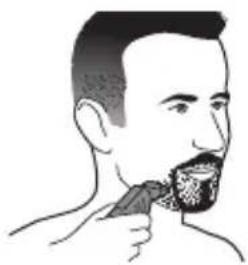
Illustration of a man eating with a cup (no text or symbols)You can use the detail foil shaver to shave unwanted hairs on your cheeks and chin with precision.
1 Gently press the detail foil shaver onto the skin and shave along contoured edges to remove any hairs.
2 Switch off and clean the appliance after each use (see 'Cleaning and maintenance').
Attachments for use on beard
- We advise you to start at the highest setting to familiarize yourself with the appliance.
- Make controlled movements against the hair growth and move it over the part that needs trimming.
Full size trimmer

natural_image
Line drawing of a man's profile with beard and tie (no text or symbols)You can use the full size trimmer without comb to trim hair close to the skin or to get clean lines around your beard, neck and sideburns (to a length of 0.5mm).
1 To trim hair close to the skin, place the flat side of the trimming head against your skin and make strokes in the desired direction.
2 For contouring, hold the trimming head perpendicular to the skin and move the trimming head upwards or downwards with gentle pressure.
3 Switch off and clean the appliance after each use (see 'Cleaning and maintenance').
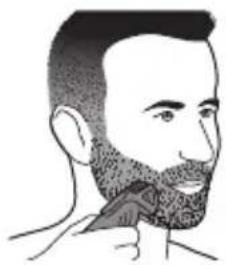
Beard and stubble comb (1-18mm)
natural_image
Illustration of a person's head and neck showing a beaded beard and jaw (no text or symbols)You can use the beard and stubble comb attached to the full size trimmer to evenly trim your beard, stubble and moustache. You can choose any setting between 1 and 18mm in steps of 1mm.
1 Attach the beard and stubble comb onto the appliance.
2 Press the length selector and then slide it up or down to select the desired hair length setting.
3 To trim most effectively, move the appliance against the hair growth direction. Make sure that the surface of the comb always stays in contact with the skin.
4 Switch off and clean the appliance after each use (see 'Cleaning and maintenance').
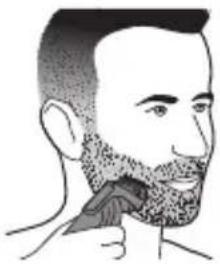
Beard comb (1-12mm)
natural_image
Illustration of a person applying a toothbrush to their beache (no text or symbols)You can use the beard comb attached to the full size trimmer to evenly trim your beard and moustache. You can choose any setting between 1 and 12mm in steps of 1mm.
1 Attach the beard and stubble comb onto the appliance.
2 Select the desired hair length setting.
3 To trim most effectively, move the appliance against the hair growth direction.
Note: Make sure that the surface of the comb always stays in contact with the skin.
4 Switch off and clean the appliance after each use (see 'Cleaning and maintenance').
Attachments for use on head
natural_image
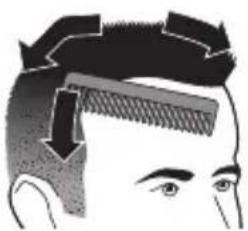
Illustration of a person's head with a comb and arrow indicating hair direction (no text or symbols)Hair clipping with comb:
1 Comb the hair in the growth direction.
2 Slowly move the trimmer against the hair growth direction. Press lightly.
3 Since hair grows in different directions, you need to move the appliance in different directions as well (upward, downward or across).
- Always make sure that the flat part of the comb is in full contact with the scalp to obtain an even result.
- When you trim for the first time, start at the highest length setting (20mm) to familiarise yourself with the appliance.
Hair clipping without comb:
Be careful when you trim without comb because the cutting unit removes every hair it touches.
1 Before you start to contour the hairline around the ears, with any comb attachment, comb the hair ends over the ears
2 Tilt the appliance in such a way that only one edge of the trimmer touches the hair.
3 Only cut the hair ends. The hairline should be close to the ear.
4 To contour the neckline and sideburns, turn the appliance and make downward strokes.
5 Move the appliance slowly and smoothly. Follow the natural hairline.
Full size trimmer

natural_image
Illustration of a hand holding a tool with an arrow indicating rotation, and a magnified inset showing a spring (no text or symbols)You can use the full size trimmer without comb to clip hair very close to the skin (to a length of 0.5mm) or to create contours around your ears or neck.
Switch off and clean the appliance after each use (see 'Cleaning and maintenance').
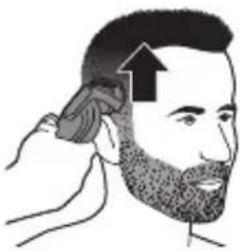
Hair comb (3-20mm)
natural_image
Illustration of a person applying a hair accessory to their beaded ear (no text or symbols)You can use the hair comb attached to the full size trimmer for an even haircut. You can choose any setting between 3 and 20mm in steps of 1mm.
Switch off and clean the appliance after each use (see 'Cleaning and maintenance').
Attachments for use on body
Body trimming with comb
- It is recommended to trim your body hair when it is dry because wet hair tends to stick to the body.
- Take your time when you first start to trim sensitive areas. You have to acquire practice with the appliance. Your skin also needs some time to adjust to the procedure.
- When you trim sensitive areas, we advise you not to use the trimmer without the trimming comb.
- When too many hairs have accumulated on the appliance, blow out before use, for best trimming results.
Body trimming (3-12mm)
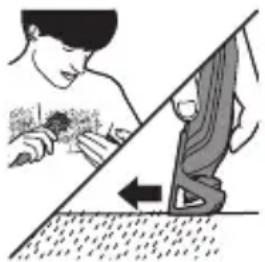
natural_image
Illustration of a person using a tool to clean or wear a surface, with no visible text or symbolsYou can use the body comb attached to the full size trimmer, to trim hairs below the neckline. You can choose any setting between 3 and 12mm in steps of 1 mm.
Switch off and clean the appliance after each use (see 'Cleaning and maintenance').
Cleaning and maintenance
Regular cleaning guarantees better grooming results.
Never clean, remove or replace a shaving or cutting unit while the appliance is switched on.
Always check if the water is too hot, to prevent burning your hands.
Never dry cutting units or shaving foils with a towel or tissue, as this may cause damage.
Never use compressed air, scouring pads, abrasive cleaning agents or aggressive liquids such as petrol or acetone to clean the appliance.
Cleaning and storage
Never use scouring pads, abrasive cleaning agents or aggressive liquids such as petrol or acetone to clean the appliance.
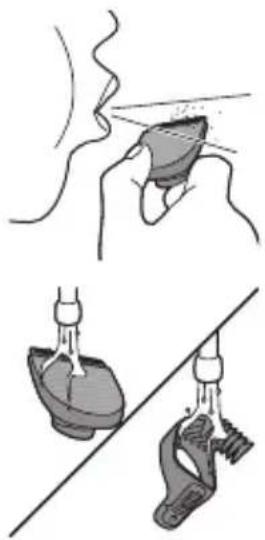
natural_image
Illustration showing a hand holding a medical device and another performing a manual manual (no text or symbols present)Always switch off the appliance and disconnect it from the wall socket before cleaning.
Never dry the trimmer teeth with a towel or tissue, as this may damage the trimmer teeth.
1 Remove any comb or attachment from the appliance.
2 Blow and/or shake out any hair that has accumulated in the attachments and/or combs.
3 Clean the attachments, the combs and the appliance under lukewarm water after every use.
4 Carefully shake off excess water and let all parts air dry completely.
5 Store the appliance and its attachments in the storage pouch to prevent damage.
Cleaning shaving foils
The shaving foil is very delicate. Handle it carefully. Replace the shaving foil if it is damaged.
Detail foil shaver
1 Pull the top part of the detail-foil shaver off the bottom part.
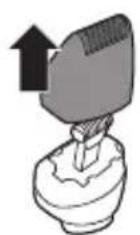

natural_image
Illustration showing a hand performing a nasal swab injection and a corresponding lung with liquid droplets (no text or symbols)2 Blow and/or shake out any hair that has accumulated inside the detail-foil shaver.
3 Clean the top part of the detail-foil shaver under a lukewarm tap.
4 Carefully shake off excess water and let air dry completely.
Ordering accessories
To buy accessories or spare parts, visit www.shop.philips.com/service or go to your Philips dealer. You can also contact the Philips Consumer Care Center in your country (see the international warranty leaflet for contact details).
Recycling
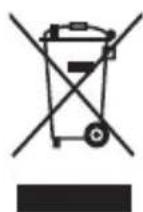
- This symbol means that this product shall not be disposed of with normal household waste (2012/19/EU).
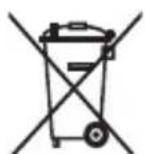
- This symbol means that this product contains a built-in rechargeable battery which shall not be disposed of with normal household waste (2006/66/EC). Please take your product to an official collection point or a Philips service center to have a professional remove the rechargeable battery.
- Follow your country's rules for the separate collection of electrical and electronic products and rechargeable batteries. Correct disposal helps prevent negative consequences for the environment and human health.
Removing the rechargeable battery
Only remove the rechargeable battery when you discard the product. Before you remove the battery, make sure that the product is disconnected from the wall socket and that the battery is completely empty.
Take any necessary safety precautions when you handle tools to open the product and when you dispose of the rechargeable battery.
1 Make sure the appliance is disconnected from the mains.
2 Remove the attachment.
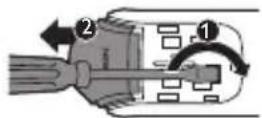
3 Remove the on/off button of the appliance with a flathead screwdriver.
4 Remove the front panel of the appliance with a flathead screwdriver.
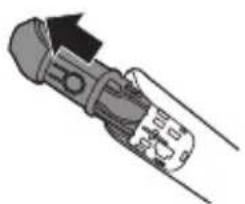
5 To pull out the inner body, apply a tilting force in the indicated hole with a flathead screwdriver. Pull upward on the top cover.
natural_image
Diagram of a mechanical tool or connector with no visible text or symbols6 Separate the inner body and the tube.
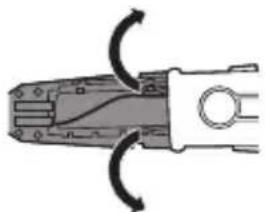
7 Remove the on/off contact.
natural_image
Diagram of a pliers with directional arrows indicating movement or force (no text or symbols)8 Unhook and remove the rest of the cover to expose the rechargeable battery.
9 Cut the wires to separate the rechargeable battery from the appliance.
Warranty and support
If you need information or support, please visit www.philips.com/support or read the international warranty leaflet.
Warranty restrictions
Cutting units are not covered by the terms of the international warranty because they are subject to wear.
Introduktion
natural_image
No sign depicting a faucet with a showerhead, enclosed in a circle (no text or symbols)natural_image
Prohibition sign of a faucet without any text or symbolsnatural_image
Simple black-and-white icon of a faucet with raindrops, no text or symbols present.natural_image
Illustration of a hand holding a pen with an arrow pointing to a device, and a close-up of a small device inside a socket (no text or symbols)text_image
Diagram showing a power button with an arrow indicating upward motion, likely illustrating a power or current control mechanism.1 Tænd apparatet ved at trykke on/off-knappen opad.
2 Sluk apparatet ved at trykke on/off-knappen nedad.
text_image
Diagram illustrating three steps of hairpin tool application, labeled 1, 2, and 3 with directional arrows.natural_image
Diagram of a mechanical component with a downward arrow indicating a force or direction (no text or symbols present)text_image
Diagram showing a device with labeled parts and directional arrows indicating motion or movement.text_image
Diagram showing a mechanical or electrical component with labeled parts and directional arrows indicating motion or force.natural_image
Line drawing of a person holding an object, possibly a device or tool, with no visible text or symbols.natural_image
Illustration of a person using a tool to cut the face area, no text or symbols presentnatural_image
Illustration of two men eating with a diagonal line crossing (no text or symbols)natural_image
Illustration of a person applying a product to their face (no text or symbols)natural_image
Illustration of a hand holding a device with a face icon and radiating lines, no text or symbols presentnatural_image
Illustration of a man eating with a cup (no text or symbols)natural_image
Side profile illustration of a man's head and neck with beard (no text or symbols)natural_image
Illustration of a person's beard being brushed with a toothbrush (no text or symbols)natural_image
Illustration of a person applying a toothbrush to their beache (no text or symbols)natural_image
Illustration of a person's head with a comb and eye (no text or symbols)Klipning med kam:
natural_image
Illustration of a hand holding a tool with a magnified inset showing a spiral (no text or symbols)natural_image
Illustration of a person applying a hair to their beache with an arrow indicating direction (no text or symbols)natural_image
Illustration of a person using a tool to clean or store floor, with a diagonal line and arrow indicating direction (no text or symbols)natural_image
Illustration showing a hand holding a small object above and a close-up of a mechanical component being lifted by a tool (no text or symbols present)natural_image
Illustration showing a hand holding a petal with a droplet, and a close-up of a liver with liquid droplets (no text or symbols)natural_image
Two mechanical clamps with arrows indicating rotation or movement (no text or symbols)natural_image
No sign depicting a faucet with a showerhead, enclosed in a circle (no text or symbols)natural_image
Prohibition sign showing a faucet without a shower, enclosed in a circle (no text or symbols)natural_image
Simple black-and-white icon of a faucet with raindrops, no text or symbols present.natural_image
Illustration of a medical device with a catheter inserted, showing a magnified view of a patient's ear (no text or symbols present)natural_image
Simple diagram showing a button with an arrow pointing upward, no text or symbols presenttext_image
Diagram illustrating three-step hairpin cutting process with labeled steps ①, ②, and ③text_image
Diagram showing a device with labeled parts and directional arrows indicating motion or assembly steps.text_image
Diagram showing a mechanical or fluid system with two labeled components, marked 1 and 2, indicating directional movement or flow.natural_image
Line drawing of a person using a handheld device to interact (no text or symbols present)natural_image
Illustration of a person performing a hand gesture with a violin, no text or symbols presentnatural_image
Illustration of a person applying a toothbrush to another person's beak (no text or symbols present)natural_image
Illustration of a person applying a product to their face (no text or symbols)natural_image
Illustration of a hand holding a device with a face icon and sound waves, no text or symbols presentnatural_image
Line drawing of a person applying a toothpaste to their mouth (no text or symbols)natural_image
Line drawing of a man's profile with beard and bow tie (no text or symbols)natural_image
Line drawing of a person's head and neck showing a beaded tassel (no text or symbols)natural_image
Illustration of a person applying a toothbrush to their beache (no text or symbols)natural_image
Illustration of a person's head with a comb and arrow indicating hair direction (no text or symbols)natural_image
Illustration of a hand holding a tool with an arrow indicating rotation, and a magnified inset showing a mechanical component (no text or symbols)natural_image
Illustration of a person brushing a beaded head with an arrow indicating direction (no text or symbols)natural_image
Illustration of a person using a tool to clean or wear a surface, with a diagonal line and arrow indicating direction (no text or symbols)natural_image
Illustration of a hand holding a small object with a pointed tip, possibly a device or tool, against a human-like background (no text or symbols)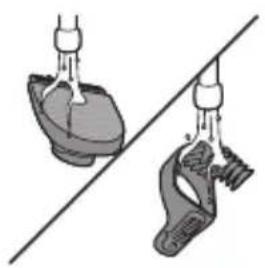
natural_image
Diagram showing two mechanical components connected by a diagonal line, no text or symbols presenttext_image
Medical illustration showing three steps of a procedure involving a device, hand stimulation, and catheter placement.natural_image
Illustration of a hand holding a tool with a mechanical component (no text or symbols visible)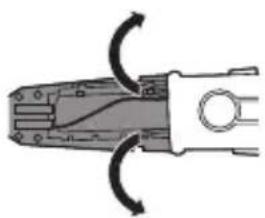
natural_image
Diagram of a pliers with directional arrows indicating movement or force (no text or symbols)natural_image
Prohibition sign of a faucet without any text or symbolsnatural_image
No sign depicting a faucet with a showerhead, enclosed in a circle (no text or symbols)natural_image
Simple black-and-white icon of a faucet with raindrops, no text or symbols present.natural_image
Illustration of a hand holding a pen with a black arrow pointing to a device, and an inset showing a close-up of a device (no text or symbols present)natural_image
Simple diagram of a battery with an arrow indicating power input (no text or symbols)text_image
Diagram showing three labeled mechanical components with directional arrows, likely illustrating a cutting or fastening process.text_image
Diagram showing a device with labeled parts and directional arrows indicating motion or assembly.text_image
Diagram showing a mechanical or electrical component with numbered parts and directional arrows indicating motion or flow.natural_image
Line drawing of a person using a handheld device to interact (no text or symbols present)Recorte del pelo de la nariz:
natural_image
Illustration of a person performing a facial recognition or facial recognition task, with no visible text or symbols.natural_image
Illustration of two men with beard and a diagonal line, no text or symbols presentnatural_image
Illustration of a person applying a product to their face (no text or symbols)natural_image
Illustration of a hand holding a shoe with a magnified inset showing facial features (no text or symbols)natural_image
Illustration of a person smoking a cigarette (no text or symbols present)natural_image
Line drawing of a man's profile with beard and tie (no text or symbols)natural_image
Illustration of a person's head and neck showing a beaded turtleneck (no text or symbols)natural_image
Illustration of a person's beard and neck with a triangular hairpin (no text or symbols)natural_image
Illustration of a person's head with a comb and arrow indicating hair direction (no text or symbols)natural_image
Illustration of a hand holding a tool with an arrow indicating rotation, and a magnified inset showing the tool's spiral (no text or symbols)natural_image
Illustration of a person applying a hair to their beache with an arrow indicating direction (no text or symbols)natural_image
Illustration of a person using a tool to clean or wear a surface, with no visible text or symbolsnatural_image
Illustration showing a hand holding a small object with motion lines, and two hanging objects on a diagonal line (no text or symbols)natural_image
Illustration of a handheld device with wires and connectors (no text or symbols)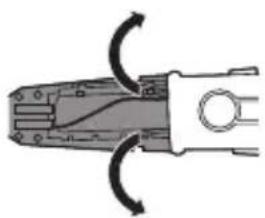
natural_image
Diagram of a pliers with directional arrows indicating movement or force (no text or symbols)natural_image
Prohibition sign of a faucet without any text or symbolsnatural_image
Prohibition sign showing a faucet without a shower, enclosed in a circle (no text or symbols)natural_image
Simple black-and-white icon of a faucet with raindrops (no text or symbols)natural_image
Illustration of a hand holding a pen with an arrow pointing to a device, and a close-up inset showing a close-up of a device (no text or symbols present)text_image
Diagram showing a button labeled 'Power' with an upward arrow, likely indicating a power or current direction in a device or control panel.text_image
Diagram showing three labeled mechanical components with directional arrows indicating movement or assembly.text_image
Diagram showing a hand holding a device with labeled parts and directional arrows indicating motion or movement.text_image
Diagram showing a mechanical or fluid system with labeled components and directional arrows indicating flow or movement.natural_image
Illustration of two men with beard and a diagonal line crossing (no text or symbols)natural_image
Illustration of a person applying a product to their face (no text or symbols)natural_image
Illustration of a hand holding a hairdryer with facial expression and motion lines (no text or symbols)natural_image
Illustration of a man eating with a cup (no text or symbols)natural_image
Line drawing of a man's profile with beard and tie (no text or symbols)natural_image
Line drawing of a person's beard being adjusted by a hair clip (no text or symbols)natural_image
Illustration of a person applying a toothbrush to their beache (no text or symbols)natural_image
Illustration of a person's head with a comb and arrow indicating hair direction (no text or symbols)natural_image
Illustration of a hand holding a tool with an arrow indicating rotation, and a magnified inset showing the tool's tip (no text or symbols)natural_image
Illustration of a person applying a hair to their beak with an arrow indicating direction (no text or symbols)natural_image
Illustration of a person using a tool to clean or wear a surface, with a diagonal line and a downward arrow indicating the process (no text or symbols present)natural_image
Simple line drawing of a hand holding a small object with a pointed tip, no text or symbols presentnatural_image
Illustration of two mechanical components hanging from a diagonal line, no text or symbols presentnatural_image
Illustration of a hand holding a tool with a mechanical component (no text or symbols visible)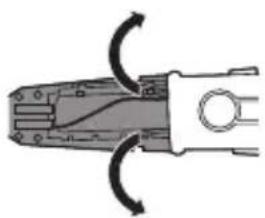
natural_image
Diagram of a pliers with directional arrows indicating movement or force (no text or symbols)natural_image
No sign depicting a faucet with a showerhead, enclosed in a circle (no text or symbols)natural_image
No sign depicting a faucet with a showerhead, enclosed in a circle (no text or symbols)natural_image
Simple black-and-white icon of a faucet with raindrops, no text or symbols present.natural_image
Illustration of a hand holding a pen with an arrow pointing to a device, and a close-up of a small device inside a socket (no text or symbols)natural_image
Simple diagram showing a button with an arrow pointing upward, no text or symbols presenttext_image
Diagram illustrating three-step hairpin tool application with labeled parts and directional arrowstext_image
Diagram showing a device with labeled parts and directional arrows indicating motion or assembly.text_image
Diagram showing a mechanical or fluid system with two labeled components, marked 1 and 2, indicating directional flow or movement.natural_image
Line drawing of a person using a handheld device to interact (no text or symbols)natural_image
Illustration of a person performing a hand gesture with a knife, no text or symbols presentnatural_image
Illustration of a person's beard being pointed at by a diagonal line (no text or symbols)natural_image
Illustration of a person applying a product to their face (no text or symbols)natural_image
Illustration of a hand holding a shoe with a face icon and motion lines indicating motion (no text or symbols)natural_image
Line drawing of a man applying a toothbrush to their beak (no text or symbols)natural_image
Side profile illustration of a man's head and beard (no text or symbols)natural_image
Illustration of a person's head with a beard and a small object near the chin, no text or symbols presentnatural_image
Illustration of a person applying a toothbrush to their beache (no text or symbols)natural_image
Illustration of a person's head with a comb and arrow indicating hair direction (no text or symbols)natural_image
Illustration of a hand holding a tool with an arrow indicating rotation or movement (no text or symbols present)natural_image
Illustration of a person applying a hair accessory to their beaded ear (no text or symbols)natural_image
Illustration of a person using a tool to clean or wear a surface, with a diagonal line and arrow indicating direction (no text or symbols)natural_image
Illustration of a hand holding a small object with motion lines, no text or symbols presentnatural_image
Diagram showing two mechanical components suspended between two diagonal lines (no text or symbols)natural_image
Illustration showing a hand performing a medical procedure with an upward arrow and a close-up of a person touching the tissue (no text or symbols)natural_image
Anatomical illustration of a human liver and surrounding organs (no text or labels)natural_image
Illustration of a mechanical tool with a handle and spring, no text or symbols presentnatural_image
Mechanical component diagram showing a pliers with curved arrows indicating rotation (no text or symbols)natural_image
Prohibition sign showing a faucet with a diagonal line and raindrops, no text presentnatural_image
Prohibition sign showing a faucet without a shower, enclosed in a circle (no text or symbols)natural_image
Simple black-and-white icon of a faucet with raindrops, no text or symbols present.natural_image
Illustration of a hand holding a pen with a magnified inset showing a smiling face inside (no text or symbols)natural_image
Simple diagram of a battery with an arrow indicating power input (no text or symbols)text_image
Diagram showing three labeled mechanical components with directional arrows, likely illustrating a cutting or fastening process.text_image
Diagram showing a device with labeled parts and directional arrows indicating motion or assembly.text_image
Diagram showing a hand holding a device with labeled parts and directional arrows indicating motion or force.natural_image
Line drawing of a person using a handheld device to interact (no text or symbols present)Neushaar trimmen:
natural_image
Illustration of a person performing a hand gesture with a tool, no text or symbols presentnatural_image
Illustration of two men with beard tones, one facing forward and the other looking straight (no text or symbols)natural_image
Illustration of a person applying a product to their face (no text or symbols)natural_image
Illustration of a hairdryer with facial expression and motion lines (no text or symbols)natural_image
Illustration of a person brushing teeth with a toothbrush (no text or symbols)natural_image
Line drawing of a man's head with beard and comb (no text or symbols)natural_image
Line drawing of a person's head and neck showing a beaded hair accessory (no text or symbols)natural_image
Illustration of a person applying a toothbrush to their beache (no text or symbols)natural_image
Illustration of a person's head with a comb and arrow indicating hair direction (no text or symbols)natural_image
Illustration of a hand pressing down on a curved object with an arrow indicating motion (no text or symbols)natural_image
Illustration of a person applying a hair accessory to their beaded ear (no text or symbols)natural_image
Illustration of a person using a tool to clean or wear a surface, with a diagonal line and arrow indicating direction (no text or symbols)natural_image
Illustration showing a hand holding a medical device and another close-up of a foot with a medical device (no text or symbols present)natural_image
Illustration showing a hand holding a small object with an upward arrow, and another hand holding a small object with a pointed tip (no text or symbols)natural_image
Illustration of a mechanical tool or connector with a handle and cable, no visible text or symbolsnatural_image
Diagram of a pliers with directional arrows indicating movement or force (no text or symbols)natural_image
No smoking sign with faucet symbol (no text)natural_image
Prohibition sign showing a faucet crossed out by a diagonal line, indicating no pollution or water release.natural_image
Simple black-and-white icon of a faucet with raindrops (no text or symbols)Lading tar ca. 10 timer.
natural_image
Illustration of a hand holding a pen with a magnified inset showing a device (no text or symbols present)natural_image
Simple diagram of a battery with an arrow indicating power input (no text or symbols)text_image
Diagram showing three labeled mechanical components with directional arrows indicating movement or force, overlaid on a diagonal line.text_image
Diagram showing a device with labeled parts and directional arrows indicating motion or assembly.text_image
Diagram showing a hand holding a device with labeled parts and directional arrows indicating motion or force.natural_image
Line drawing of a person using a handheld device to interact (no text or symbols present)Trimme nesehår:
natural_image
Illustration of a person using a device to cut the face area (no text or symbols present)natural_image
Illustration of two men with beaks facing each other, separated by a diagonal line (no text or symbols)natural_image
Illustration of a person applying a product to their face (no text or symbols)text_image
Diagram illustrating facial recognition or facial recognition process with labeled components and directional arrowsnatural_image
Illustration of a person brushing their beard with a toothbrush (no text or symbols)natural_image
Line drawing of a man's profile with beard and tie (no text or symbols)natural_image
Illustration of a person's head and neck with a beard, no text or symbols presentnatural_image
Illustration of a person applying a toothbrush to their beache (no text or symbols)natural_image
Illustration of a person's head with a comb and arrow indicating hair direction (no text or symbols)natural_image
Illustration of a hand holding a curved object with an arrow indicating rotation, and a magnified inset showing a spiral (no text or symbols)natural_image
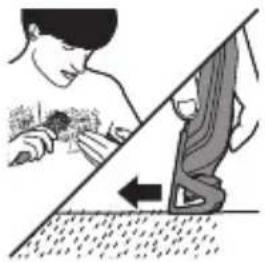
Illustration of a person applying hair to their beache with an arrow indicating direction (no text or symbols)Kroppstrimming (3–12 mm)
natural_image
Illustration of a person cleaning a surface with a hand holding a flower (no text or symbols)natural_image
Illustration showing a hand holding a medical device and another close-up of a medical device with tubing (no text or symbols)Tørk aldri tennene på trimmeren med et håndkle eller tørkepapir. Det kan skade tennene på trimmeren.
natural_image
Illustration showing a hand holding a small object with an upward arrow above, and another hand holding a small object with a pointed tip, both without any text or symbols.natural_image
Anatomical illustration of a human liver and surrounding organs (no text or labels)natural_image
Diagram of a mechanical tool or connector with a curved arrow indicating direction (no text or symbols present)
natural_image
Diagram of a pliers or connector with curved arrows indicating rotation (no text or symbols)natural_image
Prohibition sign of a faucet without any text or symbolsnatural_image
Prohibition sign of a faucet without any text or symbolsnatural_image
Simple black-and-white icon of a faucet with a showerhead (no text or symbols)natural_image
Illustration of a medical device with an arrow pointing to a catheter and a close-up inset showing a patient's abdomen (no text or symbols present)natural_image
Simple diagram showing a power button inside a container with an arrow indicating upward motion (no text or symbols)text_image
Diagram showing three labeled mechanical components with directional arrows indicating movement or force, alongside a diagonal line.text_image
Diagram showing a device with labeled parts and directional arrows indicating motion or assembly.text_image
Diagram showing a hand holding a device with labeled parts and directional arrows indicating motion or force.natural_image
Line drawing of a person using a handheld device to interact (no text or symbols present)natural_image
Illustration of a person performing a bandaged instrument (no text or symbols present)natural_image
Illustration of two men eating with a diagonal line crossing (no text or symbols)natural_image
Illustration of a person applying a product to their face (no text or symbols)natural_image
Illustration of a hand holding a device with a face icon and emitting rays (no text or symbols)natural_image
Illustration of a person eating with a toothbrush (no text or symbols)natural_image
Line drawing of a man's head and neck with a beard, showing detailed hair texture (no text or symbols)natural_image
Illustration of a person's beard being brushed with a toothbrush (no text or symbols)natural_image
Illustration of a person brushing their beard with a toothbrush (no text or symbols)natural_image
Illustration of a person's head with a comb and arrow indicating hair direction (no text or symbols)natural_image
Illustration of a hand holding a tool with an arrow indicating rotation or movement (no text or symbols present)natural_image
Illustration of a person applying a hair accessory to their beaded ear (no text or symbols)natural_image
Illustration of a person using a tool to clean or wear a surface, with a diagonal line and arrow indicating direction (no text or symbols)natural_image
Diagram of a liver with liquid flowing from a vessel (no text or labels)Encomendar acessórios
natural_image
Illustration of a mechanical tool or connector with a handle and internal components (no text or symbols)natural_image
Diagram of a pliers with directional arrows indicating movement or force (no text or symbols)natural_image
No sign depicting a faucet with a showerhead, enclosed in a circle (no text or symbols)natural_image
Prohibition sign showing a faucet with a diagonal line and a diagonal line, no text or symbols present.natural_image
Simple black-and-white icon of a faucet with a showerhead (no text or symbols)text_image
Diagram showing a hand holding a screwdriver with a close-up of an electrical socket, indicating electrical contact or disconnection.text_image
Diagram showing a button labeled 'Power' with an upward arrow, likely indicating current or activation.text_image
Diagram illustrating three-step mechanical assembly with labeled components and directional arrowstext_image
Diagram showing a device with labeled parts and directional arrows indicating motion or assembly.text_image
Diagram showing a mechanical or fluid system with labeled components and directional arrows indicating flow or movement.natural_image
Line drawing of a person holding an object, possibly a device or tool, with no visible text or symbols.natural_image
Illustration of a person using a device to cut the blade (no text or symbols)natural_image
Illustration of a man with a beard and a diagonal line crossing another's beak (no text or symbols)natural_image
Illustration of a person applying a product to their face (no text or symbols)natural_image
Illustration of a hand holding a remote device with a face icon and radiating lines (no text or symbols)natural_image
Line drawing of a man applying a toothbrush to their beak (no text or symbols)natural_image
Line drawing of a man's head and neck with a beard, showing detailed facial features (no text or symbols)natural_image
Line drawing of a person's beard being adjusted by a hair clip (no text or symbols)natural_image
Illustration of a person's neck and beak with a bandage, no text or symbols presentnatural_image
Illustration of a person's head with a comb and arrow indicating hair direction (no text or symbols)natural_image
Illustration of a hand holding a tool with an arrow indicating direction, and a magnified inset showing the tool tip (no text or symbols)natural_image
Illustration of a person applying a hair accessory to their beaded head (no text or symbols)natural_image
Illustration of a person using a tool to clean or wear a surface, with a diagonal line and arrow indicating direction (no text or symbols)natural_image
Illustration of a hand holding a small object with a pointed tip, possibly a device or tool, against a human-like background (no text or symbols)natural_image
Illustration of two different foot positions connected by a diagonal line, no text or symbols presentnatural_image
No sign depicting a faucet with a showerhead, enclosed in a circle (no text or symbols)natural_image
Prohibition sign of a faucet without any text or symbolsnatural_image
Simple black-and-white icon of a faucet with raindrops, no text or symbols present.natural_image
Illustration of a hand holding a pen with a magnified inset showing a small device (no text or symbols)natural_image
Simple diagram showing a button with an arrow pointing upward, no text or symbols presenttext_image
Diagram illustrating three steps of hairpin tool application, labeled 1, 2, and 3 with directional arrows.natural_image
Diagram of a mechanical component with a downward arrow indicating a force or direction (no text or symbols present)text_image
Diagram showing a device with labeled parts and directional arrows indicating motion or assembly.text_image
Diagram showing a mechanical or electrical component with labeled parts 1 and 2, indicating directional movement or assembly.natural_image
Line drawing of a person using a handheld device to interact (no text or symbols present)Trimma näshår:
natural_image
Illustration of a person using a tool to cut the body part of a violin (no text or symbols present)natural_image
Illustration of two men with beard and a diagonal line, no text or symbols presentnatural_image
Illustration of a person applying a product to their face (no text or symbols)natural_image
Illustration of a hairdryer with facial expression and motion lines (no text or symbols)natural_image
Illustration of a person eating with a toothbrush (no text or symbols)natural_image
Line drawing of a man's head and neck with a beard, showing detailed facial features (no text or symbols)natural_image
Line drawing of a person's head and neck showing a beaded eyebrow being brushed (no text or symbols)natural_image
Illustration of a person applying a toothbrush to their beache (no text or symbols)natural_image
Illustration of a person's head with a comb and arrow indicating hair direction (no text or symbols)natural_image
Illustration of a hand holding a tool with an arrow indicating direction, and a magnified inset showing the tool tip (no text or symbols)natural_image
Illustration of a person brushing a bearded man's hair with an arrow indicating direction (no text or symbols)natural_image
Illustration of a person cleaning a surface with a tool, showing no text or symbolsnatural_image
Illustration showing a hand performing a medical procedure with a device and a separate close-up of a device (no text or symbols present)natural_image
Illustration of a hand holding a tool with a mechanical component (no text or symbols visible)natural_image
Diagram of a pliers with directional arrows indicating movement or force (no text or symbols)natural_image
No sign depicting a faucet with a showerhead, enclosed in a circle (no text or symbols)natural_image
Prohibition sign showing a faucet without spraying water, enclosed in a circle (no text)natural_image
Simple black-and-white icon of a faucet with a showerhead, no text or symbols present.natural_image
Illustration of a hand holding a pen with a magnified inset showing a person inside a device (no text or symbols)natural_image
Simple diagram showing a button labeled 'Power' with an arrow pointing upward, no text or symbols present.text_image
Diagram showing three steps of hairpin cutting process with numbered arrows indicating directiontext_image
Diagram showing a toilet with labeled parts and directional arrows indicating movement or change.text_image
Diagram showing a mechanical or electrical component with labeled parts 1 and 2, indicating directional movement or assembly.natural_image
Line drawing of a person holding a small object, possibly a device or tool, with no visible text or symbols.natural_image
Illustration of a person using a chisel to cut the jaw (no text or symbols present)natural_image
Illustration of two men with beard and a diagonal line, no text or symbols presentnatural_image
Illustration of a person applying a product to their face (no text or symbols)natural_image
Illustration of a hand holding a shoe with a face icon and motion lines indicating motion (no text or symbols)natural_image
Illustration of a man eating a cup (no text or symbols present)natural_image
Side profile illustration of a man's head and beard (no text or symbols)natural_image
Illustration of a person's beard and neck, showing detailed hair texture (no text or symbols)natural_image
Illustration of a person applying a toothbrush to their beache (no text or symbols)natural_image
Illustration of a person's head with a comb and arrow indicating hair direction (no text or symbols)Tarakla saç kesimi:
natural_image
Illustration of a hand holding a tool with an arrow indicating rotation, and a magnified inset showing a mechanical component (no text or symbols)natural_image
Illustration of a person applying a hairpin to their beaded beard (no text or symbols)natural_image
Illustration of a person using a tool to clean or wear a surface, with no visible text or symbolsnatural_image
Illustration showing a hand holding a medical device with a magnified view of its tip and a separate close-up of a medical device (no text or symbols present)natural_image
Illustration of a mechanical tool or probe with a handle and base, no visible text or symbolsnatural_image
Diagram of a pliers with directional arrows indicating movement or force (no text or symbols)natural_image
Prohibition sign of a faucet without any text or symbolsnatural_image
Prohibition sign showing a faucet without a shower, enclosed in a circle (no text or symbols)natural_image
Simple black-and-white icon of a faucet with a showerhead, no text or symbols present.natural_image
Illustration of a hand holding a pen with an arrow pointing to a device, and a close-up of a small electronic device inside (no text or symbols)natural_image
Diagram showing a button with an arrow pointing upward, no text or symbols presenttext_image
Diagram illustrating three-step hairpin tool application: cutting, holding, and cutting with a diagonal line.text_image
Diagram showing a device with labeled parts and directional arrows indicating motion or assembly stepstext_image
Diagram showing a mechanical or fluid system with two labeled components, marked 1 and 2, indicating directional movement or flow.natural_image
Line drawing of a person holding an object, possibly a device or tool, with no visible text or symbols.natural_image
Illustration of a person using a tool to cut the head area, showing mechanical components (no text or symbols)natural_image
Illustration of two men's beaded teeth with a diagonal line crossing them (no text or symbols)natural_image
Illustration of a person applying a product to their face (no text or symbols)natural_image
Illustration of a hand holding a shoe with a face icon and motion lines indicating motion (no text or symbols)natural_image
Illustration of a person applying a toothpaste to their mouth (no text or symbols)natural_image
Line drawing of a man's head and neck with a beard, no text or symbols presentnatural_image
Illustration of a person's head and neck showing a beaded tumbler (no text or symbols)natural_image
Illustration of a person applying a toothbrush to their beache (no text or symbols)natural_image
Illustration of a person's head with a comb and arrow indicating hair direction (no text or symbols)natural_image
Illustration of a hand holding a tool with an arrow indicating rotation or movement (no text or symbols)natural_image
Illustration of a person applying a hair to their beache with an arrow indicating direction (no text or symbols)natural_image
Illustration of a person cleaning a surface with a diagonal line and arrow indicating direction (no text or symbols)natural_image
Illustration showing a hand holding a small object above a pair of hands using a tool, with no visible text or symbols.natural_image
Two mechanical tool diagrams showing a hand operating a tool and a pliers with rotation arrows (no text or symbols)75% recycled paper
75% papier recyclé