Series 3000 S3230 - Shaver PHILIPS - Free user manual and instructions
Find the device manual for free Series 3000 S3230 PHILIPS in PDF.


User questions about Series 3000 S3230 PHILIPS
0 question about this device. Answer the ones you know or ask your own.
Ask a new question about this device
Download the instructions for your Shaver in PDF format for free! Find your manual Series 3000 S3230 - PHILIPS and take your electronic device back in hand. On this page are published all the documents necessary for the use of your device. Series 3000 S3230 by PHILIPS.
USER MANUAL Series 3000 S3230 PHILIPS
natural_image
Simple line drawing of a remote control with three buttons and a power button (no text or symbols)
natural_image
Simple line drawing of an open book with a grid pattern on the left and a closed page on the right (no text or symbols)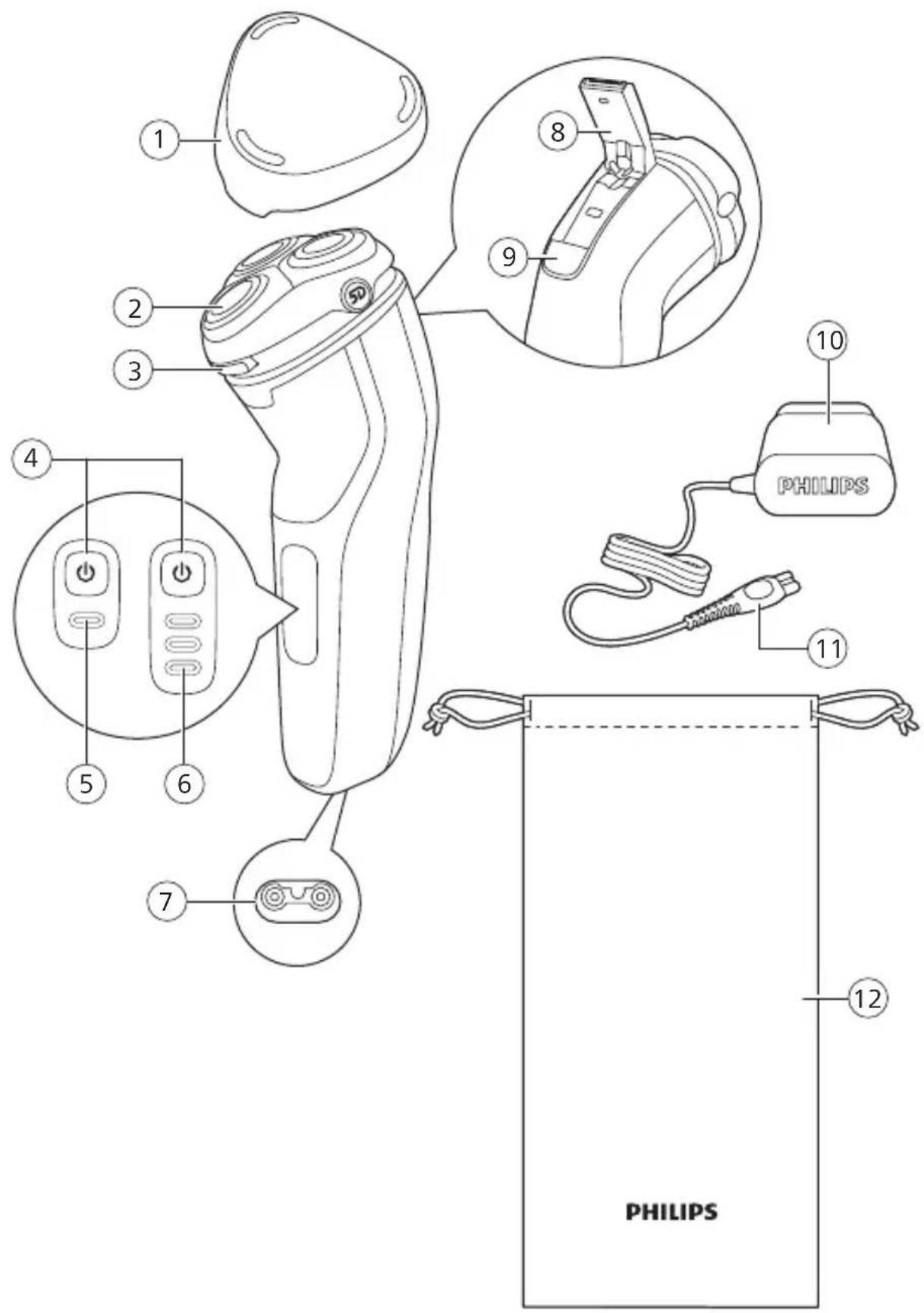
text_image
1 2 3 4 5 6 7 8 9 10 PHILIPS 11 12 PHILIPSEnglish 6
Français (Canada) 22
General description (Fig. 1)
1 Protection cap
2 Shaving unit
3 Shaving unit release button
4 On/off button
5 1-level battery status indicator (S3133, S3134 only)
6 3-Level battery status indicator (S3233, S3230, S3332, S3333 only)
7 Socket for small plug
8 Charging stand (S3332, S3333 only)
9 Pop-up trimmer
10 Trimmer release slide
11 Supply unit
12 Small plug
13 Storage pouch (S3232, S3230, S3332, S3333 only)
Introduction
Congratulations on your purchase and welcome to Philips! To fully benefit from the support that Philips offers, register your product at
www.philips.com/welcome.
Important safety information
Only use the product for its intended purpose. Read this important information carefully before you use the product and its batteries and accessories, and save it for future reference. Misuse can lead to hazards or serious injuries.
Warning

natural_image
Prohibition sign of a faucet without any text or symbols- Keep the supply unit and the charging stand dry.

- This shaver is waterproof. It is suitable for use in the bath or shower and for cleaning under the tap. For safety reasons, the shaver can therefore only be used without cord.
- Do not modify the supply unit.
- This appliance can be used by children aged from 8 years and above and persons with reduced physical, sensory or mental capabilities or lack of experience and knowledge if they have been given supervision or instruction concerning use of the appliance in a safe way and understand the hazards involved. Children shall not play with the appliance. Cleaning and user maintenance shall not be made by children without supervision.
- Do not use a damaged appliance. Replace damaged parts with new Philips parts.
- Do not use the supply unit in or near wall sockets that contain an electric air freshener to prevent irreparable damage to the supply unit.
- Because of hygiene, only one person should use the appliance.
- Unplug the appliance before cleaning it with water.
- Only use cold or lukewarm water to clean the appliance.
- Never use compressed air, scouring pads, abrasive cleaning agents or aggressive liquids to clean the appliance.
- Water may drip from the socket at the bottom of the shaver when you rinse it. This is normal and not dangerous because all electronics are enclosed in a sealed power unit inside the shaver.
- Only use original Philips accessories or consumables. Only use detachable supply unit HQ8505.
- Charge, use and store the product at a temperature between 5 °C and 35 °C.
- Keep product and batteries away from fire and do not expose them to direct sunlight or high temperatures.
- If the product becomes abnormally hot or smelly, changes color or if charging takes longer than usual, stop using and charging the product and contact Philips.
English
- Do not place products and their batteries in microwave ovens or on induction cookers.
- Do not open, modify, pierce, damage or dismantle the product or battery to prevent batteries from heating up or releasing toxic or hazardous substances. Do not short-circuit, overcharge or reverse charge batteries.
- If batteries are damaged or leaking, avoid contact with the skin or eyes. If this occurs, immediately rinse well with water and seek medical care.
Electromagnetic fields (EMF)
This Philips appliance complies with all applicable standards and regulations regarding exposure to electromagnetic fields.
The display
S313X
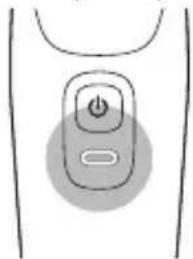
Battery fully charged
natural_image
Simple diagram of a power button with a circular indicator, no text or symbols presentWhen the battery is fully charged, the charging light lights up white continuously.
Note: After approx. 30 minutes, the charging light goes out to save energy.
Battery low
text_image
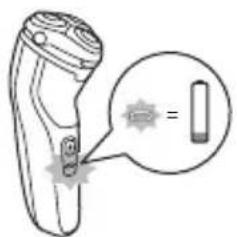
Diagram of a handheld device with an annotation box showing a close-up of its internal components and a star symbol.When the battery is almost empty (when there are only 5 or fewer shaving minutes left), the charging light flashes orange.
When you switch off the appliance, the charging light continues to flash orange for a few seconds.
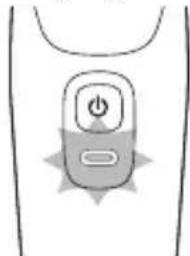
Charging
natural_image
Simple line drawing of a mobile phone icon with power button and starburst symbol (no text or labels)When the shaver is charging, the charging light flashes white.
S323X, S333X
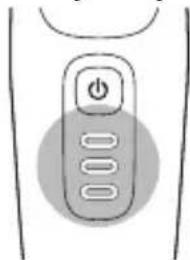
Battery fully charged
natural_image
Simple line drawing of a remote control button with three buttons and an 'Power' button (no text or symbols)When the battery is fully charged, all charging lights light up white continuously.
Note: After approx. 30 minutes, the charging lights go out to save energy.
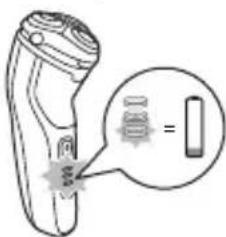
Battery low
text_image
Diagram showing a handheld device with a magnified inset highlighting a component labeled '='When the battery is almost empty (when there are only 5 or fewer shaving minutes left, the bottom charging light flashes orange.
When you switch off the appliance, the bottom charging light continues to flash orange for a few seconds.
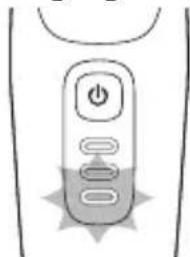
Charging
natural_image
Simple line drawing of a remote control with buttons and a starburst symbol (no text or labels)When the shaver is charging, first the bottom light of the battery charge indicator flashes, then the second light, and so on until the shaver is fully charged.
Charging
Charge the shaver before you use it for the first time and when the display indicates that the battery is almost empty.
Charging takes approx. 1 hour. A fully charged shaver has a shaving time of up to 60 minutes.
This shaver is suitable for use in the bath or shower. For safety reasons, it is therefore not possible to use the shaver while it is connected to the power outlet for charging.
Note: Depending on your shaving/styling behavior and beard type, the operating time may vary over time.
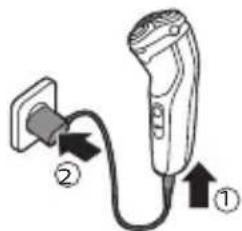
Charging with the supply unit
text_image
Diagram showing a plug connected to an electric vehicle with labeled parts ① and ②1 Put the small plug in the appliance.
2 Put the supply unit in the wall socket.
- The charging light shows the charging status of the appliance.
3 After charging, remove the supply unit from the wall socket and pull the small plug out of the appliance.
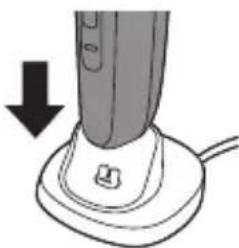
Charging with charging stand (S3332, S3333 only)
natural_image
Illustration of a handheld vacuum cleaner with a downward arrow indicating compression (no text or symbols)1 Connect the small plug of the cord into the charging stand. Connect the supply unit into any 100V to 240V outlet. Use only the power cord provided.
2 Place the shaver in the stand in an upright position making sure charging contacts in the bottom of stand fit into recess in bottom of the shaver.
- The display on the shaver will indicate the shaver is charging.
3 After charging, remove the shaver from the stand by lifting straight up. Do not tilt the shaver.
Quick charge
When you start charging the empty battery, the charging light flashes white quickly. After approx. 5 minutes the charging light flashes white slowly. The shaver now contains enough energy for a 5-minute shave.
Using the appliance
Note: This appliance is waterproof. It is suitable for use in the bath or shower and for cleaning under the tap. For safety reasons, this appliance can therefore only be used without cord.

This symbol indicates that the shaver can be used in the bath or shower.
Shaving tips and tricks
- Make circular movements during use. Circular movements provide better shaving results than straight movements.
- Your skin may need 2 or 3 weeks to get accustomed to the Philips shaving system.
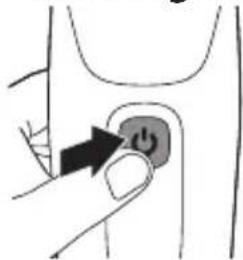
Switching the appliance on and off
natural_image
Hand holding a button with an arrow pointing to it, no text or symbols presentTo switch the appliance on or off, press the on/off button once.
Shaving
Dry shaving
Note: For the best results on skin comfort, pre-trim your beard if you have not shaved for 3 days or longer.
1 Switch on the appliance.

natural_image
Illustration of a person using a handheld device to apply facial hair (no text or symbols present)12 English

natural_image
Illustration of a person using a handheld device to apply facial pain (no text or symbols present)2 Move the shaving heads over your skin in circular movements to catch all hairs growing in different directions.
3 Stretch your skin with your free hand so the blades can lift and cut hair. Gently press the shaver onto you skin so the floating heads can follow the contours of your face.
Note: Do not press too hard as too much pressure can cause shaving heads to pinch the skin.
4 Switch off and clean the appliance after each use.
5 Put the protective cap on the appliance to protect the shaving heads during storage and travel.
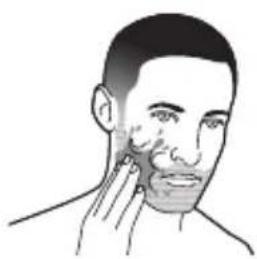
Wet shaving
natural_image
Illustration of a person applying facial massage to the ear (no text or symbols)For a more comfortable shave, you can also use this appliance on a wet face with shaving foam or shaving gel.
1 Apply some water to your skin.

natural_image
Illustration of a person applying facial care to their face (no text or symbols)2 Apply shaving foam or gel to your skin.
natural_image
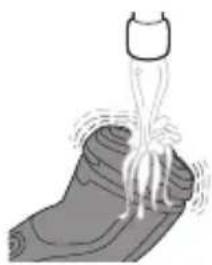
Illustration of a bottle dispensing liquid into a container with visible roots (no text or symbols)3 Rinse the shaving unit under the tap to ensure that it glides smoothly over your skin.
4 Switch on the appliance.
natural_image
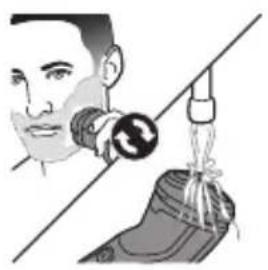
Illustration of a person using a handheld device to interact with a shoe (no text or symbols present)5 Move the shaving heads over your skin in circular movements to catch all hairs growing in different directions. Make sure each shaving head is fully in contact with the skin. Exert gentle pressure for a close, comfortable shave.
Note: Do not press too hard, this can cause skin irritation.
Note: Rinse the shaving unit regularly to ensure that it continues to glide smoothly over your skin.
6 Switch off and clean the appliance after each use.
7 Dry your face.
Note: Make sure that you rinse all foam or shaving gel off the appliance with warm water.
8 Put the protective cap on the appliance to protect the shaving heads during storage and travel.
Trimming
natural_image
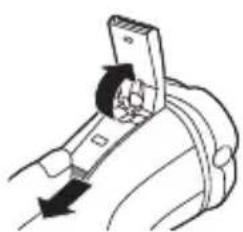
Diagram of a mechanical device with a lever and handle, showing motion direction (no text or symbols)You can use the trimmer to groom your sideburns and moustache.
1 Push the trimmer release slide downwards to open the trimmer.
2 Switch on the appliance.
natural_image
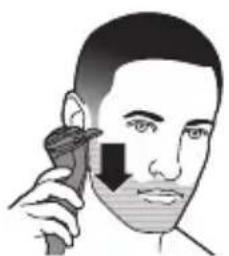
Illustration of a person using a handheld device to apply facial hair (no text or symbols present)3 Hold the trimmer perpendicular to the skin and move the appliance downwards while you exert gentle pressure.
4 Switch off and clean the trimmer after each use.
natural_image
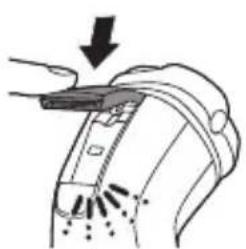
Diagram of a hand holding a device with an arrow pointing to it, showing internal components and motion lines (no text or symbols)5 Close the pop-up trimmer ('click').
Cleaning and maintenance
Cleaning the shaver
Clean the shaver after every use for optimal performance.
Caution: Never use compressed air, scouring pads, abrasive cleaning agents or aggressive liquids such as petrol or acetone to clean the appliance.
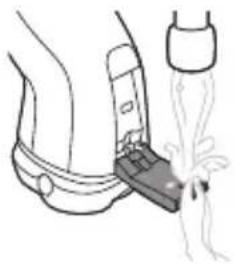
Caution: While rinsing the shaving heads, water may drip out of the base of the appliance. This is a normal occurrence. Internal electric parts are in a waterproof compartment so the appliance will be protected against water damage.
natural_image
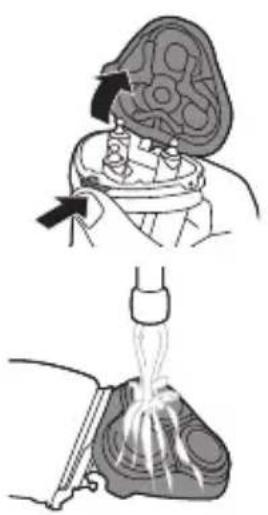
Medical illustration showing a surgical procedure with an anatomical view and a catheter inserted (no text or labels)1 Switch off the appliance and make sure it is disconnected from the wall socket.
2 Press the release button to open the shaving unit.
3 Rinse the shaving unit and hair chamber with lukewarm water.
4 Rinse the outside of the shaving unit with lukewarm water.
natural_image
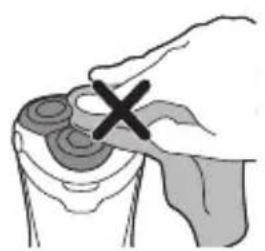
Illustration of a hand holding a circular object with a cross mark, no text or symbols presentNever dry the shaving unit with a towel or tissue, as this may damage the shaving heads.
5 Carefully shake off excess water and let air dry completely.
6 Close the shaving unit.
Cleaning the pop-up trimmer
Clean the pop-up trimmer after each use.
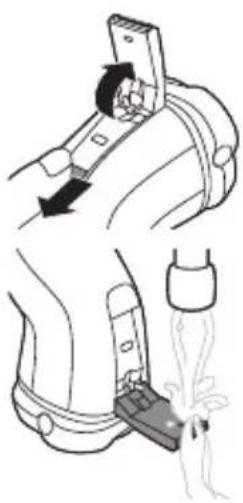
Never dry the trimmer teeth with a towel or tissue, as this may damage the trimmer teeth.
natural_image
Illustration of a mechanical device with a lever and foot, showing motion and assembly (no text or symbols)1 Switch off the appliance and make sure it is disconnected from the wall socket.
2 Push the trimmer release slide downwards to open the trimmer.
3 Switch on the appliance and rinse the pop-up trimmer with warm water.
4 After cleaning, switch off the appliance.
5 Carefully shake off excess water and let the pop-up trimmer air dry.
6 Close the pop-up trimmer ('click').
Tip: For optimal performance, lubricate the teeth of the pop-up trimmer with a drop of mineral oil every six months (oil not included).
Thorough cleaning
Clean the shaving heads thoroughly once a month for optimal performance.
1 Switch off the appliance and make sure it is disconnected from the wall socket.
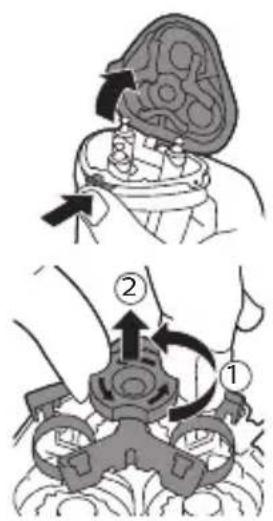
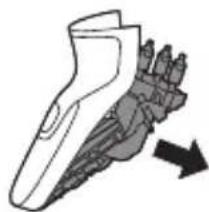
2 Press the release button to open the shaving unit. Pull the shaving unit off the appliance.
text_image
Medical illustration showing two steps of a surgical procedure on a patient's head, labeled with arrows and numbered annotations.3 Turn the lock anticlockwise (1) and remove the retaining frame (2). Place it aside in a safe place.
English
natural_image
Illustration of a hand holding three circular objects with an upward arrow above (no text or symbols)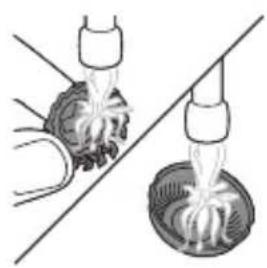
natural_image
Illustration of two hands using a tool to lift a bowl of liquid, separated by a diagonal line (no text or symbols)
text_image
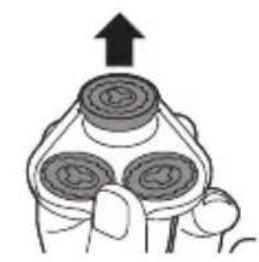
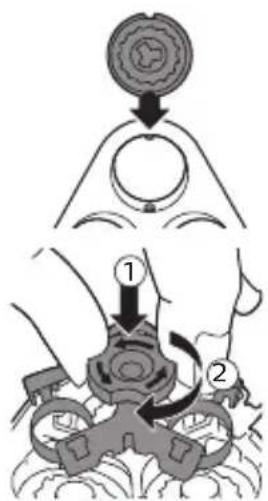
Medical diagram showing a step in a procedure involving a circular component and a hand holding a device, labeled with steps 1 and 2.4 Remove and clean one shaving head at a time. Each shaving head consists of a cutter and a guard.
Note: Do not clean more than one cutter and guard at a time, since they are all matching sets. If you accidentally mix up the cutters and guards, it may take several weeks before optimal shaving performance is restored.
5 Remove the cutter from the shaving guard and clean both parts under the tap.
6 Put the cutter back into the guard.
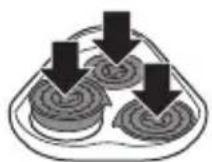
7 Put the shaving heads back into the shaving unit.
8 Put the retaining frame back into the shaving unit (1) and turn the lock clockwise (2).
natural_image
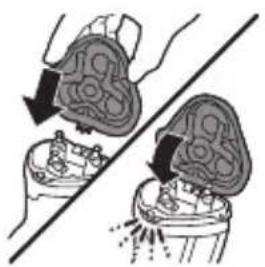
Illustration of two hands performing a medical procedure on a patient's abdomen, showing anatomical changes (no text or symbols present)9 Insert the hinge of the shaving unit into the slot in the top of the shaver. Then close the shaving unit.
Note: If the shaving unit does not close smoothly, check if you have inserted the shaving heads properly and if the retaining frame is locked.
Replacement
Replacing the shaving heads
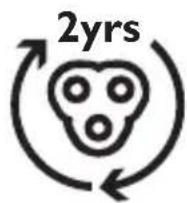
For maximum shaving performance, we advise you to replace the shaving heads every two years. Replace damaged shaving heads immediately. Always replace the shaving heads with original Philips shaving heads (see 'Ordering accessories').
1 Switch off the appliance and make sure it is disconnected from the wall socket.
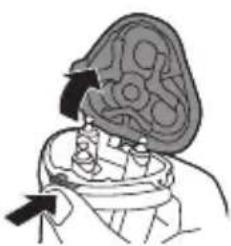
2 Press the shaving unit release button to open the shaving unit. Pull the shaving unit off the appliance.
natural_image
Illustration of a person holding a large, abstract object with arrows indicating direction (no text or symbols)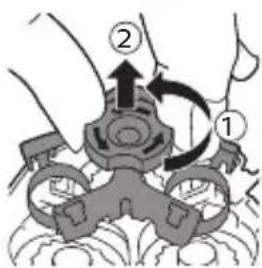
text_image
Diagram showing a mechanical or electrical component with labeled parts 1 and 2, indicating directional movement or assembly.3 Turn the lock anticlockwise (1) and remove the retaining frame (2). Place it aside in a safe place.
natural_image
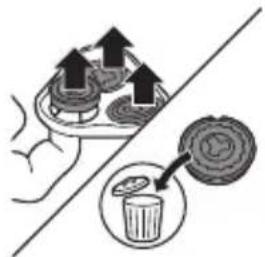
Illustration of a hand holding a tray with upward arrows and a magnified inset showing a circular object (no text or symbols)4 Remove the shaving heads from the shaving unit. Discard the used shaving heads immediately to avoid mixing them with the new shaving heads.
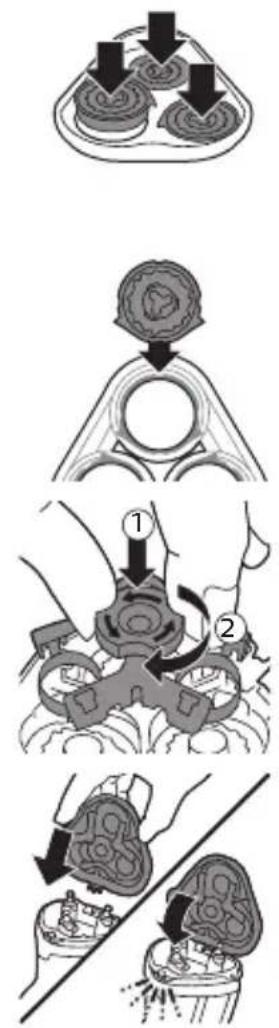
5 Place new shaving heads in the shaving unit.
Note: Make sure that the shaving heads with the projections fit exactly onto the hooks of the shaving head holder when placing them. The shaving heads supplied with the shaver either have notches or projections. Both shaving systems are the same.
6 Put the retaining frame back into the shaving unit (1) and turn the lock clockwise (2).
7 Insert the hinge of the shaving unit into the slot in the top of the shaver. Then close the shaving unit.
Note: If the shaving unit does not close smoothly, check if you have inserted the shaving heads properly and if the retaining frame is locked.
Storage
natural_image
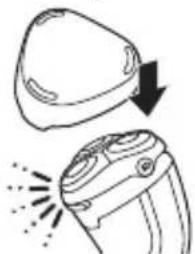
Illustration of a device with a curved top and a flathead, showing a downward arrow and emitting sparks (no text or symbols)Put the protection cap on the shaver to prevent damage.
Note: Always let the shaver dry completely before storing or before charging in the charging stand.
Storage in pouch (S3232, S3230, S3332, S3333 only)
- Store the appliance in the pouch supplied.
- Make sure the appliance is dry before you store it in the pouch.
Ordering accessories
To buy accessories or spare parts, visit www.philips.com/parts-and-accessories or go to your Philips dealer. You can also contact the Philips Consumer Care Center in your country (see the international warranty leaflet for contact details).
Support
For all product support such as frequently asked questions, please visit www.philips.com/support. The shaving heads (cutters and guards) are not covered by the terms of the international warranty because they are subject to wear.
Disposal
- This product contains a rechargeable lithium-ion battery which must be disposed of properly.
- Contact your local town or city officials for battery disposal information. You can also call 888-224-9764 or visit www.call2recycle.ca for battery drop-off locations.
- For assistance, visit our website www.philips.com/support or call +1 (866) 800 9311 toll free.
- Your product is designed and manufactured with high quality materials and components, which can be recycled and reused. For recycling information, please contact your local waste management facilities or visit www.recycle.philips.com.
Removal of built-in rechargeable battery
The built-in rechargeable battery must only be removed by a qualified professional when the appliance is discarded. Before removing the battery, make sure that the appliance is disconnected from the wall socket and that the battery is completely empty.
Take any necessary safety precautions when you handle tools to open the appliance and when you dispose of the rechargeable battery.
When you handle batteries, make sure that your hands, the product and the batteries are dry.
To avoid accidental short-circuiting of batteries after removal, do not let battery terminals come into contact with metal objects (e.g. coins, hairpins, rings). Do not wrap batteries in aluminum foil. Tape battery terminals or put batteries in a plastic bag before you discard them.
Be careful, the battery strips are sharp.
natural_image
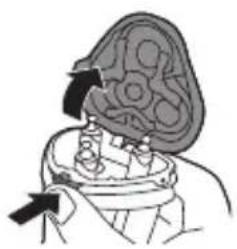
Illustration of a human head with an arrow pointing to the brain area (no text or symbols)1 Press the shaving unit release button to open the shaving unit. Pull the shaving unit off the shaver.
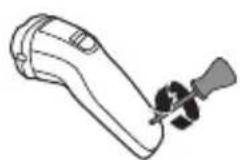
2 Remove the screw in the back of the shaver.
natural_image
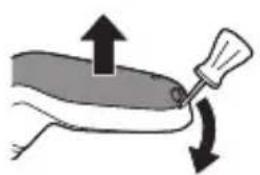
Illustration of a hand holding a tool with directional arrows indicating motion (no text or symbols)3 Remove the back panel by using a flathead screwdriver.
text_image
Diagram showing a hand holding a screwdriver with an inset device labeled '2×' indicating a 2x multiplier.
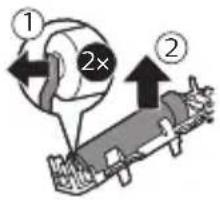
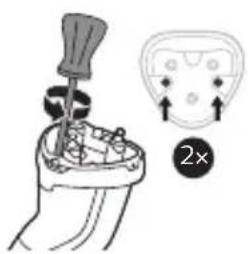
4 Remove two screws and then remove the hair chamber from the shaver.
5 Lift out the front panel.
6 Bend the eight snap hooks aside and remove the cover of the power unit.
7 Lift out the two parts of the power unit.
8 Break the battery tags with a pair of cutting pliers.
9 Remove the rechargeable battery.
natural_image
Prohibition sign showing a faucet without raindrops, enclosed in a circle (no text)natural_image
Simple diagram of a power button inside a rounded rectangle, no text or symbols presenttext_image
Diagram showing a handheld device with a close-up of its internal components and a warning symbol indicating absence.natural_image
Simple line drawing of a button with a starburst pattern, no text or symbols presentnatural_image
Simple line drawing of a remote control button with three buttons (no text or symbols)text_image
Diagram showing a handheld device with a magnified inset highlighting a battery symbol and its corresponding component.natural_image
Simple line drawing of a remote control button with three buttons and a starburst pattern at the bottom (no text or symbols)text_image
Diagram showing a plug connected to an electric vehicle with labeled parts ① and ②natural_image
Illustration of a hairdryer with a downward arrow indicating compression (no text or symbols)natural_image
Simple line drawing of a finger pressing a button on a curved surface (no text or symbols)natural_image
Illustration of a person applying facial hair to their cheek, with no visible text or symbols
natural_image
Illustration of a person using a handheld device to address eye area (no text or symbols present)natural_image
Illustration of a person applying facial care to their cheek (no text or symbols)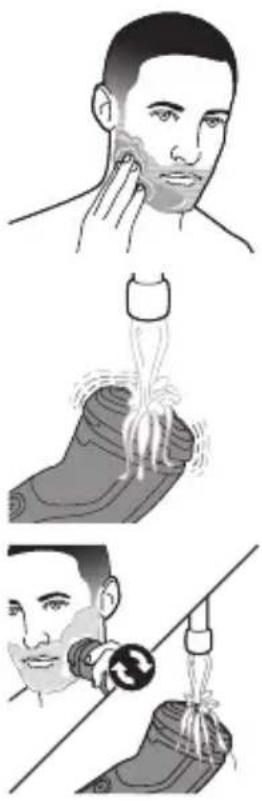
text_image
Illustration showing three-step instructions for using a tool to lift a shoe, with Chinese text labels.natural_image
Diagram of a mechanical assembly with directional arrows indicating motion (no text or symbols)natural_image
Illustration of a person using a handheld device to apply facial features (no text or symbols present)natural_image
Diagram of a hand holding a device with arrows indicating motion or force (no text or symbols)text_image
Medical procedure diagram showing steps to remove a patient's abdomen, including injection, catheter insertion, and dissection with X mark.natural_image
Illustration of a hand holding a circular object with a black X mark, no text or symbols presentnatural_image
Diagram of a mechanical device with a lever and handle, showing motion direction (no text or symbols)Français (Canada)
natural_image
Illustration of a person's seatbelt with a foot and a bottle pouring liquid (no text or symbols)text_image
Medical procedure diagram showing steps to organize a patient's abdomen with labeled arrows and componentsnatural_image
Illustration of two hands using a tool to lift or spread material from a bowl (no text or symbols)text_image
Diagram illustrating a mechanical or robotic operation with labeled steps 1 and 2, showing a circular component being processed into a device.natural_image
Illustration of two hands performing a manual valve or valve operation on a mechanical component (no text or symbols present)text_image
Medical illustration showing two steps of a surgical procedure on a device, labeled ① and ② with arrows indicating direction.natural_image
Illustration of a hand using a tray to generate food, with a magnified inset showing waste disposal (no text or symbols)natural_image
Illustration of a device with a curved top and a pair of circular lenses emitting exhaust flames (no text or symbols)natural_image
Illustration of a human head with an arrow pointing to the brain area (no text or symbols)natural_image
Illustration of a medical or surgical tool interacting with a device, showing upward and downward motion arrows (no text or symbols)text_image
Diagram showing a hand holding a screwdriver with an inset close-up highlighting a 2x magnification indicator.natural_image
Illustration of a dental implant with an upward arrow indicating growth (no text or symbols)5 Soulevez la plaque avant.
natural_image
Illustration of a hand holding a small object with a curved arrow indicating rotation (no text or symbols)text_image
Technical diagram showing mechanical assembly with directional arrows and a 8x ratio label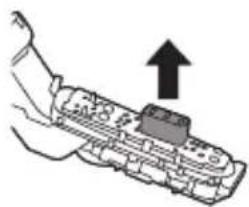
natural_image
Illustration of a hand holding a mechanical component with an upward arrow indicating motion (no text or symbols)natural_image
Illustration of a hand holding a cylindrical object with an upward arrow, no text or symbols present