Nikkor AFS 50mm f1.4G - Camera lens NIKON - Free user manual and instructions
Find the device manual for free Nikkor AFS 50mm f1.4G NIKON in PDF.



| Product type | Photo lens |
| Brand | Nikon |
| Model | Nikkor AFS 50mm f/1.4G |
| Focal length | 50 mm |
| Maximum aperture | f/1.4 |
| Optical construction | 8 elements in 7 groups |
| Angle of view | 46° (FX), 31°30' (DX), 38° (IX240) |
| Focusing | Autofocus (Silent Wave Motor SWM) with manual override M/A |
| Minimum focus distance | 0.45 m |
| Number of diaphragm blades | 9 (rounded) |
| Aperture range | f/1.4 to f/16 |
| Filter attachment size | 58 mm |
| Dimensions (diameter x length) | 73.5 mm x 54 mm |
| Weight | 280 g |
| Supplied accessories | Front cap LC-58, rear cap, lens hood HB-47, case CL-1013 |
| Maintenance and cleaning | Blower or brush, soft cloth with ethyl alcohol. Do not use organic solvents. |
| Safety | Do not disassemble, do not look at the sun, keep out of reach of children, avoid flammable gases. |
| Repairability | Contact an authorized Nikon service center. |
Frequently Asked Questions - Nikkor AFS 50mm f1.4G NIKON
User questions about Nikkor AFS 50mm f1.4G NIKON
0 question about this device. Answer the ones you know or ask your own.
Ask a new question about this device
Download the instructions for your Camera lens in PDF format for free! Find your manual Nikkor AFS 50mm f1.4G - NIKON and take your electronic device back in hand. On this page are published all the documents necessary for the use of your device. Nikkor AFS 50mm f1.4G by NIKON.
USER MANUAL Nikkor AFS 50mm f1.4G NIKON
AF-S NIKKOR 50mm f/1.4G
Notes on Safety Operations

CAUTION
Do not disassemble
Touching the internal parts of the camera or lens could result in injury. Repairs should be performed only by qualified technicians. Should the camera or lens break open as the result of a fall or other accident, take the product to a Nikon-authorized service representative for inspection after unplugging the product and/or removing the battery.
Turn off immediately in the event of malfunction
Should you notice smoke or an unusual smell coming from the camera or lens, remove the battery immediately, taking care to avoid burns. Continued operation could result in injury.
After removing or disconnecting the power source, take the product to a Nikon-
authorized service representative for inspection.
Do not use the camera or lens in the presence of flammable gas
Operating electronic equipment in the presence of flammable gas could result in an explosion or fire.
Do not look at the sun through the lens or viewfinder
Viewing the sun or other strong light sources through the lens or viewfinder could cause permanent visual impairment.
Keep out of reach of children
Particular care should be taken to prevent infants from putting the batteries or other small parts into their mouths.
Observe the following precautions when handling the camera and lens
- Keep the camera and lens unit dry. Failure to do so could result in fire or electric shock.
- Do not handle or touch the camera or lens unit with wet hands. Failure to do so could result in electric shock.
- When shooting with back-lighting, do not point the lens at the sun or allow sunlight to pass directly down the lens as this may cause the camera to overheat and possibly cause a fire.
- When the lens will not be used for an extended period of time, attach both front and rear lens caps and store the lens away from direct sunlight. Failure to do so could result in a fire, as the lens may focus sunlight onto a flammable object.
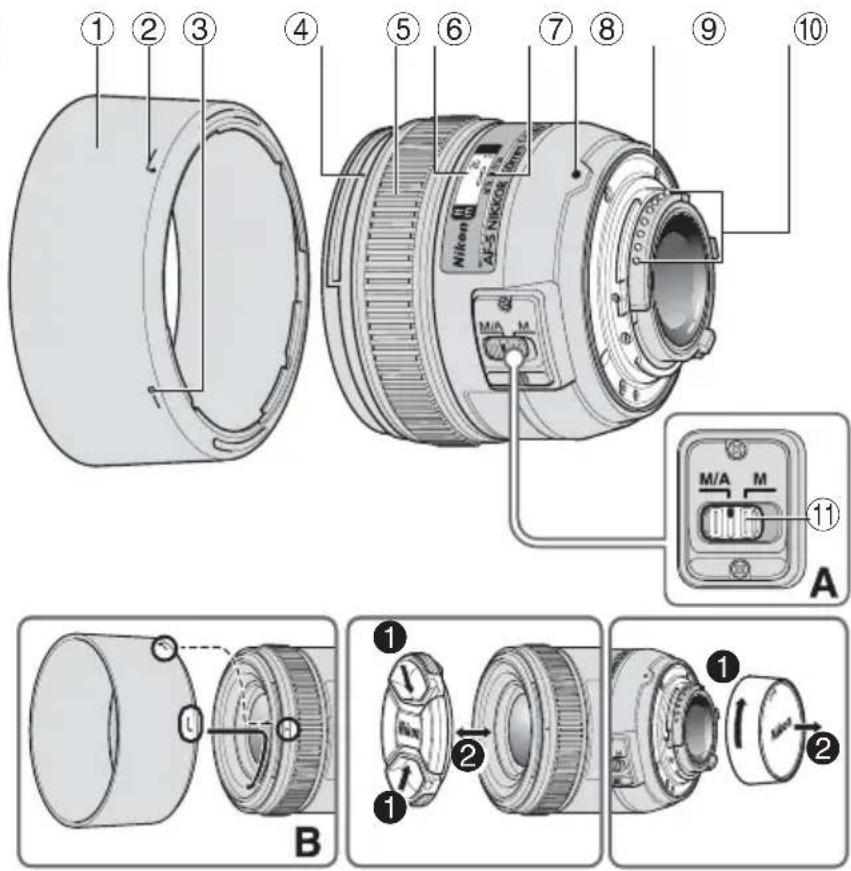
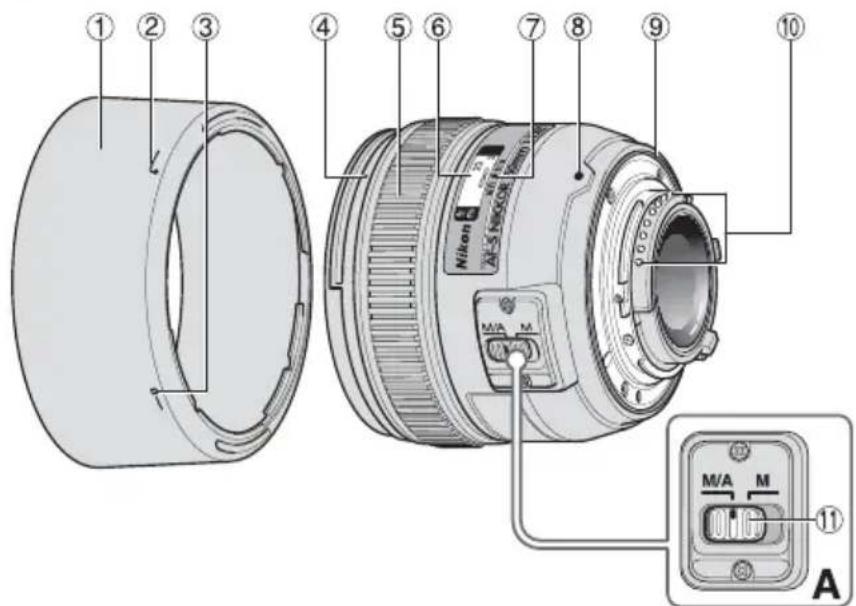
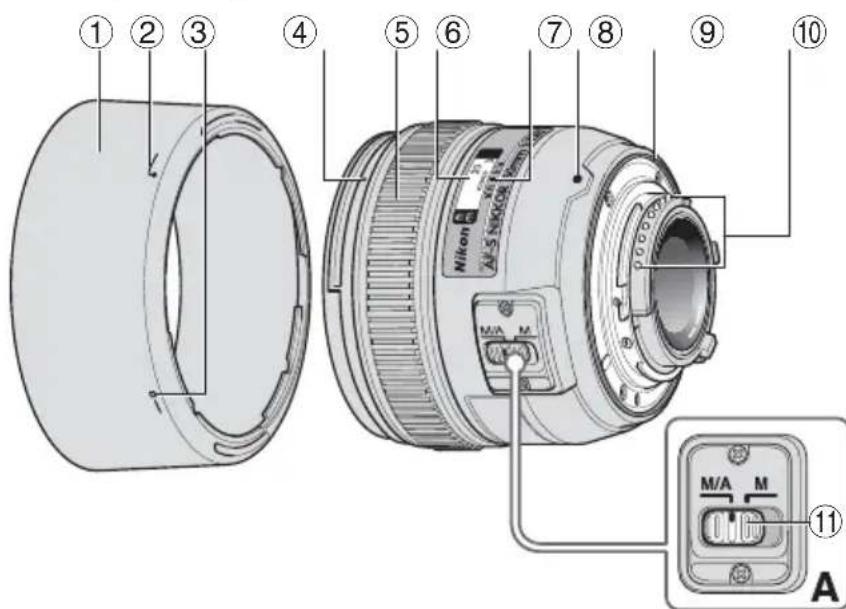
■ Nomenclature
En
① Lens hood (p.16)
Lens hood attachment index (p.16)
③ Lens hood setting index (p.16)
(4) Lens hood mounting index (p.16)
⑤ Focus ring (p.14)
⑥ Distance scale (p.15)
⑦ Distance index line (p.15)
⑧ Mounting index
Lens mount rubber gasket (p.17)
⑩ CPU contacts (p.17)
① Focus mode switch (p.14)
(): reference page
Thank you for purchasing the AF-S NIKKOR 50mm f/1.4G lens. Before using this lens, please read these instructions and refer to your camera's User's Manual.
Major features
- This lens employs a Silent Wave Motor to drive the focusing mechanism, making autofocusing smooth, silent and almost instantaneous. The focus mode switch ① is provided for simple selection of autofocus (A) or manual focus (M) operation.
- More accurate exposure control is possible when this is mounted on a Nikon camera with 3D color matrix metering capability, because subject distance information is transferred from the lens to the camera.
- The rounded aperture produces soft and pleasing blur characteristics in portions of pictures that are out-of-focus.
Important
- When mounted on Nikon DX format digital SLR cameras, such as the D300-Series and D7000, the lens' picture angle becomes 31^30' and its 35mm equivalent focal length is approx. 75mm .
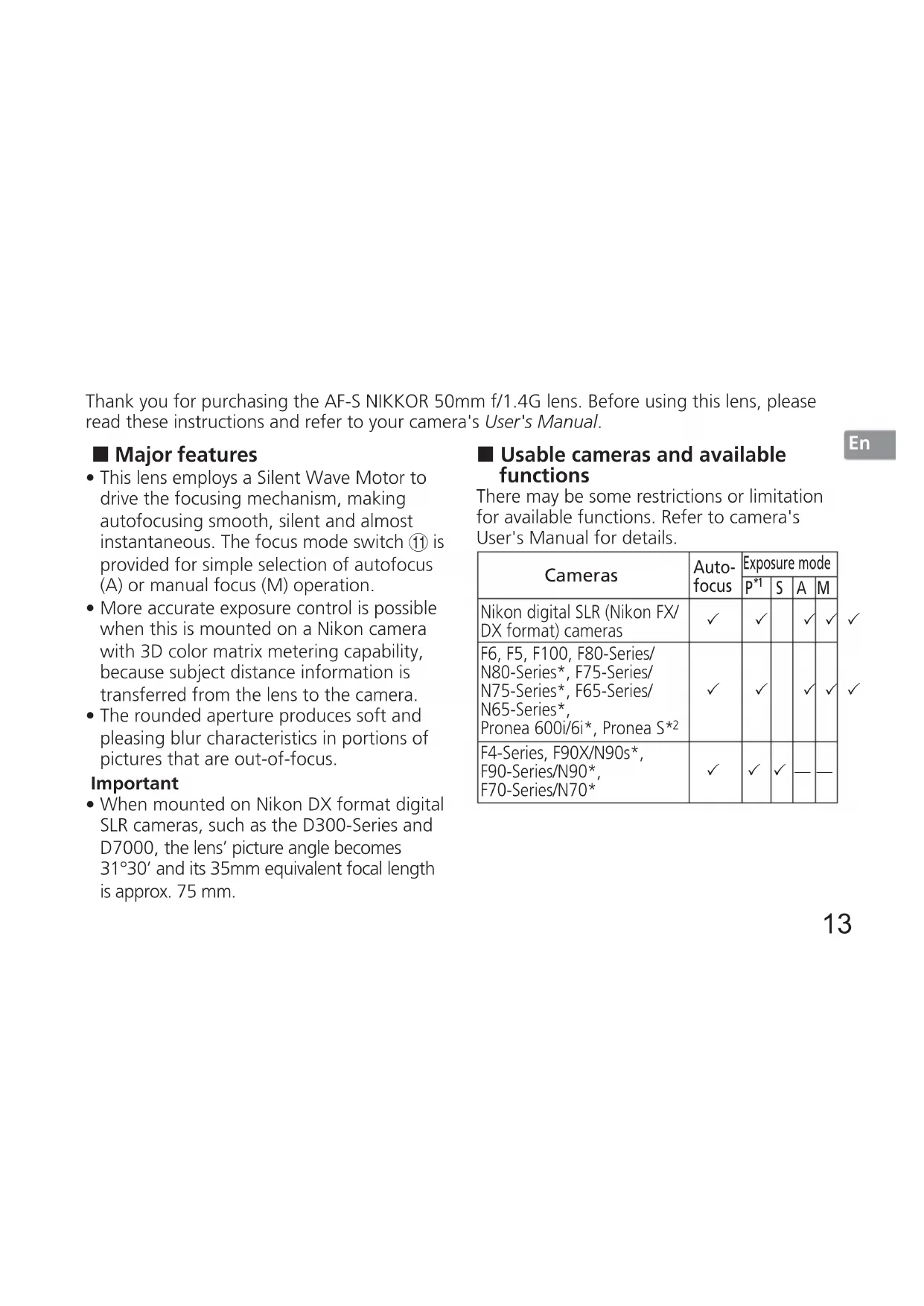
■ Usable cameras and available functions
There may be some restrictions or limitation for available functions. Refer to camera's User's Manual for details.
| Cameras | Auto-focus | Exposure mode | |||
| P*1 | S | A | M | ||
| Nikon digital SLR (Nikon FX/ DX format) cameras | ✓ | ✓ | ✓ | ✓ | |
| F6, F5, F100, F80-Series/ N80-Series*, F75-Series/ N75-Series*, F65-Series/ N65-Series*, Pronea 600i/6i*, Pronea S*2 | ✓ | ✓ | ✓ | ✓ | |
| F4-Series, F90X/N90s*, F90-Series/N90*, F70-Series/N70* | ✓ | ✓ | ✓ | — | — |
| F60-Series/N60*, F55-Series/N55-Series*, F50-Series/N50*, F-401x/N5005*, F-401s/N4004*, F-401/N4004* | — | ✓ | ✓ | ✓ | |
| F-801s/N8008*, F-801/N8008*, F-601M/N6000* | — | ✓ | ✓ | ||
| F3AF, F-601/N6006*, F-501/N2020**, Nikon MF cameras (except F-601M/N6000*) | — | — | |||
: Possible : Impossible
: Sold exclusively in the USA
: Sold exclusively in the USA and Canada
1: P includes AUTO and Vari-Program System.
*2: Manual (M) is not available.
Focusing (Fig. A)
Set your camera's focus mode selector according to the chart below:
Autofocus with manual override (M/A mode)
1 Set the lens focus mode switch ⑪ to M/A.
2 Autofocus is enabled, but autofocus operation can be overridden by rotating the separate focus ring 5 while pressing the shutter-release button halfway, or by pressing the AF-ON button on the camera body of cameras so equipped.
Press the shutter-release button halfway or the AF-ON button once again to cancel manual focus and resume autofocus.
| Cameras | Camera focus mode | Lens' focus mode switch | |
| M/A M | |||
| Nikon digital SLR (Nikon FX/DX format) cameras, F6, F5, F4-Series, F100, F90X/N90s*, F90-Series/N90*, F80-Series/N80-Series*, F75-Series/N75-Series*, F70-Series/N70*, F65-Series/N65-Series*, Pronea 600i/6i*, Pronea S | AF | Autofocus with manual override | Manual focus (Electronic rangefinder can be used.) |
| MF | Manual focus (Electronic rangefinder can be used.) | ||
| F60-Series/N60*, F55-Series/N55-Series*, F50-Series/N50*, F-801s/N8008s*, F-801/N8008*, F-601M/N6000*, F-401x/N5005*, F-401s/N4004s*, F-401/N4004* | AF MF | Manual focus (Electronic rangefinder can be used, except with the F-601 M/N6000.*) | |
- Sold exclusively in the USA
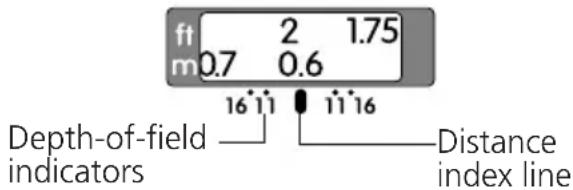
Depth of field
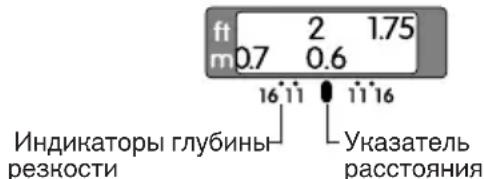
- Approximate depth of field can be determined by checking the depth of field scale.
- If your camera has a depth-of field preview (stop-down) button or lever, depth of field can be previewed through the camera viewfinder.
For more information, see p. 114.
Setting the aperture
Use the camera to adjust the aperture setting.
The built-in flash and vignetting
- The built-in flash cannot be used over distances of less than 0.6m (2.0 ft).
- To prevent vignetting, do not use the lens hood.
- Vignetting is the darkening of the corners around the image that occurs when the light emitted by the flash is obstructed by the lens hood, or lens barrel, depending on the shooting distance.
Using the lens hood
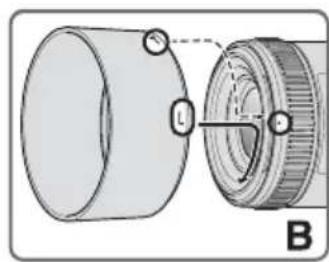
Attaching the hood
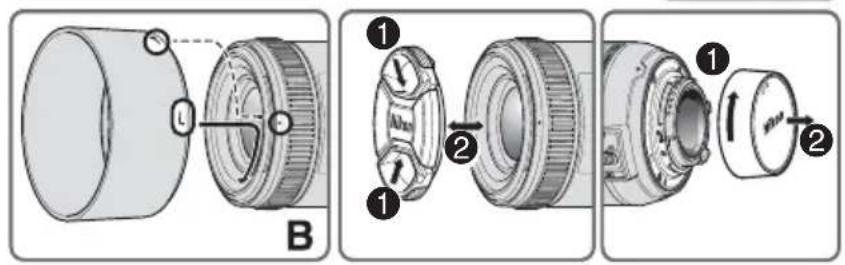
Align the lens hood attachment index ( either of two indexes) ② on the hood with the lens hood mounting index ④ on the lens, and turn the hood counterclockwise (as viewed when holding the camera with the lens facing away from you) until it clicks into place (Fig. B).
-
Be sure that the lens hood mounting index is aligned with the lens hood setting index (-0) ③.
-
If the lens hood is not correctly attached, vignetting may occur.
- To facilitate attachment or removal of the hood, hold it by the base (near the lens hood attachment index) rather than its outer edge.
- To store the lens hood, attach it in the reverse position.
Detaching the hood
Hold the lens hood by the base (near the lens hood attachment index) and turn clockwise, as viewed when holding the camera with the lens facing away from you, to detach.
Recommended focusing screens
Various interchangeable focusing screens are available for certain Nikon SLR cameras to suit any picture-taking situation. The ones recommended for use with this lens are:
| Screen Camera | A | B | C | E | EC-B EC-E | G1 | G2 | G3 | G4 | J | L | M | U |
| F6 | ◎ | ◎ | - | ◎ | - | - | - | - | - | ◎ | ◎ | ||
| F5+DP-30 | ◎ | ◎ | ◎ | ◎ | ◎ | ◎ | ◎ | ◎ | |||||
| F5+DA-30 | ◎ | ◎ | ◎ | ◎ | ◎ | ◎ | ◎ | ◎ |
:Excellent focusing
:Acceptable focusing
Slight vignetting or moiré patterns appear in the viewfinder, but not on the film.
- : Not available
Blank box means not applicable. Since type M screen can be used for both macrophotography at a magnification ratio of 1:1 or above and for photomicrography, it has different applications than other screens.
Important
- For F6 cameras, when using screens other than type B or E, "Other screen" must be selected in Custom Setting. Refer to camera's User's Manual for details.
- For F5 cameras, only EC-B, EC-E, B, E, J, A, L focusing screens are usable in Matrix Metering.
- When using the B and E focusing screens in cameras other than those listed above, refer to the columns for the B and E screens.
Lens care
- Be careful not to allow the CPU contacts (10) to become dirty or damaged.
- If the lens mount rubber gasket ⑨ is damaged, be sure to visit the nearest Nikon-authorized service representative for repair.
-
Clean lens surfaces with a blower brush. To remove dirt and smudges, use a soft, clean cotton cloth or lens tissue moistened with ethanol (alcohol) or lens cleaner. Wipe in a circular motion from the center to outer edge, taking care not to leave traces or touch other parts of the lens.
-
Never use organic solvent such as thinner or benzene to clean the lens.
- NC filters are available to protect the front lens element. The lens hood also helps to protect the front of the lens.
- When storing the lens in its flexible lens pouch, attach both the front and rear lens caps.
- When the lens is mounted on a camera, do not pick up or hold the camera and lens by the lens hood.
- When the lens will not be used for an extended period of time, store it in a cool, dry place to prevent mold and rust. Be sure to store the lens away from direct sunlight or chemicals such as camphor or naphthalene.
- Do not get water on the lens or drop it in water as this will cause it to rust and malfunction.
- Reinforced plastic is used for certain parts of the lens. To avoid damage, never leave the lens in an excessively hot place.
Standard accessories
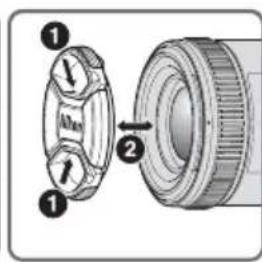
- 58mm snap-on Front Lens Cap LC-58
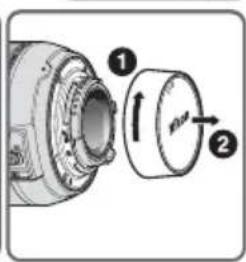
- Rear Lens Cap
- Bayonet Hood HB-47
- Flexible Lens Pouch CL-1013
■ Optional accessory
- 58mm screw-on filters
■ Specifications
Type of lens: G-type AF-S NIKKOR lens with built-in CPU and Nikon bayonet mount
Focal length: 50mm
Maximum aperture: f/1.4
Lens construction: 8 elements in 7 groups
Picture angle: 46^ with 35mm (135) format Nikon film SLR cameras and Nikon FX format digital SLR cameras 31^30^ with Nikon DX format digital SLR cameras 38^ with IX240 system cameras
| Distance information: | Output to camera |
| Focusing: | Autofocus using a Silent Wave Motor; manually via separate focus ring |
| Shooting distance scale: | Graduated in meters and feet from 0.45 m (1.75 ft) to infinity (∞) |
| Closest focusing distance: | 0.45 m (1.5 ft) from focal plane |
| No. of diaphragm blades: | 9 pcs. (rounded) |
| Diaphragm: | Fully automatic |
| Aperture range: | f/1.4 to f/16 |
| Exposure measurement: | Via full-aperture method |
| Attachment size: | 58mm (P = 0.75 mm) |
| Dimensions: | Approx. 73.5 mm dia. x 54 mm (extension from the camera's lens-mount flange) |
Weight: Approx. 280 g (9.9 oz)
Specifications and designs are subject to change without notice or obligation on the part of the manufacturer.
| Einstellscheibe Kamera | A | B | C | E | EC-B EC-E | G1 | G2 | G3 | G4 | J | L | M | U |
| F6 | ◎ | ◎ | - | ◎ | - | - | - | - | - | ◎ | ◎ | ||
| F5+DP-30 | ◎ | ◎ | ◎ | ◎ | ◎ | ◎ | ◎ | ◎ | |||||
| F5+DA-30 | ◎ | ◎ | ◎ | ◎ | ◎ | ◎ | ◎ | ◎ |
| Verre Appareil | A | B | C | E | EC-B EC-E | G1 | G2 | G3 | G4 | J | L | M | U |
| F6 | ◎ | ◎ | — | ◎ | — | — | — | — | — | ◎ | ◎ | ||
| F5+DP-30 | ◎ | ◎ | ◎ | ◎ | ◎ | ◎ | ◎ | ◎ | |||||
| F5+DA-30 | ◎ | ◎ | ◎ | ◎ | ◎ | ◎ | ◎ | ◎ |
| Pantalla Cámara | A | B | C | E | EC-B EC-E | G1 | G2 | G3 | G4 | J | L | M | U |
| F6 | ◎ | ◎ | - | ◎ | - | - | - | - | - | ◎ | ◎ | ||
| F5+DP-30 | ◎ | ◎ | ◎ | ◎ | ◎ | ◎ | ◎ | ◎ | |||||
| F5+DA-30 | ◎ | ◎ | ◎ | ◎ | ◎ | ◎ | ◎ | ◎ |
: Enfoque excellente
O: Enfoque acceptable
| Skärnm Kamera | A | B | C | E | EC-B EC-E | G1 | G2 | G3 | G4 | J | L | M | U |
| F6 | ◎ | ◎ | — | ◎ | — | — | — | — | — | ◎ | ◎ | ||
| F5+DP-30 | ◎ | ◎ | ◎ | ◎ | ◎ | ◎ | ◎ | ◎ | |||||
| F5+DA-30 | ◎ | ◎ | ◎ | ◎ | ◎ | ◎ | ◎ | ◎ |
Utmärkt fokusering
O: Acceptabel fokusering
En latt vinjettering aller moiremonster syns i sokaren, men inte pa filmen.
:Intetillgangligt
I P E D U N P E K J D E H N E
He pa36npaIte foToHamepy
PpIKoCHOBHeH K BHTpeHHM YacTAM FOToKaMepbI NIN ObBeKTbA MoKET PnBBeCTN K NOUyeHIO TpaBM.PeMOHT DOJIKeH IPOIN3BOIDTCBc TOJIbKO KBAJINOuPoBaHNIM CNEUaJINCaTM.B CUYae NOBpeHDeHn KOpNyca FOToKaMepbI NIN ObBeKTbA B pe3yIbTaTe NaDeHn NIN DpyrTO FOPONCweCTBn OTHKIOUHTe CETeBOI 6IOK NITAHN NIN N3BLeEhNTe 6aTaPeIO NDOCTABTe H3dJIne DnI pOBepn B A BTOpNI3OBaHbN B cepBNCbN CEHTP Nikon.
B clyuae HeHcnpaBHocTHn HemeJeHHo BbIKIIOHTe FOtOKaMepy
PnnoBHeHn Dbima Hn Heo6bHOrO 3aNaXa, HcXoJaIero n3
f0ToKamepbHn NObeKTHBa, HEmdJeHNo H3BLeKeHTe 6aTapeH,
CTapaCb He DoNcyTb OKOrOB. PpOdoJIKeHne pa6oTbIC
ycTpOcTBOM MoKET npNBecTH K NOJyueHIO TpaBM. PocJe
H3BLeeHn HbatapeHn OTHJIouEHn ICTOCHNkA NITAHn
DOCTaBbTe H3DeJIne DnI pOBePKn B 6bnKaIshn
ABTOPH3OBAHHb CEPBNCbI cHTp KOMnaHm Nikon.
He noIb3yItec b foToKamepo HnN 06beHTBOM npn HAIuHn B Bo3dyXe IerKOBocJIaMeHIOUxxCra3OB
Pa6Ota c 3JIeKtPOHHbIM O6OpUOBaHnEM npn HauHm B Bo3dYxe IeRHOBCPJIaMeHraIooXcR Ra30B MOKeT pINBECTN K B3pBy NIN noHapy.
He cmoTpHe Ha coIHnce Upe3 06beHTHB NIN BnOINChaTeIb
Ecn CMOTpeb Ha coHnue nIIN dpYnne NCTOCHN INPKORO CBetae3 06BeKTHB INI BNIOONCKaTEJI, TO 3TO MOKeT Bbl3BaTb Heo6paTMoe yxduHHe 3peHn.
XpaHnTe B HeoCTynHom IaIeTeMceTe
PIMHTe Oocble MepbI npedoctoPOHOCTH BO
136exaHHe IOnaDaHnBaTapeN dpyrnx He6oJIbUHX
npedMeTOB DeTmB pot.
CobIouaTe cJeMyoUne MepbI IpeOcTOPOXHOCTN BO BpEmr 3KcIIyaTaunn FOToKaMepbI N O6BeKTHBa
He donyckaIte nonadHnBaObI Ha foToKamepu n o6BeKTnB. HecobJeHne 3tOro Tpe6oBaHnMoKeT npVBecn K noKapy nn nopaaHEnIO 3JIeKTPnuCeKIM TOKOM.
He npnkaaTecb K foToKamepe nn OsbekTHBy MokpbIMnykamH. HecobJIOJeHne 3TOrTO Tpe6oBaHna MOKe TnpBecTuNopaaKeHHIO 3JIeKTPnuCeKN TMOKOM.
- Pn Cbemke C 3aHnHm OCBeueHHe HnPaBnTe ObeKTHBa HA CoJIHcE, a TaKHe He DOnyCKaIe NOnaHaHn COJIHeHOrO CBeta BObeKTHB, TaK KaK 3TO MoKeT PnBecTN K nepepeBy FOToKamepbI n ee Bo3rOpahnIO.
EcnnObeKTHBHe6yETNCNoIb3OBaTbC8B TeueHne IINTeIbHO BVPemEH, PnIKpeNITe NpeDHO 3aHIo KpbIshn OBekTBA H He OCTABNTE ObekTNB IOI pRMBIM COJIHeHbIMI Lyam. HecO6JIIOHe 3TO TcIOBm MOKeT npNBecTN K Bo3rOpAHIO, NocOJIbky ObekTBN MOKeT COcpeDToHTb CoJIHeHbIe LyuHa KaKOM-JI60 JERKOBOCIIaMeHHIOUeMcPipeDMte.
KOMNOHEHTbl
① BLeHda(cTp.56)
② MeTka KpenJIeHnIe 6JIeHdBi (CTp.56)
③ MeTkaФИнкацинБileHдbl(CTp.56)
④ YcTaHOBOUHnMa MeTHKa 6JIeHnIbI (CTp.56)
⑤ΦOKyCnPoBOuHoe KOJIbIcO (CTp.55)
⑥ Μικαλa paacCTOΗΝΑ (CTp. 55)
⑦ YkaaataelpaacCTOHHN (CTp.55)
⑧ YctaHOBOUHAR MetKa
9 Pe3HOBbI ynIOTHnTeIb KpeIeHHa 06BeKTHBa (CTp.57)
10Pa3bEmbl npoceccopa (CTp.57)
11IpeeknOuateBpeKIMOB 0OKyCnPOBKN (CTp.55)
OCHOBHbIE BO3MOXHOCTN
-ДаHHьиобeКTNИнСПОЛБ3yeT6ecWуMHьI BOJHOBOI npINBOD Silent Wave MotorДЯ ynpaBJIeHnMexAHn3MOMФOKCupOBKn,YTO DeJaET nPoUeCC aBTOΦOKCupOBKn PJIaBHbIM, 6ecWyMHbIMи nPaKTnueCKn MROBEHNbIM. PerekJIIOHTeJIpeKIMOBФOKCupOBKn 11 NCNoJIb3YeTcДЯ yO6HOro peKJIIOUeHnR MeHdY aBTOMaTnueeCKm(A)иpyHbIM(M) peKIMAMNФOKCupOBKn.
- Пи Иснольбовань с obeКТИВа c
фотokамерам Nikon c Фуннкциев 3D
цБETOBORO MaTPNCHORO 3aMepa
обеспechиваETСЯОлEE TOUHBI KOHTPOЛь
экноЗИП.N.TAK KaK ДАньIE O PACCTОHIN
do obeKТа NepeDAHOTcC ObeKТИВа Ha
фOTOKamepy.
- CkpyrIeHHaI dnaΦparMa oBecneuBaET 6oJIe KpacINbIe MЯrkIe I HeRcHbIe OeptTaHry Tex Yacte CHIMKa, KOToPbIe HaxOJrTcB HBe ΦOKyCa.
BHHMaHne
-Пи писоедини obeHTBa K uHpOBoN 3epKaIbHoJ FOToKAmpe Nikon φopMaTa DX, HanpImep, K FOToKAmpe cepu D300 n D7000, yroI 3peHnOObeKTHBa CTAHOBNTcpaBBbIM 31^30^ a foKycHoe pacCToRHe (B kHBaJIeHTe Iyra 35MM pJeHOUHO FOToKAmpebl) cTAHOBNTc np6IIN3HTeIbHo paBBbIM 75 MM.
CobmteMbIe foToHaMepbI n DOCTynHbIe yHKcH
IcnoJb3OBAHne IOCTyINhBIX ΦyHKnI N OsbekTnBa MoKeT 6bITb CBaHO C HeKOTOpbIMN orpaHnueHNm. IopPo6HbIE CBeDeHnC M. B pyKOBOdCTBe NOJIb3OBATeJIa FOToKaMepbI.
| Фотонамеры | аВTO-фонуснорвka | Рек imm энcoloимin | |||
| P'1 | S | A | M | ||
| Цфравов зэрпальский с氟огаме Nikon phorma T6/DX | ✓ | ✓ | ✓ | ✓ | ✓ |
| F6, F5, F100, Серия F80, Серия F75, Серия F65, Pronea 600i, Pronea S*2 | ✓ | ✓ | ✓ | ✓ | ✓ |
| Серия F4, F90X, Серия F90, Серия F70 | ✓ | ✓ | ✓ | — | — |
| Серия F60, Серия F55, Серия F50, F-401x, F-401s, F-401 | — | ✓ | ✓ | ✓ | ✓ |
| F-801s, F-801, F-601M | — | ✓ | ✓ | — | — |
| F3AF, F-601, F-501, Камеры Nikon MF (крOME F-601M) | — | — | — | ||
√:Bo3MOxH0 —:HeB03MOxH0
1:Рек imm P bKIOUaet B ce6r peHm AUTO n cIcTeMy C bapnporpaMMo.
2:PyuHoi peHHM (M) HeDooCTyneH.
■Фонус neuropва (pnc. A)
YcTaHOBnTe CeJIeKTop peHIMa FOkCnPOBKn KaMepbI B COOTBeTCTBnC HnKepeBEdHHoTabJInCeI.
ABTOΦOKyCnOBbA C BO3MOxHOCtBIO KoppeKcNn BpyHyI (peKIM M/A)
1 YcTaHOBnTe NepeKJIouaTeIb peKHMOB 0HcyCnPOBKN ① B NOJIOKeHne M/A.
2 BkHueHHa FyHKnA aBTOfOKcnpOBKn OTMeHReTc npn BpaueHN CneuaJIbHOrO KOJIbua fokycnpOBKn ⑤;Pn3TOM cnyckOBa KhoNka 3aTBopa DOnKHa 6bITb HaKaTa HAnoIobHy NIn DoJHHa 6bITb HaKaTa KhoNka AF-ON,ecn Oha IMeETcHa Kopnyce fOToKaMepbl.
3 CHOBA HAnMMTe CnYCHOByIO KHOHky 3aTBopa HanoJOBHy IIN KHOHky AF-ON dIra OTMeHbI pyHOr ΦOKyCnPOBKn IN BO3O6HOBJeHnA BTOΦOKyCnPOBKn.
■Глубина pe3кocтн
- Pnp6n3ntelbHa rIy6nHa pe3KocTOnpeJeHHeTcNo shaene Iy6HbI pe3KocTn.
- Ecni foToKaMepa oChaueHa KhoNkoHnI npbuaKHom npocMoTpa rIy6HHb pe3KoCTn (3aTeMHHeHne), To rIy6Hny pe3KoCTn MOxHO npOBepntb Upe3 BnOOnCKaTeJIb foToKaMepbI.
- DOnoHnTeNbHbIe CBeDeHnIcM. HcTp. 114.
YCTaHOBka DnaΦpaRmbI
Ha foToKamepe MoXHo HacTpOHTb npaMeTpbl dnaΦparMbI.
HcnoIb3ObaHne 6JeHdbI
Ru
PnncoeHHeHne 6IeHdbI
COBMECTNMBETKpeHJIeHHaI(,JIIO6aH3 DBYMeTOK)②HaYCTaHOBOUHOHMeTHe6JeHDbI4Ha 0bEHTNB,NOBOPaUNBaITe6JeHnyIpOTNB YacOBO CTpeJKN(depHaΦOTOKaMepyObeHTNBOmOTce6a) DoNoHONFHKcauHN(pnc.B).
- Y6eHNTecb, YTO yCTaHOBOHnA MeTHKa 6JIeHDbI COBnaJaTe C MeTKoI ΦHKCaunn 6JIeHDbI (-) ③.
- EcIn 6IeHda yCTaHOBHeHa Ha 06bEHTNB HeHaJIeKaUIM O6pa3OM, MOKeT BO3HNKHyTb 3ΦΦeKT BnHbETnpOBAHn.
-ДяоблereHЯ yCTaHOBKn nIN CHTn8 6JIeHbI ydePknBaIte ee 3a OCHOBaHne (pAOM C yCTaHOBOuHoi MeTHoN 6JIeHbI), a He 3a BHeuHIOKpOMHy.
-ДяхраненябileндыпрсоeнгЯite eeвobpaTHOM NOLOKeHHN.
OTcoeHHeHne6IeHbI
YTO6bIOTCOEHNHTb6JeHdy,yDEpHHBaIte ee 3a OCHOBAHNE (PraDM C yCTaHOBOUHO METKOH 6JIeHdbI) NIOBepHnTe NO YACOBO CTpeJIke, yDEpHHBAI FOToKAMepy OBeKTINOM OT Ce6J.
■ PeKOMeHdyeMbIe fOKyCnpoBOOHyBle 3KpaHbl
CmeHHbIe oHycnpoBOOHbIe 3KpaHbI,doCTynHbIE
dIra onpeJeIeHHbIX 3epKaIbHbIX fOToKaMep
Nikon, nomoraOT ocUyecTBnArytB cBeMky
npaKTnueckn B IIO6bIX CNTyaunx.C 3TUM
o6beKTHBOM peKOMeHNdyETcNcNoJIb3OBaTb
cNe dyIOUne oHycnpoBOOHbIe 3KpaHbI.
| ФотOKамер | A | B | C | E | EC-B EC-E | G1 | G2 | G3 | G4 | J | L | M | U |
| F6 | ◎ | ◎ | — | ◎ | — | — | — | — | — | ◎ | ◎ | ||
| F5+DP-30 | ◎ | ◎ | ◎ | ◎ | ◎ | ◎ | ◎ | ◎ | |||||
| F5+DA-30 | ◎ | ◎ | ◎ | ◎ | ◎ | ◎ | ◎ | ◎ |
@: NcklnHouTeIbHOe KaueCTBO KOKyCnPOBKn
O: PnneMleMoE KaueCTBO FOKcnpOBKn He6oJIbUoe BInHbETnPOBaHne NIN Myap MOryT HMeTb MeCTo B BNDoNCHaTeJe, HO He Ha INeHKe.
Heioctynho
IycToe noJe 03Haayet, YTO fokyCnpoBOHbI kpaH nCNoJIb3OBAt b HeJIb3a. NocKoJIbKy 3kpaTtna M MoKeT nCNoJIb3OBAtbc KaK dIa
MaKpocbEMn npu yBeJIuHEnn 1:1 n Bblue, TaK n DnMnKpOΦOTOrpaΦnIpOBaHN, ero npImeHHe OToNHaETcR OT npIMeHHe N dpyrNX 3kpaHOB.
BHHMaHHe
ДяКамерF6 npинспьзовани ekраНов КрOME TINOB BИN E,В ПьзоваTeьСнХ HabТpoих Heo6xOДМо Bbl6paTb «Дpy罗ЗЕкраH».БОлee NOДрбhoe Oпсанe CM.В pyKOBODCTBE NOьзоваTeЯ.
ДяКамерF5cMaTpUHbIM3Kcno3aMepom MOrTyHCNoJIb3OBAtbcraTOJIbHO 0KycuropOBouHbIE3KpaHbEC-B,EC-E,B,E,J, A,L.
-ПиИСЮьЗOBAHINФOKсИРОВЧБIX
эКраНов ТипаВ ИЕ В ФОТКамерх,OTПИЧБIX
OTПИВЕDEHHbIXВТаБЛЦeВыISe,CM.
СтOLБцIДЯЗКрановТипаВИE.
YxOД 3a o6beKTHBOM
- N36eRaIte nonaHaHnra rpa3n Ha KOHTaKtBi CPU 10 INN INX NOBpeKeHdHnA.
B clyae NOBpeJKeHnpe3nHOBOrO yIIOHTHeJI KpeJIeHnOBeKTHBa ⑨ o6paTNTecb K abTOpH3OBAHHOMy cepBnCHOMy CEHTpy Nikon nIN B cepBnCHbI CEHTp IIN PPOBeDEHn peMOHTa.
BbIOpHnIteOuHcTKy NOBepXHOCTN OBeKTHBa npOdyBaHHem BO3dYOM.ДЯ ydaJIeHnI rpr3N I PATEH nCIOJb3yIte MmKHyO, YICHTyIO XIoJIaHTo6MyMaKHaT KHaHb NII pOtnpOCHyIO TKAHb DIA OBeKTHBa, CMOUeHHyO 3TaHOJIom (aJIHOJIeM) NII JIKNHOCTbIO DIA YIcTHKn LInH3. IpOTnpaIte KpyRObbIM DNINKeHnRMAOT
UHTpaK Kpaarm, CTapaCb He OCTaBnTb CNEIOB NIM DOTparrBaTbCn DO npyHnx YacteN ObeHTnBa.
Hikorda He nCnoB3yIte oprAHueckne paCTbOpnteIN nn 6eH30I Jn YNCTKN OBeKtNBa.
-ДязauNTbI nepeHHeJInH3bI obBeKTHBa MOHHO nCIOJIb3OBaTb HeITpaJIbHbIe CBETOΦnJIbTpbl. BJeHda obBeKTHBa TaHKe NOMoAet 3auNTbI nepeHIOU LInH3y obBeKTHBa.
- Pπn xpaHeHm ObbektuB B MmRkOM yexIe CJIeDyET pNkpeNTb nepeHIOU 3aHIOU KpbIiKn OObbektuBa.
He noHnMaIte n He HocHTe oBbEeTHB nIn foToKamepy, depKaacb 3a npNkpeHHeHHyIO 06bEeKTHBy 6JIeHdy.
EcnnobekTNB He 6ydtncnObl3OBaTbCBA TeueHne dInTeIbHO BpeMeHN, XpaHNTe erO BC yXOM, npoxlaHOM MeCTe IJn ppeoTbpauSeHHn OBpa3OBAHn r6ka nnn Koppo3nn. HnkOrda He OCTaJIYte ObekTNB NOB O3DeNCTBnEM NpMbx COJIHeuHbIX LyueHn HE noDBepraHTe erO BO3DeNCTBnIO XIMHKaTOB, HAnpImep KaMΦapNbIX NN HaftaIIINHOBbIX CpeDCTB.
- N36eAte IonoaHa Ha oBbEeKTHB BObl He 6pocaiTe ero B BoDy, TaK KaH 3TO MoKeT CTaTb npuHHoB O3HnKHOBeHn PKaABuHNb IJIH HeNCnPpaBHOCTn.
B HeKOTOpbIX qactx OBeHTnBa nCNoJb3yeTcR IIaCTNKOBbIM MaTePnaI NOBbIWeHHo NpOuHOCtN. IJI npEeOTBpaUeHnIOBpeXdEHNr HNKOrDa He OCTaBIAIte OBeKTNB B MeCTax C NOBbIWeHHo TEMpePaTypoi.
CtahapThbIe npHaJeeHHocTn
| Matglazen Camera | A | B | C | E | EC-B EC-E | G1 | G2 | G3 | G4 | J | L | M | U |
| F6 | ◎ | ◎ | - | ◎ | - | - | - | - | - | ◎ | ◎ | ||
| F5+DP-30 | ◎ | ◎ | ◎ | ◎ | ◎ | ◎ | ◎ | ◎ | |||||
| F5+DA-30 | ◎ | ◎ | ◎ | ◎ | ◎ | ◎ | ◎ | ◎ |
| Fotocamera | Autofocus | Modo di esposizione | |||
| P*1 | S | A | M | ||
| Fotocamera reflex digitali Nikon (formato FX/DX) | ✓ | ✓ | ✓ | ||
| F6, F5, F100, series F80, series F75, series F65, Pronea 600i, Pronea S*2 | ✓ | ✓ | ✓ | ✓ | ✓ |
| Serie F4, F90X, series F90, series F70 | ✓ | ✓ | ✓ | — | — |
| Serie F60, series F55, series F50, F-401x, F-401s, F-401 | — | ✓ | ✓ | ✓ | ✓ |
| F-801s, F-801, F-601M | — | ✓ | ✓ | — | — |
| F3AF, F-601, F-501 Nikon MF fotocamera (tranne F-601M) | — | — | — | ||
| Schermo Fotocamera | A | B | C | E | EC-B EC-E | G1 | G2 | G3 | G4 | J | L | M | U |
| F6 | ◎ | ◎ | - | ◎ | - | - | - | - | - | ◎ | ◎ | ||
| F5+DP-30 | ◎ | ◎ | ◎ | ◎ | ◎ | ◎ | ◎ | ◎ | |||||
| F5+DA-30 | ◎ | ◎ | ◎ | ◎ | ◎ | ◎ | ◎ | ◎ |
Mny KOIATE TOV NIAO MEOW TOU pAKOU T OU OKONETPOU
Eav koitate tov nio n aalec nyeec duvaot o wou paoou n tou ooteutpu uopei va pokn eoioviuon otikn b
Duaooteaikpi a no naia
Aniteiaiiaeepn npoooxn wote va anopeuxoit o Evexoevva baoovu ta uopa oto otou taatapie n aalpa kpa eapntmuata.
Tnpeite tic napakatw npoqulaEic kata to xeiipio tnc wtoypaipikc mxavnc kalou pako
- DiatnpieTe Tn φωτογραφική μχανή και το φακό οτεγώ. H
μη Φροσης autης της προρύλαξης ενέχει κίνδυνο
πιρκayiac ἡλεκτροπληξιac.
Mny xeiipieote kai nvyitee tn wtoypapikn unxavn to paKO Bpeyueva xepia. H mtnponon autnc Tnpoqulaenc evexki kivduvo nEktponlnaic.
Kata tn 尼 nE oniothio ,nO tpepeTe to qako npoc tov nIIO kai mnv apnvteTo qwc tou nIou va 8ianepva aneuthetaiaoc to qako npoc ta katw eIeIoh auto uTOpoei va npokalaeoi Uephepavon Tnc wtoypapiknc uXavnc kai niBavuc tvnpokan npkayic.
Otauovapakocdeva xpnoiiointhetaia npataetapevo xpoviokiaotma,ouvdeote to pnpootivo kai naw kalumpa qakoukai anoynkeovte to qakovakpi ana o aepoo nlaikopwC Hn npnonautnc nnpupuae ntopeva npokaolei npkayia,eneidn o qakoc mnpoei va eotiaoei to qwc tou niou e eva uphiKTO avtikemuvo.
OvopatoLoyia
| 对焦屏照相机 | A | B | C | E | EC-BEC-E | G1 | G2 | G3 | G4 | J | L | M | U |
| F6 | ◎ | ◎ | ◎ | ◎ | ◎ | - | - | - | - | ||||
| F5+DP-30 | ◎ | ◎ | ◎ | ◎ | ◎ | ◎ | ◎ | ◎ | ◎ | ||||
| F5+DA-30 | ◎ | ◎ | ◎ | ◎ | ◎ | ◎ | ◎ | ◎ | ◎ |
| 對焦屏 相機 | A | B | C | E | EC-B EC-E | G1 | G2 | G3 | G4 | J | L | M | U |
| F6 | ◎ | ◎ | - | ◎ | - | - | - | - | - | ◎ | ◎ | ||
| F5+DP-30 | ◎ | ◎ | ◎ | ◎ | ◎ | ◎ | ◎ | ◎ | |||||
| F5+DA-30 | ◎ | ◎ | ◎ | ◎ | ◎ | ◎ | ◎ | ◎ |
@: 最佳對焦
○: 可接受對焦
| Focused distance De | depth of field Reproduction ratio | |||||||
| f/1.4 f/2 f/2.8 f/4 f/5.6 f/8 f/1 | f/5.6 f/8 f/1 | f/16 | ||||||
| 1.75 | 1 ft 8-14/16 in. | 1 ft 8-12/16 in. | 1 ft 8-12/16 in. | 1 ft 8-10/16 in. | 1 ft 8-8/16 in. | 1 ft 8-4/16 in. | 1 ft 7-15/16 in. | 1 ft 7-9/16 in. |
| 1 ft 9-2/16 in. | 1 ft 9-4/16 in. | 1 ft 9-4/16 in. | 1 ft 9-6/16 in. | 1 ft 9-10/16 in. | 1 ft 9-13/16 in. | 1 ft 10-3/16 in. | 1 ft 10-11/16 in. | |
| 2 | 1 ft 11-12/16 in. | 1 ft 11-12/16 in. | 1 ft 11-10/16 in. | 1 ft 11-8/16 in. | 1 ft 11-4/16 in. | 1 ft 10-15/16 in. | 1 ft 10-9/16 in. | 1 ft 10-1/16 in. |
| 2 ft 4/16 in. | 2 ft 4/16 in. | 2 ft 6/16 in. | 2 ft 10/16 in. | 2 ft 13/16 in. | 2 ft 1-3/16 in. | 2 ft 1-11/16 in. | 2 ft 2-6/16 in. | |
| 2.5 | 2 ft 5-10/16 in. | 2 ft 5-8/16 in. | 2 ft 5-6/16 in. | 2 ft 5-3/16 in. | 2 ft 4-13/16 in. | 2 ft 4-5/16 in. | 2 ft 3-12/16 in. | 2 ft 2-14/16 in. |
| 2 ft 6-6/16 in. | 2 ft 6-8/16 in. | 2 ft 6-10/16 in. | 2 ft 6-15/16 in. | 2 ft 7-5/16 in. | 2 ft 7-15/16 in. | 2 ft 8-14/16 in. | 2 ft 10-3/16 in. | |
| 3 | 2 ft 11-8/16 in. | 2 ft 11-4/16 in. | 2 ft 11-1/16 in. | 2 ft 10-11/16 in. | 2 ft 10-3/16 in. | 2 ft 9-8/16 in. | 2 ft 8-8/16 in. | 2 ft 7-5/16 in. |
| 3 ft 8/16 in. | 3 ft 12/16 in. | 3 ft 15/16 in. | 3 ft 1-7/16 in. | 3 ft 2-1/16 in. | 3 ft 3 in. | 3 ft 4-5/16 in. | 3 ft 6-10/16 in. | |
| 4 | 3 ft 11-1/16 in. | 3 ft 10-13/16 in. | 3 ft 10-5/16 in. | 3 ft 9-10/16 in. | 3 ft 8-10/16 in. | 3 ft 7-7/16 in. | 3 ft 5-14/16 in. | 3 ft 3-12/16 in. |
| 4 ft 15/16 in. | 4 ft 1-5/16 in. | 4 ft 1-15/16 in. | 4 ft 2-12/16 in. | 4 ft 3-15/16 in. | 4 ft 5-12/16 in. | 4 ft 8-10/16 in. | 5 ft 1-3/16 in. | |
| 7 | 6 ft 9-2/16 in. | 6 ft 8-1/16 in. | 6 ft 6-10/16 in. | 6 ft 4-7/16 in. | 6 ft 1-13/16 in. | 5 ft 10-5/16 in. | 5 ft 5-14/16 in. | 5 ft 10/16 in. |
| 7 ft 3-2/16 in. | 7 ft 4-5/16 in. | 7 ft 6-6/16 in. | 7 ft 9-4/16 in. | 8 ft 1-11/16 in. | 8 ft 9 in. | 9 ft 9-4/16 in. | 11 ft 8-14/16 in. | |
| 20 | 18 ft 12/16 in. | 17 ft 5-1/16 in. | 16 ft 6-10/16 in. | 15 ft 5-4/16 in. | 14 ft 1-7/16 in. | 12 ft 7-1/16 in. | 10 ft 11-4/16 in. | 9 ft 2-14/16 in. |
| 22 ft 5-1/16 in. | 23 ft 6 in. | 25 ft 3-15/16 in. | 28 ft 6-4/16 in. | 34 ft 7-7/16 in. | 50 ft 1-3/16 in. | 136 ft 2-6/16 in. | 1/116.3 | |
| ∞ | 180 ft 9 in. | 131 ft 2-6/16 in. | 93 ft 2-4/16 in. | 65 ft 9-13/16 in. | 46 ft 9-8/16 in. | 33 ft 1-1/16 in. | 23 ft 6-2/16 in. | 1/∞ |
| ∞ | ∞ | ∞ | ∞ | ∞ | ∞ | ∞ | ∞ | |
Nikon
No reproduction in any form of this manual, in whole or in part (except for brief quotation in critical articles or reviews), may be made without written authorization from NIKON CORPORATION.
NIKON CORPORATION
Printed in China
© 2008 Nikon Corporation

TT5A02(D9) 7MAA56D9-02




