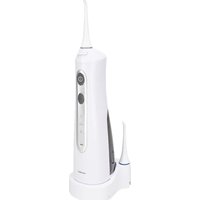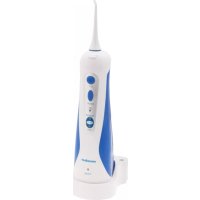
NMD 3.7 A1 - Interdental brush NEVADENT - Free user manual and instructions
Find the device manual for free NMD 3.7 A1 NEVADENT in PDF.



| Technical Features | NEVADENT NMD 3.7 A1 interdental brush, size A1, designed for effective cleaning between teeth. |
|---|---|
| Usage | Ideal for daily oral hygiene, recommended for narrow interdental spaces. |
| Maintenance and Repair | Rinse the brush after each use, replace regularly to ensure optimal effectiveness. |
| Safety | Use with caution to avoid gum injuries. Do not force insertion into interdental spaces. |
| General Information | Product available in multiple sizes, compatible with denture wearers. Check the appropriate size before purchase. |
Frequently Asked Questions - NMD 3.7 A1 NEVADENT
User questions about NMD 3.7 A1 NEVADENT
0 question about this device. Answer the ones you know or ask your own.
Ask a new question about this device
Download the instructions for your Interdental brush in PDF format for free! Find your manual NMD 3.7 A1 - NEVADENT and take your electronic device back in hand. On this page are published all the documents necessary for the use of your device. NMD 3.7 A1 by NEVADENT.
USER MANUAL NMD 3.7 A1 NEVADENT
WATER JET FLOSSER NMD 3.7 A1
GB IE
WATER JET FLOSSER
Operating instructions
FR BE
HYDROPULSEUR
Mode d'emploi
DE AT CH
MUNDDUSCHE
Bedienungsanleitung
DK
MUNDSKYLLEAPPARAT
Before reading, unfold the page containing the illustrations and familiarise yourself with all functions of the device.
DK
GB/IE Operating instructions Page 1
| DK | Befjeningsvejledning | Side | 15 |
| FR/BE | Mode d'emploi Page 29 | ||
| NL/BE | Gebruiksaanwijzing Pgina 43 | ||
| DE/AT/CH | Bedienungsanleitung Seite 57 |
Contents
Introduction 2
Intended use 2
Package contents 2
Appliance description 3
Technical details 3
Safety information 4
Set-up/wall bracket 5
Charging the appliance 6
Filling the water tank 6
Fitting/removing attachments 7
Before first use 7
Power levels 8
Using the appliance 9
After use 10
Cleaning and Care 1
Disposal 12
Kompernass Handels GmbH warranty 12
Service 14
Importer 14
Introduction
Congratulations on the purchase of your new appliance.
You have selected a high-quality product. The operating instructions are part of this product. They contain important information about safety, usage and disposal. Before using the product, please familiarise yourself with all operating and safety instructions. Use the product only as described and for the range of applications specified. Please also pass these operating instructions on to any future owner.
Intended use
This appliance is intended exclusively for personal dental care at home. This appliance is intended solely for use in private households. The appliance is not intended for use in industrial or medical environments. It is not suitable for animal care. Do not use it for commercial purposes.
Package contents
Hand element with water tank
2 attachments
Charger
2 screws
2 wall plugs
Operating instructions
NOTE
- Check the package for completeness and signs of visible damage.
If the delivery is incomplete or damage has occurred as a result of defective packaging or during transport, contact the Service hotline (see section Service).
Appliance description
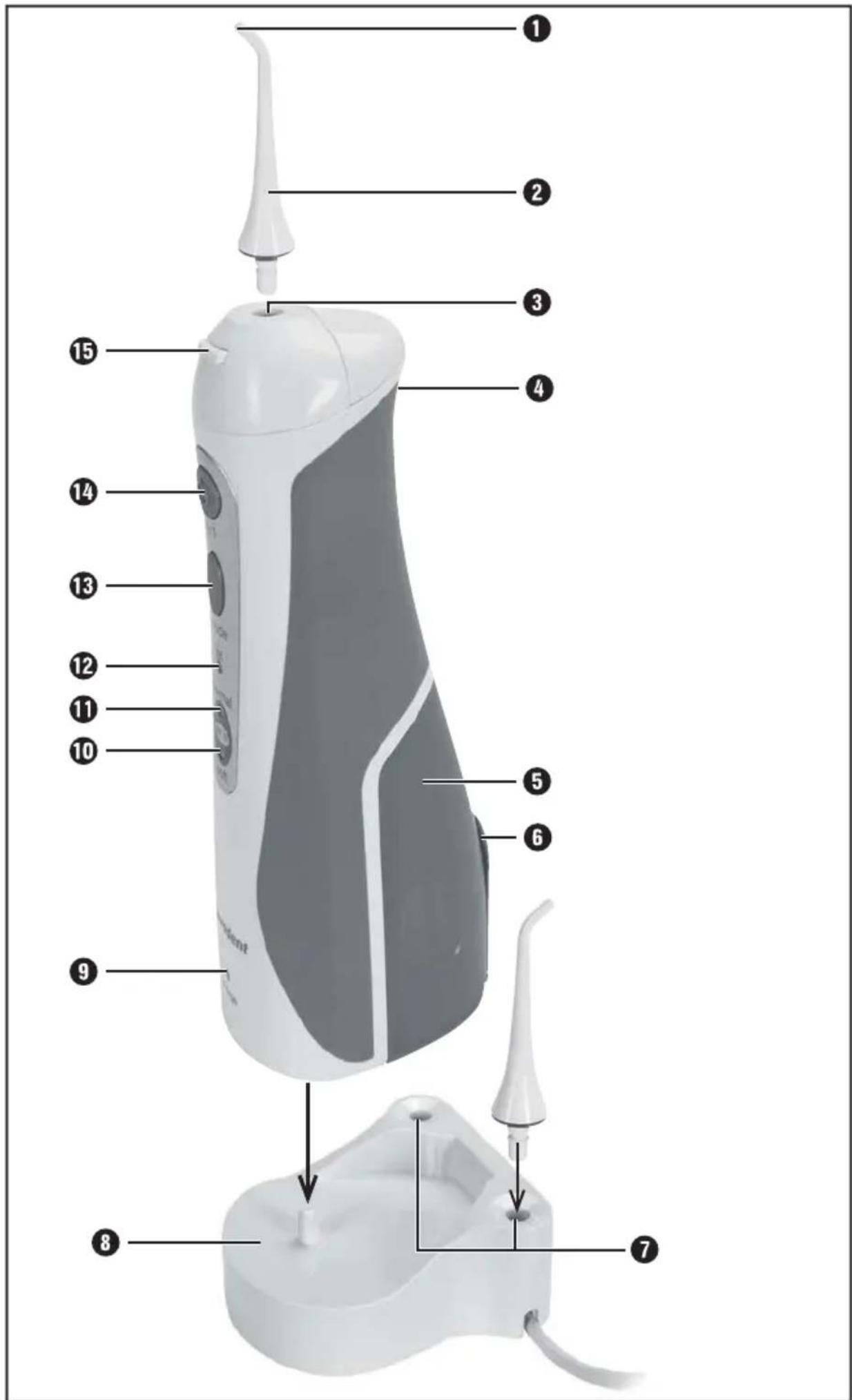
1 Nozzle
Attachment
3 Attachment fitting
Air supply slit
5 Water tank
Water tank filler opening
7 Recesses for attachments
Charger
Charge indicator
"soft" control lamp
"normal" control lamp
12 "jet" control lamp
13 "mode" button
14 On/Off button
15 Release button
Technical details
| Charger | |
| Voltage supply 100 - 240 V | ~ | 50 / 60 Hz |
| Power consumption 3.5 W | |
| Protection class IPX 7 | |
| Appliance | |
| Rechargeable battery 3.7 V / 800 mAh / Li-ion battery | |
| Pump frequency 1400 pulses / minute | |
| Pressure with "jet stream" 5.9 bar | |
| Pressure with "normal" 3.9 bar | |
| Pressure with "Soft stream" 2 bar | |
| Water tank volume 130 ml | |
| Protection class IPX 4 | |
Safety information

DANGER - RISK OF ELECTRICAL SHOCK!
- To avoid damage, do not allow liquids to enter the appliance and do not submerge it in water.
Ensure that no foreign objects enter the appliance.
In the event of malfunctions or obvious damage, please contact our Customer Service department. - Ensure that the power cable can never become wet or damp during operation. Route the power cable in such a way that it cannot become trapped or damaged in any other way. Danger of electric shock!
The mains cable of this appliance cannot be replaced. If the cable is damaged, the whole appliance must be scrapped. - Never touch the charger if it has fallen into water. Remove the plug from the wall socket first! Danger of electric shock!

Do not submerge the handset or the charger in water or other liquids.
WARNING - RISK OF INJURY!
- Oral irrigators may be used by children over the age of 8 and by persons with reduced physical, sensory or mental capabilities or lack of experience and/or knowledge if they are supervised.
- Cleaning and user maintenance should not be carried out by children unless they are under supervision.
Do not allow children to use the appliance as a plaything.
CAUTION - PROPERTY DAMAGE!
- Charge the appliance only with the supplied charger.
The oral irrigator may only be used with cold or warm water. Do not use any chemical substances or other solutions.
Set-up/wall bracket
NOTE
The charger 8 may only be operated free-standing if used in dry rooms. Place the charger 8 on a flat surface.
In damp rooms, especially in the vicinity of water (bath), the charger must be firmly fixed to the wall to protect it from falling into water.
1) Make sure that there are no electric cables, wires or pipes running behind the wall surface where you plan to hang the charger 8.
2) Mark two drill holes on the wall 3.2cm apart and drill the marked holes with a 5mm bit. Check to ensure that there is a mains power socket in the immediate vicinity.
3) Push the supplied wall plugs into the holes and screw in the screws so that the screw heads and around 3mm of the neck of the screws still protrude from the hole.
4) Feed the cable through one of the recesses on the side of the charger 8, depending on which side the plug socket is located.
5) Push the charger onto the screws so that the screws protrude through the holes on the charger. Then push the charger downwards so that the screws slide into the rails and the charger sits firmly.
Charging the appliance
NOTE
Before starting to use the appliance, check that it is in fault-free condition. You must not use the appliance if it has any faults.
1) Insert the power plug into the socket.
NOTE
Charge the appliance only when there is no water in the water tank 5.
2) Place the handset on the charger 8 so that it slides onto the pin on the charger 8.
3) Allow the handset to charge for approximately 15 hours before using it for the first time. The charge indicator on the front of the handset lights up red during the charging process. When the battery is fully charged, the charge indicator lights up green.
4) You can now leave the handset on the charger ⑧ after every use, so as to always have full power available.
NOTE
In the following cases, the appliance must be charged for at least 15 hours:
Before first use.
-If the battery has been drained during use.
If you have not used the appliance for more than 3 months.
Filling the water tank
CAUTION - PROPERTY DAMAGE!
- Fill the water tank ⑤ only with tap water. Do not add any mouthwash or other liquids. These could damage the tubing and the appliance.
- Fill only with water up to a max. temperature of 40^ .
You can fill/top up the water tank 5 at any time:
1) Take the handset with the attached empty water tank 5 from the charger 8.
2) Open the water tank lid and fill the tank with water through the filler opening 6.
3) Close the water tank lid.
NOTE
Do not charge the appliance if there is water in the water tank 5.
Fitting/removing attachments
To fit an attachment 2 to the handset, push it into the attachment fitting 3 and press the attachment 2 downwards so that it clicks into place.
To remove an attachment 2 from the handset, press the release button 15 and pull the attachment 2 upwards off the appliance.
NOTE
To order new attachments 2, please contact the service department (see section "Service"). Have the IAN number of this appliance to hand. You will find the IAN number on the front page of these operating instructions as well as directly under the service addresses and on the type plate of the appliance.
-
You can also use the replacement nozzles for Panasonic® oral irrigators (model EW 1211 W).
Panasonic is a registered trademark of the Panasonic Corporation. -
Attachments ② that are not in use can be placed in one of the recesses ⑦ on the charger ⑧.
Before first use
1) Rinse the attachments 2 in clean water. One attachment 2 can be placed into one of the recesses 7 on the charger 8. Fit the other attachment 2 onto the handset.
2) Pull the water tank ⑤ downwards off the appliance and rinse the water tank ⑤ in clean water.
3) Push the water tank ⑤ back onto the appliance. Ensure that the supply tube is in the water tank ⑤.
4) Fill the water tank 5 as described in the section "Filling the water tank".
5) Hold the handset so that the nozzle 1 is pointing into the wash basin. However, do not tip the hand set too far, otherwise the supply tube will no longer be able to reach the water or water will leak from the air supply slit 4.
6) Press the On/Off button 14. The appliance starts pumping and spraying water. Allow the appliance to run for approximately 15 seconds so that all the internal lines are flushed.
7) Press the On/Off button 14 to switch off the appliance.
You can now use the appliance.
Power levels
This oral irrigator has 3 different power levels:
"jet": powerful water jet, "jet" control lamp 12 lights up. For cleaning left over food from your interdental spaces.
- "normal": water mixed with air, "normal" control lamp ⑩ lights up. For cleaning left over food from your interdental spaces, massaging your gums, for rinsing between teeth and gums.
- "soft": water jet mixed with a lot of air, "soft" control lamp 10 lights up. For gently massaging the gums.
NOTE
If the appliance was completely discharged during the last use, always start on the power level "jet".
Press the "mode" button 13 repeatedly until the desired power level is set.
Press the On/Off button 14. The appliance starts with the set power level.
To switch the oral irrigator off, press the On/Off button 14 once again.
Using the appliance
WARNING!
The unfamiliar stimulation may cause light gum bleeding at first. This is normal. If this happens, use a less intensive power level, for instance "normal". If the gum bleeding continues for more than two weeks, you should consult your dentist.
NOTE
- Ensure that you do not cover the air supply slit ④ on the rear side of the appliance during use.
If you hold the appliance at an excessive angle during use, water may leak from the air supply slit.
1) Fill the water tank 5.
2) Place the attachment 2 on the handset.
3) Use the "mode" button 13 to select the desired power level.
4) Place the attachment 2 in your mouth to prevent spray. Bend over the wash basin and hold the appliance as upright as possible. Direct the nozzle 1 of the attachment 2 towards your teeth/interdental spaces.
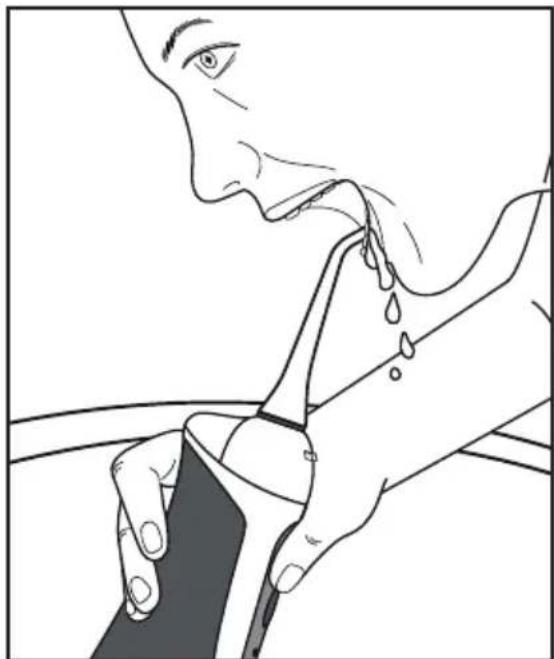
5) Press the On/Off button 14 to switch on the appliance. Close your mouth a little to prevent water from spraying around.
6) Depending on the desired effect, guide the nozzle 1 of the attachment 2 slowly from one interdental space to the next or over your gums to massage them. The length of the process will depend on the how much cleaning the interdental spaces require. Continue cleaning until your teeth feel clean. When massaging your gums, continue as long as the massage feels pleasant.
NOTE
The water in the water tank is enough for about 35 seconds of use.
If the water in the water tank 5 runs out during use, stop the appliance, take it out of your mouth and fill the water tank 5 through the filler opening 6.
A fully charged battery is enough for about 15 minutes of use.
7) When you are finished, press the On/Off button to switch off the appliance.
8) Only then should you take the attachment ② out of your mouth and rinse it under clean, running water.
After use
NOTE
Always empty the water tank 5 and all tubes after every use to prevent the build-up of germ or contaminants.
When the appliance is switched off and you have finished the treatment:
1) Open the water tank lid with the attachment 2 still fitted and pour out the rest of the water.
2) Close the water tank lid.
3) Switch the appliance on for a couple of seconds, to flush any remaining water from the water tank 5.
4) Remove the attachment 2 from the handset and place it in the recess 1 on the charger 8.
5) Place the handset on the charger 8.
Cleaning and Care

DANGER - RISK OF ELECTRICAL SHOCK!
Always remove the plug of the charger 8 from the power socket before cleaning the appliance! There is a risk of electric shock!

Do not immerse the handset or the charger 8 in water or other liquids.
CAUTION - PROPERTY DAMAGE!
- Never open the housing of the charger ⑧ or the handset! They cannot be resealed in a watertight manner.
Do not use aggressive, acidic, abrasive or chemical cleaning agents.
Clean the charger 3 only with a soft, lightly moistened cloth. Do not use detergents or solvents. They can damage the plastic surfaces.
Remove the attachment 2 from the handset. After use, clean the attachments 2 thoroughly under running water.
To clean the handset, remove the water tank 5 and wipe off the handset with a damp cloth. For more stubborn dirt, add a little detergent to the cloth and rinse it off afterwards with a cloth dampened with clean water. Dry off the handset with a cloth.
Rinse out the water tank 5 with clear water. After cleaning, pour out all of the water from the water tank 5. If you are not using the appliance for over a week, leave the water tank 5 open to ensure it can dry fully.
Disposal
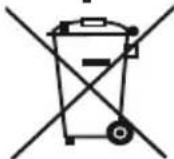
Never dispose of the appliance in your normal domestic waste. This product is subject to the provisions of European Directive 2012/19/EU.
Dispose of the appliance via an approved disposal company or your municipal waste facility. Please comply with all applicable regulations. Please contact your waste disposal centre if you are in any doubt.
NOTE
The integrated rechargeable battery in this appliance cannot be removed for disposal.

The packaging is made from environmentally friendly material and can be disposed of at your local recycling plant.
This appliance is provided with a 3-year warranty valid from the date of purchase. In the event that this product has any faulty, you, the buyer, have certain statutory rights. Your statutory rights are not restricted in any way by the warranty described below.
Warranty conditions
The validity period of the warranty starts from the date of purchase. Please keep your original receipt in a safe place. This document will be required as proof of purchase.
If any material or production fault occurs within three years of the date of purchase of the product, we will at our discretion either repair or replace the product for you. This warranty service is dependent on you presenting the defective appliance and the proof of purchase (till receipt) and a short written description of what the fault is and when it happened.
If the defect is covered by the warranty, your product will either be repaired or replaced by us. The repair or replacement of a product does not signify the beginning of a new warranty period.
Warranty period and statutory claims for defects
The warranty period is not prolonged by repairs effected under the warranty. This also applies to replaced and repaired components. Any damage and defects present at the time of purchase must be reported immediately after unpacking. Repairs carried out after expiry of the warranty period shall be subject to a fee.
Scope of the warranty
This appliance has been manufactured according to strict quality guidelines and inspected meticulously prior to delivery.
The warranty covers material faults or production faults. The warranty does not extend to product parts subject to normal wear and tear or for fragile parts such as switches, batteries, baking moulds or parts made of glass.
The warranty does not apply if the product has been damaged, improperly used or improperly maintained. The directions in the operating instructions for the product regarding proper use of the product are to be strictly followed. Uses and actions that are discouraged in the operating instructions or which are warned against must be avoided.
This product is intended solely for private use and not for commercial purposes. The warranty shall be deemed void in cases of misuse or improper handling, use of force and modifications/repairs which have not been carried out by one of our authorised Service centres.
Warranty claim procedure
To ensure quick processing of your case, please observe the following instructions:
- Please have the till receipt and the item number (e.g. IAN 12345) available as proof of purchase.
- You will find the item number on the type plate, an engraving, on the front page of the instructions (below left) or as a sticker on the rear or bottom of the appliance.
- If functional or other defects occur, please contact the service department listed either by telephone or by e-mail.
- You can return a defective product to us free of charge to the service address that will be provided to you. Ensure that you enclose the proof of purchase (till receipt) and information about what the defect is and when it occurred.
You can download these instructions along with many other manuals, product videos and software on www.lidl-service.com.
Service
GB Service Great Britain
Tel.: 0871 5000 720 (£ 0.10/Min.)
E-Mail: kompernass@lidl.co.uk
IE Service Ireland
Tel.: 1890 930 034
(0,08 EUR/Min., (peak))
(0,06 EUR/Min., (off peak))
E-Mail: kompernass@lidl.ie
IAN 275966
Importer
Please note that the following address is not the service address. Please use the service address provided in the operating instructions.
KOMPERNASS HANDELS GMBH
BURGSTRASSE 21
44867 BOCHUM
GERMANY
www.kompernass.com
Indholdsfortegnelse
Indledning 16
KOMPERNASS HANDELS GMBH
BURGSTRASSE 21
44867 BOCHUM
GERMANY
www.kompernass.com
Table des matieres
Introduction 30
Chere cliente, cher client,
KOMPERNASS HANDELS GMBH
BURGSTRASSE 21
44867 BOCHUM
GERMANY
www.kompernass.com
Inhoud
Inleiding 44
WAARSCHUWING - LETSELGEVAAR!
KOMPERNASS HANDELS GMBH
BURGSTRASSE 21
44867 BOCHUM
GERMANY
www.kompernass.com
Inhaltsverzeichnis
Einleitung 58
KOMPERNASS HANDELS GMBH
BURGSTRASSE 21
44867 BOCHUM
GERMANY
www.kompernass.com
KOMPERNASS HANDELS GMBH
BURGSTRASSE 21
44867 BOCHUM
DEUTSCHLAND/GERMANY
www.kompernass.com
Last Information Update · Tilstand af information · Version des informations
Stand van de informatie · Stand der Informationen:
05/2016-Ident.-No.:NMD3.7A1-022016-3