
RFD10EB - Radio PANASONIC - Free user manual and instructions
Find the device manual for free RFD10EB PANASONIC in PDF.
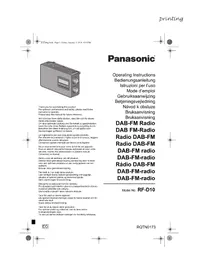


| Product type | DAB+/FM Radio |
| Brand | Panasonic |
| Model | RFD10EB |
| Power supply | Mains (cord supplied) or 4 R14/LR14 batteries (not supplied) |
| Weight with batteries | 1.3 kg |
| Weight without batteries | 1.0 kg |
| FM frequency range | 87.50 - 108.00 MHz (50 kHz step) |
| DAB/DAB+ frequency range | Band III (5A to 13F) |
| Number of presets | 10 stations (FM and DAB) |
| Output power | 2 W RMS (10% THD) |
| Speaker | Full range 10 cm (4 Ω), mono, not magnetically shielded |
| Headphone jack | Stereo 3.5 mm (16 Ω) |
| Antenna | Telescopic, adjustable in length and orientation |
| Display | LCD screen with adjustable backlight |
| Battery life (FM) | Approximately 30 h (alkaline LR14) / 9 h (manganese R14) |
| Battery life (DAB/DAB+) | Approximately 40 h (alkaline LR14) / 12 h (manganese R14) |
| Maintenance and cleaning | Wipe with a soft, dry cloth. Do not use solvents or abrasive products. |
| Safety | Do not expose to moisture, dripping or splashing. Do not open the case. Use only recommended accessories. Refer repairs to a qualified technician. |
| Spare parts and repairability | In case of problem, contact an authorized after-sales service. Do not attempt to repair yourself. |
| General information | Operating temperature: 0°C to +40°C. Humidity: 35% to 80% RH (without condensation). Power consumption in standby: approx. 0.6 W. |
Frequently Asked Questions - RFD10EB PANASONIC
User questions about RFD10EB PANASONIC
0 question about this device. Answer the ones you know or ask your own.
Ask a new question about this device
Download the instructions for your Radio in PDF format for free! Find your manual RFD10EB - PANASONIC and take your electronic device back in hand. On this page are published all the documents necessary for the use of your device. RFD10EB by PANASONIC.
USER MANUAL RFD10EB PANASONIC
rf-d10eg.book Page 1 Friday, January 3, 2014 4:54 PM
Thank you for purchasing this product.
For optimum performance and safety, please read these instructions carefully.
Please keep this manual for future reference.
Operating Instructions
Bedienungsanleitung
- To reduce the risk of fire, electric shock or product damage,
- Do not expose this unit to rain, moisture, dripping or splashing.
- Do not place objects filled with liquids, such as vases, on this unit.
- Use only the recommended accessories.
- Do not remove covers.
- Do not repair this unit by yourself. Refer servicing to qualified service personnel.
AC mains lead
- The mains plug is the disconnecting device. Install this unit so that the mains plug can be unplugged from the socket outlet immediately.
CAUTION!
Unit
- This unit may receive radio interference caused by mobile telephones during use. If such interference occurs, please increase separation between this unit and the mobile telephone.
Battery
- Danger of explosion if battery is incorrectly replaced. Replace only with the type recommended by the manufacturer.
- When disposing the batteries, please contact your local authorities or dealer and ask for the correct method of disposal.
- Do not heat or expose to flame.
- Do not leave the battery(ies) in a car exposed to direct sunlight for a long period of time with doors and windows closed.
- Do not break open or short-circuit the battery.
- Do not charge the alkaline or manganese battery.
- Do not use the battery if the cover has peeled off.
- Remove the battery if you do not use the unit for a long period of time or if the unit is to be powered exclusively by AC power. Keep in a cool, dark area.
Small objects
- The knobs (e.g., [VOLUME] knob) can come off when pulled hard. To prevent children from swallowing the knob, do not pull it off.
Supplied accessories
Check and identify the supplied accessories.
□ 1 AC mains lead
Table of contents
Safety precautions.... 2
Supplied accessories 2
Overview of controls 3
Power sources. 4
Getting started. 4
DAB 4
FM radio....5
System settings....6
Troubleshooting....6
Specifications 7
This product incorporates the following software:
(1) The software developed independently by or for Panasonic Corporation,
(2) The software owned by third party and licensed to Panasonic Corporation, and/or
(3) Open source software
The software categorized as (3) is distributed in the hope that it will be useful, but WITHOUT ANY WARRANTY, without even the implied warranty of MERCHANTABILITY or FITNESS FOR A PARTICULAR PURPOSE. Please refer to the detailed terms and conditions thereof shown below.
This software is copyright 2008 Simon Tatham.
Permission is hereby granted, free of charge, to any person obtaining a copy of this software and associated documentation files (the "Software"), to deal in the Software without restriction, including without limitation the rights to use, copy, modify, merge, publish, distribute, sublicense, and/or sell copies of the Software, and to permit persons to whom the Software is furnished to do so, subject to the following conditions:
The above copyright notice and this permission notice shall be included in all copies or substantial portions of the Software.
THE SOFTWARE IS PROVIDED "AS IS", WITHOUT WARRANTY OF ANY KIND, EXPRESS OR IMPLIED, INCLUDING BUT NOT LIMITED TO THE WARRANTIES OF MERCHANTABILITY, FITNESS FOR A PARTICULAR PURPOSE AND NONINFRINGEMENT. IN NO EVENT SHALL THE COPYRIGHT HOLDERS BE LIABLE FOR ANY CLAIM, DAMAGES OR OTHER LIABILITY, WHETHER IN AN ACTION OF CONTRACT, TORT OR OTHERWISE, ARISING FROM, OUT OF OR IN CONNECTION WITH THE SOFTWARE OR THE USE OR OTHER DEALINGS IN THE SOFTWARE.






rf-d10eg.book Page 3 Friday, January 3, 2014 4:54 PM
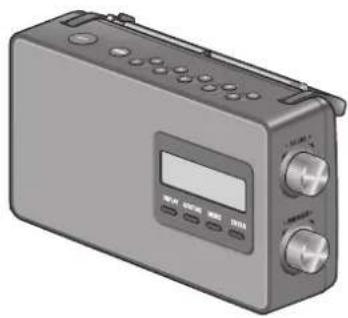
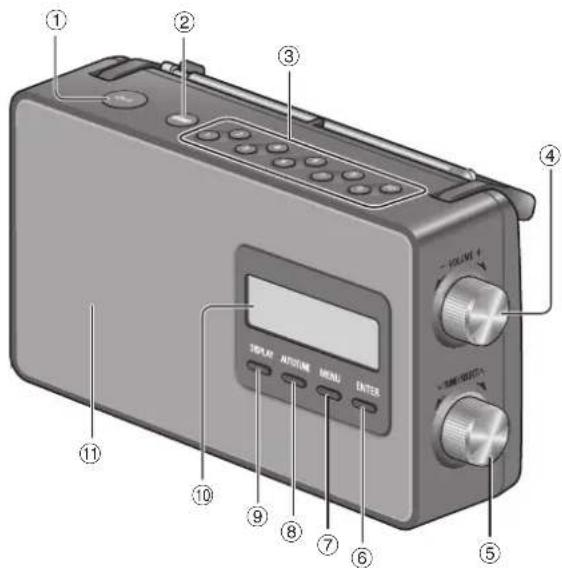
Overview of controls
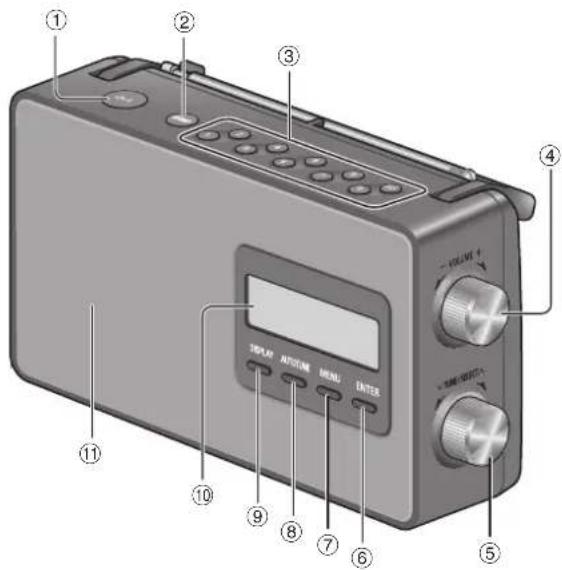
Front view
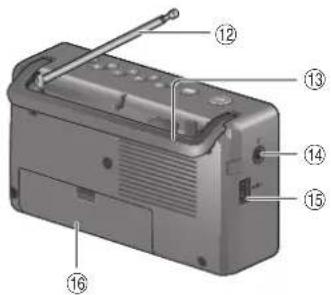
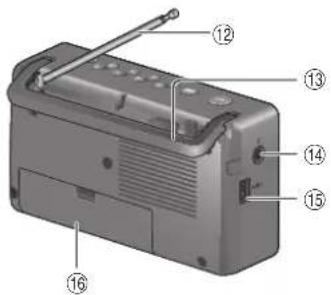
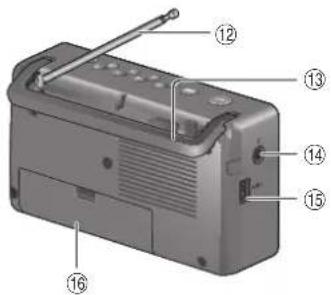
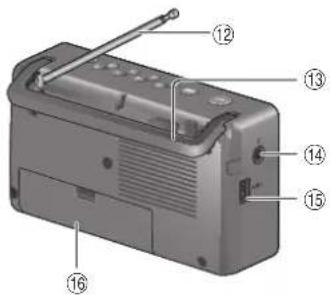
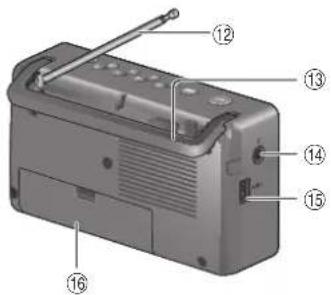
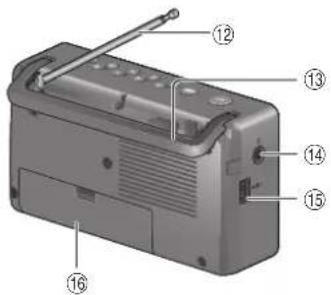
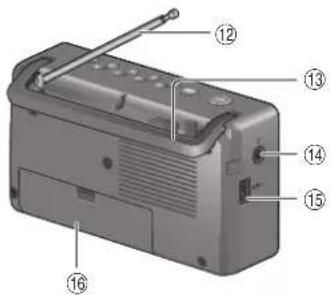
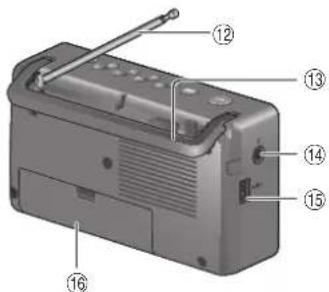
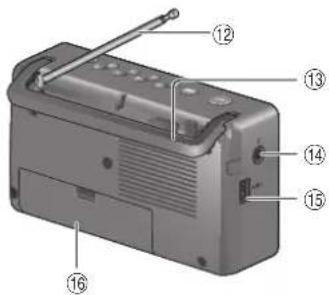
Rear view
ENGLISH
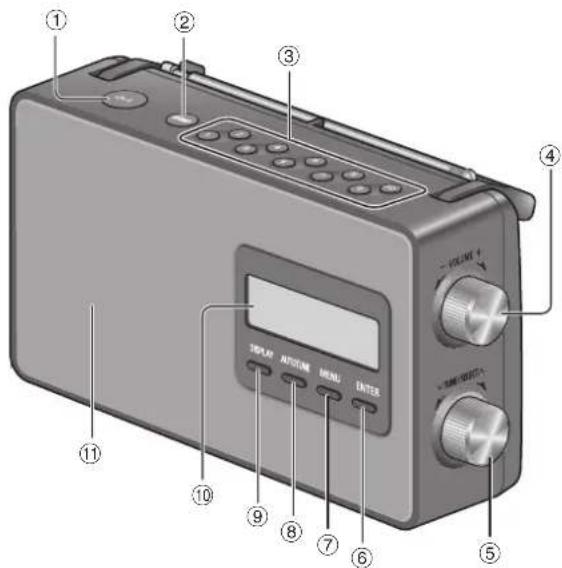
① Standby/on switch [☐/I]
Press to switch the unit from on to standby mode or vice versa. In standby mode, the unit is still consuming a small amount of power.
②Select FM or DAB radio
③Direct preset buttons
④Adjust the volume
⑤Select desired frequency in manual tuning
View available options
⑥Confirm an option
⑦View available menu
⑧Auto tuning for FM stations
⑨View available information
⑩ Display panel
⑪Speaker (monaural)
The speaker does not have magnetic shielding. Do not put this unit near TVs, PCs or other equipment easily influenced by magnetism.
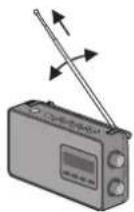
⑫Antenna Extend the antenna, adjust the length, angle and direction for best reception.
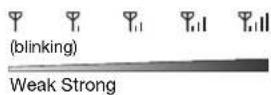
Signal strength indicator
⑬Handle ⑭Headphones jack
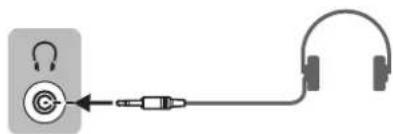
Plug type: ∅ 3.5 mm stereo (not supplied) - Excessive sound pressure from earphones and headphones can cause hearing loss. - Listening at full volume for long periods may damage the user's ears.
⑮ AC IN terminal ⑯ Battery compartment
3 ROTND175




rf-d10eg.book Page 4 Friday, January 3, 2014 4:54 PM


Power sources
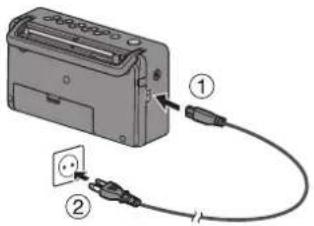
Using the household mains socket
Connect the AC mains lead firmly to the unit and the household mains socket.
Note:
- Do not use an AC mains lead from other equipment.
- This unit consumes a small amount of power when it is in standby mode. Disconnect the power supply if you do not use the unit.
Using the batteries (not supplied)
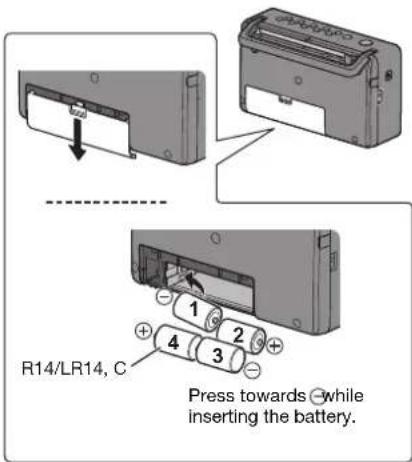
Use alkaline or manganese batteries.
Install the batteries so that the poles (+ and -) align with those in the unit.
This unit will use the batteries as the power source when you disconnect the AC mains lead. The battery indicator will light up.
The battery indicator shows the battery levels.
Ⓦ → Ⓦ → I →
Note:
• The unit switches on after you insert the batteries.
- When the battery indicator " begins flashing, replace all 4 of the batteries.
• After the battery indicator flashes for 10 seconds, the unit will switch off automatically.
Getting started
1 Extend the antenna.
2 Press [ðv] to switch on the unit.
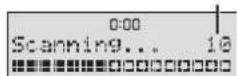
The first time you switch on the unit, it will enter DAB mode and automatically scan for stations. It sets the time and date (if data is available) and starts playing the first station it finds.
Number of stations found
Note:
In standby mode, the unit shows the time and date (only when the unit is powered by AC).
DAB
DAB (Digital Audio Broadcasting) is a procedure of broadcasting the radio digitally. It gives less interference and better sound quality.
This unit supports DAB in "BAND III" bands.
DAB operation
The first time you enter DAB mode, or if the station list is empty, the unit will start the full scan and memorise the stations.
You can perform the full scan procedure when there is a new station or a station becomes available.
1 Press [BAND] to select "DAB".
2Press [MENU] to select "Full scan" and then press [ENTER] to start full scan. To cancel, press [MENU].
Remove unavailable listed stations
This unit indicates those stations that are closed or no longer available with a question mark in front of the station name. You can remove these stations from the station list.
1 Press [MENU] and then turn [TUNE/SELECT] to select "Prune".
2Press [ENTER].
3Turn [ TUNE/SELECT ] to select "Yes" and then press [ENTER].
To cancel, select "No".







rf-d10eg.book Page 5 Friday, January 3, 2014 4:54 PM
Listening to a station
1 Turn [ TUNE/SELECT ] to select a station from the station list.
2Press [ENTER] to tune to the selected station.
Note:
indicates a secondary service station. Secondary service stations are always listed next to their primary station in the station list.
Presetting stations
You can preset up to 10 stations into the direct preset buttons.
1 While listening to a station, press and hold the desired direct preset button ([1] to [10]). Example: press and hold [2] to store current station into preset 2.
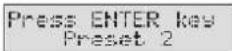
2Press [ENTER] to preset the station.
Listening to a preset station
Press the direct preset button ([1] to [10]) to listen to the preset station.
Manual tuning
You can perform manual tuning to a particular channel or frequency. This can be useful when you are adjusting the antenna to achieve the best possible reception and scanning a particular channel to update the station list.
1 Press [MENU].
2Turn [ TUNE/SELECT ] to select "Manual tune" and then press [ENTER].
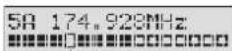
3Tum [ TUNE/SELECT ] to select a frequency or channel and then press [ENTER]. The display shows the received signal strength of the selected frequency. Adjust the antenna to achieve the best reception.
threshold indicator
Adjust the antenna so that the received signal strength (solid rectangles) exceeds the threshold indicator.
Viewing available information
You can view various information about the DAB broadcast such as dynamic label information (if available), signal strength, program type, ensemble name, channel number, bit rate, DAB variant and date.
Press [DISPLAY] to view available information. Press and hold [DISPLAY] to show the default display.
FM radio
1 Press [BAND] to select "FM".
2Press [AUTOTUNE] to tune to a station.
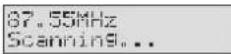
The unit stops tuning when it finds a station. Press [AUTOTUNE] again to tune to the next station.
Manual tuning
Turn [VTUNE/SELECT] to tune to the required station.
Presetting stations
You can preset up to 10 stations into the direct preset buttons. The first five stations are preset with a default frequency for your convenience.
1 While listening to a station, press and hold the desired direct preset button ([1] to [10]).
2Press [ENTER] to preset the station.
Listening to a preset station
Press the direct preset button ([1] to [10]) to listen to the preset station.
Viewing available information
You can view the information of the radio station such as RDS text (available in some areas), frequency and date.
Press [DISPLAY].
Note:
RDS may not be available if reception is poor.
5 ROIND173
ENGLISH






System settings
To view the System menu
When in DAB mode
1 Press [MENU].
2Turn [TUNE/SELECT] to select "System" and then press [ENTER].
When in FM mode
Press [MENU].
To navigate around the menu
Turn [MTUNE/SELECT] to select an item or option. Press [ENTER] to confirm.
Example: Backlight setting displays

Indicates current setting
| Time | The time and date information are updated automatically with the DAB/RDS broadcast (if available).You can also set the time and date manually with the Time menu.This is a 24 hour clock.Set time: Set the hours and minutes.Set date: Set the day, month and year. |
| Backlight | 10 sec: The backlight switches off after 10 seconds of inactivity.On: The backlight is always on. |
| Language | You can change the language for the display panel.English, Italiano, Deutsch, Français |
| Factory Reset | Yes, NoSelect “Yes” to reset the unit to factory default setting. |

Troubleshooting
General
Sound is distorted or no sound.
- Adjust the volume.
- Check and adjust the antenna.
- Move the unit to another location and do a full scan again.
- An AC mains lead or fluorescent light is near the cables. Keep other appliances and cords away from the cables of this unit.
Reception is poor or beat sound is heard.
- Keep the antenna away from computers, TVs, other cables and cords. Move mobile telephones away from the unit if the interference is apparent.
Messages
"Service not available"
• No DAB reception.
"No DAB station"
- No DAB station available.
- Check the antenna.
- Move the unit to another location and do a full scan again.
"Time Not saved"
- The changes made to the time was not saved, the changes will be lost.
"Alarm Not saved" - The changes made to the alarm was not saved, the changes will be lost.

6 RQTNO173




rf-d10eg.book Page 7 Friday, January 3, 2014 4:54 PM


Specifications
Power supply
AC AC 230 V, 50 Hz
Battery DC 6 V (4 x R14/LR14, C)
Power consumption 7 W
Frequency range
FM 87.50 MHz to 108.00 MHz (50 kHz steps)
DAB/DAB+ BAND III
5A to 13F (174.928 MHz to 239.200 MHz)
Terminal
Headphones Stereo, 3.5 mm (16 Ω)
Speaker
Full range 10 cm (4 Ω)
Output power 2 W (RMS 10% THD)
Battery life
| Power source | Manganese R14 battery | Alkaline LR14 battery |
| FM Approx. 9 | H Approx. 30 H | |
| DAB/DAB+ Approx. 12 H Approx. | 40 H | |
Dimensions (W x H x D) 251 mm x 138 mm x 91 mm
Mass
With batteries 1.3 kg
Without batteries 1.0 kg
Operating temperature range 0°C to +40°C
Operating humidity range
35% to 80% RH (no condensation)
Power consumption in standby mode
0.6 W (approximate)
Note:
Specifications are subject to change without notice. Mass
and dimensions are approximate.
Disposal of Old Equipment and Batteries
Only for European Union and countries with recycling systems


These symbols on the products, packaging, and/or accompanying documents mean that used electrical and electronic products and batteries must not be mixed with general household waste.
For proper treatment, recovery and recycling of old products and used batteries, please take them to applicable collection points in accordance with your national legislation. By disposing of them correctly, you will help to save valuable resources and prevent any potential negative effects on human health and the environment.
For more information about collection and recycling, please contact your local municipality.
Penalties may be applicable for incorrect disposal of this waste, in accordance with national legislation.

Note for the battery symbol (bottom symbol):
This symbol might be used in combination with a chemical symbol. In this case it complies with the requirement set by the Directive for the chemical involved.
ENGLISH

7 ROTND173


This software is copyright 2008 Simon Tatham. Permission is hereby granted, free of charge, to any person obtaining a copy of this software and associated documentation files (the "Software"), to deal in the Software without restriction, including without limitation the rights to use, copy, modify, merge, publish, distribute, sublicense, and/or sell copies of the Software, and to permit persons to whom the Software is furnished to do so, subject to the following conditions:
The above copyright notice and this permission notice shall be included in all copies or substantial portions of the Software.
THE SOFTWARE IS PROVIDED "AS IS", WITHOUT WARRANTY OF ANY KIND, EXPRESS OR IMPLIED, INCLUDING BUT NOT LIMITED TO THE WARRANTIES OF MERCHANTABILITY, FITNESS FOR A PARTICULAR PURPOSE AND NONINFRINGEMENT. IN NO EVENT SHALL THE COPYRIGHT HOLDERS BE LIABLE FOR ANY CLAIM, DAMAGES OR OTHER LIABILITY, WHETHER IN AN ACTION OF CONTRACT, TORT OR OTHERWISE, ARISING FROM, OUT OF OR IN CONNECTION WITH THE SOFTWARE OR THE USE OR OTHER DEALINGS IN THE SOFTWARE.
rf-d10eg.book Page 3 Friday, January 3, 2014 4:54 PM

Rückansicht
DEUTSCH
rf-d10eg.book Page 4 Friday, January 3, 2014 4:54 PM


Stromquellen
Hinweis:
rf-d10eg.book Page 7 Friday, January 3, 2014 4:54 PM


Technische Daten
Stromversorgung
AC 230 V Wechselstrom, 50 Hz
Batterie 6 V Gleichstrom (4 x R14/LR14, C)
Leistungsaufnahme
7 W
Frequenzbereich
FM (UKW)
This software is copyright 2008 Simon Tatham.
Permission is hereby granted, free of charge, to any person obtaining a copy of this software and associated documentation files (the "Software"), to deal in the Software without restriction, including without limitation the rights to use, copy, modify, merge, publish, distribute, sublicense, and/or sell copies of the Software, and to permit persons to whom the Software is furnished to do so, subject to the following conditions:
The above copyright notice and this permission notice shall be included in all copies or substantial portions of the Software.
THE SOFTWARE IS PROVIDED "AS IS", WITHOUT WARRANTY OF ANY KIND, EXPRESS OR IMPLIED, INCLUDING BUT NOT LIMITED TO THE WARRANTIES OF MERCHANTABILITY, FITNESS FOR A PARTICULAR PURPOSE AND NONINFRINGEMENT. IN NO EVENT SHALL THE COPYRIGHT HOLDERS BE LIABLE FOR ANY CLAIM, DAMAGES OR OTHER LIABILITY, WHETHER IN AN ACTION OF CONTRACT, TORT OR OTHERWISE, ARISING FROM, OUT OF OR IN CONNECTION WITH THE SOFTWARE OR THE USE OR OTHER DEALINGS IN THE SOFTWARE.





rf-d10eg.book Page 3 Friday, January 3, 2014 4:54 PM

Vista posteriore
ITALIANO
rf-d10eg.book Page 4 Friday, January 3, 2014 4:54 PM


Nota:
rf-d10eg.book Page 5 Friday, January 3, 2014 4:54 PM


rf-d10eg.book Page 7 Friday, January 3, 2014 4:54 PM


Dati tecnici
Alimentazione
CA CA 230 V, 50 Hz
Batteria CC 6 V (4 x R14/LR14, C)
This software is copyright 2008 Simon Tatham.
Permission is hereby granted, free of charge, to any person obtaining a copy of this software and associated documentation files (the "Software"), to deal in the Software without restriction, including without limitation the rights to use, copy, modify, merge, publish, distribute, sublicense, and/or sell copies of the Software, and to permit persons to whom the Software is furnished to do so, subject to the following conditions:
The above copyright notice and this permission notice shall be included in all copies or substantial portions of the Software. THE SOFTWARE IS PROVIDED "AS IS", WITHOUT WARRANTY OF ANY KIND, EXPRESS OR IMPLIED, INCLUDING BUT NOT LIMITED TO THE WARRANTIES OF MERCHANTABILITY, FITNESS FOR A PARTICULAR PURPOSE AND NONINFRINGEMENT. IN NO EVENT SHALL THE COPYRIGHT HOLDERS BE LIABLE FOR ANY CLAIM, DAMAGES OR OTHER LIABILITY, WHETHER IN AN ACTION OF CONTRACT, TORT OR OTHERWISE, ARISING FROM, OUT OF OR IN CONNECTION WITH THE SOFTWARE OR THE USE OR OTHER DEALINGS IN THE SOFTWARE.





rf-d10eg.book Page 3 Friday, January 3, 2014 4:54 PM

Vue arrière
FRANCIALS
rf-d10eg.book Page 4 Friday, January 3, 2014 4:54 PM


Remarque:
rf-d10eg.book Page 5 Friday, January 3, 2014 4:54 PM


Écouter une station
rf-d10eg.book Page 7 Friday, January 3, 2014 4:54 PM


Spécifications
Alimentation
CA CA 230 V, 50 Hz
Pile DC 6 V (4 x R14/LR14, C)
Consommation 7 W
Plage de fréquence
Dimensions (L x H x P) 251 mm x 138 mm x 91 mm
Poids
Avec piles 1,3 kg
Sans piles 1,0 kg
This software is copyright 2008 Simon Tatham. Permission is hereby granted, free of charge, to any person obtaining a copy of this software and associated documentation files (the "Software"), to deal in the Software without restriction, including without limitation the rights to use, copy, modify, merge, publish, distribute, sublicense, and/or sell copies of the Software, and to permit persons to whom the Software is furnished to do so, subject to the following conditions:
The above copyright notice and this permission notice shall be included in all copies or substantial portions of the Software.
THE SOFTWARE IS PROVIDED "AS IS", WITHOUT WARRANTY OF ANY KIND, EXPRESS OR IMPLIED, INCLUDING BUT NOT LIMITED TO THE WARRANTIES OF MERCHANTABILITY, FITNESS FOR A PARTICULAR PURPOSE AND NONINFRINGEMENT. IN NO EVENT SHALL THE COPYRIGHT HOLDERS BE LIABLE FOR ANY CLAIM, DAMAGES OR OTHER LIABILITY, WHETHER IN AN ACTION OF CONTRACT, TORT OR OTHERWISE, ARISING FROM, OUT OF OR IN CONNECTION WITH THE SOFTWARE OR THE USE OR OTHER DEALINGS IN THE SOFTWARE.




rf-d10eg.book Page 3 Friday, January 3, 2014 4:54 PM

Achteraanzicht
rf-d10eg.book Page 4 Friday, January 3, 2014 4:54 PM


Stroombronnen
Opmerking:
rf-d10eg.book Page 5 Friday, January 3, 2014 4:54 PM


rf-d10eg.book Page 7 Friday, January 3, 2014 4:54 PM


Technische gegevens
Voeding
Wisselstroom AC 230 V, 50 Hz
Batterij DC 6 V (4 x R14/LR14, C)
Zonder batterijen 1,0 kg
This software is copyright 2008 Simon Tatham.
Permission is hereby granted, free of charge, to any person obtaining a copy of this software and associated documentation files (the "Software"), to deal in the Software without restriction, including without limitation the rights to use, copy, modify, merge, publish, distribute, sublicense, and/or sell copies of the Software, and to permit persons to whom the Software is furnished to do so, subject to the following conditions:
The above copyright notice and this permission notice shall be included in all copies or substantial portions of the Software.
THE SOFTWARE IS PROVIDED "AS IS", WITHOUT WARRANTY OF ANY KIND, EXPRESS OR IMPLIED, INCLUDING BUT NOT LIMITED TO THE WARRANTIES OF MERCHANTABILITY, FITNESS FOR A PARTICULAR PURPOSE AND NONINFRINGEMENT. IN NO EVENT SHALL THE COPYRIGHT HOLDERS BE LIABLE FOR ANY CLAIM, DAMAGES OR OTHER LIABILITY, WHETHER IN AN ACTION OF CONTRACT, TORT OR OTHERWISE, ARISING FROM, OUT OF OR IN CONNECTION WITH THE SOFTWARE OR THE USE OR OTHER DEALINGS IN THE SOFTWARE.





rf-d10eg.book Page 3 Friday, January 3, 2014 4:54 PM

Overblik over betjeningsknapper
Set forfra
Set bagfra
rf-d10eg.book Page 4 Friday, January 3, 2014 4:54 PM


Strømkilder
Bemærk:
rf-d10eg.book Page 5 Friday, January 3, 2014 4:54 PM


Lyt til en station
For at navigere rundt i menuen
rf-d10eg.book Page 7 Friday, January 3, 2014 4:54 PM


Specifikationer
Strømforsyning
AC AC 230 V, 50 Hz
Batteri DC 6 V (4 x R14/LR14, C)
Strømforbrug 7 W
Frekvensområde
FM 87,50 MHz til 108,00 MHz (50 kHz trin)
DAB/DAB+ BAND III
This software is copyright 2008 Simon Tatham.
Permission is hereby granted, free of charge, to any person obtaining a copy of this software and associated documentation files (the "Software"), to deal in the Software without restriction, including without limitation the rights to use, copy, modify, merge, publish, distribute, sublicense, and/or sell copies of the Software, and to permit persons to whom the Software is furnished to do so, subject to the following conditions:
The above copyright notice and this permission notice shall be included in all copies or substantial portions of the Software.
THE SOFTWARE IS PROVIDED "AS IS", WITHOUT WARRANTY OF ANY KIND, EXPRESS OR IMPLIED, INCLUDING BUT NOT LIMITED TO THE WARRANTIES OF MERCHANTABILITY, FITNESS FOR A PARTICULAR PURPOSE AND NONINFRINGEMENT. IN NO EVENT SHALL THE COPYRIGHT HOLDERS BE LIABLE FOR ANY CLAIM, DAMAGES OR OTHER LIABILITY, WHETHER IN AN ACTION OF CONTRACT, TORT OR OTHERWISE, ARISING FROM, OUT OF OR IN CONNECTION WITH THE SOFTWARE OR THE USE OR OTHER DEALINGS IN THE SOFTWARE.




rf-d10eg.book Page 3 Friday, January 3, 2014 4:54 PM
Přehled ovládání
Pohled zepredu
Pohled zezadu
rf-d10eg.book Page 4 Friday, January 3, 2014 4:54 PM


Zdroje napájení
Poznámka:
rf-d10eg.book Page 5 Friday, January 3, 2014 4:54 PM


Poslech stanice
rf-d10eg.book Page 7 Friday, January 3, 2014 4:54 PM


Specifikace
Napájení
Sít AC 230 V, 50 Hz
Baterie DC 6 V (4 x R14/LR14, C)
Spotřeba 7 W
Frekvenční rozsah
FM 87,50 MHz až 108,00 MHz (Kroky po 50 kHz)
DAB/DAB+ BAND III
5A až 13F (174,928 MHz až 239,200 MHz)
Výstup
Sluchátka Stereo, 3,5 mm (16 Ω)
Reproduktor
This software is copyright 2008 Simon Tatham.
Permission is hereby granted, free of charge, to any person obtaining a copy of this software and associated documentation files (the "Software"), to deal in the Software without restriction, including without limitation the rights to use, copy, modify, merge, publish, distribute, sublicense, and/or sell copies of the Software, and to permit persons to whom the Software is furnished to do so, subject to the following conditions:
The above copyright notice and this permission notice shall be included in all copies or substantial portions of the Software.
THE SOFTWARE IS PROVIDED "AS IS", WITHOUT WARRANTY OF ANY KIND, EXPRESS OR IMPLIED, INCLUDING BUT NOT LIMITED TO THE WARRANTIES OF MERCHANTABILITY, FITNESS FOR A PARTICULAR PURPOSE AND NONINFRINGEMENT. IN NO EVENT SHALL THE COPYRIGHT HOLDERS BE LIABLE FOR ANY CLAIM, DAMAGES OR OTHER LIABILITY, WHETHER IN AN ACTION OF CONTRACT, TORT OR OTHERWISE, ARISING FROM, OUT OF OR IN CONNECTION WITH THE SOFTWARE OR THE USE OR OTHER DEALINGS IN THE SOFTWARE.





rf-d10eg.book Page 3 Friday, January 3, 2014 4:54 PM

Bild bakifrån
SVENSKA
rf-d10eg.book Page 4 Friday, January 3, 2014 4:54 PM


Strömkällor
Observera:
rf-d10eg.book Page 5 Friday, January 3, 2014 4:54 PM


rf-d10eg.book Page 7 Friday, January 3, 2014 4:54 PM


Specifikationer
Nätdel
Utan batterier 1,0 kg
This software is copyright 2008 Simon Tatham.
Permission is hereby granted, free of charge, to any person obtaining a copy of this software and associated documentation files (the "Software"), to deal in the Software without restriction, including without limitation the rights to use, copy, modify, merge, publish, distribute, sublicense, and/or sell copies of the Software, and to permit persons to whom the Software is furnished to do so, subject to the following conditions:
The above copyright notice and this permission notice shall be included in all copies or substantial portions of the Software.
THE SOFTWARE IS PROVIDED "AS IS", WITHOUT WARRANTY OF ANY KIND, EXPRESS OR IMPLIED, INCLUDING BUT NOT LIMITED TO THE WARRANTIES OF MERCHANTABILITY, FITNESS FOR A PARTICULAR PURPOSE AND NONINFRINGEMENT. IN NO EVENT SHALL THE COPYRIGHT HOLDERS BE LIABLE FOR ANY CLAIM, DAMAGES OR OTHER LIABILITY, WHETHER IN AN ACTION OF CONTRACT, TORT OR OTHERWISE, ARISING FROM, OUT OF OR IN CONNECTION WITH THE SOFTWARE OR THE USE OR OTHER DEALINGS IN THE SOFTWARE.




rf-d10eg.book Page 3 Friday, January 3, 2014 4:54 PM

Bakside
NORSK
① Bryter standby/på [∅/l]
rf-d10eg.book Page 4 Friday, January 3, 2014 4:54 PM


Strømkilder
Merknad:
rf-d10eg.book Page 5 Friday, January 3, 2014 4:54 PM


rf-d10eg.book Page 7 Friday, January 3, 2014 4:54 PM


Spesifikasjoner
Strømtilførsel
AC (vekselstrøm) Vekselstrøm 230 V, 50 Hz
Batteri Likestrøm 6 V (4 x R14/LR14, C)
Strømforbruk 7 W
Frekvensområde
FM 87,50 MHz til 108,00 MHz (50 kHz trinn)
DAB/DAB+ BAND III
Uten batterier 1,0 kg
rf-d10eg.book Page 1 Friday, January 3, 2014 4:54 PM

SUOMI
VAROITUS!
Laite
Manufactured by: Panasonic Corporation
Kadoma, Osaka, Japan
Importer for Europe: Panasonic Marketing Europe GmbH
Panasonic Testing Centre
Winsbergring 15, 22525 Hamburg, Germany
Panasonic Corporation
Web Site: http://panasonic.net
En ○○○○○○○SwC/DaDuFrltGe
RQTN0173
L0114CH0







- AC MAINS LEAD
- CAUTION
- UNIT
- BATTERY
- SMALL OBJECTS
- SUPPLIED ACCESSORIES
- TABLE OF CONTENTS
- OVERVIEW OF CONTROLS
- POWER SOURCES
- USING THE HOUSEHOLD MAINS SOCKET
- NOTE
- USING THE BATTERIES (NOT SUPPLIED)
- GETTING STARTED
- DAB
- DAB OPERATION
- REMOVE UNAVAILABLE LISTED STATIONS
- LISTENING TO A STATION
- PRESETTING STATIONS
- LISTENING TO A PRESET STATION
- MANUAL TUNING
- VIEWING AVAILABLE INFORMATION
- FM RADIO
- SYSTEM SETTINGS
- TO VIEW THE SYSTEM MENU
- TO NAVIGATE AROUND THE MENU
- TROUBLESHOOTING
- GENERAL
- MESSAGES
- SPECIFICATIONS
- STROMQUELLEN
- HINWEIS
- TECHNISCHE DATEN
- NOTA
- DATI TECNICI
- REMARQUE
- ÉCOUTER UNE STATION
- SPÉCIFICATIONS
- STROOMBRONNEN
- OPMERKING
- TECHNISCHE GEGEVENS
- OVERBLIK OVER BETJENINGSKNAPPER
- STRØMKILDER
- BEMÆRK
- LYT TIL EN STATION
- FOR AT NAVIGERE RUNDT I MENUEN
- SPECIFIKATIONER
- PŘEHLED OVLÁDÁNÍ
- ZDROJE NAPÁJENÍ
- POZNÁMKA
- POSLECH STANICE
- SPECIFIKACE
- STRÖMKÄLLOR
- OBSERVERA
- MERKNAD
- SPESIFIKASJONER
- SUOMI
- VAROITUS
- LAITE
Brand : PANASONIC
Model : RFD10EB
Category : Radio