EasyManual
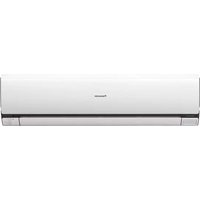
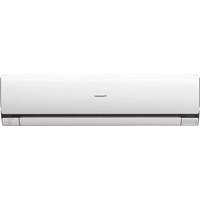
CSPC9GKD - Air-conditioner PANASONIC - Free user manual and instructions
Find the device manual for free CSPC9GKD PANASONIC in PDF.


User questions about CSPC9GKD PANASONIC
0 question about this device. Answer the ones you know or ask your own.
Ask a new question about this device
Download the instructions for your Air-conditioner in PDF format for free! Find your manual CSPC9GKD - PANASONIC and take your electronic device back in hand. On this page are published all the documents necessary for the use of your device. CSPC9GKD by PANASONIC.
USER MANUAL CSPC9GKD PANASONIC
natural_image
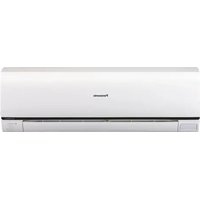
Illustration of a Panasonic air conditioner unit (no text or symbols on the device itself)Panasonic®
Operating Instructions Air Conditioner
Indoor Unit Outdoor Unit
CS-PC7GKD CU-PC7GKD
CS-PC9GKD CU-PC9GKD
text_image
ENGLISH 2 ~ 7 Before operating the unit, read these operating instructions thoroughly and keep them for future reference. RUSSKII 8 ~ 13 Перед началом эксплуатации данного устройства внимательно прочитайте инструкции по эксплуатации и сохраните их. УКРАЇНСЬКА 14 ~ 19 Уважно прочитайте цю інструktію перед експлуатацією кондиционера і збережить її для довідок у майбутньому ЕРГИВ 27 يرجى قراة ئتلاويات التشغيل بعنابة تامة قبل نشفيل مكيف الهواع. واحفظ هذا الكتبّ كمرجع في الس cheapest. ESPAÑOL 20 ~ 25 Antes de utilizar la unidad, sírvase leer atentamente estas instrucciones de funciona- amiento y conservarlas como futuro elemento de consulta. FRANÇAIS 26 ~ 31 Avant d'utiliser l'appareil, lisez ce mode d'emploi dans son intégralité et conservez- le pour toute référence ultérieure. © 2006 Panasonic HA Air-Conditioning (Guangzhou) Co., Ltd. All rights reserved. Unauthorized copying and distribution is a violation of law. MANILA INSTRIPHIPII NOILS 20ATELENI КОРОТКА ИСПРЕКДЕЦИТЕ ВАРТИЕ ME67 Manufactured by: PANASONIC HOME APPLIANCES AIR- CONDITIONING (GUANGZHOU) CO., LTD. XIECUN, ZHONGCUN TOWN, PANYU DISTRICT, GUANGZHOU CITY, GUANGDONG PROVINCE, CHINA. © 2006 Panasonic HA Air-Conditioning (Guangzhou) Co., Ltd. All rights reserved. Unauthorized copying and distribution is a violation of law.ENGLISH 2\~7
Before operating the unit,
read these operating
Instructions thoroughly
and keep them for future
reference
УКРАЇНСЬКА 14\~19
Уважно прочитайте
цю інструкцію перед
експлуатацією
CONDITIONING (GUANGZHOU) CO., LTD.
XIECUN, ZHONGCUN TOWN, PANYU DISTRICT,
GUANGZHOU CITY, GUANGDONG PROVINCE, CHINA.
© 2006 Panasonic HA Air-Conditioning
(Guangzhou) Co., Ltd. All rights
reserved. Unauthorized copying and
distribution is a violation of law.
SAFETY PRECAUTIONS
DEFINITION
To prevent personal injury, injury to others, or property damage, please observe the following.
Incorrect operation due to failure to follow instructions may cause harm or damage, the seriousness of which is classified as below:

Warning
This sign warns of death or serious injury.
The instructions to be followed are classified by the following symbols:

This symbol denotes an action that is PROHIBITED.

Caution
This sign warns of injury or damage to property.


These symbols denote actions that are COMPULSORY.

Warning
Remote Control
During Operation

- Do not use rechargeable (Ni-Cd) batteries.
- Do not allow infants and small children to play with the remote control to prevent them from accidentally swallowing the batteries.

- Remove the batteries if the unit is not going to be used for a long period of time.
- New batteries of the same type must be inserted following the polarity stated to prevent malfunction of the remote control.
Indoor Unit
During Installation

- Do not install, remove and reinstall the unit by yourself; improper installation will cause leakage, electric shock or fire. Please consult an authorized dealer or specialist for the installation work.
During Operation

- Do not insert your fingers or other objects into the indoor or outdoor unit. - Do not attempt to repair the unit by yourself.
natural_image
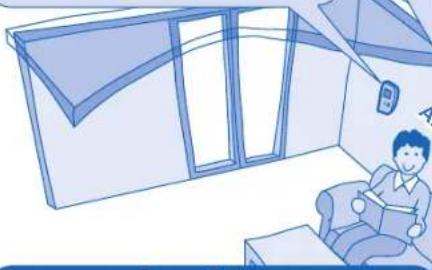
Illustration of a person reading a book inside a room with large windows and a door (no text or symbols)Air inlet
Power Supply
During Installation

- This equipment must be earthed and installed with ELCB. Otherwise, it may cause electrical shock or fire in case of malfunction.
During Operation

- Do not share the same power outlet with other equipment.
- Do not modify power cords.
- Do not use extension cords.
- Do not operate with wet hands.
- Do not operate or stop the unit by inserting or pulling out the power plug.
- Insert the power plug properly.
• Use the specified supply cord. - If the supply cord is damaged, it must be replaced by the manufacturer, its service agent or similarly qualified persons in order to avoid a hazard.
- Dust on the electric power plug should be periodically wiped with a dry cloth.
• In case of emergency or abnormal conditions (burning, unusual odour, etc), turn off the power supply and unplug.
• In case of emergency or abnormal conditions (burning, unusual odour, etc), turn off the power supply and unplug.


Caution
Indoor Unit
During Installation

Do not install the unit in a potentially explosive atmosphere.

Ensure that the drainage pipe is connected properly. Otherwise, leakage may occur.
During Operation

- Do not wash the unit with water, benzene, thinner or scouring powder.
- Do not use for other purposes such as preservation of food.
- Do not use any combustible equipment in front of the airflow outlet.
- Do not expose directly to cold air for a long period.
• Aerate the room regularly.

Power Supply
During Operation

- Do not pull the cord to disconnect the plug.

- Switch off the power supply and unplug before cleaning or servicing.
- Turn off the power supply and unplug if the unit is not used for a long period of time.
- This air conditioner is equipped with a built-in surge protective device. However, in order to further protect your air conditioner from being damaged by abnormally strong lightning activity, you may want to disconnect it from the power supply. Do not touch the air conditioner during lightning, it may cause electric shock.
Outdoor Unit
During Installation

- Ensure that the drainage pipe is connected properly. Otherwise, leakage may occur.
During Operation

- Do not sit or place anything on the outdoor unit.

• After long periods of use, make sure the installation rack is not damaged.
REGULATORY INFORMATION
The appliance is not intended for use by young children or the infirm person without supervision. Young children should be supervised to ensure that they do not play with the appliance.

ENVIRONMENTAL REQUIREMENTS
Battery Disposal
The batteries must be recycled or disposed of properly.

END-OF-LIFE DISPOSAL
"Instructions for end-user" for air conditioners:
Information on Disposal in other countries outside the European Union
This symbol is only valid in the European Union. If you wish to discard this product, please contact your installer, dealer or local authority and ask for the correct method of disposal.
OPERATION CONDITION
Use this air conditioner under the following temperature range.
| Temperature (°C) | Indoor Outdoor | ||||
| *DBT *WBT *DBT *WBT | |||||
| COOLING | Maximum | 32 23 | 43 26 | ||
| Minimum | 21 15 | 21 15 | |||
*DBT: Dry bulb temperature *WBT: Wet bulb temperature
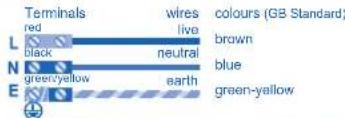
Replacement or installation of power plugs shall be performed by authorized/qualified personnel only. The wires in this mains lead are coloured in accordance with the following code:
text_image
Terminals red wires live colours (GB Standard) L black neutral brown N green/yellow blue earth E green-yellowWiring colour may vary depending on a country wiring code's standard.
Thank you for purchasing Panasonic Air Conditioner
TABLE OF CONTENTS
SAFETY PRECAUTIONS
2
REGULATORY INFORMATION
3
HOW TO OPERATE
4\~5
CARE & CLEANING
6
TROUBLESHOOTING
7
PRODUCT SPECIFICATION
38
QUICK GUIDE
Back cover
Note:
The illustrations in this manual are for explanation purposes only and may differ from the actual unit. It is subjected to change without notice for future improvement.
HOW TO OPERATE
REMOTE CONTROL PREPARATION
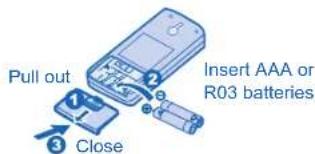
Inserting the batteries
text_image
Pull out Close Insert AAA or R03 batteries- The retention period of batteries might be affected to be shorter because of the using times of the remote control, even less than one year.
REMOTE CONTROL TRANSMITTER
• Make sure it is not obstructed.
- Certain fluorescent lights may interfere with signal transmission. Please consult your nearest dealer.
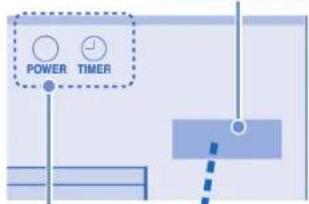
RECEIVER
text_image
POWER TIMERINDICATOR
Maximum distances : 8m
MODE OPERATION
Select AUTO → COOL FAN ← DRY
Turn on
Adjust temperature
AUTO MODE - FOR YOUR CONVENIENCE
- Unit selects the operation mode according to the room temperature.
- Once auto mode is selected, the unit will operate at the standard setting temperature.
- To change the standard setting temperature, press for "▲ STD" or for "▼ STD".
| Room temperature | Operation mode | Standard setting temperature | STD (+2°C) | STD (-2°C) |
| 23°C & above | Cool 25°C | 27°C 23°C | ||
| Below 23°C Dry | 22°C 24°C 20°C | |||
COOL MODE - TO ENJOY COOL AIR
• Recommended temperature: 26°C \~ 28°C
DRY MODE - TO DEHUMIDIFY THE ENVIRONMENT
- During soft dry operation, the indoor fan operates at low fan speed to give a very gentle cooling operation.
- Recommended temperature: 1°C \~ 2°C lower than room temperature.
FAN MODE - TO MAINTAIN A GOOD VENTILATION OF THE ROOM
- The compressor will not operate during air circulation operation.
- For cool and dry modes, the range of temperature can be selected from 16°C \~ 30°C.
LCD display
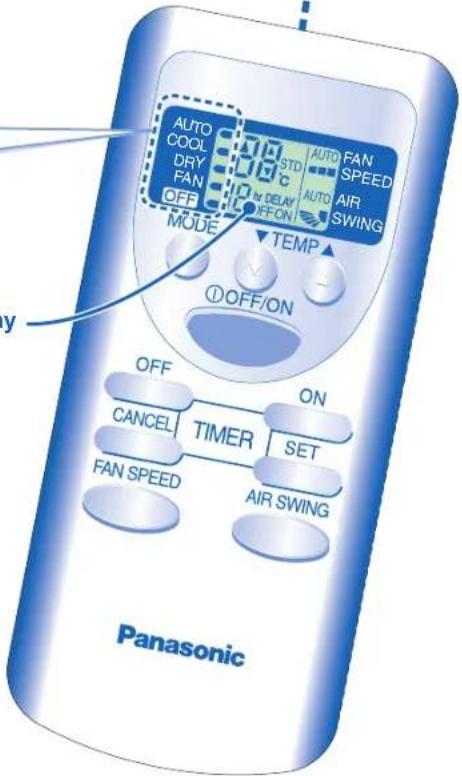
text_image
AUTO COOL DRY FAN OFF MODE 37.0 STD C N DELAY OFFON AUTO FAN SPEED AUTO AIR SWING TEMP ① OFF/ON OFF ON CANCEL TIMER SET FAN SPEED AIR SWING PanasonicNotes:
- Use a screwdriver to short the two Reset Terminals on the back of remote control to restore the remote control's default setting.
- Remove the batteries if the unit is not to be used for a long period.
FEATURE OPERATION
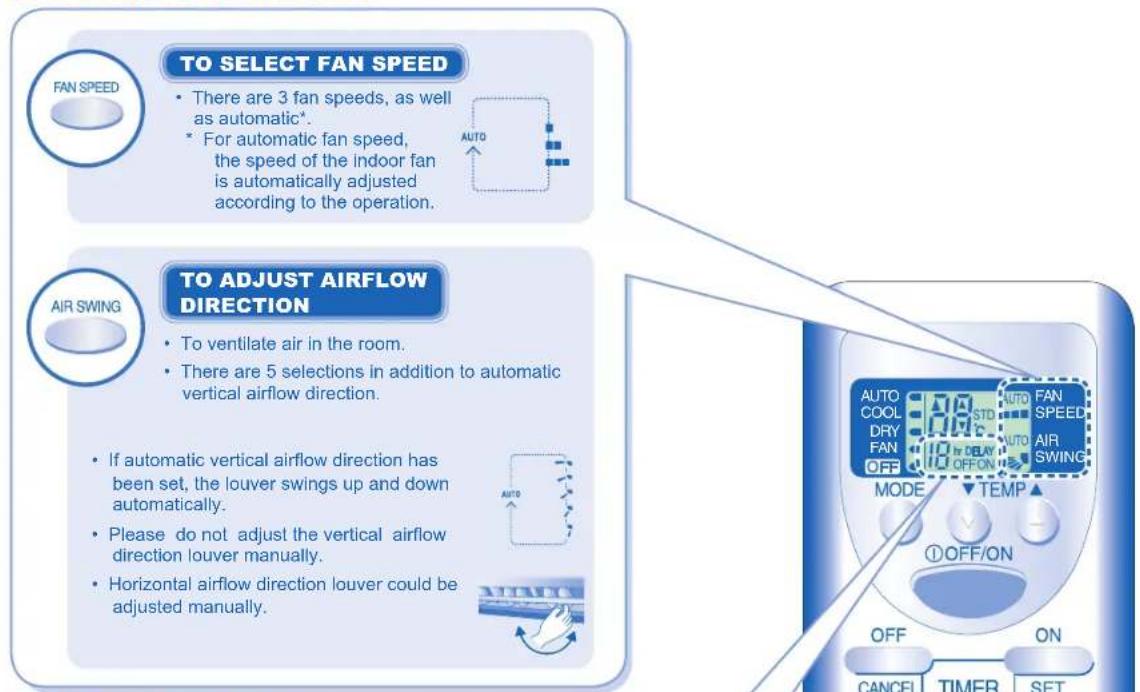
text_image
TO SELECT FAN SPEED • There are 3 fan speeds, as well as automatic*. • For automatic fan speed, the speed of the indoor fan is automatically adjusted according to the operation. A AIR SWING TO ADJUST AIRFLOW DIRECTION • To ventilate air in the room. • There are 5 selections in addition to automatic vertical airflow direction. • If automatic vertical airflow direction has been set, the louver swings up and down automatically. • Please do not adjust the vertical airflow direction louver manually. • Horizontal airflow direction louver could be adjusted manually. AUTO AUTO COOL DRY FAN OFF AUTO FAN SPEED AUTO AIR SWING MODE TEMP ① OFF/ON OFF ON CANCEL TIMER SETTIMER SETTING
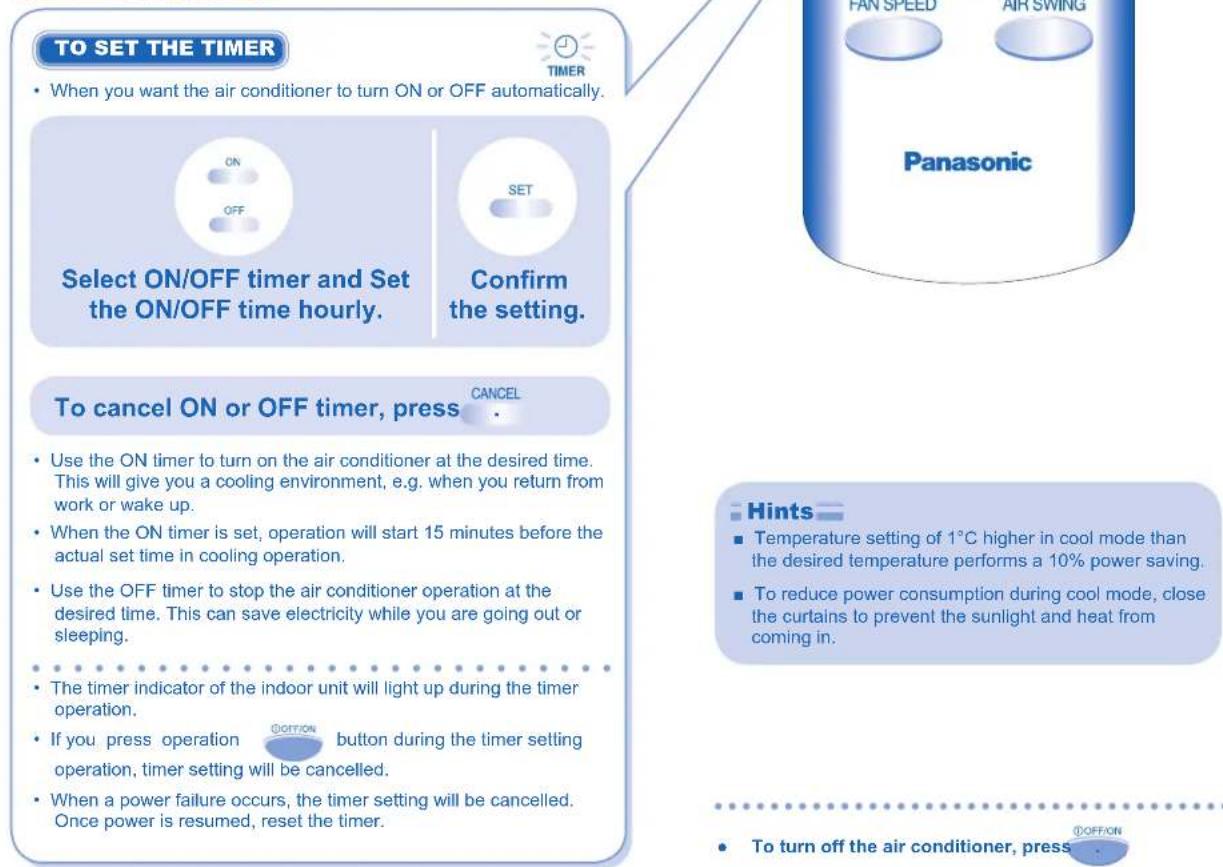
text_image
TO SET THE TIMER • When you want the air conditioner to turn ON or OFF automatically. ON OFF SET Select ON/OFF timer and Set the ON/OFF time hourly. Confirm the setting. To cancel ON or OFF timer, press CANCEL • Use the ON timer to turn on the air conditioner at the desired time. This will give you a cooling environment, e.g. when you return from work or wake up. • When the ON timer is set, operation will start 15 minutes before the actual set time in cooling operation. • Use the OFF timer to stop the air conditioner operation at the desired time. This can save electricity while you are going out or sleeping. • The timer indicator of the indoor unit will light up during the timer operation. • If you press operation button during the timer setting operation, timer setting will be cancelled. • When a power failure occurs, the timer setting will be cancelled. Once power is resumed, reset the timer. Panasonic Hints • Temperature setting of 1°C higher in cool mode than the desired temperature performs a 10% power saving. • To reduce power consumption during cool mode, close the curtains to prevent the sunlight and heat from coming in. • To turn off the air conditioner, pressCARE & CLEANING

Switch off the power supply before cleaning
AIR FILTER
Vacuum, wash and dry.
- It is recommended to clean air filters once every 2 weeks.
- Wash/rinse the filters gently with water to avoid damage to the filter surface.
- Dry the filters thoroughly under the shade, away from fire or direct sunlight.
- Replace any damaged filter. Part no.: CWD001110
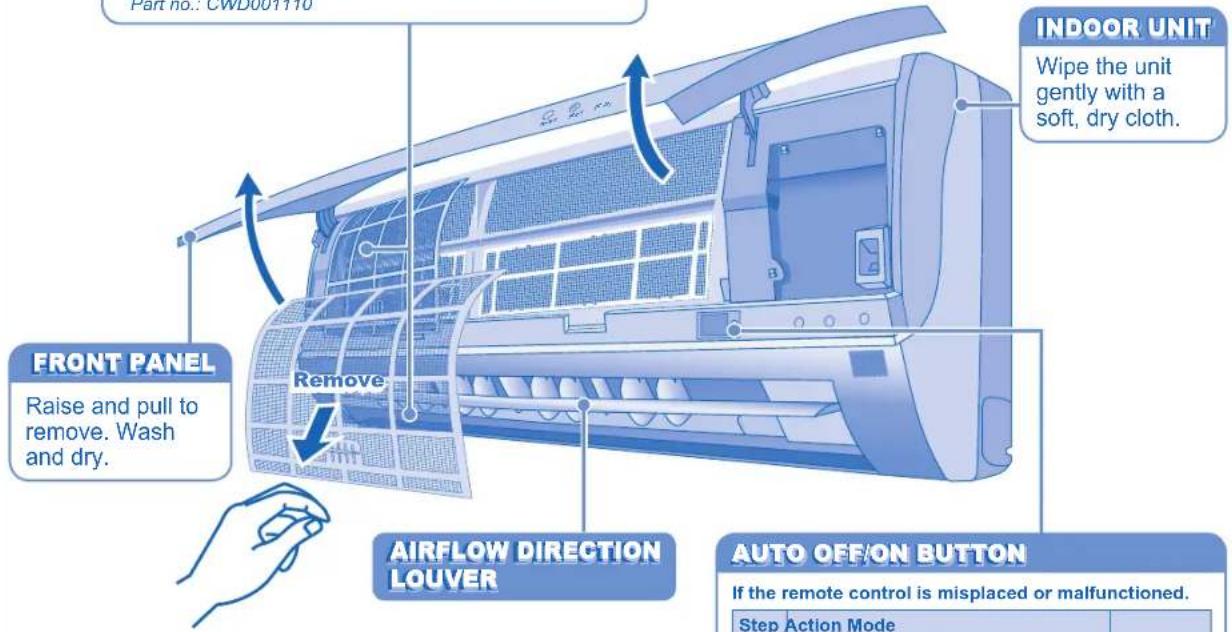
text_image
Part no.: CWD007110 INDOOR UNIT Wipe the unit gently with a soft, dry cloth. FRONT PANEL Raise and pull to remove. Wash and dry. Remove AIRFLOW DIRECTION LOUVER AUTO OFF/ON BUTTON If the remote control is misplaced or malfunctioned. Step Action ModeAUTO OFF/ON BUTTON
If the remote control is misplaced or malfunctioned.
| Step | Action Mode | |
| 1 | Press once Automatic | |
| 2 | Press and hold until you hear one beep, then release | Force Cooling |
- To turn off, press the AUTO OFF/ ON button again.
To switch off the remote control signal receiving sound press the button and hold for approximate 10 seconds until double beep sound is heard, then release.
- Repeat the above step if you want to switch on the signal receiving sound.
To switch off the auto restart control, press the button and hold for approximate 15 seconds until triple beep sound is heard, then release.
• To switch on the auto restart control, repeat the above step
WASHING INSTRUCTIONS
- Do not use benzene, thinner or scouring powder.
• Use only soap (pH7) or neutral household detergent. - Do not use water hotter than 40°C.
Hints
■ Clean the filter regularly for best performance and to reduce power consumption.
■ Please consult your nearest dealer for seasonal inspection.
TROUBLESHOOTING
The following symptoms do not indicate malfunction.
| Symptom Cause | |
| Mist emerges from indoor unit. | Condensation effect due to cooling process. |
| Water flowing sound during operations. | Refrigerant flow inside the unit. |
| The room has a peculiar odour. | This may due to damp smell emitted by the wall, carpet, furniture or clothing. |
| Indoor fan stops occasionally during automatic fan speed setting. | This helps to remove the surrounding odours. |
| Operation is delayed a few minutes after restart. | The delay is a protection to the unit's compressor. |
| Outdoor unit emits water/steam. | Condensation or evaporation occurs on pipes. |
| The unit operates automatically when power is resumed after a power failure. | It is the Auto Restart function of the unit. Operation will be restarted automatically under the previous operation mode and airflow direction when power is resumed as the operation is not stopped by remote control.To cancel the Auto Restart Control, please refer to page 6. |
| Power indicator blinks before the unit is switched on. | This is a preliminary step in preparation for the operation when the ON timer has been set. |
Check the following before calling for servicing.
| Symptom Check | |
| Cooling operation is not working efficiently. | Set the temperature correctly.Close all doors and windows.Clean or replace the air filters.Clear any obstruction at the air inlet and air outlet vents. |
| Noisy during operation. | Check if the unit has been installed at an incline.Close the front panel properly. |
| Remote control does not work. | Insert the batteries correctly.Replace weak batteries. |
| The unit does not work. | Check if the circuit breaker is tripped.Check if timers have been set. |
FOR EXTENDED NON-USE
- Activate fan mode for 2\~3 hours to thoroughly dry the unit.
• Turn off the power supply and unplug. - Remove the remote control batteries.
SEASONAL INSPECTION AFTER EXTENDED NON-USE
- Checking of remote control batteries.
- No obstruction at air inlet and air outlet vents.
• After 15 minutes of operation, it is normal to have the following temperature difference between air inlet and air outlet vents: Cooling: ≥ 8°C
NON SERVICEABLE CRITERIAS
TURN OFF POWER SUPPLY and CALL Authorized Distributor under the following conditions:
• Abnormal noise during operation.
- Water/foreign particles have entered the Remote Control.
• Water leaks from Indoor unit.
- Circuit breaker switches off frequently.
• Power cord becomes unnaturally warm.
- Switches or buttons are not functioning properly.
• The timer indicator blinks and the unit can not be operated.

natural_image
Simple line drawing of a two-story building facade with windows and a sloped roof (no text or symbols)Электроснабжение
При установке

m = 311
natural_image
Illustration of a person sitting in front of a large building with windows and doors (no text or symbols visible)Alimentation
CARACTERISTIQUES DU PRODUIT 38
GUIDE RAPIDE
Dos de couverture
Remarque:
natural_image
Illustration of a room interior with large windows and a person holding a phone (no text or symbols)مدخل الهواء
مزود الطاقة
الثناة التركيب
The image contains no legible text or symbols.
كيف تشفل
*60 g for air purging is not included.
Test conditions
1. Cooling: Indoor Dry Bulb Temp. (°C) 27 Outdoor Dry Bulb Temp. (°C) 35
Wet Bulb Temp. (°C) 19 Wet Bulb Temp. (°C) 24
2. Standard piping length: 5 m (Includes Indoor Unit piping length).
| Translations | Deutsch | Français | Greek | Italian | Nederland | Portuguese | Russian | Spanish | Bulgarian | Turkish | Arabic | Swedish | Norwegian | Ukrainian |
| Product Specification | ProduktSpezifikation | Caractéristiques du produit | Produktspasés speslivinç | presorptione del prodotto | productikenmarken | Especificações do produto | Технически характеристики | Especificación de productos | Спецификация на продукта | Orion Oreditikan | مoutselves النجع | Produktans spezifikationer | Produktats spezifikaziner | Техечн характеристики |
| Model Indoor UnitOutdoor Unit | ModellInnengeritAussergerit | ModèleUnité intérieureUnité extérieure | MonvtéloÉquiterpoin ouokouhÉquiterpoin ouokouh | ModelloImpianto internoImpianto externo | ModelloBinneninrichtingButteninrichting | ModeloElemento interiorElemento exterior | ModельВигрения часть устройстваذินки часть устройства | ModeloEquipo interiorEquipo exterior | ModellВътрешне устройствоВъщино устройство | Modeliç ÜniteDiç Ünite | طرازالعربية المئانيالعربية المئاني | ModellInomhusenhetUtomhusenhet | ModellInnendørsenhetUtendørsenhet | |
| Power / Current | Stromversorgung | Alimentation | Парохýреşçumatòc | Corrente | Stroom | Potência | Напряжениепитания | Corriente | Електрическозахранване | Güç / Akim | /القيمة/النبار الكهرباني | Effekt/strom | Effekt/strom | |
| Refrigerant | Kühmittel | Réfrigérant | ψυκτικό μέσο | Refrigerante | Koelmiddel | Refrigerante | Охлаждакций агент | Refrigerante | Охлаждане | Sogutucu | /المادة/L shrدة | Köldmedium | Холодогагент | |
| Cooling Capacity | Kühlleistung | Capacitéréfrigérante | İkavıttηταφύξης | Refrigerazione | Cooling Capacity | Capacidadedo refrescatamento | Мощностьохлаждения | Potenciafrigorífica | Охлаждашкапацитет | SogutmaKapasitesi | /سعة التبрид | Kyikapacitet | Потужністьна охолодження | |
| Noise LevelConditions1m DistanceMax. coolingSound power level | LármpegelBedingungen1m AbstandMax. KühlungSchalleistungspegel | Niveau de bruitConditionsDistance 1 mRetroideissement max.Niveau de puissance sonore | Entimežo θοριβουΣυνήμαςΑποστασ 1 μετρουΜόγ. ΦΨΕηΣταθμη σχυμοςΒοριβεύ | Livello di rumoreCondizioniDistanza di 1 mRafreddamento max.Livello rumore | LawaaipellerVoorwaarden1m afstandMax. KoelingGoludanivau | Nivel do barulhoCondiçõesDistândia de 1mArrefecimento máx.Nivel de alimentaçãosonora | Уровень шумаац Josefяти-Индайяттам - 1YИФ. высництамУ. очень мощностизухка | Nivel sonoroCondiciones1 m de distanciaRefrigeración máx.Nivel de potenciade sonido | Ниво на шумаУсловия1m разстояниеМаксимально оплажданеНиво на звухка | Ses seviyesiKoçullar1m UzaklikMaks. sogurmaSes seviyesi | /مستو الحضUAعلايالصنيف/السapeake ام/الله الامسي للتربي/مستوى فرdera الصوت | BuferniváVilkor1 m avständMax. kyningLjudelfektnivá | StayniváVilkár1 m avstandMaks. kjelingLydeffektnivá | |
| Air Circulation | Luftzirkulation | Ventilation | Киклофорiaoσέρα | Circolazione aria | Luchtcirculatie | Circulação do ar | Циркуляциявоздуха | Circulacion de aire | Вълдушаниркуляция | Hava Devri | /دوران الهواع | Luftflöde | Luftstrømning | |
| Product weight | Produktgewicht | Poids du produit | Вάρος τουпроюштоς | Peso prodotto | Produktgewicht | Peso do producto | Вес продукта | Peso del producto | Тело на продукта | Ürün agirligi | /وزن النتچ | Produktens vikt | Produktets vekt | |
| Dimensions | Abmessungen | Dimensions | Диáσταση | Misure | Afmetingen | Dimensões | Размеры | Medidas | Размери | Ebarlar | /الأبعاد | Mått | Mål |
QUICK GUIDE/KPATKAY INCTRYKZIA ПОЛЬЗОВАТЕЛЯ/КОРОТКА ІНСТРУКЦИЯ/ GUIDE RAPIDE/GUÍA RÁPIDA/دیل س行程

MODE
AUTO GOOL FAN DRY

Select the desired mode. Выберите необходимый режим. Оберить потрібний режим. Sélectionnez le mode de fonctionnement souhaité. Seleccione el modo deseado.
اختر الوضع المرغوب.

①OFF/ON
Matsushita Electric Industrial Co., Ltd.
Web Site: http://www.panasonic.co.jp/global/