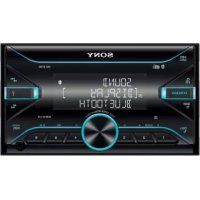
DSXB710D - Car stereo SONY - Free user manual and instructions
Find the device manual for free DSXB710D SONY in PDF.



| Product Type | Car Radio |
| Brand | Sony |
| Model | DSX-B710D |
| Dimensions (W×H×D) | 178 mm × 100 mm × 177 mm |
| Mounting Dimensions (W×H×D) | 182 mm × 111 mm × 159 mm |
| Weight | 1.0 kg |
| Power Supply | 12 V DC battery (negative ground) |
| Rated Current Consumption | 10 A |
| Maximum Output Power | 55 W × 4 (at 4 Ω) |
| Speaker Impedance | 4 Ω to 8 Ω |
| Tuner Type | DAB/DAB+, FM, AM/LW |
| FM Range | 87.5 MHz – 108.0 MHz |
| AM Range | 531 kHz – 1602 kHz |
| DAB Range | 174.928 MHz – 239.200 MHz |
| Bluetooth Connectivity | Bluetooth version 3.0, range approx. 10 m |
| Bluetooth Profiles | A2DP, AVRCP, HFP, PBAP, SPP |
| USB Port | High speed, max current 1 A, FAT16/FAT32 formats |
| Audio Formats | MP3, WMA, AAC, FLAC |
| Key Features | Extra Bass, automatic search, station memory, hands-free calling |
| Included Accessories | Main unit, power cable, microphone, mounting frame, release keys |
| Care and Cleaning | Allow to cool before use if vehicle exposed to sun; do not spill liquid |
| Safety | Install in dashboard, avoid dust and high temperatures |
| Available Spare Parts | Cable for steering wheel remote control (RC-SR1) optional |
Frequently Asked Questions - DSXB710D SONY
User questions about DSXB710D SONY
0 question about this device. Answer the ones you know or ask your own.
Ask a new question about this device
Download the instructions for your Car stereo in PDF format for free! Find your manual DSXB710D - SONY and take your electronic device back in hand. On this page are published all the documents necessary for the use of your device. DSXB710D by SONY.
USER MANUAL DSXB710D SONY
DAB/DAB+/FM/AM/LWBluetooth® Car Audio
| Operating Instructions | GB |
| Mode d'emploi | FR |
| Bedienungsanleitung | DE |
| Manual de instrucciones | ES |
| Gebruiksaanwijzing | NL |
| Bruksanvisning | SE |
To cancel the demonstration (DEMO) display, see page 6.
For the connection/installation, see page 10.
For safety, be sure to install this unit in the dashboard of the car as the rear side of the unit becomes hot during use.
For details, see "Connection/Installation" (page 10).
Made in Thailand
The nameplate indicating operating voltage, etc., is located on the bottom of the chassis.
The validity of the CE marking is restricted to only those countries where it is legally enforced, mainly in the countries EEA (European Economic Area) and Switzerland.

Hereby, Sony Corporation declares that this equipment is in compliance with Directive 2014/53/EU.
The full text of the EU declaration of conformity is available at the following internet address:
http://www.compliance.sony.de/
Notice for customers: the following information is only applicable to equipment sold in countries applying EU Directives
This product has been manufactured by or on behalf of Sony Corporation.
EU Importer: Sony Europe B.V.
Inquiries to the EU Importer or related to product compliance in Europe should be sent to the manufacturer's authorized representative, Sony Belgium, bijkantoor van Sony Europe B.V., Da Vincilaan 7-D1, 1930 Zaventem, Belgium.
Disposal of waste batteries and electrical and electronic equipment (applicable in the European Union and other countries with separate collection systems)
This symbol on the product, the battery or on the packaging indicates that the product and the battery shall not be treated as household waste. On certain batteries this symbol might be used in combination with a chemical symbol. The chemical symbol for lead (Pb) is added if the battery contains more than 0.004% lead.
By ensuring that these products and batteries are disposed of correctly, you will help to prevent potentially negative consequences for the environment and human health which could be caused by inappropriate waste handling. The recycling of the materials will help to conserve natural resources.
In case of products that for safety, performance or data integrity reasons require a permanent connection with an incorporated battery, this battery should be replaced by qualified service staff only.
To ensure that the battery and the electrical and electronic equipment will be treated properly, hand over these products at end-of-life to the appropriate collection point for the recycling of electrical and electronic equipment.
For all other batteries, please view the section on how to remove the battery from the product safely. Hand the battery over to the appropriate collection point for the recycling of waste batteries.
For more detailed information about recycling of this product or battery, please contact your local Civic Office, your household waste disposal service or the shop where you purchased the product or battery.
Warning if your car's ignition has no ACC position
Be sure to set the AUTO OFF function. The unit will shut off completely and automatically in the set time after the unit is turned off and the clock is displayed (i.e. press and hold OFF for 1 second), which prevents battery drain. If you do not set the AUTO OFF function, press and hold OFF until the display disappears each time you turn the ignition off.
Disclaimer regarding services offered by third parties
Services offered by third parties may be changed, suspended, or terminated without prior notice.
Sony does not bear any responsibility in these sorts of situations.
Important notice
Caution
IN NO EVENT SHALL SONY BE LIABLE FOR ANY INCIDENTAL, INDIRECT OR CONSEQUENTIAL DAMAGES OR OTHER DAMAGES INCLUDING, WITHOUT LIMITATION, LOSS OF PROFITS, LOSS OF REVENUE, LOSS OF DATA, LOSS OF USE OF THE PRODUCT OR ANY ASSOCIATED EQUIPMENT, DOWNTIME, AND PURCHASER'S TIME RELATED TO OR ARISING OUT OF THE USE OF THIS PRODUCT, ITS HARDWARE AND/OR ITS SOFTWARE.
Dear customer, this product includes a radio transmitter.
According to UNECE Regulation no. 10, a vehicle manufacturers may impose specific conditions for installation of radio transmitters into vehicles. Please check your vehicle operation manual or contact the manufacturer of your vehicle or your vehicle dealer, before you install this product into your vehicle.
Emergency calls
This BLUETOOTH car handsfree and the electronic device connected to the handsfree operate using radio signals, cellular, and landline networks as well as user-programmed function, which cannot guarantee connection under all conditions. Therefore do not rely solely upon any electronic device for essential communications (such as medical emergencies).
On BLUETOOTH communication
- Microwaves emitting from a BLUETOOTH device may affect the operation of electronic medical devices. Turn off this unit and other BLUETOOTH devices in the following locations, as it may cause an accident.
where inflammable gas is present, in a hospital, train, airplane, or petrol station near automatic doors or a fire alarm - This unit supports security capabilities that comply with the BLUETOOTH standard to provide a secure connection when the BLUETOOTH wireless technology is used, but security may not be enough depending on the setting. Be careful when communicating using BLUETOOTH wireless technology.
- We do not take any responsibility for the leakage of information during BLUETOOTH communication.
If you have any questions or problems concerning your unit that are not covered in this manual, consult your nearest Sony dealer.
Guide to Parts and Controls
Main Unit
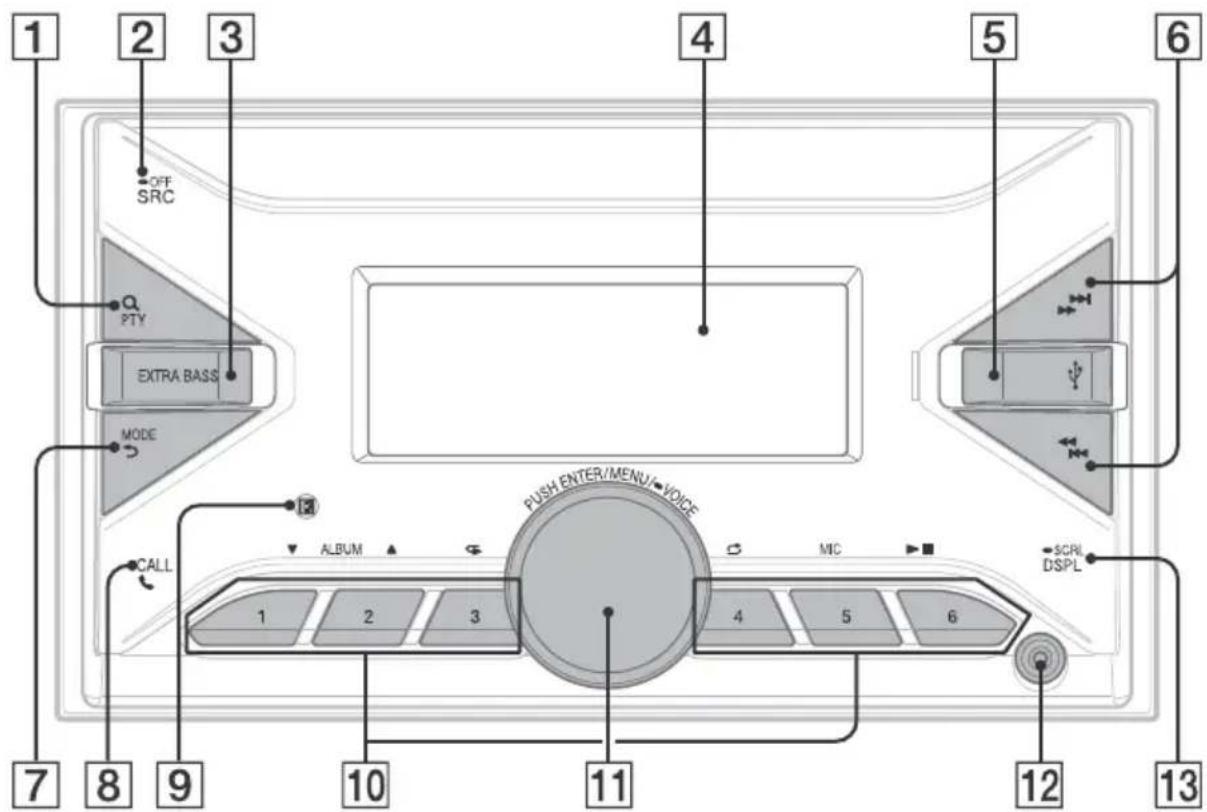
1 C(browse)
During playback:
Enters the browse mode.
(Not available when a USB device in AndroidTM mode or iPod is connected.)
During DAB reception:
Enters the browse mode.
PTY (program type)
During FM reception:
Selects PTY in RDS.
During DAB reception:
Press twice within 2 seconds to select PTY.
Press and hold for more than 2 seconds to perform an auto tune to update the station list.
2 SRC (source)
Turns on the power.
Changes the source.
OFF
Press and hold for 1 second to turn the source off and display the clock.
Press and hold for more than 2 seconds to turn off the power and the display.
3 EXTRA BASS
Reinforces bass sound in synchronization with the volume level.
Press to change the EXTRA BASS setting: [1], [2], [OFF].
4 Display window
USB port
6 S E E K - / + )
During radio reception:
Tunes in radio stations automatically.
Press and hold to tune manually.
During DAB reception:
Selects a station.
Press and hold to search for a station group. (Available only when [SEEK BY] is set to
[STATION GP].
1/prev/next)
( fast-reverse/fast-forward)
7 MODE
back)
Returns to the previous display.
8 CALL
Enters the call menu. Receives/ends a call. Press and hold for more than 2 seconds to switch the BLUETOOTH signal.
Receptor for the remote commander
10 Number buttons (1 to 6)
Receives preset radio stations.
Press and hold to preset stations.
During DAB reception:
Receives preset DAB stations or radio stations.
Press and hold to preset DAB stations or radio stations.
ALBUMV/
Skips an album for audio device.
Press and hold to skip albums continuously. (Not available when a USB device in Android mode or iPod is connected.)
(repeat)
(Not available when a USB device in Android mode is connected.)
(shuffle)
(Not available when a USB device in Android mode is connected.)
MIC
II (play/pause)
11 Control dial
Adjusts the volume.
PUSH ENTER
Enters the selected item.
Press SRC, rotate then press to change the source (timeout in 2 seconds).
MENU
Opens the setup menu.
VOICE
Press and hold for more than 2 seconds to activate voice dial, voice recognition (Android smartphone only), or the Siri function (iPhone only).
12 AUX input jack
13 DSPL(display)
Changes display items.
SCRL (scroll)
Press and hold to scroll a display item.
Basic Operations
Resetting the Unit
Before operating the unit for the first time, after replacing the car battery, or changing the connections, you must reset the unit.
1 Press and hold DSPL and CALL for more than 2 seconds.
Note
Resetting the unit will erase the clock setting and some stored contents.
Pairing with a BLUETOOTH Device
When connecting a BLUETOOTH device for the first time, mutual registration (called "pairing") is required. Pairing enables this unit and other devices to recognize each other. This unit can connect two BLUETOOTH devices (two mobile phones, or a mobile phone and an audio device).
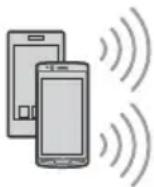

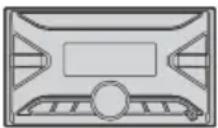
1 Press MENU, then rotate and press the control dial to select [BLUETOOTH] [PAIRING] [DEVICE 1]/[DEVICE 2]*.
flashes while the unit is in pairing standby mode.
- [DEVICE 1] or [DEVICE 2] will be changed to the paired device name after pairing is complete.
2 Perform pairing on the BLUETOOTH device so it detects this unit.
3 Select your model name shown in the display of the BLUETOOTH device*.
When pairing is made, stays lit.
- If passkey input is required on the BLUETOOTH device, input [0000].
Canceling the Demonstration Mode
You can cancel the demonstration display which appears when the source is off and the clock is displayed.
1 Press MENU, rotate the control dial to select [GENERAL], then press it.
2 Rotate the control dial to select [DEMO], then press it.
3 Rotate the control dial to select [DEMO-OFF], then press it.
The setting is complete.
4 Press (back) twice.
The display returns to normal reception/play mode.
Updating the Firmware
To update the firmware, visit the support site on the back cover, then follow the online instructions.
Notes
- Using a USB device (not supplied) is required for updating the firmware. Store the updater in the USB device, and connect the device to the USB port, then perform the update operation.
- Updating the firmware takes a few minutes to complete. During the update, do not turn the ignition to the OFF position, nor remove the USB device.
Additional Information
Precautions
Cool off the unit beforehand if your car has been parked in direct sunlight.
- Do not leave audio devices brought in inside the car, or it may cause malfunction due to high temperature in direct sunlight.
- Power antenna (aerial) extends automatically.
To maintain high sound quality
Do not splash liquid onto the unit.
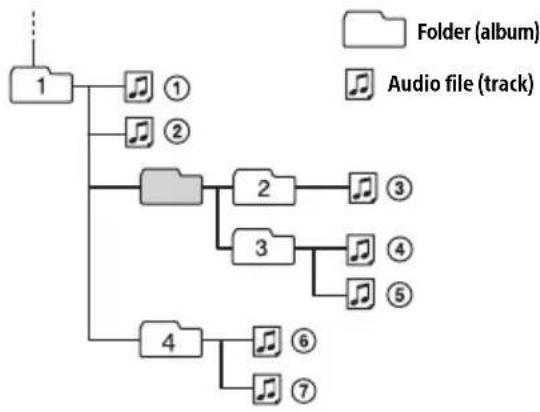
Playback order of audio files
About iPod
- You can connect to the following iPod models. Update your iPod devices to the latest software before use.
Compatible iPhone/iPod models
| Compatible Model B | u Bluetooth® USB | |
| iPhone XR √ | √ | |
| iPhone Xs max √ | √ | |
| iPhone Xs √ | √ | |
| iPhone X √ | √ | |
| iPhone 8 √ | √ | |
| iPhone 8 Plus √ | √ | |
| iPhone 7 √ | √ | |
| iPhone 7 Plus √ | √ | |
| iPhone SE √ | √ | |
| iPhone 6s √ | √ | |
| iPhone 6s Plus √ | √ | |
| iPhone 6 √ | √ | |
| iPhone 6 Plus √ | √ | |
| iPhone 5s √ | √ | |
| iPhone 5c √ | √ | |
| iPhone 5 √ | √ | |
| iPhone 4s √ | √ | |
| iPod touch (6th generation) | √ | √ |
| iPod touch (5th generation) | √ | √ |
| iPod nano (7th generation) | √ |
- Use of the Made for Apple badge means that an accessory has been designed to connect specifically to the Apple product(s) identified in the badge, and has been certified by the developer to meet Apple performance standards. Apple is not responsible for the operation of this device or its compliance with safety and regulatory standards.
Please note that the use of this accessory with an Apple product may affect wireless performance.
If you have any questions or problems concerning your unit that are not covered in this manual, consult your nearest Sony dealer.
Specifications
Tuner section
DAB/DAB+
Tuning range: 174.928 MHz - 239.200 MHz Antenna (aerial) terminal: External antenna (aerial) connector
FM
Tuning range: 87.5 MHz - 108.0 MHz
Usable sensitivity: 7 dBf
Signal-to-noise ratio: 73 dB
Separation: 50 dB at 1 kHz
AM/LW
Tuning range: 531 kHz - 1,602 kHz (AM), 153 kHz - 279 kHz (LW)
Sensitivity: AM: 26 V LW: 50~ V
USB Player section
Interface: USB (Full speed)
Maximum current: 1 A
Maximum number of recognizable folders and files:
Folders (albums): 256
Files (tracks) per folder: 256
Compatible Android Open Accessory protocol (AOA): 2.0
Corresponding codec:
MP3 (.mp3)
Bit rate: 8 kbps - 320 kbps (Supports VBR (Variable Bit Rate))
Sampling rate: 16 kHz - 48 kHz
WMA (.wma)
Bit rate: 32 kbps - 192 kbps (Supports VBR (Variable Bit Rate))
Sampling rate: 32 kHz, 44.1 kHz, 48 kHz
AAC (.m4a, .mp4)
Bit rate: 16 kbps - 320 kbps (stereo)
Sampling rate: 8 kHz - 48 kHz
FLAC (.flac)
Bit depth: 16 bit, 24 bit
Sampling rate: 44.1 kHz, 48 kHz
Supported file system: FAT16, FAT32
Wireless Communication
Communication System: BLUETOOTH Standard version 3.0
Output: BLUETOOTH Standard Power Class 2 (Max. Conducted +1 dBm)
Maximum communication range* Line of sight approx. 10m 33 ft
Frequency band: 2.4 GHz band (2.4000 GHz - 2.4835 GHz)
Modulation method: FHSS
Compatible BLUETOOTH Profiles ^2 : A2DP (Advanced Audio Distribution Profile) 1.3 AVRCP (Audio Video Remote Control Profile) 1.3 HFP (Handsfree Profile) 1.6 PBAP (Phone Book Access Profile) SPP (Serial Port Profile)
Corresponding codec: SBC (.sbc), AAC (.m4a)
*1 The actual range will vary depending on factors such as obstacles between devices, magnetic fields around a microwave oven, static electricity, reception sensitivity, antenna (aerial)'s performance, operating system, software application, etc.
*2 BLUETOOTH standard profiles indicate the purpose of BLUETOOTH communication between devices.
Power amplifier section
Output: Speaker outputs
Speaker impedance: 4 - 8 Maximum power output: 55W × 4 (at 4 )
General
Power requirements: 12 V DC car battery (negative ground (earth))
Rated current consumption: 10 A
Dimensions: Approx. 178mm× 100mm× 177mm (71/8 in × 4 in × 7 in) (w/h/d)
Mounting dimensions: Approx. 182mm× 111mm× 159mm (71 / 4 in × 43 / 8 in × 63 / 8 in) (w/h/d)
Mass: Approx. 1.0kg (2 lb 4 oz)
Package contents:
Main unit (1)
Parts for installation and connections (1 set)
Optional accessories/equipment:
Cable for steering wheel remote input: RC-SR1
Ask the dealer for detailed information.
Design and specifications are subject to change without notice.
Copyrights
The Bluetooth® word mark and logos are registered trademarks owned by the Bluetooth SIG, Inc. and any use of such marks by Sony Corporation is under license. Other trademarks and trade names are those of their respective owners.
Windows Media is either a registered trademark or trademark of Microsoft Corporation in the United States and/or other countries.
This product is protected by certain intellectual property rights of Microsoft Corporation. Use or distribution of such technology outside of this product is prohibited without a license from Microsoft or an authorized Microsoft subsidiary.
Apple, iPhone, iPod, iPod nano, iPod touch, and Siri are trademarks of Apple Inc., registered in the U.S. and other countries.
Android is a trademark of Google LLC.
Connection/Installation
Cautions
- Run all ground (earth) leads to a common ground (earth) point.
- Do not get the leads trapped under a screw, or caught in moving parts (e.g., seat railing).
- Before making connections, turn the car ignition off to avoid short circuits.
- Connect the power supply leads (2) to the unit and speakers before connecting it to the auxiliary power connector.
- Be sure to insulate any loose unconnected leads with electrical tape for safety.
- Choose the installation location carefully so that the unit will not interfere with normal driving operations.
- Avoid installing the unit in areas subject to dust, dirt, excessive vibration, or high temperature, such as in direct sunlight or near heater ducts.
- Use only the supplied mounting hardware for a safe and secure installation.
Note on the power supply lead (yellow)
When connecting this unit in combination with other stereo components, the amperage rating of the car circuit to which the unit is connected must be higher than the sum of each component's fuse amperage rating.
Note on installing in cars with a start-stop system
The unit may restart when starting the engine from start-stop. In this case, turn off the start-stop system of your car.
Mounting angle adjustment
Adjust the mounting angle to less than 30^ .
Parts List for Installation
① Mounting screws
(5×max.8mm
(7 / 32× .5 / 16in)) (4)

② Power supply leads (1)
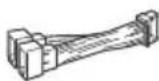
③ Microphone (1)

④ Double-sided tape (1)

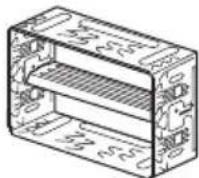
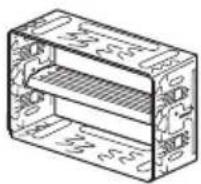
⑤ Mounting sleeve (1)
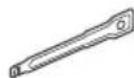
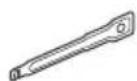
⑥ Release keys (2)
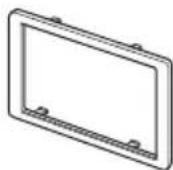
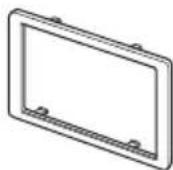
⑦ Trim ring (1)
- This parts list does not include all the package contents.
- The mounting sleeve ⑤ is attached to the unit before shipping. Before mounting the unit, use the release keys ⑥ to remove the mounting sleeve ⑤ from the unit. For details, see "Removing the mounting sleeve" (page 13).
- Keep the release keys ⑥ for future use as they are also necessary if you remove the unit from your car.
Connection
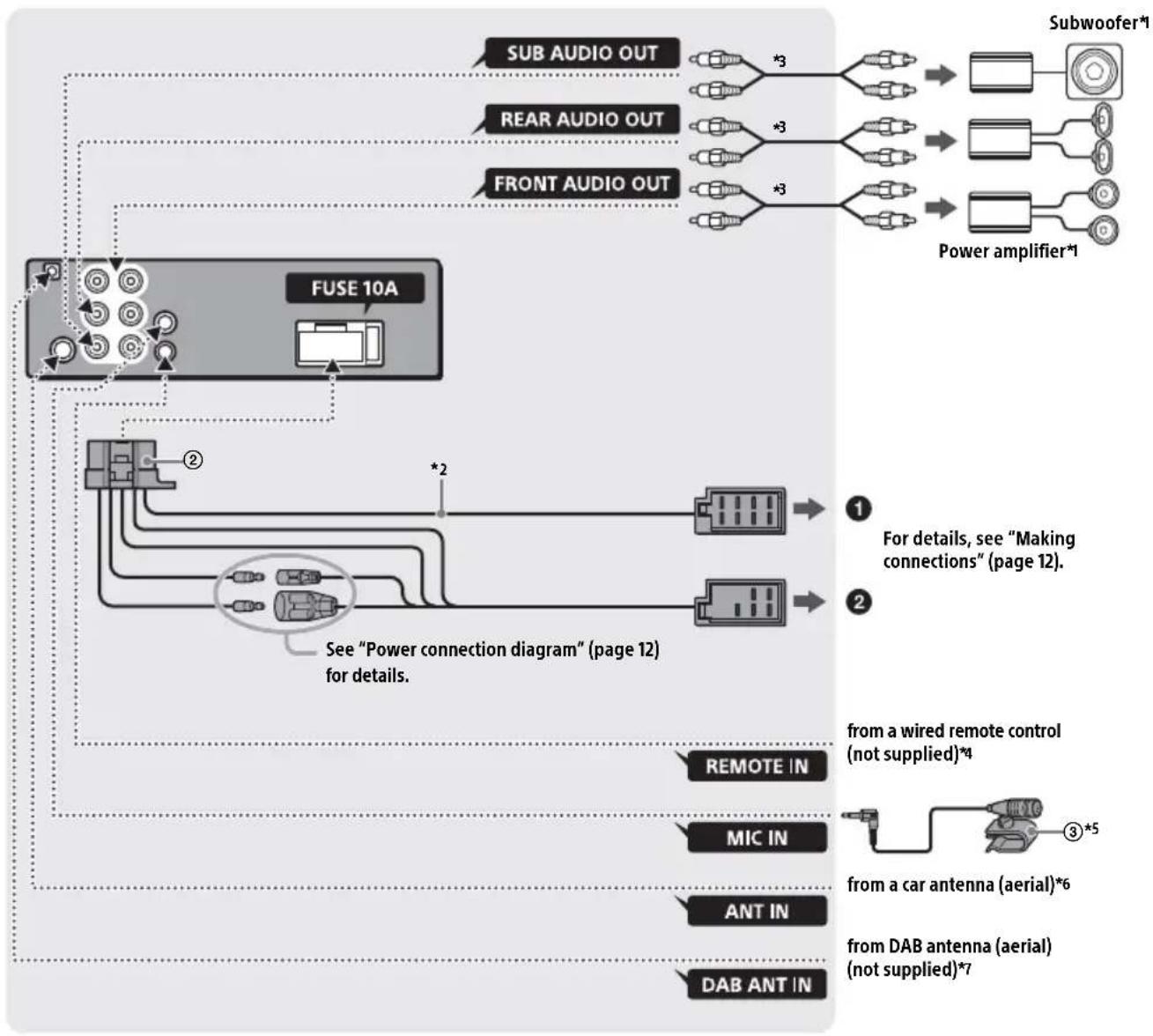
*1 Not supplied
2 Speaker impedance: 4 Ω to 8 Ω × 4
3 RCA pin cord (not supplied)
4 Depending on the type of car, use an adaptor for a wired remote control (not supplied). For details on using the wired remote control, see "Using the wired remote control" (page 13).
5 Whether in use or not, route the microphone input cord such that it does not interfere with driving operations. Secure the cord with a clamp, etc., if it is installed around your feet. For details on installing the microphone, see "Installing the microphone" (page 13).
6 Depending on the type of car, use an adaptor (not supplied) if the antenna (aerial) connector does not fit.
7 Set [ANT-PWR] to [ON] (default) or [OFF] depending on the type of DAB antenna (aerial). Max. supply current 0.1 A
Making connections
If you have a power antenna (aerial) without a relay box, connecting this unit with the supplied power supply leads ② may damage the antenna (aerial).
To the car's speaker connector
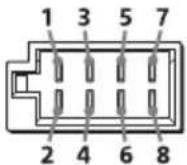
| 1 | Rear speaker (right) | ⊕ | Purple |
| 2 | ⊗ | Purple/black striped | |
| 3 | Front speaker (right) | ⊕ | Gray |
| 4 | ⊗ | Gray/black striped | |
| 5 | Front speaker (left) | ⊕ | White |
| 6 | White/black striped | ||
| 7 | Rear speaker (left) | ⊕ | Green |
| 8 | Green/black striped |
To the car's power connector
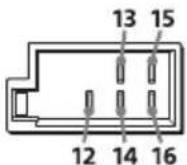
| 12 | continuous power supply | Yellow |
| 13 | power antenna (aerial) / power amplifier control (REM OUT) | Blue/white striped |
| 14 | switched illumination power supply | Orange/white striped |
| 15 | switched power supply Red | |
| 16 | ground (earth) Black |
Subwoofer Easy Connection
You can use a subwoofer without a power amplifier when it is connected to a rear speaker lead.
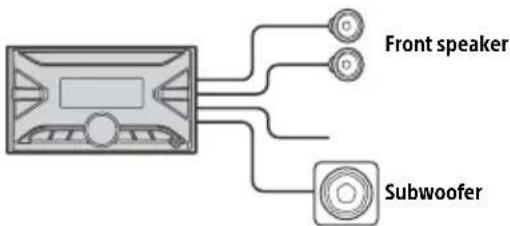
Notes
Preparation of the rear speaker leads is required.
- Use a subwoofer with an impedance of 4 to 8 , and with adequate power handling capacities to avoid damage.
Memory hold connection
When the yellow power supply lead is connected, power will always be supplied to the memory circuit even when the ignition switch is turned off.
Speaker connection
Before connecting the speakers, turn the unit off.
- Use speakers with an impedance of 4 to 8 , and with adequate power handling capacities to avoid damage.
Power connection diagram
Check your car's auxiliary power connector, and match the connections of leads correctly depending on the car.
Auxiliary power connector
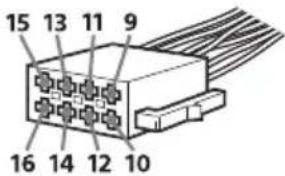
Common connection
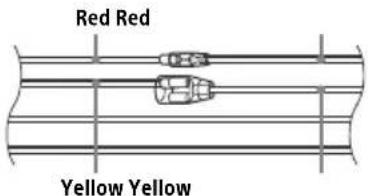
| 12 | continuous power supply | Yellow |
| 15 | switched power supply Red |
When the positions of the red and yellow leads are inverted
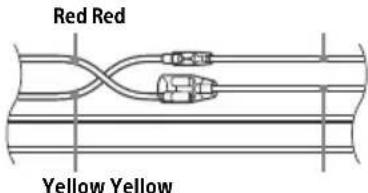
| 12 s | witched power supply | Yellow |
| 15 | continuous power supply | Red |
When the car without ACC position
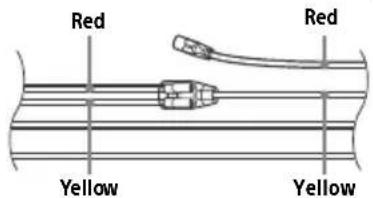
After matching the connections and switching power supply leads correctly, connect the unit to the car's power supply. If you have any questions and problems connecting your unit that are not covered in this manual, consult the car dealer.
Installing the microphone
To capture your voice during handsfree calling, you need to install the microphone ③.
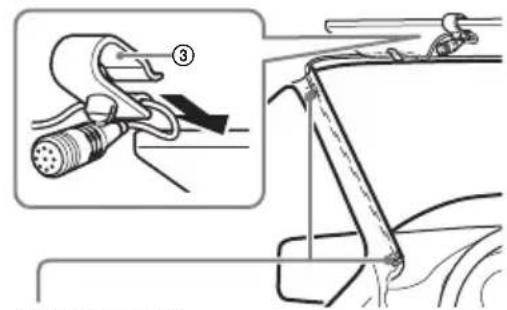
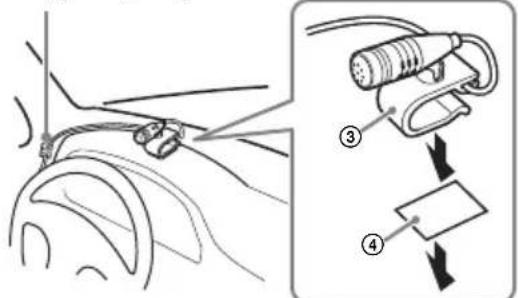
Clip (not supplied)
Cautions
It is extremely dangerous if the cord becomes wound around the steering column or gearstick. Be sure to keep it and other parts from interfering with your driving operations.
If airbags or any other shock-absorbing equipment is in your car, contact the store where you purchased this unit, or the car dealer, before installation.
Note
Before attaching the double-sided tape ④ clean the surface of the dashboard with a dry cloth.
Using the wired remote control
1 To enable the wired remote control, set [STR CONTROL] in [STEERING] to [PRESET].
Installation
Removing the mounting sleeve
Before installing the unit, remove the mounting sleeve 5 from the unit.
1 Insert both release keys ⑥ until they click, and pull down the mounting sleeve ⑤, then pull up the unit to separate.
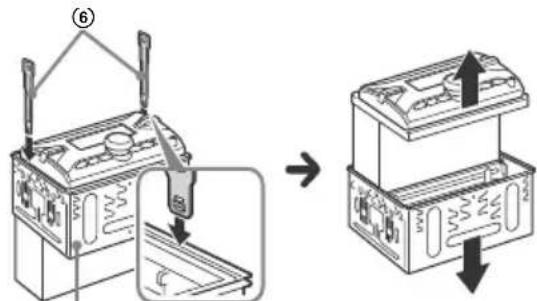
Face the hook inwards.
Mounting the unit in the dashboard
For Japanese cars, see "Mounting the unit in a Japanese car" (page 14).
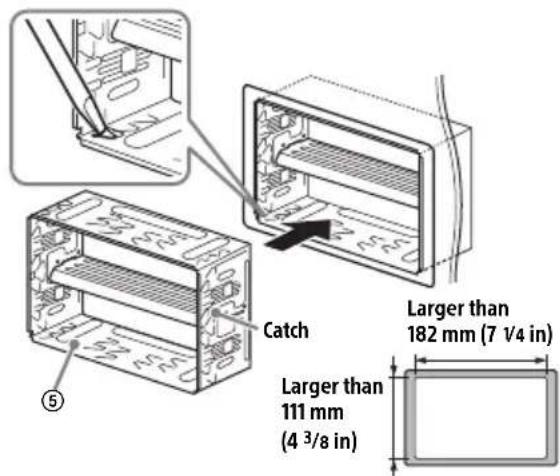
Mounting the unit with the supplied mounting sleeve
Before installing, make sure the catches on both sides of the mounting sleeve ⑤ are bent inwards 3.5mm (5/32 in).
1 Position the mounting sleeve ⑤ inside the dashboard, then bend the claws outward for a tight fit.
2 Mount the unit onto the mounting sleeve ⑤.
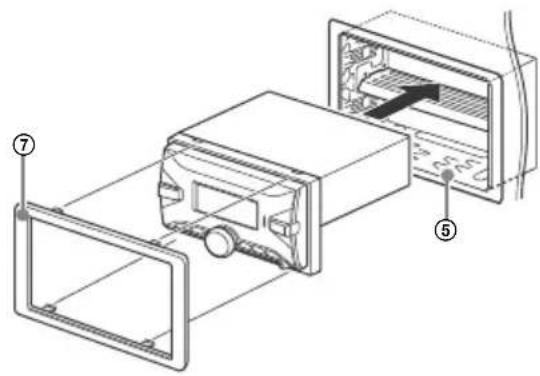
Note
If the catches are straight or bent outwards, the unit will not be installed securely and may spring out.
Mounting the unit in a Japanese car
You may not be able to install this unit in some makes of Japanese cars. In such a case, consult your Sony dealer.
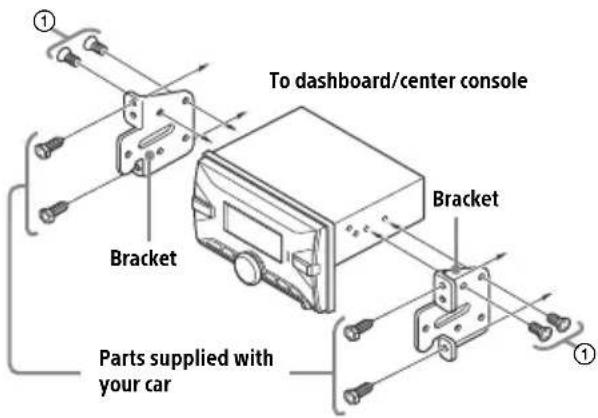
When mounting this unit to the preinstalled brackets of your car, use the mounting screws ① in the appropriate screw holes based on your car: T for TOYOTA and N for NISSAN.
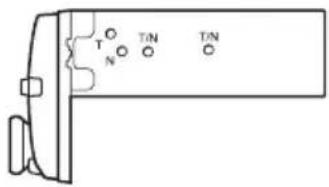
Note
To prevent malfunction, install only with the mounting screws ①.
Resetting the unit
For details, see "Resetting the Unit" (page 6).
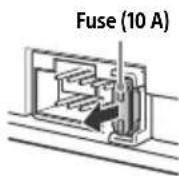
Fuse replacement
When replacing the fuse, be sure to use one matching the amperage rating stated on the original fuse. If the fuse blows, check the power connection and replace the fuse. If the fuse blows again after replacement, there may be an internal malfunction. In consult your nearest Sony dealer.
Avertissement
Protocole AOA (Android Open Accessory) compatible : 2.0
Codec correspondent:
MP3 (.mp3)
Débit binaire: 8 kbits/s - 320 kbits/s (prise en charge de VBR (Variable Bit Rate))
Taux d'échantillonnage: 16 kHz - 48 kHz
WMA (.wma)
Débit binaire : 32 kbits/s - 192 kbits/s (prise en charge de VBR (Variable Bit Rate))
Raccordement/Installation
Attention
Selecteert PTY in RDS.
174,928 MHz - 239,200 MHz
Antenneaansluiting:
87,5 MHz - 108,0 MHz
531 kHz - 1.602 kHz (AM),
153 kHz - 279 kHz (LW)
Gevoeligheid:
AM: 26~ V
LW:50~ V
USB-spelergedeelte
Interface: USB (Full Speed)
Maximale stroom: 1 A
Mappen (albums): 256
Bestanden (nummers) per map: 256
Compatible Android Open Accessory-protocol (AOA): 2.0
Overeenkomstige codec:
MP3 (.mp3)
A2DP (Advanced Audio Distribution Profile) 1.3
AVRCP (Audio Video Remote Control Profile) 1.3
HFP (Handsfree Profile) 1.6
PBAP (Phone Book Access Profile)
SPP (Serial Port Profile)
Overeenkomstige codec:
SBC (.sbc), AAC (.m4a)
Lista over delar for installation
① Monteringsskruvar (5×max.8mm)(4)
② Nätkabel (1)

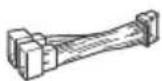
③ Mikrofon (1)
④ Dubbelsidig tejp (1)


⑤ Monteringshylsa (1)
⑥ Frigöringsnycklar (2)
⑦ Avslutningslist(1)
Hereby, Sony Corporation declares that this equipment is in compliance with Directive 2014/53/EU.
The full text of the EU declaration of conformity is available at the following internet address:
http://www.compliance.sony.de/
Eesti keel
If you have any questions or for the latest support information on this product, please visit the web site below:
Support-Website
https://www.sony.eu/support
For more details, please visit the following web site and refer to your unit name as shown below.
https://rd1.sony.net/help/ev/dsx-b7071/h_zz/
Made for

iPhone
iPod

Bluetooth