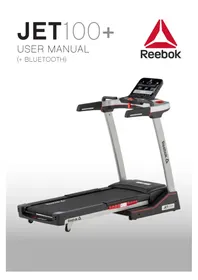
Jet 100+ - Treadmills Reebok - Free user manual and instructions
Find the device manual for free Jet 100+ Reebok in PDF.



User questions about Jet 100+ Reebok
0 question about this device. Answer the ones you know or ask your own.
Ask a new question about this device
Download the instructions for your Treadmills in PDF format for free! Find your manual Jet 100+ - Reebok and take your electronic device back in hand. On this page are published all the documents necessary for the use of your device. Jet 100+ by Reebok.
USER MANUAL Jet 100+ Reebok
FOLDING INSTRUCTIONS
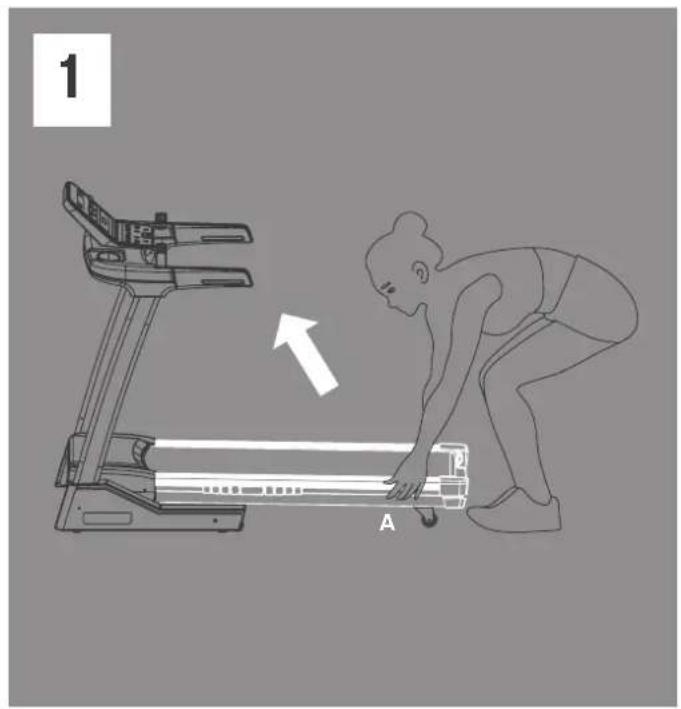
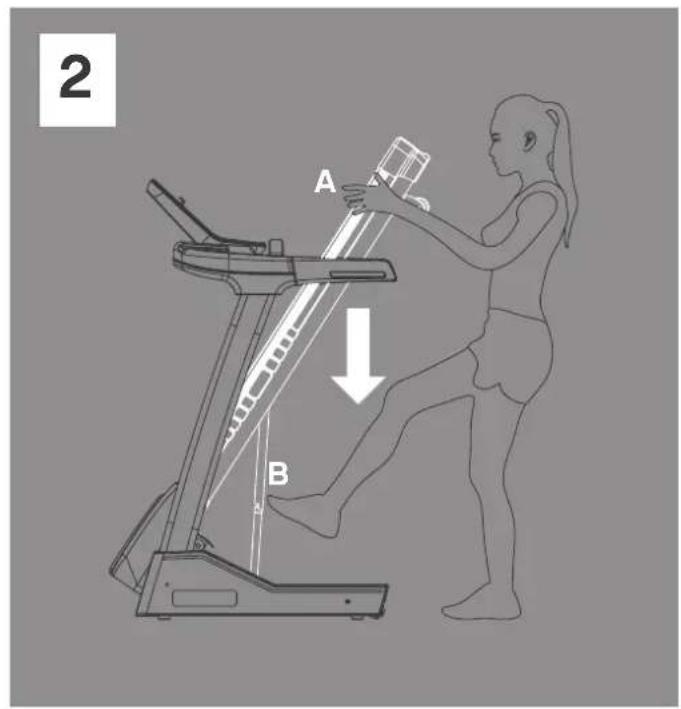
MOVING YOUR MACHINE
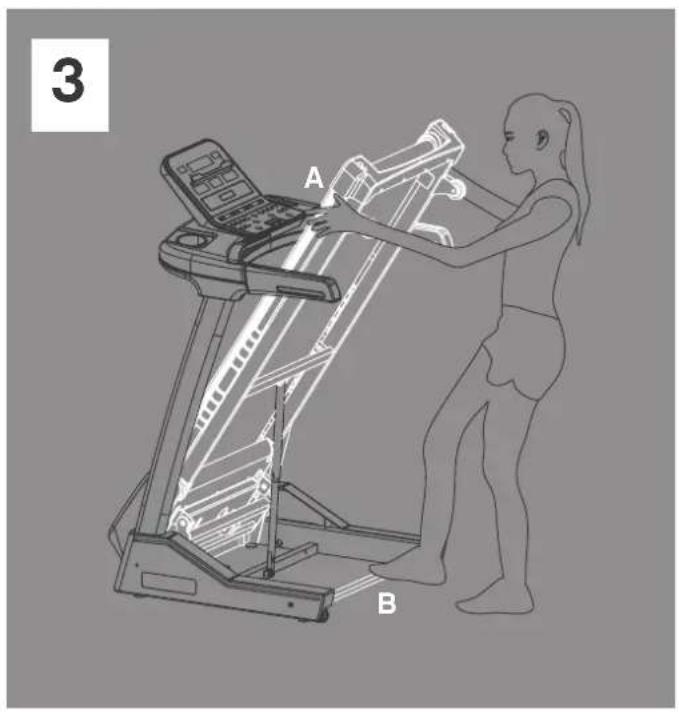
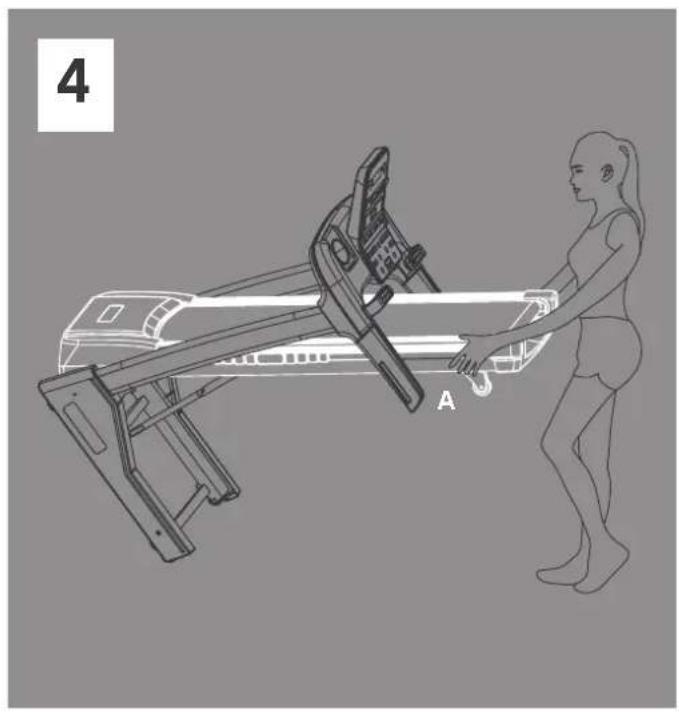
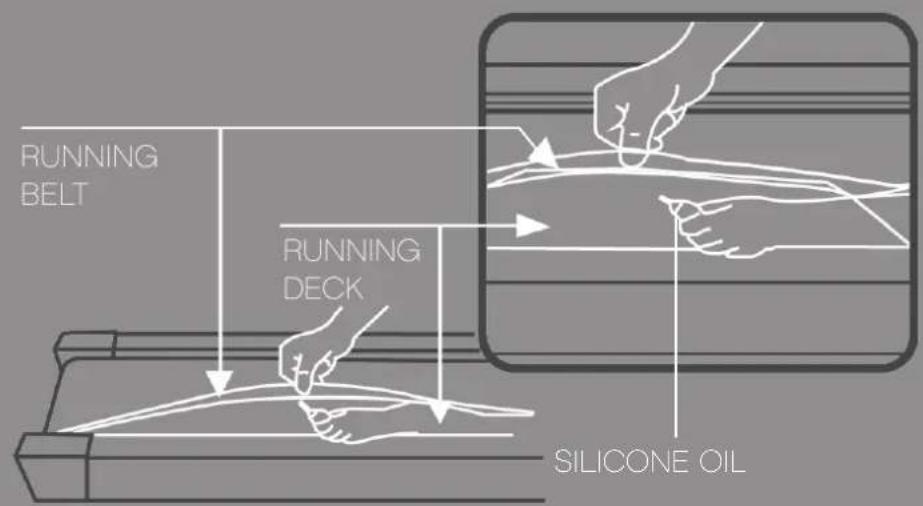
LUBRICATION
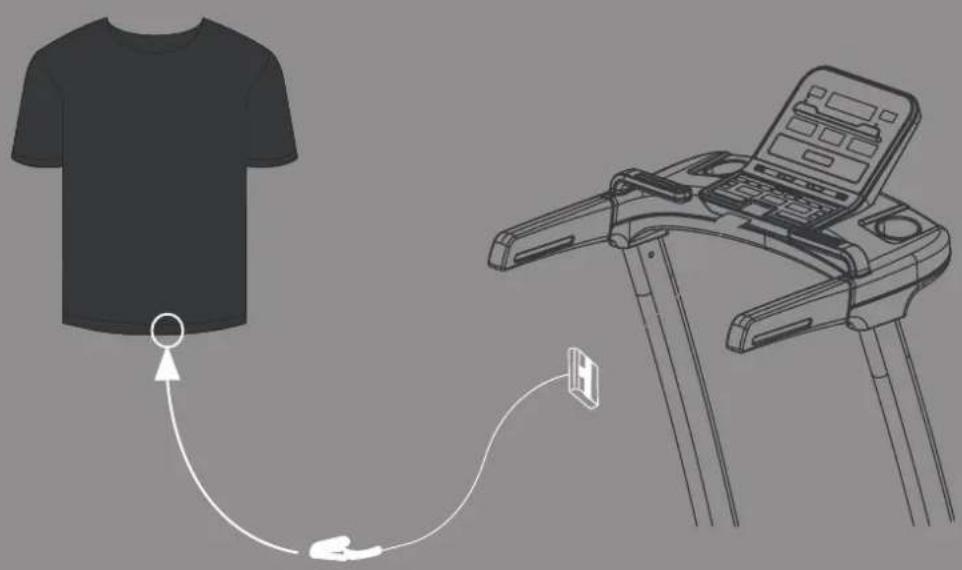
SAFETY KEY
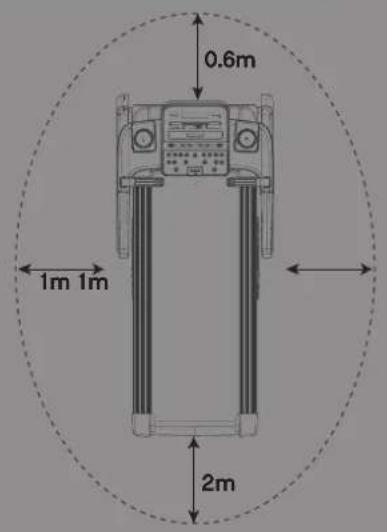
SAFETY PROCEDURES
ALLOW FOR A MINIMUM SPACE SHOWN BELOW AROUND THE TREADMILL WHEN IN OPERATION.
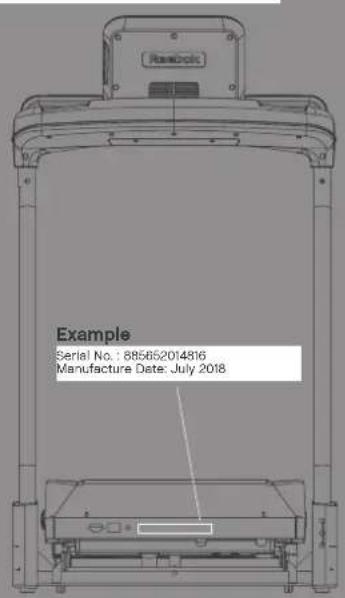
SERIAL NUMBER IS LOCATED ON THE FRONT BASE OF THE TREADMILL.

Product Registration and Support
Enregistrement et support du produit
Productregistratie en ondersteuning
Registrodeproductosysoporte
Registrodeproductesuporte
PerectraaHnoDaepeKka npOdykta
製品の登録とサボ一ト
U
产品注册和技术支持
WWW.RFFBOXFITNESSINFOPRODUCT-SUPPORT
THIS PRODUCT IS SUITABLE FOR USER'S WEIGHT OF 110KG

WEEE logo this symbol on a product means that the product is covered by European Directive 2012/9/EU. Hereby, R-E International declares that this product is in compliance with the essential requirements and other relevant provisions of Directive 2014/53/EU.
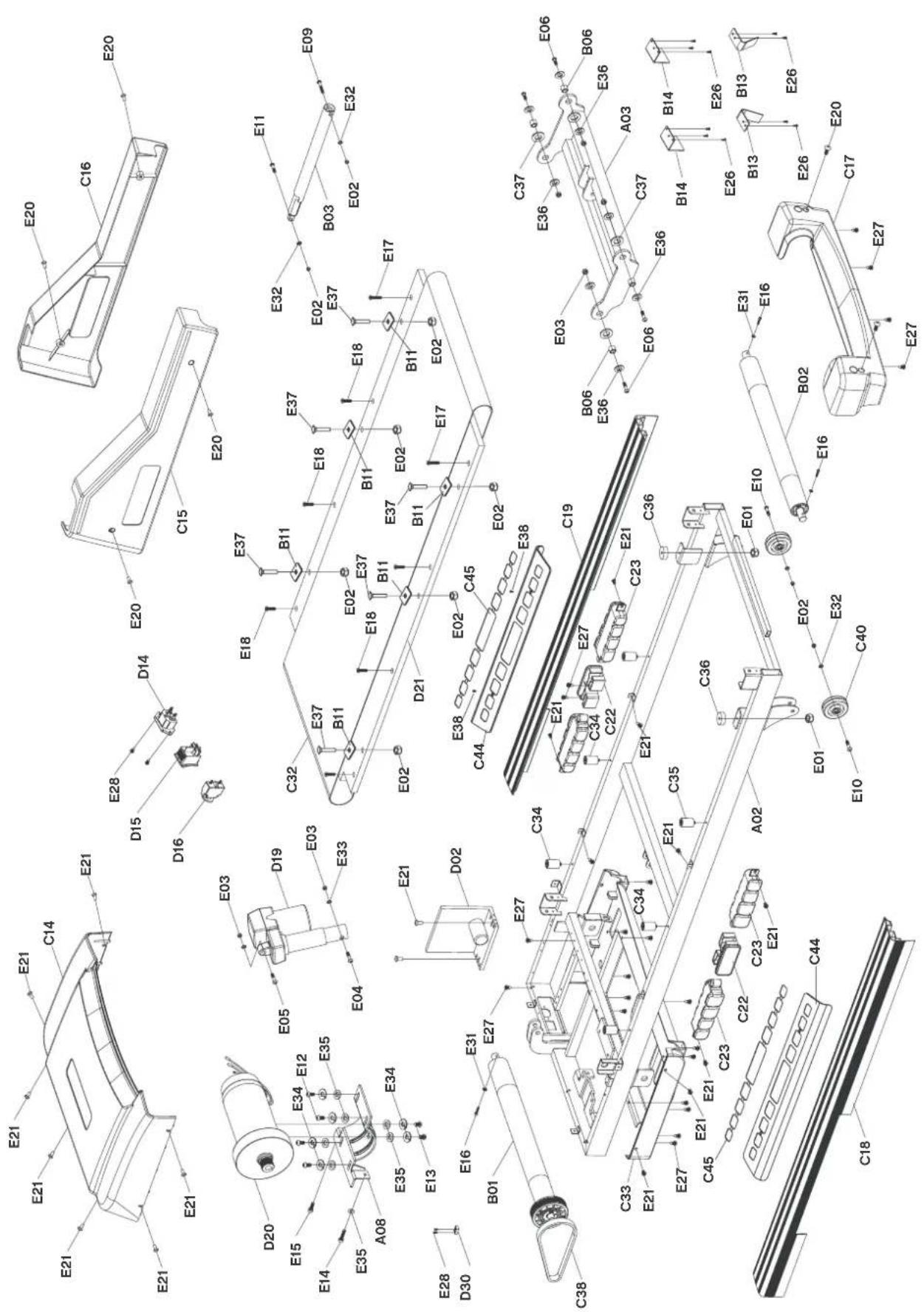
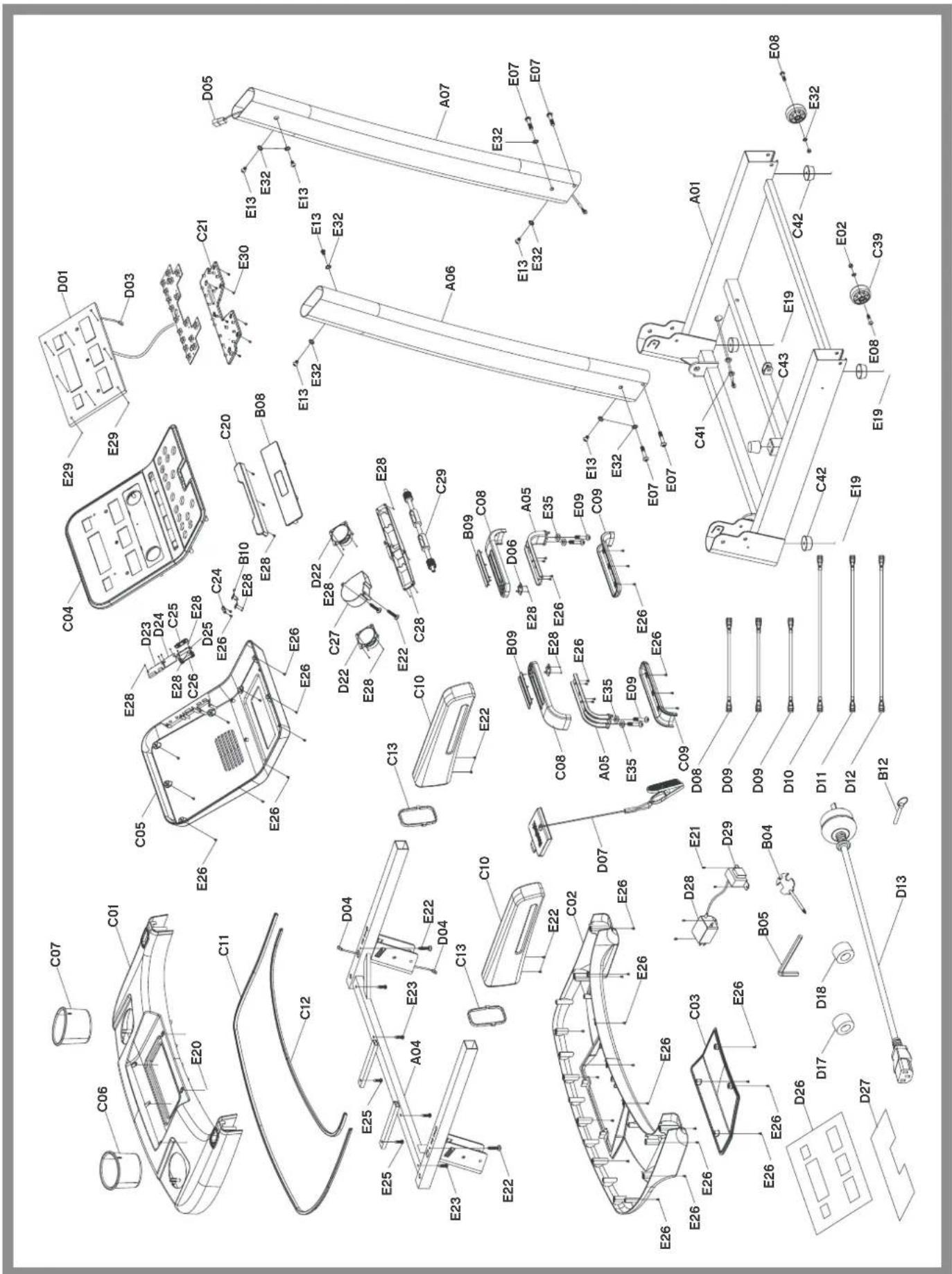
| No. | PART DESCRIPTION | QTY | No. | PART DESCRIPTION | QTY | No. | PART DESCRIPTION | QTY |
| A01 | base frame 1 C23 air cushion 4 D26 console panel | 1 | C24 | safety key base | 1 | D27 | function button sticker | 1 |
| A02 | main frame | 1 | C24 | volume control button | 1 | D28 | filter | 1 |
| A03 | incline bracket | 1 | C25 | base of volume control button | 1 | D29 | inductance | 1 |
| A04 | console bracket | 1 | C26 | base of volume control button | 1 | D30 | speed sensor | 1 |
| A05 | pulse bracket | 2 | C27 | fan | 1 | D30 | bolt | 1 |
| A06 | left upright tube | 1 | C28 | fan guide | 1 | E01 | nut | 2 |
| A07 | right upright tube | 1 | C29 | fan axis | 1 | E02 | nut | 12 |
| A08 | motor bracket | 1 | C32 | running belt | 1 | E03 | nut | 6 |
| B01 | front roller | 1 | C33 | motor bottom cover | 1 | E04 | bolt | 1 |
| B02 | back roller | 1 | C34 | black cushion | 4 | E05 | bolt | 1 |
| B03 | cylinder | 1 | C35 | blue cushion | 2 | E06 | bolt | 4 |
| B04 | spanner and screw driver | 1 | C36 | blue cushion | 2 | E07 | bolt | 4 |
| B05 | 5mm allen key | 1 | C37 | plastic pad | 4 | E08 | bolt | 2 |
| B06 | bushing | 4 | C38 | motor belt | 1 | E09 | bolt | 5 |
| B08 | speaker net | 1 | C39 | transport wheel | 2 | E10 | bolt | 2 |
| B09 | pulse steel plate | 4 | C40 | adjustable wheel | 2 | E11 | bolt | 1 |
| B10 | spring plate | 2 | C41 | ring-shape wire plug | 2 | E12 | bolt | 4 |
| B11 | side rail tighten sheet | 6 | C42 | flat foot pad | 4 | E13 | bolt | 8 |
| B12 | locking pin | 1 | C43 | cone-shape cushion | 1 | E14 | bolt | 1 |
| B13 | belt hook | 2 | C44 | anti-slip pad | 2 | E15 | bolt | 1 |
| B14 | hide board | 2 | C45 | sticker of anti-slip pad | 2 | E16 | bolt | 3 |
| C01 | console base | 1 | D01 | computer board | 1 | E17 | bolt | 2 |
| C02 | console bottom cover | 1 | D02 | control board | 1 | E18 | bolt | 6 |
| C03 | console back cover | 1 | D03 | top signal wire | 1 | E19 | bolt | 4 |
| C04 | console panel | 1 | D04 | middle signal wire | 1 | E20 | bolt | 11 |
| C05 | console panel bottom cover | 1 | D05 | bottom signal wire | 1 | E21 | bolt | 21 |
| C06 | left water bottle holder | 1 | D06 | pulse button | 2 | E22 | screw | 8 |
| C07 | right water bottle holder | 1 | D07 | safety key | 1 | E23 | screw | 4 |
| C08 | pulse top cover | 2 | D08 | ac single wire (blue) | 1 | E25 | screw | 2 |
| C09 | pulse bottom cover | 2 | D09 | ac single wire (brown) | 2 | E26 | screw | 54 |
| C10 | handle bar | 2 | D10 | ac single wire (brown 350mm) | 1 | E27 | screw | 23 |
| C11 | decoration strip I | 1 | D11 | ac single wire (blue 350mm) | 1 | E28 | screw | 35 |
| C12 | decoration strip ii | 1 | D12 | grounding wire | 1 | E29 | screw | 8 |
| C13 | handle bar decoration ring | 2 | D13 | power wire | 1 | E30 | screw | 7 |
| C14 | motor top cover | 1 | D14 | power socket | 1 | E31 | washer | 3 |
| C15 | left upright tube cover | 1 | D15 | on-off button | 1 | E32 | washer | 14 |
| C16 | right upright tube cover | 1 | D16 | overload protector | 1 | E33 | washer | 2 |
| C14 | motor top cover | 1 | D17 | magnet ring | 1 | E34 | spring washer | 6 |
| C15 | left upright tube cover | 1 | D18 | magnet core | 1 | E35 | flat washer | 11 |
| C16 | right upright tube cover | 1 | D19 | Incline motor | 1 | E36 | big washer | 8 |
| C17 | back end cover | 1 | D20 | dc motor | 1 | E37 | bolt | 6 |
| C18 | left side rail | 1 | D21 | running board | 1 | E38 | screw | 4 |
| C19 | right side rail | 1 | D22 | speaker | 2 | |||
| C20 | plastic holder | 1 D23 | audio board 1 | |||||
| C21 | button board | 1 | D24 | usb board | 1 | |||
| C22 | cushion | 2 | D25 | volume control board | 1 |
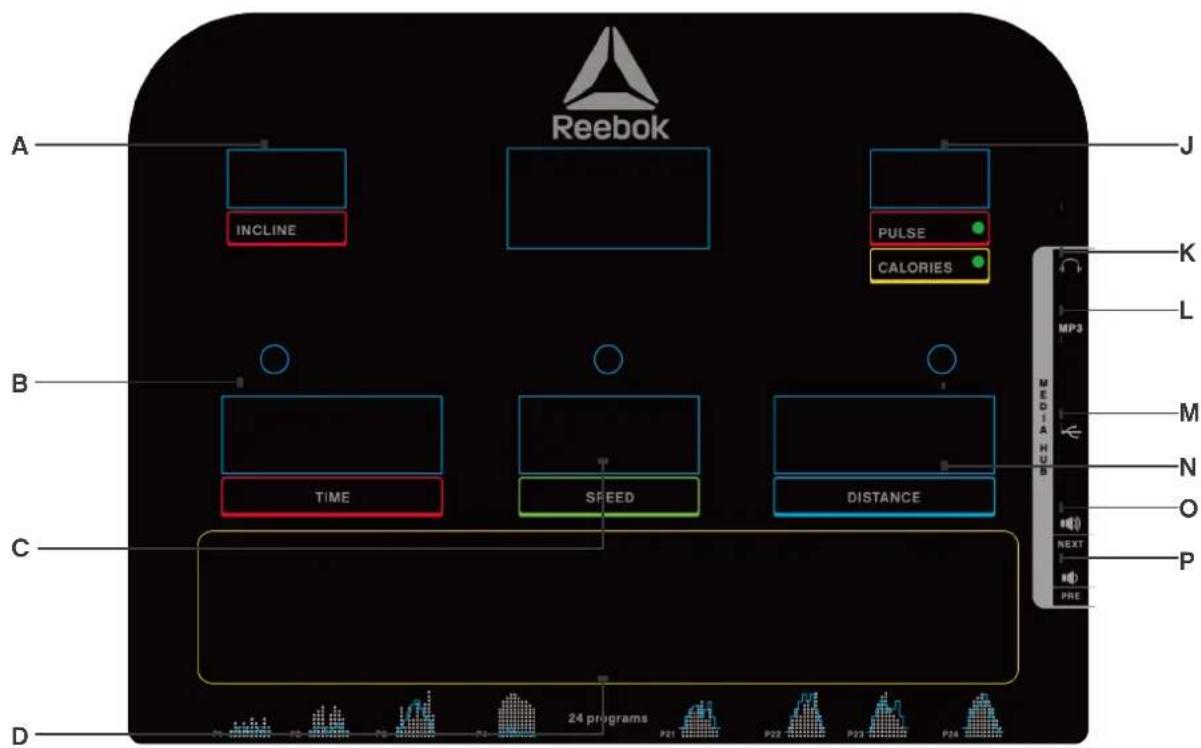
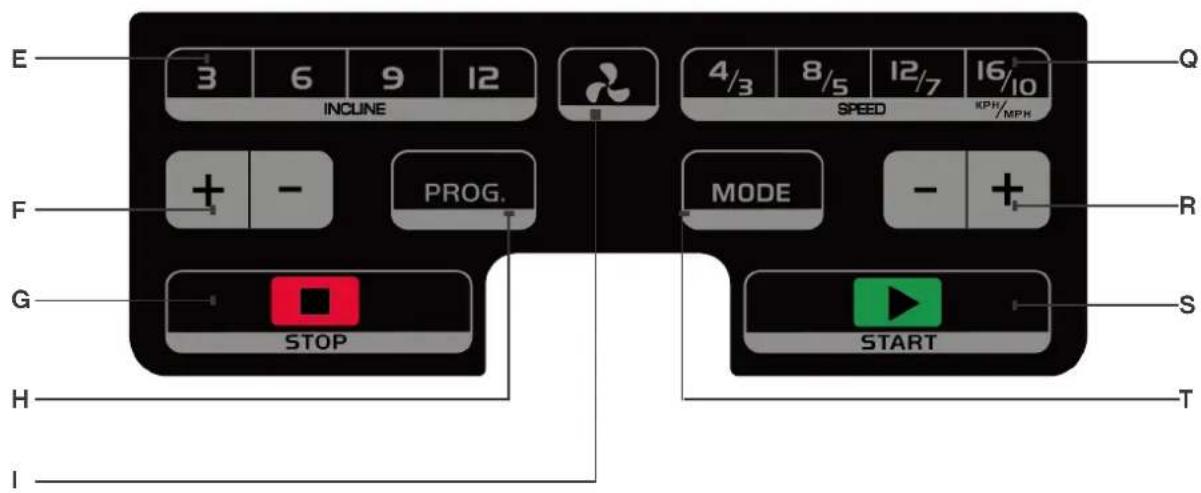
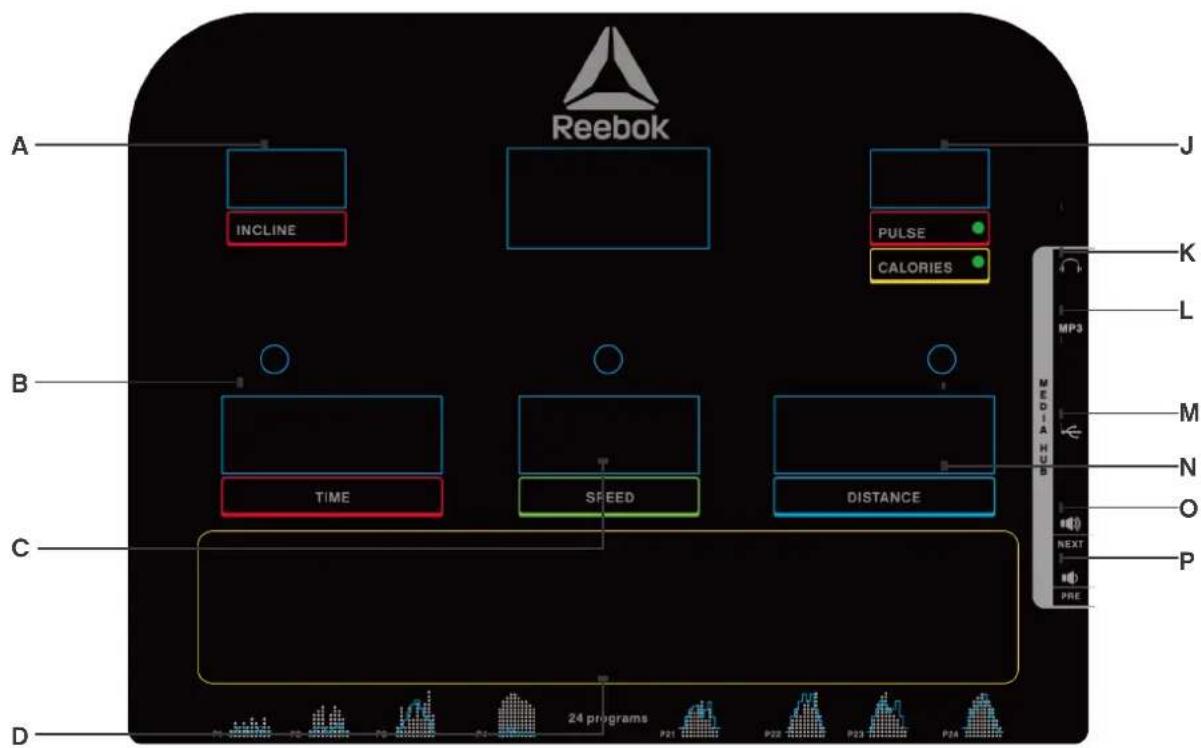
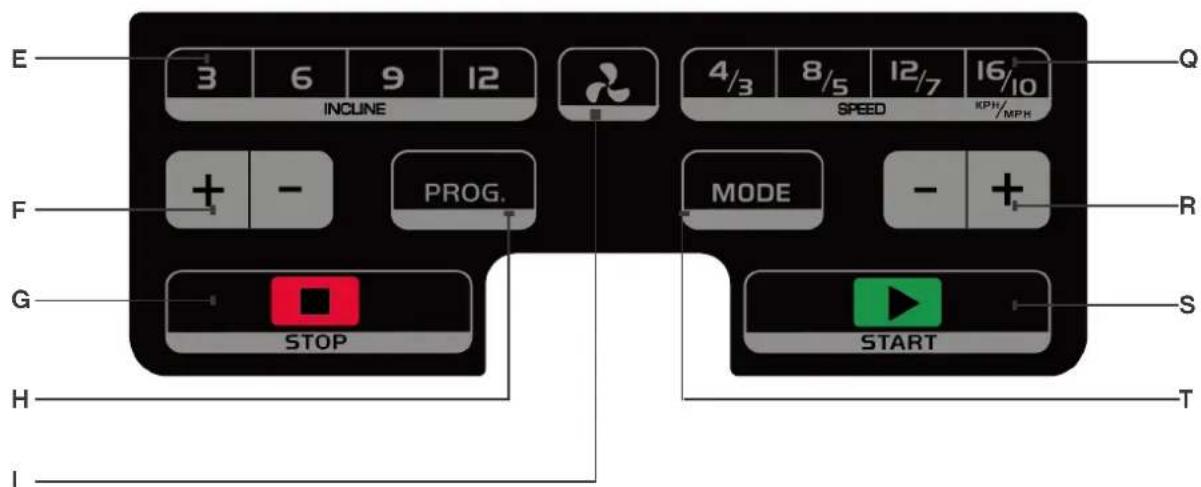
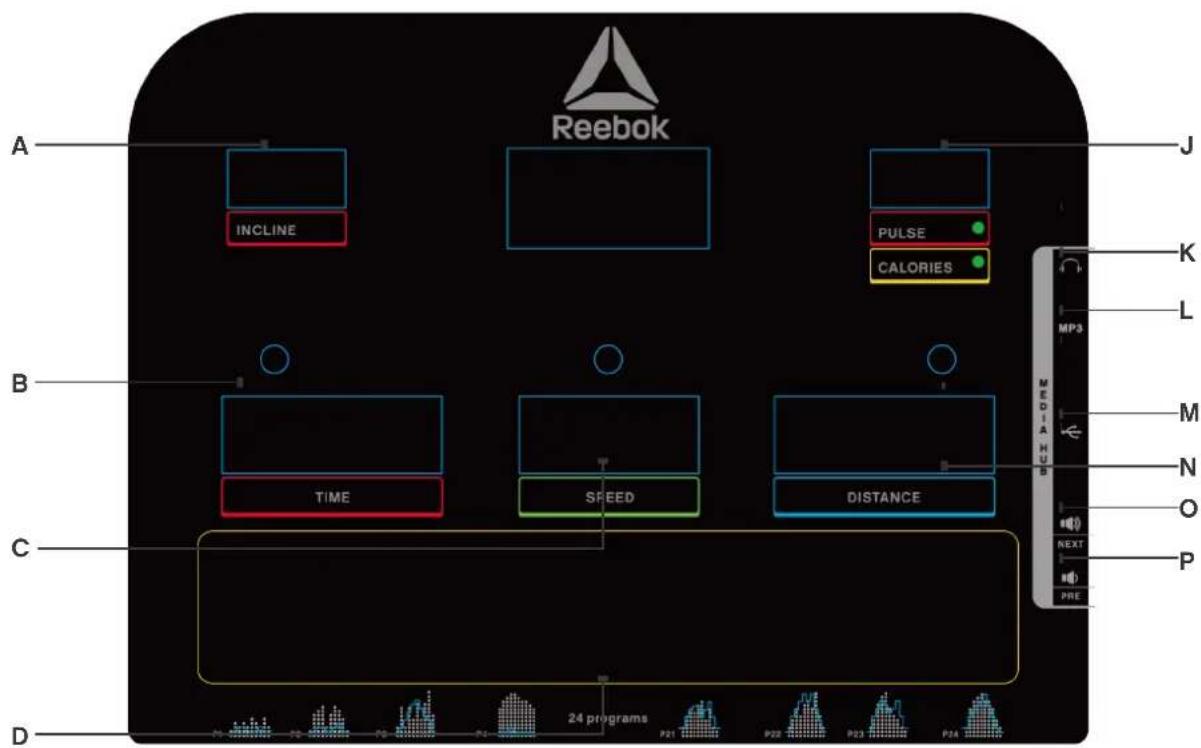
COMPUTER FUNCTION
A - INCLINE
B-TIME
C - SPEED
D - PROGRAM GUIDE
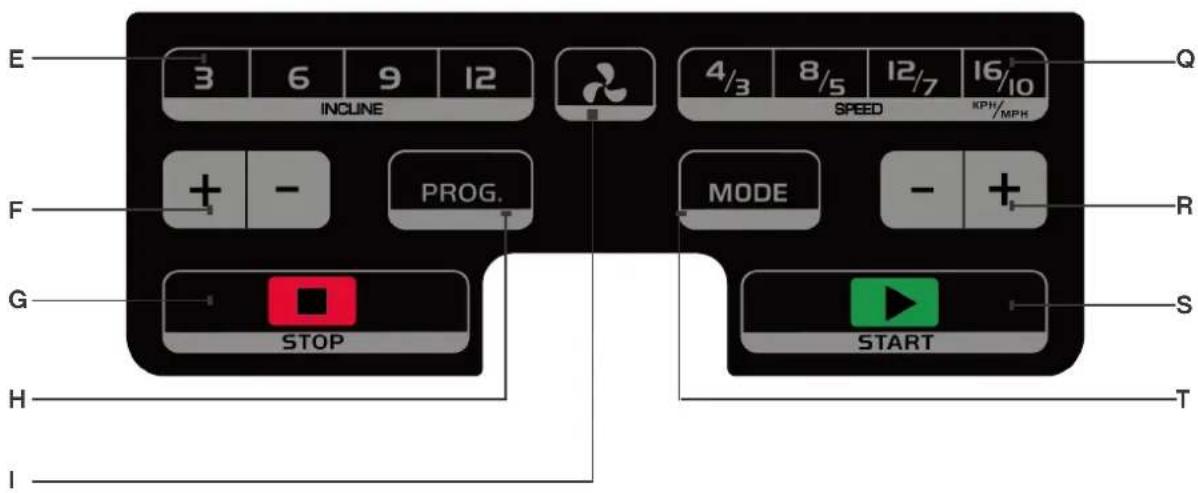
E-INSTANT INCLINE
F - INCLINE UP / DOWN
G- STOP
H - PROGRAM
FAN
J-PULSE/CALORIES
K-HEADPHONE INPUT
L - MP3 INPUT
M - USB INPUT
N - DISTANCE - DISPLAYS PROGRAM
- VOLUME +/NEXT SONG
P - VOLUME - / PREVIOUS SONG
Q-INSTANT SPEED
R - SPEED UP / DOWN
S-START
T-MODE
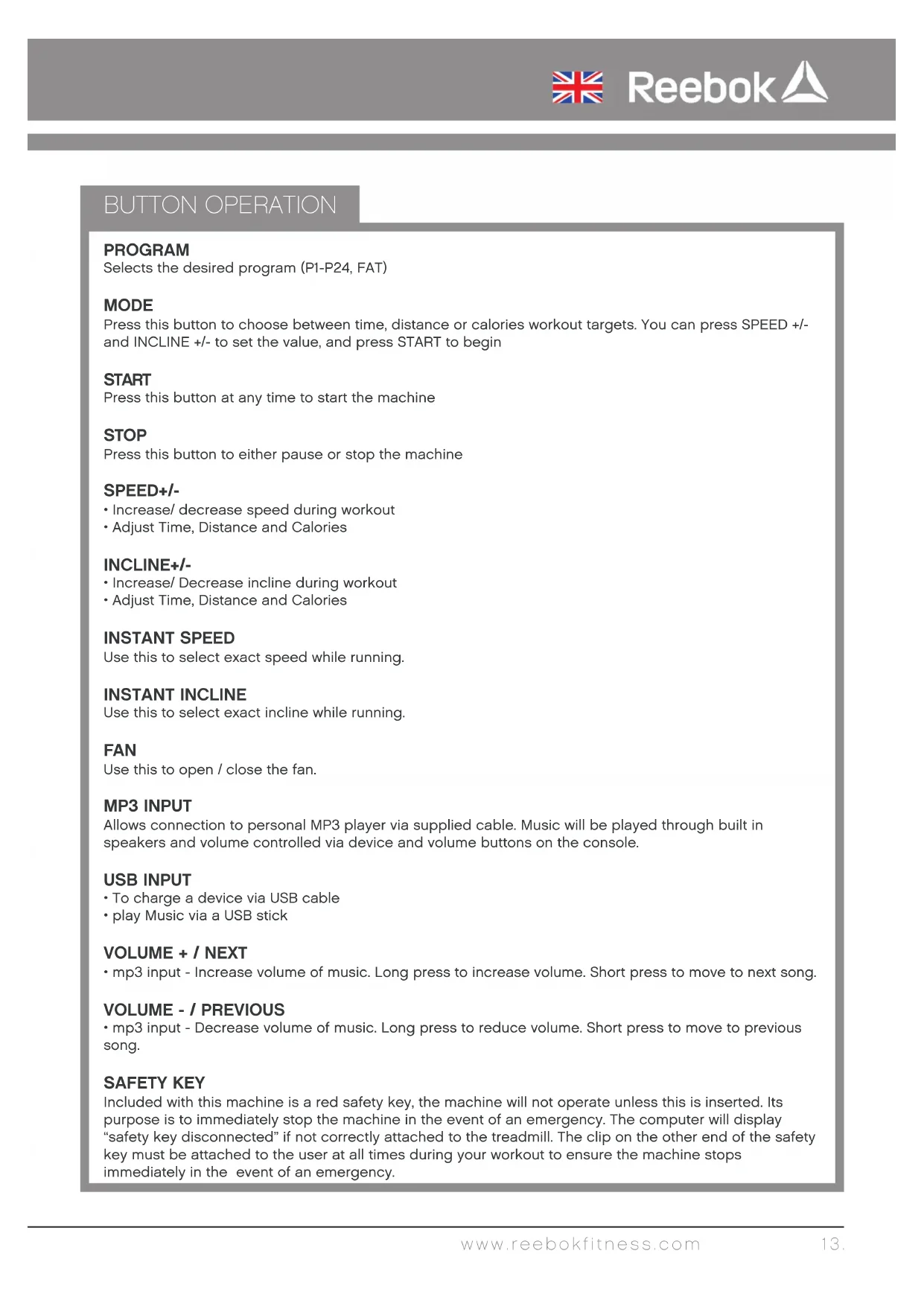
BUTTON OPERATION
PROGRAM
Selects the desired program (P1-P24, FAT)
MODE
Press this button to choose between time, distance or calories workout targets. You can press SPEED +/- and INCLINE +/- to set the value, and press START to begin
START
Press this button at any time to start the machine
STOP
Press this button to either pause or stop the machine
SPEED+/-
- Increase/ decrease speed during workout
- Adjust Time, Distance and Calories
INLINE+/-
- Increase/Decrease incline during workout
- Adjust Time, Distance and Calories
INSTANT SPEED
Use this to select exact speed while running.
INSTANT INLINE
Use this to select exact incline while running.
FAN
Use this to open / close the fan.
MP3 INPUT
Allows connection to personal MP3 player via supplied cable. Music will be played through built in speakers and volume controlled via device and volume buttons on the console.
USB INPUT
To charge a device via USB cable
- play Music via a USB stick
VOLUME + / NEXT
- mp3 input - Increase volume of music. Long press to increase volume. Short press to move to next song.
VOLUME - / PREVIOUS
- mp3 input - Decrease volume of music. Long press to reduce volume. Short press to move to previous song.
SAFETY KEY
Included with this machine is a red safety key, the machine will not operate unless this is inserted. Its purpose is to immediately stop the machine in the event of an emergency. The computer will display "safety key disconnected" if not correctly attached to the treadmill. The clip on the other end of the safety key must be attached to the user at all times during your workout to ensure the machine stops immediately in the event of an emergency.
HANDLEBAR CONTROLS
SPEED+/-
- Increase / decrease speed during workout
- Adjust Time, Distance and Calories
INLINE+/-
- Increase / Decrease incline during workout
- Adjust Time, Distance and Calories
PULSE GRIPS
There are pulse sensors located on both handlebars, in order to monitor the users pulse rate these can be held in order for the reading to be given. The pulse monitor is a guide for reference only and not for medical use or monitoring.
COMPUTER PROGRAMS
Manual Mode includes normal mode, time, calories and distance countdown mode.
P0 - Manual Mode
PI - P24 - Preset workout programs
Fat - Body fat functions
NORMAL MODE
- From standby press START to begin manual mode immediately
- Treadmill speed and incline can be manually adjusted by using the SPEED +/- or INCLINE +/- buttons at any time during a workout
- Press STOP/PAUSE button to stop the workout. The treadmill will go into cool down mode
- Take out the SAFETY KEY to stop the working of the motor, or press STOP two times.
TIME, DISTANCE AND CALORIES COUNTERDOWN MODE
- From standby press MODE to select TIME, DISTANCE and CALORIES. Once selected use speed or incline +/- to alter the required setting and press START to begin.
- The TIME, DISTANCE or CALORIES will count down from the selection.
- Once the countdown has completed the computer will beep to indicate the end of the program and speed window will show "END" after 5 seconds the computer will beep and all the setting reset to zero.
P01-P24
These are preset programs in which the machines speed or incline will be changed automatically during the workout.
Note: if speed/incline is altered by the user during these programs it will revert back to the preset speed/ incline at the next segment of the program.
- From standby screen, Press PROGRAM button to select required program
- Press START to select and begin using the preset time.
- The default workout time for these programs is 10 minutes. This can be altered by pressing INCLINE +/-. buttons before START selected
- During these programs the speed and incline settings are split into 10 segments. The time of each segment depends on the overall time selected. For example a 10 minute program = 10 segments of 1 minute. Therefore the speed/incline would alter every 1 minute. Times will differ to allow for warm up and cool down.
- The console will count down and beep for 3 seconds each time the speed/incline is changed.
BODY FAT FUNCTION
- Press PROGRAM button until body fat function displays in the TIME DISPLAY
- Press MODE button to enter the BODY FAT FUNCTION
- The TIME window will display the preset program (F1-F5), DISTANCE window will display the input data
- Press +I to change the input parameters.
- Press MODE to confirm
F-1 Sex 01 male - 02 female
F-2 Age 10-99
F-3 Height 100 - 200CM (40-80 INCH)
F-4 Weight 20 - 150KG (44-330LB)
- F5 will be displayed. At this stage the user information has been stored. Place both hands on the pulse sensors for approximately 5-10 seconds. The test results will then be displayed as below.
<19 Under weight
(20-25) Normal weight
(26-29) Overweight
30 Obese
MPH to KPH conversion
The Speed and distance can be set to operate in MPH and KPH To switch between these.
- In standby mode, insert SAFETY KEY, Press SPEED+ and INLINE+ for 5 seconds.
- Speed will show "0.6" for MPH or "1.0" for KPH.
- Repeat above process to change the speed again.
LUBRICATION REMIND FUNCTION
When the machine has completed 300km (188miles), the console will beep for every 10 seconds, and TIME window will show Oil. This means that your treadmill needs to be lubricated with oil (this should be completed every 6 weeks). To reset the console, hold STOP button for 3 seconds, the console will now beep and reset.
BLUETOOTH INSTRUCTIONS
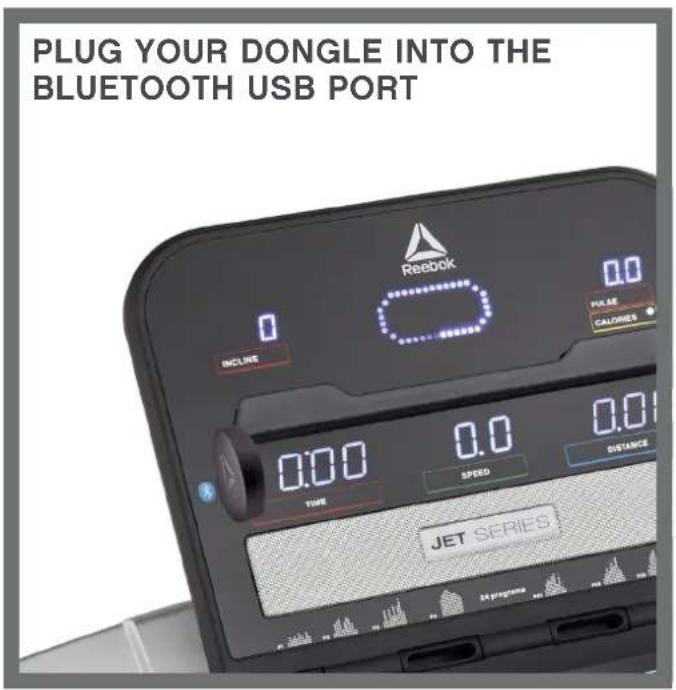
CONNECT YOUR SMARTPHONE TO YOUR NEW REEBOK EQUIPMENT
DOWNLOAD:
Search 'Reebok Fitness Equipment' on the App Store or Google

Download on the App Store

GET IT ON Google Play
CONNECT:
Your Reebok machine connects to the app via the bluetooth dongle, so you don't need GPS or internet to use it.
The USB connector is colour coded blue to match the correct USB port on your machine.
Once you have selected a workout or planned your route, the app will ask you to choose the machine you would like to connect with.
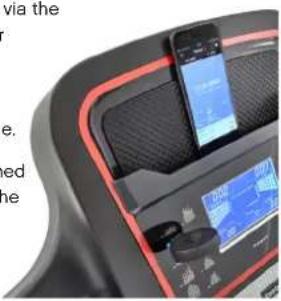
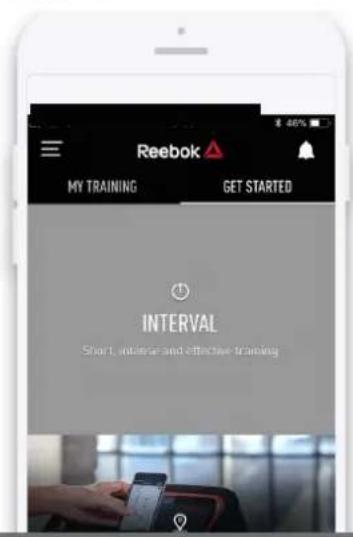
SELECT GET STARTED & CHOOSE FROM QUICK START, INTERVAL OR MAP MY ROUTE
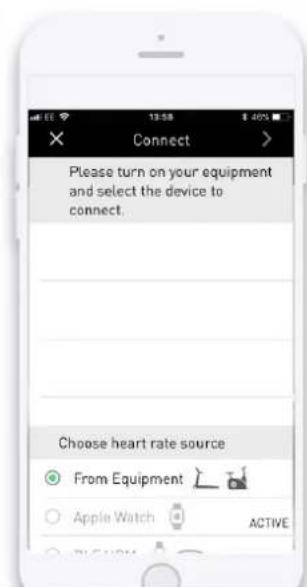
CONNECT TO YOUR MACHINE

ZASUNTE ADAPTER BLUETOOTH DO USB PORTU.
PRIPOJTE CHYTRY TELEFON KE SVÉMU NOVÉMU
VYBAVENI REEBOK. Download: Vyhledejte 'Reebok Fitness Equipment' v App Store nebo Google Play.
ZVOLTE ZACIT & VYBRAT Z OKAMZITY START, INTERVAL NEBO MAPOVAT TRASU.
PRIPOJTE KE SVEMU ZARIZENI.

SAET DONGLEN IND I BLUETOOTH USB-STIKKET. FORBIND DIN SMARTPHONE MED DIT NYE REEBOK UDSTYR. Download: Sog after "Reebok Fitness Equipment" i App Store eller Google Play.
VaelG GET STARTED OG VaelG MELLEM KVIKSTART,
INTERVAL ELLER KORTLæG MIN RUTE.
FORBIND MED DIN MASKINE.

STECKEN SIE IHREN DONGLE IN DEN BLUETOOTH USB ASCHLUSS.
oofofofofofo REEBOKfo
日 _ 2 ^ 日 _ 2 ^ 日 _ 2 ^ 日 _ 2 ^ 日 _ 2 ^ 日 _ 2 ^ 日 _ 2 ^ Reebok" s App Store G Google Store.
2004001g 1p031gpoUwOuWgE,1wOg0g200bgs

FUNKCEPOCTA
A-INCLINE(STOUPANI)
B-TIME(CAS)
C - SPEED (RYCHLOST)
D - PROGRAM GUIDE (PRUVODCE PROGRAMEM)
E - INSTANT INCLINE (OKAMZITE STOUPANI)
F - INCLINE UP/DOWN (ZVYSENI/SNIZENI STOUPANI)
G-STOP (ZASTAVIT)
H-PROGRAM
I-FAN (VENTILATOR)
J - PULSE/CALORIES (TEP/KALORIE)
K-HEADPHONE INPUT (VSTUP PRO SLUCHATKA)
L - MP3 INPUT (VSTUP PRO MP3)
M - USB INPUT (VSTUP PRO USB)
N - DISTANCE (VZDÁLENOST - Zobraz program)
- VOLUME + / NEXT SONG (HLASITOST + / DALŠI SKLADBA)
P - VOLUME - / PREVIOUS SONG (HLASITOST - / PREDCHOZI SKLADBA)
Q-INSTANT SPEED (OKAMZITA RYCHLOST)
R - SPEED UP/DOWN (ZVYSIT/SNIZIT RYCHLOST)
S-START
T-MODE (REZIM)
FUNKCE TLACİTEK
PROGRAM
VOLUME +/NEXT (LYDSTYRKE+/NtESTE)
賊藥藻藻藻藻藻藻藻藻藻藻藻藻藻藻藻藻藻藻藻藻藻藻藻藻藻藻藻藻藻藻藻藻藻藻藻藻藻藻藻藻藻藻藻藻藻藻藻藻藻藻藻藻藻藻藻藻藻藻藻藻藻藻藻藻藻藻藻藻藻藻藻藻藻藻藻藻藻藻藻藻藻藻藻藻藻藻藻藻藻藻藻藻藻藻藻藻藻藻藻藻藥藥藥藥藥藥藥藥藥藥藥藥藥藥藥藥藥藥藥藥藥藥藥藥藥藥藥藥藥藥藥藥藥藥藥藥藥藥藥藥藥藥藥藥藥藥藥藥藥藥藥藥藥藥藥藥藥藥藥藥藥藥藥藥藥藥藥藥藥藥藥藥藥藥藥藥藥藥藥藥藥藥藥藥藥藥藥藥藥藥藥藥藥藥藥藥藥藥藥藥
徳部巴克連
SPEED(今丘)+1-
·運通かは通常広多中会道
·社,,
INCLINE(鑫)+I-
·運通かは通常広の進相を適応の
·社,,
默険
INCLINE (INCLINAÇÃO) +/
INCLINE (INCLINAÇÃO) +/
- Aumentar/diminui r a inclinação durante o exercicso
- Ajustar Hora, Distáncia e Calorias
PUNHOS DE PULSAÇÃO
EduHnIbI n3MepeHnCKOpOCTn paCCToHHN
PacctoHne nCKOpocTb MOxHO n3MepaTb B MInJx N MInJx B Yac (MPH) nn KNIOMeTpax N KINOMeTpax B Yac (KPH).YTo6bl nepeKIOUHTbcra MeKdy eDHHzAMn H3MepeHna, BbINOHNte CNe dyUOJIne DeIcTBn:
- B pexkme oxndaHnBcTaBbTe KIOUyBE3OJNACHOCTn, a 3aTeM haxmnte n ydepXnBaTKe KhoKn SPEED (CKOPOCTb) ^+ n INCLINE (HAKIOH)+ B TeueHne 5 ckyHd.
- B OkHe ckOpocTn OTo6pa3ntc 3NaueHne 0.6 dIy MInb/y (MPH) nII I.0 dIy KMIy (KPH).
- UTo6bI CHOBA n3MeHnTb eDHHu bI n3MepeHn, NOBTOpNTe 3TN DeiCTBnJ.
计算机功能
yj jll cjj jll, jjj jjj
(START
caljill 1
(1) STOP
jll jll jll, jlll jll jll
(-1 + 2) - 1 + INLINE
y
yj jall jwll, jilwll, joi jial jaii
(ajlll aee) INSTANT SPEED
.501 1
(ILL) INSTANT INLINE
a
(1) FAN
S ACD = S COD + S DCE - S CDE
(MP3) MP3 INPUT
Jj j j 111111111111111111111111111111111111111
.
(USBJds) USB INPUT
USB
USB 0516224abw
(/+)VOLUME+NEXT
1j6b Jc0j8 bgsJr6gUogu.1j6b Uc0j0g0s0uUuUus
UJcUgUJUg.
(/)VOLUME-/PREVIOUS
106EbJUeJgUeJfOwUoogU.106EbJUeJrOuOgUuUcU-mp3Jld
UusUJcUsUwUoo
a 10000000000000000000000000000000000000000000000000000000000
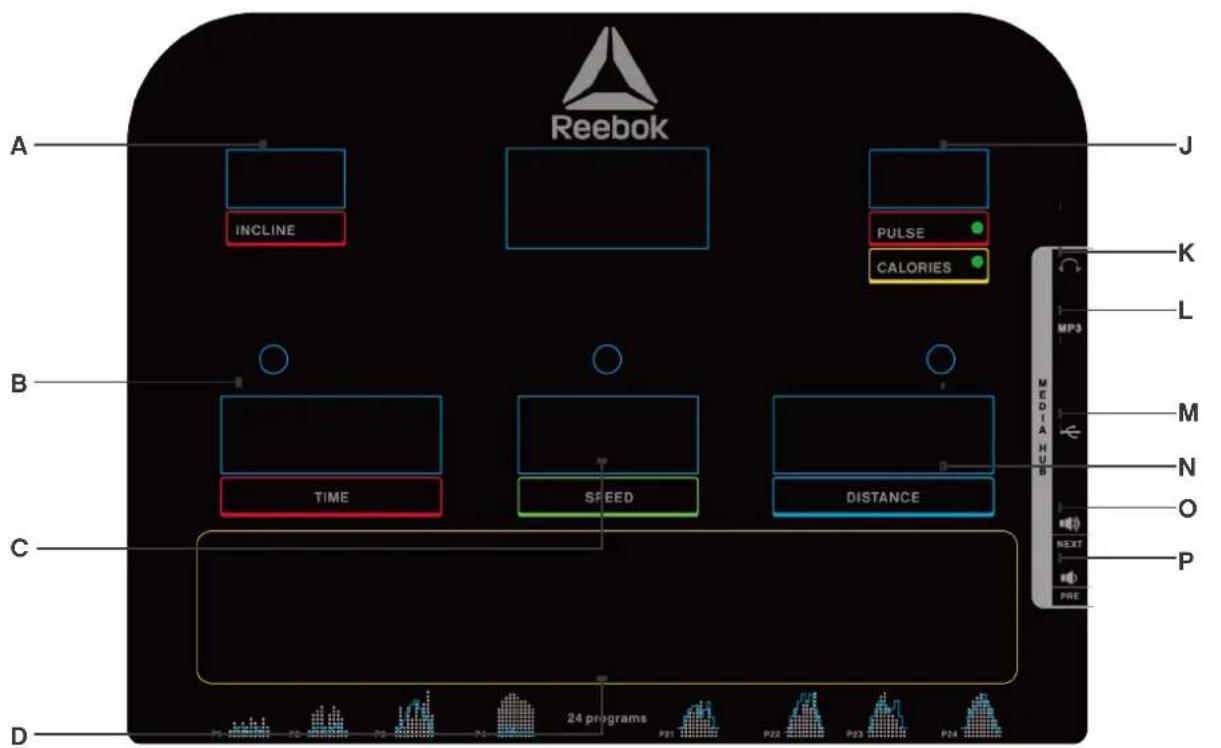
HEADPHONE INPUT - K
(cicauuill)
(MP3)MP3INPUT-L
(USBJ)USBINPUT-M
Displays Program - DISTANCE - N
()
VOLUME ^+ /NEXTSONG-O
(aillll 1/+)
VOLUME ^+ /NEXTSONG-P
(aall aic1/ -cysll)
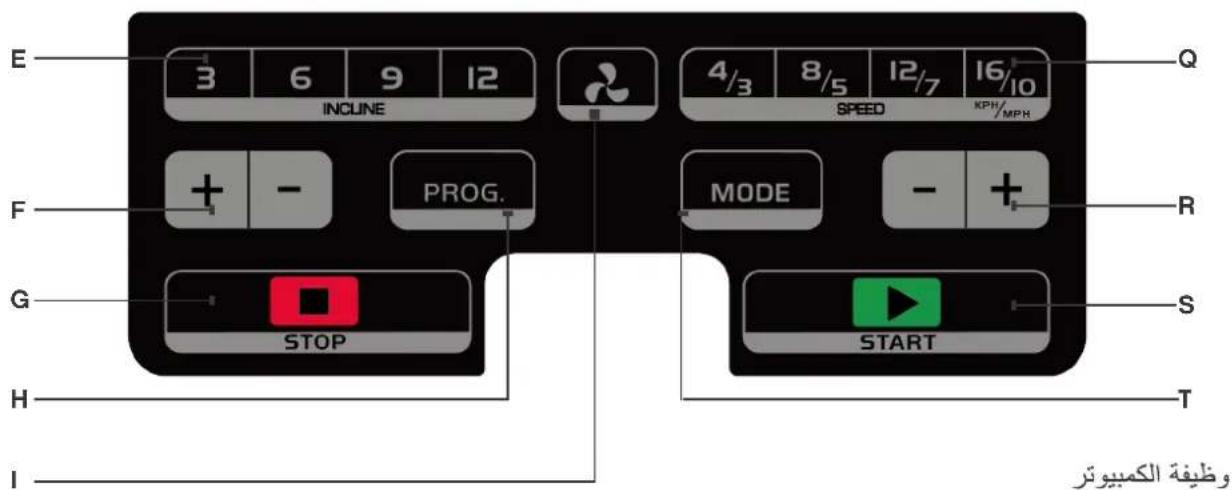
(iailliejll)INSTANT SPEED-Q
SPEED UP / DOWN - R
(a.e. x( 1 - x) x^2 - 2x + 1 ≥ 0 )
()START-S
()MODE-T
INCLINE-A
(j)J)TIME-B
(a) SPEED-C
PROGRAM GUIDE-D
(cal)
INSTANT INCLINE - E
()
=31521.3924000000000000000000000000000000000000000000000000
(20) Body Fat Function
sll (eai) MODE jie biai
()MPH to KPH conversion
+
aellwSj"1.,"j aellw, ju"1."7"ae wai
.5
Jaaill Jalic
(-1 + i r_min) - 1 + SPEED
yj 10
aJalll aJall, aJall, jajll bJai
(-1 + 2) - 1 + INCLINE
yjdl 1
yjdlal jwl, slwll, jil
PULSE GRIPS
a aaii i 100
S_ ACD = 12 · CD × AC = 12 × 3
ailll lllllllllllllllllllllllllllllllllllll
P0
aannnnn nnnnnnnnnnnnnnnnnnnnnnnnnnnnnnnnnnnnnnnnnnnnnnnnnnnnnnnnnnnnnnnnnnnnnnnnnnnnnnnnnnnnnnnnnnnnnnnnnnn
P1-P24
puiyjui
Fat
1
1 1
.
.100000000000000000000000000000000000000000000000000000000
Aealll llll lal (a) Distance (a) TIME
CALORIES (JALI) TIME, DISTANCE 1000 MODE
For additional content please visit: www.reebokfitness.com

Dalsi informace najdete na: www.reebokfitness.com

Du kan finde yderligere informationer på: www.reebokfitness.com

For product information or service please contact:
UK: RFE Europa Ltd. 8 Clarendon Drive, Wymbush, Milton Keynes, MK8 8ED.
Customer Service: Tel: +44 (0)800 440 2459 Email: techsupport@rfeinternational.com
Europe: serviceeuropa@rfeinternational.com
Spain: serviciotechnico@rfeinternational.com
APAC (excluding Australia): RFE Asia Pacific, 2608-1609, 1 Hung To Road, Kwun Tong, Kowloon, Hong Kong. Email: techsupportapac@rfeinternational.com
Australia: techsupportaustralia@rfeinternational.com
China: techsupportchina@rfeinternational.com / +852 34685027
USA: RFE Sporting Goods Inc., 1300 Smith Road, STE 104, Austin, Texas, 78721, USA.
Email: techsupportusa@rfeinternational.com