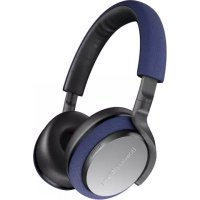
PX5 - Earphones BOWERS & WILKINS - Free user manual and instructions
Find the device manual for free PX5 BOWERS & WILKINS in PDF.



| Product Type | Bluetooth wireless over-ear headphone |
| Brand | Bowers & Wilkins |
| Model | PX5 |
| Weight | 241 grams |
| Power Supply | Rechargeable Lithium Polymer battery, up to 25 hours battery life (Bluetooth + ANC), full charge in 3 hours, quick charge: 15 minutes for 5 hours |
| Connectivity | Bluetooth 5.0 with aptX Adaptive, 3.5mm audio jack, USB-C (audio and charging) |
| Bluetooth Codecs | aptX Adaptive, aptX HD, aptX Classic, AAC, SBC |
| Speakers | 2 x 35.6 mm full range |
| Microphones | 4 microphones for noise cancellation, 2 microphones for telephony (CVC2) |
| Frequency Response | 10 Hz to 30 kHz |
| Input Impedance | 20 kOhms |
| Distortion (THD) | < 0.3% (1 kHz / 10 mW) |
| Noise Cancellation | Adaptive with High, Low, Auto and Off modes, intelligent environment detection |
| Smart Features | Ambient Pass-Through, Wear Sensors with automatic pause/resume, Bowers & Wilkins Headphones app |
| Supplied Accessories | Carrying case, USB-C cable (1.2m), 3.5mm audio cable (1.2m), documentation |
| Care and Cleaning | Clean with a soft, slightly damp microfiber cloth. Do not use abrasive products, detergents or paper towels. Avoid moisture in the connectors. |
| Repairability | Reset possible via buttons (Volume +, Volume -, Noise Cancellation) or via the app. Firmware updates via app. |
| General Information | RoHS, REACH, WEEE compliant. Support at www.bowerswilkins.com/support |
Frequently Asked Questions - PX5 BOWERS & WILKINS
User questions about PX5 BOWERS & WILKINS
0 question about this device. Answer the ones you know or ask your own.
Ask a new question about this device
Download the instructions for your Earphones in PDF format for free! Find your manual PX5 - BOWERS & WILKINS and take your electronic device back in hand. On this page are published all the documents necessary for the use of your device. PX5 by BOWERS & WILKINS.
USER MANUAL PX5 BOWERS & WILKINS
PX5 Wireless Headphones
Welcome to Bowers & Wilkins and PX5
Thank you for choosing Bowers & Wilkins. When John Bowers first established our company, he did so in the belief that imaginative design, innovative engineering and advanced technology were keys that could unlock the enjoyment of audio in the home. His belief is one that we continue to share and inspires every product we design, tailored for new audio experiences outside of the home.
The Bowers & Wilkins PX5 are high performance on-ear headphones designed to deliver the highest quality mobile personal audio experience combined with the convenience of wireless operation and the serenity of noise-cancellation. This manual will tell you everything you need to know to get the most from your PX5 headphones.
Your PX5 can play music streamed wirelessly from your mobile phone, tablet or computer via Bluetooth, or conventionally connected by a jack cable to a suitable analog headphone output. PX5 can also play audio via a USB connection from a computer and can be used for wireless telephony.
PX5 Real World Listening features include our latest innovations in Adaptive Noise Cancellation, Ambient Pass-Through and enhanced Wear Sensing technologies. Our latest generation noise cancellation feature was designed from the ground up with intelligent environment sensing capabilities, automatically selecting the appropriate type of noise cancellation best suited to your surrounding environment, its only goal is to deliver an uncompromised listening experience. Ambient Pass-Through enables external sounds, such as conversation or safety announcements, to be heard clearly without any need to remove the headphones. The Wear Sensing feature enables PX5 to respond naturally, pausing and resuming the music simply by lifting either earpiece on or off your ear. These features can be enabled and further customised via the Bowers & Wilkins Headphone App available for free on iOS and Android devices.
PX5 incorporates a rechargeable battery pack. When fully charged and depending on the degree of Bluetooth, Adaptive Noise Cancellation and Ambient Pass-Through use, the battery pack can provide up to 25 hours of continuous wireless media streaming with noise cancellation enabled at average playback volume levels.
1. PX5 Carton Contents
PX5 headphones
Storage case
USB-C charging cable
3.5mm audio cable
Document pack
2. Getting to know your PX5
2.1 Switching Headphones On and Off
Diagram 1 illustrates power switch functionality.
Switching On
The Power Switch is located on the right earpiece. Slide the Power Switch up to the middle position. An audible cue will be presented and the LED indicator will light up in either green, amber or red displaying the current charge level.
Switching Off
Slide the Power Switch to the bottom position.
An audible cue will be presented and the
headphones will power down when the LED
indictor is no longer lit.
2.2 Headphone Controls
Diagram 2 illustrates the headphone controls. The following buttons on the right earpiece are used to for media playback:
Function Action
| Play or pause | Press the Multi-function button once. |
| Play to next track | Press the Multi-function button twice in quick succession. Note: functionality dependent on source device. |
| Play previous track | Press the Multi-function button three times in quick succession. Note: functionality dependent on source device. |
| Increase Volume Press the Volume + button. | |
| Lower Volume Press the Volume - button. | |
The following buttons on the right earpiece are used for phone call functionality:
Function Action
| Answer or end call | Press the Multi-function button once. |
| Answer an incoming call | When incoming call occurs, press the Multi-function button once. |
| Decline an incoming call | When incoming call occurs, hold the Multi-function for 2 seconds. |
| Switch between two calls | With two calls active, press the Multi-function button twice. |
| Merge two calls | With two calls active, hold the Multi-function button for 1 second. |
| Toggle mute | While on a call, press the Multi-function button three times. |
2.3 Status Indicator
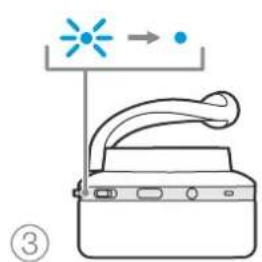
The status LED indicator is located on the right earpiece, Diagram 3 explains the illumination states.
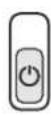
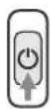

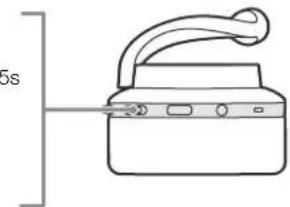
Diagram 1
Power switch functionality
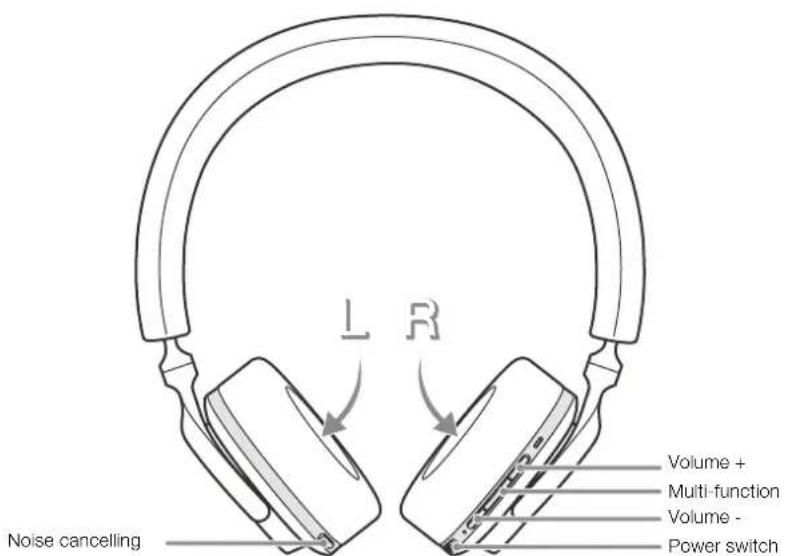
Diagram 2
Headphone controls
Illumination Operational state
| White Battery charge > 30% |
| Amber Battery charge between 30% and 10% |
| Red Battery charge < 10% |
| Red flashing Battery charge insufficient for headphone operation |
| Blue flashing Pairing mode enabled |
| Blue (2 sec solid) Pairing successful |
| Blue flashing (calls) Incoming call |
| Green flashing Rapid charging |
| Green solid Battery charge full, trickle charging |
Diagram 3
Status indicator illuminations
3. Intelligent Features
3.1 Adaptive Noise Cancellation
Noise cancellation is a series of advanced technologies that aids in removing undesired noise from the surrounding environment.
PX5 features our latest innovations in adaptive noise cancellation, this includes intelligent sensing that adapts noise cancellation and tuning best suited to your surrounding environment. As your surroundings change, noise cancellation will auto adapt to complement your new environment.
The Noise Cancellation button on the left earpiece is used to cycle between the following modes, see Diagram 2 for button location:
Mode Application
| High | Suitable for consistently noisy environments such as an airplane cabin. |
| Low | Suitable for environments where you need awareness of your surroundings. |
| Auto | Intelligently adapts noise cancellation best suited to your current environment. |
| Off Turns off the noise cancellation feature. | |
3.2 Ambient Pass-Through
PX5 features ambient pass-through which lets some external noise from the surrounding environment, such as safety announcements or conversations, to be heard without taking the headphones off.
The Noise Cancellation button on the left earpiece also controls this feature, see Diagram 2 for button location.
Function Action
| Enable ambient pass-through | Press and hold the Noise Cancellation button for 2 seconds. |
| Disable ambient pass-through | With ambient pass-through enabled, either hold down or single press the Noise Cancellation button for 2 seconds, the headphones will return to the previous noise cancellation mode |
The level of ambient pass-through can be further customised to suite your needs using the Bowers & Wilkins Headphones App.
3.3 Wear Sensors
PX5 incorporate our latest enhanced wear detection sensors in both earpieces, see Diagram 4, enabling intelligent battery conservation by entering standby when removed from the head. When worn again, PX5 automatically wakes and connects to the last connected Bluetooth device.
During media playback, PX5 will auto pause when either earpiece is lifted from the ear. Playback will auto resume when the earpiece is placed back on the ear. Auto resume has been further optimised so it is ready only when you are. This means the headphone will not attempt to resume playback during following conditions:
- Headphone powers on from the off state.
- Headphone wakes from the standby state.
- Headphone reboots (such as after a factory reset).
Wear sensor and standby can be adjusted using the Bowers & Wilkins Headphones App.
Note: Take care when wearing your headphones; hair or accessories trapped between your ears and the earpieces, or wearing glasses that distort the profile of your ears, may interfere with the performance of the proximity sensors.
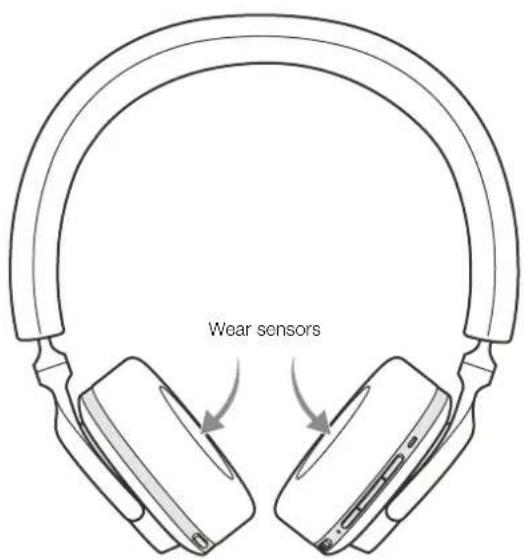
Diagram 4
Wear sensor location
4. Battery Charging and Power Saving
Your PX5 comes with the battery partially charged may be used immediately. For best practice we recommend to fully charge the headphones before first use. Please allow up to 3 hours for full charge. The headphones can be used while charging.
To charge:
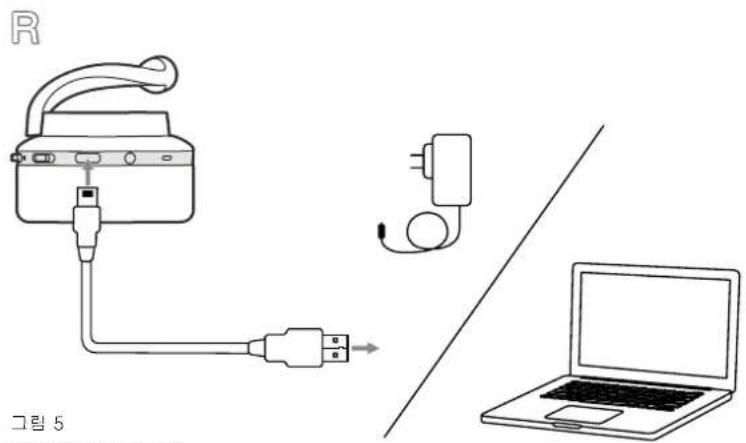
- Please use the supplied charging cable and connect the USB-A plug to a wall charger or a powered computer USB-A socket.
- Then connect the USB-C end to the headphones USB-C socket
Note: During charging, the headphone indicator will flash green. When fully charged, the indicator will remain illuminated. See Diagram 3 for status indicator details.
4.1 Standby Power Saving
PX5 wear detection sensors intelligently conserve power. When taken off your head, PX5 will automatically enter standby which will pause media playback, disconnect Bluetooth and switch to a low power state.
When worn again, PX5 will wake and reconnect to the last connected Bluetooth source. Note that both earpieces must detect wear for proper functionality. If wear sensors are disabled using the app, this feature will also be disabled.
With the app, you can customise how long the headphones will wait before switching to auto standby, please see Standby Timer under Settings in the app.
5. Wearing Your Headphones
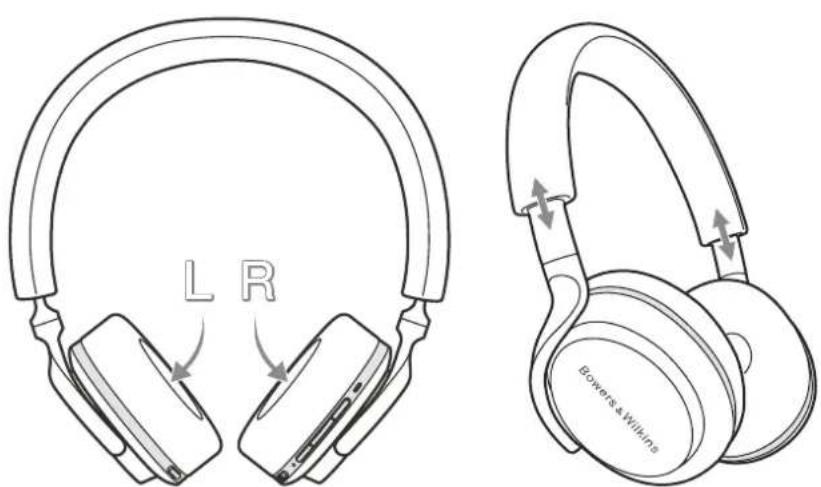
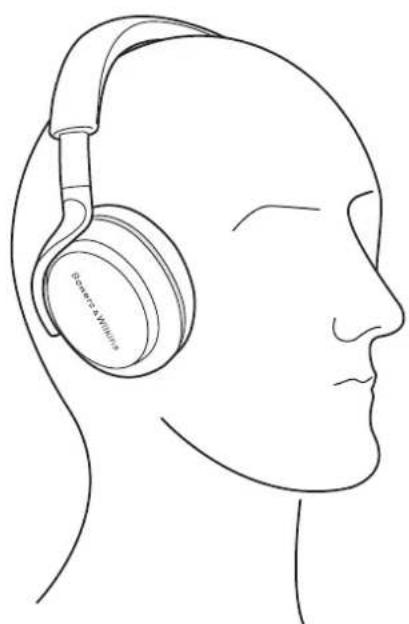
Wearing your headphones correctly will help ensure the best possible experience. See Diagram 6.
- Identify the left and right earpieces by finding the identification legends located on the interior of each earpiece.
- Wear the headphones accordingly with the headband adjusted so that the they rest comfortably on your head.
Note: Wearing glasses that distort the profile of your ears may interfere with headache performance. Similarly, hair trapped between your ears and the telephone ear-pieces may interfere with the wear sensor performance.
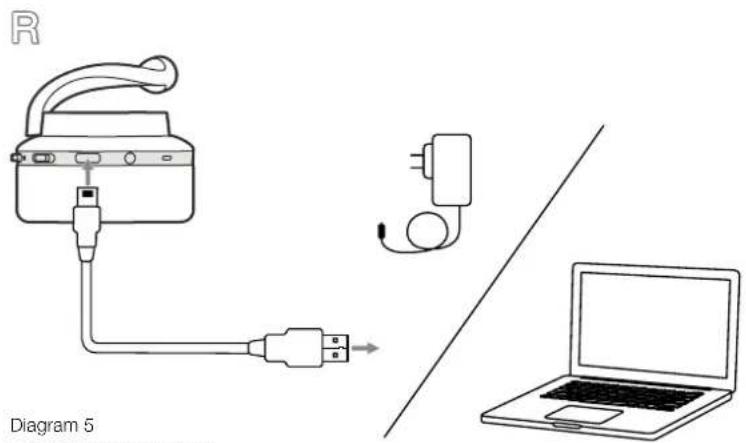
Diagram 5 USB-C cable connection
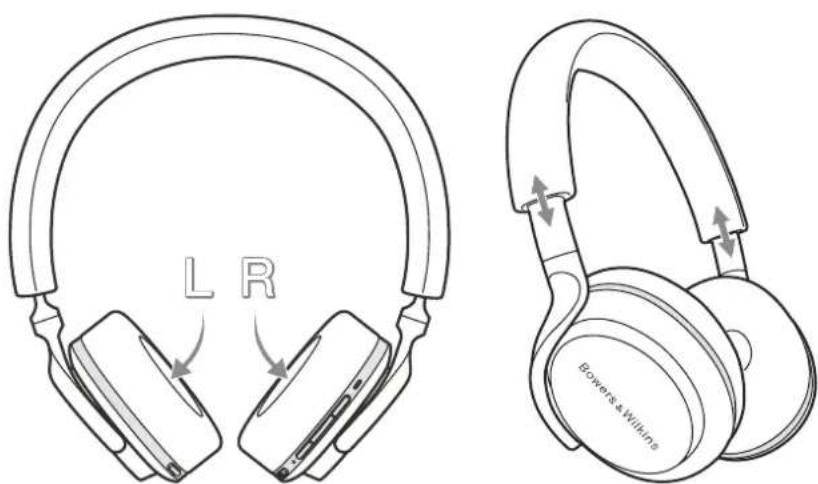
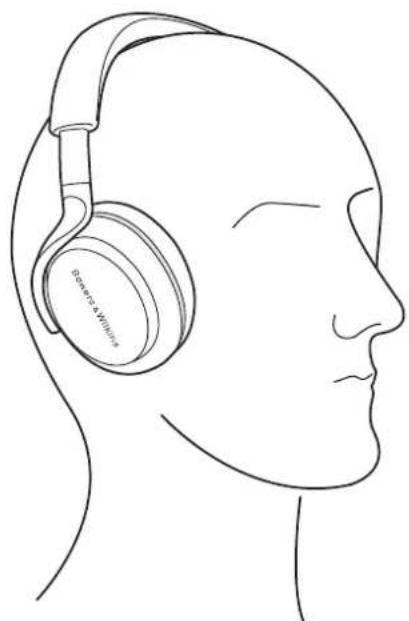
Diagram 6 Wearing your headphones
6. Bluetooth Connection
6.1 Pairing
PX5 is designed to stream media wirelessly from Bluetooth audio devices, such as smartphones, tablets or personal computers. To do so, the headphone and device (source) must first be paired.
- The first time you switch on your headphones, Bluetooth pairing mode will be enabled, the indicator will flash blue. If pairing mode is not enabled, please slide and hold the power switch to the upper (Bluetooth Icon) position for 5 seconds, let go when the indicator blinks blue and when an audible cue is presented.
- Ensure the Bluetooth feature is enabled on the audio device, PX5 will appear in the discovery list, select it to pair.
- The indicator will flash blue while pairing is in progress, this will change to solid blue and an audible cue presented when pairing is successful.
Your headphones will remember up to eight paired Bluetooth devices. Repeat the above steps to pair more devices.
Note: Your headphones will automatically exit Bluetooth pairing mode if no device is paired within 5 minutes. If pairing fails, the indicator will rapid flash blue, please try pairing again.
6.2 Multiple Bluetooth Connections
PX5 can connect up to two devices at the same time, but note that you can only play audio or take calls from one device at a time.
To switch between two devices:
- Pause audio on the first device, or use the PX5 multi-function button.
- Play audio from the second device and the headache will switch over.
When streaming audio, receiving a call on the second device will automatically pause playback and the call will be routed automatically to your headphones. Ending the call will automatically resume playback from the first device.
6.3 Disconnect from a Device
You can quickly disconnect PX5 from a device by sliding the Power Switch to the upper (Bluetooth Icon) position two times in quick succession, an audible tone will be presented indicating successful disconnection.
Alternatively, you can manage connection in further detail using the Bowers & Wilkins Headphones app under Connections.
6.4 Setting Up Headphones with the App
The Bowers & Wilkins Headphones app provides extended setup and adjustments to features such as Adaptive Noise Cancellation, Ambient Pass-Through, and Wear Sensors. The app also provides further customisations such as voice prompt, standby time, connection management and headphone software updates. The app is available as a free download on iOS and Android devices.
To add your headphones:
- From your mobile device, download and install the Bowers & Wilkins Headphones app.
- Launch the app, then read and follow the instructions pertaining app notification and permissions.
- After reaching the main screen, simply tap + and following the in-app instructions.
6.5 Headphone Software Updates
Bowers & Wilkins will occasionally make available software updates that refine and optimise the performance of your headphones or add new features.
The Bowers & Wilkins Headphones app will notify you when a software update is available, tap on the notification and the follow in-app instructions.
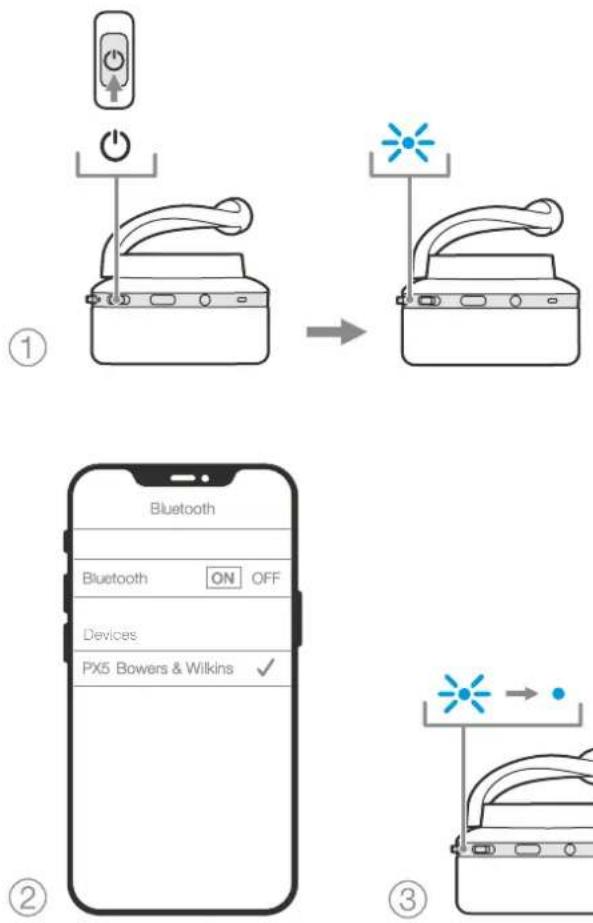
Diagram 7 Bluetooth pairing
7. Auxiliary Connection
In addition to Bluetooth, your PX5 can also connect to audio sources using the supplied 3.5mm audio or USB cables.
7.1 Connecting with the 3.5mm Audio Cable
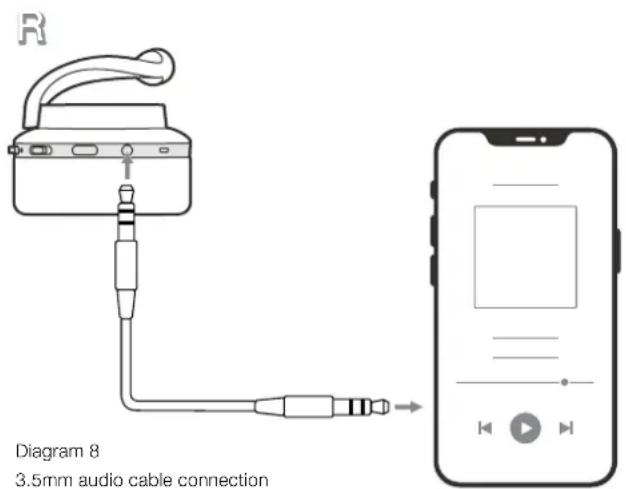
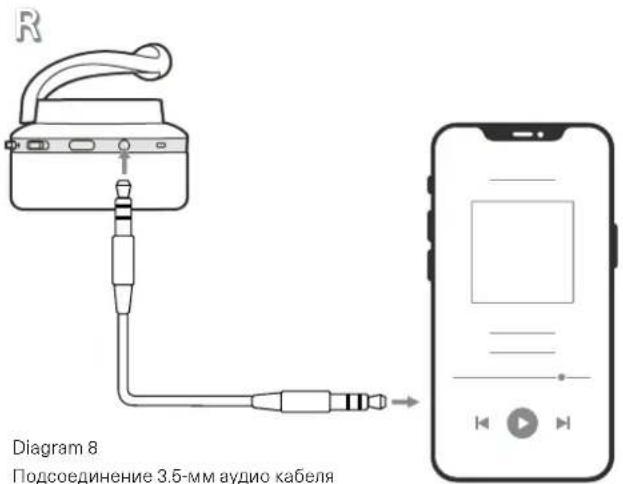
The 3.5mm audio cable enables your PX5 to be used with a device supporting an analogue output such as a conventional headphone socket on smartphones or tablets, or a traditional hi-fi system. See Diagram 8.
- Insert the 3.5mm audio cable into the headache 3.5mm socket on the right ear piece.
- Take the other end and insert into the appropriate socket on your device.
- Your PX5 will automatically disconnect from any Bluetooth devices.
Note: Your headphones must have sufficient charge and switched on to play audio from an analogue source device. The volume and play/ pause buttons will not function when using the 3.5mm interface.
7.2 Connecting with the USB Cable
USB connection enables your PX5 to function as a USB sound output device when connected to a capable computer.
- Insert the USB-C end into the PX5 USB-C socket on the right ear piece.
- Take the USB Type A end and insert into the appropriate socket on your computer.
- PX5 will automatically disconnect from any Bluetooth devices.
- Find and select your headphones from the computer's audio output control panel.
Note: When connected to an capable computer USB port, the headphone battery will also charge.
8. Power Cycle and Reset
8.1 Power Cycle
You can power cycle your PX5, simultaneously hold the Volume + and Volume - buttons for 10 seconds until the indicator LED extinguishes, let go when the indicator lights up again. Rebooting your headphones will not reset their internal settings or clear the paired device history.
8.2 Reset to Default
You can clear the paired device history and restore all settings to their defaults. With PX5 powered on, simultaneously hold the Volume +, Volume - and Noise Cancellation buttons for 10 seconds until the indicator LED extinguishes, let go when the indicator lights up again, the headphones will be ready to pair to a device. Alternatively, you can reset from the Bowers & Wilkins Headphones app, please see Reset under Settings in the app
9. Care & Maintenance
9.1 Storing Your PX5
Taking care of your PX5 will ensure they continue to deliver the best performance and experience.
When not used, stow your headphones using the included storage pouch. It is recommended the headphones are first powered off:
- Retract the headband on each side so they are in the smallest position.
- With the buttons facing you, rotate the earpieces inwards so they lay flat.
- Place the headphones in to the storage case.
9.2 Cleaning Your PX5
Your PX5 can be cleaned by a soft, damp microfiber cloth, gently wipe or dab clean.
The fabric on PX5 have been specially coated with moisture and stain repellent. If dirt, stain or fibre residue accumulate on the fabric surface, please clean as instructed above.
- Do NOT aggressively rub or use an abrasive tool to clean, especially the fabric.
- Do NOT use paper towels, napkins or tissue as they will leave residue.
- Do NOT use cleaning detergents, soapy water, polish or chemical cleaners.
- Ensure that no moisture get inside the earpieces, buttons and interface ports.
10. Support
Should you require further help or advice regarding your PX5 please visit the Headphones support site here www.bowerswilkins.com/support.
Environmental Information
This product complies with international directives, including but not limited to the Restriction of Hazardous Substances (RoHS) in electrical and electronic equipment, the Registration, Evaluation, Authorisation and restriction of Chemicals (REACH) and the disposal of Waste Electrical and Electronic Equipment (WEEE). Consult your local waste disposal authority for guidance on how properly to recycle or dispose of this product.
Specifications
Wearing Style Bluetooth Wireless On-Ear Headphones
Technical Features Adaptive Noise Cancellation
Ambient Pass-Through
Wear-Detection Sensor
Bluetooth® audio - Bluetooth 5.0 with aptX™ Adaptive
USB-C charging & audio interface
3.5mm auxiliary audio interface
Bluetooth Codes aptXTM Adaptive
aptXTM HD
aptXTM Classic
AAC
SBC
Bluetooth Profiles A2DP v1.3.1
AVRCP v1.6.1
HFP v1.7.1
HSP v1.2
BLE GATT (Generic Attribute Profile)
Drive Units 2 x 0 35.6mm full range
Microphones 4x mics for ANC
2x mics for telephony (CVC2 - Clear Voice Communication v2)
Frequency Range 10Hz to 30kHz
Input Impedance 20 kOhms
Distortion (THD) < 0.3% (1kHz/10mW)
Battery Type Rechargeable Lithium Polymer
Battery Life & Charging 25 hrs Bluetooth with ANC, 5hrs with 15min charge
Inputs Bluetooth, 3.5mm stereo jack, USB-C audio
In Box Accessories 1.2m stereo audio cable, 1.2m USB-A to USB-C cable, Storage Case
Weight 241 grams
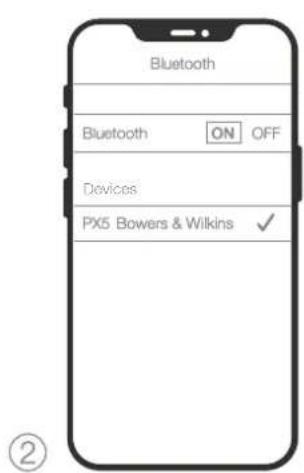
Figure 7 Jumelage Bluetooth
Ambient Pass-Through
Naherungssensor
Bluetooth Codesc aptXTM Adaptive
aptXTM HD
aptXTM Classic
AAC
SBC
Bluetooth Profile A2DP v1.3.1
AVRCP v1.6.1
HFP v1.7
HSP v1.2
BLE GATT (Generic Attribute Profile)
3.1 Adaptive Noise Cancellation
3.2 Ambient Pass-Through
Ambient Pass-Through
Draagsensor
Bluetooth® audio - Bluetooth 5.0 met 'aptX Adaptive'
USB-C Iaad- & audio-ingang
Bluetooth Codes, aptX™ Adaptive
aptXTM HD
aptXTM Classic
AAC
SBC
Bluetooth Profielen A2DPv1.3.1
AVRCPv1.6.1
HEP v1.7.1
HSP v1.2
BLE GATT (Generic Attribute Profile)
Drive Units 2x035.6 mm full range
9.2 OuMCTKa Baunx PX5
Baun PX5MOXHO YNCTNB MKAO, BNAKHO MKNPOBOIOKOHOH TKAHNO, PNPCTO AKKyPAHO NPOTePbTb IN MN NPMOKHYB TCHNO TKAHHO.
TkaHbHa PbxMee TceuMaIbHOe NIOXpBnue HJ3
3aUHTb OT BnAa I pR3N. Eocn rP3b, HA NTAN
OCTATK HINTOK REe KHeAkanAAIOCTCR Ha NOEHPXHOCT
TKAH, NOXyYCTA, OcHNTCe ee Tak, KAK yKa3aHO B5uH.
HEcpeyertepbHnnoB30BaTb 6pa3HHbIe cpeCTBAJINCHK,OCO6EHNO TKAHN.
HEcnoIbayte6ymaxHHe nOtoHua,caipetkn HnCaPcETKn
HEIIOJIbEyIe NCTHIIe CpeCTBa, MlbIbIyIO BOY, NOIPOBOHHe IIN DpyTne XIMHNecKHe cpeCTBa.
Y6cuiTeo,HTo Bnara Hc nonana BHyTp bHuyHHIOK, KHOIOK INIITeppeChbIX NOpToB.
10.Подержka
Ecnna BAM Tpe6yTcN NOMO, HIN COBET INA BnAeBbE
PX5, noxanyIcTa, nocTeNTe caNT NOpePKN
Headphones www.bowerswilkins.com/support.
3KoIoruecka HOpMaun
OTnpOpyKt COOTBCTByET MekdyHapOdbHM
DnpeKTHNAM, BKIOUAB, HO HE ORpAHNVBAACb
OrpaHmEHMeM OAncbHX BSeIcTeB (Restriction of
Hazardous Substances -RoHS) B anekTprnHeckCM n
aEeKTPCHOM o6OpyOBaHH, peYnCTpaHH, ouEnke,
aBTOpcHsHH mOpaHnueHHnHa H NcIOnIsBaHHne
XMMHECKNX BSeIcTeB (REACH) yndaJIeHKe OxToPOB
aEeKTPCHOM o6OpyOBaHHo (WEEE).
PpOKHOUYbTIpyTECB c BaHHM MeCTHbIM oprAHOM n
yTINLAHMQA OHxOoB DnI NpOyHeHH peKOMeHNaI aTOM, KAK pApBbHo peuKlNpObaT bN yTINLInpObaTb
3OTnOooKyT.
Texnueckne xapakTepnKu
CTmHbHOweHnHaKnaHbHeBecnpoBObHbIeBluToothHayuHnKn
DcONHbA AaunBHe UyMOnoDaBHeHne -Adaptive Noise Cancelling
CKBO3HOn nponyck okpykaioux 3bykoB - Ambient Pass-Through
Cencop BnHexenn-Wear-Detection Sensor
Bluetooth® aymo - Bluetooth 5.0 capXTM Adaptive
Popt USB-C nna 3apn n ayu no cnHa
3.5mm aydno Bxod AUX
Bluetooth kodek aptX™ Adaptive
aptXTM HD
aptX™ Classic
AAC
SBC
Bluetooth npoФmU A2DPv1.3.1
AVBCPv1.6.1
HFPv1.7.1
HSPy1.2
BLE GATT (Generic Attribute Profile)
HAMK2x035.6MM,NOHOmana30HHB
Mkpoohb4xMknpoohAANC
2x MMKpOoHa JnTnePohnn (CVC2-Clear Voice Communication v2)
Hnanaohyacto10T-30K
BxOHHIIMnDAnC 20KOM
MckaeHn(THD)<0.3%(1KfL,10mBt)
AkkymyantopIITnMeBO-nOMpeHbI
Bpma pa60b 25acob Bluetooth c ANC, 5acob nocie 15 mHyt bctpo sapk
Bxodbl Bluetooth,3.5-crepeo paabeM,USB-C pna aymo
Ppnaembe akceccyapb 1.2 M crepea ayno kaebb, 1.2 M USB-A - USB-C kaebb, cymoka da xpaehn
Bec 241r
FlapapopphiTHD<0.3%1kHz/10mW
Turoc matapiac Enavaopctoepvni thou noaepouoc
| High | HiHiHiHiHiHiHiHiHiHiHiHiHiHiHiHiHiHiHiHiHiHiHiHiHiHiHiHiHiHiHiHiHiHiHiHiHiHiHiHiHiHiHiHiHiHiHiHiHiHiHiHiHiHiHiHiHiHiHiHiHiHiHiHiHiHiHiHiHiHiHiHiHiHiHiHiHiHiHiHiHiHiHiHiHiHiHiHiHiHiHiHiHiHiHiHiHiHiHiHiMiMiMiMiMiMiMiMiMiMiMiMiMiMiMiMiMiMiMiMiMiMiMiMiMiMiMiMiMiMiMiMiMiMiMiMiMiMiMiMiMiMiMiMiMiMiMiMiMiMiMiMiMiMiMiMiMiMiMiMiMiMiMiMiMiMiMiMiMiMiMiMiMiMiMiMiMiMiMiMiMiMiMiMiMiMiMiMiMiMiMiMiMiMiMiMiMiMiMiMi MiMiMiMiMiMiMiMiMiMiMiMiMiMiMiMiMiMiMiMiMiMiMiMiMiMiMiMiMiMiMiMiMiMiMiMiMiMiMiMiMiMiMiMiMiMiMiMiMiMiMiMiMiMiMiMiMiMiMiMiMiMiMiMiMiMiMiMiMiMiMiMiMiMiMiMiMiMiMiMiMiMiMiMiMiMiMiMiMiMiMiMiMiMiMiMiMiMiMiMiMirr |
| Low | You're going to die tomorrow. You're going to die tomorrow. You're going to die tomorrow. You're going to die tomorrow. You're going to die tomorrow. You're going to die tomorrow. You're going to die tomorrow. You're going to die tomorrow. You're going to die tomorrow. You're going to die tomorrow. You're going to die tomorrow. You're going to die tomorrow. You're going to die tomorrow. You're going 10000000000000000000000000000000000000000000000000000000000000000000000000000000000000000000000000000 |
| Auto | You're going to die tomorrow. You're going to die tomorrow. You're going to die tomorrow. You're going to die tomorrow. You're going to die tomorrow. You're going to die tomorrow. You're going to die tomorrow. You're going to die tomorrow. You're going to die tomorrow. You're going to die tomorrow. You're going to die tomorrow. You're going to die tomorrow. You're goin the next day. You're going to die tomorrow. You're going to die tomorrow. You're going to die tomorrow. You're going to die tomorrow. You're going to die tomorrow. You're going to die tomorrow. You're going to die tomorrow. You're going to die tomorrow. You're going to die tomorrow. You're going to die tomorrow. You're going to die tomorrow. You're going to die tomorrow. You's going to die tomorrow. You're going to die tomorrow. You're going to die tomorrow. You're going to die tomorrow. You're going to die tomorrow. You're going to die tomorrow. You're going to die tomorrow. You're going to die tomorrow. You're going to die tomorrow. You're going to die tomorrow. You're going to die tomorrow. You're going to die tomorrow. You're going to die tomorow. You're going to die tomorrow. You're going to die tomorrow. You're going to die tomorrow. You're going to die tomorrow. You're going to die tomorrow. You're going to die tomorrow. You're going to die tomorrow. You're going to die tomorrow. You're going to die tomorrow. You're going to die tomorrow. You're going to die tomorrow. You're going to die tomorrow. You'll be able to die tomorrow. You'll be able to die tomorrow. You'll be able to die tomorrow. You'll be able to die tomorrow. You'll be able to die tomorrow. You'll be able to die tomorrow. You'll be able to die tomorrow. You'll be able to die tomorrow. You'll be able to die tomorrow. You'll be able to die tomorrow. You'll be able to die tomorrow. You'll be able 10000000000000000000000000000000000000000000000000000000000000000000000000000000000000000000000000 |
PX5是呂默习01003003003003003003003003003003003003003003003003003003003003003003003003003003003003003003003003003003
MIOIJ 1JHJ 1JHJ 1JHJ 1JHJ 1JHJ 1JHJ 1JHJ 1JHJ 1JHJ 1JHJ 1JHJ 1JHJ 1JHJ 1JHJ 1JHJ 1JHJ 1JHJ 1JHJ 1JHJ 1JHJ 1JHO JHO JHO JHO JHO JHO JHO JHO JHO JHO JHO JHO JHO JHO JHO JHO JHO JHO JHO JHO JHO JHO JHO JHO JHO JHO JHO JHO JHO JHO JHO JHO JHO JHO JHO JHO JHO JHO JHO JHO JHO JHO JHO JHO JHO JHO JHO JHO JHO JHO JHO
- 本表附后请在表中注明:
3.
藥藻藻藻藻藻藻藻藻藻藻藻藻藻藻藻藻藻藻藻藻藻藻藻藻藻藻藻藻藻藻藻藻藻藻藻藻藻藻藻藻藻藻藻藻藻藻藻藻藻藻藻藻藻藻藻藻藻藻藻藻藻藻藻藻藻藻藻藻藻藻藻藻藻藻藻藻藻藻藻藻藻藻藻藻藻藻藻藻藻藻藻藻藻
5. 三元函数
电三云日 电
- 风口贝斯内部的L()R()贝
- 三二元已M如贝贝贝贝贝贝贝贝贝贝贝贝贝贝贝贝贝贝贝贝贝贝贝贝贝贝贝贝贝贝贝贝贝贝贝贝贝贝贝贝贝贝贝贝贝贝贝贝贝贝贝贝贝贝贝贝贝贝贝贝贝贝贝贝贝贝贝贝贝
孕:朝三云藻韵歌造,孕的士,贝 010101010101010101010101010101010101010101010101010101010101010101010101010101010101010101010101010
6 三品
6. 早早早
6.1 早早早
PX5是S0a3T,T,T,T,T,T,T,T,T,T,T,T,T,T,T,T,T,T,T,T,T,T,T,T,T,T,T,T,T,T,T,T,T,T,T,T,T,T,T,T,T,T,T,T,T,T,T,T,T,T,T, T, T, T, T, T, T, T, T, T, T, T, T, T, T, T, T, T, T, T, T, T, T, T, T, T, T, T, T, T, T, T, T, T, T, T, T, T, T, T, T, T, T, T, T, T, T, T, T, T, T,
1.PX5 豫三者将击到用早默上 云韵云云云云云云云云云云云云云云云云云云云云云云云云云云云云云云云云云云云云云云云云云云云云云云云云云云云云云云云云云云云云云云云云云云云云云云云云云云云云云云云云云云云云云云云云云云云云云云云云云云云云
2. 00000000000000000000000000000000000000000000000000000000000000
3. 请在该题中填空:请在该题中填空:请在该题中填空:请在该题中填空:请在该题中填空:请在该题中填空:请在该题中填空:请在该题中填空:请在该题中填空:请在该题中填空:请在该题中填空:请在该题中填空:请在该题中填空:请在该
德三藏在中8的国歌里就了
朝尚士S司贝((早云云)云云)云云)云云)云云)云云)云云)云云)云云)云云)云云)云云)云云)云云)云云)云云)云云)云云)云云)云云)云云)云云)云云)云云)云云)云云)云云)云云)云云)云云)云云)云云)云云)云云)
Bowers & Wilkins Headphones App 1
6.4 云王三
B&WJH 10000000000000000000000000000000000000000000000000000000000000000
吉
德三元电
吉
HH H
歌用gKJ 5.0 aptXAdaptive
USB-C 电电电电电电电电电电电电电电电电电电电电电电电电电电电电电电电电电电电电电电电电电电电电电电电电电电电电电电电电电电电电电电电电电电电电电电电电
3.5mm异伸O多口O日T
Bluetooth 基本 Aptx-Adaptive
Aptx-HD
Aptx-Classic
ACC
SBC
Bluetooth 2D
AVRCP v1.6.1
HFPv1.7.1
HSP v1.2
BLE GATT (Generic Attribute Profile)
三拉贝用2x035.6mm基
HOI3 4x ANC HOI3
2x 音生马贝(CVC2-ClearVoiceCommunicationv2)
孕H 10Hz\~30kHz
1020Ω
0.3%(1KHz/10mW)
山
BTeTlSuMg&A2BT/ANC25iA1,15是责云或5iA

- PX5 Wireless Headphones
- Welcome to Bowers & Wilkins and PX5
- PX5 Carton Contents
- Getting to know your PX5
- Switching Headphones On and Off
- Switching On
- Switching Off
- Headphone Controls
- Status Indicator
- Intelligent Features
- Adaptive Noise Cancellation
- Ambient Pass-Through
- Wear Sensors
- Battery Charging and Power Saving
- To charge:
- Standby Power Saving
- Wearing Your Headphones
- Bluetooth Connection
- Pairing
- Multiple Bluetooth Connections
- Disconnect from a Device
- Setting Up Headphones with the App
- Headphone Software Updates
- Auxiliary Connection
- Connecting with the 3.5mm Audio Cable
- Connecting with the USB Cable
- Power Cycle and Reset
- Power Cycle
- Reset to Default
- Care & Maintenance
- Storing Your PX5
- Cleaning Your PX5
- Support
- Environmental Information
- Specifications
- OuMCTKa Baunx PX5
- 10.Подержka
- 3KoIoruecka HOpMaun
- Texnueckne xapakTepnKu
- 三元函数
- 早早早
- 早早早
- 云王三
- 吉
Brand : BOWERS & WILKINS
Model : PX5
Category : Earphones