
SCM7880 - Portable CD player PHILIPS - Free user manual and instructions
Find the device manual for free SCM7880 PHILIPS in PDF.

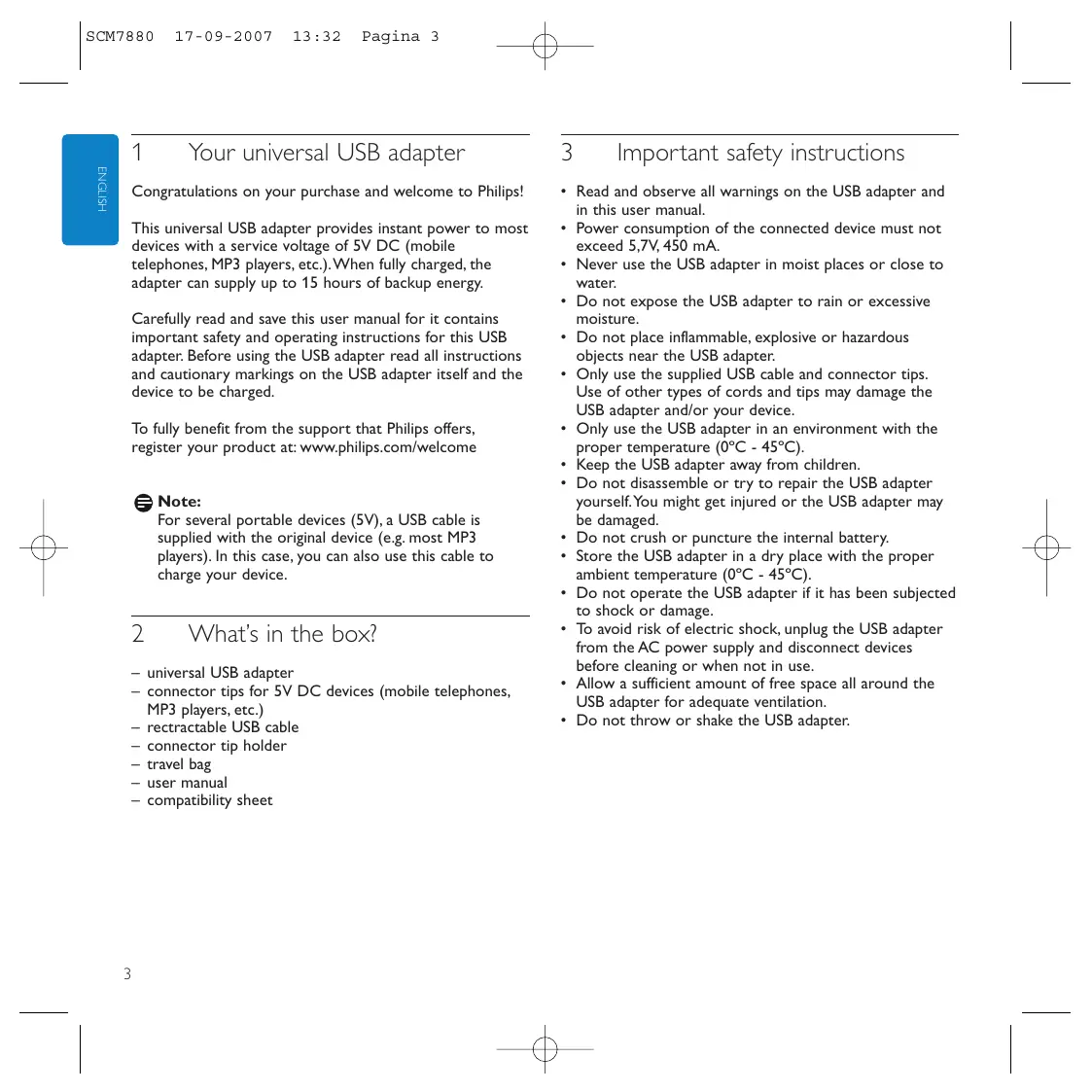


| Product type | Universal USB Adapter |
| Brand | PHILIPS |
| Model | SCM7880 |
| Dimensions | 80.5 × 57.7 × 40.8 mm (h × w × d) |
| Weight | 116 g |
| Battery type | Lithium-polymer, 1000 mAh |
| Power supply | 110-240 V AC, 50/60 Hz |
| USB output | 5.4 V DC, 450 mA max |
| Battery charging time | 2-3 hours |
| Main features | Charging of 5 V DC devices, internal backup battery, LED charge and battery indicators, reset button |
| Package contents | Adapter, connector tips, detachable USB cable, tip holder, travel pouch, user manual, compatibility sheet |
| Care and cleaning | Use a soft, lint-free cloth. Avoid harsh chemicals. Recharge every 3 months if unused. |
| Safety instructions | Do not use in wet environments; operating temperature 0°C to 45°C; do not disassemble; do not expose to rain; do not use if damaged. |
| Reparability | Do not open or repair yourself. Contact your local distributor. Reset via RESET button if needed. |
| General information | Support and registration at www.philips.com/welcome |
Frequently Asked Questions - SCM7880 PHILIPS
User questions about SCM7880 PHILIPS
0 question about this device. Answer the ones you know or ask your own.
Ask a new question about this device
Download the instructions for your Portable CD player in PDF format for free! Find your manual SCM7880 - PHILIPS and take your electronic device back in hand. On this page are published all the documents necessary for the use of your device. SCM7880 by PHILIPS.
USER MANUAL SCM7880 PHILIPS
Register your product and get support at www.philips.com/welcome
SCM7880
EN universal USB adapter 3
FR adaptateur USB universal 6
ES adaptor USB universal 9
DE universeller USB-Adapter 12
NL universe USB-adapter 15
IT adattatore universal USB 18
PT adaptor USB universal 21
GR npoapouoyea USB 24
TR USB adaptorünüz 27
DK universal-USB-adapter 30
SV universell USB-adapter 33
FI USB-yleissovitin 36
PL uniwersalnyadapterUSB 39
CZ univerzální adaptér USB 42
SK univerzálnyadapter USB 45
HU univerzális USB-csatlakozó 48
RU yHnBepcaaHbI aAaTep USB 51
B
C
1 Your universal USB adapter
Congratulations on your purchase and welcome to Philips!
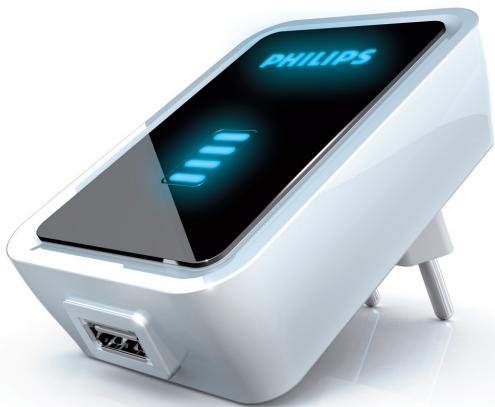
This universal USB adapter provides instant power to most devices with a service voltage of 5V DC (mobile telephones, MP3 players, etc.). When fully charged, the adapter can supply up to 15 hours of backup energy.
Carefully read and save this user manual for it contains important safety and operating instructions for this USB adapter. Before using the USB adapter read all instructions and cautionary markings on the USB adapter itself and the device to be charged.
To fully benefit from the support that Philips offers, register your product at: www.philips.com/welcome

Note:
For several portable devices (5V), a USB cable is supplied with the original device (e.g. most MP3 players). In this case, you can also use this cable to charge your device.
2 What's in the box?
universal USB adapter
- connector tips for 5V DC devices (mobile telephones, MP3 players, etc.)
- retractable USB cable
- connector tip holder
travel bag
-user manual
compatibility sheet
3 Important safety instructions
- Read and observe all warnings on the USB adapter and in this user manual.
- Power consumption of the connected device must not exceed 5,7V, 450 mA.
- Never use the USB adapter in moist places or close to water.
- Do not expose the USB adapter to rain or excessive moisture.
- Do not place inflammable, explosive or hazardous objects near the USB adapter.
- Only use the supplied USB cable and connector tips. Use of other types of cords and tips may damage the USB adapter and/or your device.
- Only use the USB adapter in an environment with the proper temperature (0^ - 45^) .
- Keep the USB adapter away from children.
- Do not disassemble or try to repair the USB adapter yourself. You might get injured or the USB adapter may be damaged.
- Do not crush or puncture the internal battery.
- Store the USB adapter in a dry place with the proper ambient temperature (0^ - 45^) .
- Do not operate the USB adapter if it has been subjected to shock or damage.
- To avoid risk of electric shock, unplug the USB adapter from the AC power supply and disconnect devices before cleaning or when not in use.
- Allow a sufficient amount of free space all around the USB adapter for adequate ventilation.
- Do not throw or shake the USB adapter.
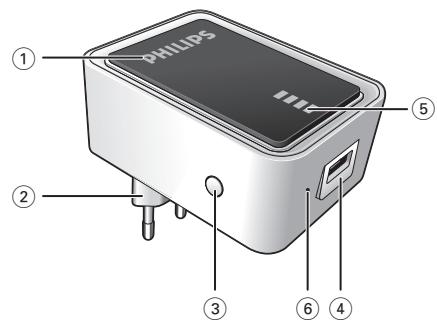
4 Functional overview (fig.A)
① PHILIPS
- Lights up when a 5V device is charging (when no device is connected, the PHILIPS logo will flash).
- Flashes when the device is fully charged.
② Foldable power plug
Connects to the wall outlet.
③ Battery check button
Activates the power indicator.
④ USB port
Connects to 5V DC devices (mobile telephones, MP3 players, etc.).
⑤ Power indicator
Indicates the battery status.
Reset
Reset the USB adapter back to factory default settings.
5 Operation
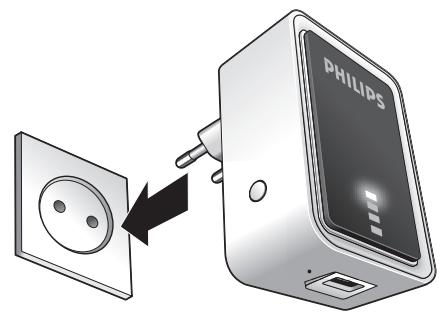
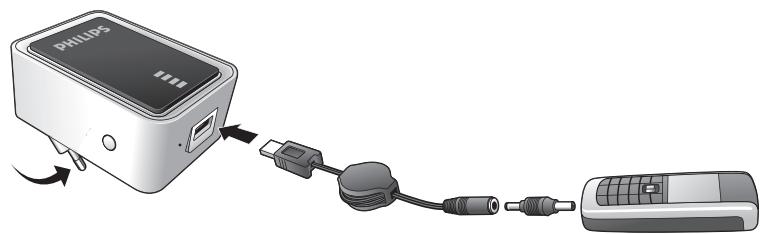
Charging the internal battery (fig. B)
1 Press the battery check button (3).
One, two or three LEDs light up in the power indicator (5), indicating the current battery status. If all four LEDs light up, the battery is fully charged.
2 Insert the power plug (2) into a wall outlet.
The power indicator LEDs (5) will flash one after another, indicating that the battery is being charged.
When all LEDs light continuously the battery is fully charged.
3 Disconnect the USB adapter from the wall outlet.
Charging devices - preparation
1 Check the maximum input voltage (V DC) of the device you wish to connect. For this see the user manual that came with the device.
2 Make sure the device does not consume more current (mA) than 450mA .
3 Check what connector tip is required for your device. See the compatibility sheet for the proper tip for your device.
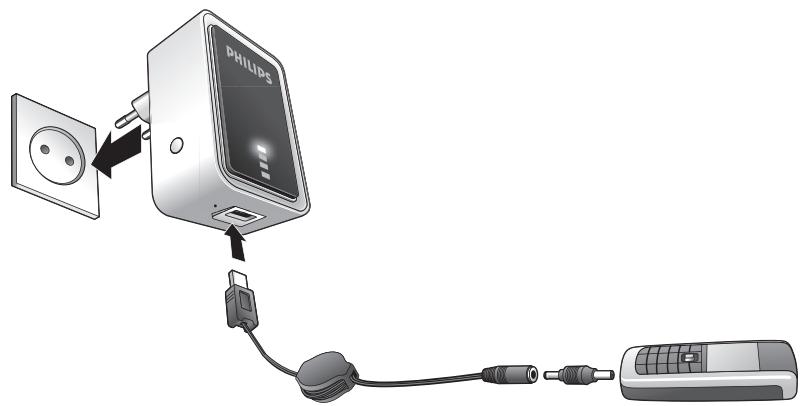
Charging 5V devices (fig. C)
You can charge a 5V device in two ways:
- Charge directly from the internal battery.
- Insert the power plug (2) into a wall outlet.
1 Insert the plug of the USB cable into the USB port (4).
2 Connect the connector tip to the USB cable.
3 Insert the connector tip into the power supply jack of the device.
PHILIPS lights up when a device is charging.
PHILIPS will flash when the device is fully charged.
4 Disconnect the device from the USB adapter.

Note:
If you are unable to solve a problem by following the above hints, try resetting the USB adapter by pressing RESET. The RESET button is recessed to prevent accidental reset of the USB adapter. Use a paperclip to gently press the RESET button.
6 Technical specifications
- Battery type: Lithium polymer
- Rated input: 110V - 240V AC (60/50Hz)
Rated output: 5.4V DC, max. 450 mA - Battery capacity: 1000 mAh
Recharging time: 2-3 hours - Operating temperature: 0^ - 45^
Size: 80.5 × 57.7 × 40.8 mm (h × w × d)
Weight: 116 g
7 Troubleshooting
Problem
- Possible cause
Solution
USB adapter does not charge connected device
Voltage of device does not correspond with that of USB adapter.
- Refer to the user manual that came with the device.
- Improper connection between device and USB adapter.
- Make sure that the USB cable is properly inserted into the device and the USB adapter.
- Damaged USB cable or connector tip.
- Replace USB cable and/or connector tip.
- Wrong connector tip used.
- Check connector tip and replace if necessary.
- Battery power of USB adapter too low.
- Charge USB adapter.
- Non supplied USB cable / connector tip used.
- Replace with supplied USB cable/connector tip.
- Problems with electrical circuit of USB adapter.
Take the USB adapter to your local distributor.
USB adapter power runs out quickly
- USB adapter not fully charged before using.
- Fully charge USB adapter before using.
USB adapter cannot be charged
- Improper connection between USB adapter and wall outlet.
- Check that power plug is properly inserted into the wall outlet.
- Problems with the electrical circuit of the USB adapter.
- Take USB adapter to your local distributor.

Note:
If you are unable to solve a problem by following the above hints, try resetting the USB adapter by pressing RESET. The RESET button is recessed to prevent accidental reset of the USB adapter. Use a paperclip to gently press the RESET button.
8 Maintenance
- Recharge the USB adapter every three months when it is not being used for a long period of time.
- Use a soft, lint-free cloth to clean the USB adapter exterior. Do not use harsh chemicals, cleaning solvents or strong detergents.
- When any problems occur with the USB adapter or the accessories, take the adapter and accessories to your local distributor.
9 Need help?
Online help: www.philips.com/welcome
For interactive help and frequently asked questions.
OTo6paKaet ypoBeHb 3apAa AkkMyAToPA.
⑥ C6poc
Bo3Bpaaaet aAnTeP USB K 3aBOaCKnM HacTPOiKaM.
5 3KcnpaTaCnA
3apAka BCTpoeHHoro aKKymyIaTopa (pnc.B)
1 HaKmTe KhoNkY 3ap4a 6aTapei (3).
B INHAnKaTope nHTaHn (5) 3arOpaTeC T OAnH, DBA Hn TpN INHAnKaToP, OTo6PaKaIaUHne TEkyuHn IyPoBeHb 3apraDa aKKymAITop. EcN aKKymAITop NOAHocTbIO 3apJKeH, 3arOpaOTcB Ce YeTbIpe INHAnKAtOpA.
BCTaBbTe BnAky nIITAHn (2) B CTeHHyIO 3AeKTPopo03ETKY.
OAnH 3a ApyHM 3aMnraIOT INHnKaTOpbl NtHaHn (5), Yka3bIAIOUne, UTO aKKMyAIArTOP 3apJxaeTc.
Ecam aKKyMaTOp NOAHOCTbIO 3apJKeH, BCE INdNkAtOpbi roprT 6e3 nepe6oE.
3 OToeAnHInTe aAanTep USB oT cTeHHoJ 3AEKTopoP03eTKN.
3apAhbie yctpoiCTBa -noAroTOBka
1 NepeA IOkAnOueHem IPOBepbTe MaKcHMaIbHOe BXoADHOe HApJxKeHne (B NoctoHHoro Toka) YCTpoiCTBa. AIA INΦOpMauCm. pyKOBOCTBO NOa3OBaTeA, BXoDAuEe B KOMIaEKr YCTPOICTBa.
2 Y6eAHTecb, qTO IOTpe6AerMa BEAUNHnA ToKa (MA) Aa DaHHoro yCTpOiCTBa He npeBbIwaet 450 mA.
3ПоберьтЕ,КангеHaCaAKNДЯ ПОАКИоуеняТpe6yIOTcAЯBaшeroУстpoiCTBa.ДЯВыбopaCOOTBETCTBYIOSeHACaAKNCM.ANT COBMECTIMOCTN.
3apAka yctpoHCTb c HanpXeHHem 5 B (Pnc.C)
CyueCTByeT DaBa BapnHaTa 3aPaAKn yCTpOInCTBa C HaprJKeHem 5B:
3apraKa HenocpeAcdTbeHNO O T BCTPOeHHoro aKKyMaTopa.
BCTaBBTe BnAky nHTaHHy (2) B cTeHHHy 3AekTPOpo3eTKy.
1 BCTaBtBe BnAky Ka6eA USB B nOpT USB (4).
2 POnCoeAnHnTe HacaKy AIAI PoAKnIOueHnK Ka6eAU USB.
BCTaBbTe HacaKky AIAI POIAUOeHnB pa3bEm NCTOCHNka PNTAHN yCTpOCTBa.
PHILIPS 3aropaetc BO Bpem 3apAKN yctpoiCTBa.
PHILIPS 3aMnraet, KOa yCTpoCTBO 6yTeI NOHOCTbIO 3apXeHO.
4 OToeAnHHe yCTpoCTBO oT aanTepa USB.
PpimmeaHne:
Ecam Bam He ydaeTcpeWntb npo6Amy, cAeMyaBwIeepnBeEHHbIM Yka3AHNtM, NOnItaiTeCb nepe3aRpy3ntb yctpoiCTBO aAnTep USB, hKaab KhoNkY RESET (C6poc). KhoNka RESET cneuaNbHO yctahOBHeha TAKm O6pa30m, uTo6bI npeDoTbpArTHb PnCK CAYaHOrO c6poca yctpoiCTBa aAnTep USB. Akkypatho HakMnte KhoNkY RESET ckpenKoi.
6 TexHHueckne xaapKTepeNCTIKN
TIN aKKyMaTOpa: ANTHeBbI NOANMEp
-ПOTpe6laemamMoUHocTb:110V-240VAC(60/50Hz)
- HomHaHaBHa BbIXoHa Ha MoHocTb: 5,4 B NoCToHaHHoro ToKa, MaKc. 450 mA
BbIXOHaMoUHocTbEMKoCTb6aTape:1000MAu
Bpem3apAkn:2-3yacOB
Pa6o7aTeMnpepaTpya: 0^ -45°C
Pa3Mep: 80,5 x 57,7 x 40,8 MM (B x W x r)
Bec:116 rpaMM
7 YcTaPaHHeHn HeuCnPaBHoCTeN
PpO6aema
-Bo3MOxKHn npnuHnA
- Pešeni
Agantep USB He 3apjXaet nogKIOueHHOe yCTpoIcTBO
- HanpajkeHne ycmpoJcmba He coombemcmyem HanpajkeHnO aganmepa USB.
- AIA CIPaBKN CM.PYKOBOAcTBO NIOb3OBaTeAIA,BXoAJIuee B KOMIAEKT YCTPOIcTBa.
- HenpabnAbhoe nogKIOueHne Mexkgy ycmpoYcmbom n aganmepom USB.
- Y6eAnTeCb,уTO Ka6eAusb USB COOTBETCTByIOuIM
- 6pa30m BcTaBAeH ByctpoiCTBO u aanTep USB.
-Повөрөгэнд кабөл USB ИИн Hacagka gənogкlioуеня.
3aMeHnte Ka6eAb USB HnHaCaAky AIAI NOkAIOUoyEHH. - Icnoa3yemca HenpaBnBnaHag Hacagka gA noqkauyeHna.
- PIOBOpBeTe HacaDky AIAI NOdKIAUoyehnI N, pni Heo6xoAnMoCTn, 3aMeHnte.
- Hn3knyoBHeb 3apraa akymyamopag aganmepa USB.
- 3apraAHTe aaanTep USB.
- IcnoIb3yemcHneBxograB B KOMnAekm Ka6eAB USB Hacagka gna nogkauoehna.
3aMeHnTe Ha BXoAaIuB KOMPiEeKr Ka6eAB USB HacaAky AIA IOAkuOueHn. - Henoanagkn c 3eKmpnuecko uebvo aganmepa USB.
- OTHeCHTe aAaNTep USB B MecTHoe TOPROBOE NpeAcTaBnTeAbCTBO.
3apagka aganterpa USB 6bictpo 3akauhbaetca
- Aganmep USB 6bI He noAnHocmbio 3apJxhen nepe nCNOAb3OBAHnEM.
- PioHocbIO 3apAaNTe aaantep USB nepeA NCPOAb3OBAHNEM.
Aganrep USB He 3apxkaetc
- HenpavbHoe nogKIOUeHne Mekgy aganmepom USB ncmenHO 3Aekmpopo3emko.
- Y6eAnTeCb, yTO BnAka 3aekTpOniTaHnI npabNAbHO BCTaBHeHa B CteHHyO 3aekTpopo3EtKy.
- Henolagkn B 3Aekmpnuecko cenn aganmepa USB.
- OTHeCHTe aaantep USB B MeCTHoe TOPROBOE npeaCTaBNTeAbCTBO.

Примейан: С�лары:
Ecam Bam He ydaetcpeaHTb pno6eMy, cAeYab bIiuePnBHeAHHbIM Yka3AHm, IOnbItaTecb nepea4py3NTb YCTPOINCTBO NITAHN, HAKAB KHONKY RESET (C6poc). KHONKa RESET CneuaAhoYctahOBaHEa taKAM Opa3OM, YTO6bl PneOtBPaTbPnCK CAYauHOro 6cPoCa YCTPOINCTBA NITAHN. AkkypaTHO HAXMnTe KHOKNY RESET CKpenKo.
8
O6cayKINBaHne
- BbIOAnHnTe nOa3apAky aanTepa USKKaKDbIe TpN Meca,ecn aanTep He nCPOAb3yeTcB TeueHne DOA toro nepnoa BpeMeHN.
AaHCTKn BHeuHne NOBepxHocTn aanTepa USB nCno3yIte MrgkyIO,6e3BOPcBOYIO TkaHB. He nCno3yIte arpeccNBhIE xMmKAtbl, paCTbOpHTeAN HAn CnMbHie YNCTaJIue cpeCTBa. - PnB O3HnKHOBeHH NIO6bIX HENIOAaOK C a4aIaTepOM USB Hm Akceccyapam, ObauaaHTecb M MeCTHOe TOPROBO IpeAdCTaBNTeALbCTBO.
9
HyXHa nOMoUsb?
HInTepaKTHBnaIPOADepeXka: www.philips.com/welcome
AHTepaKTNBHIOIPOAdepKNIuCATo3aDaBaEmbIX BONPOCOB.
EN Information to the consumer
Disposal of your old product
Your product is designed and manufactured with high quality materials and components, which can be recycled and reused.
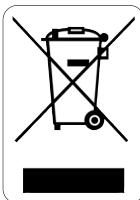
When this crossed-out wheeled bin symbol is attached to a product it means the product is covered by the European Directive 2002/96/EC.
Please inform yourself about the local separate collection system for electrical and electronic products.
Please act according to your local rules and do not dispose of your old products with your normal household waste. The correct disposal of your old product will help prevent potential negative consequences for the environment and human health.
All rights reserved. Reproduction in whole or in part is prohibited without the prior written consent of the copyright owner. The information presented in this document does not form part of any quotation or contract, is believed to be accurate and reliable and may be changed without notice. No liability will be accepted by the publisher for any consequence of its use. Publication there of does not convey nor imply any license under patent- or other industrial or intellectual property rights.
Document order number: 8670 000 33749
September 2007
www.philips.com
Printed in China