
AZT9230 - Portable CD player PHILIPS - Free user manual and instructions
Find the device manual for free AZT9230 PHILIPS in PDF.



User questions about AZT9230 PHILIPS
0 question about this device. Answer the ones you know or ask your own.
Ask a new question about this device
Download the instructions for your Portable CD player in PDF format for free! Find your manual AZT9230 - PHILIPS and take your electronic device back in hand. On this page are published all the documents necessary for the use of your device. AZT9230 by PHILIPS.
USER MANUAL AZT9230 PHILIPS
Philips Consumer Electronics
Philips, Glaslaan 2
5616 JB Eindhoven, The Netherlands
Controls 6
Quick start 7
Power supply. 8-10
Headphones. 10
General information 11
CD play. 12-13
Features. 14-19
Radio 20-21
Clock 22
Alarm clock. 23-24
In-car connection. 25
Troubleshooting. 26-27
Commandes 28
Mise en service rapide. 29
Philips product warranty for
Australia 96-97
Guarantee and service for
New Zealand 98
DIGITAL DBB...DIGITAL DYNAMIC BASS BOOST switches the bass enhancement on and off
2 11.........switches the player on, starts or pauses CD play
3 stops CD play, clears a CD program or switches the player off
4. skips and searches CD tracks forwards, selects the next preset radio station
一 ..skips and searches CD tracks backwards, selects the previous preset radio station
5·MODE……selects the different playing possibilities: SHUFFLE, SHUFFLE REPEAT ALL, REPEAT, REPEAT ALL and 5CR7
6 .display
7▲tunes to radio stations upwards, sets the time upwards tune to radio stations downwards, sets the time downwards
SET...activates/confirms the current time setting, activates/confirms the alarm time setting
9 CLOCK.........switches to clock or alarm clock display
10 PROGRAM.....programs CD tracks and radio stations, reviews the program
11 RADIO-BAND...switches the radio on, selects a waveband
RESUME...stores the last position of a CD track played
HOLD...locks all buttons
OFF...switches RESUME and HOLD off
LINE OUT/...3.5 mm headphone socket, socket to connect the player to another analogue audio input of an additional appliance, remote control socket
14 VOL ....... adjusts the volume
[15] OPEN .opens the CD lid
16 4.5V DC .........socket for external power supply
[17] .........typeplate
18 ESP.ELECTRONIC SKIP PROTECTION ensures continuous CD playback regardless of vibrations and shocks, switches the alarm function on and off
This set complies with the radio interference requirements of the European Community.
1 OPEN
2
3 CD
4
5 HOLD-OFF
6 PLAY
7 VOLUME
8 RADIO / BAND
9 TUNING

Batteries (supplied or optionally available)
With this player you can use either:
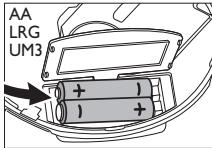
- normal batteries type LR6, UM3 or AA (preferably Philips), or
- alkaline batteries type LR6, UM3 or AA (preferably Philips).
Notes: - Old and new or different types of batteries should not be used in combination. Remove batteries if they are empty or if the player is not going to be used for a long time.
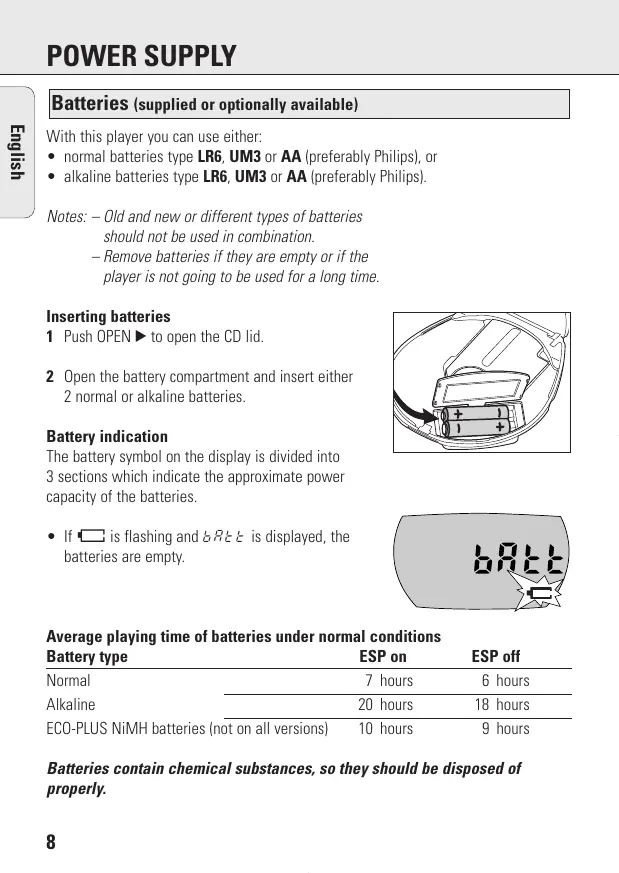
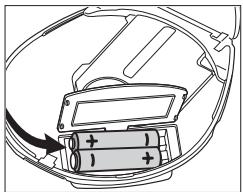
Inserting batteries
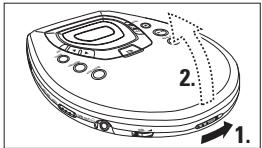
1 Push OPEN to open the CD lid.
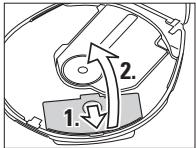
2 Open the battery compartment and insert either 2 normal or alkaline batteries.
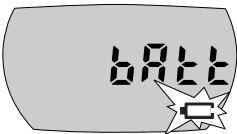
Battery indication
The battery symbol on the display is divided into 3 sections which indicate the approximate power capacity of the batteries.
- If is flashing and bR is displayed, the batteries are empty.
Average playing time of batteries under normal conditions
| Battery type | ESP on | ESP off |
| Normal | 7 hours | 6 hours |
| Alkaline | 20 hours | 18 hours |
| ECO-PLUS NiMH batteries (not on all versions) | 10 hours | 9 hours |
Batteries contain chemical substances, so they should be disposed of properly.
ECO-PLUS NiMH battery information (for versions supplied with rechargeable ECO-PLUS NiMH batteries AY 3362 only)
Recharging works only on players with supplied rechargeable ECO-PLUS NiMH batteries AY 3362.
Recharging the ECO-PLUS NiMH batteries on board
1 Make sure you insert the rechargeable ECO-PLUS NiMH batteries AY 3362.
2 Connect the mains adapter to the 4.5V DC socket of the player and to the wall socket.
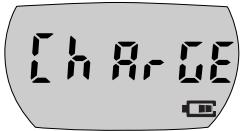
filled with 0-3 sections (depending on the level of charge) is shown and C H R - C E is displayed.
- Recharging stops when you start playback or when approximately 7 hours have passed by.
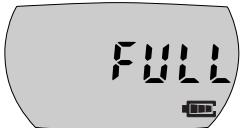
3 When the batteries are fully recharged, is shown and F_LL is displayed.
Notes: - It is normal for the batteries to become warm during recharging.
- If the batteries become too warm, recharging will be interrupted for approximately 30 minutes and H_2 is displayed.
- To ensure proper recharging on board, take care that contacts are clean, and you are using only the ECO-PLUS NiMH batteries AY 3362.
Rechargeable ECO-PLUS NiMH battery handling
- Recharging already charged or half-charged batteries will shorten their lifetime. Therefore, after using the rechargeable ECO-PLUS NiMH batteries a few times, discharge them completely before recharging.
- To avoid a short circuit, the batteries should not touch any metal objects.
- When the batteries quickly become empty after recharging, the contacts are dirty or the end of their lifetime has been reached.
Mains adapter (supplied or optionally available)
Use only the AYT 3170 adapter (4.5 V/300 mA direct current, positive pole to the centre pin). Any other product may damage the player.
1 Make sure that the local voltage corresponds to the mains adapter's voltage.
2 Connect the mains adapter to the 4.5V DC socket of the player and to the wall socket.
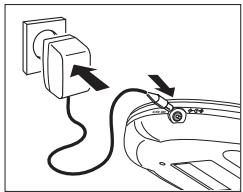
Note: Always disconnect the adapter when you are not using it.
Headphones AY 3677
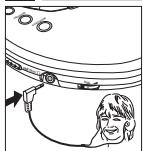
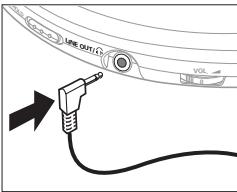
- Connect the supplied headphones to the LINE OUT/Ω socket.
Note: LINE OUT/ can also be used for connecting your HiFi system (signal lead) or your car radio (cassette adapter or signal lead). In both cases, the volume of the player must be set to position 8.
Use your head when using headphones
Hearing safety: Do not play your headphones at a high volume. Hearing experts advise that continuous use at high volume can permanently damage your hearing.
Traffic safety: Do not use headphones while driving a vehicle. It may create a hazard and it is illegal in many countries. Even if your headphones are an open-air type designed to let you hear outside sounds, do not turn up the volume so high that you cannot hear what is going on around you.
CD player and CD handling
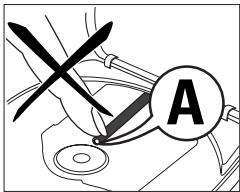
- Do not touch the lens (A) of the CD player.
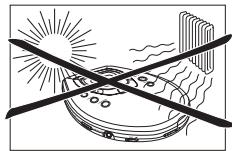
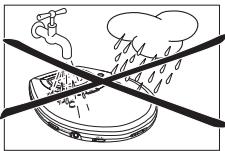
- Do not expose the set, batteries or CDs to humidity, rain, sand or excessive heat (caused by heating equipment or direct sunlight).
- You can clean the CD player with a soft, slightly dampened, lint-free cloth. Do not use any cleaning agents as they may have a corrosive effect.
- To clean the CD, wipe it in a straight line from the centre towards the edge using a soft, lint-free cloth. A cleaning agent may damage the disc! Never write on a CD or attach a sticker to it.
- The lens may cloud over when the set is moved suddenly from cold to warm surroundings. Playing a CD is not possible then. Leave the CD player in a warm environment until the moisture has evaporated.
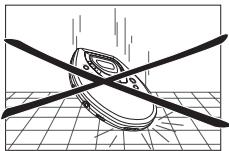
Active mobile phones in the vicinity of the CD player may cause malfunctions. - Avoid dropping the set as this may cause damage.
Environmental information
- All redundant packing material has been omitted. We have done our utmost to make the packaging easily separable into two mono materials: cardboard (box) and polyethylene (bags, protective foam sheet).
- Your set consists of materials which can be recycled if disassembled by a specialized company. Please observe the local regulations regarding the disposal of packing materials, exhausted batteries and old equipment.
CAUTION
Use of controls or adjustments or performance of procedures other than herein may result in hazardous radiation exposure or other unsafe operation.
Playing a CD
This CD player can play all kinds of Audio Discs such as CD-Recordables and CD-Rewritables. Do not try to play a CD-ROM, CDi, VCD, DVD or computer CD.
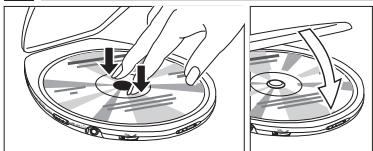
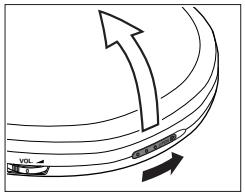
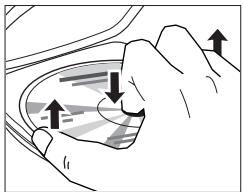
1 Push the OPEN▶ slider.
The lid opens.
2 Insert an audio CD, printed side up, by pressing gently on the CD centre so that it fits onto the hub. Close the lid by pressing it down.
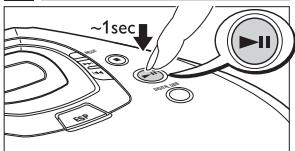
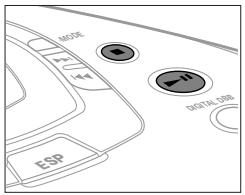
3 Press for approximately 1 second to switch the player on and start CD playback.
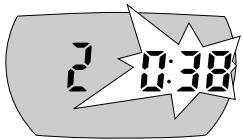
The current track number and the elapsed playing time are displayed.
- You can pause playback by pressing II.
The time where playback was paused is flashing. - Continue playback by pressing again.
4 Press to stop playback.
The total number of tracks and the total playing time of the CD are displayed.
5 Press again to switch the player off.
- To remove the CD, hold it by its edge and press the hub gently while lifting the CD.
Note: If there is no activity, the set will automatically switch off after a while to save energy.
Playback information
- If a recordable CD (CD-R) or a rewritable CD (CD-RW) is not recorded properly, nF and 15C is displayed. In that case use FINALIZE on your CD recorder to complete the recording.
- If you want to play a rewritten CD (CD-RW), it takes 3-15 seconds for sound reproduction to start once you have pressed II.
- Playback will stop if you open the CD lid.
- While the CD is read, - is displayed.
Volume and bass
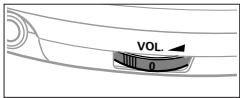
Volume adjustment
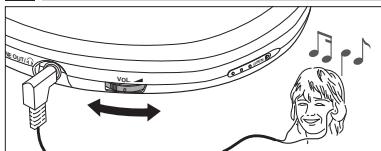
- Adjust the volume by using VOL
Bass adjustment
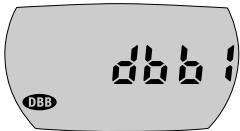
You can choose between the bass enhancement levels d^^ and d^^^ .
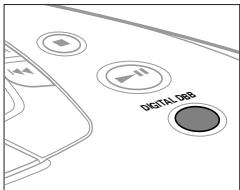
1 Press DIGITAL DBB as often as necessary to select the desired bass intensity. a'bb' or a'bb' is displayed for 2 seconds and DBB is shown.
2 To switch 品 品 or 品 品 off, press DIGITAL DBB repeatedly. DBB goes off.
Selecting a track and searching
Selecting a track during playback
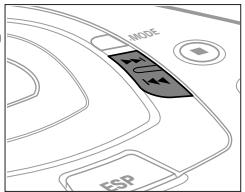
- Briefly press or once or several times to skip to the current, previous or next track.
Playback continues with the selected track and its number is displayed.
Selecting a track when playback is stopped
1 Briefly press or once or several times.
The selected track number is displayed.
2 Press to start CD play.
→ Playback starts with the selected track.
Searching for a passage during playback
1 Keep or pressed to find a particular passage in a backward or forward direction.
Searching is started and playback continues at low volume. After 2 seconds the search speeds up.
2 Release the button when you reach the desired passage.
Normal playback continues from this very position.
Notes: - During SCAN searching is not possible.
- During SHUFFLE, SHUFFLE REPEAT ALL, REPEAT or while playing a program, searching is only possible within the particular track.
Programming track numbers
You can select up to 99 tracks and store them in memory in a desired sequence. Any track can be stored more than once.
1 While playback is stopped, select a track with or
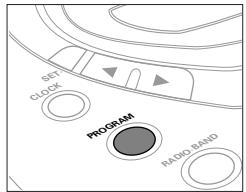
2 Press PROGRAM to store the track.
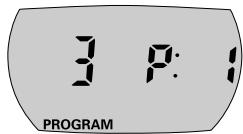
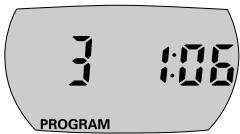
PROGRAM lights up; the track number programmed and with the total number of stored tracks are displayed.
3 Select and store all desired tracks in this way.
4 Press to start playback of your selected tracks. PROGRAM is shown and playback starts.
- You can review the program by pressing PROGRAM for more than 2 seconds.
- The display shows all stored tracks in sequence.
Notes: - If you press PROGRAM and there is no track selected,
5E L E C E is displayed.
- If you try to store more than 99 tracks, FULL is displayed.
Clearing the program
1 If necessary, press to stop playback.
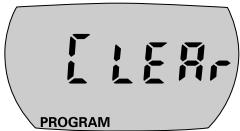
2 Press to clear the program.
L E R is displayed once, PROGRAM goes off and the program is cleared.
Notes: The program will also be cleared if you
- interrupt the power supply or
open the CD lid.
Storing the last position played - RESUME
You can store the last position played. When restarting, playback continues from where you have stopped.
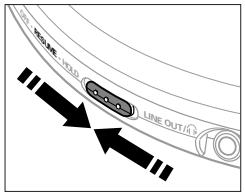
1 Switch the slider to RESUME during playback to activate RESUME.
RESUME is shown.
2 Press whenever you want to stop playback.
3 Press whenever you want to resume playback.
RESUME is shown and playback continues from where you have stopped.
- To deactivate RESUME, switch the slider to OFF.
RESUME goes off.
213
RESUME
Locking all buttons - HOLD
You can lock the buttons of the set. When a key is pressed, no action will be executed then.
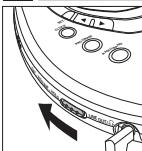
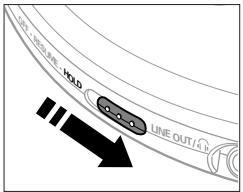
1 Switch the slider to HOLD to activate HOLD.
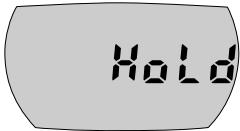
All buttons are locked. HαL a' is displayed by pressing any key.
2 To deactivate HOLD, switch the slider to OFF.
Note: When you deactivate HOLD by switching the slider to RESUME and restart, playback continues from where you have stopped.
ESP
With a conventional portable CD player you might have experienced that the music stopped e.g. when you were jogging. The ELECTRONIC SKIP PROTECTION prevents loss of sound caused by light vibrations and shocks. Continuous playback is ensured. However, ESP does not prevent playback interruptions during serious running. It also does not protect the set against any damage caused by dropping!
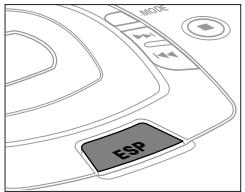
- Press ESP during playback to activate the skip protection.
^p is shown and the protection is activated.
- To deactivate the skip protection, press ESP again. goes off and the protection is deactivated.
10 358

Selecting different playing possibilities - MODE
It is possible to play tracks in random order, to repeat a track or the CD and to play the first few seconds of each track.
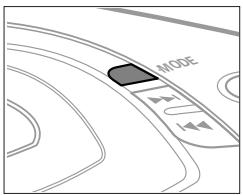
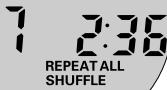
1 Press -MODE during playback as often as necessary until the display shows either:
SHUFFLE: All tracks of the CD are played in random order until all of them have been played once.
SHUFFLE REPEAT ALL: All tracks of the CD are played repeatedly in random order.
REPEAT: The current track is played repeatedly.
REPEAT ALL: The entire CD is played repeatedly.
SCR7: The first 10 seconds of each of the remaining tracks are played in sequence.
2 Playback starts in the chosen mode after 2 seconds.
- To return to normal playback, press -MODE repeatedly until the display indicator goes off.
Radio play
You can tune to any FM or MW station automatically or manually. Stereo stations are indicated by st.
1 Press RADIO-BAND to switch the radio on.
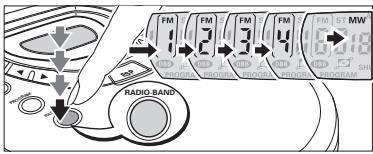
2 Press RADIO-BAND if necessary repeatedly to select the desired waveband.
FM , FM ^2 ,FM 3 ,FM or MW is shown.
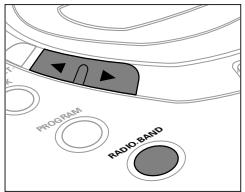
Tuning to radio stations automatically
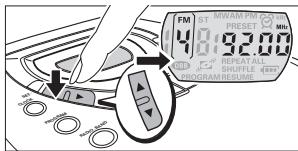
1 Keep or pressed for at least 1 second.
The radio tunes to a station with sufficient strength and radio play starts.
(for "automatic search") and the current waveband and frequency are displayed.
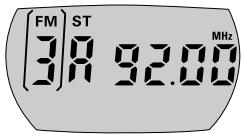
2 Repeat searching until you find the desired radio station.
Tuning to radio stations manually
1 Keep or pressed.
2 Release or , then briefly press or again when you are close to the desired frequency.
3 Briefly press or repeatedly until you reach the desired frequency.
Radio play starts. The current waveband and frequency are displayed.
- To switch from radio play to CD play press
- Press to switch the radio off.
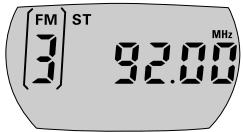
Note: In case of interferences in stereo mode press MODE to switch to mono.
Antennas
- FM: The headphone wire is used as FM antenna. If necessary move it for optimum reception.
- MW: The internal MW antenna is directed by turning the player.
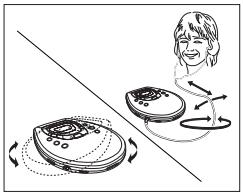
Storing radio stations
You can store up to 30 radio stations.
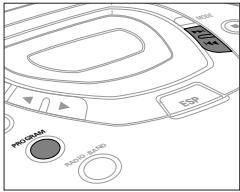
1 Tune to a desired radio station and press PROGRAM.
2 Press or if necessary repeatedly to select the number that should be assigned to this radio station.
3 Press PROGRAM while PRESET is blinking to confirm the storing.
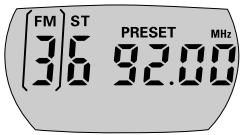
PRESET, the waveband, the frequency and the preset number of the stored station are displayed.
4 Store all desired stations this way.
Note: Already stored stations can be recognized by the indicator PRESET and the preset number.
Tuning to a stored radio station
1 Select the waveband.
2 Press or if necessary repeatedly to select the preset number of the desired radio station.
Radio play starts. PRESET, the waveband, the frequency and the preset number of the stored station are displayed.
Time setting
Your player has a built-in clock. However CD or tuner play is not conditional upon the time setting.
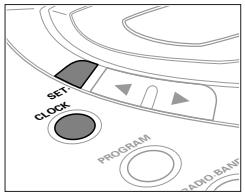
1 Keep SET-pressed for approximately 2 seconds.
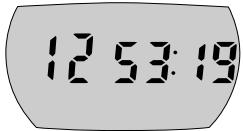
The clock digits 00:00 flash.
2 Keep or pressed, then briefly press or again repeatedly within 5 seconds to set the current time.
The current time is displayed.
3 Press SET· three times or do not press any key for 5 seconds.
The current time is set and the time display goes off.
- To switch to the clock display during CD or tuner play, press CLOCK.
The current time is displayed for 5 seconds.
Notes: - When the player is supplied by batteries do not remove the batteries during radio play, otherwise time settings will be lost and will have to be readjusted.
- If the power supply is interrupted for longer than 1 minute, all time settings will be lost and will have to be readjusted.
1038
Alarm time setting
Provided the current time has been set, your player can be used as an alarm clock.
1 Keep SET-pressed for approximately 2 seconds, then briefly press SET-again.
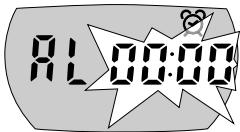
RL is displayed and the alarm clock digits 品 : 品 flash.
2 Press or repeatedly within 5 seconds to set the alarm time.
is shown and the alarm time is displayed.
3 Press SET: twice or do not press any key for 5 seconds.
The alarm time is set and the alarm display goes off.
- To switch to the alarm clock display during CD or tuner play, press CLOCK twice.
3 is shown and the alarm time is displayed for 5 seconds.
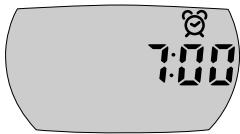
Alarm activation/deactivation
At the set alarm time either the tuner will start playing for 1 hour, the beeper will come on for 3 minutes or an entire CD will be played.
1 Keep SET-pressed for approximately 2 seconds, then briefly press SET- twice.
Either RL b E E P, RL c d or RL e w n is displayed.
2 Press or if necessary repeatedly within 5 seconds to select the desired alarm signal until the display shows either:
RLBEEP: the beeper will be the alarm signal,
RLC: the CD will be the alarm signal, or
RLwn: the tuner will be the alarm signal.
At the set time ② starts flashing and the selected alarm signal will come on.
- You can deactivate the beeper for 24 hours by pressing any key on the player.
- If you deactivate the alarm function by switching CD or tuner play off with , CD or tuner play will restart after 24 hours.
- To switch the alarm function on or off, keep ESP pressed for approximately 2 seconds.
→ is shown if the alarm function is on.
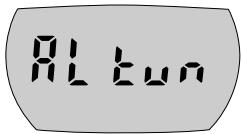
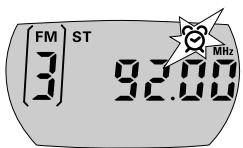
Notes: - If there is no CD inserted or no radio station tuned, the beeper will be taken as the alarm signal instead. The alarm can only be heard if you disconnect the headphones, and either connect speakers to the player, or select the beeper as the alarm signal.
In-car use (connections supplied or optionally available)
Only use the AY 3545 car voltage converter (4.5 V, DC, positive pole to the centre pin) and the AY 3501 car cassette adapter. Any other product may damage the set.
1 Put the CD player on a horizontal, vibration-free and stable surface. Make sure it is in a safe place, where the player is neither a danger nor obstacle to the driver and
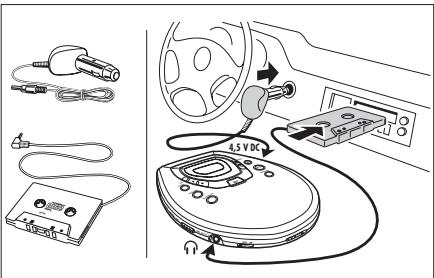
2 Connect the DC plug of the voltage converter to the 4.5V DC socket of the CD player (only for a 12 V car battery, negative grounding).
3 Insert the voltage converter into the cigarette lighter socket. If necessary, clean the cigarette lighter socket to obtain a good electrical contact.
4 Turn down the volume and connect the cassette adapter plug to the LINE OUT/ socket of the CD player.
5 Carefully insert the cassette adapter into the car radio's cassette compartment.
6 Make sure the cord does not hinder your driving.
7 Start the CD player, set VOL to position 8 and adjust the sound with the car radio controls.
- Always remove the voltage converter from the cigarette lighter socket when the CD player is not in use.
Notes: - Avoid excessive heat from the car heating or from direct sunlight (e.g. in a parked car in the summer).
- If your car radio has a LINE IN socket, it is better to use it for the car radio connection instead of the cassette adapter. Connect the signal lead to this LINE IN socket and to the LINE OUT/socket of the CD player.
WARNING
Under no circumstances should you try to repair the set yourself as this will invalidate the guarantee.
| Problem | Possible cause | Solution |
| No power, playback does not start | Batteries | |
| Batteries inserted incorrectly | Insert the batteries correctly. | |
| Batteries are empty. | Change the batteries. | |
| Contact pins are dirty. | Clean them with a cloth. | |
| Mains adapter | ||
| Loose connection | Connect the adapter securely. | |
| In-car use | ||
| Cigarette lighter is not powered when ignition is off. | Switch on ignition or insert batteries. | |
| nF d'15C indication | CD-RW (CD-R) is not recorded properly. | Use FINALIZE on the CD recorder to complete the recording. |
| no d'15C indication | The CD is badly scratched or dirty. | Replace or clean the CD. |
| CD is not or incorrectly inserted. | Insert a CD, label upwards. | |
| The laser lens is steamed up. | Wait until the lens has cleared. | |
| Hold indication and/or no reaction to controls | HOLD is activated. | Deactivate HOLD. |
| Electrostatic discharge | Disconnect the set from power supply or take out the batteries for a few seconds. | |
| The CD skips tracks. | The CD is damaged or dirty. | Replace or clean the CD. |
| RESUME, SHUFFLE or PROGRAM is active. | Switch RESUME, SHUFFLE or PROGRAM off. |
If a fault occurs, first check the points listed, before taking the set for repair.
If you are unable to solve a problem by following these hints, consult your dealer or service centre.
| Problem | Possible cause | Solution |
| No sound or bad sound quality | PAUSE is activated. | Press▶II. |
| Loose, wrong or dirty connections | Check and clean connections. | |
| Volume is not adjusted. | Adjust the volume. | |
| Malfunctions due to vicinity of active mobile phones | Keep the player away from active mobile phones. | |
| Strong magnetic fields near the player | Change the player's position or connections. | |
| In-car use cassette adapter is inserted incorrectly. | Insert the cassette adapter correctly. | |
| Temperature inside the car is too high/low. | Let the player adjust to the temperature. | |
| Cigarette lighter socket is dirty. | Clean the cigarette lighter socket. | |
| Wrong playback direction of the car cassette player's autoreverse feature | Change the autoreverse direction. | |
| Poor radio reception | Weak radio signal | Direct the antenna for optimum reception. |
| Interference caused by electric equipment like TVs, computers, engines etc. | Keep the player away from electric equipment. | |
| Alarm does not work. | Alarm time is not set/alarm is not activated. | Set the alarm time/activate the alarm. |
| Malfunction, loss of time settings | Continued operation with weak batteries | Change batteries, readjust settings. |
Warranty conditions valid for Colour Television, Video Cassette Recorders, CD Recordable, DVD Players, Audio Systems, and Portable Audio.
The benefits given to the purchaser by this warranty are in addition to all other rights and remedies which the purchaser has in respect of the product under the Trade Practices Act or other Commonwealth or State Law.
Philips Consumer Electronics warrants its products to the purchaser as follows and subject to the stated conditions.
12 months free service
Conditions of warranty
- All claims for warranty service should be made to your nearest Philips Authorised Service Centre. Reasonable evidence of date of purchase must be provided.
- This warranty extends only to defects occurring under normal use of the product when operated in accordance with the instructions.
- Home service within the normal service area of our Philips Authorised Service Centres will be provided for television receivers with screen size 48 cm and above. All other products are to be brought or sent to your nearest Philips Authorised Service Centre.
- This warranty does not cover:
a) Mileage or travelling time, pickup or delivery, cost of insurance.
b) Service costs arising from failure to correctly adjust the controls of the product or to observe the instructions, or inspections that reveal that the product is in normal working order.
c) Product failures caused by misuse, neglect, normal wear and tear, accidental breakage, transit damage, inexpert repairs or modification by unauthorised persons, lightning strikes, vermin infestation or liquid spillage.
d) Cleaning of video or audio heads.
e) Inadequate receiving antennae.
f) Replacement of worn or used batteries, styli or other consumables.
The conditions contained in this warranty card replace and override the provisions of the World-Wide Guarantee for Products sold in Australia.
Philips Authorised Service Centres
To contact your nearest Philips Authorised Service Centre call 1300 36 1392 from anywhere in Australia.
| Sydney | Adelaide |
| Newcastle | Hobart |
| Perth | Wollongong |
| Melbourne | Canberra |
| Brisbane |
Service is provided through 350 accredited service dealers throughout Australia. To find out about your nearest centre, call 1300 36 1392.
Please record the following information for your records and keep in a safe place.
Model No:
Serial No:
Please retain your purchase receipt which is required to claim service under warranty.
Philips Consumer Electronics Australia Limited
ACN 008 445 743, 3 Figtree Drive
Homebush NSW 2140
Version 4,03/99,FPCP-030
Thank-you for purchasing this quality Philips product.
Philips New Zealand Ltd guarantees this product against defective components and faulty workmanship for a period of 12 months. Any defect in materials or workmanship occurring within 12 months from the date of purchase subject to the following conditions will be rectified free of charge by the retailer from whom this product was purchased.
Conditions
- The product must have been purchased in New Zealand. As proof of purchase, retain the original sales docket indicating the date of purchase.
- The guarantee applies only to faults caused by defective components, or faulty workmanship on the part of the manufacturer.
- The guarantee does not cover failures caused by misuse, neglect, normal wear and tear, accidental breakage, use on the incorrect voltage, use contrary to operating instructions, or unauthorised modification to the product or repair by an unauthorised technician.
- Reasonable evidence (in the form of a sales docket) must be supplied to indicate that the product was purchased no more than 12 months prior to the date of your claim.
- In the event of a failure, Philips shall be under no liability for any injury, or any loss or damage caused to property or products other than the product under guarantee.
This guarantee does not prejudice your rights under common law and statute, and is in addition to the normal responsibilities of the retailer and Philips.
How to claim
Should your Philips product fail within the guarantee period, please return it to the retailer from whom it was purchased. In most cases the retailer will be able to satisfactorily repair or replace the product.
However, should the retailer not be able to conclude the matter satisfactorily, or if you have other diffi-culties claiming under this guarantee, please contact
The Guarantee Controller
Philips New Zealand Ltd.
P.O.Box 41.021
Auckland
(09) 84 94 160
fax (09) 84 97 858
Meet Philips at the Internet
http://www.philips.com

CLASS 1 LASER PRODUCT