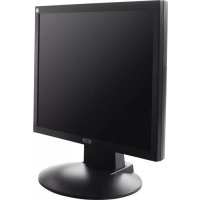
TVAC10012 - Computer monitor ABUS - Free user manual and instructions
Find the device manual for free TVAC10012 ABUS in PDF.



| Product type | 17-inch LED Monitor |
| Brand | ABUS |
| Model | TVAC10012 |
| Screen diagonal | 17 inches (43.2 cm) |
| Resolution | 1280 x 1024 (SVGA) |
| Aspect ratio | 4:3 |
| Display technology | LCD with LED backlight |
| Brightness | 250 cd/m² |
| Contrast ratio | 1000:1 |
| Response time | 5 ms |
| Viewing angle (H/V) | 170° / 160° |
| Number of colors | 16.7 million |
| Video inputs | 1 x VGA, 1 x HDMI, 2 x BNC (composite), 1 x S-Video |
| Video outputs | 2 x BNC (loop-through) |
| Audio inputs | 1 x 3.5 mm jack (PC), 1 x RCA pair (L/R) |
| Speakers | Built-in, stereo 2 x 2.5 W |
| Power supply | 12 V DC / 3 A (power adapter included) |
| Dimensions without stand (W x H x D) | 372 x 310 x 50 mm |
| Dimensions with stand (W x H x D) | 372 x 390 x 195 mm |
| Weight | 3.3 kg |
| VESA standard | 75 x 75 mm |
| Maintenance and cleaning | Unplug before cleaning; use a soft, dry cloth; avoid chemicals and liquid penetration. |
| Safety | Do not open the housing; ensure adequate ventilation; do not expose to moisture. |
Frequently Asked Questions - TVAC10012 ABUS
User questions about TVAC10012 ABUS
0 question about this device. Answer the ones you know or ask your own.
Ask a new question about this device
Download the instructions for your Computer monitor in PDF format for free! Find your manual TVAC10012 - ABUS and take your electronic device back in hand. On this page are published all the documents necessary for the use of your device. TVAC10012 by ABUS.
USER MANUAL TVAC10012 ABUS
natural_image
Interior view of a clothing store with racks of colorful jackets and hanging potted plants, displayed on a monitor (no visible text or signage)D
GB
D
GB
F
NL
DK
PL
Bedienungsanleitung
User manual
Manuel utilisateur
These user manual contains important information for installation and operation. This should be also noted when this product is passed on to a third party. Therefore look after these operating instructions for future reference!
A list of contents with the corresponding page number can be found in the index on page 24.
Français
natural_image
Computer monitor displaying a photo of clothing racks in a retail store (no visible text or symbols)Bedienungsanleitung
Version 05/2015
CE
natural_image
Line drawing of a computer monitor with blank screen and stand (no text or symbols)Monitor
natural_image
Line drawing of a computer interface showing connected ports and connectors (no text or symbols)natural_image
Line drawing of a computer interface showing ports, connectors, and a server unit (no text or symbols)natural_image
Diagram of a computer interface showing connections between ports and connectors (no text or labels)natural_image
Pure electrical circuit lines without any symbolsnatural_image
Computer monitor displaying a photo of colorful jackets in a retail store (no visible text or symbols)User manual
Version 05/2015
CE
Original English user manual. Keep for future use.
Introduction
Dear Customer,
Thank you for purchasing this product.
This device complies with the requirements of the applicable EU directives. The declaration of conformity can be ordered from:
To maintain this condition and to ensure risk-free operation, you as the user must observe these operation instructions!
Before initial start-up, read through the complete operating instructions observing operating and safety instructions.
All company and product names mentioned in this document are registered trademarks. All rights reserved.
If you have any questions, please contact your installer or your local dealer!

Disclaimer
This user manual was prepared with greatest care. If you should notice omissions or inaccuracies, please inform us about these on the back of this manual given address.
The ABUS Security-Center GmbH assumes no liability for technical and typographical faults and reserves the right to make at any time modifications to the product or user manual without a previous announcement. The company is not liable or responsible for direct and indirect subsequent damages which are caused in connection with the equipment, the performance and the use of this product.
No guarantee for the content of this document is taken.
Icon explanation
 | A flash in the triangle is used if there is danger for the health, e.g. by an electric shock. |
 | An exclamation mark in the triangle points to an important note in this user manual which must be minded. |
 | This symbol can be found when you are to be given tips and information on operation. |
Important safety advice
 | The warranty will expire for damage due to non-compliance with these operating instructions. ABUS will not be liable for any consequential loss! |
 | ABUS will not accept liability for damage to property or personal injury caused by incorrect handling or non-compliance with the safety-instructions.In such cases the warranty will expire. |
The device has been manufactured in compliance with international safety standards. Please read these safety advices carefully.
Safety advice
- Mains supply
Operate this product only from the type of power supply indicated on the marking label. If you are not sure of the type of power supplied to your home, consult your local power company. Disconnect the product from the mains before you start any maintenance or installation procedures.
- Overloading
Do not overload a wall outlet, extension cord or adapter as this may result in electric fire or shock.
- Liquids
Setup the device only in dry and dust-protected rooms. Protect the device from any kind of liquids entering.
- Cleaning
Disconnect the product from the wall outlet before cleaning. Use a light damp cloth (no solvents) to dust the product.
- Ventilation
The slots on top of the product must be left uncovered to allow proper airflow into the unit. Do not stand the product on soft furnishings or carpets. Do not stack electronic equipments on top of the product.
- Accessories
Do not use any unsupported accessories as these may be hazardous or cause damage the product.
-
Location
-
Setup the device only in dry and dust-protected rooms.
- Protect the device from any kind of liquids entering.
- Do not place the device near a radiator or heat register.
- Setup the device only in areas with the advised operating temperatures of 0^ 40^ .
Warnings
Follow all safety and operating advises before starting-up the device!
-
Follow these directions in order to avoid damage of the power cord or plug:
-
Do not modify or process the power cord or plug arbitrarily.
- Do not bend or twist the power cord.
- Make sure to disconnect the power cord holding the plug.
-
Keep heating appliances as far as possible from the power cord in order to prevent the cover vinyl from melting.
-
Follow these directions. Failure to follow any of them may cause electrical shock:
-
Do not open the main body or the power supply.
- Do not insert metal or inflammable objects inside the product.
-
In order to avoid any damage during lighting use a surge protection.
-
Do not use the product when it is out of order. If you continue to use the product when defective, serious damage can be caused to it. Make sure to contact your local product distributor if the product is out of order.
LCD Screen
- Heavy pressure can destroy the LCD screen.
- Using the system in a cold environment can cause display errors. This is not a malfunction and the LCD screen will work normal again when the environment temperature increases.
- Despite high standards of quality during manufacture, black or light spots could appear on the screen in places, possibly for a long time. Such spots are normal with LED screens and do not mean there is a malfunction. Furthermore, after switching off, a distorted picture may still be seen for several seconds afterwards.
 | During the installation into an existing video surveillance system make sure that all devices are disconnected from the low and supply voltage circuit. |
 | If in doubt allow a professional electrician to mount, install and wire-up your device. Improper electrical connection to the mains does not only represent at threat to you but also to other persons.Wire-up the entire system making sure that the mains and low voltage circuit remain separated and cannot come into contact with each other in normal use or due to any malfunctioning. |
Unpacking
While you are unpacking the device please handle it with utmost care.
| If you notice any damage of the original packaging, please check at first the device.If the device shows damages, please contact your local dealer. |
Table of contents
- Intended use 27
- Scope of delivery....27
- Features and functions ...... 27
- Overview - type numbers 28
- Physical descriptions 28
- Mounting 29
6.1 Power supply.... 29
6.2 Ventilation 29
6.3 Wall Mount 29
- Button description....29
- Connection options for the monitor 30
8.1 Connect the monitor to a PC or recorder via VGA cable. 30
8.2 Connect the monitor with a PC or recorder via HDMI cable. 30
8.3 Connect the monitor to a camera or a recorder via coaxial cable. 30
8.4 Finally, connect the power supply unit provided to the monitor and the 230 V AC power supply....31
- Selecting the input signal 31
- On-screen menu 32
10.1 Picture 33
10.2 Menu 34
10.3 Position / Size 35
10.4 Picture-in-picture 36
10.5 VGA settings.... 37
10.6 Audio 38
- Maintenance and cleaning 39
11.1 Maintenance.... 39
11.2 Cleaning 39
-
Disposal 39
-
Technical data....40
1. Intended use
This monitor is used in combination with connected video signal sources (B/W and color cameras) and digital recorders for object surveillance. The video inputs as HDMI, VGA and BNC offer flexibility when connecting the monitor to a recorder, live cameras or a computer. Integrated loudspeaker and audio inputs also allow soundtracks to be played. To fix it to a wall or ceiling, VESA standard mounts can be used.
For a detailed description of functions, refer to Section 3, "Features and functions".
2. Scope of delivery
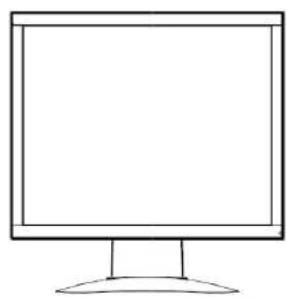
natural_image
Line drawing of a flat-screen computer monitor with a blank screen and base (no text or symbols)Monitor
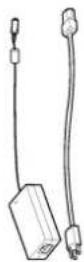
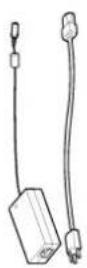
Power supply unit incl. EU and UK cold device cable

VGA cable

HDMI cable

PC audio cable
3. Features and functions
• Higher contrast and improved color display thanks to LED backlighting
• Suitable for continuous operation
- Easy to install on the wall or ceiling with VESA standard mounts (VESA 75 x 75 mm)
• Versatile connection options
• Low energy consumption due to energy saving LED display
4. Overview – type numbers
| Model number TVAC10012 | |
| Screen size 17" | |
| Resolution 1280 (H) x 1024 (V) SXGA | |
| Brightness 250 cd/m | ^2 |
5. Physical descriptions

| 1 Power supply DC 12 | V / 3 A,Only use the power supply unit provided for operating the monitor! |
| 2 HDMI input Port for multi-media data | |
| 3 VGA input PC and DVR signal input | |
| 4 S-Video S-Video input | |
| 5 Video input 1 Composite video signal input 1 (BNC) | |
| 6 Video output Looped-through video signal output 1 (BNC) | |
| 7 Video input 2 Composite video signal input 2 (BNC) | |
| 8 Video output Looped-through video signal output 2 (BNC) | |
| 9 PC audio input 3.5 mm jack, audio signal input coupled with the VGA input | |
| 10 Audio input R Cinch input L, audio signal input coupled with the video inputs. | |
| 11 Audio input L Cinch input R, audio signal input coupled with the video inputs. | |
6. Mounting
6.1 Power supply
Before starting installation, ensure that the power supply voltage and the rated voltage on the power supply unit are identical.
6.2 Ventilation
Please provide sufficient ventilation. The cooling openings may not be covered for sufficient ventilation.
6.3 Wall Mount
For mounting the monitor at a wall please use a VESA compatible wall mount. At the backside of the monitor there are squarely arranged assembly holes (Middle distance 75 mm). These are compatible with the ABUS TVAC10500 wall mount.
Please also pay attention to the installation manual of the wall mount.

During the mounting of the TFT monitor it must be separated from the mains voltage.
7. Button description
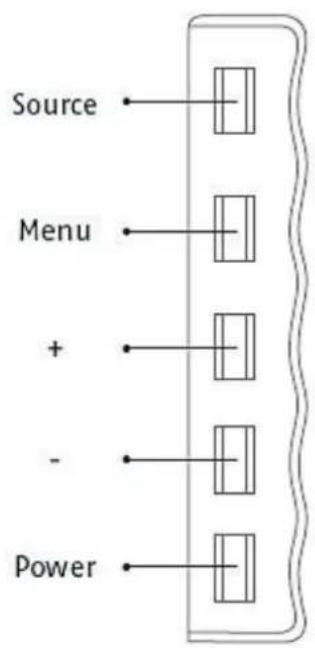
| Button Description | |
| SOURCE | Select one of the different input signals:HDMI (digital signal input)VGA (PC or DVR signal input)AV1 or AV2 (composite signal inputs)Select a submenu or confirm a selected value |
| MENU | Show the OSD (on-screen display)Exit a menu item and the menu |
| + | Navigate between menu itemsIncrease the value in the OSDIncrease the volume during operation |
| - | Navigate between menu itemsReduce the value in the OSDDecrease the volume during operation |
| POWER Switch monitor on/off | |
8. Connection options for the monitor
8.1 Connect the monitor to a PC or recorder via VGA cable.
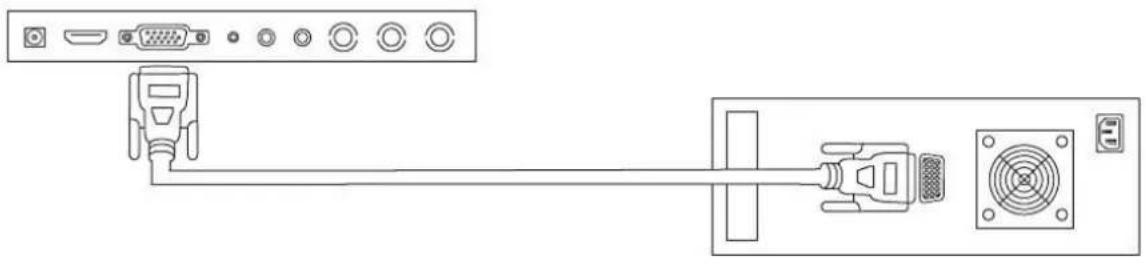
natural_image
Line drawing of a computer interface showing connections between ports and connectors (no text or symbols)8.2 Connect the monitor with a PC or recorder via HDMI cable.
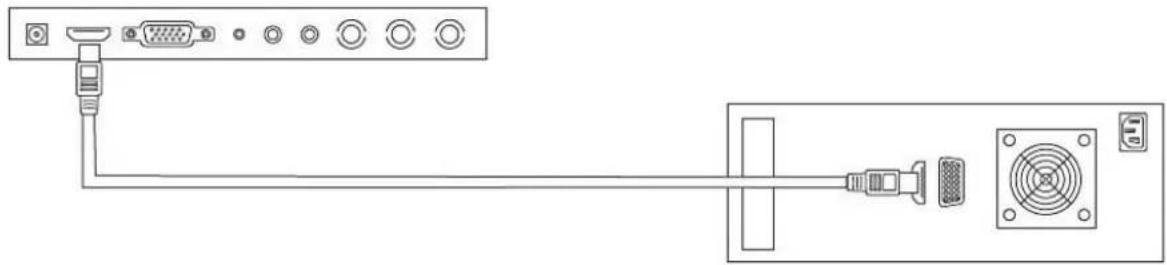
natural_image
Line drawing of a computer interface showing connections between ports and a central device (no text or symbols)8.3 Connect the monitor to a camera or a recorder via coaxial cable.
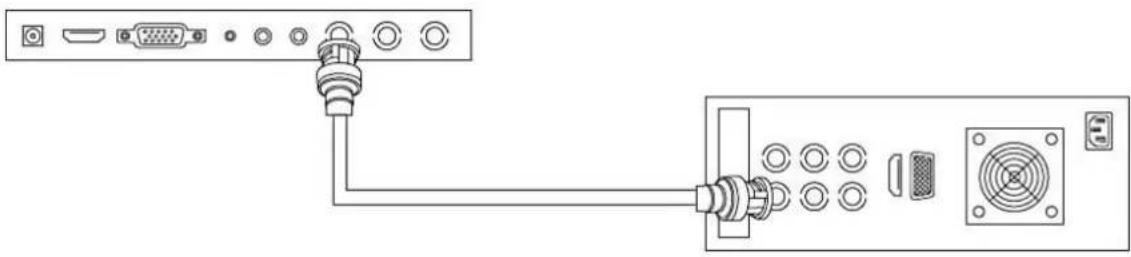
natural_image
Diagram of a computer interface showing connections between ports and connectors (no text or labels)Use a coaxial cable with BNC plugs (male) for the connection.
8.4 Finally, connect the power supply unit provided to the monitor and the 230 V AC power supply.
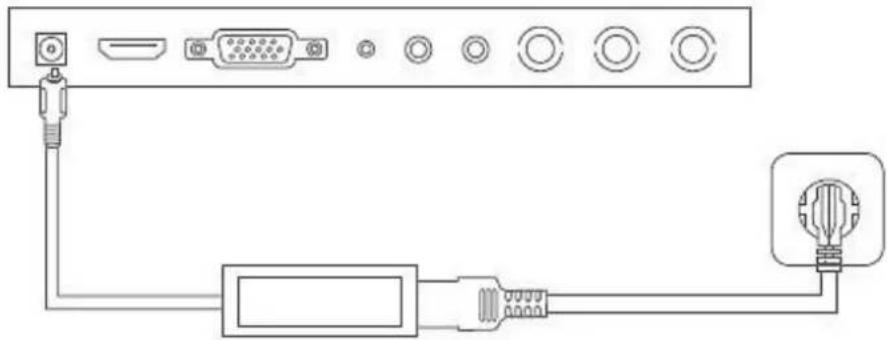
natural_image
Pure electrical circuit lines without any symbols9. Selecting the input signal
To select the input signal, press the source button. The selected input will be displayed on the upper right of the screen. Press the source button repeatedly until you get to the input you require. To confirm the selected output, please then press the + or - button.
You have the choice of AV1, AV2, HDMI, S-Video and VGA.
10. On-screen menu
To call up the on-screen display, please press the "Menu" button.
To adjust the settings, you have the following screen menus at your disposal.
 | Image Settings for the picture display |
 | Menu Settings for displaying the menu |
 | Position / Size Settings for the size and position of the display |
 | Picture-in-picture Settings for the picture-in-picture display |
 | VGA settings Screen settings for VGA mode |
 | Audio Settings for audio playback |

Please note that the menu structure depends on the input signal.
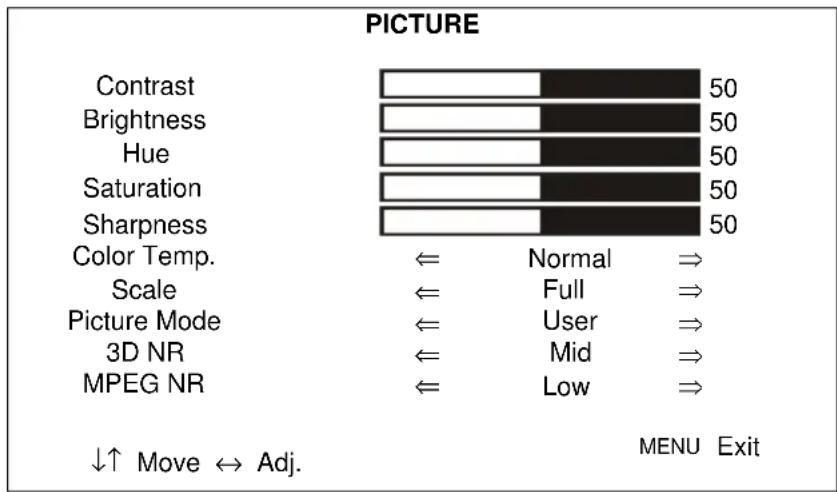
10.1 Picture
To make settings for the picture display, press the MENU button and then press the SOURCE button to select the first menu item.
The selected menu item is shown by a frame. The sub-menu item is highlighted in yellow.
You can navigate between sub-menu items using the SOURCE button. Press the + / - button to increase or decrease the values of a sub-menu.
bar
| Category | Value | | -------------- | ----- | | Contrast | 50 | | Brightness | 50 | | Hue | 50 | | Saturation | 50 | | Sharpness | 50 || Menu item Description | Verfügbar in Modus | |
| Contrast | Setting the picture contrast(value ranging from 0 to 100) | AV, HDMI, VGA |
| Brightness | Setting the picture brightness(value ranging from 0 to 100) | AV, HDMI, VGA |
| Color hue | Setting the color hue(value ranging from -50 to +50) | AV |
| Color saturation | Setting the color saturation(value ranging from 0 to 100) | AV |
| Sharpness | Setting the picture sharpness(value ranging from 0% to 100%) | AV |
| Color temperature | Setting the color temperature.You have the following options:Standard, warm, cold | AV, HDMI, VGA |
| Scale | Selection of the picture displayYou have the following options:full / 4:3 / centered | AV, HDMI, VGA |
| Picture mode | Selecting the predefined picture settings or saving the user settings. You have the following options:User, standard, soft, dynamic | AV |
| 3D NR | Setting the noise reductionYou have the following options:Off / Low / Medium / High | AV |
| MPEG NR | Setting the noise reduction for MPEG signalsYou have the following options:Off / Low / High | AV |
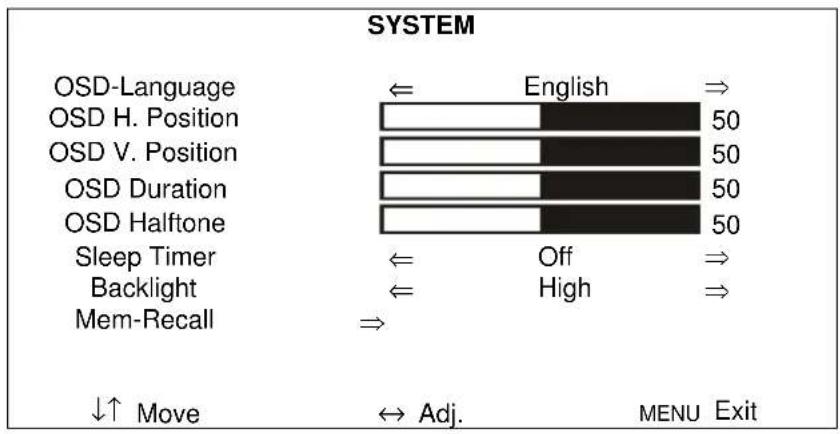
10.2 Menu
This menu item lets you make settings for the menu display.
| Menu item Description Available in mode | ||
| OSD-Language | Selection of the language for the OSD.The following languages are available:German, English, French, Dutch, Danish, Polish,Italian, Spanish | AV, HDMI, VGA |
| OSD H position | Manual setting of the horizontal picture position(value ranging from 0 to 100) | AV, HDMI, VGA |
| OSD V position | Manual setting of the vertical picture position(value ranging from 0 to 100) | AV, HDMI, VGA |
| OSD Duration | Setting specifying how long the menu remains on the screen (value from 5 to 60 seconds) | AV, HDMI, VGA |
| OSD Halftone | Setting of the transparency of the OSD (value from 0 to 100)"0" maximum transparency; "100" no transparency | AV, HDMI, VGA |
| Sleep Timer | Automatic deactivation of the monitor after a predefined time period.You have the following options:Off / 15 / 30 / 45 / 30 minutes | AV, HDMI, VGA |
| Backlight | Setting the backlighting.You have the following options:Low, Medium, High | AV, HDMI, VGA |
| Mem-Recall | Restoring the factory settings AV, HDMI, VGA | |
10.3 Position / Size
This menu item lets you make settings for the display size and position.
| POSITION / SIZE | |||
| HStart | 500 | ||
| HSize | 500 | ||
| VStart | 500 | ||
| VSize | 500 | ||
| ↓↑ Move | Adj. | MENU Exit | |
| Menu item Description | Available in mode | |
| H start | Manual setting of the horizontal picture position AV | |
| H size | Manual adjustment of the horizontal picture size AV | |
| V start | Manual setting of the vertical picture position AV | |
| V size | Manual adjustment of the vertical picture size AV |
10.4 Picture-in-picture
This menu item lets you make settings for the picture-in-picture display.
| PIP | |||
| Multi Window | Off | ||
| Sub Source | VGA | ||
| Size | Large | ||
| PIP Position | Top L | ||
| Border Color | Black | ||
| Sound Source | Main | ||
| Swap | |||
| ↓↑ Move | Adj. | MENU Exit | |
| Menu item Description | |
| Multi Window | Activation or deactivation of the picture-in-picture function.You have the following options:Off / PIP / POP |
| Sub Source | Select the input for the picture-in-picture function |
| Size | Setting the size of the additional windowYou have the following options:Small / medium / large |
| PIP Position | Selection of the position of the additional window.You have the following options:Upper L / lower L / lower R / upper R |
| Border Color | Selection of the frame for the additional windowYou have the following options:Black/blue |
| Sound Source | Selection of the audio input of the main or additional window |
| Swap | Swap the set main and additional window |
| Please note:It is not possible to display HDMI and VGA or AV1 and AV2 simultaneously as a picture-in-picture. |
10.5 VGA settings
This menu item lets you make screen settings for the VGA mode.
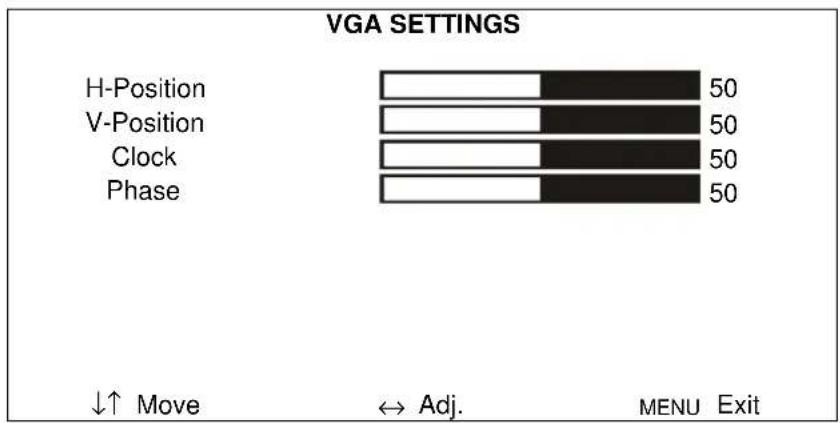
bar
VGA SETTINGS | Category | Value | |---|---| | H-Position | 50 | | V-Position | 50 | | Clock | 50 | | Phase | 50 | ↓↑ Move ↔ Adj. MENU Exit| Menu item Description Available in mode | ||
| H position | Manual setting of the horizontal picture position(value ranging from 0 to 100) | VGA |
| V position | Manual setting of the vertical picture position(value ranging from 0 to 100) | VGA |
| Clock | Vertical synchronization(value ranging from 0 to 100) | VGA |
| Phase | Horizontal synchronization(value ranging from 0 to 100) | VGA |
10.6 Audio
This menu item lets you make settings for the audio output.
To set the volume of the monitor, press the + or - button in normal operation and set the value that you want with these buttons.
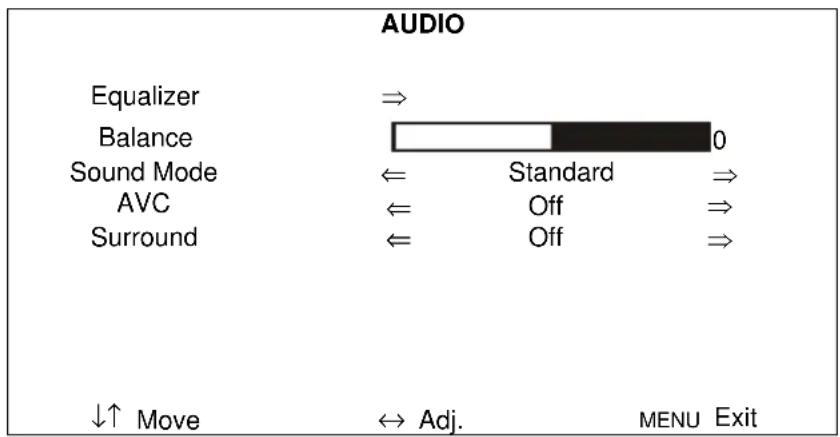
| Menu item Description | Available in mode | |
| Equalizer | Sound settings120 Hz (value ranging from 0 to 100)500 Hz (value ranging from 0 to 100)1.5 kHz (value ranging from 0 to 100)5 KHz (value ranging from 0 to 100)10 KHz (value ranging from 0 to 100) | AV, HDMI, VGA |
| Balance | Setting the balance between the left and right loudspeaker(value ranging from 0 to 100) | AV, HDMI, VGA |
| Sound Mode | Selection between various preset audio modes.These can be used to set different sound effects.User: Mode for individually setting the audio outputPreset modes for the audio output:Music, film, standard | AV, HDMI, VGA |
| AVC | Automatic volume controlYou have the following options:ON / OFF | AV, HDMI, VGA |
| Surround | Activation / deactivation of the surround modeYou have the following options:ON / OFF | AV, HDMI, VGA |
11. Maintenance and cleaning
11.1 Maintenance
Regularly check the product's physical state, e.g. check for damage of the housing.
If you suspect that safe operation cannot be guaranteed anymore, disconnect the product and ensure that it cannot be used by mistake. Remove the batteries.
You can assume that safe operation is not possible anymore when
• the device shows visible damage,
• the device does not function anymore

Please note:
The product is absolutely maintenance-free for you. There are no components on the inside of the product to be checked or services by you, never open it.
11.2 Cleaning
Wipe the product with a clean, dry cloth. If the device is very dirty, you can moisten the cloth with lukewarm water.

Ensure that no liquids can get into the device.
Do not use any chemical cleaners, since they could damage the housing surface or the screen (discolorations).
12. Disposal
Important: The EU Directive 2002/96/EC regulates the proper return, treatment and recycling of used electronic devices. This symbol means that in the interest of environmental protection the device must be disposed of separately from household or industrial waste at the end of its service life in accordance with applicable local legal guidelines. Disposing of used devices can be done at official recycling centers in your country. Obey local regulations when disposing of material. Further details on returns (also for non-European countries) can be obtained at your local authority. Separate collection and recycling saves natural resources and ensures that all the provisions for protecting health and environment are observed when recycling the product.
13. Technical data
| Model number TVAC10012 | |
| Monitor type LED LCD monitor | |
| Screen diagonal 17" | |
| Resolution 1,280 (H) x 1,024 (V) (SXGA) | |
| Pixel pitch 0.264 (H) x 0.264 (V) mm | |
| Picture format 4:3 | |
| Video system PAL / NTSC | |
| Comb filter 3D | |
| Signal recognition Automatic | |
| Contrast ratio 1000:1 | |
| Brightness 250 cd/m | ^2 |
| Color gradations 16.7 million | |
| Viewing angle, horiz. / vert. 170° (H) x 160° (V) | |
| Response time 5 ms | |
| Frequency range 30 – 80 kHz (H) / 50 – 75 Hz (V) | |
| OSD menu | Graphic on-screen display |
| OSD languages | German, English, French, Dutch, Danish, Polish, Italian, Spanish |
| Inputs | 1 x VGA, 1 x HDMI, 2 x BNC,1 x audio (3.5 mm jack), 2 x cinch audio, 1x S-Video |
| Outputs | 2 x BNC |
| Loudspeakers | Integrated 2 x 2.5 W, stereo |
| Housing material | Plastic |
| Display surface | matte |
| VESA | 75 x 75 mm |
| Power supply | 12 V DC |
| Power consumption | Max. 3 A |
| Operating temperature | 0 – 40°C |
| Humidity | Max. 70% (non-condensing) |
| Dimensions (W x H x D)(without stand) | 372 x 310 x 50 mm |
| Dimensions (W x H x D)(with stand) | 372 x 390 x 195 mm |
| Weight | 3.3 kg |
TVAC10012
natural_image
Computer monitor displaying a photo of a clothing store interior with hanging jackets and racks (no visible text or symbols)Manuel utilisateur
Version 05/2015
CE
natural_image
Line drawing of a flat-screen computer monitor with a blank screen and stand (no text or symbols)Moniteur
natural_image
Line drawing of a computer interface showing connections between ports and a connector (no text or symbols)natural_image
Line drawing of a computer interface showing ports, connectors, and a power connector (no text or symbols)natural_image
Diagram of a computer interface showing connections between ports and connectors (no text or labels)natural_image
Pure electrical circuit lines without any symbolsnatural_image
Computer monitor displaying a photo of colorful jackets in a retail store (no visible text or symbols)natural_image
Line drawing of a flat-screen computer monitor with no text or symbols on the screen or standMonitor
Voeding incl. EU- en UK-
voedingskabels

VGA·kabel

HDMI -kabel

PC-audio kabel
natural_image
Line drawing of a cable connector with ports and connectors (no text or symbols)natural_image
Line drawing of a computer interface showing ports, connectors, and a power outlet (no text or symbols)natural_image
Diagram of a computer interface showing connections between ports and connectors (no text or labels)natural_image
Pure electrical circuit lines without any symbolsnatural_image
Computer monitor displaying a photo of colorful jackets in a retail store (no visible text or symbols)Brugerhåndbog
Version 05/2015
CE
natural_image
Simple line drawing of a computer monitor with blank screen and stand (no text or symbols)Monitor
natural_image
Line drawing of a computer interface showing connections between ports and a connector (no text or symbols)natural_image
Line drawing of a network connection between two computer ports, showing ports with connectors and a central connector (no text or labels)natural_image
Diagram of a computer interface showing connections between ports and connectors (no text or labels)natural_image
Pure electrical circuit lines without any symbolsbar_stacked
OSD | Category | Value | |---|---| | OSD-Sprog | Danish => 50 | | OSD H. Position | Danish => 50 | | OSD V. Position | Danish => 50 | | OSD timer | Danish => 50 | | OSD transparens | Danish => 50 | | Dvale tid | Fra => 50 | | Bagrundslys | HoJ => 50 | | Reset | => 50 | ↓↑ Flytte ↔ Justere MENU Forladnatural_image
Computer monitor displaying a photo of clothing racks in a retail store (no visible text or symbols)Instrukcja obsługi
Wersja 05/2015
CE
natural_image
Line drawing of a computer monitor with blank screen and stand (no text or symbols)Monitor
natural_image
Line drawing of a cable connector with ports and connectors (no text or symbols)natural_image
Line drawing of a computer interface showing ports, connectors, and a server unit (no text or symbols)natural_image
Diagram of a computer interface showing connections between ports and connectors (no text or labels)natural_image
Pure electrical circuit lines without any symbolsThese operating instructions are published by ABUS Security-Center GmbH & Co.KG, Linker Kreuthweg 5, 86444 Affing, Germany. No reproduction (including translation) is permitted in whole or part e.g. photocopy, microfilming or storage in electronic data processing equipment, without the express written consent of the publisher. The operating instructions reflect the current technical specifications at the time of print. We reserve the right to change the technical or physical specifications.
F Note de l'éditeur
© Copyright 05/2015 by ABUS Security-Center