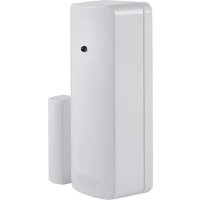
FUMK50010W - Alarm system ABUS - Free user manual and instructions
Find the device manual for free FUMK50010W ABUS in PDF.



| Product Type | Wireless Opening Detector |
| Brand | ABUS |
| Model | FUMK50010W |
| Dimensions (W x H x D) | 33 mm x 89 mm x 29 mm |
| Weight | Approx. 53 g |
| Power Supply | CR2 3 V Lithium Battery |
| Battery Life | Up to 36 months |
| Radio Frequency | 868.6625 MHz / FM |
| Power Consumption | 0.03 A |
| Radio Range | Varies depending on environment (to be tested on site) |
| Environmental Class | I (-10 °C to +55 °C) |
| Security Level | II |
| Housing Material | ABS |
| Contacts | Reed contact, internal tamper contacts TS1-2, possibility of external contacts |
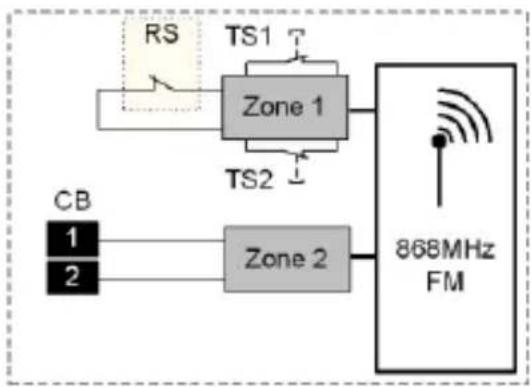
| Number of Zones | 2 zones (zone 1: reed contact + tamper, zone 2: input for external contact) |
| Signal LED | Yes (can be activated/deactivated via jumper LK3) |
| Learning | By infrared or internal learning via jumper LK4 |
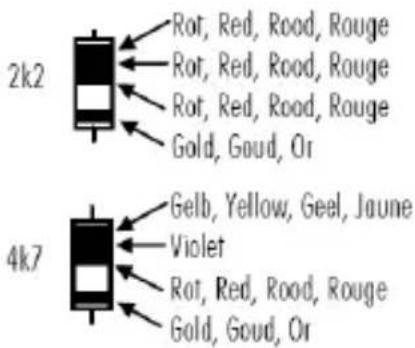
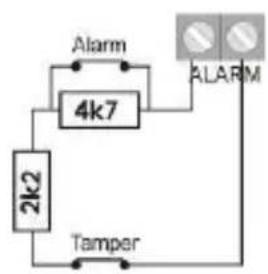
| External Connection | DEOL (double end of line) with 2.2 kΩ and 4.7 kΩ resistors, max. length 10 m |
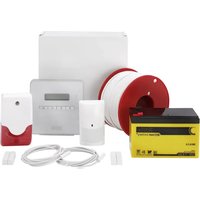
| Package Contents | Detector, magnet, magnetic holder, CR2 battery, screws, shims, jumpers, instructions |
| Compatibility | ABUS Secvest alarm control panels (receiver) |
Frequently Asked Questions - FUMK50010W ABUS
User questions about FUMK50010W ABUS
0 question about this device. Answer the ones you know or ask your own.
Ask a new question about this device
Download the instructions for your Alarm system in PDF format for free! Find your manual FUMK50010W - ABUS and take your electronic device back in hand. On this page are published all the documents necessary for the use of your device. FUMK50010W by ABUS.
USER MANUAL FUMK50010W ABUS
natural_image
White cylindrical device with a red dot on top, next to a smaller cylindrical component (no visible text or symbols)FUMK50000W/B
FUMK50010W/B

Security Tech Germany
Funköffnungsmelder
Radio-controlled opening detector
Installation Guide
natural_image
Simple 3D diagram of a rectangular block with two arrows indicating upward and downward motion (no text or symbols)4. Signal LED

Achtung!
Anzeige: Secvest
natural_image
Simple line drawing of a door with a handle and bracket (no text or symbols)13. Montage:
Many thanks for your purchase of this wireless opening detector. This device is built according to state-of-the-art technology. It complies with current domestic and European regulations.
Hereby, ABUS Security-Center GmbH & Co. KG declares that the radio equipment type FUMK50000W/B, FUMK50010W/B is in compliance with Directive 2014/53/EU. The full text of the EU declaration of conformity is available at the following internet address: www.abus.com >> Search >> FUMK50000W/B, FUMK50010W/B >> Downloads
The Declaration of Conformity can also be obtained from the following address:
Pay attention to the notes and instructions in these operating instructions! If you do not follow these instructions, your guarantee claim becomes invalid! No liability can be accepted for resulting damages!
The product may not be changed or modified in any way.

Battery warning!
The device is supplied with direct current from a 3 V lithium battery. To guarantee a long working life and avoid fire and injury, please note the following:
- Do not dispose of the battery in domestic waste.
- Do not expose the battery to direct sunlight or sources of heat.
- Do not store the battery under high temperatures.
- The battery must not be burned.
- The battery must not come into contact with water.
- The battery must not be dismantled, pierced or otherwise damaged.
- The battery contacts must not be short-circuited.
- The battery must be kept away from small children.
- The battery cannot be recharged.
1. Scope of delivery
1 x installation instructions
1 x magnet
1 x CR2 3 V lithium battery
1 x magnet holder
1 x opening detector
2 x countersunk screws (magnet holder)
2 x rounded head screws (detector)
4 x magnet spacers
2 x detector spacers
4 x jumpers
3. Putting into operation
Open the housing by loosening the screw and then removing the cover.
2. Technical data
| Power supply: | 3 V Li/MnO2 |
| Battery type: | CR2 |
| Power consumption: | 0.03 A |
| Frequency: | 868.6625 MHz / F |
| Weight: | ca. 53 g |
| Dimensions (WxHxD in mm): | 33x89x29 |
| Battery life: | Up to 36 months |
| Environment class: | I (-10 to +55 °C) |
| Security level: | II |
| INCERT no.: | C0160194 |
| Housing material: | ABS |

Important!
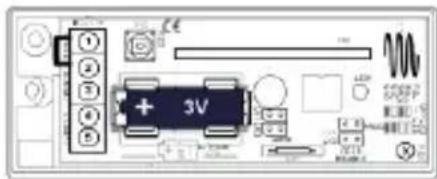
Check for correct polarity!
Insert the battery into the wireless opening detector.
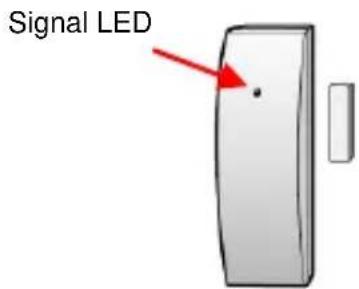
4. Signal LEDs
| Operating state | Signal |
| Operating mode | No signal |
| Transmit / IR programming mode | 4 x flash |
| Programming mode for internal detectors | Continuous flashing |
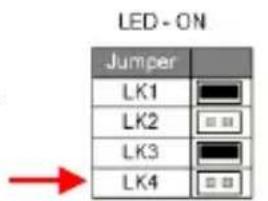
5. Activating the LED
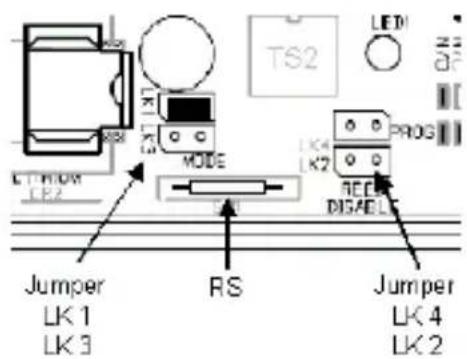
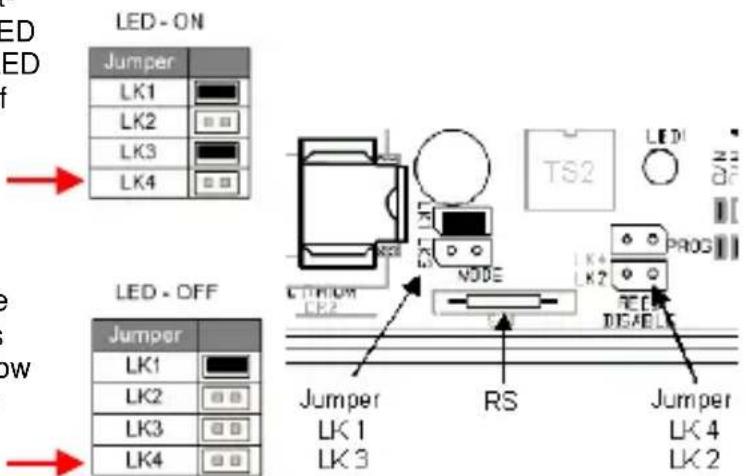
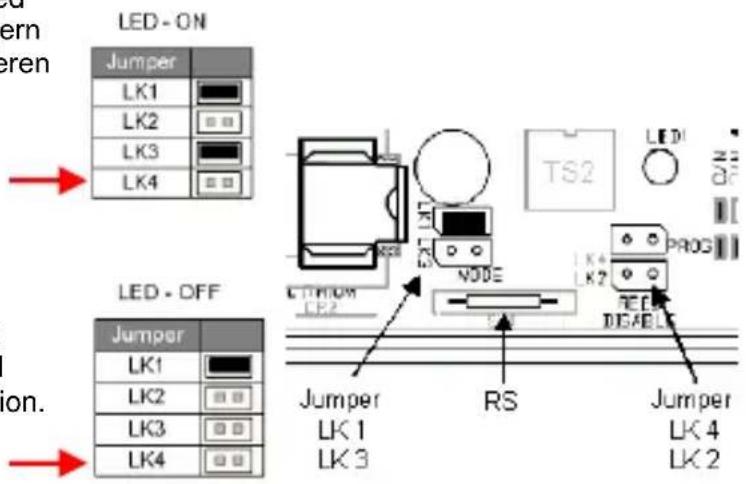
Attach a jumper to contacts LK1 and LK3. Short-circuit the LK4 contact with a jumper until the LED flashes continuously. Remove this again. The LED is now activated. Restore the original position of the jumper.
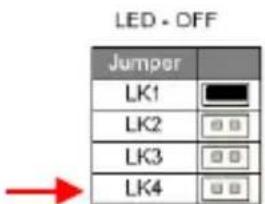
6. Deactivating the LED
Attach a jumper to contact LK1. Short-circuit the LK4 contact with a jumper until the LED flashes continuously. Remove this again. The LED is now deactivated. Restore the original position of the jumper.
7. Training the zones
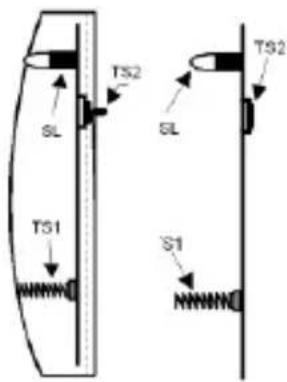
Ensure that the Secvest (receiver) is in learning mode. Using a wireless accessory module (wireless extension), hold the "SL" signal LED of the detector at a maximum of 50 mm above the IR receiver. Train the zones as described below.

The possible configurations of the individual zones can be found on the previous pages. You can also use this wireless magnet contact as a wireless module.
8. Training zone 1
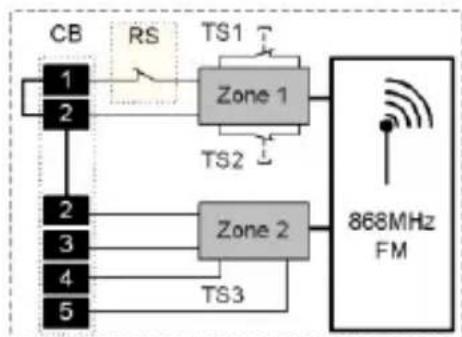
Keep the "TS2" anti-removal wall contact pressed. When deinstalled, also keep the "TS1" cover contact pressed.
Open one of these contacts until successful reception is confirmed.
flowchart
graph TD
    CB["CB"] -->|RS| Zone1["Zone 1"]
    CB --> Zone2["Zone 2"]
    Zone1 -->|TS1| Zone2
    Zone2 -->|TS2| Zone1
    Zone2 -->|TS3| Output["868MHz FM"]
    Zone1 -->|TS1| Output
    Zone2 -->|TS2| Output
GB
9. Training zone 2
(if necessary)
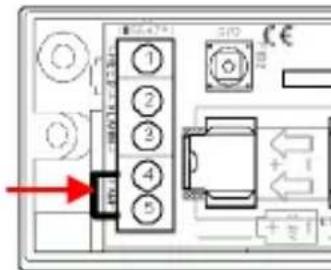
Connect the "TAMP" contact with a jumper on the terminal connector strip of contacts 4 and 5.
Open and close the "TAMP" connection until successful reception is confirmed.

Important!
10. Attaching the detector
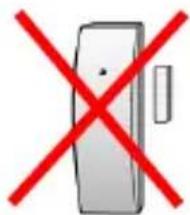
- Do not attach on or near metal surfaces!
- Do not attach within 1 metre of gas, water or power lines!
- Do not attach near electronic devices (e.g. computers, photocopiers or other detectors)!
11. Range
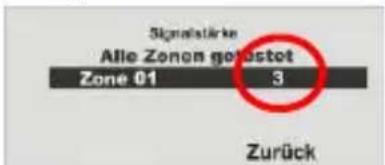
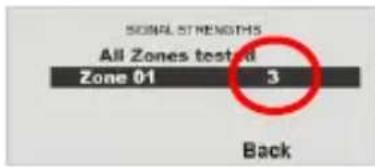
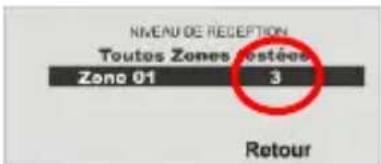
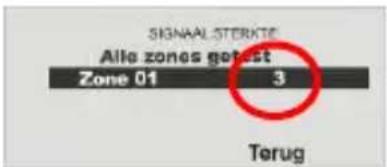
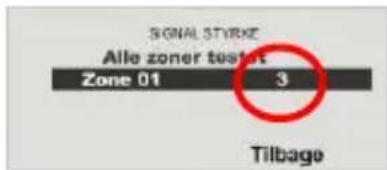
The range is dependent on the surrounding conditions. Therefore, use double-sided adhesive tape to fix the detector temporarily in different locations and test it by triggering an alarm. If this signal is not detected by the Secvest, move the detector to a new position. The signal strength should not fall below 3. Testing using the Secvest: Installer menu → Test → Detector signal
12. Installation location
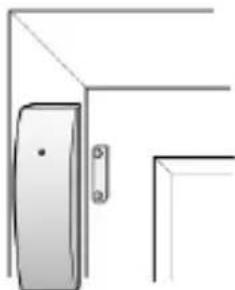
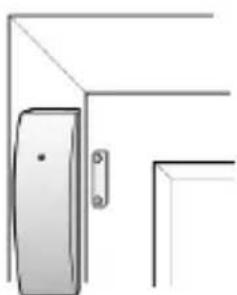
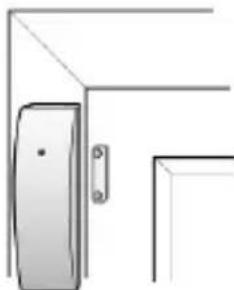
The best place to install the wireless opening detector is the upper corner of the window/door frame. Ensure that the detector is installed on a flat surface so the TS2 contact switches correctly (see "Training zone 1").
Displays: Secvest
GB
natural_image
Simple line drawing of a door with a handle and bracket (no text or symbols)13. Installation
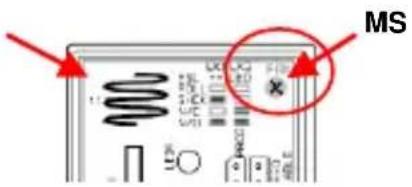
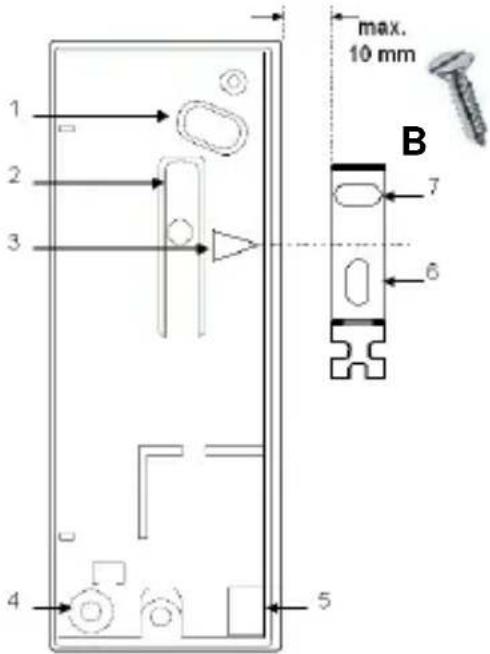
Remove the PCB from the housing. Loosen the "MS" screw and lift out the PCB.

Fasten the detector and magnet holder centrally to the "3" marking with a maximum spacing of 10 mm.
Use the base plate of the detector and the magnet holder to mark the fastening holes 1, 4, 6 and 7.
Use the rounded head screw "A" for the detector and the countersunk screw "B" for the magnet holder.
Ensure that the anti-removal wall contact "2" can be moved inwards.
Cable opening "5" for external detectors with a connection cable of max. 10 metres.
PCB
A
14. Configuration
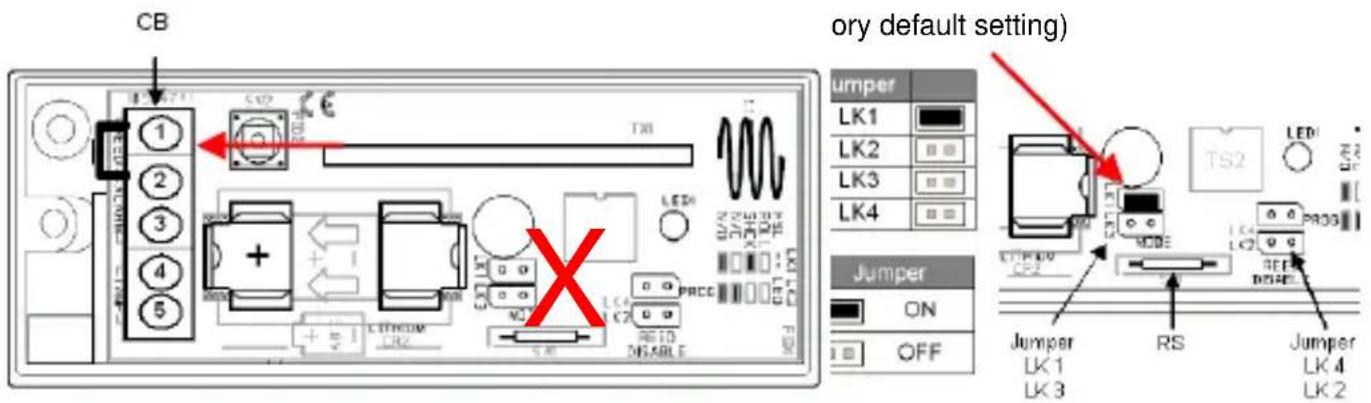
| Abbreviations | Description | Abbreviations | Description | |
| CB | Terminal connector strip | TS1 - 2 | Internal tamper contacts | |
| RS | Reed switch | eTS3 | External tamper contact | |
| NC | Normal closed contact | eS1 - 2 | External switch contacts | |
| NO | Normal open contact |

Only use zone 2 of the detector, as the internal tamper contacts TS1-2 are deactivated in this way.
Fig. 1
Préface
Chère cliente, cher client,
natural_image
Simple illustration of a door with a red arrow pointing to the left side (no text or symbols)
Attention!
Affichage : Secvest
natural_image
Simple line drawing of a door with a handle and mounting bracket (no text or symbols)13. Montage :
4. Signaal-LED
Weergave: Secvest
natural_image
Simple line drawing of a door and wall corner (no text or symbols)NL
13. Montage:
4. Segnale LED:
natural_image
Simple 3D diagram of a rectangular object with a red arrow pointing to its top surface (no text or symbols)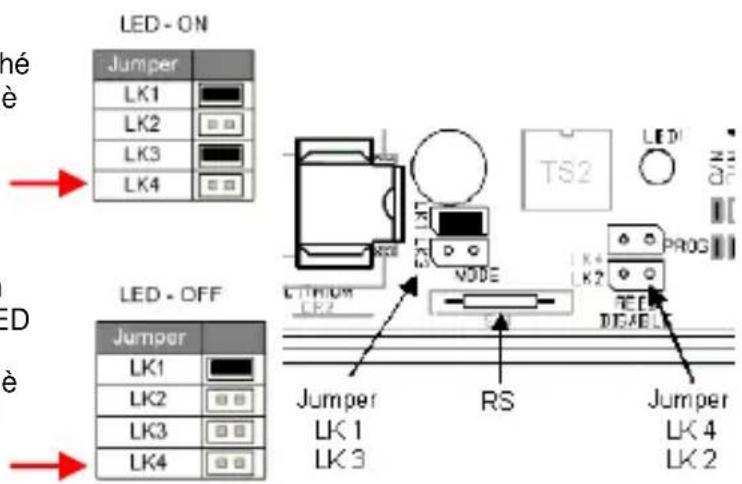

Attenzione!
natural_image
Simple line drawing of a door with a handle and bracket (no text or symbols)13. Montaggio:
Forord
Kære kunde.
Linker Kreuthweg 5, 86444 Affing, Germany

Vigtigt!
4. Signal-LED
| Driftstilstand | Signal |
| Driftsmodus | Intet signal |
| Send / programmeringsmenu IR | 4 x blink |
| Programmeringsmenu melder intern | Kontinuerligt blink |
Visning: Secvest 868
natural_image
Simple line drawing of a door with a handle and bracket (no text or symbols)13. Montage:
Fjern printkortet fra huset. Løsn skruen "MS", tag printkortet ud.

Fastgør melderen og magnetholderen i midten til at markere "3" med maks.10 mm afstand.
natural_image
White cylindrical device with a red dot on top, next to a smaller cylindrical component (no visible text or symbols)FUMK50010W/B

Funköffnungsmelder
Radio-controlled opening detector
Installation Guide
flowchart
graph TD
    RS["RS"] --> Zone1["Zone 1"]
    Zone1 --> TS1["TS1"]
    Zone1 --> TS2["TS2"]
    Zone2["Zone 2"] --> 868MHzFM["868MHz FM"]
    CB["CB"] --> Zone2
    Zone1 --> 868MHzFM
    Zone2 --> 868MHzFM
FUMK50010W/B
Using detectors as wireless modules
This wireless magnet contact can also be used as a wireless module.
- Close the jumper connection LK2 (Fig. 1, Pos. 2) to deactivate the internal magnet contact. Connect the external detectors to the clamps of the screw clamp block and train them (see "Connecting external contacts" and "Training external contacts").
Training external contacts
The external contacts of the wireless opening detector are trained for an extra zone of the system:
- Switch your wireless centre to learn mode. Observe the system instructions.
1.1. Connect both screw clamps on the screw clamp block with a 2K2 resistor.
1.2. Remove the resistor to trigger wireless transmission. OR:
1.3. Connect the external contact to a detector and open the tamper protection.
1.4. Check that the alarm centre has recognised the detector.
Connecting external contacts
External contacts can be connected via DEOL to this opening detector.
Two or more devices must be connected in series.
The cable length must not exceed 10 metres.
Connect the external devices to the screw clamps on the PCB.
Pay attention to the resistance values.
Activating/deactivating LEDs
Connect the jumper to contact LK3 to activate the LED.
Remove the jumper to deactivate it.
| LED | Flashing: Program mode4x flashing: TransmitOff: Normal | |
| LK2 | Internal contact | 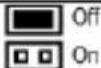 |
| LK3 | LED | 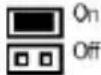 |
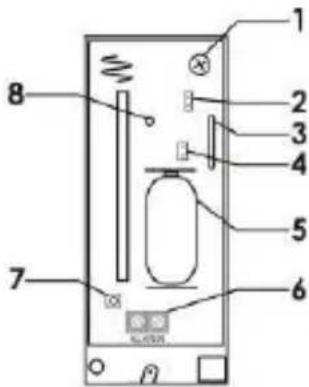
| No. | Name |
| 1 | Fixing screw |
| 2 | Jumper connection LK2 |
| 3 | Magnet switch |
| 4 | Jumper connection LK3 |
| 5 | Battery |
| 6 | Screw clamp block |
| 7 | Tamper protection, cover |
| 8 | LED |
flowchart
graph TD
    A["4k7"] --> B["2k2"]
    B --> C["Tamper"]
    D["Alarm"] --> A
    E["ALARM"] --> F["Square icon"]
    style A fill:#f9f,stroke:#333
    style B fill:#ccf,stroke:#333
    style C fill:#cfc,stroke:#333
    style D fill:#fcc,stroke:#333
    style E fill:#cff,stroke:#333
    style F fill:#ffc,stroke:#333
flowchart
graph TD
    A["RS"] --> B["Zone 1"]
    B --> C["868MHz FM"]
    D["CB"] --> E["Zone 2"]
    E --> C
    F["TS1"] --> B
    G["TS2"] --> B
    H["1"] --> E
    I["2"] --> E
FUMK50010W/B


- Signal LED
- Achtung!
- Montage:
- Battery warning!
- Scope of delivery
- Putting into operation
- Technical data
- Important!
- Signal LEDs
- Activating the LED
- Deactivating the LED
- Training the zones
- Training zone 1
- Training zone 2
- Attaching the detector
- Range
- Installation location
- Installation
- Configuration
- Préface
- Attention!
- Montage :
- Signaal-LED
- Segnale LED:
- Attenzione!
- Montaggio:
- Forord
- Vigtigt!
- Signal-LED
- Funköffnungsmelder
- Radio-controlled opening detector
- FUMK50010W/B
- Using detectors as wireless modules
- Training external contacts
- Connecting external contacts
- Activating/deactivating LEDs
Brand : ABUS
Model : FUMK50010W
Category : Alarm system