TVAC35500 - Security alarm ABUS - Free user manual and instructions
Find the device manual for free TVAC35500 ABUS in PDF.



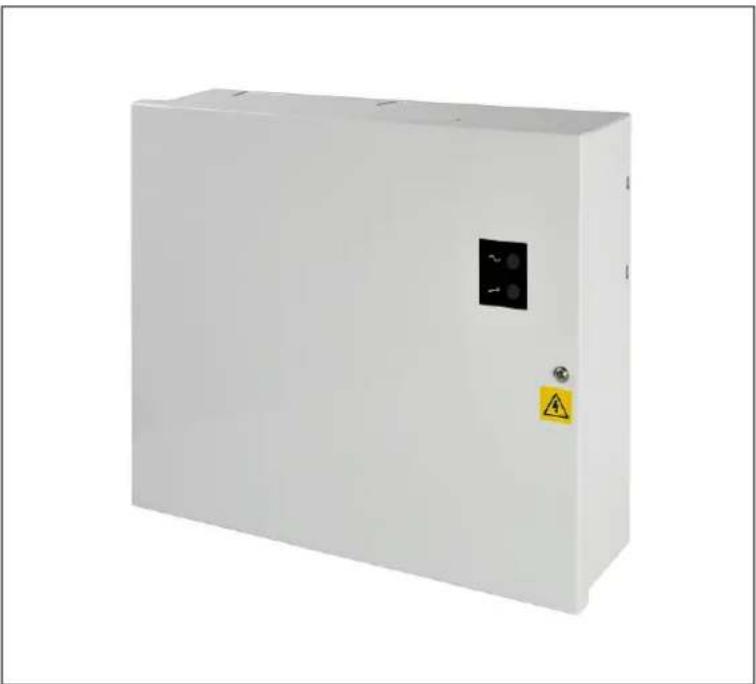
| Product Type | Safety power supply for CCTV systems |
| Brand | ABUS |
| Model | TVAC35500 |
| Input voltage | 100-240 V AC, 50 Hz |
| Output voltage | 13.4 to 14 V DC (mains), 10.0 to 12.3 V DC (battery) |
| Total output current | 2 A |
| Number of outputs | 8 individual outputs (+ and - terminals) |
| Backup battery type | 12 V / 7 Ah battery (not included, space provided) |
| Tamper protection | Cover contact (NC) |
| Overload and short-circuit protection | Yes, via replaceable fuses and PTC fuse |
| LED indicators | Green (mains OK), Red (malfunction) |
| Dimensions (W x H x D) | 338 x 281 x 86 mm |
| Weight (without battery) | 3.26 kg |
| Operating temperature | -10 °C to +40 °C |
| Ambient humidity | 75 % non-condensing |
| Main fuse | T2.0A HBC |
| Generator fuse | F2.0A |
| Fuses per output | 8 x F2.0A |
| Battery fuse | PTC auto-reset 1.0 A |
| Installation | Fixed indoor mounting, min. lateral distance 100 mm |
| Delivery contents | Power supply unit, installation instructions, mounting accessories |
| Maintenance | Check physical condition, do not open the housing |
| Cleaning | Soft dry cloth, lukewarm water if necessary, no solvents |
| Disposal | Do not dispose of with household waste, follow local regulations |
Frequently Asked Questions - TVAC35500 ABUS
User questions about TVAC35500 ABUS
0 question about this device. Answer the ones you know or ask your own.
Ask a new question about this device
Download the instructions for your Security alarm in PDF format for free! Find your manual TVAC35500 - ABUS and take your electronic device back in hand. On this page are published all the documents necessary for the use of your device. TVAC35500 by ABUS.
USER MANUAL TVAC35500 ABUS
TVAC35500 - TVAC35520

Bedienungsanleitung

User manual

Manuel utiliseur

These user manual contains important information for installation and operation.
This should be also noted when this product is passed on to a third party.
Therefore look after these operating instructions for future reference!
A list of contents with the corresponding page number can be found in the index on page 17.
Français
5. Anschlüsse / Status LED
TVAC35500 & TVAC35510
TVAC35520
Original English user manual. Keep for future use.
Introduction
Dear Customer,
Thank you for purchasing this product.
This product meets the requirements of the applicable European and national guidelines. The corresponding declarations and documents can be obtained from the manufacturer (www.abus-sc.com).
To maintain this condition and to ensure risk-free operation, you as the user must observe these operation instructions!
Before initial start-up, read through the complete operating instructions observing operating and safety instructions.
All company and product names mentioned in this document are registered trademarks. All rights reserved.
If you have any questions, please contact your installer or your local dealer!

Disclaimer
This user manual was prepared with greatest care. If you should notice omissions or inaccuracies, please inform us about these via the address given at the back of this manual. The ABUS Security-Center GmbH assumes no liability for technical and typographical faults and reserves the right to make at any time modifications to the product or user manual without a previous announcement. The company is not liable or responsible for direct and indirect subsequent damages which are caused in connection with the equipment, the performance and the use of this product. No guarantee for the content of this document is given.
Icon explanation
| A flash in the triangle is used if there is danger to health, e.g. by an electric shock. | |
| An exclamation mark in the triangle points to an important note in this user manual which must be respected. | |
| This symbol can be found when you are to be given tips and information on operation. |
Important safety advice
| The warranty will expire for damage due to non-compliance with these operating instructions. ABUS will not be liable for any consequential loss! | |
| ABUS will not accept liability for damage to property or personal injury caused by incorrect handling or non-compliance with the safety-instructions. In such cases the warranty will expire. |
The device has been manufactured in compliance with international safety standards. Please read the following safety advice notes carefully.
Safety advice
- Mains supply
100-240V AC, 50Hz
Operate this product only from the type of power supply indicated on the marking label. If you are not sure of the type of power supplied to your home, consult your local power company. Disconnect the product from the mains before you start any maintenance or installation procedures.
- Overloading
Do not overload a wall outlet, extension cord or adapter as this may result in electric fire or shock.
- Liquids
Protect the device from any kind of liquids entering.
- Cleaning
Use a light damp cloth (no solvents) to dust the product.
- Ventilation
The top of the product must be left uncovered to allow proper airflow around the unit. Do not stand the product on soft furnishings or carpets. Do not stack electronic equipment on top of the product.
- Accessories
Do not use any unsupported accessories as these may be hazardous or cause damage the product.
-
Location
-
Setup the device only in dry and dust-protected rooms.
- Do not place the device near a radiator or heat source.
- Setup the device only in areas with the advised operating temperatures of -10^ - +40^ .
Warnings
Follow all safety and operating advice before starting-up the device!
-
Follow these directions in order to avoid damage of the power cord or plug: Please note that power cords and plugs are not supplied with this unit.
-
Keep heating appliances as far as possible from the power cord in order to prevent the insulation from melting.
-
Follow these directions. Failure to follow any of them may cause electrical shock:
-
Do not insert metal or flammable objects inside the product.
-
In order to avoid any damage during lightning use a surge protection.
-
Do not use the product when it is out of order. If you continue to use the product when defective, serious damage could be caused to the product and any connected equipment. Make sure to contact your local product distributor if the product is out of order.

During the installation into an existing video surveillance system make sure that all devices are disconnected from the low and mains supply voltage circuit.

If in doubt engage a professional electrician to mount, install and wire-up your device. Improper electrical connection to the mains does not only represent at threat to you but also to other persons.
Wire-up the entire system making sure that the mains and low voltage circuit remain separated and cannot come into contact with each other in normal use or due to any malfunctioning.
Unpacking
While you are unpacking the device please handle it with utmost care.

If you notice any damage of the original packaging, please check at first the device. If the device shows damages, please contact your local dealer.
Table of contents
- Intended use 20
- Scope of delivery 20
- Features and functions 20
- Overview - type numbers 20
- Connections / status LED 21
- Installation 22
6.1 Fastening 22
6.2 Connecting to the mains power supply 22
6.3 Connecting the power outputs 23
6.4 Connecting the backup battery 23
- Maintenance and cleaning 23
7.1 Maintenance 23
7.2 Cleaning 24
- Disposal 24
- Technical data 24
1. Intended use
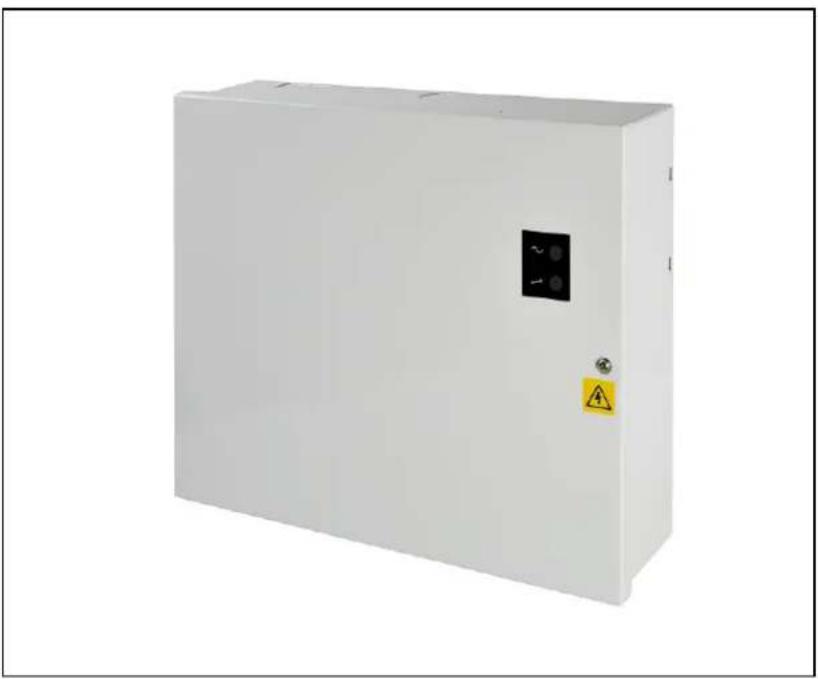
This 230 V AC power supply unit offers you a stabilised central power supply for video surveillance systems. In the event of a power failure, continued operation is guaranteed by automatic switchover to the integrated emergency battery.
A detailed description of all functions can be found in chapter 3 "Features and functions".
2. Scope of delivery
Power supply unit
Installation manual
- Installation accessories
3. Features and functions
- Suitable as a central power supply system for CCTV systems
- 8 individually fused outputs
- LED control indicator for mains power and fuse failure (dependent upon model)
Tamper-protected (cover switch) - Room for a 12 V/7 Ah standby battery (suitable battery: BT2070)
Secured against overloading and short-circuits
4. Overview - type numbers
| Article number TVAC35500 | TVAC35510 TVAC35520 | ||
| Main supply voltage 100 – 240 VAC, 50 Hz | |||
| Output voltage 13.8 VDC | |||
| Output current (max.) 2 A 3 A 5 A | |||
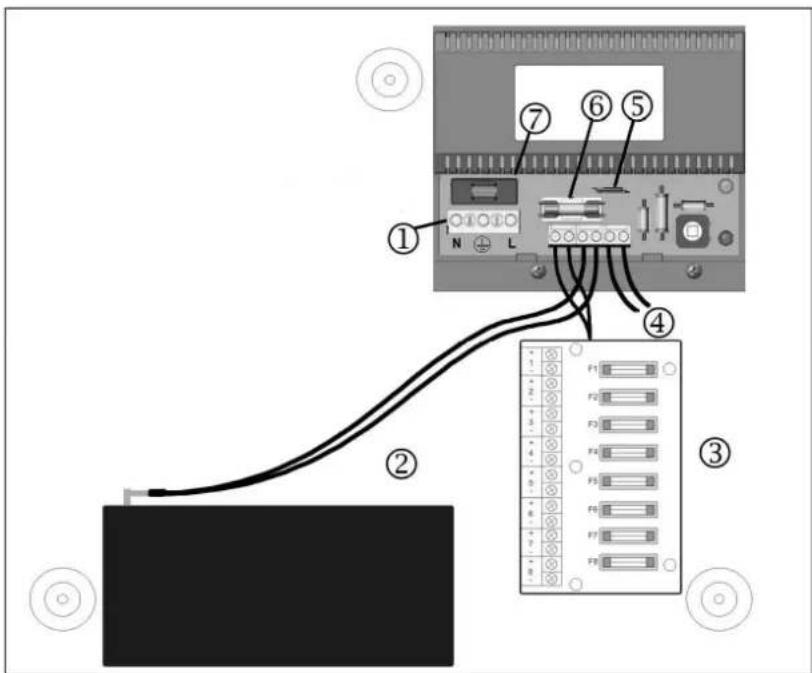
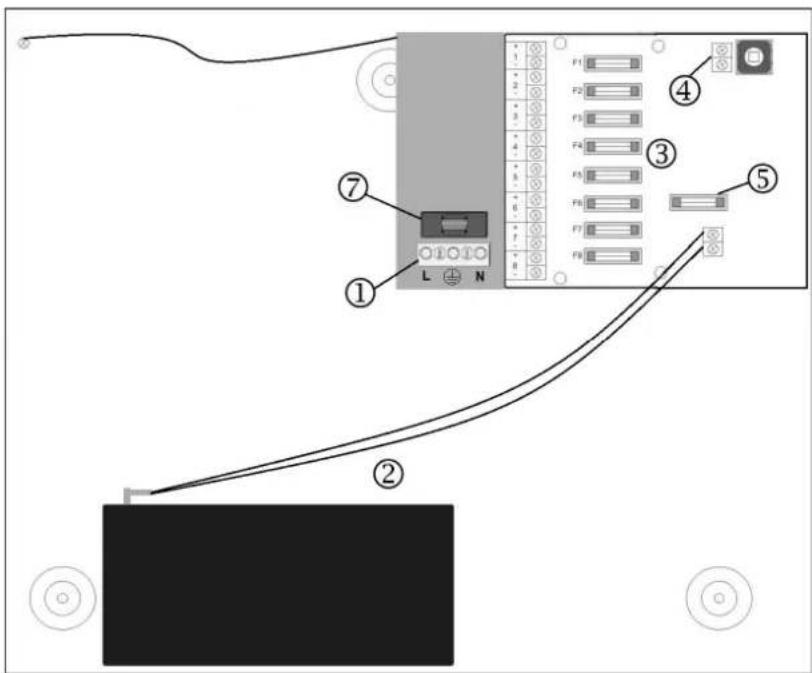
5. Connections / status LED
TVAC35500 & TVAC35510
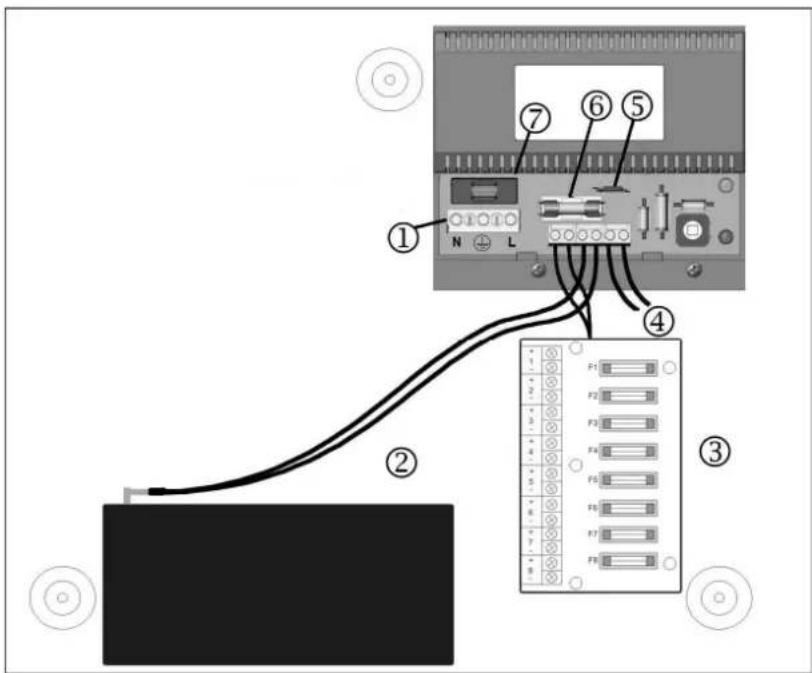
TVAC35520
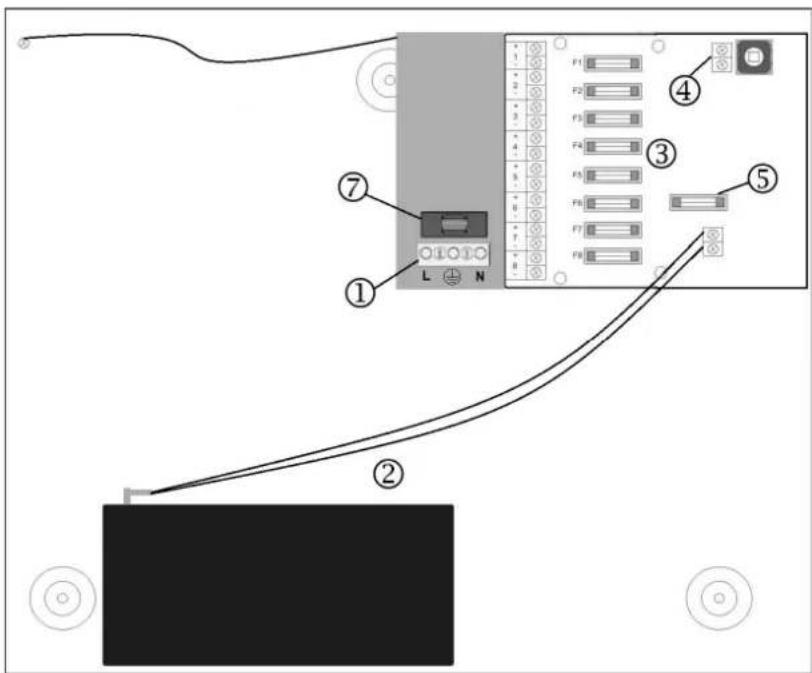
Connections:
| ① | Mains connection block | Brown cable Live | |
| Green/yellow cable Ground | |||
| Blue cable Neutral | |||
| ② | Battery connection | Red cable Positive | |
| Black cable Negative | |||
| ③ | Power connections 1 - 8 | Connection “+” Positive | |
| Connection “-” Negative | |||
| ④ | Tamper contact Contact closed | when cover closed (NC = normally closed) | |
| ⑤ | Battery fuse - self resetting PTC fuse | ||
| ⑥ | Power unit fuse | ||
| ⑦ | Mains fuse | ||
LED control indicator:
| GREEN Mains LED The power supply is working correctly | |
| RED Fault LED | Fault present: Fuse is defective (TVAC35500 and TVAC35510 only) |
6. Installation
6.1 Mounting

IMPORTANT:
Only connect the device to the mains power supply after it has been installed. The device must be earthed at the start of installation.
This device is designed for a fixed indoor installation. Fasten the device securely and with the correct alignment so that a minimal clearance is achieved. Allow at least 100mm between this device and other equipment.
Use the holes in the base for feeding the cable into the housing. Route input and output cables via different knockouts or cable entry holes.
6.2 Connecting to the mains power supply
Connect to an external mains isolation device rated at 3A minimum, for example a fused spur, using a cable suitable for connecting to the mains power supply (0.5 mm², 300/500 V ac).
Use suitable cable connections during the installation. Ensure that cable ties are used for all cables.
Test the device by connecting it briefly to the mains power supply. A green LED indicates that the cable is connected correctly.

IMPORTANT:
Disconnect the device from the mains power supply after the test is successful.
6.3 Connecting the power outputs
Pay attention to the required cable cross section to suit the current required by the connected equipment. Connect the cable to the power outputs, making sure that the polarity is correct. Use suitable cable ties for fastening the cables.
Now carry out another test to determine whether the device works correctly. If the fault LED lights up, then this may be due to no battery being connected. Ensure that the connected device is supplied correctly with power. Finally, disconnect the power supply unit from the mains.
6.4 Connecting the backup battery
Use the battery cables supplied for connecting the power supply unit to a battery.
Connect these cables to the connection block and battery.

Please note:
Ensure that the battery connections have the correct polarity:
Use the red cable for the positive terminal (+) and the black cable for the negative terminal (-) .
Connect the power supply unit to the mains power. Ensure that the green LED lights up. Make sure that the red LED does not indicate any faults.
Now disconnect the power supply unit from the power supply. The green LED should no longer light up.
Check whether the battery provides sufficient voltage and current to the connected devices.

Please note:
Ensure that the battery is charged sufficiently.
If the battery is not charged sufficiently, then charge it before carrying out a new test run.

Please note:
Leave the battery connected to the power supply for a minimum of 30 minutes to start the charging process.
7. Maintenance and cleaning
7.1 Maintenance
Regularly check the product's physical state, e.g. check for damage of the housing.
If you suspect that safe operation cannot be guaranteed anymore, disconnect the product and ensure that it cannot be used by mistake. Remove the batteries.
You can assume that safe operation is not possible anymore when
- the device shows visible damage,
- the device does not function anymore
| ! | Please note: The product is absolutely maintenance-free for you. There are no components on the inside of the product to be checked or serviced by you, never open it. |
| IMPORTANT: Do not attempt to remove the safety protective cover of the power unit. |
7.2 Cleaning
Use a light damp cloth (no solvents) to dust the product. If the device is very dirty, you can moisten the cloth with lukewarm water.
! Ensure that no liquids can get into the device. Do not use any chemical cleaners, since they could damage the housing surface.
8. Disposal
Devices with this marking should not be put in the household garbage. Dispose of the product at the end of its lifetime according to the applicable regulations.
9. Technical data
| Model number TVAC35500 TVAC C35510 TVAC35520 | |||
| Mains supply voltage | 100 – 240 V AC / 50 Hz | ||
| Output voltage | 13.4 – 14.2 V DC in mains operation 10.0 – 12.3 V DC in battery operation | ||
| Total output current | 2.0 A | 3.0 A | 5.0 A |
| Battery charging current | 0.5 A | ||
| Output ripple Max. 150 mV | pk - pk | ||
| Mains fuse (20 mm HBC) | T2.0 A | T2.0 A | T3.15 A |
| Power unit fuse (20 mm glass) | F2.0 A | F3.15 A | F5.0 A |
| Power fuse – power connection board (20 mm glass) | 8 x F2.0 A 8 x F | 3.15 A 8 x F5.0 A | |
| Battery fuse self resettin | g PTC fuse F1.0 | A | |
| Battery charging time 24 hours | |||
| Battery type (12 V) VRLA 1 x 7 Ah | |||
| Environment -10 °C to +40 °C, 75% non-condensin g | |||
| Dimensions (WxHxD) 338 x 281 x 86 mm | |||
| Weight (without battery) | 3.26 kg | 3.4 kg | |
TVAC35500 - TVAC35520
Manuel utiliseur
Version 12/2024
CE
Chere cliente, cher client,
These operating instructions are published by ABUS Security Center GmbH & Co.KG, Linker Kreuthweg 5, 86444 Affing, Germany. No reproduction (including translation) is permitted in whole or part e.g. photocopy, microfilming or storage in electronic data processing equipment, without the express written consent of the publisher.
The operating instructions reflect the current technical specifications at the time of print. We reserve the right to change the technical or physical specifications.
Copyright 12/2024 by ABUS Security-Center


- TVAC35500 - TVAC35520
- Anschlüsse / Status LED
- Introduction
- Disclaimer
- Icon explanation
- Important safety advice
- Safety advice
- Warnings
- Unpacking
- Table of contents
- Intended use
- Scope of delivery
- Features and functions
- Overview - type numbers
- Connections / status LED
- Connections:
- LED control indicator:
- Installation
- Mounting
- Connecting to the mains power supply
- IMPORTANT:
- Connecting the power outputs
- Connecting the backup battery
- Please note:
- Maintenance and cleaning
- Maintenance
- Cleaning
- Disposal
- Technical data
- Manuel utiliseur
Brand : ABUS
Model : TVAC35500
Category : Security alarm