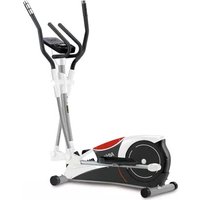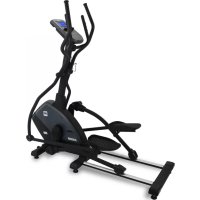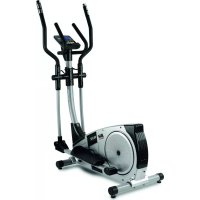
BG2351I - Elliptical bike BH FITNESS - Free user manual and instructions
Find the device manual for free BG2351I BH FITNESS in PDF.



| Product Type | Elliptical Bike |
| Brand | BH Fitness |
| Model | BG2351I |
| Maximum User Weight | 105 kg |
| Dimensions (L x W x H) | 170 x 70 x 170 cm (estimate) |
| Device Weight | Approximately 60 kg |
| Power Supply | 220 V via power adapter for model G2351 |
| Resistance Type | Electromagnetic (model G2351) or manual (model G2350) |
| Resistance Adjustment | Tension knob (G2350) or via console (G2351) |
| Display | Electronic monitor with time, distance, calories, speed, heart rate |
| Heart Rate Sensor | Hand-Grip handles (model G2351) |
| Standards | EN957, domestic use |
| Warranty | 2 years (according to general conditions) |
| Maintenance | Check and tighten screws after one week of use |
| Cleaning | Damp cloth, no abrasive products |
| Safety | Minimum clearance 0.50 m around, do not exceed 105 kg |
| Spare Parts | Available via after-sales service, specify code and quantity |
Frequently Asked Questions - BG2351I BH FITNESS
User questions about BG2351I BH FITNESS
0 question about this device. Answer the ones you know or ask your own.
Ask a new question about this device
Download the instructions for your Elliptical bike in PDF format for free! Find your manual BG2351I - BH FITNESS and take your electronic device back in hand. On this page are published all the documents necessary for the use of your device. BG2351I by BH FITNESS.
USER MANUAL BG2351I BH FITNESS
natural_image
Line drawing of an outdoor fitness bike with visible legs, arms, and control panel (no text or symbols)Instrucciones de montaje y utilización Instructions for assembly and use Instructions de montage et utilisation Montage und gebrauchsanleitung Instruções de montagem e utilização Istruzioni di montaggio e uso Montage-en gebruiksinstrukties
Fig.1
text_image
Technical diagram showing exploded and assembled parts of a device with labeled components and part numbersFig.2
text_image
NO 10*4 NO 13*4 NO 67*4 NO 44*2 NO 43*2 NO 46*2 NO 9*4 NO 10*4 NO 13*4 NO 48*4 NO 89*4 NO 90*4 NO 91*4 NO 10*2 NO 14*2 NO 14*2 NO 13*2 NO 52*2 NO 114*2 NO 115*1Fig.3
text_image
101 105 67 13 10Fig.4
text_image
101 66 10 67 13Fig.5
text_image
21 22Fig.6A
text_image
19 21 22 54 101 102 9 13 10 102 19Fig.6B
text_image
Technical diagram of a mechanical device with numbered parts and exploded views, likely for assembly or maintenance instructions.Fig.7
text_image
14 12 15L 17 108 21 15R 13Fig.8
text_image
85 51 45 73 52 45 13 14Fig.9
text_image
45 46 15L 44 43 15R 45Fig.10
text_image
15L 2 15R 42L 42R 41 45Fig.11
text_image
7L 5 2 15L 7R 9 13 10 15RFig.12
text_image
47L 48 45 48 47R 45 91 89 90Fig.13
text_image
1 8L 1 128 1 126 20 G2350 15L 19 20 16 15R 8RFig.14
text_image
110 18F 21 112 10 14 18B 16 110 G2350 128Fig.15
natural_image
Line drawing of an outdoor fitness equipment with two legs and a circular base, labeled with number 69 (no text or symbols on the device itself)Fig.16
natural_image
Line drawing of a person pushing a lawn mower with a device labeled '104' (no text or symbols on the diagram itself)Fig.17
text_image
101 116 220 V k mEspañol
line
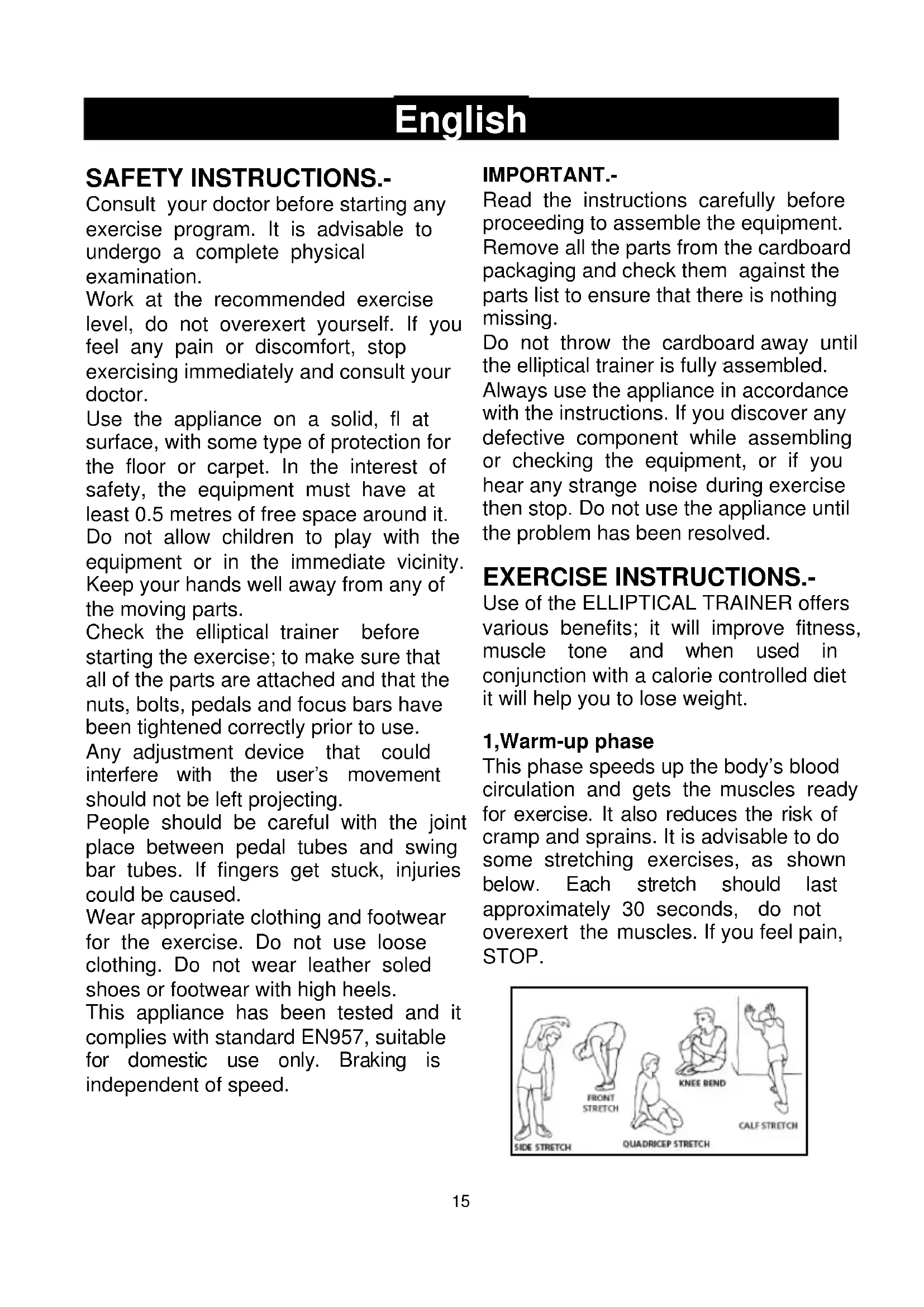
| AGE | HEART RATE | | --- | ---------- | | 20 | 160 | | 40 | 140 | | 60 | 120 | | 75 | 100 |Consult your doctor before starting any exercise program. It is advisable to undergo a complete physical examination.
Work at the recommended exercise level, do not overexert yourself. If you feel any pain or discomfort, stop exercising immediately and consult your doctor.
Use the appliance on a solid, fl at surface, with some type of protection for the floor or carpet. In the interest of safety, the equipment must have at least 0.5 metres of free space around it. Do not allow children to play with the equipment or in the immediate vicinity. Keep your hands well away from any of the moving parts.
Check the elliptical trainer before starting the exercise; to make sure that all of the parts are attached and that the nuts, bolts, pedals and focus bars have been tightened correctly prior to use.
Any adjustment device that could interfere with the user's movement should not be left projecting.
People should be careful with the joint place between pedal tubes and swing bar tubes. If fingers get stuck, injuries could be caused.
Wear appropriate clothing and footwear for the exercise. Do not use loose clothing. Do not wear leather soled shoes or footwear with high heels.
This appliance has been tested and it complies with standard EN957, suitable for domestic use only. Braking is independent of speed.
IMPORTANT.-
Read the instructions carefully before proceeding to assemble the equipment. Remove all the parts from the cardboard packaging and check them against the parts list to ensure that there is nothing missing.
Do not throw the cardboard away until the elliptical trainer is fully assembled.
Always use the appliance in accordance with the instructions. If you discover any defective component while assembling or checking the equipment, or if you hear any strange noise during exercise then stop. Do not use the appliance until the problem has been resolved.
EXERCISE INSTRUCTIONS.-
Use of the ELLIPTICAL TRAINER offers various benefits; it will improve fitness, muscle tone and when used in conjunction with a calorie controlled diet it will help you to lose weight.
1, Warm-up phase
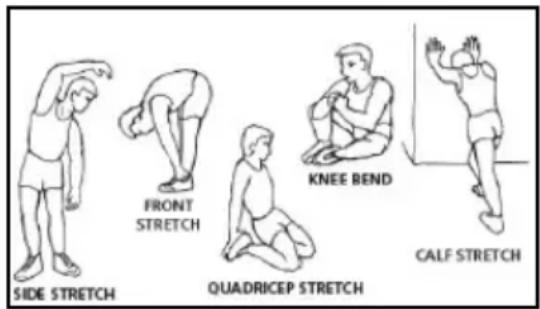
This phase speeds up the body's blood circulation and gets the muscles ready for exercise. It also reduces the risk of cramp and sprains. It is advisable to do some stretching exercises, as shown below. Each stretch should last approximately 30 seconds, do not overexert the muscles. If you feel pain, STOP.
text_image
SIDE STRETCH FRONT STRETCH QUADRICEP STRETCH KNEE BEND CALF STRETCH2. Exercise phase
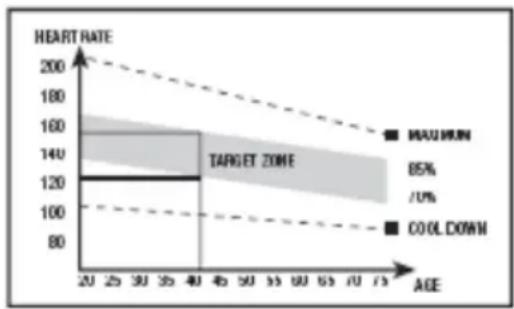
This phase requires the greatest physical exertion. After regular exercise the leg muscles will become more flexible. It is important to keep the rhythm constant. The rhythm of the exercise should be fast enough to bring the heart rate into the target area, as shown on the following graph:
line
| AGE | HEART RATE | | --- | --- | | 20 | 160 | | 30 | 140 | | 40 | 120 | | 50 | 100 | | 60 | 90 | | 70 | 85 |This phase should last at least 12 minutes, although it is advisable for most people to start off with sessions of 10-15 minutes.
3. Cool-down phase
This phase allows the cardiovascular and muscle system to relax. It consists of repeating the warm-up exercises, i.e. reducing the rhythm and continuing for approximately 5 minutes. Repeat the stretching exercises but remember not to overexert the muscles.
Eventually your training sessions will have to become longer and more intensive. It is advisable to exercise at least three days per week, on alternate days.
Muscle toning
You should select a high exertion level in order to tone muscles during exercise. This entails greater stress on the leg muscles, so it may be wise to reduce exercise times. If you also wish to improve your overall fi tness then you should change your training program. Do the warm-up and cooldown exercises as normal but when you are reaching the end of the exercise phase, increase the exertion level in order to make your legs work harder. You should reduce speed in order to keep your heart rate within the target area.
Weight loss
In this case the important factor is the effort made. The more intense and the longer the session, the greater the number of calories burned. Even though you are doing the same work as you do to improve fitness, the objective has changed.
GENERAL INSTRUCTIONS.-
Carefully read through the instructions contained in this manual. It provides you with important information about assembly, safety and use of the machine.
1 This unit has been designed for home use. The user weight does not have to exceed 105kg
2 Keep your hands well away from any of the moving parts.
3 Parents and/or those responsible for children should always take their curious nature into account and how this can often lead to hazardous situations and be haviour resulting in accidents. This unit does not have to be used in any case like toy.
4 The owner is responsible for ensuring that anyone who uses the machine is duly informed about the necessary precautions.
5 Your unit can only be used by one person at a time.
6 Use suitable clothing and footwear. Tie up your shoelace correctly.
1. ASSEMBLY INSTRUCTIONS.-
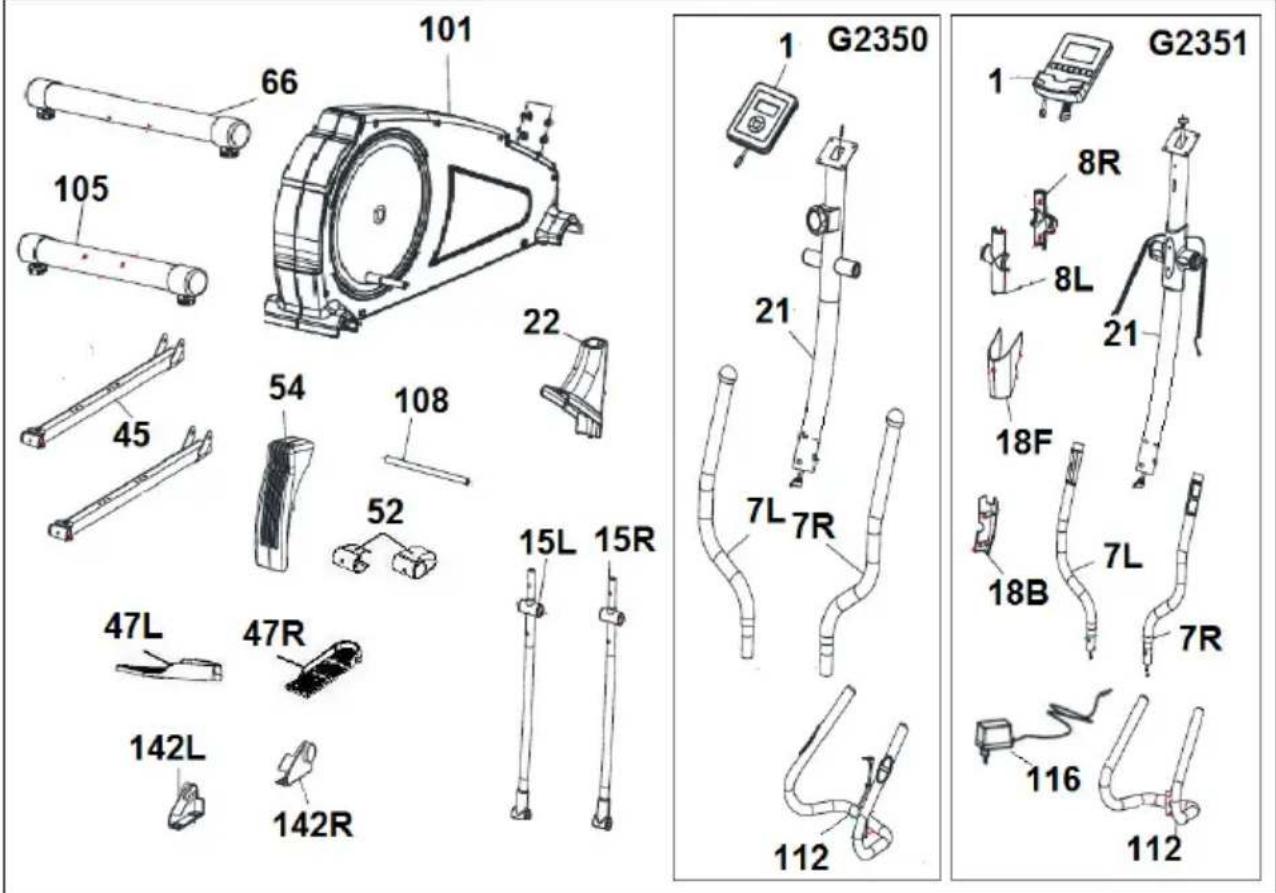
Take the unit out of its box and make sure that all of the pieces are there: The assistance of a second person is recommended when assembling this unit Fig.1.
(1) Monitor.
(7L) Top focus bar, left.
(7R) Top focus bar, right.
(15L) Bottom focus bar, left.
(15R) Bottom focus bar, right.
(21) Main post.
(22) Bottom post cover.
(45) Pedal left foot.
(45) Pedal right foot.
(47L) Left footrest.
(47R) Right footrest.
(51) Bottom cover, left foot.
(51) Bottom cover, right foot.
(54) Bottom cover.
(66) Rear stabiliser bar with adjustable feet.
(101) Main body.
(105) Front stabiliser bar with wheels.
(112) Handlebar tube.
(142L) Bottom trim covers, left and right. (L) for the knuckle joints on the focus bars.
(142R) Bottom trim covers, left and right (R) for the knuckle joints on the focus bars.
G2351 :
(8L) Focus bar spindle covers (L).
(8R) Focus bar spindle covers (R).
(18F) Monitor front cover
(18B) Monitor back cover
(116) Adapter
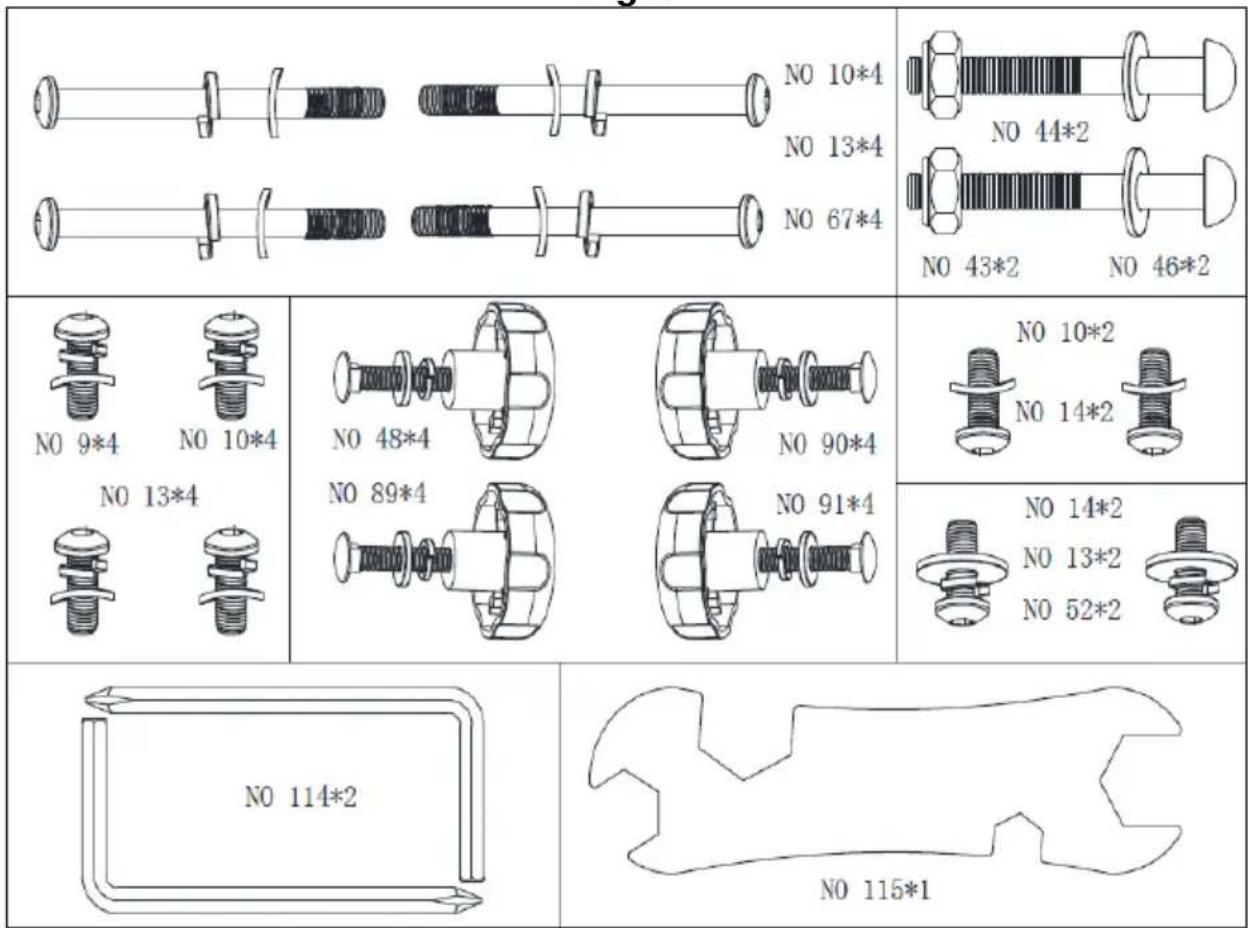
Fig.2 - . NUTS & BOLTS
(9) Screws M8x20 .
(10) Flat Washer 8.
(13) Spring washer 8.
(14) M8x20 screws.
(43) M10 Nut
(44) Washer 10
(46) Screw M10x78
(48) Screw M6x55
(52) Washer
(67) Screw
(89) Spring washer 6
(90) Knob
(91) Washer 6
Allen wrenches 5mm
Mixed Key.
2. FITTING THE STABILISER BARS.-
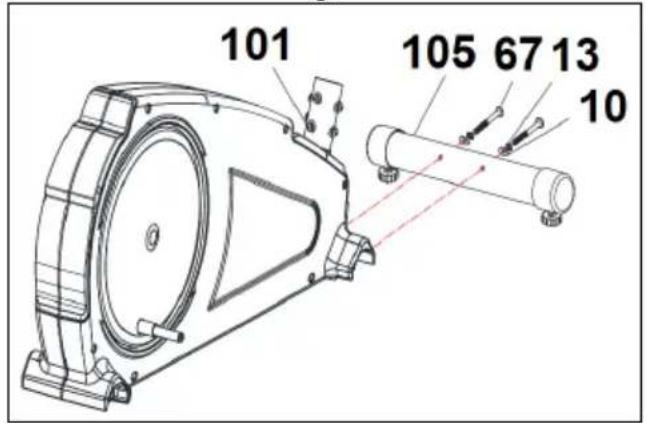
Bring the front stabiliser bar with wheels (105) to the main body (101) positioning the wheels at the front of the unit, Fig.3, insert screws (67), fit the washers (13) and the corrugated washers (10). Use the 5mm Allen key to tighten securely.
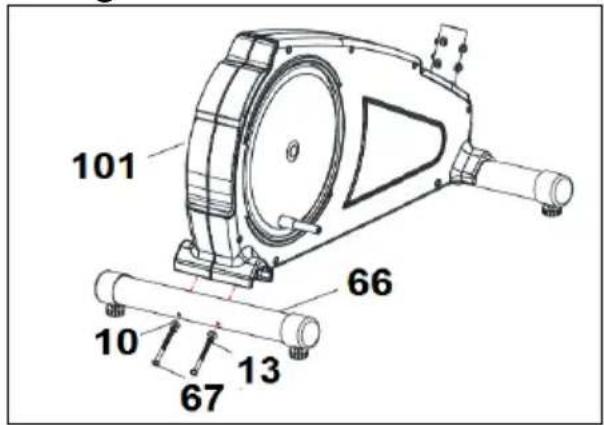
Take the rear stabiliser bar with adjustable feet (66), Fig.4, insert the bolts (67); fit the washers (13), the corrugated washers (10) and tighten securely.
3. FITTING THE BOTTOM POST COVER.-
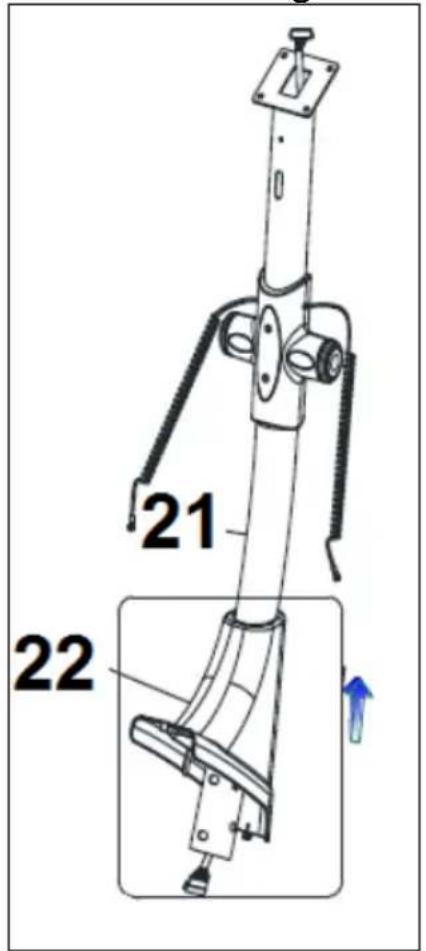
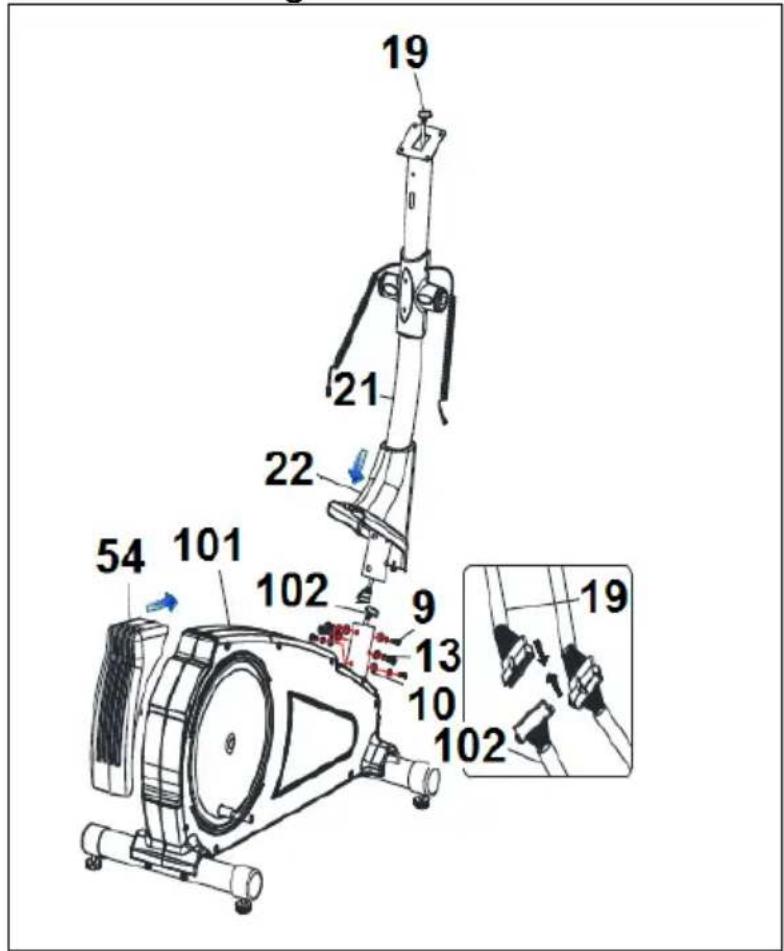
Take the main post (21) and insert the bottom post cover (22) in the direction of the arrow, Fig.5.
4. FITTING THE MAIN POST.-
Once the bottom post cover is fitted, remove the screws (9) and washers (13) and (10) from the bottom of the main post (21).
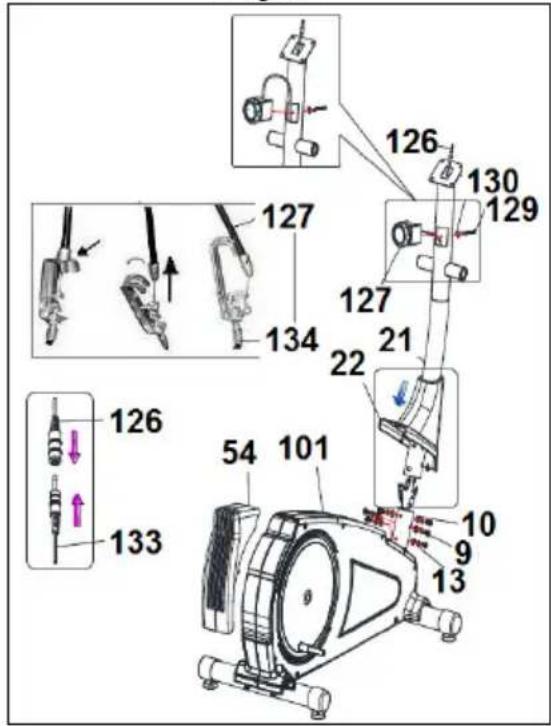
Bring the main post (21) up to boss on the main body (101), Fig.6.
G2350. Unfasten the screw (129) at the back of the tension controller (127), fit the tension controller (127) onto the main post (21).
Retighten the screw (129) as shown in diagram Fig. 6B, using the screwdriver ended spanner. Check that the tension controller operates correctly by turning it left and right.
Take the tip of the tension cable (127), sticking out of the bottom of the main post (21) and connect it to the tension support (134), as shown in Fig.6B.
Plug connector (126), coming out of the main post (21), into connector (133), coming out of the boss on the main body (101), Fig.6B.
G2351. Plug connector (19), coming out of the main post (21), into connector (102), coming out of the boss on the main body (101), Fig.6A.
Slip the main post (21) over the boss (101) on the main body in the direction of the arrow, Fig.6, making sure not to snag any of the cables.
Fit the screws (9), along with the washers (13) and (10), removed previously, Fig.6, and tighten securely. Lower the bottom trim section (22) for the main post (21) down over the boss section of the main body (101), Fig.6. Fit the bottom cover (54).
G2350 ATTENTION: When the machine has been assembled, make sure that the tension control (127) works correctly.
5. FITTING THE FOCUS BARS.-
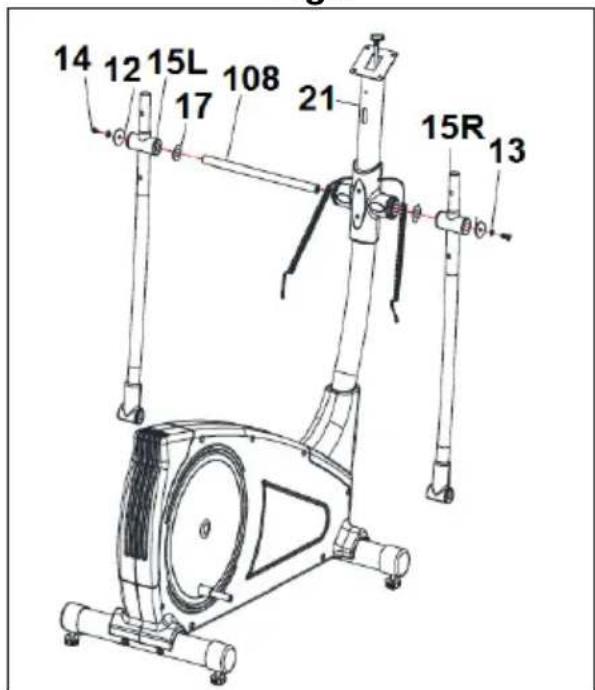
Insert the focus bar spindle (108) through the spacer bushes on the main post (21), Fig.7, leaving it centred.
Fit the spacer washers (17) as shown in Fig.7. Insert the left focus bar (15L) (marked with the letter "L") onto the focus bar spindle (108), Fig.7, then fit the right focus bar (15R) (marked with the letter "R") on the other end of the spindle. Fit the bolts (14) and the flat washers (12-13) and with the help of the box spanners tighten securely.
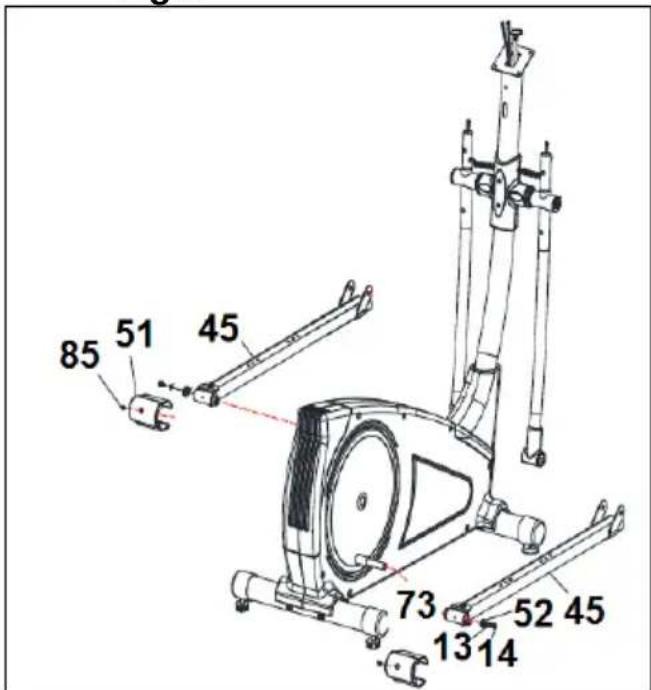
Take the right pedal (45), Fig.8, (marked with the setter "R") and slide it onto the crank shaft (73) on the right-hand side of the machine.
Now take washer (13) (52) and bolt (14) and tighten securely.
Take the left pedal (45), Fig.8, (marked with the setter “L”) and slide it onto the shaft (73) on the left-hand side of the machine.
Now take washer (13) (52) and bolt (14) and tighten securely.
Attach the bottom covers (51), Fig.8, and fit screws (85).
7. FITTING THE FOOT BARS.-
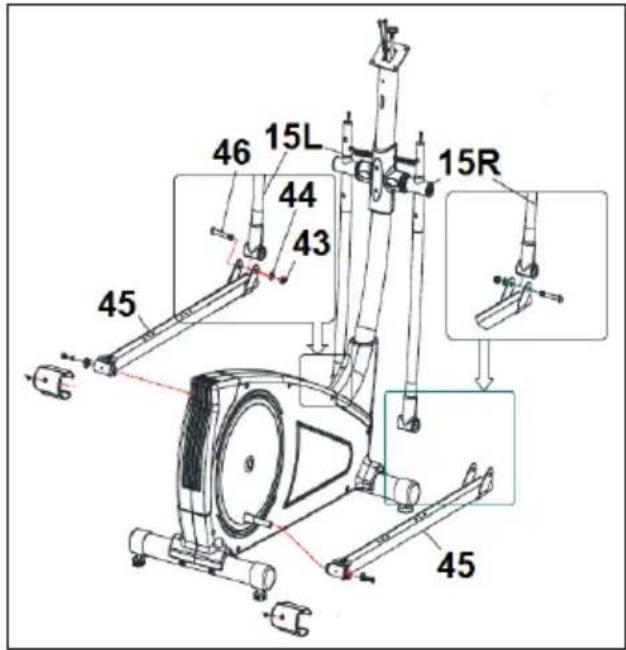
Take the right foot bar (45) and position it on the "U" at the bottom of the right focus bar (15R), Fig.9.
Insert screw (46), as shown in Fig.9A, then fit the flat washer (44) and the self locking nut (43), and tighten securely.
Take the left foot bar (15L) and go through the same assembly procedure as with the right.
8. FITTING THE FOCUS BAR SIDE COVERS TO THE FOOT BARS.-
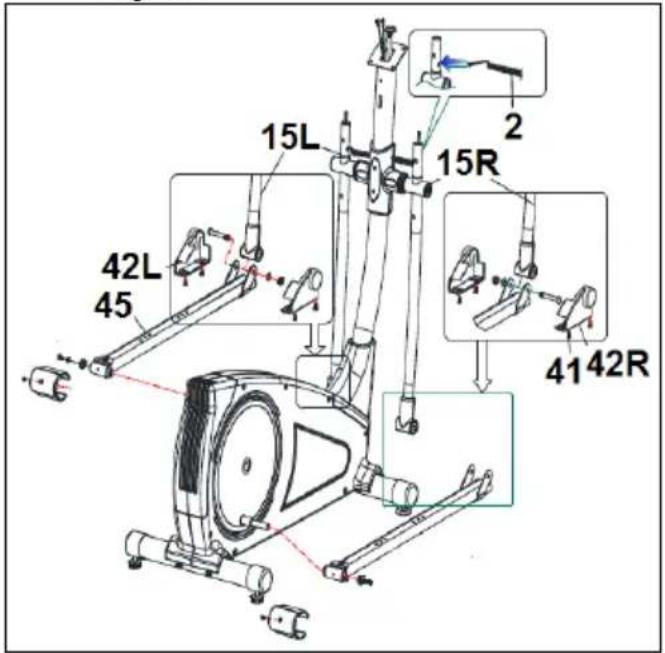
Next fit the footrest covers (42R) and (42L) with the bottom of the joints on the right side, Fig.10. Use screws (41) to screw them together. Then do the same with the other covers on the left-hand side.
9. FITTING THE UPPER FOCUS BARS.-
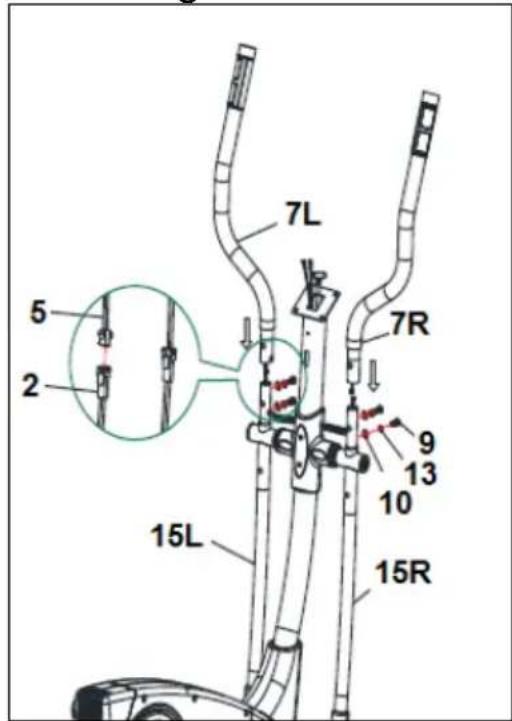
G2351. Take hold of the Hand-grip connectors (2), sticking out of the top bars (7L) and (7R).
Take the top left bar (7L) (marked with the letter "L").
Insert the top bar onto the bottom left focus bar (15L), lining up the letters (L), Fig.11, fit the screws (9), the washers (10) (13) and tighten securely. Now go through the same procedure for the top right focus bar (7R).
10. FITTING THE FOOTRESTS.-
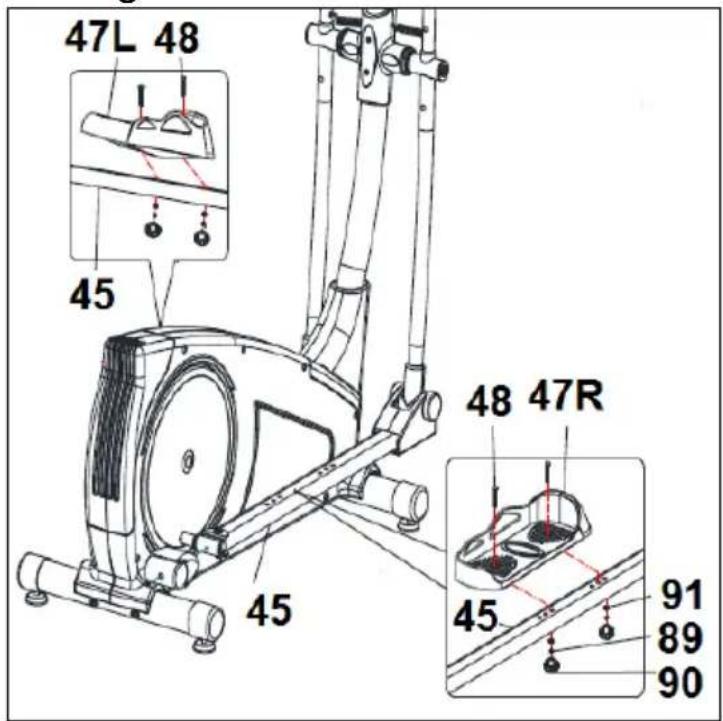
Next, remove the screws (48), the flat washers (89) (91) and the knobs (90) and position the right footrest (47R) (marked with the letter "R") on top of the unit's right foot (45), Fig.12, (left and right refers to the user's position doing exercise) refit the knobs (90), the washers (89) (91) and the screws (48) removed previously and tighten securely.
Next, position the left footrest (47L) (marked with the letter "L") on top of the left foot (45), refit the knobs (90), the washers (89) (91) and the screws (48) removed previously and tighten securely.
11. FITTING MONITOR.-ATTACHING THE FEEDBACK CABLE
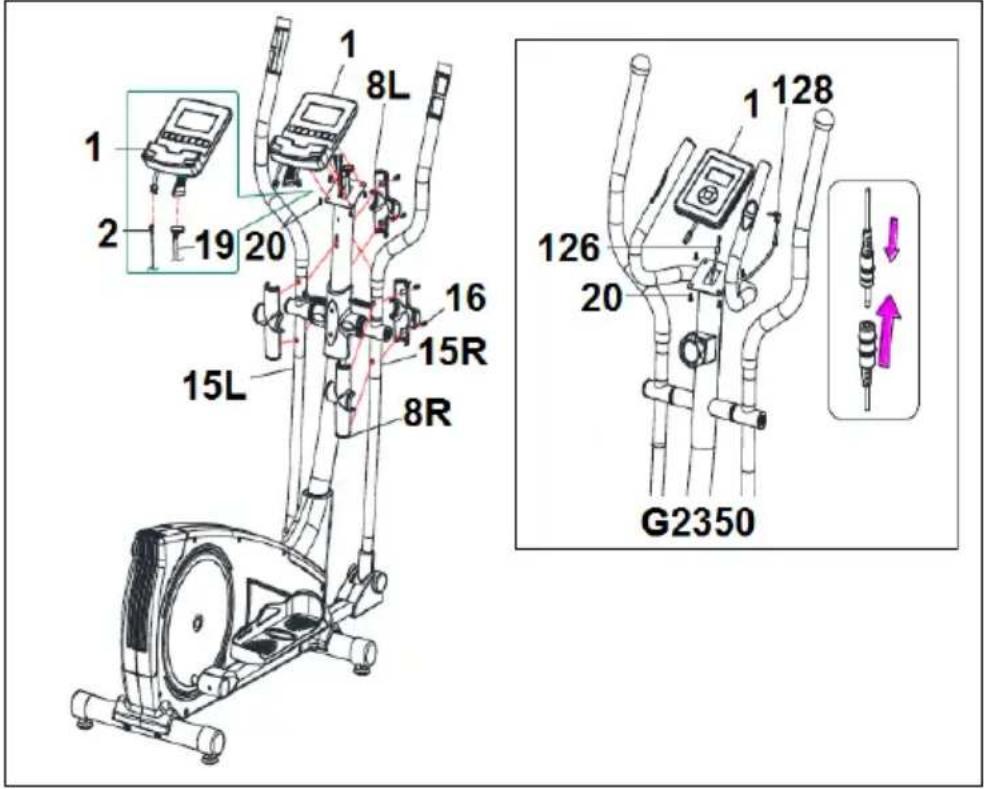
G2350. Take hold of the cable (126), which is sticking up out of the main post (21), and plug it into the connector of the electronic unit (1), as shown in Fig.13.
G2351. Take hold of the cable (19), which is sticking up out of the main post (21), and plug it into the
connector of the electronic unit (1), as shown in Fig.13.
FITTING THE HAND-GRIP CABLE.
G2351. Take hold of the Hand-grip connectors (2), sticking out of the main post (21), and plug them into the connectors located at the back of the monitor (1), as shown in Fig.13.
ATTACHING THE MONITOR.-
Release screws (20), Fig.13, at the back of the monitor.
Next, slide the front of the monitor onto the plate on top of the main post (21) in the direction of the arrow, Fig.14, push the cables down into the main post making sure not the pinch any of the cables. Replace the screws (20) removed previously.
ATTENTION:
It is important to retighten all of the screws involved in assembling the machine after approximately a week of use as this will prevent any strange noises and possible damage.
12. FITTING THE HANDLEBAR.-
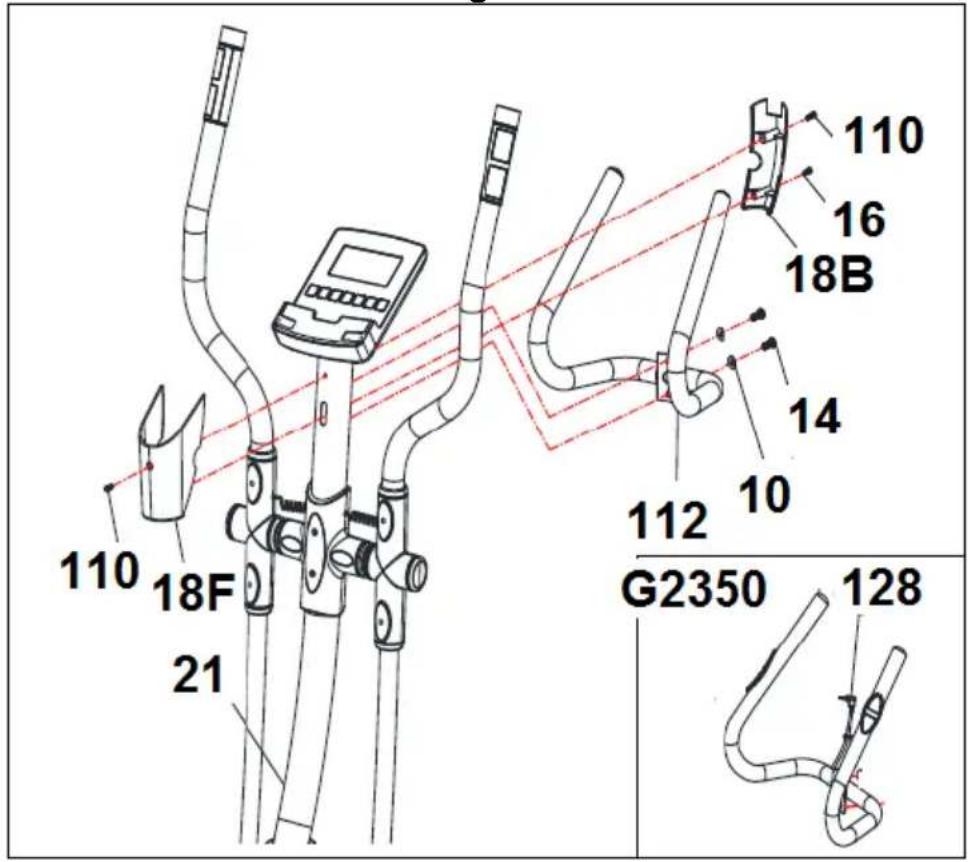
Take the handlebar (112), remove screws (14), position the ends of the handlebar on the plate at the top of the main post (21), Fig.14. Refit the screws (14) removed previously.
FITTING THE HAND-GRIP CABLE.
G2350. Take hold of the Hand-grip connectors (128), sticking out of the main post (21), and plug them into the connectors located at the back of the monitor (1), as shown in Fig.13.
G2351. Take the covers (18B) (18F) (8R) (8L) and position them on the main post (80), Fig.14.
Now use the screws (110) (16) to attach them to the post.
G2350
EXERTION SETTINGS.-
To provide an even level of exertion during exercise, this appliance is equipped with a tensioning control (127), located on the main post (21), offering various exertion settings. To increase pedal resistance turn the tensioning control (127) clockwise (+) until the exertion level best suits your exercise requirements. To reduce pedal resistance turn the tensioning control (127) anticlockwise (-).
G2351
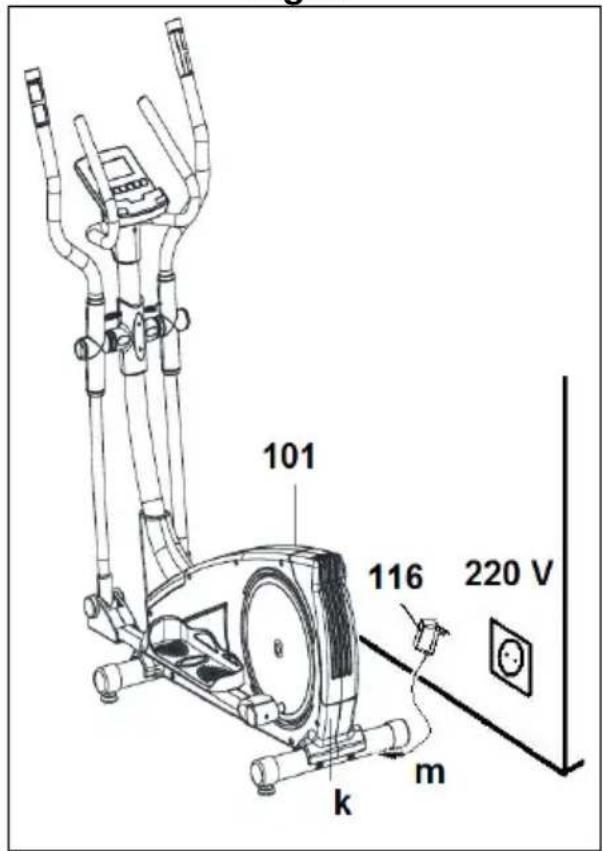
MAINS CONNECTION.-
Insert the jack (m) on the transformer (116) into the connection hole (k) on the main body (101) (bottom, rear of the machine) and then plug the transformer into a 220 V mains supply, Fig.17.
LEVELLING.-
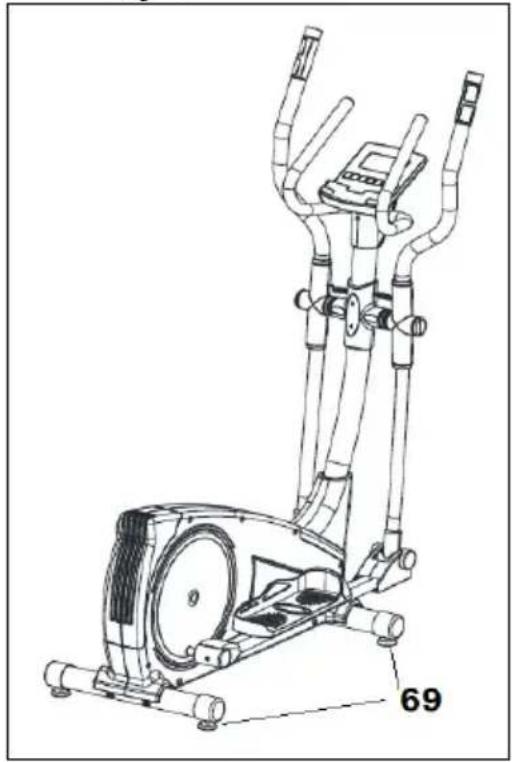
Once the unit has been placed into its final position, make sure that it sits flat on the floor and that it is level. This can be achieved by screwing the adjustable feet (69) up or down, as shown in Fig.15.
MOVEMENT & STORAGE.-
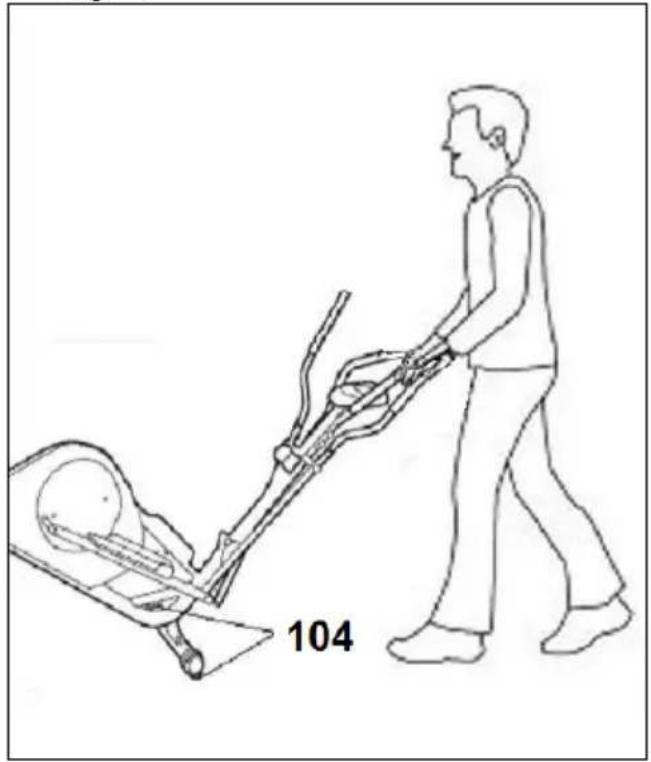
The unit is equipped with wheels (104) to make it easier to move. The wheels located at the front of your unit make it easier to move it into a chosen position, by lifting the rear of the unit up slightly and pushing it, as shown in Fig.16. Store your unit in a dry place, preferably not subject to changes in temperature.
Do not hesitate to get touch with the Technical Assistance Service if you have any queries by phoning customer services (see last page in manual)
BH RESERVES THE RIGHT TO MODIFY THE SPECIFICATIONS OF ITS PRODUCTS WITHOUT PRIOR NOTICE
Français
line
| AGE | HEART HALE | | --- | --- | | 20 | 160 | | 30 | 140 | | 40 | 120 | | 50 | 100 | | 60 | 80 | | 70 | 60 | | 75 | 40 |MISE EN PLACE DU CÂBLE HANDGRIP.
line
| AGE | HEART RATE | | --- | --- | | 20 | 120 | | 30 | 120 | | 40 | 120 | | 50 | 120 | | 60 | 120 | | 70 | 120 | | 75 | 120 |line
| AGE | HEART RATE | | --- | --- | | 20 | 120 | | 30 | 140 | | 40 | 160 | | 50 | 180 | | 60 | 200 | | 71 | 180 |line
| AGE | HEART RATE | | --- | --- | | 20 | 160 | | 30 | 140 | | 40 | 120 | | 50 | 100 | | 60 | 80 | | 70 | 60 | | 75 | 40 |To order replacement parts: State the part code and Quantity
text_image
Technical schematic diagram of a mechanical assembly with labeled components and exploded views G01 to G06To order replacement parts: State the part code and Quantity
Toll free: +1 866 325 2339
No.139, Jhongshan Rd.
Daya Township
Taichung 428, Taiwan. R.O.C.
Tel.: +886 4 25609200
Fax: +886 4 25609280
e-mail: info@bhfitness.pt
BH SERVICE PORTUGAL
e-mail: info@bhfitness.pt
BH FITNESS MEXICO
Block A, NO.68, Branch Lane
455, Lane 822,
Zhen Nan RD., Li Zi Yuan, Putuo,
Shanghai 200331, P.R.C.
Tel: +86-021-5284 6694
Fax:+86-021-5284 6814
e-mail: info@i-bh.cn
BH FITNESS UK
Unit 12 Arlington Court
Newcastle Staffs
ST5 6SS
UK 0844 3353988
International
00441782634703
AFTER SALES - UK
e-mail: service@bh-uk.co.uk
BH Germany GmbH
Altendorfer Str. 526
45355 Essen
Tel: +49 201 450910-0
e-mail:
info@bhgermany.com
savfrance@bhfitness.com
BH SE RESERVA EL DERECHO A MODIFICAR LAS ESPECIFICACIONES DE SUS PRODUCTOS SIN PREVIO AVISO.
SPECIFICATIONS MAY BE CHANGED WITHOUT PRIOR NOTICE DUE TO OUR PROGRAMME OF CONTINUOUS PRODUCT DEVELOPMENT.
BH SE RÉSERVE LE DROIT DE MODIFIER LES SPECIFICATIONS DE SES PRODUITS SANS PRÉAVIS.