Surpresso Compact - Coffee maker SIEMENS - Free user manual and instructions
Find the device manual for free Surpresso Compact SIEMENS in PDF.



User questions about Surpresso Compact SIEMENS
0 question about this device. Answer the ones you know or ask your own.
Ask a new question about this device
Download the instructions for your Coffee maker in PDF format for free! Find your manual Surpresso Compact - SIEMENS and take your electronic device back in hand. On this page are published all the documents necessary for the use of your device. Surpresso Compact by SIEMENS.
USER MANUAL Surpresso Compact SIEMENS
Operating instructions
natural_image
Illustration of a Siemens coffee machine with control panel and side panel (no text or symbols visible)TK 58...
de 2
en 12
fr 22
it 33
nl 44
es 55
pt 67
pl 78
ru 89
E
de
Sicherheitshinweise
Please read these instructions carefully and keep for future reference.
This fully automatic espresso machine is designed for preparation of small amounts of coffee for domestic use or for use in non-commercial, household-like environments, such as staff kitchens in shops, offices, agricultural and other small businesses or for use by guests at bed-and-breakfast establishments, small hotels and similar residential facilities.

Risk of electric shock
Connect and operate the appliance only in accordance with the specifications on the rating label.
Do not use if either the power cord or the appliance is damaged.
Use indoors at room temperature only. This appliance is not intended for use by persons (including children) with reduced physical, sensory or mental capabilities, or lack of experience and knowledge, unless they have been given supervision or instruction concerning use of the appliance by a person responsible for their safety. Children should be supervised to ensure that they do not play with the appliance. In the event of malfunction, unplug the appliance immediately.
To avoid potential hazards, repairs such as replacing a damaged cord should only be performed by our service personnel. Never immerse the appliance or power cord in water.
Do not reach into the grinding unit.

Risk of scalding
The foaming nozzle 9 gets very hot. Hold the foaming nozzle 9 by the plastic part only and keep it away from parts of the body. When steam or hot water are dispensed, the foaming nozzle 9 may sputter initially.
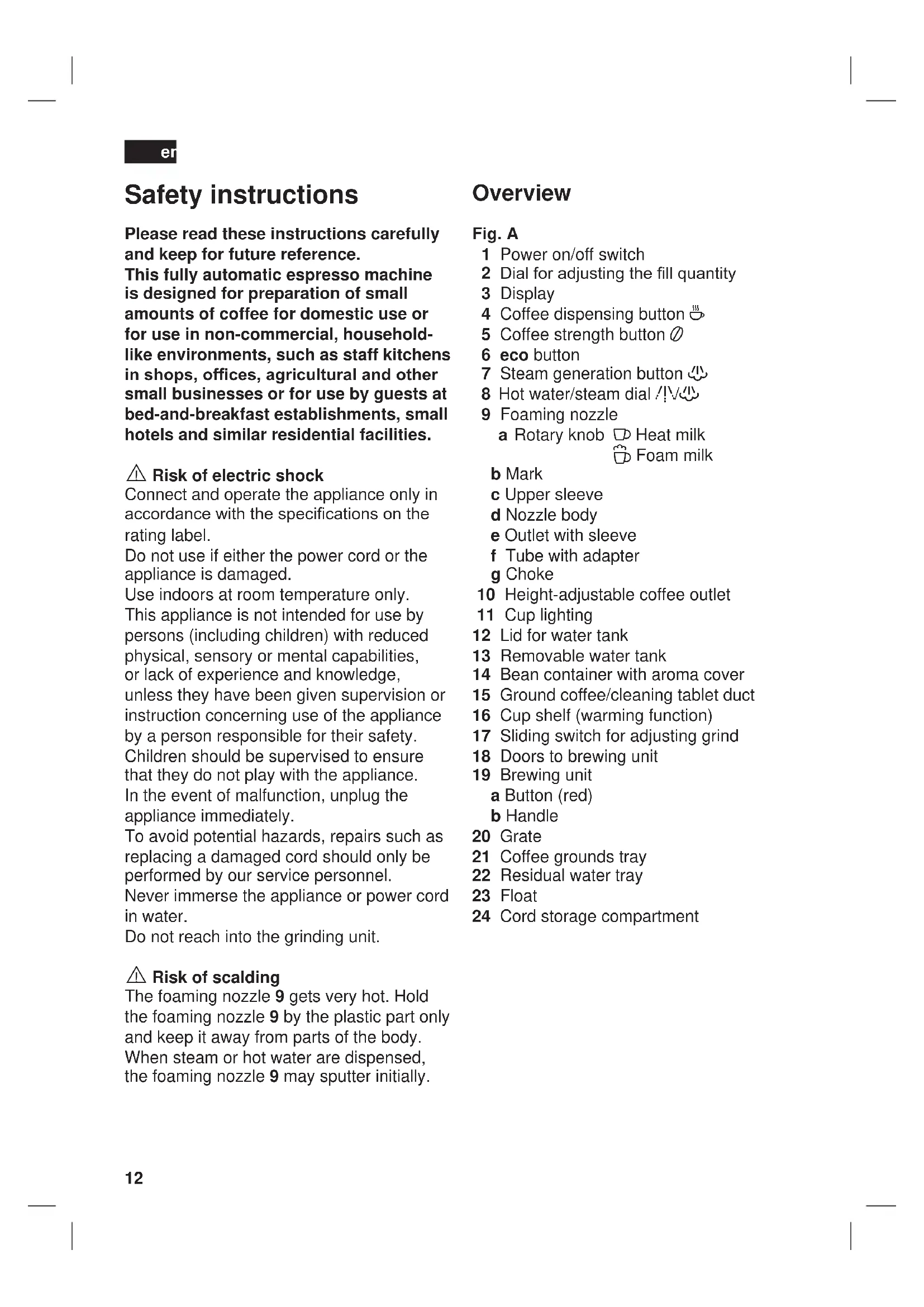
Overview
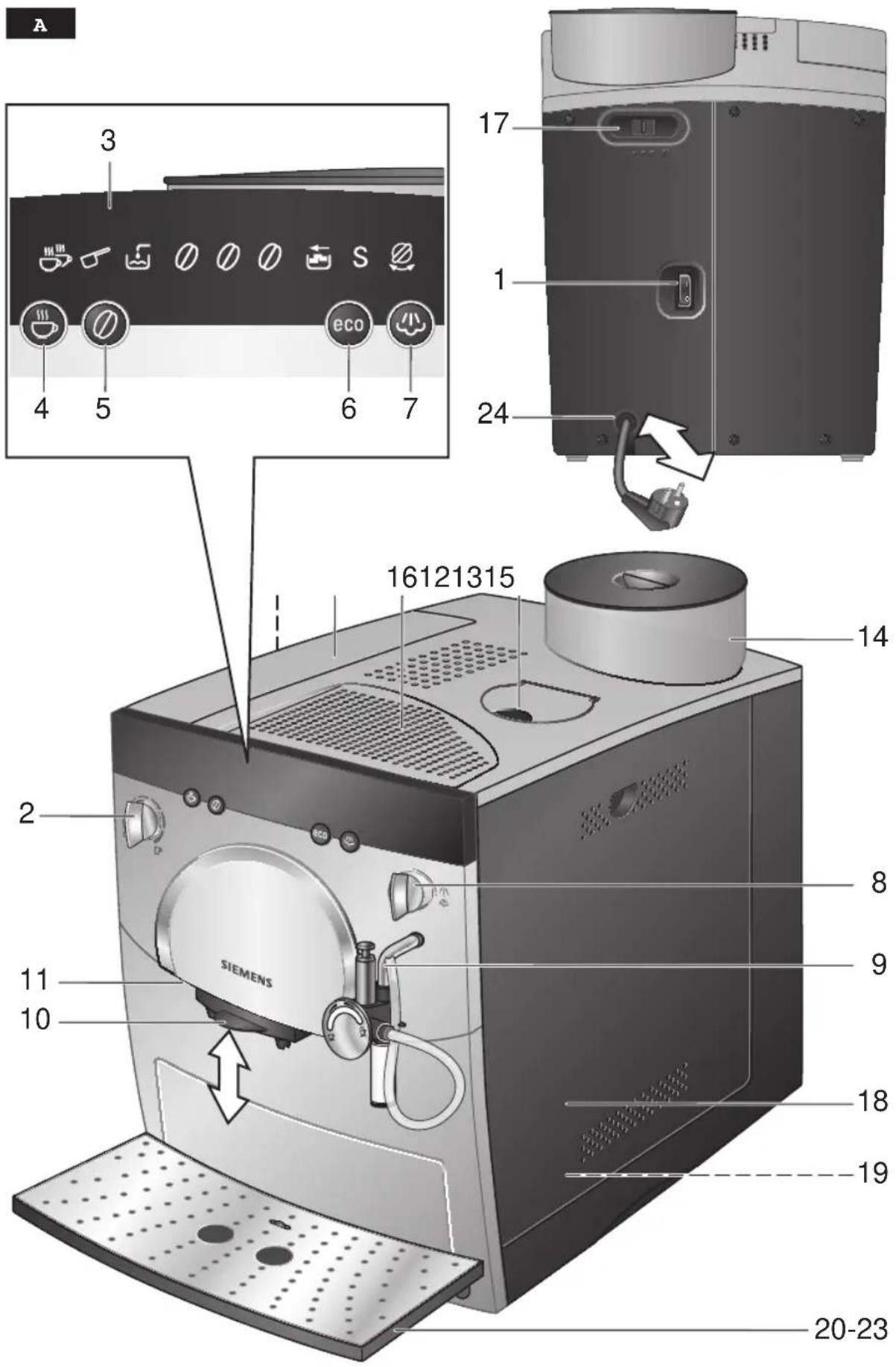
Fig. A
1 Power on/off switch
2 Dial for adjusting the fill quantity
3 Display
4 Coffee dispensing button 🎨
5 Coffee strength button ∅
6 eco button
7 Steam generation button
8 Hot water/steam dial /!
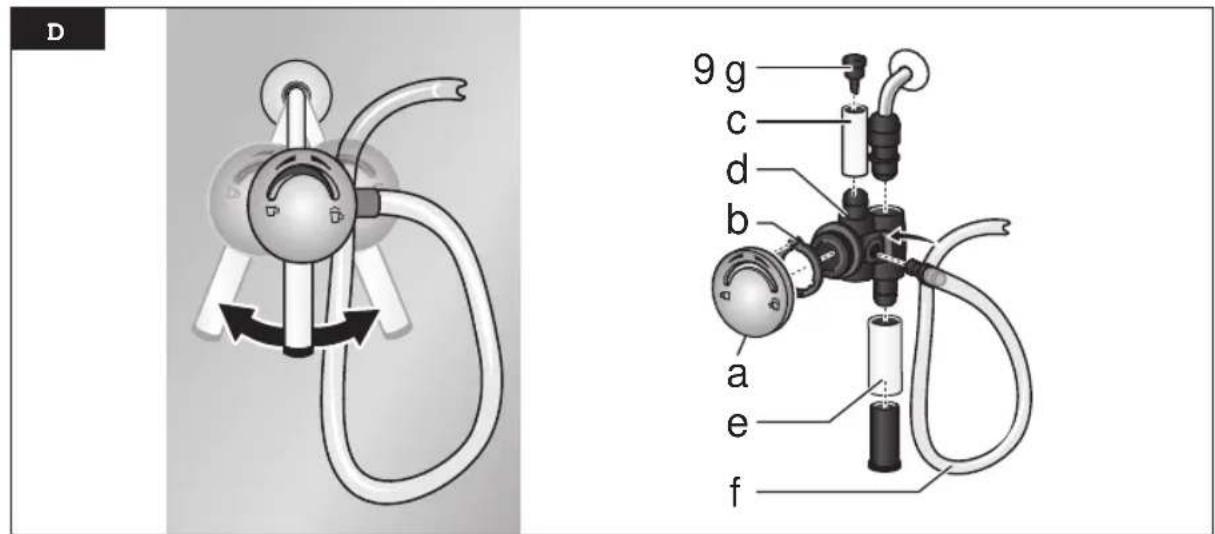
9 Foaming nozzle
a Rotary knob
Heat milk
Foam milk
b Mark
c Upper sleeve
d Nozzle body
e Outlet with sleeve
f Tube with adapter
g Choke
10 Height-adjustable coffee outlet
11 Cup lighting
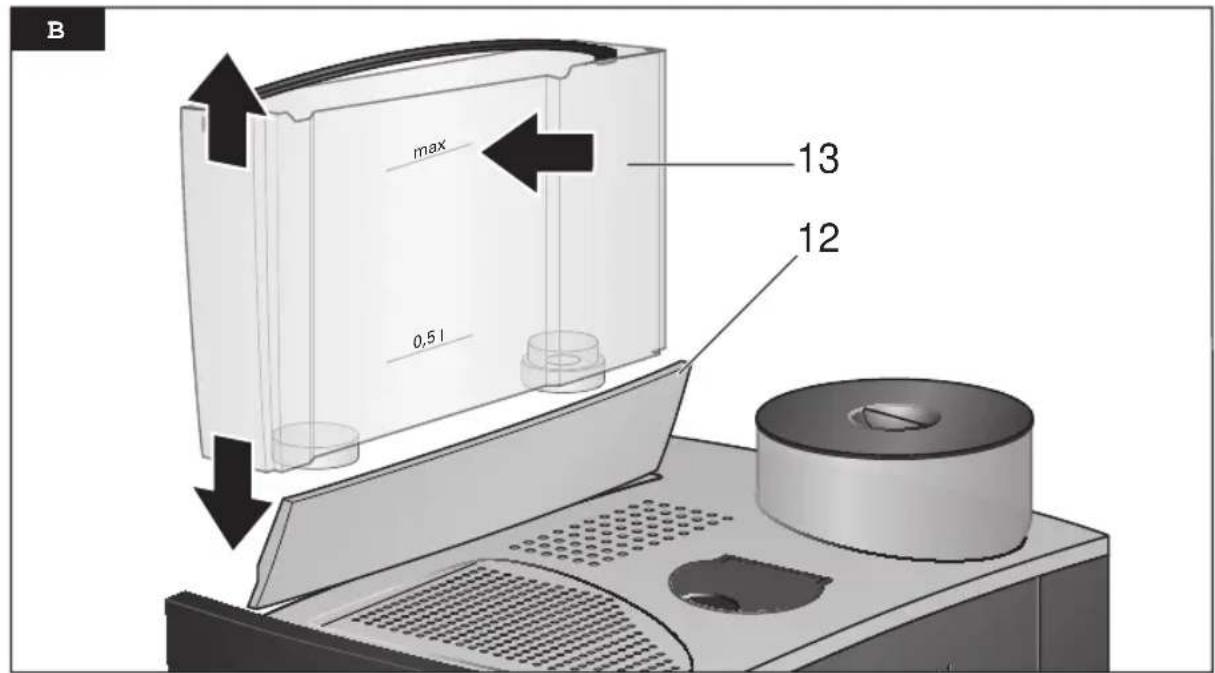
12 Lid for water tank
13 Removable water tank
14 Bean container with aroma cover
15 Ground coffee/cleaning tablet duct
16 Cup shelf (warming function)
17 Sliding switch for adjusting grind
18 Doors to brewing unit
19 Brewing unit
a Button (red)
b Handle
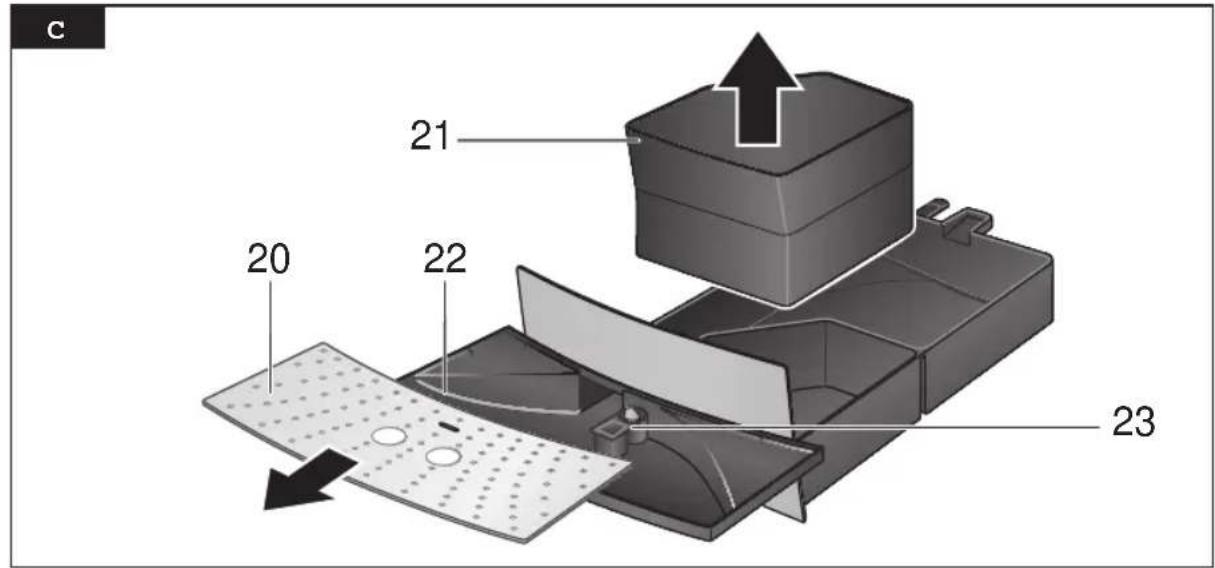
20 Grate
21 Coffee grounds tray
22 Residual water tray
23 Float
24 Cord storage compartment
Before using for the first time
General
Fill the water tank with fresh, uncarbonated water only, and if possible, use only beans for fully automatic coffee and espresso machines. Do not use coffee beans that have been glazed, caramelized or treated with other additives containing sugar, since they will block the grinding unit. Check the water hardness with the enclosed test strip. If a value other than 4 is displayed, change the setting on the appliance accordingly (see “Setting the water hardness”).
Switching on the appliance
- Place the appliance on a flat, water-resistant surface.
- Pull enough of the power cord out of the storage compartment and plug it into the electrical socket.
- Remove and rinse the water tank 13 and fill it with fresh cold water. Do not fill above the “max” mark.
- Replace the water tank 13 and push it firmly downward into place.
- Fill the bean container with coffee beans.
- Make sure that the hot water/steam dial 8 is at ●.
- Set the power on/off switch 1 to I.
When switched on for the first time, the water pipes in the appliance must be filled.
- Place a cup under the nozzle 9.
- Turn the dial 8 to √√. Water runs into the cup. Turn the dial 8 back to ●.
- The LED eco will now flash red. The appliance rinses and heats up.
The appliance is ready for use when all four buttons ⚙, ∅, eco, 🌐 and the coffee strength indicator (coffee beans) light up on the display.
This appliance also offers an “eco” mode which uses less power.
Coffee or steam can be dispensed in the usual way when the appliance is in "eco"
mode. When the required button is pressed, the appliance first heats up, so it will take a little longer until the coffee is brewed or the machine is ready to provide steam.
To dispense hot water, first press the eco button. The appliance heats up briefly. Now the hot water can be dispensed as usual.
i The appliance's factory settings are programmed for optimal performance.
Note: If the appliance is being used for the first time or has not been operated for a prolonged period, the first cup of coffee will not have the full aroma and should not be consumed.
Controls
1 Power on/off switch
The power switch 1 on the rear of the appliance switches the power supply on or off. When the power on/off switch has been turned on, the appliance heats up, rinses and is then ready for use.
The appliance does not rinse if it is still warm when switched on.
Warning
Do not turn off the power switch while the appliance is operating. Before switching off, press the eco button to start the automatic rinse cycle. Then switch off at the power on/off switch.
2 Dial for adjusting the amount of coffee per cup
This dial 2 allows variable adjustment of the quantity of coffee from a small cup ☐ to a large cup ☐.
er
3 Display
The display uses symbols to indicate appliance settings and messages.

Coffee dispensing, 2 cups

flashing Lid for ground coffee uct 15 is open

on Ground coffee/Cleaning
∅ on Mild coffee
∅∅ on Medium-strength coffee
∅∅ on Strong coffee
∅∅∅ flashing Bean container empty
S on Service:
Descale/clean appliance
S flashing
Service programme in operation
on Fill water tank 13
on Fill water tank 13, hold cup
+ ∅ flashing under foaming nozzle 9 and turn dial 8 to /ɪv/心.
flashing Turn dial 8 to /!√.
∅ on Turn dial 8 to ●.

on Empty trays
flashing
Trays missing
4 Coffee dispensing button 🎨
Coffee can be brewed by pressing this button.
Press once for one cup. The coffee is ground, brewed and dispensed into the cup.
Button 🔊 flashes during this process.
Press twice within 3 seconds for two cups. The coffee is ground, brewed and dispensed into the cups (the grinding and brewing process takes place twice).
Button 🎨 flashes and 🎨 (2 cups) appears on the display during this process.
i If the coffee dispensing button 🎨 is pressed again, the coffee brewing process is terminated.
5 Coffee strength button Ⓞ
This button ∅ is used to select the coffee strength:
∅ mild
∅∅ medium
∅∅∅ strong
The selected setting is shown on the display.
6 eco button
The appliance can be put into "eco" mode or returned to normal mode with the eco button.
In “eco” mode the appliance consumes less energy.
All displays and buttons are dimmed, only messages such as “Empty trays” are displayed in the usual brightness.
The temperature of the cup shelf (warming function) is lower.
Switching to "eco" mode starts an automatic rinse cycle.
The appliance does not rinse if:
- no coffee was dispensed before it was switched to "eco" mode.
– steam was dispensed shortly before it was switched off.
The appliance is programmed so that it switches to "eco" mode automatically after about 10 minutes. The default time can be changed (see "Settings and displays").
7 Steam generation button
Button ⚙️ generates steam for foaming or warming.
8 Steam dispensing dial
Hot water or steam can be dispensed by turning the dial to √ or √. To dispense steam, the button √ must be pressed first (see “Preparing milk froth and hot milk”).
Settings and displays
Setting the water hardness
It is important that the water hardness be set correctly, so that the appliance indicates accurately when the descaling programme should be run. The factory setting is a water hardness of 4. You can check the water hardness using the enclosed test strip or by asking your local water supplier.
| Degree | Water hardness | |
| German (°dH) | French (°fH) | |
| 1 | 1-7 | 1-13 |
| 2 | 8-15 | 14-27 |
| 3 | 16-23 | 28-42 |
| 4 | 24-30 | 43-54 |
- Determine the water hardness with the enclosed test strip.

e.g.= Hardness 2
- Switch the appliance to "eco" mode.
- Hold down the steam button 🎨 for at least 5 seconds. The number of service buttons 🎨, ⭕, eco, 🔊 that light up indicate the selected water hardness.
- Press the steam button 🎯 repeatedly until the correct number of buttons is lit.
- Press eco button once. The selected number of service buttons should light up briefly; this indicates that the desired water hardness setting has been saved successfully.
If a water filter (special accessory) is used, the water hardness should be set to 1.
Note: If no button is pressed within 90 seconds, the appliance switches to "eco" mode without saving the new settings. In this case, the previous water hardness setting is retained.
The first time a filter is used or after changing the filter, the appliance needs to be cleaned.
Fill the water tank with water.
- Place a suitable container (at least 0.5 litres) under the foaming nozzle 9.
- Turn the dial 8 to /!V.
- Allow about 0.5 litres of water to run through.
- Turn the dial back to ●.
Setting the temperature
It is possible to set three different coffee temperatures.
- Switch the appliance to "eco" mode.
- Hold down the ⏻ + ∅ buttons simultaneously for at least 5 seconds.
on = Low temperature
♂ + on = Medium temperature
♡ + + eco on = High temperature - Press the ⚙ button to set the required temperature.
- Press the eco button to save the setting.
i The factory setting is the medium temperature.
Setting the time for switchover to "eco" mode.
The appliance can be programmed so that it automatically switches to “eco” mode after a certain time (from 10 minutes to 4 hours).
- Switch the appliance to "eco" mode.
- Hold down the Ⓞ button for at least 5 seconds.
If lights up
= switchover after 10 minutes
If 📋, ⭕ lights up
= switchover after 30 minutes
If ⚙, ∅, eco lights up
= switchover after 2 hours
If 📋, ⭕, eco, 🔊 lights up
= switchover after 4 hours
- Press the ⏻ button to set the required time.
- Press the eco button to save the setting.
i The factory setting is 10 minutes.
er
Reset
The settings for water hardness, temperature and default time in "eco" mode can be reset to the factory settings simultaneously.
- Switch the appliance to "eco" mode and remove trays 21 and 22.
- Hold down the 🔊 and 🔒 buttons simultaneously for at least 5 seconds. The LEDs flash briefly to confirm the reset.
- Insert trays 21 and 22 again, the appliance switches to "eco" mode.
Adjusting the grinding unit
Sliding switch 17 adjusts the degree of grinding, from coarse to fine.
Warning
Adjust the grinding unit only while it is running! Otherwise the appliance may be damaged.
- Press the coffee dispensing button 🤨.
- While the grinding unit is running, move the sliding switch 17 to the desired position: the smaller the dots, the finer the grind.
i The new setting will not become apparent until the second or third cup is brewed.
Tip: For dark roast coffee beans, choose a coarser grind; for light roast beans, select a finer grind.
Float
The float 23 in the water tray 22 shows when the tray needs emptying.
- If the float 23 is clearly visible, empty the water tray 22.
Preparation
This fully automatic espresso/coffee machine grinds beans freshly for each brew. If possible, use only beans for fully automatic coffee and espresso machines. Deep-freeze or store in a cool place in sealed, airtight containers. Coffee beans can be ground while frozen.
Tip: Pre-warm cups, especially small, thick espresso cups, by placing on the cup shelf 16 or rinsing with hot water.
Using coffee beans
The appliance must be ready for use.
- Set the desired per-cup quantity using dial 2.
- Select the desired coffee strength using button ∅.
- Place the prewarmed cup(s) under the coffee outlet 10.
- Press the coffee dispensing button once for 1 cup or twice within three seconds for 2 cups. The coffee is brewed and dispensed into the cup(s).
Note
If you select two cups, the grinding and brewing process is performed twice.
- Coffee dispensing stops automatically when the selected quantity has been dispensed.
i The brewing process can be terminated by pressing the coffee dispensing button 🌐 again. When coffee is brewed for 2 cups, it is dispensed via two outlet nozzles (place the cups side by side).
Using ground espresso/coffee powder
The appliance must be ready for use.
- Set the desired per-cup quantity using the dial 2.
- Place the prewarmed cup(s) under the coffee outlet 10.
- Open the cover of the ground coffee duct 15.
- Add one to two level scoops of ground coffee (grind: medium-fine) to the ground coffee duct 15.
Note
Do not add whole beans or instant coffee! Use a maximum of two level scoops of coffee.
- Close the cover of the ground coffee duct 15.
- Press the coffee dispensing button 🎨.
i Repeat the process if a second cup is desired.
Note: If coffee is not brewed within 90 seconds, the brewing chamber is emptied automatically in order to prevent overfilling. The appliance is rinsed.
Preparing hot water
The appliance must be ready for use. This function allows water to be heated for a cup of tea, for example.

Risk of burnsRisk of burns
The foaming nozzle 9 gets very hot. Hold it by the plastic part only.
- Place an appropriate cup under the foaming nozzle 9.
- Turn the rotary knob 9a to the centre.
- Turn the dial 8 to 小心.

Risk of scaldingRisk of scalding
When the dial is set to ∥ ∥ ∥ the nozzle may sputter a little. Do not touch the foaming nozzle 9 or aim it at anyone.
• Water runs into the cup.
- End the process by turning the dial 8 back to .
Important:
It is not possible to dispense hot water when the appliance is in “eco” mode. First press the eco button and then dispense hot water.
Preparing milk froth and hot milk
The appliance must be ready for use.

Risk of burns
The foaming nozzle 9 gets very hot. Hold it by the plastic part only.
- Turn the rotary knob 9a to 📋 to foam the milk or 📋 to heat the milk.
- Immerse tube 9f into a container with enough milk.
- Press the 🔊 button. It will start to flash.
i The appliance will now heat up for approx. 20 seconds.
- Place an appropriate cup under the foaming nozzle 9.
- When the ⏻ button lights up and ⏱ appears on the display, turn the dial 8 to ∥ ∥ ∥.

Risk of scalding
When the dial is set to the nozzle may sputter a little. Escaping steam is very hot and may cause liquids to sputter. Do not touch the foaming nozzle 9 or aim it at anyone.
- The milk is now drawn in and foamed or heated.
- End the process by turning the dial 8 back to O.
Note: When the foaming nozzle 9 has cooled down, clean it immediately. Dried residue is difficult to remove (see section "Cleaning the foaming nozzle").
Tip: If possible, use cold low-fat milk (1.5% fat).
Milk drinks such as hot chocolate can be prepared using the ☐ setting.
er
Maintenance and cleaning
⚠️ Risk of electric shock
Unplug the appliance before cleaning it. Never immerse the appliance in water. Do not use a steam cleaner.
Daily cleaning
Each time the appliance is used, coffee and milk residues accumulate. So the fully automatic coffee machine should be cleaned daily to remove them (preferably at the end of the day).
- Always remove any limescale, coffee, milk or descaling fluid residue immediately. Such residue can cause corrosion.
- Clean the two coffee outlet nozzles 10 with a damp cloth.
- Wipe the outside of the appliance with a damp cloth. Do not use scouring agents.
- Wash all removable parts by hand only.
- Rinse out the water tank 13 with water only.
- Remove, empty and clean the trays for coffee grounds 21 and residual water 22.
- Wipe out the inside of the appliance (tray holders).
Note: If the appliance is cold when switched on, or if it is switched to "eco" mode after dispensing coffee, it rinses automatically; in other words the system cleans itself.
Cleaning the foaming nozzle 9
Important: Clean the foaming nozzle 9 after each use.
- Immerse tube 9f into a container with warm water.
- Place an appropriate container under the foaming nozzle 9.
- Press the 🔊 button. It will start to flash.
i The appliance will now heat up for approx. 20 seconds.
- When the ⏻ button lights up and ⏱ appears on the display, turn the dial 8 to ⏮.
⚠️ Risk of scaldingRisk of scalding
When the dial is set to A , the nozzle may sputter a little. Escaping steam is very hot. Do not touch the foaming nozzle 9 or aim it at anyone.
- Allow about 1 cup of water to run through.
- End the process by turning the dial 8 back to .
Dismantle the foaming nozzle 9 to clean it thoroughly (Fig. D).
Clean with a caustic cleaning solution and a soft brush. Rinse and dry all parts
Brewing unit
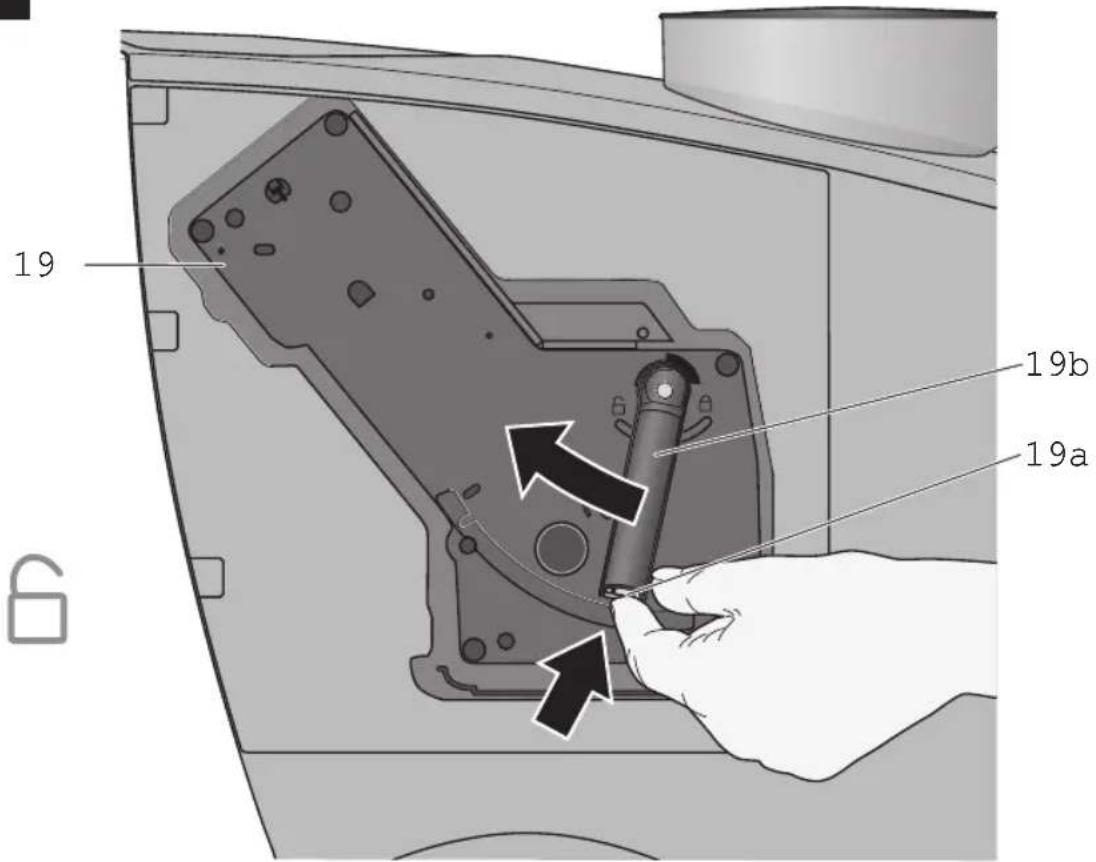
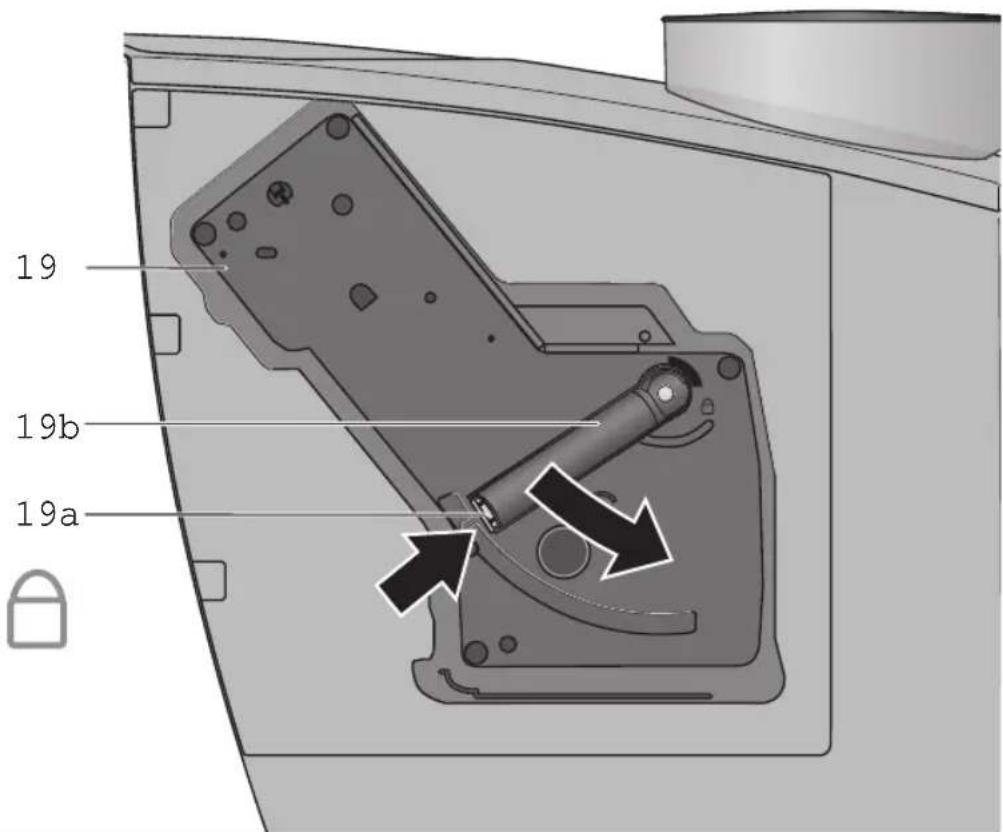
The brewing unit can be removed for cleaning (Fig. E).
- Press the eco button to start the automatic rinse cycle.
- Turn the power on/off switch 1 to 0.
- Open the door 18 to the brewing unit 19.
- Hold the red button 19a down and push the handle 19b up until you hear it engage.
- Grasp the brewing unit 19 by the handle, remove carefully, and rinse under running water. Do not use cleaning agents. Do not place in the dishwasher.
- Vacuum the inside of the appliance, or clean it with a damp cloth.
- Reinsert the brewing unit 19 all the way into the appliance.
- Hold the red button 19a down and push the handle 19b down as far as it goes, until you hear it engage. The brewing unit is now secure.
- Close the doors of the brewing unit.
Service programme: Combined cleaning and descaling process
If an “S” is shown on the display while the appliance is on, the service programme must be run immediately to clean and descale the appliance. If the service programme is not run as instructed, the appliance may be damaged.
Specially-developed descaling (order no. 310967) and cleaning agents (order no. 310575) are included with the appliance and can also be obtained from customer service.
Warning
Each time you run the service programme, you should follow the instructions for using the cleaning and descaling agents carefully.
Never interrupt the descaling programme. Do not drink the liquids.
Never use vinegar or vinegar-based products.
Never put descaling tablets or other descaling materials into the duct for cleaning tablets.
The "S" symbol flashes while the service programme is running (approx. 40 minutes).
Important: If there is a filter in the water tank, it needs to be removed before the service programme is run.
Starting the service programme
Important: There should be approx. 0.5 liters of water in water tank 13.
- Switch the appliance to "eco" mode.
- Hold down the coffee dispensing button 🌐 for at least 5 seconds. The appliance rinses 2 x through the coffee outlet 10.
▶ lights up on the display.
- Empty and reinsert the trays 21 and 22.
▶ lights up on the display.
- Open the cover of the duct 15 for ground coffee / cleaning tablets.
- Place one cleaning tablet in the duct 15 and close the cover.
▶ lights up on the display and the button flashes.
- Empty the water tank before filling it with lukewarm water, add descaling agent and dissolve completely (total liquid: 0.5 litres). or
Pour prepared descaling mixture into the water tank (total liquid: 0.5 litres).
- Press the 🎨 button. The descaling process begins. Duration approx. 10 minutes. The descaling solution flows into the water tray 22.
▶ ∅ flashes on the display.
- Place a suitable container (approx. 0.5 litres) under the nozzle 9.
- Set the dial 8 to 小心. The descaling process begins. Duration approx. 5 minutes. The descaling solution flows into the container.
▶ lights up on the display.
- Empty and reinsert the water tray 22.
▶ lights up on the display and the 🎨 button flashes.
- Empty and clean the water tank 13, fill with fresh water up to the "max" mark and reinsert.
- Place a suitable container (approx. 0.5 litres) under the nozzle 9.
- Press the 📋 button. The cleaning process begins. Water flows into the container.
▶ lights up on the display.
- Turn the dial 8 to ●. The cleaning process begins. Duration approx. 10 minutes. Liquid flows into tray 22 inside the appliance, then from the coffee outlet.
er
▶ lights up on the display.
- Empty, clean and reinsert the trays 21 and 22.
The appliance heats up and is ready for use again when all four buttons ☉, ☐, eco and 🌈 light up and remain lit.
Important: If the service programme is interrupted, e.g. due to a power cut, it is vital that the appliance be rinsed before it is used again.
- Press the eco button.
▶ The S LED and ⏻ button flash.
- Rinse the water tank 13 thoroughly and fill with fresh water.
- Press the steam button ⏻. The appliance is rinsed and liquid flows into the tray.
The ☐ LED flashes.
- Place a suitable container (approx. 0.5 litres) under the nozzle 9 and turn the dial 8 to /!V/心. Water runs into the container.
The 🔒 LED lights up.
- Turn the dial 8 to ●.
The appliance rinses.
▶ lights up on the display.
- Empty, clean and reinsert the trays.
The appliance is ready for use again.
Anti-freeze
In order to avoid damage through cold during transportation and storage, the appliance must be emptied completely first.
The appliance must be ready for use.
- Place a large, narrow container under foaming nozzle 9.
- Press 小 button.
- As soon as ☐ lights up on display, turn dial 8 to /!√/。
- Remove, empty, and replace water tank. The appliance will release steam for a while.
- When foaming nozzle 9 stops releasing steam, turn dial back to ●.
- Turn off the appliance.
Disposal

This appliance is labelled in accordance with the European Directive 2002/96/EG relating to waste electrical and electronic equipment – WEEE. The directive provides the framework for the EU-wide take-back and disposal of end-of-life appliances.
Please ask your specialist retailer about current disposal facilities.
Guarantee
The guarantee conditions for this appliance are as defined by our representative in the country in which it is sold. Details regarding these conditions can be obtained from the dealer from whom the appliance was purchased. The bill of sale or receipt must be produced when making any claim under the terms of this guarantee.
Changes reserved.
Troubleshooting
| Problem Possible cause Solution | ||
| flashing when bean container is full. | The grinding unit is not yet full enough. | Press coffee dispensing button again. |
| No hot water or steam discharge. | Foaming nozzle 9 is blocked. | Clean foaming nozzle 9. |
| Foam insufficient or too runny. | Foaming nozzle 9 is dirty. Clean foaming nozzle 9. | |
| Blocked choke 9g or blocked rotary knob 9a. | Remove all milk residue from individual parts. | |
| Milk not suitable for foaming. | Use cold low-fat (1.5% fat) milk. | |
| Coffee dispensing slows to a trickle. | Coffee is ground too fine. Pre-ground coffee is too fine. | Adjust the grinding unit to a coarser setting. Use a more coarsely-ground coffee. |
| Coffee not dispensed. Water tank 13 not correctly positioned. | Make sure water tank 13 is in the correct position. If necessary fill water pipes (see section “Switching on the appliance”). | |
| Coffee has no “crema” (creamy foam). | Unsuitable type of coffee. Beans no longer fresh. | Change type of coffee used. Use fresh beans. |
| Degree of grinding inappropriate for beans. | Optimize degree of grinding. | |
| Grinding unit does not grind the beans. | Beans are not falling into the grinding unit (beans too oily). | Gently tap the bean container. |
| Grinding unit makes a loud noise. | Foreign objects in the grinding unit (e.g. grit, which can be found even in superior types of coffee). | Call the hotline. Note: The appliance can still be used to make pre-ground coffee. |
| eco button and steam button flash alternately. | The brewing unit 19 is missing, or is not properly inserted or secured. | Insert and secure the brewing unit 19. |
| The indicator does not appear on the display, even though water tank is empty. | There is a water film between water tank and housing, water detection is defect. | Dry water tank and appliance. |
| If problems cannot be eliminated, always call the hotline. | ||
fr
AE United Arab Emirates,
BSH Home Appliances Pty Ltd
7-9 Arco Lane
HEATHERTON, Victoria 3202
Tel.: 1300 368 339
Fax: 1300 306 818
valid only in AUS
mailto:bshau-as@bshg.com
BA Bosnia-Herzegovina, Bosna i Hercegovina
"HIGH" d.o.o.
Odobašina 57
71000 Sarajewo
Info-Line: 061 10 09 05
Fax: 033 21 35 13
mailto:delicnanda@hotmail.com
www.bshappliancecare.co.uk/
Siemens
Service Requests (nationwide)
Tel.: 0844 8928999
mailto:mks-servicerequest@
bshg.com
Spares and Accessories
Tel.: 0844 8928921
mailto:mks-spares@bshg.com
Product Advice
Tel.: 0844 8928927
mailto:mks-productadvice@
bshg.com
Head office
Tel.: 0844 8928922
Fax: 01908 328670
GR Greece, Ελλάς
BSH Ikiakes Siskeves A. B. E.
Kentriko Ipokatastima Service
17 km E.Ó. Athinon-Lamias &
Potamou 20
145 64 Kifisia
North Block, Skyway House
3 Sham Mong Road
Tai Kok Tsui, Kowloon
Hongkong
Tel.: 2565 6151
Fax: 2565 6252
mailto:service.siemens@
bshg.com
HR Hrvatska, Croatia
Gemma B&D d.o.o.
Prisavlje 2
10000 Zagreb
Tel.: 01 6195 582
Fax: 01 6195 582
mailto:servis@gemma.hr
IE Republic of Ireland
BSH Home Appliances Ltd.
BSH Appliance Care,
Service Division
Unit F4, Ballymount Drive
Ballymount Industrial Estate
Walkinstown
Dublin 12
www.bshappliancecare.ie/
siemens
Service Requests, Spares and
Accessories
Tel.: 01450 2655
Fax: 01450 2520
IL Israel, בַרְבָר
C/S/B Home Appliance Ltd.
Uliel Building
2, Hamelacha St.
Industrial Park North
71293 Lod
Tel.: 08 9777 222
Fax: 08 9777 245
mailto:csb-serv@zahav.net.il
IS Iceland
Smith & Norland hf.
Noatuni 4
105 Reykjavik
Tel.: 0520 3000
Fax: 0520 3011
www.sminor.is
IT Italia, Italy
LT Lietuva, Lithuania
Baltic Continent Ltd.
Lukšio g. 23
09132 Vilnius
Tel.: 05 274 1788
Fax: 05 274 1765
mailto:info@balticcontinent.lt
www.balticcontinent.lt
LU Luxembourg
Unit F 2, 4 Orbit Drive
Mairangi Bay, Auckland 1310
Tel.: 09 477 0492
Fax: 09 477 2647
PL Polska, Poland
BSH Home Appliances (SEA)
Pte. Ltd.
15 th Rd., Randjespark
Private Bag X36, Randjespark
1685 Midrand – Johannesburg
Tel.: 086 002 6724
Fax: 011 265 7852
mailto:service@bsh.co.za
www.siemensappliances.co.za