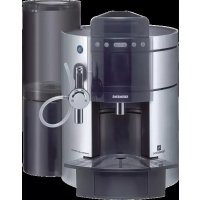
Nespresso TK911N2DE - Coffee maker SIEMENS - Free user manual and instructions
Find the device manual for free Nespresso TK911N2DE SIEMENS in PDF.



| Product type | Nespresso automatic coffee maker |
| Brand | Siemens |
| Model | Nespresso TK911N2DE |
| Dimensions (W x H x D) | 35 x 35 x 30 cm |
| Power supply | 220-240 V / 50 Hz |
| Power consumption | 1300 W |
| Maximum pressure | 19 bars |
| Water tank capacity | 1.2 L |
| Coffee functions | Small cup, large cup, cappuccino, latte macchiato |
| Additional functions | Hot water, steam, cup warmer |
| Milk frothing system | Integrated with adapter and steam tube |
| Energy saving mode | Automatic after 1 hour |
| Automatic rinsing | Yes, at startup and as needed |
| Descaling | Automatic program, specific product recommended |
| Maintenance | Daily cleaning of nozzles and frothing system |
| Safety | Protection against burns, automatic shut-off, on/off switch |
| Included accessories | Hot water/steam nozzle, frothing system, capsule holder |
| Customer service | Siemens and Nespresso hotline |
Frequently Asked Questions - Nespresso TK911N2DE SIEMENS
User questions about Nespresso TK911N2DE SIEMENS
0 question about this device. Answer the ones you know or ask your own.
Ask a new question about this device
Download the instructions for your Coffee maker in PDF format for free! Find your manual Nespresso TK911N2DE - SIEMENS and take your electronic device back in hand. On this page are published all the documents necessary for the use of your device. Nespresso TK911N2DE by SIEMENS.
USER MANUAL Nespresso TK911N2DE SIEMENS
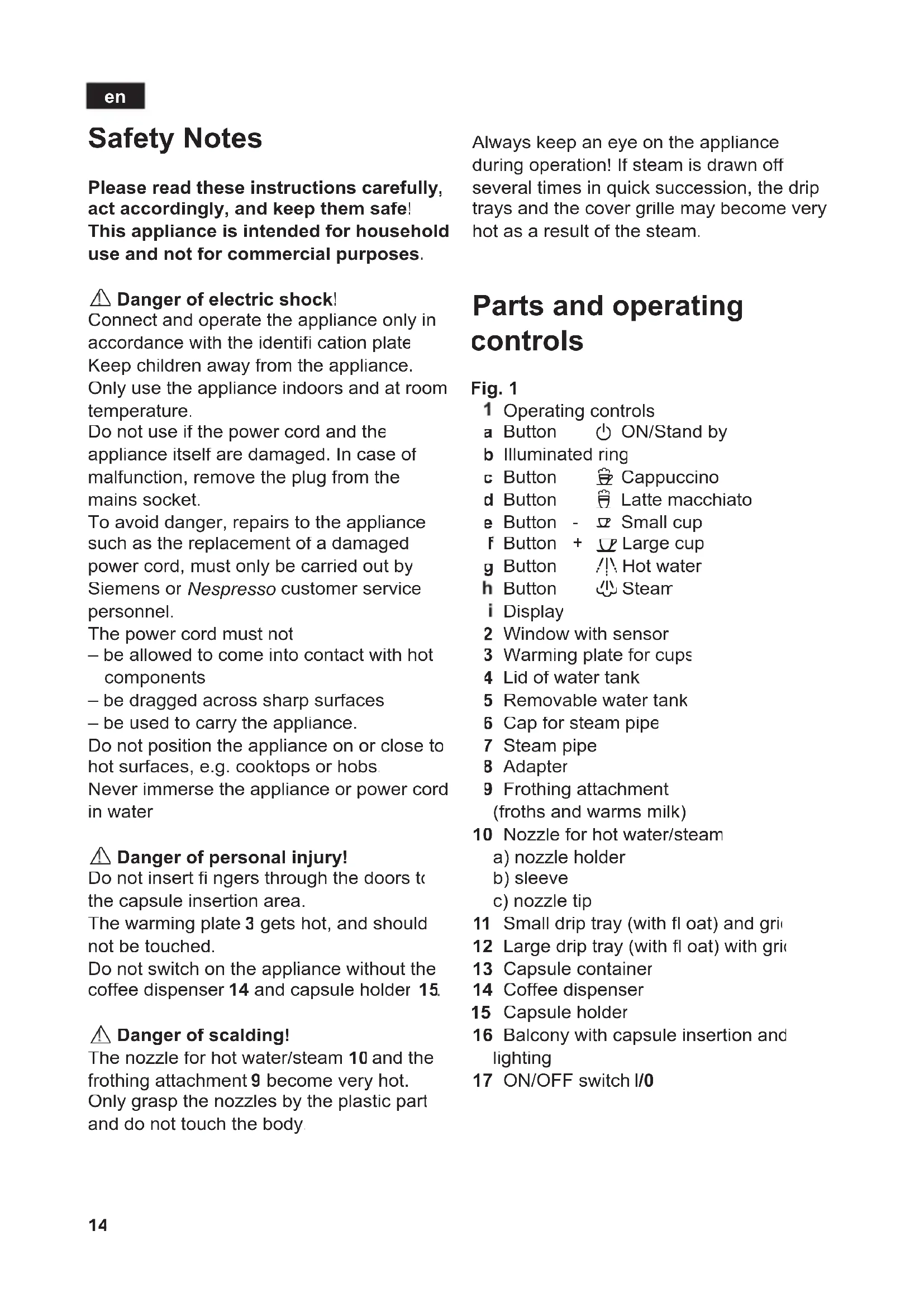
Please read these instructions carefully, act accordingly, and keep them safe! This appliance is intended for household use and not for commercial purposes.
Danger of electric shock!
Connect and operate the appliance only in accordance with the identifi cation plate Keep children away from the appliance. Only use the appliance indoors and at room temperature.
Do not use if the power cord and the appliance itself are damaged. In case of malfunction, remove the plug from the mains socket.
To avoid danger, repairs to the appliance such as the replacement of a damaged power cord, must only be carried out by Siemens or Nespresso customer service personnel.
The power cord must not
-
be allowed to come into contact with hot components
-
be dragged across sharp surfaces
-
be used to carry the appliance.
Do not position the appliance on or close to hot surfaces, e.g. cooktops or hobs
Never immerse the appliance or power cord in water
Danger of personal injury!
Do not insert fingers through the doors to the capsule insertion area.
The warming plate 3 gets hot, and should not be touched.
Do not switch on the appliance without the coffee dispenser 14 and capsule holder 15.
Danger of scalding!
The nozzle for hot water/steam 10 and the frothing attachment 9 become very hot.
Only grasp the nozzles by the plastic part and do not touch the body
Always keep an eye on the appliance during operation! If steam is drawn off several times in quick succession, the drip trays and the cover grille may become very hot as a result of the steam.
Parts and operating controls
Fig. 1
1 Operating controls
a Button ON/Stand by
b Illuminated ring
c Button Cappuccino
d Button Latte macchiato
e Button - ½ Small cup
F Button + Large cup
g Button /Hot water
h Button Steam
i Display
2 Window with sensor
3 Warming plate for cups
4 Lid of water tank
5 Removable water tank
6 Cap for steam pipe
7 Steam pipe
8 Adapter
9 Frothing attachment (froths and warms milk)
10 Nozzle for hot water/steam
a) nozzle holder
b) sleeve
c) nozzle tip
11 Small drip tray (with float) and grid
12 Large drip tray (with float) with grid
13 Capsule container
14 Coffee dispenser
15 Capsule holder
16 Balcony with capsule insertion and lighting
17 ON/OFF switch I/0
Important notes
- Fill the water tank 5 only with cold mains water, and change daily
- Only place Nespresso capsules on the "balcony" 16. Other objects may damage the appliance.
- Do not obstruct the window with objects or your hand, and do not remove it.
- Do not insert or place any objects on or in the balcony with the capsule insertion aperture 16.
- The Nespresso capsules must be undamaged before use. Capsules which are distorted or open could jam and damage the appliance.
Protection against frost: In order to avoid the effects of frost, the appliance must be completely drained prior to transport or storage.
- Switch on the appliance, Ready appears in the display
- Press the steam button.
- If the display shows Steam ready, remove the water tank and empty
- Press the steam button once more.
- Wait until the appliance stops pumping.
- Tip the remaining water out of the drip trays 11 and 12, and switch the appliance off at the ON/OFF switch 17.
NESPRESSO capsules
Use only Nespresso capsules with this appliance.
Address for orders:
Nespresso-Club, www.nespresso.com
Before using for the first time
Putting the appliance into operation
- Plug into mains supply.
- Fill the water tank 5 with fresh, cold water, with the lid 4 removed, or through the grille in the lid, and mount in position.
- Set switch 17 to I. The blue ring b surrounding button lights up. Window 2 opens and closes.
- Press button (Stand by). Window 2 opens.
The ex works setting for the display shows Sprache and Deutsch alternately.
To set a different language, use the button - or + to select the desired language and store with steam button.
To confirm English:
Press the steam button
- Press button (Stand by).
Wait will now appear in the display, followed by Rinsing. Appliance rinsing is performed automatically.
- Rinse the appliance without a Nespresso capsule in position. To do this, place a suffi cientsly large vessel under the coffee dispenser 14, and press button (large cup).
- Repeat this procedure 4 times.
- Empty the collecting vessel and place it under the frothing attachment 9.
- Press button /I\ (hot water), and draw approx. 0.5 l water, shut off by pressing button /I\
The appliance is now ready for operation. Ready appears in the display.
Info: If English has already been confirmed, and a different language is desired, see under "Changing basic settings".
Water hardness
The preset water hardness is 3. To determine the hardness of the water in the area, use the test strips provided, or make inquiries with the local water utility. To change the water hardness setting, consult the section "Changing basic settings".
Power save
The appliance automatically switches to economy mode if it is not used for an hour. The display shows Power save. This function can be activated and deactivated as desired via the basic settings. Info: The warming plate 3 is not switched off in economy mode.
Every time the cold appliance is switched on Rinsing appears in the display. The appliance is rinsed automatically. If Manual has been selected in the basic settings, Launch rinsing cycle will appear in the display. Check that all drip trays are in place, and then press the button (large cup). The appliance is rinsed.
Preparing coffee
Tip: For really successful espresso coffee, preheat the cups on the warming plate 3, or fi II the cups with hot water and empty out The appliance must be switched on, and Ready showing in the display. If window 2 is closed, move your hand in front of the window to open it (Fig. 2).
- Place a Nespresso capsule on the lit balcony 16, with the membrane downwards (Fig. 2).
-
Place a preheated cup under the coffee dispenser 14
-
Depending on the cup size required, press button (small cup) or button (large cup). The cup is filled. The coffee dispenser automatically cuts off as soon as the programmed quantity has been served.
Ready appears in the display
Info: After use, the capsule is automatically ejected into the capsule container 13. Info: Approx. 2 min. after the brewing process has finished, the window closes automatically. The appliance is equipped with a sensor which automatically opens the window in response to a hand movement.
To stop the flow of coffee prematurely
- Press button (small cup) or button (large cup) once again.
To change the quantity of liquid permanently
The preset quantity for a small and large cup respectively can be altered.
- Keep the button (small cup) or button (large cup) depressed until the desired quantity of coffee has been served. During this time, the text in the display will flash
Info: The quantity can be changed at any time.
Additional quantity of liquid
- Press button (small cup) or button (large cup) again, within four seconds of the flow of coffee stopping
The same quantity of water again will be passed through the capsule.
To prepare coffee or obtain water immediately after drawing off steam
If immediately after drawing off steam, coffee is dispensed by pressing the button (small cup) or button (large cup), the appliance initially cools off automatically. The appliance fi rst gives off steam a intervals, then coffee flows from the coffe dispenser 14
If hot water is required immediately after drawing off steam, first cool the appliance by pressing button [4]1 (hot water), the appliance gives off steam into the drip tray 12.
Frothing or warming milk
Danger of scalding
The steam is very hot. Only grasp the frothing attachment by the plastic part.
Always use suffi cients milk, otherwise the steam produced may result in sudden spluttering.
- Firmly slide together the frothing attachment 9 (Fig. 4). There must be no gaps between the individual components.
- Push the frothing attachment 9 firmly onto the adapter 8 on the steam pipe 7 (Fig. 5).
- Dip the tube into the vessel containing the milk.
- Set the selector on the frothing attachment 9 to (frothed milk) or (hot milk) as desired (Fig. 5).
- Place a cup or a glass under the nozzle of the frothing attachment 9.
- Press the steam button 心
- As soon as Steam and ready flash alternately in the display, press the steam button once more. The milk is drawn into the appliance, heated, and, if (frothed milk) is selected, frothed.
- To end the process, press the steam button. The appliance will briefly emi steam.
The appliance will be ready to provide steam for around minutes. Ready will then reappear in the display.
Tip: You can use the selector on the frothing attachment 9 to vary the milk froth and the temperature by gently rotating it between 豆 and 豆 . The 豆 (cooler) to 豆 (hotter) settings regulate the temperature of the steam (Fig. 5).
You should preferably use cold milk with a fat content of 1.5% .
Info: Clean the frothing attachment 9 immediately after it has cooled down by rinsing it with water. Dried residues are difficult to remove
See section "Care and daily cleaning".
Preparing cappuccino and latte macchiato
Danger of scalding
The steam is very hot. Only grasp the frothing attachment by the plastic part.
Always use sufficient milk, otherwise the steam produced may result in sudden spluttering.
With this appliance, preparing excellent cappuccino or latte macchiato is simplicity itself.
To prepare cappuccino
- Push the frothing attachment 9 onto the adapter B and set the selector to (frothed milk).
- Dip the tube into a vessel containing milk.
- Position a large cup under the coffee dispenser 14, and direct the nozzle of the frothing attachment 9 into the cup.
- Place the Nespresso-capsule on the lit balcony 16, with the membrane downwards (Fig. 2).
- Press the button (cappuccino). After a short time, an optimum mix of frothed milk and coffee will automatically flow into the cup
Info: You can halt the dispensing of milk or coffee respectively at any time by pressing the button (Cappuccino) or (latte macchiato).
- Push the frothing attachment 9 onto the adapter 8 and set the selector to (frothed milk).
en
- Dip the tube into a vessel containing milk.
- Remove the small drip tray 11 (up to around 14cm in height).
- Place a large glass under the coffee dispenser 14 and direct the nozzle of the frothing attachment 9 into the glass.
- Place the Nespresso-capsule on the lit balcony 16, with the membrane downwards (Fig. 2)
- Press the button (latte macchiato). An optimum mix of frothed milk and coffee will now automatically flow into the cup
Info: You can halt the dispensing of milk or coffee respectively at any time by pressing the button (Cappuccino) or (latte macchiato).
Permanently changing the quantity of liquid
The preset quantity of milk and coffee for the preparation of cappuccino and latte macchiato can be changed.
- Prepare the appliance with milk and coffee.
- Keep the button (cappuccino) or (latte macchiato) depressed until the desired quantity of milk has been fed through. During this time Macchiato or Cappuccino flashes in the display. Release the button (Cappuccino) or (Latte macchiato), and the appliance will steam briefly
- Now keep the button (Cappuccino) or (Latte macchiato) pressed until the desired quantity of coffee has been fed through. During this time Macchiato or Cappuccino flashes in the display. As soon as the process is completed, the display indicates Ready.
Info: If the quantity of coffee is to remain unchanged, the procedure can also be ended after changing the quantity of milk.
- Press button (Stand by). Ready appears in the display
Preparing hot water
This function enables hot water to be prepared, e.g. for a cup of tea.
Danger of skin burns
The nozzle becomes very hot, and should only be grasped by the plastic section.
- Screw the nozzle 10 onto the adapter 8 of the steam pipe 7 (Fig. 3).
- Hold a glass or cup under the nozzle 10.
- Press button /I (hot water). Hot water is dispensed from the nozzle 10.
To stop, press the button / (hot water) again.
Wait appears briefly in the display The display then indicates Ready once more.
Heating liquids with steam
Danger of scalding
Steam is very hot, and may cause the liquid to splutter.
- Screw the nozzle 10 in place (Fig. 3).
- Press the steam button
Steam and wait flash alternately in the display.
As soon as Steam and ready flash alternately in the display, steam can be drawn off.
- Immerse the nozzle 10 deeply into the liquid, making sure it does not touch the bottom of the vessel.
- Press button (steam).
- Slowly trace circles through the liquid in the vessel. The liquid is heated up.
- As soon as the liquid is hot, press button (steam) once again.
The display alternates between Steam and ready.
The appliance now automatically cools down for around 2 minutes. The display once again indicates Ready.
Info: After it has cooled down, immediately clean the nozzle 1C. Dried residues are difficult to remove. See section "Care and daily cleaning".
Changing basic settings
The basic settings can be changed. Tc enable this function, buttons (Stand by), 空 small cup), (large cup), /h (hot water) and (steam) are assigned additional functions.
Button 山 = Access to programming mode
Button 门 = Selector button for basic settings
Button = Selector button ^+ (in the basic settings)
Button = Selector button - (in the basic settings)
Button 日 = Score settings
The following basic settings can be changed:
Language - Warming plate
Water hardness -Rinse
- Power save - Reset
To program the appliance
Info: The appliance must be switched on
- Keep steam button depressed for at least three seconds.
The programming mode is activated. - By pressing the selector button /I, choose the desired setting in the display, e.g. Hardness/Level 3.
To change the setting, press button -2 or button +4, e.g. Hardness/ Level 2. - Press button once.
The changed setting is stored.
The display once again shows Ready.
To change the language
Sprache/Deutsch is preset.
The following languages are available:
Deutsch Nederlands
English Espanol
François Portuguese
Italiano Pycckni
To change the water hardness
Hardness/Level 3 is preset.
The following levels are available:
Level 1, 2, 3, 4 or -
The setting - indicates that no water hardness level is selected, which means that the appliance does not automatically alert the user when descaling is required.
| Leve | Water hardness level | |
| German (°dH) | French (°fH) | |
| - | none | none |
| 1 | 1-7 | 1-13 |
| 2 | 8-15 | 14-27 |
| 3 | 16-23 | 28-42 |
| 4 | 24-30 | 43-54 |
Power save
The economy mode can be changed from Power save/Onto Power save/Off.
Warming plate
The function of the warming plate 3 can be switched from Warmplate/On to Warmplate/Off.
Descaling procedure
The functions Start descending procedure and Descaling alarm reset are required if descending is to be performed, see section "Descending"
Rinsing
The user can choose between two settings. Automatic = appliance is rinsed automatically
Manual = on each occasion the display text. Launch rinsing cycle appears. In this case, check that all drip trays are in place, and press button f (large cup); the appliance is rinsed
Reset
Yes serves to reset all settings changed in programming mode and any changes to the liquid quantity are reset to the original ex works values.
Care and daily cleaning
Danger of electric shock! Before cleaning, unplug the appliance from the mains supply. Never immerse the appliance in water Do not use a steam cleaner
- All loose parts must be washed by hand.
- Wipe the housing and window, using only a soft, damp cloth.
- Do not use abrasive cleaning materials.
- Rinse out the water tank 5 with water only
- Remove the drip tray 11 with its cover grille.
- Remove the large drip tray 12, together with the cover grille and the capsule container 13, by pulling forwards (Fig. 6).
- Wash all parts with a mild detergent solution.
-
When relocating, ensure that all parts are properly seated.
-
First pull the coffee dispenser 14 forwards out of its location, followed by the capsule holder 15 (Fig. 8).
- Clean with a detergent solution and a soft brush (not dishwasher-safe).
- Slide the capsule holder 15 back into position, followed by the coffee dispenser 14.
Nozzle 10 for hot water/steam
- Unscrew the nozzle 10 from the steam pipe
- Dismantle all parts (Fig. 7)
- Clean with a detergent solution and a soft-bristled brush. Clean the front tip of the nozzle 10 / c using a blunt needle.
- Rinse all parts with clean water, and dry off.
Frothing attachment 9
The individual parts of the frothing attachment 9 must always be kept clean. Even the smallest milk residue will impair the frothing results.
Accordingly, the frothing attachment 9 must be rinsed through with water immediately after use.
- Dip the tube in a vessel containing cold water
- Place a second vessel under the nozzle of the frothing attachment 9.
- Set the selector of the frothing attachment 9 to (hot milk).
- Press the steam button 小。
- When the display alternates between Steam and ready, press the steam button h once again.
- Rinse the frothing attachment 9 through for around ten seconds.
To terminate the process, press the steam button
Depending on usage, the frothing attachment 9 should be disassembled and cleaned daily, or at least once a week.
- Pull the frothing attachment 9 off the steam pipe 7 from below (Fig. 5)
Disassemble the frothing attachment 9 (Fig.4) - Clean the individual parts carefully with a detergent solution and a soft brush. Rinse all parts clean, and dry off. Do not place them in a dishwasher
Descaling
When Machine to be descaled appears in the display, the appliance must be descaled without delay. To avoid the possibility of damage, descale the appliance according to the following instructions. Use only descaler ordered via the customer service department (Customer Service Prod. No.: 31 0748) or the Nespresso-Club.
Caution!
Never descale the appliance using vinegar or vinegar-based preparations! Follow precisely the quantities stipulated and the information displayed. Never interrupt the descaling program. Never drink the descaling fluid
D escaling program
The descending program takes around 20 minutes. The display guides the user through the program.
- Mount the nozzle 10 on the adapter B.
- Press the steam button and keep it depressed for three seconds.
- Using button /! (Hot water), select Start descaling procedure?.
- Select Yes with the button or (small/ large cup).
- Press button /! \ (hot water).
Display: Empty container and press steam button
- Empty the drip trays 11 and 12 and the capsule container 13, and put them back in position.
- Press the steam button
Display: Fill agent + water and press steam button
-
Mix together 100ml Nespresso descaling preparation and 500ml water and remove the lid 4 from the water tank 5. Pour the descaling solution into the empty water tank 5 up to the mark, and replace the lid 4.
-
Position two adequately sized vessels (approx. 600ml ) under the steam pipe 7 and the coffee dispenser 14 respectively
- Press steam button 心
Display: Descaling in progress The solution first runs through the nozzle 10, then into the drip tray 12 and finally out of the coffee dispenser 14.
Display: Empty container
- Empty, clean and replace drip tray 12.
Display: Fill water and press steam button
- Thoroughly rinse out the water tank 5 and fill with 1.2 l fresh water
After emptying the vessels, position them under nozzle 10 and the coffee dispenser 14 once again. - Press steam button
Display: Rinsing
The appliance is now rinsed, initially into the drip 12, then through the coffee dispenser 14 and finally through nozzle 10 until the water tank 5 is empty.
Display: Empty container
- Empty, clean and replace drip tray 12.
Display: Ready
The descending alarm is automatically cancelled.
- Wipe the exterior of the appliance with a damp cloth.
- Remove the coffee dispenser 14 and capsule container 15 (Fig. 8), rinse under running water, and replace.
If the descending procedure is interrupted, the descending alarm is not cancelled, and the appliance requests the user to carry out a full rinse as detailed in the display.
Infc: If insufficient descentaling solution of fresh water is provided, the appliance reverts one step and once again displays the request to replenish the descentaling solution or water.
Manual resetting of the Machine to be descaled warning
If manual descending is performed, the Machine to be descaled alert in the display
- Keep the steam button depressed for three seconds.
- Using the steam button , select Descaling alarm reset?
- Select Yes with the button - or +
- Press button (Stand by).
The Machine to be descaled warning in the display is cancelled.
Important
It is essential to descale the appliance regularly, otherwise its functions may be impaired
Hotline
If it should prove impossible to rectify a malfunction, you should in all cases contact the Siemens or Nespresso hotline.
Accessories
The appliance is supplied with the following accessories:
Hot water/steam nozzle 10
Disposal

This appliance is marked in accordance with the European Directive 2002/96/EG relating to waste electrical and electronic equipment - WEEE. This Directive sets out the framework for the EU-wide take-back and disposal of end-of-life appliances. Please ask your specialist retailer about current disposal facilities.
Guarantee
The guarantee conditions for this appliance are as defi ned by our representative in the country in which it is sold. Details regarding these conditions can be obtained from the dealer from whom the appliance was purchased. The bill of sale or receipt must be produced when making any claim under the terms of this guarantee.
Technical data
Mains voltage 220-240 V / 50 Hz
Power consumption 1300 W
Maximum brewing
pressure 19 bar
Water tank capacity 1.2 I
Dimensions
W×H×D(cm) 35×35×30
Approvals see identificati cation plate
Right of modification reserved
| Messages in the display | |
| Please and fill water flash alternately in the display | The water tank 5 is empty. Fill it with fresh water. Press button έ (small cup) and allow water to run into a cup. Ready appears in the dispay again |
| When preparing regular coffee, cappuccino or latte macchiato, the scrolling messageFill water and press button is displayed | The water tank 5 is empty. The Nespresso capsule is retained in the brewing system for around 40 sec. Within 40 sec. fill the water tank 5 and press the button previously selected once again. The brewing process is continued. If the brewing process has been interrupted during the milk frothing when preparing “Cappuccino” or “Latte Macciato”, the coffee will be brewed after the water tank has been filled and the button pressed. Extra milk can then be added, as described in the section “Frothing or warming milk”. Note: If the process is not continued within 40 sec., the capsule is ejected into the capsule container 13. Info: The fact that the capsule remains in place for longer may have a slight effect on the flavour of the coffee. |
| Empty anc capsules flash alternately in the display | The capsule container 13 is full. Disposition of the used Nespresso capsules (Fig. 6). |
| Check anc container flash alternately in the display | The drip tray 12 and the capsule container 13 are missing. Put the drip tray 12 and the capsule container 13 back into position. |
| The display shows Power save | The appliance automatically switches to power save if it has not been used for an hour. |
| Visual alert | |
| The fl oat in drip tray 1' or 12 respectively becomes visible. | During the rinsing procedure, when preparing coffee and drawing steam, a certain amount of water will collect in the drip trays. As soon as these are full, the fl oat rises (Fig. 6). Once the fl oat becomes visible, the corresponding drip tray must be emptied • Remove the small drip tray 1' • Pull the large drip tray 12 forwards. • Remove the capsule container 13. • Empty the drip trays and clean them using a little detergent solution. • Mount the capsule container 13 on the large drip tray 12, and push back into position • Insert small drip tray 1'. |
| What if something goes wrong? | |
| The blue illuminated ring 1b does not light up. | Check the power supply (possible power outage) and that the ON/OFF switch 17 is set to l. |
| It is impossible to heat water or generate steam. | Nozzle 10 is blocked up. Clean nozzle 1c using a detergent solution and a blunt needle |
| Not enough milk froth is being produced, or it is too runny. | • The frothing attachment 9 is blocked. Wash with a mild detergent solution, as directed. • Use cold milk with a fat content of at least 1.5 % |
| Message in display Please fill water despite a full water tank | After the water tank has been filled, no coffee has yet been served. Press /!\( hot water \). |
| Water is dripping from the steam pipe 7. | • Place a vessel under nozzle 1C. Press button /!\( (hot water) \), and draw off a little water • Finally press /!\( once again \). |
| The window 2 opens but will not close. | • Set the ON/OFF switch 17 to 0. After approx. 5 sec. switch to l once more. • If the window does not move, or opens and fails to close properly, it can be carefully slid shut by hand |
| During the descending procedure, no liquid runs out out of nozzle 1C into the collecting vessel. | • Break off the descending procedure with the button / (Stand by). Remove the nozzle 10 and the adapter 8, and clean them thoroughly (scale residue). Refi t both parts and repeat the descending procedure from the start as directed. |
| Fault codes | Danger of electric shock! Set the ON/OFF switch 17 to 0, as soon as one of the fault codes F1 through F10 lights up. |
| F1, F2, F6, F7, F9 Electrical malfunction | Set the ON/OFF switch 17 to 0, and after about 15 seconds reset to 1 once again. |
| F3, F4, F5, F8 Mechanical malfunction | Set ON/OFF switch 17 to 0 and proceed as follows: A capsule may have become jammed in the vicinity of the brewing unit. Remove and empty the capsule container 13. • Pull the coffee dispenser 14 and the capsule holder 15 forwards out of their seating (Fig. 8). It should be possible to see the capsule, which may be carefully pushed backwards, using a spoon. Once the capsule has been removed, restart the appliance. • If the fault code is still lit, set the ON/OFF switch 17 to 0, and then back to 1 again after about 5 seconds (it may be necessary to repeat this procedure). |
| F10 | Capsule holder 15 missing or misaligned. Check the capsule holder 15, and mount correctly. |
| If the fault message lights up again after the appliance is put back into operation, the hotline must be contacted. | |
Vooraf is Sprache/Deutsch ingesteld.
A这其中, the way that you are doing your best to make a difference in your life is to be successful.
Para defi nir other idioma, seleccionar con as teclas - ou + o idiomapretendido e memorizao-lo com a tecla de vapor.
- Para confirma Portugues: Premir a tecla de vapor.
- Premir a tecla (Standby).
tecla 日 = Memorizar as defi nicoes
CeteboIshyp He OJxKeH
- COPIKacatbCnTOPaHMMIOBepxHOCTHM
- NOBpeKdAcbc8 o6 ocTpbc Kpa,
-нсплььзоваТбяВ Ка ueCTBe pyuКи ДлЯперенockи пибopa.
KoΦeBapKy HeIb3a yCTaHaBnBaTb B
HeNOCpeDCTBeHHoN 6JIIN3OCTn OT rOpAynx
NoBepXHocTeN, HApPIMep, HaRpeBaTeJbHbIX
3JIeMeHTOB 3JIeKTpONlNT.
HnkOrda He norgyKaIte B Body HN
KoΦeBapKy, HNe ee ceTeBOI shHyp.
Onachoctb TpaBMnpoBaHnI
HnKOrda He 3acOBbIBaIte NaIbUcI B DBepuy npncnocO6JIeHnA dJIaBraHnKaNCuI. IocTabKa 3 HarpeBaETc, He npKacaTecb K Hei.
KoFeBapKy HeIb3a BKNIOuA Tb 6e3 yCTpOiCTBa Inpa3nBa KoFe 14 n depXaTeN dnn Kancyn 15.
Onachoctb ownapnbHna!
Hacadka dny noaun ropaye BOdbI/napa 10 n npncnocobneHne dny BCNEHBNAHn I NOdOrpeBa MoNoka 9 CINbHO HarpeBaOTcra. TOMy moXHO 6paTbcra ToIbKO 3a IactmacCOBbie Detajn HacaQK, a He 3a DetaiN KopnyCa.
HnkOrda He ocTabnIte pa6oTaIoUkoFeBapky 6e3 npncMoTpa! Ecnn noDaHa Iapa IIpon3BOuNTc MHOIOKpaTHO uepe: KOpOTKne IIpomexyTKn BpeMeHN, TO NOdoHbI dIg C6opa npoNtOn JxNkOCTN INpeWetKN MOrYT cINbHO HarpeBaTbcra
Дeтали злелемны упраВ lienя
PucyHok1
1 ΘnementbI ynpaBneHnF
a KhoNka BKNHueHne/peXnM OxndaHna
b CBeTaeec KOnbuc
c KhoNka KofoeKanyuHNO
d KhoNka KOpe NO-NTaJIbHcKN «Latte macchiato»
e Khonka - MaJIeHbKa YaUka
f Khonka+ 60nbwa yawka
g Khonka /10paBbOda
h Khonka
i DnCnne
2 OkHO cceHCOPHbIM DaTCHKOM
3IocTabKa cnoDorpeBOM nyaweK
4 KpbIuKa eMKoCTN dJIa BOdJI
5 CbemHa eMKoCTb IJI BAObl
6 Konnaqok Jn Tpykni npaunapa
7 Tpy6ka noaun npa
8 NepexoHnK
9Писпoc6лeнHeДЯ BCПeHnBaHn(BCIeHnBaHnE NIOdOrpeB MOJOKa)
10 HacaKa IJIa IIOaUN rOpueN BOIbI/ Iapa
a)ДержкATEЛь HabacdKN
b) BTVJIka
c)HaKOHeuHKn HaCaJKN
1 MaJIbI IOnIOH JIA c6Opa IpoJIHToJ KnIKOCTN (C NOnJIaBkOM) H peWEKoI
12 BoJIbIoiN IOJIOH IJIa c6opa IIpoJIHTOJ KnIKoCTN (C IIOJIJIaBkOM) CpeIeTkoI
13 KoHTeINHeP JIA KAICyJ
14 UcTpoIcTBo IOnaH Koe
15 DepeKaTeJIb IJa KaIcYJI
16 BaJIkoHcK C IprncIocO6JIeHHemДJI BtIgNBAHnKaICyI N IOCDBeTKoN
17 CeTeBOB BbIKIOUaTeJIb I/O
Baxhna nHΦopMaçn
-BeMKoCTb 5MOxHO 3aJIHBaTb TOJIbKO uNCTyIO, XOJIoDHyIO BOIOIPOBOHyIO BODy, KOTopyIO CJIeDyeTeEKeIHeBHO MeHrTb.
- Ha 6aJIkoHvHK 16 MoKHO Klaactb TOIbKO KaIcYIbI MapKn Nespresso. JIObBiE pyrHe IpeIMeTbI MOrTy IOBpeIHTb KoΦeBapKy.
-He 6IoknpyTe OKHO KaKHMN-JH6o IpeMaTAMN HJN pyKoN He CHMaHTe erO.
-He KlaIHTe HnKaKHX IpeIMeTOB Ha 5aIKOHuHK C IIpHcIOco6JIeHNEm IJI BTHBaHHa KaICyI 16 NII INBHyTpB HeRo.
- KaICyJIbI MapKN Nespresso IepeI NcIOJIb3OBAHHeM He IOJIKHe 6bITb IOBpeJKeHbI. DeOpMnPOBaHHBe HIN BCKpbITbIe KaICyJIbIMoYr 3aCTPrtb BHyTpN KoFeBapKn IIOBpeIHTb ee.
3aunTa OT 3aMeP3aHn:Bo n36eKaHne IOBpeKJeHnI pIn6opa B pe3yIbTaTe BO3JeNCTBnHa HrO Hn3KoTEmpePaTypbI Iprn TpaHCIOPTnPOBKe H xpaHeHH He06xOJMo IpeDvapHTeJbHO IpoH3BeCTn POJIHoe OIIOPOKHeHn Ipn6opa.
BkHouHTe np6op:HaIHCIIee IIOABNTc 0o06IeHne TOTOB
HaKMITE KHOIIKy IOnaUn npa
- IocJIIOBHeHHHa HnCIIeec COo6IeHHN NAP TOTOB CHHMHTe 2MKOCTb IA BObl IOIPOKHTe ee.
HaKMITE KHOIIKY IOaH Napa IOBTOPOHO.
-ПодождпTeДоТexПор,Пoka пибор HepepeCTaHETOTKaUHBaTb BODY.
BbIeTe H3 IOJIOHOB 11H 12OCTaTKI BOIbI N BbIKJIIOHTe IprH6Op C IOMOUIbHO CeTeBOrO BBIKJIIOUaTeJI 17.
KancyIbI MapKn NESPRESSO
ДЯданнйКофеваркmoЖHO
HcIOJIb3OBaTb KaIICyJIbI MapKN Nespresso.
AmpecДЯЗаKaka3a:
Nespresso-Club, www.nespresso.com
PnroTOBneHne KanyuHNO
HacaIte npncnoc6JeHne dna 3cnHeHbAHnMoNoka 9 Ha nepexOdHnK 8 1 yctaHOBnTe peyJITOp B HIOJOKeHne MoNoHa nHa).
- Iorpy3NTe ⅢaHr B EMKoCTb C MONOKOM.
- PocTaBbTe 60nbUyU yawKy noD /cTpoiCtBO dIpa3nBa KoPe 14 n HappaBbTe HacaKu npncnocObeHnA BcHbHaHH 9 HaawKy
-ПложиTe kancyny Nespresso Mem6paHOB Bn3 Ha 6aJIkoHcNK CTOДСВETKoI 16 (pnc.2).
- Haxmte KhoNky (kanyuHNO).
IIO nCTeueHn HeoJbWoO BpeMeHn
JxuaHn aBtOMaTnueckn BCHeHHOe
MOJOKo N KoPe HaINBaOTcR B YaWKy B
ONTMaJIbHoN npOpOpuN.
HnOpMaunHaKaTne KhoNKn (KanyuHNO) nn (KoPe NO-NTaJIbHcNk «Latte macchiato») no3BOJnEeB JIO6oe BpeM npekpaTntb NODauy MOnOKa nn KoPe.
ПриноВлесни Кофп no-нтавянск «Latte Macchiato»
Hacadntepncnoc6neHne dna 3cnHeHHBaHHaMOJoka9HaIpePxOHNK8 1yctahOBnTe peYJIrTop BIOJOKeHne MoNoOHa NeHa).
- Iorpy3nte UJnaHr B EMKOCTb C MONOKOM.
- YdaIte MaIbI noDoH 11.
- IoDCTaBbTe 60JbWOn CTaKaH (BbICOTOnIpIMepHO Do 14 cm) NOJ yCTpoNCTBO dJa3JIbBa KoPe 14 n HAIpaBbTe HaCaKyIpcnOcO6JIeHn IA BcpeHnBaHnMoJOKa 9 Ha CTaKaH.
- IonoXnTe KancyLy Nespresso Mem6paHOn Bn3 Ha bankOHnK C nOcBcTeKo1 16 (pnc.2).
- Haxmnte KhoNky (Latte macchiato)
ABTOMaTnueckn BcneHeHoe MOnOKo N
KoPe HaJIbAOTcB CTAkaH B ONImaJIbHOI
IIpoIIOpCnn.
Hopma: Haxatne KhoNkV (KanyuHNO) NIN (KoPe NO-NTaJIbHCKN «Latte macchiato») no3BOJnE T B IIO6oe BpemI IIpeKpaTtB IIOaUy MOJIOKa NIN KoPe.
I3MeHHe KOnuYeCTBa NOpaBaemoi XnKoCTNa JInTeNbHoe BpeMa
IpeBapntelbHo yctaHOBHeHoe KOINue CTBO MOnoka N KoPe dJa PnIroTOBHeHn KaNyuHnO N KoPe «Latte Macchiato MOKeT 6bIT n3MeHeHO
- PoirotobTe KoΦeBapKy K 3a6Opy MoJOKa N KoΦe.
- YdepxBaIte KhoNky (KanyuHNO) nn (Latte macchiato) B HaxaTOM nOIO XeHN Do Tex nop, NOKa N KOpe Ba PKN He BbINbETcra Tpe6yEMC KOJIYueCTBO MOJOKA. B TeueHne 3TOrB Bpem eHn Ha dnCIIIEe IooUpeHNC MiraHT COo6UeHn MAKKbTA0 nn KANYHHHO .Pnp OTnyckAHn KhoNk (Cappuccino) nn (Latte macchiato), KoPeBapka HeKOTOpoe Bpem BAInyckaet Nap.
3aTeM eue pa3 HaxMMte KhoNky (Cappuccino) nnn (Latte macchiato) u ydepKmbaIte ee B haxatom noJoxeHn Do Tex nop, noka n3 KoepBapKn He BblbETc Tpe6yEmoe KOJIueCTBO KoPe. B TeueHne 3Toro BpemHn Ha dinCnIee NOOpeDHO MraIoT COo6uHn MAKKbATo nn KanyHHNO. Nocne 3aBepWeHn IpoUecca Ha dnCIIeE NOABJIeTc coo6uHnne FOTOB0.
HOpma: Ecnn KOJnueCTBO KoPe OCTaETc HEN3MeHHbIM, nPoUeCC MOKeT 6bITb 3aBepWeH yXe NocNe N3MeHeHn KOIInueCTBa MoJIOKa
- Haxmte KhoNky (pexim OxndaHna). Ha dinCnlee noBJIaTcra coo6ueHne FOTOBO.
ПриноТовлени ratrye BODbl
C NOMOJIbIO 3TOI cyHKUIN B KOpeBapKe MOxHO HaPetb BOy, HApPImep, IJI HAaKN YAH.
Onachoctb ownapBaHnra!
HacaKa OueHb CnIbHo HarpeBaeTcra, NO3ToMy npKacaiTeCb TOnbKO K NlaCTMaCCOBo DeTaII.
- HabnHTte HacaKy 10 Ha IepexOuHnK Btpy6Kn noaun napa 7 (pnc.3).
- Повстаытей пон haадку 10 сдахи hyшку.
- Haxmte KhONky /I (rOpraa BOda). N3 Hacaikn 10 BbITEkaet Topyra BOda.
- Дя пекрашени поцеса[euple pa3 haxmnte KhoNky /!(ropaay Boda).
Ha dncnnee HeKOTOpoe Bpemy
BbICBeuNbAeTc coo6ueHne NOOxDHTE.
3aTeM Ha dncnnee cHOBa NOBnAeTc
coo6ueHne FOTOBO.
HarpeBaHne XnKocTei napom
Onachoctb ownapBaHna!
Iap ouheb ropnyn. OH moxet Bbl3BaTb 06pa3OBaHne 6pb13r XNDKoCTn.
- HABHNTTE hacaKy 10 (pnc.3).
- Haxmte KhoNky noaun napa 心
Ha dncnnee nooepedno mraot coo6ueHnna nnpnOdoxHNT.
OT6op npa MoKet npoN3BOOnTbCra, KaK TOnbko Ha DnCnIe NoOuepeDHO 3AmrAOT coo6uHnna NAP n rTOBO.
- Iorpy3nte HacaKy 10 rny6oko B xnkocTb, Ho yTObbl OHa He Kacanacb npn 3Tom dHa EMKOCIn.
- HaxmTe KhoNky (noDaayapa).
- PON3BOJNTe MeJHeHbIe BpaaTeJIbHbIe DnIXeHnE mKoCTbIO. KnDkoCTbHaPeBaetc.
- После HarpeBaHЯждкОCTN CHOBa HaxMITE KHONky (noDAya napa)Дя 3aBepWeHЯ npOcecca.
Ha dncnnee noouepeHNO BbICBeyNBaOTc coo6uHnI NAP n TOTOBO. Nocne 3toro KoepBaPka ABTomatNueckv oxJaXdaetcB TeueHne npImepHo 2 MNHy.T.Ha dncnnee cHOBA NOBnEtc; TOTOBC.
HOpmaF: Pocne oxnaKeHnHeo6xOIMO cpa3y Je npombItb HacaKky1C. PnpcoXuIe ocTaTkn KndKoCTnydAJIOTc a 60nbUIM TpydOm. Cmpa3dEe YXOD I exeDHeBHa YNCTKa
Pa360pky n uocKy npncnoc6JeHnna IBAeHNBaHn8 Heo6xOaHMo npOn3BO dHTB 3aBNCIMOCtN OT yAcTOTbI eRo NcNoJb30BaHn, HO KaK MmHmym OdHn pa3 EHeJeJIIO
- CHIMITE npncnoc6JIeHHe dIa BCneHnBa HnMa MoIoka 9 c Tpy6Kn nOdaun npa 7, NotAHyB 3a Hero BHN3 (pnc.5).
-ПОНЗВЕДITE pa3борky npncnocobну ДИBAСЕНБАннMoJOKa 9 (pIc.4). - ПониБeДиTe TшaTeЛьну OчИСТКу Дета徳и УлочьIM pactВорOM И МяrkоI ЧETКОИ Nпocушinte ИX. He сеДуЕТ Мытб DeТали В NOсyДомоeЧОМ Maшинe
YdaJIeHneHaKnPi
EcnHa dnCnnee noBnTcCoObueHne YdHNTE HAKNb, Heo6xOaMo He3aMeJ IITeNbHO ONUCTnTB KoFeBapKy OT HaKnnY DaJIeHne HAKINn CNeDyET PON3BOAnTE COIacHO npVBedeHHOn HNXe INCTpyKcnn BO n36exKaHHe NOBpeKdEHNr KoFeBapKn. NcNoIb30BaTb CNeDyET TOnbKO CpeDCTBC DInyuaJeHn HaKnn, KOToPoE MoXHo 3aKa3aTb Chepe3 cepBnCHyIO cLyXbY (Homep dJa 3aKa3a 31 0748) nnupe3 Kny6 Nespresso.
BHIMMaHne
HNB KOEM cnyae He nCnoIb3yIe dJydaJIeHnHaKnnu YKcyc nn CpeIcTba Ha OCHOBE yKcyca
B ToHocTn co6IIOdaIte yka3aHn no KOJIInueCTbY npIMeHNHeMbIX CpeIcTB n yka3aHnHa dncnnee.
HnB Koem cnyae He npepbBaIte BblNOJIHeHne nporpaMMbI ydaJIeHnHaKnII.
HnB Koem cnyae He neTe o6pa3 youyIOcR XNDKoCTb.
Iporpamma ydaJeHnaKnIn
Iporpamma ydaeneHnaKnN dInTc npimepno 20 mHyT. Dncnnei nomorae BbIOJINt b ty Ipoipammy
- YctaHOBnTe HacaIky 10 Ha nepexoHn8.
- YdepxnBaIe KHONky NODaun nape B TeueHne Tpex CekyHd B Haxatom IIOJXeHN.
- BbIbePnte KhoNko/! (ropaay Boda) HauATb ydaJIeHHe HAKnH?
BbIbepnte KhoNkoJ nn (MaJIeHbKa/6OJIb7a Ya7ka) OTBeT JH.
HaxMTe KhONky /!(ropaar Boda).
Co06eHne Ha nncnnee: ONyCTOWHTb KOHTEHEP H HAXATb KHONKY NAPA
- OnopoxHnTe nOdoHb1 1n 12n KOHTeHep dJa KaNCyI 13 n yCTaHOBnTe INx Ha MeTo
- Haxmte KhoNky noaun napa
CoobueHne Ha dncnnee BnHTb PACTBOP +BOy H HAXATb KHONKY NAPA
Cmeaute 100 mI cpeCTBa dIy ydaJIeHn HAKNI IN Nespresso n 500 Mn BObl n CHIMNTe KpbIuKy 4 C EMKocN dIy BOduI 5. BneTe pactBop dIy ydaJIeHn HaKINn E nyctyo EMKOCTb dIy BOduI 5 Do OTMeTKn I CHOBA 3akpoITe ee KpbIuKOJ.
- IocTaBbTe noTpy6ky noaHn npa 7 n yctpoiCTBO dIpa3INBa KoPe 14 uBe DOcTaTOUHO 60JIbUne eMKoCTn npImepHo no 600 mN kaxdA.
- HaxmTe KhoNky noaun napa 心
CoobueHneHaDnCnJee HDETyDAJIENHE HAKHH
PacTBOP cpeIcTba npoxoINT cchaJanaepe3 hacaiky 10, a 3aTeM noctynaeBIOIOH 12 n HakoHeu BbITEkaetn3ycTroipocTba dna pa3nBa KoPe 14.
CoobueHneHaDnCnnee ONyCTOWHTb KOHTEHEP
- Onopoxhnte noDOn 12, ouNCTne ero yctaHOBnTe Ha MeCtO.
CoobueHne Ha dncnnee 3AHTb BDOy H HAWATb KHONKY NAPA
TuaTeIbHO npOMOHTe EMKOCTB INRA BODb 5n3aJeITe B Hee 1,2 n CBexKeB ODbI.
CHOBA NOCTaBbTe ONOPOXHeHHbIe EMKoCTn NOD HacaKy 10 n yCtpoiCTBO dIpa3NIBa KoPe 14.
- HaxmTe KhoNky noaynapa
CoobueHne Ha dinCnnee. NOIOCKAHHE PpmbIBka KoPeBapKn CO cInbOM Chaana B noDoH 12, a 3aTeM Ype3 yCTpoNCTBC dJa pa3nBa KoPe 14 n HakoHeu Ype3 HaCaKy 10 Ipon3BOUnTcH Do MOMeHa OIOPOXHeHH EMKocn DnB BoBi 5.
Co06eHneHaDnCnIee ONyCTOWHTb KOHTEHEP
- Onopoxhnte noDOn 12, ouNCTe eOv yctaHOBnTe Ha MeCtO.
Co06eHHe Ha dinCnnee: TOTOBI PpeDynpexKdEHHo Heo6xOIMocTn ydaJI eHnHaKnPi ABTomatNueckn ydaJIaReTcA dnCiJeH.
- Пртпг Te Koфеварky chapyки влajнов Трянков.
- CHIMITE yCTPOINCTBO ДЯ pa3nBa KoΦe 14 И DepxkATENBДЯ KANCyI 15 (pnc.8), npOMOITe INX NOД pPOTOHOBODI IN YcTahOBIne Ha MeCtO.
B cnyuae npepbibaHn nporpaMMbl ydaJeHnHaKnPi npedynpeXdHne Heo6xOIMOCTH ydaJIeHn HaKnPi Hc ydaIareTc c dncnpe, N KoPeBapka npednaTaet IPOBeCTN IOJHyIO pOMbIKy corlaCHO yka3aHnM Ha dncnnee.
Hhopmaa:EcN B KoPeBapKy 6blnc 3aJInTO HeIOCTaOHTHOe DITI IIPOMbIKV KOINueCTBO pACTBOPa DITYdAJIENHaKIN NIN BOdbI, KoPeBapKa BO3Bpaa- aETcRA Ha ONDy ONepauuHO HA3ad, IN Ha DnCnIee BHOBb NOABJRETCr TpeBOBaHne 3aJInTB pACTBOP dT YdaJIeHNHaKIN NIN BOdy
PruhoC6poc npedynpekdeHna Heo6xOdmocTn ydaJeHnHaKnPi
Ecnn ounctka ot haknn BbinoHraetc BpyHyu, yka3aHne ydaHNTE HAKINb MOKET 6bIb ydaJeHo c dncnpe
- YdepxnBaTe KHONky nOaun npa BteueHne Ipex CekyHb HaxkatoM NOJIOKeHH
BbIePte KHONKoN noaun npa C6POC NPEynp. 06 ydAn. HAKINH?
BbI6epnte KhoNkoJ - Wn+ OBei
Haxmte KhoNky (pexim OxndaHna). CoobueHne ydaHTE HAKnB rachet
BaxhnaHnΦopMaun
KoPeBapKa 68a3aTeIbHo DoJXHa peIyIpaHcOuNuaTbcS OHaKnIN BC N36eKaHne BbIXOa ee n3 CTPOA
«Горая Линя» CBЯЗ
Ecn HencnpaBHOtNe ydaIocb yctpaHntb, o6a3aTeJIbHo 6paTITecb 3c NOMOuIIO NO «Tropaey JINHIn» CBa3N E Cnyk6y cepBnca qnpMbI «CmMeHc» nJN Nespresso.
Принолжност.
B KOMnIeK T NOcTaBKn KoΦeBaPkn BODaT CJIeDyUoUne IprHaIeXHocTn: HacaIka DnI ropJeW BoDbl/napa 10
YTNIN3aun

Данны 6ыTOВО npибор nmeet БоЗначене corIacHo Tpe6OBaHnЯm ДирЕТИВы EC 2002/96/EC ob yTuIn3aцn эл ektpOTexHnueckOro n эл ektpoHnHO БОБуDAВаня (waste electrical and electronic equipment - WEEE). B daHnoi ДирЕТИВе пиВeDEнbl DeiCTByUOuNe на Всй TeppINTOPIN EC npabINA приema n yTuIn3aцn OTCnyЖиBшero Своь срOK obOpyDobAHЯ. ИнфOPmaцию О DeiCTByUOuXn PpeDnIcaHnx NO УтININ3aцn Bbl можete поучITь y TopROBO areHTa.
TexHnueckne daHHbIe
CetéBoe HapjxHne 220-240 B/50 Tc
TOpTe6PnEma
MoUHOCTb 1300BT
MaKcImaJIbHoe
DaBHeHne npa 196ap
BMecTUMOCTb EMKOCTN
DJIa BOdBi 1,2π
TabAPtB
XxBxΓ (cm) 35x35x30
DOnyckn cm.ΦnprMeHHyo
Ta6nHy
YcnoBna rapaHTnHoro 06cnyxNbHa
IOnyUHTb NcHepNbIBaIOUyU INHΦOpMaUHO 6 yCIOBnIX rapaHTnHOrO oCnyKuBaHHa Bbl MoXeTe B BaWeM 6nXaHWeM ABTOpN3OBaHHOM cepBnCHOM ueHTpe nIN B CepBnCHOM ueHTpe OT npOn3BOdnteJRA OOO «BCX BbITobAraTexnka», a TaKKe HauTn BΦnpMeHHOM rapaHTnHOM TaIOHe, BbIaBaEMom IIpIIPOdaJKe.
MblocTabJem 3a co6o npaBO Ha BHeCEHnE n3MeHeHn.
www.bshappliancecare.co.uk/
Siemens
Service Requests (nationwide)
Tel.: 08702 413382
mailto:mks-servicerequest@
bshg.com
Spares, Accessories and Centra
Warehouse
Tel.: 08705 54321C
www.bshappliancecare.co.uk/
Siemens
mailto:mks-spares@bshg.com
Customer Liaison
Fax:01908328660
mailto:mks-customerliaison@
bshg.com
Head office
Tel.: 08705222777
Fax: 01908 32867C
IT Italien, Italy, Italia

- Danger of electric shock!
- Danger of personal injury!
- Danger of scalding!
- Parts and operating controls
- Fig. 1
- Important notes
- NESPRESSO capsules
- Before using for the first time
- Putting the appliance into operation
- Water hardness
- Power save
- Preparing coffee
- To stop the flow of coffee prematurely
- To change the quantity of liquid permanently
- Additional quantity of liquid
- To prepare coffee or obtain water immediately after drawing off steam
- Frothing or warming milk
- Preparing cappuccino and latte macchiato
- To prepare cappuccino
- en
- Permanently changing the quantity of liquid
- Preparing hot water
- Danger of skin burns
- Heating liquids with steam
- Danger of scalding
- Changing basic settings
- To program the appliance
- To change the language
- To change the water hardness
- Warming plate
- Descaling procedure
- Rinsing
- Reset
- Care and daily cleaning
- Danger of electric shock! Before cleaning, unplug the appliance from the mains supply. Never immerse the appliance in water Do not use a steam cleaner
- Nozzle 10 for hot water/steam
- Frothing attachment 9
- Descaling
- Caution!
- D escaling program
- Display: Empty container and press steam button
- Display: Fill agent + water and press steam button
- Display: Empty container
- Display: Fill water and press steam button
- Display: Rinsing
- Display: Ready
- Manual resetting of the Machine to be descaled warning
- Important
- Hotline
- Accessories
- Disposal
- Guarantee
- Technical data
- Onachoctb TpaBMnpoBaHnI
- Onachoctb ownapnbHna!
- Дeтали злелемны упраВ lienя
- PucyHok1
- Baxhna nHΦopMaçn
- KancyIbI MapKn NESPRESSO
- PnroTOBneHne KanyuHNO
- ПриноВлесни Кофп no-нтавянск «Latte Macchiato»
- I3MeHHe KOnuYeCTBa NOpaBaemoi XnKoCTNa JInTeNbHoe BpeMa
- ПриноТовлени ratrye BODbl
- Onachoctb ownapBaHnra!
- HarpeBaHne XnKocTei napom
- Onachoctb ownapBaHna!
- YdaJIeHneHaKnPi
- BHIMMaHne
- Iporpamma ydaJeHnaKnIn
- «Горая Линя» CBЯЗ
- Принолжност.
- YTNIN3aun
- TexHnueckne daHHbIe
- YcnoBna rapaHTnHoro 06cnyxNbHa
- IT Italien, Italy, Italia
Brand : SIEMENS
Model : Nespresso TK911N2DE
Category : Coffee maker