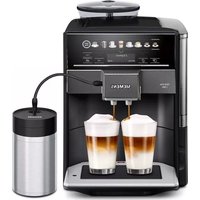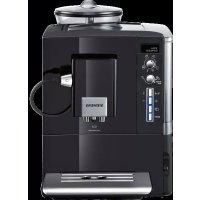
EQ.5 extraKlasse TE506F09DE - Coffee maker SIEMENS - Free user manual and instructions
Find the device manual for free EQ.5 extraKlasse TE506F09DE SIEMENS in PDF.


User questions about EQ.5 extraKlasse TE506F09DE SIEMENS
0 question about this device. Answer the ones you know or ask your own.
Ask a new question about this device
Download the instructions for your Coffee maker in PDF format for free! Find your manual EQ.5 extraKlasse TE506F09DE - SIEMENS and take your electronic device back in hand. On this page are published all the documents necessary for the use of your device. EQ.5 extraKlasse TE506F09DE by SIEMENS.
USER MANUAL EQ.5 extraKlasse TE506F09DE SIEMENS
Included in delivery (see page 23)
CALC'N'CLEAN NOTWENDIG!
Included in delivery. 23
Safety instructions 24
Overview. 26
Controls 26
Display messages 27
aromaDoubleShot. 27
Before using for the first time. 28
Water filter 29
Menu settings 30
Adjusting the grinding unit 31
Preparation using coffee beans. 31
Preparation using ground coffee 32
Dispensing hot water 32
Preparing milk froth and warm milk 33
Maintenance and daily cleaning 33
Tips on energy saving 36
Service Programmes 36
Frost protection. 39
Accessories 39
Disposal 39
Guarantee. 39
Technical data. 39
Simple troubleshooting. 40
Congratulations on purchasing this fully automatic espresso machine from Siemens.
These instructions describe various models with different features.
Please also note the enclosed quick reference guide. It can be kept in the special storage compartment (5c) until it is needed.
Included in delivery
(see overview image at the start of the instructions)
Fully automatic espresso machine TE506
Quick reference guide
Instruction manual
Milk frother
Water hardness testing strip
Measuring spoon
Water filter
Safety instructions
Please read and follow the operating instructions carefully and keep them for later reference. Enclose these instructions when you give this appliance to someone else. This appliance is designed for the preparation of normal household quantities in the home, or in household-like, non-commercial environments. Household-like environments include staff kitchens in shops, offi ces, agricultural and other small businesses or for use by guests at bed-and-breakfast establishments, small hotels and similar residential facilities.
Danger of electric shock!
Connect and operate the appliance only according to the type plate specifications. To avoid potential hazards, repairs such as replacing a damaged cable must only be carried out by our customer service personnel.
This appliance may be used by children aged 8 years and older and by persons with reduced physical, sensory or mental capabilities or who lack experience and/or knowledge if they are supervised or have been given instruction in the safe use of the appliance and have understood the dangers involved. Keep children under 8 years of age away from the appliance and connecting cable and do not allow them to use the appliance. Children shall not play with the appliance. Cleaning and user maintenance shall not be made by children unless they are older than 8 years and supervised.
Never immerse the appliance or mains cable in water. Use only if power cord and appliance show no signs of damage. Should a fault occur, pull the plug or disconnect from the mains immediately.
Risk of suffocation!
Do not allow children to play with packaging material.
Risk of scalding!
The milk frother outlet (6a) gets very hot. Milk froth or warm milk comes out of the milk frother (6) at high pressure. Splashes of milk can scald. Do not touch the outlet (6a) or aim it at anyone. After use, allow to cool down first before touching.
Use this appliance only after the milk frother (6) has been fully assembled and installed.
Risk of injury!
Do not reach into the grinding unit.
Overview
(see overview images A, B, C, D and E at the beginning of this instruction manual)
1 Bean container
2 Aroma cover
3 Selector for grind setting
4.4.2.1.3.4.5.6.7.8.9.10.11.12.13.14.15.16.17.18.19.20.21.22.23.24.25.26.27.28.29.30.31.32.33.34.35.36.37.38.39.40.41.42.43.44.45.46.47.48.49.50.51.52.53.54.55.56.57.58.59.60.61.62.63.64.65.66.67.68.69.70.71.72.73.74.75.76.77.78.79.80.81.82.83.84.85.86.87.88.89.90.91.92.93.94.95.96.97.98.99.100
5 Brewing unit (Fig. E)
a) Brewing unit
b) Door
c) Storage compartment for quick reference guide
d) Eject lever for brewing unit
e) Lock
f) Cover
6 Milk frother (Fig. C) removable
a) Outlet
b) Rotary selector for warm milk/ milk froth
c) Milk tube
d) Upper part
e) Air nozzle
7 Coffee outlet, height-adjustable
8 Drip tray (Fig. D)
a) Drip tray panel
b) Coffee grounds container
c) Drip tray for coffee outlet
d) Grate for coffee outlet
9 Power on/off switch O/I
10 start button
11 button
12 / button
13 念 off / i button
14 "Coffee strength" rotary knob
15 "Drink selection" rotary knob
16 Display
17 Removable water tank
18 Lid for water tank
19 Measuring spoon (insertion aid for water filter)
20 Storage compartment for measuring spoon
21 Power cable with storage compartment
22 Water filter
Controls
Power on/off switch O / I
The power switch O/I (9) is used to switch the appliance on or to switch it off fully (power supply off).
Important: Before switching off, run the cleaning programme or use the off / i button (13) to switch off.
按钮
Press the button (11) to prepare two cups of the selected drink at the same time. The button can be activated for drinks without milk and without the AromaDouble Shot function.
off/i button
When the off / i button (13) is pressed briefly, the appliance rinses and switches off. Pressing and holding down the off / i button (13) displays the user settings or starts the descaling and cleaning function.
//button
Press the button (12) to generate steam for preparing milk froth or warm milk. This button is also used to dispense hot water.
start button
Press the start button (10) to begin drink preparation or to start a service programme. Press the start button (10) again during drink preparation to cut the dispensing processshort.
"Coffe strength" rotary knob
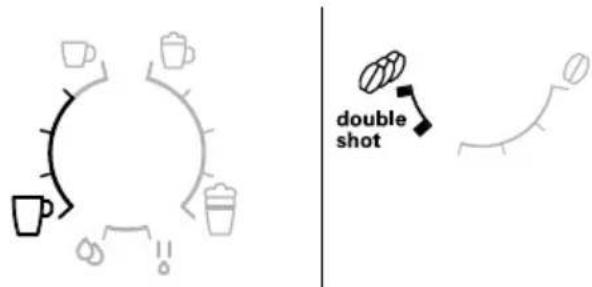
| double shot | This rotary knob (14) is used to set the coffee strength. |
| ∅ | VERY MILD MILD |
| to | NORMAL STRONG |
| ∅ | DOUBLESHOT STRONG+ DOUBLESHOT STRONG++ |
| double shot | With these coffeestrengths the coffee isbrewed in 2 stages. See“aromaDoubleShot”. |
"Drink selection" rotary knob
| This rotary knob (15) is used to select the required drink and the per-cup quantity. It is also used to change user settings. | |
| Coffee-based drinks without milk: | |
| SMALL ESPRESSO ESPRESSO | |
| SMALL CAFÉ CRÈME | |
| CAFÉ CRÈME | |
| LARGE CAFÉ CRÈME | |
| Coffee-based drinks with milk: | |
| SMALL CAPPUCCINO | |
| LARGE CAPPUCCINO | |
| SMALL MACCHIATO | |
| MACCHIATO | |
| LARGE MACCHIATO | |
| RINSE MACHINE | |
| RINSE MILK SYSTEM |
N.B.: If a drink is selected that cannot be prepared, INVALID COMBINATION appears in the display. Change the coffee strength or the selected drink.
Rotary selector
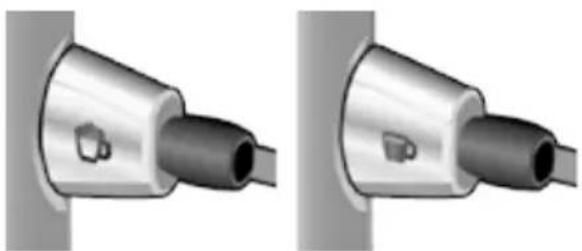
To dispense milk froth – for example for a latte macchiato or cappuccino – turn the symbol to the front.
To dispense warm milk, turn the symbol to the front.
To dispense hot water, set the rotary selector to the horizontal position.
Display messages
The display (16) shows not only the current operating status, but also various messages that give you status information or let you know when you need to take action. As soon as you have taken the necessary action, the message disappears and the menu for drink selection is displayed again.
aromaDoubleShot
The longer the coffee is brewed, the more bitter substances and undesired aromas are released. This has a negative effect on the taste and makes the coffee less easily digestible. So for extra strong coffee the TE506 has a special aromaDouble Shot function. When half the quantity has been prepared, coffee is ground and brewed again so that only the pleasant, aromatic scents are released.
The aromaDouble Shot function is activated with the following settings:
Before using for the first time
General
Fill the appropriate container using only pure, cold, uncarbonated water and only roasted beans (preferably espresso or coffee bean blends for fully automatic coffee machines). Do not use coffee beans that have been glazed, caramelised or treated with other additives containing sugar, since they will block the brewing unit. The water hardness setting can be adjusted on this appliance. The factory default setting for the water hardness is 4. Check the water hardness with the enclosed test strip. If the check reveals a value other than 4, change the setting on the appliance accordingly after switching on (see "Menu settings" WATER HARDNESS).
Switching on the appliance
- Remove the protective film.
- Place the fully automatic expresso machine on a flat, water-resistant surface that can take its weight. Make sure that the machine's ventilation slots remain unobstructured.
Important: Only use the appliance in frost-free rooms. If the appliance has been transported or stored at temperatures below 0^ , wait at least 3 hours before operation.
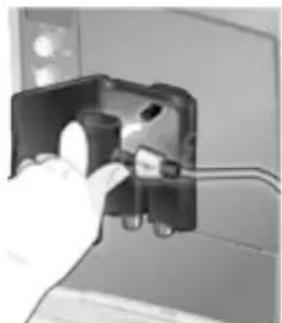
- Pull the power cord out of the storage compartment (22) and plug in. Adjust the length of the cable by pushing it back in or pulling it out. The easiest way to do this is to place the appliance so that its back is flush with the edge of the
counter and either pull the cable downward or push it upward.
- Install the milk frother. Operate the machine only after the milk frother (6) has been fully assembled and installed.
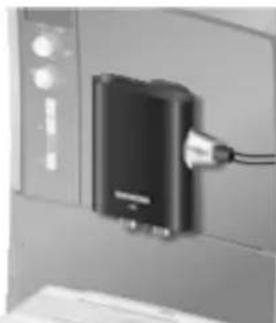
- Lift the lid of the water tank (18).
- Remove and rinse the water tank (17) and fill it with fresh cold water. Do not fill above the max mark.
- Replace the water tank (17) and push it firmly downward into place.
- Close the lid of the water tank (18) again.
- Fill the bean container (1) with coffee beans (for preparation using ground coffee, see "Preparation using ground coffee").
- Press the power switch O/I (9). The display (16) shows the menu for setting the display language.
- Select the required display language with the upper rotary knob (15). The following languages are available:
DEUTSCH
ENGLISH
FRANÇAIS
NEDERLANDS
ITALIANO - Place a receptacle under outlet (6a).
- Press the start button (10).
The language you selected is saved. The appliance heats up and rinses. Some water will run out of the coffee outlet. When the drink selection menu is shown in the display, the appliance is ready for use.
Switching off the appliance
The factory settings of the fully automatic espresso machine are programmed for optimal performance. The appliance switches off automatically after a specific time (time span can be programmed, see "Menu settings" SHUT OFF).
Exception: The appliance switches off without rinsing if only hot water or steam were dispensed.
To switch the appliance off manually before this, press the off / i button (13). The appliance rinses and switches off.
N.B.: If the appliance is being used for the first time, a service program has been run, or the appliance has not been operated for a long period, the first beverage will not have the full aroma and should not be consumed.
When using the espresso machine for the first time, you will achieve a suitably thick and stable "crema" only after the first few cups have been dispensed.
After extended use, water droplets may form on the ventilation slots. This is normal.
Water filter
A water filter can prevent scale buildup. Before a new water filter is used, it must be rinsed. To do this, proceed as follows:
- Press the water filter (20) firmly into the water tank with the aid of the measuring spoon (19).
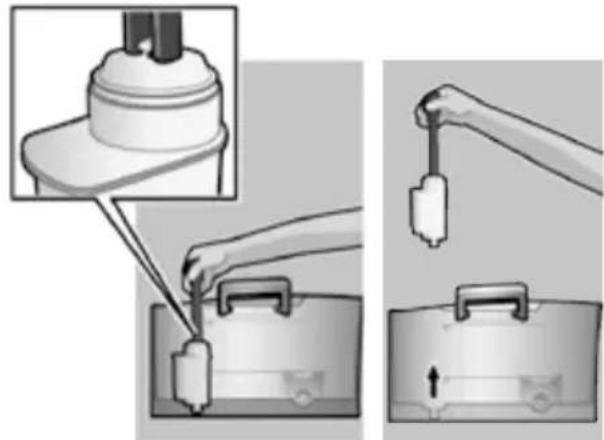
- Fill the water tank (17) with water up to the max mark.
- Press and hold the off / i button (13) for at least three seconds. The menu opens.
- Press the off / i button (13) repeatedly until the display shows No / Old FILTER.
- Select ACTIVATE FILTER with the upper rotary knob (15).
- Press the start button (10).
- Place a receptacle with a capacity of 0.5 litres under the outlet (6a).
- Press the start button (10).
- Water will now flow through the filter to rinse it.
- Empty the container.
The appliance is ready to use once more.
Note: Rinsing the filter simultaneously activates the setting for the CHANGE FILTER! display.
The filter is no longer effective when the CHANGE FILTER! display appears, or at the latest after 2 months. It needs to be replaced for reasons of hygiene and so that there is no build-up of limescale (this could damage the appliance). Replacement filters can be obtained from retailers or from customer service (see "Accessories"). If no new filter is used, turn the FILTER setting to No / Old.
Note: You can use the filter indicator to mark the month in which you inserted the filter. You can also mark the month in which you will need to replace the filter next (at the latest after two months).
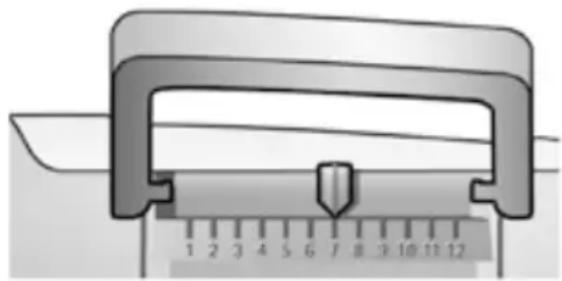
Note: If the appliance has not been used for a prolonged period (e.g. vacation) the filter should be rinsed before the appliance is used again. To do so, dispense a cup of hot water and pour it away.
Menu settings
You can adapt the appliance to your individual needs in the menu settings.
- Hold the off / i button (13) down for at least 3 seconds.
- Press the 念 off/i button (13) repeatedly until the required menu item appears in the display.
- Select the required setting with the upper rotary knob (15).
- Confirm by pressing the start button (10).
To leave the menu without making any changes, turn the rotary selector to Exit and press the start button (10).
You can set the following:
SHUT OFF
Here you can set the time span after which the appliance automatically switches off following the last drink preparation. A time between 15 minutes and 4 hours can be set. The default time can be shortened to save energy.
FILTER
Here you can set whether a water filter is being used. If a water filter is not being used, turn the setting to No / Old. If a water filter is being used, turn the setting to Activate FILTER. New water filters have to be rinsed before use (see "Water filter").
START CALC'N'CLEAN
The service programmes (CALC'N'CLEAN / DESCALING / CLEANING) can be selected manually here. Press the start button (10) and run the selected programme (see "ServiceProgrammes").
TEMP.
The brewing temperature (HIGH / MIDDLE / LOW) can be set here.
LANGUAGE
The display language can be set here.
WATER HARDNESS
The water hardness setting can be adjusted on this appliance. It is important to set the water hardness correctly, so that the appliance indicates accurately when the descending programme should be run. The factory setting for the water hardness is 4.
You can check the water hardness using the enclosed test strip or by asking your local water supplier.
Dip the test strip briefly in water, gently shake off any drips, and check the result after one minute.
Level Water hardness
| German (°dH) French (°fH) | ||
| 1 | 1-7 | 1-13 |
| 2 | 8-14 | 14-25 |
| 3 | 15-21 | 26-38 |
| 4 | 22-30 | 39-54 |
DRINK COUNTER
This displays how many drinks have been dispensed since the appliance was first put into operation.
Adjusting the grinding unit
The rotary selector (3) adjusts the grind settings from coarse to fine.
Warning!
Adjust the grinding unit only while it is running! Otherwise the appliance may be damaged. Do not reach into the grinding unit.
- While the grinding unit is running, adjust the rotary selector (3) from fine (a: Turn anticlockwise) to coarse (b: Turn clockwise) as required.
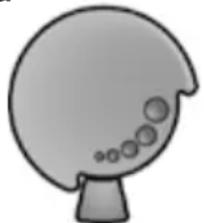
a
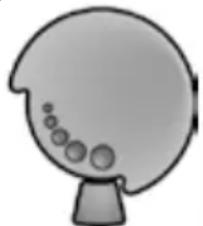
b
Note: The new setting will not become apparent until after the second cup of coffee.
Note: If the message PLEASE ADJUST GRINDING UNIT TO COARSER SETTING! appears in the display, the grind setting for the coffee beans is too fine. Adjust the grinding unit to a coarser setting.
Tip: For dark roast coffee beans, choose a finer grind, for lighter beans a coarser grind.
Preparation using coffee beans
This fully automatic espresso machine grinds beans freshly for each brew.
The appliance must be ready for use. To prepare a coffee-based drink with milk, first insert the milk tube into a milk container and turn the rotary selector (6b) to "Milk froth".
Important: Dried milk residue is difficult to remove, so the milk frother (6) must be cleaned with lukewarm water immediately after use and rinse using the RINSE MILK SYSTEM programme.
Tip: If possible, use only beans for fully automatic coffee and espresso machines. For optimal quality, deep-freeze the beans or store in a cool place in sealed containers. Coffee beans can be ground while frozen.
Important: Fill the water tank (17) with fresh water every day. The tank (17) should always contain sufficient water for operating the appliance.
Preparation
- Place the pre-warmed cup(s) under the coffee outlet (7).
Tip: For a small espresso, always preheat the cup, e.g. using hot water.
- Select the required coffee and the required per-cup quantity by turning the upper rotary knob (15). The selected coffee and the per-cup quantity are shown in the display.
- Select the required coffee strength by turning the lower rotary knob (14). The selected coffee strength is shown in the display. To prepare two cups at the same time, press the button (11) (only for drinks without milk and without the aromaDouble Shot function).
- Press the start button (10).
Coffee is brewed and then poured into the cup(s).
N.B.: With some settings the coffee is prepared in two stages (see "aromaDouble Shot"). Wait until the procedure is fully completed.
Press the start button (10) again to cut the brewing process short.
Preparation using ground coffee
This fully automatic espresso machine can also be operated with ground coffee (not instant coffee powder).
The appliance must be ready for use. To prepare a coffee-based drink with milk, first insert the milk tube into a milk container and turn the rotary selector (6b) to "Milk froth".
N.B.: The aromaDouble Shot function cannot be used when coffee is prepared using ground coffee.
Important: Dried milk residue is difficult to remove, so the milk frother (6) must be cleaned with lukewarm water immediately after use and rinse using the RINSE MILK SYSTEM programme.
Important: Fill the water tank (17) with fresh water every day. The tank (17) should always contain sufficient water for operating the appliance.
Preparation
- Open the drawer (4).
- Pour in no more than 2 level measuring spoons of ground coffee.
Warning: Do not use whole beans or instant coffee.
- Close the drawer (4).
- Select the required drink by turning the upper rotary knob (15) (only one cup possible).
- Press the start button (10).
Coffee is brewed and then poured into the cup.
N.B.: Repeat the procedure for another cup of coffee. If no coffee is taken within 90 seconds, the brewing chamber empties automatically to avoid overfilling. The appliance rinses.
Dispensing hot water
Risk of burns!
The milk frother (6) gets very hot. Hold the milk frother (6) by the plastic part only.
The milk frother must be cleaned before drawing hot water.
The appliance must be ready for use.
- Place the pre-warmed cup or glass under the outlet of the milk frother (6a).
- Set the rotary selector (6b) to the horizontal position.
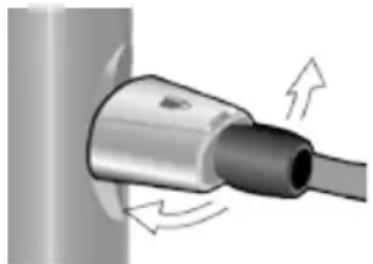
- Press and hold the 12 button (12) for approx. 3 seconds. The appliance heats up. Hot water runs out of the milk frother outlet (6a) for about 40 seconds.
- Press the 12 button (12) again to cut the process short.
Preparing milk froth and warm milk
Risk of burns!
The milk frother (6) gets very hot. Hold the milk frother (6) by the plastic part only.
Tip: You can foam the milk first and then dispense coffee, or foam the milk separately and pour it onto the coffee.
The appliance must be ready for use.
- Place a pre-warmed cup under outlet (6a).
- Insert the milk tube (6c) into a milk container.
- Turn the rotary selector (6b) to "Milk froth" or "Warm milk".
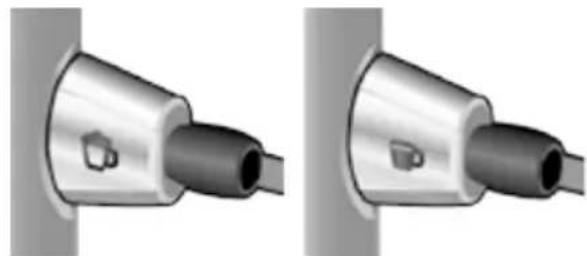
- Press the 山 / 山 button (12). The 山 / 山 button (12) flashes and the appliance now heats up for approx. 20 seconds.
Risk of burns!
Milk froth or warm milk comes out of the milk frother (6) at high pressure. Splashes of milk can scald. Do not touch the outlet (6a) or aim it at anyone.
- End the process by pressing the 心 / 小 button (12).
Tip: For optimal milk froth quality, use cold milk with a fat content of at least 1.5% if possible.
Important: Dried milk residue is difficult to remove, so the milk frother (6) must be cleaned with lukewarm water immediately after use and rinse using the RINSE MILK SYSTEM programme.
Maintenance and daily cleaning
Risk of electric shock!
Unplug the appliance before cleaning it. Never immerse the appliance in water. Do not use a steam cleaner.
- Wipe the outside of the appliance with a soft, damp cloth.
- Do not use abrasive cloths or cleaning agents.
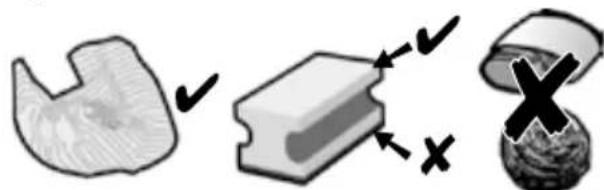
Always remove any limescale, coffee, milk or descending fluid residue immediately. Such residue can cause corrosion.
- New sponge cloths may contain salts. Salts can cause rust film on stainless steel and must therefore be washed out thoroughly before use.
- Pull the drip tray (8c) with the coffee grounds container (8b) forward and out. Remove the panel (8a) and the grate (8d). Empty and clean the drip tray and coffee grounds container.
- Remove drawer (4) and clean.
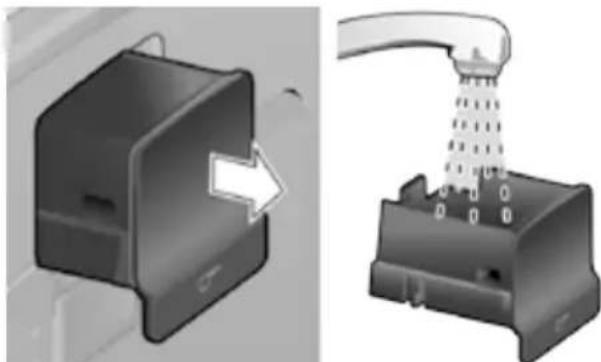

Do not put the following items in the dishwasher: drip tray panel (8a), drawer (4), brewing unit (5a).

The following items are dishwasher-safe: drip tray for coffee outlet (8c), coffee grounds container (8b), grate for coffee outlet (8d), aroma cover (2) and measuring spoon (19).
- Wipe out the inside of the appliance (tray holders and drawer).
Important: Drip tray for coffee outlet (8c) and coffee grounds container (8b) should be emptied and cleaned daily to prevent mould from developing.
N.B.: If the appliance is cold when switched on with the power switch O/I (9) or if it switches off automatically after coffee has been dispensed, it rinses automatically. In other words the system cleans itself.
Important: If the appliance has not been used for a prolonged period of time (e.g. after a vacation), clean the entire appliance thoroughly, including the milk system and brewing unit.
Cleaning the milk system
If the milk system was not cleaned after milk has been dispensed, after a certain amount of time the message CLEAN MILK SYSTEM! will appear on the display. Clean the milk system immediately after use! To clean, leave the rotary selector (6b) in the same position it was in when last used.
To pre-clean the milk system automatically:
- Select by turning the rotary knob (15).
- Place a tall, empty container under the outlet (6a).
- Push the outlet as close as possible to the container.
- Place the end of the milk tube (6c) into the container.
- Press the start button (10).
The machine automatically releases water into the container and vacuums it up again via the milk tube to rinse the milk system. The rinse procedure stops automatically after about 1 minute.
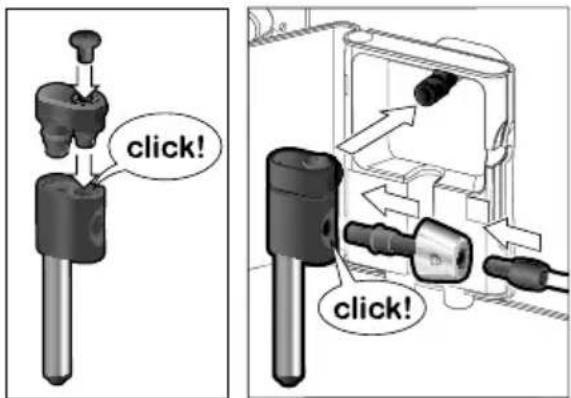
- Empty the container and clean the milk tube (6c).
In addition to this, clean the milk system thoroughly at regular intervals (by hand or in the dishwasher).
Dismantling the milk system for cleaning:
- Pull the milk frother (6) forward out of the appliance.
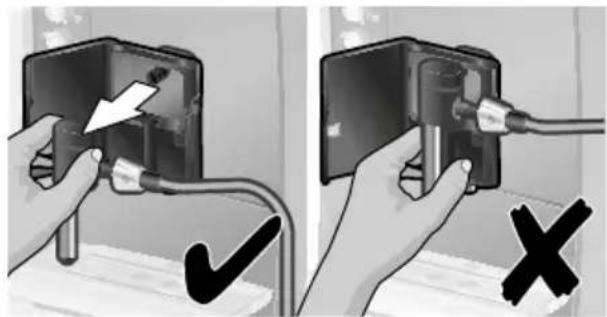
- Dismantle the milk frother into its individual parts (6a to 6d) (see figure C at the start of the operating instructions).
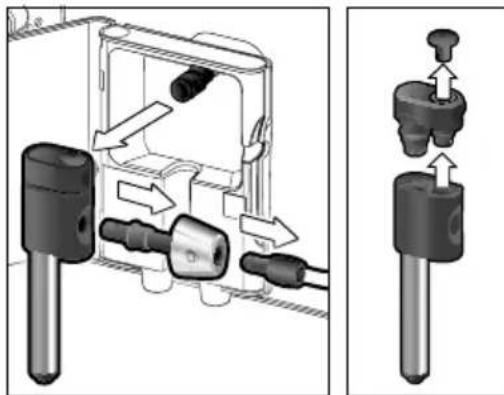
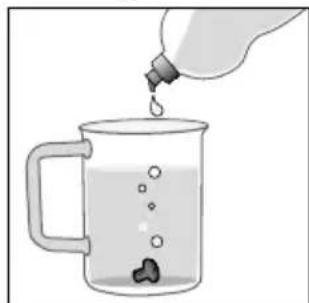
- Clean the individual parts with a detergent solution and a soft brush. If necessary, soak in a warm detergent solution.

-
Rinse all parts with clear water and dry them.
-
Reassemble all the parts and replace fully in the appliance.
- Remove the cover (5f) of the brewing unit and rinse the brewing unit (5a) thoroughly under running water.
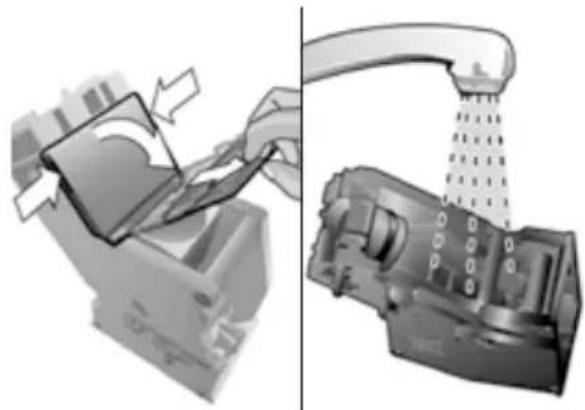
Risk of scalding!
Use this appliance only after the milk frother (6) has been fully assembled and installed.
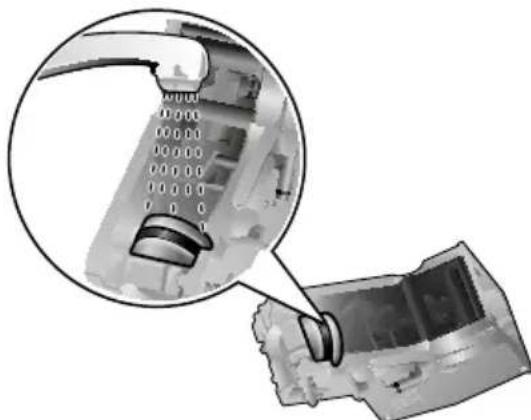
- Thoroughly clean the brewing unit sieve under the running water.
Cleaning the brewing unit
Clean the brewing unit regularly! To pre-clean the brewing unit automatically:
- Select by turning the rotary knob (15).
- Place an empty glass under outlet (6a).
- Press the start button (10).
The appliance rinses.
In addition to the automatic cleaning programme, the brewing unit (5a) should be removed regularly for cleaning. (See figure E at the start of the operating instructions.)
- Switch the appliance off at the power on/off switch O/I (9). No buttons are lit.
- Open the door (5b) to the brewing unit.
- Slide the red lock (5e) on the brewing unit (5a) completely to the left.
- Press the eject lever (5d) down fully. The brewing unit is released.
- Grasp the brewing unit (5a) by the recessed grips and remove carefully.
Important: Do not clean with detergent or other cleaning agents and do not put it in the dishwasher.
- Wipe out the inside of the appliance thoroughly with a damp cloth and remove any coffee residues.
- Allow the brewing unit (5a) and the inside of the appliance to dry.
- Replace the cover (5f) on the brewing unit and reinsert the brewing unit (5a) fully into the appliance.
- Press the eject lever (5d) up fully.
- Slide the red lock (5e) fully to the right and close the door (5b).
Tips on energy saving
- Switch off the fully automatic espresso machine when not in use. To do this, press the off / i button (13). The appliance rinses and switches off.
- If possible, do not interrupt coffee or milk froth dispensing. Cutting the coffee or milk froth dispensing process short results in higher energy consumption and in more residual water collecting in the drip tray.
- Descale the appliance regularly to avoid a build-up of limescale. Limescale residue results in higher energy consumption.
Service Programmes
Tip: Refer also to the quick reference guide in the storage compartment (5c).
Depending on usage, the following messages will appear on the display at certain intervals:
DESCALE REQUIRED!
or
CLEAN REQUIRED!
or
CALC'N'CLEAN REQUIRED!
The appliance should be cleaned or descaled immediately using the corresponding programme. You also have the option of combining both processes with the Calc'n'Clean function (see "Calc'n'Clean"). If the service programme is not run as instructed, the appliance may be damaged.
Warning!
Each time you run the service programme, you should follow the instructions for using the descaling and cleaning agents. Please observe the safety instructions on the packaging of the cleaning agent.
Never interrupt the service programme!
Do not drink the liquids!
Never use vinegar, vinegar-based products, citric acid or citric acid-based products!
Never put descending tablets or other descending agents in the ground coffee drawer or the drawer for cleaning tablets (4)!
Specially developed descaling and cleaning tablets are available from retailers or customer service (see „Accessories").
Dscaling
Duration: approx. 25 minutes.
Important: If there is a filter in the water tank (17), it needs to be removed before the descending programme is run.
If the message DESCALE REQUIRED! appears on the display, press the off / i button (13) for 3 seconds and then press the start button (10). The descending programme will start. To descale the appliance before being prompted, press the off / i button (13) for at least 3 seconds. Then press the off / i button (13) briefly twice. Turn the upper rotary knob (15) until START DESCALING appears in the display. To start the descending procedure, press the start button (10).
The display will guide you through the programme.
EMPTY DRIP TRAY
INSERT DRIP TRAY
- Empty drip tray (8) and replace them.
N.B.: If the water filter (20) is activated, the display will prompt you to remove the filter (20) and then press the start button (10) again. Remove the filter now if you have not already done so. Press the start button (10).
FILL DESCALER
PRESS START
- Pour lukewarm water into the empty water tank (17) up to the 0.5l mark and then dissolve 1 Siemens descaling tablet TZ80002 in it. When using TZ60002, 2 tablets must be dissolved.
- Press the start button (10).
PLACE CONTAINER
PRESS START
- Place a receptacle with a capacity of at least 0.5 litres under the outlet (6a).
- Press the start button (10).
DESCALE IN PROGRESS
The descending pro gramme will now run for about 20 minutes.
CLEAN / FILL WATER TANK
PRESS START
- Rinse the water tank (17) and refill it with fresh water up to the max mark.
- Press the start button (10).
DESCALE IN PROGRESS
The descending pro gramme now runs for about 3 minutes and rinses the appliance.
EMPTY DRIP TRAY
INSERT DRIP TRAY
- Empty drip tray (8) and replace them.
Replace the filter if one is being used. The appliance has completed descaling and is ready for use again.
Important: Wipe down the appliance using a soft, damp cloth to immediately remove any descaler residue. Such residue can cause corrosion. New sponge cloths may contain salts. Salts can cause rust film on stainless steel and must therefore be washed out thoroughly before use.
Cleaning
Duration: approx. 10 minutes.
Important: Clean the brewing unit before starting the service programme, see chapter "Cleaning the brewing unit".
If the message CLEAN REQUIRED! appears on the display, press the off / i button (13) for 3 seconds and then press the start button (10).
The cleaning programme will start.
To clean the appliance before being prompted, press the off / i button (13) for at least 3 seconds. Then press the off / i button (13) briefly twice. Turn the upper rotary knob (15) until START CLEANING appears in the display. To start the cleaning procedure, press the start button (10).
The display will guide you through the programme.
EMPTY DRIP TRAY
INSERT DRIP TRAY
- Empty drip tray (8) and replace them.
CLEANING IN PROGRESS
The appliance rinses twice.
OPEN DRAWER
- Open the drawer (4).
FILL CLEANER
- Drop a Siemens cleaning tablet in the drawer (4) and close.
CLEANING IN PROGRESS
The cleaning pro gramme will now run for about 8 minutes.
EMPTY DRIP TRAY
INSERT DRIP TRAY
- Empty drip tray (8) and replace them.
The appliance has finished cleaning is ready for use again.
Calc'n'Clean
Duration: approx. 35 minutes.
Calc'nClean combines the separate functions of descending and cleaning. If both programmes are due to be run soon, the espresso machine automatically suggests this service programme.
Important: If there is a filter in the water tank (17), it needs to be removed before the service programme is run.
If the message Calc'N'CLEAN REQUIRED! appears on the display, press the off / i button (13) for 3 seconds and then press the start button (10). The service programme will start.
To run Calc'n'Clean before being prompted, press the off / i button (13) for at least 3 seconds. Then press the off / i button (13) briefly twice. Turn the upper rotary knob (15) until START Calc'n'CLEAN appears in the display. To start Calc'n'Clean, press the start button (10). The display will guide you through the programme.
EMPTY DRIP TRAY
INSERT DRIP TRAY
- Empty drip tray (8) and replace them.
CALC'N'CLEAN IN PROGRESS The appliance rinses twice.
OPEN DRAWER
- Open the drawer (4).
FILL CLEANER
- Drop a Siemens cleaning tablet in the drawer (4) and close.
N.B.: If the water filter (20) is activated, the display will prompt you to remove the filter (20) and then press the start button (10) again. Remove the filter now if you have not already done so. Press the start button (10).
FILL DESCALER
PRESS START
- Pour lukewarm water into the empty water tank (17) up to the 0.5l mark and then dissolve 1 Siemens descending tablet TZ80002 in it. When using TZ60002, 2 tablets must be dissolved.
- Press the start button (10).
PLACE CONTAINER
PRESS START
- Place a receptacle with a capacity of at least 1 litre under the outlet (6a).
- Press the start button (10).
CALC'N'CLEAN IN PROGRESS
The descending pro gramme will now run for about 22 minutes.
CLEAN / FILL WATER TANK
PRESS START
- Rinse the water tank (17) and refill it with fresh water up to the max mark.
- Press the start button (10).
CALC'N'CLEAN IN PROGRESS
The descending pro gramme now runs for about 10 minutes and rinses the appliance.
EMPTY DRIP TRAY
INSERT DRIP TRAY
- Empty drip tray (8) and replace them. Replace the filter if one is being used. The appliance has finished cleaning is ready for use again.
Important: Wipe down the appliance using a soft, damp cloth to immediately remove any descaler residue. Such residue can cause corrosion. New sponge cloths may contain salts. Salts can cause rust film on stainless steel and must therefore be washed out thoroughly before use.
Frost protection
To avoid damage from low temperatures during transport and storage, the appliance must be completely emptied first.
Note: The appliance must be ready for use and the water tank (17) filled.
- Place a large receptacle under outlet (6a).
- Press the 12 button (12) and allow the appliance to steam for about 15 seconds.
- Switch the appliance off at the power on/off switch O/I (9).
- Empty the water tank (17) and the drip tray (8).
Accessories
The following accessories can be obtained from retailers and customer service.
| Accessories Ordering number | |
| Retail / Customer service | |
| Cleaning tablets TZ60001 / 00310575 | |
| Descaling tablets TZ80002 / 00576693 | |
| Water filter TZ70003 / 00575491 | |
| Care set TZ80004 / 00576330 | |
| Milk container with “Fresh Lock” lid | TZ80009N / 00576166 |
Disposal

Dispose of packaging in an environmentally-friendly manner. This appliance is labelled in accordance with European Directive 2012/19/EG concerning used electrical and electronic appliances (waste electrical and electronic equipment - WEEE). The guideline determines the framework for the return and recycling of used appliances as applicable throughout the EU. Please ask your specialist retailer about current disposal facilities.
Guarantee
The guarantee conditions for this appliance are as defined by our representative in the country in which it is sold. Details regarding these conditions can be obtained from the dealer from whom the appliance was purchased. The bill of sale or receipt must be produced when making any claim under the terms of this guarantee.
Changes reserved.
Technical data
| Power connection (voltage - frequency) 220-240 V - 50/60 Hz | |
| Heater wattage 1600 W | |
| Maximum static pump pressure 15 bar | |
| Maximum water tank capacity (without filter) 1.7 liters | |
| Maximum capacity of the coffee bean container | 300 grams |
| Length of power cable | 100 cm |
| Dimensions (H x W x D) | 385 x 280 x 479 mm |
| Weight, empty | 9.3 kg |
| Type of grinding unit | Ceramic |
Simple troubleshooting
| Problem Cause Solution | ||||
| Display shows REFILL BEANS! although the bean container (1) is full, or the grinding unit does not grind the beans. | Beans are not falling into the grinding unit (beans too oily). | Gently tap the bean container (1). Change the type of coffee if necessary. When the bean container (1) is empty, wipe it with a dry cloth. | ||
| No hot water dispensed. The milk frother (6) is soiled. | Clean the milk frother (6), see “Maintenance and daily cleaning”. | |||
| Too little or no milk froth or the milk frother (6) does not draw the milk in. | The milk frother (6) is soiled. | Clean the milk frother (6), see “Maintenance and daily cleaning”. | ||
| Milk unsuitable for frothing. Use low-fat milk (1.5% fat). | ||||
| The milk frother (6) is not correctly assembled. | Wet the milk frother parts and press together firmly. | |||
| Build-up of limescale in the appliance. | Descale the appliance as described in the instructions. | |||
| Coffee dispensing slows to a trickle or stops completely. | Coffee is ground too finely. Pre-ground coffee is too fine. | Adjust the grinding unit to a coarser setting. Use coarser pre-ground coffee. | ||
| Build-up of limescale in the appliance. | Descale the appliance as described in the instructions. | |||
| Coffee has no “crema”. Unsuitable type of coffee. Use a type of coffee with a higher proportion of robusta beans. | ||||
| The beans are no longer fresh. | Use fresh beans. | |||
| The grinding setting is not suitable for the beans. | Adjust grinding setting to fine. | |||
| Coffee is too “acidic”. The grinding setting is too coarse or the pre-ground coffee is too coarse. | Adjust the grinding unit to a finer setting or use finer pre-ground coffee. | |||
| Unsuitable type of coffee. Use a darker roast. | ||||
| Coffee is too “bitter”. The grinding setting is too fine or the pre-ground coffee is too fine. | Adjust the grinding unit to a coarser setting or use coarser pre-ground coffee. | |||
| Unsuitable type of coffee. Change type of coffee used. | ||||
| Display shows ERROR CALL HOTLINE | The appliance has a fault. Please call the hotline. | |||
| If you are unable to solve the problem, please call the hotline. You will find the telephone numbers at the back of these instructions. | ||||
| Problem Cause Solution | ||||
| The water filter (20) does not stay in position in the water tank (17). | The water filter (20) is not mounted correctly. | Firmly press the water filter (20) straight down into the tank connection. | ||
| Display shows CHECK WATER TANK | Water tank has been incorrectly inserted or the new water filter has not been rinsed according to instructions. | Insert the water tank correctly or rinse the water filter according to instructions and then switch on. | ||
| Carbonated water in the water tank. | Fill the water tank with fresh tap water. | |||
| The coffee grounds are not compact and are too wet. | The grinding setting is too fine or too coarse, or not enough ground coffee has been used. | Adjust the grinding unit to a coarser or finer setting, or use 2 level measuring spoons of ground coffee. | ||
| Display shows CLEAN BREWING UNIT | Brewing unit (5) is soiled. Clean brewing unit (5). | |||
| Too much pre-ground coffee in the brewing unit (5). | Clean brewing unit (5). Pour in no more than 2 level measuring spoons of ground coffee. | |||
| The brewing unit's mecha-nism is stiff. | Remove and clean the brewing unit, see "Maintenance and daily cleaning". | |||
| Coffee or milk froth quality varies considerably. | Build-up of limescale in the appliance. | Descale the appliance as described in the instructions. | ||
| Water dripped onto the inner floor of the appli-ance when the drip tray (8) was removed. | Drip tray (8) removed too early. | Wait a few seconds after the last drink was dispensed before removing the drip tray (8). | ||
| Display shows INSERT BREWING UNIT | Brewing unit (5) is missing or was not recognised. | Switch off the appliance with the brewing unit (5) in place, wait three seconds and switch on the appliance. | ||
| Restore the unit to its original factory settings ("Reset"). | You changed some settings and want to discard them. | Turn off the unit with the power on/off switch O/I (9). Press and hold the ∅ off / i (13) and the ∅ I/! (12) button and turn the appliance on with the power on/off switch O/I (9). Confirm by pressing the start button start (10). The factory settings are now activated. | ||
| If you are unable to solve the problem, please call the hotline. You will find the telephone numbers at the back of these instructions. | ||||
Sommaire
CALC'N'CLEAN EN COURS
CALC'N'CLEAN EN COURS
CALC'N'CLEAN EN COURS
Sous reserve de modifications.
Duur: circa 25 minutes.
Duur: circa 10 minutes.
Duur: circa 35 minutes.
AE United Arab Emirates,
BSH Home Appliances FZE
Round About 13,
Plot Nr MO-0532A
Jebel Ali Free Zone - Dubai
Tel.:048814401
mailto:service-uae@bshg.com
www.siemens-home.com/ae
AL Republika e Shqiperise, Albania
AERTECH SH.P.K.
Rruga Qemal Stafa
Pallati ri perball Prokuroris se
Pergjithshme
Hyrja C Kati 10
Tirana
Tel.: 066 206 47 94
mailto:g.volina@aertech.al
HEATHERTON, Victoria 3202
Tel.: 1300 368 339
mailto:bshau-as@bshg.com
www.siemens-home.com.au
BA Bosnia-Herzegovina, Bosna i Hercegovina
"HIGH" d.o.o.
Gradačačka 29b
71000 Sarajevo
Info-Line: 061 10 09 05
Fax: 033 21 35 13
mailto:delicnanda@hotmail.com
BE Belgique, Belgie, Belgium
BSH Home Appliances S.A.
European Trade Center Building,
5th floor
1784 Sofia
Tel.: 02 892 90 47
Fax: 02 878 79 72
mailto:informacia.servis-bg@
bshg.com
www.siemens-home.bg
BH Bahrain,
Khalafat Company
Manama
Tel.: 017400553
mailto:service@khalaifat.com
CH Schweiz, Suisse, Svizzera, Switzerland
BSH Hausgeräte AG
Werkskundendienst
für Hausgeräte
Fahrweidstrasse 80
8954 Geroldswil
+7 snt/min (alv 23%)
+17 snt/min (alv 23%)
FR France
BSH Electroménager S.A.S.
To arrange an engineer visit, to order spare parts or
accessories or for product advice please visit
www.siemens-home.co.uk
or call
Tel.: 0844 892 8999*
*Calls from a BT landline will be charged at up to 3 pence per minute. A call set-up fee of up to 6 pence may apply.
GR Greece, Eλας
BSH Ikiakes Siskeves A.B.E.
Central Branch Service
17 km E.O. Athinon-Lamias &
Potamou 20
14564 Kifisia
IavvAAHvio tnAePwvo:181 82
(aotikxpeoon)
www.siemens-home.gr
HK Hong Kong, 香港
BSH Home Appliances Limited
Unit 1 & 2, 3rd Floor
North Block, Skyway House
3 Sham Mong Road
Tai Kok Tsui, Kowloon
Hong Kong
Tel.: 2565 6151
Fax:25656681
mailto:siemens.hk.service@
bshg.com
www.siemens-home.com.hk
HR Hrvatska, Croatia
BSH kučni urežaji d.o.o.
Kneza Branimira 22
10000 Zagreb
Tel.: 016403609
Fax: 01 640 36 03
mailto:informacije.servis-hr@
bshg.com
www.siemens-home.com/hr
www.siemens-home.com/hu
IE Republic of Ireland
BSH Home Appliances Ltd.
Unit F4, Ballymount Drive
Ballymount Industrial Estate
Walkinstown
Dublin 12
Service Requests, Spares and
Accessories
Tel.:014502655
Fax: 01450 2520
www.siemens-home.com/ie
IL Israel,
C/S/B Home Appliance Ltd.
Uiel Building
2, Hamelacha St.
Industrial Park North
71293 Lod
Tel.: 089777222
Fax: 08 9777 245
mailto:csb-serv@zahav.net.il
www.siemens-home.co.il
IN India, Bharat, यर्षत
BSH Customer Service
Front Office
Shop No.4, Everest Grande,
Opp. Shanti Nagar Bus Stop,
Mahakali Caves Road,
Andheri East
Mumbai 400 093
IS Iceland
Smith & Norland hf.
Noatuni 4
105 Reykjavik
Tel.: 0520 3000
Fax:05203011
www.sminor.is
IT Italia, Italy
www.siemens-home.com/it
KZ Kazakhstan, Ka3akctah
IP Turebekov Yerzhan
Nurmanovich
Jangeldina str. 15
Shimkent 160018
Tel.: 0252 31 00 06
mailto:evrika_kz@mail.ru
LB Lebanon,
Tehaco s.a.r.l
Boulevard Dora 4043 Beyrouth
P.O.Box 90449
Jdeideh 1202 2040
Tel.:01255211
mailto:Info@Teheni-Hana.com
LT Lietuva, Lithuania
Baltic Continent Ltd.
Luksoq.23
09132 Vilnius
Tel.: 05 274 1788
Fax:052741765
mailto:info@balticcontinent.It
www.balticcontinent.lt
LU Luxembourg
www.siemens-home.com/lu
LV Latvija, Latvia
General Serviss Limited
Bullu street 70c
1067 Riga
Tel.: 07424137
mailto:bt@olimpeks.lv
MD Moldova
S.R.L. "Rialto-Studio"
yn. UyceBa 98
2012 KnuinHeB
TeJ./paKc:022 23 81 80
MK Macedonia, MaKeIoHnja
GORENEC
Jane Sandanski 69 lok. 3
1000 Skopje
Tel.: 02 2454 600
Mobil: 070 697 463
mailto:gorenec@yahoo.com
MT Malta
Aplan Limited
The Atrium
Mriehel by Pass
BKR3000 Birkirkara
Tel.: 025495122
Fax: 021 480 598
mailto:lapap@aplan.com.mt
NL Nederlande, Netherlands
Unit F 2, 4 Orbit Drive
Mairangi Bay
Auckland 0632
Tel.:094770492
Fax:094772647
mailto:bshnz-cs@bshg.com
PL Polska, Poland
www.siemens-home.com/pt
*(PT 0,10 €/min., Mobile 0,25 €/min)
RO Romania, Romania
BSH Electrocasnice srl.
Sos. Bucuresti-Ploiesti,
nr. 19-21, sect.1
13682 Bucuresti
Tel.:021 203 9748
Fax:021 203 9733
mailto:service.romania@
bshg.com
www siemens-home.com/ro
RU Russia, Pocsn
OOO"BCX BbITOBaTeXnka"
CepBnC OT pOn3BODnteTnA
Maŋa Kanyxckaa 19/1
119071 MockBa
TeJ.: 495 737 2962
mailto:mok-kdhl@bshg.com
www.siemens-home.com
SE Sverige, Sweden
BSH Home Appliances AB
Landsvagen 32
169 29 Solna
Tel.: 0771 11 22 77 local rate
mailto:Siemens-Service-SE@
bshg.com
www.siemens-home.se
SG Singapore, 新加坡
BSH Home Appliances Pte. Ltd.
TECHPLACE I and
Mo Kio Avenue 10
Block 4012 #01-01
569628 Singapore
Tel.:67515000
Fax:67515005
mailto:bshsgp.service@bshg.com
SI Slovenija, Slovenia
BSH Hišni aparati d.o.o.
Litostrojska 48
1000 Ljubljana
Tel.: 01 583 07 00
Fax: 01 583 08 89
www.siemens-home.com/sk
TR Türkiye, Turkey
BSH Ev Aletleri Sanayi
ve Ticaret A.S.
Fatih Sultan Mehmet Mahallesi
Balkan Caddesi No: 51
34771 Umraniye, Istanbul
Tel.: 02164446688*
Fax: 0 216 528 9188
mailto:careline.turkey@bshg.com
www.siemens-home.com/tr
gama-electronics.com
XS Srbija, Serbia
BSH Kučni aparati d.o.o.
Milutina Milankovica 11^a
11070 Novi Beograd
Tel.: 011 205 23 97
Fax: 011 205 23 89
mailto:informacije.servis-sr@
bshg.com
www.siemens-home.rs
ZA South Africa
BSH Home Appliances (Pty) Ltd.
15th Road Randjespark
Private Bag X36, Randjespark
1685 Midrand-Johannesburg
Tel.: 086 002 6724
Fax:0866171780
mailto:applianceserviceza@
bshg.com
www.siemens-home.com
UK Calls provided by a UK BT Landline will be charged at up to 3 pence per minute.
A Call Set-Up Fee of up to 6 pence per call applies to calls from residential lines.
Mobile and other providers' costs may vary. See www.bt.com/pricing for details.
HR 016403609
HU 014895461
IE 014502655
IS 05203000
LT 052741788
LU 26349300
LV 067425232
ME 020662444
MK 022454600
PL 801 191 534
RO 021 203 97 48
RU 4957372962
SI 041991100
SK 0244452041
XS 0116147110
AU 1300368339