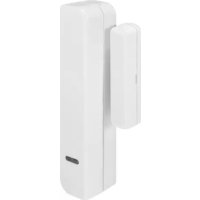
FUMK50031W - Door/window sensor ABUS - Free user manual and instructions
Find the device manual for free FUMK50031W ABUS in PDF.

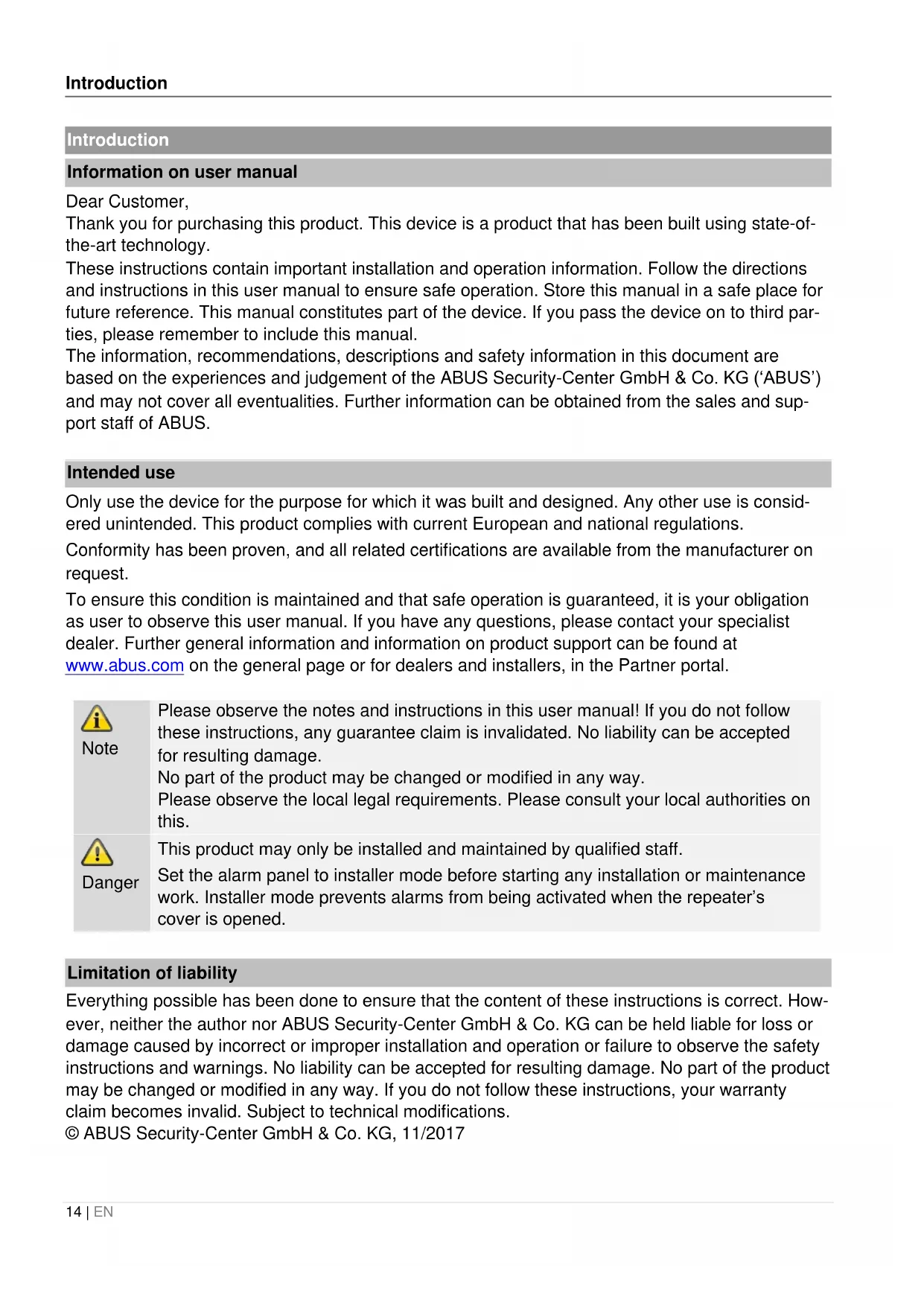


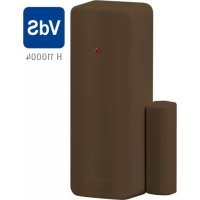
| Product type | Secvest narrow wireless opening detector |
| Brand | ABUS |
| Model | FUMK50031W |
| Sensor dimensions (H x W x D) | 19 x 103 x 24 mm |
| Magnet dimensions (H x W x D) | 12 x 55 x 12 mm |
| Sensor weight (with battery) | 40 g |
| Magnet weight | 10 g |
| Power supply | 1 lithium battery 3 V CR2 |
| Replacement battery type | FU2990 |
| Main functions | Opening detection via Reed contact, tamper monitoring, LED indicator, signal test |
| Detection method | Reed contact (magnetic field sensor) |
| Wireless range (open field) | 500 m |
| Wireless range (indoor) | Approx. 30 m |
| Operating frequency | 868.6625 MHz (low data rate) |
| Security grade | 2 (EN 50131-1) |
| Protection rating (IP) | IP34 (when mounted) |
| Operating temperature | -10 °C to +55 °C |
| Max. humidity | 75% RH non-condensing |
| Housing material | PC/ABS |
| Maintenance and cleaning | Clean with a soft dry cloth. Replace the battery every 2 years or when the control panel indicates empty battery. |
| Security | Tamper protection (cover and wall), battery voltage monitoring, continuous supervision |
| General information | Compatible with Secvest control panels (FUAA50000, FUA50500, etc.), RED 2014/53/EU, WEEE 2012/19/EU directives |
Frequently Asked Questions - FUMK50031W ABUS
User questions about FUMK50031W ABUS
0 question about this device. Answer the ones you know or ask your own.
Ask a new question about this device
Download the instructions for your Door/window sensor in PDF format for free! Find your manual FUMK50031W - ABUS and take your electronic device back in hand. On this page are published all the documents necessary for the use of your device. FUMK50031W by ABUS.
USER MANUAL FUMK50031W ABUS
Installation instructions and user manual
FR
Installation instructions and user manual
FR
Information on user manual
Dear Customer,
Thank you for purchasing this product. This device is a product that has been built using state-of-the-art technology.
These instructions contain important installation and operation information. Follow the directions and instructions in this user manual to ensure safe operation. Store this manual in a safe place for future reference. This manual constitutes part of the device. If you pass the device on to third parties, please remember to include this manual.
The information, recommendations, descriptions and safety information in this document are based on the experiences and judgement of the ABUS Security-Center GmbH & Co. KG ('ABUS') and may not cover all eventualities. Further information can be obtained from the sales and support staff of ABUS.
Intended use
Only use the device for the purpose for which it was built and designed. Any other use is considered unintended. This product complies with current European and national regulations.
Conformity has been proven, and all related certifications are available from the manufacturer on request.
To ensure this condition is maintained and that safe operation is guaranteed, it is your obligation as user to observe this user manual. If you have any questions, please contact your specialist dealer. Further general information and information on product support can be found at www.abus.com on the general page or for dealers and installers, in the Partner portal.

Note
Please observe the notes and instructions in this user manual! If you do not follow these instructions, any guarantee claim is invalidated. No liability can be accepted for resulting damage.
No part of the product may be changed or modified in any way.
Please observe the local legal requirements. Please consult your local authorities on this.

Danger
This product may only be installed and maintained by qualified staff.
Set the alarm panel to installer mode before starting any installation or maintenance work. Installer mode prevents alarms from being activated when the repeater's cover is opened.
Limitation of liability
Everything possible has been done to ensure that the content of these instructions is correct. However, neither the author nor ABUS Security-Center GmbH & Co. KG can be held liable for loss or damage caused by incorrect or improper installation and operation or failure to observe the safety instructions and warnings. No liability can be accepted for resulting damage. No part of the product may be changed or modified in any way. If you do not follow these instructions, your warranty claim becomes invalid. Subject to technical modifications.
© ABUS Security-Center GmbH & Co. KG, 11/2017
Safety information
Explanation of symbols
The following symbols are used in this manual and on the device:
| Symbol | Signal word | Meaning |
| ! | Danger | Indicates a risk of injury or health hazards. |
| ! | Danger | Indicates a risk of injury or health hazards caused by electrical voltage. |
| ! | Important | Indicates possible damage to the device/accessories. |
| i | Note | Indicates important information. |
| The EU Directive WEEE 2012/19/EU governs the proper recovery, treatment and recycling of used electronic devices. This symbol means that, in the interest of environmental protection, the device must be disposed of separately from household or industrial waste at the end of its lifespan in accordance with applicable local legal guidelines. Used devices can be disposed of at official recycling centres in your country. Obey local regulations when disposing of material. Further details on returns (also for non-EU countries) can be obtained from your local authority. Separate collection and recycling conserve natural resources and ensure that all the provisions for protecting health and the environment are observed when recycling the product. | ||
Packaging

Danger
Keep packaging material and small parts away from children. There is a risk of suffocation!
Remove all packaging material before using the device.
Information on the battery

Danger
The device is supplied with direct current from a battery. To guarantee a long lifespan and avoid fire and injury, please note the following:
- Do not dispose of the battery with household waste.
- The battery must not be directly exposed to heat or sunlight, and must not be stored in hot places.
- The battery must not be burned.
- The battery must not come into contact with water.
- The battery must not be dismantled, pierced or otherwise damaged.
- The battery contacts must not be short-circuited.
- The battery must be kept out of reach of from small children.
- The battery cannot be recharged.
Scope of delivery
1x Secvest Small Wireless Magnetic Contact
- 1x battery type CR2, lithium
- 2x spacers for magnet
- 2x spacers for detector
- 1x screw with raised head for attaching the upper part of the sensor
- 4x screws with raised head for installation
1x manual
Technical data
| Product name | Secvest Small Wireless Magnetic Contact |
| Item number | FUMK50031W |
| Compatible equipment | 868 MHz narrow band receiver from ABUS |
| Environmental class | II (EN 50131-1 + A1:2009 Section 7) |
| Protection class, IP protection class | IP34 (internal spaces, in its installed state) IP = international protection or ingress protection 3 = tools and wires 4 = splashing water |
| Operating temperature | -10°C to +55°C |
| Humidity, maximum | Non-condensing average relative humidity 75% |
| Housing material | PC/ABS |
| Dimensions – sensor | 19 x 103 x 24 mm (WxHxD) |
| Dimensions – magnet | 12 x 55 x 12 mm (WxHxD) |
| Weight – sensor | 40 g (with battery) 30 g without battery, 10 g battery only |
| Weight – Magnet | 10 g |
| Security level | 2 (EN 50131-1 + A1:2009 Section 6) |
| Tamper monitoring | yes |
| Tamper protection | according to EN50131-2-6 Section 4.5 |
| Displays | 1 LED trigger signalling, for infrared programming |
| Connections | Jumper to deactivate the front LED Plug-in terminal |
| Type of power supply | Type C (EN 50131-1 Section 9 and EN 50131-6 Section 4.1) Power supply compliant with EN50131-1:2006+A1:2009 9.2 and EN50131-6 if installed correctly together with Secvest FUAA50xxx. |
| Power consumption/energy consumption | 3 μA standby current 35 mA max. |
| Operating voltage | 3 V DC |
| Battery type | 1x CR2 battery, 3V, lithium LiMn02 Replacement battery FU2990 |
| Battery life | Typically > 2 years |
| Battery under voltage threshold | 2.4 V, 'Flat battery' fault at < 2.4 V |
| Voltage monitoring | During operation the voltage provided by the battery is monitored. If the voltage is below the lower threshold of 2.4 V, a fault report is sent to the alarm control panel and the user is informed. |
| Operating frequency, wireless | 868.6625 MHz narrow band |
| Transmission power, wireless | max. 10 mW |
| Range, wireless | max. 500 m range outdoors approx. 30 m indoors (depending on building structure) |
| Type of detection | Reed contact as sensor for magnetic field |
| Standards for intrusion and panic button devices | Intrusion Standard: EN 50131-2-6; Certification body: Telefication |
| Conformity | Third-party verification of compliance was carried out by Telefication. |
| EU Directives | RED: 2014/53/EU EMC: 2014/30/EU RoHS: 2011/65/EU WEEE: 2012/19/EU ErP: 2009/125/EU Low Voltage: 2014/35/EU General Safety: 2001/95/EC |
| General | This product must be installed by a qualified service engineer. |
Functional principle and features
General
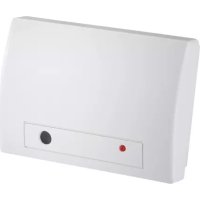
The FUMK50031W is a wireless magnetic contact for doors and windows. It was designed to operate together with 868 MHz narrow band receivers from ABUS. The FUMK50031W consists of two components: the sensor (usually installed on the door frame or window frame) and the magnet. If the door or the window is opened, the two components are separated. This information is then transmitted to the respective alarm panel or receiver component. This triggers a corresponding alarm.
Main features
- Narrow design for particularly small installation proportions
- Reliably detects opening of windows and doors.
- Magnet can be mounted on the right or the left
- Wide range
- Impact-resistant construction
Tamper monitoring
- Cover and wall tamper contact
- Simple installation
- Supervision
- Monitors voltage
Compatible equipment
The Secvest Small Wireless Magnetic Contact FUMK50031W is compatible with:
Alarm panels
Components
Secvest FUA50000, Secvest Touch FUA50500, Secvest FUA10000, FU8000, FU5000
- Repeater module FUMO50010
Universal module UVM FUMO50020 - Wireless extensions Terxon MX AZ4120 and LX AZ4220
Device description
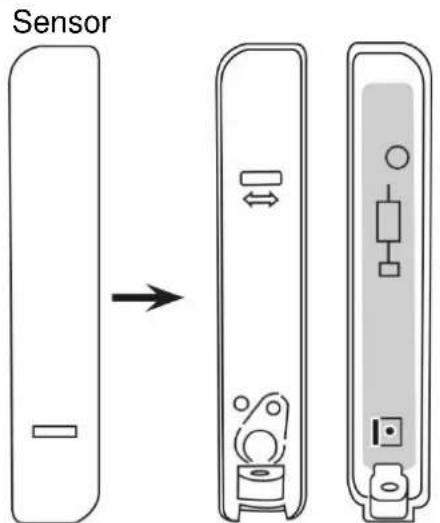
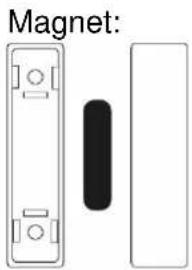
Approximation and separation distances on ferromagnetic and non-ferromagnetic mounting surfaces due to EN 50131-2-6, chapter 5.2 c)

This table shows the relevant distances required between the sensor and the magnet for arming/disarming the alarm.
Only the movement within the specified axis is accepted, where sensor and magnet are optimally positioned on the other two axes.

| Interface | Status | Distance (mm) | ||
| X | Y | Z | ||
| Fe | 22 | 14 | 32 | |
| 17 | 11 | 26 | ||
| Fe | 15 | 14 | 19 | |
| 11 | 10 | 10 | ||
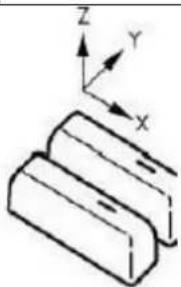
Installation
Step 1: Select installation location for the detector
Select an installation location which:
- is within the wireless range of the alarm panel or the wireless-receiver (max. 500 m outdoors).

Note
The wireless signal strength of the detector should be tested at the installation location of the alarm panel prior to installation.
The wireless range can be shortened when the sensor is mounted on or near a metal surface.

Note
The detector must not be installed in the following locations:
- at a distance of less than 1m from household electrical systems or power distributors
- inside metal housings
- close to high-voltage devices or electronic devices such as computers, photocopiers or other wireless devices.
The sensor should be mounted at the top, preferably on the stationary part of the door or window frame. This ensures consistent transmission power during operation.
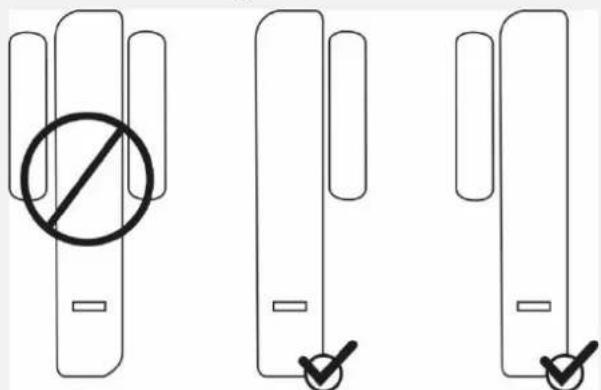
The spacers that are included within the scope of delivery can be mounted behind the magnet or the sensor. The detector must not be installed on the hinge-side.
Sensor and magnet can also be positioned opposite each other, as long as:
- the arrows on the back plates of sensor and magnet are aligned with each other
- the maximum distance between the front covers does not exceed 10mm when mounted on a metal surface or 15mm when mounted on a non-metallic surface.

Note
The magnet can be mounted on the right or the left side of the sensor.
Step 2: Open the cover of sensor and magnet
- Remove the screw from the underside of the sensor and open the cover.
- Use a suitable slotted screwdriver and open the cover of the magnet.

Step 3: Install detector on door or window

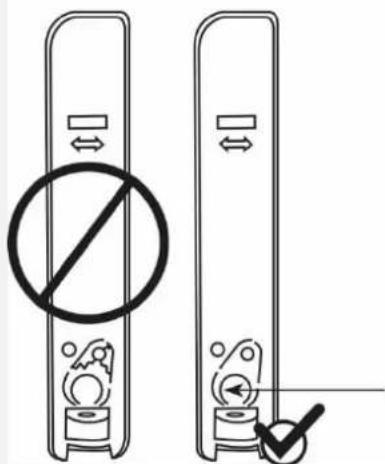
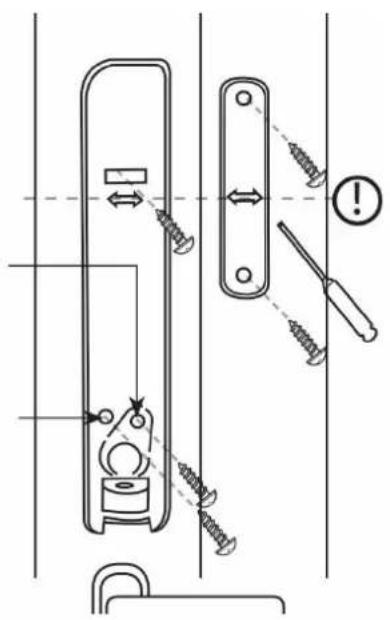
A moulded part in the recess of the back plate serves as an anti-removal wall contact. This moulded part must be affixed to the wall with a screw. If this is not done, tamper detection for removal from the wall is deactivated.
When installed without an anti-removal wall contact, the detector can be ripped off without a tamper alarm being triggered.
The detector also loses its certification for security level 2 as a result.
To prevent this, the tamper mechanism must be affixed to the wall, and will break off at the defined predetermined breaking points in the event of a tamper attempt, triggering a tamper alarm.
Do not break off the plastic part.
Plastikteil nicht ausbrechen / Do not break plastic part /
niet breken kunststofdeel / pas rompre piece en
matière plastique //DDke bryde plastdel/
No romper la pieza de plastico/
nie zframac czesc plastikowa /inte bryta plastdel/
Non rompere parte plastica
- Place the sensor and the magnet on the door or window and align both vertically. Mark the mounting points.

Ensure that the reed contact and the magnet are at roughly the same height. There are arrows on the inside of the rear panel of the sensor housing and the magnet housing as an aid.
- Drill holes to fit the diameters of the screws.
- Insert the supplied screws through the mounting holes of the sensor and the magnet. Insert the screws. Do not tighten the screws yet.
Realign the sensor and the magnet vertically. Now tighten the screws.
Mit Sabotage / With tamper / Met sabotage / Avec le sabotage/ Med sabotage / De Sabotaje / Z sabotazowego / Med sabotage / Con Sabotaggio
Ohne Sabotage / Without tamper / Zonder Sabotage / Sans sabotage / Uden sabotage / Sin Sabotaje / Bez sabotazowego / Utan Sabotage / Senza Sabotaggio
Step 4: Power supply
- Insert the batteries into the bracket, ensuring the polarity is correct.
Step 5: Program detector into alarm panel or receiver component

Note
The following describes direct programming on the Secvest alarm panel
FUAA50000. For web-based programming and programming to other receivers,
please read the relevant chapter in the instructions about these components.
- If this has not been done already, switch the alarm panel on.
- Select:
Installer mode -> Components -> Detector -> Wireless zones -> Add/Remove detector
- Choose a free wireless zone. The message 'Activate the tamper contact of the detector' is displayed.
- Flick the tampering switch.
The detector will then send a pairing signal to the alarm panel. The alarm panel will recognise the detector.
- Once the pairing signal has been received by the wireless alarm system, it will emit two beeps. The message 'Detector was programmed to: zone 2xy' and the incoming signal strength are displayed.
- Confirm the successfully completed pairing on the control panel.
Step 6: Test the system
Test the system fully.
Signal strength
Installer mode > Test > Signal strengths > Detector
After selecting the signal strengths for all detectors is displayed on the alarm panel. For more details, please refer to the relevant instructions for the alarm panel or wireless extension.
Walk test
Installer mode > Test > Walk test
After making the selection, you can choose whether to test all detectors in the system, in a partition of the system, or individual detectors. For more details, please refer to the relevant instructions for the alarm panel or wireless extension.
- Flick the tampering switch. The message 'S' for tamper is displayed.
- Open the door or the window. The message 'A' for alarm is displayed.
Step 7: Close the cover of the sensor and the magnet
- Close the sensor cover and re-tighten the screw on the underside of the sensor.
- Close the magnet cover. The upper part of the magnet cover must be clicked into place on the bottom part.
Step 8: Programming the alarm panel
- Adjust zone type and attributes according to the requirements.
- Exit installer mode on the alarm panel. The system is now ready.
Functions and displays
Operation of the LEDs

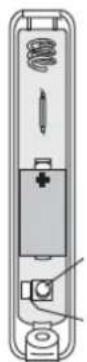
Remove the jumper to disarm the front LED.
Enable LED
- to enable programming via infrared. Some products are programmed via infrared (not via wireless).
- to check detector function on site.
Disable LED
to increase security
to extend battery life.
Error and tamper monitoring
The detector continually monitors error and tamper states and reports all events to the alarm panel. The following is monitored:
- Tamper contact: The detector's tamper contact is continually monitored.
- Battery voltage: The detector monitors the battery voltage and reports faults to the alarm panel.
Supervision: The detector continually sends Supervision messages to the alarm panel.
Maintenance
Before opening the sensor cover, make sure that the alarm panel is in installer mode. This prevents the tamper alarm from being triggered.
Test during routine maintenance that the detector works properly.
Check the tamper contact.
Check the functionality of the detector by opening and closing the door or the window.
Clean the detector as required.
Replace the batteries every two years or if the alarm panel displays the message 'Flat battery in detector'. You can find the battery type to be used as a replacement under Technical data.
iNote
After removing the old battery, wait 30 seconds before inserting the new battery.
How to replace the batteries:
- Set the alarm panel to installer mode.
- Remove the screw from sensor cover and open the cover.
- Remove the battery.
- Wait 30 seconds and then insert the new battery.
- Close the cover, tighten the cover fixing screws.
Test the system.
Warranty

- ABUS products are designed and manufactured with the greatest care and tested according to the applicable regulations.
- The warranty only covers defects caused by material or manufacturing errors at the time of sale. If there are demonstrable material or manufacturing errors, the module will be repaired or replaced at the guarantor's discretion.
- In such cases, the warranty ends when the original warranty period of two years expires. All further claims are expressly rejected.
- ABUS will not be held liable for defects and damage caused by external influences (e.g. transport, use of force, operating errors), inappropriate use, normal wear and tear, or failure to observe the instructions in this manual.
- In the event of a warranty claim, the original proof of purchase with the date of purchase and a short written description of the problem must be supplied with the product.
- Should you discover a defect on your detector that was already present at the time of purchase, please contact your dealer directly within the first two years.
Disposal

Dispose of the device in accordance with EU Directive 2012/19/EU – WEEE (Waste Electrical and Electronic Equipment). If you have any questions, please contact the municipal authority responsible for disposal. You can get information on collection points for waste equipment from your local authority, from local waste disposal companies or your dealer,
for example.
Declaration of conformity
ABUS Security-Center hereby declares that the wireless system type FUMK50031W complies with RED Directive 2014/53/EU. The full EU Declaration of Conformity text can be found at:
www.abus.com > Item search > FUMK50031W > Downloads
The Declaration of Conformity can also be obtained from the following address:
Installation instructions and user manual
NL
Chere cliente, cher client,
Installation instructions and user manual
FR
Installation instructions and user manual
FR
Installation instructions and user manual
NL
- Information on user manual
- Intended use
- Limitation of liability
- Safety information
- Explanation of symbols
- Packaging
- Information on the battery
- Scope of delivery
- Functional principle and features
- General
- Main features
- Compatible equipment
- Device description
- Installation
- Step 1: Select installation location for the detector
- Step 2: Open the cover of sensor and magnet
- Step 3: Install detector on door or window
- Step 4: Power supply
- Step 5: Program detector into alarm panel or receiver component
- Step 6: Test the system
- Step 7: Close the cover of the sensor and the magnet
- Step 8: Programming the alarm panel
- Functions and displays
- Operation of the LEDs
- Error and tamper monitoring
- Maintenance
- iNote
- Warranty
- Disposal
- Declaration of conformity
Brand : ABUS
Model : FUMK50031W
Category : Door/window sensor