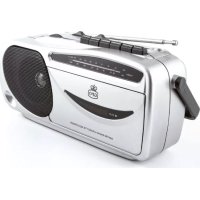
9401 - Radio GPO - Free user manual and instructions
Find the device manual for free 9401 GPO in PDF.



| Brand | GPO |
| Model | 9401 |
| Product Type | Portable radio and cassette player |
| AM frequency range | 530 - 1710 kHz |
| FM frequency range | 88 - 108 MHz |
| FM antenna | Telescopic |
| AM antenna | Ferrite core |
| Power supply | 4 C batteries or AC/DC adapter (not included) |
| Radio functions | AM/FM band selection, manual tuning, volume control |
| Cassette functions | Play, record, fast forward, rewind, pause, stop/eject |
| Recording | From radio or built-in condenser microphone |
| Automatic level control (ALC) | Yes, for recording |
| Headphone jack | 3.5 mm jack |
| Speaker | Built-in, disabled when headphones are used |
| Head cleaning | After 100 hours of use, with a cotton swab soaked in isopropyl alcohol |
| Safety | Do not open the housing; no user-serviceable parts inside |
| Exterior care | Soft cloth and mild soap for the front panel |
| Protection rating | Not specified (indoor use) |
| Weight | Approximately 1.5 kg (estimate) |
| Dimensions | Approximately 30 x 20 x 15 cm (estimate) |
Frequently Asked Questions - 9401 GPO
User questions about 9401 GPO
0 question about this device. Answer the ones you know or ask your own.
Ask a new question about this device
Download the instructions for your Radio in PDF format for free! Find your manual 9401 - GPO and take your electronic device back in hand. On this page are published all the documents necessary for the use of your device. 9401 by GPO.
USER MANUAL 9401 GPO
English. 2
German 10
French 18
Dutch 26
Spanish 34
English
Thanks for purchasing the GPO 9401 Cassette Player. You are now the proud owner of a classic piece of British design – a portable radio and cassette player. It's time to dust off your old cassettes, or to buy a blank tape or two to start recording your favourite songs from the radio. It's listening enjoyment the way it always used to be.
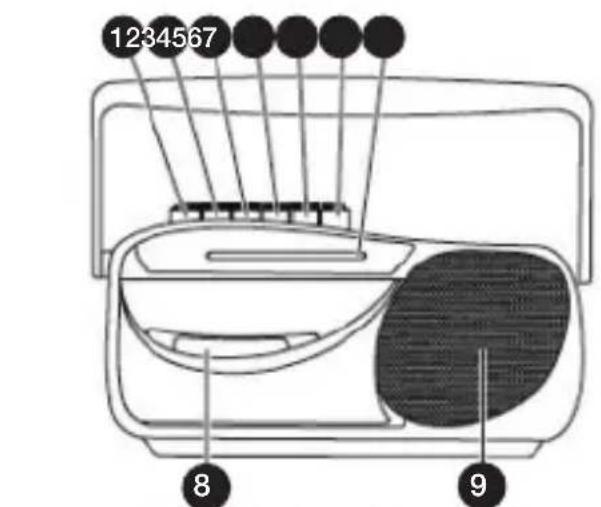
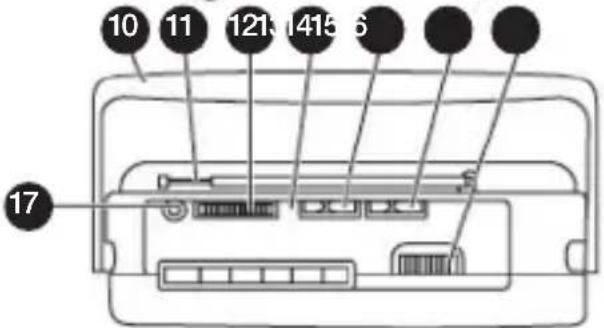
Location of Controls
1 Pause Button
Stop/Eject Button
3 Fast Forward Button
4 Rewind Button
Play Button
6 Record Button
7 Dial Lens
Cassette Compartment
9 Speaker
10 Handle
11 Rod Antenna
Volume Control
13 Condenser Mic
14 Function Selector (Tape/Radio)
15 Band Selector
16 Tuning Control
17 Headphone Jack
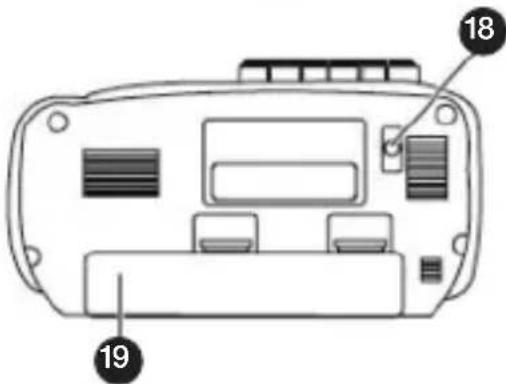
18 AC Socket
19 Battery Compartment
Unit Power Supply
The GPO 9401 Cassette Player is designed to operate with the included AC/DC adaptor, or with size C batteries.
Operation with AC/DC Adaptor
- Insert the small plug of the AC/DC adaptor into the AC socket on the rear of the player
- Insert the AC/DC plug adaptor into a power outlet in a convenient location
Operation with Batteries
- Remove the battery compartment door on the rear of the unit
- Insert four size C batteries, taking care to make sure they are positioned according to the polarity markings on the unit
- Close the battery compartment door
Note: Check your batteries regularly. If the unit will be run using the AC/DC adaptor for a long period of time, remove any installed batteries to prevent leakage.
Radio Operation
- Set the function selector switch to 'Radio'
- Choose your preferred radio band with the band selector
- Tune in to your preferred radio station by twisting the tuning control
- Adjust the volume control knob to your desired volume
- To turn off the radio, set the function selector switch to 'Tape'
Radio Antenna
The GPO 9401 Cassette Player is fitted with a telescopic ferrite antenna which can receive AM and FM broadcasts. For the best results, extend this antenna fully.
Please note that this antenna is directional, and reception for distant stations may be improved by rotating the unit or repositioning the antenna.
Headphone Jack
The unit is equipped with a headphone jack for private listening. Simply plug in your chosen 3.5mm headphones into the headphone jack.
Once your headphones are connected, the built-in speaker will be automatically disconnected.
Cassette Operation
- Ensure that the function selector switch is sent to 'Tape'
- Press the Stop/Eject button to open the cassette cover
- Insert your chosen cassette tape, button side up, with the tape facing you
- Close the cover
- Playback will begin when you press the Play button
Automatic Level Control
This unit has a built in ALC circuit. Volume for recording levels are pre-set, meaning that changing the volume while recording will not affect the recording levels.
Cassette Controls
Play: Pressing Play will start the tape.
Pause: Pressing the Pause button will stop the tape during recording or playback. To restart the tape, press the Pause button a second time.
Auto Stop: When the cassette being played or recorded on reaches the end of the tape, the unit will shut off.
Fast Forward/Rewind: Pressing the Fast Forward or Rewinnd buttons will run the tape forward or backwards at high speed. Press the Stop/Eject button to stop the tape.
Stop/Eject: Pressing the Stop/Eject button while the tape is playing will stop the tape. Pressing it while the tape has stopped will open the cassette cover.
Recording
- To record to a cassette, install a blank cassette as described earlier.
- Set the function selector to the radio position.
- Select your preferred radio station as described above, and press record to Record from the radio.
- Pressing Record while the function selector is in the tape position will record from the built-in condenser microphone instead of the radio.
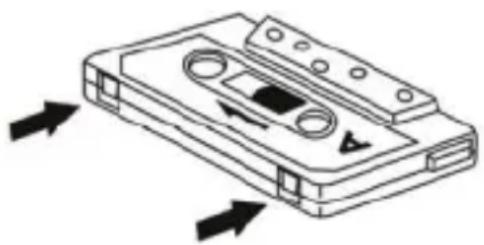
Note: Make sure that the erase prevention tab on top of the tape has not been cut off. If these tabs have been removed, the tape cannot be used for recording.
Cleaning the Unit
- The exterior casing of this unit may be cleaned with a dust cloth. Use caution when cleaning and wiping any plastic parts.
- Mild soap and a damp cloth may be used to clean the front panel.
- The tape heads, capstan and pinch roller should be cleaned after every 100 hours of use. Use a cotton swab moistened with head cleaning solution or isopropyl alcohol, then carefully dry with another cotton swab.
Note: Never use metal objects on or near the tape heads. Do not allow any cleaning materials to fall into the tape assembly.
Specifications
Frequency Range: AM 530 - 1710KHz FM 88 - 108 MHz
Antenna: FM Telescopic Antenna AM Ferrite Core Antenna
Troubleshooting
Q) The unit will not turn on
A) Ensure that the DC cable is properly connected to the unit and plugged in to a working outlet. If you are running from battery power, ensure that the batteries are fully charged and installed correctly.
Product Support
For more advice or assistance, please visit www.gporetro.com, or call our support team on 0845 521 4095.
Please note, for your personal safety you SHOULD NOT attempt to open the unit's casing. Opening the casing voids your warranty, and no user serviceable parts are contained inside
German
Location of Controls
Bediening cassetterecorder
Knoppen cassetterecorder
Hereby ProtelX, declares that this equipment (GPO 9401) is in compliance with the essential requirements and other relevant provisions of Directive, you can access a copy of this certificate on www.gporetro.com/Certificate-of-Conformity
DE
ProTelX Ltd, Unit 6, Park 17 Industrial Estate, Moss Lane,
Whitefield, Manchester, M45 8FJ UK