SLSX428 - Hi-Fi System PANASONIC - Free user manual and instructions
Find the device manual for free SLSX428 PANASONIC in PDF.

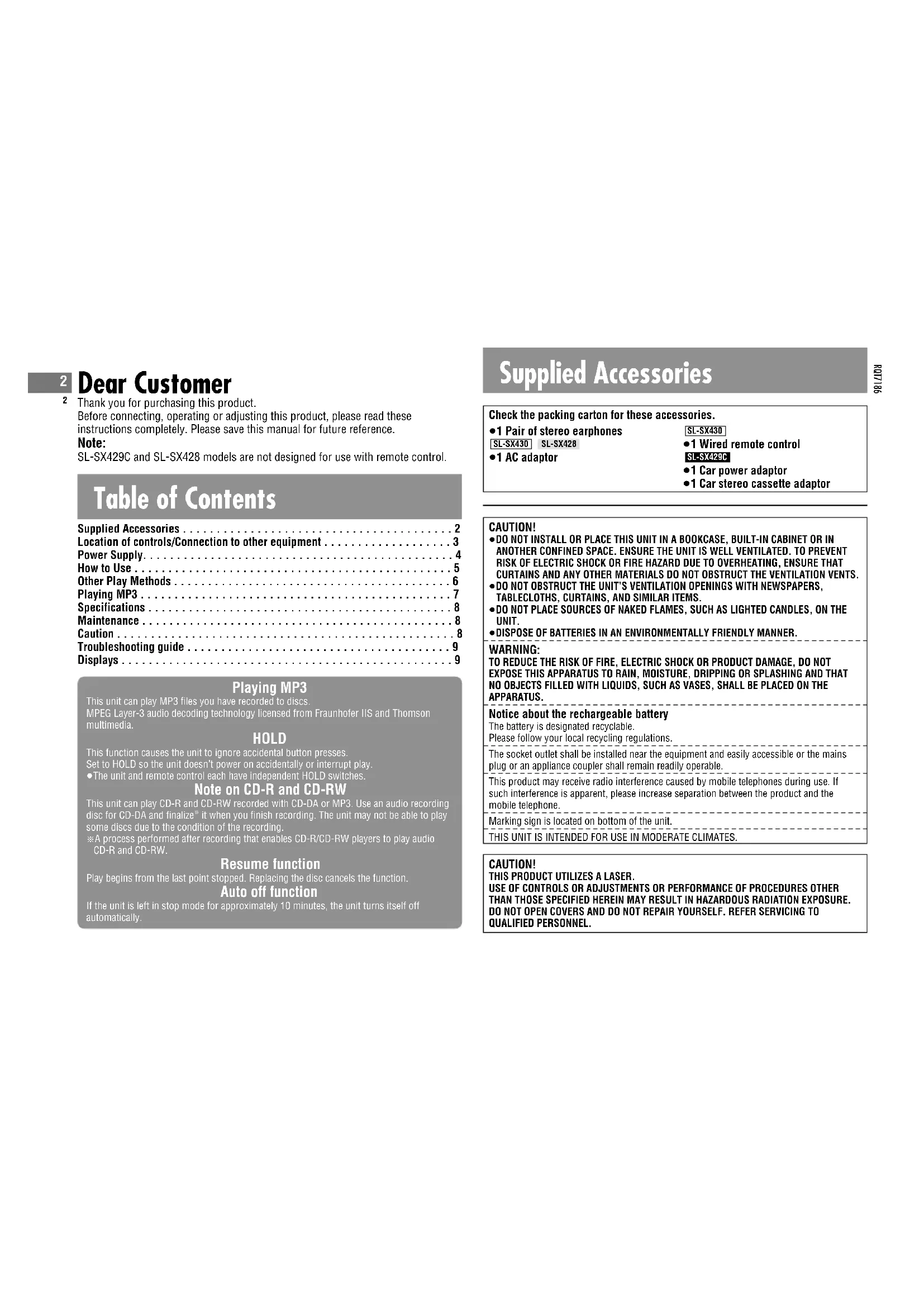


| Product type | Portable CD/MP3 player (Hi-Fi system) |
| Brand | Panasonic |
| Model | SL-SX428 |
| Dimensions (W x H x D) | 135 x 24.3 x 135 mm |
| Weight (with batteries) | 224 g |
| Weight (without batteries) | 180 g |
| Power supply | DC 4.5 V (AC 220-230 V, 50/60 Hz mains adapter) or 2 LR6/AA batteries (alkaline or Ni-Cd rechargeable P-3GAVE/2B) |
| Power consumption (without charging) | 0.7 W |
| Power consumption (while charging) | 3.1 W |
| Rechargeable battery charging time | Approximately 4 to 5 hours |
| Battery life (CD-DA, alkaline batteries) | Approximately 50 hours |
| Battery life (MP3, alkaline batteries) | Approximately 85 hours |
| Supported audio formats | CD-DA, MP3 (32-320 kbps, 48/44.1/32 kHz) |
| Playback functions | Play, pause, search, skip, repeat (1 track, all, A-B, random), program (20 tracks), album mode |
| Sound quality | S-XBS (bass), Live (concert ambiance), Digital remastering (MP3), disable equalizer |
| Skip protection | Anti-skip memory (POS1/POS2 for CD-DA, 100 s for MP3 at 128 kbps) |
| Headphone output | 3.5 mm stereo jack, max output level 6 mW + 6 mW into 16 Ω (adjustable) |
| Additional features | HOLD lock, auto power off (10 min), resume playback, car adapter (optional SH-CDC9) |
| Care and cleaning | Clean with a soft dry cloth. Do not use alcohol, thinner, or benzine. |
| Safety | Do not expose to rain or moisture. Do not block ventilation. Use only in temperate climate. Do not open the casing (laser). |
| Spare parts and repairability | Specific rechargeable batteries P-3GAVE/2B. Mains adapter RFEA431E-S (for SL-SX429C). Car adapter SH-CDC9. Replacement lens SZP1038C. Have any repairs carried out by qualified personnel. |
Frequently Asked Questions - SLSX428 PANASONIC
User questions about SLSX428 PANASONIC
0 question about this device. Answer the ones you know or ask your own.
Ask a new question about this device
Download the instructions for your Hi-Fi System in PDF format for free! Find your manual SLSX428 - PANASONIC and take your electronic device back in hand. On this page are published all the documents necessary for the use of your device. SLSX428 by PANASONIC.
USER MANUAL SLSX428 PANASONIC
2 Thank you for purchasing this product.
Before connecting, operating or adjusting this product, please read these instructions completely. Please save this manual for future reference.
Note:
SL-SX429C and SL-SX428 models are not designed for use with remote control.
Table of Contents
Supplied Accessories 2
Location of controls/Connection to other equipment 3
Power Supply. 4
How to Use 5
Other Play Methods 6
Playing MP3 7
Specifications 8
Maintenance 8
Caution 8
Troubleshooting guide 9
Displays 9
Playing MP3
This unit can play MP3 files you have recorded to discs.
MPEG Layer-3 audio decoding technology licensed from Fraunhofer IIS and Thomson multimedia.
HOLD
This function causes the unit to ignore accidental button presses.
Set to HOLD so the unit doesn't power on accidentally or interrupt play.
- The unit and remote control each have independent HOLD switches.
Note on CD-R and CD-RW
This unit can play CD-R and CD-RW recorded with CD-DA or MP3. Use an audio recording disc for CD-DA and finalize* it when you finish recording. The unit may not be able to play some discs due to the condition of the recording.
※A process performed after recording that enables CD-R/CD-RW players to play audio CD-R and CD-RW.
Resume function
Play begins from the last point stopped. Replacing the disc cancels the function.
Auto off function
If the unit is left in stop mode for approximately 10 minutes, the unit turns itself off automatically.
Supplied Accessories
Check the packing carton for these accessories.
●1 Pair of stereo earphones
SL-SX430 SL-SX428
- 1 AC adaptor
SL-SX430
●1 Wired remote control
SL-SX429C
●1 Car power adaptor
●1 Car stereo cassette adaptor
CAUTION!
- DO NOT INSTALL OR PLACE THIS UNIT IN A BOOKCASE, BUILT-IN CABINET OR IN ANOTHER CONFINED SPACE. ENSURE THE UNIT IS WELL VENTILATED. TO PREVENT RISK OF ELECTRIC SHOCK OR FIRE HAZARD DUE TO OVERHEATING, ENSURE THAT CURTAINS AND ANY OTHER MATERIALS DO NOT OBSTRUCT THE VENTILATION VENTS.
- DO NOT OBSTRUCT THE UNIT'S VENTILATION OPENINGS WITH NEWSPAPERS, TABLECLOTHS, CURTAINS, AND SIMILAR ITEMS.
- DO NOT PLACE SOURCES OF NAKED FLAMES, SUCH AS LIGHTED CANDLES, ON THE UNIT.
•DISPOSE OF BATTERIES IN AN ENVIRONMENTALLY FRIENDLY MANNER.
WARNING:
TO REDUCE THE RISK OF FIRE, ELECTRIC SHOCK OR PRODUCT DAMAGE, DO NOT EXPOSE THIS APPARATUS TO RAIN, MOISTURE, DRIPPING OR SPLASHING AND THAT NO OBJECTS FILLED WITH LIQUIDS, SUCH AS VASES, SHALL BE PLACED ON THE APPARATUS.
Notice about the rechargeable battery
The battery is designated recyclable.
Please follow your local recycling regulations.
The socket outlet shall be installed near the equipment and easily accessible or the mains plug or an appliance coupler shall remain readily operable.
This product may receive radio interference caused by mobile telephones during use. If such interference is apparent, please increase separation between the product and the mobile telephone.
Marking sign is located on bottom of the unit
THIS UNIT IS INTENDED FOR USE IN MODERATE CLIMATES.
CAUTION!
THIS PRODUCT UTILIZES A LASER.
USE OF CONTROLS OR ADJUSTMENTS OR PERFORMANCE OF PROCEDURES OTHER THAN THOSE SPECIFIED HEREIN MAY RESULT IN HAZARDOUS RADIATION EXPOSURE. DO NOT OPEN COVERS AND DO NOT REPAIR YOURSELF. REFER SERVICING TO QUALIFIED PERSONNEL.
Location of controls/Connection to other equipment
References to the remote control apply only to SL-SX430.
Turn off this unit and the other equipment before connection.
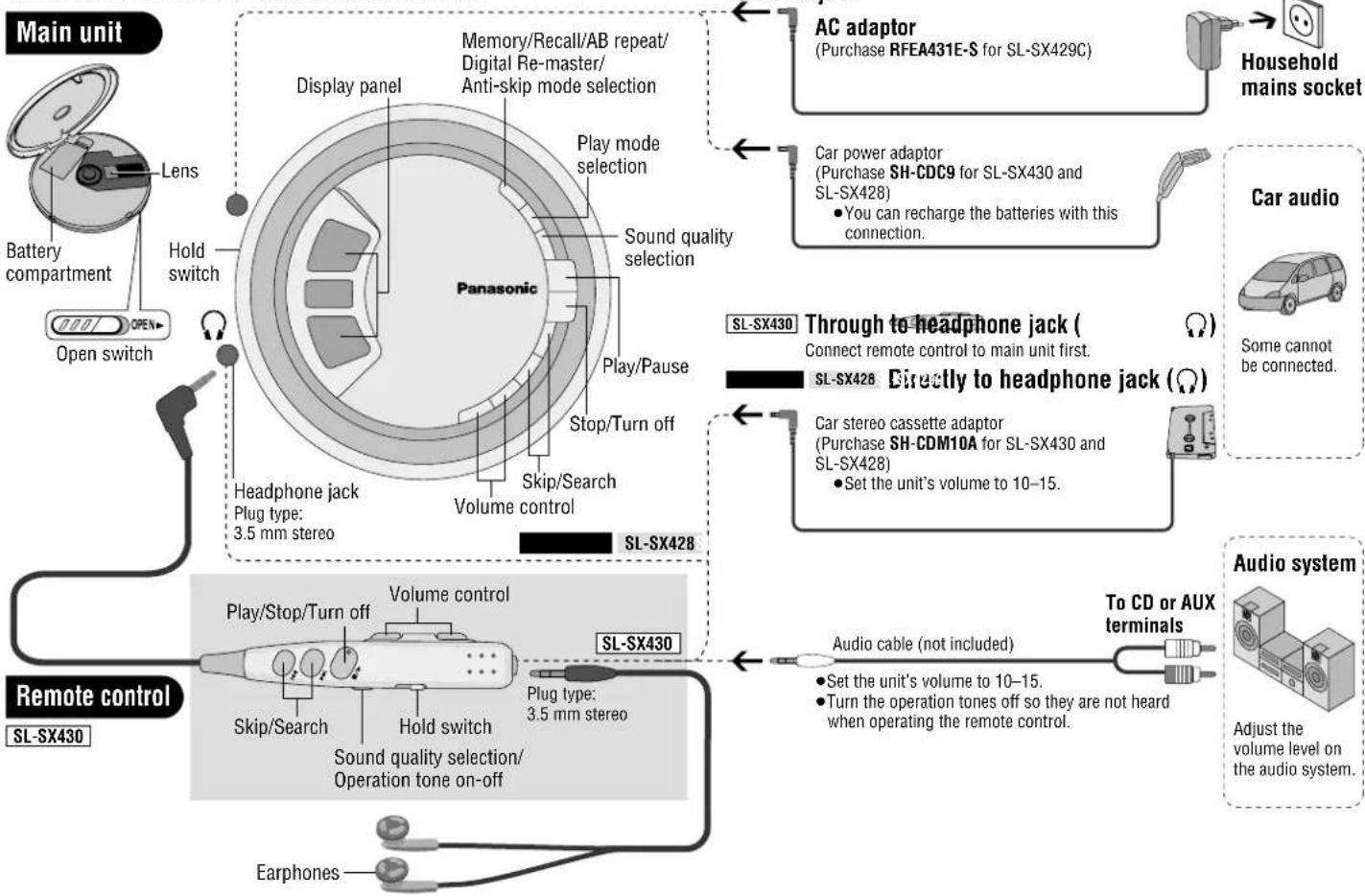
flowchart
graph TD
    A["Main unit"] --> B["Lens"]
    B --> C["Battery compartment"]
    C --> D["Open switch"]
    D --> E["Open switch"]
    E --> F["Display panel"]
    F --> G["Play mode selection"]
    G --> H["Sound quality selection"]
    H --> I["Play/Pause"]
    I --> J["Stop/Turn off"]
    J --> K["Skip/Search"]
    K --> L["Volume control"]
    L --> M["Headphone jack\nPlug type: 3.5 mm stereo"]
    M --> N["SL-SX428"]
    N --> O["SL-SX430"]
    O --> P["Play/Stop/Turn off"]
    P --> Q["Volume control"]
    Q --> R["Sl-SX430"]
    R --> S["Load back"]
    S --> T["Car power adaptor\n(Purchase SH-CDC9 for SL-SX430 and SL-SX428)\n• You can recharge the batteries with this connection."]
    T --> U["SL-SX430 Through to headphone jack (Connect remote control to main unit first.)"]
    U --> V["SL-SX428 Directly to headphone jack ()"]
    V --> W["Car stereo cassette adaptor\n(Purchase SH-CDM10A for SL-SX430 and SL-SX428)\n• Set the unit's volume to 10–15."]
    W --> X["To CD or AUX terminals"]
    X --> Y["Audio system"]
    Y --> Z["Adjust the volume level on the audio system."]
    Z --> AA["Audio cable (not included)."]
    AA --> AB["To CD or AUX terminals"]
    AB --> AC["Car audio"]


Power Supply
Rechargeable batteries (not included) Recharge before initial use.
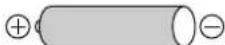
As a safety precaution this unit is constructed so it is impossible to recharge ordinary batteries. For details, check with your dealer.
Special rechargeable Ni-Cd batteries P-3GAVE/2B (set of 2)

Ordinary dry cell batteries/rechargeable batteries
■For SL-SX429C
Be sure to obtain the optional AC adaptor RFEA431E-S.
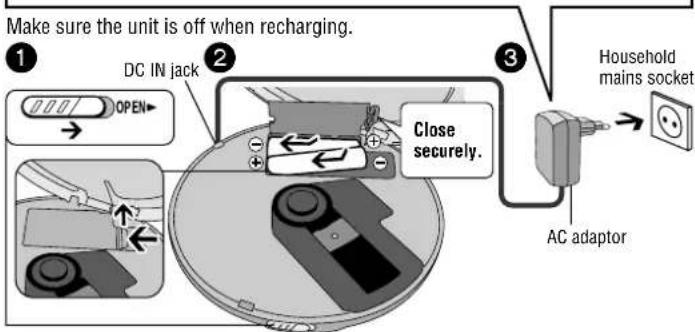
- The battery indicator ( ) rolls while recharging and disappears when finished (about 4 to 5 hours).
- You can recharge the batteries before they are fully discharged.
- Fit the battery lid so it is secure and flush with the battery compartment. If it comes loose, it may scratch your discs.
Dry cell batteries (not included)
After disconnecting the AC adaptor, insert two "LR6, AA, UM-3" alkaline batteries. Insert the same way as the rechargeable batteries.
The battery indicator
This indicator appears when the unit is on.
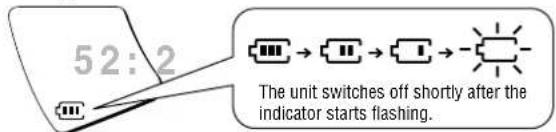
●Before playing starts the battery indicator may flash although the batteries are not drained. It appears correctly once you start play.
General
■Play time
→Specifications, page 8
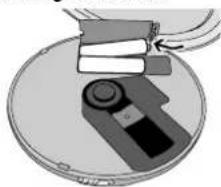
■Removing batteries
natural_image
Illustration of a device with a circular component and stacked books on top, enclosed in a circular frame (no text or symbols)Car adaptor
SL-SX429C includes a car power adaptor. (Refer to the separate installation instructions.) Purchase the SH-CDC9 car power adaptor for use with SL-SX430 and SL-SX428.
The unit is in the standby condition when the AC adaptor is connected. The primary circuit is always "live" as long as the AC adaptor is connected to an electrical outlet.
How to Use
References to the remote control apply only to SL-SX430.
Playback
![③ Press [▶/Ⅱ]. Track number Elapsed playing time of track 3 5:22 4 Adjust the volume with [VOL +] or [VOL -]. (0-25) Release HOLD. ① Open the lid and insert a CD. Plug in firmly. SL-SX430 ② Release HOLD. ③ Press. ④ Adjust the volume. (0-25) Plug in firmly. ● MP3 files take a little longer to be read. ● "MP3 is on the display while playing MP3 files.](/content/2026/03/451033/images/c5a0f7ba2361da482a597a1009c1d27031d3e43712766e69a57356738ce3ff32.jpg)
Pause
Remote control Main unit
Not available.

Press.
■Press again to restart play.
Search
Remote control Main unit
Press and hold during play.
Press and hold during play.
●You cannot search while playing MP3.
- You can search only within the current track during program, one track repeat, random, random repeat and AB repeat play modes ( page 6).
Skip
Remote control Main unit

Press. Press.
- Press [◀◀] twice to skip to the beginning of the previous track during play.
- You cannot use [◀◀] to skip to the previous track during random play (→page 6).
Stop/Turn off
Remote control Main unit

Press. Press.

■Press and hold to turn the unit off.
■Press again to turn the unit off.
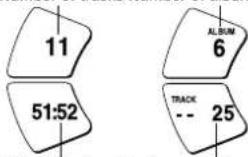
MP3
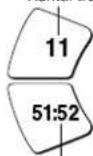
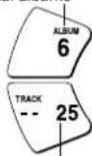
Number of tracks Number of albums
pie
| Category | Value | |---|---| | 11 | 11 | | 51:52 | 51:52 | | ALBUM | 6 | | TRACK | 25 |Total play time Number of tracks
Other Play Methods
References to the remote control apply only to SL-SX430.
Program Play

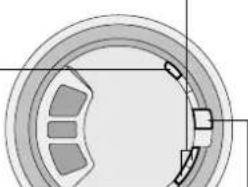
Press [◀◀, ▶▶] while stopped to select the tracks.
You can skip albums when programming MP3 tracks (→page 7).
natural_image
Cross-sectional diagram of a mechanical bearing or dial (no text or symbols)
Press [MEMO] to register.
Track number
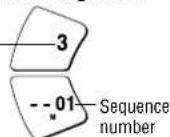

Repeat steps 1 and 2 to register up to 20 tracks.

Press [▶/■] to start play.
When Playing MP3
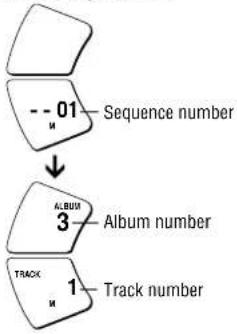
flowchart
graph TD
    A["Sequence number"] --> B["Album number"]
    B --> C["Track number"]
■ To confirm the contents of the program
Press [MEMO] while the disc is playing.
■ To cancel program play Press [■].
Changing the sound quality
Each time you press
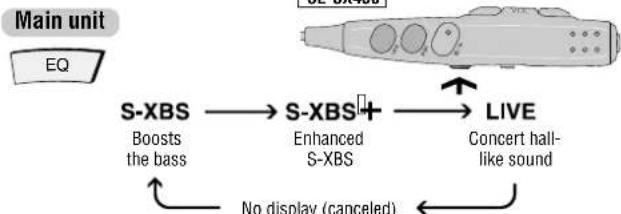
flowchart
graph LR
    EQ["EQ unit"] --> S_XBS1["S-XBS"]
    EQ --> S_XBS2["S-XBS+"]
    EQ --> LIVE["LIVE"]
    S_XBS1 -->|Boosts the bass| S_XBS2
    S_XBS2 -->|Enhanced S-XBS| Live
    Live -->|Concert hall-like sound| S_XBS1
    S_XBS2 -->|No display (canceled)| Live
●The effect may differ between different kinds of music.
Play modes
Each time you press
Main unit
MODE
During play
C
While paused


One track repeat
All track repeat
Random
Random repeat
AB repeat (AB specified segment repeat) (← below)


No display (canceled)


■ Specifying the AB segment
Press [MEMO] at the start point (A) and once more at the end point (B).


- Stop or skip (←page 5) to cancel.
- If you do not specify point B and reach the end of disc, point B is set automatically and repeat begins. You can also specify point B again by pressing [MEMO].
- You cannot select "RANDOM" and "A ➕ B" while playing MP3.
Anti-Skip System
This system reduces skipping caused by vibration to a minimum.
You can change the anti-skip memory time for CD-DA to improve sound quality.
While stopped, each time you press and hold
Main unit

POS 2
Sound enhanced mode,
10-second anti-skip memory
POS 1
Anti-skip enhanced mode.
45-second anti-skip memory
- You cannot change the memory time for MP3. It is a maximum of 100 seconds for data recorded at 128 kbps.
Turning the operation tone off
Press and hold [EQ] until "bP oFF" appears
SL-SX430
![PANASONIC SLSX428 - Press and hold [EQ] until "bP oFF" appears - 1](/content/2026/03/451033/images/2815d9d257db9be1df2d631565a7220fc23cffbf4c7b5fca00df275575591867.jpg)
bP oFF
Tone off
bP on
Tone on
Playing MP3
References to the remote control apply only to SL-SX430.
Starting play from an album (Album skip)
Press and hold until the album you want appears
Main unit
SL-SX430

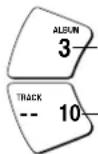
Album number
Number of tracks
Playing only the tracks in a selected album (Album mode)
Each time you press and hold
Main unit
MODE
ALBUM
Album mode

No display
(canceled)
- You can select another album with album skip (→above).
- You cannot turn album mode on during program play.
Enjoying even more natural sound (Digital Re-master)
You can regenerate signal frequency lost during compression, restoring to near pre-compression form.
While stopped, each time you press and hold
Main unit
MBMO
RMTR
Sound enhanced
No display
Conserves battery life
This unit can play MP3, a method of compressing audio without overtly hurting audio quality.
■When creating MP3 files to play on this unit
Disc formats: ISO9660 level 1 and level 2 (except for extended formats)
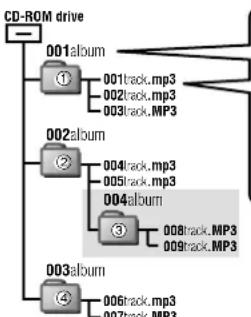
flowchart
graph TD
    A["CD-ROM drive"] --> B["001album"]
    A --> C["002album"]
    A --> D["003album"]
    B --> E["①"]
    B --> F["001track.mp3"]
    B --> G["002track.mp3"]
    B --> H["003track.MP3"]
    C --> I["②"]
    C --> J["004track.mp3"]
    C --> K["005track.mp3"]
    C --> L["004album"]
    D --> M["③"]
    D --> N["008track.MP3"]
    D --> O["009track.MP3"]
    D --> P["006track.mp3"]
    D --> Q["007track.MP3"]
Naming tracks and albums
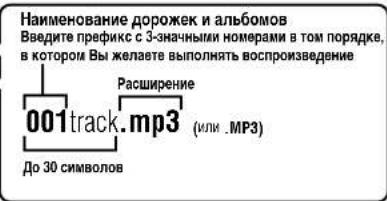
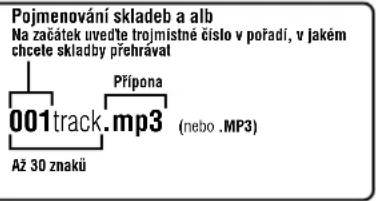
Prefix with 3-digit numbers in the order you want to play
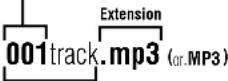
Up to 30 characters
If you created an album such as 004album on the left, the files may not play in name order.
The albums would play in the order ①, ②, ③, ④.
■Limitations on MP3
- This unit is compatible with multi-session but if there are a lot of sessions it takes more time for play to start. Keep the number of sessions to a minimum to avoid this.
● This unit cannot play files recorded using packet write. - If a CD-ROM format CD contains MP3 and files other than MP3, only the MP3 files will be playable.
- Depending on how you create MP3 files, they may not play in the order you numbered them or may not play at all.

Specifications
Audio (CD-DA)
Sampling frequency: 44.1 kHz
No. of channels:
2 (left and right, stereo)
Headphone output level:
RMS max. 6 mW+6 mW/ 16 Ω(adjustable)
Frequency response: 20 Hz to 20,000 Hz
(+0.5 dB to -7 dB)
Pickup
Light source: Semiconductor laser
Wavelength: 780 nm
(Norsk)
Bølgelengde 780 nm
Supported bit-rates:
32 kbps to 320 kbps (128 kbps is recommended)
Supported sampling frequency:
48 kHz/44.1 kHz/32 kHz
Maximum number of items
(total no. of albums and tracks): 999
Maximum album levels: 100
General
Power supply:
DC input: DC 4.5 V
SL-SX430 SL-SX428
AC adaptor input:
AC 220-230 V 50/60 Hz
SL-SX430 SL-SX428
Power consumption:
Using AC adaptor: 0.7 W
Recharging: 3.1 W
Play time:
Using on a flat stable surface at 25 °C,
EQ is off, Hold is on, Anti-skip is on
POS 1 (CD-DA), recommended bit rate
(MP3:128 kbps), and Digital Re-master is off (MP3). Play times are in hours
and approximate.
| Batteries used | MP3 disc | CD-DA disc |
| 2 optional alkaline batteries | 85 | 50 |
| 2 optional rechargeable batteries | 40 | 23 |
Recharging time: About 4 to 5 hours
●The play time may be less depending
on the operating conditions.
●Play time will be considerably reduced
when playing CD-RW.
Operational temperature range:
0 °C-40 °C
Rechargeable temperature range:
5^-40^
Dimensions (W×H×D):
135×24.3×135 mm
Mass: 224 g (with batteries)
180 g (without batteries)
Note:
Specifications are subject to change without notice.
Mass and dimensions are approximate.
Maintenance
If the surfaces are dirty wipe with a soft, dry cloth.
●Never use alcohol, paint thinner or benzine to clean this unit.
- Before using chemically treated cloth, read the instructions that came with the cloth carefully.
Caution
- Do not expose the unit to direct sunlight or heat, such as from heating appliances, as these can damage the unit.
- Discontinue use if you experience discomfort with the earphones or any other parts that directly contact your skin. Continued use may cause rashes or other allergic reactions.
■Batteries
- Do not peel off the covering on batteries and do not use if the covering has been peeled off.
- Align the poles + and - correctly when inserting the batteries.
- Do not mix different types of batteries or old and new batteries.
- Remove the batteries if you do not intend to use the unit for a long time.
- Do not throw into a fire, short-circuit, disassemble, or subject to excessive heat.
- Do not attempt to recharge dry cell batteries.
- When carrying batteries in a pocket or bag, ensure no metal objects such as necklaces are placed together with them. Contact with metal may cause short-circuiting which can cause a fire.
■Listening
- Do not play your headphones or earphones at a high volume. Hearing experts advise against continuous extended play.
- If you experience a ringing in your ears, reduce volume or discontinue use.
- Do not use while operating a motorized vehicle. It may create a traffic hazard and is illegal in many areas.
- You should use extreme caution or temporarily discontinue use in potentially hazardous situations.
- Even if your headphones or earphones are the open-air type designed to let you hear outside sounds, don't turn up the volume so high that you can't hear what's around you.
■ CDs
- Do not use irregularly shaped CDs.
- Do not use non-specification discs
- Do not use CDs printed with label printers available on the market.
- Do not use CDs with labels and stickers that are coming off or with adhesive exuding from under labels and stickers.
Troubleshooting guide
References to the remote control apply only to SL-SX430.
Before requesting service, make the below checks. If you are in doubt about some of the check points, or if the remedies indicated in the chart do not solve the problem, consult your dealer for instructions.
| No play. | ●The HOLD function is on. Release HOLD (↔page 5).●The batteries may have run empty (↔page 4).(If play is extremely short even after fully recharging the batteries, the batteries may have exceeded their life. Rechargeable batteries can be recharged approximately 300 times.)●The disc isn't correctly set.●The disc is scratched or dirty. (Tracks skipped.)●There is moisture on the lens. Wait for about an hour and then try again.●The lens is dirty: clean it with a blower (recommended product: SZZP1038C). If the lens gets marked with fingerprints, gently wipe them off with a cotton swab.●The unit may not read MP3 correctly if it is shaken while it is reading the files.●Play of a multi-session disc may not be possible if there is a blank data segment between sessions.●If there is large JPEG data etc. within a MP3 file, sound may become muted and play may not be possible.●If you try playing a CD that contains CD-ROM format data and normal audio data (CD-DA), output from one of the above may become silent, and play may not be possible. |
| No sound or there is a lot of noise. | ●Ensure the plugs are inserted firmly.●Wipe the plugs clean with a clean cloth.●Noise may occur when playing MP3 if recording quality is poor.●The elapsed playing time disappears and sound is interrupted if bumps continue repeatedly. |
| Play doesn't resume from the last point stopped. | ●This doesn't work if you change discs.●This doesn't work during random play.●It may not work correctly under some conditions. |
| Play doesn't start from the first track. | ●Random play modes may be on (↔page 6).●Play resumes from the last point stopped. |
| The unit stops working. | Disconnect then reconnect all power sources (batteries and AC adaptor). |
| Cannot search through tracks. | You cannot search through MP3 files. |
| Cannot skip albums. | You cannot skip between the first and last albums during play. |
| Cannot change the Digital Re-master mode, anti-skip mode. | If [◀◀]or [▶▶] is pressed before [MEMO] you cannot change the mode. |
| Cannot specify the AB segment. | You may not be able to specify segment A or B at the end of disc. |
| Digital Re-master does not work. | Depending on the type of MP3 disc recording, the effect may not appear. |
| [SL-SX430]The unit malfunctions when connected to other equipment. | Be sure to connect other equipment through the remote control. Speakers connected directly to the unit should have an impedance of 1 kΩ or less. |
| Cannot hear the remote control's operation tone. | The operation tone may be off (→page 6). |
| The remote control does not work properly. | Use only the included remote control to operate this unit. |
| Cannot recharge. | ●You aren't using the special rechargeable batteries (→page 4).●You must insert two batteries before you can recharge them.●The unit must be off before you can recharge. |
| The AC adaptor becomes warm during recharging. | This is normal. |
| The batteries are taking a long time to recharge. | The batteries may take a maximum of 6 hours to recharge under some conditions. |
| Play time is short after recharging. | ●This may occur after the first time you recharge the batteries or haven't used them for a long time. Play time should be restored after a few recharges.●The batteries can go flat if you leave the AC adaptor connected after recharging is complete. |
| The battery indicator fails to appear or is incorrect. | ●The indicator does not appear when the AC adaptor is connected.●The indicator does not appear correctly under some conditions. |
Displays
| hold | The HOLD function is on. Release HOLD (page 5). |
| no disc | ●You haven't inserted a disc or it isn't inserted correctly. ●You have inserted a disc this unit cannot play. |
| open | The disc lid is open. |
| F | The program already contains 20 tracks. |
| J | Reading MP3 files. |
Sehr geehrter Kunde
natural_image
Illustration of a device with a circular button and a stack of books on top, placed on a circular base (no text or symbols visible)Autobatterieadapter
flowchart
graph TD
    A["CD-ROM drive"] --> B["001album"]
    B --> C["①"]
    C --> D["001track.mp3"]
    C --> E["002track.mp3"]
    C --> F["003track.MP3"]
    G["002album"] --> H["②"]
    H --> I["004track.mp3"]
    H --> J["005track.mp3"]
    G --> K["004album"]
    K --> L["③"]
    L --> M["008track.MP3"]
    L --> N["009track.MP3"]
    O["003album"] --> P["④"]
    P --> Q["006track.mp3"]
    P --> R["007track.MP3"]
natural_image
Illustration of a device being handled by stacked books on a circular base (no text or symbols visible)Piles sèches (non fournies)
natural_image
Diagram of a mechanical device inside a circular housing, showing internal components and motion arrows (no text or symbols)Mémoire anti-saut 10 secondes
Mode anti-saut amélioré
Mémoire anti-saut 45 secondes
flowchart
graph TD
    A["CD-ROM drive"] --> B["001album"]
    A --> C["002album"]
    A --> D["003album"]
    B --> E["001track.mp3"]
    B --> F["002track.mp3"]
    B --> G["003track.MP3"]
    C --> H["004track.mp3"]
    C --> I["005track.mp3"]
    C --> J["004album"]
    D --> K["006track.mp3"]
    D --> L["007track.MP3"]
●1 Auto-stereo cassetteadapter
WAARSCHUWING!
- OM EEN GOEDE VENTILATIE TE VERZEKEREN, DIT APPARAAT NIET IN EEN BOEKENKAST, EEN INGEBOUWDE KAST OF EEN ANDERE GESLOTEN RUIMTE INSTALLEREN OF GEBRIUKEN. ZORG ERVOOR DAT DE VENTILATIEWEGEN NIET DOOR GORDIJNEN OF ANDERE MATERIALEN WORDEN AFGESLOTEN, OM GEVAAR VOOR ELEKTRISCHE SCHOK OF BRAND TEN GEVOLGE VAN OVERVERHITTING TE VOORKOMEN.
- ZÖRG DAT DE VENTILATIE-OPENINGEN VAN HET APPARAAT NIET GEBLOKKEERD WORDEN DOOR KRANTEN, TAFELKLEEDJES, GORDIJNEN, OF IETS DERGELIJKS.
- ZET GEEN OPEN VUUR, ZOALS BRANDENDE KAARSEN, OP HET APPARAAT
•DOE LEGE BATTERIJEN WEG OP EEN MILIEUVRIENDELIJKE MANIER.
WAARSCHUWING:
TENEINDE HET GEVAAR VOOR BRAND, ELEKTRISCHE SCHOK OF PRODUCTBESCHADIGING TE VERMINDEREN, MAG DIT APPARAAT NIET WORDEN BLOOTGESTELD AAN REGEN, VOCHT, EN DRUPPELEND OF SPATTEND WATER, EN MOGEN ER GEEN VOORWERPEN MET WATER OF ANDERE VLOEISTOFFEN ERIN, ZOALS BLOEMENVAZEN, OP HET APPARAAT WORDEN GEZET.
Opmerking betreffende de oplaadbare batterij
natural_image
Illustration of a device inside a circular container with a hand holding a stack of books (no text or symbols visible)Auto-accu adapter
Aantal tracks Aantal albums
Anti-skip versterking,
45-seconden anti-skip geheugen
I DETTE APPARAT ANVENDES EN LASER.
BRUG AF BETJENINGSKNAPPER ELLER REGULERINGER ELLER FREMGANGSMÄDER
UDOVER DE I DENNE BETJENINGSVEJLEDNING ANGIVNE, KAN MEDF∅RE FARE FOR BESTRÅLING.
ÅBN IKKE KABINETTET OG FORSOG IKKE AT UDF∅RE REPARATIONER SELV.
REPARATIONER MÅ KUN FORETAGES AF KVALIFICEREDE TEKNIKERE.
natural_image
Illustration of a hand holding a rectangular object above a circular base, with no visible text or symbols.Biladapter
natural_image
Diagram of a mechanical device inside a circular housing, showing components like a knob and handle (no text or symbols)natural_image
Diagram of a mechanical device with a circular base and attached components (no text or symbols visible)natural_image
Illustration of a mechanical device with a rotating knob and surrounding components (no text or symbols)flowchart
graph TD
    A["CD-ROM drive"] --> B["001album"]
    B --> C["①"]
    C --> D["001track.mp3"]
    C --> E["002track.mp3"]
    C --> F["003track.MP3"]
    G["002album"] --> H["②"]
    H --> I["004track.mp3"]
    H --> J["005track.mp3"]
    H --> K["004album"]
    L["003album"] --> M["④"]
    M --> N["006track.mp3"]
    M --> O["007track.MP3"]
    P["008track.MP3"] --> Q["③"]
    Q --> R["009track.MP3"]
TENTO PŘÍSTROJ JE KONSTRUOVÁN PRO POUŽITÍ V MÍRNÉM KLIMATU.
POZOR!
TENTO VYROBEK PRACUJE S LASEROVYM PAPRSKEM.
PRI NESPRÁVNÉM POUŽITÍ OVLÁDACÍCH PRVKU.
STEJNĚ JAKO PŘI PROVÁDĚNÍ JINÝCH POSTUPŮ, NEŽ JSOU POPSÁNY V TOMTO
NÁVODU, MŮŽE DOJÍT K NEBEZPEČNĚMU VYZAŘOVÁNÍ
NIKDY NESNIMEJTE VNEJSI KRYT A PRISTROJ SAMI NEOPRAVUJTE. SERVIS
PŘENECHTE POUZE KVALIFIKOVANÝM OSOBÁM V AUTORIZOVANÝCH OPRAVNÁCH.
NEBEZPEČÍ!
PRI ODKRYTOVÁNÍ A ODJIŠTĚNÍ BEZPEČNOŠTNÍCH SPÍNAČŮ HROZÍ NEBEZPEČÍ NEVIDITELNÉHO
LASEROVÉHO ZÁŘENÍ. CHRANTE SE PŘED PRÍMÝM ZÁSAHEM LASEROVÝM PAPRSKEM.
natural_image
Illustration of a device with a circular component and stacked books, no visible text or symbolsAdaptér do automobilu
flowchart
graph TD
    A["CD-ROM drive"] --> B["001album"]
    A --> C["002album"]
    A --> D["003album"]
    B --> E["①"]
    B --> F["001track.mp3"]
    B --> G["002track.mp3"]
    B --> H["003track.MP3"]
    C --> I["②"]
    C --> J["004track.mp3"]
    C --> K["005track.mp3"]
    C --> L["004album"]
    D --> M["③"]
    D --> N["008track.MP3"]
    D --> O["009track.MP3"]
    D --> P["006track.mp3"]
    D --> Q["007track.MP3"]
natural_image
Diagram of a mechanical device with a rotating knob and surrounding components (no text or symbols)natural_image
Illustration of a hand holding a book and a circular device with a lock, no text or symbols visibleBiladaptern
flowchart
graph TD
    A["CD-ROM drive"] --> B["001album"]
    A --> C["002album"]
    A --> D["003album"]
    B --> E["001track.mp3"]
    B --> F["002track.mp3"]
    B --> G["003track.MP3"]
    C --> H["004track.mp3"]
    C --> I["005track.mp3"]
    C --> J["004album"]
    D --> K["008track.MP3"]
    D --> L["009track.MP3"]
    E --> M["001track.mp3"]
    F --> N["002track.mp3"]
    G --> O["003track.MP3"]
    H --> P["004track.mp3"]
    I --> Q["005track.mp3"]
    J --> R["008track.MP3"]
    K --> S["006track.mp3"]
    L --> T["007track.MP3"]
LUOKAN 1 LASERLAITE KLASS 1 LASER APPARAT
| ANOVARSEL USYNLIG LESTRÄSTÄLENWED BARNING NAR SKKFERHISÄ/BRIVIERE EF UDE AF FUNKTIN,UNIDSA UNSSETTE SE FOR SSTRÄLENVÖRSCHT-UNSICHTBARE LESTRÄSTÄLENHUNG, WEN BEADECUKING GÖFFENETÜRO SICHERHEI SVERHÜBESELLIGÜBERDUCKT. NOID DEM STRAH.AUSSITEN |
| DANGER-IN-VISBLE LESTRÄSTÄLENCHEN OPENAND INTERDIÖCKCHATAT: AVOID DIRECT EXPOSUTTO BEAM |
| ROLSO2244 A plena piesiander,plaat endommager |
(Inside of product)
(Indersiden at apparatet)