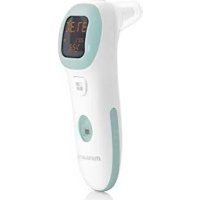
Thermotalk Plus - Thermometer Miniland - Free user manual and instructions
Find the device manual for free Thermotalk Plus Miniland in PDF.



| Product Type | Front and ear infrared thermometer |
| Model | TH2071 (Thermotalk Plus 89068) |
| Brand | Miniland |
| Dimensions (L x H x D) | 127 x 39 x 63 mm |
| Weight | 67 g |
| Power supply | 2 AAA batteries (DC 3V) |
| Battery life | Approximately 6 months (5 measurements per day) |
| Body temperature measurement range | 32.0 °C to 42.9 °C |
| Ambient temperature measurement range | 5.0 °C to 59.9 °C |
| Accuracy (laboratory) | ±0.2 °C (35.5-42.0 °C) / ±0.3 °C (other ranges) |
| Main functions | Ear and forehead measurement, pulse measurement, voice announcement, 15-record history, clock and calendar |
| Display | LCD with date, time, temperature, pulse, icons |
| Care and cleaning | Clean the infrared sensor with a soft cloth dampened with water or alcohol after 4 uses |
| Safety | Do not use in case of ear infection, keep out of reach of children, do not immerse, avoid shocks |
| Box contents | 1 thermometer, 1 stand, 1 storage bag, 2 AAA batteries, instruction manual |
| Operating environment | 10-40 °C (ear), 15-40 °C (forehead), RH 15-85% |
| Storage | -20 °C to 55 °C, RH 15-90% |
| Classification | Class IIa medical device, type BF applied part |
| Standards | European Directive 93/42/EEC, CE0197 (TÜV Rheinland) |
| Warranty | 2 years |
Frequently Asked Questions - Thermotalk Plus Miniland
User questions about Thermotalk Plus Miniland
0 question about this device. Answer the ones you know or ask your own.
Ask a new question about this device
Download the instructions for your Thermometer in PDF format for free! Find your manual Thermotalk Plus - Miniland and take your electronic device back in hand. On this page are published all the documents necessary for the use of your device. Thermotalk Plus by Miniland.
USER MANUAL Thermotalk Plus Miniland
- Introduction
- Contents
- Safety instructions
- Product features
- Instructions for use
- Normalized symbols
- Battery & product disposal information
1. INTRODUCTION
Congratulations on your purchase of this Ear and forehead thermometer with pulse reading function.
The product is intended for the intermittent monitoring of human body temperature on people of all ages. This device is an ear canal IR thermometer, which means that the measure site is ear canal. The forehead temperature is obtained based on the site offset between the ear and the forehead, and the forehead temperature is only used as a reference. This thermometer is intended for home use by customer only. The patient may be an operator and can change the batteries under normal circumstance and maintain the device and its accessories according to the user manual.
Before using this device, please read all instructions in this manual carefully. For the safe and correct use of this product, please read the safety precautions explained in this user manual.
Please store for future reference as it contains important information.
The features described in this user's guide are subject to modifications without prior notice.
2. CONTENTS
1 infrared thermometer
1 support
1 storage and travel bag
2 x AAA batteries
1 Quick guide & Guarantee card
If any of the above is missing, please contact your retailer.
3. SAFETY INSTRUCTIONS
3.1.SAFETY PRECAUTIONS
Warning marks and symbols are included for safety and a correct use of this product and prevention of any injury.
See below for the description of warning marks and symbols:
- WARNING: Means the possibility of personal injury in case of improper use.

- NOTICE: Means the possibility of injuries or damage* in the case of improper use.
[This covers any damage to your house, personal belongings and pets]

- PROHIBITION: Means that the detailed items expressed in words or figures within or beside the symbol are totally forbidden. The symbol on the left means forbidden in general.

- MUST BE OBSERVED: This means obligatory with the detailed items expressed in words or figures within or beside the mark. The one on the left means that it is compulsory in general.

- THE MEANING OF THE SYMBOL: Means Type-BF device

- The patient may be an operator and can change the batteries under normal circumstance and maintain the device and its accessories according to the user manual.
- It is dangerous for patients to perform a self-evaluation and self-treatment based on the results of the reading. Be sure to follow your doctor's instructions.
^ A self-evaluation may cause deterioration in the state of the patient's health.
- Don't touch or blow on the infra-red sensor.
A dirty infra-red sensor may cause an inaccurate reading.
- Clean the infra-red sensor with a soft wet cloth.
- Do not clean with toilet paper or a tissue as this may scratch the infrared sensor and cause an inaccurate reading.
- Clean the infra-red sensor every 4 uses (following the instructions given on the manual, section 6.3. CARE AND CLEANING).
-
Keep the machine out of children's reach
-
If a child takes his own reading, it may cause damage to his ear. Please consult the doctor at once if a battery is accidentally swallowed.
-
When the device is used to measure the temperature of a child, it has to be operated by an adult. Adults can measure their own temperature.
- In the case of having performed any outdoor activities, no reading should be taken until the patient's body temperature is the same as the room temperature.
*If the patient has used a water-filled pillow or hot water bottle, this may cause an inaccurate reading.
- If there is a difference in temperature between the storage area and the place where the reading is to take place, leave the thermometer at room temperature for approximately 30 minutes.
*A failure to do so may cause an inaccurate reading.
- If the reading exceeds 38^ C and / or the patient feels uncomfortable, the user should get in contact with a doctor.
- Stop using the product in the event of any pain.
*It is likely to cause damage to the inside of the patient's ear.
- It is not recommended to use the product by users suffering early disease including otitis and tympanitis.
*The affected part is likely to get worse.
- Don't use the product in a wet ear.
*It may cause damage to the ear.
- Avoid mechanical shock. otherwise the thermometer will be damaged.

- Do not dispose the batteries by throwing them into a fire.
*They may explode.
IMPORTANT:
- If this advice is not followed, the product guarantee may become invalid.
- The warranty excludes the user-caused failures listed below:
- Unauthorized disassembly and modification of the product
- If the product is dropped during application or transportation
- An incorrect use of the product.
3.2. RECOMMENDATIONS
- The product should not be exposed to any chemical solvent, direct sunshine or high temperatures.
- Do not drop, step on or subject the product to any vibration or impact.
- Do not use a mobile phone near the thermometer when it is being used.
- For the disposal of batteries and waste, please act according to local law.
-
Remove the batteries if the unit is not going to be used for a long period of time.
-
Do not repair or do maintenance operations to the thermometer while it is in use.
IMPORTANT: You are advised that changes and modifications not carried out on the equipment by the MINILAND technical service are not covered by the product guarantee.
4.PRODUCT FEATURES
Intended for use:
The device is intended for the occasional reading and monitoring of human body temperature in a domestic environment.
The reference body site is the core and the mode of operation is adjusted mode.
4.1.PRODUCT STRUCTURE
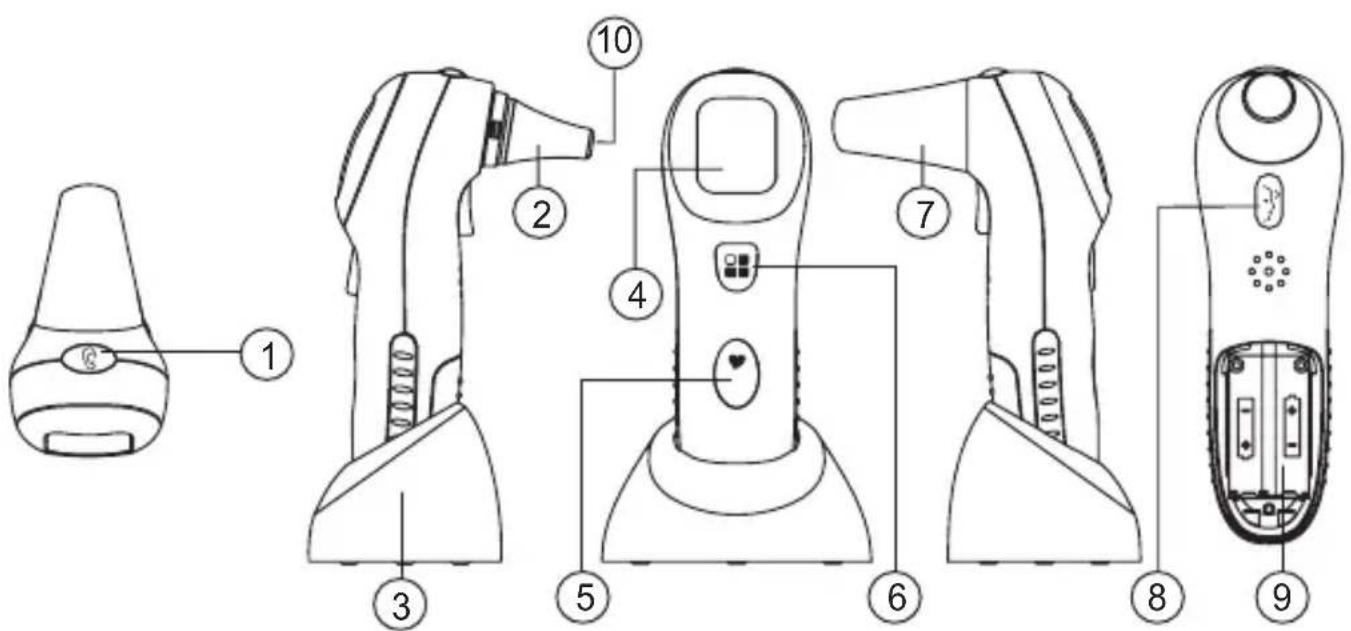
4.1.1. PARTS DESCRIPTION
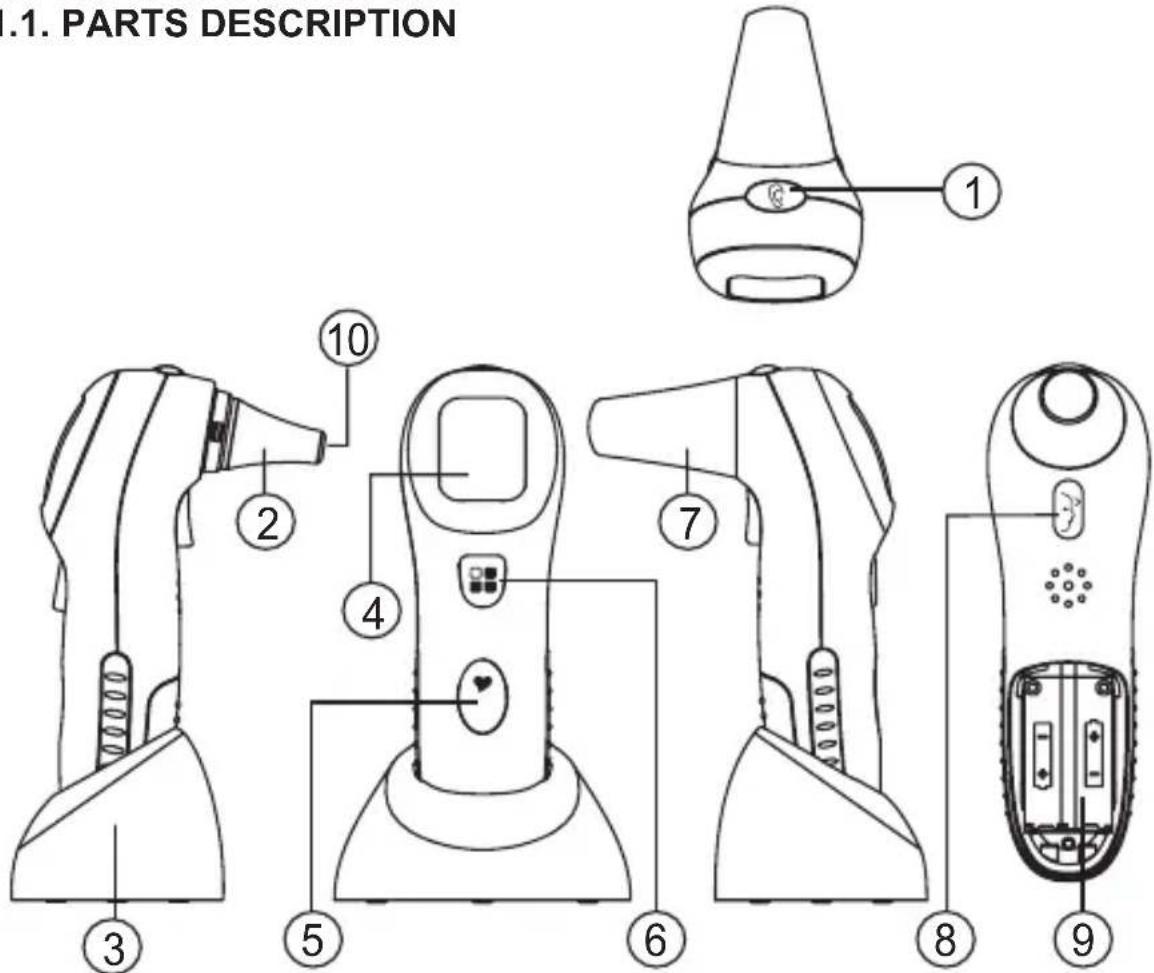
- Ear key
- Probe
- Support
- LCD
-
Heart rate key
-
Broadcast key
- Forehead probe
- Forehead key
- Battery
- Infrared sensor
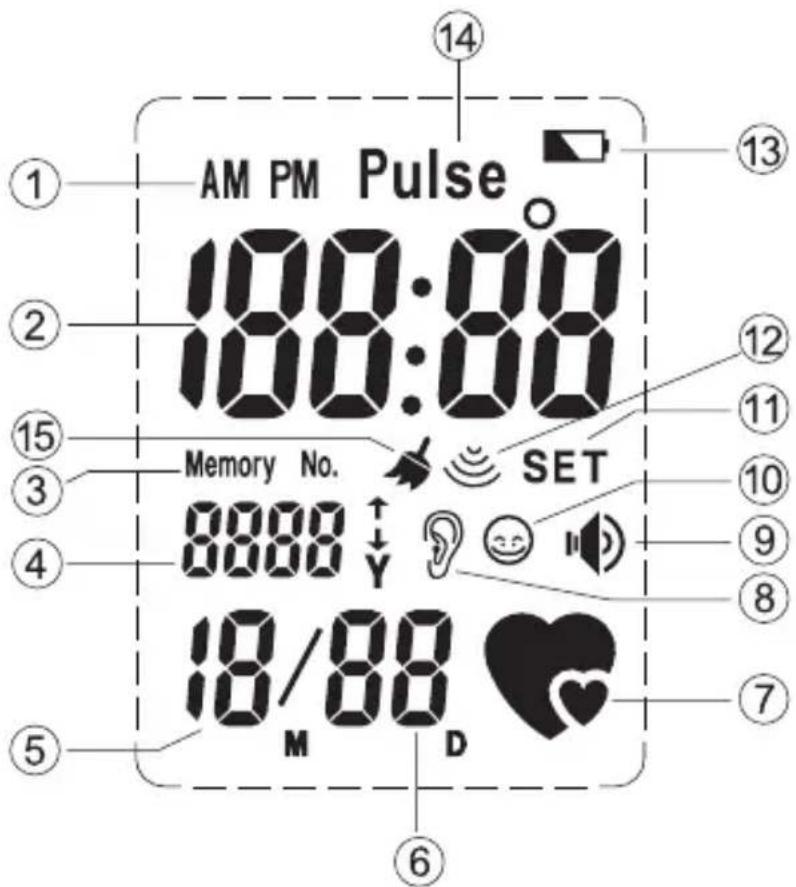
4.1.2. LCD DISPLAY
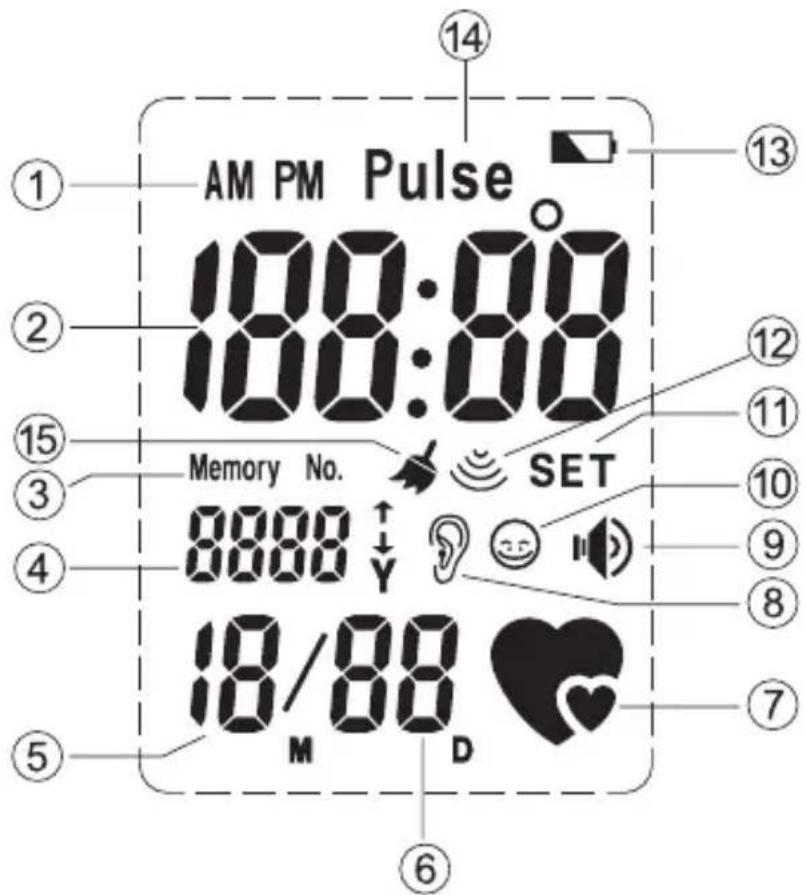
1.AM/PM
2. Time, temperature or pulse display
3. Memory number
4. Memory number or year display
5. Month display
6. Date display
7. Heart rate reading symbol
8. Ear temperature reading symbol
9. Speaker
10. Forehead temperature reading symbol
11. Set display
12. Body temperature reading symbol
13. Low battery symbol
14. Pulse
15. Cleaning indicator
4.2. BASIC FUNCTIONS
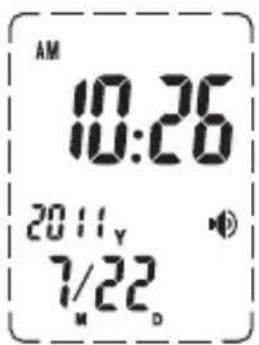
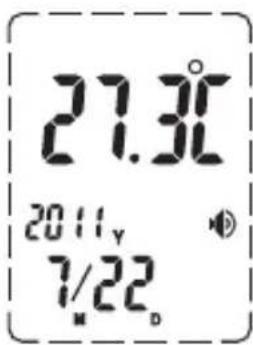
-
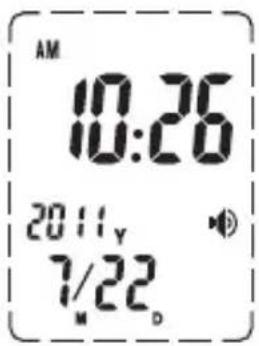
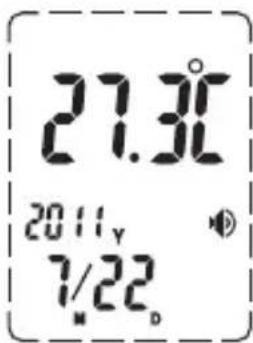
Environment temperature, current date and time display:
Range of date display falls within Gregorian calendar year 2001~2099, time display mode is 24 hours shift. LCD can display date, time and environment temperature, LCD displays time and temperature every 5 seconds. -
Reading and display of temperature:
Readings range from 32.0^ to 42.9^ (89.6°F to 109.3°F).
- 15 sets of readings:
Maximum of 15 sets of temperature records stored.
Temperature is stored together with date, memory number and mode (Ear or Forehead).
- Reading display of room temperature :
Reading ranges from 5.0^ to 59.9^ (41.0^ to 139.8^)
- Voice prompt: readings, and/or room temperature, and/or current time.
4.3. ADDITIONAL FUNCTION
- Function: Reading and display of heart rate.
- Range: 40~140
- To monitor your heart rate:
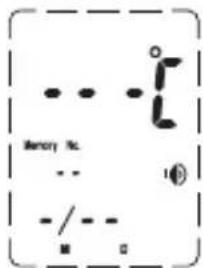
If you want to monitor your heart rate, please press [Heart rate] button, the device makes a "DI" sound, the LCD will display as in figure 2 and the device starts to read your heart rate. Meanwhile place your finger on the [Heart rate] key as in figure 1. When the device detects the heart rate, the symbol will flash to the beat of your heart.
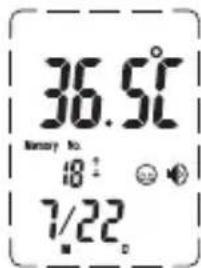
When the reading is complete (about 15 seconds), you will hear a "DI" sound and the LCD will display your heart rate as in figure 3.
Caution:
- Do not keep the [Heart rate] button pressed down when the device is taking a reading of your heart rate.
- If the symbol [ ] does not flash, please make sure your finger is placed correctly and you are pressing down hard enough. Excessive pressure will
obstruct the local blood circulation and the device will not be able to detect the heart rate.
- The maximum reading time is 15 seconds.
- Avoid swimming or intense physical exercise at least half an hour before measuring heart rate.
- Do not measure heart rate if your hand is shaking.
- You must put your finger on the heart rate button (5) without moving it.
- Whilst measuring, do not talk or move.
- If the measurement is incorrect, you may take it again. However, you must wait 5 to 15 minutes before taking the next measurement.
- Make sure you use the same finger if you decide to repeat the heart rate measurement so that you can compare the results.
- The results obtained after measuring heart rate must only be regarded as a reference. They cannot be used as the basis for carrying out clinical diagnoses or evaluations. It is dangerous to draw conclusions or start treatments based on these results. Please consult your doctor and follow his indications if you don't feel well.
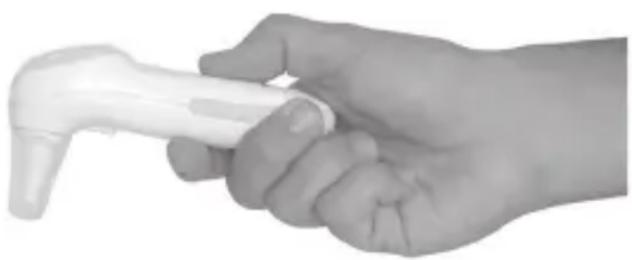
Figure 1
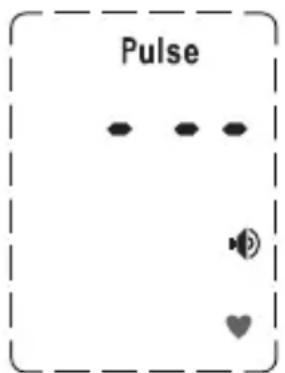
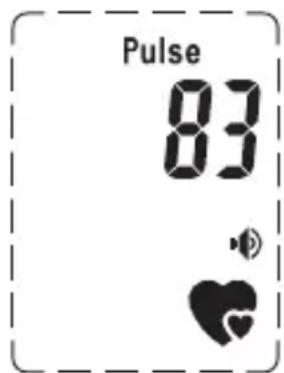
Figure 2 Figure 3
5. INSTRUCTIONS FOR USE
5.1. PREPARATIONS
- Replace any low-voltage battery to ensure full power supply.
- For a correct reading, the thermometer must be in the same environment 30 minutes before the reading takes place.
- Unforeseen fluctuations in ambient temperature are likely to affect the accuracy of the measurement. When the temperature of the measurement site is different from that of the area where the thermometer was located, or when attempting to take the temperature, brake an air conditioner, it is impossible to obtain reliable results.
-
The reading must be taken in a clean ear to assure maximum accuracy.
-
The reading must be taken when the patient is in a state of rest for maximum accuracy.
- The temperature is likely to rise immediately after exercise or bathing.
5.2. HOW TO TAKE A READING
- To take an ear temperature: Pull out the forehead probe from the unit, and insert the temperature probe along the eardrum as deep as possible into the ear. Press [key to take the ear temperature. Upon completion you will hear two short beep sounds, the LCD will display "ooo" and the result of the reading, and you will hear the result via the speaker if the TALK function is enabled. When the "ooo" disappears from the screen, the next reading can be taken. Hold the device correctly and do not press any other keys during the ear temperature measurement.
- To take the forehead temperature: Put on the forehead probe onto the unit, then locate the probe gently in the center of the forehead, midway between the eyebrow and the hairline. Press [y] key once to start the forehead measurement (the measuring time is approximately 1~2 seconds). Upon completion you will hear two short beep sounds, the LCD will display the result of the reading, and you will hear the result via the speaker if the TALK function is enabled.
- The result will automatically be recorded in the memory. Once 15 recordings have been stored, on taking the 16th recording, the first set of data will be removed and the new recording will take the top position.
- Perform a maximum of 3 consecutive measurements. Body temperature may not give a true reading even though the patient has recovered. For continuous measurement up to 4 times or more, you must wait at least 10 minutes before taking a new measurement.
- Once the reading has finished, the unit will automatically return to time mode after 30 seconds.
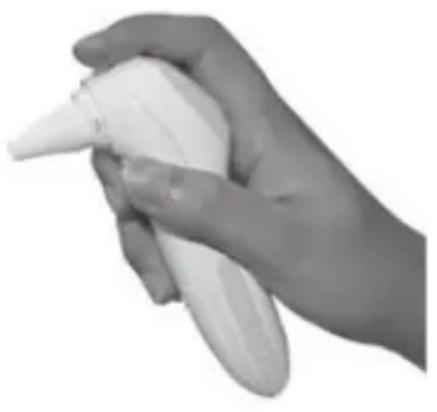
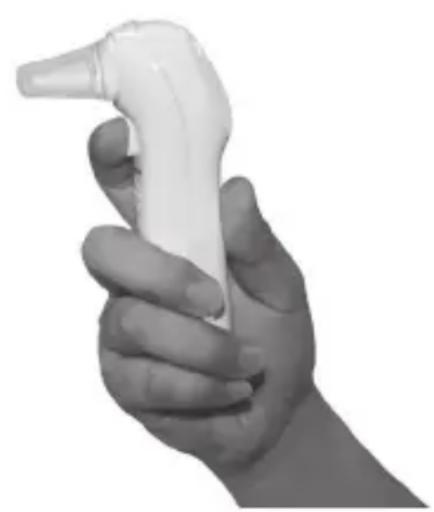
- The display will automatically turn off after 3 minutes after the last key has been pressed (if sleep mode is enabled).
5.3. DISPLAYING THE RESULTS OF THE MEASUREMENT
Normal body temperature is a range. A person's normal tempera tura range tends to decrease with age. The following table shows normal temperature ranges by age:
| 0 - 2 years | 36.4 - 38.0 °C | 97.5 - 100.4 °F |
| 3 - 10 years 36.1 - 37.8 | °C | 97.0 - 100.0 °F |
| 11 - 65 years 35.9 - 37.6 | °C | 96.6 - 99.7 °F |
| >65 years 35.8 - 37.5 °C | 96.4 - 99.5 °F | |
The range of normal temperature varies from person to person and can be influenced by many factors such as time of day, measure from different sites, level of activity, medications... So we recommend that you practice with the thermometer on yourself and family members when you are healthy. This way you will know how the thermometer works and will feel more confident of the measurements you take when a family member is ill.
On this thermometer, the results will be showed as follows:
A. An accurate value display for result ranges between 32.0^ and 42.9^ (89.6°F and 109.3°F)
B. "HI" is displayed for result above 42.9^ C / 109.3^ F
C. “LO” is displayed for result below 32.0^ C / 89.6^ F
- Display time in a sequence of year, month, date, hour, minute with a flickering “ : ” stands for seconds. The LCD displays the current time and room temperature every 5 seconds.
- Press [ ] to show the current time and/or room temperature (except for French and Russian).
- Press hold [1] for 3 seconds to select between english, german, french, spanish, italian, russian or no voice.
When the unit is on voice mode, you will always hear a beep during the measurement.
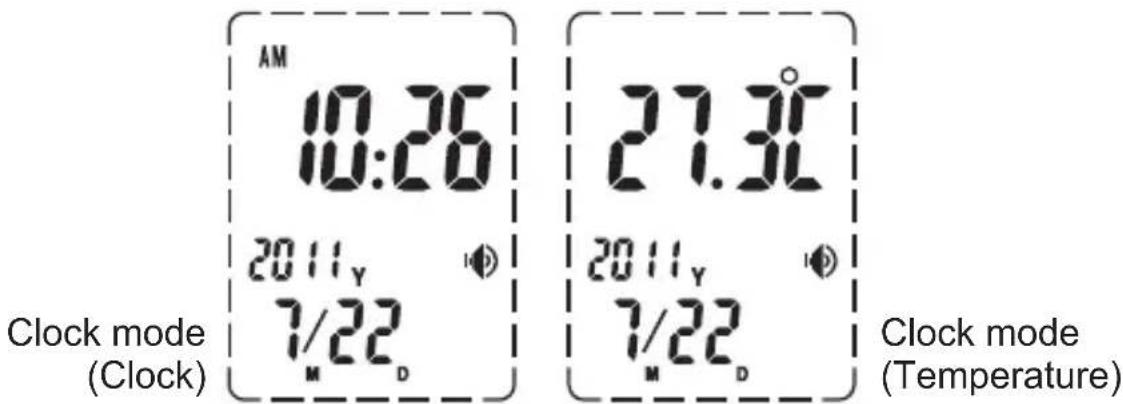
- When the TALK function is enabled, the [icon] is displayed. If it is disabled, the [icon] will be off. The default TALK function is enabled.
- Press [3] and [8] key to retrieve the recorded temperature; press the [3] and [8] key for approximately 3 seconds to enter the set up mode, the time, date and LCD state (on or off) can be reset.
- Press the [q] and [R] keys to select Celsius or Fahrenheit.
- Sleep mode - The system enters sleep mode 3 minutes after the last key has been pressed.
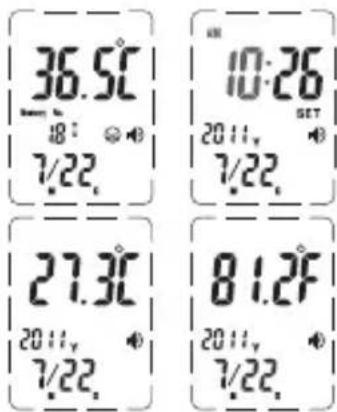
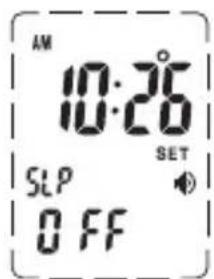
5.4.2. SETUP MODE
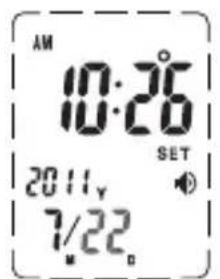
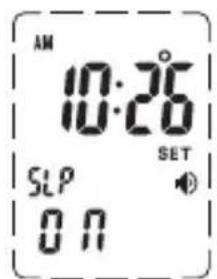
Press the [ ] and [ ] keys for approximately 3 seconds to enter the setup mode.
- Press [ ] to select between a setting of HOUR, MINUTE, YEAR, MONTH, DAY and SLEEP enable/ disable and to increase the digit.
- Press [to confirm the settings and go to the next setting.
- Press hold [ ] to scroll through the digits quickly.
*The unit will automatically return to clock mode 30 seconds after the last key has been pressed.
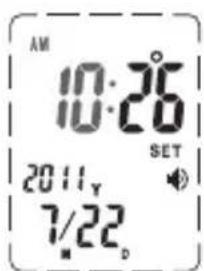
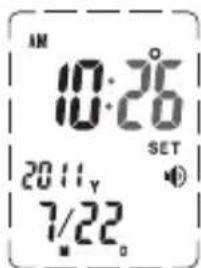
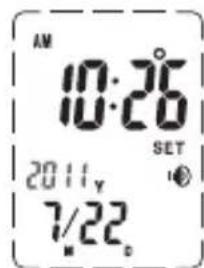
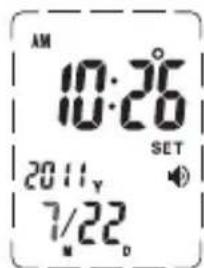
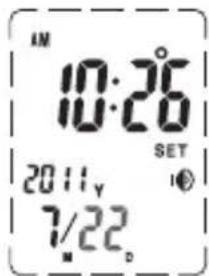
Set monthSet year Set minuteSet hour
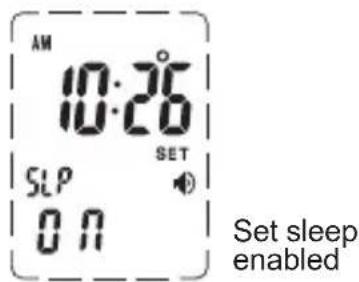
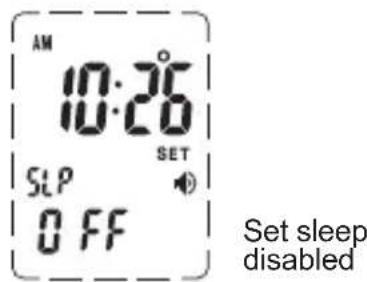
5.4.3. MEMORY MODE
- Press [ ] and [ ] clock mode to enter memory mode.
Press [ ] to display the data stored.
- "-" will be displayed if no data is stored.
- Maximum storage capacity is 15 sets of data with date and memory number shown.
- The unit automatically returns to clock mode 5 seconds after the last key has been pressed.
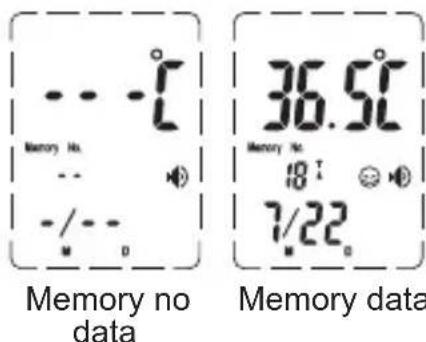
Note: Press any key to stop the sound during the announcement.
5.5. RECOMMENDATIONS
- When using for the first time, we recommend taking the reading 3 times in the same ear. The maximum reading should be recorded in the case of different results as there may be a slight difference of between (+/-0.3^, +/-0.5^) if the thermometer is used continuously.
- Wait only 30 seconds before taking another reading on the same patient again to avoid excessive cooling of the skin.
- For users in sound health, both ears are almost the same in terms of body temperature. You should select the ear that shows a stable and relatively higher temperature.
- Please clean the ear before taking a reading.
NOTE: The unit may not function correctly in an environment with electrostatic discharge so it may be necessary to reset the unit.
5.6. TROUBLES AND TROUBLESHOOTING
| PROBLEMS CHECK LIST SOLUTIONS | ||
| No response/ Automatic reset when the insulator is taken out | Battery used up Insert a | new battery |
| Battery in wrong polarity | Take out battery, reinsert battery correctly | |
| Poor battery contact | ||
| Battery symbol on LCD | Low battery life Insert a | new battery |
| “Lo” on screen(result below 32.0°C or 89.6°F) | Thermometer placed correctly in the eardrum / forehead | Follow user's manual to point at the eardrum / forehead. |
| “Hi” on screen(result below 42.9°C or 109.3°F) | Please check the operation method | Follow user's manual for correct reading |
| Errp" on screen Hardware | problem Consult with your | dealer |
| “ErrE” on screen | Environment temperature beyond the scope of 10°C~40°C (50.0°F~104.0°F) for Ear 15°C~40°C (59.0°F~104.0°F) for Forehead | Condition the thermometer until it reaches environment temperature 10°C~40°C (50.0°F~104.0°F) for Ear 15°C~40~ (59.0°F~ 104.0°F) for Forehead |
| “Err” on screen | Operation error, More than 15 seconds without test result in heart rate mode | Please repeat the operation, following the instructions in user manual |
| Other malfunctions | Contact the MINILAND technical service. | |
6. MAINTENANCE
6.1. REPLACE A BATTERY
Remove the battery compartment flap. Use only new batteries (2 x AAA battery). Replace the battery compartment firmly.

6.2. MAINTENANCE, STORAGE AND CALIBRATION
Maintenance:
- Remove any stains on the casing with a soft dry cloth.
- Do not wash with water or detergent containing abrasive elements or benzene.
Storage:
- Clean the thermometer and replace the cover to protect the lens after each use.
- Do not expose the thermometer to direct sunshine, high temperatures, damp conditions, fire, flame, vibration or impact.
- Remove the battery for long time of non use.
Calibration:
This thermometer is calibrated at the time of manufacture. If the thermometer is used according to instructions, periodic recalibration is not required. If at any time you question the accuracy of the measurement, please contact the retailer immediately.
Don't attempt to modify or reassemble the thermometer.
6.3. WARNING OF DIRT ON THE SENSOR
In order to remind the user to clean the infrared sensor, this thermometer has a special alarm. If the thermometer hasn't been used for a long time or if several measures have been taken, the LCD will display the cleaning symbol to remind the user to clean the infrared sensor. The thermometer will return back to standby mode after pressing any button.
6.4. CARE AND CLEANING
- Keep the probe surface clean, otherwise the reading will not be accurate.
- Clean the probe with clean paper moistened in water or alcohol, and take the reading after the water on the surface of the probe all evaporates.
Caution:
Make sure the tip of thermometer is clean. A dirty lens may cause an inaccurate reading.
7. TECHNICAL SPECIFICATION
Product Name: Infrared thermometer
- Model: TH2071 (thermotalk plus 89068)
- Power supply: DC3V (2 x AAA battery)
Mode of operation: Adjusted mode
- Reference body site: Core
- Temperature sensing Part: IR sensor
- Range: 32.0^ C 42.9^ C( 89.6^ F 109.3^ F)
- Room Temperature: 5.0^ C 59.9^ C (41.0°F ~139.8°F)
Laboratory accuracy: + / - 0.2^ (or + / - 0.4^
35.5^ 42.0^ (or 95.9^ 107.6^)
+/- 0.3°C (+/- 0.5°F)
32.0^ 35.4^ (or 89.6^ 95.8^ )
42.1^ 42.9^ (or 107.7^ 109.3^ )
- Room Temperature: +/- 2^ C ( 4^ F )
Size: 127(L) × 39(W) × 63(D) mm
Weight: 67 g
- Working environment: 10^ 40^ (50.0°F~104.0°F) for Ear
15^ 40^ (59.0°F ~104.0°F) for Forehead
Relative humidity: 20% RH 85% RH
- Transportation and storage condition:
Temperature -20°C to 55°C, Relative humidity 15%-90% - Precision/repeatability: +/- 0.3^ (+/- 0.5^)
- Service life of the battery: With a new battery (Carbon) approximately 6
months based on a frequency of use of 5 timer per day.
Service life of the device: 2 years - Classification of ME equipment: Internally powered/ Continuous operation
*Dispose of used batteries responsibly, please consult your distribution center for details.
NORMALIZED SYMBOLS




0197
- Read the operating Instructions for use!
- Type BF Applied Part. The applied part is the probe tip.
-
Disposal in accordance with Directive 2002/96/EU (WEEE)
-
Complies with the European Medical Device Directive (93/42)
EEC) and amended by directive 2007/47/EC requirements. Notified
body TÜV Rheinland (CE0197)

- Serial number

The name and the address of the manufacturer

- Authorized Representative in the European Community

- Batch code

- Date of manufacture
ELECTROMAGNETIC COMPATIBILITY (EMC)
-
This device should not be used adjacent to or stacked with other equipment and that if adjacent or stacked use is necessary, this device should be observed to verify normal operation in the configuration in which it will be used
-
Use of accessories other than those specified or provided by the manufacturer of this device could result in increased electromagnetic emissions or decreased electromagnetic immunity of this equipment and result in improper operation.
-
Portable RF communications equipment (including peripherals such as antenna cables and external antennas) should be used no closer than 30~cm (12 inches) to any part of the device, including cables specified by the manufacturer. Otherwise, degradation of the performance of this equipment could result.
-
When the operating environment is relatively dry, strong electromagnetic interference usually occurs. At this time, the device may be affected as follows:
-
the device stops output;
- the device turns off;
-
the device restarts;
-
The above phenomenon does not affect the basic safety and essential performance of the device, and the user can use it according to the instruction. If you want to avoid the above phenomenon, please use it according to the environment specified in the manual.
| Declaration - electromagnetic emission | ||
| The device is intended for use in the electromagnetic environment specified below. The customer or the user of device should assure that it is used in such an environment. | ||
| Emissions test Compliance Electromagnetic environment - guidance | ||
| RF emissions CISPR 11 | Group 1 | The device uses RF energy only for its internal function. Therefore, its RF emissions are very low and are not likely to cause any interference in nearby electronic equipment. |
| RF emissions CISPR 11 | Class B | The device is suitable for domestic establishment and in establishment directly connected to the public low-voltage power supply network that supplies buildings used for domestic purposes. |
| Harmonic emissions IEC 61000-3-2 | Not applicable | |
| Voltage fluctuations/ flicker emissions IEC 61000-3-3 | Not applicable | |
| Declaration - electromagnetic immunity | |||
| The device is intended for use in the electromagnetic environment specified below. The customer or the user of device should assure that it is used in such an environment. | |||
| Immunity test | IEC 60601test level | Compliance level | Electromagnetic environment - guidance |
| Electrostatic discharge (ESD) IEC 61000-4-2 | ±8 kV contact ±2 kV, ±4 kV, ±8 kV, ±15 kV air | ±8 kV contact ±2 kV, ±4 kV, ±8 kV, ±15 kV air | Floors should be wood, concrete or ceramic tie. If floors are covered with synthetic material, the relative humidity should be at least 30%. |
| Electrical fast transient/burst IEC 61000-4-4 | ±2 kV for power supply lines ±1 kV for input/output lines | Not applicable | Mains power quality should be that of a typical commercial or hospital environment. |
| Surge IEC 61000-4-5 | ±0.5kV, ±1 kV line(s) to lines ±0.5kV, ±1 kV, ±2 kV line(s) to earth | Not applicable | Mains power quality should be that of a typical commercial or hospital environment. |
| Voltage dips, short interruptions and voltage variations on power supply input lines IEC 61000-4-11 | 0% UT; 0.5 cycle At 0°, 45°, 90°, 135°, 180°, 225°, 270°and 315°0% UT; 1 cycle and 70% UT; 25/30 cycles Single phase: at 0°0% UT; 250/300 cycles | Not applicable | Mains power quality should be that of a typical commercial or hospital environment. If the user of the device requires continued operation during power mains interruptions, it is recommended that the device be powered from an uninterrupti-ble power supply or a battery. |
| Power frequency (50/60 Hz) magnetic field IEC 61000-4-8 | 30 A/m 30 A/m | Power frequency magnetic fields should be at levels characteristic of a typical lo- cation in a typical commercial or hospital environment. | |
| NOTE: UT is the a.c. mains voltage prior to application of the test level. | |||
| Declaration - electromagnetic immunity | |||
| The device is intended for use in the electromagnetic environment specified below. The customer or the user of device should assure that it is used in such an environment. | |||
| Immunity test | IEC 60601 test level | Compliance level | Electromagnetic environment - guidance |
| Conducted RF IEC 61000-4-6 | 3V 0.15 MHz to 80MHz 6 V in ISM and amateur radio bands between 0.15 MHz and 80 MHz | Not applicable | Portable and mobile RF communications equipment should be used no closer to any part of device, than the recommended separation distance calculated from the equation applicable to the frequency of the transmitter.Recommended separation distance d=1.2√P 150KHz to 80 MHzd=1.2√P 80MHz to 800 MHzd=2.3√P 80MHz to 2,7 GHzwhere P is the maximum output power rating of the transmitter in watts (W) according to the transmitter manufacturer and d is the recommended separation distance in meters (m).Field strengths from fixed RF transmitters, as determined by an electromagnetic site survey, a should be less than the compliance level in each frequency range.Interference may occur in the vicinity of equipment marked with the following symbol: |
| Radiated RF IEC 61000-4-3 | 10V/m 80 MHz a 2,7 GHz | 10V/m | |
| NOTE 1 At 80 MHz and 800 MHz, the higher frequency range applies.NOTE 2 These guidelines may not apply in all situations. Electromagnetic propagation is affected by absorption and reflection from structures, objects and people. | |||
a Field strengths from fixed RF transmitters, such as base stations for radio (cellular/cordless) telephones and land mobile radios, amateur radio, AM and FM radio broadcast and TV broadcast cannot be predicted theoretically with accuracy. To assess the electromagnetic environment due to fixed RF transmitters, an electromagnetic site survey should be considered. If the measured field strength in the location in which device is used exceeds the applicable RF compliance level above, device should be observed to verify normal operation. If abnormal performance is observed, additional measures may be necessary, such as re-orienting or relocating device.
b Over the frequency range 0.15 MHz to 80 MHz, field strengths should be less than 3V / m
| Recommended separation distances between portable and mobile RF communications equipment and device | |||
| The device is intended for use in an electromagnetic environment in which radiated RF disturbances are controlled. The customer or the user of device can help prevent electromagnetic interference by maintaining a minimum distance between portable and mobile RF communications equipment (transmitters) and device, as recommended below, according to the maximum output power of the communications equipment. | |||
| Rated maximum output power of transmitter W | Separation distance according to frequency of transmitter m | ||
| 0,15 MHz to 80 MHz d = 1.2√P | 80 MHz to 800 MHz 80 d = 1.2√P | MHz to 2,7 GHz d = 2.3√P | |
| 0,01 0,12 | 0,12 0,23 | ||
| 0,1 0,38 | 0,38 0,73 | ||
| 1 1,2 1,2 | 2,3 | ||
| 10 3,8 3 | 8 7,3 | ||
| 100 12 12 | 23 | ||
| For transmitters rated at a maximum output power not listed above, the recommended separation distance d in meters (m) can be estimated using the equation applicable to the frequency of the transmitter, where P is the maximum output power rating of the transmitter in watts (W) according to the transmitter manufacturer. NOTE 1: At 80 MHz and 800 MHz, the higher frequency range applies. NOTE 2: These guidelines may not apply in all situations. Electromagnetic propagation is affected by absorption and reflection from structures, objects and people. | |||
8. BATTERY & PRODUCT DISPOSAL INFORMATION
- Remember to dispose of the product responsibly.
- Do not mix products bearing the crossed -out bin symbol with your general household waste.
- For the correct collection and treatment of these products take them to the collection points designated by your local authority. Alternatively contact the retailer who sold you the product.
INDICE
3.2. RECOMMANDATIONS
4. CARACTERISTIQUES DU PRODUIT
4.1. STRUCTURE DU PRODUIT
8. INFORMATIONS D'ELIMINATION DES PILES ET DU PRODUIT
5.6. PROBLEMY EKSPLOATACYJNE I ICH LIKWIDACJA
3.1. MEPbI INPEDOCTOPOXHOCTN
IJa 6e3oNaCHO n npaBnIbHOrO nCNoJIb3OBaHnRA 3TOrO n3DeJnRA, a TaKxe dJa IpeDorBpaAueHnra NOnyueHnRA TpaBM BamN INpyrMM NIObMn B HactoJe IHCTpykCNI NCNoIb3yOTcR CNeDuOuNE PpeDynpexKaIoUne 3HaKn i CNMBolbl: Oncsahne 3HaueHn PpeDynpexKaIoUnx 3HaKOB i CNMBOLOB HaxODNTcR HNXe:




- PEPENPPEKDEHNE: O3Naayet BepoTHOCTb NOJyehn TpaBMbl Prn HnpaBnIbHOM NcNoIb3OBAHN.
BHIMAHHE: O3Haayet BepoTHOCb NOJyehn TpaBmbl NIN npuHHeHry uJep6a nMyIeCTBy npn HnPaBnIbHOM IcNoIb3OBaHn. [yuep6 umyuIecmy O3Haayem IIOboe nopeXdeHue doma u npedMemoe domaunhezo obuxoda, a maKke mpaembl, noJyehHbIe domaunHmu XUOBomHbIMu.]
3APLEUHNE: O3Naaet 3anpeT Ha BcHnHOpMaunIO, PpeOCTabJIeHHyIO B BVNe CNOB IIN cNpB BHyTpN 3HaKa IIN pRdom C Hm. PonoKeHne cIeBa O3Naaet 06nn 3anpeT.
OB3ATEJIbHOCTb CO6JIIODEHnA: O3NaaET o6aTeIbHoe BblONHeHne BCEx yka3aHn, npedocTabHeHHbIX B BVde CNOB nIN CuΦp BHyTpN INI pAOM co 3HaKOM. IonoJKeHne cIeBa O3NaaET O6aTeJIbHoe dIg BCEX CO6JIIODeHne.
3HAUHNE CIMBOJA: O3nauaet npnbop Tuna BF,

- Paunent Moxet Cam 6bItb Onepatopom N Moxet camocToTeNbHO MeHantb 6aTapeKn npn O6bUHbIX yCIOBnAx, a TaKke ObcIyXnBaTb yCTpOietBO corlaCHO IHCTpyKuIN NO 3KcnnyatauIN.
- CamoctoTeJIbHoe OueHnBaHne COCTOaHnCBOero 3dOpOBbI n CaMOJeUeHHe Ha OCHOBaHn NOKa3aHn 3TOrO npi6opa npedCTaBnEe ONaCHOCTb dIy 60JIbHbIX. BblONHnYe yka3aHn CBOero leuauero Bpaua.
*Camocmomehoe ouehueaue cocmohue c6o2o 3doopobmoK npueecmu K o6cmpenuo 3abonebau.
- He npikacaiTecb n He dyuTe Ha nHphipaKpaChbI ceHCop.
*3a2p3HeHHbI NK ceHcop Moxem cmamb npuUHO HemoHybIX noka3aHu.
B cnyuae 3aqr3HeHnO octopoXHo OunchTe IHpapKpaChbI ceHCOP mRKO BnaXHO TkaHbIO.
*Tyanemha 6ymaa unu 6ymaxhble canpemku, uCnoIb3yEmbie dner ouuueHua NK ceHCopa, mozym e2o nozaapanamb, ymo npueedem K hemouhim noka3aHua m npubopa. - UnCTIte DaTnK TepMOMeTp aYepe3 KaJdbie 4 NcNoJIb3OBAHnA (B COOTBeTCTBnC TEm, yTo yKa3aHO B pyKOBoODCTBe nOlb3OBATeJn, B pa3dene 6.3. YXOD nUHCTKA).
XpaHnTe npi6op B HeoctynHom IJyIeTe MeCTe
*Camocmomehoe HeocmopoxHoe u3MepeHue memnepamypbI dembmu moxem npubecmu K noepeKdeHIO nOncmu yho paKoBuHb. B cnyae cnyauHo2O npozambyaHua 6amaeu HemedJeHNO o6pamumec b K epay.
Korda yctpoCTBO nCNoB3yETcIg N3MepeHn TEmnepatypbI pe6eHka, OHO DoJXHo ynpabTbCBA3pocblIM. B3pocblte Moryt N3MepeTb CO6CTBeHHyO Temnepatypy.
He npoBOnTe n3MepEnHe uepe3 yuHyIO noIoCTb cpa3y nocIe Bo3paueHnC yUInCb. IopoJdTe HeKOTOpoe Bpem, UTO6bl uHna paKOBnHa cTana TeNNoi.
*Ppu ucnonb3o8aHuu nodyuku uu Mewoka, 3anonHeHHo2o bdou, uu npu npoebeHu u3Mepenur cpa3y nocne 0o3pauehenur C yluu6 3umhee epemnoka3aHua mepmomempa moaym 6bmb 3aHuxKeHbl.
- YuHTbIBaTeMnepaTyHyo pa3HnUy MeCTa XpaHeHna TepMometpa N OMeUeHnB KOTOpOM 6yDyT npOBODITb N3MepeHne, TepMometp DoJxKeH B TeueHne OKOIO OCHOBHOe TEIO caIa JBnErcg OCHOBHbIM, a peKIM pa60Tb HAcTpaNBaETcB peKIMe.
- HebsbohHeue 3mo2o mpe6oBaHua Moxem cmmb npuHou HemoHybIX noka3aHupubopa.
- Ecni TemnepaTpa TeNa NOIb3OBATeN IpeBbIaAe 38°C n / nIi OH nIIOXo Ce6y UYBCTByeT, O6ra3aTeNbHO CBxNITecb C BpaQOM.
- Пи ВОЗнКНовен КAKОДЛБО 6ОЛnpeКрТпЕ ИСПОЛьЗОВАне пИбopa.
*Bo3MOxHNO6peXdeHue yuHoO omepcmur.
- Пибор He pekomeHnyeTcK INCNoIb3OBaHnIO JIOdbMn C 6OJIe3HЯMn OpraHOB cIyxa, BKNIOUay HApxHbI ONIT N MInPnHrNT.
* CocmoHue yacmu yuHou nonocmu, nopaxeHHou 6one3hbo, moXem yxduumbcra.
He npoBOJnte n3MepenHe uepe3 yuHoe OTBepCTne nocJe KynaHnI nn INaBaHbJ.
*Bo3moXHO ocna6nHeue 3axeama e yuHOM omepcmu. - I36eataMeXaHueckx yapOB, B npOTnBHom cnyae TepMometp 6ydt NOBpeKdEh.

He 6pocaiTe 6aTapeiKn B OroHb.
*B OzHe 6amapeuku Moaym 83opeaambc.
BAKHAR INHΦOPMAÇNЯ:
- Heco6JIHOeHHe IHCTpyKcI npOn3BOIDTeJIa MoKeT npINBecTN K nOtepe rapaHTn Ha npOdyKcIIO.
- YcIIOBnra rapaHTnHOrO 6CJyXnBaHnHe paCnpocTpaHOTcHa cNeDyUoUne HeNCpapBHOCTN B pa6ote np6opa, BO3HKnUne NO BNHe NOLb3OBaTeJIa:
- HencnpaBHOCTb BCJeIDCTBHe HecaHKUHOHPOBaHHo pa36opKn MoDnKauuN.
- HencpaBHOCTb BCJeCDTBVe BHe3aHOro NaJeHnBaBpeMry NcNoJb3OBaHnI nn nepeBO3KN
- HencnpabHocTB BCJeIDCTBne HecO6JIHOdeHnI npaBnI 3KcPiyaTaCuN, n3IOKeHHbIX B pyKOBOdCTBe NOlb3OBaTeTJ.
3.2. PEKOMEHДAUIN
3anpeueHO octaBnTb n3deJne B MeCTax, rIe np6Op MOKeT noDBepHyTbcB BlnHIO XmMuecknx pactBopnteNe, pRMOrO COJIHeuHOro CBeTa IIN BBICOKO TeMnepaTypbl.
He donyckaite yapob, naeHn npbopa, ero nonaHaNoI HOrn n BnnaHa Ha Hero Bn6paun.
He nCnoJb3yIte Mo6nIbHbI TeJefoh pIaOM c pa6OtaIOUIM TepMometpOM.
- YtNiN3aun 6batapeek n OTXOIOB: DeIcTByIte B COOTBeTCTBUN C HOpMaMn MEcTHOrO 3aKOHODaTeJIbCTBa.
- Ecni Bbl He 6yTe IcNoIb3OBAb Tnp6op B TeueHne IInTeIbHoro nepnoDa BpeMeHn, BblbTe n3 Hero 6bTaapeKn.
- He pemontnyte n He BbINOJIHnIte pa60tBI NO TEXHNueCKOMy 6cJyXnBaHIO TepMometpa, KOrda OH IcNoJIb3YeTcR.
Baxho: obaaem Bahe BnMaHne Ha To, yTo npBHeCen MoNΦkaun B np6op Nucom, He YBLaHouMcR cepBnchbIM TexHnKOM MINILAND, rapaHTna Ha np6op 6ydet yTepraHa.
4. XAPAKTEPNUCTNKN 3ДЕЛЯ
OchOBHoe TeIIO caTaNBAeTCa OCHOBHbIM, a peXIM pa6OTbI HacTpaUNBaETcBpeXnme.
Pp6op npedHa3NaueH dny nepnoDnueckoro n3MepeHna TeMnpaTpybI ueNoBueeCKoro TeJa H ee KOHTPOJRA B DOMaSHNX ycNOBnX.
4.1. CTPYKTPA N3DEJINIA
4.1.1. ONICAHNE DETAJEIN
- KhoNka dIy I3MepenHr TeMnepaTpybI yxa
2.30H - noctabka
- JnDkoKpncTaNJInueckn DnCnnej (KKD)
- KhoNka JnIa N3MepeHnca cepDeuHoro PutMa
- KhoNka OTnpaBneHnCnHaJIOB
7.Датчндял6a - KhoNkaДЯИЗМерЕнь TempepaTypblI6a
9.6atapeiKa
10.Инфракрасьи сеньсор
4.1.2.ЖКДДИСПЛЕМ
- yTpo/Beuep
- OTo6paXeHne BpeMeHn, Tempepatpyi Nnybca
- HOMEPnamrtn
- OTo6paXeHHe Homepa namrN nn rOda
- OTo6paXeHne MeCya
- OTo6paKeHne DaTbI
- 3нak ИЗмерени сер dedуHoro рntma
- 3нak Измерени Temперatypebl B yшон paKOBиHe
- rporkoBOpnteIb
- 3nak n3mepenH TemnepaTpybI6a
- NaCTPOJa DNcNJIeR
- 3нak ИЗмерени Temпера typы.YeNoBeeCKOrO TeJa
- 3NaK pa3paJKeHHo 6aTapeiKN
- nyIbc
- NaOH CHNCTOTbI CeHCopa
4.2.OCHOBHbIEΦYHKUIN
- OTo6paXeHne TempeaTypbI OkpykaIOUeI cpebl, TeKUSei DaTbI N BpeMeHi:
Dnana3OH OTo6paXeHnJaTbI HaxOHTcB
PpeJelax TperopnaHcKO raKeHdAp 2001-
2099rr., INdkauNja DaTbI npOnCXoINT B
peXime 24 YacOB.
KKD MoKet noka3bIBaTb DaTy, BpeMn
N TempeaTypOOkpykaIOUeI cpebl,
KKD noka3bIBaET n3MeHeHnBpeMeHi
N TempeaTypbI KaKdble 5 ceKyHd B
HOpMaJIbHbIX ycIOBIAx.
2.Измерении oTo6paхене Tempepatypbl:Диana3OH Измерения ot 32.0°Cdo42.9°C (ot 89.6°Fdo109.3°F).
3. Памъ Ha Измерени:
Makcimальhoe колчecТBO xpaHЯцнхся 3aIncese TEmpeatypbl - 15.
3haueHne Tempeatypbl coxpaHЯETcBMeCTe c datoN npOBeHENn I3MepHnI, HomepOM pAMrTn IN CnoCo6bOM npOBeHEnn I3MepHnI (yxo nII nO6).
4.Измерени Индигаця TemпepaТурьВnomeшен:Диапазон Измереня ot 5.0°Cdo 59.9°C (ot 41.0°Fdo 139.8°F).
5. TOnocoboe coo6eHHe: 03ByuBaIOTcpe3yIbTaTbI n3MepeHn n/nn TeMnepaTpya B NOMEeHn n/nn TeKyuee BpeM.
4.3.ДОПОЛНТЕЛБHBIEФУHKЦИ
npoBODNTcN3MepeHne,OTJNUyaeTcN OT TeMnpaTypbI TORO MeCTa,B KOTOPOM HaxoDNTcN TepMOMeTp,pe3yNbTaTbI N3MepeHn8 6dyT He npaBnBHBIMn. Pe3yNbTaTbI N3MepeHn8 TAKKe 6dyT He npaBnBHBIMn npn npNBedeHn N3MepeHn8 npeed KOHNzHOHePOM.
YctaHOBka yaca YcTaHOBka MmHyTbI YcTaHOBka rOda YcTaHOBka MeCra
YctaHOBkaH
PeknM
OKnDaHnayakTNBnPoBaH
PekmOxuHaHnOTKJIOUeH
5.4.3. Pekim naMaTn
- Haxmte KhoN [n []peXime OTo6paXeHna BpeMeHn, YTO6bI 3aHTn BpeKIM namrtn. Haxmte KhoNky [noka3bIBaTb 3aIncei.
2.BcnyaeOTcyTCTBn3aHnCeI NOBNTc3HaK“-”; - MakcimalbHoe kOJIuYeCTBO 3aIncen - 15, c yka3aHnem daTbI n Homepa naMRTN;
- Прибор abTomatnueckи BO3BpaaaeTcBpeKM OTo6paXeHn BpeMeHn Chepe3 5 cekyHnNoCJIne NocJeDHeRo HaKATN KHOKN.
Приимechане: Habtmte Лобую Кноку, уTo6bl OctaHOBNTbпераду cooшцehniaВ rolocobom peЖIMe.
B namrHn Hn daHHbIX
DaaHbIe B nAMrTu
5.5. PEKOMEHДAUIN
- HauHauOuIM NOIb3OBaTeJAM peKOMeHdyem B nepBbI pa3 I3MepNTb TemnepaTpy 3 pa3a B OndHom n Tom JxE yxe. B cnyae noJyehnpa3HbIX 3NaueHn, 3aNcBIAeTcra MaKcImaJIbHOe, TAK KaN pRi npoJOnJXteJIbHOM INCNoIb3OBaHn TepMometpa B erO NOKa3AHnX MoKeT 6bITb NorpeUHocTb (+/- 0.3^, + / - 0.5^
- TTo6bI He IOnyCTnTb Upe3MepHOrO OxJaXdEHHa KoxN, OxJaTe OkoNo 30 CekyHd Npeed Tem, KaK N3MePnTb Tempeatpy Ondoro N TOrO Je NaunHeTa.
- Y IIODeI C XOPOUIM COCTOAHnEM 3DOpOBbY TeMNEpaTypa B o6oNX yJax NOuTH ODNHaKOBaB. BbIepeNte yXo co cTa6HbHO N OTHOCHTeJIbHO NOBblSeHHoI TEMNEpaTypoI.
- Nocntte ywn npeed n3MepeHem TemnepaTypbl.
© Miniland, S.A. 2011
Fabricado en China. Conservar los datos.
Made in China. Keep this information.
Fabricado em China. ConservarDados.
Fabbricato in China. Conservare i dati.
Fabrique en China. Conserver ces informations.
Hergestellt in China. Bewahren Sie diese Angaben auf Wyprodukowano w Chinach. Zachowaj instrukcje.
CdeIaHO B KITae. CoXpaHNTe 3Ty INHΦopMaцHQ.
thermotalk plus 89068

Shenzhen Dongdixin Technology Co., Ltd
Floor 1-2, No.3 Building, Fanshen Xusheng Industrial Estate
Xilixiaobaimang 518108 Nanshan District, Shenzhen P. R. China

Shanghai International Holding Corp. GmbH (Europe)
Eiffestraße 80, 20537 Hamburg Germany

- INTRODUCTION
- CONTENTS
- SAFETY INSTRUCTIONS
- 3.1.SAFETY PRECAUTIONS
- IMPORTANT:
- RECOMMENDATIONS
- 4.PRODUCT FEATURES
- Intended for use:
- 4.1.PRODUCT STRUCTURE
- PARTS DESCRIPTION
- LCD DISPLAY
- BASIC FUNCTIONS
- ADDITIONAL FUNCTION
- Caution:
- INSTRUCTIONS FOR USE
- PREPARATIONS
- HOW TO TAKE A READING
- DISPLAYING THE RESULTS OF THE MEASUREMENT
- SETUP MODE
- MEMORY MODE
- RECOMMENDATIONS
- TROUBLES AND TROUBLESHOOTING
- MAINTENANCE
- REPLACE A BATTERY
- MAINTENANCE, STORAGE AND CALIBRATION
- Maintenance:
- Storage:
- Calibration:
- WARNING OF DIRT ON THE SENSOR
- CARE AND CLEANING
- TECHNICAL SPECIFICATION
- NORMALIZED SYMBOLS
- ELECTROMAGNETIC COMPATIBILITY (EMC)
- BATTERY & PRODUCT DISPOSAL INFORMATION
- INDICE
- RECOMMANDATIONS
- CARACTERISTIQUES DU PRODUIT
- STRUCTURE DU PRODUIT
- INFORMATIONS D'ELIMINATION DES PILES ET DU PRODUIT
- MEPbI INPEDOCTOPOXHOCTN
- BAKHAR INHΦOPMAÇNЯ:
- PEKOMEHДAUIN
- XAPAKTEPNUCTNKN 3ДЕЛЯ
- CTPYKTPA N3DEJINIA
- ONICAHNE DETAJEIN
- 4.1.2.ЖКДДИСПЛЕМ
- 4.2.OCHOBHbIEΦYHKUIN
- 4.3.ДОПОЛНТЕЛБHBIEФУHKЦИ
- Pekim naMaTn
- PEKOMEHДAUIN
- thermotalk plus 89068
Brand : Miniland
Model : Thermotalk Plus
Category : Thermometer