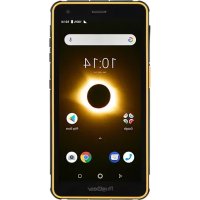
RugGear RG650 - Smartphone

RG650 - Smartphone RugGear - Free user manual and instructions

Find the device manual for free RG650 RugGear in PDF.

English EN Download 💬 AI Question 10 questions ⚙️ Specs
📄

Document temporarily unavailable

The manual is currently being transferred to our new server. It will be accessible again in a few hours. Thank you for your patience.

Pick your language and provide your email: we'll send you a specifically translated version.
Product Type Rugged Smartphone
Brand RugGear
Model RG650
Dimensions Approximately 155 x 75 x 15 mm
Weight Approximately 250 g
Power Supply Lithium-ion battery, 5V/1A charging via micro USB
SIM Card Type Nano-SIM
Memory Card Micro SD up to 32 GB
Connectivity Micro USB, 3.5 mm jack
Front Camera Yes (details not specified)
Rear Camera Yes with flash
Customization Button Configurable shortcut to an application
Protection Rating Water and dust resistant (rubber covers) – estimated IP68
Operating Temperature -10°C to 50°C
Charging Temperature 0°C to 45°C
SAR (head) 0.70 W/kg
SAR (body) 1.55 W/kg (at 5 mm)
Maintenance and Cleaning Turn off the device, use a soft antistatic cloth, no chemicals
Safety Do not open, use approved accessories, avoid magnetic fields
Recycling Do not dispose with household waste, drop off at a collection center
Warranty Consult ruggear.com

Frequently Asked Questions - RG650 RugGear

How to insert the SIM card and Micro SD card?
Open the rubber cover of the SIM card tray, insert the provided pin into the hole to eject the tray. Place the Nano-SIM card and Micro SD card (up to 32 GB) in their respective slots, then reinsert the tray and close the rubber cover securely to ensure water resistance.
How to charge the phone?
Use the provided micro USB cable with a 5V/1A charger. Connect the cable to the phone and a power outlet. Only charge at room temperature between 0°C and 45°C. Unplug once the battery is full. Use only approved RugGear chargers and cables.
What to do if the screen gets scratched?
Avoid touching the screen with sharp objects. Clean it gently with a soft, antistatic cloth. Dust particles and fingernails can scratch the screen. If the screen is damaged, contact customer service.
How to use the customization button?
The customization button is a programmable shortcut. Go to system settings, select 'Customization Button', and assign an application of your choice. Once configured, a quick press will open the defined application.
What is the allowed operating temperature?
The normal operating temperature is between -10°C and 50°C. For charging, the ambient temperature must be between 0°C and 45°C. Avoid excessively hot or cold environments to prevent battery damage.
Does the phone support fast charging?
No, the RG650 only supports 5V/1A charging. A higher charging current could damage the device. Use only a standard 5V/1A charger.
How to protect the phone's water resistance?
Make sure the rubber covers on the SIM card tray and headphone jack are properly closed and intact. Without these covers, the device is no longer guaranteed to be water and dust resistant. Check their condition regularly.
What is the SAR value of this phone?
The maximum SAR (Specific Absorption Rate) for the head is 0.70 W/kg and for the body (at 5 mm) is 1.55 W/kg. These values comply with the European limit of 2.0 W/kg.
How to recycle the phone at end of life?
Do not dispose of the device, battery, or accessories with household waste. Drop them off at a designated collection point for electronic waste. Consult your local municipality or ruggear.com for more information.
Where to find the warranty terms?
For European customers, go to https://ruggear.com/warranty-terms/. For American customers, consult https://ruggear.com/terms-and-conditions-americas/. For any questions, contact your retailer.

User questions about RG650 RugGear

0 question about this device. Answer the ones you know or ask your own.

Ask a new question about this device

The email remains private: it is only used to notify you if someone responds to your question.

No questions yet. Be the first to ask one.

Download the instructions for your Smartphone in PDF format for free! Find your manual RG650 - RugGear and take your electronic device back in hand. On this page are published all the documents necessary for the use of your device. RG650 by RugGear.

USER MANUAL RG650 RugGear

Manual assistant
Powered by Anthropic
Waiting for your message
Product information

Brand : RugGear

Model : RG650

Category : Smartphone