
Cloud MIX - Headphones HYPERX - Free user manual and instructions
Find the device manual for free Cloud MIX HYPERX in PDF.
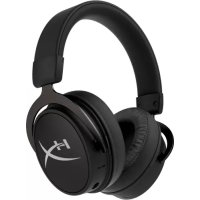

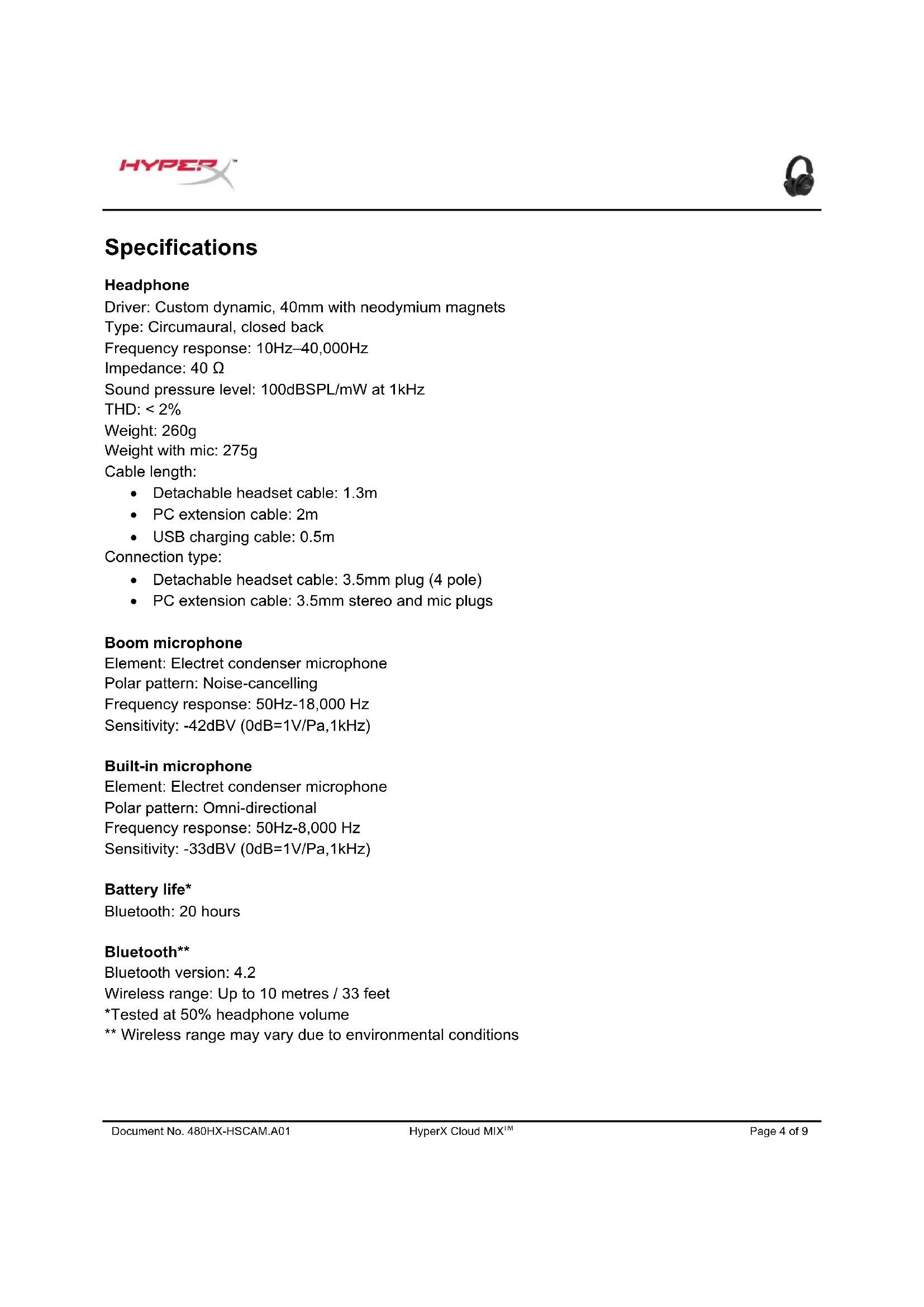


| Product type | Wireless and wired audio headset |
| Brand | HyperX |
| Model | Cloud MIX |
| Cushion type | Circumaural, closed-back |
| Speakers | Dynamic, 40 mm with neodymium magnets |
| Frequency response | 10 Hz – 40 kHz |
| Impedance | 40 Ω |
| Sound pressure level | 100 dBSPL/mW at 1 kHz |
| Total harmonic distortion | < 2 % |
| Boom microphone | Electret, noise canceling, 50 Hz – 18 kHz |
| Built-in microphone | Electret, omnidirectional, 50 Hz – 8 kHz |
| Wired connectivity | 3.5 mm jack (4-pole) + PC extension cable |
| Bluetooth | Version 4.2, range up to 10 m |
| Battery life (Bluetooth) | 20 hours |
| Charging time | 3 hours |
| Weight (without microphone) | 260 g |
| Weight (with microphone) | 275 g |
| Headphone cable length | 1.3 m |
| PC extension cable length | 2 m |
| Built-in controls | Volume (wheel), microphone mute, Bluetooth buttons |
| Power supply | Rechargeable battery via USB |
| Included accessories | 3.5 mm cable, USB cable, detachable microphone, PC extension cable |
| Maintenance | Clean with a soft, dry cloth. Do not immerse. |
| Safety | Do not expose to water. Use at moderate volume to protect hearing. |
| Repairability | Detachable cables and microphone for easy replacement. Spare parts available from the manufacturer. |
Frequently Asked Questions - Cloud MIX HYPERX
User questions about Cloud MIX HYPERX
0 question about this device. Answer the ones you know or ask your own.
Ask a new question about this device
Download the instructions for your Headphones in PDF format for free! Find your manual Cloud MIX - HYPERX and take your electronic device back in hand. On this page are published all the documents necessary for the use of your device. Cloud MIX by HYPERX.
USER MANUAL Cloud MIX HYPERX
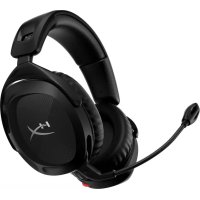
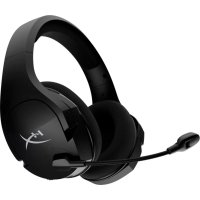
HyperX Cloud MIX™ Wired Gaming Headset + Bluetooth®
Find the language and latest documentation for your HyperX Cloud MIX™
Wired Gaming Headset + Bluetooth® here.
HyperX Cloud MIX™ Wired Gaming Headset + Bluetooth® Installation Guide
For instructions in English
Wired headset setup. 5
Wireless headset setup through Bluetooth® 6
Bluetooth® function buttons 7
Headset charging 8
Status LED indicators 8
Factory reset 8
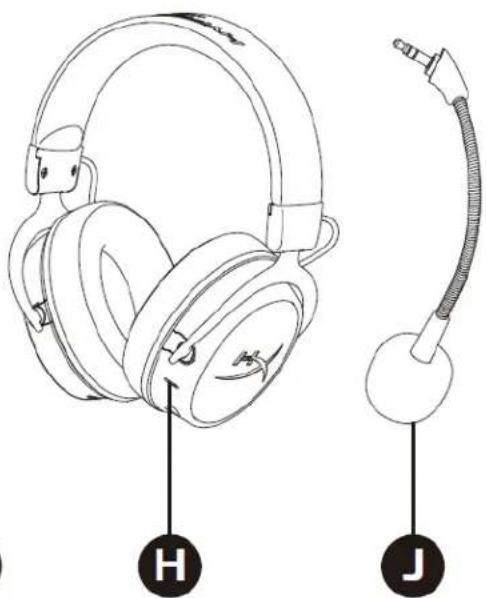
Overview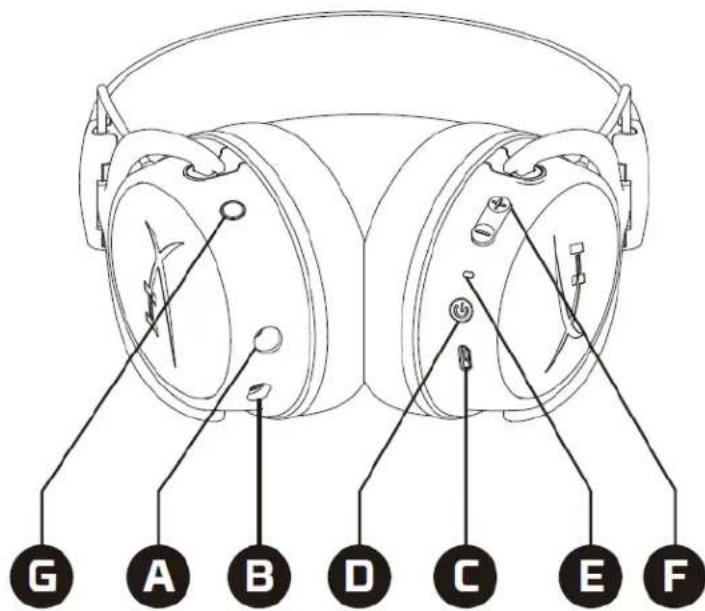
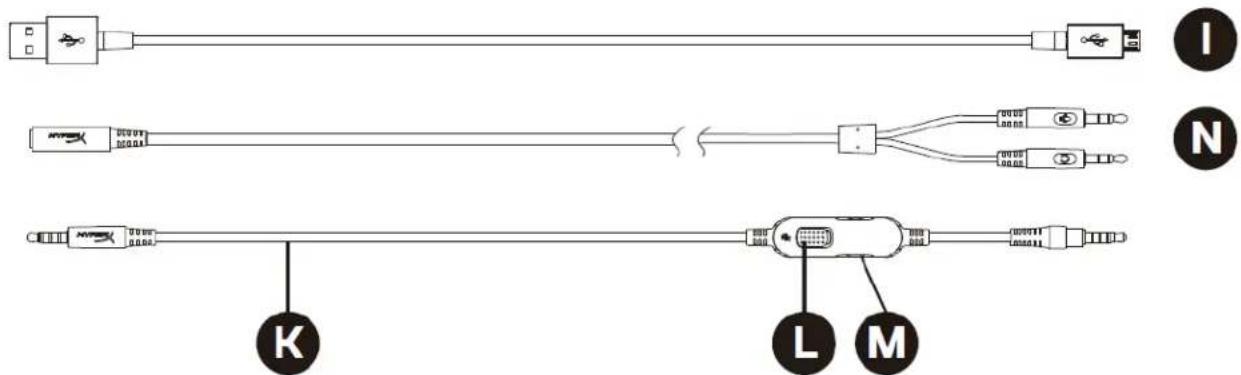
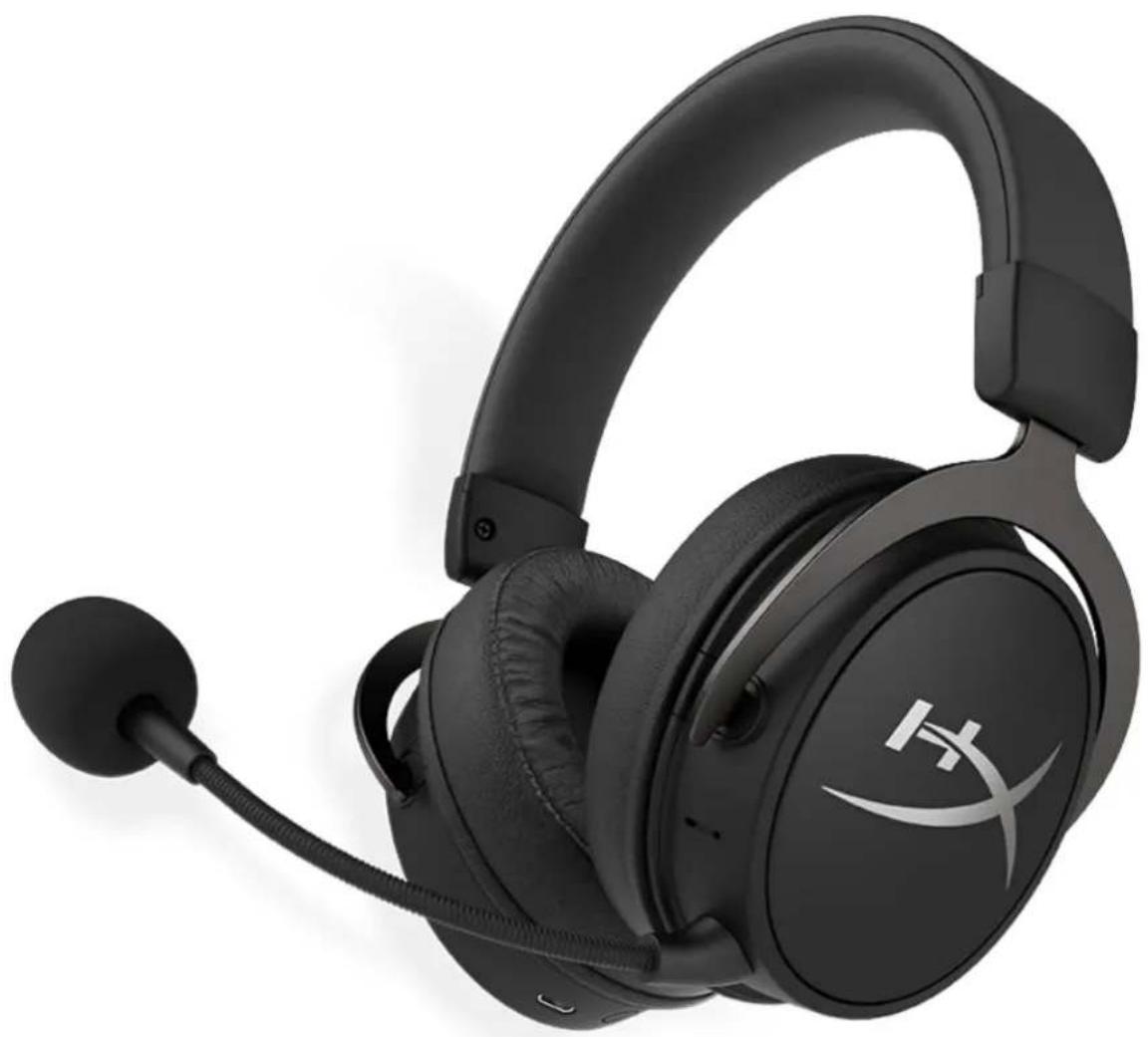
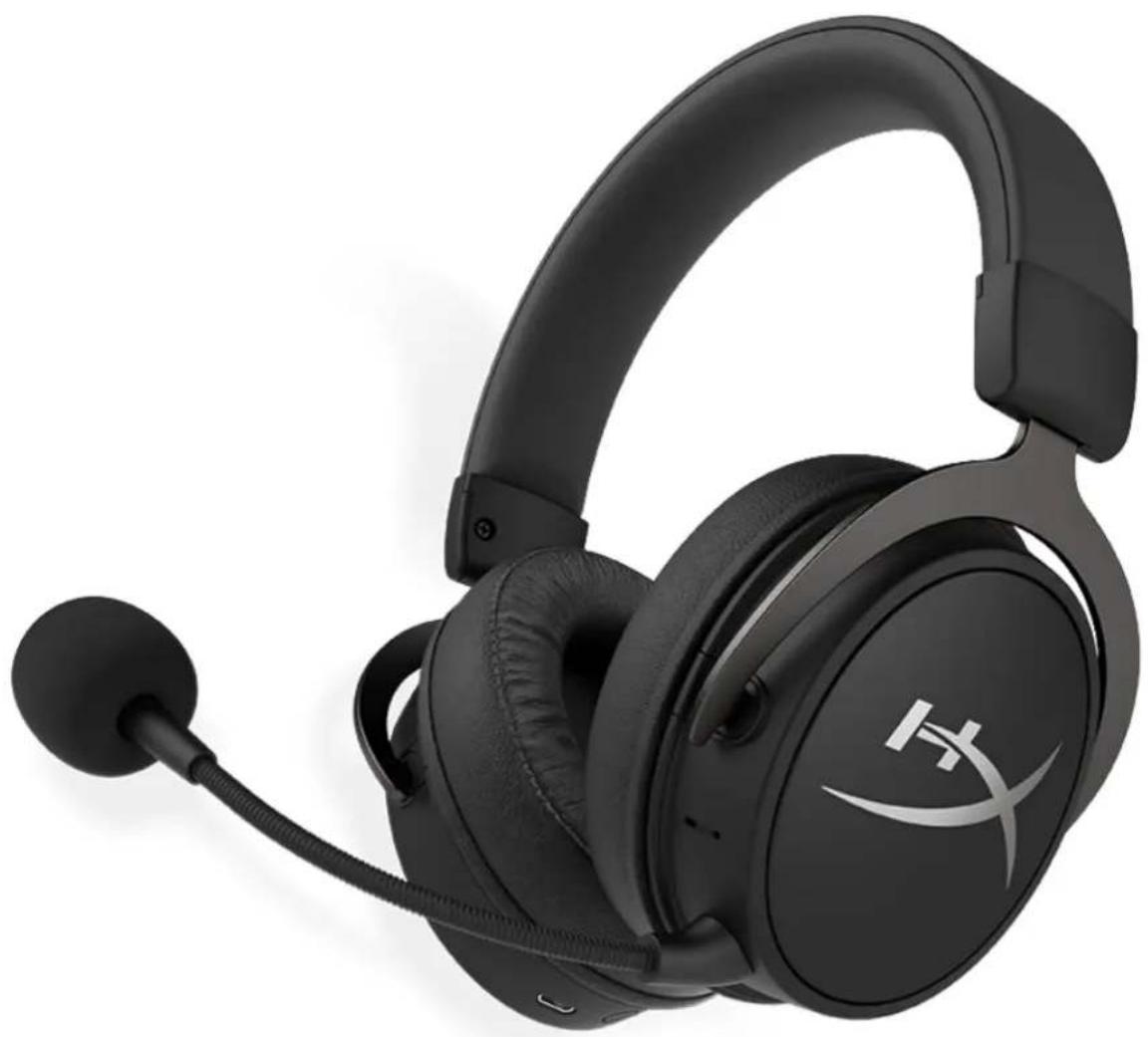
A. 3.5mm cable port B. Microphone port C. USB charge port D. Bluetooth® power button E. Status LED F. Bluetooth® volume buttons G. Bluetooth® multifunction button
H. Bluetooth® microphone I. USB charge cable J. Detachable microphone K. 3.5mm cable L. Wired microphone mute M. Wired headphone volume wheel N. 3.5mm PC extension cable
Specifications
Headphone
Driver: Custom dynamic, 40mm with neodymium magnets
Type: Circumaural, closed back
Frequency response: 10Hz-40,000Hz
Impedance: 40 Ω
Sound pressure level: 100dBSPL/mW at 1kHz
THD: < 2%
Weight: 260g
Weight with mic: 275g
Cable length:
- Detachable headset cable: 1.3m PC extension cable: 2m USB charging cable: 0.5m
Connection type:
- Detachable headset cable: 3.5mm plug (4 pole) PC extension cable: 3.5mm stereo and mic plugs
Boom microphone
Element: Electret condenser microphone
Polar pattern: Noise-cancelling
Frequency response: 50Hz-18,000 Hz
Sensitivity: -42dBV (0dB=1V/Pa, 1kHz)
Built-in microphone
Element: Electret condenser microphone
Polar pattern: Omni-directional
Frequency response: 50Hz - 8,000Hz
Sensitivity: -33dBV (0dB=1V/Pa, 1kHz)
Battery life*
Bluetooth: 20 hours
Bluetooth**
Bluetooth version: 4.2
Wireless range: Up to 10 metres / 33 feet
*Tested at 50% headphone volume
** Wireless range may vary due to environmental conditions
In-line controller
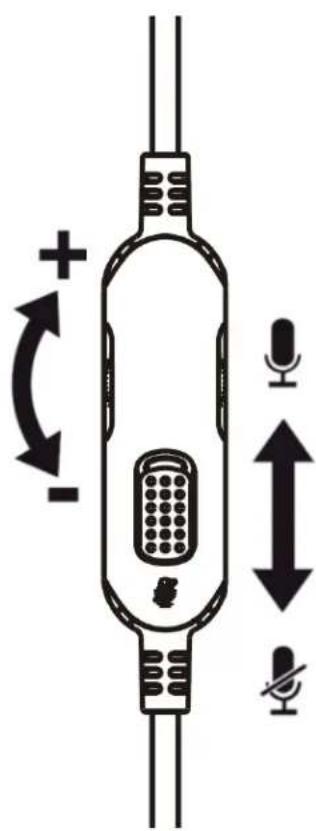
Rotate the volume wheel to increase or decrease the volume.
Slide the microphone mute switch up or down to mute or unmute the microphone. The red mark on the switch indicates that the mic is muted.
Wired headset setup
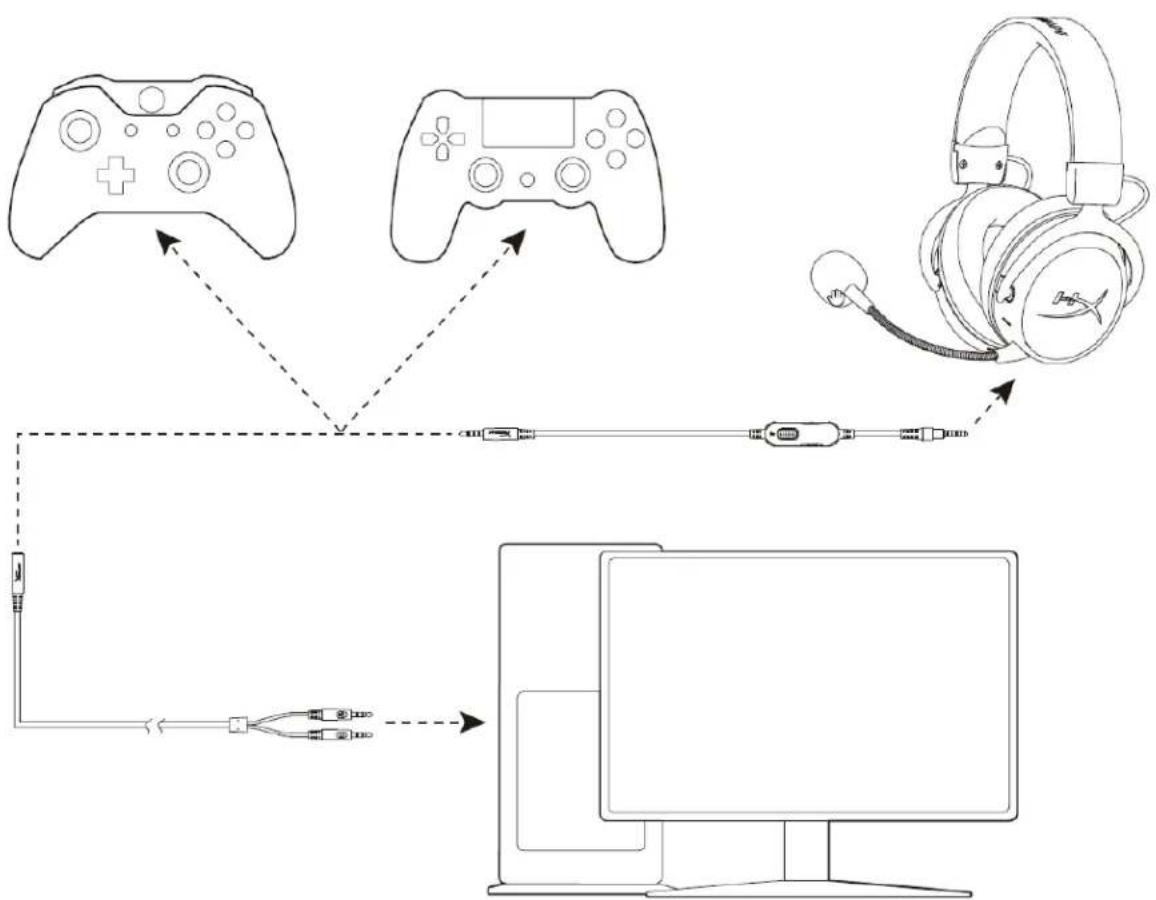
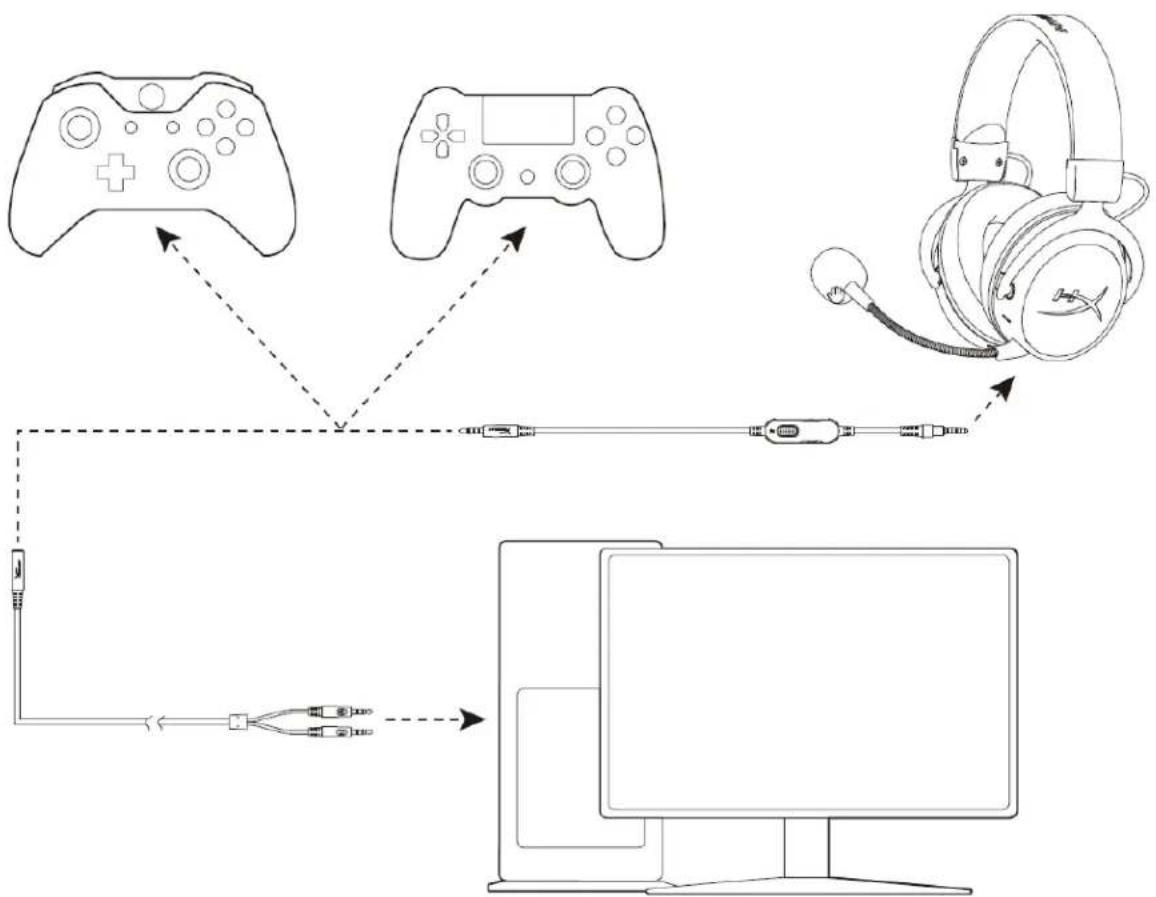
- Connect the detachable microphone to the headset's microphone port. Push until the microphone sits flush.
- Connect the 3.5mm cable plug with the grey portion into the headset's cable port. Push until you feel a click and there is no visible grey portion.
- Connect the opposite end of the 3.5mm cable to your device.
a. If you are connecting to a PC or device that has both an audio port (green) and a microphone port (pink), connect the opposite end of the 3.5mm cable to the 3.5mm PC extension cable. Then connect the audio plug with the green stripes into the audio port and connect the microphone plug with the pink stripes into the microphone port.
*Port colours may vary on different devices.
Wireless headset setup through Bluetooth®
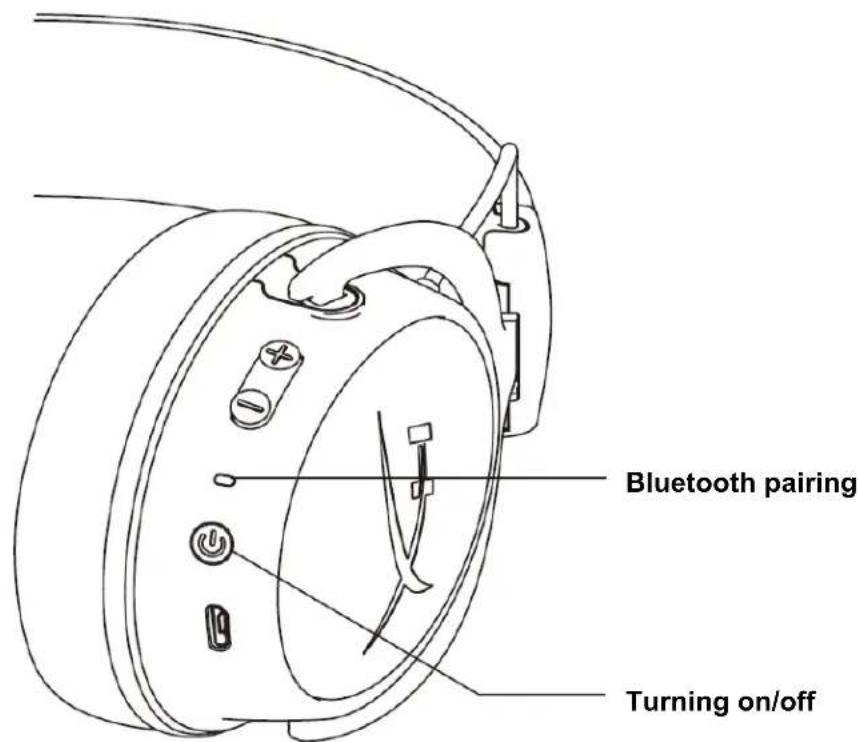
Bluetooth pairing
- With the headset turned off, press and hold the power button for 5 seconds. The LED indicator will flash red and blue.
- On your Bluetooth-enabled device, search and connect to HyperX Cloud MIX. Once connected, the indicator LED will flash blue every 5 seconds.
Turning on/off
Power on/off - Hold down the power button for 2 seconds
Bluetooth® function buttons
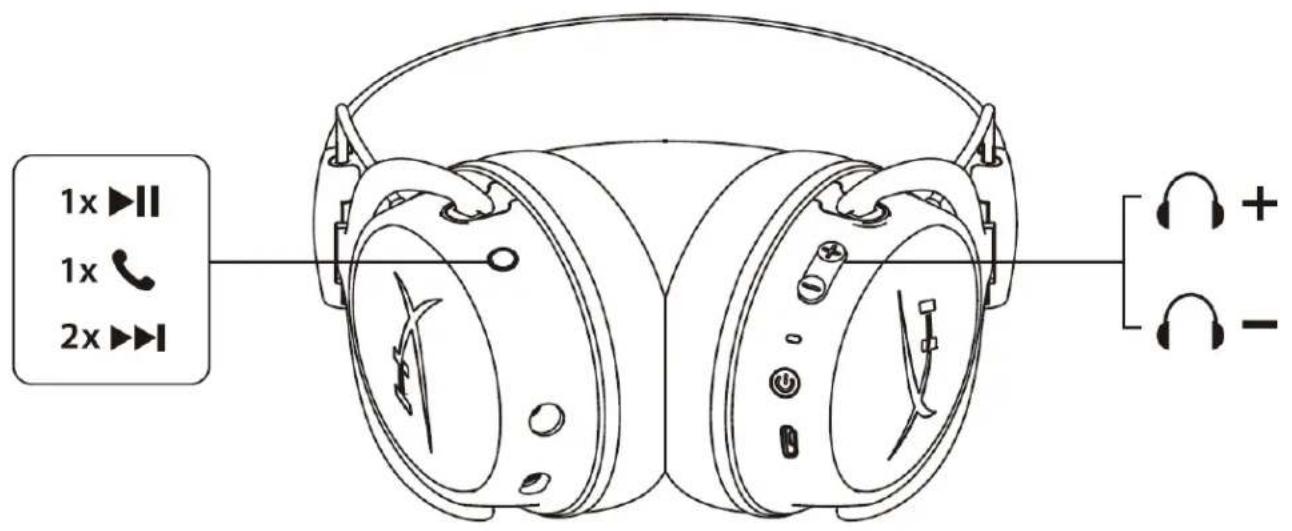
Multifunction button
1. Media apps
Press once to play/pause media. Press twice to skip to the next track. Press three times to skip to the previous track.
2. During calls
Press once to answer or end a call.
3. Voice assistant
- Hold for 2 seconds to summon the voice assistant.
Volume buttons
- Press the ⊕ button to increase volume. Press the button to decrease volume.
Note: Button functions may differ depending on the connected device.
Headset charging
When the headset is connected to a charger with the USB charge cable, the status LED will indicate the charge status. The headset will take approximately 3 hours to charge fully.
| Status LED | Charging status |
| Solid red | Charging |
| Off Fully charged |
Status LED indicators
The status LED on the headset indicates the current state of the headset.
| Status LED Headset status | |
| Flash blue every 5 seconds Connected to a device | |
| Flash blue every 2 seconds Not connected to a device | |
| Pairing mode Flashing red and blue | |
| Factory reset Flash blue 5 times and light up red for 1 second |
Factory reset
To perform a factory reset on the headset, hold the power button and volume up button together for 7 seconds. The status LED will flash blue 5 times and light up red for 1 second. The headset will turn off automatically.
HyperX Cloud MIX™
HX-HSCAM-GM
HX-HSCAM-GM/EM
INDEX
General overview 3
Specifications 2
Polar pattern: Omnidirectional
Sensitivity: -33 dB (0 dB = 1 V/Pa, 1 kHz)
Operating time*
Bluetooth: 20 hours
Bluetooth**
Bluetooth version: 4.2
Status indicators
The status LED indicates the current status of the headset.
| С党支部а С党支部а С党支部а С党支部а С党支部а С党支部а С党支部а С党支部а С党支部а С党支部а С党支部а С党支部а С党支部а С党支部а С党支部а С党支部а С党支部а С党支部а С党支部а С党支部а С党支部а С党支部а С党支部а С党支部а С党支部а С党支部а | С党支部а С党支部а С党支部а С党支部а С党支部а С党支部а С党支部а С党支部а С党支部а С党支部а С党支部а С党支部а С党支部а С党支部а С党支部а С党支部а С党支部а С党支部а С党支部а С党支部а С党支部а С党支部а С党支部а С党支部а С党支部a С党支部a С党支部a С党支部a С党支部a С党支部a С党支部a С党支部a С党支部a С党支部a С党支部a С党支部a C支部a C支部a C支部a C支部a C支部a C支部a C支部a C支部a C支部a C支部a C支部a C支部a C支部a C支部a C支部a C支部a C支部a C支部a C支部a C支部a C支部a C支部a C支部a C支部a C支部a C党支部a C党支部a C党支部a C党支部a C党支部a C党支部a C党支部a C党支部a C党支部a C党支部a C党支部a C党支部a C党支部a C党支部a C党支部a C党支部a C党支部a C党支部a C党支部a C党支部a C党支部a C党支部a C党支部a C党支部a C党支部a C支部a C支部a C支部a C支部a C支部a C支部a C支部a C支部a C支部a C支部a C支部a C支部a C支部a C支部a C支部a C支部a C支部a C支部a C支部a C支部a C支部a C支部a C支部a C支部a С党支部a С党支部a С党支部a С党支部a С党支部a С党支部a C支部a C支部a C支部a C支部a C支部a C支部a C支部a C支部a C支部a C支部a C支部a C支部a C支部a C支部a C支部a C支部a C支部a C支部a C党支部a C支部a C支部a C支部a C支部a C支部a C支部a C支部a C支部a C支部a C支部a C支部a C支部a C支部a C支部a C支部a C支部a C支部a C支部a C支部a C支部a C支部a C支部a C支部a C党支部a C支部a C支部a C支部a C支部a C支部a C党支部a C支部a C支部a C支部a C支部a C支部a C支部a C支部a C支部a C支部a C支部a C支部a C支部a C支部a C支部a C支部a C支部a C支部a C支部a C党支部a C支部a C支部a C支部a C支部a C支部a c C支部a C支部a C支部a C支部a C支部a C支部a C支部a C支部a C支部a C支部a C支部a C支部a C支部a C支部a C支部a C支部a C支部a C支部a C支部a C支部a C支部a C支部a C支部a C支部a C支部b C支部b C支部b C支部b C支部b C支部b C支部b C支部b C支部b C支部b C支部b C支部b C支部b C支部b C支部b C支部b C支部b C支部b C支部b C支部b C支部b C支部b C支部b C支部b C支部b C支部a C支部a C支部a C支部a C支部a C支部a C支部a C支部a C支部a C支部a C支部a C支部a C支部a C支部a C支部a C支部a C支部a C支部a C支部a C支部a C支部a C支部a C支部a C支部a C支部c C支部c C支部c C支部c C支部c C支部c C支部c C支部c C支部c C支部c C支部c C支部c C支部c C支部c C支部c C支部c C支部c C支部c C支部c C支部c C支部c C支部c C支部c C支部c C支部c C支部a C支部a C支部a C支部a C支部a C支部a C支部a C支部a C支部a C支部a C支部a C支部a C支部a C支部a C支部a C支部a C支部a C支部a C支部a C支部a C支部a C支部a C支部a C支部a C C C C C C C C C C C C C C C C C C C C C C C C C C C C C C C C C C C C C C C C C C C C C C C C C C c c c c c c c c c c c c c c c c c c c c c c c c c c c c c c c c c c c c c c c c c c c c c c c c c c C 支部a C支部a C支部a C支部a C支部a C支部a C支部a C支部a C支部a C支部a C支部a C支部a C支部a C支部a C支部a C支部a C支部a C支部a C支部a C支部a C支部a C支部a C支部a C支部a C支部a c c c c c c c c c c c c c c c c c c c c c c c c c c c c c c c c c c c c c c c c c c c c c c c c c d c c c c c c c c c c c c c c c c c c c c c c c c c c c c c c c c c c c c c c c c c c c c c c c c c e c c c c c c c c c c c c c c c c c c c c c c c c c c c c c c c c c c c c c c c c c c c c c c c c c l c c c c c c c c c c c c c c c c c c c c c c c c c c c c c c c c c c c c c c c c c c c c c c c c c f f f f f f f f f f f f f f f f f f f f f f f f f f f f f f f f f f f f f f f f f f f f f f f f f f c c c c c c c c c c c c c c c c c c c c c c c c c c c c c c c c c c c c c c c c c c c c c c c c c g g g g g g g g g g g g g g g g g g g g g g g g g g g g g g g g g g g g g g g g g g g g g g g g g g c c c c c c c c c c c c c c c c c c c c c c c c c c c c c c c c c c c c c c c c c c c c c c c c c r r r r r r r r r r r r r r r r r r r r r r r r r r r r r r r r r r r r r r r r r r r r r r r r r r c c c c c c c c c c c c c c c c c c c c c c c c c c c c c c c c c c c c c c c c c c c c c c c c c h h h h h h h h h h h h h h h h h h h h h h h h h h h h h h h h h h h h h h h h h h h h h h h h h h c c c c c c c c c c c c c c c c c c c c c c c c c c c c c c c c c c c c c c c c c c c c c c c c c b b b b b b b b b b b b b b b b b b b b b b b b b b b b b b b b b b b b b b b b b b b b b b b b b b c c c c c c c c c c c c c c c c c c c c c c c c c c c c c c c c c c c c c c c c c c c c c c c c c m m m m m m m m m m m m m m m m m m m m m m m m m m m m m m m m m m m m m m m m m m m m m m m m m m n n n n n n n n n n n n n n n n n n n n n n n n n n n n n n n n n n n n n n n n n n n n n n n n n n m m m m m m m m m m m m m m m m m m m m m m m m m m m m m m m m m m m m m m m m m m m m m m m m m c c c c c c c c c c c c c c c c c c c c c c c c c c c c c c c c c c c c c c c c c c c c c c c c c n n n n n n n n n n n n n n n n n n n n n n n n n n n n n n n n n n n n n n n n n n n n n n n n n N C B E T P R Y S O H |
Restoring factory settings
To restore factory settings on the headset, press and hold the power button and the volume up button together for 7 seconds. The status LED flashes 5 times and then turns off for 1 second with red light. The headset automatically turns off.
HyperX Cloud MIX™
Part Numbers
HX-HSCAM-GM
HX-HSCAM-GM/EM
CONTENTS
mata: -33dBV (0dB=1V/Pa,1kHz)
1
Bluetooth:20
Bluetooth**
Bluetooth: 4.2
- 1
Bluetooth®
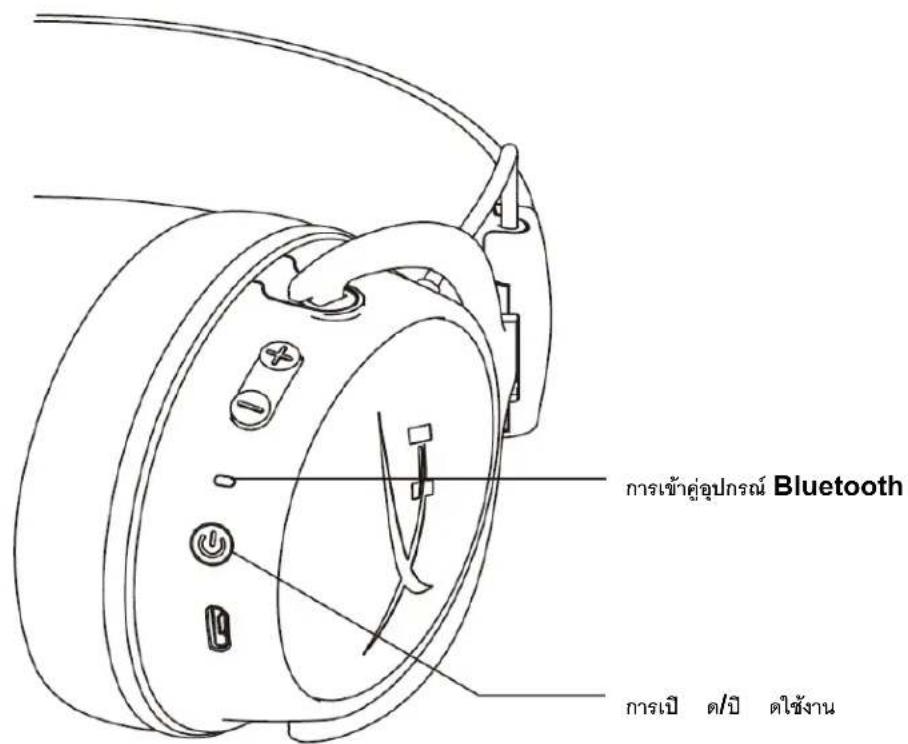
Bluetooth
- 5 LED indicators
- Bluetooth 1000mAh battery HyperX Cloud MIX LED
1
Bluetooth®
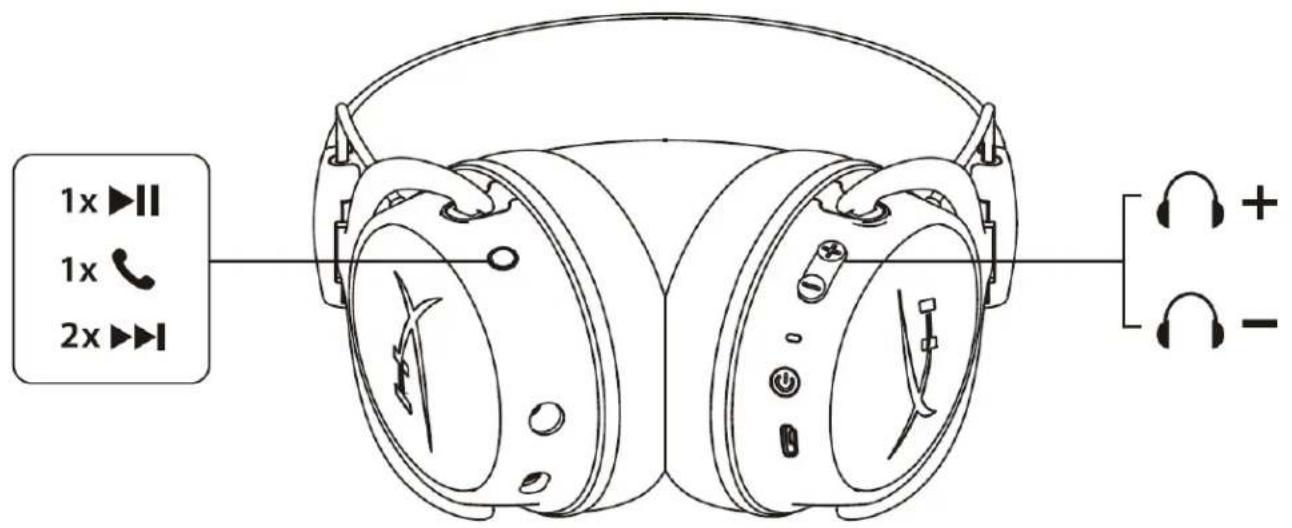
y naunus
1.
- non-trivial 3.1.1.10 (forward)
3.
n2
-
Sensitivity: -42dBV (0dB=1V/Pa, 1kHz)
Built-in microphone
Element: Electret condenser
Polar pattern: Omnidirectional
Frequency response: 50Hz - 8,000 Hz
Sensitivity: -33dBV (0dB=1V/Pa, 1kHz)
Battery life*
Bluetooth: 20 hours
Bluetooth**
Bluetooth version: 4.2
Wireless range: within 10 meters / 33 feet
- Tested at 50% headphone volume
**Wireless range may vary depending on environmental conditions
Inline controller
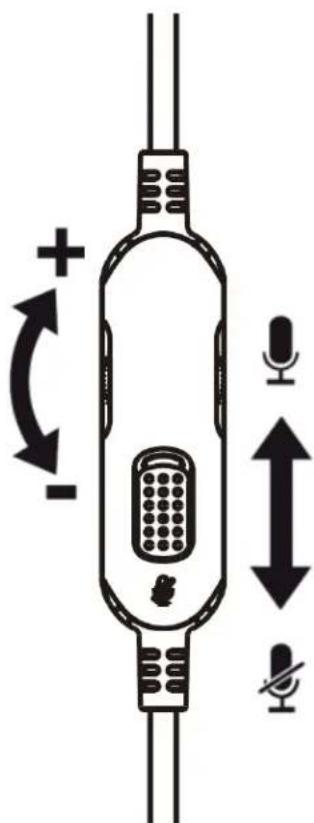
Scroll the volume wheel to increase/decrease volume.

- HYPERX CLOUD MIX™ WIRED GAMING HEADSET + BLUETOOTH®
- HYPERX CLOUD MIX™ WIRED GAMING HEADSET + BLUETOOTH® INSTALLATION GUIDE
- SPECIFICATIONS
- HEADPHONE
- BOOM MICROPHONE
- BUILT-IN MICROPHONE
- BATTERY LIFE
- BLUETOOTH
- IN-LINE CONTROLLER
- WIRED HEADSET SETUP
- WIRELESS HEADSET SETUP THROUGH BLUETOOTH®
- BLUETOOTH PAIRING
- TURNING ON/OFF
- BLUETOOTH® FUNCTION BUTTONS
- MULTIFUNCTION BUTTON
- MEDIA APPS
- DURING CALLS
- VOICE ASSISTANT
- VOLUME BUTTONS
- HEADSET CHARGING
- STATUS LED INDICATORS
- FACTORY RESET
- HYPERX CLOUD MIX™
- INDEX
- OPERATING TIME
- STATUS INDICATORS
- RESTORING FACTORY SETTINGS
- PART NUMBERS
- CONTENTS
- BLUETOOTH®
- Y NAUNUS
- INLINE CONTROLLER
Brand : HYPERX
Model : Cloud MIX
Category : Headphones