Flipout BTTS001 - Screwdriver Batavia - Free user manual and instructions
Find the device manual for free Flipout BTTS001 Batavia in PDF.


User questions about Flipout BTTS001 Batavia
0 question about this device. Answer the ones you know or ask your own.
Ask a new question about this device
Download the instructions for your Screwdriver in PDF format for free! Find your manual Flipout BTTS001 - Batavia and take your electronic device back in hand. On this page are published all the documents necessary for the use of your device. Flipout BTTS001 by Batavia.
USER MANUAL Flipout BTTS001 Batavia
Operating instructions
- On/off switch
- Temperature switch
- Ventilation openings
- Hot Air nozzle
- Extension handle
- Handle
- Lock button for extension handle
- Stand
- Nozzle for surface weed control
- Heating pin for underground weed control
OVERZICT
Safety instructions 5
Connecting to power supply 8
Contents 8
Product 8
Operation 9
Option 1: Weed killer 9
Option 2: Specific weed killer. 9
Cooling 9
Storage 10
Cleaning 10
Technical data 10
INHALTSVERZEICHNIS
Instruction manuals provide valuable hints for using your new device. They enable you to use all functions, and they help you avoid misunderstandings and prevent damage. Please take the time to read this manual carefully and keep it for future reference.
Intended for household and similar purposes.
EXPLANATION OF THE SYMBOLS

Denotes risk of personal injury, loss of life or damage to the tool in case of non-observation of the instructions in this manual.
Indicates electrical shock hazard.

Do not expose to rain.

Remove plug from the mains immediately if the cable is damaged or cut.

Caution, hot surface.

SAFETY INSTRUCTIONS
This appliance can be used by children aged from 8 years and above and persons with reduced physical, sensory or mental capabilities or lack of experience and knowledge if they have been given supervision or instruction concerning use of the appliance in a safe way and understand the hazards involved. Children shall not play with the appliance. Cleaning and user maintenance shall not be made by children without supervision.
GENERAL SAFETY INSTRUCTIONS FOR POWER TOOLS

WARNING! Read all instructions.
WARNING: Always switch off the appliance when non-working.
WARNING: Always remove the plug from the socket when not using the device, when replacing the nozzles or during maintenance of the device
Failure to follow all instructions listed below may result in electric shock, fire and/or serious injury.
The term "power tool" in all of the warnings listed below refers to your mains operated (corded) power tool or battery operated (cordless) power tool.
Save these instructions for future reference!
- Work area
a. Keep work area clean and well lit. Cluttered and dark areas invite accidents.
b. Do not operate power tools in explosive atmospheres, such as in the presence of flammable liquids, gasses or dust. Power tools create sparks which may ignite the dust of fumes.
c. Keep children and bystanders away while operating a power tool. Distractions can cause you to lose control. - Electrical safety
a. Power tool plugs must match the outlet. Never modify the plug in any way. Do not use any adapter plugs which earthed (grounded) power tools. Unmodified plugs and matching outlets will reduce risk of electric shock.
b. Avoid body contact with earthed or grounded surfaces such as pipes, radiators, ranges and refrigerators. There is an increased risk of electric shock if your body is earthed or grounded.
c. Do not expose power tools to rain or wet conditions. Water entering a power tool will increase the risk of electric shock.
English
d. Do not abuse the cord. Never use the cord for carrying, pulling or unplugging the power tool. Keep cord away from heat, oil, sharp edges or moving parts. Damaged or entangled cords increase the risk of electric shock.
e. When operating a power tool outdoors, use an extension cord suitable for outdoor use.
Use of a cord suitable for outdoor use reduces the risk of electric shock.
f. Always use tool in conjunction with a residual circuit breaker device.
The use of a residual circuit breaker device reduces the risk of electric shock.
- Personal safety
a. Stay alert, watch what you are doing and use common sense when operating a power tool. Do not use a power tool while you are tired or under the influence of drugs, alcohol or medication.
A moment of inattention while operating power tools may result in serious personal injury.
b. Use safety equipment. Always wear eye protection.
Safety equipment such as dust mask, non-skid safety shoes, hard hat, or hearing protection used for appropriate conditions will reduce personal injuries.
c. Avoid accidental starting. Ensure the switch is in the off position before plugging in.
Carrying power tools with your finger on the switch or plugging in power tools that have the switch on invites accidents.
d. Remove any adjusting key or wrench before turning the power tool on.
A wrench or a key left attached to a rotating part of the power tool may result in personal injury.
e. Do not overreach. Keep proper footing and balance at all times.
This enables better control of the power tool in unexpected situations.
f. Dress properly. Do not wear loose clothing or jewellery. Keep your hair,
clothing and gloves away from moving parts.
Loose clothes, jewellery or long hair can be caught in moving parts.
g. If devices are provided for the connection of dust extraction and collection facilities, ensure these are connected and properly used.
The use of these pieces of equipment reduce hazards caused by dust.
- Power tool use and care
a. Do not force the power tool. Use the correct power tool for your application.
The correct power tool will do the job better and safer at the rate for which it was designed.
b. Do not use the power tool if the switch does not turn it on and off.
Any power tool that cannot be controlled with the switch is dangerous and must be repaired.
c. Disconnect the plug from the power source before making any adjustments, changing accessories, or storing power tools.
Such preventive safety measures reduce the risk of starting the power tool accidentally.
d. Store idle power tools out of the reach of children and do not allow persons unfamiliar with the power tool or these instructions to operate the power tool.
Power tools are dangerous in the hands of untrained users.
e. Maintain power tools. Check for misalignment or binding of moving parts, breakage of parts and any other condition that may affect the power tools operation. If damaged, have the power tool repaired before use.
Many accidents are caused by poorly maintained power tools.
f. Keep cutting tools sharp and clean.
Properly maintained cutting tools with sharp cutting edges are less likely to bind and are easier to control.
g. Use the power tool, accessories and tool bits etc., in accordance with these
instructions and in the manner intended for the particular type of power tool, taking into account the working conditions and the work to be performed.
Use of the power tool for operations different from intended could result in a hazardous situation.
5. Service
a. Please use a qualified expert who uses original replacement parts to repair your power tool.
This will ensure proper functioning of the power tool.
ADDITIONAL SAFETY INSTRUCTIONS

When using electric tools, basic safety precautions should always be followed to reduce the risk of fire, electric shock and personal injury.
Read all these instructions before attempting to operate this product and save these instructions.
Before using the appliance
Check the following:
- Make sure the voltage of the hot air gun corresponds with the power voltage;
- Are the mains lead and the mains plug in a good state: strong, without ravels or damages.
- Caution is advised when using long extension cables
- Do not use the appliance under moist circumstances;
- The metal mouthpiece gets hot. Watch out and do not touch the metal mouthpiece;
- Prevent damage of the heating element. Do not lock or block the mouth piece;
- Do not leave the appliance when switched on;
- When in operation do not point the device at people or animals
- Never look into the hot air nozzle
-
Do not use this device in rain or damp surroundings, or near explosive or flammable products.
-
Do not use the device on or near very dry spots to avoid fire
- Always remove the plug from the socket when not using the device, when replacing the nozzles or during maintenance of the device
- Do not point the device at the same place for longer periods of time
- Do not hold the device too close to the surface about to be worked on as the device can overheat
- Pay attention to the direct / indirect workspace as the heat can ignite flammable materials, which are close by but not necessarily in view
- Do not allow the hot parts of the device to touch the cord or other flammable materials
The device should always be clean, dry and free of grease and oil - Do not use the appliance for purposes other than for which it is intended.

This appliance operates at a temperature of 600 degrees without visible signs of this temperature (no flames), still there is a chance of fire risk. Watch out for the hot air stream from the mouth piece. This air stream can cause burns.
When operating the appliance
- If you are going to use the hot air gun, vapours and gas can be released during a short time. This can be harmful for your health. Asthmatics can suffer hindrance of it;
- Before connecting the plug to the mains voltage you have to check if the switch is in position "0";
- Keep the mains lead always away from the mouthpiece of the hot air gun;
- Keep children and animals away from the appliance if you are using it.
- Keep all parts of the body away from the metal heating head. Do not touch it before it is cooled down.
- Carry the appliance by the handle when the metal heating head is cooled down.


English
- Hold the appliance by insulated gripping surfaces only, because the metal heating head may contact hidden wiring or its own cord.
Immediately switch off the appliance when:
- Plug and/or cable are defective or damaged:
The switch is defective; - You smell or see smoke caused by scorched insulation from the hot air gun.
Electrical safety
When using electric machines always observe the safety regulations applicable in your country to reduce the risk of fire, electric shock and personal injury. Read the following safety instructions and also the enclosed safety instructions.

Always check that the power supply corresponds to the voltage on the rating plate.

Class II machine - Double insulation - You don't need any earthed plug
Replacing cables or plugs
If the power cord is damaged, it must be replaced by the manufacturer or its service agent or a similarly qualified person, in order to avoid a hazard.
Immediately throw away old cables or plugs when they have been replaced by new ones. It is dangerous to insert the plug of a loose cable in the wall outlet.
Using extension cables
Only use an approved extension cable suitable for the power input of the machine. The minimum conductor size is 1.5mm^2 . When using a cable reel always unwind the reel completely
Inadequate extension cords can be dangerous. If an extension cord is used, it shall be suitable for outdoor use, and the connection has to be kept dry and off the ground. It is recommended that this is accomplished by means of a cord reel which keeps the socket at least 60~mm above the ground.
CONNECTING TO POWER SUPPLY
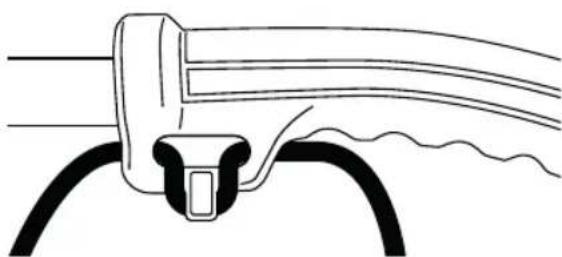
This product is designed with a cord retainer that prevents the extension cord from being pulled loose while using.
NOTICE: Always use cord retainer to properly attach extension cord to the machine. Failure to use cord retainer may result in damage to the machine and/or extension cord.
- Form a loop with the end of the extension cord.
- Insert loop portion of extension cord through opening and place over cord retainer.
- Slowly pull loop against cord retainer until the slack is removed.
- Plug product into extension cord.
NOTE: Failure to remove all excess cord slack from extension cord retainer could result in plug loosening from receptacle.
CONTENTS
1 Weed Killer
1 Nozzle for surface weed control
1 Heating pin for underground weed control
1 Extension handle (2 parts)
1 Instruction manual
PRODUCT
Fig. A
- On/off switch
- Temperature switch
- Ventilation openings
- Hot Air nozzle
- Extension handle
- Handle
- Lock button for extension handle
- Stand
- Nozzle for surface weed control
- Heating pin for underground weed control
OPERATION

Always use with caution! Do NOT cover the ventilation openings during use as it causes a risk of burns! Do not touch the hot nozzle!
Temperature settings:
With the temperature switch (1) you can select from two temperature settings. Depending on the application, you can use the following settings:
Setting I 50^ (venting / cooling)
Setting II 600^
The volume of air in each setting 500L /Minute
To turn on the power:
- Push the switch (1) in position I or position II.
To turn off the appliance:
- Push the switch on position "O".
To install the nozzle:
The nozzle (9) can easily be pushed over the hot air nozzle and secured by using the bayonet fastening. Never touch the nozzle during or immediately after use of the device. The nozzle is very hot.
OPTION 1: WEED KILLER
Assemble the extension handle
The extension handle (5) consists of two parts. Connect both parts.
Now attach the extension handle to the device.
Make sure that the extension handle firmly clicks into position. If using the device as a weed killer you must use the extension handle. Hold the weed killer firmly by holding the end of the extension handle.
Use:
- Ensure the extension handle (5) is firmly fixed onto the device and that the device is turned off.
- Install the nozzle (9) to destroy weeds.
- Insert the plug into the socket
- Check to ensure the nozzle is not blocked before turning the device on.
- Set the temperature to setting II (1).
-
Allow the device about 45 seconds to warm up.
-
To eliminate weeds, hold the nozzle (9) over the weeds for about 5 seconds. During these 5 seconds the cell structure of the weed is destroyed. As a result, the weed dies within a few days.
It is not necessary to completely burn the weeds, 5 seconds is more than sufficient. - For an efficient treatment the nozzle should be held around 0 to 5cm above the weeds
The effects are not visible immediately but will take a while before they can be seen. It is more of a long-term effect.
OPTION 2: SPECIFIC WEED KILLER
- Ensure the extension handle is firmly fixed onto the device and that the device is turned off.
- Install the Heat-pin (10) to heat-treat the weed.
- Insert the plug into the socket.
- Set the temperature switch in position "I".
- Allow the device about 60 seconds to warm up.
- Position the heat-pin in the middle of the weed, and push the pin into the weed, up to the mark, and retract the heat-pin from the soil after about 2 seconds.
The effect of the treatment will not be immediately obvious as it can take several days before it is visible, but it will have a long-term effect. - Use the heat-pin only on the lawn and loose soil. Do not use on rocky soil as the heat-pin could break off.
- On some occasions, a small brown spot of burned grass can occur, but this will recover very soon.
COOLING
Before turning off the device, it must be cooled first. Select temperature setting (1) I for at least one minute. The device can be switched off thereafter.
Place the appliance on its stand (8) after use and allow it to cool down before storage


STORAGE
Make sure that the device has completely cooled down before storing.
CLEANING
Keep the ventilation slots (3) of the machine clean to prevent overheating of the engine. Regularly clean the machine housing with a soft cloth, preferably after each use. Keep the ventilation slots free from dust and dirt. If the dirt does not come off use a soft cloth moistened with soapy water. Never use solvents such as petrol, alcohol, ammonia water, etc. These solvents may damage the plastic parts.
TECHNICAL DATA
Voltage: 230 - 240 V~50 Hz
Power: 2000 W
Air flow: 500 litres/minute
Setting I: .50°C
Setting II: 600°C
DISPOSAL

Do not dispose of electric power tools with domestic refuse.
The electric power tool is shipped in packaging to reduce transport damage.
This packaging is a raw material and as such can either be reused or can be fed back into the raw material cycle. The electric power tool and its accessories are made from various materials such as metals and plastics. Take defective components to a special refuse collection point. Ask about these at your specialist shop or local council.
EC-DECLARATION OF CONFORMITY
We, the Batavia GmbH, Weth. Buitenhuisstraße 2a, NL-7951 SM Staphorst, declare by our own responsibility that the product MaxxHeat, Model BT-WK002, Item-No 7063005, is according to the basic requirements, which are defined in the European Directives Electromagnetic Compatibility 2014/30/EC (EMC), 2014/35/EU (LVD) and their amendments. For the evaluation of conformity, the following harmonized standards were consulted:
EN60335-1
EN 60335-2-45
EN 62233
EN 55014-1
EN 55014-2
EN 61000-3-2
EN 61000-3-3
Staphorst, 20 December 2017
Meino Seinen, QA Representative Batavia GmbH, Weth. Buitenhuisstraat 2a, 7951 SM Staphorst, Netherlands
Attention, surface chaude.
CONSIGNES DE SECURITE
CE-DECLARATION DE CONFORMITE
Staphorst, 20 December 2017
This product has got a 2 year warranty
Dear Client, if for any reason this product is not working, please ensure you contact our Client Service Centre. Ensure you have your original receipt of purchase. This warranty covers all defects in workmanship or materials in this Batavia product for a two year period from the date of purchase. The warranty does not cover any malfunction, or defect resulting from misuse, neglect, alteration, or repair.