XL1 Street - Self-balancing scooter smartGyro - Free user manual and instructions
Find the device manual for free XL1 Street smartGyro in PDF.



| Product type | Self-balancing scooter |
| Brand | smartGyro |
| Model | XL1 Street |
| Maximum user weight | 100 kg |
| Minimum user weight | 20 kg |
| Maximum range | 20 km (typical 12-15 km) |
| Maximum speed | 12 km/h |
| Charging time | About 2 hours |
| Power supply | Mains adapter included |
| Protection rating | IP54 |
| Recommended use | Indoor, flat and smooth surfaces |
| Speed alarm | Yes |
| Low battery alarm | Yes |
| Sensors | Motion micro-sensors |
| Wheel type | Pneumatic |
| Chassis material | Not specified |
| Dimensions | Not specified |
| Product weight | Not specified |
| Maintenance and cleaning | Dry cloth, avoid chemicals, check wheel condition |
| Storage | Dry place, temperature between 0°C and 55°C |
| Safety | Wear helmet and protective gear (knee and elbow pads) |
| Spare parts | Pneumatic wheels available, contact after-sales service |
| Customer service | www.smartgyro.es |
Frequently Asked Questions - XL1 Street smartGyro
User questions about XL1 Street smartGyro
0 question about this device. Answer the ones you know or ask your own.
Ask a new question about this device
Download the instructions for your Self-balancing scooter in PDF format for free! Find your manual XL1 Street - smartGyro and take your electronic device back in hand. On this page are published all the documents necessary for the use of your device. XL1 Street by smartGyro.
USER MANUAL XL1 Street smartGyro
Remember that riding a vehicle always involves a risk, without exception. Remember when you learned to ride a bicycle? He probably started riding in a safe place and had someone who taught him. Surely he started driving slowly. This technique can also be applied in our smartGyro. Carefully read the instructions in this manual so you can learn how to ride safely.
NOTICE - FAILURE TO COMPLY WITH THE SAFETY INSTRUCTIONS COULD RESULT IN SERIOUS BODILY INJURY AND IN EXTREME CASES OF DEATH.
- Charge your smartGyro using the included charger and cable. Using a different one could cause product failures and invalidate your warranty.
- Whenever you use the product, be sure to wear appropriate clothing with appropriate protectors to avoid personal injury. Wear protective clothing, such as knee and elbow pads or gloves.
- Be sure to wear comfortable clothes. Above all it is important that your shoes are closed and flat. Do not wear very loose and long clothes that can get into the wheels or get caught in the product.
- Before mounting on the product, carefully read this user manual, which explains all the basic principles and tips for using the smartGyro XL.
- Do not use the product if it weighs less than 20kg or exceeds 100kg .
- Before getting into the smartGyro, make sure the place is safe, in a flat and smooth place. Also check that the product does not beep or is in alert mode. Do not mount if the alerts are not unresolved.
- Do not attempt to open or modify your smartGyro as doing so will void the manufacturer's warranty and could lead to serious bodily injury or death.
- Do not drive the product if you have drunk or are under the influence of a drug. Use the smartGyro in situations where you could not put yourself in danger or the people around you. Do not drive your smartGyro under the influence of drugs or alcohol. Do not drive your smartGyro when you have not rested well or are sleepy.
smartgyro.es
Manual-XL1
- Do not drive your smartGyro on curbs, ramps or try acrobatics or tricks, as skaters or bikers do.
- Do not turn your smartGyro sharply, especially at high speeds.
- Do not turn continuously for a long period of time. It could cause dizziness and cause damage to your surroundings?
- Do not use the product aggressively, you could cause product failures and accidents.
- Never use the product to lower elevators or stairs.
- Do not drive near areas with water or muddy (sand, burn) or stony places? Try not to drive through very rough places?
- Do not drive in bad weather: snow, rain, hail or on icy roads, smooth roads or extreme heat?
- Do not use the smartGyro on slippery surfaces or steep slopes.
If you are not sure that the surface where you use the product is safe enough, take the device and find another spot. - Always observe the direction you are going with the SmartGyro and be careful with the people, environmental elements, properties and objects that surround you. Do not use it in areas where there are many people.
- Always take care of people and their belongings when using the product.
- Do not use smartGyro, when you are talking, writing a message or talking on the phone. It could cause an accident.
- Do not drive your smartGyro on roads, trails or bike lanes.
-
Do not drive the product near vehicles or on roads.
-
Do not climb or descend steep slopes with the smartGyro.
The smartGyro is designed to be used by one person at a time. Do not try to ride with two or more people at a time. - Do not carry anything with you when you are driving the smartGyro.
- People with poor balance should not use this product.
- Do not use smartGyro if you are pregnant or think you may be pregnant.
- Be very careful when allowing children or elderly people to use the product. These people may not have the physical abilities necessary to drive safely.
- Always keep in mind the necessary space you must have to stop on time.
- Do not jump with the product on.
- Do not drive your smartGyro in dark areas or in low light.
- Always make sure you have enough free space when standing on the SmartGyro to do it safely through doors and other obstacles at low altitude.
- Do not step on any other part of the appliance other than the lower pads where the feet are placed.
- Always avoid the operation of the product in unsafe places and where hazardous and volatile materials are present, such as example, near areas with flammable gases or liquids.
- Always avoid driving at full speed. The product will tell you that it goes very fast if you start to whistle continuously. Driving at high speed could make you fall off the smartGyro.
YOU MUST COMPLY WITH ALL LOCAL AND / OR STATE LAWS OF YOUR REGION / COUNTRY REGARDING THE USE OF THIS DEVICE TYPE
smartgyro.es
Manual-XL1
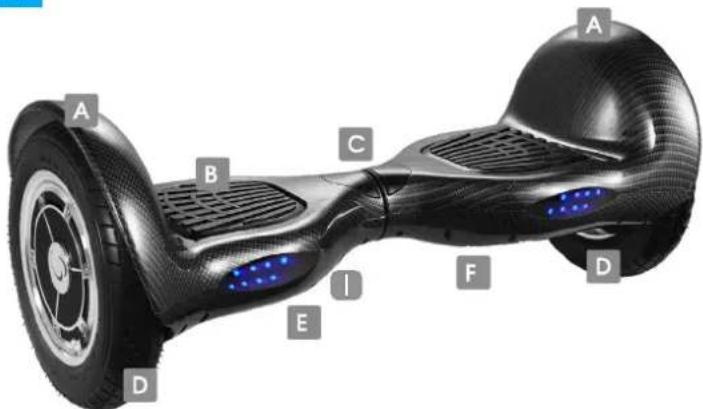
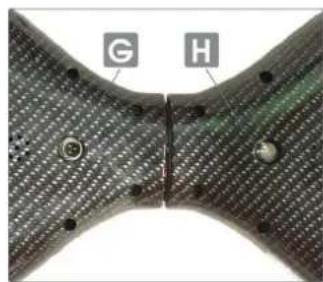
UNIT SCHEME
A Bumper
B Footstep
Display
D Wheels
E Position LEDs
Rear protection
G Charger Port
ON/OFF
Speakers
SCREEN PANEL SCHEME
Blue battery icon: the smartGyro is charged
Flashing blue battery icon: first warning that the battery is low
Red battery icon: low battery, it is necessary to recharge
Blue operation icon: your smartGyro is ready to use
Operation icon Red: some error has occurred


Before starting
After reading this manual, you should see the videos on our website to familiarize yourself with the product.
You can see the tutorials here> www.smartgyro.es
Weight restrictions
The smartGyro is optimized for drivers up to 100kg and with a minimum weight of 20kg
Range of autonomy
In optimal conditions, the smartGyro can travel distances of up to 20km . However, the typical range of kilometers is between 12 and 15km .
Several factors can occur for this range to descend:
-
Speed and driving style - Maintaining a moderate and continuous speed will allow you to travel a greater distance with your smart-Gyro, if you drive with frequent stops, starting at idle and with extreme acceleration the travel capacity will decrease. ? - This product is designed for smooth and flat surfaces. Using it in irregular terrain is not only dangerous, but it will negatively affect the autonomy range of your smartGyro.
-
The weight of the user can affect the range of autonomy.
Battery Maintenance:
The first time you use the smartGyro charge the battery completely. A correct battery charge and good maintenance will allow the maximum operating range in your smartGyro. Excessive load or failure to follow proper loading instructions can reduce the range of autonomy.
Manual-XL1
Preparation
Please read this user manual carefully, in its entirety, before mounting on your new smartGyro.
Follow the loading instructions that are explained below, before attempting to use the product.
The first time you are going to ride, it is recommended that you do it in a large place if possible in a covered place and with the help of a friend. Your companion will help you focus your balance and offer assistance in case you can become unbalanced. It is important that your assistant read this manual and become familiar with the video tutorial before helping you. Always use sportswear or comfortable clothes. It is advisable to use protections such as knee pads or helmets until you become familiar with the product.
Getting familiar with your smartGyro
Your smartGyro moves obeying the natural movements of your body, allowing you to move forward, back, rotate and move with great ease and with a sense of absolute freedom. For this it has five microsensors. It is very easy to use, however you need a period of compulsory adaptation until you get total confidence in your driving style. Once you have practiced enough you will be able to control your movements to the point of remaining almost motionless or turning 360^ without any difficulty.
Do not forget, smartGyro is very intuitive, it will move according to the signals it receives from its body.
- If you lean a little forward or tip your toes forward, the smartGyro will move forward.
- If you lean slightly back or tip your heels towards the ground, the smartGyro will move backwards.
As you become familiar with the smartGyro, you will find that tilting one foot forward and one back will allow you to turn on yourself.
Tips to consider
Keep a relaxed posture:
If you are tense, and do not have a relaxed posture, the smartGyro will know and exaggerate your movements. Relax and learn to control the direction and balance with balance.
Position of the feet:
When you climb the smartGyro, make sure you maintain an upright position and that your feet are symmetrically aligned with the lower mats so you can drive the product optimally.
Do not move abruptly:
Try to avoid moving your arms or making a fuss, because it will modify your posture and balance.
Descend confidently:
ALWAYS step back from the smartGyro with both feet at the same time and with confidence. Why? Because if you go down with one foot first, the device could interpret that with the other you want to go forward. Always lower backwards with both feet, to avoid a possible fall.
Should I take into account any important recommendations when loading the product?
Yes, it is also important that you respect and comply with each and every one of our indications:
- Load preferably in places away from flammable products.
- Monitor and control the loading period (which does not exceed the recommended period).
- Use only the original charger.
- Do not leave the skate loading at night.
- If the skate has been exposed to high temperatures, wait and check that it is not hot before putting it back on.
- If you have used the skate with the Go-kart, the Crazy-kart or any other similar support, the battery life is shorter because it subjects the skate at a much higher speed and continuously. Keep in mind that using this type of supports, the skate overheats so it is necessary to wait until the temperature drops to put it to charge again.
smartgyro.es
Manual-XL1
Charging your smartGyro
Make sure that your smartGyro's charger is in optimal condition. Check that there is no dust or dirt in the connector and if so, clean it and make sure it is dry. Go to the section "Product outline" of this manual where the cargo port where you must connect it is indicated.
Always use the original charger provided with the product and connect it correctly to the device (through the charging port) and to a power outlet. It is important that you always use the charger that comes with your smartGyro, otherwise the device may fail and may not be covered by the warranty.
When the smartGyro battery indicator light is red, it means that the product is charging. Once the product is loaded, it will take approximately two hours to complete the charge.
When the LED light turns green, it means that the product is fully charged. It is important that at that moment, disconnect the network adapter immediately so that it stops charging. The life of the battery will be affected by the battery charging time, never exceed and extend the life of your battery.
The first time you use the product, charge the smartGyro for about 2 hours. A full charge will take approximately 2 hours. Do not leave the product charging once the light of the adapter has changed to green or overcharge the battery for more than 2-3 hours.

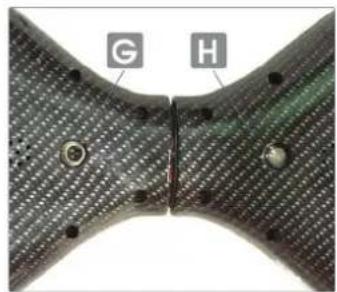
Charging Port

Power Button
Using the SmartGyro
XL1-Manual
Step 1. Place the product on the ground. Please, choose a smooth surface where you can slide without difficulty. If it's the first time you ride, look for a comfortable place to practice. We recommend an open area, without obstacles, with a few meters of free space in each direction. The better the more clear it is.
Step 2. Press the POWER button on the bottom of the product on the side opposite the charging port. The device will beep indicating that it is on.
Step 3. Check the upper light indicators. The battery icon should appear in blue and the usage indicator also.
- If the battery icon lights red, it means that you must recharge your SmartGyro. - If the device starts to emit a series of alarm beeps, the product is not in its correct starting position. Turn off the product and place it in a smooth area to check that the wheels or mechanisms are not clogged. Repeat step 2.
Step 4. Put on your helmet, the appropriate protections for elbows and knees and a suitable clothing for bumps and falls.
Step 5. Hold on to your friend! Your assistant must always be by your side, pending of you and in front of smartGyro. Ideally, it would be that I could climb and be able to use my arms and shoulders to balance.
Step 6. Once up, jump safely and briefly backwards with both legs at the same time to get off. Make sure your assistant is attentive to pick you up and help you.

smartgyro.es
Manual-XL1
Using the smartGyro
Step 7. Climb quickly and with conviction to smarGyro. Place your feet perpendicularly on the product. Plant your feet evenly and strive to be right enough. That will make stabilizing smartGyro much easier.
Take your time. On average, it takes at least 3-5 minutes to get used to smartGyro. At first, use the help of your companion and get used to the feeling of knowing that the more straight you are, the more stable and stable your smartGyro is.
The smartGyro is intuitive, if you lean forward, the smartGyro will go Forward, if you lean backwards it will go in the opposite direction and if it stays still ... It will not go anywhere, it will stay in balance!
Practice jumping with firmness, confidence and speed backwards to get off the product. It is the most important skill you will have to learn to use the product safely. Do not jump forward ever.
ALWAYS JUMP TO BACK, DO IT WITH THE FIRST FEET ON THE DESCEND
Tip
Always practice with protections, helmets and with the help of a companion.
The scheme explains how to move with the smartGyro. If it stays in the center and right, it will be immobile. Tilt your head slightly in the direction you want to move forward.
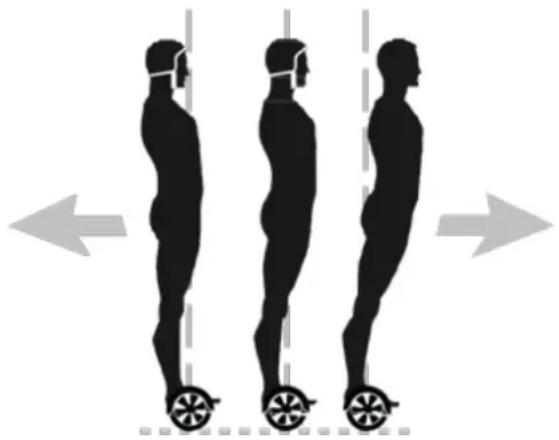
Driving your SmartGyro. PART II
Now that you can drive your smartGyro, back and forth, we'll start talking about how to start spinning.
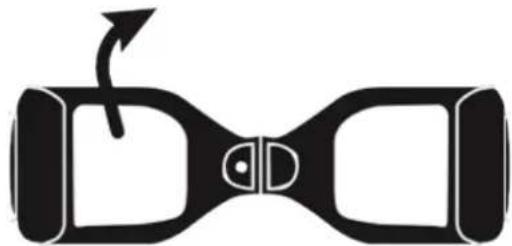
Stop turning: try to stay straight and upright, doing the same pressure with both legs, thus preventing it from turning in any direction.
Practice at the beginning by turning gently and then intensify the pressure and the degree of the curve. Then return to the equilibrium position to stop turning. Always turn in a controlled manner, if you turn sharply you may lose balance and fall.
TIP:
Practice, practice practice until you can make a complete turn on its axis.
Manual - XL1
Driving your SmartGyro. Part III
Now that you can maneuver easily with your smartGyro, make your driving more fluid and try to drive avoiding obstacles in the environment, moving between space and rooms and passing under the doors. Always be very careful, especially if you are moving in a new environment.
Be careful, for example, when crossing doors as the smartGyro makes it higher and it is possible that the door has a width that does not allow the device to enter easily.
Be alert to the dangers that occur in changes in terrain, such as grass, sand or trails.
Alert: what is that sound?
In situations of alarm, the device will emit a series of beeps to warn you, keep in mind the following situations to know why your SmartGyro beeps:
- When you suddenly get off the unit: your smartGyro detects when it drops unexpectedly and emits the warning beep. Put it back on a flat, smooth surface, put it on properly to get on when it's off and then turn it on again.
- When the speed alarm is activated: your smartGyro has a built-in speed alarm that will sound when you are moving faster than the maximum speed of the product. Slow down to deactivate the speed alarm.
- When the battery is low: the battery indicator will light red (instead of blue) indicating that the battery is low and needs recharging. It is very dangerous to continue using the device if the load is low.
- When the engines are overheated: it occurs when you do not use the SmartGyro in optimal conditions, for example, riding uphill or uneven terrain. Please allow the product to cool before continuing to use it.
Speed restrictions
XL1-Manual
The maximum speed of the smartGyro is limited to approximately 12 km per hour. Please note that exceeding this speed will trigger the speed alarm and cause the smartGyro to start emitting a series of warning beeps. This alarm is designed exclusively for your safety. The smartGyro is not designed for speeds exceeding 12 kilometers per hour. We strongly recommend that you keep the speed below the limit.
Inspection, maintenance and storage of your Smartgyro
We recommend that you maintain a care routine for your smartGyro similar to that of a bicycle, a skateboard or a car. If you discover any anomaly, please contact us through our website www.smartgyro.es
Care and maintenance
Check the wheels periodically to see if they are damaged or carry an excessive load. Avoid using harsh chemicals or solvents when cleaning the smartGyro. Do not let liquids come into contact with smartGyro ports or buttons.
The smartGyro has an IP54 rating, which means it can withstand only small splashes of water. It is not resistant to water, nor should it be used in waterlogged conditions. If water or other liquids get into it, permanent damage to the circuitry and its electronic components could occur.
Storage
Store your smartGyro in interior areas, which are dry places and in proper conditions. If the ambient temperature of the storage location is below 0^ or above 55^ , choose another location. To prevent the entry of dust and particles, store your smartGyro in its original packaging.
If you are going to store your smartGyro for a long period of time, check that the battery of the product is at minimum levels. We recommend recharging the battery every 3 months to make sure it is ready to drive after it has been stored.
Technical safety requirement
The power adapter is the device disconnect device. The socket outlet must be close to the equipment and easily accessible.
Recycle your device
Electrical or electronic products, batteries, accumulators and other accessories must necessarily be collected separately. When you have finished the useful life of your electrical or electronic device remove the batteries and deposit it, separately, in the correct container for proper management. Keep in mind that batteries can not be deposited indiscriminately together with household waste. Consider recycling according to the manufacturer's guidelines. With this gesture, it will help reduce the risks to your health and preserve the environment. If you have any questions, check with your municipality or distributor to request the essential details regarding recycling of your old device. N° REI- RPA 1201-RD.106/2008.
Important
- You should always wear a helmet and safety guards to avoid personal injuries in the event of falls.
- The product is specially designed for interiors.
- It is designed to be used by anyone from 10 years of age with adult supervision.
Frequent questions
XL1-Manual
Is it legal to use smartGyro on a road or path?
The smartGyro is a product designed, especially for interiors. We do not recommend, therefore, its use on roads, trails, near a public road, bike lane, etc ... Regarding its legality, mobility is governed by municipal ordinances so the rules change from one place to another. It is imperative that you contact the local and state transit authorities for more information.
The smartGyro battery icon is on. What should I do?
Please check that the unit has been charged according to the instructions.
The smartGyro is sounding. What should I do?
See page 30 for an accurate idea of what the beeps might mean.
I can not control the smartGyro. What should I do?
Review the instructions in the User's Guide or view the online tutorials on smartgyro.es and if you still can not master it, call us, we will be happy to help you.
Can the smartGyro XL1 have a flat tire?
Yes, the wheels can be punctured since they are pneumatic wheels. Take the same precautions you would have with a bicycle.
Manual - XL1
How to calibrate your Smartgyro XL1 if it has calibration problems?
Follow these steps to correctly reset your Smartgyro:
- Put your Smartgyro XL1 on a completely flat and smooth surface and in a neutral position, that is, with the feetsteps completely vertical
- When in the correct position and with your Smartgyro turned off, press and hold the power button until the lights begin to flash.
- When the lights begin to blink, leave the Smartgyro in its calibration process (it will take approximately five minutes). After that time your Smartgyro will be perfectly calibrated.
We turn on our Smartgyro again to make sure it works correctly.
If you still have questions, contact info@smartgyro.es and they will solve your problems. You can also view the explanatory video of the calibration on our website:
http://smartgyro.es