
SBCRU530-87B - Remote control PHILIPS - Free user manual and instructions
Find the device manual for free SBCRU530-87B PHILIPS in PDF.


| Product type | Universal remote control |
| Brand | Philips |
| Model | SBCRU530-87B |
| Power supply | 2 x 1.5 V batteries, type R03/UM4/AAA |
| Dimensions (approx.) | 20 × 5 × 2 cm |
| Weight (approx.) | 150 g (with batteries) |
| Range | Up to 10 m |
| Compatible devices | TV, VCR, satellite/cable receiver |
| Number of keys | Approximately 30 keys including SHIFT for secondary functions |
| Main functions | Power on/standby, mode selection, volume +/-, channel +/-, numeric keys, teletext, menu, confirm, VCR functions (play, stop, pause, fast forward, rewind, record) |
| Programming | By 4-digit code or auto search |
| Code memory | Yes, can be checked via keys 1-4 |
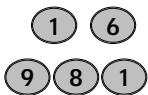
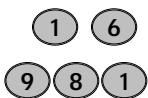
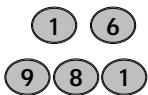
| Factory reset | Yes, press 1+6 then 981 |
| Ultra-real sound | TV volume control regardless of mode |
| Adding functions | Possible via 3-digit code obtained from support |
| Maintenance | Clean with a soft dry cloth; do not use solvents |
| Battery replacement | At least once a year; do not remove for more than one hour |
| Safety | Do not expose to humidity or extreme temperatures; use only recommended batteries |
| Spare parts | No detachable parts other than the battery compartment |
| Repairability | Contact Philips support in case of malfunction |
| Included accessories | Remote control only; batteries not included |
Frequently Asked Questions - SBCRU530-87B PHILIPS
User questions about SBCRU530-87B PHILIPS
0 question about this device. Answer the ones you know or ask your own.
Ask a new question about this device
Download the instructions for your Remote control in PDF format for free! Find your manual SBCRU530-87B - PHILIPS and take your electronic device back in hand. On this page are published all the documents necessary for the use of your device. SBCRU530-87B by PHILIPS.
USER MANUAL SBCRU530-87B PHILIPS
You just made a great choice by buying this Philips universal remote control! It takes the place of as many as three separate remote controls and can operate the most-used functions of almost any brand of TV, VCR and satellite tuner/cable decoder.
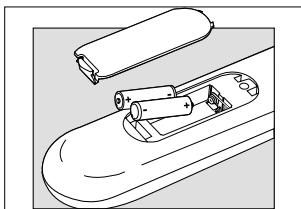
Installing the batteries
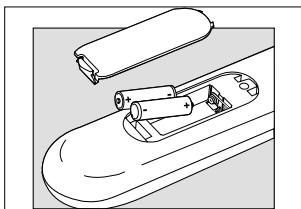
Your SBC RU 530 needs two 1.5V batteries, type R03, UM4 or AAA.
Put them in like this:
natural_image
Diagram of a device with battery and internal components (no text or symbols)TIP
- Remember to replace the batteries at least once a year.
- Don't leave the batteries out for longer than one hour, otherwise you will need to set-up the SBC RU530 again.
KEYS & FUNCTIONS
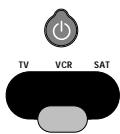
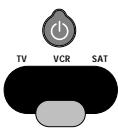
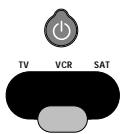
Power: to switch TV/VCR/SAT on and off.
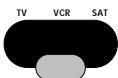
Mode Selector: to select TV, VCR or Satellite mode.
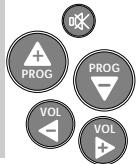
Mute: to switch the TV sound on and off.
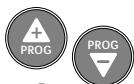
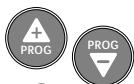
Channel Up/Down: to select next / previous channel.

Volume Up/Down: to control the TV volume.

Number Keys: for direct channel selection and other functions.

To switch between one and two-digit channel selection and display.

SHIFT: to get access to additional functions (press together with other function keys). Depending on the age of your equipment, the result is for example:
SHIFT + PROG+: increases brightness or menu up function
SHIFT + PROG-: decreases brightness or menu down function
SHIFT + VOL+: increases colour or menu right function
SHIFT + VOL-: decreases colour or menu left function

To operate menu control.
To confirm your selection.
Try other shift/key combinations on your equipment to discover which functions are available.
Remember that you can't get access to additional functions if these functions were not available on the original remote control of your equipment!

To switch on teletext.
To enlarge the teletext display on screen.
To stop changing teletext pages.
To switch off teletext.
If you use the memory out key (⇔) to access the next teletext page on your Philips TV, see Troubleshooting.

natural_image
Vertical sequence of gray circular icons with play and control symbols (no text or numbers)| Fasttext | VCR |
| Red | Rewind |
| Record | |
| Green | Stop |
| Yellow | Play |
| Blue | Forward |
| Pause |
SET-UP FOR USE
A D V I C E
Carefully read the complete procedure before starting!
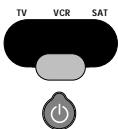
Your equipment is a Philips brand:
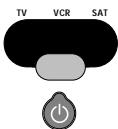
1 Press the mode selector key for the device you want to operate.
2 Press the power key to test.
- The green indicator LED under each device (TV, VCR or SAT) lights up to confirm the mode you're in.
C H E C K
Press a few keys to check correct response. If response is not correct, go to the next paragraph.
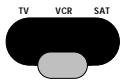


Your equipment is of another brand, or your equipment is a Philips brand, but not all keys respond correctly:
1 Press the mode selector key to select the device (TV, VCR or SAT) you want to operate.
2 Look up the brand name of the device you want to operate in the code list (centre of this manual). Make sure you choose the correct code list for your device!
3 Make sure the device is switched on.
4 Press and hold keys 1 and 3 simultaneously - for about three seconds- until the green LED lights up. (Release the keys: the green LED should stay on)
5 Enter your 4-digit code using the number keys, within 30 seconds.
- The green LED flashes twice.
CHECK
That's it! Press a few keys to check correct response. If response is not correct, repeat procedure beginning at step 1, using the next 4-digit code from the codelist.
N O T E
- If the LED displays one long flash, the code was not recognised. Please go back to step 1 and repeat the procedure, using the next 4-digit code in the list.
- If no key is pressed within 30 seconds, you have to start again at step 1.
- If no correct code is in the list, go to the next paragraph.
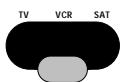


You do not know the brand of your equipment/you can not find the right code in the code list » auto search:
1 Press the mode selector key to select the device (TV, VCR or SAT) you want to operate.
2 Make sure the device is switched on (if the device is a VCR, please insert a tape and start playback).
3 Press and hold keys 1 and 3 simultaneously -for about three seconds- until the green LED lights up.
(Release the keys: the green LED should stay on)
4 Press the power key to start the search. Make sure that you keep the remote control pointed at your equipment.
– Each time the green LED flashes, another code is sent. When the right code is found, the equipment switches off (VCR stops playback). Immediately press the power key to stop the search.
If the green LED flashed again after the equipment switched off, this means you missed the correct code!
If you missed the code, follow the next procedure, starting at step 5. If the LED did not flash again after the equipment switched off, go to step 7.

5 Switch the equipment manually back on.
6 Press 'PROG-' (down only!) repeatedly to send previous codes until the equipment switches off again.

7 Press the power key to lock the correct code in the SBC RU530's memory.
- The green LED flashes twice.
C H E C K
Switch equipment on manually. Press a few keys to check correct response. If response is not correct, repeat procedure beginning at step 1.
N O T E
- The search time averages about 90 seconds. (Maximum search time is 5 minutes for TV, 2 minutes for VCR and 4 minutes for SAT).
- Autosearch stops automatically after all codes have been tested.
MAKE A NOTE OF YOUR CODE!
A D V I C E
Carefully read the complete procedure before starting!
Note the code inside the battery case and in the codelist in the centre of this booklet. This may be useful if you ever need to set up the SBC RU530 again. You used the auto search procedure or you forgot to note the code after set up? No problem! You can still 'read out' the code from the remote:
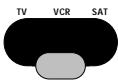



1 Make sure you've selected the right mode with the mode selector key.
2 Press and release keys 1 and 6 simultaneously.
Important: after pressing the keys, you have to release them immediately!
- The green LED lights up.
3 Press the two digits key.
- The green LED goes out.
4 Press key 1 and count the number of times the green LED flashes. This is the first digit of the 4-digit code. (No flashes means the digit is zero.)
5 Press key 2 and count the number of flashes for the second digit.
6 Press key 3 and count the number of flashes for the third digit.
7 Press key 4 and count the number of flashes for the forth digit.
8 Note the code.
ADVANCED TIPS AND TRICKS
A D V I C E
Carefully read the complete procedure before starting!
Changing the device keys
With the mode selector it is possible to select 3 categories of devices you want to operate. Each category (TV, VCR and SAT) is meant to operate a specific group of equipment:
| TV | VCR | SAT |
| tv | vcr | sat |
| cable |
Once you have programmed the functions of a device in one of the categories, it is not possible to program another device in the same category. There is, however, a solution in case you want to program two devices in the same category (2 TV's, VCR's, etc.). The following example explains how.
EXAMPLE:
The SAT mode on this remote control is factory preset to control many Philips satellite receivers. You can change the SAT mode (or any mode) to operate another type of device. The following example shows you how to use the SAT mode to operate a second TV:
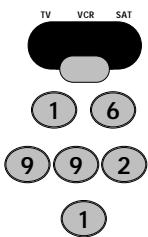
1 Press the mode selector key to select SAT and make sure the second TV is switched on.
2 Press and hold keys 1 and 6 simultaneously - for about 3 seconds - until the green LED lights up.
3 On the keypad, press keys 9, 9 and 2.
4 Press the mode selector key to select TV mode.
5 Press key 1.
- The LED flashes twice to indicate successful set up. That's it!
Don't forget to set up the SBC RU530 to operate this second TV. See the section Set-up for use.
Punch-Through Sound
Punch-through sound enables you to control the audio level of your first or second TV, regardless of what device mode the remote control is in.
EXAMPLE:
You have installed a second TV under SAT mode. You can control that TV's volume when you are in VCR mode. This feature is installed as a default setting for a first TV.
To install this feature for a second TV:
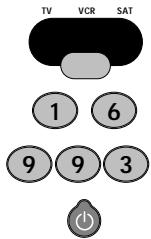
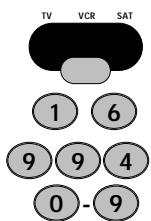

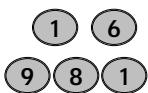
1 Press the mode selector key to select VCR.
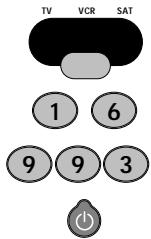
2 Press and hold keys 1 and 6 simultaneously -for about 3 seconds - until the green LED lights up.
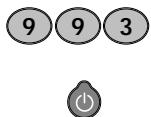
3 On the keypad, press keys 9, 9, and 3.
4 Press the mode selector key to select SAT (second TV).
5 Press the power key.
- That's it! The LED flashes twice to indicate successful set up. The Volume up/down keys now control the volume of your second (SAT) TV when you're in VCR mode.
Add a specific function to your remote control
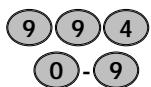
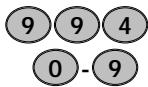
In case you do not find the function you want to use (e.g. a specific teletext function), it can easily be added to your remote control's functionality. All you have to do is contact the Philips Universal Remote Control helpline to obtain the 3-digit code for the missing function. The rest of the procedure is quite simple:
1 Press the mode selector key for the device you want to operate.
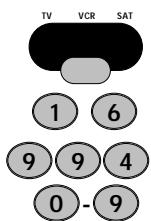
2 Press and hold keys 1 and 6 simultaneously - for about three seconds - until the green LED lights up.
3 Enter 9, 9 and 4, using the number keys.
4 Enter the 3-digit code you received from the helpline using the number keys, within 30 seconds.
5 Press the key under which you want to store the new function. The LED flashes twice to indicate a successful installation.
If you want to store the function under a Shift/Key combination; first press Shift, then press the required function key.
N O T E
- The original function of the key will be overwritten. If you want to return to its original function see the following section about resetting.
- Remember: no functions can be performed by this remote control that are not present on the equipment you are operating!
Reset your remote control to its original presets:
If you want to return to the original functions of all keys and delete all added functions under programmed keys a simple reset procedure is sufficient:
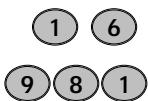
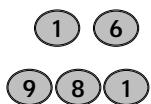
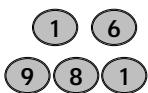
1 Press and hold keys 1 and 6 simultaneously - for about three seconds - until the green LED lights up.
2 Enter 9, 8 and 1, using the number keys.
- The LED flashes twice to indicate a successful reset.
The keys on your remote control will now perform their default functions.
TROUBLESHOOTING GUIDE
- Problem:
- Solution:
- Device is not responding and the green light does not flash when you press a button.
- Replace batteries with two new 1.5 volt, type R03, UM4 or AAA batteries.
- Device is not responding, but the green light does flash when you press a button.
- Aim the SBC RU530 at the device and be sure that there are no obstructions between the SBC RU530 and the device.
- The SBC RU530 is not performing commands properly.
- You may be using the wrong code. Try repeating Set up using another code, listed under your brand, or start the Autosearch Set-up over again to locate the proper code. If the device still doesn't respond, call the help-line and we'll put you back on track.
- You can't access teletext pages and you were used to use this (⇨) button to access teletext.
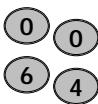
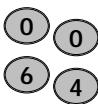
- Follow Set up procedure and at step 5 of section "Your equipment is of another brand, or your equipment is a Philips brand, but not all keys respond correctly" press keys 0, 0, 6 and 4. To enter teletext pages, press the teletext cancel button.
- The teletext buttons do not work.
- Be sure your TV has teletext capabilities. The SBC RU530 does not extend the capabilities of your TV!
- Having problems operating all the functions on your device.
- The SBC RU530 may just need customising for your model type. Just call our help-line and we'll put you back on track.
- Your brand is not listed in the code list.
– Try the hands-free Autosearch method. - You want to reset the remote control to its factory preset.
- 1 Press and hold keys 1 and 6 simultaneously - for about 3 seconds - until the green LED lights up.
- 2 On the keypad, press keys 9, 8, and 1. The LED flashes twice to indicate a successful reset.
NEED HELP?
If you have any questions about the SBC RU530, please call our help-line for assistance! You can find the number in the code list section of this booklet.
Before you call, please read this manual carefully. You will be able to solve most of your problems. If you don't find an answer to your questions, make a note of your equipment in the table at the back of the code list section of this booklet. This makes it easier and faster for our operators to help you. Look for the model numbers in the equipment instruction manual, or on the back of your equipment. When calling our help-line please have your equipment close by, so our operators can help you verify the functionality of your remote control.
The model number of your Philips universal remote control is: SBC RU530
Date of purchase: ____/____/____ day/month/year
natural_image
Diagram of a device with battery and internal components (no text or symbols)A v i s
natural_image
Vertical sequence of gray circular icons with play and control symbols (no text or numbers)R E C O M M A N D A T I O N
R E C O M M A N D A T I O N
R E C O M M A N D A T I O N
R E C O M M A N D A T I O N

natural_image
Diagram of a handheld device with battery and internal components (no text or symbols)H I N W E I S
natural_image
Five gray circular icons with play and control symbols, arranged vertically (no text or numbers)| TV | VCR | SAT |
| TV | VCR | SATKabel-TV |
natural_image
Diagram of a handheld device with battery and internal components (no text or symbols)TIP
natural_image
Vertical sequence of gray circular icons with play and control symbols (no text or numbers)VOORBEELD:

Baur .....0064, 0539, 0388, 0037, .....0376, 0571
Bazin 0244
Beko 0513, 0397
Beon 0064
Best 0364, 0397, 0448
Bestar 0583, 0397
Binatone 0244
Black Star....0274
Blacktron 0309
Blackway 0309
Blaupunkt......0354, 0355, 0218
Blue Sky....0245
Blue Star 0309
Bondstec 0274
Boots 0244
Brandt .....0360, 0223, 0136, 0362
Brinkmann....0445, 0583
Brionvega 0114, 0389
Brittania 0244
Bruns 0114
Bush......0064, 0398, 0245, 0036,
0376, 0579, 0063, 0299, 0309, 0321, 0401
CGE .....0111, 0274, 0103, 0579
CTC 0274
Carena 0482, 0583
Carrefour 0063
Cascade 0036
Cathay 0064
Centurion 0064
Century 0114
Cimline 0036
City 0036
Clarivox....0064
Clatronic......0103, 0274, 0397
Concorde 0036
Condor 0347, 0397
Contec....0036, 0063
Continental Edison.....0223, 0360, .....0426
Cosmel 0036, 0364
Crosley .....0111, 0114, 0103, 0374
Crown....0397, 0036, 0064, 0103, ....0445
Crystal 0458
CS Electronics 0274, 0245
Cybertron 0245
Daewoo 0401, 0036, 0064
Dainichi 0242, 0245
Dansai....0064
Dantax 0397, 0513
Dawa 0583
Dayton 0036
De Graaf 0235, 0575
Decca 0064, 0099, 0299
Desmet....0347, 0583
Diamant 0583
Dixi....0036, 0064
DTS 0036
Dual 0363, 0379, 0571
Dual Tec 0244
Dumont ......0114, 0097, 0374
D-Vision 0583
Dynatron 0583
Elbe 0286
Elcit 0114, 0274
Elekta 0309
Elin....0064, 0575
Elite....0245, 0347
Elman 0129
Elta....0036
Emerson 0114, 0388
Emperor 0309
Erres 0064
Etron....0036, 0190, 0583
Euroman ...0291, 0583, 0244, 0397
Europhon....0583, 0543
Expert 0233
Fenner 0401, 0036
Ferguson..0100, 0265, 0136, 0314, 0362, 0064
Fidelity 0388, 0571
Finlandia ......0373, 0386, 0235
Finlux.....0114, 0373, 0064, 0131, .....0132, 0097, 0099, 0374
Firstline...0348, 0036, 0244, 0274, 0321
Fisher.....0571, 0244, 0235, 0131, .....0397, 0582
Flint 0482
Formenti..0347, 0064, 0374, 0579, 0114
Fortress....0120, 0114
Fraba....0397, 0583
Frontech......0458, 0190, 0274
Fujitsu 0099, 0233
Funai 0321
Galaxis 0397, 0583
GBC....0579
GEC .....0070, 0099, 0064, 0244
GPM 0245
Geloso....0036, 0374
General Technic....0036
Genexxa 0190, 0245
Goldline 0364
GoldStar ...0064, 0244, 0136, 0317
Goodmans....0064, 0099, 0398, ....0063, 0244, 0262, 0401
Gorenje 0397
Graetz 0388, 0374, 0190
Granada ...0386, 0064, 0099, 0235, ....0378, 0244, 0366
Grandin 0309
Grundig ....0097, 0218, 0264, 0514
HCM 0036, 0309
Halifax 0291, 0244
Hampton 0244
Hanseatic .....0388, 0064, 0347, .....0455, 0571, 0583
Hantarex 0036, 0583
Hema 0244, 0036
Hinari......0036, 0063, 0064, 0245
Hisawa 0309, 0427, 0482
Hitachi ....0190, 0252, 0070, 0376,
0383, 0136, 0071, 0244, 0063, 0223, ......0132, 0374, 0575
Huanyu 0401
Hornyphon 0583
Hoshai 0245
Hygashi 0244
Hyper 0036, 0244, 0274
Hypersonic 0388
Hypson....0064, 0309
ICE....0244, 0398
ICeS....0245
ITC 0579
ITS....0398
ITT .0374, 0388, 0378, 0190, 0571, 0575
Imperial ..0274, 0111, 0445, 0579, ....0103, 0397
Indesit 0264
Indiana 0064
Ingelen 0190
Ingersol 0036
Inno Hit 0099
Interbuy 0036, 0291, 0274
Interfunk.....0064, 0388, 0539, .....0190, 0274
Intervision......0064, 0129, 0244
Irradio....0036, 0064, 0245
Isukai 0245
JEC 0062
JVC ......0080, 0121, 0063, 0398
Kaisui......0245, 0244, 0036, 0309
Kapsch 0190, 0233
Karcher 0583, 0448
Kathrein....0583
Kendo....0064, 0262, 0389
Kennedy 0579
Kolster 0583
Konka 0245, 0398
Kneissel 0286, 0462
Korpel 0064
Korting 0114
Koyoda 0036
Lenco 0036, 0131
Lenoir 0036
Lesa....0274
Leyco 0099, 0064, 0321
Liesenk & Tter 0064
Lifetec 0036, 0291
Lloyds 0036
Loewe......0539, 0114, 0102, 0316
Logik 0038
Luma....0233, 0332
Lux May 0583
Luxor.....0264, 0388, 0384, 0376, .....0383
M Electronic.....0373, 0132, 0131, .....0244, 0036, 0064, 0136, 0190, .....0314, 0401, 0507
MTC....0376, 0539
Magnadyne .....0114, 0374, 0129, .....0274, 0571
Magnafon 0129, 0103
Manesth ......0347, 0244, 0262
Marantz 0064, 0583
Marelli 0114
Mark 0064
Matsui .....0036, 0262, 0064, 0204, 0235, 0244, 0398, 0571, 0038, 0062, .....0063, 0099, 0299, 0321, 0514
McMichael 0070
Mediator 0064
Memorex 0036
Memphis 0364
Mercury 0583
Metz......0302, 0266, 0114, 0394
Minerva 0514, 0097, 0264
Mitsubishi .....0063, 0539, 0135, .....0114, 0264
Mivar....0317, 0318, 0319
Motion 0103
Multistandard 0129
Multitech......0036, 0103, 0129
Murphy....0131
NEC....0197
NEI 0064, 0364, 0458
National 0264
Neckermann.....0376, 0064, 0114, .....0583, 0218
Nesco....0274
Newtech 0583, 0036
New World 0245
Nicam 0571
Nikkai0064, 0062, 0245, 0364, 0099
Nobliko 0103, 0129
Nokia .....0507, 0575, 0388, 0500
Nordmende .....0223, 0136, 0314
Oceanic ....0388, 0242, 0374, 0190
Okano 0397, 0583
Onwa....0398
Opera 0583
Orbit 0583
Orion.....0204, 0321, 0262, 0571, .....0064, 0347, 0348
Osaki....0099, 0244, 0245
Oso 0245
Osume....0099
Otto Versand .....0064, 0539, 0374, .....0376, 0037, 0063, 0218, 0244, .....0347, 0579, 0583
Palladium 0397, 0445
Panama 0244
Panasonic .....0253, 0153, 0264, .....0677, 0190, 0374, 0394
Panavision 0583
Pathe Cinema.....0347, 0265, 0579
Pathe Marconi 0223, 0360
Pausa 0036
Perdio 0347
Perfekt 0583
Philco.....0114, 0111, 0274, 0579, .....0103
Philex 0378
Philharmonic 0244
Philips.....0064, 0583, 0359, 0350, .....0070, 0114, 0401, 0632, 0883
Phoenix....0114
Phonola....0064, 0114
Pioneer 0136, 0314, 0190
Plantron 0291, 0583
Poppy....0036
Prandoni-Prince .....0273, 0543
Precision 0244
Prima 0036, 0291
Prinz 0099
Profex 0036, 0103, 0388
Profi-Tronic 0583
Proline 0348
Prosonic 0397, 0401, 0583
Protech....0064, 0129, 0036, 0458, ....0244, 0274, 0364, 0445, 0579
Pye 0583
Pymi 0036
Quasar 0274
Quelle .....0064, 0097, 0539, 0037, 0111, 0038, 0279, 0354, 0388, 0579, .....0131, 0355, 0571
Questa 0063
R-Line 0064
RBM 0097
RFT 0455, 0114
Radialva 0136
Radiola....0064, 0350
Radiomarelli 0114
Radiotone......0036, 0445, 0583
Rank Arena 0063
Rediffusion 0388, 0378
Revox 0064
Rex ......0332, 0233, 0190, 0286
Roadstar 0036, 0245, 0445
Robotron 0114
Royal Lux 0448
SBR 0064, 0070
SEG .....0244, 0063, 0103, 0579
SEI .0571, 0129, 0374, 0037, 0114, 0204, 0321
Saba....0136, 0114, 0190, 0223, ....0314, 0362, 0102, 0374
Saccs....0265
Sagem....0482
Saisho .....0038, 0204, 0571, 0036, .....0262, 0458
Salora.....0388, 0376, 0575, 0190, .....0383, 0386
Sambers 0129, 0103
Samsung ..0064, 0244, 0317, 0397, 0036, 0583
Sansui 0583
Sanyo .....0063, 0235, 0038, 0099, .....0131, 0366
Schaub Lorenz......0388, 0374
Schneider .....0064, 0363, 0350, .....0571, 0245, 0274, 0379, 0398
Seleco .....0233, 0286, 0190, 0332, .....0389
Sencora 0036
Sentra 0062
Sharp 0120, 0063
Shorai 0321
Siarem....0114, 0129, 0374
Siemens...0354, 0218, 0355, 0064, 0374
Sierra 0583
Siesta 0397
Silver 0063
Singer 0114
Sinudyne .....0571, 0129, 0037, .....0114, 0204, 0262, 0321, 0374
Skantic....0384, 0383
Sogera....0347
Solavox 0378, 0190
Sonitron 0235
Sonoko 0036, 0064
Sonolor....0190, 0235, 0242
Sontec....0064
Sony......0038, 0037, 0063, 0256
Sound & Vision ......0245, 0401
Soundwave 0064, 0445
Standard....0244, 0245, 0036
Star Lite....0583
Sten Way 0245, 0309
Stern......0233, 0190, 0286, 0332
Sunkai....0321, 0348
Sunwood....0036, 0583
Supertech....0036, 0583
Supra 0401, 0036
Susumu 0245
Sutron....0036
Sysline 0064
Tandy .....0190, 0245, 0099, 0244
Tashiko .....0063, 0070, 0244, 0386
Tatung....0099, 0244, 0064
Tec 0579, 0244, 0274
Technema 0347
Technics 0677
Teleavia....0360
Telecor 0190, 0244, 0245
Telefunken.....0136, 0279, 0128, .....0111, 0362
Telegazi .....0190, 0245, 0583
Telemeister 0347
Telesonic 0583
Teletech 0036
Teleton .....0233, 0063, 0244, 0376
Televideon....0347
Temco 0321
Tensai 0245, 0321, 0347
Texet 0245
Thomson..0136, 0360, 0223, 0314, ....0264, 0426, 0376
Thorn .....0064, 0062, 0099, 0111, .....0131, 0388, 0539
Tokai 0099, 0190, 0583
Tomashi 0309
Toshiba....0062, 0063, 0097
Towada 0579
Trans Continens 0244
Triumph 0204
Uher 0233, 0347
Ultravox 0129, 0378
Universum .....0132, 0373, 0064, .....0579, 0131, 0397, 0448, 0519
Univox 0114, 0583
Vestel 0064
Vexa 0036, 0583
Videosat....0274
VideoSystem....0583
Videotechnic 0244
Videoton 0458
Visa 0036, 0190
Vision 0347
Vortec 0583
Voxson 0114, 0190
Waltham....0383, 0244
Watson....0347, 0064
Watt Radio......0129, 0571, 0579
Wega....0114, 0063
Weltblick....0347, 0583
White Westinghouse....0347, 0064
Yamashi 0245, 0583
Yoko....0244, 0064, 0458
Yorx 0245
Zanussi 0332, 0233
SETUP CODES FOR VCR
ASA....0064
Aiwa....0334, 0027, 0379
Akai ....0133, 0342, 0080, 0068, ....0312
Akiba 0099
Alba .....0047, 0305, 0379, 0099, .....0236, 0342
Ambassador 0047
Amstrad......0027, 0352, 0305
Anitech 0099
Aristona 0430
Asuka....0064
Baird .....0131, 0027, 0068, 0134
Basic Line......0305, 0047, 0099
Blaupunkt.....0253, 0222, 0189, .....0030, 0061, 0254, 0430
Blue Sky....0305
Matsui .....0236, 0031, 0379, 0063, .....0115
Memorex...0131, 0027, 0064, 0073
Memphis 0099
Metz....0030, 0374, 0222, 0064, ....0189, 0254
Minerva 0222
Mitsubishi 0070, 0094
Multitech....0027, 0099
Murphy....0027
NEC 0065, 0068, 0094
Nesco....0099
Nokia .....0131, 0133, 0068, 0073, .....0267
Nordmende .....0068, 0411, 0347, .....0348
Oceanic 0027, 0068
Okano 0342
Orion.....0236, 0031, 0379, 0063, .....0115
Osaki....0027, 0064, 0099
Palladium .....0064, 0068, 0099
Panasonic .....0253, 0189, 0254
Pathe Cinema 0063
Pathe Marconi 0068
Pentax....0069
Perdio 0027
Philco 0065
Philips.....0430, 0494, 0411, 0830
Pioneer 0094
Portland 0047
Profex 0349
Profitronic....0267
Proline 0027
Quartz....0073
RFT 0430
Rex 0068, 0411
Roadstar ...0064, 0099, 0267, 0305
SEG 0267, 0349
SEI....0031
Saba....0068, 0411, 0233, 0347, ....0348
Saisho .....0236, 0031, 0063, 0115
Salora....0073, 0070, 0133
Samsung....0267, 0459
Sansui 0068, 0094
Sanyo 0073, 0131
Saville....0379
Schaub Lorenz....0027, 0068, 0131
Schneider 0027, 0099
Seleco 0068
Sentra 0047
Sharp 0089, 0075
Shintom 0099, 0131
Shorai 0031
Siemens...0030, 0131, 0222, 0064, 0081
Silva 0064
Singer 0072
Sinudyne 0031
Solavox 0047
Sonolor 0073, 0089
Sontec....0064
Sony....0061, 0059, 0038
Sunstar 0027
Suntronic 0027
Tashiko 0027
Tatung....0027, 0068
Tec....0047
Technics 0189, 0253
Teleavia....0068
Telefunken.....0068, 0411, 0347, .....0348, 0214
Tenosal 0099
Tensai 0027, 0349
Thomson......0068, 0411, 0347
Thorn 0068, 0063, 0131
Toshiba.....0072, 0068, 0411, 0070
Towada 0349
Uher 0267
Universum .....0027, 0133, 0064, .....0222, 0267, 0352
Yamishi 0099
Yokan....0099
Yoko 0267, 0047
SETUP CODES FOR CABLE
Birgmingham Cable Communications 0303
British Telecom....0030
Filmnet 0470
HyperVision....0646
Jerrold 0303, 0030
MNet 0470
Nokia 0708
PVP Stereo Visual Matrix .....0030
Philips 0646
Sagem....0844
Scientific Atlanta......0304, 0035
Tele+1 0470
United Cable....0030
SETUP CODES FOR SATELLITE
Akai 0542
Alba .....0448, 0482, 0389, 0542
Aldes 0315, 0389
Allsat 0227
Allsonic....0315
Amstrad...0488, 0279, 0372, 0528, 0874
Akena 0695
Ankaro 0315, 0396
Anttron 0448
Armstrong 0270
Astra 0135, 0566
Astro .....0200, 0385, 0528, 0547
Avalon....0423
Axis 0396
BT 0695, 0542, 0737
Beko 0482
Best 0396
Blaupunkt 0200
Boca....0270, 0540, 0159
British Sky Broadcasting (BskyB). 0874
Bush 0389
CNT 0547
Cambridge 0542, 528
Canal Digital....0880
Canal Satellite .....0880, 0319
Canal+ 0880
Channel Master 0389
CityCom....0845, 0421
Commlink 0315
Connexions 0423
Conrad 0600, 0142
Crown 0270
Cyrus 0227
D-box....0900
Daewoo 0448, 0740
DDC 0389
DNT....0423, 0227
Distratel....0912
Distrisat 0619
Ditristrad 0619
Dual 0400
Dune 0396
Echostar ..0898, 0740, 0194, 0423, 0880
Emanon 0448
Eurodec 0551
FTE....0358, 0890
Ferguson 0363
Fidelity 0279
Finlandia 0135, 0482
Finlux 0135, 0482
Fracarro....0898
Freecom 0448
Fuba....0423, 0448, 0396
Galaxis .....0890, 1138, 0310, 0315
Gardiner 0845
Gold Box......0880, 0319
Gooding 0598
Goodmans 0482
Granada....0135
Grandin 0872
Grundig ...0200, 0874, 0777, 0166, ....0598, 0832
Hanseatic 0632
Hirschmann.....0200, 0423, 0528, .....0600
Hitachi....0482
Houston 0695
Humax....0890, 1075
Huth 0270, 0315
ITT....0135
InVideo 0898
Intervision 0619
JOK....0737
JVC 0542, 0598
Kathrein ..0200, 0685, 0385, 0358, 0469, 0531, 0649, 0227 0421, 1084
Kosmos 0358
Kreiselmeyer 0200
Kyostar 0448
La Sat 0540, 0547
Lenco 0448
Lennox 0619
Loewe 0270
Lupus....0396
Luxor 0135, 0600, 0900
Macab 0551, 0878
Manhattan .....0547, 0619, 0482
Marantz 0227
Maspro 0777, 0363
Matsui....0598
MediaSat 0880
Mediamarkt 0270
Micro Technology 0566
Minerva 0598
Morgan's......0270, 0159, 0540
Multichoice 0906
Multistar 0358
Myryad 0227
Neuhaus 0528
Nikko 0740
Nokia .....0135, 0600, 0900, 1050, .....0482
Nordmende 0389
Ondigital 0160, 0161, 0268
Orbitech 0528
Pace .....0482, 0268, 0818, 0363, .....0524, 0822, 0874, 0914
Palladium 0598
Palsat....0528
Panasat 0906
Panasonic 0874
Panda 0482
Patriot 0542
Philips.....0227, 0160, 0880, 0319, .....0482, 0777, 0832, 1145 0126, .....0161, 0598, 0737, 0925
Phonotrend......0315, 0619
Pioneer 0880
Polytron 0421
Premiere......0900, 0319, 0880
Promax....0482
Prosat 0315
Quadral 0389, 0655
RFT 0227, 0315
Radiola 0227
Radix 0423
SAT 0488
SEG 0448, 0396, 0566
SKY 0883
SM Electronic 0740
Saba......0363, 0547, 0737, 0912
Sabre 0482
Sagem....0847
Salora 0135
SatPartner 0448, 0547
Satcom....0632
Schneider 0832
Schwaiger 0421, 0531
Seemann 0423
Siemens 0200
Skymaster.0315, 0632, 0655, 0740
Sony 0874
Strong 0906
Sunstar 0540
TPS 0847
Tantec 0363, 0482
TechniSat....0289, 0528
Telefunken 0448
Teleka 0270
Telesat 0632
Thomson....0880, 0482, 0912
Tonna 0695
Trendline 0540
Trend Plain 0540
Triasat 0528
Triax 0528
Universum 0200, 0598
Ventana....0227
Viadigital 0194, 0898
Vortec 0448
Wisi 0200, 0423, 0482
Zehnder ....0358, 0579, 0845, 0547
Zenith 0883
TV
Equipment
Brand
Model number
Number of original remote
Code
VCR
Equipment
Brand
Model number
Number of original remote
Code
SAT
Equipment
Brand
Model number
Number of original remote
Code
Helpline

Östereich
01 546575609
België/Belgique
02 7172458
Danmark
35258758
Finland
09 22948258
France
03 87 17 00 87
Deutschland
0211 65791158
'Ελληνας
00800 3122 1219
Ireland
01 6011158
Italia
02 48271158
Nederland
053 4849106
Norge
22 70 82 58
Portugal
0800 831 351
España
91 7456228
Sverige
08 7505196
Suisse/die Schweiz
01 2120045
United Kingdom
0207 7440344
natural_image
Diagram of a device with battery and internal components (no text or symbols)TIPS
natural_image
Vertical sequence of gray circular icons with play and pause symbols (no text or numbers)
EXEMPEL:

natural_image
Diagram of a device with a battery and internal components (no text or symbols)N E U V O
NÄPPÄIMET & TOIMINNOT
natural_image
Vertical gray button icons with play and control symbols (no text or numbers)



natural_image
Diagram of a device with battery and internal components (no text or symbols)E T R Å D
natural_image
Vertical gray button icons with play, pause, and double arrow symbols (no text or numbers)
natural_image
Line drawing of a device with a battery and cylindrical component inserted into a tray (no text or symbols)E T R Ä D



natural_image
Vertical sequence of gray circular icons with play and control symbols (no text or numbers)
Dealer's name, address and signature
You just made a great choice by buying this Philips universal remote control! It takes the place of as many as three separate remote controls and can operate the most-used functions of almost any brand of TV, VCR and satellite tuner/cable decoder.
Installing the batteries
Your SBC RU 530 needs two 1.5V batteries, type R03, UM4 or AAA.
Put them in like this:
natural_image
Diagram of a device with battery and internal components (no text or symbols)TIP
- Remember to replace the batteries at least once a year.
- Don't leave the batteries out for longer than one hour, otherwise you will need to set-up the SBC RU530 again.
KEYS & FUNCTIONS
Power: to switch TV/VCR/SAT on and off.
Mode Selector: to select TV, VCR or Satellite mode.
Mute: to switch the TV sound on and off.
Channel Up/Down: to select next / previous channel.

Volume Up/Down: to control the TV volume.

Number Keys: for direct channel selection and other functions.

To switch between one and two-digit channel selection and display.

SHIFT: to get access to additional functions (press together with other function keys). Depending on the age of your equipment, the result is for example:
SHIFT + PROG+: increases brightness or menu up function
SHIFT + PROG-: decreases brightness or menu down function
SHIFT + VOL+: increases colour or menu right function
SHIFT + VOL-: decreases colour or menu left function

To operate menu control.
To confirm your selection.
Try other shift/key combinations on your equipment to discover which functions are available.
Remember that you can't get access to additional functions if these functions were not available on the original remote control of your equipment!

To switch on teletext.
To enlarge the teletext display on screen.
To stop changing teletext pages.
To switch off teletext.
If you use the memory out key (⇔) to access the next teletext page on your Philips TV, see Troubleshooting.

natural_image
Vertical sequence of gray circular icons with play and control symbols (no text or numbers)| Fasttext | VCR |
| Red | Rewind |
| Record | |
| Green | Stop |
| Yellow | Play |
| Blue | Forward |
| Pause |
SET-UP FOR USE
A D V I C E
Carefully read the complete procedure before starting!
Your equipment is a Philips brand:
1 Press the mode selector key for the device you want to operate.
2 Press the power key to test.
- The green indicator LED under each device (TV, VCR or SAT) lights up to confirm the mode you're in.
C H E C K
Press a few keys to check correct response. If response is not correct, go to the next paragraph.
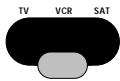


Your equipment is of another brand, or your equipment is a Philips brand, but not all keys respond correctly:
1 Press the mode selector key to select the device (TV, VCR or SAT) you want to operate.
2 Look up the brand name of the device you want to operate in the code list (centre of this manual). Make sure you choose the correct code list for your device!
3 Make sure the device is switched on.
4 Press and hold keys 1 and 3 simultaneously - for about three seconds- until the green LED lights up. (Release the keys: the green LED should stay on)
5 Enter your 4-digit code using the number keys, within 30 seconds.
- The green LED flashes twice.
CHECK
That's it! Press a few keys to check correct response. If response is not correct, repeat procedure beginning at step 1, using the next 4-digit code from the codelist.
N O T E
- If the LED displays one long flash, the code was not recognised. Please go back to step 1 and repeat the procedure, using the next 4-digit code in the list.
- If no key is pressed within 30 seconds, you have to start again at step 1.
- If no correct code is in the list, go to the next paragraph.
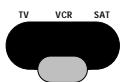


You do not know the brand of your equipment/you can not find the right code in the code list » auto search:
1 Press the mode selector key to select the device (TV, VCR or SAT) you want to operate.
2 Make sure the device is switched on (if the device is a VCR, please insert a tape and start playback).
3 Press and hold keys 1 and 3 simultaneously -for about three seconds- until the green LED lights up.
(Release the keys: the green LED should stay on)
4 Press the power key to start the search. Make sure that you keep the remote control pointed at your equipment.
- Each time the green LED flashes, another code is sent. When the right code is found, the equipment switches off (VCR stops playback). Immediately press the power key to stop the search.
If the green LED flashed again after the equipment switched off, this means you missed the correct code!
If you missed the code, follow the next procedure, starting at step 5. If the LED did not flash again after the equipment switched off, go to step 7.

5 Switch the equipment manually back on.
6 Press 'PROG-' (down only!) repeatedly to send previous codes until the equipment switches off again.

7 Press the power key to lock the correct code in the SBC RU530's memory.
- The green LED flashes twice.
C H E C K
Switch equipment on manually. Press a few keys to check correct response. If response is not correct, repeat procedure beginning at step 1.
N O T E
- The search time averages about 90 seconds. (Maximum search time is 5 minutes for TV, 2 minutes for VCR and 4 minutes for SAT).
- Autosearch stops automatically after all codes have been tested.
MAKE A NOTE OF YOUR CODE!
A D V I C E
Carefully read the complete procedure before starting!
Note the code inside the battery case and in the codelist in the centre of this booklet. This may be useful if you ever need to set up the SBC RU530 again. You used the auto search procedure or you forgot to note the code after set up? No problem! You can still 'read out' the code from the remote:
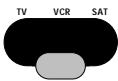



1 Make sure you've selected the right mode with the mode selector key.
2 Press and release keys 1 and 6 simultaneously.
Important: after pressing the keys, you have to release them immediately!
- The green LED lights up.
3 Press the two digits key.
- The green LED goes out.
4 Press key 1 and count the number of times the green LED flashes. This is the first digit of the 4-digit code. (No flashes means the digit is zero.)
5 Press key 2 and count the number of flashes for the second digit.
6 Press key 3 and count the number of flashes for the third digit.
7 Press key 4 and count the number of flashes for the forth digit.
8 Note the code.
ADVANCED TIPS AND TRICKS
A D V I C E
Carefully read the complete procedure before starting!
Changing the device keys
With the mode selector it is possible to select 3 categories of devices you want to operate. Each category (TV, VCR and SAT) is meant to operate a specific group of equipment:
| TV | VCR | SAT |
| tv | vcr | sat |
| cable |
Once you have programmed the functions of a device in one of the categories, it is not possible to program another device in the same category. There is, however, a solution in case you want to program two devices in the same category (2 TV's, VCR's, etc.). The following example explains how.
EXAMPLE:
The SAT mode on this remote control is factory preset to control many Philips satellite receivers. You can change the SAT mode (or any mode) to operate another type of device. The following example shows you how to use the SAT mode to operate a second TV:
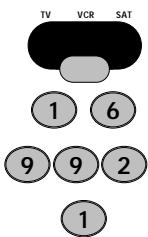
1 Press the mode selector key to select SAT and make sure the second TV is switched on.
2 Press and hold keys 1 and 6 simultaneously - for about 3 seconds - until the green LED lights up.
3 On the keypad, press keys 9, 9 and 2.
4 Press the mode selector key to select TV mode.
5 Press key 1.
- The LED flashes twice to indicate successful set up. That's it!
Don't forget to set up the SBC RU530 to operate this second TV. See the section Set-up for use.
Punch-Through Sound
Punch-through sound enables you to control the audio level of your first or second TV, regardless of what device mode the remote control is in.
EXAMPLE:
You have installed a second TV under SAT mode. You can control that TV's volume when you are in VCR mode. This feature is installed as a default setting for a first TV.
To install this feature for a second TV:

1 Press the mode selector key to select VCR.
2 Press and hold keys 1 and 6 simultaneously -for about 3 seconds - until the green LED lights up.
3 On the keypad, press keys 9, 9, and 3.
4 Press the mode selector key to select SAT (second TV).
5 Press the power key.
- That's it! The LED flashes twice to indicate successful set up. The Volume up/down keys now control the volume of your second (SAT) TV when you're in VCR mode.
Add a specific function to your remote control
In case you do not find the function you want to use (e.g. a specific teletext function), it can easily be added to your remote control's functionality. All you have to do is contact the Philips Universal Remote Control helpline to obtain the 3-digit code for the missing function. The rest of the procedure is quite simple:
1 Press the mode selector key for the device you want to operate.
2 Press and hold keys 1 and 6 simultaneously - for about three seconds - until the green LED lights up.
3 Enter 9, 9 and 4, using the number keys.
4 Enter the 3-digit code you received from the helpline using the number keys, within 30 seconds.
5 Press the key under which you want to store the new function. The LED flashes twice to indicate a successful installation.
If you want to store the function under a Shift/Key combination; first press Shift, then press the required function key.
N O T E
- The original function of the key will be overwritten. If you want to return to its original function see the following section about resetting.
- Remember: no functions can be performed by this remote control that are not present on the equipment you are operating!
Reset your remote control to its original presets:
If you want to return to the original functions of all keys and delete all added functions under programmed keys a simple reset procedure is sufficient:
1 Press and hold keys 1 and 6 simultaneously - for about three seconds - until the green LED lights up.
2 Enter 9, 8 and 1, using the number keys.
- The LED flashes twice to indicate a successful reset.
The keys on your remote control will now perform their default functions.
TROUBLESHOOTING GUIDE
- Problem:
- Solution:
- Device is not responding and the green light does not flash when you press a button.
- Replace batteries with two new 1.5 volt, type R03, UM4 or AAA batteries.
- Device is not responding, but the green light does flash when you press a button.
- Aim the SBC RU530 at the device and be sure that there are no obstructions between the SBC RU530 and the device.
- The SBC RU530 is not performing commands properly.
- You may be using the wrong code. Try repeating Set up using another code, listed under your brand, or start the Autosearch Set-up over again to locate the proper code. If the device still doesn't respond, call the help-line and we'll put you back on track.
- You can't access teletext pages and you were used to use this (⇨) button to access teletext.
- Follow Set up procedure and at step 5 of section "Your equipment is of another brand, or your equipment is a Philips brand, but not all keys respond correctly" press keys 0, 0, 6 and 4. To enter teletext pages, press the teletext cancel button.
- The teletext buttons do not work.
- Be sure your TV has teletext capabilities. The SBC RU530 does not extend the capabilities of your TV!
- Having problems operating all the functions on your device.
- The SBC RU530 may just need customising for your model type. Just call our help-line and we'll put you back on track.
- Your brand is not listed in the code list.
– Try the hands-free Autosearch method. - You want to reset the remote control to its factory preset.
- 1 Press and hold keys 1 and 6 simultaneously - for about 3 seconds - until the green LED lights up.
- 2 On the keypad, press keys 9, 8, and 1. The LED flashes twice to indicate a successful reset.
NEED HELP?
If you have any questions about the SBC RU530, please call our help-line for assistance! You can find the number in the code list section of this booklet.
Before you call, please read this manual carefully. You will be able to solve most of your problems. If you don't find an answer to your questions, make a note of your equipment in the table at the back of the code list section of this booklet. This makes it easier and faster for our operators to help you. Look for the model numbers in the equipment instruction manual, or on the back of your equipment. When calling our help-line please have your equipment close by, so our operators can help you verify the functionality of your remote control.
The model number of your Philips universal remote control is: SBC RU530
Date of purchase: ____/____/____ day/month/year
natural_image
Diagram of a device with battery and internal components (no text or symbols)INDICACIÓN
natural_image
Vertical sequence of gray circular icons with play and control symbols (no text or numbers)




EJEMPLO:
natural_image
Diagram of a device with battery and internal components (no text or symbols)INFORMAZIONE
natural_image
Vertical sequence of gray circular icons with play and control symbols (no text or numbers)Suono attivo
natural_image
Diagram of a device with battery and internal components (no text or symbols)A v i s o
Corte de som: para ligar e desligar o som do televisor.
Canal Seguinte/Anterior: para seleccionar o canal seguinte ou o canal anterior.

natural_image
Vertical sequence of gray circular icons with play and control symbols (no text or numbers)Baur .....0064, 0539, 0388, 0037, .....0376, 0571
Bazin 0244
Beko 0513, 0397
Beon 0064
Best 0364, 0397, 0448
Bestar 0583, 0397
Binatone 0244
Black Star....0274
Blacktron 0309
Blackway 0309
Blaupunkt......0354, 0355, 0218
Blue Sky....0245
Blue Star 0309
Bondstec 0274
Boots 0244
Brandt .....0360, 0223, 0136, 0362
Brinkmann....0445, 0583
Brionvega 0114, 0389
Brittania 0244
Bruns 0114
Bush......0064, 0398, 0245, 0036,
0376, 0579, 0063, 0299, 0309, 0321, 0401
CGE .....0111, 0274, 0103, 0579
CTC 0274
Carena 0482, 0583
Carrefour 0063
Cascade 0036
Cathay 0064
Centurion 0064
Century 0114
Cimline 0036
City 0036
Clarivox....0064
Clatronic......0103, 0274, 0397
Concorde 0036
Condor 0347, 0397
Contec....0036, 0063
Continental Edison.....0223, 0360, .....0426
Cosmel 0036, 0364
Crosley .....0111, 0114, 0103, 0374
Crown....0397, 0036, 0064, 0103, ....0445
Crystal 0458
CS Electronics 0274, 0245
Cybertron 0245
Daewoo 0401, 0036, 0064
Dainichi 0242, 0245
Dansai....0064
Dantax 0397, 0513
Dawa 0583
Dayton 0036
De Graaf 0235, 0575
Decca 0064, 0099, 0299
Desmet....0347, 0583
Diamant 0583
Dixi....0036, 0064
DTS 0036
Dual 0363, 0379, 0571
Dual Tec 0244
Dumont 0114, 0097, 0374
D-Vision 0583
Dynatron 0583
Elbe 0286
Elcit 0114, 0274
Elekta 0309
Elin....0064, 0575
Elite....0245, 0347
Elman 0129
Elta....0036
Emerson 0114, 0388
Emperor 0309
Erres 0064
Etron....0036, 0190, 0583
Euroman ...0291, 0583, 0244, 0397
Europhon....0583, 0543
Expert 0233
Fenner 0401, 0036
Ferguson..0100, 0265, 0136, 0314, 0362, 0064
Fidelity 0388, 0571
Finlandia ......0373, 0386, 0235
Finlux.....0114, 0373, 0064, 0131, .....0132, 0097, 0099, 0374
Firstline...0348, 0036, 0244, 0274, 0321
Fisher.....0571, 0244, 0235, 0131, .....0397, 0582
Flint 0482
Formenti..0347, 0064, 0374, 0579, 0114
Fortress....0120, 0114
Fraba....0397, 0583
Frontech....0458, 0190, 0274
Fujitsu 0099, 0233
Funai 0321
Galaxis 0397, 0583
GBC....0579
GEC .....0070, 0099, 0064, 0244
GPM 0245
Geloso....0036, 0374
General Technic....0036
Genexxa 0190, 0245
Goldline 0364
GoldStar ...0064, 0244, 0136, 0317
Goodmans....0064, 0099, 0398, ....0063, 0244, 0262, 0401
Gorenje 0397
Graetz 0388, 0374, 0190
Granada ...0386, 0064, 0099, 0235, ....0378, 0244, 0366
Grandin 0309
Grundig ....0097, 0218, 0264, 0514
HCM 0036, 0309
Halifax 0291, 0244
Hampton 0244
Hanseatic .....0388, 0064, 0347, .....0455, 0571, 0583
Hantarex 0036, 0583
Hema 0244, 0036
Hinari......0036, 0063, 0064, 0245
Hisawa 0309, 0427, 0482
Hitachi ....0190, 0252, 0070, 0376,
0383, 0136, 0071, 0244, 0063, 0223, ......0132, 0374, 0575
Huanyu 0401
Hornyphon 0583
Hoshai 0245
Hygashi 0244
Hyper 0036, 0244, 0274
Hypersonic 0388
Hypson....0064, 0309
ICE....0244, 0398
ICeS....0245
ITC 0579
ITS....0398
ITT .0374, 0388, 0378, 0190, 0571, 0575
Imperial ..0274, 0111, 0445, 0579, ....0103, 0397
Indesit 0264
Indiana 0064
Ingelen 0190
Ingersol 0036
Inno Hit 0099
Interbuy 0036, 0291, 0274
Interfunk.....0064, 0388, 0539, .....0190, 0274
Intervision......0064, 0129, 0244
Irradio....0036, 0064, 0245
Isukai 0245
JEC 0062
JVC ......0080, 0121, 0063, 0398
Kaisui......0245, 0244, 0036, 0309
Kapsch 0190, 0233
Karcher 0583, 0448
Kathrein....0583
Kendo....0064, 0262, 0389
Kennedy 0579
Kolster 0583
Konka 0245, 0398
Kneissel 0286, 0462
Korpel 0064
Korting 0114
Koyoda 0036
Lenco 0036, 0131
Lenoir 0036
Lesa....0274
Leyco 0099, 0064, 0321
Liesenk & Tter 0064
Lifetec 0036, 0291
Lloyds 0036
Loewe......0539, 0114, 0102, 0316
Logik 0038
Luma....0233, 0332
Lux May 0583
Luxor.....0264, 0388, 0384, 0376, .....0383
M Electronic.....0373, 0132, 0131, .....0244, 0036, 0064, 0136, 0190, .....0314, 0401, 0507
MTC 0376, 0539
Magnadyne .....0114, 0374, 0129, .....0274, 0571
Magnafon 0129, 0103
Manesth ......0347, 0244, 0262
Marantz 0064, 0583
Marelli 0114
Mark 0064
Matsui .....0036, 0262, 0064, 0204, 0235, 0244, 0398, 0571, 0038, 0062, .....0063, 0099, 0299, 0321, 0514
McMichael 0070
Mediator 0064
Memorex 0036
Memphis 0364
Mercury 0583
Metz......0302, 0266, 0114, 0394
Minerva 0514, 0097, 0264
Mitsubishi .....0063, 0539, 0135, .....0114, 0264
Mivar......0317, 0318, 0319
Motion 0103
Multistandard 0129
Multitech......0036, 0103, 0129
Murphy....0131
NEC....0197
NEI 0064, 0364, 0458
National 0264
Neckermann.....0376, 0064, 0114, .....0583, 0218
Nesco....0274
Newtech 0583, 0036
New World 0245
Nicam 0571
Nikkai0064, 0062, 0245, 0364, 0099
Nobliko 0103, 0129
Nokia .....0507, 0575, 0388, 0500
Nordmende .....0223, 0136, 0314
Oceanic ....0388, 0242, 0374, 0190
Okano 0397, 0583
Onwa....0398
Opera 0583
Orbit 0583
Orion.....0204, 0321, 0262, 0571, .....0064, 0347, 0348
Osaki....0099, 0244, 0245
Oso 0245
Osume....0099
Otto Versand .....0064, 0539, 0374, .....0376, 0037, 0063, 0218, 0244, .....0347, 0579, 0583
Palladium 0397, 0445
Panama 0244
Panasonic .....0253, 0153, 0264, .....0677, 0190, 0374, 0394
Panavision 0583
Pathe Cinema.....0347, 0265, 0579
Pathe Marconi 0223, 0360
Pausa 0036
Perdio 0347
Perfekt 0583
Philco.....0114, 0111, 0274, 0579, .....0103
Philex 0378
Philharmonic 0244
Philips.....0064, 0583, 0359, 0350, .....0070, 0114, 0401, 0632, 0883
Phoenix....0114
Phonola....0064, 0114
Pioneer 0136, 0314, 0190
Plantron 0291, 0583
Poppy....0036
Prandoni-Prince .....0273, 0543
Precision 0244
Prima 0036, 0291
Prinz 0099
Profex 0036, 0103, 0388
Profi-Tronic 0583
Proline 0348
Prosonic 0397, 0401, 0583
Protech....0064, 0129, 0036, 0458, ....0244, 0274, 0364, 0445, 0579
Pye 0583
Pymi 0036
Quasar 0274
Quelle .....0064, 0097, 0539, 0037, 0111, 0038, 0279, 0354, 0388, 0579, .....0131, 0355, 0571
Questa 0063
R-Line 0064
RBM 0097
RFT 0455, 0114
Radialva 0136
Radiola....0064, 0350
Radiomarelli 0114
Radiotone......0036, 0445, 0583
Rank Arena 0063
Rediffusion 0388, 0378
Revox 0064
Rex ......0332, 0233, 0190, 0286
Roadstar 0036, 0245, 0445
Robotron 0114
Royal Lux 0448
SBR 0064, 0070
SEG .....0244, 0063, 0103, 0579
SEI .0571, 0129, 0374, 0037, 0114, 0204, 0321
Saba....0136, 0114, 0190, 0223, ....0314, 0362, 0102, 0374
Saccs....0265
Sagem....0482
Saisho .....0038, 0204, 0571, 0036, .....0262, 0458
Salora.....0388, 0376, 0575, 0190, .....0383, 0386
Sambers 0129, 0103
Samsung ..0064, 0244, 0317, 0397, 0036, 0583
Sansui 0583
Sanyo .....0063, 0235, 0038, 0099, .....0131, 0366
Schaub Lorenz......0388, 0374
Schneider .....0064, 0363, 0350, .....0571, 0245, 0274, 0379, 0398
Seleco .....0233, 0286, 0190, 0332, .....0389
Sencora 0036
Sentra 0062
Sharp 0120, 0063
Shorai 0321
Siarem....0114, 0129, 0374
Siemens...0354, 0218, 0355, 0064, 0374
Sierra 0583
Siesta 0397
Silver 0063
Singer 0114
Sinudyne .....0571, 0129, 0037, .....0114, 0204, 0262, 0321, 0374
Skantic....0384, 0383
Sogera....0347
Solavox 0378, 0190
Sonitron 0235
Sonoko 0036, 0064
Sonolor....0190, 0235, 0242
Sontec....0064
Sony......0038, 0037, 0063, 0256
Sound & Vision ......0245, 0401
Soundwave 0064, 0445
Standard....0244, 0245, 0036
Star Lite....0583
Sten Way 0245, 0309
Stern......0233, 0190, 0286, 0332
Sunkai....0321, 0348
Sunwood....0036, 0583
Supertech....0036, 0583
Supra 0401, 0036
Susumu 0245
Sutron 0036
Sysline 0064
Tandy .....0190, 0245, 0099, 0244
Tashiko .....0063, 0070, 0244, 0386
Tatung....0099, 0244, 0064
Tec 0579, 0244, 0274
Technema 0347
Technics 0677
Teleavia....0360
Telecor 0190, 0244, 0245
Telefunken.....0136, 0279, 0128, .....0111, 0362
Telegazi .....0190, 0245, 0583
Telemeister 0347
Telesonic 0583
Teletech 0036
Teleton .....0233, 0063, 0244, 0376
Televideon....0347
Temco 0321
Tensai 0245, 0321, 0347
Texet 0245
Thomson..0136, 0360, 0223, 0314, ....0264, 0426, 0376
Thorn .....0064, 0062, 0099, 0111, .....0131, 0388, 0539
Tokai 0099, 0190, 0583
Tomashi 0309
Toshiba....0062, 0063, 0097
Towada 0579
Trans Continens 0244
Triumph 0204
Uher 0233, 0347
Ultravox 0129, 0378
Universum .....0132, 0373, 0064, .....0579, 0131, 0397, 0448, 0519
Univox 0114, 0583
Vestel 0064
Vexa 0036, 0583
Videosat....0274
VideoSystem....0583
Videotechnic 0244
Videoton 0458
Visa 0036, 0190
Vision 0347
Vortec 0583
Voxson 0114, 0190
Waltham....0383, 0244
Watson....0347, 0064
Watt Radio......0129, 0571, 0579
Wega....0114, 0063
Weltblick....0347, 0583
White Westinghouse....0347, 0064
Yamashi 0245, 0583
Yoko....0244, 0064, 0458
Yorx 0245
Zanussi 0332, 0233
SETUP CODES FOR VCR
ASA....0064
Aiwa....0334, 0027, 0379
Akai ....0133, 0342, 0080, 0068, ....0312
Akiba 0099
Alba .....0047, 0305, 0379, 0099, .....0236, 0342
Ambassador 0047
Amstrad......0027, 0352, 0305
Anitech 0099
Aristona 0430
Asuka....0064
Baird .....0131, 0027, 0068, 0134
Basic Line......0305, 0047, 0099
Blaupunkt.....0253, 0222, 0189, .....0030, 0061, 0254, 0430
Blue Sky....0305
Matsui .....0236, 0031, 0379, 0063, .....0115
Memorex...0131, 0027, 0064, 0073
Memphis 0099
Metz....0030, 0374, 0222, 0064, ....0189, 0254
Minerva 0222
Mitsubishi 0070, 0094
Multitech....0027, 0099
Murphy....0027
NEC 0065, 0068, 0094
Nesco....0099
Nokia .....0131, 0133, 0068, 0073, .....0267
Nordmende .....0068, 0411, 0347, .....0348
Oceanic 0027, 0068
Okano 0342
Orion.....0236, 0031, 0379, 0063, .....0115
Osaki....0027, 0064, 0099
Palladium .....0064, 0068, 0099
Panasonic .....0253, 0189, 0254
Pathe Cinema 0063
Pathe Marconi 0068
Pentax....0069
Perdio 0027
Philco 0065
Philips.....0430, 0494, 0411, 0830
Pioneer 0094
Portland 0047
Profex 0349
Profitronic....0267
Proline 0027
Quartz....0073
RFT 0430
Rex 0068, 0411
Roadstar ...0064, 0099, 0267, 0305
SEG 0267, 0349
SEI....0031
Saba....0068, 0411, 0233, 0347, ....0348
Saisho .....0236, 0031, 0063, 0115
Salora....0073, 0070, 0133
Samsung....0267, 0459
Sansui 0068, 0094
Sanyo 0073, 0131
Saville....0379
Schaub Lorenz....0027, 0068, 0131
Schneider 0027, 0099
Seleco 0068
Sentra 0047
Sharp 0089, 0075
Shintom 0099, 0131
Shorai 0031
Siemens...0030, 0131, 0222, 0064, 0081
Silva 0064
Singer 0072
Sinudyne 0031
Solavox 0047
Sonolor 0073, 0089
Sontec....0064
Sony....0061, 0059, 0038
Sunstar 0027
Suntronic 0027
Tashiko 0027
Tatung....0027, 0068
Tec....0047
Technics 0189, 0253
Teleavia....0068
Telefunken.....0068, 0411, 0347, .....0348, 0214
Tenosal 0099
Tensai 0027, 0349
Thomson......0068, 0411, 0347
Thorn 0068, 0063, 0131
Toshiba.....0072, 0068, 0411, 0070
Towada 0349
Uher 0267
Universum .....0027, 0133, 0064, .....0222, 0267, 0352
Yamishi 0099
Yokan....0099
Yoko 0267, 0047
SETUP CODES FOR CABLE
Birgmingham Cable Communications 0303
British Telecom....0030
Filmnet 0470
HyperVision....0646
Jerrold 0303, 0030
MNet 0470
Nokia 0708
PVP Stereo Visual Matrix .....0030
Philips 0646
Sagem....0844
Scientific Atlanta......0304, 0035
Tele+1 0470
United Cable....0030
SETUP CODES FOR SATELLITE
Akai 0542
Alba .....0448, 0482, 0389, 0542
Aldes 0315, 0389
Allsat 0227
Allsonic....0315
Amstrad...0488, 0279, 0372, 0528, 0874
Akena 0695
Ankaro 0315, 0396
Anttron 0448
Armstrong 0270
Astra 0135, 0566
Astro .....0200, 0385, 0528, 0547
Avalon....0423
Axis 0396
BT 0695, 0542, 0737
Beko 0482
Best 0396
Blaupunkt 0200
Boca....0270, 0540, 0159
British Sky Broadcasting (BskyB). 0874
Bush 0389
CNT 0547
Cambridge 0542, 528
Canal Digital....0880
Canal Satellite 0880, 0319
Canal+ 0880
Channel Master 0389
CityCom....0845, 0421
Commlink 0315
Connexions 0423
Conrad 0600, 0142
Crown....0270
Cyrus 0227
D-box....0900
Daewoo 0448, 0740
DDC 0389
DNT....0423, 0227
Distratel....0912
Distrisat 0619
Ditristrad 0619
Dual 0400
Dune 0396
Echostar ..0898, 0740, 0194, 0423, 0880
Emanon 0448
Eurodec 0551
FTE....0358, 0890
Ferguson 0363
Fidelity 0279
Finlandia 0135, 0482
Finlux 0135, 0482
Fracarro....0898
Freecom 0448
Fuba....0423, 0448, 0396
Galaxis .....0890, 1138, 0310, 0315
Gardiner 0845
Gold Box......0880, 0319
Gooding 0598
Goodmans 0482
Granada....0135
Grandin 0872
Grundig ...0200, 0874, 0777, 0166, ....0598, 0832
Hanseatic 0632
Hirschmann.....0200, 0423, 0528, .....0600
Hitachi....0482
Houston 0695
Humax....0890, 1075
Huth 0270, 0315
ITT....0135
InVideo 0898
Intervision 0619
JOK....0737
JVC 0542, 0598
Kathrein ..0200, 0685, 0385, 0358, 0469, 0531, 0649, 0227 0421, 1084
Kosmos 0358
Kreiselmeyer 0200
Kyostar 0448
La Sat 0540, 0547
Lenco 0448
Lennox 0619
Loewe 0270
Lupus....0396
Luxor 0135, 0600, 0900
Macab 0551, 0878
Manhattan .....0547, 0619, 0482
Marantz 0227
Maspro 0777, 0363
Matsui....0598
MediaSat 0880
Mediamarkt 0270
Micro Technology 0566
Minerva 0598
Morgan's......0270, 0159, 0540
Multichoice 0906
Multistar 0358
Myryad 0227
Neuhaus 0528
Nikko 0740
Nokia .....0135, 0600, 0900, 1050, .....0482
Nordmende 0389
Ondigital .....0160, 0161, 0268
Orbitech 0528
Pace .....0482, 0268, 0818, 0363, .....0524, 0822, 0874, 0914
Palladium 0598
Palsat....0528
Panasat 0906
Panasonic 0874
Panda 0482
Patriot 0542
Philips.....0227, 0160, 0880, 0319, .....0482, 0777, 0832, 1145 0126, .....0161, 0598, 0737, 0925
Phonotrend......0315, 0619
Pioneer 0880
Polytron 0421
Premiere......0900, 0319, 0880
Promax....0482
Prosat 0315
Quadral 0389, 0655
RFT 0227, 0315
Radiola 0227
Radix 0423
SAT 0488
SEG 0448, 0396, 0566
SKY 0883
SM Electronic 0740
Saba......0363, 0547, 0737, 0912
Sabre 0482
Sagem....0847
Salora 0135
SatPartner 0448, 0547
Satcom....0632
Schneider 0832
Schwaiger 0421, 0531
Seemann 0423
Siemens 0200
Skymaster.0315, 0632, 0655, 0740
Sony 0874
Strong 0906
Sunstar 0540
TPS 0847
Tantec 0363, 0482
TechniSat....0289, 0528
Telefunken 0448
Teleka 0270
Telesat 0632
Thomson....0880, 0482, 0912
Tonna 0695
Trendline 0540
Trend Plain 0540
Triasat 0528
Triax 0528
Universum 0200, 0598
Ventana....0227
Viadigital 0194, 0898
Vortec 0448
Wisi 0200, 0423, 0482
Zehnder ....0358, 0579, 0845, 0547
Zenith 0883
TV
Equipment
Brand
Model number
Number of original remote
Code
VCR
Equipment
Brand
Model number
Number of original remote
Code
SAT
Equipment
Brand
Model number
Number of original remote
Code
Helpline

Östereich
01 546575609
België/Belgique
02 7172458
Danmark
35258758
Finland
09 22948258
France
03 87 17 00 87
Deutschland
0211 65791158
'Ελληνας
00800 3122 1219
Ireland
01 6011158
Italia
02 48271158
Nederland
053 4849106
Norge
22 70 82 58
Portugal
0800 831 351
España
91 7456228
Sverige
08 7505196
Suisse/die Schweiz
01 2120045
United Kingdom
0207 7440344
natural_image
Line drawing of a remote control device with a battery and cable (no text or symbols)Συμβουλή

Προγραμματισμός
Σ υ μ β ο υ λ ἡ

1
natural_image
Diagram of a handheld device with battery and cable (no text or symbols)WSKAZÓWKA
natural_image
Vertical sequence of gray circular icons with play and pause symbols (no text or numbers)
natural_image
Line drawing of a remote control device with battery and switch (no text or symbols)С о в д т :
natural_image
Vertical sequence of gray circular icons with play and control symbols (no text or numbers)



1
6
natural_image
Diagram of a handheld device with battery and cable (no text or symbols)TIP
Napájení: zapne/vypne TV/VCR/SAT.
natural_image
Vertical sequence of gray circular icons with play and control symbols (no text or numbers)Příprava k použití
POKYN
Dealer's name, address and signature