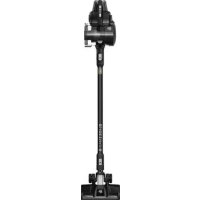
Blade 2 Max DD7881 - Vacuum Cleaner DIRT DEVIL - Free user manual and instructions
Find the device manual for free Blade 2 Max DD7881 DIRT DEVIL in PDF.



| Device type | Cordless vacuum cleaner |
| Model | Blade 2 Max DD7881 |
| Brand | Dirt Devil |
| Battery voltage | 21.6 V (Li-ion) |
| Maximum operating time | Approximately 35 minutes |
| Charging time | Approximately 4 hours |
| Dust container capacity | 0.6 L |
| Power | 180 W |
| Weight | 2.4 kg |
| Power adapter input | Input: 100-240 V ~, 50/60 Hz, 0.5 A; Output: 25 V, 600 mA |
| Boost mode | Yes (full power) |
| Motorized roller brush | Yes, with on/off button |
| Washable filter | Yes (foam filter and separator filter) |
| Use as handheld vacuum | Yes, by detaching the tube |
| Wall mount included | Yes |
| Included accessories | Crevice tool, pet hair tool, dusting brush, parquet brush (optional) |
| Warranty | Legal warranty (European Directive 2011/83/EU) |
| Filter cleaning | Every 4 to 6 uses: tap; every 3 months: wash with water (max 40°C), dry for 24 hours |
Frequently Asked Questions - Blade 2 Max DD7881 DIRT DEVIL
User questions about Blade 2 Max DD7881 DIRT DEVIL
0 question about this device. Answer the ones you know or ask your own.
Ask a new question about this device
Download the instructions for your Vacuum Cleaner in PDF format for free! Find your manual Blade 2 Max DD7881 - DIRT DEVIL and take your electronic device back in hand. On this page are published all the documents necessary for the use of your device. Blade 2 Max DD7881 by DIRT DEVIL.
USER MANUAL Blade 2 Max DD7881 DIRT DEVIL
natural_image
Line drawing of a vacuum cleaner with handle and base (no text or symbols)DE Bedienungsanleitung | 2in1 Akku-Handstaubsauger | 7
EN Instruction Manual | 2-in-1 Handheld vacuum cleaner with rechargeable battery | 14
FR Mode d'emploi | Aspirateur à main 2 en 1 à accumulateur | 20
ES Manual de instrucciones | Aspiradora inalámbrica de mano 2en1 | 27
IT Istruzioni per l'uso | Aspirapolvere manuale a batteria 2 in 1 | 34
PT Instruções de utilização | Aspirador de pó manual sem fios 2em1 | 41
NL Bedieningshandleiding | 2in1 accu-handstofzuiger | 48
PL Instrukcja obsługi | Ręczny odkurzacz akumulatorowy 2w1 | 55
CZ Návod k obsluze | Ruční akumulátorový vysavač 2v1 | 62
HU Használati utasítás | 2 az 1-ben akkumulátoros kézi porszívó | 68
TR Kullanım kılavuzu | 2si1 arada şarjlı el süpürgesi | 75
FI Käyttöohje | Akkukäyttöinen 2in1-käsipölynimuri | 82
SE Bruksanvisning | Batteridriven 2-i-1-handdammsugare | 88
DK Betjeningsvejledning | 2-i-1 batteridrevet håndstøvsuger | 94
SK Návod na obsluhu | Ručný akumulátorový vysávač 2v1 | 100
NO Bruksanvisning | 2-i-1 batteridrevet håndstøvsuger | 106
GR Οδηγίες χρήσης | Επαναφορτιζόμενη σκούπα χειρός 2 σε 1 | 112
RO Instructiuni de utilizare | Aspirator manual cu accumulator, 2 în 1 | 119
BG Упътване за обслужване | Акумулаторна ръчна прахосмукачка 2в1 | 126
HR Upute za rukovanje | 2-u-1 ručni usisavač za prašinu s punjivom baterijom | 133
LT Naudojimo instrukcija | jkraunamas rankinis dulkių siurblys "du viename" | 139
LV Lietošanas instrukcija | Akumulatora rokas puteklsücëjs divi vienā | 146
EE Kasutusjuhend | Kaks ühes akutoitega käsitolmuimeja | 153
SI Navodila za uporabo | 2v1 ročni akumulatorski sesalnik | 159
RU Руководство по эксплуатации | Аккумуляторный ручной пылесос 2 в 1 | 165
UA Інструкція користувача | Ручний пилосос на акумуляторі 2 в 1 | 172

International Services
DE
Royal Appliance International GmbH
Abt. Kundenservice
Jagenbergstraße 19
41468 Neuss
DEUTSCHLAND

de@dirtdevil-service.eu
www.dirtdevil.de

0049 (0) 180 - 501 50 50*

0049 (0) 2131 - 60906095
AT

at@dirtdevil-service.eu
0043 - 720 -88 49 54**
CH

ch@dirtdevil-service.eu
0041 - 31 -52 80 557**
BE

be@dirtdevil-service.eu
0032 - 2 -80 85 065**
LU

lu@dirtdevil-service.eu
00352 - 2 -08 80 506**
FR

fr@dirtdevil-service.eu
0033 - 9 - 75 18 30 17**
ES

es@dirtdevil-service.eu
0034-91-1982787**
IT

it@dirtdevil-service.eu
0039 - 06 - 94 80 16 18**
PT

pt@dirtdevil-service.eu
00351 - 21 - 11 41 327**
NL

nl@dirtdevil-service.eu
0031 - 20 - 80 85 408**
PL

pl@dirtdevil-service.eu
0048 - 22 - 39 70 223**
CZ

cz@dirtdevil-service.eu
00420 - 2 - 46 01 95 41**
HU

hu@dirtdevil-service.eu
0036 - 1 - 84 80 686**
TR

tr@dirtdevil-service.eu
0090 - 85 03 90 1980**
FI

fi@dirtdevil-service.eu
00358 - 9 - 42 45 04 12**
SE

se@dirtdevil-service.eu
0046 - 84 46 82 150**
DK

dk@dirtdevil-service.eu
0045 - 78 - 77 44 95**
SK

sk@dirtdevil-service.eu
0042 - 12 32 78 45 49**
NO

no@dirtdevil-service.eu
0047 - 21 99 94 89**
GR

gr@dirtdevil-service.eu
0030 - 2 - 11 19 81 203**
RO

ro@dirtdevil-service.eu
0040 - 31 63 03 651**
BG

bg@dirtdevil-service.eu
00359 - 2 - 49 25 116**
HR

hr@dirtdevil-service.eu
00385 - 1 - 6666 441**
LT

li@dirtdevil-service.eu
00370 - 52 14 17 98**
LV

lv@dirtdevil-service.eu
00371 - 66 09 04 70**
EE

ee@dirtdevil-service.eu
00372 - 88 01 167**
SI

si@dirtdevil-service.eu
00386 - 18 88 80 74**
DE
** Charges for calls from abroad depend on the current charges imposed by the respective foreign telephone company and the respective rates.
AT, CH
natural_image
Line drawing of a mechanical device with a central component and directional arrow (no text or symbols)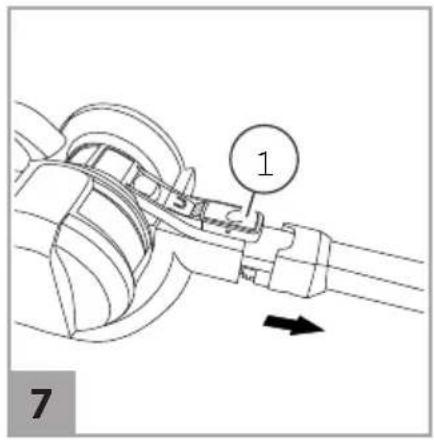
natural_image
Line drawing of a mechanical device with attached wires and ports (no text or symbols)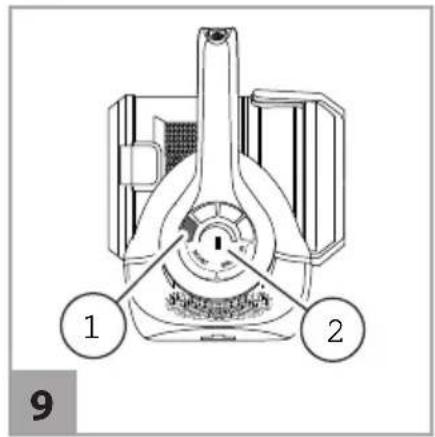
natural_image
Mechanical assembly diagram showing a rotating component with three curved arrows indicating rotational motion (no text or symbols)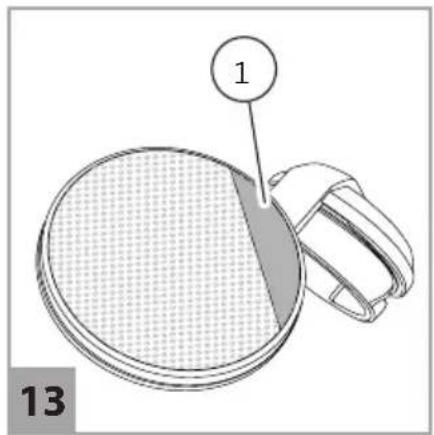
natural_image
Diagram of a circular object with a shaded section and labeled point '1', no text or symbols present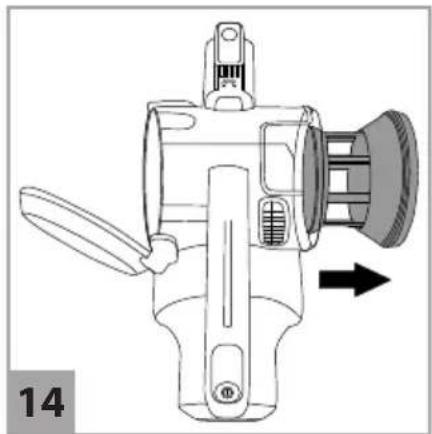
natural_image
Technical line drawing of a mechanical device with a directional arrow indicating motion (no text or symbols present)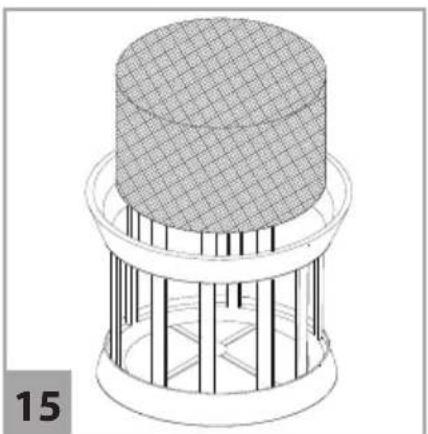
natural_image
3D wireframe diagram of a mechanical component with a grid-patterned top surface and vertical supports (no text or symbols)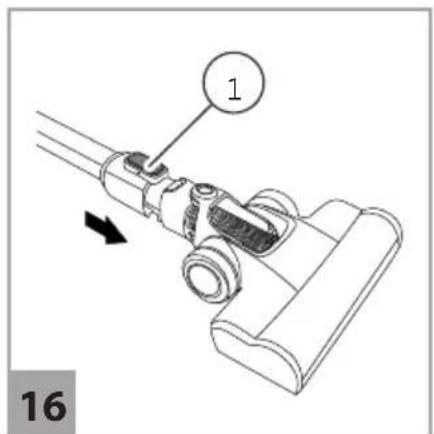
natural_image
Technical line drawing of a mechanical device with a spring and rope assembly (no text or symbols)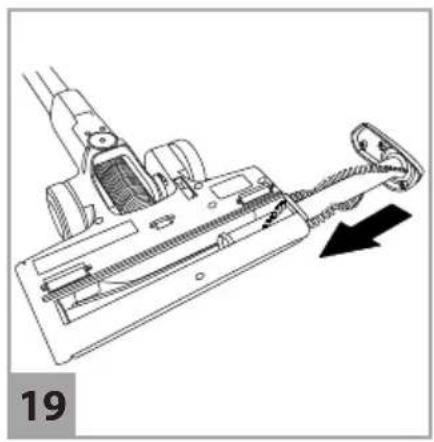
natural_image
Technical line drawing of a vacuum cleaner with a black arrow indicating motion direction (no text or symbols)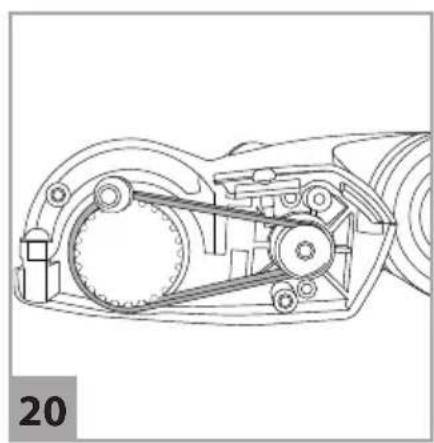
natural_image
Technical line drawing of a mechanical assembly with gears and shafts (no text or symbols)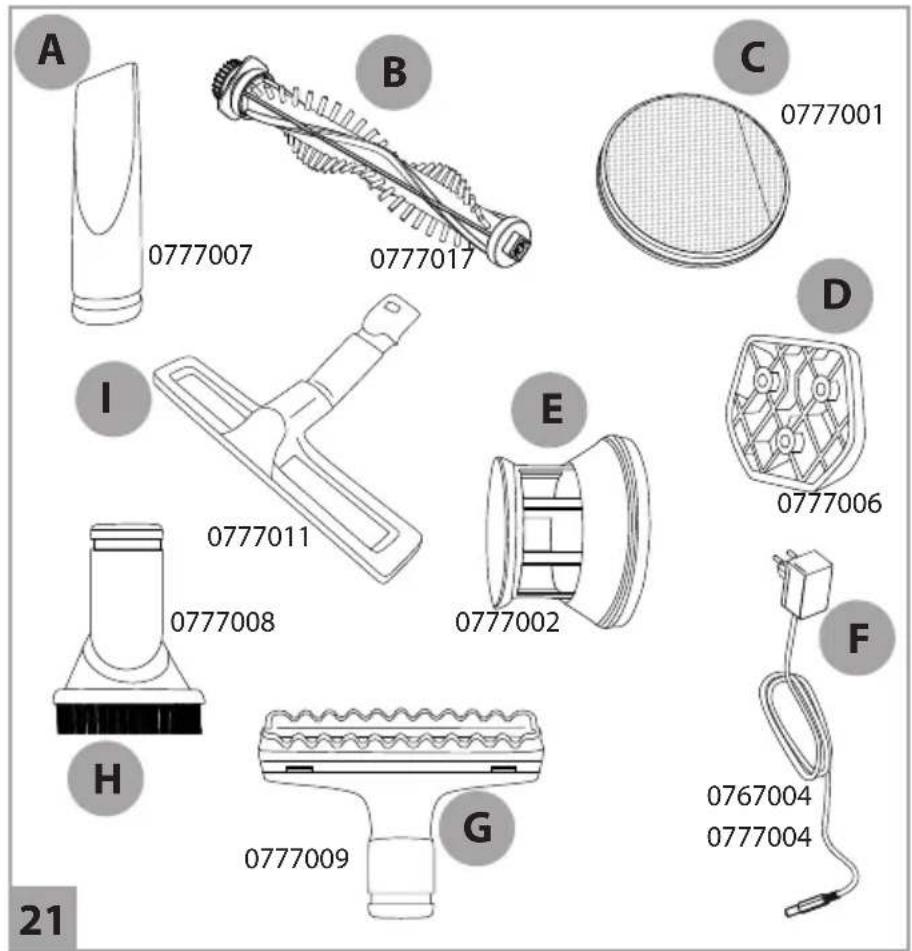
Vielen Dank!
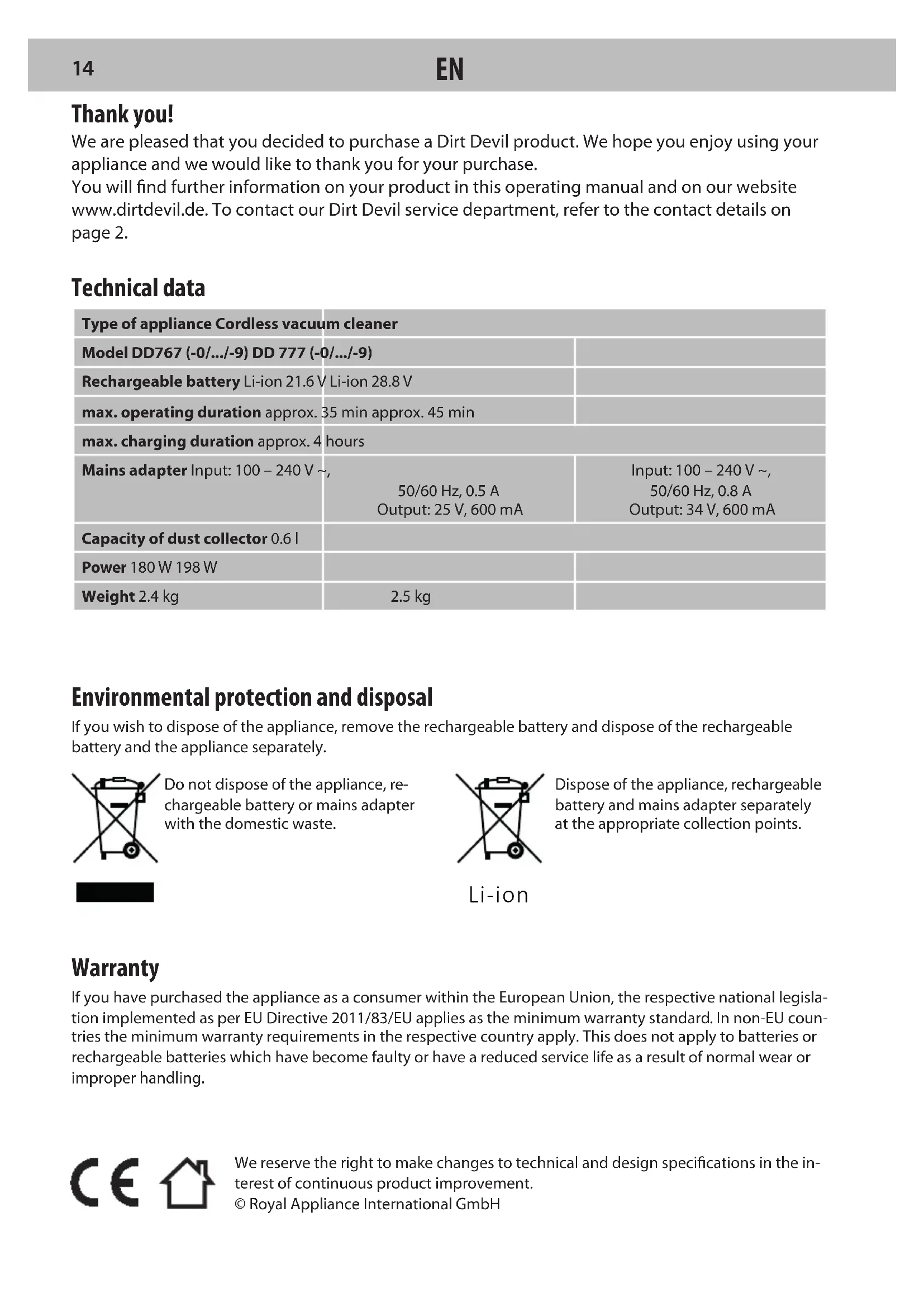
We are pleased that you decided to purchase a Dirt Devil product. We hope you enjoy using your appliance and we would like to thank you for your purchase.
You will find further information on your product in this operating manual and on our website www.dirtdevil.de. To contact our Dirt Devil service department, refer to the contact details on page 2.
Technical data
| Type of appliance Cordless vacuum cleaner | ||
| Model DD767 (-0/.../-9) DD 777 (-0/.../-9) | ||
| Rechargeable battery Li-ion 21.6 V Li-ion 28.8 V | ||
| max. operating duration approx. 35 min approx. 45 min | ||
| max. charging duration approx. 4 hours | ||
| Mains adapter Input: 100 – 240 V ~,50/60 Hz, 0.5 AOutput: 25 V, 600 mA | Input: 100 – 240 V ~,50/60 Hz, 0.8 AOutput: 34 V, 600 mA | |
| Capacity of dust collector 0.6 l | ||
| Power 180 W 198 W | ||
| Weight 2.4 kg | 2.5 kg | |
Environmental protection and disposal
If you wish to dispose of the appliance, remove the rechargeable battery and dispose of the rechargeable battery and the appliance separately.
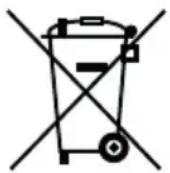
Do not dispose of the appliance, rechargeable battery or mains adapter with the domestic waste.
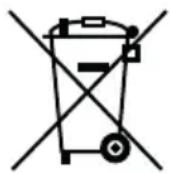
Dispose of the appliance, rechargeable battery and mains adapter separately at the appropriate collection points.
Warranty
If you have purchased the appliance as a consumer within the European Union, the respective national legislation implemented as per EU Directive 2011/83/EU applies as the minimum warranty standard. In non-EU countries the minimum warranty requirements in the respective country apply. This does not apply to batteries or rechargeable batteries which have become faulty or have a reduced service life as a result of normal wear or improper handling.
SAFETY INSTRUCTIONS
About this operating manual
Read this operating manual completely before using the appliance. Keep this operating manual for reference. If you pass the appliance on to third parties, it must be accompanied with this operating manual. Failure to adhere to this operating manual can lead to serious injuries or damage to the appliance. We assume no liability for damage caused as a result of failure to adhere to this operating manual. Important information not included in this chapter is indicated as follows:

WARNING!
Warns of health hazards and identifies possible risks of injury.

CAUTION!
Indicates possible dangers to the appliance or other objects.
NOTE
Highlights tips and information.
You can also download this operating manual from our website:
www.dirtdevil.de
Concerning certain groups of persons
This appliance can be used by children aged 8 and older and by persons with impaired physical, sensory or mental abilities or a lack of experience or knowledge as long as they are supervised or instructed in the proper use of the appliance and understand the risks involved.
Children must not play with the appliance.
■ Children must not perform cleaning or user maintenance without supervision.
- Packing material and small parts must not be used as toys. There is risk of asphyxia-tion.
Children under the age of 8 should be kept away from the appliance, the mains adapter and the mains adapter cord whilst they are switched on, plugged in at the socket or are cooling down.
Information on the power supply
The appliance is charged with electrical current. Thus there is always risk of electrical shock. You must therefore observe the following:
- Never touch the rechargeable battery or mains adapter with wet hands. Never immerse the appliance, the rechargeable battery or the mains adapter in water or other liquids.
Always take hold of the mains adapter when you wish to disconnect the mains adapter from the mains socket. Never pull on the mains adapter's cord.
■ Ensure that the mains adapter cord is not bent, pinched or rolled over, and that it does not come into contact with heat sources. - Only use the mains adapter included in the scope of supply to charge the rechargeable battery.
Always check the mains adapter cord for possible damage before using the appliance. Never use a mains adapter with a damaged cord or plug. Only ever connect the mains adapter to sockets which carry the voltage indicated on the mains adapter.
Before cleaning or performing user maintenance on the appliance, ensure that the appliance is switched off and that the mains adapter is not connected.
Before using the appliance, ensure that the appliance is not connected to the mains adapter.
About the brushbar
The brushbar in the turbo head rotates at high speed. This poses various hazards to people, animals and objects:
- Never vacuum people, animals or plants. Keep parts of the body and items of clothing away from the moving parts and openings of the appliance when it is in operation. They may otherwise be drawn in and cause injuries.
Before you detach or attach, open or clean the turbo head, switch off the appliance.
Do not run over cords, cables etc. as they could get tangled in the brushbar and be damaged. - Keep the brushbar away from all delicate surfaces to avoid damaging them. Refer to the manufacturer's cleaning and care instructions, this may otherwise cause damage.
Keep the brushbar away from curtains, drapes and fringes, as they could otherwise be drawn in and damaged.
■ Only use the brushbar to clean carpets.
About the rechargable battery
There is a risk of injury if rechargeable batteries are handled incorrectly.
- Only use the mains adapter included in the scope of supply to charge the rechargeable battery.
- Never short-circuit the rechargeable battery, i.e. never touch both poles simultaneously, especially with electrically conductive objects.
■ Never take the rechargeable battery apart, never deform it and never expose it to high temperatures.
Improper handling can cause fluid to leak from the rechargeable battery. Avoid any contact with such fluid.
If you have come into contact with the escaping fluid, rinse it off with plenty of an water and consult a doctor.
■ Make sure the mains adapter is not con- ev nected before removing the battery.
If the appliance is faulty
If the appliance, the mains adapter or the mains adapter cord are damaged, they will need to be replaced by the manufacturer, the manufacturer's customer service department or a similarly qualified person in order to prevent hazards.
- Hand over a faulty appliance to an authorised dealer or send it to the Dirt Devil customer service department for repairs, > "International Services" on page 2.
- Never use a faulty appliance, mains adapter, mains adapter cord or rechargeable battery!
Proper use
This appliance must only be used for domestic use. It is not suitable for industrial or commercial use. Only use the appliance to clean light soiling from hard floors, carpets, ceilings or upholstered furniture. Any other use is considered improper use and is prohibited.
The following in particular is prohibited:
Vacuuming:
- People, animals, plants or items of clothing on the body
→ High risk of injury!
- Hot ash, burning cigarettes, matches and highly flammable substances
→ Risk of fire!
— Water and other liquids
→ Risk of short circuit!
- Toner (for laser printers, copying machines, etc.)
→ Risk of fire and explosion!
Use
— In the vicinity of explosive or highly flammable substances
→ Risk of fire and explosion!
- Outdoors
→ Risk of damage due to rain and dirt! - Of non-original accessories. This can impair appliance safety.
- Carrying out repairs yourself
→ Risk of injury and loss of entitlement to free replacement!
Storage
■ Store the appliance in a cool, dry place out of the reach of children.
The appliance is not free standing. Between uses, lie the appliance flat on the floor in a suitable location so that it does not become a trip hazard.
Disposal
At the end of its service life, dispose of the appliance and battery in an eco-friendly manner as described, > "Environmental protection and disposal" on page 14.
■ Remove the battery before disposing of the device.
■ Dispose of the battery in a safe fashion.
Preparatory work
Getting to know the appliance
Fig. 1: ① Handle with battery level indicator; ② Wand release button; ③ Reach wand; ④ Accessory release clip; ⑤ Light on the turbo head; ⑥ Turbo head with brushbar; ⑦ Charging port (hidden); ⑧ Hand-held; ⑨ Mains adapter; ⑩ ON/OFF button; ⑪ Filter cover; ⑫ Battery level gauge; ⑬ Brushbar button; ⑭ Wall mount; ⑮ Boost button; ⑯ Battery level indicator; ⑰ Dust collector
Accessories (optional):
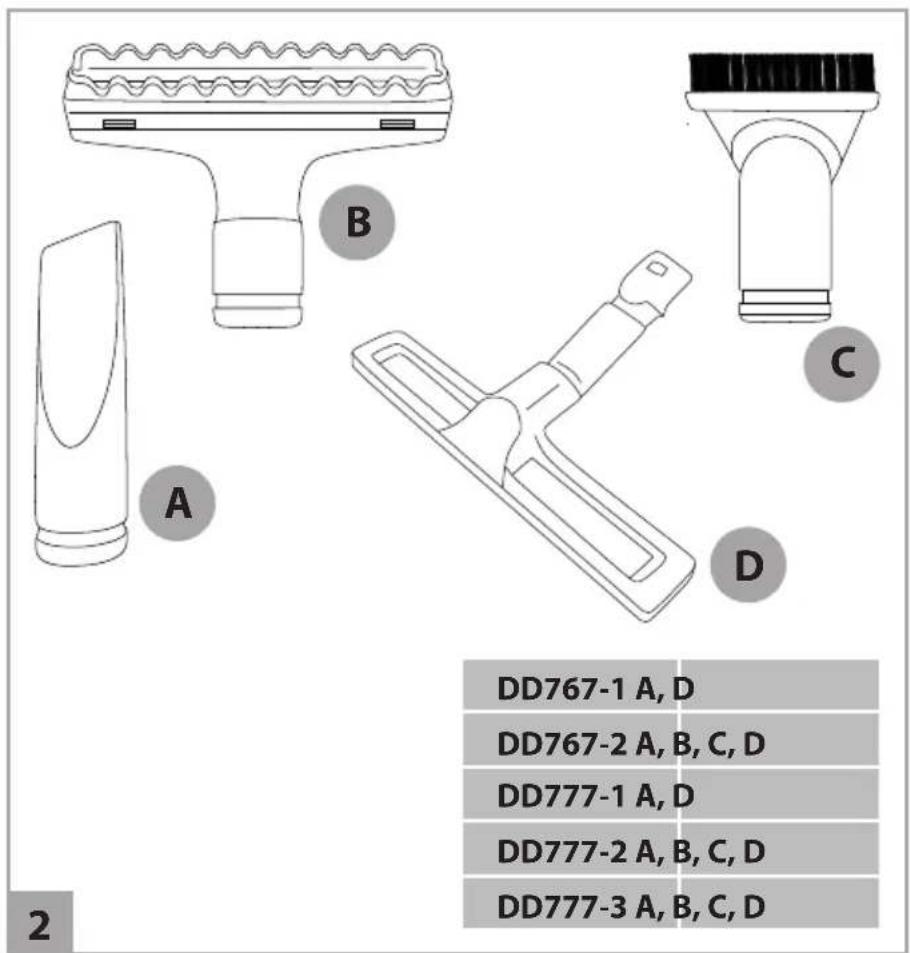
Fig. 2: A Crevice tool; B Pet tool; C Dusting brush; D Parquet tool
Unpacking and assembling
① Unpack the contents and check they are complete. If you notice any transport damage or if anything is missing, contact your dealer immediately.
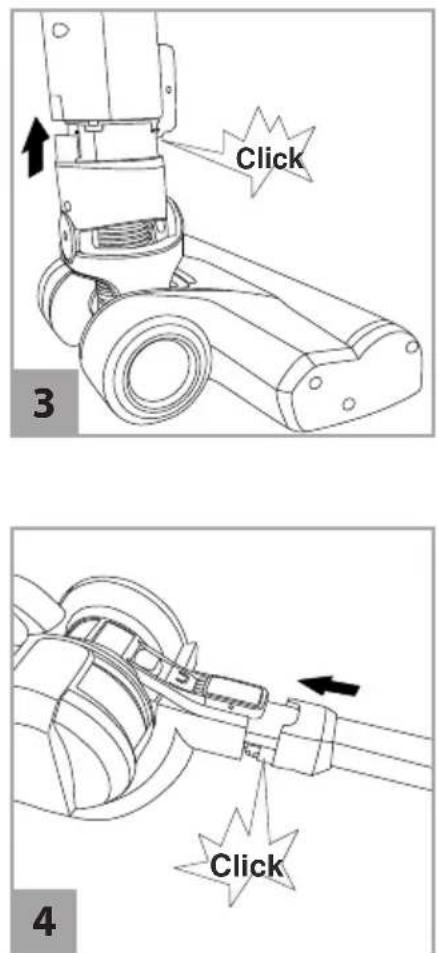
2 Attach the turbo head or accessory to the reach wand until it clicks into place (Fig. 3).
3 Attach the reach wand to the handheld until it clicks into place (Fig. 4).
NOTE:
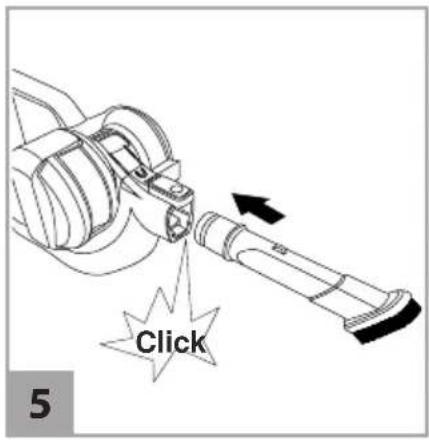
To use the appliance as a handbelt, attach the turbo head or accessory directly to the handheld until it clicks into place (Fig. 5).
Attaching the wall mount
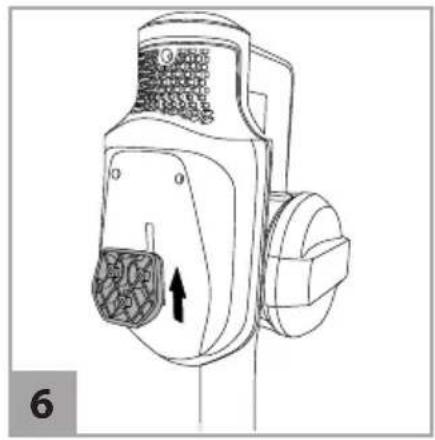
① Choose a location to store the appliance, preferably near a mains socket. ② Connect the appliance with the wall mount (Fig. 6). ③ Place the appliance and wall mount against the wall so that the turbo head rests flat on the floor. ④ Use a pencil to mark the position of the wall mount. ⑤ Remove appliance from the wall mount. ⑥ Align wall mount to the wall and make a mark for each screw. ⑦ Use screws and wall plugs to screw the wall mount to the wall.
Charging the rechargeable battery

WARNING!
Risk of fire or explosion! Only use the mains adapter included in the scope of supply to charge the rechargeable battery.
NOTE:
You must charge your appliance before using it for the first time. The initial charge takes 4 hours. Failure to fully charge the rechargeable battery before first use may result in poor battery performance.
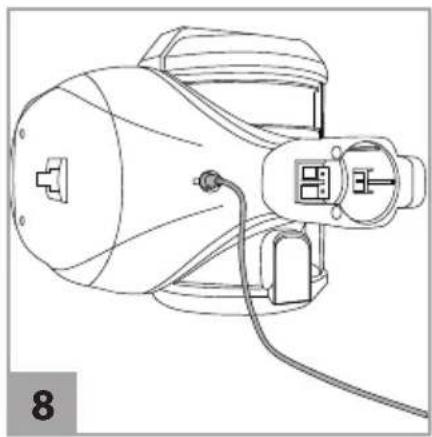
① Attach appliance to the wall mount. To charge the appliance as a handheld, press wand release button (Fig. 7/①), detach reach wand and accessories and place handheld on a flat, stable surface. ② Connect the mains adapter cable to the charging port (Fig. 8). ③ Connect the mains adapter to a socket → The battery level indicators (Fig. 1/① & 9/②) light up constantly in red. To indicate the charging progress, the battery level gauge lights (Fig. 9/①) will illuminate in turn, until all four lights are illuminated. ④ After a maximum of 4 hours, the battery level gauge lights go out and the battery level indicators (Fig. 1/① & 9/②) light up constantly in white. → The rechargeable battery is fully charged. ⑤ Disconnect the mains adapter from the socket (to save electricity) and disconnect the mains adapter cable from the appliance.
Vacuuming

WARNING!
Take extra care when vacuum cleaning on stairs.
NOTE:
When the battery is almost flat the appliance will switch itself off within a few seconds. Fully charge the rechargeable battery, > „Charging the rechargeable battery“ on page 17.
NOTE:
Constant use of the boost mode and brushbar will reduce the battery runtime.
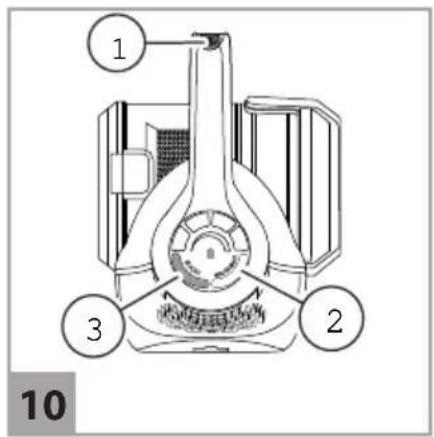
① Assemble required accessory, > "Unpacking and assembling" on page 18. ② To switch on the appliance, press the ON/OFF button (Fig. 10/1). → The appliance starts in boost mode. To switch between full and reduced suction power, press the boost button (Fig. 10/3). ③ To switch the brushbar on/off, press the brushbar button (Fig. 10/2). ④ Vacuum.
NOTE:
If the brush bar is blocked, the appliance will switch off and the lamp on the turbo head will flash red (Fig. 1/5). Press the ON/OFF button (Fig. 10/1) to switch off the appliance and clean the turbo head, > "Removing blockages" on page 19.
5 To switch off the appliance, press the ON/OFF button (Fig. 10/1). → The appliance switches off.
Maintaining the appliance
Emptying the dust collector
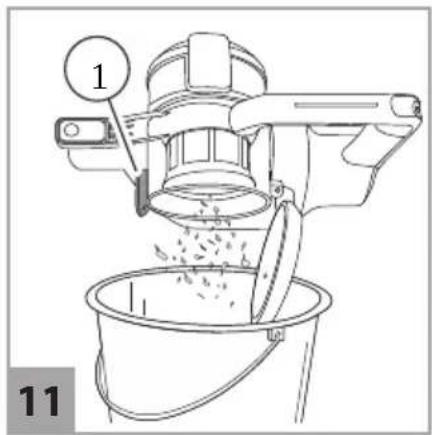
① Press the wand release button (Fig 7/①) and remove the reach wand or the accessory from the handheld. ② Hold the handheld over a bin and press the dirt release button (Fig. 11/①). → The dust collector cover opens and the dust falls out.
Cleaning the filters

CAUTION!
Use the appliance only with both filters in place.
NOTE:
For best cleaning results, tap the filters over a bin every 4 – 6 uses and wash them every 3 months.
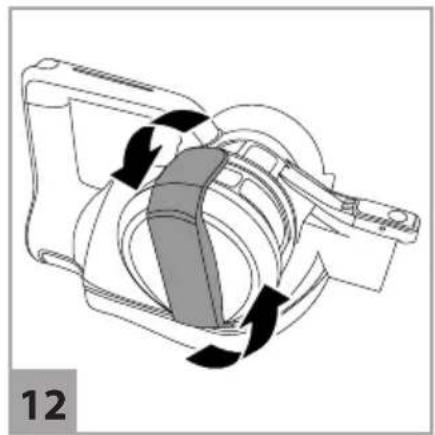
① Empty the dust collector, > "Emptying the dust collector" on page 19. ② Twist the filter cover anticlockwise to unlock (Fig. 12) and remove the filter cover from the handheld. ③ Pull the tab on the filter (Fig. 13/①) to remove it from the cover. ④ Pull the round foam filter to remove it from the handheld.
5 Tap both filters over a bin to remove dirt. 6 Rinse out the filters under running water (max. 40 °C).
7 Leave the filters dry for at least 24 hours before putting them back in the appliance.
Cleaning the separator
① Empty the dust collector, > "Emptying the dust collector" on page 19. ② Twist the filter cover anticlockwise to unlock (Fig. 12) and remove filter cover from the handheld. ③ Press dust collector release button to open the dust collector. ④ To release the separator, push from inside the dust collector and pull out the separator to remove (Fig. 14). ⑤ Pull filter out of the separator (Fig. 15). ⑥ Tap filter and separator over a bin to remove dirt. ⑦ Rinse out the filter under running water (max. 40 °C). ⑧ Let the filter dry for at least 24 hours before putting it back in the appliance.
Removing blockages
- Carefully remove any hair from the turbo head with a pair of scissors in order to remove any blockages.
▶ Use a broomstick or similar blunt object to remove blockages from the reach wand.
Removing and replacing the brushbar
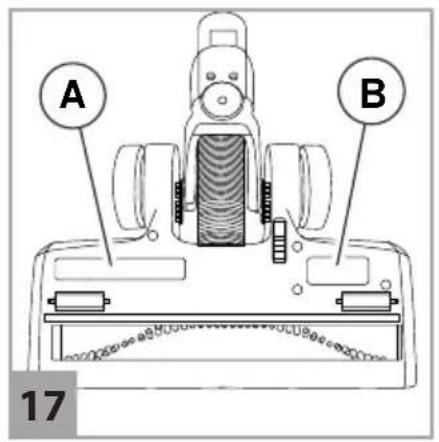
① Press accessory release button and remove the turbo head from the reach wand or the handheld (Fig. 16/1). ② Find the letter "A" on the base of the turbo head to indicate the cover you need to remove (Fig. 17/A). ③ Use a screwdriver to unscrew the three screws and remove the cover.
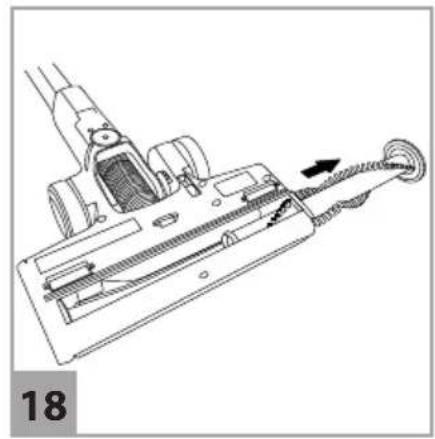
4 Slide the brushbar out of the housing (Fig. 18).
5 Clear any blockages or replace the brushbar if it is defective. 6 Push brushbar onto the cover, slide both parts in the housing (Fig. 19) and tighten the cover with the screws.
Removing and replacing the belt
① Press the accessory release button and remove the turbo head from the reach wand or the handheld (Fig. 16/①). ② Find the letter "B" on the base of the turbo head to indicate the cover you need to remove (Fig. 17/⑧). ③ Use a screwdriver to unscrew the three screws and remove the cover. ④ If the belt is broken, remove it and slide a new one onto the cogs (Fig. 20). ⑤ Refit the cover and tighten it with the screws.
Accessories
- Crevice tool - 0777007 (Fig. 21 /A)
- Brushbar – 0777017 (Fig. 21 /B)
- Pre-motor filter – 0777001 (Fig. 21 /C)
• Wall mount – 0777006 (Fig. 21 /D) - Filter set (separator + filter) – 0777002 (Fig. 21/E)
- 24 V mains adapter – 0767004 (Fig. 21/F)
- 32 V mains adapter – 0777004 (Fig. 21/F)
- Pet tool – 0777009 (Fig. 21/G)
- Dusting brush – 0777008 (Fig. 21 /H)
• Parquet tool – 0777011 (Fig. 21/I)
Troubleshooting
Before you contact our Dirt Devil customer service department or send the appliance to the Dirt Devil customer service department, you will find a lot of additional information in the service area of our website which will help you solve problems.
Switch off the appliance before you start trouble-shooting. Never use a faulty appliance, mains adapter or rechargeable battery.
Merci beaucoup !
natural_image
Blank gray image with no visible content, text, or symbolsRoyal Appliance International GmbH
Jagenbergstraße 19
41468 Neuss
Germany
- International Services
- DE
- AT
- CH
- BE
- LU
- FR
- ES
- IT
- PT
- NL
- PL
- CZ
- HU
- TR
- FI
- SE
- DK
- SK
- NO
- GR
- RO
- BG
- HR
- LT
- LV
- EE
- SI
- AT, CH
- Vielen Dank!
- Environmental protection and disposal
- Warranty
- SAFETY INSTRUCTIONS
- About this operating manual
- WARNING!
- CAUTION!
- NOTE
- www.dirtdevil.de
- Concerning certain groups of persons
- Information on the power supply
- About the brushbar
- About the rechargable battery
- If the appliance is faulty
- Proper use
- The following in particular is prohibited:
- Storage
- Disposal
- Preparatory work
- Getting to know the appliance
- Accessories (optional):
- Unpacking and assembling
- NOTE:
- Attaching the wall mount
- Charging the rechargeable battery
- Vacuuming
- Maintaining the appliance
- Emptying the dust collector
- Cleaning the filters
- Cleaning the separator
- Removing blockages
- Removing and replacing the brushbar
- Removing and replacing the belt
- Accessories
- Troubleshooting
- Merci beaucoup !
Brand : DIRT DEVIL
Model : Blade 2 Max DD7881
Category : Vacuum Cleaner