
WAM3501 - Hi-Fi System SAMSUNG - Free user manual and instructions
Find the device manual for free WAM3501 SAMSUNG in PDF.




| Brand | Samsung |
| Model | WAM3501 |
| Product type | Wireless Hi-Fi speaker |
| Connectivity | Wi-Fi, Bluetooth |
| Multiroom function | Yes (group playback, stereo sound or multiple connections) |
| Dedicated app | Samsung Multiroom |
| Music services | Web radio (TuneIn), services via the app |
| TV SoundConnect (Bluetooth) | Yes (Samsung TVs after 2012) |
| TV connection via Wi-Fi | Yes (Samsung Smart TV after 2014) |
| Automatic standby mode | After 15 minutes of inactivity |
| Reset | Press + and - simultaneously for 5 seconds |
| Power supply | Mains via adapter |
| Maintenance | Clean with a soft dry cloth, avoid liquid products |
| Safety | Respect the indicated voltage, do not open the device |
| Compatibility | Smartphone, tablet (iOS, Android) |
Frequently Asked Questions - WAM3501 SAMSUNG
User questions about WAM3501 SAMSUNG
0 question about this device. Answer the ones you know or ask your own.
Ask a new question about this device
Download the instructions for your Hi-Fi System in PDF format for free! Find your manual WAM3501 - SAMSUNG and take your electronic device back in hand. On this page are published all the documents necessary for the use of your device. WAM3501 by SAMSUNG.
USER MANUAL WAM3501 SAMSUNG
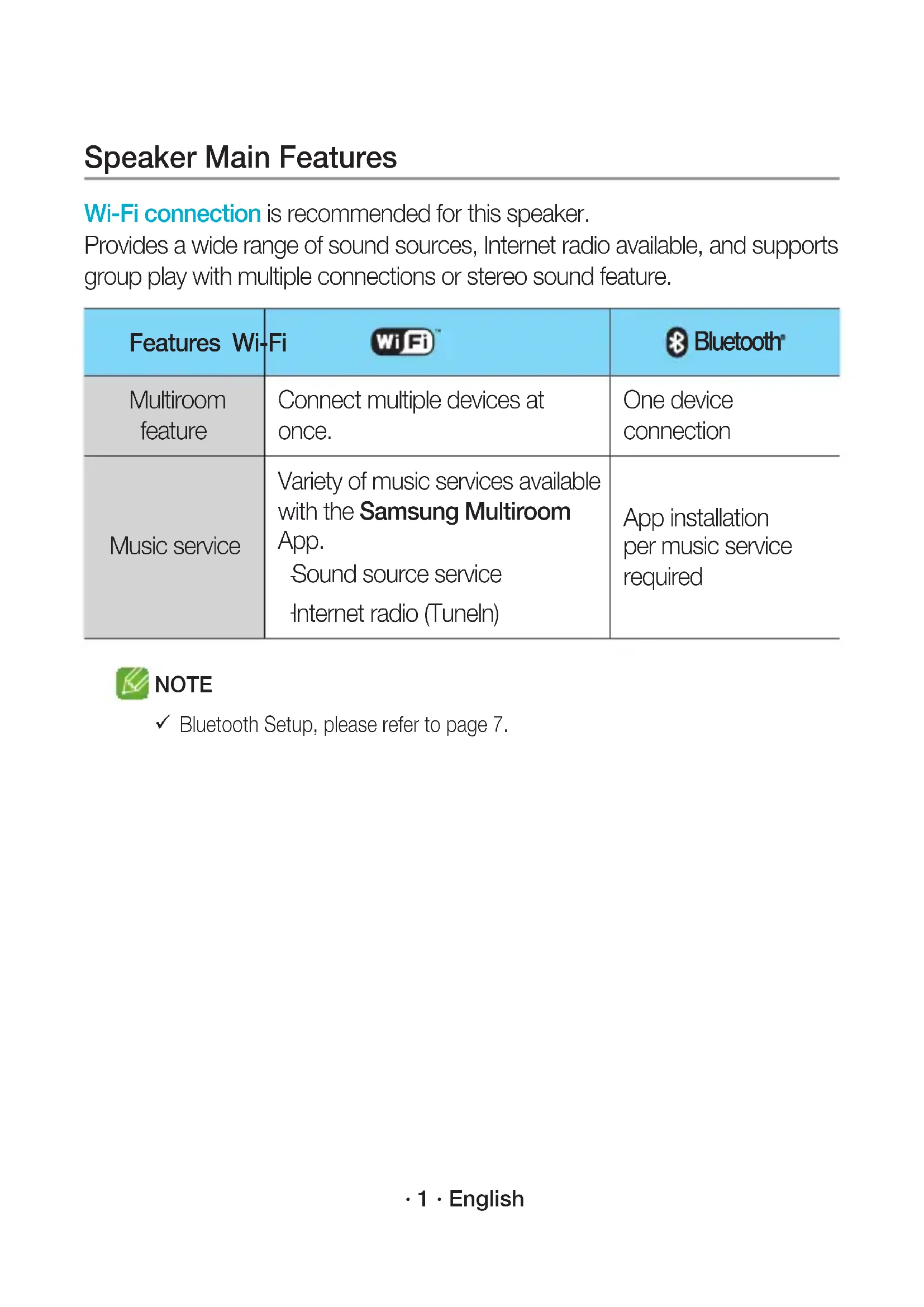
Wi-Fi connection is recommended for this speaker.
Provides a wide range of sound sources, Internet radio available, and supports group play with multiple connections or stereo sound feature.
| Features Wi-Fi | WiFi | Bluetooth |
| Multiroom feature | Connect multiple devices at once. | One device connection |
| Music service | Variety of music services available with the Samsung Multiroom App. Sound source service Internet radio (Tuneln) | App installation per music service required |

NOTE
Bluetooth Setup, please refer to page 7.
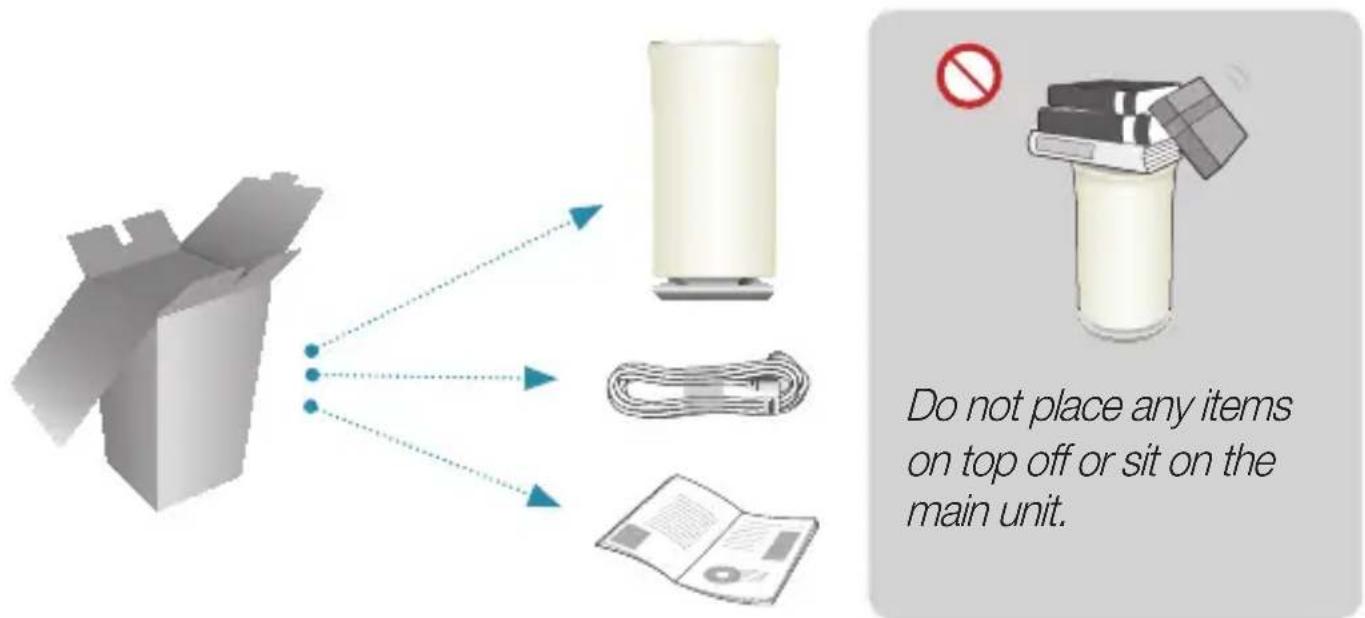
Getting Started
- Follow the installation steps in this user manual.
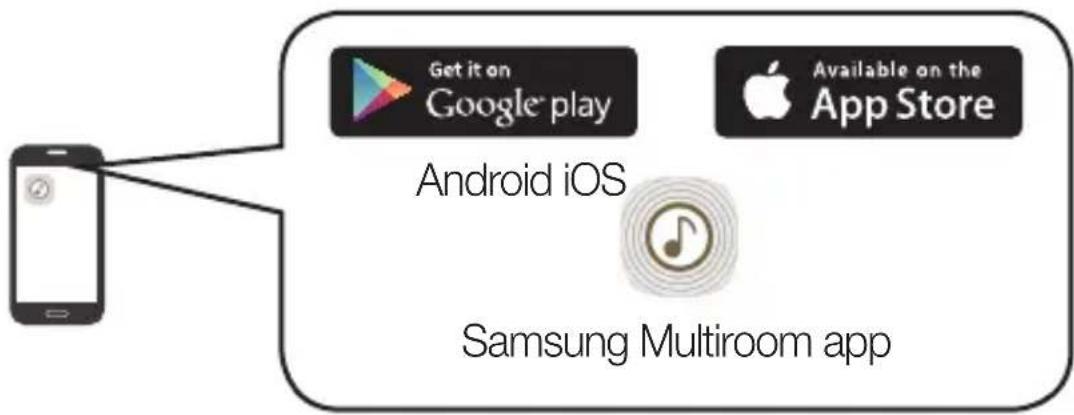
- Please download Samsung Multiroom app on your smart device.
- Make sure your smart device (Smart Phone, Tablet, PAD, etc) is connected to your Wi-Fi network.

NOTE
- All the devices need to connect to the same network.


Smart device Router
- On your smart device, download and install the Samsung Multiroom app.
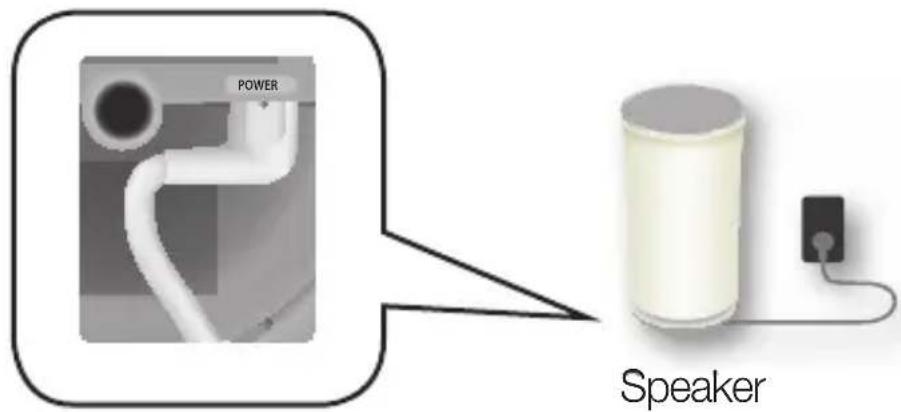
- Connect your speaker to power.
- Launch the Samsung Multiroom app on your smart device, and then follow the instructions on the screen to complete setup.
Play music after speaker setup is complete.
Welcome Screen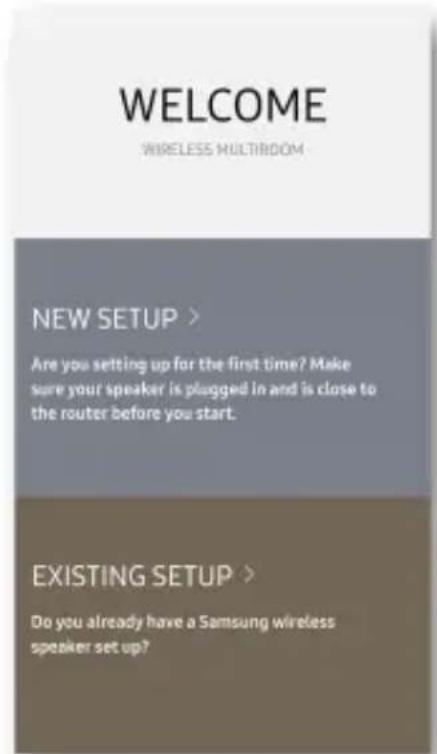
If Auto Set-up fails, follow the on-screen instructions.

NOTE
If speaker setup continually fails, press and hold the volume (+, -) buttons on top of the speaker simultaneously for five seconds to reset the speaker. Next, restart the app and follow the displayed instructions to configure the speaker again.
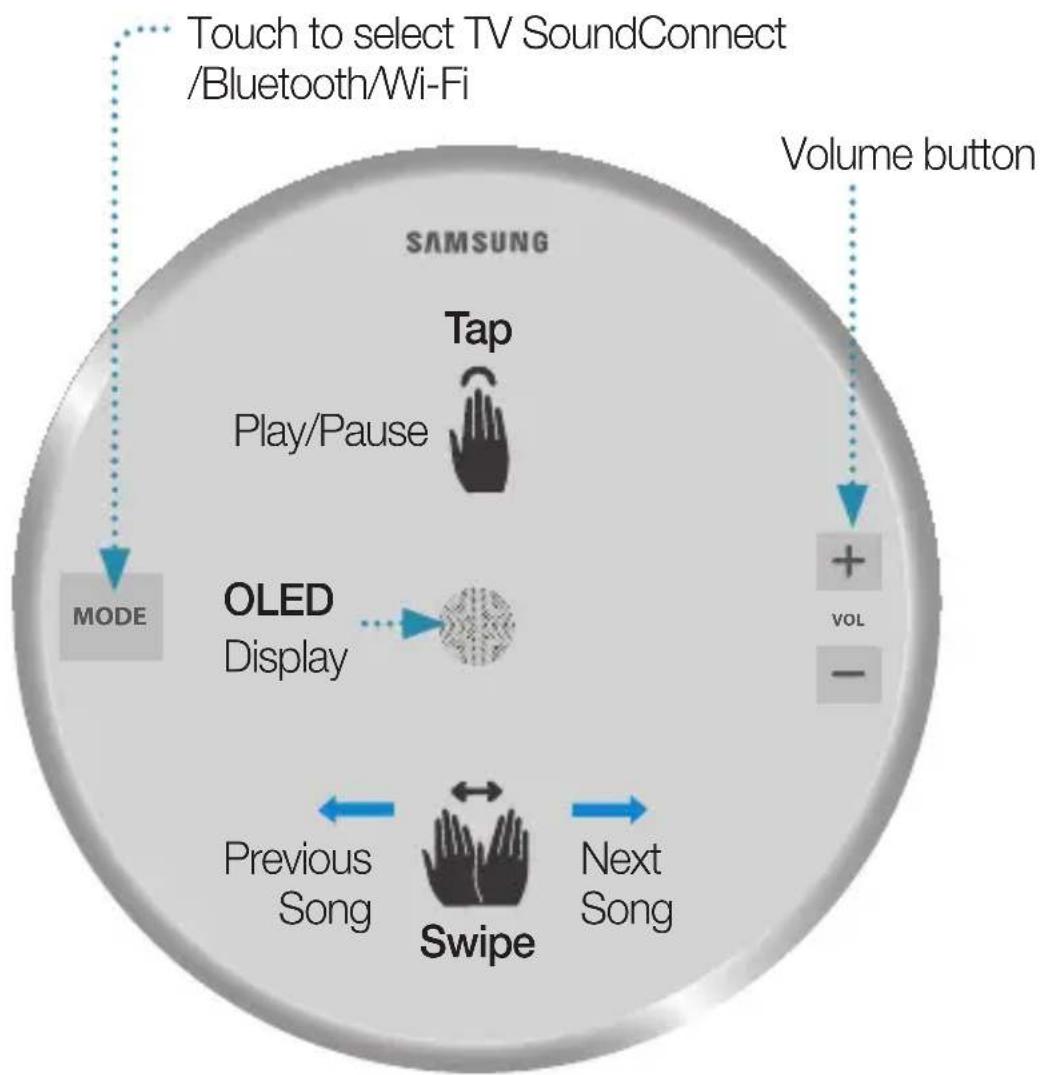

NOTES
Tap/Swipe: The whole area is available except the MODE and Volume (-, +) key area on the top. The speaker will enter standby mode to reduce energy consumption after 15 minutes of idle time.
SPK ADD/Wi-Fi SETUP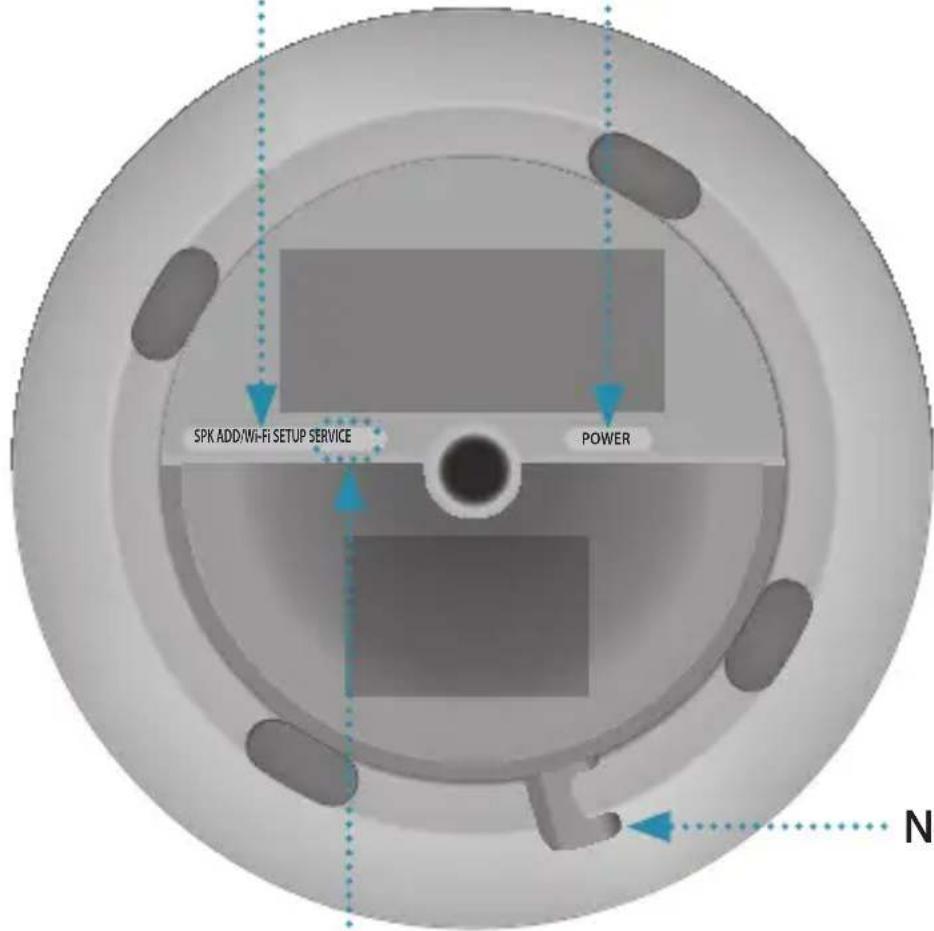
POWER
Connect the power cord plug to your speaker as shown below.

Notch for Power Cable
SERVICE Jack
For service only.
- Touch the MODE button on the top of your speaker one or more times until you hear "Bluetooth is ready".
- Enable Bluetooth on your smart phone, and then select [Samsung] R3 from the Bluetooth list.
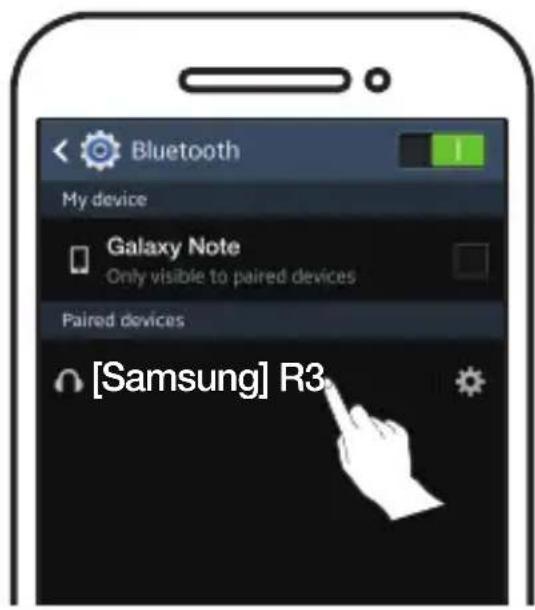

NOTE
If you are not connected to the Samsung Multiroom app, you may see "Samsung Wireless Audio" on your Bluetooth list.
- Use any music app on your device to play music on your speaker.

NOTE
In Bluetooth mode, the Play/Pause/Next/Prev functions are available on Bluetooth devices that support AVRCP.
Connecting to a TV via TV SoundConnect (Bluetooth)
TV SoundConnect allows an easy wireless connection between a Samsung TV and your speaker, so you can enjoy listening to your TV's sound through the speaker.
- Touch the MODE button one or more times until you hear "TV SoundConnect is ready".

NOTE
TV SoundConnect can be used to connect a single speaker to a TV. (To connect multiple speakers to a TV, refer to "Connecting to a Samsung Smart TV over Wi-Fi".)
- Press and hold the MODE button for 5 seconds to initialize TV SoundConnect Mode.
- A pop-up appears on the TV asking you to approve the connection. Approve to continue.

NOTES
- Once the connection is completed, skip steps 2 and 3 above when you connect the TV again. To connect a new TV, follow all 3 steps above.
- The TV SoundConnect (SoundShare) feature is available on several Samsung TV models released after 2012.
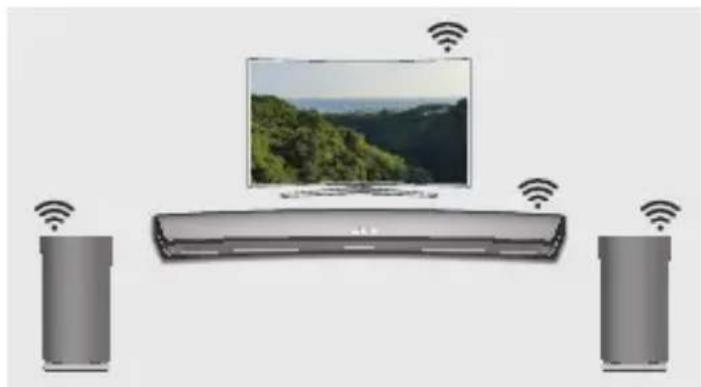
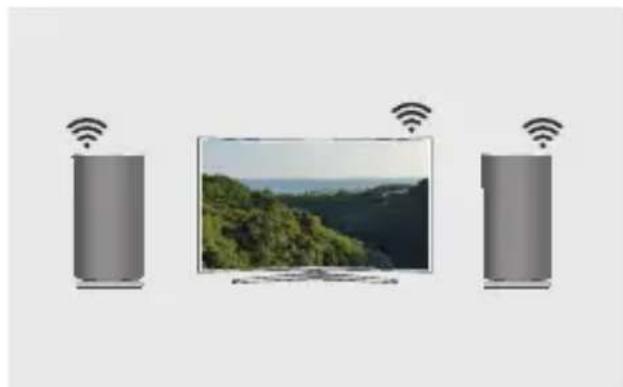
What is the Wi-Fi surround sound connection?
If your Samsung TV supports the Wi-Fi mode, connect the TV and audio devices on the same Wi-Fi network. You can enjoy sound experience from the surround sound system.
Playing TV sound using the Soundbar and speakers
Playing TV sound using speakers only (up to five speakers can be connected)
Checklist before Connection

Check information for your TV model.
For connection to a TV over Wi-Fi, only Samsung Smart TVs, released after 2014, are compatible. (See the User Manual provided with your TV.)
When using a smart TV manufactured by other than Samsung,
Use a wired connection to connect between your TV and Samsung Soundbar that supports the multiroom feature. Then use the Multiroom app to set up your surround sound system. (Refer to the Soundbar user manual at the Samsung website.)
- Check to make sure that the Soundbar and audio device are connected to a (Wi-Fi) network.

NOTE
Download the Samsung Multiroom app to your smart device, then follow the instructions in the app to connect the speakers and/or Soundbar to the (Wi-Fi) network.
- Check to make sure that the TV is connected to the network.
- How to check: Menu → Network → Network Status
- Check to make sure that the TV, Soundbar and speakers are connected to the same network.
Connecting to a Samsung Smart TV released in 2016
- Connecting a single speaker or Soundbar From the menus, select Sound Output. Home Menu → Settings ( → Sound → Sound Output → Model name(Wi-Fi)
- Connecting multiple speakers or connecting a single speaker along with the Soundbar
- On the TV menu, select Wireless Speaker Manager.
Menu → Sound → Expert Settings → Wireless Speaker Manager
2. Select Multiroom Link Type.
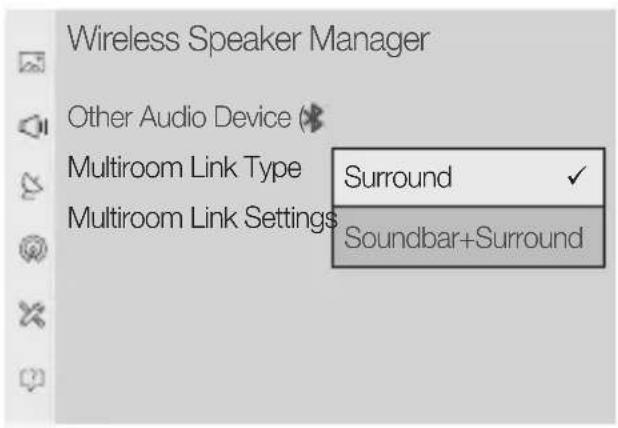
- Surround: Set up with 2 to 5 speakers Soundbar+Surround: Set up with one Soundbar and two speakers
NOTE
- The surround sound system is not available with a combination of one Soundbar and one speaker.
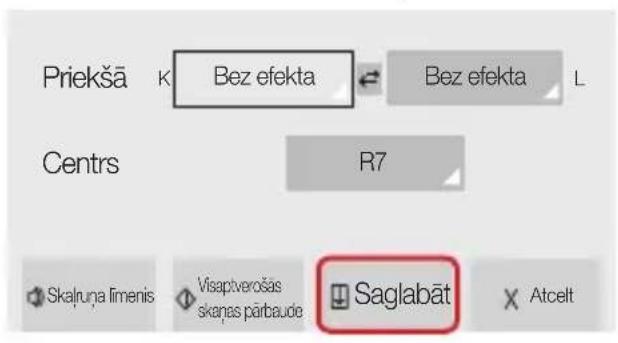
3. Select Multiroom Link Settings. Select a speaker for each channel and select Save to complete configuration.
- Surround
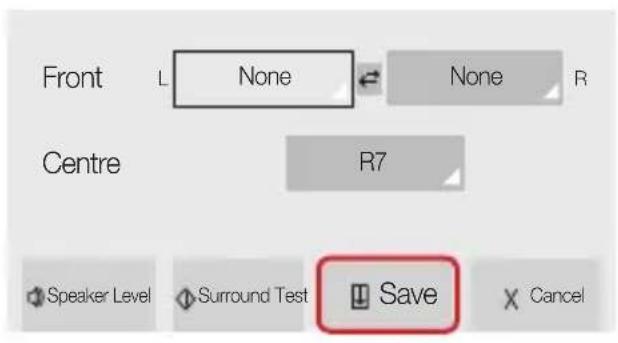
Soundbar+Surround
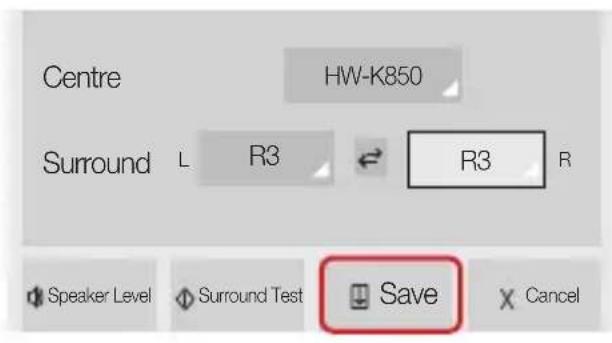
If a connection cannot be established, see "Checklist before Connection" on pages 9 and 10.
Connecting to a Samsung Smart TV released in 2015
- Connecting a single speaker or Soundbar
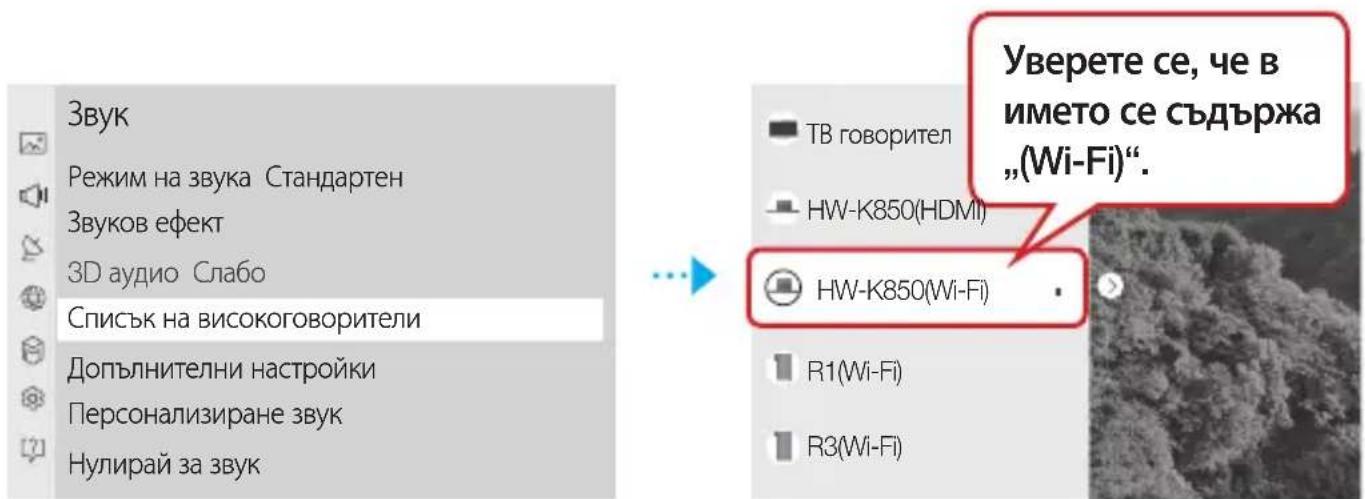
- On the TV menu, select Speaker List. Menu → Sound → Speaker List
- Select a connected speaker from the list of speakers.
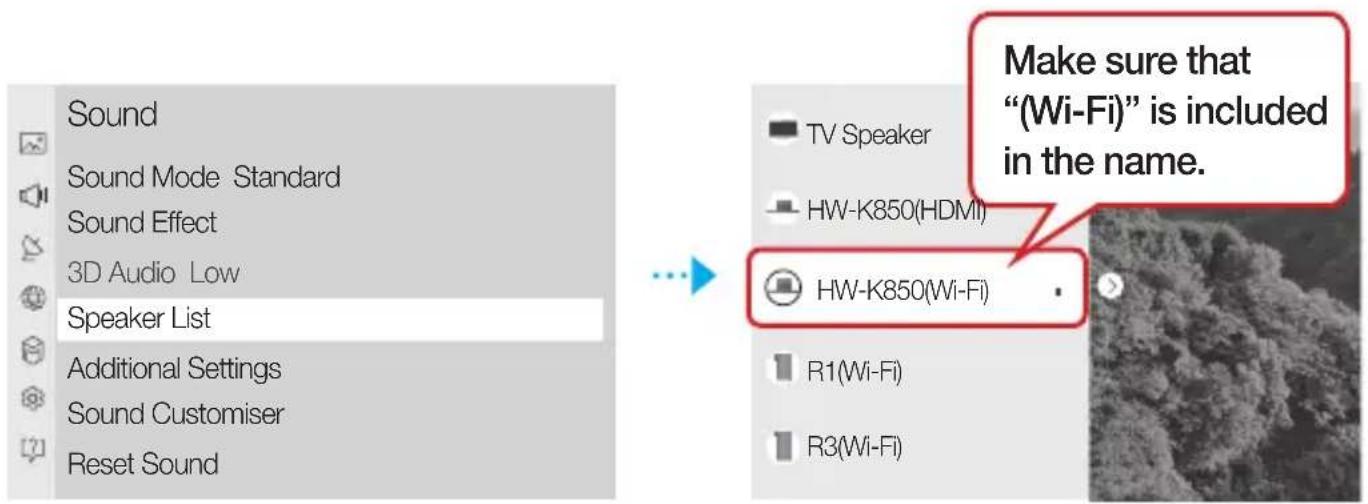

IMPORTANT
Soundbars are indicated by the 'Model name(Wi-Fi)'.
- Connecting multiple speakers or connecting a single speaker along with the Soundbar
- Follow the instructions under "Connecting a single speaker or Soundbar" to connect a speaker.

IMPORTANT
To configure the surround sound system aligned with a Soundbar, select a Soundbar first.
- With the speaker selected, press the right directional key on the remote control. Select a speaker for each channel and select Save to complete configuration.
Connecting only a speaker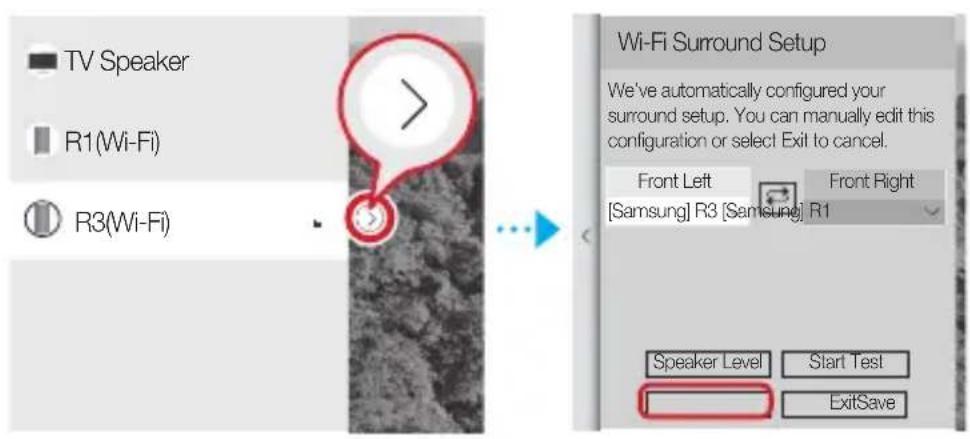
Connecting a speaker along with the Soundbar
- The surround sound system is not available with a combination of one Soundbar and one speaker.
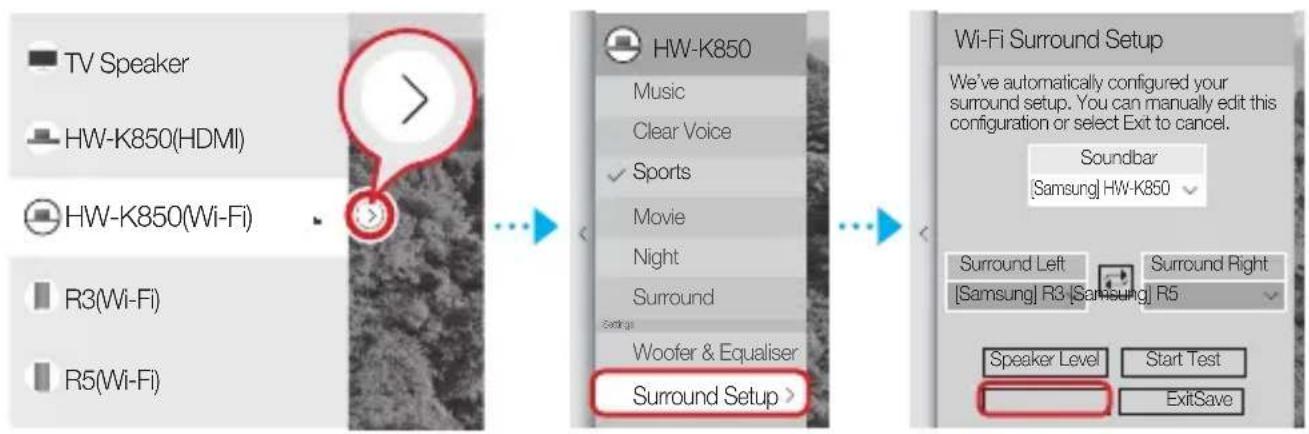
If a connection cannot be established, see “Checklist before Connection” on pages 9 and 10.
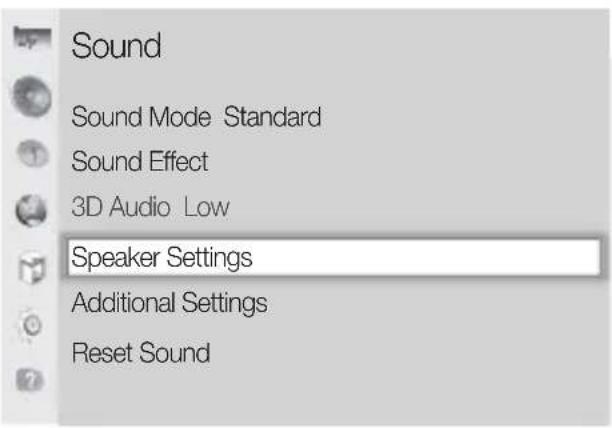
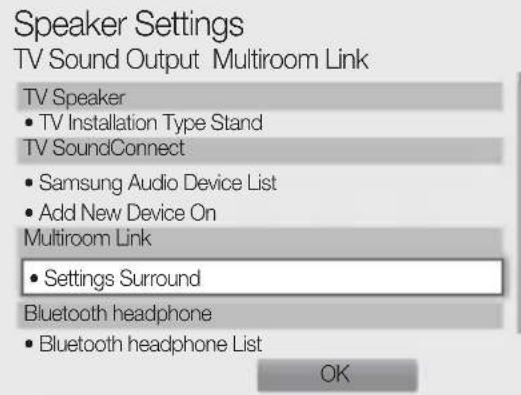
Connecting to a Samsung Smart TV released in 2014
- From the menus, select Multiroom Link - Settings.
Menu → Sound → Speaker Settings → Multiroom Link - Settings

2. Select the Multiroom Link type.
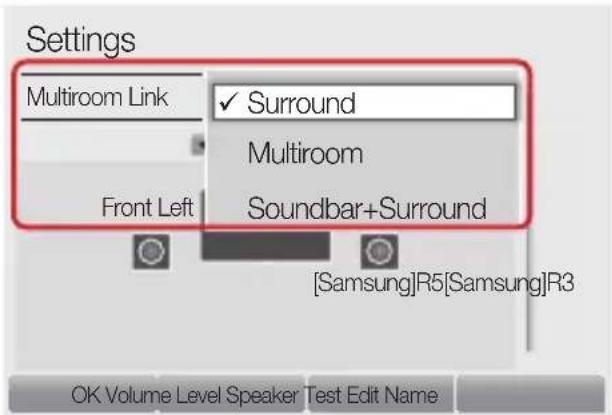
- Surround:
Set up with one to five speakers
Soundbar+Surround:
Set up with one Soundbar, or with one Soundbar and two speakers

NOTE
- The surround sound system is not available with a combination of one Soundbar and one speaker.
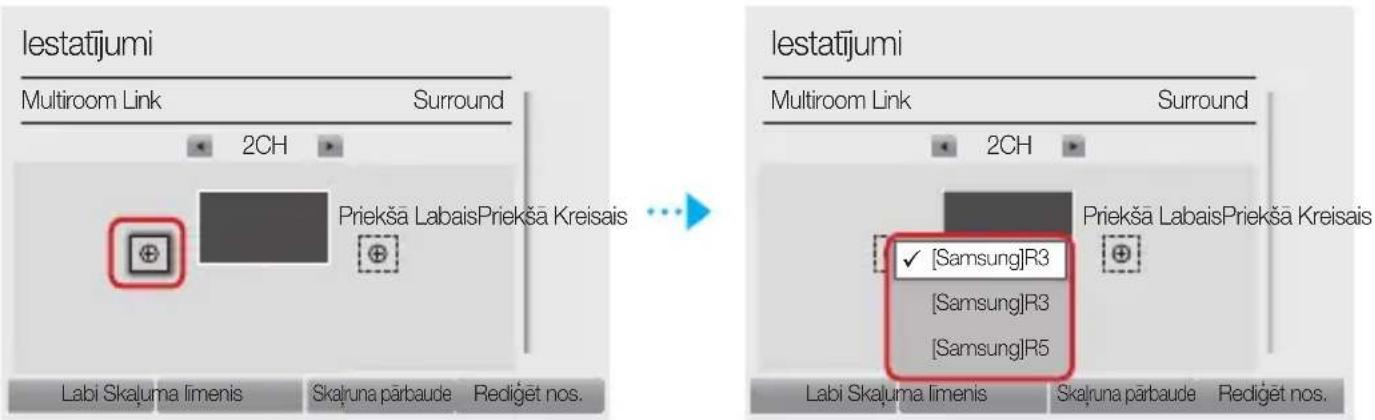
- Select the number of speakers to connect. e.g., one speaker → 1CH, two speakers → 2CH
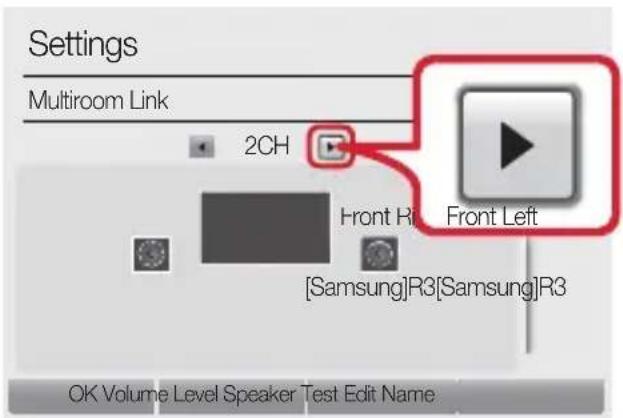
- Select the speaker in the position you want and select OK.
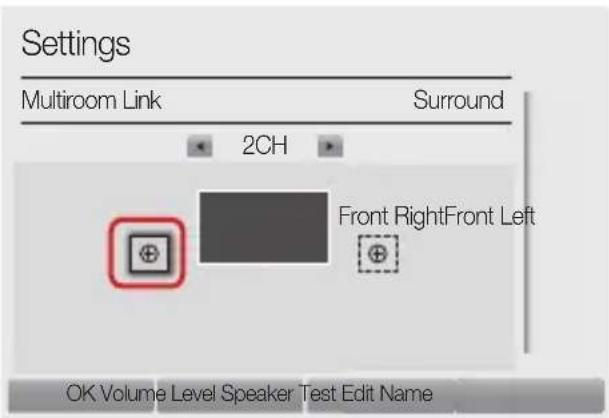
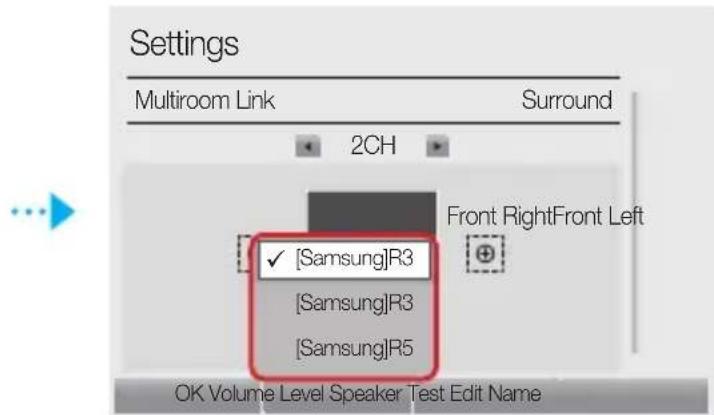
- Set TV sound output to Multiroom Link.
✓ If a connection cannot be established, see “Checklist before Connection” on pages 9 and 10.
3a T03n BncoKorOBopnteI ce npenopbUba Wi-Fi Bpb3ka.
Ipeoctabry o6wnpeH dnaana3OH OT 3ByKOBN n3TOUHNu,NaHCHn INHTepHet paIOCTaHcnn I NOdIbpxka rpynoBO Bb3npOIN3BExJaHe C HAKOLKO CBbp3BaHnI NII C fYHKcIyTa 3a CTepeO3ByK.
Cbbp3BaHe Ha eHnHua ToHKoHa nn Ha Soundbar
OT meHIOtata n36epete 3ByKOB n3XoI.
MeHIO Haayano → HacrpoiKn ( → 3Byk → 3BykoB n3xoJ →
ImeHa moJeN(Wi-Fi)
Cbbp3BaHe Ha HЯKOKO TOHKOLOHn IIN CBbp3BaHe Ha eMHNuHa ToHKOJOna 3aeDnO cbc Soundbar
- B MeHIO To Ha TeIeBn3Opa n36epTe Dncpeuep Ha 6e3KnUHn BnCOKOROBOpnteIN.
MeHIO → 3ByK → EKcpeptnHaCTpoiKn → DIncpeep Ha 6e3xuHn BnCOKOrOBOpnteIi
2. 136epete Tn Multiroom Link.
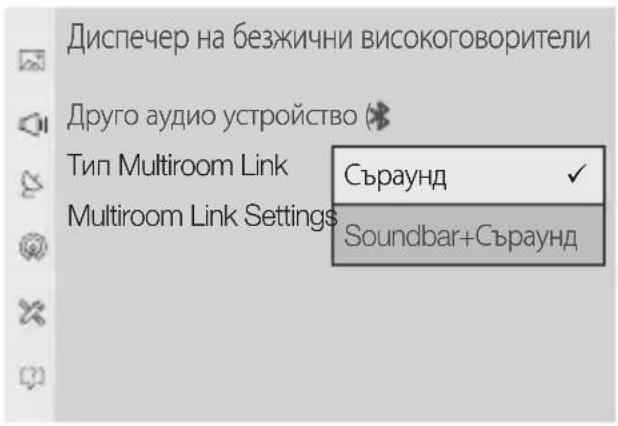
- Cbpayнд :
HactpoBbHe npn 2 do 5 ToHKoJOnH
Soundbar + Subwoofer:
Connecting the Soundbar and the subwoofer

CONNECTION
The subwoofer sound system cannot be used with a combination of the Soundbar and a subwoofer.
- Select Multiroom Link Settings. Select the subwoofer for each channel and select Save to connect the configured one.
Connection
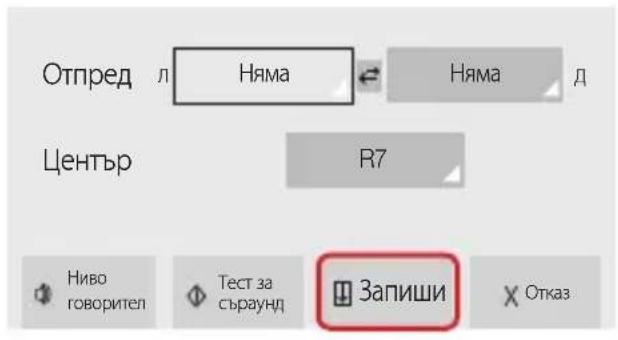
Soundbar + Subwoofer
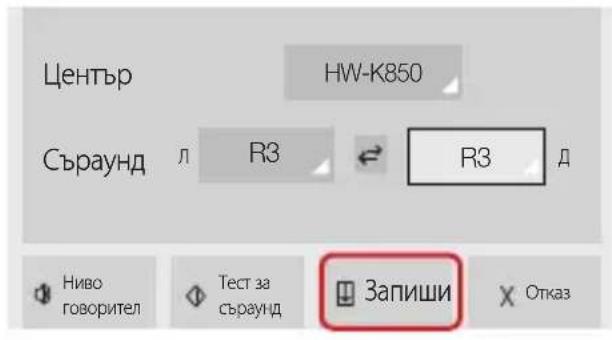
✓ If a connection cannot be established, see "Checking the connection before connecting" on pages 9 and 10.
Connected to a Samsung Smart TV released before 2015.
Connecting the subwoofer unit or the Soundbar
- In the TV menu, select Speaker List. Menu → Sound → Speaker List 2. Select the connected subwoofer from the list of subwoofers.

IMPORTANT
√ The Soundbar is set as the name of the device (Wi-Fi).
Connecting multiple subwoofers Connecting the subwoofer unit together with the Soundbar
- Follow the instructions in "Connecting the subwoofer unit or the Soundbar" to connect the subwoofer.

To configure the sound system for surround sound with the Soundbar, select the Soundbar first.
Connecting only the subwoofer
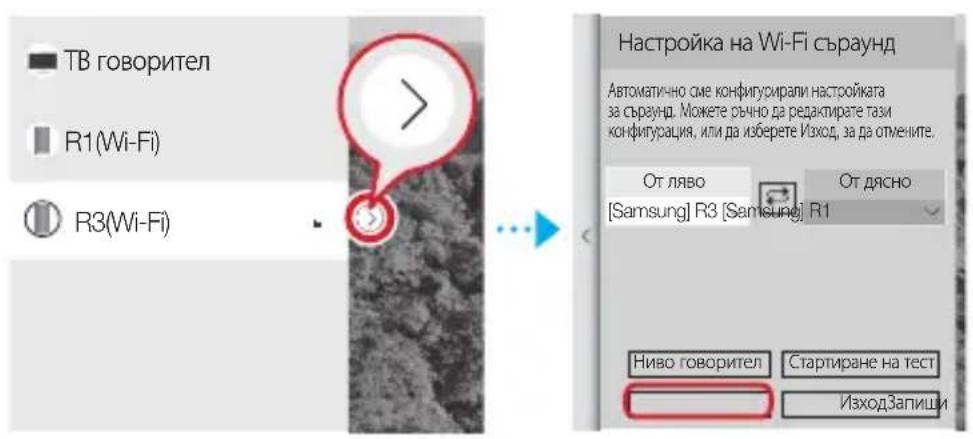
Connecting the subwoofer together with the Soundbar
The surround sound system cannot be used with a combination of one Soundbar and one subwoofer.
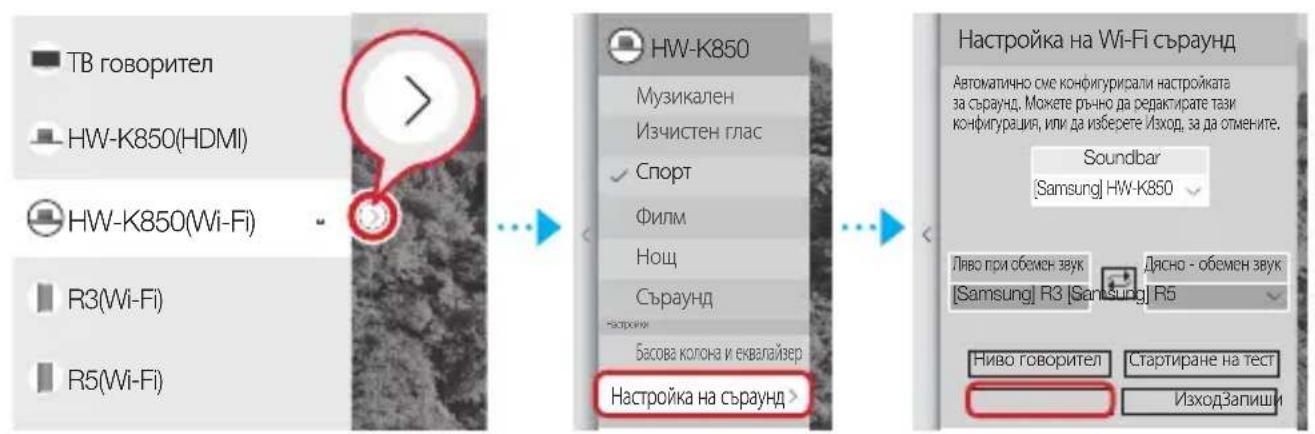
If a connection cannot be established, see "Checking the connection before connecting" on pages 9 and 10.
Connected to Samsung Smart TV, released before 2014.
1. From the menu, select Multiroom Link - Settings.
MENU → Sound → Speaker Settings → Multiroom Link - Settings
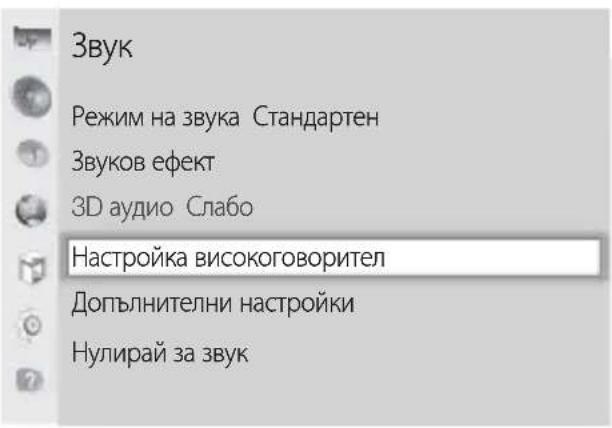

2. Select the Multiroom Link system type.
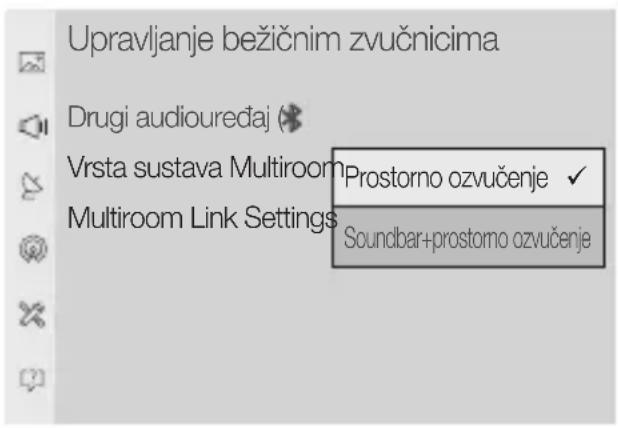
- Surround sound: Setup with 2 to 5 speakers Soundbar+surround sound: Setup with one Soundbar device and two speakers

NOTE
The surround sound system is not available when using one Soundbar device and one speaker together.
- Select Multiroom Link Settings. Select a speaker for each channel and select Save to finish configuration.
Smart device Router
2. Select Multiroom Link type.
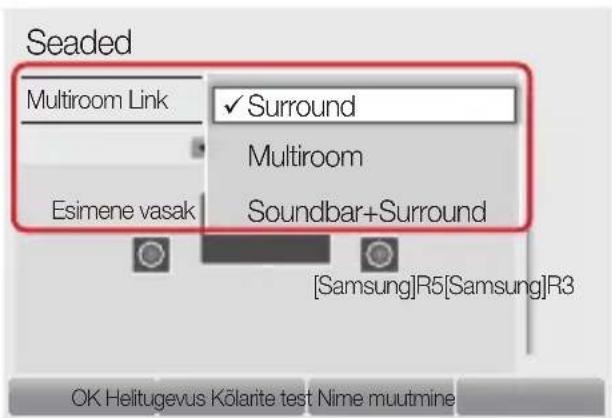
- Surround:
2. Select Multiroom Link type.
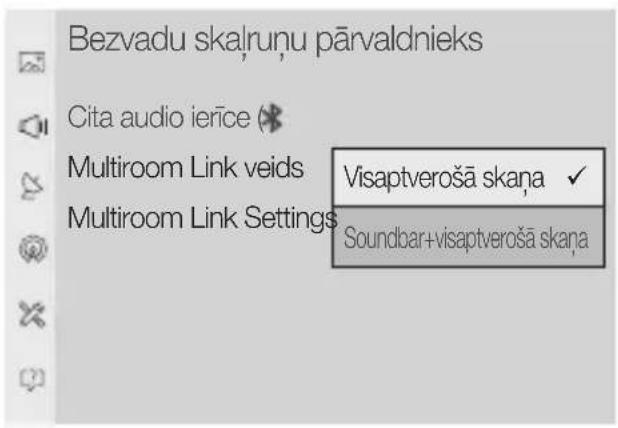
- Immersive sound: Set up from 2 to 5 speakers. Soundbar + immersive sound: Set up one Soundbar system and two speakers.

NOTE
The surround sound system is not available for a combination of one Soundbar system and one speaker.
- Select Multiroom Link Settings. Select the speakers for each channel and then select Save to complete the configuration.
Immersive sound
2. Select Multiroom Link type.
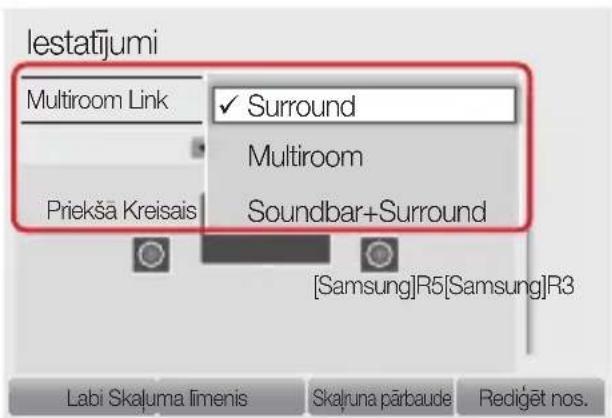
- Surround:
Set up from one to five speakers.
Soundbar + Surround:
Set up one Soundbar system or one Soundbar system and two speakers.

NOTE
The surround sound system is not available for a combination of one Soundbar system and one speaker.
Connecting to a Samsung Smart TV using Wi-Fi
- Select the number of speakers to connect, for example, one speaker → 1CH, two speakers → 2CH
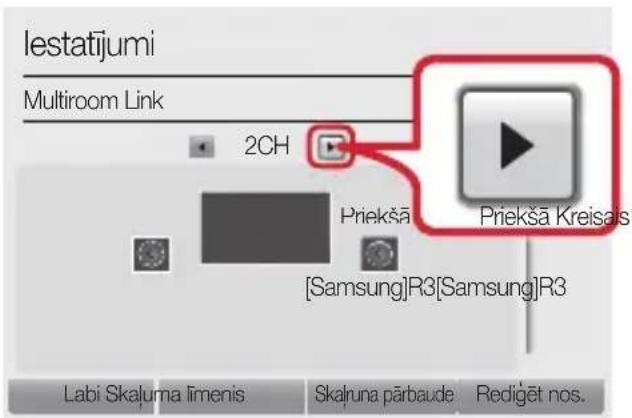
- Select the speaker in the desired position, and then select OK.
- Set the TV's audio output to Multiroom Link.
2. Select the Multiroom Link type.
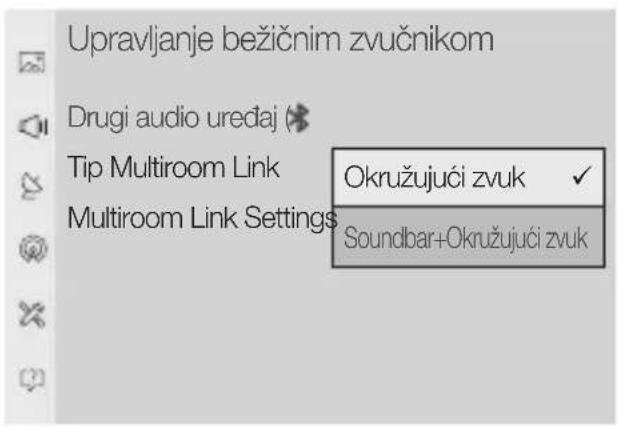
- Surround sound: Setting from 2 to 5 speakers Soundbar+Surround sound: Setting with "Justim Soundbar device and two speakers

NOTE
√ The surround sound system is not available with a combination of one Soundbar device and one speaker.
- Select Multiroom Link Settings. Select a speaker for each channel and select Save to finish configuration.
- Surround sound
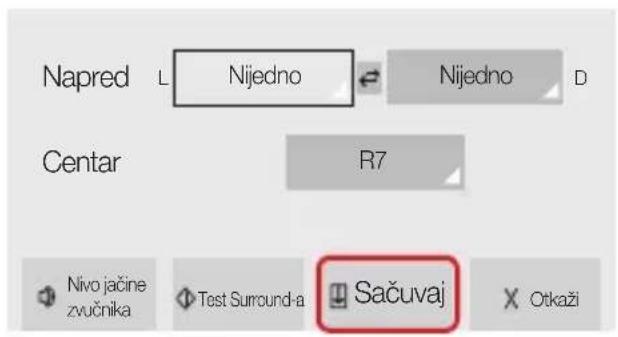
Soundbar+Surround sound
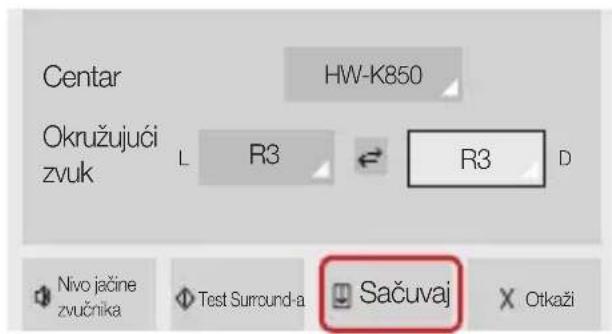
2. Select the Multiroom Link type.
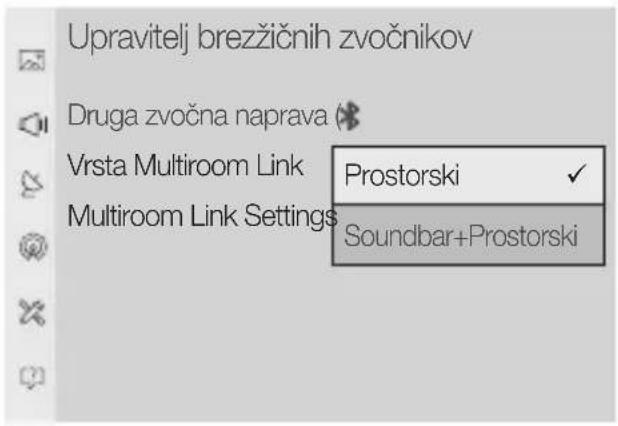



- NOTE
- GETTING STARTED
- NOTES
- POWER
- SERVICE JACK
- CONNECTING TO A TV VIA TV SOUNDCONNECT (BLUETOOTH)
- WHAT IS THE WI-FI SURROUND SOUND CONNECTION
- CHECKLIST BEFORE CONNECTION
- CONNECTING TO A SAMSUNG SMART TV RELEASED IN
- SELECT MULTIROOM LINK TYPE
- SELECT MULTIROOM LINK SETTINGS. SELECT A SPEAKER FOR EACH CHANNEL AND SELECT SAVE TO COMPLETE CONFIGURATION
- SURROUND
- SOUNDBAR+SURROUND
- CONNECTING A SINGLE SPEAKER OR SOUNDBAR
- IMPORTANT
- CONNECTING MULTIPLE SPEAKERS OR CONNECTING A SINGLE SPEAKER ALONG WITH THE SOUNDBAR
- CONNECTING A SPEAKER ALONG WITH THE SOUNDBAR
- SELECT THE MULTIROOM LINK TYPE
- EPETE TN MULTIROOM LINK
- CBPAYНД
- SOUNDBAR + SUBWOOFER
- CONNECTION
- CONNECTING ONLY THE SUBWOOFER
- CONNECTING THE SUBWOOFER TOGETHER WITH THE SOUNDBAR
- CONNECTED TO SAMSUNG SMART TV, RELEASED BEFORE
- FROM THE MENU, SELECT MULTIROOM LINK - SETTINGS
- SELECT THE MULTIROOM LINK SYSTEM TYPE
- IMMERSIVE SOUND
- SOUNDBAR + SURROUND
- CONNECTING TO A SAMSUNG SMART TV USING WI-FI
- SURROUND SOUND
- SOUNDBAR+SURROUND SOUND
Brand : SAMSUNG
Model : WAM3501
Category : Hi-Fi System