USER MANUAL Party Go Prixton
For safe use and maximum performance please read this manual carefully before use.
To avoid the danger of electric shock or fire, do not expose to rain or moisture.
IMPORTANT NOTES
The use must be allowed only to adults and responsible persons, adequately educated on the damages deriving from incorrect use.
-
This appliance can be used by children aged 8 years under adults supervision or if they have received instructions on how to use the appliance safely and understand the dangers involved. Cleaning and maintenance operations by the user must not be carried out by children unless they are over 8 years of age and operate under supervision. Keep the appliance and its cord out of the reach of children under the age of 8.
-
The devices can be used by people with reduced physical, sensory or mental abilities or with a lack of experience and knowledge if they are supervised or if they have received instructions regarding the safe use of the device and understand the dangers involved.
Children must not use the appliance as a game.
-
Do not allow the appliance to be used by children or the disabled without supervision.
-
Keep away from pets.
-
Never use the appliance in places where the cord, plug and the product itself may come into contact with water or wet surfaces. Do not use the appliance outdoors, as rain could create short circuits. Do not touch the appliance with wet hands.
The max. operation temperature is 45^
-
Avoid installing the unit in the locations listed below:
-
Places exposed to direct sunlight or close to equipment that generate heat, such as radiators;
- Above other appliances that can radiate excessive heat;
- Places that block ventilation or are humid or dusty;
-
Environments subject to constant vibration;
-
Do not place accessories with naked flames, such as lighted candles, on the appliance.
- Do not try to repair or intervene on the appliance yourself. Incorrect interventions or tampering can void the guarantee. In the event of any damaged parts or suspected malfunction, discontinue use immediately and consult qualified personnel. Never dip the appliance in water or other liquids. Do not place bowls containing liquids (such as vases) on top of the appliance.
- Do not touch the appliance with wet hands and do not place it near sinks, tubs or bowls of liquids. Use the product only if in perfect condition. If the appliance has been lipped in water or is damaged, contact qualified personnel.
The product should not be used if it has been dropped or if there are any visible signs of damage.
- Exposure to high volume levels can cause hearing problems, including permanent damage. The tendency to hearing loss varies from person to person, however constant exposure to high volume levels is harmful to anyone. Moderate the volume level.
- Do not turn on or use the device while charging.
PACKAGE CONTENTS
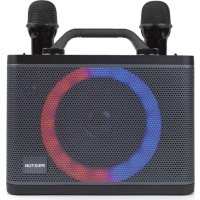
- PARTY GO Bluetooth Karaoke Machine - 1 pcs
- Wireless Microphone - 2 pcs
3.50cm USB-C charging cable - 1 pcs
4.50cm 3.5mm AUX cable - 1 pcs
- Instruction manual - 1 pcs
KEY FEATURES
- Wireless connectivity using Bluetooth 5.0 technologyCompatible with all Bluetooth enabled devices such as smart phones, tablets, etc. Wireless streaming range is about 10m.
With USB/Micro SD card slot to play music.
- 3.5mm AUX universal connectivity for MP3/MP4 Players, iPod, computers, netbooks, laptops etc.
-With Coaxial audio input.
- Headset output.
- Plug in the instrument in socket with wired microphone, keyboards, guitars etc.
-7 Colors LED and 11 LED modes.
DESCRIPTION OF THE KEYS
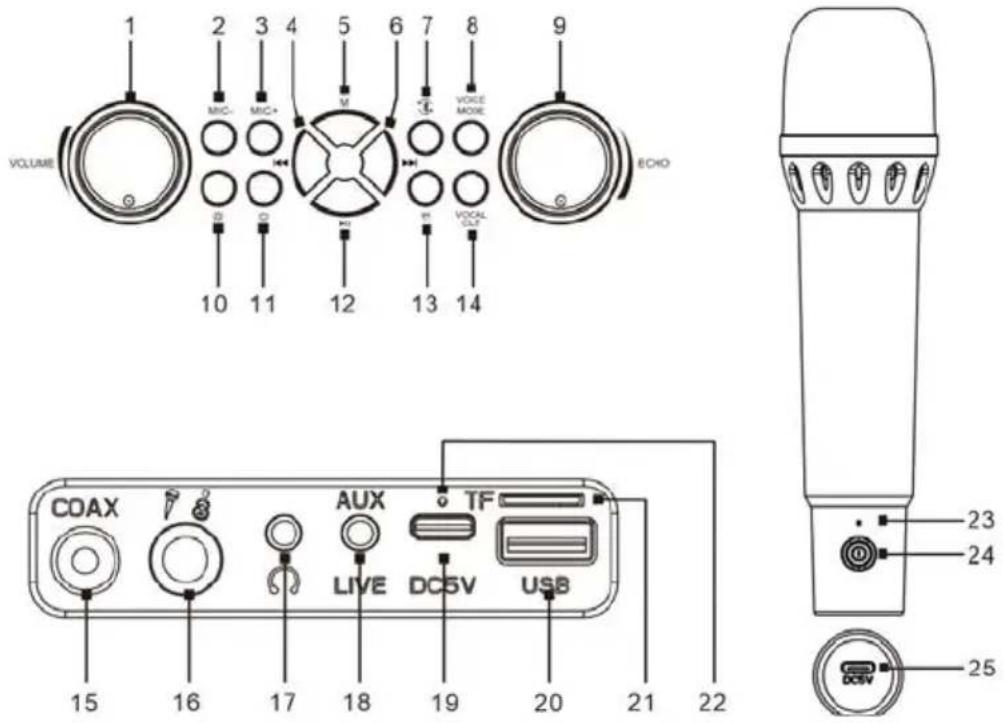
1.Volume knob
2.Mic volume -
3.Mic volume +
4.Previous track
5.M:press to change the mode
6.Next track
7.Disconnect BT
8.Voice mode:3 modes(KTV mode,original mode,profession mode)
9.ECHO knob
10.RGB LED Lights control button
a. Press and hold: turn on/off LED lights
b.Short press : change LED lights effect(11 effects)
11.Speaker Power ON/OFF
12.Play/Pause
- Applaud
- Vocal cut
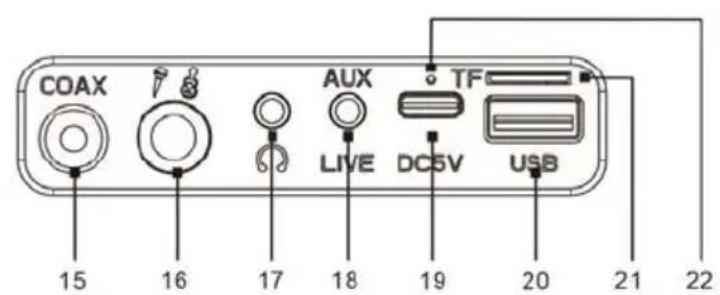
- Coaxial audio input
- Instrument in socket
- Headset input
18.AUX input
- USB-C input for charging
20.USB input
- Micro SD card slot
- Speaker charging indicator
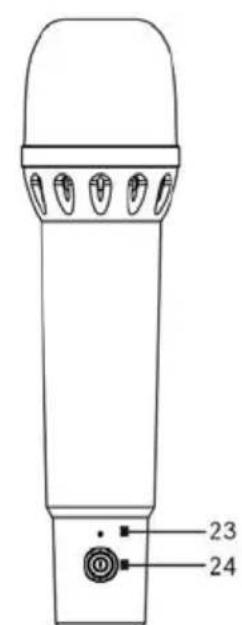
- Mic Charging indicator
- Mic Power ON/OFF
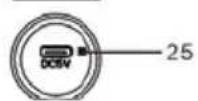
- USB-C input for charging
BATTERY CHARGE
PartyGO has a built-in rechargeable battery which can be recharged using the supplied cable and a DC 5V 1A power adapter (not included). Before use, it is recommended to fully charge the battery. During the charging phase, the red LED will be on (the speaker will be fully charged in about 6.5 hours). The indicator will turn off when the appliance is fully
Note:
- Low battery warning: when the speaker battery level is low, it will periodically start emitting a warning sound, recharge the unit to resume playback.
- The battery life (it lasts about 4 hours with listening at 70% volume) may vary depending on the listening volume, the type of song being played, the paired external device and whether or not the LED lights ON.
- Charging times may vary depending on the charge status of the unit and on features of the used power charger.
OPERATING INSTRUCTIONS POWER ON/OFF
- Press and hold the Power button to turn on the unit, then you can hear the short prompt voice and pairing LED starts flashing in blue color.
- Press and hold the Power button of the microphones.
- The wireless microphones will connect with speaker automatically.
- When you press and hold the Power button again, the unit will be turned off.
CHOICE OF LED LIGHTS EFFECT
After turning on the unit, press and hold the LED Lights button to turn on/off the LED lights. By press the LED lights button, you can change the light effects.
PLAY/PAUSE
During music playback, press button (12) to pause the playback. To resume playback, press the button (12) again.
MODE SELECTION
For changing source (choosing between Bluetooth / Micro SD / USB / AUX / Coaxial), short press the M button.
BLUETOOTH FUNCTION
The device supports music playback via Bluetooth connection to a smartphone or other compatible Bluetooth device.
NOTE : It can not be guaranteed the compatibility with all Bluetooth devices on the market.
BLUETOOTH PAIRING:
- Turn on the speaker and activate the Bluetooth function on the external device.
-Search for the name "PartyGO Prixton" from your external device and select it to pair with Bluetooth (enter "0000" if required).
A sound is emitted from the speaker to confirm that the connection was successful.
Note: Make sure not to point the microphone at the speaker, and keep the distance between speaker and the microphone further than 2 meters to avoid the risk of audio feedback.
- Insert a USB stick or micro SD card into the USB port or card slot. The music starts playing automatically provided that USB stick or the card has been formatted to FAT32 and contains MP3 files.
Control the music by using the speaker controls.(See "Speaker controls")
Note: Only MP3 files stored on a Micro SD card formatted to FAT32 can be played by the speaker.
To play audio via AUX input, connect the 3.5mm audio cable to the AUX input on the speaker and your audio source(e.g. CD player, MP3 player). Select the right source by press the M button, then it start playback directly from the external device.
Note: The music transport controls Play/pause, Next/previous track) are disabled in AUX mode.Use your smart device to control the music.
To play audio via coaxial input, connect one end of coaxial cable to the coaxial audio input on the speaker and the other to the external device(DVD/TV). Select the right source by short pressing the M button then start playback directly from the external device.
INSTRUMENT-IN MODE
Plug in the instrument in socket with wired microphone, keyboards,guitars etc.
The wired microphone can work directly after plugged in. And the wireless microphones can work together with wired microphone.
HEADSET OUTPUT
With the PartyGO, you can also play the music and microphone voice on an external speaker or micro HiFi set. Just connect the AUX 3,5mm
cable to the headset output of the machine and to the AUX in connector of the external speaker or micro HiFi set.
SPEAKER CONTROLS
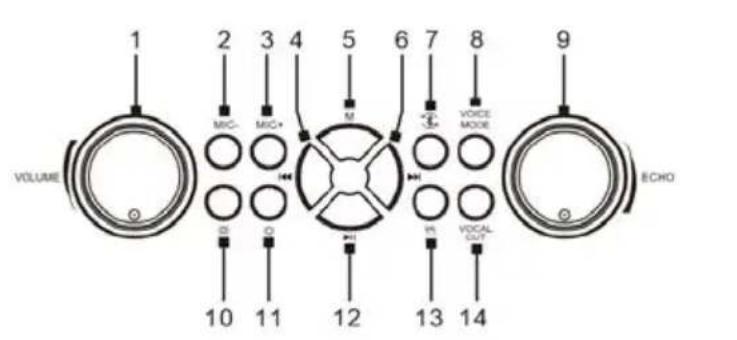
Play or pause music: Press the Play/pause button(12).
Volume up/down: Rotate the volume knob(1) to adjust the volume of the speaker.
Previous song: Press the button(4).
Next song:Press the button(6).
Echo up/down:Rotate the ECHO knob(9).
MIC-: Press the button(2) to decrease the volume of the microphone.
MIC+: Press the button(3) to increase the volume of the microphone.
TROUBLESHOOTING
Problem:
Remedy:
- Long press the Power key to turn on the appliance.
The battery is low, leave the device to charge for a few hours.
Problem:
Cannot pair
Remedy:
Check that the speaker is turned on and is not already paired with another device.
- If there are too many Bluetooth devices turned on nearby, turn them off to avoid any interference and try to perform Bluetooth pairing again.
Problem:
Sound is weak or distorted
Remedy:
- Check the volume of the speaker and that of the external device and adjust it to a suitable level.
Make sure the speaker is charged.
Problem:
- Cannot play properly. The music is discontinuous
Remedy:
-
Check whether the distance between the speaker and the Bluetooth device is not out of the operating distance (10 meters max).
-
Remove any obstacles between the speaker and the Bluetooth device.
-
Move the speaker or Bluetooth device to get the best reception.
-
Check battery charge status.
Problem:
Remedy:
Make sure the speaker and microphone close with each other more than 2 meter.
CARE AND MAINTENANCE
-
Keep the unit away from magnetic objects, water and heat sources.
-
Use a clean soft damp cloth to clean the device. Never use chemical cleaners that could damage the finish of the unit.
CAUTION: Never allow any water or other liquids to get inside the unit while cleaning.
TECHNICAL SPECIFICATIONS
Bluetooth version: V 5.0
Bluetooth distance: About 10m
Built-in battery: Rechargeable Lithium, 3600mAh for speaker; 1200mAh for microphone
Power supply: DC 5V - 1A (USB-C input)
MAX output power (RMS): 12W
Playing time: About 4 hours at 70% volume
USB/Micro SD. Supported file systems: FAT32
Max capacity: 32GB.
Supported formats USB/micro SD: mp3
Karaoke machine size(including handle): 25(L) x 13.5 (W) x 22.2 (H) cm
Microphone size: 5.0 (L) x 5.0 (W) x 17.5 (H) cm
Machine Weight: 2.43 kg.
Warranty policy
This product complies with the warranty law in force in the country of purchase. When you have a problem that you can not solve, you must access the web www.prixton.com and click on the contact option to send us your assistance form.
These technical and electrical specifications are those of typical units and may be changed without prior notice in order to provide improved equipment.
We, La Trastienda Digital located in Avenida Cervantes 49, modulo 25, Basauri 48970, Bizkaia hereby declare that the following goods, imported and selling at European market:
| BRAND | MODEL NAME DESCRIPTION | CATEGORY |
| Prixton | PartyGO | Karaoke | Audio |
Are in compliance with the EC Council Directive of 2014/53/EU (EM DIRECTIVE) and harmonized standards and with the board of the 16th of April 2014.
The complete text of the UE Declaration of conformity is available anytime at this website address:
www.prixton.com
LA TRASTIENDA DIGITAL
AVERTISSEMENTS DE SECURITE
MISE EN MARCHE/ARRET
Distance Bluetooth Environ 10 metres
Wireless Microphone 2 Stuck
Wireless Microphone 2 pcs
50cm USB-C charging cable 1 pcs
50cm 3.5mm AUX cable 1 pcs
Instruction manual 1 pcs
KEY FEATURES
- Wireless connectivity using Bluetooth 5.0 technologyCompatible with all Bluetooth enabled devices such as smart phones, tablets, etc.Wireless streaming range is about 10m
- With USB/Micro SD card slot to play music.
- 3.5mm AUX universal connectivity for MP3/MP4 Players, iPod, computers, netbooks, laptops etc.
- With Coaxial audio input.
- Headset output.
- Plug in the instrument in socket with wired microphone, keyboards,guitars etc.
- 7 Colors LED and 11 LED modes.
DESCRICAO DAS CHAVES
Tamanho do microfone: 5,0 (L) x 5,0 (L) x 17,5 (A) cm
Peso daquina: 2,43 kg.
VEILIGHEIDSWAARSCHUWINGEN