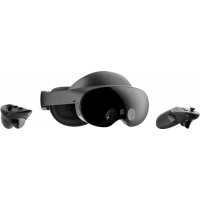
Quest Pro - VR glasses META - Free user manual and instructions
Find the device manual for free Quest Pro META in PDF.


| Technical Specifications | Resolution: 1800 x 1920 per eye, Field of View: 110 degrees, Refresh Rate: 90 Hz |
|---|---|
| Usage | Compatible with VR applications, immersive games, augmented and virtual reality experiences. |
| Maintenance and Repair | Clean lenses with a soft cloth, regularly check for software updates. |
| Safety | Use in a clear space to avoid collisions, do not use if you feel nausea or dizziness. |
| General Information | Weight: approximately 500 g, Battery life: up to 3 hours, Connectivity: Wi-Fi, Bluetooth. |
Frequently Asked Questions - Quest Pro META
How do I set up my META Quest Pro for the first time?
To set up your META Quest Pro, turn on the headset, download the Meta app on your smartphone, follow the on-screen instructions to connect the headset to your account, and adjust the settings according to your preferences.
What should I do if my META Quest Pro won\u0027t turn on?
Check that the headset is charged. If the screen remains black, try plugging it into a power source for at least 30 minutes before turning it on again.
How do I troubleshoot Wi-Fi connection issues on my META Quest Pro?
Make sure your router is functioning properly. Go to the headset settings, select 'Wi-Fi', and verify that you are connected to the correct network. Restart the headset and router if necessary.
What should I do if the controllers aren\u0027t working?
Check that the controllers are charged and properly paired with the headset. If the problem persists, try resetting them by holding down the device button and the ring button simultaneously for a few seconds.
How do I adjust the image quality for a better experience?
Go to the display settings in the main menu and adjust the resolution and field of view according to your preferences. Also ensure that your glasses (if worn) are properly positioned.
My META Quest Pro freezes during use. What should I do?
Try restarting the headset. If the problem persists, check for available software updates and install them. If the problem continues, reset to factory settings.
How do I clean the lenses of my META Quest Pro?
Use a soft, clean microfiber cloth to gently wipe the lenses. Avoid using chemicals or sprays directly on the lenses.
Can I use third-party apps on my META Quest Pro?
Yes, you can download third-party apps via the Meta Store. Make sure to check the app\u0027s compatibility with your headset.
How do I extend the battery life of my META Quest Pro?
Avoid using the headset at extreme temperatures, reduce screen brightness, and disable unused features when not in use.
What should I do if I have comfort issues with the headset?
Adjust the straps for a better fit. Take regular breaks to avoid fatigue. If the problem persists, consider purchasing additional accessories to improve comfort.
User questions about Quest Pro META
0 question about this device. Answer the ones you know or ask your own.
Ask a new question about this device
No questions yet. Be the first to ask one.
Download the instructions for your VR glasses in PDF format for free! Find your manual Quest Pro - META and take your electronic device back in hand. On this page are published all the documents necessary for the use of your device. Quest Pro by META.