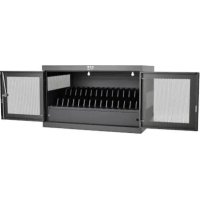
CSCXB16USB - Battery charger Tripp Lite - Free user manual and instructions
Find the device manual for free CSCXB16USB Tripp Lite in PDF.



| Product Type | 16-Port USB Charger/Hub |
| Brand | Tripp Lite |
| Model | CSCXB16USB |
| Dimensions (H x W x D) | 477.52 x 770.382 x 513.08 mm |
| Weight | 39 kg |
| Maximum Load Capacity | 45.4 kg (100 lb) |
| Input Power | 230 V, 2.5 A, 50 Hz |
| Output Power | 5.0 V, 2.4 A max per USB port |
| Number of USB Ports | 16 x USB 2.0 A (female), 1 x USB 2.0 B (female), 1 x USB 2.0 Mini (female) |
| Transmission Speed | Up to 480 Mbit/s |
| Main Features | Charge and sync up to 16 devices, automatic optimal charge detection (up to 2.4 A per port), computer sync, firmware update |
| Housing Material | Metal |
| Security | Key-lockable doors, padlock holes, wall-mountable with keyhole slots |
| Operating Temperature | 0 to 30 °C |
| Operating Humidity | 5 to 95% non-condensing |
| Maintenance and Cleaning | Unplug before cleaning, wipe with a damp lint-free cloth, dry before replugging. Do not use abrasive cloths, solvents, or aerosols. |
| Spare Parts and Accessories | Optional USB cables (Apple, Micro-B), caster and handle kit (CSHANDLEKIT2) |
| Warranty | 2-year limited warranty |
| Recommended Installation Environment | Controlled indoor environment, away from moisture, extreme temperatures, flammable liquids, dust, and direct sunlight |
Frequently Asked Questions - CSCXB16USB Tripp Lite
User questions about CSCXB16USB Tripp Lite
0 question about this device. Answer the ones you know or ask your own.
Ask a new question about this device
Download the instructions for your Battery charger in PDF format for free! Find your manual CSCXB16USB - Tripp Lite and take your electronic device back in hand. On this page are published all the documents necessary for the use of your device. CSCXB16USB by Tripp Lite.
USER MANUAL CSCXB16USB Tripp Lite
USB Charging Station
16-Port Models: CSC16USB, CSCXB16USB, CSCXS16USB
(Series number: AG-0738)
Table of Contents
- Important Safety Instructions 2
- Overview 3
- Feature Identification 4
- Setup 5
4.1 Adjusting Storage Shelf Dividers 5
4.2 Powering the USB Charger/Hub Unit 5
4.3 Door Locks 5
- 16-Port USB Charger/Hub 6
5.1 USB Charger/Hub Features 6
5.2 Connecting Devices to the 6 USB Charger/Hub
5.3 Connecting a Computer to the 7 USB Charger/Hub
- Wall Mounting 7
- Desktop/Floor Placement 7
- Specifications 8
- Storage, Service and Cleaning 8
- Optional Casters and Handle 8
- Warranty and Product Registration 9
Espanol 10
Français 19
Pycckn 28
Deutsch 37
WARRANTY REGISTRATION
Register your product today and be automatically entered to win an ISOBAR® surge protector in our monthly drawing!

tripplite.com/warranty

TrippLite.Eaton.com/support
Copyright © 2023 Tripp Lite. All trademarks are the sole property of their respective owners.
1. Important Safety Instructions
SAVE THESE INSTRUCTIONS
This manual contains instructions and warnings that must be followed during the installation and operation of the product described in this manual. Failure to comply may invalidate the warranty and cause property damage or personal injury.
USB Charger/Hub Unit:
- Connect the unit to an outlet that is in accordance with your local building codes and adequately protected against excess current, short-circuits and earthly faults.
- The electrical outlet supplying power to the equipment should be installed near the unit and be easily accessible.
- The AC plug on the power supply cord serves as the disconnect device.
- Connect the unit directly to a properly grounded AC power outlet.
- Do not modify the plug, and do not use an adapter that would eliminate the ground connection.
-
If any of the following situations arise, schedule an appointment with a service technician to have your equipment inspected:
-
The equipment has been exposed to moisture
-
The equipment has been dropped and damaged
The equipment shows obvious signs of breakage
The equipment is not functioning properly or is not functioning according to the instructions described in this Owner's Manual -
Use of this equipment in life support applications where failure of this equipment can reasonably be expected to cause the failure of the life support equipment or to significantly affect its safety or effectiveness is not recommended.
Charging Station Cabinet:
- Keep the charging station in a controlled indoor environment away from moisture, temperature extremes, flammable liquids and gasses, conductive contaminants, dust and direct sunlight.
- Leave adequate space around the charging station for proper ventilation. Do not block, cover or insert objects into the charging station's external ventilation openings.
- For best performance, keep indoor temperature between 32^ and 86^ ( 0^ and 30^ ).
- Do not remove any warnings, cautions or descriptive labels from the charging cart.
- The charging station is extremely heavy. Use caution when handling the charging station. Do not attempt to unpack or mount it unassisted. Use a mechanical device such as a forklift or pallet jack to move the charging station in the shipping container.
- Do not place containers of liquid or stack items on the cabinet.
- Inspect the shipping container and the charging station for shipping damage. Do not use the charging station if it is damaged.
- Use caution when cutting packing materials. The charging station could be scratched, causing damage not covered by the warranty.
- Save all packing materials for later use. Repacking and shipping the charging station cabinet or equipment without the original packing materials may cause product damage that will void the warranty.
1. Important Safety Instructions

For Wall-Mount and Desktop Installations:
- The charging station must be installed by a qualified technician.
- Before mounting, first make sure that the wall surface can safely support the combined load of the charging station, equipment stored and all attached hardware and components.
- The charging station can support equipment up to its maximum load capacity of 100 lb. (45 kg).
- Always use suitable mounting means when installing to cinder blocks, concrete, drywall or wood studs. Install securely to the wall using proper hardware (not provided).
WARNING: The supporting surface must be able to safely support the combined load of the charging station, equipment stored and all attached hardware and components (see 8. Specifications for more information on your model's weight and dimensions).
- For desktop installations, the mounting brackets that shipped with the unit can also be used to secure the charging station to a desktop surface.
2. Overview
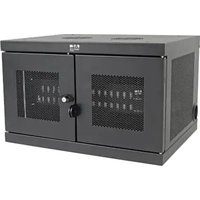
Your charging station is an all-in-one solution for storing, charging and syncing up to 16 devices. Your charging station can be conveniently mounted to walls as well as used for stationary desktop or floor placement installations. To prevent theft and device tampering, your charging station enclosure comes equipped with locking steel doors.
Explanation of Symbols:

CAUTION: RISK OF DANGER

PROTECTIVE BONDING TERMINAL

AC VOLTAGE
WALL-MOUNT WARNING: The wall surface, wall studs and all user-supplied mounting hardware must be able to support the combined weight of the cabinet and all equipment that will be installed in the cabinet. The cabinet can support equipment up to its maximum load capacity of 100 lb. (45 kg).
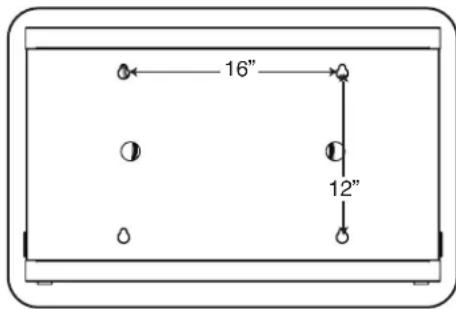
Wall-mounting holes are spaced 16 in. (406 mm) apart horizontally to accommodate standard placement of wall studs. It is advised to safely distribute the weight of the cabinet and all installed equipment.
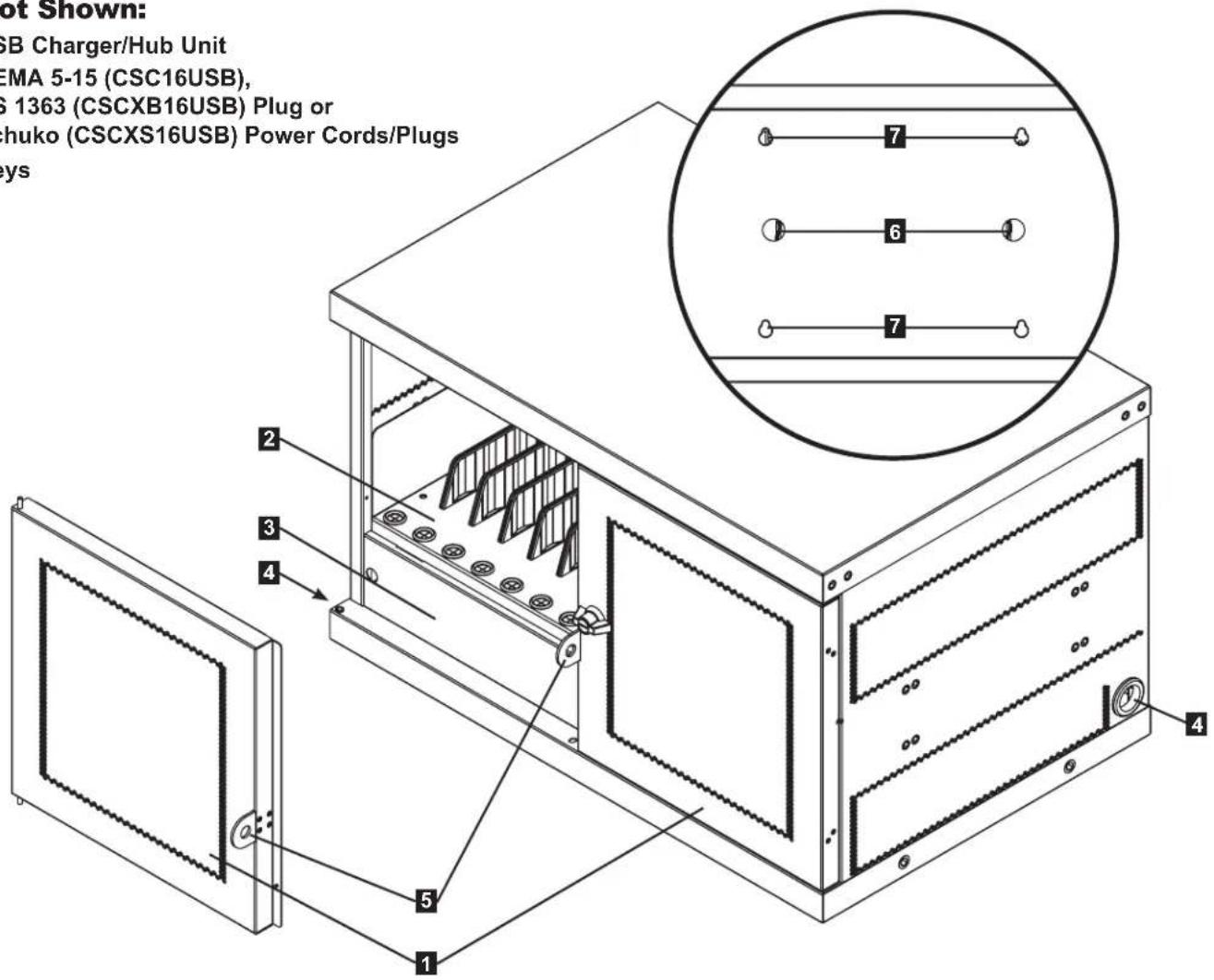
3. Feature Identification
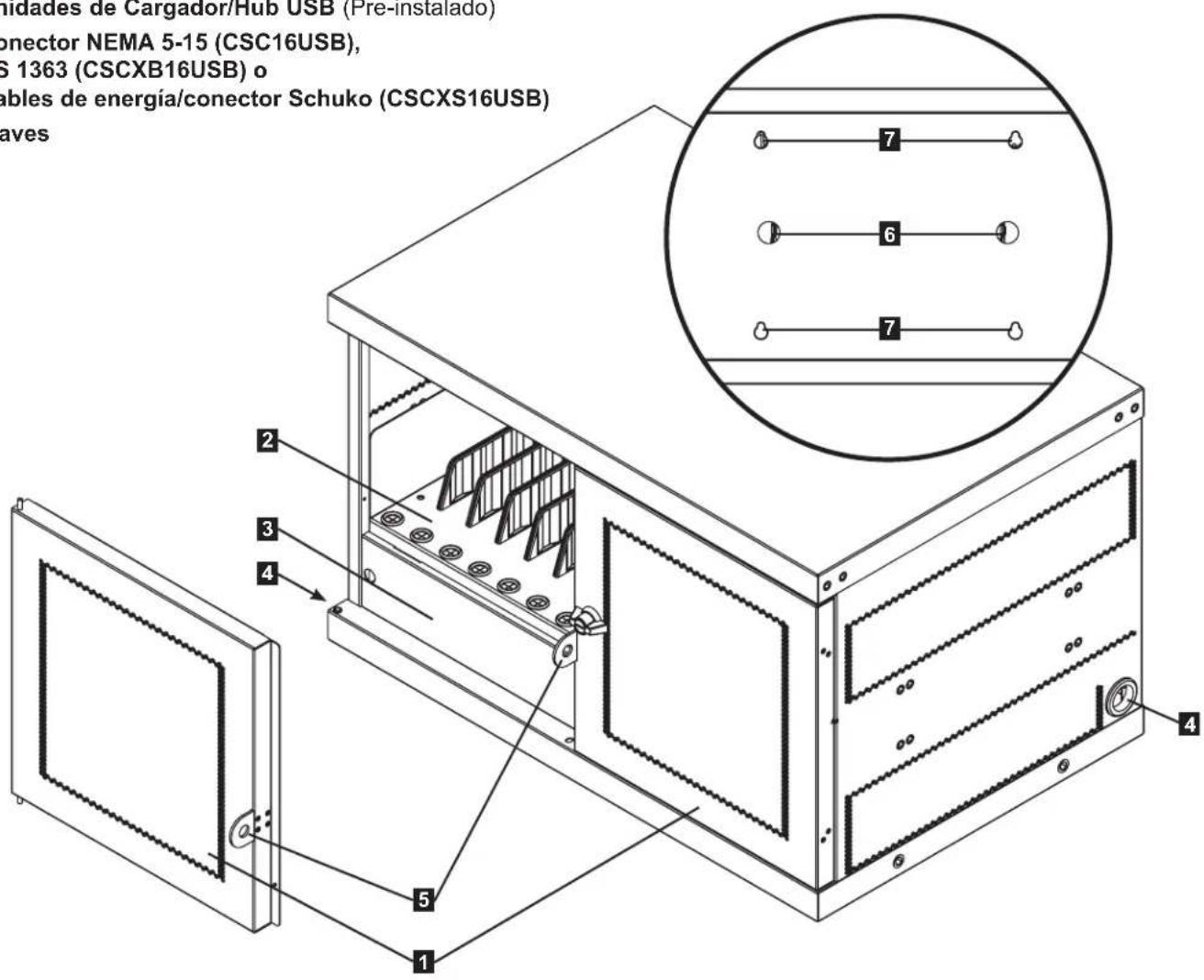
CSC16USB
1 Locking Split Doors
2 Adjustable Storage Shelves (Holds up to 16 Devices)
3 Blanking Panel (Removable)
4 Power Cord Access Holes (1 Located on Each Side)
5 Padlock Hasp (User Supplies Lock)
6 Cable Lock Routing Holes (User Supplies Lock)
7 Rear Panel with Keyhole Wall Mount Slots (See Section 5 for More Information)
Not Shown:
USB Charger/Hub Unit
NEMA 5-15 (CSC16USB),
BS 1363 (CSCXB16USB) Plug or
Schuko (CSCXS16USB) Power Cords/Plugs
Keys
4. Setup

Caution! Read All Instructions andWarnings Before Installation!

Warning: Charging stations can be extremely heavy. Do not attempt to unpack or mount the charging station without assistance. Use extreme caution when handling the charging station and be sure to follow all handling and installation instructions. Do not attempt to install equipment without first stabilizing the charging station.
4.1 Adjusting Storage Shelf Dividers
Your charging station comes with a storage shelf containing adjustable dividers that can accommodate up to 16 personal electronic devices.
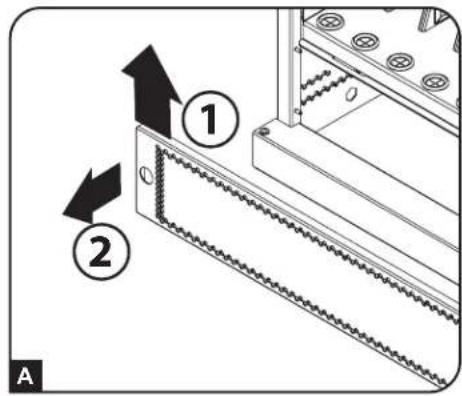
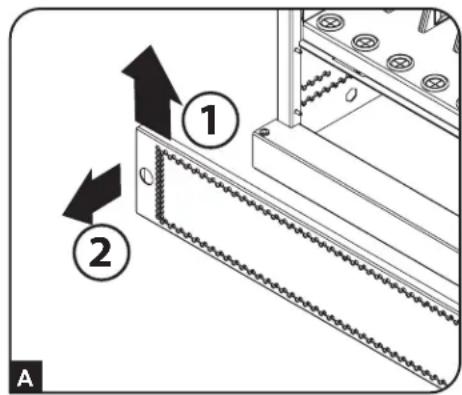
Remove any personal electronic devices stored on the shelf tray. Then remove the blanking panel by inserting your fingers into its left and right holes, lifting the blanking panel up and pulling out A. To remove the shelf tray from the cabinet, push the shelf tray forward to disengage from the mounting hook, then pull the tray up and out. Once the shelf is
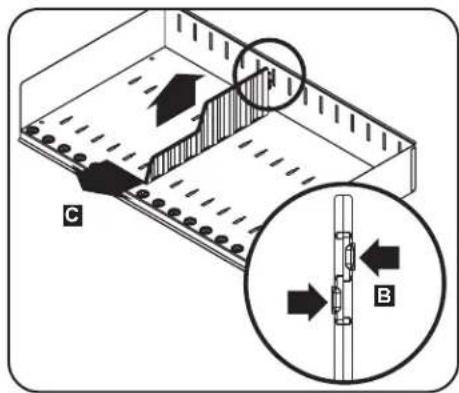
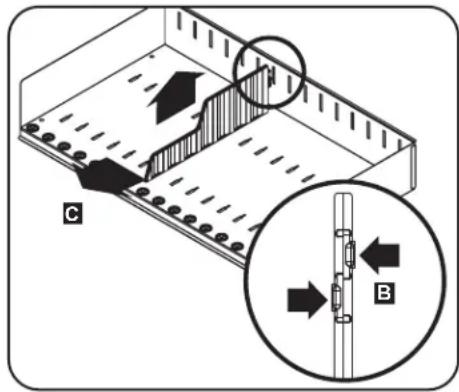
removed, remove or rearrange the dividers by pushing in the two tabs securing the divider to the rear end B, then push the divider forward to disengage from the shelf tray C. Repeat as necessary for additional shelf dividers.
4.2 Powering the USB Charger/Hub Unit
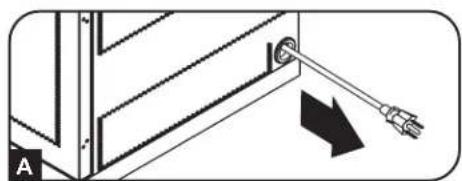
Once the blanking panel has been removed as shown in Section 4.1, find the USB Charger/Hub unit's input plug and cable located in the charging station's bottom compartment. Then push the input plug through one of the power cord access holes located on either side of the charging station cabinet A (using the power cord access hole on the same side as the power cord manager is recommended). Plug the power cord into the nearest 3-prong, grounded wall outlet.
Note: The power cord can optionally be routed through the charging station's rear panel. To do so, first remove the rubber grommet from either power cord access hole and attach it to the cable lock routing hole on the back of the unit (see 3. Feature Identification for routing locations).
4.3 Door Locks
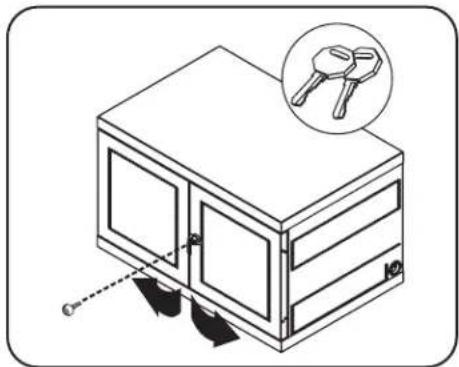
The split doors contain a lock that is accessible with the included keys.
5. 16-Port USB Charger Hub
5.1 USB Charger/Hub Features
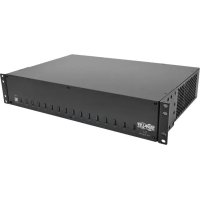
- Professional-grade USB charger/hub charges and syncs up to 16 USB devices, including iPad®, iPod®, iPhone®, and Android™ tablets and smartphones.
- Provides each USB port with an optimum charge level for a particular device (up to 2.4 amps).
- Allowsyncing to be performed with any device designed for USB data communications, per compatible file management software.
- Syncs Apple devices via iTunes software or Apple Configurator.
- Mini-USB Firmware Upgrade Port enables future software upgrades to support newer devices.
- 2U, rack-mountable housing can be configured for professional, educational or personal installations.
A 2.4A USB Device Ports with LED Indicator Lights (16 total)
Computer Sync Port
C Firmware Upgrade Port

5.2 Connecting Devices to the USB Charger/Hub
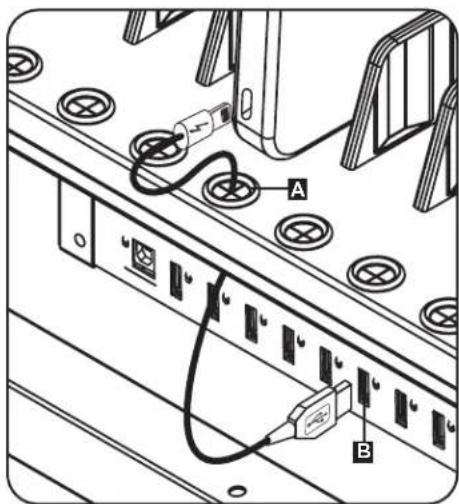
The charging station's storage shelf features 16 strain relief bushings that prevent the USB cable's device connectors from slipping through the bushing A. Using a user-supplied or device manufacturer's shielded USB cable, connect the USB cable to the device to be charged. Then pass the cable end through the strain relief bushing on the storage shelf and connect the USB connector into a USB charging port B. Repeat for all devices and reattach the blanking panel removed in Section 4.1 to the unit.
Tripp Lite offers individual and 10-pack cables for Apple devices using USB to 30-Pin or USB to Lightning™ cables, as well as individual and 10-pack cables for USB 3.0 or 2.0 devices using USB-A (male) to 5-Pin Micro B (male) cables.
| Cable Type | Individual Cable Model Number | 10-Pack Cable Model Number |
| Apple USB to 30-Pin Connector, 10 in. M110-10N-BK M1 | 10-10N-BK-10 | |
| Apple USB to 30-Pin Connector, 3 ft. M110-003-WH — | ||
| Apple USB to 8-Pin Lightning Connector, 10 in. M100-10N-BK M100-10N-BK-10 | ||
| Apple USB to 8-Pin Lightning Connector, 3 ft. M100-003-BK M100-003-WH | — | |
| Apple USB to 8-Pin Lightning Connector, 6 ft. M100-006-BK M100-006-WH | — | |
| Apple USB to 8-Pin Lightning Connector, 10 ft. M100-010-BK M100-010-WH | — | |
| USB 3.0 SuperSpeed A (Male) to 5-Pin Micro-B (Male), 1 ft. | U326-001-BK U326-001-BK-10 | |
| USB 3.0 SuperSpeed A (Male) to 5-Pin Micro-B (Male), 3 ft. | U326-003 U326-003-BK | — |
| USB 3.0 SuperSpeed A (Male) to 5-Pin Micro-B (Male), 10 ft. | U326-010 — | |
| USB 2.0 Reversible A (Male) to 5-Pin Micro-B (Male), 1 ft. | UR050-001* | UR050-001-10* |
| USB 2.0 Reversible A (Male) to 5-Pin Micro-B (Male), 3 ft. | UR050-003* UR050-003-WH* | — |
| USB 2.0 Reversible A (Male) to 5-Pin Micro-B (Male), 6 ft. | UR050-006* UR050-006-SLIM* | — |
| USB 2.0 Reversible A (Male) to 5-Pin Micro-B (Male), 10 ft. | UR050-010* | — |
- Features a reversible USB-A (male) connector for simplified installations. Visit tripplite.com for more information on our selection of premium USB cables.
5. 16-Port USB Charger Hub
5.3 Connecting a Computer to the USB Charger/Hub
In addition to device charging, the USB Charger/Hub is equipped with a hub function that syncs devices and their respective software applications via a connected computer. To enable the hub function, use the included USB cable to connect the USB-B connector into unit's Computer Sync Port and the USB-A connector into a computer's USB port.
Note: When a computer connection is established and multiple devices are connected to the USB Charger/Hub, the charge rate will reduce during syncing and resume to the normal charge rate upon completion.
Note: The Firmware Upgrade Port requires a mini-USB connection (cable not included). To download the most recent firmware updates, go to tripplite.com/support.
6. Wall Mounting
For wall mounting, you will need:
- Level
- Appropriate tools for wall mounting
- Appropriate hardware for wall mounting (not included)
Warning: Do not attempt to mount the charging station to the wall with any personal electronic devices inside.
There are 4 keyhole cutouts on the charging station cabinet's rear panel. Each keyhole can accommodate an M5 or 3/16'' bolt. Each of the keyhole sets are centered 16'' apart horizontally and 12'' vertically (see the corresponding model diagram for exact keyhole locations).
Using a level and tape measure, measure to position your mounting areas precisely. Use appropriate fasteners (not included) to secure the charging station to the wall.
Note: The charging station must be installed by a qualified technician. Use suitable mounting means when installing to cinder block, concrete, drywall or wood studs.
Warning: The supporting surface must be able to safely support the combined load of the charging station, equipment stored and all attached hardware and components. See Section 8. Specifications for more information on your model's weight and dimensions.
7. Desktop/Floor Placement
WARNING: For desktop and floor applications, always install the charging station in a structurally sound area with a level surface that is able to bear the weight of the charging station, all equipment that will be installed in the charging station and any other enclosures and/or equipment that will be installed nearby. Never attempt to lift or install the charging station without adequate help. See Section 8. Specifications for more information on the charging station's rated load capacity.
Note: The mounting brackets that shipped with the unit can also be used to secure the charging station to a desktop surface.
8. Specifications
| Models CSC16USB, CSCXB16USB, CSCXS16USB | |
| Dimensions (H x W x D) 18.8 x 30.33 x 20.20 in. / 477.52 x 770.382 x 513.08 mm | |
| Unit Weight 85.98 lb. / 39 kg | |
| Load Capacity* 100 lb. / 45.4 kg | |
| Charger/Hub Ports 16 x USB 2.0 A (Female) | 1 x USB 2.0 B (Female) 1 x USB 2.0 Mini (Female) |
| Transmission Speed Up to 480 Mbps | |
| Power Requirement Input: 110-120V, 2.5A, 50/60 Hz (CSC16USB) or 230V, 2.5A, 50Hz (CSCXB16USB, CSCXS16USB) Output: 5.0V, 2.4A Max (per USB port) | |
| Operating Temperature 32° to 86°F / 0° to 30°C | |
| Operating Humidity 5 to 95% RH, Non-Condensing | |
| Enclosure Material Metal | |
- Full wall-mount load capacity requires a mounting surface capable of bearing the full load of the charging station and all connected components. Specifications may be subject to change without further notice.
9. Storage, Service and Cleaning
Storage
The enclosure should be stored in a controlled indoor environment away from moisture, temperature extremes, flammable liquids and gasses, conductive contaminants, dust and direct sunlight. Store the enclosure in its original shipping container if possible.
Service
The enclosure is covered by the limited warranty described in this manual. For more information, visit tripplite.com/support.
Cleaning
Before cleaning, always power off the charging station by unplugging it from its AC source. Dampen a clean, lint-free cloth with water and wipe down the unit as necessary. Allow the surface area to dry before plugging in the unit. Note: Avoid using abrasive cloths, solvents or aerosol sprays to clean the charging station; doing so can damage the unit.
10. Optional Casters and Handle
For applications requiring extra mobility, an optional caster and handle accessory kit (Model: CSHANDLEKIT2) contains two swivel/locking casters, two swivel-only casters and a handle that attaches to the top of the charging station unit. Visit tripplite.com for more information.
11. Warranty and Product Registration
2-Year Limited Warranty
Seller warrants this product, if used in accordance with all applicable instructions, to be free from original defects in material and workmanship for a period of 2 years from the date of initial purchase. If the product should prove defective in material or workmanship within that period, Seller will repair or replace the product, at its sole discretion.
THIS WARRANTY DOES NOT APPLY TO NORMAL WEAR OR TO DAMAGE RESULTING FROM ACCIDENT, MISUSE, ABUSE OR NEGLECT. SELLER MAKES NO EXPRESS WARRANTY OTHER THAN THE WARRANTY EXPRESSLY SET FORTH HEREIN. EXCEPT TO THE EXTENT PROHIBITED BY APPLICABLE LAW, ALL IMPLIED WARRANTYES, INCLUDING ALL WARRANTYES OF MERCHANTABILITY OR FITNESS, ARE LIMITED IN DURATION TO THE WARRANTY PERIOD SET FORTH ABOVE; AND THIS WARRANTY EXPRESSLY EXCUSES ALL INCIDENTAL AND CONSEQUENTIAL DAMAGES. (Some states do not allow limitations on how long an implied warranty lasts, and some states do not allow the exclusion or limitation of incidental or consequential damages, so the above limitations or exclusions may not apply to you. This warranty gives you specific legal rights, and you may have other rights which vary from jurisdiction to jurisdiction.)
WARNING: The individual user should take care to determine prior to use whether this device is suitable, adequate or safe for the use intended. Since individual applications are subject to great variation, the manufacturer makes no representation or warranty as to the suitability or fitness of these devices for any specific application.
Product Registration
Visit tripplite.com/warranty today to register your new Tripp Lite product. You'll be automatically entered into a drawing for a chance to win a FREE Tripp Lite product!*
- No purchase necessary. Void where prohibited. Some restrictions apply. See website for details.
Regulatory Compliance Identification Numbers
For the purpose of regulatory compliance certifications and identification, your Tripp Lite product has been assigned a unique series number. The series number can be found on the product nameplate label, along with all required approval markings and information. When requesting compliance information for this product, always refer to the series number. The series number should not be confused with the marketing name or model number of the product.
FCC Notice, Class B
This device complies with part 15 of the FCC Rules. Operation is subject to the following two conditions: (1) This device may not cause harmful interference, and (2) this device must accept any interference received, including interference that may cause undesired operation.
Note: This equipment has been tested and found to comply with the limits for a Class B digital device, pursuant to part 15 of the FCC Rules. These limits are designed to provide reasonable protection against harmful interference in a residential installation. This equipment generates, uses and can radiate radio frequency energy and, if not installed and used in accordance with the instructions, may cause harmful interference to radio communications. However, there is no guarantee that interference will not occur in a particular installation. If this equipment does cause harmful interference to radio or television reception, which can be determined by turning the equipment off and on, the user is encouraged to try to correct the interference by one or more of the following measures:
- Reorient or relocate the receiving antenna.
- Increase the separation between the equipment and receiver.
- Connect the equipment into an outlet on a circuit different from that to which the receiver is connected.
- Consult the dealer or an experienced radio/TV technician for help.
Any changes or modifications to this equipment not expressly approved by Tripp Lite could void the user's authority to operate this equipment.
WEEE Compliance Information for Tripp Lite Customers and Recyclers (European Union)

Under the Waste Electrical and Electronic Equipment (WEEE) Directive and implementing regulations, when customers buy new electrical and electronic equipment from Tripp Lite they are entitled to:
- Send old equipment for recycling on a one-for-one, like-for-like basis (this varies depending on the country)
- Send the new equipment back for recycling when this ultimately becomes waste
Tripp Lite has a policy of continuous improvement. Specifications are subject to change without notice. Photos and illustrations may differ slightly from actual products.

TrippLite.Eaton.com/support
Conector NEMA 5-15 (CSC16USB),
BS 1363 (CSCXB16USB) o
Cables de energia/conector Schuko (CSCXS16USB)
Llaves
4. Instalación

Station de charge USB
3apnHoe yctpoNCTBO USB/USB-KoHcHTpaTOP:
- POKHOTe yCTPOIcTB K PO3ETKE, COOTBETCTBYUeN npHrTbIM B BAWe CTpaHE CTOPTeJIbHbIM HOpMaM HAIDeKaaUM 06pa3OM 3aUuueHHoN OT N36bIToUHbIX TOKOB, KOPOTKHX 3aMbIkaHNI 3aMbIkaHNI Ha 3emnHO.
-3NeKtpnuecka po3eKa, uepe3 KOtopyo ocyuieCTbIeTc3JeKtponntaHne obopydOBaHna, doJxHa 6blyctAHOBHeBA JERKOIOCTyHOM MeCTe B6JIN3u yCTpoiCTBa. - ⅢTencelbHbI pa3bem nepemehHoro ToKa Ha Ihype 3JIeKTPoNtAHnA Cnyknt B KaueCTBe yCTpoiCTBa 3aIHTHOOTKNIOHcHn.
-ПоdkнунаTe yctpoCTBO HeNocpeDCTBENHO K NaJIeKaUIM Oba3OM 3a3eMJIeHHoP o3eTKe CETn nepMeHHoro TOka.
He nepeJeIbIbAaTe 3JIeKTPnueckyU BnKy u He nCIOJb3yIte npexoDnHK, He oBeCeNeuBaIoUcN 3a3EmHeHra.
B Cnyaee Bo3HnKHOBeHnIIO60I 3 OINcaHHbIX HIXe CHTyaUIn OΦOpMNTe Bbl3OB TexHnueckoro CneuaNtcta InpoBepKn BaWero ObopydObaHnI:
-Понаданеоборюваян IOB BO3deIcTBNE BJIaN
-Падене obopydOBaHnC bICOTbI nIe mExaHnYeCKoe NOBpeKDeHne
-ПОЯВЛЕNHЯВHbIX npn3HaKOB HeNCpNaBHOCTN O6OpyoBaHЯ
- HenaJIeKaJaa pa6oTa nn OTKa3 B pa6Ote o6OpyIOBaHnCOrJaCHO yKa3aHnM, n3IooKeHHbIM B PyKOBOIDCTBe NOIb3OBaTeTn
- He pekomeHnyeTc nCNoJIb3OBAHnE daHHoro obopydOBaHnB CnCTeMaX Kn3Heo6ecneeyHn, rIe erO BbIXoN 3 CTPOr npednoJIOKeTjBHO MOKeT npINBeCTN K nepe6oM B pa6ote obopydOBaHnJ Kn3Heo6ecneeyHn NII B 3HaHTeJIbHOm Mepe CHN3NTb erO 6e30NaCHOCTb nnN 3ΦΦeKTHBHOCTb.
Kopnyc 3apAHOc tAnuH:
3apnHna cTahnI DOJXHa HaxoHTbcB B NOMEueHIn C KOHTpOlnpyEmbIM MKNpOKnIMaTOM BdaIN OT nCTOHyKOB BnAri, 3KCTpeMaJIbHbIX Tempepatyp, BOCIIaMeHraUxxCs KIOKcTeN rA3OB, 3NEKTPoPpOBoDhbix 3arpa3HnTeJe, IIJI IN npAmoro CoJHeHOr CBeta.
CoBex cToPOH 3apAHOH CTaHcHHeo6xOIMo o6ecneuTb DocTaTOH CBO6OHOro npocTpaHCTBa dIe erO HndJekaUero npOBETpNBaHn. He 3aropaxBaTe n He hakpbBaTe BHeuHne BeHTUNaONHHbIe OTBepCTN KOpNyCa 3apAHOH CTaHcHn, a TAKKe He BCTaBnIe TB HNX KAKNe-JIN60 ppeMeTbl.
-ДяобсесенmaKcIMaIbHOn npOu3BOIHTeJIbHOCTn NOIDepXINBaIte B NOMEueHm TEmpepaTpy BO3dyxaBdana3OHe ot 0^ do 30^
He cHnmaTe c 3apdHOn cTahmK KaKe-1n6o npEynpeXeHn, npEdoCTepExeHn nn OnncaTeNbHbte 3TNKeTKn.
3apnHra cTahnra yBnaTcKpaHe TKeJeBOeCho. Pnp nepeMeueHH 3apnHcr OaHn co6JIOaTe octopoknoctb.He nItaTecb pacnakobbbatb nn MOHTnpoBaTbe B OOnHOy. Ip npnepeueHH 3apnHO CTAHnB TpaHCnOpTnpOBOuHOM KOHTeHepe NcNoIb3yTe MExAHueckoe yCTpoCTBO TnNa BNIOOHORo Norpy3nuKa nn BNIOOHOr nDpaBnueeCKo TeLekKn.
- He KlaaTe Ha Kopnyc EMKoCTn C XuKoCTaMn Nn npEmdTbI, paCnoJaeraemble OOnn Ha dpyrom.
- Ocmotpnte TpaHcnpTnOPOBHyI KOHTeHep n 3apAHyIO CTaHcIIO Ha npEIMET HAIINyN NOBpeKDeHNI, NOnyHeHHbIX npi TpaHCnpTnOBKe. He noJIb3yIteCb 3apAHO CTaHcIeN B Clyae ee nobpeKDeHNI.
- Pn pa3pe3aHn ynaKOBouh bIX MaTePnAnOB CO6JIIOaIte OCTOpOxHOCTb. 3TO MOKeT pNBeCTN K HaNecEHIO cApaINH Ha NOBepXHOCTb 3apJdHON CTAHUN, YTO nPeDcTabJREt CO6oY Ueep6, He NOKpbBaembl DeIcTBUoJe rapaHTnei.
Bce ynaKOBouHbIe MaTePnAblcneDyET coXpaHnTb dIraNoCneDyUoero NcNoNtB3OBAHn. NobTopHa ynaKOBka n TpaHCnOpTnPOBkA 3apAHOH cTAnCmN 6e3 NcNoJIb3OBAHn OpRnHaJIbHbIX yNaKOBouHbIX MaTePnAIOB MoKeT npINBeCTN K NOBpeKdEHHIO H3DeJIna, KOToPoE NoBLeueT 3a Co6o anHHyInpoBaHnne DeiCtByIOuE rapaHTn.
1. Baxhblc yka3aHnno TExHnke 6e30nacHoCTn

Длг HaCTeHHbIX И HAcToJIbHbIX CnCTeM:
- YctaHOBka 3apAHOI CTAHUN DOJIXHA IPOIN3BOIDITbC TOLbKO KBAJIINΦUINPObAHbIM TEXHNueckm CneLuaJIInCTOM.
- NpeepaHauanom MoHTaxa y6eDInTecb B TOM, YTO NOBepxHOCTb CTehbl MOKeT C 3anaCom BbydePKNBaTb cyMMapHyu Harpy3ky, Co3daBaemyo 3apAHOI CTAHuei, XpaHyaUMcO6OpyIOBaHHeM IN BCEM INXoJUIMN B KOMnEKT DeTaJIaMn OChACTK IN DpyrIMN KOMnoHEHTAMN.
-3apnHnaCTaHnMoKet BbIePknBaTb 6OpynObaHne Maccndo45K. - Pn KpenneHnn K 6eToHy, uNakOBeToHy, rncokapToHy nN cToKam dpeBHHoro Kapkaca o6a3aTeNbHO nCNOb3ynt COOTBeTCTByUoIe MOHTaXhble npncnocobHe. HAdexHo yCTaHOBNTe Ha CteHy c NOMOuH Ho HApEkaue OCHACTK (B KOMPJIeKT NOCTaBKn He BXOINT).
BHIMAHHE! Onopna noBepxHocb DoJXHa C 3aIacOM BbldepkBaTc ymmapHyo Harpy3ky, Co3aBaemyo 3apraHOn CTahuei, HaxOJaUMCBA He o6opyDobAHnEM n BCEM BXODAUMB KOMPiKeT DeTaJIaMn OChAcTK n DpyHMN KOMnoHeHTAm (B Pa3dene 8. TexHnueckne xapaKTePncTHKn npBODNTc 6OJee noDpO6Ha NfOpMaunr O Macce n ra6apnthbx pa3mepax BaWe moDei).
B Cnyae HactoIbHOY yCTaHOBKn IIN KpeJIeHn 3apJHO CTAHN K CToneuHnue MOryT TAKKe NcnoJIb3OBAtbcr MOHTaxHbI KPOHtEHNbl, NOCTabJIeMbIe B KOMJIeKTe C yCTpoIcTBom.
2. KpaTkoe onncanHe
Pnpno6peHnHa BAMn 3apAnHnA CTAHnI npedctabJreT CObO yHnBepcaNbHoe yCTpoiCTBO nXpaHeHn, 3apAnKn CnHXPOHN3auny UcTPOiCTB B KOnuYeCTBe Do 16 UT. 3apAnHn CTAHnM oMeT yD06HO MOHTPOBaTcR Ha CTeHbl, a TAKKe IpncnOCA6nBaTbc DnA CTAUHOAPHoro paMaEHHn Ha CTone nn Ha NoIy. Bo n36exAHne XnueHHn yCTpoiCTB INn HeCaHKUHOHPOBAHHORO DOCTyNa K Hm Kopnyc BaWeJ 3apAnHO CTaHnO OCHaUeH 3anIPAoUMMNc CtaNbHBIM NBePauMn.
YcNoBhIe 06o3HaueHn

BHIMAHHE! ONACHOCTb

3AUNTHAR KJEMMA

HANPRAKHENE NEPEMEHHO TOKA
BHIMAHNE! Pn MoNTaKe Ha CTeHy NOBepXHOCTb CTeHb, 3JeMeHTb CTeHOBOr KApKaca N BCE MOHTaXHbIe npncnoCo6JIeHnA, KOToBie Bb HamepeBaTeCb NCNoB3OBAbT, DOJXHbI BblEepKuBaTb Bec WkaFpa N BCero yctahOBHeHHoro B Hem o6OpyDoBaHnA. WkaF moKet BblEepKuBaTb o6OpyDoBaHne Macc0n Do 45 Kr.
OtBepctnIy nA hacteHoro MOHTaKa IMeOT WAr 406 MM C ropu3oHTaNbHbIM paCnoJIOXeHNEM, yTo oBeceNeuBaET BO3MOxHOCTB KpeNHeHnK 3JeMeHtAM cTahdApTHOrO cTeHOBOrO Kapkaca. B CEJnx 6e3onacHOCTn peKOMeHnyetcpaCnpedeJIb Bec wkaqpa N BCero yCTaHOBJEHORO B HEm o6OpyDoBaHna.
3.Cxema pacnoonoxeHn yHKuOHaIbHbIX 3JeMeHTOB
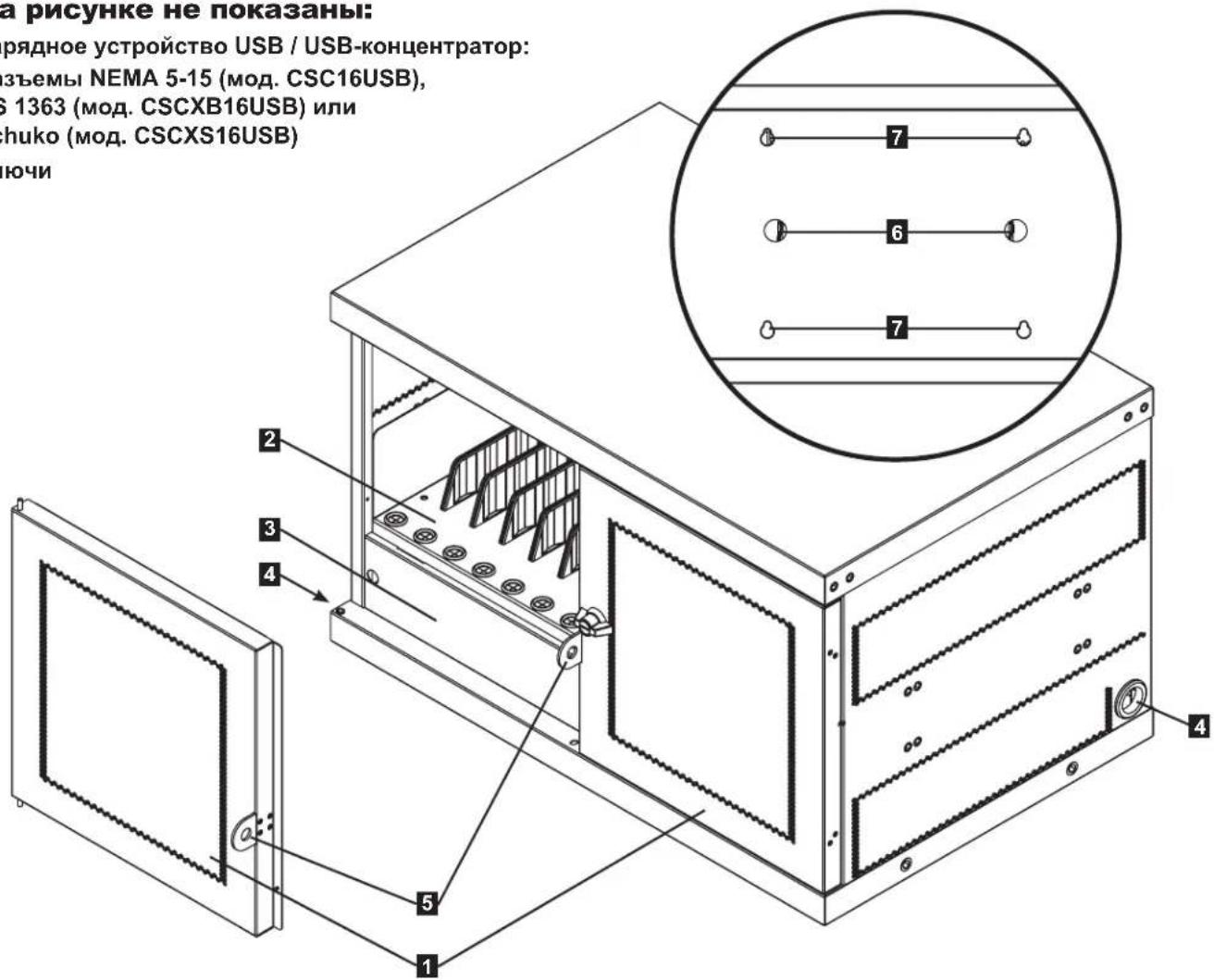
CSC16USB
1 3aHpaembIe DBepbI pa3pe3HOKHOCTpyKcIMN
2 PerynnpyembIe noKn dIxpaHEnHnB (BMeUaHOT do 16 yCtpoNCTB)
3 PanaheIb-3arLyuoka (cbemha)
4 OTBepCTnIaIshypa nHTAHn (no 1 cKaXdoi CTopoHbI)
5IeTJnJaHaBeCHOrO 3aMKa (HaBeChOH 3AMOK nPiNo6peTaEc Tc NOJIb3OBaTeJIeM)
6 OTBepCTnA DnA 6JIOKpOBKn Ka6eJeN (6nOKpOBKa npno6peTaec nOJIb3OBaTeIeM)
7 3aHnra naHeIb c npope3mN dna HacTeHHoro MoHTaxa (noDpo6Hee cm. B Pa3dene 5)
Ha pncyHke He noka3aHbI:
3apnHoe yctpoNCTBO USB/USB-KoHcHTpaTop:
Pa3bembl NEMA 5-15 (moCSC16USB),
BS 1363 (MoA. CSCXB16USB) nn
Schuko (moA. CSCXS16USB)
Klouy
4. NaHbna yctaHOBka

BHMaHHe! Npeed yctaHObKO BHMaTeJIbHO 03HaKOMbTecb co BCEMN yka3aHnMaMn n ppeDynpeJxdeHnMaMn!

BHHMaHHe! 3apnHbIe cTahCmN MOryt 6bItb KpaHne TaeKeIOBecHbIMn. He nbTaIaTeCb paacNaKOBbIbAtb HmMOHTnpoBaTb 3apnHyO cTahCmIO B OAnHOy. BybTe npedeJbHO octOpoxKnI npn nepemeueHN 3apnHOc TAHCN N o63aTeJbHO cJeDyIte BCem yKa3aHnM NO o6paueHnO uYctaHOBke. He npOn3BoNDte yCTaHOBky 6opUpoBaHnB 3apnHyO cTahCmIO do o6cepeHnE ee yctOuNbOcTn.
4.1 PerynipoBka noLoXeHna pa3dJIteJIbHbIX neperopodok
Pnio6peTeHHa Bamn 3apJdHa
ctAHnKOMNKeTyeTcNoIKoI
XpaHeHnpeYnnpyEmbIX
pa3deNtJIbHbIX neperOpOdk,Ha
KOTopoM MoKet pa3MeuataBc4 Do 16
NepcoHaNbHbIX 3NeKTPOHHbIX yCTpoiCTB.
CHmnte BCE nepcoHaNbHbIe
3JeKTPoHHbIe ycTpoiCTBa, XpaHraUneCe
Ha NoJIke. 3aTEM CHmnte NaHeJIb-
3aRnykU, BCTaNB NaJIbCuI B OTBepCTna
CLeBa N CnpaBA, NOJHAB NaHeJIb-
3aRnykU BBex N BbITrIIBaee HapKy
A.ДяиИЗВLEЧЕНЯ NOЛКИ ИЗ KOPNYCa npOДВИнБTe ee BNEpeД ДЯ ВИВОДЯИЗ 3aцeпLEHЯС MONTaЖнOI 3aцeЛКОI, a 3aTeM NOTAHITE ee BBepx И HApKy.
Pocne ChTn noJKN CHIMNTE nnn nepeCTaBbTe pa3dJIInTeNbHbIe peperopOKn, HadaBnBaHa 06a Ra3bUka, o6ecNeuBAIOUne KpenHe NpeperopOKn K 3aHHeMy KOHy B, a 3aTeM HaadABnTe Ha pa3dJIInTe bInpeD erI erO tCOeINHeHr O T NOJK C Pn HeoXoDMOCtN NOBTopTe BblweyKa3AHbIe DeIcTBnI DnI dpynx Pa3dJIInTeN noLOK.
NEMA 5-15 (CSC16USB),