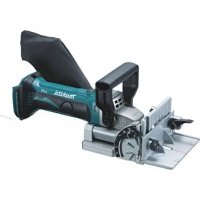
BPJ180 - Milling machine MAKITA - Free user manual and instructions
Find the device manual for free BPJ180 MAKITA in PDF.


| Product Type | Cordless Plate Joiner |
| Brand | Makita |
| Model | BPJ180 |
| Rated voltage | 18 V DC |
| No load speed | 6,500 min⁻¹ |
| Max. groove depth | 20 mm |
| Adjustable front plate angle | 0° to 90° (stops at 0°, 45°, 90°) |
| Angle guide | Height adjustable |
| Overall length | 351 mm |
| Net weight (with battery) | 3.0 kg (EPTA-01/2003) |
| Blade type | Plate joiner |
| Dust bag capacity | Approx. 1/2 full (indicator) |
| Battery protection | Overload, overheating, low voltage |
| Automatic overload shut-off | Yes |
| Switch lock | Yes |
| Sound pressure level (L_pA) | 74 dB(A), uncertainty K=3 dB(A) |
| Vibration (grooving MDF) | 2.5 m/s² or less, K=1.5 m/s² |
| Maintenance | Regular cleaning of air vents, carbon brush replacement |
| Recommended spare parts | Blades, carbon brushes, battery, charger, angle guide, dust bag |
| Main safety instructions | Wear hearing protection, do not wear gloves, always remove battery before maintenance |
Frequently Asked Questions - BPJ180 MAKITA
User questions about BPJ180 MAKITA
0 question about this device. Answer the ones you know or ask your own.
Ask a new question about this device
Download the instructions for your Milling machine in PDF format for free! Find your manual BPJ180 - MAKITA and take your electronic device back in hand. On this page are published all the documents necessary for the use of your device. BPJ180 by MAKITA.
USER MANUAL BPJ180 MAKITA
GB Cordless Plate Joiner Instruction Manual
| Explanation of general view | ||
| 1 B u t t o n | 14 Tighten | 27 Inner flange |
| 2 Red indicator | 15 Loosen | 28 Clamp screw |
| 3 Battery cartridge | 16 Down | 29 Shaft lock |
| 4 Star marking | 17 Up | 30 Dust bag |
| 5 Indication lamp | 18 Center of blade thickness | 31 Fastener |
| 6 Pointer | 19 Fence | 32 Dust nozzle |
| 7 Stopper | 20 Angle scale | 33 Exhaust vent |
| 8 Adjusting screw | 21 Blade cover | 34 Inhalation vent |
| 9 Rubber spike | 22 Set plate | 35 Limit mark |
| 10 Lock lever | 23 Thickness of set plate | 36 Holder cap cover |
| 11 Angle guide | 24 Slide switch | 37 Screwdriver |
| 12 Knob | 25 Lock nut | 38 Brush holder cap |
| 13 Scale | 26 Plate joiner blade |
SPECIFICATIONS
| Model BPJ140 BPJ180 | ||
| Type of blade Plate Joiner | ||
| Max. grooving depth 20 mm | ||
| No load speed (min-1) | 6 | |
| Overall length | 351 mm | |
| Net weight | 3.0 kg | |
| Rated voltage | D.C. 14.4 V | D.C. 18 V |
- Due to our continuing program of research and development, the specifications herein are subject to change without notice.
- Specifications and battery cartridge may differ from country to country.
- Weight, with battery cartridge, according to EPTA-Procedure 01/2003
ENE013-1
Intended use
The tool is intended for cutting crescent shaped slots for the placement of flat wooden dowels or biscuit by a plunging action.
GEA010-1
General Power Tool SafetyWarnings
WARNING Read all safety warnings and all instructions. Failure to follow the warnings and instructions may result in electric shock, fire and/or serious injury.
Save all warnings and instructions for future reference.
GEB093-1
CORDLESS PLATE JOINER SAFETY WARNINGS
- Blades must be rated for at least the speed marked on the tool. Blades running over rated speed can fly apart and cause injury.
- Always use the guard. The guard protects the operator from broken blade fragments and unintentional contact with the blade.
-
Use only the blades specified for this tool.
-
Never operate the tool with the blade locked in exposed position or without the blade cover secured properly in place.
- Make sure that the blade slides smoothly before operation.
- Check the blades carefully for cracks or damage before operation. Replace cracked or damaged blades immediately.
- Make sure that the flange fits in the arbor hole when installing the blade.
- Inspect for and remove all nails or foreign matter from the workpieces before operation.
- Always place the workpieces on a stable workbench.
- Secure the workpieces firmly with clamp or vise.
- NEVER wear gloves during operation.
- Hold the tool firmly with both hands.
- Keep your hands and body away from the grooving area.
- Run the tool for a while without the blade pointing toward anybody. Watch for vibration or wobbling that could indicate poor installation or a poorly balanced blade.
- Never reach your hands underneath the workpieces while the blade is rotating.
- Do not leave the tool running unattended.
- Always be sure that the tool is switched off and the battery cartridge is removed before making any adjustments or replacing the blade.
- Some material contains chemicals which may be toxic. Take caution to prevent dust inhalation and skin contact. Follow material supplier safety data.
-
Do not use blunt or damaged blades.
-
Do not use the tool with damaged guards.
SAVE THESE INSTRUCTIONS.

WARNING:
DO NOT let comfort or familiarity with product (gained from repeated use) replace strict adherence to safety rules for the subject product. MISUSE or failure to follow the safety rules stated in this instruction manual may cause serious personal injury.
ENC007-8
IMPORTANT SAFETY INSTRUCTIONS
FOR BATTERY CARTRIDGE
- Before using battery cartridge, read all instructions and cautionary markings on (1) battery charger, (2) battery, and (3) product using battery.
- Do not disassemble battery cartridge.
- If operating time has become excessively shorter, stop operating immediately. It may result in a risk of overheating, possible burns and even an explosion.
- If electrolyte gets into your eyes, rinse them out with clear water and seek medical attention right away. It may result in loss of your eyesight.
- Do not short the battery cartridge:
(1) Do not touch the terminals with any conductive material.
(2) Avoid storing battery cartridge in a container with other metal objects such as nails, coins, etc.
(3) Do not expose battery cartridge to water or rain.
A battery short can cause a large current flow, overheating, possible burns and even a breakdown.
- Do not store the tool and battery cartridge in locations where the temperature may reach or exceed 50^ (122^) .
- Do not incinerate the battery cartridge even if it is severely damaged or is completely worn out. The battery cartridge can explode in a fire.
- Be careful not to drop or strike battery.
- Do not use a damaged battery.
- Follow your local regulations relating to disposal of battery.
SAVE THESE INSTRUCTIONS.
Tips for maintaining maximum battery life
- Charge the battery cartridge before completely discharged. Always stop tool operation and charge the battery cartridge when you notice less tool power.
- Never recharge a fully charged battery cartridge. Overcharging shortens the battery service life.
- Charge the battery cartridge with room temperature at 10^ - 40^ (50^ - 104^) . Let a hot battery cartridge cool down before charging it.
- Charge the battery cartridge once in every six months if you do not use it for a long period of time.
FUNCTIONAL DESCRIPTION
CAUTION:
- Always be sure that the tool is switched off and the battery cartridge is removed before adjusting or checking function on the tool.
Installing or removing battery cartridge (Fig. 1)
CAUTION:
- Always switch off the tool before installing or removing of the battery cartridge.
- Hold the tool and the battery cartridge firmly when installing or removing battery cartridge. Failure to hold the tool and the battery cartridge firmly may cause them to slip off your hands and result in damage to the tool and battery cartridge and a personal injury.
To remove the battery cartridge, slide it from the tool while sliding the button on the front of the cartridge.
To install the battery cartridge, align the tongue on the battery cartridge with the groove in the housing and slip it into place. Insert it all the way until it locks in place with a little click. If you can see the red indicator on the upper side of the button, it is not locked completely.
CAUTION:
- Always install the battery cartridge fully until the red indicator cannot be seen. If not, it may accidentally fall out of the tool, causing injury to you or someone around you.
- Do not install the battery cartridge forcibly. If the cartridge does not slide in easily, it is not being inserted correctly.
Battery protection system (Fig. 2)
The tool is equipped with a battery protection system. This system automatically cuts off power to the motor to extend battery life.
The tool will automatically stop during operation if the tool and/or battery are placed under one of the following conditions:
Overloaded:
The tool is operated in a manner that causes it to draw an abnormally high current.
In this situation, turn the tool off and stop the application that caused the tool to become overloaded. Then turn the tool on to restart.
If the tool does not start, the battery is overheated. In this situation, let the battery cool before turning the tool on again.
- Low battery voltage:
The remaining battery capacity is too low and the tool will not operate. In this situation, remove and recharge the battery.
NOTE:
- The overheat protection works only with a battery cartridge with a star mark.
Indication lamp with multi function (Fig. 3)
Indication lamps are located in two positions.
When the battery cartridge is inserted on the tool with the slide switch positioned in the "O (OFF)" position, the indication lamp flickers quickly for approximately one second. If it does not flicker so, the battery cartridge or indication lamp has broken.
Overload protection
-
When the tool is overloaded, the indication lamp lights up. When the load on the tool is reduced, the lamp goes out.
-
If the tool continues to be overloaded and the indication lamp continues to light up for approximately two seconds, the tool stops. This prevents the motor and its related parts from being damaged.
-
In this case, to start the tool again, move the slide switch to the "O (OFF)" position once and then to the "I (ON)" position.
-Battery cartridge replacing signal
- When the remaining battery capacity gets small, the indicator lamp lights up during operation earlier than enough capacity battery use.
- Accidental re-start preventive function
- Even if the battery cartridge is inserted on the tool with the slide switch in the "I (ON)" position, the tool does not start. At this time, the lamp flickers slowly and this shows that the accidental re-start preventive function is at work.
- To start the tool, first slide the slide switch toward the "O (OFF)" position and then slide it toward the "I (ON)" position.
Adjusting the depth of groove (Fig. 4)
6 grooving depths can be preset according to the size of biscuit to be used.
Refer to the table below for the correspondence between the sizes marked on the stopper and the biscuit size. Fine adjustments to the grooving depth can be made by turning the adjusting screw after loosening the hex nut. This may become necessary after the blade has been resharpened a few times.
| Size on stopper 0 | 10 20 S D | MAX | ||||
| Biscuit size 0 10 | 20 — — — | |||||
| Depth of groove | 8 mm | 10 mm | 12.3 mm | 13 mm | 14.7 mm | 20 mm* |
- With the rubber spikes removed.
012681
Angle guide (Fig. 5 & 6)
The angle guide height can be moved up and down to adjust the position of the blade in relation to the top of the workpiece.
To adjust the angle guide height, loosen the lock lever down and rotate the knob until the pointer points to the desired scale graduation marked on the angle guide.
Then tighten the lock lever up to secure the angle guide. The scale on the angle guide indicates the distance from the top of the workpiece to the center of the blade thickness.
The angle guide is removable from the fence according to the need of your work. To remove the angle guide, loosen the lock lever and turn the knob clockwise until it comes out of the upper end of the fence.
Fence (Fig. 7 & 8)
NOTE:
- Remove the angle guide according to the need of your work when using the tool with the angle of the fence adjusted to other than 0^ . When you need to use the angle guide under the above condition, be sure to adjust the depth of groove to get a proper depth.
The angle of the fence can be adjusted between 0^ and 90^ (positive stops at 0^ , 45^ and 90^ ). To adjust the angle, loosen the lock lever and tilt the fence until the pointer points to the desired graduation on the angle scale. Then tighten the lock lever to secure the fence. When the fence is set at 90^ , both the distance from the center of the blade thickness to the fence and the distance from the center of the blade thickness to the bottom of the base are 10mm .
Set plate (Fig. 9 & 10)
Use the set plate as shown in Fig. 9 & 10 when cutting slots in thin workpieces.
Switch action (Fig. 11)
CAUTION:
- Before installing the battery cartridge into the tool, always check to see that the slide switch actuates properly and returns to the "OFF" position when the rear of the slide switch is depressed.
- Switch can be locked in "ON" position for ease of operator comfort during extended use. Apply caution when locking tool in "ON" position and maintain firm grasp on tool.
To start the tool, slide the slide switch toward the "I (ON)" position. For continuous operation, press the front of the slide switch to lock it.
To stop the tool, press the rear of the slide switch, then slide it toward the "O (OFF)" position.
ASSEMBLY
CAUTION:
- Always be sure that the tool is switched off and the battery cartridge is removed before carrying out any work on the tool.
Removing or installing the blade (Fig. 12)
CAUTION:
- When installing the plate joiner blade, mount the inner flange with the side marked "22" facing toward you.
To remove the blade, loosen the clamp screw and open the blade cover. Push the shaft lock and loosen the lock nut using the lock nut wrench. To install the blade, first mount the inner flange.
Then mount the blade and the lock nut. Securely tighten the lock nut using the lock nut wrench. Close the blade cover and tighten the clamp screw to secure the blade cover.
CAUTION:
- Use only Makita lock nut wrench provided to remove or install the blade.
- Always check the depth of groove after replacing the blade. Readjust it if necessary.
Dust bag (Fig. 13)
To attach the dust bag, fit it onto the dust nozzle. If the dust bag becomes an obstacle to your work, turn the dust nozzle to change the dust bag position.
When the dust bag is about half full, switch off and remove the battery cartridge. Remove the dust bag from the tool and pull the bag's fastener out. Empty the dust bag by tapping it lightly to remove as much of the dust as possible.
NOTE:
- If you connect a Makita vacuum cleaner to your plate joiner, more efficient and cleaner operations can be performed.
OPERATION
How to make joints

WARNING:
- Always clamp the workpiece to the workbench before each operation. (Fig. 14 & 15)
Corner Joint (Fig. 16, 17 & 18)
T-Butt Joint (Fig. 19, 20 & 21)
Miter Joint (Fig. 22 & 23)
Frame Joint (Fig. 24 & 25)
Edge-To-Edge Joint (Fig. 26 & 27)
To make joints, proceed as follows:
- Fit the two workpieces together as they will appear in the finished joint position.
- Mark the center of the intended biscuit grooves on the workpiece using a pencil.
NOTE:
- The center of grooves should be at least 50mm from the outer edge of the workpieces.
- Allow 100mm - 150mm between grooves in multiple biscuit application.
- For Corner Joint and T-Butt Joint only Clamp the vertical workpiece to the workbench. For Miter Joint only
Clamp one workpiece to the workbench with the mitered edge facing up.
For Frame Joint and Edge-To-Edge Joint only Clamp one workpiece to the workbench.
- Set the depth of groove according to the size of biscuit to be used. Refer to the table in the "Adjusting the depth of groove" section.
- Adjust the angle guide height so that the blade is centered in the board thickness.
- Align the center mark on the base with the pencil line on the workpiece.
- Switch on the tool and gently push it forward to extend the blade into the workpiece.
- Gently return the tool to the original position after the adjusting screw reaches the stopper.
9. For Corner Joint and T-Butt Joint only
Clamp the horizontal workpiece to the workbench. For Miter Joint only
Clamp the other workpiece to the workbench with the mitered edge facing up.
For Frame Joint and Edge-To-Edge Joint only Clamp the other workpiece to the workbench.
10. For Corner Joint only
Place the tool on the workpiece so that the blade is facing down.
For T-Butt Joint only
Remove the angle guide from the tool. Place the tool on the workpiece so that the blade is facing down.
- Repeat the steps 6 - 8 to groove in the horizontal or the other workpiece.
If you do not need to center the blade in the board thickness, proceed as follows:
For Corner Joint, Miter Joint, Frame Joint and Edge-To-Edge Joint only
- Remove the angle guide from the tool. Set the fence at 90^ for Corner Joint, Frame Joint and Edge-To-Edge Joint or at 45^ for Miter Joint.
- Follow steps 1 - 11 excluding steps 5 and 10 described above.
For T-Butt Joint only
- Fit the two workpieces together as they will appear in the finished joint position.
- Lay the vertical workpiece on the horizontal one. Clamp both workpieces to the workbench.
- Remove the angle guide from the tool.
- Follow the steps 2, 4, 6, 7, 8 and 11 described above.
MAINTENANCE

CAUTION:
- Always be sure that the tool is switched off and the battery cartridge is removed before attempting to perform inspection or maintenance.
- Never use gasoline, benzine, thinner, alcohol or the like. Discoloration, deformation or cracks may result.
The tool and its air vents have to be kept clean. Regularly clean the tool's air vents or whenever the vents start to become obstructed. (Fig. 28)
Replacing carbon brushes
Remove and check the carbon brushes regularly. Replace when they wear down to the limit mark. Keep the carbon brushes clean and free to slip in the holders. Both carbon brushes should be replaced at the same time. Use only identical carbon brushes. (Fig. 29) Insert the top end of slotted bit screwdriver into the notch in the tool and remove the holder cap cover by lifting it up. (Fig. 30)
Use a screwdriver to remove the brush holder caps. Take out the worn carbon brushes, insert the new ones and secure the brush holder caps. (Fig. 31)
Reinstall the holder cap cover on the tool.
To maintain product SAFETY and RELIABILITY, repairs, any other maintenance or adjustment should be performed by Makita Authorized Service Centers, always using Makita replacement parts.
OPTIONAL ACCESSORIES
CAUTION:
- These accessories or attachments are recommended for use with your Makita tool specified in this manual. The use of any other accessories or attachments might present a risk of injury to persons. Only use accessory or attachment for its stated purpose.
If you need any assistance for more details regarding these accessories, ask your local Makita Service Center.
Angle guide
- Dustbag
- Set plate
- Lock nut wrench
- Plate joiner blades
- Makita genuine battery and charger
NOTE:
- Some items in the list may be included in the tool package as standard accessories. They may differ from country to country.
ENG905-1
Noise
The typical A-weighted noise level determined according to EN60745:
Model BPJ140
Sound pressure level (L_pA) : 73 dB (A)
Uncertainty (K): 3 dB (A)
The noise level under working may exceed 80 dB (A).
Model BPJ180
Sound pressure level (L_pA) : 74 dB (A)
Uncertainty (K): 3 dB (A)
The noise level under working may exceed 80 dB (A).
Wear ear protection
ENG900-1
Vibration
The vibration total value (tri-axial vector sum) determined according to EN60745:
Work mode: cutting grooves in MDF
Vibration emission (a_h) : 2.5m / s^2 or less
Uncertainty (K): 1.5m / s^2
ENG901-1
- The declared vibration emission value has been measured in accordance with the standard test method and may be used for comparing one tool with another.
- The declared vibration emission value may also be used in a preliminary assessment of exposure.

WARNING:
- The vibration emission during actual use of the power tool can differ from the declared emission value depending on the ways in which the tool is used.
- Be sure to identify safety measures to protect the operator that are based on an estimation of exposure in the actual conditions of use (taking account of all parts of the operating cycle such as the times when the tool is switched off and when it is running idle in addition to the trigger time).
For European countries only
EC Declaration of Conformity
We Makita Corporation as the responsible manufacturer declare that the following Makita machine(s):
Designation of Machine:
Cordless Plate Joiner
Model No./ Type: BPJ140, BPJ180
are of series production and
Conforms to the following European Directives: 2006/42/EC
And are manufactured in accordance with the following standards or standardised documents: EN60745
The technical documentation is kept by: Makita International Europe Ltd.
Technical Department,
Michigan Drive, Tongwell,
Milton Keynes, Bucks MK15 8JD, England
11.7.2011
Tomoyasu Kato
Director
Makita Corporation
3-11-8, Sumiyoshi-cho,
Anjo, Aichi, 446-8502, JAPAN
Descriptif
ACCESSIONS EN OPTION
ATTENTION:
Michigan Drive, Tongwell,
Milton Keynes, Bucks MK15 8JD, Angleterre
11.7.2011
Tomoyasu Kato
Director
Makita Corporation
3-11-8, Sumiyoshi-cho,
Anjo, Aichi, 446-8502, JAPAN
Übersicht
Michigan Drive, Tongwell,
Milton Keynes, Bucks MK15 8JD, England
11.7.2011
Tomoyasu Kato
Direktor
Makita Corporation
3-11-8, Sumiyoshi-cho,
Anjo, Aichi, 446-8502, JAPAN
Visione generale
Michigan Drive, Tongwell,
Milton Keynes, Bucks MK15 8JD, England
11.7.2011
Tomoyasu Kato
Aministratore
Makita Corporation
3-11-8, Sumiyoshi-cho,
Anjo, Aichi, 446-8502, JAPAN
OPTIONELE ACCESSOIRES

LET OP:
Michigan Drive, Tongwell,
Milton Keynes, Bucks MK15 8JD, England
11.7.2011
Tomoyasu Kato
Director
Makita Corporation
3-11-8, Sumiyoshi-cho,
Anjo,Aichi,446-8502,JAPAN
Michigan Drive, Tongwell,
Milton Keynes, Bucks MK15 8JD, Inglaterra
11.7.2011
Tomoyasu Kato
Director
Makita Corporation
3-11-8, Sumiyoshi-cho,
Anjo, Aichi, 446-8502, JAPAN
Explicaçao geral
Michigan Drive, Tongwell,
Milton Keynes, Bucks MK15 8JD, Inglaterra
11.7.2011
Tomoyasu Kato
Director
Makita Corporation
3-11-8, Sumiyoshi-cho,
Anjo, Aichi, 446-8502, JAPAN
Michigan Drive, Tongwell,
Milton Keynes, Bucks MK15 8JD, England
11.7.2011
Tomoyasu Kato
Direktør
Makita Corporation
3-11-8, Sumiyoshi-cho,
Anjo, Aichi, 446-8502, JAPAN
Nepiypaipn yevikns aTPOINS
Alambda'kapbouvakiow
Na apaieite kai va eEyxete TAKIKA ta KAPBOVAKIA. Na avTKaOHTATE ta KAPBOVAKIA OTV exouv apei EwC Tnv evEiogn opiou. Na biatnpite Ta KAPBOVAKIA kaopapk eAeUepepa yia va yliotpouv otic utdooxec. PpTei va aaLacETe tautoxpova kai ta duo KAPBOVAKIA. Na xpnoioutoeite mvo KAPBOVAKIA idoi TUIOu. (EIK.29) ToTIOeTnote Tny akpn evoc TAAke KAOTABIOU peo aTNV EYKOTIN TOU epyaleiou kai onkwote TO kalmu KaTAKIOU UTDOxNc yia va to byaTe. (EIK.30)
Me Tn Bontheia Evoc Katoaibiou, ByaTe Ta Kattkia Tng UTOOxN yia Ta Kapbouvacia. ByaTe Ta 0hapueva Kapbouvacia, ToTIOBETNOte Ta KaIVoUPyia kai aopalote Ta KATKIA TNG UTOOxNc Yia Ta Kapbouvacia. (Eik.31)
ToTIOeTnOte EaV a To KALUmu KaTakIOu UTOOxNc OTo EpyaIio.
Tia va δiatnpetra n AΦAΛEIA kai n AEIONIISTIA tou Tpoiovto, oI εpyaieε επiokueug, kaωc kai OTIOIaONTE aALN εpyaia ouvtnpnnc n puθmuoc, θa TpETe i va EKTAEoUVtaσ Eouoioobotmeva Kevtpa EUGTTNPETnnc Tng Makita, kai πavtoe μe Tn xphonn avtaaakTKWv Tng Makita.
IPOAIPETIKA EAPTHMATA
PPOsOXH:
Auta ta aaptnata n Tpoaaptnata ouviotwvtai yia xpnoan me to epyaaleio oac tnc Makita Tou kathetaetai sto eyxepidio auto. H xpnoan ontoiovodntote aawv aaptnpatwv n TPOaaptnpatwv mTropei va dbnioupynaeikov Tpaumatou atouw. Xpnoiopoitoe iE movo Eapntnata n TPOaaptnata mOvo ia to oKOTIOu TPOoipizovtai.
Eav xpeiaeote katoia ontheia yia TepiooTepecs TAnpoopiec TTou apopoov Ota Eapntmuata auta, aTotavtheite oTo totIKo oac Kevtpo EutnpetnoS Makita.
Michigan Drive, Tongwell,
Milton Keynes, Bucks MK15 8JD, England (Ayyia)
11.7.2011
Tomoyasu Kato
△euθuvntns
Makita Corporation
3-11-8, Sumiyoshi-cho,
Anjo,Aichi,446-8502,JAPAN
Michigan Drive, Tongwell,
Milton Keynes, Bucks MK15 8JD, England
11.7.2011
Tomoyasu Kato
Mudur
Makita Corporation
3-11-8, Sumiyoshi-cho,
Anjo,Aichi,446-8502,JAPAN
Makita Corporation
Anjo, Aichi, Japan
885102A998
IDE
www.makita.com