ManualGo.com
BBO180 - Grinder MAKITA - Free user manual and instructions
Find the device manual for free BBO180 MAKITA in PDF.



Download the instructions for your Grinder in PDF format for free! Find your manual BBO180 - MAKITA and take your electronic device back in hand. On this page are published all the documents necessary for the use of your device. BBO180 by MAKITA.
USER MANUAL BBO180 MAKITA
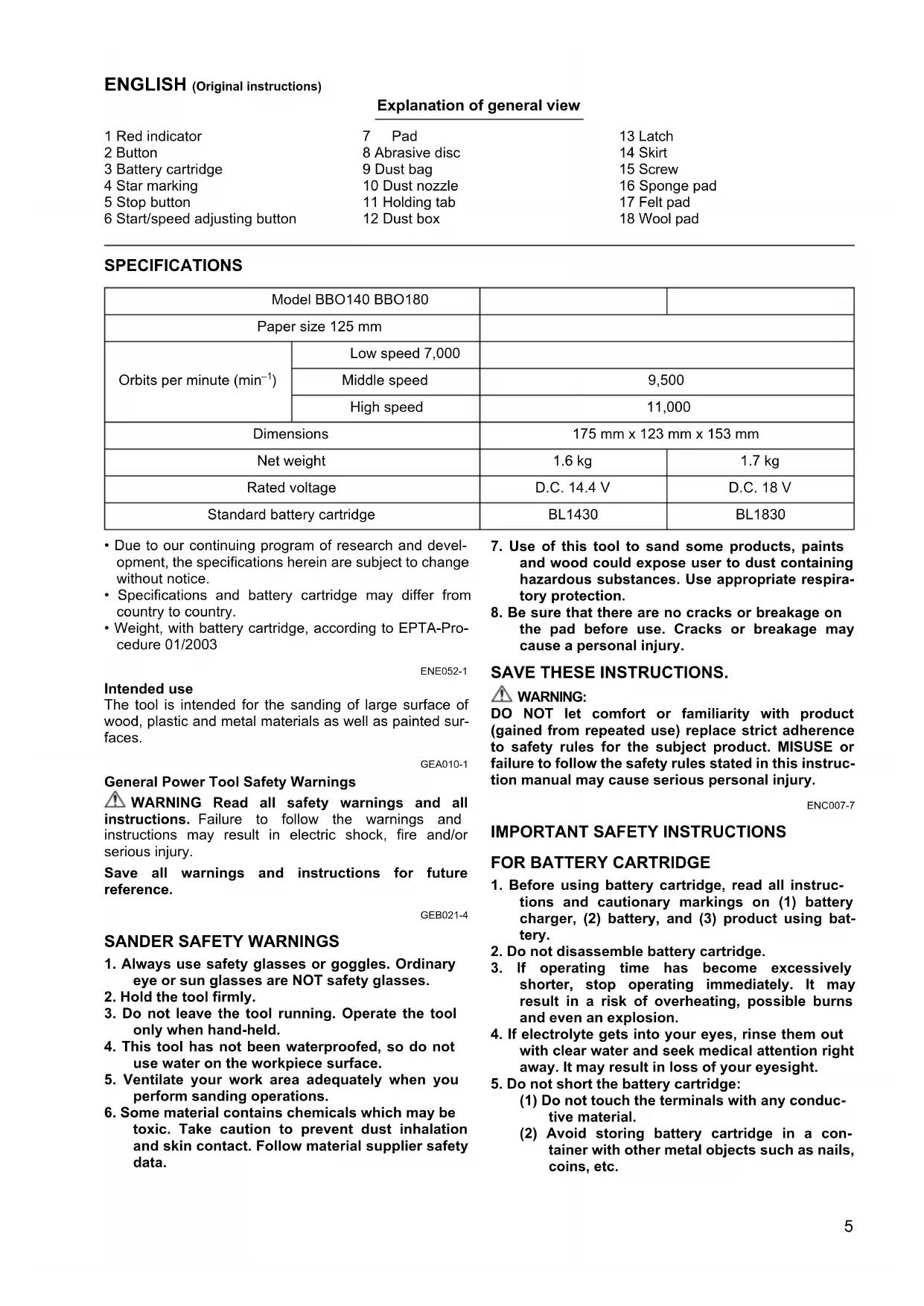
- Due to our continuing program of research and devel- opment, the specifications herein are subject to change without notice.
- Specifications and battery cartridge may differ from country to country.
- Weight, with battery cartridge, according to EPTA-Pro- cedure 01/2003 ENE052-1 Intended use The tool is intended for the sanding of large surface of wood, plastic and metal materials as well as painted sur- faces. GEA010-1 General Power Tool Safety Warnings WARNING Read all safety warnings and all instructions. Failure to follow the warnings and instructions may result in electric shock, fire and/or serious injury. Save all warnings and instructions for future reference. GEB021-4
eye or sun glasses are NOT safety glasses.
2. Hold the tool firmly.
3. Do not leave the tool running. Operate the tool
only when hand-held.
4. This tool has not been waterproofed, so do not
use water on the workpiece surface.
5. Ventilate your work area adequately when you
perform sanding operations.
6. Some material contains chemicals which may be
toxic. Take caution to prevent dust inhalation and skin contact. Follow material supplier safety data.
7. Use of this tool to sand some products, paints
and wood could expose user to dust containing hazardous substances. Use appropriate respira- tory protection.
8. Be sure that there are no cracks or breakage on
the pad before use. Cracks or breakage may cause a personal injury. SAVE THESE INSTRUCTIONS.
DO NOT let comfort or familiarity with product (gained from repeated use) replace strict adherence to safety rules for the subject product. MISUSE or failure to follow the safety rules stated in this instruc- tion manual may cause serious personal injury. ENC007-7
1. Before using battery cartridge, read all instruc-
tions and cautionary markings on (1) battery charger, (2) battery, and (3) product using bat- tery.
2. Do not disassemble battery cartridge.
3. If operating time has become excessively
shorter, stop operating immediately. It may result in a risk of overheating, possible burns and even an explosion.
4. If electrolyte gets into your eyes, rinse them out
with clear water and seek medical attention right away. It may result in loss of your eyesight.
5. Do not short the battery cartridge:
(1) Do not touch the terminals with any conduc- tive material. (2) Avoid storing battery cartridge in a con- tainer with other metal objects such as nails, coins, etc. Model BBO140 BBO180 Paper size 125 mm Orbits per minute (min
Low speed 7,000 Middle speed 9,500 High speed 11,000 Dimensions 175 mm x 123 mm x 153 mm Net weight 1.6 kg 1.7 kg Rated voltage D.C. 14.4 V D.C. 18 V Standard battery cartridge BL1430 BL18306 (3) Do not expose battery cartridge to water or rain. A battery short can cause a large current flow, overheating, possible burns and even a break- down.
6. Do not store the tool and battery cartridge in
locations where the temperature may reach or exceed 50°C (122°F).
7. Do not incinerate the battery cartridge even if it
is severely damaged or is completely worn out. The battery cartridge can explode in a fire.
8. Be careful not to drop or strike battery.
9. Do not use a damaged battery.
SAVE THESE INSTRUCTIONS. Tips for maintaining maximum battery life
1. Charge the battery cartridge before completely
discharged. Always stop tool operation and charge the bat- tery cartridge when you notice less tool power.
2. Never recharge a fully charged battery cartridge.
Overcharging shortens the battery service life.
3. Charge the battery cartridge with room tempera-
ture at 10°C – 40°C (50°F – 104°F). Let a hot bat- tery cartridge cool down before charging it.
4. Charge the battery cartridge once in every six
months if you do not use it for a long period of time. FUNCTIONAL DESCRIPTION CAUTION:
- Always be sure that the tool is switched off and the bat- tery cartridge is removed before adjusting or checking function on the tool. Installing or removing battery cartridge (Fig. 1) CAUTION:
- Always switch off the tool before installing or removing of the battery cartridge.
- Hold the tool and the battery cartridge firmly when installing or removing battery cartridge. Failure to hold the tool and the battery cartridge firmly may cause them to slip off your hands and result in damage to the tool and battery cartridge and a personal injury. To remove the battery cartridge, slide it from the tool while sliding the button on the front of the cartridge. To install the battery cartridge, align the tongue on the battery cartridge with the groove in the housing and slip it into place. Insert it all the way until it locks in place with a little click. If you can see the red indicator on the upper side of the button, it is not locked completely. CAUTION:
- Always install the battery cartridge fully until the red indicator cannot be seen. If not, it may accidentally fall out of the tool, causing injury to you or someone around you.
- Do not install the battery cartridge forcibly. If the car- tridge does not slide in easily, it is not being inserted correctly. Battery protection system (Lithium-ion battery with star marking) (Fig. 2) Lithium-ion batteries with a star marking are equipped with a protection system. This system automatically cuts off power to the tool to extend battery life. The tool will automatically stop during operation if the tool and/or battery are placed under one of the following conditions:
- Overloaded: The tool is operated in a manner that causes it to draw an abnormally high current. In this situation, stop the application that caused the tool to become overloaded. Then press the start/speed adjusting button again to restart. If the tool does not start, the battery is overheated. In this situation, let the battery cool before pressing the start/speed adjusting button.
- Low battery voltage: The remaining battery capacity is too low and the tool will not operate. In this situation, remove and recharge the battery. Switch action and speed adjusting button (Fig. 3) To start the tool, press the start/speed adjusting button. The tool starts with high speed mode. Each time you press the start/speed adjusting button, the speed mode changes in an order of hi speed, middle speed, and low speed. To stop the tool, press the stop button. Refer to the table for the relationship between the speed mode and the kind of work.
- The table shows standard applications. They may differ under certain conditions. ASSEMBLY CAUTION:
- Always be sure that the tool is switched off and the bat- tery cartridge is removed before carrying out any work on the tool. Installing abrasive disc (Fig. 4) To install the abrasive disc, first remove all dirt or foreign matter from the pad. Then attach the abrasive disc to the pad. Be careful to align the holes in the abrasive disc with those in the pad. Installing dust bag (optional accessory) (Fig. 5) Install the dust bag on the tool with its mouth directing downwards. Emptying dust bag (Fig. 6 & 7) When the dust bag is about half full, switch off the tool, and remove the dust bag from the tool. Then remove the dust nozzle from the dust bag after unlocking the dust nozzle by turning it slightly counterclockwise. Empty the dust bag by tapping it lightly. After emptying the dust bag, install the dust nozzle on the dust bag. Turn the dust nozzle slightly clockwise to lock it in place. Then install the dust bag on the tool as described in “Installing dust bag”. Speed mode Number of rotations Usage High 11,000 Regular sanding Middle 9,500 Finish sanding Low 7,000 Polishing7 Installing paper filter bag (optional accessory) (Fig. 8 & 9) Make sure that the logo on the cardboard lip and the logo on the dust box are on the same side, then install the paper filter bag by fitting the cardboard lip in the groove of each holding tab. Make sure that the logo on the cardboard lip and the logo on the dust nozzle are on the same side, then install the dust nozzle on the dust box. Removing dust box and paper filter bag (Fig. 10 & 11) Remove the dust nozzle by pushing the two latches. Remove the paper filter bag first by pinching the logo side of its cardboard lip, then by pulling the cardboard lip downwards to move it out of the holding tab of the dust box. Removing and reinstalling the skirt (Fig. 12, 13 & 14) CAUTION:
- Do not use the tool without the skirt. Otherwise dust is scattered all over. You can choose one of 12 directions of the skirt in accor- dance with your purpose. To remove the skirt, remove the screw and remove the skirt with slightly opening it for both sides. To reinstall the skirt, install it with slightly opening it for both sides. And fasten the screw. CAUTION:
- Do not set the skirt other than the designated angle. Otherwise the tool may be damaged. OPERATION
- Never switch on the tool when it is in contact with the workpiece, it may cause an injury to operator. Sanding operation (Fig. 15) CAUTION:
- Never run the tool without the abrasive disc. You may seriously damage the pad.
- Never force the tool. Excessive pressure may decrease the sanding efficiency, damage the abrasive disc or shorten tool life.
- Using the tool with the pad edge contacting the work- piece may damage the pad. Hold the tool firmly. Turn the tool on and wait until it attains full speed. Then gently place the tool on the work- piece surface. Keep the pad flush with the workpiece and apply slight pressure on the tool. CAUTION:
- The sanding pad rotates clockwise during the loaded operation, but it may rotate counterclockwise during the no-load operation. Polishing operation (optional) CAUTION:
- Use only a Makita genuine sponge pad, felt pad or wool pad (optional accessories).
- Always operate the tool at low speed to prevent work surfaces from heating abnormally.
- Never force the tool. Excessive pressure may decrease the polishing efficiency and cause motor overload, resulting in tool malfunction.
1. Applying wax (Fig. 16)
Use an optional sponge pad. Apply wax to the sponge pad or work surface. Run the tool at low speed to smooth out wax. NOTE:
- First, wax a not conspicuous portion of the work sur- face to make sure that the tool will not scratch the sur- face or result in uneven waxing.
- The tool starts with high speed mode. Be careful when you start the tool. The wax may be spattered. It is rec- ommended that you spread wax with the tool stopped before starting up the tool. Change the speed mode to low immediately after you start the tool.
- Always run the tool at low speed. Running it at high speed may cause the wax to spatter.
Use an optional wool pad. Run the tool at low speed and apply the wool pad gently to the work surface. MAINTENANCE CAUTION:
- Always be sure that the tool is switched off and the bat- tery cartridge is removed before attempting to perform inspection or maintenance.
- Never use gasoline, benzine, thinner, alcohol or the like. Discoloration, deformation or cracks may result. To maintain product SAFETY and RELIABILITY, repairs, carbon brush inspection and replacement, any other maintenance or adjustment should be performed by Makita Authorized Service Centers, always using Makita replacement parts. OPTIONAL ACCESSORIES CAUTION:
- These accessories or attachments are recommended for use with your Makita tool specified in this manual. The use of any other accessories or attachments might present a risk of injury to persons. Only use accessory or attachment for its stated purpose. If you need any assistance for more details regarding these accessories, ask your local Makita Service Center.
- Hook-and-loop type abrasive discs (with pre-punched holes)
- Hook-and-loop type sponge pad
- Hook-and-loop type felt pad
- Hook-and-loop type wool pad
- Makita genuine battery and charger
- Some items in the list may be included in the tool pack- age as standard accessories. They may differ from country to country.8 ENG905-1 Noise The typical A-weighted noise level determined according to EN60745: Model BBO140 Sound pressure level (L
): 78 dB (A) Uncertainty (K): 3 dB (A) The noise level under working may exceed 80 dB (A). Model BBO180 Sound pressure level (L
): 77 dB (A) Uncertainty (K): 3 dB (A) The noise level under working may exceed 80 dB (A). Wear ear protection ENG900-1 Vibration The vibration total value (tri-axial vector sum) determined according to EN60745: Model BBO140 Work mode: sanding metal plate Vibration emission (a
Model BBO180 Work mode: sanding metal plate Vibration emission (a
- The declared vibration emission value has been mea- sured in accordance with the standard test method and may be used for comparing one tool with another.
- The declared vibration emission value may also be used in a preliminary assessment of exposure.
- The vibration emission during actual use of the power tool can differ from the declared emission value depending on the ways in which the tool is used.
- Be sure to identify safety measures to protect the oper- ator that are based on an estimation of exposure in the actual conditions of use (taking account of all parts of the operating cycle such as the times when the tool is switched off and when it is running idle in addition to the trigger time). ENH101-15 For European countries only EC Declaration of Conformity We Makita Corporation as the responsible manufacturer declare that the following Makita machine(s): Designation of Machine: Cordless Random Orbit Sander Model No./ Type: BBO140, BBO180 are of series production and Conforms to the following European Directives: 2006/42/EC And are manufactured in accordance with the following standards or standardised documents: EN60745 The technical documentation is kept by our authorised representative in Europe who is: Makita International Europe Ltd. Michigan Drive, Tongwell, Milton Keynes, Bucks MK15 8JD, England