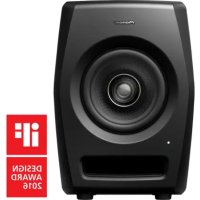
RM05 - Loudspeaker PIONEER - Free user manual and instructions
Find the device manual for free RM05 PIONEER in PDF.



| Product type | Bi-amplified 2-way active speaker |
| Dimensions (W x H x D) | 203 x 281 x 225 mm |
| Weight | 9.3 kg |
| Power supply | 100-240 V AC, 50/60 Hz |
| Power consumption | 142 W (standby < 0.3 W) |
| Frequency response (-10 dB) | 45 Hz to 50 kHz |
| Maximum sound pressure level | 104 dB SPL (peak @ 1 m) |
| Input sensitivity | -40 dB to +6 dB |
| LF amplifier | 50 W / 4 Ω, class AB |
| HF amplifier | 50 W / 4 Ω, class AB |
| Woofer | 13 cm aramid fiber cone |
| Tweeter | 3.8 cm HSDOM rigid dome |
| Audio inputs | XLR (balanced) and RCA (unbalanced) |
| Equalizer | Low EQ, Mid EQ, High EQ (adjustable settings) |
| Auto standby mode | Yes (delay ~25 min, can be disabled) |
| POWER/CLIP indicator | White (on), red (clipping) |
| Included accessories | Power cord, rubber feet, cushion pads, manual |
| Safety | Grounded plug, ventilation (10 cm clearance), do not expose to water |
| Maintenance | Clean with a dry cloth; do not use solvents |
| Repairability | Refer all servicing to qualified personnel |
Frequently Asked Questions - RM05 PIONEER
User questions about RM05 PIONEER
0 question about this device. Answer the ones you know or ask your own.
Ask a new question about this device
Download the instructions for your Loudspeaker in PDF format for free! Find your manual RM05 - PIONEER and take your electronic device back in hand. On this page are published all the documents necessary for the use of your device. RM05 by PIONEER.
USER MANUAL RM05 PIONEER
The Pioneer DJ support site shown above offers FAQs, information on software and various other types of information and services to allow you to use your product in greater comfort.
Operating Instructions
Mode d'emploi
Bedienungsanleitung
Thank you for buying this Pioneer product.
Please read through these operating instructions so you will know how to operate your model properly.
After you have finished reading the instructions, put them away in a safe place for future reference.
WARNING
This equipment is not waterproof. To prevent a fire or shock hazard, do not place any container filled with liquid near this equipment (such as a vase or flower pot) or expose it to dripping, splashing, rain or moisture.
D3-4-2-1-3_A1_En
WARNING
This product equipped with a three-wire grounding (earthed) plug - a plug that has a third (grounding) pin. This plug only fits a grounding-type power outlet. If you are unable to insert the plug into an outlet, contact a licensed electrician to replace the outlet with a properly grounded one. Do not defeat the safety purpose of the grounding plug.
D3-4-2-1-6_A1_En
WARNING
To prevent a fire hazard, do not place any naked flame sources (such as a lighted candle) on the equipment.
D3-4-2-1-7a_A1_En
Operating Environment
Operating environment temperature and humidity: +5 °C to +35 °C (+41 °F to +95 °F); less than 85 %RH (cooling vents not blocked)
Do not install this unit in a poorly ventilated area, or in locations exposed to high humidity or direct sunlight (or strong artificial light).
D3-4-2-1-7c*_A2_En
CAUTION
The POWER switch on this unit will not completely shut off all power from the AC outlet. Since the power cord serves as the main disconnect device for the unit, you will need to unplug it from the AC outlet to shut down all power. Therefore, make sure the unit has been installed so that the power cord can be easily unplugged from the AC outlet in case of an accident. To avoid fire hazard, the power cord should also be unplugged from the AC outlet when left unused for a long period of time (for example, when on vacation).
D3-4-2-2-2a* A1 En
POWER-CORD CAUTION
Handle the power cord by the plug. Do not pull out the plug by tugging the cord and never touch the power cord when your hands are wet as this could cause a short circuit or electric shock. Do not place the unit, a piece of furniture, etc., on the power cord, or pinch the cord. Never make a knot in the cord or tie it with other cords. The power cords should be routed such that they are not likely to be stepped on. A damaged power cord can cause a fire or give you an electrical shock. Check the power cord once in a while. When you find it damaged, ask your nearest PIONEER authorized service center or your dealer for a replacement.
S002*_A1_En
Make sure that the wall you intend to mount the speakers on is strong enough to support them.
SGK003_A1_En
Pioneer is not responsible for any accidents or damage that result from improper installation, misuse or modification of the product, or natural disasters.
SGK008_A1_En
VENTILATION CAUTION
When installing this unit, make sure to leave space around the unit for ventilation to improve heat radiation (at least 10 cm at top, 10 cm at rear, and 10 cm at each side).
WARNING
Slots and openings in the cabinet are provided for ventilation to ensure reliable operation of the product, and to protect it from overheating. To prevent fire hazard, the openings should never be blocked or covered with items (such as newspapers, table-cloths, curtains) or by operating the equipment on thick carpet or a bed.
D3-4-2-1-7b*_A1_En
IMPORTANT
The lightning flash with arrowhead symbol, within an equilateral triangle, is intended to alert the user to the presence of uninsulated "dangerous voltage" within the product's enclosure that may be of sufficient magnitude to constitute a risk of electric shock to persons.
CAUTION
RISK OF ELECTRIC SHOCK DO NOT OPEN
CAUTION:
TO PREVENT THE RISK OF ELECTRIC SHOCK, DO NOT REMOVE COVER (OR BACK). NO USER-SERVICEABLE PARTS INSIDE. REFER SERVICING TO QUALIFIED SERVICE PERSONNEL.

The exclamation point within an equilateral triangle is intended to alert the user to the presence of important operating and maintenance (servicing) instructions in the literature accompanying the appliance.
D3-4-2-1-1b_A1_En
IMPORTANT SAFETY INSTRUCTIONS
1) Read these instructions.
2) Keep these instructions.
3) Heed all warnings.
4) Follow all instructions.
5) Do not use this apparatus near water.
6) Clean only with dry cloth.
7) Do not block any ventilation openings. Install in accordance with the manufacturer's instructions.
8) Do not install near any heat sources such as radiators, heat registers, stoves, or other apparatus (including amplifiers) that produce heat.
9) Do not defeat the safety purpose of the polarized or grounding-type plug. A polarized plug has two blades with one wider than the other. A grounding type plug has two blades and a third grounding prong. The wide blade or the third prong are provided for your safety. If the provided plug does not fit into your outlet, consult an electrician for replacement of the obsolete outlet.
10) Protect the power cord from being walked on or pinched particularly at plugs, convenience receptacles, and the point where they exit from the apparatus.
11) Only use attachments/accessories specified by the manufacturer.
12) Use only with the cart, stand, tripod, bracket, or table specified by the manufacturer, or sold with the apparatus. When a cart is used, use caution when moving the cart/apparatus combination to avoid injury from tip-over.

13) Unplug this apparatus during lightning storms or when unused for long periods of time.
14) Refer all servicing to qualified service personnel. Servicing is required when the apparatus has been damaged in any way, such as power-supply cord or plug is damaged, liquid has been spilled or objects have fallen into the apparatus, the apparatus has been exposed to rain or moisture, does not operate normally, or has been dropped.
D3-7-13-69_En
The Safety of Your Ears is in Your Hands
Get the most out of your equipment by playing it at a safe level – a level that lets the sound come through clearly without annoying blaring or distortion and, most importantly, without affecting your sensitive hearing. Sound can be deceiving. Over time, your hearing “comfort level” adapts to higher volumes of sound, so what sounds “normal” can actually be loud and harmful to your hearing. Guard against this by setting your equipment at a safe level BEFORE your hearing adapts.
ESTABLISH A SAFE LEVEL:
- Set your volume control at a low setting.
- Slowly increase the sound until you can hear it comfortably and clearly, without distortion.
- Once you have established a comfortable sound level, set the dial and leave it there.
BE SURE TO OBSERVE THE FOLLOWING GUIDELINES:
- Do not turn up the volume so high that you can't hear what's around you.
- Use caution or temporarily discontinue use in potentially hazardous situations.
- Do not use headphones while operating a motorized vehicle; the use of headphones may create a traffic hazard and is illegal in many areas.
S001a_A1_En
[For American Users and Canadian Users]
AFTER-SALES SERVICE FOR PIONEER PRODUCTS
Please contact the dealer or distributor from where you purchased the product for its after-sales service (including warranty conditions) or any other information. In case the necessary information is not available, please contact the Pioneer's subsidiaries (regional service headquarters) listed below:
PLEASE DO NOT SHIP YOUR PRODUCT TO THE COMPANIES at the addresses listed below for repair without advance contact, for these companies are not repair locations.
AMERICA
PIONEER ELECTRONICS (USA) INC.
P.O. BOX 1760, LONG BEACH, CA 90801-1760, U.S.A.
EUROPE
PIONEER EUROPE NV
EUROPEAN SERVICE DIVISION
HAVEN 1087, KEETBERGLAAN 1, B-9120 MELSELE, BELGIUM
ASEAN
PIONEER ELECTRONICS ASIACENTRE PTE. LTD.
SERVICE DEPARTMENT
253, ALEXANDRA ROAD #04-01 SINGAPORE 159936
JAPAN AND OTHERS
PIONEER CORPORATION (HEAD OFFICE)
CUSTOMER SUPPORT CENTER
[For American Users]
NOTE:
This equipment has been tested and found to comply with the limits for a Class B digital device, pursuant to Part 15 of the FCC Rules. These limits are designed to provide reasonable protection against harmful interference in a residential installation. This equipment generates, uses, and can radiate radio frequency energy and, if not installed and used in accordance with the instructions, may cause harmful interference to radio communications. However, there is no guarantee that interference will not occur in a particular installation. If this equipment does cause harmful interference to radio or television reception, which can be determined by turning the equipment off and on, the user is encouraged to try to correct the interference by one or more of the following measures:
— Reorient or relocate the receiving antenna.
— Increase the separation between the equipment and receiver.
— Connect the equipment into an outlet on a circuit different from that to which the receiver is connected.
— Consult the dealer or an experienced radio/TV technician for help.
D8-10-1-2_A1_En
Information to User
Alterations or modifications carried out without appropriate authorization may invalidate the user's right to operate the equipment.
D8-10-2_A1_En
IMPORTANT NOTICE
THE MODEL NUMBER AND SERIAL NUMBER OF THIS EQUIPMENT ARE ON THE REAR OR BOTTOM. RECORD THESE NUMBERS ON YOUR ENCLOSED WARRANTY CARD AND KEEP IN A SAFE PLACE FOR FUTURE REFERENCE.
D36-AP9-1_A1_En
WARNING: This product contains chemicals known to the State of California and other governmental entities to cause cancer and birth defects or other reproductive harm.
Wash hands after handling.
D36-P5_C1_En
[For European Users]
For Finland customers
For Norway customers
For Sweden customers
Apparaten skall anslutas till jordat uttag
D3-4-2-1-6b_A1_En

If you want to dispose this product, do not mix it with general household waste. There is a separate collection system for used electronic products in accordance with legislation that requires proper treatment, recovery and recycling.
Private households in the member states of the EU, in Switzerland and Norway may return their used electronic products free of charge to designated collection facilities or to a retailer (if you purchase a similar new one).
For countries not mentioned above, please contact your local authorities for the correct method of disposal.
By doing so you will ensure that your disposed product undergoes the necessary treatment, recovery and recycling and thus prevent potential negative effects on the environment and human health.
K058b_A1_En
[For European Users and Others]
CAUTION
TO PREVENT THE RISK OF ELECTRIC SHOCK, DO NOT REMOVE COVER (OR BACK). NO USER-SERVICEABLE PARTS INSIDE. REFER SERVICING TO QUALIFIED SERVICE PERSONNEL.
D3-4-2-1-1_B1_En
Introduction
Main Features
Coaxial driver reproducing point-source sound with 50 kHz *HSDOM tweeter.
HSDOM stands for "Harmonized Synthetic Diaphragm Optimum Method". All aspects of the diaphragm, including materials, the shape, and the edges, have been optimized using computer simulations, realizing ultrahigh frequency playback.
High-stiffness aluminum die-cast cabinet eliminating unnecessary resonance.
AFAST technology realizes clear sound quality through the reduction of internal standing waves.
AFAST stands for "Acoustic Filter Assisted System Tuning". Technology that controls standing waves and resonant sounds by adding an acoustic tube inside the speaker enclosure.
natural_image
Technical line drawings of two power speaker models labeled RM-05 and RM-07 (no text or symbols on the devices themselves)Confirm All Accessories
- Power cord (1)
- Operating Instructions (this document)
- Rubber leg x 4
- Bottom cushion x 6
Names and Functions of Parts
Front Panel Facilities
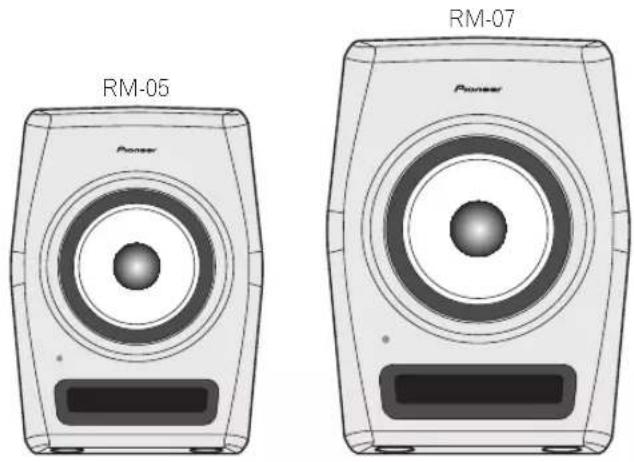
* The RM-05 is shown in the illustration. Specifications for the RM-05 and RM-07 are identical apart from the screw holes for the wall mount bracket.
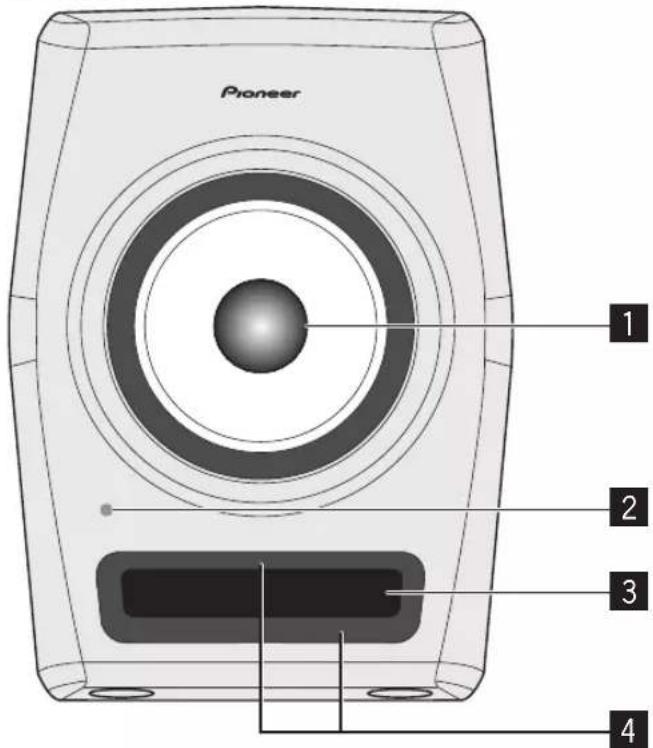
1 Coaxial driver
RM-05: 5 inch Aramid fiber woofer
1.5 inch HSDOM tweeter
RM-07: 6.5 inch Aramid fiber woofer
1.5 inch HSDOM tweeter
HSDOM:
[Harmonized Synthetic Diaphragm Optimum Method]
2 POWER / CLIP indicator
Lit white in connection to power ON/OFF. Off when in Standby.
It will also be lit red when the input level is too high and causing sound distortion.
In this case, lower the input level.
3 Bass-reflex woofer
4 Groove
Controls the airflow from the bass reflex duct for smooth relay of the low frequency range.
Rear Panel Facilities
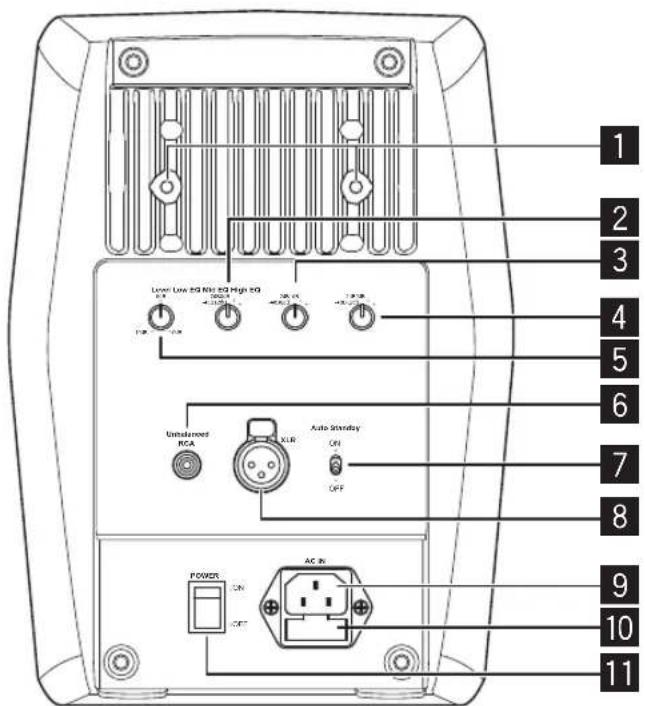
* The RM-05 is shown in the illustration.
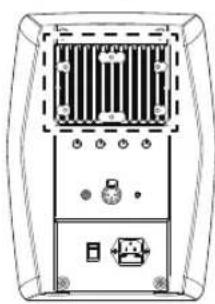
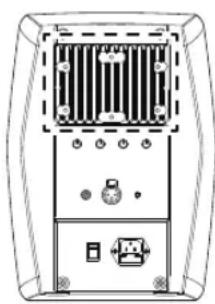
1 Screw holes for the wall mount bracket
2 LOW EQ dial
Adjust the frequency response in the low frequency range. See "Equalizer Settings" on page 9 for more details.
3 MID EQ dial
Adjust frequency attenuation in the approx. 100 Hz to 200 Hz range. See "Equalizer Settings" on page 9 for more details.
4 HIGH EQ dial
Adjust the frequency response in the high frequency range. See "Equalizer Settings" on page 9 for more details.
5 LEVEL dial
Use to adjust the sound level (Volume).
6 RCA INPUT jack (Unbalanced)
7 AUTO STANDBY switch
Use to turn the auto standby function on or off. When the auto standby function is turned on, the speakers automatically enter standby mode if no input signal is received for a certain period of time (approximately 25 minutes) and power consumption can be reduced. When an input signal is received while the speakers are in standby mode, the speakers will automatically resume from standby mode.
- The illumination (POWER indicator) on the front panel turns off when the speakers enter standby mode.
- When the input signal is weaker than a certain level, the speakers may not automatically resume from standby mode. In such cases, turn off the [AUTO STANDBY] switch to use the speakers.
- To force the speakers to resume from standby mode, turn off the [POWER] switch on the rear panel once, and turn it back on after a few seconds.
8 XLR INPUT connector (Balanced)
The connector's pin array is as follows: No. 1 Ground, No. 2 Hot, and No. 3 Cold.
9 AC IN
Connect the accessory power cord here and to an AC power outlet.
10 Fuse holder
11 POWER switch
Use to turn the power on and off.
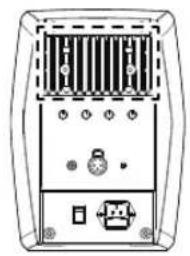
Position of screw holes for the wall mount bracket
✿ RM-05 (M6 10 mm deep 2 locations)
natural_image
Front view of a device rear panel with ventilation grilles and ports (no text or symbols visible)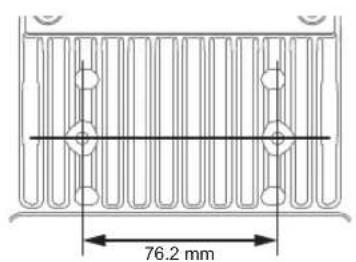
◆ RM-07 (M6 10 mm deep 6 locations)
natural_image
Front view of a computer chassis showing front panel, rear panel, and internal components (no text or symbols visible)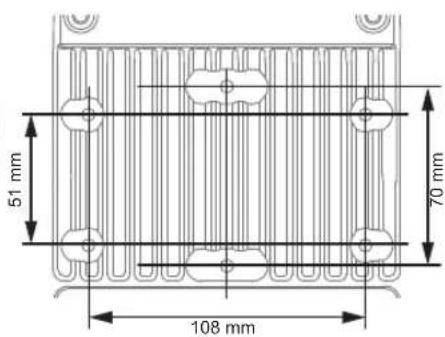
Cautions for Attaching to Wall Using a Mount Bracket
- Use a mount bracket that is capable of supporting the weight of the unit. In regard to retail brackets, please direct any inquiries to your retailer.
- Perform an inspection of the wall etc. prior to performing the mounting, and ensure that it is strong enough to support the weight of the unit.
- Use screws that are suited to the materials of the wall to which the unit is being mounted.
• After completing the mounting, be sure to perform a full safety check, and conduct periodic safety checks going forward.
Installation and Connections
How to Install
A speaker's playback sound is delicately influenced by conditions in the listening room. To produce optimum listening conditions, take due consideration of the conditions of your installation location before beginning actual installation.
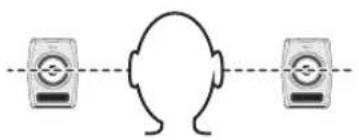
- Place the speakers at ear level.
natural_image
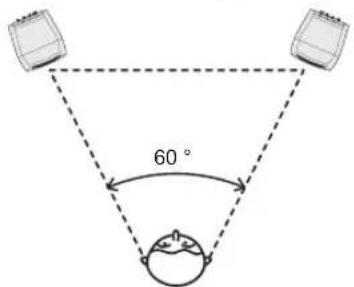
Simple line drawing of a human head with two connected devices (no text or symbols)- The left and right speakers should be placed at an equal distance from and bilaterally symmetrical to the listening position.
- Speakers should ideally be located at 30^ angles from the listening position (together forming a total 60^ angle), and rotated inward to face the listening position.
- Do not block the heat sink section on the back. The resulting reduction in heat radiation capabilities can lead to a degradation in performance or cause malfunctions.
Angling Speakers
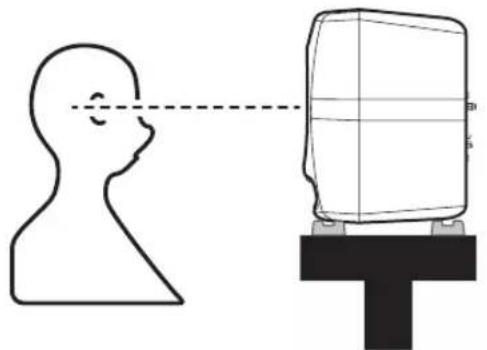
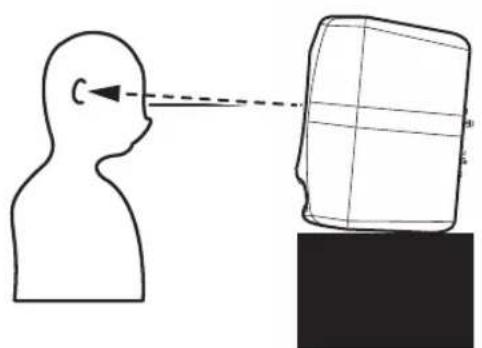
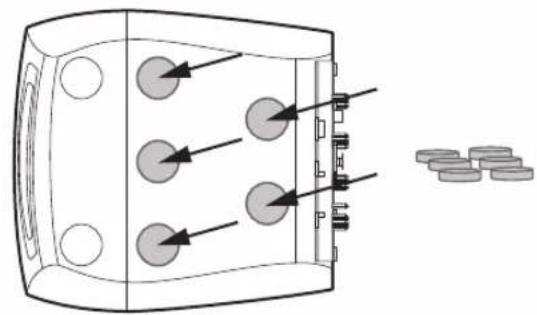
You may use the rubber legs and cushions supplied as the situation demands with the unit to tilt the speaker surface upward or place it vertically.
When using a speaker stand etc. to place the speaker surface vertically
Attach the supplied rubber legs (thicker ones) to the indents on the bottom surface.
natural_image
Diagram showing a human head profile facing a screen with a dashed line indicating perspective (no text or symbols)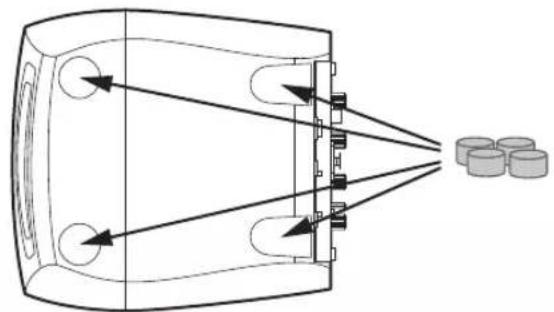
natural_image
Diagram of a device emitting beams into a chamber with cylindrical components nearby (no text or symbols)When placing on a desk etc. with the speaker face tilted upward
Attach the supplied cushions (thinner ones) to the bottom of the unit in order to prevent slippage.
natural_image
Diagram of a device with three circular components and directional arrows, next to scattered coins (no text or symbols)WARNING
Store small parts out of the reach of children and infants. If accidentally swallowed, contact a doctor immediately.
D41-6-4_A1_En
Connections
- When making or changing connections, always turn off the power and disconnect the power cord from its outlet.
-
Also, be sure to read the operating instructions for the other components to which you are connecting these speakers.
-
Do not plug in the power cord until all other connections have been completed.
- Use only the furnished accessory power cord.
- Make sure to set the sound level at an appropriate level as the input signals to the XLR INPUT connector and RCA INPUT jack will be mixed together, affecting the sound level.
Equalizer Settings
The Tone Control Function
The unit has functionality to adjust frequency response in accordance with the location and environment in which it is placed.
Adjustment is performed using a combination of the three knobs on the rear panel.
The unit is shipped with settings to provide a flat response in an anechoic room. Please adjust the settings to match the environment in which you place the unit.
Low EQ
A shelving filter is used to adjust the frequency response in the low frequency range. You can choose from +2 dB, 0 dB, -2 dB and -4 dB. Use if the placement environment of the unit is lacking in the low frequency range, or if reflection from walls etc. is causing the low frequency range to become too strong.
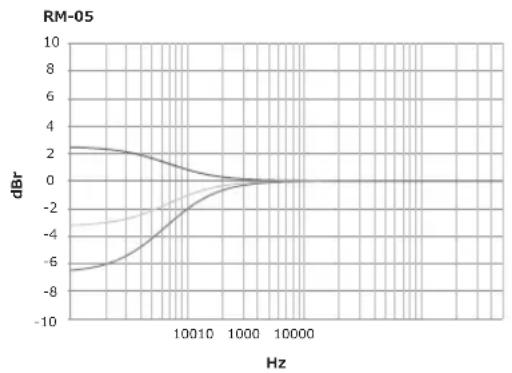
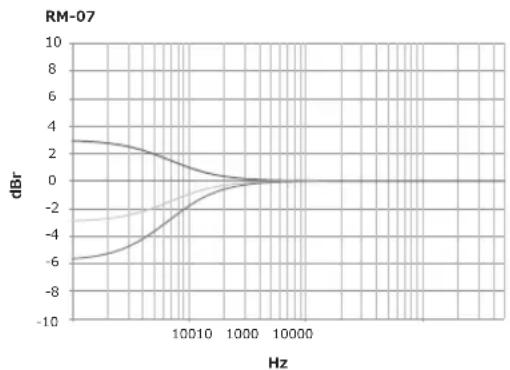
line
| Hz | dBm (Line 1) | dBm (Line 2) | dBm (Line 3) | | ------ | ------------ | ------------ | ------------ | | 10^0 | -6.0 | -4.0 | 3.0 | | 10^1 | -2.0 | -1.0 | 2.0 | | 10^2 | 0.0 | 0.0 | 0.0 | | 10^3 | 0.0 | 0.0 | 0.0 | | 10^4 | 0.0 | 0.0 | 0.0 | | 10^5 | 0.0 | 0.0 | 0.0 | | 10^6 | 0.0 | 0.0 | 0.0 | | 10^7 | 0.0 | 0.0 | 0.0 | | 10^8 | 0.0 | 0.0 | 0.0 | | 10^9 | 0.0 | 0.0 | 0.0 | | 10^10 | 0.0 | 0.0 | 0.0 | | 10^11 | 0.0 | 0.0 | 0.0 | | 10^12 | 0.0 | 0.0 | 0.0 | | 10^13 | 0.0 | 0.0 | 0.0 | | 10^14 | 0.0 | 0.0 | 0.0 | | 10^15 | 0.0 | 0.0 | 0.0 | | 10^16 | 0.0 | 0.0 | 0.0 | | 10^17 | 0.0 | 0.0 | 0.0 | | 10^18 | 0.0 | 0.0 | 0.0 | | 10^19 | 0.0 | 0.0 | 0.0 | | 10^20 | 0.0 | 0.0 | 0.0 | | 10^21 | 0.0 | 0.0 | 0.0 | | 10^22 | 0.0 | 0.0 | 0.0 | | 10^23 | 0.0 | 0.0 | 0.0 | | 10^24 | 0.0 | 0.0 | 0.0 | | 10^25 | 0.0 | 0.0 | 0.0 | | 10^26 | 0.0 | 0.0 | 0.0 | | 10^27 | 0.0 | 0.0 | 0.0 | | 10^28 | 0.0 | 0.0 | 0.0 | | 10^29 | 0.0 | 0.0 | 0.0 | | 10^3 | 6.5 | -4.5 | -6.5 | | 10^31 | -6.5 | -4.5 | -6.5 | | 1 | -6.5 | -4.5 | -6.5 | | | -6.5 | -4.5 | -6.5 | | | -6.5 | -4.5 | -6.5 | | | -6.5 | -4.5 | -6.5 | | | -6.5 | -4.5 | -6.5 | | | -6.5 | -4.5 | -6 | | | -6.5 | -4.5 | -6 | | | -6.5 | -4.5 | -6 | | | -6.5 | -4.5 | -6 | | | -6.5 | -4.5 | -6 | | | -6.5 | -4.5 | -6 | | | | | | | | | | | | | | | | | | | | | | | | | | | | | | | | | | | | | | | | | | | | | | | | | | | | | | | | | | | | | | | | | | | | | | | | | | | | | | | | | | | | | | | | | | | | | | | | | | | | | | | | | | | | | | | | | | | | | | | | | | | | | | | | | | | | | | | | | | | | | | | | | | | | | | | | | | | | | | | | | | | | | | | | | | | | | | | | | | | | | | | | | | | | | | | | | | | | | | | | | | | | | | | | | | | | | | | | | | | | | | | | | | |Mid EQ
A notch-filter is used to adjust frequency attenuation in the approx. 100 Hz to 200 Hz range. You can choose from 0 dB, -1 dB, -2 dB and -4 dB.
Use if the effects of a control console or table are making the above range too strong.
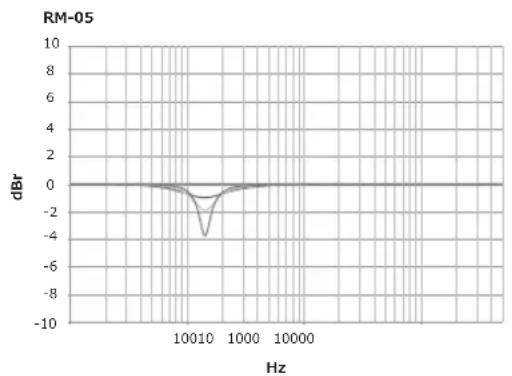
line
| Hz | dBr | | ------ | ---- | | 10010 | -4.0 | | 1000 | 0.0 |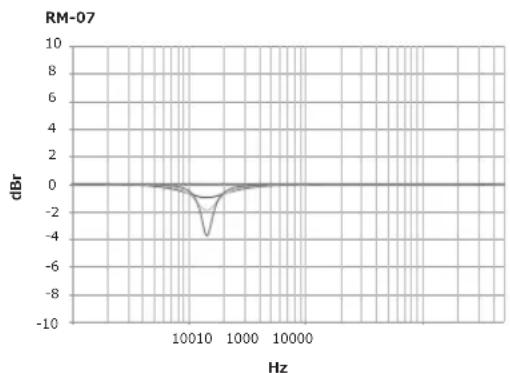
line
| Hz | dBr | | ------ | ---- | | 10^0 | 0.0 | | 10^1 | -2.0 | | 10^2 | -5.0 | | 10^3 | -1.0 | | 10^4 | 0.0 | | 10^5 | 0.0 |High EQ
A shelving filter is used to adjust the frequency response in the high frequency range. You can choose from +1 dB, 0 dB, -1 dB and -2 dB. Use if the placement environment of the unit is lacking in the high frequency range, or if the high frequency range is too strong.
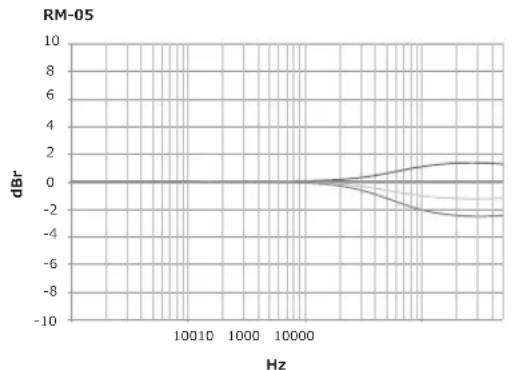
line
| Hz | dBm | | ------ | ---- | | 100 | 0 | | 1000 | 0 | | 10000 | 0 | | >10000 | -2 |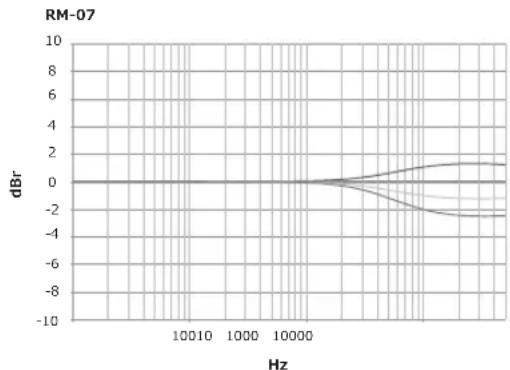
line
| Hz | dBr | | ------ | ---- | | 10^0 | 0 | | 10^1 | 0 | | 10^2 | 0 | | 10^3 | -2 | | 10^4 | -4 | | 10^5 | -6 | | 10^6 | -8 | | 10^7 | -10 |Additional Information
Troubleshooting
- If you think you are experiencing a malfunction with this unit, check the following items. Also check other devices connected to the unit. If the problem persists, consult your dealer for service.
- On occasion, the unit may fail to operate properly due to static electricity or other external conditions. In this event, disconnect the power cord and wait for five minutes or more, then reconnect the power cord and check for proper operation.
Symptom Items to Check Remedy
| No power Is power cord connected properly? Connect power cord to outlet. | ||
| No sound from connected audio devices, or sound is very small. | Has connected audio device been set properly? Set device's external input and sound volume properly. | |
| Is connection cable connected properly? Connect cables properly. | ||
| Are connectors or plugs dirty? Clean connectors and plugs before connecting. | ||
| Is the sound volume set properly? Turn the [LEVEL] dial on the rear panel clockwise and turn up the volume. | ||
| Is the power turned on? Turn on the [POWER] switch on the rear panel. | ||
| Is the auto standby function on? Turn off the [POWER] switch on the rear panel once, wait a few seconds, and then turn it back on. | ||
| The POWER indicator (white) does not come on. | Is the power turned on? Turn on the [POWER] switch on the rear panel. | |
| Is the auto standby function on? Turn off the [POWER] switch on the rear panel once, wait a few seconds, and then turn it back on. | ||
| Speakers do not resume (turn on) from standby mode. | Is the level of the input signal low? Increase the level of the input signal. | |
| Turn off the [AUTO STANDBY] switch to turn off the auto standby function. | ||
| The sound distorts, or the indicator is lit red. | Is the level of the input signal too high? Slowly turn the [LEVEL] dial on the rear panel counterclockwise and turn down the volume. | |
| Is the output level of the connected audio device set properly? | Adjust the output level of the connected audio device properly. | |
| Feedback (continuous howling sound) Is the sound volume set properly? Slowly turn the [LEVEL] dial on the rear panel counterclockwise and turn down the volume. | ||
Trademarks
- Pioneer is a registered trademark of PIONEER CORPORATION.
- Other listed company names and a product name are the registered trademark of the companies or trademarks.
Specifications
| RM-05 RM-07 | ||
| Type Bi-amp 2-way active speaker | ||
| System Total Capabilities | ||
| Frequency Response (-10 dB) | 45 Hz to 50 kHz 40 Hz to 50 kHz | |
| Maximum Sound Pressure Level 104 dB SPL (peak @ 1 m) | 109 dB SPL (peak @ 1 m) | |
| Input Sensitivity -40 dB to +6 dB | ||
| High EQ Can be Adjusted, -2 / -1 / 0 / +1 dB at 10 kHz | ||
| Mid EQ Can be Adjusted, -4 / -2 / -1 / 0 dB at 140 Hz | ||
| Low EQ Can be Adjusted, -4 / -2 / 0 / +2 dB at 50 Hz | ||
| Cross Over Frequency 1.7 kHz 1.6 kHz | ||
| Amplifier | ||
| Amp Output | LF: 50 W / 4 Ω, Class ABHF: 50 W / 4Ω, Class AB | LF: 100 W / 4 Ω, Class ABHF: 50 W / 4 Ω, Class AB |
| Input connectors (balanced input) XLR × 1 | ||
| Input connectors (unbalanced input) RCA × 1 | ||
| Impedance 10 k | Ω | |
| Speaker | ||
| Enclosure Bass reflex/Aluminum die-cast | ||
| Woofer (LF driver) 13 cm (5 in.) cone 16.5 cm (6.5 in.) cone | ||
| Tweeter (HF driver) | 3.8 cm (1.5 in.) hard dome | 3.8 cm (1.5 in.) hard dome |
| Power unit/other | ||
| Supported voltages* | 100 V (50 Hz/60 Hz), 110 V to 120 V (50 Hz/60 Hz), 220 V to 240 V (50 Hz/60 Hz) | |
| Power consumption | 142 W | 195 W |
| Power consumption during standby mode | 0.3 W or less | 0.3 W or less |
| External dimensions W × H × D | 203 mm x 281 mm x 225 mm8.0 in. x 11.1 in. x 8.9 in. | 244 mm x 337 mm x 260 mm9.6 in. x 13.3 in. x 10.2 in. |
| Weight | 9.3 kg (20.5 lbs) | 12.3 kg (27.1 lbs) |
* Differs depending on the region of use.
Specifications and design subject to possible modification without notice, due to improvements.
© 2015 PIONEER CORPORATION. All rights reserved.
natural_image
Illustration of a power speaker with no visible text or symbols on the body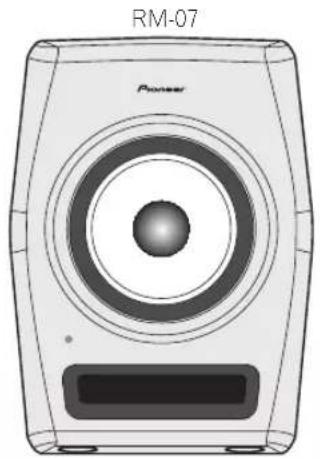
natural_image
Line drawing of a power speaker with no text or symbols on the bodynatural_image
Front view of a device rear panel with ventilation grilles, ports, and a connector (no text or symbols visible)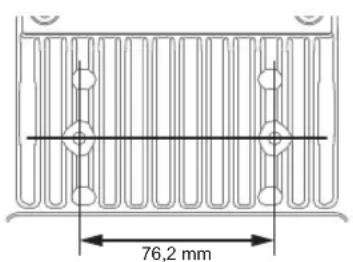
natural_image
Front view of a computer chassis showing front panel, rear panel, and internal components (no text or symbols visible)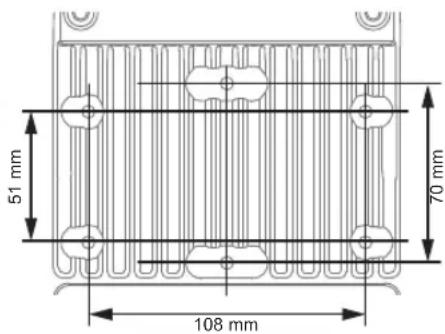
natural_image
Simple line drawing of a human head connected to two identical devices (no text or symbols)natural_image
Diagram showing a human head profile facing a screen with a dashed line indicating perspective (no text or symbols)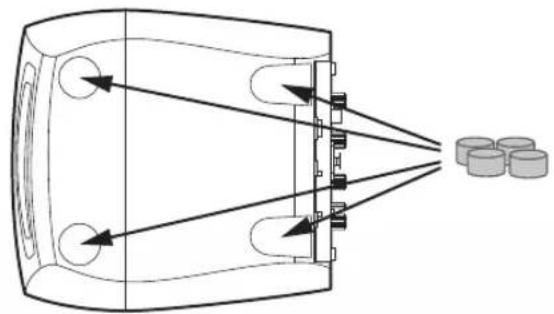
natural_image
Diagram of a device emitting beams into a chamber with three cylindrical components nearby (no text or symbols)natural_image
Simple line drawing of a human head silhouette facing a screen with a dashed line indicating light or perspective (no text or symbols)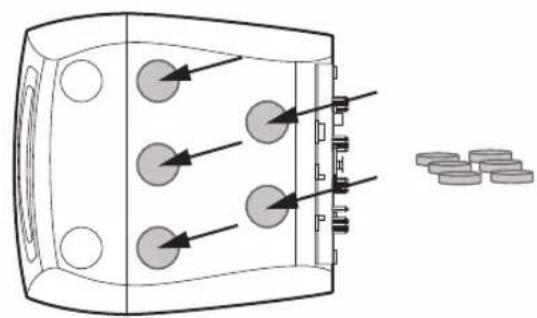
natural_image
Diagram of a device with three circular components and directional arrows, next to scattered coins (no text or symbols)AVERTISSEMENT
natural_image
Front view of a power speaker with visible sound waves and a screen (no text or symbols)natural_image
Line drawing of a power speaker with no text or symbols on the bodynatural_image
Front view of a device rear panel with indicator lights and ports (no text or symbols visible)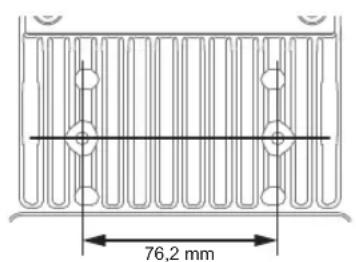
✿ RM-07 (M6 10 mm tief, 6 Positionen)
natural_image
Front view diagram of a computer chassis showing front panel, rear panel, and internal components (no text or labels)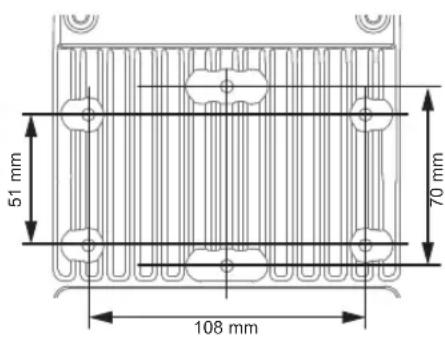
natural_image
Simple line drawing of a human head with two connected devices (no text or symbols)natural_image
Diagram showing a human head profile facing a screen with a dashed line indicating perspective (no text or symbols)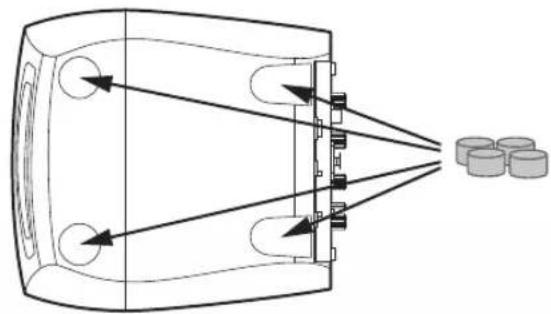
natural_image
Diagram of a device emitting beams into a chamber with three cylindrical components nearby (no text or symbols)natural_image
Simple line drawing of a human head silhouette facing a screen with a dashed line indicating light direction (no text or symbols)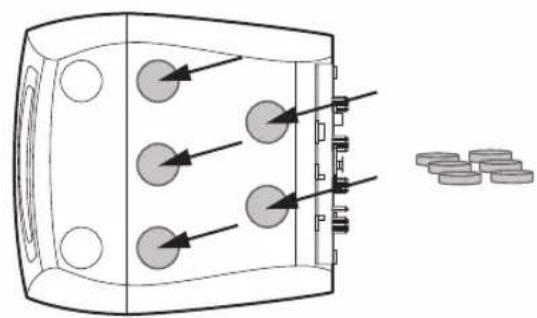
natural_image
Diagram of a device with three circular components and directional arrows, next to scattered circular objects (no text or symbols)WARNUNG
line
| Hz | dBm (Line 1) | dBm (Line 2) | dBm (Line 3) | | ------ | ------------ | ------------ | ------------ | | 10 | -6.0 | -4.0 | 3.0 | | 100 | -2.0 | -1.0 | 0.0 | | 1000 | 0.0 | 0.0 | 0.0 | | 10000 | 0.0 | 0.0 | 0.0 |HSDOM: [Harmonized Synthetic Diaphragm Optimum Method]
2 Indicatore POWER / CLIP
natural_image
Front view of a device rear panel with ventilation grilles, ports, and a connector (no text or symbols visible)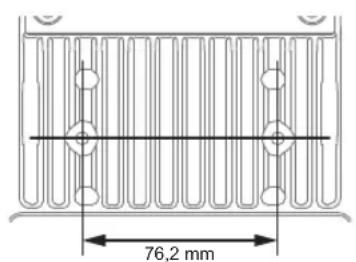
natural_image
Front view of a computer chassis showing front panel, rear panel, and internal components (no text or symbols visible)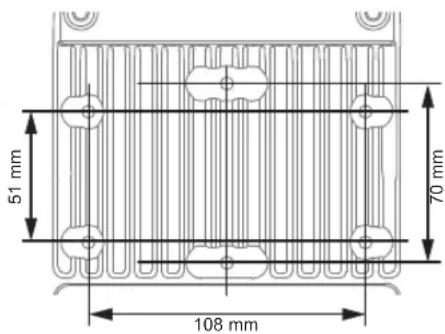
natural_image
Simple line drawing of a human head connected to two identical devices (no text or symbols)natural_image
Diagram showing a human head profile facing a screen with a dashed line indicating alignment, next to a T-shaped object (no text or symbols)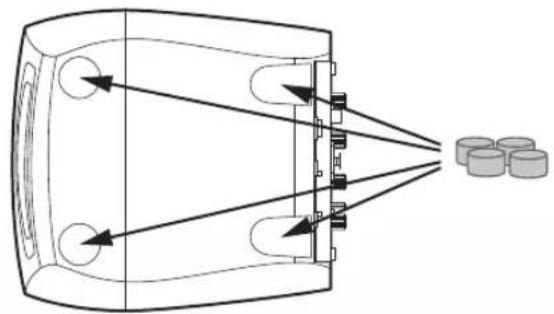
natural_image
Diagram of a device emitting beams into a chamber with three cylindrical components nearby (no text or symbols)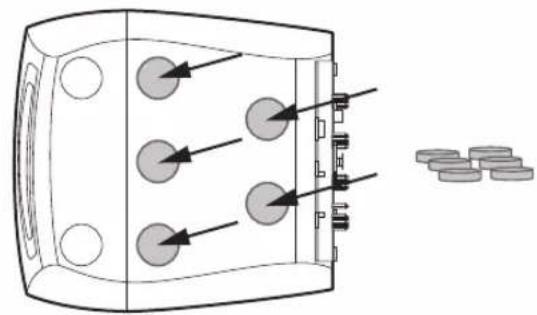
natural_image
Diagram of a device with three circular components and directional arrows, next to scattered coins (no text or symbols)ATTENZIONE
line
| Hz | dBr (Line 1) | dBr (Line 2) | dBr (Line 3) | | ------ | ------------ | ------------ | ------------ | | 10^0 | -6.0 | -4.0 | 3.0 | | 10^1 | -2.0 | -1.0 | 2.0 | | 10^2 | 0.0 | 0.0 | 0.0 | | 10^3 | 0.0 | 0.0 | 0.0 | | 10^4 | 0.0 | 0.0 | 0.0 | | 10^5 | 0.0 | 0.0 | 0.0 | | 10^6 | 0.0 | 0.0 | 0.0 | | 10^7 | 0.0 | 0.0 | 0.0 | | 10^8 | 0.0 | 0.0 | 0.0 | | 10^9 | 0.0 | 0.0 | 0.0 | | 10^10 | 0.0 | 0.0 | 0.0 | | 10^11 | 0.0 | 0.0 | 0.0 | | 10^12 | 0.0 | 0.0 | 0.0 | | 10^13 | 0.0 | 0.0 | 0.0 | | 10^14 | 0.0 | 0.0 | 0.0 | | 10^15 | 0.0 | 0.0 | 0.0 | | 10^16 | 0.0 | 0.0 | 0.0 | | 10^17 | 0.0 | 0.0 | 0.0 | | 10^18 | 0.0 | 0.0 | 0.0 | | 10^19 | 0.0 | 0.0 | 0.0 | | 10^20 | 0.0 | 0.0 | 0.0 | | 10^21 | 0.0 | 0.0 | 0.0 | | 10^22 | 0.0 | 0.0 | 0.0 | | 10^23 | 0.0 | 0.0 | 0.0 | | 10^24 | 0.0 | 0.0 | 0.0 | | 10^25 | 0.0 | 0.0 | 0.0 | | 10^26 | 0.0 | 0.0 | 0.0 | | 10^27 | 0.0 | 0.0 | 0.0 | | 10^28 | 0.0 | 0.0 | 0.0 | | 10^29 | 0.0 | 0.0 | 0.0 | | 10^3 | 0.0 | 0.0 | 0.0 | | 10^31 | 6.5 | -4.5 | -6.5 | | 1 | -6.5 | -4.5 | -6.5 | | | -6.5 | -4.5 | -6.5 | | | -6.5 | -4.5 | -6.5 | | | -6.5 | -4.5 | -6.5 | | | -6.5 | -4.5 | -6.5 | | | -6.5 | -4.5 | -6 | | | -6.5 | -4.5 | -6 | | | -6.5 | -4.5 | -6 | | | -6.5 | -4.5 | -6 | | | -6.5 | -4.5 | -6 | | | -6.5 | -4.5 | -6 | | | | | | | | | | | | | | | | | | | | | | | | | | | | | | | | | | | | | | | | | | | | | | | | | | | | | | | | | | | | | | | | | | | | | | | | | | | | | | | | | | | | | | | | | | | | | | | | | | | | | | | | | | | | | | | | | | | | | | | | | | | | | | | | | | | | | | | | | | | | | | | | | | | | | | | | | | | | | | | | | | | | | | | | | | | | | | | | | | | | | | | | | | | | | | | | | | | | | | | | | | | | | | | | | | | | | | | | | | | | | | | | | | |EQ media
WAARSCHUWING NETSNOER
natural_image
Illustration of a power speaker with no visible text or symbols on the body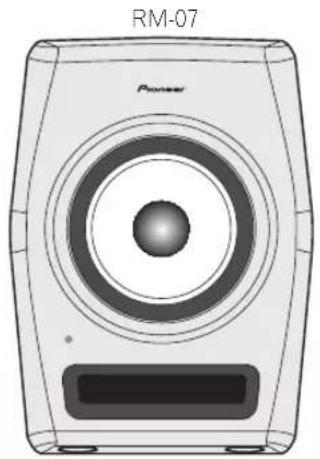
natural_image
Line drawing of a power speaker with no text or symbols on the body[Harmonized Synthetic Diaphragm Optimum Method]
2 POWER / CLIP-lampje
natural_image
Front view of a device rear panel with ventilation grilles, ports, and a connector (no text or symbols visible)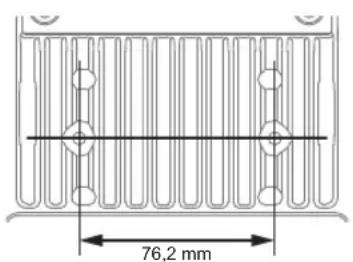
natural_image
Front view diagram of a device rear panel with ventilation grilles and ports (no text or labels)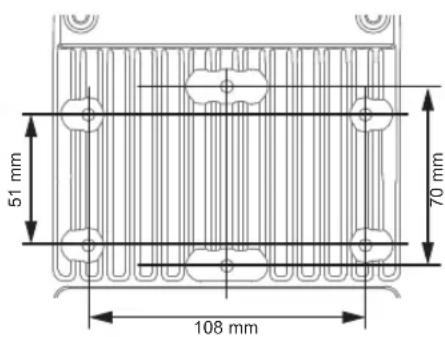
natural_image
Simple line drawing of a human head connected to two identical devices (no text or symbols)natural_image
Diagram showing a human head profile facing a screen with a dashed line indicating perspective (no text or symbols)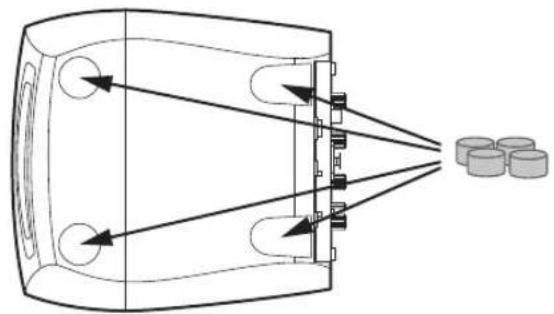
natural_image
Diagram of a device emitting beams into a chamber with cylindrical components nearby (no text or symbols)natural_image
Diagram of a device with three circular components and directional arrows, next to scattered coins (no text or symbols)WAARSCHUWING
line
| Hz | dBm (Line 1) | dBm (Line 2) | dBm (Line 3) | dBm (Line 4) | | ------ | ------------ | ------------ | ------------ | ------------ | | 10^0 | -6.0 | -3.0 | -2.0 | 3.0 | | 10^1 | -4.0 | -2.0 | -1.0 | 2.0 | | 10^2 | -2.0 | -1.0 | 0.0 | 1.0 | | 10^3 | 0.0 | 0.0 | 0.0 | 0.0 | | 10^4 | 0.0 | 0.0 | 0.0 | 0.0 | | 10^5 | 0.0 | 0.0 | 0.0 | 0.0 | | 10^6 | 0.0 | 0.0 | 0.0 | 0.0 | | 10^7 | 0.0 | 0.0 | 0.0 | 0.0 | | 10^8 | 0.0 | 0.0 | 0.0 | 0.0 | | 10^9 | 0.0 | 0.0 | 0.0 | 0.0 | | 10^10 | 0.0 | 0.0 | 0.0 | 0.0 | | 10^11 | 0.0 | 0.0 | 0.0 | 0.0 | | 10^12 | 0.0 | 0.0 | 0.0 | 0.0 | | 10^13 | 0.0 | 0.0 | 0.0 | 0.0 | | 10^14 | 0.0 | 0.0 | 0.0 | 0.0 | | 10^15 | 0.0 | 0.0 | 0.0 | 0.0 | | 10^16 | 0.0 | 0.0 | 0.0 | 0.0 | | 10^17 | 0.0 | 0.0 | 0.0 | 0.0 | | 10^18 | 0.0 | 0.0 | 0.0 | 0.0 | | 10^19 | 0.0 | 0.0 | 0.0 | 0.0 | | 10^2 | 0.0 | 0.0 | 0.0 | 0.0 | | 10^21* | -6.5 | -3.5 | -2.5 | -3.5 | | 10^22* | -4.5 | -2.5 | -1.5 | -2.5 | | 10^23* | -2.5 | -1.5 | -1.5 | -1.5 | | 10^24* | -1.5 | -1.5 | -1.5 | -1.5 | | 10^25* | -1.5 | -1.5 | -1.5 | -1.5 | | 10^26* | -1.5 | -1.5 | -1.5 | -1.5 | | 10^27* | -1.5 | -1.5 | -1.5 | -1.5 | | 10^28* | -1.5 | -1.5 | -1.5 | -1.5 | | 10^29* | -1.5 | -1.5 | -1.5 | -1.5 | | 10^3 | -1.5 | -1.5 | -1.5 | -1.5 | | 10^31* | -1.5 | -1.5 | -1.5 | -1.5 | | 1 | -6.5 | -3.5 | -2.5 | -3.5 | | | -4.5 | -2.5 | -1.5 | -2.5 | | | -2.5 | -1.5 | -1.5 | -1.5 | | | -1.5 | -1.5 | -1.5 | -1.5 | | | -1.5 | -1.5 | -1.5 | -1.5 | | | -1.5 | -1.5 | -1.5 | -1.5 | | | -1.5 | -1.5 | -1.5 | -1 | | | -1 | -6 | -3 | -3 | | | | -6 | -3 | -3 | | | | -6 | -3 | -3 | | | | -6 | -3 | -3 | | | | -6 | -3 | -3 | | | | -6 | -3 | -3 | | | | -6 | -3 | -3 | | (Note: The values for the lines are estimated based on the provided code) are not explicitly provided in the code provided in the code itself). The actual values may vary due to the random nature of the data generation.Mid EQ
natural_image
Illustration of a power speaker with no visible text or symbols on the body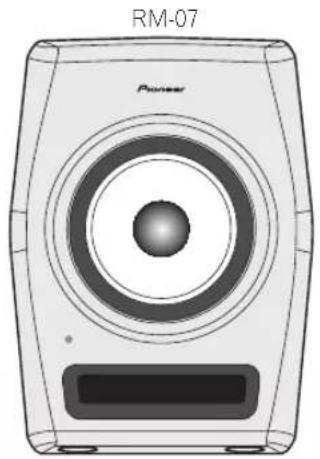
natural_image
Line drawing of a power speaker with no text or symbols on the bodynatural_image
Front view of a device rear panel with ventilation grilles, ports, and connectors (no text or symbols visible)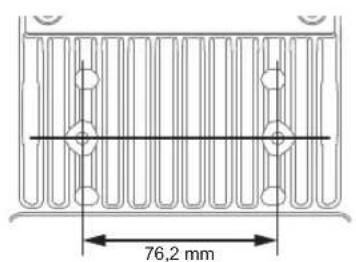
natural_image
Line drawing of a device rear panel with ventilation grille and ports (no text or symbols)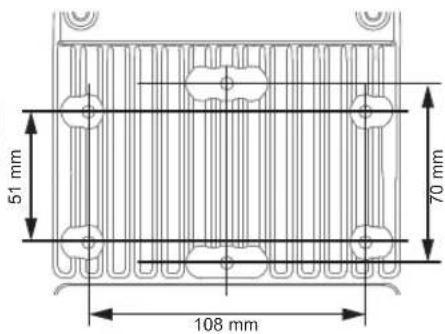
natural_image
Simple line drawing of a human head with two connected devices (no text or symbols)natural_image
Silhouette of a human head facing a screen with a dashed line indicating perspective (no text or symbols)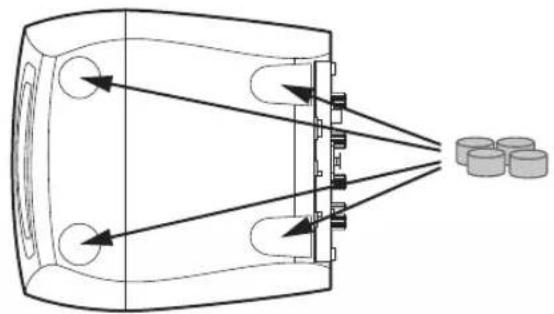
natural_image
Diagram of a device emitting beams into a chamber with three cylindrical components nearby (no text or symbols)natural_image
Diagram of a device with three circular components and directional arrows, next to scattered coins (no text or symbols)ADVERTENCIA
line
| Hz | dBr (Line 1) | dBr (Line 2) | dBr (Line 3) | dBr (Line 4) | | ------ | ------------ | ------------ | ------------ | ------------ | | 10^0 | -6.0 | -3.0 | -2.0 | 3.0 | | 10^1 | -4.0 | -2.0 | -1.0 | 2.0 | | 10^2 | -2.0 | -1.0 | 0.0 | 1.0 | | 10^3 | 0.0 | 0.0 | 0.0 | 0.0 | | 10^4 | 0.0 | 0.0 | 0.0 | 0.0 | | 10^5 | 0.0 | 0.0 | 0.0 | 0.0 | | 10^6 | 0.0 | 0.0 | 0.0 | 0.0 | | 10^7 | 0.0 | 0.0 | 0.0 | 0.0 | | 10^8 | 0.0 | 0.0 | 0.0 | 0.0 | | 10^9 | 0.0 | 0.0 | 0.0 | 0.0 | | 10^10 | 0.0 | 0.0 | 0.0 | 0.0 | | 10^11 | 0.0 | 0.0 | 0.0 | 0.0 | | 10^12 | 0.0 | 0.0 | 0.0 | 0.0 | | 10^13 | 0.0 | 0.0 | 0.0 | 0.0 | | 10^14 | 0.0 | 0.0 | 0.0 | 0.0 | | 10^15 | 0.0 | 0.0 | 0.0 | 0.0 | | 10^16 | 0.0 | 0.0 | 0.0 | 0.0 | | 10^17 | 0.0 | 0.0 | 0.0 | 0.0 | | 10^18 | 0.0 | 0.0 | 0.0 | 0.0 | | 10^19 | 0.0 | 0.0 | 0.0 | 0.0 | | 10^2 | 0.0 | 0.0 | 0.0 | 0.0 | | 10^21 | 0.0 | 0.0 | 0.0 | 0.0 | | 10^22 | 0.0 | 0.0 | 0.0 | 0.0 | | 10^23 | 0.0 | 0.0 | 0.0 | 0.0 | | 10^24 | 0.0 | 0.0 | 0.0 | 0.0 | | 10^25 | 0.0 | 0.0 | 0.0 | 0.0 | | 10^26 | 0.0 | 0.0 | 0.0 | 0.0 | | 10^27 | 0.0 | 0.0 | 0.0 | 0.0 | | 10^28 | 0.0 | 0.0 | 0.0 | 0.0 | | 10^29 | 0.0 | 0.0 | 0.0 | 0.0 | | 10^3 | 6.5 ± .5 | -3.5 | -2.5 | -6.5 | | >1 | <6.5 | <3.5 | <2.5 | <6.5 | | >2 | <6.5 | <3.5 | <2.5 | <6.5 | | >3 | <6.5 | <3.5 | <2.5 | <6.5 | | >4 | <6.5 | <3.5 | <2.5 | <6.5 | | >5 | <6.5 | <3.5 | <2.5 | <6.5 | | >6 | <6.5 | <3.5 | <2.5 | <6.5 | | >7 | <6.5 | <3.5 | <2.5 | <6.5 | | >8 | <6.5 | <3.5 | <2.5 | <6.5 | | >9 | <6.5 | <3.5 | <2.5 | <6.5 | | >1 | <6.5 | <3.5 | <2.5 | <6.5 | | >2 | <6.5 | <3.5 | <2.5 | <6.5 | | >3 | <6.5 | <3.5 | <2.5 | <6.5 | | >4 | <6 | <3 | <2 | <6 | | >5 | <6 | <3 | <2 | <6 | | >6 | <6 | <3 | <2 | <6 | | >7 | <6 | <3 | <2 | <6 | | >8 | <6 | <3 | <2 | <6 | | >9 | <6 | <3 | <2 | <6 | | >1 | <6 | <3 | <2 | <6 | | >2 | <6 | <3 | <2 | <6 | | >3 | <6 | <3 | <2 | <6 | | >4 | <6 | <3 | <2 | <6 | | >5 | <6 | <3 | <2 | <6 | | >6 | <6 | <3 | <2 | <6 | | >7 | <6 | <3 | <2 | <6 | | >8 | <6 | <3 | <2 | <6 | | >1 | <6 | <3 | <2 | <6 | | >2 | <6 | <3 | <2 | <6 | | >3 | <6 | <3 | <2 | <6 | | >4 | <6 | <3 | <2 | <Mid EQ
line
| Hz | dBm | | ------ | ---- | | 10^0 | 0.0 | | 10^1 | -4.5 | | 10^2 | 0.0 | | 10^3 | 0.0 | | 10^4 | 0.0 |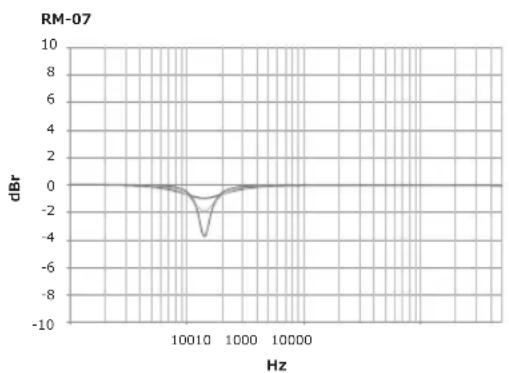
High EQ
[Harmonized Synthetic Diaphragm Optimum Method]
2 Indicador POWER / CLIP
natural_image
Front view of a device rear panel with ventilation slots, ports, and a connector (no text or symbols visible)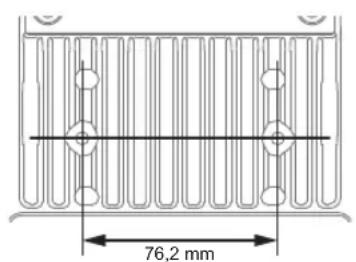
natural_image
Line drawing of a device rear panel with ventilation grille and ports (no text or symbols)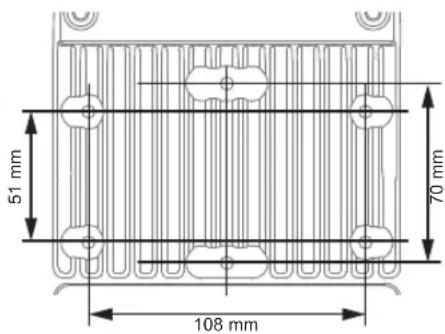
natural_image
Simple line drawing of a human head with two connected devices (no text or symbols)natural_image
Diagram showing a human head profile facing a screen with a dashed line indicating perspective (no text or symbols)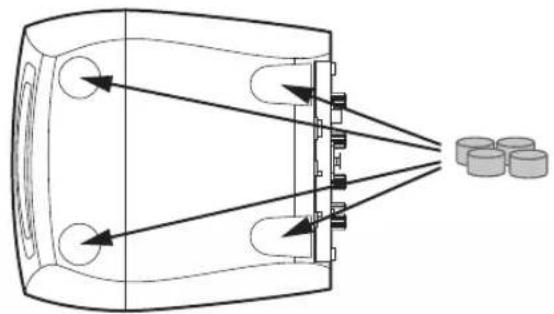
natural_image
Diagram of a device emitting beams into a chamber with cylindrical components nearby (no text or symbols)natural_image
Simple line drawing of a human head silhouette facing a screen with a dashed line indicating light direction (no text or symbols)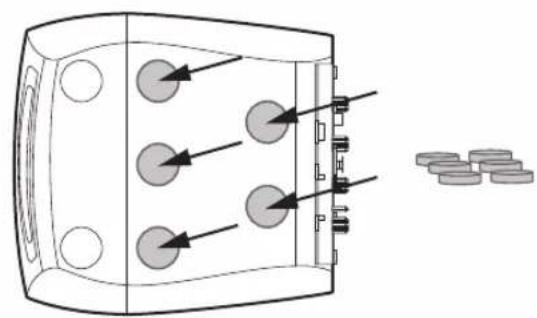
natural_image
Diagram of a device with three circular components and directional arrows, next to scattered coins (no text or symbols)AVISO
natural_image
Illustration of a power speaker with concentric rings and a central hub (no text or symbols)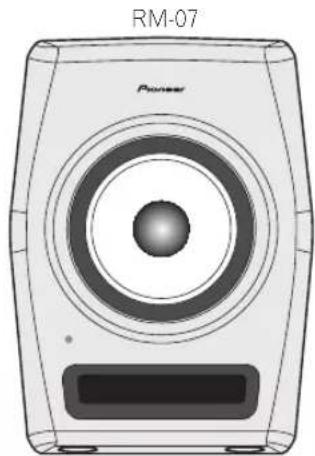
natural_image
Illustration of a power speaker with concentric rings and a button, labeled RM-07 (no text or symbols on the device itself)HSDOM: [Harmonized Synthetic Diaphragm Optimum Method]
natural_image
Front view of a device rear panel with ventilation slots and ports (no text or symbols visible)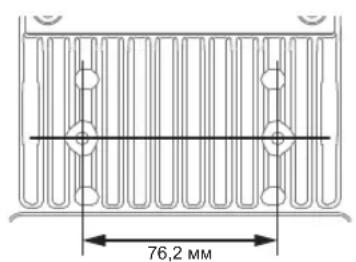
natural_image
Front view of a computer chassis with ventilation grilles and ports (no text or symbols visible)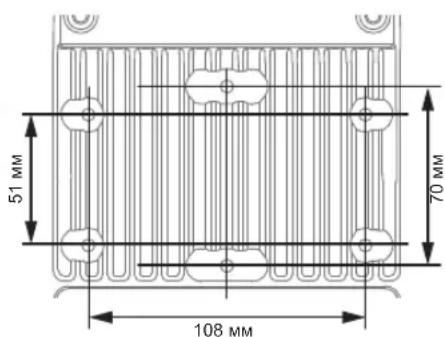
natural_image
Simple line drawing of a human head facing two identical meters connected by a dashed line (no text or symbols)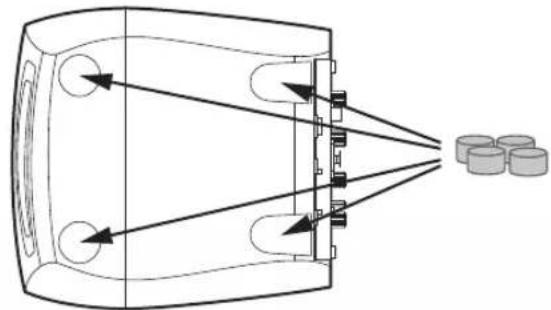
natural_image
Diagram of a device emitting beams into a chamber with three cylindrical components nearby (no text or symbols)natural_image
Diagram of a device with three circular components and directional arrows, next to scattered circular objects (no text or symbols)ПРЕДУПРЕЖДЕНИЕ
natural_image
Illustration of a power speaker with no visible text or symbols on the body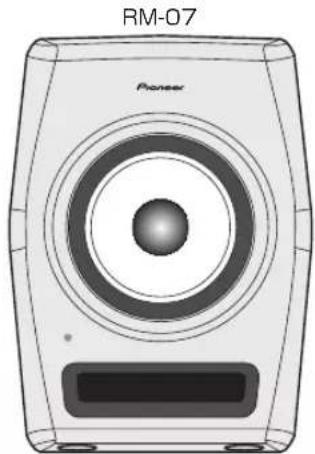
natural_image
Illustration of a Pioneer audio speaker with concentric circles and a rectangular base (no text or symbols)付属品を確認する
[Harmonized Synthetic Diaphragm Optimum Method]
※イラストは RM-05 です。
1 マウント金具用ネジ穴
2 LOW EQ ツマミ
natural_image
Front view of a device rear panel with ventilation grilles and ports (no text or symbols visible)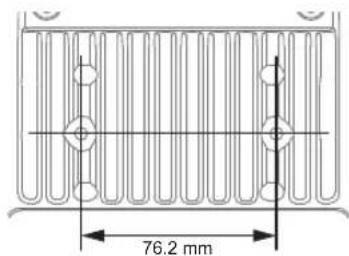
natural_image
Front view of a computer monitor with ventilation grilles and ports (no text or symbols visible)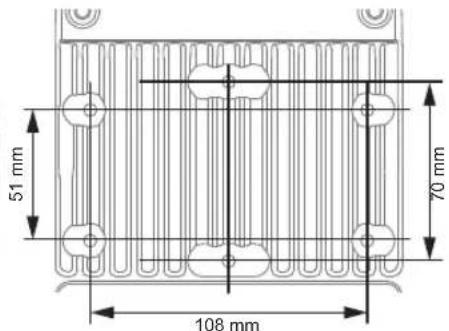
natural_image
Simple line drawing of a human head connected to two identical devices (no text or symbols)natural_image
Diagram showing a human head profile facing a camera with a screen, alongside a silhouette of the head (no text or symbols)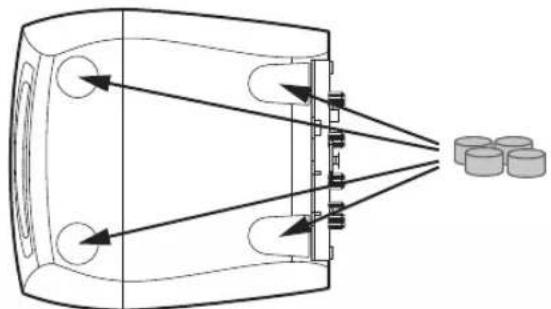
natural_image
Diagram of a device emitting beams into a chamber with cylindrical components nearby (no text or symbols)natural_image
Diagram showing a human head silhouette with an arrow pointing to a rectangular object, connected by a dashed line (no text or symbols present)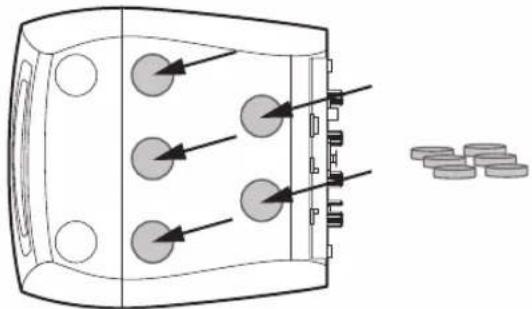
natural_image
Diagram of a device with three circular components and directional arrows, next to scattered circular objects (no text or symbols)接続する
This warranty is valid only in Japan.
© 2015 PIONEER CORPORATION. All rights reserved.
PIONEER CORPORATION
1-1, Shin-ogura, Saiwai-ku, Kawasaki-shi, Kanagawa 212-0031, Japan
パイオニア株式会社
PIONEER ELECTRONICS (USA) INC.
P.O. BOX 1720, Long Beach, California 90801-1720, U.S.A. TEL: (800) 421-1404
PIONEER ELECTRONICS ASIACENTRE PTE. LTD.
253 Alexandra Road, #04-01, Singapore 159936 TEL: 65-6472-7555
PIONEER ELECTRONICS AUSTRALIA PTY. LTD.
5 Arco Lane, Heatherton, Victoria, 3202, Australia, TEL: (03) 9586-6300
PIONEER ELECTRONICS (THAILAND) CO., LTD.
17th Fl., KPN Tower, 719 Rama 9 Road, Bangkapi, Huaykwang, Bangkok 10310 TEL: 66-2-717-0777
先鋒股份有限公司
PIONEER INDIA ELECTRONICS PRIVATE LTD.
216, Second Floor, Time Tower, M.G. Road, Sector 28, Gurgaon 122001,
Haryana, India TEL: +91-124-463-6100
- WARNING
- Operating Environment
- CAUTION
- POWER-CORD CAUTION
- VENTILATION CAUTION
- IMPORTANT
- RISK OF ELECTRIC SHOCK DO NOT OPEN
- CAUTION:
- IMPORTANT SAFETY INSTRUCTIONS
- The Safety of Your Ears is in Your Hands
- ESTABLISH A SAFE LEVEL:
- BE SURE TO OBSERVE THE FOLLOWING GUIDELINES:
- [For American Users and Canadian Users]
- AFTER-SALES SERVICE FOR PIONEER PRODUCTS
- AMERICA
- EUROPE
- ASEAN
- JAPAN AND OTHERS
- [For American Users]
- NOTE:
- Information to User
- IMPORTANT NOTICE
- [For European Users]
- For Finland customers
- For Norway customers
- For Sweden customers
- [For European Users and Others]
- Introduction
- Main Features
- Confirm All Accessories
- Names and Functions of Parts
- Front Panel Facilities
- Coaxial driver
- POWER / CLIP indicator
- Bass-reflex woofer
- Groove
- Rear Panel Facilities
- Screw holes for the wall mount bracket
- LOW EQ dial
- MID EQ dial
- HIGH EQ dial
- LEVEL dial
- RCA INPUT jack (Unbalanced)
- AUTO STANDBY switch
- XLR INPUT connector (Balanced)
- AC IN
- Fuse holder
- POWER switch
- Position of screw holes for the wall mount bracket
- Cautions for Attaching to Wall Using a Mount Bracket
- Installation and Connections
- How to Install
- Angling Speakers
- Connections
- Equalizer Settings
- The Tone Control Function
- Low EQ
- Mid EQ
- High EQ
- Additional Information
- Troubleshooting
- Trademarks
- AVERTISSEMENT
- WARNUNG
- Indicatore POWER / CLIP
- ATTENZIONE
- EQ media
- WAARSCHUWING NETSNOER
- POWER / CLIP-lampje
- WAARSCHUWING
- ADVERTENCIA
- Indicador POWER / CLIP
- AVISO
- ПРЕДУПРЕЖДЕНИЕ
- 付属品を確認する
- マウント金具用ネジ穴
- LOW EQ ツマミ
- 接続する
- PIONEER CORPORATION
- パイオニア株式会社
- PIONEER ELECTRONICS (USA) INC.
- PIONEER ELECTRONICS ASIACENTRE PTE. LTD.
- PIONEER ELECTRONICS AUSTRALIA PTY. LTD.
- PIONEER ELECTRONICS (THAILAND) CO., LTD.
- 先鋒股份有限公司
- PIONEER INDIA ELECTRONICS PRIVATE LTD.
Brand : PIONEER
Model : RM05
Category : Loudspeaker